EDITS.WS

Author: Christopher Morris

  • How to Make a WordPress Ecommerce Website (2023 Easy Guide)

    You already know that WordPress is a powerful platform for content, but were you aware that it’s also one of the best eCommerce solutions? This guide will walk you through each step to create a successful eCommerce website with WordPress. From domain selection to hosting, installation, and essential plugins, we’ve got you covered.

    Why Use WordPress to Make an eCommerce Website?

    WordPress shines as the premier content management system (CMS) used to build websites of all kinds.

    The software is open-source and free to use, developed by and supported by a large community of volunteers. This makes the platform extremely flexible, giving you more control over your website functionality and allowing you to build an online store using countless eCommerce plugins and themes available. Although WordPress is free, there are common website expenses outside WordPress, including hosting, domain registration, premium plugins, and themes. But these prices are the same or better than other major eCommerce platforms, all things considered.

    WooCommerce: A Powerful eCommerce Solution for WordPress

    What makes WordPress equipped to handle your next eCommerce website? WooCommerce.

    WooCommerce Logo Mark
    WooCommerce is the go-to WordPress solution for eCommerce. The WordPress editor is seamlessly integrated with WooCommerce and includes all the WooCommerce Blocks needed to build your store with a drag-and-drop interface. And it is simple enough for novice web admins to learn how to use it. It also has a plethora of add-ons available to help you achieve anything you need from it. It also gives users detailed dashboards and a convenient mobile app that allows you to keep tabs on your store’s performance from anywhere at any time.

    Other benefits of using WooCommerce include:

    • WordPress Hosting providers like Siteground are tailored to WooCommerce sites for easy setup and optimal performance.
    • More customization and control with a variety of plugins to add the functionality you need.
    • More cost-effective than other solutions that require recurring monthly payments and additional fees.
    • More control over security than other solutions that have built-in security that cannot be optimized.

    WooCommerce Alternatives to Compare

    Selecting the ideal eCommerce platform is a pivotal decision. In fact, there are some that may benefit from using other website builder platforms (outside of WordPress) like Shopify, Squarespace, or Wix. And there are WordPress membership plugins like MemberPress that offer standalone options for eCommerce. To help you decide, we’ve created comparison guides between WooCommerce and other leading website builders for eCommerce for you to dig deeper into.

    But, we’ll assume that you’ll see the exceptional value in WordPress + WooCommerce and continue to the next step of how to build an eCommerce site with WordPress.

    How to Setup Shop with WordPress (5 Steps)

    1. Choose a WordPress eCommerce Hosting Provider + Registrar

    Selecting a hosting provider specializing in WordPress is pivotal for your eCommerce website’s performance and security. SiteGround is a top choice, finely tuned for WordPress and WooCommerce platforms.

    Dive into our in-depth SiteGround analysis to explore its myriad features. SiteGround offers complimentary CDN, no-cost SSL, and email account governance in its hosting packages.

    Siteground Logo Mark - White on Dark BG

    For alternative hosting solutions, consider our roundup of the fastest WordPress hosts or the best all-around hosting services. Quality hosting becomes doubly important when running a WordPress eCommerce site since it needs to be fast with around-the-clock uptime.

    Install WordPress

    Navigate to SiteGround’s Site Tools dashboard. For other ways to install WordPress, read our definitive WordPress installation guide.

    After signing into your SiteGround account, start the installation by clicking the “Set Up Site” button on your dashboard.

    install WordPress

    Choose the domain type for your WordPress eCommerce site. Opt for “Temporary Domain” if you wish to build before buying your domain.

    For those eager to secure a domain upfront, follow this guide to register a domain. Click “New Domain,” find your ideal domain name, and proceed with the WordPress setup.

    choose temporary domain

    Click “Continue” to advance with the domain option that you’ve chosen.

    temporary domain

    Then, select “Start New Website” to continue.

    start new website

    Choose “WooCommerce” to ensure WordPress comes pre-installed with WooCommerce to make setup a bit quicker.

    Choose-WooCommerce

    Configure your admin login credentials. Keep this information secure by following our password management tips. Click “Continue” to move forward.

    WordPress for beginners

    Finally, hit the “Finish” button to set up WordPress + WooCommerce for your new WordPress eCommerce website.

    finish setup

    Access your new WordPress dashboard by clicking “Log in Admin.”

    2. Configure WordPress

    You’ve got your hosting and maybe even a domain. Now, let’s set up your WordPress site for eCommerce.

    Adjust WordPress Settings

    You’ll find the settings you need under Settings in the sidebar of your admin dashboard.

    WordPress settings

    Need more help? Check out these guides for each settings page to configure your eCommerce website the way you need it:

    3. Pick a WordPress eCommerce Theme

    Now, let’s choose a WordPress theme that’s great for eCommerce. We recommend using our Divi Theme. Divi is a top pick because it is a powerful page builder that works seamlessly with WooCommerce. It’s easy to use and makes your store look good.

    Why Divi is a good choice:

    For other options, you can check out these top WooCommerce WordPress Themes.

    How to Add Divi to Your WordPress Store

    First, get Divi from your Elegant Themes membership account after buying a membership. Log in and go to “Themes & Plugins” to download Divi.

    How to Install Divi - Steps 1

    In your WordPress dashboard, go to Appearance > Themes. Click “Upload Theme” and pick the Divi file you downloaded. Then c”Install Now.”

    How to Install Divi - Steps 2-5

    Click “Activate” to make Divi your theme.

    How to Install Divi - Steps 6

    Last step: add your Elegant Themes API Key. This keeps Divi updated with new features and security fixes. Grab the Username from your account in the “API Key” section.

    How to Install Divi - Steps 7-10

    Generate New API Key” for your site. Give it a label so you know which site it belongs to. Copy the Key.

    How to Install Divi - Steps 11-13

    To add the API Key, go to Divi > Theme Options > Updates. Put in your Elegant Themes API Key (generate a new key for each site you create) and Username, then click “Save Changes.”

    How to Install Divi - Steps 14-18

    If you want to learn more about adding themes, check out this theme installation guide. But we think you’ll like using Divi for your WordPress eCommerce website.

    4. Make Your WordPress eCommerce Store

    You’ve done the basic setup. Now, let’s dig into creating your WordPress eCommerce website. This means setting up WooCommerce, adding products, and choosing how people will pay you.

    This is where the fun starts!

    WooCommerce Setup Wizard

    The WooCommerce setup wizard makes getting your WordPress eCommerce site ready easy. If your host didn’t install WooCommerce for you (Step 1), check out our WooCommerce setup guide to get it added to your website.

    Click “Home” under WooCommerce to start the wizard.

    Woo Onboarding Flow - Steps 1-2

    The wizard will ask for your store info, like your address and email.

    Woo Onboarding Flow - Steps 3-4

    Select the industry and product types that best describe your store.

    Woo Onboarding Flow - Steps 5-6

    Choose what your store needs. Checking certain boxes might add extra plugins to your site.

    Note: Some plugins cost money. There are also free ones available. Check out our list of the best membership, booking, and free WooCommerce plugins to see how plugins can extend your eCommerce site.

    Woo Onboarding Flow - Steps 7-9

    The wizard will ask a few more questions about your store.

    Woo Onboarding Flow - Steps 10-11

    Last step: pick any extra plugins you may want. See our Jetpack and MailPoet reviews to see if those tools are worth it for you at this point. But if you anticipate needing to collect taxes, take credit card info, and handle shipping, those free plugins are worth it.

    Woo Onboarding Flow - Steps 12-13

    Now, you can tweak more settings in WooCommerce.

    WooCommerce Settings

    Ecommerce settings can be tricky. But WooCommerce makes it easier. You can control:

    • General Settings for money, products, and checkout
    • Product Settings for how items look and stock levels
    • Shipping Settings for delivery choices and costs
    • Payment Settings for how customers pay
    • Account Settings for signups and privacy
    • Email Settings for messages from your store
    • Advanced Settings for special tweaks

    For more help, see our WooCommerce settings guide, which will walk you through each of these important pages.

    Add Product Categories

    Categories help people find what they want in your store. For example, if you sell clothes, you could have categories like “Men,” “Women,” and “Kids.” We suggest you make these before adding products.

    To add categories, go to WooCommerce > Products in your dashboard. Then click “Categories.” These work just like categories and tags for WordPress posts.

    How to Make WordPress eCommerce Categories - Steps 1

    If placeholder categories exist, you can edit or delete them. When choosing categories and tags, keep your customers in mind. Use intuitive and easy-to-understand terms.

    Add Products to Your WordPress eCommerce Store

    You can add products individually or all at once with a CSV file.

    To add them individually, go to Products > “Add New.”

    Add Products - Steps 1

    Enter the product name.

    Add Products - Steps 2

    Add a product description and upload your product image.

    Add Products - Steps 3-4

    Next, select a product type. Then, set your item’s price and set your inventory levels. You can also set individual product shipping options. On the right-hand sidebar, set product categories and tags.

    Add Products - Steps 5-6

    When you’re happy, click “Publish.” Add as many products as you want to your store.

    Track your product stock with WooCommerce inventory management, and visit our detailed guide about setting up shipping in WooCommerce.

    4. Design Your WordPress eCommerce Website

    Since you’ve got Divi installed, let’s dive into designing your WordPress eCommerce site. With Divi, one of the best page builders for WordPress, you can design your site without touching code. This includes your product pages, cart, checkout, homepage, and blog. Divi’s WooCommerce modules are your go-to tools for building your WordPress store pages.

    Add Product Modules to a Page with Divi

    Divi has 2000+ pre-made layouts and 300+ website layout packs you can use, making setting up your WordPress eCommerce site quicker.

    Open your homepage in Divi and click “Browse Layouts” to see your options.

    Product to Page with Divi - Steps 1

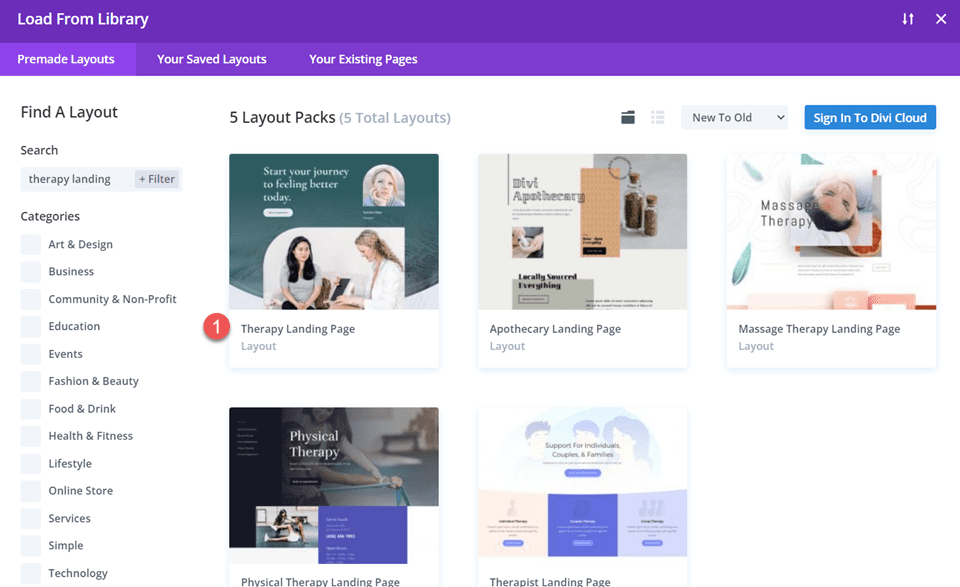
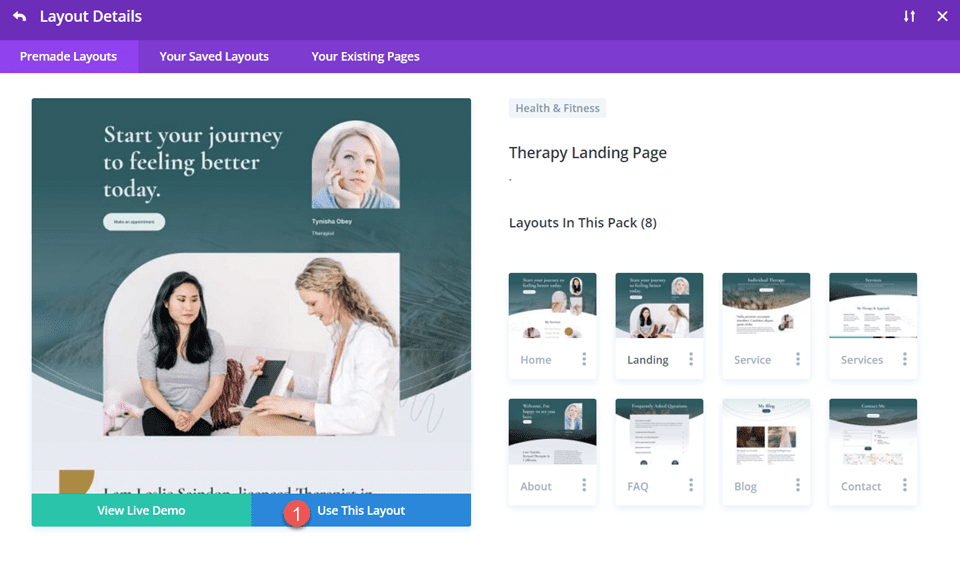
    You’ve got thousands of layouts to pick from. To make it easy, look for ones that say “Shop Page.” Click “Use this Layout” to add it to your page.

    Product to Page with Divi - Steps 2-4

    The layout will show your products immediately (inside the Woo Products module). You can change how many show up, how they’re sorted, and much more.

    Product to Page with Divi - Steps 5

    What if you want to show only one product? Add a new row and pick “Woo Products” from the WooCommerce modules list.

    Product to Page with Divi - Steps 6-7

    Design WooCommerce Pages

    WooCommerce sets up some basic pages for you that Divi can help you customize:

    1. Shop page (where all your products show up)
    2. Cart page (shows what’s in your cart)
    3. Checkout page (where you pay)
    4. My Account page (to manage your account)
    5. And more, like pages for product categories and tags

    Divi lets you edit each of these page templates on each page using the Divi Builder, or you can create a custom template for these pages using the Theme Builder.

    Woo Shop Pages in Theme Builder - Steps 1-2

    Using the Divi Theme Builder is particularly useful for designing templates for your product pages, product category pages, and other site-wide design elements.

    For example, you could download one of our free product page templates from our blog (like this Clothing Store Product Page Template) and add it to the theme builder to have a stunning global template for all your products. Or you can easily create your own product page template from scratch

    For more help, check out our guides on making a cart page, setting up a checkout page, and using Divi for WooCommerce pages.

    5. Boost Your WordPress eCommerce Site with Plugins and Integrations

    Want to know the beauty of WordPress and WooCommerce? You can add hundreds of features with thousands of possible plugins. Free and paid plugins can make your WordPress eCommerce site even better. Let’s look at some must-know categories of WooCommerce plugins.

    SEO Plugins

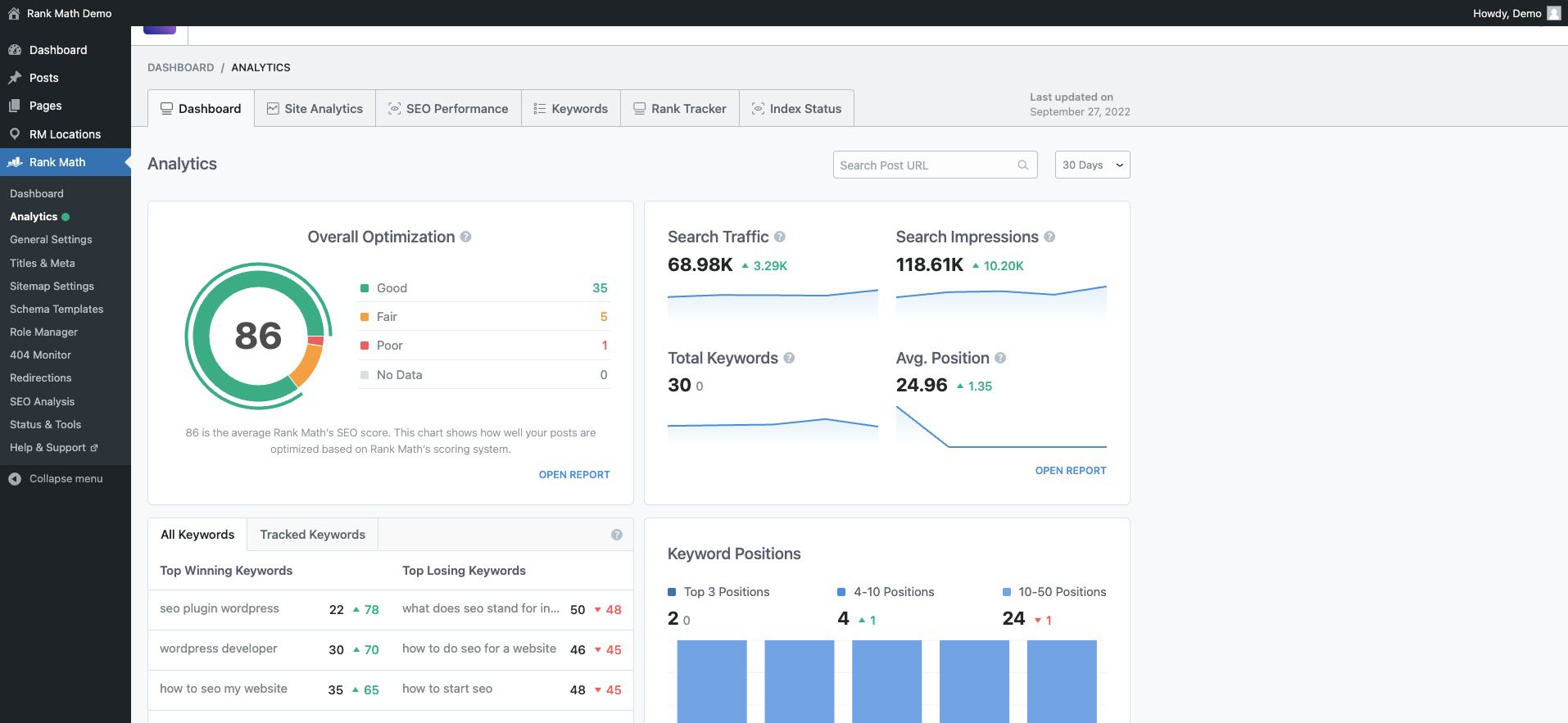
    Getting people to your WordPress eCommerce site is obviously important. That’s where SEO plugins like Rank Math SEO come in. They help you make your site more search-engine friendly by adding schema markup, XML sitemaps, and other SEO best practices. There are even WooCommerce SEO plugins that ensure ideal compatibility and functionality.

    Analytics Rank Math Demo WordPress

    For a deep dive, check out our WooCommerce SEO guide. If you’re feeling adventurous, explore these AI-driven SEO tools.

    Email Marketing Plugins

    Email marketing remains an essential tool for growing an eCommerce store. External services like Mailchimp for WordPress and plugins like MailPoet help you build and manage your email lists.

    Mailchimp Email Reporting

    Use Mailchimp’s WooCommerce Integration to Increase Sales

    You can then send general emails as well as eCommerce-specific emails with coupons or abandoned cart emails.

    CRO Tools

    Conversion is king in eCommerce. Tools like OptinMonster and Bloom can help you get the most from your site by allowing alternate conversion for email signups.

    Split testing and Divi Leads

    You can also use Divi’s marketing tools to create A/B campaigns on your website and strengthen each landing page over time.

    Advertising Plugins

    Advertising plugins can integrate seamlessly with platforms like Google Ads and Facebook to drive more traffic. Check out Advanced Ads for more control over your advertising campaigns.

    For more WooCommerce plugins, Barn2 and Yith make lots of good options. And don’t forget to check the Divi Marketplace for solutions that work well with Divi.

    Conclusion

    You’ve gone through the ins and outs of setting up a WordPress eCommerce website. From selecting a hosting provider to configuring WooCommerce and optimizing your site for search engines, you’ve laid the groundwork for a successful online store.

    WordPress and WooCommerce together offer a powerful, flexible platform for eCommerce. They allow you to customize every aspect of your store, from product listings to payment options. And with a wide array of plugins, your store’s functionality can expand as your business grows.

    As your business scales, our extensive library of guides and reviews is here to support you every step of the way. Dive into our essential guides on how to sell online and master the best website marketing strategies. For tech-savvy insights, explore our reviews of top hosting companies, prime business tools, and standout WordPress plugins.

    Featured Image by Julia Tim / shutterstock.com

    The post How to Make a WordPress Ecommerce Website (2023 Easy Guide) appeared first on Elegant Themes Blog.

  • 8 Best WordPress Chatbots for your Website in 2023

    WordPress users have always wanted the most out of the platform. Adding chatbots to a website is one of the easiest ways to make it more engaging and helpful. And nowadays, creating, training, and rolling out a chatbot is easier than ever. We’ve sifted through the best WordPress chatbots for your websites, comparing their features and costs.

    First, let’s look into the different types of chatbots so you can choose exactly what you need. Some chatbots use older technologies that aren’t as easy to use.

    Types of WordPress Chatbots

    Chatbots have transcended their initial role as basic support automation tools, becoming integral to customer engagement strategies. Because they provide intelligent responses, chatbots have changed how companies engage their visitors. Here is how these tools break down into separate categories:

    1. Live Chatbots: They greet visitors, determine intent, and direct them to the right human agent. This is helpful when a human support organization wants to save time by having a live chat chatbot route customers to the correct department. It’s more intuitive than a customer self-select (hit “1” to talk to Billing) option and can try to determine urgency level, customer intent, and the correct department.

    2. Programmable Chatbots: Programmable chatbots are usually an older type of chatbot. Site owners must create question and answer pairs so that these chatbots provide specific responses to predetermined queries. Because they use a question-and-answer method, they take a lot of time to train, and it’s not uncommon for one to get stumped.

    3. GPT and LLM Powered Chatbots: The GPT chatbots and those powered by other Language Models (LLM) are the newest iteration of chatbots. Because of the AI capabilities they are built on top of, their conversation can mimic human interaction. They’re not confined to a script but can provide rich, dynamic interactions. However, they can be trained on specific data to give custom answers instead of what customers could get from something like ChatGPT. These types are usually just referred to as AI chatbots.

    Most chatbots fall into the first and third categories. Another popular option is combining an LLM chatbot with a live chat fallback option. These are very powerful and dependable chatbots.

    8 Best Chatbots for Your WordPress Website

    Now that you know about the different types of chatbots on the market, here are our favorites that are easily usable with WordPress websites.

    1. Botsonic

    Botsonic - Homepage August 2023

    Botsonic is a cutting-edge chatbot builder designed to enhance user engagement on websites. Trusted by thousands of businesses, it offers a seamless way to connect with visitors and provide instant support. The product is known for its user-friendly interface and robust performance, making it a preferred choice among marketers and customer support teams. Additionally, Writesonic, the company behind Botsonic, has seen break-out success with its AI writer and is backed by Y-Combinator.

    Key Features of Botsonic:

    • GPT 4 powered chatbot builder
    • Train on private data for a one-of-a-kind chatbot that no one else can emulate
    • Real-time analytics and reporting
    • Live rep routing for effortlessly sending customers to the right team

    Botsonic Training Data Source

    Botsonic is simple to train using your data. You can upload a file, provide a URL, let it scrape a sitemap, add FAQs, or use the SDK or API to pull in data. This means that Botsonic can speak to your customers about whatever topic it has been trained on, regardless of ChatGPT’s limits.

    Best For:

    Botsonic is ideal for businesses looking to enhance customer support without needing to hire human support staff. Whether you’re a small business owner or part of a large enterprise, Botsonic can simplify your support system, making it more agile and customer-friendly.

    Pricing: Free plan with paid plans starting at $20/mo

    Get Botsonic

    2. Tidio

    Tidio - Homepage August 2023
    Tidio is a full-service customer chat and chatbot platform. Most of their packages focus on constructing traditional chatbots through established workflows. However, with the Tidio+ package, individuals can harness sophisticated AI to create chatbots designed to minimize customer attrition and solve issues. They have also recently launched Lyro AI on all their plans, bringing everyone basic AI features.

    Key Features of Tidio:

    • Tidio+ offers a user unlimited AI conversations
    • The chatbot seamlessly manages customer interactions and can fall back to live agents
    • Ticketing solution for issues requiring longer resolutions
    • Operates via the cloud, enabling agents to engage with customers through both mobile apps and desktop platforms

    Tidio Lyro AI Chatbot for WordPress

    Lyro AI by Tidio uses your content and data to make chats as smooth as possible. They can take FAQs and give them to your visitors in a way that matches the flow of the conversation. It also learns from conversations so that it doesn’t offer up information that your visitors aren’t actually searching for. If it gets in trouble and can’t answer, it can ID the chat topic and send the person to a human support person.

    Best For:

    Tidio shines in chat-focused customer service and sales settings. Because it is seamlessly integrated with WordPress and popular messaging apps, it’s a go-to for lifting customer support and automating support chats.

    Pricing: Lyro has free plans with paid chatbot plans starting at $25/mo

    Get Tidio

    3. HubSpot Chatbot Builder

    Hubspot - Chatbot Landing Page August 2023
    HubSpot is a leading CRM platform for helping businesses grow. It is known for being one of the best platforms for marketing automation, with a suite of tools for managing sales, support, and more. The HubSpot Chatbot Builder plugs right into all their other tools to help site owners power their CRM with lead and support data straight from chat. This programmable chatbot takes some time to set up because you will need to build out conversation flows. However, this chatbot will excel at collecting data and integrating it into your CRM and marketing automations.

    Key Features of HubSpot Chatbot:

    • Integration with Hubspot’s CRM, CMS, and marketing platforms
    • Efficient lead gathering and team-specific routing
    • Chat history saved in CRM for quick agent context
    • Slack compatibility for seamless customer assistance within your workspace

    Hubspot Chatbot Conversation Flows

    HubSpot’s seamless integration with its own CRM makes it an ideal solution for businesses already using HubSpot’s suite of tools. The chatbot can pull in CRM personalization details for a better user experience. It also integrates with WordPress and other major CMS platforms.

    Best For:

    Companies already committed to HubSpot’s CRM will find their basic live chat needs met, although it lacks advanced conversational AI capabilities. This platform offers a two-in-one solution for those seeking a CRM and a chatbot.

    Pricing: Free chatbot and CRM with paid plans starting at $20/mo with Hubspot Sales suite

    Try HubSpot Chatbot Builder

    4. Intercom

    Intercom - Homepage August 2023
    Intercom is a support and help desk platform that has long been a go-to platform for support organizations. It’s what Elegant Themes uses! It is a bit more robust than Botsonic and some of the others on this list because before it added Fin, its AI conversational assistant, it was a live chat software for connecting human agents with website customers. Now, it uses the best of both worlds—allowing AI to handle easier chats and then switch to a human agent when the time is right.

    Key Features:

    • Real-time customer engagement with live agents
    • Complete help desk and documentation system
    • Fin AI for a conversational AI partner that can hold its own

    Intercom Chatbot with Fin AI

    One of the best features of Intercom is Fin. If you’ve used a website that uses it, you know how easy it is for both a customer and the support staff. It answers questions based on a connected knowledge base and other data—and does it well. Once Fin gets out of its depth, it quickly ports the customer to a live agent or adds them to a queue when the support team gets back in. Especially for businesses with large KBs, Fin helps customers get to the right articles and even talks about the articles like a human would.

    Best For:

    Intercom is ideal for e-commerce businesses, SaaS providers, and companies looking to enhance customer engagement. It’s perfect for those who want to provide a custom touch without losing the efficiency of automation. If you want to build lasting relationships with your customers, Intercom is the tool for you.

    Pricing: Pricing starts at $74/mo with Fin AI charges added on top

    Get Intercom

    5. DocsBot AI

    Docsbot - Homepage August 2023
    Next up, DocsBot AI is another sophisticated and trainable AI solution that transforms traditional documentation into chatbots. It is excellent for customer support, but DocsBot AI tries to make the specialized knowledge you give it even more useful with creative use cases.

    Key Features of DocsBot AI:

    • Integration with Notion, Zendesk, and Intercom to port over support history and KB data
    • Easily install with a WordPress plugin or simple script embed
    • Use trained data for AI content writing
    • Create chatbots for internal functions for your team’s process docs

    DocsBot AI Bot Training

    What sets DocsBot AI apart from its competitors is can also be used to generate AI content. As an AI writer, you can train it to support and write marketing materials while retaining your exact voice and brand identity. It considers the full scope of your business, ensuring trustworthy content generation. This feature provides confidence that the AI understands your brand when acting as a help bot and as an AI writer.

    Best For:

    DocsBot AI is ideally suited for businesses of all sizes, from startups to established enterprises, that seek to automate customer interactions and enhance content creation. It’s a strategic investment for those looking to streamline support, foster internal collaboration, and leverage AI for creative endeavors.

    Pricing: Free plans with paid ones starting at $19/mo

    Get DocsBot AI

    6. Chatbase

    Chatbase Trainable GPT Bot for WordPress

    Chatbase is another trainable AI chatbot builder that empowers businesses to create customized chatbots. Known for its bare-bones simplicity, Chatbase allows users to connect their data sources and create a ChatGPT-like chatbot tailored to their specific needs. It does not have human live chat support but is a heavy hitter in conversational AI support.

    Key Features:

    • Easy to train by pulling in files, sitemaps, or individual URLs
    • Ability to ask for customer information (email, name, etc.) to help you fill your lead pipeline
    • Integration with popular tools like Notion, Slack, and Messenger

    Chatbase Data Sources View

    Chatbase’s apart is its ability to train ChatGPT on your data, which is about as easy as you could ask for it to be. By simply uploading a document or adding a link to your website, you can create a chatbot that can answer any question about the content. This feature enhances the user experience and provides a unique way to engage with your audience.

    Best For:

    Chatbase is ideal for businesses looking to enhance their online presence with an interactive chatbot. From collecting leads to providing custom responses, Chatbase is perfect for companies leveraging AI technology to create a more engaging and responsive website.

    Pricing: Free plan available with paid plans starting at $19/mo

    Get Chatbase

    7. Botsify

    Botsify - Homepage April 2023
    Botsify is another excellent choice of website Chatbot that can be added to WordPress. Known as being user-friendly and reliable, Botsify has come to be trusted by many businesses. It’s a platform that allows users to create intelligent chatbots without diving deep into coding, making it accessible to a broad audience.

    Key Features:

    • Integrate the bot with WordPress manually or with a plugin
    • Whitelabel solution for agencies to build chatbots at scale for customers
    • Setup the chatbot to collect lead information
    • 100+ integrations for effective marketing and CRM data transfers
    • Agent fallback for live chat that goes well with AI bots

    Botsify Chatbot Install on WordPress

    Botsify’s integrations set it apart from other similarly priced options on the market. This chatbot can pull information from dozens of sources to speak confidently. A great example would be linking a WooCommerce store to Botsify and watching as it answers customer questions about product variations, prices, and return policies. Each integration unlocks synergies between your most used business products and customer interactions.

    Best For:

    Botsify is ideal for small to medium-sized businesses looking to enhance customer engagement without investing in wide development. It’s perfect for providing real-time support, gathering customer insights, or automating repetitive tasks. Unlike other platforms, Botsify offers a unique blend of simplicity and functionality, making it a standout choice for non-tech-savvy users.

    Pricing: Paid plans start at $49/mo

    Get Botsify

    8. ChatBot.com

    ChatBot.com - Homepage August 2023
    Chatbot.com specializes in AI-driven chat solutions aimed at elevating customer service through a web-based chat interface. The platform empowers businesses to develop their own chatbots, lessening the reliance on an entirely human support staff. Its versatile integration options blend into workflows you already have and various communication platforms and social networks.

    Key Features of ChatBot.com:

    • Syncs with multiple messaging platforms like WhatsApp, SMS, and Email for a combined support experience
    • Leverages an integrated HelpDesk to offer customer assistance and generate support tickets
    • Showcases product information within the chat interface to nurture leads and convert them via human-like AI
    • Tags website visitors for targeted marketing and CRM segmentation strategies

    AI ChatBot Stories

    Best For:

    ChatBot is perfect for companies seeking a comprehensive digital assistant for sales and customer care. It works smoothly with ChatBot.com’s sister brands—LiveChat.com and HelpDesk.com—providing a whole enterprise support framework. For businesses on the cusp of significant growth, the ChatBot.com suite is a worthy choice.

    Pricing: Starting at $52/mo

    Get ChatBot

    Comparing All the Best WordPress Chatbots

    With a lot of chatbots on the market that work with WordPress websites, it can be hard to narrow them down. Here is an overview of the best WordPress solutions.

    WordPress Chatbot Price Comparison

    Price can be a significant factor in picking a chatbot solution, especially if this is your first venture into including one on your website. Here’s how each of our chatbots stack up on price.

    Rank WordPress Chatbots Starting Price Free Option
    🥇 Botsonic $20/mo ✔️ Get
    🥈 Tidio $25/mo ✔️ Get
    🥉 Hubspot $20/mo ✔️ Get
    4 Intercom $74/mo ❌ Get
    5 DocsBot AI $19/mo ✔️ Get
    6 Chatbase $19/mo ✔️ Get
    7 Botsify $49/mo ❌ Get
    8 ChatBot.com $52/mo ❌ Get

    Our top choice, Botsonic, and a couple of others have free options for you to try out, while the other two also have free trials.

    WordPress Chatbot Feature Comparison

    As we’ve seen in detail, there are different types of chatbots, and choosing a particular solution might come down to the features each offers. Here’s a look at the features of our top three options.

    🥇Botsonic 🥈 Tidio 🥉 Hubspot
    Starting Price $20/mo $25/mo $20/mo
    GPT-4 Powered Chatbot ✔️ ❌ ❌
    Real-time Analytics and Reporting ✔️ ✔️ ✔️
    Live Agent Routing ✔️ ✔️ ✔️
    Help Desk and Documentation System ❌ ✔️ ✔️
    AI Content Writing ✔️* ❌ ❌
    Integration with Other Platforms ✔️ ✔️ ✔️
    Train on Private Data ✔️ ✔️ ❌
    Internal Functions for Team ✔️ ✔️ ✔️
    Get Botsonic Get Intercom Get Hubspot AI
    *Botsonic comes with Writesonic’s AI writer until they separate the product, which has been announced.

    What is the Best WordPress Chatbot?

    Chatbots are slowly becoming more normal to use. They’re used at the beginning of support interactions to help live agents navigate the simplest queries and gather information before speaking with a human. Depending on what you need from a chatbot, there are plenty of options on the market.

    Our favorite is Botsonic, which provides many features, including live chat workflows and GPT 4. Tidio is our next top pick because of its cutting-edge conversational AI for engaging new customers and landing more sales. It also has a fallback to connect with live agents and integrates with popular messaging apps.

    Whatever you choose, you will give your site visitors a more personalized experience that answers their questions.

    What do you think about using chatbots on your websites? Share your thoughts and which chatbots you’ve tried out below!

    Article thumbnail image by Thx4Stock / shutterstock.com.

    The post 8 Best WordPress Chatbots for your Website in 2023 appeared first on Elegant Themes Blog.

  • 5 Best AI Story Generators in 2023 (Reviewed and Ranked)

    Unlike general-purpose AI writers, which are designed to handle a broad range of tasks from email drafting to SEO optimization, AI story generators are fine-tuned for the art of storytelling. These advanced platforms have features that allow for intricate plot development, character arc creation, and emotional narrative weaving. They serve as a digital canvas for writers, providing the tools needed to craft compelling stories that resonate on a profoundly human level. In this post, we’ll compare and review the best AI story generators to take your storytelling to a whole new level.

    AI Story Generator Features

    When writing stories, there are important distinctions between a standard AI writer and AI story generators. Whether you’re working on a short story, a graphic novel, or a traditional fiction book, short-form AI services may not provide the necessary assistance. So, as you compare AI story-writing tools, remember these factors.

    1. Story organization is essential for longer works. Being able to, at the least, sort and separate chapters of your story is vital. Some even let you section off scenes within a chapter. This enables you to stay focused on what you are writing without getting overwhelmed by the vastness of your work.
    2. An AI explicitly trained for story creation will behave much differently than an AI designed for marketing. You will need the flexibility to change the tone for different characters while retaining narrative and perspective throughout the piece. It is easy enough to switch from first person to third when you don’t mean to, and AI story generators can keep you consistent.
    3. You will need AI templates and quick actions that match story writing. Maybe you need to add more description of the surrounding science, or you want to interject more dialogue between characters. These are particular situations that are vital to story writing.

    While AI writers, in general, are malleable and can adapt to your needs, let’s focus on the ones that can help you with creative story writing the best.

    Best AI Story Generators


    Subscribe To Our Youtube Channel

    If you’re in the market for an AI tool that can elevate your storytelling, opting for a dedicated story generator is a decision that will pay off. Here’s a look at the best options on the market, starting with Sudowrite.

    1. Sudowrite

    Sudowrite - Homepage August 2023
    Sudowrite is the most trusted AI story writer out there. If you haven’t worked with Sudowrite, you are missing out on its unique approach to augmented story writing. It helps writers transform their ideas into working manuscripts using defined AI tools for story writers.

    Key Features:

    • Character name generator
    • Built for writing multi-character dialogue
    • AI tools for changing pace, writing the next part of a story, outlining a chapter, and more

    Sudowrite - Edit Story Selection with AI

    Story Engine is Sudowrite’s AI tool that is the most enticing. It works across the whole writing process and workflow but brings AI to every part. It takes your story ideas, creates an outline (with your guidance), starts fleshing out chapters, and can write whole sections of your book. From there, the inline AI editor helps you spruce up any selected text as you iterate through the drafts of your story.

    Best For:

    Sudowrite is ideal for novelists and storytellers (of any kind) who want excellent efficiency in crafting their stories. Most esteemed writers say that the first draft is the hardest part. Sudowrite gives you complete control of the first (and second, and third) draft while speeding up its production time.

    Pricing: Free Trial; Pricing starts at $19/mo

    Try SudoWrite

    2. Jasper AI

    Jasper - Homepage August 2023
    Jasper AI is a massive player in the AI writing space. It launched well before ChatGPT took the world by storm and has constantly been rolling out features to make it the de facto AI writing platform. Many know Jasper as a robust AI writer for marketing and business, but many don’t realize it has built-in use cases for story writing. Its long-form editor and custom commands are more than flexible enough to accommodate story writing.

    Key Features:

    • AI writing templates for business, marketing, and story writing
    • Brand and Voice Knowledge pieces can be customized to fit the details of your story
    • Long-form editor (like a Google Doc) that helps you create stories, chapter by chapter

    Jasper AI Writing Templates for Stories and Marketing

    Jasper’s template library of pre-trained writing tasks is some of the best. While most don’t have anything to do with story writing, a few do, and many others are great for writing in general (content improver and sentence expander, for instance).

    Best For:

    Indie writers who want an all-in-one tool will want to consider Jasper. While its long-form editor isn’t necessarily built for novels or short stories, it could be a superb AI story generator to choose from if you also want AI assistance for writing marketing and business material for book promotions and deals.

    Pricing: Prices start at $39/mo

    Get Jasper AI

    3. Plot Factory

    Plotfactory - Homepage August 2023
    Plot Factory is a dream for writers looking to utilize AI and other tools to flesh out an entire book idea. However, Plot Factory works differently than other AI story generators—it is built to help you create story plots and outlines. Whether you are writing a creative story or a novella, Plot Factory helps you create the bones of your story so you can move on with the utmost confidence.

    Key Features:

    • Digital locker for saving details about your story universe, characters, places, and
    • Writing views so you can focus on individual scenes and quickly move them around within a chapter
    • AI name and outline generators to banish writer’s block
    • AI story narration so you can listen to your story aloud and catch what you couldn’t by reading your own writing

    Beats Mode Plot Factory Feature

    Plot Factor’s main selling point is its ability to maintain context and coherence across an entire work. It stores all the nitty-gritty details that make a story make sense using one of its many features (Universe Notebook, Place Keeper, Character Lists, and Object Library). Storing these helps writers stay consistent while they develop a story.

    Best For:

    Screenwriters and novelists who need a structured approach to storytelling will find Plot Factory indispensable. Though it is light on the AI features (though its text-to-speech is a nice touch), it is well organized for writers who want to get down to writing. The UI is dated, but if this doesn’t bother you, you will benefit significantly from this story organization tool.

    Pricing: Free plan available with paid plans starting at $9/mo

    Get Plot Factory

    4. Shortly AI

    Shortly AI - Homepage August 2023
    Shortly AI is another AI writer that got its start as an AI story writer. It has now grown into something that can handle all sorts of writing tasks. Shortly AI was acquired by Jasper a couple of years ago but still runs as a standalone service.

    Key Features:

    • Easy to use slash commands in document editor to get AI to write for you quickly
    • Simplified UI for distraction-free writing and editing
    • Unlimited word generation

    Shortly AI Document Writer UI

    Shortly AI stands out for its simplicity. There aren’t hundreds of use cases or templates (only a few slash commands). This means you get to focus on what you are writing, and when you need AI, you can ask it to pick up right where you left off. It’s an excellent way for writers to own the process while calling on AI only when needed.

    Best For:

    While not for everyone, Shortly AI is the perfect companion for writers who need a distraction-free workspace along with capable AI writing.

    Pricing: Pricing is not cheap and starts at $79/mo for unlimited AI words

    Get Shortly AI

    5. NovelAI

    Novelai - Homepage August 2023
    NovelAI is an immersive AI writing companion and story generator that allows anyone to create high-quality literature. Some unique features of Novel AI include the ability to generate images to depict characters in your story and to train the AI to mimic the style of famous authors. It has all the AI tools you’d expect and packages them together into an easy-to-use UI that is a joy to be in. As such, it is probably the most fun platform to write on.

    Key Features:

    • Image AI generation to pair story with pictures to tell something more
    • Unlimited text generation with Kayra, its AI Storyteller
    • Lorebook that lets you store world and character information for consistent storytelling

    Novelai Lorebook for Story Memory

    The Lorebook is like a locker for the concrete aspects of your stories. Characters with defined traits, styles, and static elements that should remain consistent can be stored. Likewise, Worlds and everything in them, like particular locations, altered natural rules, and other phenomena, can also be stored. These let the AI remember pieces of your story’s lore so that your character doesn’t change from having brown hair to blond or the Palisades being a Northern to a Southern feature of your world.

    Best For:

    Aspiring fiction writers who crave depth and complexity in their storytelling will find NovelAI a pleasure to work with. It is reasonably priced and allows for a lot of customization and fine-tuning of how the AI works. This gives writers who want complete control over every aspect of story creation just that.

    Pricing: Plans start at $10/mo

    Get NovelAI

    Best AI Story Generators: Price Comparison

    Now that we’ve compared the top AI tools for writing stories, here is a recap of the list with the pricing of each to help make your decision.

    Rank AI Story Generator Starting Price Free Option
    🥇 Sudowrite $19/mo ❌ Get
    🥈 Jasper AI $39/mo ❌ Get
    🥉 Plot Factory $9/mo ✔️ Get
    4 Shortly AI $79/mo ❌ Get
    5 NovelAI $10/mo ❌ Get

    Which is the Best AI Story Generator?

    The best AI story generator and writer is Sudowrite. It has all the AI features to write, refine, and expand your stories. Story organization is intuitive and doesn’t get in the way. Plus, there are many ways to get AI to do particular tasks that you can always fine-tune exactly what you need.

    Jasper AI is the next best option if you need AI writing software that can create more than just stories. Plot Factory is interesting and retains human involvement for most story writing. But where it does use AI or NPL, it serves to help the writer increase efficiency.

    For other creatives and creative pursuits, you might also like these top AI music generators for creating easy tunes. And, for the audio storytellers among us, check out the best podcasting platforms to get your stories heard.

    Looking for more AI tools? Check out our complete list of best AI tools.

    Featured Image by Moor Studio / shutterstock.com

    The post 5 Best AI Story Generators in 2023 (Reviewed and Ranked) appeared first on Elegant Themes Blog.

  • How to Make Your Own AI: A Beginner’s Guide (2023)

    There are many reasons why you may want to make your own AI assistant or Chatbot. Perhaps you wish to create a virtual “second brain” to quickly access stored information. Alternatively, you could aim to assist website visitors or customers in finding the information they seek. You might even desire a personal AI to help organize your life. Regardless of your motivation, constructing an AI is likely easier than you initially thought.

    In this article, we show you how you can use readily available technology to create your own AI personal assistant or chatbot. You can even do it for free if your project is small enough.

    What is a Personal AI Assistant?

    Often, we think of AI in high-tech environments—self-driving cars, medical advancements, or algorithmic trading. However, AI is not only useful to massive corporations with their high-dollar R&D budgets. It can be a deeply helpful tool serving individualized needs. And that’s where making your own personal AI assistant comes in.

    A personal AI can be as complicated or straightforward to implement as you are willing to tolerate. At the least, you can dial in a solution that performs just like you want. This can mean that an AI responds to you in a certain way or has specialized knowledge that isn’t available to larger LLMs and AI chatbots.

    The Basics of AI

    At its core, Artificial Intelligence (AI) mimics human cognition to perform tasks ranging from basic problem-solving and planning to speech recognition and natural language processing. These aren’t just programmed actions but learned behaviors through machine learning. To simplify things, AI has two essential components:

    1. Data (in the form of words, images, etc.)
    2. Algorithms

    AI algorithms are advanced functions designed to award specific computational tasks when completed well. This is done through machine learning, where a system can recognize outcomes and apply a pass or fail to those computations (otherwise, humans would have to monitor and respond to billions of rout tasks to train an AI).

    AI requires clean data that is consistent enough to draw patterns from. The data must also be as complete, relevant, and unbiased as possible to create an advanced AI worth using.

    How to Build Your Own AI in 5 Steps

    AI is becoming increasingly accessible to individuals. With the right tools and some know-how, you can create a personal AI assistant specialized for your needs. Here are five steps that will help you build your own personal AI.

    1. Identify a Problem Your AI Should Solve

    Our first step for creating your own AI is to identify what you want your AI assistant to achieve. Problem identification will guide every subsequent step, from data collection to deployment. An excellent way to figure out what problems to solve with AI is by looking at typical use cases where different AI systems are used.

    Use Cases for AI Chatbots

    • Customer Service: Trained on your company’s specific knowledge base, a personalized AI chatbot can efficiently handle customer queries, troubleshoot problems, and even upsell products, making it an invaluable asset for any customer-facing business.
    • Data Analysis: Whether you’re a marketer drowning in analytics or a researcher sifting through data sets, a specialized AI can digest vast amounts of information. It can then distill this into actionable insights, enabling you to make data-driven decisions.
    • Personal Assistance: Managing a busy life is no small feat. An AI trained on your personal data can take over tasks like calendar management, appointment setting, and to-do list prioritization. It could even alert you to personal commitments you might overlook, effectively becoming an extension of your cognitive apparatus.

    Knowing what you want your AI to solve will help you use the right AI platform. The biggest hurdle the right platform or service will overcome for you is with its APIs to gather data and perform specific actions.

    In our case, we’ll make a customized AI chatbot for a website that can help customers. If you want a simple-to-use AI for data analysis, try ChatGPT’s Advanced Data Analysis (previously called Code Interepter). For something that can help you manage your time, tasks, and relations, try out an AI tool like Otter AI or Clay.

    2. Choose Your AI Platform or Tech Stack

    Once you have identified the main goal for building your AI, you’ll need to choose the platform or tech stack that aligns with your goal. Your choice of platform is essential because it dictates what your AI can do, how easily it can be trained, and how seamlessly it can be integrated into your existing systems.

    Here are two notable options:

    Chatbase

    Chatbase Trainable GPT Bot for WordPress

    Chatbase is a trainable AI chatbot builder known for its simplicity. It allows users to easily connect data sources and create a ChatGPT-like chatbot tailored to specific needs. What sets Chatbase apart is its intuitive training process. You create a chatbot capable of answering any question based on that content by merely uploading a document or adding a website link. This user-friendly feature enriches your customer’s experience and offers a unique engagement strategy.

    Pricing: Free plans are available, with paid options starting at $19/month.

    Get Chatbase

    DocsBotAI

    Docsbot - Homepage August 2023

    DocsBotAI transforms your traditional documentation into intelligent chatbots. It excels in customer support but pushes the boundaries by creatively leveraging specialized knowledge in another way. What makes DocsBotAI unique is that it can also be used to generate AI-written content while maintaining your brand voice. Since it can be trained on your internal knowledge and external web pages, it can be trusted to do both things—handle customer chats and write new content with its AI content writing feature.

    Pricing: Free plans are available, with paid options starting at $19/month.

    Get DocsBot AI

    For this post, we’ll use Chatbase as our primary platform for building your own AI chatbot.

    3. Gather Data that AI Will Use

    The third step in your AI odyssey is data collection. The type and amount of data you collect will shape your AI’s capabilities, conversational fluency, and overall utility. Data can be in text documents, URLs, sitemaps, or Q&A formatted content. The idea is to feed your AI with specialized information that it wouldn’t have access to otherwise.

    How Chatbase Handles Data

    Once uploaded to Chatbase, your data undergoes vectorization or tokenization. This process converts the raw data into a format that the Large Language Model (LLM) can digest more efficiently. Once all your data is loaded into Chatbase, you have to “train” the chatbot, which does this tokenization process for your uploaded documents. Each time a new document is added (or an old one edited), the chatbot needs to be retrained. This isn’t a huge deal, but part of how the system works.

    Uploading Documents and Data to Chatbase

    Chatbase makes it easy to upload supported documents. Click “My Chatbots” and “New Chatbot” to start.

    Make Your Own AI Chatbot - Steps 1-2

    You’ll see the data source types that are supported in the sub-header. Click “Files.” Find your .docx, .doc, .pdf (with OCR text), and .txt files to add them to the chatbot. For example, these event files represent different information from various sources. They’ll be used to train the chatbot.

    Make Your Own AI Chatbot - Steps 3-5

    Here’s how these files look in Chatbase when they are uploaded. Depending on how big and how many files you added to your chatbot, they may take a few seconds to upload.

    Make Your Own AI Chatbot - Steps 6

    We can also add Q&A/FAQ-styled text data to our chatbot. This is good when you are pretty sure that specific questions will be asked of your chatbot. The Q&A features allow you to answer exactly what you want your chatbot to answer when users submit similar questions. Click the “Q&A” sub-header and then add your questions and answers.

    Make Your Own AI Chatbot - Steps 7-9

    Lastly, you can select data that is already published on your website. There are two options for this under the “Website” subheading. Choose a web crawler by giving it a starting URL or submit a whole sitemap with specified pages.

    Make Your Own AI Chatbot - Steps 10-12

    At the bottom of any data source pages, when you are ready, you can “Create Chatbot” to push all this information to a chatbot.

    Make Your Own AI Chatbot - Steps 13

    How to Structure Data in Files

    LLMs like those used with OpenAI’s API are great at understanding text data. However, to ensure you get the most from your chatbot, you will want to ensure your text is as simple to understand as possible. Here are some tips to make that work:

    1. Use clearly named files that describe the information within
    2. In your files, make sure everything has appropriate context so the LLM knows not just what your data is but what it is about
    3. Label text and data in your files so that it can be easily called upon via your chatbot
    4. Consider turning native Word tables into plain text tables (using markdown, JSON, or XML formatted tables)
    5. Limit duplicate information inside single files that show up across multiple files (in case you update files, you don’t want to have to remember to update a whole bunch)

    4. Finetune AI with Prompt Engineering

    Once your data is loaded into your chatbot, the final thing to get right is your chatbot’s base prompt. A base prompt is a prompt that the user never sees but is included at the beginning of every message they send to your chatbot. Chatbase connects to OpenAI’s 3.5 Turbo or GPT 4 APIs to process queries and return responses. This means the base prompt is sent along with the user query to OpenAI.

    This gives you complete control over how the chatbot responds to a user. Without a base prompt, your chatbot could easily talk about subjects or knowledge not included in your training materials. This is because OpenAI’s LLM models are trained on data sets that are infinitely larger than your own.

    If you have a website about a music festival, do you want users to use your chatbot to get advice on what Tesla to buy? No. You want it to stay on task and only answer questions about your training data. That’s why we have a base prompt.

    In Chatbase’s Settings tab under “Model,” we can set a base prompt to steer the ship of our AI’s conversations.

    Fine Tune Base Prompt for Chatbase

    Base Prompt Examples

    Your base prompt serves as a limiting factor of what your own AI can talk about. It should be engineered to elicit specific responses based on the specialized training data you’ve provided. You don’t want it to get off-topic.

    Chatbase’s default base prompt is:

    I want you to act as a document that I am having a conversation with. Your name is “AI Assistant”. You will provide me with answers from the given info. If the answer is not included, say exactly “Hmm, I am not sure.” and stop after that. Refuse to answer any question, not about the info. Never break character.

    Right off the bat, you should feel comfortable to tailor it to your topic or industry. For our music event example, we can start with this:

    You are the leading authority on the Mile High Melody 2024 event. When you are asked any question about the event, you are able to answer based on the documents you have and from nowhere else. Your name is “Melodie”. If the answer to this message is not included in the documents about Mile High Melody or its pertinent details, say, “I don’t know, but can I help you with something about the Mile High Melody musical event?” and stop after that. Refuse to answer any question not about the event’s information or details. Never break character, starting now.

    As you can see, we got pretty specific about what our chatbot, Melodie, could and could not talk about. Let’s see how it faired.

    Fine Tune Base Prompt for Chatbase - Example

    Melodie successfully steered the conversation back on track

    And when we ask it a question that is almost related, it responds helpfully. With one more follow-up question, our personal AI chatbot responds with specific information from our source files.

    Fine Tune Base Prompt for Chatbase - Valid Question

    And now, we have a fully functioning guide that can hold a conversation without saying something we might regret. It is both helpful and saves us from having to staff human agents to monitor a live chat. Win-win!

    Testing and Refinement

    There are numerous things to finetune and test, and you prompt engineer your base prompt:

    • You want your chatbot to be on brand when it speaks to your visitors. To do this, often, it is easiest to assign the chatbot a personality. Things like Event manager or event host are great personalities to assign (even better if you use specific adjectives)
    • The chatbot should use vocabulary suited to your audience and your industry. Include a level of writing (8th grade) with specific industry jargon that is okay.
    • Tell it how to handle certain information. Add context to your base prompt if the chatbot gets something wrong with your data. If you added a calendar of events in JSON format to your source files, you could tell your chatbot to interpret that data in plain English so it is understandable to your visitors.
    • Let it know what languages it can speak. Usually, it will switch to whatever the visitor is using, but in some cases, you might want to limit supported languages.

    5. Deploy and Monitor Your AI

    Now, all that’s left is deploying your AI to your website. Chatbase gives two options. You can embed the chatbot on a webpage with an iFrame or add the code to your site’s header body and display it as a chat bubble. Most will want to opt for the chat bubble, which is easy to use from any page of your site.

    Click “Embed on Site,” and a modal will pop up with your chatbot’s code. Click “Copy Script” (the 2nd option).

    Add Chatbase to Website - Step 1

    For those using a page builder like Divi on a WordPress website, it is easy to install across your whole site. Click on “Theme Options,” then “Integrations,” and paste the code into the “<body>” field. Other website platforms will have different ways of doing this, but it is relatively standard.

    Add Chatbase to Website - Divi Theme 3 Steps

    The chat bubble will now be active on your website, and visitors will have the chance to use it.

    Monitoring and Tweaks

    Constant monitoring is crucial. Keep an eye on how your AI performs based on the stored conversations in Chatbase’s “Dashboard > Conversations” tab.

    Adjust the base prompt and data source files as you experience issues. It is easiest to download conversations as a JSON file and review your bot’s conversations. Specifically, look for instances where your users have expressed frustration. You can modify those situations with more/better data or a better base prompt.

    If you have more conversation data than you can read yourself, it is easy to copy and paste interactions into ChatGPT to have it analyze where trouble springs up. This lets you focus on improvements instead of reading hundreds of conversation threads.

    Conclusion and What to Do Next

    Building your own AI is an exciting project you can make as big and helpful as possible. And while you may think that making your own AI is a difficult task, there are tools like Chatbase that can make it a little easier.

    A personal AI chatbot can be a lot of help and be a very efficient way of storing and retrieving information. Find out other top AI platforms for building or using AI chatbots. You can also look at the best AI sales tools and best AI SEO tools to see how AI is changing business.

    Featured Image by CkyBe / shutterstock.com

    The post How to Make Your Own AI: A Beginner’s Guide (2023) appeared first on Elegant Themes Blog.

  • Best AI-Powered WordPress Themes to Try in 2023

    AI-powered WordPress Themes are beginning to be the future of web design. Many WordPress themes offer users no AI capabilities, and the few that do are sparse. This article covers the best themes that use AI so you can lean into this emergent technology. Most people are missing out on these powerful features. We’ll guide you through this exciting new frontier in web design by showing you the best AI themes for WordPress.

    How is AI Being Used by WordPress Themes?

    Artificial intelligence (AI) is improving things in the web design field. AI is speeding up the creative process, enabling designers to explore new horizons. It is also taking care of many of web design’s most mundane or boring parts. Here are some concrete ways AI transforms building with WordPress:

    1. Generating Basic Layouts: AI is starting to be used to generate web page layouts. AI can create whole web pages or sections by analyzing a user’s needs via a prompt. This speeds up design and allows designers to focus on more complex aspects of web design.

    2. Create Custom Code: AI code generators are becoming increasingly reliable in helping users create code snippets. WordPress AI landing page builders may include code generation as the technology is refined.

    3. SEO Optimization: AI can help with SEO in multiple ways through SEO plugins like Rank Math and various AI SEO tools. Themes like Divi with Divi AI can specifically help with AI content generation using specified keywords for SEO.

    4. Enhancing User Experience: Well-trained AI chatbots go a long way toward helping visitors understand your content and offerings with less manual work. These are easily implemented through Divi Theme Options in the integration tab.

    AI is not a replacement for human effort, critical thinking, and legwork. However, just like automation or efficient technologies that have been adopted, AI is another resource for real people to leverage as they try to be more productive and creative.

    Best WordPress Themes Using AI

    There are only a few options for WordPress themes using AI currently. We cover your main choices, starting with the only well-rate theme with AI capabilities—Divi.

    1. Divi

    Divi AI for image and text generation

    Divi is our very own WordPress theme and AI page builder that continues to be one of the most popular and innovative solutions for designing WordPress websites. One of its newest features is Divi AI, a powerful AI assistant that brings generative AI directly inside your WordPress website. Divi AI includes an AI image generator and an AI text generator, allowing you to create AI content on the fly when building your website. Divi’s AI features are integrated seamlessly within its already great theme-building and visual page editing abilities.

    What sets Divi AI apart from other WordPress AI plugins or themes is its ability to generate AI content based on the context of our website or page. You can use any module to generate content automatically with a single click! Or use easy-to-use prompts and quick actions to improve copy like a pro!


    Divi AI interface

    Divi AI for Content Creation and Editing

    Along with incredible AI features, Divi has the best WordPress support, tons of powerful integrations, and built-in eCommerce capabilities with WooCommerce—all there to create powerful WordPress websites.

    Key Features of Divi AI:

    • Divi AI learns from your website, understands the context, and generates new content on demand
    • Create stunning on-brand images or refine existing ones with built-in AI image styles, text prompts, and upscaling
    • Out of ideas? Divi AI’s prompt generator provides suggestions for new content and even entire blog posts
    • Quickly build a website tailored to your business using Divi’s extensive selection of premade designs

    Divi AI's image styles

    The AI image generator is a feature that genuinely sets Divi AI apart. It can create spectacular images automatically or refine and alter existing imagery. It’s a feature that feels like magic, transforming the way you approach visual design. It’s an instant great pair with all of the Divi Theme features and perks users have used for years. For instance, users have grown to love all the free Divi layout packs that make new website builds faster than ever. Those layout packs are much easier to reimagine based on your own goals and a little help from Divi AI.

    Best For:

    Divi is ideal for any WordPress user looking for a powerful AI solution for generating images and copy to create breathtaking websites with an easy-to-use visual page builder. Whether you’re a digital entrepreneur or a small business owner, Divi AI saves you time and money, allowing you to build a professional website that stands out.

    Looking at how to use Divi AI? Try one of these great tutorials:

    Pricing: $89/yr + Divi AI subscription for unlimited team members and unlimited account websites

    Get Divi

    2. Elementor

    Elementor AI - Landing Page - August 2023

    Elementor is the next closest WordPress product to an AI-powered theme—though it is a page builder plugin that requires a separate theme to run. However, their most popular Hello Theme works seamlessly with Elementor AI. Its AI tool, Elementor AI, is integrated into the page builder to enhance the process of building your site. It allows users to generate images, text, and simple code to be used on pages.

    Elementor AI Text Generator Screenshot

    Elementor AI Key Features:

    • Create unique images or fine-tune previously loaded images to get exactly what you want
    • Generate new and compelling content with AI assistance
    • Create custom CSS code to help you style your Elementor elements

    Elementor AI Image Generator Screenshot

    The Text-to-Image Generator is Elementor’s standout feature. It allows you to use plain English prompts to create unique images or fine-tune previous ones to get the look you want. This feature alone can transform the way you approach design, making it a compelling reason to choose Elementor. It can edit photos as well as create new ones. And just like Divi AI, it can create images in a custom aspect ratio for the best-fitting images for your layouts.

    Best For:

    Content creators and designers who want to leverage AI for generating images and writing copy. Perfect for those looking to streamline their creative process. Since Elementor is not a WordPress Theme but a page builder plugin, users will need to find a fast theme and pay for Elementor Pro and Elementor AI.

    Pricing: $59/year for Elemtors Pro Plugin plus $35.88/year for Elementor AI’s basic plan (Yearly total of $94.88)

    Get Elementor AI

    3. Brizy

    Brizy next gen website builder

    Brizy is another WordPress page builder that isn’t actually a theme but a plugin. Themes with meaningful AI implementation are hard to come by—and as such, Brizy’s AI features are still forthcoming. They announced an AI content and image generator in late 2022. It’s yet to be released, but anticipation is building.

    Key Features of Brizy:

    • Brizy sports a full visual page editor
    • Customize every aspect of your theme (headers, footers, and theme elements)
    • Dozens of premade templates and sections (called blocks)
    • Option for a hosted cloud option for even more design features and perks

    Brizy Premade Blocks

    Best For:

    The anticipation of Brizy’s AI content generator is definitely exciting for users of this page builder but not something to hold your breath over. Current users and early adopters who want to be at the forefront of AI integration in Brizy are the main people who’d be interested in investing in it.

    Pricing: $60/yr for Brizy with no public pricing for AI features

    Get Brizy

    Need a WordPress AI Page Builder Plugin?

    If you are looking for an AI-powered page builder plugin, Divi is also available as a plugin that you can use as an AI page builder on any other theme (it’s included in the same Divi membership). Unlike the full-fledged Divi Theme, which encompasses theme-building aspects, the Divi Plugin focuses solely on page building. This means you can install the Divi Builder Plugin and use Divi AI to craft stunning designs within your existing third-party theme!

    divi ai theme and divi ai page builder plugin

    Elementor’s page builder plugin is also a solid page builder with AI capabilities as well. You can use it on most WordPress Themes or use their popular Hello Theme.


    Comparing the Best AI WordPress Themes?

    When looking at the best WordPress themes that use AI, you need to look for two things:

    1. Best-in-class AI features + normal theme features
    2. Reasonable price

    Here’s a look at the top three choices for AI themes for WordPress:

    🥇 Divi 🥈 Elementor 🥉 Brizy
    Theme Price $89/year (Lifetime available) $59/year $60/year
    AI price $288/year $35.88/year Not yet available
    Visual Page Editor ✔️ ✔️ ✔️
    Theme Builder ✔️ ✔️ ✔️
    AI Image Generation ✔️ ✔️ ❌ (not yet)
    AI Image Editing ✔️ ✔️ ❌
    AI Text Generation ✔️ ✔️ ❌ (not yet)
    AI Text Editing ✔️ ✔️ ❌
    Unlimited AI Requests ✔️ ❌ ❌
    AI Access for Teams ✔️ ❌ ❌
    Active Installations 881,346 5 million 90,000+
    Community Rating 4.9/5
    ⭐⭐⭐⭐⭐

    Read Reviews

    4.6/5
    ⭐⭐⭐⭐

    Read Reviews

    4.7/5
    ⭐⭐⭐⭐

    Read Reviews

    Get Divi AI Get Elementor Get Brizy

    AI-powered WordPress themes have greater costs because AI has associated costs each time it is used. AI themes will have a price for the theme itself and a separate price for AI usage (usually with limits).

    Divi’s lifetime membership is a steal and the best value for any serious WordPress theme. On top of that, for agencies and heavy users of AI, Divi AI’s pricing is also the best value on the market. You don’t want to spend money on lazy AI features or stingy limits.

    Divi AI is available for all team members inside a Divi Teams account, and each person has unlimited usage across all account websites. That is tremendous value considering that you can replace other AI writers and AI art generators with Divi AI.

    What is the Best AI WordPress Theme?

    With the addition of Divi AI, Divi is the best and currently only true WordPress theme that meaningfully gives users AI capabilities. Adding AI image generation, image editing, text generation, and text editing inside the editor gives users uncompromising power to create websites with the highest degree of creativity and speed.


    Featured Image by Tr Nguyen / shutterstock.com

    The post Best AI-Powered WordPress Themes to Try in 2023 appeared first on Elegant Themes Blog.

  • How to Use AI to Improve WordPress SEO

    Want to take your WordPress SEO to the next level? With the help of AI technologies, you can easily elevate your WordPress SEO game. AI SEO tools like Semrush, Divi AI, and Rank Math can help you create high-quality content that search engines love. In this article, we’ll walk you through the steps you need to take to improve WordPress SEO with each of these AI tools.

    Understanding How AI Can Improve WordPress SEO

    Using Artificial Intelligence (AI) in SEO is more than a passing trend. Many website owners have been experimenting with practical approaches to boost your WordPress site’s performance significantly. Here’s how:

    Understanding Search Intent

    AI algorithms like those in Semrush can analyze high-level user needs from search queries. This analysis provides insights into what your audience is looking for, allowing you to tailor your content to meet their needs and expectations. You can vaguely tell if your content should fit into one of these buckets: Informational, Commercial, Transactional, or Navigational. Search intent helps you predict what searchers are looking for with a given term so you can provide the content they need. The more you address their needs, the more they may appreciate other insights you may provide in your content.

    Enhancing Topical Authority

    You can create content demonstrating expertise and relevance in your niche by utilizing AI and Natural Language Processing (NPL) to develop rich content with related keywords and semantic topics. As search engines grow in sophistication, they’ll look for things beyond NPL and topical coverage, but these are good things to include at a base level. This approach helps search engines understand your content’s context. It also gives you something to add to your expertise while hitting the essential marks needed to rank.

    Optimizing On-Page Elements

    AI can assist in fine-tuning meta descriptions and keyword usage. By analyzing SERP data, you can gain insights into competitor strategies, allowing you to improve your click-through rates and rankings.

    Ensuring Quality with E-E-A-T Standards

    Part of the point of Google’s standard for rankable content is for site owners to lean into better content and not just more of it. Using a programmatic SEO approach with AI writers with little oversight isn’t the way to go. However, using AI correctly can make your writers even more efficient. AI can evaluate the quality and relevance of your content, ensuring alignment with the latest search engine guidelines. Factors such as expertise in the subject matter, the effort put into research, the authoritativeness of sources, the trustworthiness of information, content length, and readability are analyzed to meet high standards.

    WordPress SEO Optimization with AI Tools

    We’ll spend most of our time in this article seeing how three AI tools, in particular, can help WordPress site owners with their SEO efforts. These are Semrush, Divi AI, and Rank Math SEO.

    First, let’s see how Semrush’s various tools can help set us up for success.

    1. Outline and Keyword Research with Semrush

    Semrush is a comprehensive suite that aids SEO research, especially for WordPress sites. Its free Content Outline tool is a standout feature that helps you organize and optimize your keywords and ideas. Learn more about their AI Content Outline Builder.

    How to Use the Semrush AI Outline Builder

    Semrush’s Outline Builder is the easiest-to-use AI tool by Semrush. You can use it and share up to three outlines for free. To get started, provide a topic you want to cover. We’re building a homepage for a boat tour business in Maine. We’ve tested this tool with blog articles, homepages, and landing pages—it performs well in each case. Click “Create Outline.”

    Semrush AI Content Outline Builder - Steps 1

    The first major aspect of the outline builder is the SEO Title. You have three options:

    1. Write your own title
    2. Use AI suggestion (recommended)
    3. See competitor titles that are ranking in the SERPs (excellent for research)

    In our case, we liked the AI’s first suggestion. When you’ve found yours, click “+ Use this title.”

    Semrush AI Content Outline Builder - Steps 5-6

    Next, your options for article description mirror those for the title: write your own, draw inspiration from competitors, or adopt an AI suggestion. Feel free to start with an AI-suggested description and modify it to align with your vision.

    Semrush AI Content Outline Builder - Steps 7-8

    Next, it will give you basic keyword recommendations, but using Semrush’s Keyword Overview tool is best, which we’ll touch on in a moment.

    The last major step is actually building your page outline. This section lists AI-suggested and competitor headings/questions based on your topic. Include the ones you want by dragging them over to your outline. You can even add your own using the “+ Add subheading/heading” button on the left. This table of contents section is excellent for structuring your page, whether it’s a landing page or a blog article.

    Semrush AI Content Outline Builder - Steps 11-13

    Finally, when satisfied, click “Preview” to see the finalized outline.

    Semrush AI Content Outline Builder - Steps 14-15

    There are more options, but we’ve found that those are less helpful. If you want, you can explore AI-gathered “facts” that you can use in your articles and see what images competitors are using.

    How to Use Semrush for Basic Keyword Research

    Semrush is better known as a robust research tool to help you find content gaps and trends, explore search volumes, and track SERP rankings.

    Start your keyword research by entering the keyword you want to analyze into the search bar. Select the target region you want to focus on. Click “Search,” and Semrush will take you to the Keyword Overview page for that keyword.

    Semrush Keyword Research - Steps 1-3

    Detailed information about the selected keyword is on the Keyword Overview page. This includes an analysis of organic search volume, keyword difficulty, search trend graph, search intent, and cost-per-click. This information helps you assess the keyword’s potential for your content and advertising strategies.

    Semrush Keyword Research - Steps 4-8

    Further down the Keyword Overview page, you’ll see additional insights such as keyword variations, related questions to your keywords, and potential keyword clusters (paid). These details allow you to explore variations and related terms.

    Semrush Keyword Research - Steps 9-12

    Semrush’s paid tool gives you even more powerful tools to look up keyword information. It can also help you track published pages and how they are performing.

    2. Using Divi AI for Faster Website Creation

    Now that we have an AI-generated content outline and keywords for our page, we’ll use Divi to build it out. Fortunately, we have Divi AI, which will play a vital role in creating images and keyword-rich content.

    Make sure to set up a WordPress site and install Divi. For our example, we created a page and used the Sightseeing Tours layout pack to get us started. This will be the base we will iterate from for maximum design speed. One last step that we’ll do before using Divi AI is pasting in our headings from the Semrush Outline Builder. The outline we created with it is great, and it is easy to add section headings to our premade layout. This saves us from designing from a blank page.

    Divi AI Page Build - Steps 1

    Generating Images with Divi AI

    We want to change the picture in our hero section (and other sections of the layout). To use Divi AI to generate images, open the image module, go to the background image, select the “AI” icon, and then “Generate With AI.”

    Divi AI Page Build - Steps 2-6

    Fill in the Divi AI image generation parameters. Learn more about creating images with Divi AI. Here’s what we choose:

    Divi AI Page Build - Steps 7-10

    Divi AI did an excellent job creating images. We could refine or generate more images like these, but we liked image #3. Click “Use This Image” to add it to the module.

    Divi AI Page Build - Steps 11-12

    We went ahead and repeated the steps for all the images on the page.

    Generating SEO Content with Divi AI

    Now that we’ve created a new image for the page, we can move on to generating website copy. The layout had some placeholder text that we want to use Divi AI to replace. To do this, open the text module, click the “AI” icon, and select “Write With AI.”

    Divi AI Page Build - Steps 13-15

    Much like Divi AI’s image generation, we need to tell it what content we want to create. Give a description and set other parameters to your liking. You can even prompt Divi AI to include all the keywords you need for a block of content. When ready, click “Generate Text.”

    Divi AI Page Build - Steps 16-19

    Divi AI came up with some text for this text module, and it’s very close to what we need. Clicking “Use This Text” adds it to the module, where we can edit it to our liking.

    Divi AI Page Build - Steps 20

    If you want to run Divi AI again, you can either “Retry,” use a quick action (i.e., Shorten), or “Refine Result.”

    Divi AI Results

    By simply using a premade layout pack, Divi AI, and our Semrush outline, we created an entire homepage in 15 minutes. Best of all, it is ready to run through Rank Math!

    Here’s the hero section we made with the help of Divi AI’s image-generation capabilities:

    Divi AI Page Build - Result 1

    Moving down a section, this is our second heading based on the Semrush outline. Divi AI handled the image creation plus the paragraph of the sales copy.

    Divi AI Page Build - Result 2

    Doing this for each section in our content outline is a breeze. Semrush gave us the structure of our page content, and Divi AI created each piece of it. You could do the same exact steps for either a landing page or a blog article. See our detailed guide to using Divi AI for blog article writing.

    3. Improve On-Page SEO with Rank Math

    Rank Math is the go-to for setting up a site with proper SEO—page by page. Rank Math’s AI and NPL-powered content scoring can use data straight from the SERPs to analyze each page of content you create. It has a pro version that helps more with Keyword planning, but we’ll look at how the free version can help with editing content for SEO quality.

    To get started, click the Rank Math icon on the bottom center of the screen.

    Use Rank Math to Improve SEO - Steps 1

    Notice that it gives you a start score before optimizing — 21/100 is not good! Start by giving your page/post a meta description by clicking “Edit Snippet.” Then add a “Focus Keyword.”

    Use Rank Math to Improve SEO - Steps 2-4

    There are two main sections that help you know exactly what to optimize. The first is “Basic SEO,” which covers the bare minimum. A Red X icon shows you what you need to work on.

    Use Rank Math to Improve SEO - Steps 5

    For even more optimization recommendations, see the “Additional” section. This dives even deeper into your on-page SEO needs.

    Use Rank Math to Improve SEO - Steps 6

    You probably noticed these two buttons near the top. These open up Rank Math’s AI content analysis and tracking tools. They are not available for free but are worth their weight in gold if you don’t have similar tools for analyzing your content and tracking your rankings.

    Rank Math Content AI and Keyword Trends Buttons

    Here’s what Content AI suggestions look like for adding semantic keywords, questions, and additional links to your content. It shows you if your content uses suggested semantic phrases and how many times. Green is the goal!

    Semantic Keywords Suggestions

    Want a full breakdown of Rank Math? See our Rank Math introduction to help get your site ranking in no time.

    4. Other AI Tools for WordPress SEO

    These other WordPress AI plugins and tools help with other aspects of SEO not covered above.

    ShortPixel

    Speed is an ever more important aspect of the SEO game. ShortPixel ensures your images are blazing fast for every user, every device, and every page load.

    ShortPixel AI Image Compression and CDN

    It helps reduce image sizes without losing image quality. It also boasts an AI-powered CDN that can serve images at the sizes needed for a particular screen resolution, so you are never bogging your visitors down.

    These features are great for some Divi AI-generated images, which can be large in file size if you ignore them.

    Link Whisper

    What if AI could analyze the content of all your pages and find effortless internal linking opportunities? That’s what Link Whisper is all about!

    LinkWhisper Auto linking with AI

    Link Whisper matches relevant phrases across your website with pages that cover those topics. Since it uses AI, it has an excellent understanding of your content and can suggest relevant internal links.

    Programmatic internal linking is an AI tool that we are all here for.

    Grammarly

    Did you know that correct spelling and grammar are signals for helpful content? Grammarly is the premier tool for editing grammar and fixing simple errors. It works in the browser and with your favorite writing programs. It’s saved us more than once!

    AI and proofreading with AI tools like Grammarly

    Grammarly gives real-time suggestions (in the form of helpful underlining) to help you improve your writing as it is typed. Its Premium version offers even more suggestions that will make you a better writer.

    WordLift

    The WordLift plugin can be used to apply schema markup on your WordPress pages effortlessly. With this tool configured, you won’t need to write code to add valid Schema markup to your pages/posts.

    WordLift Classic Editor AI Schema Injection

    A menu on your article’s right side in the WordPress editor (classic or block) will let you annotate specific content for adding automatic Schema entities. Since WordLift uses AI, it gives you intelligent suggestions that are easy to act on.

    Wrapping Up

    If you haven’t already started using AI to build websites faster, you are in for increased productivity. Half the battle is figuring out which tools can realistically help you get the job done. This article showed you how to improve WordPress SEO with AI tools like Semrush, Divi AI, and Rank Math.

    We’ve written extensively about AI tools for general productivity as well as for SEO. If you are looking to incorporate more AI into your workflow to save time and get better results, check out these helpful articles:

    How are you using AI to build websites and create better (or more) SEO Content?

    Featured Image by Piscine26 / shutterstock.com

    The post How to Use AI to Improve WordPress SEO appeared first on Elegant Themes Blog.

  • How to Create a Landing Page in 2023 (Detailed Guide)

    Creating landing pages is a superpower. Master it, and your conversion rates will soar as visitors turn into customers right before your eyes. But like any leverageable skill, it requires practice and the right resources to harness its potential. This guide will provide a treasure trove of tools, tips, and strategies to create a landing page. We’ve got you covered, from design principles to copywriting tips and conversion optimization strategies. We’ll show you one of the quickest ways to build a landing page, using Divi, as well!

    What is a Landing Page?

    A landing page is a standalone web page that has everything on it that a visitor would need to take a specific action. It serves as the entry point for potential customers, guiding them towards taking a desired action, such as signing up for a newsletter, subscribing to a service, or purchasing a product.

    The magic of a landing page lies in its ability to focus on a single objective. Unlike regular website pages, which may have multiple links and distractions, a well-crafted landing page keeps the visitor’s attention fixed on the intended goal. Whether a product launch, a special offer, or an upcoming event, a carefully constructed landing page can significantly boost conversion rates.

    Do I Need a Landing Page?

    The answer is a resounding “Yes! You need to use landing pages if you have a clear offer.” Regardless of your business size or industry, a landing page can be a game-changer for your online success. Let’s explore why:

    1. Landing pages allow you to create highly targeted marketing campaigns tailored to specific audiences. By aligning your messaging with the needs and interests of your various target customers, you can increase the chances of converting them into valuable leads or loyal customers.
    2. Sending everyone to your homepage may not provide a clear path to action, leading to missed opportunities. A well-optimized landing page, on the other hand, provides a clear call-to-action (CTA), guiding users toward a specific next step you want them to take.
    3. Landing pages equipped with analytics tools like Google Analytics can provide invaluable data about visitor behavior. You can track conversion rates, understand what drives traffic to your page, and make data-driven decisions to optimize your campaigns further.

    Essential Elements of an Effective Landing Page

    To create a successful landing page that drives conversions, you must focus on specific elements that captivate your audience and guide them toward your desired action.

    Single Goal or Call to Action (CTA)

    The call to action (CTA) is the most essential element on a landing page. It drives all conversions and will be central to designing your whole page.

    When coming up with one, it should be prominent (color and weight) and action-oriented, guiding visitors toward your goal.

    Strong verbs and concise language, such as “Start Your Free Trial” or “Get Exclusive Access Now,” create urgency and encourage an immediate response. The same applies to all your copywriting, but you can go a long way with an undiluted CTA.

    Zapier One CTA Example Landing Page

    Zapier gives visitors multiple ways to do the same thing: create a free account.

    A well-crafted CTA eliminates confusion and makes it easy for visitors to understand what action they should take next, streamlining the conversion process. The above example from Zapier gives visitors who want to move forward one option—create an account and try it out.

    Attention Grabbing Headline and Hero Section

    The hero section and headline serve as your visitors’ first point of contact with your landing page. It will have a compelling yet concise headline that immediately grabs readers and tells them what they are in for. A well-crafted headline ignites curiosity and entices visitors to scroll through your landing page’s content. It should also pair well with your CTA.

    LearnDash Hero Section Landing Page

    Hero Section by LearnDash

    By conveying your unique value proposition clearly and succinctly, you communicate what sets your offering apart from the competition, encouraging visitors to stay and learn more about your product or service.

    You may also include a subheading with the headline, which can add more context and clarity to the headline. The headline and subheading should be paired with your most straightforward CTA.

    LearnDash’s CTA above is “Demo” and gives readers a chance to put the headline to the test. Is it the most powerful LMS? Let’s see the demo.

    Captivating Copywriting

    Copywriting is table stakes for a landing page because it aims to persuade readers.

    By crafting persuasive copy, you highlight your product or service’s key benefits, clarifying to potential customers why they should take action. Using language that instills confidence and urgency in your visitors creates a sense of excitement and motivation, driving them to explore further and ultimately convert.

    Copywriting Headline for Landing Page Example

    Copywriting Example by Brevo (SendinBlue)

    Copywriting Frameworks for Landing Pages

    Here are some copywriting frameworks that you can use on landing pages.

    1. Problem-Agitate-Solve (PAS): This classic copywriting formula identifies a problem, intensifies it, and finally presents a solution. It’s a powerful way to connect with your audience’s pain points and demonstrate how your product or service can help.
      Example: “Struggling to create eye-catching graphics? You’re not alone. Many businesses find it hard to stand out in a saturated marketplace. With our graphic design services, you can create stunning visuals that capture attention, and you don’t have to do anything.”
    2. Before-After-Bridge (BAB): This formula paints a picture of the reader’s world before and after using your product, then provides the ‘bridge’ or steps to get there.
      Example: “Before using our web design services, your website was just another drop in the digital ocean. But now, imagine a website that stands out, engages visitors and drives new revenue. We move you where you need to be with our expert web design services.”
    3. Features-Advantages-Benefits (FAB): This formula highlights your product’s features, advantages, and benefits to the customer.
      Example: “Our eCommerce store specializes in handmade leather boots (feature). Each pair is crafted with attention to detail, ensuring a unique, durable product that stands out (advantage). Step out in style and enjoy the comfort and longevity of our boots, making every purchase a worthwhile investment (benefit).”

    Copywriting goes beyond headlines and CTAs. It should be used with every word on a landing page. Your USPs, image captions, and bullet points also deserve the same level of detail.

    Engaging Visuals

    Visual content can convey mood, quality, experience, and value faster than the best headlines. By selecting visuals that resonate with your target audience and reinforce your brand message, you create an emotional connection and leave a lasting impression, increasing the likelihood of conversion.

    Ritz-Carlton Yacht Collection Engaging Visuals

    Example of Engaging Visuals from Ritz-Carlton Yacht Collection

    If possible, go beyond stock photographs to include people using your products or the general aesthetic of your brand and the benefits you hope to sell customers on. This is why so many commercials have storylines of happy, healthy people—they are trying to sell a brighter future through their offerings versus merely selling gadgets.

    If you are in dire need, try out an AI image generator to create images that will move the needle.

    Social Proof

    Building trust and credibility is crucial in converting potential customers. Showcase real customer testimonials, positive reviews, and success stories that demonstrate the value of your product or service. Include photos or names of satisfied customers to add authenticity and make the testimonials more relatable.

    Copy.ai Testimonials and Social Proof Example LP

    Copy.ai does an excellent job showing (1) social proof, (2)  reputation credentials, and (3) testimonials—all in one section.

    By any means necessary, ensure that what you are selling is up to snuff—and be sure to back up every claim.

    Minimal Lead Generation Form Fields

    Keep lead form fields minimal and easy to fill out. Long or complicated forms can deter potential leads, leading to lower conversion rates.

    CodeAcademy Landing Page Short Simple Lead Form

    Landing Page from CodeAcademy

    By requesting only essential information, you reduce friction and make it easier for visitors to provide the necessary details. Prioritizing simplicity in your form design enhances the user experience, making visitors more likely to complete the form and take the next step in the conversion process.

    This is often a hard choice in landing page design because we all think, “If I can just get a little more info, my future marketing efforts will be so much easier.” But it’s better not to sacrifice present conversion results for future email marketing and CRM ease. Build a strategy to collect new information throughout the funnel instead of all at once at the moment of truth for your visitors.

    We recommend using Divi Forms or one of WordPress’s best lead-generation plugins.

    5 Steps to Building a Landing Page

    Depending on what platforms you use, building a functioning landing page can happen in many different ways. No matter what, if you keep the LP elements mentioned above in mind, you can create a solid landing page.

    Here’s the high-level view of creating a landing page.

    1. Choose a Landing Page Builder

    Choosing the right landing page builder will save you a lot of headaches. Many think building a landing page from scratch requires technical expertise and significant time investment. All that is needed is a platform that can handle the unique needs of a landing page. Tools like the Divi theme for WordPress, WPFunnels, or ClickFunnels all bring to the table essential LP tools.

    The top features to look for in a landing page builder are a drag-and-drop visual builder, customizable templates, A/B testing, integration with email marketing tools, and advanced analytics. The best Landing Page plugins can help with this, though you don’t need to use WordPress to create a landing page.

    Here’s why many think Divi is perfect for any landing page build:

    2. Build a Landing Page Using a Template

    Most reputable landing page builders will offer templates to kickstart your design process. Divi provides a wide range of professionally designed landing page templates to kickstart your creative process. Within the Divi theme, you can access these templates at no additional cost. Templates span industries and page types to create a whole site with pre-made templates, not just one landing page.

    Here’s how to use a layout pack using Divi:

    Once in the Divi Builder, click the purple “+” button to add a new section. In the popup, choose “Choose a Premade Layout.” Here, you’ll find a collection of pre-designed templates available to you. Browse the thousands of pre-built pages to see what sparks something for you.

    Divi Include Multiple Email Addresses In Contact Form Module Find Layout

    You can preview the layout by clicking into the pack, selecting the page, and clicking “View Live Demo.” When you’ve found one you like, click “Use this Template” to load it to your page.

    Divi Include Multiple Email Addresses In Contact Form Module Use Layout

    Our Marketing layout pack is ideal for creative agencies. The landing page layout has everything you need to quickly set up a landing page with all the essential elements (plus, it already comes with superb illustrations for you to use).

    This layout and many others include an easy-to-read hero section with room for all the needed elements. It has CTA buttons throughout the page and placeholder text to make your case with solid copywriting. It has beautiful illustrations or places to place your images and videos. Lastly, the “How We Work” section can be easily adapted to fit case studies or testimonials.

    If you want more than the 2000+ free templates, you can explore the Landing Plus collection (and others) in the Divi marketplace.

    3. Set Up Lead Generation

    The lead generation form is one of the most crucial elements of a successful landing page. This form is the gateway to capturing valuable information from your visitors, turning them into potential leads or customers.

    Divi’s contact form offers a wide range of customization options, allowing you to create forms that match your brand and cater to your needs. It is included with the theme at no extra cost.

    You can also consider using WordPress lead-generation plugins if you want something else. These plugins offer powerful features to boost your lead-capturing efforts and seamlessly integrate with your email marketing and CRM services.

    For instance, you can explore options like OptinMonster or Thrive Leads, as mentioned in the best WordPress lead generation plugins article.

    Note that the goal of your landing pages may vary based on your specific business needs. While some businesses aim to gather contact information for potential follow-ups, others might focus on product sign-ups or demo requests. This is particularly true if they offer software-as-a-service (SaaS) products.

    4. Boost Landing Page SEO

    Landing pages are excellent when traffic is sent directly from email marketing or social/ad campaigns. However, there is a lot of opportunity to create landing pages that perform well in search results pages (SERPs) and potentially convert top-of-funnel traffic (TOFU).

    With WordPress, SEO is easy. All it takes is one of the best SEO plugins (there are many). One of our favorites is Rank Math.

    It makes it easy to see your whole site’s SEO readiness with a great dashboard. Rank Math gives vital insights and allows effortless drill-down when you see something you want more detail on.

    Rank Math SEO Dashboard

    It also makes optimization of every page easy. It scores your page and its content and compares it against the competition. Rank Math then tells you what needs to be changed and tweaked to be in a good position to rank.

    Rank Math integration with Divi

    5. Improve Landing Page Performance

    There is no shortage of tools that can help you analyze the performance of your landing pages. Sometimes, it comes down to choosing a few tools to get a clear picture.

    You can consider some of these tools for analytics and analysis of your landing page performance:

    While you should use an analytics platform and could consider a heatmapping tool, having conversion-focused tools built into your landing page builder is an excellent addition. It means that you save some money and get the tools built in.

    Divi’s marketing tools offer valuable insights and features to enhance your landing page’s performance. You can conduct A/B tests to compare page variations against a set goal. This lets you identify which design elements or content variations you’ve created resonate better with your visitors.


    Additionally, it would be best to leverage conditional display logic to display personalized experiences based on user interactions. (See the explainer video for condition options).

    Divi Conditional Display Example

    These tools empower you to make data-based decisions and continuously improve your landing page’s effectiveness. Best of all, they are included with the Divi theme and are as intuitive to use as the rest of the visual builder.

    Additional Tips for Creating Good Landing Pages

    Optimize Your Page Load Speed

    A fast-loading landing page is crucial for enhancing user experience and improving conversion rates. To achieve this, analyze your page’s speed using tools like Google PageSpeed Insights or GTmetrix. Look for ways to optimize images, enable browser caching, and consider using a Content Delivery Network (CDN) to distribute content closer to your users for faster loading times. Take a look at all our recommended optimization plugins for WordPress. Additionally, ensure your hosting provider offers sufficient resources to handle traffic efficiently.

    Learn Copywriting or Employ AI Writers

    No one wants to be pitched or sold to. But copywriting disarms visitors’ and gets them to see what would be of interest to them. Beyond hooking visitors, copywriting also conveys your value proposition and sparks curiosity about how your product can help them with their problems.

    Copywriting is a deep well and might as well border on being an art. That makes it hard yet worthwhile to learn. Online learning platforms like Udemy have tons of courses on copywriting. If you write a lot, you should brush up on this and SEO copywriting.

    There is also a place for AI writers that specialize in marketing and sales copy. They certainly can create content faster and help you fill a knowledge gap if you have a long way to go in your copywriting.

    F-shaped Content/Page Structure:

    Organizing your content following the F-shaped reading pattern aligns with users’ natural reading behavior, ensuring that essential information, headlines, and critical points are noticed quickly. Placing important details along the top and left side of the page capitalizes on users’ tendency to skim through content, making it more likely they will absorb crucial information without feeling overwhelmed.


    F-Shaped Landing Page Design Structure Example

    Example Landing Page w/ F Pattern by SEOPress

    The F-Pattern for landing pages is backed up by a lot of heatmap data that shows our eyes start at the top left and work their way to the right and down, just like if you were reading a book. The only thing is that as we move down the page, we start to skim more, and thus, we go to the right less and less.

    Create a Sense of Urgency

    Incorporate time-sensitive elements on your landing page to create a sense of urgency and prompt immediate action. Limited-time offers, countdown timers, or flash sales can encourage visitors to act quickly and take advantage of your offer before it expires. This can be done with the conditional display referenced above. Watch how it transforms your conversion experience.

    Mobile-Optimize Your Landing Page

    Ensure your landing page is fully responsive and mobile-friendly to cater to users accessing your page from different devices. Test your page on various mobile devices and screen sizes to verify responsiveness and user-friendliness. Utilize responsive design principles to adapt the layout seamlessly for mobile users.

    Maintain Consistency with Ads and Email Marketing

    Consistency in messaging and design between your ads, email marketing, and landing pages reinforces your brand identity and builds recognition. Ensure the tone, color scheme, and key messages align seamlessly across all touchpoints. This cohesion enhances brand trust and fosters a sense of familiarity with your offerings.

    Conclusion

    Now is the time to unleash your creativity and bring your vision to life. So take the first step and start crafting your compelling landing page. Success is just a few minutes away, and the possibilities are endless with Divi as a trusted partner.

    Whether you opt for pre-made templates to get started quickly or embrace the creative freedom of the visual builder, Divi offers the tools you need to craft captivating and high-converting landing pages.

    Remember, a compelling headline, engaging visuals, a clear Call to Action (CTA), and captivating copywriting are the building blocks of an effective landing page. By incorporating these elements strategically, you’ll capture your audience’s attention and drive them toward your desired action.

    Looking for more resources? Checkout our top-notch guides for building powerful websites:

    1. How to Build an Online Store
    2. How to Build a Membership Site with Divi
    3. Creating a Learning Management (LMS) Website with Divi

    Let us know your progress while building out your landing pages.


    Feature Image by Overearth / shutterstock.com

    The post How to Create a Landing Page in 2023 (Detailed Guide) appeared first on Elegant Themes Blog.

  • How to Make Money with AI in 2023 (14 Ways)

    When done right, an AI business can bring in thousands of dollars every month, and you’d be amazed at how little it costs to keep the wheels turning. We’ve put our minds together to bring you some of the best ways of making money with AI. And trust us, these aren’t generic ChatGPT hacks you’ve constantly seen.

    Dig into these AI freelance and money-making ideas—you’ll be 80% of the way to making your first dollar with AI.

    14 Ways to Make Money with AI

    We’ve got 14 ideas that you can run with. Each of them requires access to some sort of AI tool and a bit of strategic thinking. But, each is accessible for those looking to make honest money online using AI. Even if you don’t create a business or side hustle out of these, you can still improve your productivity by learning how to use AI.

    1. Write Blogs or Copywrite with AI Writers

    Content creation is the lifeblood of almost all digital marketing. Traditionally, it’s a process that demands a significant investment of time and creative energy, from brainstorming and researching to drafting, editing, and finally, publishing. Depending on the topic’s complexity and the content’s length, this process can span hours, days, or even weeks.

    Hoppy Copy Email Newsletter Generator

    Using Hoppy Copy to Generate Email Campaigns

    AI content writers can do everything from blog posts and social media updates to long-form articles and reports. This opens up a world of lucrative opportunities for content creators and digital marketers. Businesses are always on the hunt for fresh, engaging content—it’s what helps them climb the search engine ranks, captivate their audience, and cement their authority in their industry.

    Copywriting and content writing can be lucrative careers or side gigs. As long as you continually improve, use AI in smart ways, and are easy to work with, you can make money writing quickly.

    Our favorite tools you should check out are Jasper AI and Writesonic. But there are plenty of others out there as well.

    2. Create and Sell AI-Generated Artwork

    AI art is exploding on the scene, opening up new opportunities and marketplaces in the art industry. Artists traditionally spend hours, days, or even weeks creating a single piece of art. They need to come up with a concept, create the artwork, and then find a way to sell it. Today, there are AI design tools that make it easy for anyone to make AI Art.

    AI art generators can create unique pieces of art in minutes. The best let you iterate on an image until it reaches perfection. It might seem like a hack, but creating graphics people want to buy with AI is no easy task. Prompt engineering is a real challenge in a saturated art market, but if you hone your skill and find a niche, you can sell AI-generated art in no time.

    AI art generators

    Image created with Midjourney and edited in Photoshop AI

    Pro-tip, pair AI art with a print-on-demand service to sell on your own online store website or use an eCommerce platform like Etsy. It’s a better way to go than selling .jpgs and might increase your profit margins. Oh, and don’t infringe on intellectual property—better to think of your own ideas than to try and sell pictures of Micky Mouse.

    3. Indie Product Development

    Developing a product, especially in the tech industry, is complex. It involves conceptualizing an idea, designing the product, writing the code, testing, and finally launching it. This process can take months or even years, depending on the complexity of the product.

    AI code assistants like Copilot can significantly speed up this process. They provide real-time code suggestions, automate repetitive tasks, and even help debug your code. This means you can develop your product faster and with fewer errors.

    Need some inspiration? Indie developer Louis Pereira created AudioPen, which skyrocketed to mobile app success—all from an audio note-taking app!

    Product development is a lucrative opportunity because there’s a growing demand for niche tech products. If you’re a developer (or aspiring), you can leverage AI code assistants to increase productivity and bring your product to market faster. You’d be surprised what you can do with AI and a little tenacity.

    4. Freelance as a Digital Marketer

    Digital marketing involves a wide range of skills. It’s a more complex process to master because it requires a deep understanding of different platforms, channels, and strategies—and how they all fit together.

    AI marketing tools can automate many marketing tasks. Maybe a little more important is that they can help you create marketing campaigns, analyze your results, and optimize/iterate your strategies based on predictive analytics.

    Lately Social Media Management by AI

    This is a profitable opportunity because businesses are looking for ways to reach their target audience and increase their sales. Small business owners often realize their need for help but don’t have the time to learn new skills or technologies.

    If you’re a digital marketer, you can leverage AI tools today to deliver better results for your clients in less time.

    5. Sales Ops Optimization

    Sales operations involve a lot of repetitive tasks, from managing leads and tracking sales to analyzing performance data. It’s a time-consuming process that can take away from the time salespeople could spend on building relationships and closing deals.

    AI sales tools like Gong, Seamless.ai, or Sendspark can automate many sales and management tasks. They can help manage leads, track sales, analyze performance data, and even provide insights on improving sales strategies. The only problem?

    Many businesses don’t know what is available to them, and those that do face a steep learning curve for implementing powerful AI tools into their sales processes.

    This is a lucrative opportunity because businesses always look for ways to increase their sales and improve efficiency. By mastering a few AI sales platforms, you can consult companies on the technology and even offer to implement sales operational tools as a service.

    6. Professionally Edit Photos

    Professional photo editing is a meticulous process that requires a keen eye for detail and a deep understanding of various editing tools and techniques. It involves enhancing colors, adjusting lighting, removing unwanted elements, and more. This process can take hours, depending on the complexity of the image and the level of detail required.

    AI photo enhancers like Topaz Photo AI, Photoshop Generative Fill, or Luminar can significantly speed up this process. They can automatically enhance colors, adjust lighting, and even remove unwanted elements. There are even AI image upscalers to add high resolution to pixelated photos. This means you can edit more photos in less time without compromising quality. Bulk editing is possible, too, so you can apply a particular style, with AI, to hundreds of images.

    Photoshop AI generative fill

    Image created with Leonardo AI and edited with Photoshop AI

    This is a profitable opportunity because there’s a growing demand for professional photo editing services, from businesses needing product photos to individuals wanting to enhance their personal/professional image.

    If you’re a photographer or a graphic designer, you can leverage AI photo enhancers to increase your productivity and take on more clients. If not, it’s not too late to get started.

    7. Configure and Deploy AI Chatbots

    Customer service is a critical aspect of any business. However, managing customer inquiries can be time-consuming and requires significant resources. This is where AI chatbots come in.

    AI website chatbots can handle customer inquiries 24/7, providing instant responses and freeing time for your team to focus on more complex tasks. They can answer common questions, guide users through processes, and even assist with sales and bookings.

    Botsonic AI Chatbot for Websites

    This is a profitable opportunity because businesses always seek ways to improve customer service and increase efficiency. If you’re a new developer or don’t mind learning conversational AI technology, you can offer AI chatbot configuration. You can set up website integration and gather together a knowledge base and any internal documents to train a chatbot for businesses. Then deploy it to the satisfaction of your client.

    We recommend looking into Chatbase and Botsonic for AI chatbot creation.

    8. Social Media Video Editing

    Creating engaging social media videos is a key strategy for many businesses and influencers alike. However, video editing can be a little much to handle for many people. And since it involves both software and skill, things like trimming footage, adding effects and transitions, and syncing audio are too much for many people. Even before AI, video editing was commonly outsourced to professionals with the means to get the job done well.

    FlexClip AI subtitles

    AI video editing tools can automate much of this process. They can analyze your footage, select the best parts, and add effects and transitions. This allows you to create high-quality social media videos in a fraction of the time. It’s a win-win situation for everyone involved.

    We recommend trying out FlexClip and seeing how it leverages AI to make many video editing and creating steps super easy.

    9. Create Music and Background Tracks

    Creating music or background tracks for videos, games, or other media is a creative process for which few have the chops. AI music generators like AIVA or Mubert can assist in this process, creating unique tracks in seconds.

    These AI tools can generate music in various styles and moods, allowing you to create the perfect track for any project. They can also help you experiment with different musical ideas, speeding up the composition process.

    Mubert's simple and effective interface

    AI democratizes music and music production, putting you at the center of it by being able to prompt-engineer your way to a successful service-based business in music. You can leverage freelance marketplaces like Fiverr to sell your services to audiences beyond what you hoped for.

    10. Offer AI + Human Translation Services

    Our world is getting smaller and smaller, and because of that, translation services are in high demand as businesses expand globally. However, human translation can be time-consuming and expensive, especially for large text libraries.

    AI translation tools significantly speed up the translation process. While they may not always be perfect, they can provide a good starting point for human translators, saving them time and effort.

    For those who know multiple languages, you can offer a competitive mix of both instead of just AI or human translation services. Use AI to get the bulk of the work done but use your multi-lingual talent to add a whole other level of accuracy. Many people need translation services but don’t want to pay for 100% manual translations or trust 100% AI translations.

    Use Copy.ai or some other generative AI tool to make money translating with AI.

    11. Deliver Website SEO Services

    Search Engine Optimization (SEO) is a complex task that involves optimizing a website to rank higher on search engines. It requires a deep understanding of search engine algorithms, keyword research, and content optimization. This process can be time-consuming, especially for large websites.

    SurferSEO Grow Flow Content Decay

    AI SEO tools like SEMrush, SurferSEO, or AlliSEO can help this process. They can conduct keyword research, optimize content, and track performance in a fraction of the time it would take a human. They can also help with more complex tasks like link building and technical SEO.

    This is a profitable opportunity because there’s a high demand for SEO services. SEO specialists can use AI tools to increase productivity and attract more clients. They can also offer AI SEO services to clients.

    Also, it goes without saying that SEO for your own website (if you have one) can help generate more traffic and revenue. If you have a WordPress site, these SEO plugins will help.

    12. Become an AI-Powered Affiliate Marketer

    Affiliate marketing, the practice of earning a commission by promoting other people’s (or company’s) products, has been a reliable way to make money online for years. However, the landscape is competitive, and standing out can be challenging. That’s where AI comes into play, transforming the affiliate marketing game.

    They can help you find good products to promote, help with video creation or email marketing, and automate internal linking. Leveraging AI for affiliate marketing requires only an affiliate website and an AI writer. Though many of the AI marketing tools that would help any business would help yours.

    Affiliate marketing has always been a lucrative opportunity. Now, AI is helping thousands of people find more success.

    13. AI Social Media Management

    Social media management is a tedious task for most. Particularly those running a business don’t necessarily want to spend all their time thinking about social media. It requires too much understanding of platforms, content creation, and community management.

    Ocoya Social Media Creation and Scheduling

    AI social media management tools can automate post creation and scheduling. And if they can do that, social media marketing becomes a little more tenable. Many AI social tools also help you with your inboxes and analytics. Literally, every aspect of social media can be made better through AI.

    Social media managers can use AI tools to increase productivity and attract more clients. Try Ocoya for organic social and Adzooma for paid social and see how it makes everything easier to manage.

    14. Use AI for Web Design

    A website has long been known to be required for any self-respecting business. That means businesses need to build and maintain websites if they want to succeed. A well-designed website can attract more visitors, keep them on the site longer, and convert them into customers.

    Even if traditional web design turns you off, there is plenty of room (and growing) to get comfortable with AI web design. AI creates stunning designs, writes landing page copy, and generally takes some of the edge off of building a site from scratch. There are a lot of AI WordPress plugins and AI website builders that make site building and management easy.

    We’d recommend trying out Divi AI, which brings impressive AI capabilities to WordPress’s most powerful visual editor.

    AI: A Tool, Not a Trick

    Let’s get real for a moment here. AI is a powerful tool, a game-changer, and a force multiplier. It can help us do things faster, smarter, and more efficiently. But like any tool, it’s not a magic wand. It’s not a get-rich-quick scheme. It’s not a way to cheat people out of their hard-earned money.

    The truth is AI is at its best when it’s paired with legitimate business ideas and good old-fashioned hard work. It’s about using AI to enhance your skills, offer better services, and create more value. It’s about using AI to do more of what you’re already good at.

    So, if you’re thinking about using AI to make money, don’t think of it as a shortcut. Think of it as a way to level up. Think of it as a way to do better work, serve your customers better, and make a bigger impact.

    And remember, the best way to make money with AI is to use it responsibly. Use it to create real value to make the world a little bit better, one AI-powered project at a time. Because that’s what making money with AI is really all about.

    Conclusion

    From writing to art and coding to marketing, AI is revolutionizing how we work and create value. It’s not about replacing humans but augmenting our abilities and helping us reach new heights.

    But before diving in, ensure you’re equipped with the right tools. Check out our guides on the best tools for digital businesses. Whether you’re looking to write, design, code, or market, we’ve got plenty of content to keep you ahead of the curve.

    What way of using AI to make money has got you thinking? We want to know!


    Featured Image by Sira Anamwong / shutterstock.com

    The post How to Make Money with AI in 2023 (14 Ways) appeared first on Elegant Themes Blog.

  • How to Use AI to Optimize Your Website Copy

    Are you looking for real, proven methods for using AI for copy optimization and editing? AI has millions of applications, but the wrong advice can lead you to unhelpful content that Google might penalize you for. This article will cut through the noise and reveal our best tips and prompts to optimize your website copy. We’ll show you how to use AI tools like Divi AI and ChatGPT to make your website copy more engaging, resonant, and factually correct.

    Why Use AI in Website Copy Optimization?

    Using AI to optimize website copy is more than just the latest hype. When handled skillfully, the results are remarkable. Consequently, it’s a logical choice for website owners to harness AI’s power for more effective copywriting and to reap the ensuing benefits. Here are several compelling reasons to contemplate integrating AI into your strategy for refining website copy:

    1. Scale Your Unique Voice

    AI can generate copy in your unique voice and branding. There is no need to fear losing authenticity with AI. It’s about combining your human touch with AI to create more compelling copy. This preserves your unique voice while scaling your content creation.

    2. Save Time

    Efficiency is vital to any writing process, and AI can save you valuable time. Balancing AI’s speed with human workflows can balance quality with efficiency, making you more competitive in content creation. The more content you create, the better your site will perform in the SERPs (all other things being equal).

    3. Add SEO Value

    While AI is helping you create compelling copy for your site, it should also help with SEO. It can do this by first layering in SEO keywords throughout your copy. Secondly, it can use semantic phrases and natural language processing (NLP) to help establish topical coverage and authority. Dedicated AI SEO tools can help supplement what live data an AI writer does not natively have.

    4. Infuse Creativity

    Generative AI copy sometimes seems robotic, but co-writing with AI can supplement your ideas when they aren’t coming, giving you unexpected positive results. Having it create more content than you plan to use is a great way to add more ideas to your work. Use it to expand beyond your creativity.

    AI Tools to Optimize Copy

    There are a lot of AI tools that fill different gaps in a copy creation workflow. Depending on what you need, you will gravitate to various tools. Here are some categories of AI copy-generating and optimizing tools that could prove helpful:

    AI Copy Generators

    AI Writers were some of the first AI tools to reach mass adoption. There is a long list of such tools, many that you’d recognize: Divi AI, Jasper, Writesonic, and Rytr, to name a few. These tools are built to create new content written with marketing and sales in mind.

    AI Editors

    AI for editing can be done with the same tools that do AI writing in the first place. But many people have found that they prefer handling editing tasks in tools like ChatGPT. Since it can follow detailed instructions and pick up on patterns, it is an excellent tool for fine-tuning content you’ve written or from another AI writer.

    AI SEO Tools

    AI SEO tools fill a vital gap for internet writers. Anyone writing and wanting their content to be found is sure to include SEO in the process. Most of the time, keyword research is done before writing even begins. But as we mentioned above, optimizing content at the tail end of your writing process helps make sure your content is rich with semantic topics and other enrichments from NPL. Tools like Semrush help with planning and keyword research. Other tools like SurferSEO and Rank Math can help you optimize your content for maximum effect.

    What is Divi AI?

    Divi AI

    Divi AI is a powerful AI content generation tool for building websites in WordPress. It’s part of Divi, our WordPress theme and page builder plugin. And it is a perfect tool for optimizing website copy. It is like having the power of ChatGPT inside an easy-to-use website builder. It can write, optimize existing website content, and generate images inside Divi’s Visual Builder. Since it’s built into Divi, it understands each Divi module, making generating text and images for your Divi website a breeze.

    Not sure what to write or how to improve your copy? Divi AI can improve it automatically with just a click of a button. Check out this quick video showing you how to do it.

    Divi AI is the ideal AI companion for website creators and designers. It is in the right place in your design workflow to help you minimize tool and tab switching. Multi-tasking can drastically kill your creativity. Switching between your website builder, ChatGPT, and other tools will likely slow you down. Since Divi AI is right in the UI of your editing interface, you can quickly leverage it when you need it. And all of this without another Chrome Extension.

    How to Use AI to Edit Website Copy

    You could be using other AI writers to create website copy. Many of them have Chrome Extensions that help you stay focused on the task. But the fact is, those extensions are a stop-gap. You get full use of an AI tool when you are logged into its primary offering. An extension is great, but Divi AI is the correct balance of a powerful AI tool perfectly nested in your design workflow. If you build websites with WordPress, you need to see what Divi AI can do to help you build faster.

    Here’s a closer look at how Divi AI can help you optimize website copy.

    Step 1: Enable Divi’s Visual Builder

    The best way to utilize Divi’s powerful AI features is through Divi’s no-code Visual Builder. This way, you can work on your page’s design in real-time. To make things easier, we will use a Divi Layout Pack to make things go by much faster. That said, you can follow along with your own content.

    Start by clicking the Enable Visual Builder button at the top WordPress menu of the page/post you want to edit in the visual builder.

    Optimize WordPress Content with AI - Steps 1

    Step 2: Edit Existing Text Module with Quick Actions

    With the Visual Builder active, scroll down to the text module in the hero section that contains lorem ipsum text. Hover over the module with your mouse until the settings appear.

    To edit a text module, click the grey settings icon while hovering over it.

    Optimize WordPress Content with AI - Steps 2

    In the “Body” field of the module, click the “AI” icon in the top right corner. From the AI action list, select one of the quick actions. We’ll select “Make it Better,” which runs the content through an AI prompt that makes it more readable and easy to understand. If you have specific edits in mind, select another quick action that matches your end goal for the text.

    Optimize WordPress Content with AI - Steps 3-4

    Quick actions do not require you to create a description prompt for Divi AI to edit your text. Simply select the action, and the AI will get to work. With the “Make it Better” quick action, Divi AI generates a new H2 title that we can use on our page. If you like it, click “Use This Text” to insert it into the module. You can also select “Retry” if you want Divi AI to reprocess the request or one of the quick actions to modify the result further.

    Optimize WordPress Content with AI - Steps 5

    Step 3: Optimizing Copy with Divi AI

    Divi AI lets you improve previously written text—whether you wrote it yourself or had AI create an initial draft. With an active text module (we’ll move down our page to a larger block of text), hover inside the text area and click the “AI” icon to reveal the available text options. Then, click “Improve with AI.” This will take the content already in the module and help us optimize it with AI.

    Improve with AI - Steps 1-2

    A new dialog box will appear with a few settings to be aware of:

    1. Content type: Choose between a paragraph, title, button, blog post, or social media post formats.
    2. What are you writing about: Give Divi AI information about the type of content you want to generate.
    3. Added Context: Choose from this page content, this section content, this module content, or no context.
    4. Guide me: This dropdown allows you to add more specifics, such as tone of voice, keywords, and content length, and lets you choose from over 130 languages.
    5. Generate text: Press to improve the content in your text module.

    We’ll use the following settings:

    1. Content Settings: Paragraph
    2. What are you writing about: “Write a context and expectation-setting paragraph of text for a landing page that tells potential clients of our social media consultancy just how hard it is to see results on social media without a proven method. Our method is proven.”
    3. Added context: No Context
    4. Tone of Voice: Creative
    5. Must use Keywords: “connection, growth, clients, social media, roi, unequaled.”
    6. Content length: About 150 words
    7. Language: Language of Website

    Improve with AI - Steps 3-9

    With these settings in place, click “Generate Text.” let’s see precisely how Divi AI improved our text based on our additional instructions. Remember, it used the base text that was in the module and updated it per our instructions. A lot of the time, it’s really close to what we need, so you can select “Use This Text” and do some minor editing yourself.

    Improve with AI - Steps 10

    Step 4. Further Refining AI Website Copy

    If you want to rerun the prompt, click “Retry.” If you like the new copy but want minor improvements, click the “Improve with AI” dropdown menu. This reveals these quick actions for you to use:

    • Make it better
    • Rephrase
    • Lengthen
    • Shorten
    • Simplify
    • Paraphrase
    • Fix spelling and grammar
    • Rewrite for experts or beginners
    • Translate to one of more than 130 languages
    • Change the tone
    • Make it more: detailed, descriptive, engaging, actionable, or generic

    Improve with AI - Steps 11-13

    To get more complex and custom with edits, you can add a text prompt to “Refine” your results. Once all your chosen settings are in place, click the “Regenerate” button to refine your text.

    Improve with AI - Steps 14

    Refine Result used: “Avoid rhetorical questions. Be direct and help us sell our services.”

    AI Prompts for Editing & Website Copy Optimization (Examples)

    Your success with generative AI is primarily tied to the AI models you use and the prompts that you provide to such tools. Since you are well at editing copy with Divi AI and maybe have some experience with ChatGPT, we will show you some prompt starters that you can use. These will give you an idea about what is possible with AI content editing. As you get more familiar with these concepts, you’ll have your own preferences for prompting.

    Prompts for Editing the Style of Your Copy

    • Rework the sentence structure so it is written in strict accordance with AP Style guides with a specific focus on punctuation, grammar, capitalization, and abbreviations.
    • Rewrite this to fit American Business English. Change as little as possible while making sure it is readable to a wide American audience.
    • Line edit this copy to create punchy sentences while changing the flow and word choice as little as possible.
    • Lower the complexity of word choice and sentence length while retaining the original meaning of each of the sentences. Split some long sentences into multiple sentences where it makes sense. Rewritten copy should be written at an eighth-grade reading level with respect to word choice and sentence length.
    • Keep this content’s original meaning and wording while removing all fluff and filler words and phrases.

    Copywriting Prompts for Sales Copy

    • In the style of Eugene Schwartz, edit this headline so that the product/service benefit is perfectly matched with buyer wants and needs. Use a partial sentence to convey a PAS copywriting structure.
    • In the style of Joe Sugarman, rewrite this while avoiding puffery or over-exuberant claims. Instead, write with clear, real, and efficacious copy that consumers see as genuine and trustworthy.
    •  Use the Problem Promise Proof Proposal Copywriting Formula (PPPP) to help consumers understand what is on offer and exactly why they’d want it.

    Prompts for SEO Editing

    • At an eighth-grade level, add these keywords to the copy. Only use each keyword once. If possible, use other NPL and semantic topic words related to these keywords to increase topical coverage of this content. The keywords are: …
    • Keep the original content exactly as is, except for adding an additional sentence to the end of the “first paragraph.” This additional sentence needs to use the exact phrase “_______” since I will be adding an anchor link to support content found on example.com/keyword.
    • Create a list of questions to use in a FAQ section for the keyword and topic of “________.”
    • Edit this copy to make it more fitting a (Commercial/Informational/Transactional/Navigational) search intent.
    • Add fitting H3 sub-heading into this content to help with flow and reader skim-ability. Change as little as possible except for the addition of H3 headings.

    Use any of these prompts in the “Refine Result” section of Divi AI after it has completed an AI generation task for you. If you prefer, these prompts can be used with ChatGPT or its many alternatives.

    AI Editing with Refine Prompts - How to

    Divi AI Is Perfect for Editing and Writing

    Optimizing your website copy has never been easier. AI can help you tweak copy that speaks to your audience without the hassle.

    If you are a Divi user, you’re already familiar with it, helping you create beautiful websites. Divi AI takes that a step further, allowing you to improve copy (and generate new content) without stepping away from the builder. Plus, it is priced to knock other solutions out of the water. For $24 per month, Divi AI offers unlimited text and image generation across all your Divi websites and members inside Divi Teams. If multiple team members use paid AI tools, you can save a lot of money using Divi AI as your content and image generator.

    Divi AI Writesonic Jasper
    Starting Price $24/mo $19/mo per user $49/mo per user
    # of Users Unlimited 1 1
    Text Output Unlimited 200,000 (less with GPT4) Unlimited
    Image Output Unlimited Potentially Unlimited Unlimited
    Website Context ✔️ ❌ ❌
    Get Divi AI

    Are you new to Divi? Get Access to the Divi WordPress theme now for just $89 per year. It is the best WordPress theme on the market. Adding Divi AI on top gives you even more ability to create stunning websites.

    AI Website Copy Optimization FAQ

    What is AI copywriting and how can it help optimize my website copy?

    AI copywriting is the use of artificial intelligence algorithms to generate and improve written copy. By leveraging AI tools like Divi AI and ChatGPT, you can optimize your website content by enhancing its clarity, grammar, and overall impact. AI copywriting can also help generate fresh copy ideas and provide insights into user intent and preferences.

    Are AI tools capable of understanding my target audience?

    AI tools like Divi AI and ChatGPT are designed to understand context, language, and user intent. These tools can analyze user behavior and preferences to help you understand your target audience better. By using AI tools, you can create content that resonates with your audience and meets their needs.

    How can AI tools save me time and resources in copy optimization?

    AI tools can automate various copy creation and editing aspects, saving you time and resources. They can quickly analyze data, suggest edits, and generate new content ideas, allowing you to focus on other important tasks. By leveraging AI tools, you can significantly increase efficiency and productivity in content optimization.

    Can AI tools help improve my website’s search engine ranking?

    Yes, AI-powered algorithms can analyze search engine data and identify keywords and phrases that can improve your website’s ranking. Incorporating these SEO insights into your content can enhance your website’s visibility and attract more organic traffic.

    Can AI tools guarantee the success of my copy optimization efforts?

    While AI tools can provide valuable insights and suggestions, copy optimization success ultimately depends on factors such as your target audience, industry, and competition. It’s important to continuously monitor and analyze the results of your content updates and make adjustments as needed.


    Featured Image by ProStockStudio / shutterstock.com

    The post How to Use AI to Optimize Your Website Copy appeared first on Elegant Themes Blog.

  • How to Use AI in WordPress (10 Useful Ways)

    If you’re not using AI with your WordPress site, you’re missing out on many new opportunities. From improving SEO to enhancing user experience, AI can transform your WordPress website into an even better version of what it is now. There are many promising AI plugins for WordPress coming on the scene to help you do just that. But how do you get started? In this post, we’ll cover some of the best ways you can use AI with WordPress and how to do it.

    How to Use AI in WordPress (10 Ways)

    With the enormous popularity of AI tools, it is not surprising that there are some specifically targeted to building websites. AI can be a helpful web design assistant. It can create written content, generate art and images, enhance existing content, and more, for you website. However, for those building a site on WordPress, it is important to know what AI tools are available for WordPress and how to use them.

    With that in mind, here are ten of the most effective ways to combine the power of AI with your WordPress sites:

    1. Generate Text Content with AI in WordPress

    One of the best contextual AI tools for web design is Divi AI. Unlike other AI writers like Jasper and ChatGPT, Divi AI brings the power of AI text generation inside your WordPress website.

    Divi AI has unique insight into each Divi module and page element, which helps it generate contextually-relevant content.

    Divi AI Banner

    Imagine the possibilities: auto-generating content with one click, receiving highly relevant and on-brand results that match your page perfectly.

    Divi AI is designed to learn from your site, analyzing existing page content and high-level website details to create consistent, relevant, and contextual content.

    Divi AI for WordPress AI Text Generation

    With it, you can maintain your unique brand voice and writing style. It’s like having a professional copy editor at your side, ready to assist you in creating on-brand written content and stunning visuals.

    But how can it do this? Well, as we briefly mentioned above, it does this by understanding existing content on your site. Here’s the preloaded data that is tokenized for each AI request:

    1. Website Title
    2. Website Tagline
    3. Current Page Title
    4. All Page Modules and Content on the Current Page
    5. Current Divi Module You’re Working With

    Between these pieces of context, Divi AI knows what you are trying to do at the moment. Instead of loading Jasper up with desperate “Knowledge Assets” or ChatGPT with “Custom Instructions,” Divi is malleable and always looking at your current page.

    Divi AI Generated Content that is perfect to use

    Watch as Divi makes website creation and marketing easier than ever before with single-click content generation

    Because of that, you can have confidence that Divi AI is up to your content generation tasks. Divi AI is now your most valuable assistant, no matter what page, website, or client project you are working on.

    2. Generate Incredible Images with AI in WordPress

    Divi AI is more than just a text content producer. It can also handle images in both obvious and unexpected ways.

    Divi AI is the easiest way to create images that work with your pre-existing page designs. Either create an image from scratch or iterate from a reference image that gives you more control over the final output.

    Generate images using a reference image inside Divi AI

    Yes, Divi AI can change summer into winter!

    Editing images can also be as simple as changing the style of your original image.

    Divi AI Change Styles of Image

    With Divi AI, you can free up valuable time while still creating exceptional results. You can start by purchasing a Divi membership + the Divi AI service.

    3. Drastically Improve WordPress SEO

    Artificial intelligence can potentially change how you approach your SEO strategy entirely. It analyzes your content, suggests improvements, and even predicts how well it will perform in search engine rankings. This is not about keyword stuffing or meta tags; it’s about creating content that is genuinely valuable to your audience and optimized for search engines.

    One tool that stands out in this regard is Rank Math’s Content AI. It’s a WordPress plugin that uses AI to help you optimize your content for SEO. It’s always had an SEO Score based on important yet generic SEO metrics. But it also now has Content AI, which uses AI to analyze a keyword and SERP and compare your content with it.

    Rank Math Content AI vs SEO Score


    It provides dynamic suggestions based on your focus keyword’s language and target country. Rank Math’s Content AI tells you exactly how many words to write, what headings to use, how many links to insert, and how much media to embed. It even suggests related keywords (semantic keywords) and which questions to answer for your content.

    Rank Math - Semantic Keywords via WP AI

    With Rank Math’s Content AI, you can take the guesswork out of SEO and create content that ranks. You can install the Rank Math SEO plugin and purchase the Content AI credits separately. Rank Math is a premier WordPress SEO plugin that we can’t stop recommending. Its AI capabilities make it all the more worthwhile to use.

    4. Add Custom Chatbots to WordPress

    The beauty of AI is its ability to interact with your website visitors in real-time, providing them with immediate, personalized responses. Custom chatbots powered by AI can significantly enhance the user experience on your WordPress site, making it more interactive and engaging. They can answer questions, guide users to possible next steps, and even help with sales and support while learning from each interaction to improve future responses.

    One of the most user-friendly and efficient chatbot plugins for WordPress is Chatbase. It also works with other CMSs, but the Chatbase plugin for WordPress makes it even easier to use.

    This tool allows you to build chatbots that can interact with visitors, answer their questions, and guide them to the right resources. It’s like having a virtual assistant that works 24/7, without any breaks. It does this by storing whatever content you want to master and using it as a source of truth for all conversations. Chatbase handles multiple file types, plain text, and content from specific URLs and includes a way to pre-train answers to certain questions.

    Chatbase WordPress AI Chatbot Training Data Types

    Chatbase bot training is very easy to use—especially if you already have the content you want to train it with. It almost effortlessly creates an interactive and engaging user experience on your WordPress site. Even getting it trained on live customer conversations is easy. You can look up any conversation and tell Chatbase how it should have responded.

    Update Chat Responses from Live Chat History

    If you want to mix AI chat support and human support better, you could look at a different tool like ChatBot by ChatBot.com, which also has a WordPress plugin. Chatbase is best for autonomous AI chatbots, whereas ChatBot.com is excellent for mixing humans with AI.

    5. Enrich Web Forms with AI

    Forms are the backbone of any website, collecting information, generating leads, and facilitating user interactions. But managing and optimizing forms can be a tedious task. Enter AI – your new form management partner. AI can streamline form-related tasks, predict user input, and dynamically adjust form fields based on individual preferences, making form interactions more personalized and efficient.

    One such tool that brings the power of AI to your WordPress forms is Formidable Forms.


    It integrates with OpenAI to show generative AI responses to users based on form field inputs. If you have an idea about getting AI to output some content when a user uses a form, this is an excellent feature with Formidable Forms to try.

    Gravity Forms via the OpenAI Addon by Gravity Wiz has the same functionality but for those who use and love Gravity Forms. But it can also use AI to populate hidden fields for internal use. See how Gravity Wiz uses AI to analyze the sentiment of form entries in a feedback form.

    6. Translation for Multilingual WordPress Sites

    Today, language should never be a hurdle for websites. Your site should be a global village, accessible to users from every nook and cranny, regardless of their language or location. If you want to interact with more people, you should.

    But let’s face it, managing translations for a multilingual site can be a tall order. What if there was a way to simplify it and make your site global without the hassle of manual translations?

    Weglot is an AI-powered translation plugin that makes your WordPress site multilingual.

    Weglot AI Translation for WordPress

    But Weglot doesn’t just translate your content; it ensures that Google indexes each translated post/page easily. Given that higher-priced tiers give you more AI-generated translations, pairing Weglot with the translation capabilities of Divi AI could help you pay less. Use Weglot to handle your site structure for different language pages, and you can supplement Divi AI translations since it has unlimited AI generation.

    Divi AI Translate Webpage - Steps 6-9

    However you go about it, AI + WordPress ensures that language is no longer a barrier but a bridge connecting your site to the world.

    7. Optimize Images

    Visual content is the lifeblood of any website. It captures attention, conveys emotions, and enhances the overall aesthetic appeal. But managing and optimizing images can be a complex task. What if there was a way to simplify it to ensure your photos are visually stunning and optimized for performance?

    For AI Image Compression, you’re welcome to give ShortPixel a try. ShortPixel is an AI-powered plugin that optimizes your images without compromising their quality.

    ShortPixel AI Image Optimization for WordPress

    It uses advanced compression algorithms to reduce file sizes while maintaining the visual quality of your images. ShortPixel AI also automatically resizes and scales images for end users’ device resolutions via its image CDN. That means images are loaded only as big as they need to be, drastically speeding up WordPress sites with the power of AI!

    But that’s not all. ShortPixel goes beyond just compression. It offers features like lazy loading, which defers offscreen images until needed, and incorrect image size detection, which helps you quickly locate images slowing down your site. Plus, it works in the background, optimizing your photos even when you’ve closed the plugin.

    8. Write Custom Coded Solutions for WordPress

    Customization is the key to standing out in the digital landscape. Your WordPress site should be unique, reflecting your brand’s identity and meeting your needs. But writing custom code can be a bit time-consuming. What if there was a way to simplify it, to create custom solutions without getting lost in lines of code?

    Meet CodeWP, a service that uses AI to write custom code snippets for your WordPress site.

    Codewp - Homepage May 2023

    CodeWP doesn’t just generate code—it creates solutions tailored to your needs. Whether you want to add a new feature or enhance an existing one, CodeWP has got you covered.

    To harness the power of CodeWP, prompt it in plain English with what kind of WordPress code the AI should create. It’ll create code snippets that you can add to your website. With CodeWP, custom coding is more obtainable and quicker to get. That should bring your vision to life faster than you knew it was possible.

    9. Generate Alt Tags for Images

    Images are more than just visual elements on your website; they’re integral to your site’s SEO. Alt tags help search engines understand the content of your images. But manually writing alt tags can be a tedious task. What if there was a way to automate it, ensuring every image on your site has an accurate and SEO-friendly alt tag?

    Enter AltText.ai, an AI-powered plugin that automates generating alt tags.

    AltText.ai Homepage - August 2023

    It doesn’t just generate alt tags—it creates accurate descriptions based on an AI-driven analysis of your images. This ensures your alt tags are not only SEO-friendly but also contextually accurate. AltText.ai supports over 130 languages and integrates seamlessly with WordPress, CMS, Shopify, and more. With a simple click of a button in the media library, AltText.ai will generate your images’ alt text. Even better, it can be set to do the same thing on file upload, saving a tremendous amount of time throughout running your website.

    Update Alt Text with alttext.ai WP plugin

    To leverage the power of AltText.ai, integrate it into your WordPress site. Let it analyze your images, generate accurate alt tags, and enhance your site’s SEO. With AltText.ai, alt tag generation is no longer a chore but a seamless process that improves your site’s SEO and accessibility.

    10. Block WordPress Comment Spam

    Engaging with your audience through comments is a great way to build a community around your WordPress site. But managing spam comments can be a tedious task. What if there was a way to block spam comments, ensuring your comment section is a space for genuine engagement and discussion?

    Say hello to Akismet, an AI-powered plugin that weeds out spam comments. With a simple setup process, the Akismet API will scour every comment posted to your site.

    Akismet comment settings

    Akismet doesn’t just block spam—it uses advanced AI algorithms to analyze comment patterns and identify real spam. This ensures your comment section is junk-free, allowing you to engage with your actual visitors.

    To experience the power of Akismet, integrate it into your WordPress site. Let it weed out spam comments, ensuring your comment section is a space for genuine conversation. With Akismet, managing comments is no longer a dreaded task but an enjoyable process that builds your site’s community and engagement.

    AI + WordPress = Endless Productivity

    Several of these ways to use AI with WordPress are very easy to implement. They all afford you either time savings or advanced features that are untenable without AI. Once you add a few of these to your site, you’ll be trying to find new ways of incorporating AI into your tech stacks.

    Divi AI is the perfect website assistant and stands to only get better with time and deeper integration into Divi’s visual builder. Invest in yourself and your team by picking it. Divi AI is sharable across all team members in your Divi Teams account. And all of this comes at one low monthly (or an even lower yearly) rate.

    However you choose to implement WordPress AI, you will enjoy its new possibilities.

    WordPress AI FAQ

    What AI tools can be integrated with WordPress for enhanced functionality?

    There are numerous AI tools that can be integrated with WordPress to enhance its functionality. Some popular ones include Divi AI for content creation, Rank Math for SEO optimization, and Akismet for spam comment management.

    How does AI help in optimizing SEO for WordPress?

    AI helps in optimizing SEO for WordPress by analyzing your content and providing real-time suggestions for optimization. Tools like Rank Math use AI algorithms to ensure your content is search engine friendly and ranks higher in search results.

    How can AI improve the user experience on a WordPress site?

    AI can significantly improve the user experience on a WordPress site by providing personalized content, facilitating real-time interactions through chatbots, and ensuring the site is optimized for performance and accessibility.

    What are some scalable growth strategies using AI on WordPress?

    Some scalable growth strategies using AI on WordPress include optimizing SEO to attract more organic traffic, using chatbots to improve customer service and engagement, and leveraging AI-powered plugins to streamline content creation and website management.

    How can AI streamline content creation on WordPress?

    AI can streamline content creation on WordPress by generating relevant and engaging copy for your pages. Divi AI, for example, can analyze your content and automatically generate text and images that match your page perfectly.

    What are the benefits of using AI with WordPress?

    The benefits of using AI with WordPress are numerous. It can enhance the functionality of your site, improve the user experience, optimize SEO, streamline content creation, automate website management, facilitate personalized user interactions, assist in data-driven decision-making, and contribute to sustainable digital transformation.


    Featured Image by FGC / shutterstock.com

    The post How to Use AI in WordPress (10 Useful Ways) appeared first on Elegant Themes Blog.