EDITS.WS

Author: Deanna McLean

  • Picsart (AI): Review (Details, Pricing & Features)

    In the past, if creatives wanted to edit photos or videos, they would need to purchase a high-end program like Adobe Photoshop or Premiere Pro to do it. With the introduction of artificial intelligence (AI), people don’t have to spend time learning complicated software or pay hundreds of dollars a year to use one. In this post, we’ll dive into the world of Picsart AI, where even beginners can create stunning photos, videos, and other creative assets for their projects.

    Let’s get started.

    What is Picsart AI?

    Picsart AI

    Picsart is a creative platform that allows you to edit photos and videos and make various enhancements. Touted as a tech unicorn by Forbes, Picsart is one of the most popular photo editing programs on the market. In 2022, Picsart joined the AI revolution by offering nearly a dozen generative AI tools that allow you to create and edit images and videos, write copy, make logos, and more. Picsart has its own research and development team whose sole purpose is to develop highly effective AI-powered programs to turn even the most novice user into a creative professional.

    Features of Picsart AI

    Picsart offers one of the most impressive AI suites on the market today. With tools to edit photos, create GIFs, create and edit videos, and more, its market share is one of the largest in the world. In addition to web-based AI tools, they also offer apps for both iPhone and Android devices, so you can take your creative programs with you on the go. Let’s take a look at the various features you’ll gain by adding Picsart to your creative portfolio.

    AI Photo Editing

    Picsart AI’s bread and butter is its image editing features. With options like AI enhance, replace, and the background generator, busy creatives can edit photos in a flash with AI.

    AI Enhance

    enhanced image

    The AI Enhance features allow users to sharpen photos, reduce noise, and increase image pixels by up to two times their original size. If you’ve ever spent hours enhancing images in other programs, you know how tedious this task can be. With Picsart AI, you can turn those grainy, low-quality images into upscaled masterpieces in seconds.

    AI Replace

    Picsart AI Replace tool

    Picsart’s AI Replace tool allows you to select a section of an uploaded photo and replace it with something else entirely. For example, in the image above, we removed the pajamas in the photo with a fluffy place for the kitty to rest her head. While this is just a basic example, you can generate and replace any aspect of your photos with a simple text prompt.

    AI Background Generator

    Picsart AI background generator

    A cool feature of Picsart AI is the AI background generator tool. With it, you can create unique photo backgrounds with a text prompt. This is a great feature for making custom backdrops for product images, eye-catching scenes for social media campaigns, and more.

    AI Style Transfer

    AI Style Transfer

    Image style transfer uses artificial intelligence to copy a photo’s style. It analyzes an uploaded image and then transfers styling to another image. This is very useful for creators who are batch-editing pictures for a project. For example, you could bulk-edit product images and apply the same style. With Picsart, that can be achieved in a few minutes.

    AI Avatar Generator

    AI Avatar Generator

    Picsart offers an app for those looking to create custom AI avatars. Available for iPhone and Android, creatives can easily create a new avatar for online forums or social media in minutes. It works by uploading 10-30 quality images of yourself (or a pet) and then choosing up to 10 styles for your avatar.

    AI Image Generator

    Picsart AI image generation

    Another helpful feature of Picsart AI is the image generation feature. Like other AI art generators, you have to describe the image you want, then sit back and watch as the AI does its magic. While you can generate decent imagery with Picsart, it could be better at hyperrealistic renders. However, it does a good job of generating animals and landscapes in various styles.

    AI Writing Assistant

    writing assistant

    If you need help crafting headlines for your social media posts, Picsart has you covered. Using their AI content generator, you can describe what you want your post to say in a few words, then watch as AI works its magic.

    AI Video Generator

    AI Video Generator

    If you want to create a quick video for use on social media, Picsart’s video creation feature comes in handy. Now, it’s not on the same level as AI video generators like Pictory, but it will work well for certain applications. For example, if you want to create quick clips for Instagram or Facebook, Picsart’s AI video generator is a good choice.

    AI video filters

    AI video filters

    After generating videos, you can use the AI video filters to add a bit of flair. They provide filter presets like Van Gogh or allow you to describe the effect you’d like to use.

    AI Gif Generator

    AI GIF Generator

    Are you looking to create the perfect meme? Picsart AI has an amazing GIF generator that allows you to develop cool animated visuals for your projects. Just describe the GIF you want with a brief text description, then incorporate other tools to add text, stickers, or other design elements to make your meme stand out.

    Sketch AI

    SketchAI

    Sketch AI is another app available through Picsart. It’s great for sketching ideas and turning them into digital art. It comes with a wide range of drawing tools to allow you to start a drawing from scratch. Alternatively, you can upload an image and have AI improve it based on your text prompt. Sketch AI is available on iPhone or Android devices.

    AI Logo Generator

    AI Logo Generator

    If you’re starting a new company or freelance venture, Picsart can help you create the logo you need to properly represent your brand. Like the other AI tools they offer, a text prompt starts the entire process. From there, you can use different effects and filters to refine your logo to suit your needs.

    Picsart Pricing Plans

    Picsart pricing

    Picsart offers standard photo and video editing tools and nearly a dozen AI tools to aid your creativity. There are three plans available: Free, Plus, and Pro. The free plan allows unlimited use of standard photo and video editing tools, free images, videos, and templates. You can even try some of the AI tools in a limited capacity.

    However, if you want to get more out of Picsart, you can sign up for Plus. It offers more image and video assets, mobile and web-based tools, and full access to hundreds of premium templates for $5 per month. Unfortunately, you won’t have access to AI tools with Plus. For that, you’ll need to sign up for Picsart Pro, which grants you access to everything on the other plans and unlimited access to their full suite of AI tools for $7 per month.

    How to Use Picsart AI

    We won’t go over every aspect of what Picsart AI can do, but we will give you a glimpse into the interface. That way, you can decide if Picsart is something you’d like to incorporate into your creative workflow. The first step is to get a feel for Picsart and the tools they offer. As previously mentioned, Picsart’s standard editing tools are free to use.

    free editing tools

    You can also try out their AI tools, such as the AI GIF, background, and image generators.

    Picsart AI tools

    However, if you want to save and export your work you must sign up for their 7-day free trial.

    Picsart free trial

    The Picsart AI Web Interface

    After choosing a tool or subscribing to a plan, you’ll get your first look at the Picsart dashboard. There are tools (1) to select your layout, edit photos, and add stickers, amongst others. Upon clicking More Tools (2), you can access the AI programs (3) mentioned in the section above. You can use any combination you wish, then add them to the pasteboard (4).

    Picsart AI dashboard

    To use a tool, click on it to reveal its interface. For example, let’s click on AI logo creator.

    select a tool

    When the screen refreshes, you’ll see a set of tools to aid you in creating your logo. You’ll enter your brand name, color scheme, and business industry to give the AI enough information to generate a logo.

    logo generator

    You can edit your chosen logo’s colors, add animations, or apply various effects to make it more impactful.

    edit logo

    Getting inspiration for branding is a good use of Picsart AI. You likely won’t get the perfect result the first time. You may not ever get the ideal result. However, it does inspire creativity and a different way of thinking. With each button click, you’ll be provided with four logo options. If you want to see more, click the generate button again. With unlimited generations with paid plans, you can tinker with it as much as you like without worrying about replenishing credits.

    Picsart App Interface

    Where Picsart shines is its mobile app. It’s a great tool for creatives who want to sketch a quick idea, generate a GIF on the fly, or create AI avatars. When you first log in to the app, you’re met with plenty of inspiration. You can check out other user’s work, follow artists, and try some example prompts to get a feel for the app.

    One of the best features of the mobile app is the AI Avatar Generator. All you have to do is upload some images of yourself, your pet, or a couple, and Picsart will generate up to 100 avatars based on the styles you choose. To create your own avatars, start by clicking the + icon (1) at the bottom center of your screen. Next, choose the avatar type (2). On the next screen, you’ll upload between 10-30 quality photos of yourself (3) in varying angles to help the AI learn your face. Next, choose up to 10 styles (4) for your avatar. Finally, generate your avatars by clicking the continue button (5).

    generate avatars

    The downside to creating your avatars is that it costs an additional $5.99 on top of the monthly Picsart subscription price. That’s per avatar set. On top of that, you’ll need to be okay with taking a break from your work while they are created. In our experience, creating an avatar set took close to 45 minutes. The upside is that it produces amazing results.

    Picsart AI avatars

    Pros and Cons of Picsart

    There is a lot to unpack with Picsart. Aside from the awesome standard photo and video editing tools, there are many AI tools to experiment with and learn. So, to help you decide whether Picsart is right for you, we added a short pros and cons list to help guide you.

    Pros of Picsart

    • It is an all-in-one creative image and video editing platform.
    • The mobile apps are amazing.
    • Free tools for the casual creator.
    • Excellent for generating GIFS, quick videos, and AI avatars.

    Cons of Picsart

    • Their writing and image tools aren’t on the same level as Jasper or Midjourney .
    • The apps (SketchAI and AI Avatar) must be purchased separately from a Picsart subscription.
    • AI Avatars can take up to 30 minutes (or more) to generate.
    • It’s not the easiest interface to master (web app).

    Final Thoughts on Picsart

    Artificial intelligence is transforming the way creatives work. With platforms like Picsart AI, creating captivating visuals no longer requires extensive knowledge of difficult programs or even a keen eye for design. Picsart AI is a great choice for aspiring creatives to learn the concepts of design while creating assets for social media and the web.

    One of the most compelling arguments for purchasing a subscription is the mobile apps and the sheer volume of tools it comes with. Some standouts include the AI Enhance, GIF generator, background generator, AI Replace, and AI Avatar generator. However, some features require additional purchases besides the monthly subscription, and some AI tools have room for improvement. Despite those minor setbacks, Picsart AI is a versatile platform that caters to casual and professional creators alike.

    The post Picsart (AI): Review (Details, Pricing & Features) appeared first on Elegant Themes Blog.

  • Get a Free Sunglass Shop Layout Pack for Divi

    Hey Divi Nation! Thanks for joining us for the next installment of our weekly Divi Design Initiative; where each week, we give away a brand new Layout Pack for Divi.

    This time around, the design team has created a beautiful Sunglass Shop Layout Pack that’ll help you get your next Sunglass Shop website up and running in no time!

    This layout pack includes:

    7 Premade page layouts strategically designed for any Sunglass Shop website (including a footer design)
    – Original, royalty-free photos and graphics + customizable source file (see below)
    – Plus, a large collection of pre-designed website elements that are customizable and reusable anywhere.

    This layout pack is available right inside Divi for all Divi customers for FREE as the latest addition to our growing Divi library of hundreds of premade layout packs, thousands of page designs, and countless web design elements and resources.

    divi layout

    Check Out The Divi Sunglass Shop
    Layout Pack Below

    Get it for free today!

    Sunglass Shop layout pack

    Landing Page Design

    Sunglass Shop layout pack

    View The Live Layout Demo

    Home Page Design

    Sunglass Shop Layout Pack for Divi

    View The Live Layout Demo

    Shop Page Design

    Sunglass Shop Layout Pack for Divi

    View The Live Layout Demo

    Product Page Design

    Sunglass Shop Layout Pack for Divi

    View The Live Layout Demo

    About Page Design

    Sunglass Shop Layout Pack for Divi

    View The Live Layout Demo

    Blog Page Design

    Sunglass Shop Layout Pack for Divi

    View The Live Layout Demo

    Contact Page Design

    Sunglass Shop Layout Pack for Divi

    View The Live Layout Demo

    Key Features

    If you’re looking for a sleek new design for your eyewear business, check out the Sunglass Shop Layout Pack for Divi. It’s packed with a modern monochrome color scheme with pops of tangerine to showcase your shades with style. Images with rounded corners and oversized text accentuate the design, allowing your customers to look in all the right places. Kickstart your new website with this modern and sophisticated design.

    Live Demos

    Click the links below to see a live demo for each of the layouts included in the pack.

    1. Sunglass Shop Landing Page (live demo)
    2. Sunglass Shop Home Page (live demo)
    3. Sunglass Shop Shop Page (live demo)
    4. Sunglass Shop Product Page (live demo)
    5. Sunglass Shop About Page (live demo)
    6. Sunglass Shop Blog Page (live demo)
    7. Sunglass Shop Contact Page (live demo)

    Access This Layout Right Now
    Directly from Your Divi Builder

    Since Version 3.0.99 of Divi, you can find and import any of the layouts included in this pack (along with ALL of Divi’s Premade Layout packs) directly from the Divi Builder. They are already waiting for you.

    To access your new layout, simply activate the Visual Builder when editing a page and look for the “Load From Library” icon in the page settings bar (it looks like a plus symbol). Click this icon to launch the Load From Library popup. Under the Premade Layouts tab, you can easily find the new layout by scrolling through the list of layout packs. Once you find the Sunglass Shop Layout Pack, click on it. You will see all the individual layouts included in the pack. Select the layout you want to use and then click the “Use This Layout” button.

    Sunglass Shop Layout Pack for Divi

    For more, check out this video to learn how you can get this layout pack up and running today.

    Subscribe To Our Youtube Channel

    Authentication Required

    Before you can download Premade Layouts from the Divi Library you must authenticate your Elegant Themes Subscription. You can do this by navigating to Divi > Theme Options > Updates. There you can enter your username and API key and save changes.

    Sunglass Shop Layout Pack for Divi

    You can find your API Key under your members area on the Elegant Themes site. After you enter the Username and API Key, you will gain immediate access to our library of hundreds of free layouts (including this one). If you haven’t done this, when you click to import a layout to your page, you will be prompted to enter your Elegant Themes Membership Username and API Key.

    Use Layout Images for FREE with No Licensing Restrictions

    Sunglass Shop Layout Pack for Divi

    The image assets included with these layouts (icons, illustrations, photos, etc.) have no licensing restrictions. This means you can use them in all of your commercial projects without having to worry about paying licensing fees or attributing the photographer. Use them in your commercial websites, sell them within your Divi child themes, include them in your own Divi layout packs or just use them on your blog. We know how challenging it can be to find good photos and how confusing and scary the licensing that governs those photos can be. We want to fix that problem for our users.

    Download the Full Res Image Assets

    New Layout Pack Every Week!

    We hope you enjoy this layout pack. We look forward to hearing your opinions in the comment section below. Make sure you check out next week’s layout pack as well!

    The post Get a Free Sunglass Shop Layout Pack for Divi appeared first on Elegant Themes Blog.

  • Murf AI: Review, Details & Pricing (2023)

    Digital creators often know the struggle of creating voiceovers for videos and other projects. The process can be time-consuming and expensive. Thanks to the latest advancements in artificial intelligence (AI), it’s now possible to create lifelike voiceovers in a fraction of the time. In this post, we’ll introduce you to Murf AI, one of the popular AI voice generators on the market.

    Let’s get started.

    What is Murf AI?

    Murf AI

    Murf AI is a powerful AI voice generator that enables you to create realistic-sounding voiceovers for your projects. It uses machine learning through generative AI to work its magic. Unlike most AI voice software, Murf’s voices sound human. They offer more than 120 of them, each with different characteristics and styles, so finding one that meets your needs is a breeze.

    That said, it’s more than just a voice generator. It can help you create videos, too. It’s not a traditional AI video generator where you generate a video from a text prompt. Instead, it provides millions of stock music, image, and video assets that you can use to create videos for the web, social media, marketing or training videos, and more.

    Benefits of Using Murf AI

    Murf AI is a powerful software that has many benefits. Whether you’re a business professional looking to save time and money or a novice marketer looking for tools to help you expand your reach, Murf AI is a solid tool for generating voiceovers for your projects.

    Some benefits include:

    • Saving time and money: You can create natural-sounding voiceovers in a few clicks, negating the need to hire professionals or spend hours editing them.
    • Choices: Murf AI provides over 120 voices available in 20 languages, so you’ll never run out of options.
    • Media assets: Murf AI offers millions of media assets you can use to create quick videos inside the editor. You can also upload your videos and other media assets for on-brand results.
    • Customization: The voice editor allows you to change the pitch, tone, and speaking style to create the perfect voice for your projects.
    • Ease of use: One of the strongest arguments for using Murf is its intuitive dashboard. There are only a few tools to learn, and the interface is simple.

    Murf AI Features

    The folks at Murf offer many features to create voiceovers for your projects. Let’s review them to better understand what you have at your disposal should you sign up for it.

    Text-To-Speech

    text-to-speech

    Murf AI’s text-to-speech feature is, in our opinion, its best feature. As previously mentioned, they offer 120 AI voices and 20 languages, so you can be certain you’ll find the perfect fit for your projects. With simple tools, you can edit your voice’s style, tone, speed, and other characteristics. It also allows you to add pauses in the right places, making voices sound incredibly human.

    Canva Add-On

    Murf AI Canva add on

    If you’re a Canva user looking to incorporate voiceovers into your projects, you’re in luck. Murf has full integration with Canva, allowing you to easily import voiceovers. They can be used in Facebook or Instagram videos, AI presentations, and more.

    AI Voice Cloning

    Voice cloning

    Another great feature of Murf AI is its voice cloning feature. However, it’s only available as a separate purchase. It works by recording your voice and then uploading the voice samples to Murf’s team so they can build a custom AI voice for you. You’ll need professional equipment for the best results, but in the end, you’ll have an exact clone of your voice to use in all your projects. This tool is great for medium to large businesses who want to streamline the process of voiceovers while saving time and money.

    Voice Over Video

    voice over video

    Suppose you have a video but need a quick and easy way to add narration. In that case, Murf AI’s voiceover video feature is the perfect solution. Whether you’re creating a catchy commercial, an engaging video tutorial, or even a comprehensive learning management system (LMS), this tool has you covered. The best part? You can unleash your creativity by accessing millions of images, music, and video assets to create video from scratch. Their AI voices range from young and old to different ethnicities, genders, and characteristics, giving you plenty of choices for your project. With that said, we found the video preview feature a bit buggy in our testing, so keep that in mind.

    Google Slides Add-On

    Google Slides add-on

    You’re in luck if you want to add voiceovers to your presentations and use Google Slides. Murf AI offers a handy add-on, allowing you to easily add spoken words to your slides. It integrates directly with GS, so you can write and edit your voiceover script as your work. The best part? You’ll have access to all of the voices in your plan – directly within the GS interface. Additionally, the AI will choose the best voice for your project based on the content within your presentation.

    Murf API

    Murf API

    Do you need AI voice integration on your application or website? With Murf API, you can do it. As with the voice cloning feature, you’ll need to request Murf to develop a custom solution. The API comes with more than 40 available voices you can use. However, you must purchase this feature separately, as it’s not part of their subscription plans. The cost of API integration is steep for smaller businesses, costing roughly $ 3,000 per year. That said, if you are part of a large business or corporation, this is a steal compared to the cost of hiring voice actors.

    Murf AI Pricing

    Murf AI pricing

    If you’re considering signing up for Murf AI, you’ll be pleased to know that the pricing is very affordable. They offer a free tier and three paid plans, so there’s something for everyone. The free plan comes with 32 AI voices, 10 minutes of voice generation, 10 minutes of transcription, and up to three users. The downside to the free plan is that you can’t download anything you generate. However, it is a great way for users to test Murf and decide if it’s the right choice.

    The Basic Plan includes unlimited downloads, 60 basic voices, access to 10 languages, 24 hours of voice generation per user per year, and over 8000 licensed soundtracks. Basic starts at $19 per user per month, billed annually. The Pro plan offers the benefits of Basic but adds access to all 120+ AI voices, 20+ languages, the AI voice changer, commercial usage rights, and high-priority support for $26 per month.

    Finally, the Enterprise plan will cost you $75 per month for 5 users. It offers all of the benefits of Pro but sweetens the deal with unlimited voice generation, transcription, and storage. You’ll also receive a dedicated account manager, advanced collaboration tools, and a security assessment. This is especially important because of the voice cloning feature. With deep fakes becoming a real concern, there is the potential for nefarious actors to gain access to your content to impersonate others.

    How to Use Murf AI

    Murf AI offers many compelling features but shines with text-to-speech. To put it plainly, they absolutely nail it. Most of its voices are really good. In most instances, it’s hard to tell the difference between human vs AI. It offers a simple interface, so you won’t get bogged down trying to learn complicated software. You can write directly in the editor or paste it from various sources, including AI writing software.

    To demonstrate how simple it is to create a voiceover, we’ll walk you through the interface and the steps needed to make your first voiceover.

    Start by navigating to the Studio Home Screen, then click the Create Project button.

    create project

    Next, give your project a name (1), select the video tab (2), choose social media as the format (3), and click the Create Project button (4).

    create new video

    Choosing a Murf AI Voice for Your Project

    On the next screen, you’ll complete a series of steps to create your video. First, you’ll need to select an AI voice for your video. For this tutorial, we’re using the free version of Murf AI, which gives us over 30 voices to choose from. Go ahead and click on Explore AI Voices (1), or click the dropdown (2) at the top of the text field.

    choose AI voice

    If you’re following along with the free version, toggle Hide Pro Voices to view the available voices.

    Hide pro voices

    When browsing, you can drill down more using the provided filters. They include US, UK, and Australian voices, sorted by gender, age group, or use case.

    Murf AI voice filters

    We’ll use Ava for our video because she has the most natural-sounding voice for our project. However, feel free to preview each one to determine which one works best for your situation. Once decided, click the select button.

    select AI voice

    Adding a Video Script

    The next step requires you to write a script for your video or use another program such as Jasper, ChatGPT, or an alternative to write it for you. We’ll ask Jasper to write a short script about 5 web design trends in 2024. Next, we’ll select the YouTube script outline tool, add our title, and set a witty tone of voice for our video.

    Jasper video script

    We’ll copy the first section of the script and paste it into Murf AI. Click the play icon on the right to generate the audio clip. Once complete, you can preview your clip using the same button.

    Generate voice-over

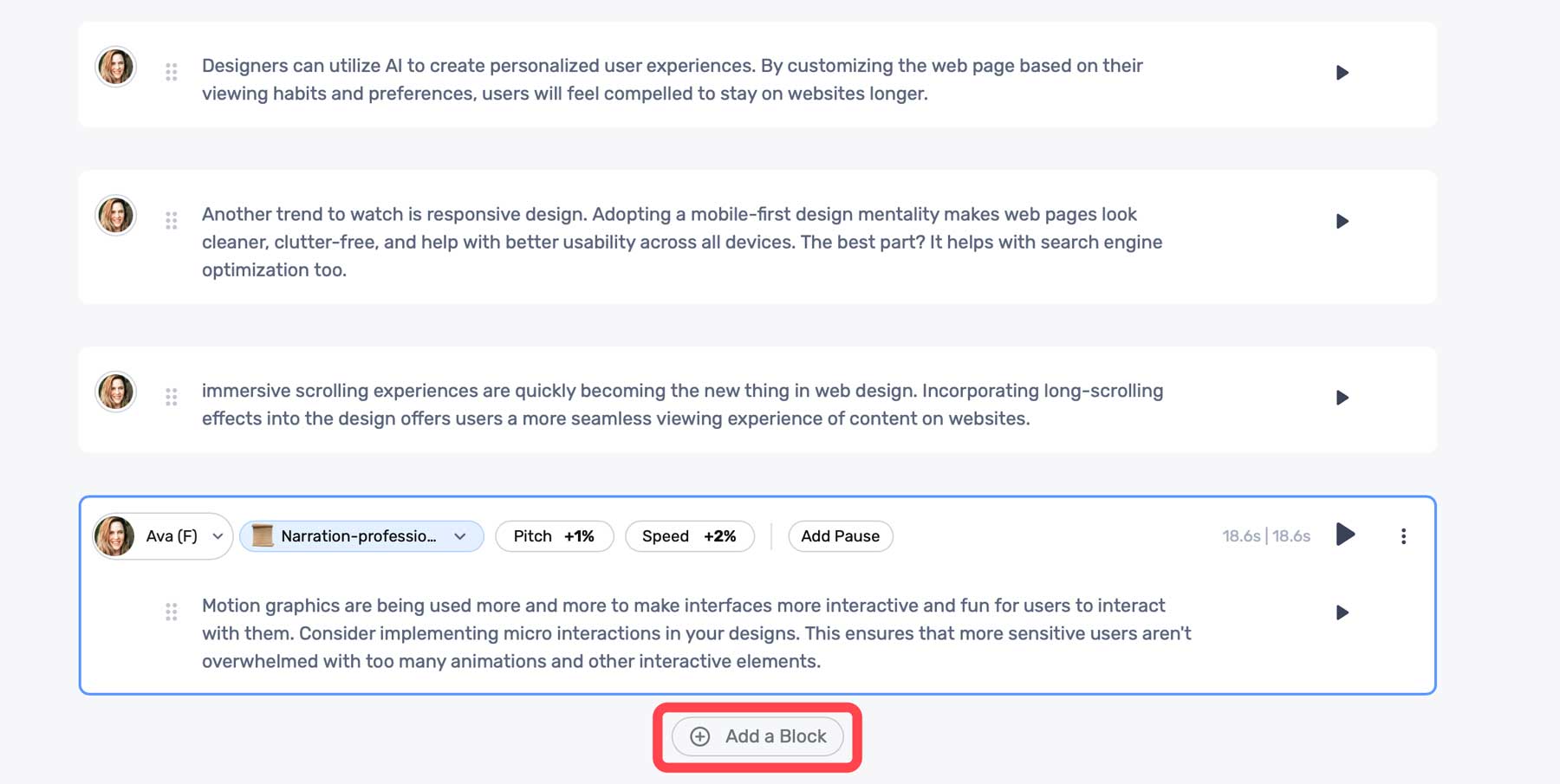
    Once your audio is generated, you can preview the audio using the same play button. Murf AI comes with a few settings to help you adjust the output. These include tone (1), pitch (2), speed (3), and the ability to add a pause (4). These come in handy if the generated voice is too computer-like, has awkward run-on sentences, or needs to be adjusted to a lower or higher sound (pitch).

    audio settings

    Click the + Add a Block button to add more text.

    Murf AI content blocks

    Adding Media To Murf AI Project

    In addition to text-to-speech, Murf AI offers its users stock media assets you can use in your projects. These include stock music, images, and videos. To add media, click the Add Media tab in the dashboard.

    Add media

    You can search the media library for assets to build your video from there.

    Murf AI stock media

    Click on any media to preview it. You can easily add it to your project by clicking the Add to Timeline button.

    Add to timeline

    Using the Voice Changer Feature

    If you prefer, you can add an audio sample and allow Murf AI to transcribe it. It’ll use its proprietary algorithms to analyze your sample and convert it to written text. Once completed, it will automatically be added to the timeline, where you can edit it. At that point, you can make audio edits as necessary for tone or pitch, choose an AI voice, and generate a voiceover in seconds.

    Murf AI voice changer

    Creating an AI voiceover with Murf AI is easy, and the voices are quite good. As an added bonus, Murf AI does an excellent job of allowing its users to customize AI models to get the most realistic sound possible. However, it’s important to mention that when using the free version, you won’t be able to export your projects. However, they are saved in your user account, should you decide to upgrade.

    Here’s a short audio clip of the AI voice model, Ava, reading a portion of our script:


    Pros and Cons of Murf AI

    To be transparent for our readers, weighing the pros and cons of subscribing to Murf AI is important. While there are a lot of pros, including the wide range of AI voices available, there are some cons that you should be aware of.

    Pros of Using Murf AI

    • Over 120+ realistic AI voices with support for 20+ languages
    • Saves time and money over hiring professional voice actors
    • Simple interface
    • Many ethnicities, tones, and styles to choose from

    Cons of Using Murf AI

    • The free plan doesn’t allow downloads
    • Customization of pitch and tone could be better
    • Potential security concerns with voice cloning
    • In our experience, the voice-over-video tool is a bit buggy at times

    Final Thoughts on Murf AI

    Murf AI is a versatile and valuable tool for creating voiceovers for presentations, videos, and more. With more than 120 natural-sounding voices and support for more than 20 languages, it saves time and resources and simplifies creating compelling voiceovers.

    However, it’s important to note that Murf AI isn’t without its flaws. There are occasional bugs with the voice-over-video tool and a need for better customization options for pitch and tone. Despite that, Murf AI stands out above its competition due to how realistic its voices are. If you need a quick way to generate natural-sounding voiceovers, you’ll be hard-pressed to find a better solution than Murf AI.

    The post Murf AI: Review, Details & Pricing (2023) appeared first on Elegant Themes Blog.

  • How to Code in WordPress with AI

    In the past, WordPress users without coding knowledge would either spend hours on Google searching for an answer or solicit the help of a professional web developer. With the emergence of artificial intelligence (AI), that is beginning to change. There are quite a few AI code assistant tools out there, but not all of them are geared specifically for WordPress. In this post, we’ll show you how to code in WordPress with AI so you can save your time and hard-earned money for other tasks.

    Let’s dive in.

    What is AI-Assisted Coding for WordPress?

    AI-assisted coding is the use of machine learning generative AI models that aid in creating code for WordPress. Most AI coding assistants let WordPress users describe what they want the code to do by entering a simple text prompt. From there, AI automatically generates the code for you, complete with custom variable names or CSS classes.

    Why You Should Code in WordPress with AI

    code in WordPress with AI

    image created with Divi AI

    There are several reasons to code in WordPress with AI. First and foremost, it allows novice coders or those with no coding knowledge to add PHP or JavaScript code snippets that change your site’s functionality. Similarly, AI can also generate CSS for you, allowing you to make advanced styling changes to your site’s design elements. Another reason you should consider using AI for coding in WordPress is to troubleshoot errors. If you’ve ever been in a situation where you are seeing the white screen of death or other common errors, AI can help you figure out where the problem is, and help fix it.

    What are the Benefits of Coding in WordPress with AI?

    happy web developer

    image created with Divi AI

    There are countless benefits of coding in WordPress with AI. Let’s highlight a few so you will have a better understanding of how AI can help make your life easier:

    • Minimal learning curve: When using AI, spending countless hours on PHP tutorials is unnecessary. In fact, it can leave you confused and frustrated. Instead, opt for a bit of AI assistance to help. You’ll likely learn a few things, too.
    • Editing theme files: When you’re mainly a web designer, you may not be comfortable editing theme files. With AI, you can put your troubles at ease because a text prompt can help you create those functions.php file hacks you were too afraid to try before.
    • Save money: In the past, if you needed to do something that required coding knowledge, you’d either need to learn how to code, which is time-consuming and sometimes expensive, or pay a developer to help. Using AI, you can avoid the middleman and save money for something else, like purchasing essential plugins or a premium WordPress theme.
    • Make your site stand out: WordPress users should never be complacent with a cookie-cutter website. The beauty of WordPress is that you can make your site look any way you want. That said, sometimes your site may need a little extra “oomph.” Adding code in WordPress with AI is an excellent way to add animations or other functionalities to make your website unique.

    How to Code in WordPress with AI

    code WordPress with AI

    image created with Midjourney

    There are a couple of ways you can code in WordPress with AI. You can use an AI page builder like Elementor to create custom CSS or an AI tool like CodeWP for PHP. As of this writing, no plugin will allow you to code PHP inside WordPress. However, CodeWP was specifically trained using WordPress files and structure, so it knows its stuff. An added bonus is the ability to store snippets in the cloud so you can save them for reuse.

    Before you start plugging custom code snippets into your site, you should do one of two things. We recommend either creating a child theme or a staging site. Doing both is a good idea, too. Regardless, your parent theme or live site will be protected from code snippets that could break your website.

    Let’s go through the steps you’ll need to set things up and generate code in WordPress.

    How to Code CSS in WordPress with AI

    Elementor AI page builder

    Elementor is one of the most popular page builders in the world. In recent months, they joined the AI revolution by offering text, image, and custom CSS generation. It works by activating the edit with AI button in Elementor’s front-end page builder in any module containing text or images.

    activate Elementor AI

    Generate CSS in Elementor AI

    For CSS generation, you’ll have to shell out for a pro license, but you can try Elementor AI text and image generation in the free version. With the pro version activated, hover over a section to reveal the edit section button.

    edit Elementor section

    Next, click the advanced icon in the sections’ settings.

    Elementor advanced settings

    Scroll to reveal the Custom CSS tab. Expand the dropdown menu to show the custom CSS box.

    Elementor custom CSS

    Click the edit with AI button above the custom CSS box.

    edit with AI

    When the dialog box appears, type in a text prompt, such as background color animation 2 colors (1). Then click the generate code button (2).

    Elementor AI text prompt

    Elementor AI will get to work generating your code snippet. It could take up to a minute to render. Once complete, you’ll get a preview of your code. If satisfied with the results, click the insert button to add the code into the Custom CSS box.

    insert code

    Once your code is inserted, you can watch the animation live in the Elementor builder.

    After your CSS code is live, you can change the colors, animation speed, and make other tweaks to suit your preferences.

    If you’d like to easily generate CSS for your web projects with Elementor, you can sign up for a yearly Pro license for $59. Remember, to use Elementor AI’s CSS generator, you’ll need to sign up for a paid plan. Prices start at $2.99 per month for 18,000 credits.

    How to Code PHP for WordPress with AI

    CodeWP

    CodeWP is an AI tool trained specifically using WordPress. It helps you create custom code snippets to extend its functionality or avoid using heavy plugins. When you are ready to implement generated code snippets, you’ll need to install a code snippet plugin, such as WPCode, or create a child theme and copy specific files from the includes folder to place your snippets.

    If you’re a Divi user and want to create a child theme, we have a detailed tutorial on the steps you’ll need to take. That said, if you’re a novice user, we highly recommend the snippet plugin route.

    Sign Up for a CodeWP Account

    If you haven’t signed up for CodeWP, click the Start for Free button.

    create CodeWP account

    When the screen refreshes, you can create an account by linking your Facebook profile, GitHub account, or by creating a username and adding your email address.

    create CodeWP account

    Browsing the CodeWP Interface

    The CodeWP is rather intuitive. You’ll be able to view your snippets, browse public (verified) snippets submitted by other users, get the latest news, and launch several code generators.

    CodeWP welcome screen

    For this tutorial, we’ll be working with the free version of CodeWP, which comes with one interface: WordPress PHP. To unlock the others, you must sign up for a pro license.

    Generate PHP in CodeWP

    To generate your first snippet, click the Generate Code button at the top left of the CodeWP interface.

    generate new snippet

    Next, click the new prompt button to open the text prompt dialog box.

    new CodeWP text prompt

    To demonstrate how easy it is to work within CodeWP, we’ll ask it to create a new custom post type for cars and some custom fields we can fill out in the cars post type.

    Start by entering the following prompt into the text field:
    Create a custom post type called cars and include a taxonomy for vehicle type. Add the following meta fields to the cars custom post type.

    integer number meta field called make
    integer number meta field called model
    integer number meta field called price
    integer number meta field called exterior color
    integer number meta field called interior color
    integer number meta field called seating capacity
    integer number meta field called drivetrain
    integer number meta field called transmission
    integer number meta field called cylinders
    integer number meta field called MPG

    Finally, click the Generate WP Code button.

    add text prompt CodeWP

    After a minute or two, CodeWP will generate your custom PHP code. To use it in WordPress, we’ll need to use the WPCode (or similar) snippet plugin.

    copy CodeWP output

    Copy the output after the opening PHP tag so we can paste it into WPCode.

    Adding PHP Code to WordPress

    Bounce back over to your WordPress admin dashboard. If you still need to install WPCode, do that now. If you need guidance on installing plugins, we have a handy plugin installation guide for you to follow.

    Navigate to Code Snippets > + Add Snippet (1). From there, click Add Your Custom Code (New Snippet) (2).

    add new snippet WPCode

    By default, WPCode selects auto-insert and sets the location to everywhere, which is what we want it to do. To make your snippet live, select PHP from the dropdown (1) and paste the PHP snippet into the code preview (2). Next, activate the snippet (3), and save it (4).

    save PHP snippet

    Once saved, a new post type appears inside the WordPress admin dashboard.

    code in WordPress with AI

    To ensure things are working correctly, hover over the car in the admin panel and click Add New.

    add new car

    Scroll down until you locate the car meta fields. If they are there, congratulations! If not, you can use CodeWP to help adjust the code accordingly.

    CPT meta fields

    Final Thoughts on Coding in WordPress with AI

    WordPress development is rapidly evolving with the integration of AI. Using tools like Elementor AI or CodeWP, you can forego hours of research or expensive web development services. AI tools designed specifically for WordPress can save money and time and teach even the most novice user how to code. Whether you need to add a custom PHP script or take your site’s design to the next level with CSS, AI coding assistants offer invaluable support.

    If you’d like to learn more about what you can do with AI for WordPress, check out some of our other AI-related posts:

    Featured Image via Leonid studio / shutterstock.com

    The post How to Code in WordPress with AI appeared first on Elegant Themes Blog.

  • 11 Best AI Web Design Tools in 2023 (Compared)

    At times, the role of a web designer can be challenging. Occasionally, you may need assistance locating suitable fonts, drafting content, or finding apt images for your project. Thankfully, with the aid of artificial intelligence (AI), you can gain assistance with these difficult tasks. In this post, we’re going to share with you our top choices for the best AI web design tools intended to ignite your creativity.

    Ready to dive in? Let’s get started.

    What is an AI Web Design Tool?

    AI web design tool

    Image created with Midjourney

    AI web design tools aid creators during the web design process. You can use them to generate text, images, and code or even help you find the perfect font combination or color scheme. There are dozens of them available due to the explosion of generative AI. Some are better than others, so it’s important to find the right ones to benefit you the most.

    What You Should Look for in an AI Web Design Tool

    There are a few things to consider when looking for the perfect AI web design tools to get the most out of AI. Consider things like ease of use, the cost to implement, and how it can be used to streamline your workflow.

    Ease Of Use

    The most important factor to consider is ease of use. After all, people use tools to assist in the creative process, not to add to their workload. Choosing a tool that doesn’t take much time to master is one of the best ways to incorporate AI into your design process.

    Keep it on Budget

    Take time to research the cost of each platform so you can decide which tools are right for your situation. There are plenty of tools to choose from, all coming in at different price points. Determine what you need vs. what it will cost so you can weigh the benefits compared to the cost.

    Streamline Your Workflow

    When researching tools, look for those that will make your life easier. Use AI web design tools to provide creative inspiration, help you match fonts, or automate other mundane tasks that would typically take hours.

    Add Functionality

    A great use of AI web design tools is adding functionality to your site without needing a plugin. For example, you can use an AI coding assistant to extend the functionality of WooCommerce, debug errors in your site’s code, or help you become a more efficient coder.

    Enhance Image Assets

    Finding the right image is one of the most frustrating aspects of web design. Sometimes, as creators, we are limited to our client’s pictures. Often, these images are too small or don’t accurately depict what the site is about. In that case, you can use an image upscaling tool or AI art generator to create your own images.

    11 Best AI Web Design Tools in 2023

    There are dozens of AI tools on the market, with more popping up daily. That said, there are only a handful that we can wholeheartedly recommend. These tools are great for generating text and/or images, building complete layouts, creating wireframes, or adding functionality through custom code, to name a few. We conducted extensive testing on over a dozen tools, balancing features and cost, to bring you our picks for the best AI web design tools you can get for your websites. So, without further ado, let’s get to it.

    1. Divi AI

    Divi AI

    Up first on our list is Divi AI. Built using ChatGPT and Stable Diffusion, Divi AI integrates directly into Divi’s no-code Visual Builder. It can generate text and images, improve upon existing images, rewrite existing copy, and even make suggestions based on surrounding content. Divi AI can generate content with one click, including text, images, or modules containing both. It uses powerful features to learn from your site. Simply provide it with a bit of context and watch the magic unfold.

    Key Features of Divi AI:

    • Generate text and images
    • Improve upon existing text and images
    • Learns from your site to provide relevant, on-brand content

    Divi AI image generation

    Divi AI can even generate images automatically. You can use the generate automatically feature to create an image based on your site’s niche in the right size. For example, if you want to replace an image in one of Divi’s layout packs, you can use this tool to generate an image based on the page’s content in the correct size.

    Best For:

    Divi AI is the best AI web design assistant you can get. With the ability to generate text and images based on your site’s unique content, you can build the perfect website in a fraction of the time. If you’re a Divi user, Divi AI is a no-brainer. If not, check out all that Divi has to offer.

    Pricing: Free to try with unlimited generations for $24 per month, with 25% savings if you purchase an annual plan for $216.

    Get Divi AI

    2. Hostinger AI

    Hostinger's AI Website Builder

    Hostinger AI Website Builder is a revolutionary tool that combines the power of AI with an easy-to-use site builder to help you launch a brand-new website with amazing speed and design. Getting started takes about 1 minute. Users can enter a few details about their website and, with a single click, watch as the builder crafts a website tailored to their needs.

    To do this, the builder uses a variety of premade layouts to fit various types of websites. It uses generative AI technology like ChatGPT to fill your page layouts with unique content, images, fonts, and colors for your website design automatically.

    If you need to make customizations to polish your design, the builder has advanced design tools and AI-powered features such as an AI writing assistant, image generator, and even an AI Logo Maker, making it a comprehensive solution for both beginners and seasoned website creators.

    Key Features of Hostinger AI Website Builder:

    • Quick and easy website creation using AI
    • Responsive and customizable design with drag-and-drop functionality
    • Variety of premade templates for different categories
    • Built-in AI writer tool for content generation
    • AI Logo Maker for instant custom logo creation
    • Integrated AI Heatmap tool for user behavior analysis
    • SEO optimization tools and Google Analytics integration
    • eCommerce tools and features for online store creation

    Best For: 
    Hostinger AI Website Builder is ideally suited for individuals or small business owners seeking a quick and efficient way to establish a professional online presence. It is a user-friendly and affordable option for creating a professional website with AI and one of only a few builders that can generate an entire site based on a simple prompt. It offers AI-powered tools and customizable templates suitable for both beginners and experienced users. As an all-in-one site builder on one of the most reliable hosting platforms, it is a popular choice for many.

    Pricing: Limited free trial; Plans start at $2.99 per month

    Try Hostinger AI Website Builder

    3. Framer

    Framer AI

    Our next AI web design tool is Framer. It works much like Webflow, where you can create a design in Figma, and then import it directly into the platform. However, the difference is that Framer takes a fraction of the time, thanks to AI. Built on the React framework, Framer gives even the most novice designer the chops to create a website complete with animations, menus, and other graphic elements on a responsive framework. This means that your site will look awesome on any device.

    Key Features of Framer:

    • Built on the React framework
    • Design a fully responsive website in minutes
    • Integrates with Figma
    • Easily convert HTML-based websites

    Framer Chrome extension

    Another cool feature of Framer is its ability to transfer HTML-based websites into Framer in minutes. It uses a Chrome extension to grab the code, then import it directly into Framer, converting it to a pixel-perfect responsive design.

    Best For:

    If you’re looking for an AI tool to create a small informational website, Framer may be the right choice. Thanks to AI, it allows you to create a fully functional website in a matter of minutes. However, if you want a more robust site, you’ll likely need coding knowledge to get a finished product. For those who want more options, we suggest using Divi AI, which gives you more control over the design and integrations.

    Pricing: Free, with plans starting at $5 per month.

    Get Framer

    4. WixADI

    WixADI

    WixADI is an AI website builder that generates complete websites in a few steps, thanks to an advanced AI assistant. It works by answering a few questions about your business and your design preferences and then produces a fully functional website complete with pages, integrations, and branded results in minutes. It’s a powerful tool for those with limited time or design ability to create a website that’s attractive, functional, and capable of powering an online store.

    Key Features of Wix ADI:

    • Create websites without design experience
    • Highly customizable
    • 100% mobile-friendly
    • Built-in SEO features
    • AI text creator

    One of the best features of WixADI is that every site generated with it is fully responsive. Your website will look great on every device, regardless of screen size. Anyone who’s ever attempted web design on their own knows what a huge plus this is. Responsive websites provide mobile users a seamless experience and rank better in search engine ranking pages (SERPs), primarily because Google takes a mobile-first approach when displaying search results.

    Best For:

    WixADI is an excellent choice for beginners or small business owners who want to showcase their business online but lack the time or expertise to do it themselves. With prices starting at a mere $16 per month, people with even the smallest budget can harness the power of AI. The downside of WixADI is that it only includes some of the tools available in the standard Wix editor. If extensive customization is important, we suggest opting for Divi AI.

    Pricing: Free, with plans starting at $16 per month.

    Get Wix ADI

    5. Photoshop

    Photoshop AI beta

    Next on our list is Photoshop, the grandfather of image editing software. Adobe has worked hard in the past year, incorporating AI features into its flagship product. Among its best features is generative fill, which allows you to add visual elements to your photos with a text prompt.

    Key Features of Photoshop:

    • Generative fill – add elements with a text prompt
    • Extend the pixels of photos
    • Generate full composite images

    Photoshop AI generative fill

    Aside from generative fill, there are a couple of other things that make Photoshop AI stand out. One of which is image extension, which allows you to extend the image area of a photo with the crop tool. From there, you can draw a selection around the blank area of the canvas, click the generative fill button, and watch the magic happen. Photoshop can evaluate the existing pixels of a photo and extend it as if those pixels were already there. In addition to that, you can start with a blank canvas and generate composite images, all with a simple prompt.

    Best For:

    Photoshop is the gold standard for image editing software. With the incorporation of AI features, it’s better than ever. However, there is a steep learning curve to Photoshop, so if you’re looking for an easy way to edit images, we suggest checking out Canva.

    Pricing: Plans start at $20.99 per month.

    Try Photoshop

    6. Uizard

    Uizard AI design tool

    As a web design professional, creating the mockup is one of the process’s most time-consuming yet crucial parts. It allows you to show clients your vision for their site without spending countless hours designing a site they disapprove of. That’s where Uizard comes in. It allows you to create mockups, wireframes, and prototypes to generate UI designs with a text prompt. You can upload sketches, screenshots, or a URL to transform them into editable designs in minutes.

    Key Features of Uizard:

    • Create mockups with a text prompt
    • Generate a functional wireframe from a screenshot
    • Hundreds of pre-designed templates

    Uizard Autodesigner

    One of the best features of Uizard (currently in beta) is the Autodesigner tool. It allows you to create a design based on a series of text inputs describing the project along with design style or keywords, then pick relevant ones, such as light or dark theme, modern, corporate, etc.. Using a text prompt to generate a mockup is a great way to spark creativity and give you a head start on the design process.

    Best For:

    Uizard is an excellent tool for creating mockups from sketches, screenshots, or something simple as a cocktail napkin. It allows you to streamline the beginning of the web design process, saving hours. It’s free to use and offers tons of benefits for creatives. That said, if you want to use the Autodesigner feature, you’ll need to pay for a Pro license, which starts at a very reasonable $12 per month.

    Pricing: Free, with pro plans starting at $12 per month.

    Get Uizard

    7. CodeWP

    CodeWP

    If you’re a WordPress user, CodeWP can help you add custom functionality to your website without needing a plugin. You can add tax rates to WooCommerce, set up a custom shopping cart, or troubleshoot errors such as the WordPress white screen of death. It works by inputting a text prompt describing what you want to create, then watching as CodeWP makes custom code snippets you can use in your WordPress website.

    Key Features of CodeWP:

    • Troubleshoot WordPress coding errors
    • Integrates with page builders such as Elementor and Oxygen
    • Generate custom WP code with a text prompt

    CodeWP integrations

    One of the upcoming features of CodeWP is seamless integration with page builders, such as Elementor and Oxygen. Soon, you can insert snippets directly into the page builder for easy integration.

    Best For:

    Currently, CodeWP is great for creating PHP snippets for your WordPress website. If you’re a WooCommerce user looking to save some cash, CodeWP can create custom snippets for tax calculation, shipment tracking, detecting duplicate product attributes, and more.

    Pricing: Free, with pro plans starting at $12 per month.

    Try CodeWP

    8. Canva

    Canva home page

    Canva has been a part of many web designer’s workflow for years. It offers countless templates to easily create social media, web, and other types of graphics. Recently, Canva incorporated several AI features to make them even more popular with creators, such as magic design, magic erase, magic replace, and magic edit. With these tools, you can easily replace backgrounds, add additional design elements, and more.

    Key Features of Canva:

    • Magic design, erase, replace, and edit tools
    • Thousands of pre-made templates
    • Auto-adjust image correction

    Canva Magic Design AI

    One of the most robust features is Canva’s magic design tool, which allows you to create custom on-brand templates from an uploaded image. There’s also an AI-powered copywriting assistant that generates written content from a text prompt. This is useful for creating presentations, adding website copy, or simply creating a headline for a social media graphic.

    Best For:

    Canva is a great tool for those with limited design knowledge. You can easily create templates for any media using a simple text prompt. If you need to create infographics or other graphic elements for your website, try Canva. They have a free plan to let you try out their AI tools. However, to get the most out of Canva, you’ll need to sign up for a pro license, which will cost you around $15 per month per person.

    Pricing: Free, with plans starting at $14.99 per month per person.

    Try Canva

    9. Font Joy

    Font Joy

    This next AI web design tool, Font Joy, is a stellar choice for pairing Google fonts. As a web designer, looking for the best font pairings for your new web project is time-consuming. Thankfully, Font Joy makes that process a lot less painless. There are only a few bells and whistles with Font Joy, so what you see is what you get. However, it’s still a powerful tool for developing a good user experience with fonts.

    Key Features of Font Joy:

    • Font visualizer
    • Picks supporting fonts based on a chosen font
    • Generates font pairings automatically

    AI web design tool Font Joy

    One of the best features of Font Joy is the font visualizer tool. It allows you to choose a font and then suggests pairings based on their similarities and proximity on a 3-dimensional map. It uses a variety of factors, including font-weight, obliqueness, and X and Y axis, to determine the best font pairing for your chosen font. The best part? You can watch the magic happen in real time and then easily select a pairing that suits you.

    Best For:

    If you waste too much time figuring out what fonts to use in your web design projects, you should try Font Joy. It’s free and offers data-driven font pairings in a matter of seconds.

    Pricing: Free

    Try Font Joy

    10. Midjourney

    MidJourney AI design tool

    Midjourney is one of the most popular AI image-generating products on the market today. It’s known for its ability to create realistic images, 3D characters, and more from a text prompt. It’s also an excellent tool for generating webpage layouts, logo concepts, characters, and icon sets as well.

    Key Features of Midjourney:

    • Generate images, web page mockups, icon sets, and more from a text prompt
    • Ability to change the aspect ratio of images
    • Comes with a list of commands and parameters to improve generated results

    best AI web design tools

    One of the best features of Midjourney is how versatile it is. Using a variety of parameters, you can choose different styles, aspect ratios, and even upload a resource image for stellar results. For example, you can upload a webpage layout as a basis for your generated content and assign the –iw (image weight) parameter to tell Midjourney how heavily your image output should relate to your uploaded image. This is handy if you have a layout in mind but want to improve it.

    Best For:

    Midjourney is a great tool for inspiration for your next web design project. You can create image assets, icon sets, or use a webpage layout as a source image to improve upon. The only downside to Midjourney is the free tier, which dumps your prompt in with thousands of other users. That said, you can sign up for a pro license to create our own chat room to dialog with the bot.

    Pricing: Free, with pro plans starting at $10 per month.

    Try Midjourney

    11. AB Testing AI

    Best AI web design tool AB testing

    One of the most important aspects of a good web design is ensuring that it is optimized for conversions. Most successful web developers and designers know that gathering feedback on designs and how they perform is A/B testing. This is where AB Testing AI comes in. It allows you to input a URL and watch as AI breaks down every aspect of your landing page, offering variations to improve it.

    Key Features of AB Testing AI:

    • Works as a Javascript snippet or as a plugin for WordPress, or Wix
    • Analyzes your site with AI
    • Offers multiple variations to improve conversion rates

    AB Testing AI integrations

    One thing that makes AB Testing AI stand out is that you can run multiple A/B tests simultaneously. This reduces workload and provides actionable insights faster than other A/B testing solutions. Not only that, but it works with various platforms including WordPress, Wix, Squarespace, Shopify, and Workflow.

    Best For:

    If you’re looking for a way to test what will work best on your landing pages, AB Testing AI may be a good choice. With a button click, you can gain valuable insights into your website’s designs through integration with WordPress, Wix, and static HTML sites.

    Pricing: Free, with pro plans starting at $19 per month.

    Try AB Testing AI

    Best AI Web Design Tools Price Comparison

    While most of the entries on our list have different strengths and applications, it’s important to showcase the pricing for each of our featured AI web design tools so you can budget for the ones you are most interested in. So, look at the comparison table below to plan which ones to incorporate into your web design process.

    AI Web Design Tool Price Free Option
    🥇 Divi AI $24/month ✔️ Visit
    🥈 Hostinger AI Website Builder $2.99/month ❌ Visit
    🥉 Framer $5/month ✔️ Visit
    4 Wix ADI $16/month ✔️ Visit
    5 Uizard $12/month ✔️ Visit
    6 CodeWP $12/month ✔️ Visit
    7 Photoshop $20.99/month ❌ Visit
    8 Canva $14.99/month ✔️ Visit
    9 Font Joy Free ✔️ Visit
    10 Midjourney $10/month ✔️ Visit
    11 AB Testing AI $19/month ✔️ Visit

    What are the Best AI Web Design Tools?

    When considering which of our recommended AI web design tools are the best, we must consider their roles in the process. If you are a Divi user or pondering becoming one, we highly suggest Divi AI. With its text and image generation and ability to generate content based on your website’s niche, you won’t find a better AI page builder.

    If you are looking for an all-in-one AI web design and hosting solution, the Hostinger AI Website Builder can get your entire site up and running from start to finish with the power of AI. It has all the additional AI tools needed for optimizing your design, content, and SEO as well.

    On the other hand, if you’re looking for a way to incorporate your Figma designs, Framer is an excellent option. Either way, incorporating any AI web design tools on our list will save valuable time and inspire creativity for your next web design project.

    Need more AI tools? Check out all our articles featuring the best AI tools for your business.

    Featured Image via ProStockStudio / shutterstock.com

    The post 11 Best AI Web Design Tools in 2023 (Compared) appeared first on Elegant Themes Blog.

  • Get a Free Book Store Layout Pack for Divi

    Hey Divi Nation! Thanks for joining us for the next installment of our weekly Divi Design Initiative; where each week, we give away a brand new Layout Pack for Divi.

    This time around, the design team has created a beautiful Book Store Layout Pack that’ll help you get your next Book Store website up and running in no time!

    This layout pack includes:

    7 Premade page layouts strategically designed for any Book Store website (including a footer design)
    – Original, royalty-free photos and graphics + customizable source file (see below)
    – Plus, a large collection of pre-designed website elements that are customizable and reusable anywhere.

    This layout pack is available right inside Divi for all Divi customers for FREE as the latest addition to our growing Divi library of hundreds of premade layout packs, thousands of page designs, and countless web design elements and resources.

    divi layout

    Check Out The Divi Book Store
    Layout Pack Below

    Get it for free today!

    Book Store layout pack

    Landing Page Design

    Book Store layout pack

    View The Live Layout Demo

    Home Page Design

    Book Store Layout Pack for Divi

    View The Live Layout Demo

    Shop Page Design

    Book Store Layout Pack for Divi

    View The Live Layout Demo

    Product Page Design

    Book Store Layout Pack for Divi

    View The Live Layout Demo

    About Page Design

    Book Store Layout Pack for Divi

    View The Live Layout Demo

    Blog Page Design

    Book Store Layout Pack for Divi

    View The Live Layout Demo

    Contact Page Design

    Book Store Layout Pack for Divi

    View The Live Layout Demo

    Key Features

    Looking for a bold new design to sell your books online? Check out the Book Store Layout Pack for Divi. Packed with quirky design details, bold colors, and beautiful simplicity, this layout pack will have your visitors coming back for more.

    Live Demos

    Click the links below to see a live demo for each of the layouts included in the pack.

    1. Book Store Landing Page (live demo)
    2. Book Store Home Page (live demo)
    3. Book Store Shop Page (live demo)
    4. Book Store Product Page (live demo)
    5. Book Store About Page (live demo)
    6. Book Store Blog Page (live demo)
    7. Book Store Contact Page (live demo)

    Access This Layout Right Now
    Directly from Your Divi Builder

    Since Version 3.0.99 of Divi, you can find and import any of the layouts included in this pack (along with ALL of Divi’s Premade Layout packs) directly from the Divi Builder. They are already waiting for you.

    To access your new layout, simply activate the Visual Builder when editing a page and look for the “Load From Library” icon in the page settings bar (it looks like a plus symbol). Click this icon to launch the Load From Library popup. Under the Premade Layouts tab, you can easily find the new layout by scrolling through the list of layout packs. Once you find the Book Store Layout Pack, click on it. You will see all the individual layouts included in the pack. Select the layout you want to use and then click the “Use This Layout” button.

    Book Store Layout Pack for Divi

    For more, check out this video to learn how you can get this layout pack up and running today.

    Subscribe To Our Youtube Channel

    Authentication Required

    Before you can download Premade Layouts from the Divi Library you must authenticate your Elegant Themes Subscription. You can do this by navigating to Divi > Theme Options > Updates. There you can enter your username and API key and save changes.

    Book Store Layout Pack for Divi

    You can find your API Key under your members area on the Elegant Themes site. After you enter the Username and API Key, you will gain immediate access to our library of hundreds of free layouts (including this one). If you haven’t done this, when you click to import a layout to your page, you will be prompted to enter your Elegant Themes Membership Username and API Key.

    Use Layout Images for FREE with No Licensing Restrictions

    Book Store Layout Pack for Divi

    The image assets included with these layouts (icons, illustrations, photos, etc.) have no licensing restrictions. This means you can use them in all of your commercial projects without having to worry about paying licensing fees or attributing the photographer. Use them in your commercial websites, sell them within your Divi child themes, include them in your own Divi layout packs or just use them on your blog. We know how challenging it can be to find good photos and how confusing and scary the licensing that governs those photos can be. We want to fix that problem for our users.

    Download the Full Res Image Assets

    New Layout Pack Every Week!

    We hope you enjoy this layout pack. We look forward to hearing your opinions in the comment section below. Make sure you check out next week’s layout pack as well!

    The post Get a Free Book Store Layout Pack for Divi appeared first on Elegant Themes Blog.

  • 6 Best AI Presentation Tools in 2023 (Compared)

    If you’ve ever been tasked with creating a presentation for your business or a client, you know how time-consuming it can be. Sitting in front of a blank page, combing through endless templates, or spending hours on a presentation probably isn’t high on your list of priorities. Thanks to artificial intelligence (AI), there’s a better way to create presentations. In this post, we’ll delve into the best AI presentation tools so you can spend more time on other tasks.

    Let’s dive in.

    What is an AI Presentation Tool?

    what is an AI presentation tool

    image created with Divi AI

    An AI presentation tool is a system that uses machine learning generative AI that allows you to create presentations in minutes rather than hours. These revolutionary tools will enable you to craft your presentation from script to finished product, all with a descriptive text prompt.

    What to Look for in an AI Presentation Maker

    As we explore the top AI presentation makers available, it’s best to look for features that will make your life easier, not harder. Here are a few things that your chosen tool should offer:

    • Ease-of-use: If you’re looking to incorporate an AI presentation tool into your workflow, you’ll want to find something easy to use. After all, you seek a less time-consuming way to create presentations. You shouldn’t have to spend hours learning a new interface.
    • Integration with popular software: Those in the business world know that there are three primary presentation tools that almost everyone uses: Microsoft PowerPoint, Adobe Keynote, and Google Slides. When shopping for AI presentation tools, look for products that can easily export your creations for those popular programs.
    • Customization options: Another important factor to consider is how easily you can customize your presentation. Look for programs that won’t force you to stick with cookie-cutter AI-generated templates. Make sure you can make design and text edits as you need them.
    • Tutorials: Learning new software can be intimidating, so make sure to choose a platform that offers plenty of tutorials and support should you encounter any problems.

    6 Best AI Presentation Tools in 2023

    We evaluated over a dozen AI presentation tools. While some decent ones didn’t make our list, we wanted to focus on tools that are easy to use, work with popular programs like PowerPoint or Google Slides, and offer the most features. Without further ado, here are our top picks for the best AI presentation tools money can buy. Most offer free versions or a free trial, so feel free to try all of them out to find the best fit for your situation.

    1. Simplified

    Simplified

    Simplified is one of the most robust AI tools on the market today. Through generative artificial intelligence, it can create presentations, images, memes, thumbnails, social media quotes, and more. What makes it unique is its wealth of AI features that appeal to creatives and content creators across different mediums, including digital art, writing, videos, and online advertising through social media.

    Key Features of Simplified:

    • Generate presentations and other forms of media
    • Edit images and text with AI
    • Create logos and design elements with AI
    • One-click editing tools for image editing

    Simplified image editing

    Another cool feature of Simplified is the image editing feature. You can remove or replace the background, erase elements, magically remove artifacts or other imperfections, autofocus, or use generative fill to add additional details to your photos. The generative fill feature works much like Photoshop AI, where you can select an area of a photograph and fill it with a new element you describe with a text prompt.

    Best For:

    Simplified may be for you if you’re in the market for an all-in-one design tool. With AI tools for generating presentations and all their elements, you can design like the pros for a very affordable price.

    Pricing: Free, with design pro plants starting at $9 per month.

    Try Simplified

    2. Slides AI

    AI presentation tools Slides AI

    Slides AI is an extension for Chrome designed to work inside Google Slides. Provide it with a topic, including any requested elements, and Slides AI will create up to a 10-page presentation in minutes. There are limited features, but it adds slides, generates text, and sets formatting based on your prompt. In addition to generating slides, Slides AI has a Magic Write feature, which allows you to paraphrase sentences, suggests images for your presentations, and helps you search for citations for your work.

    Key Features of Slides AI:

    • Magic write
    • Generate slides based on original content
    • Create slides from a topic

    Slides AI text prompt

    Slides AI has a simple interface, allowing you to focus more on creating content than learning new software. Since it works as an extension within Google Slides, you simply have to click a button, type in some text, and Slides AI will do the rest.

    Best For:

    If you are a regular Google Slides user, Slides AI is a no-brainer. You can save time creating your slides and give them a fresh look in seconds. The downside to Slides AI is that there is no text generator. That said, plenty of AI writers, such as Rytr or Jasper can help.

    Pricing: Free, with pro plans starting at $10 per month.

    Try Slides AI

    3. Gamma

    Gamma AI presentation tool

    Gamma is one of the most intuitive platforms on our list. It uses generative AI to build your presentation from a text prompt, complete with visual aids, such as charts, graphs, images, and other visual elements – automatically. One of our favorite features is the interface. Once Gamma creates your presentation, you can easily add more elements. It functions much like a page builder or Gutenberg for WordPress, where you can drag and drop visual elements into your pages and then tweak them accordingly.

    Key Features of Gamma:

    • Analytics tracking
    • Share over the web and solicit feedback through comments
    • Drag-and-drop visual editor
    • Export to PowerPoint or PDF

    Gamma presentation wizard

    Gamma creates presentations on the fly simply by typing in a text prompt. One of our favorite features is watching in real-time as Gamma makes your presentation. Once completed, you can use generative AI to edit, improve, or change any presentation aspect to match your branding and style. Another unique feature is Gamma’s analytics feature, which allows you to see who’s viewed your presentation and track engagement down to the element level.

    Best For:

    Gamma’s intuitive interface and quick start wizard make getting started a breeze. Plus, with their AI-powered text editing feature, you can tweak the content as much as you’d like. They offer access to millions of royalty-free stock images and an AI-powered image generator that suggests a relevant prompt based on your content.

    Pricing: Free, with pro plans starting at $15 per month.

    Try Gamma

    4. Beautiful AI

    Beautiful AI

    Another popular choice is Beautiful AI, a feature-packed AI presentation tool that allows you to create stunning presentations with one click. They offer several AI-powered design elements you can edit to match your branding. Plus, it’ll even line these up automatically, so you don’t have to spend time on tedious tasks. If you’d rather start from a previously created presentation, you can easily import a PowerPoint file and then use AI to improve it.

    Key Features of Beautiful AI:

    • Create AI-generated presentations with one click
    • AI-powered design elements
    • Rewrite and improve text with AI
    • 110+ pre-designed templates
    • Integrates with PowerPoint (import/export)

    Beautiful AI stock photography

    One of the best features of Beautiful AI is the millions of royalty-free stock images at your disposal. Sure, you can create your own AI images, but if you’re familiar with AI Art generators, you know that sometimes the photos they produce don’t look very natural. It’s nice they thought to include this feature because it saves you the time and cost of signing up for a stock photography service.

    Best For:

    If you’re tasked with creating presentations for your company or corporate freelance clients and must use PowerPoint, Beautiful AI is an excellent choice. While they don’t have a free plan, they offer a 14-day free trial, so you’ll have plenty of time to play with it and decide if it’s right for you.

    Pricing: Starting at $12 monthly (billed annually).

    Get Beautiful AI

    5. Tome

    Tome AI presentation tool

    Tome is one of the most popular AI presentation tools on the market. Since its release in late 2022, it has raced to become one of the fastest-growing platforms in record time, with over 1 million users. It allows you to create live, interactive presentations, mood boards, design portfolios, pitch decks, webpages, and more. Tome offers over 25 templates to give you a good starting point, which is a great time-saving feature. Its intuitive generative AI allows you to create scripts, text, images, charts, and more.

    If you already have an outline in mind, you can easily paste it into Tome, allowing it to convert your thoughts into structured presentations in a single click. Does your business require a multi-lingual solution? Tome has you covered with support languages other than English, so you can translate your text to share your presentations with anyone, anywhere.

    Key Features of Tome:

    • Creates live, interactive presentations
    • Responsive layouts for any screen size
    • Generates text, images, graphs, 3D models, and more
    • Multi-language support

    Tome interface

    Tome is web-based and provides a sharable link for your creations. Not only that, it integrates with popular platforms, such as Figma, Spline, YouTube, Twitter, Google Sheets, and other popular AI website builders like Framer. With these integrations, you can import videos, layouts, text, and even full web pages.

    Best For:

    Tome is an excellent platform for creating web-based presentations, landing pages, interactive pitch decks, and more. It does a pretty good job of text and image generation, but its integrations are the best features. Try Tome if you want an easy way to incorporate Figma layouts or YouTube videos into your presentations.

    Pricing: Free, with pro plans starting at $8 for unlimited credits.

    Try Tome

    6. PowerPoint

    AI presentation tools Microsoft 365

    Microsoft is the founding father of business software, including the widely popular PowerPoint. Sure, there are other products out there that are geared toward businesses, but PowerPoint is the gold standard for making presentations. Did you know that it comes with AI features built right in?
    Companies that already use Microsoft products will be pleased to know that you can generate incredible designs for all of your presentations through artificial intelligence.

    Key Features of Microsoft 365:

    • AI Designer for generating slides
    • Uses AI to add additional slides based on the original design
    • Generate rehearsal reports to get feedback on presentation delivery

    Microsoft reheasal report

    One of the best features of PowerPoint is the Rehearse with Coach AI tool. It records your voice and image on video to evaluate your performance. It allows you to read through your presentation and then get a professional critique of how you did. You’ll get a rehearsal report that analyzes your body language, notes how many filler words you used, and analyzes your pace and pitch.

    Best For:

    If you make presentations for a living or your company requires PowerPoint, you should check out their AI tools. The Rehearsal Report feature is well worth the cost, especially if you are the one who has to give the presentation you create. Microsoft will even give you a 30-day risk-free trial so you can try it out. The downside is that it doesn’t come with a text generator, but you can get around that by adding an AI chatbot like ChatGPT to your arsenal of tools.

    Pricing: Plans start at $6.99 per month.

    Try Microsoft 365

    Comparing the Best AI Presentation Tools

    Before deciding on which AI presentation tool to choose, take the time to compare prices and the features of every tool on our list. As previously mentioned, all of our featured tools either include a free trial or a free version to assist you in making gorgeous presentations.

    Best AI Presentation Tool Price Comparison

    We’ve created this hand comparison table to help you decipher pricing for each of our recommended AI presentation tools.

    Plugin Price Free Option
    🥇 Simplified AI $9/month ✔️ Visit
    🥈 Slides AI $10/month ✔️ Visit
    🥉 Gamma AI $15/month ✔️ Visit
    3 Beautiful AI $12/month ❌ Visit
    4 Tome $8/month ✔️ Visit
    6 PowerPoint $69/year ❌ Visit

    Best AI Presentation Tool Feature Comparison

    For you to make the most informed decision, it’s important to not only know the pricing but compare the features as well. Here’s a feature comparison table for all of the AI presentation tools on our list so you can decide which is the best fit.

    🥇 Simplified 🥈 Slides AI 🥉 Gamma
    Price $9/month $10/month $15/month
    AI Image Generation ✔️ ✔️ ✔️
    AI Image Editing ✔️ ✔️ ✔️
    AI Text Generation ✔️ ✔️ ✔️
    AI Text Editing ✔️ ✔️ ✔️
    One-Click Presentation ✔️ ✔️ ✔️
    Try Simplified Try Slides AI Get Gamma

    What is the Best AI Presentation Tool?

    After thoroughly testing over a dozen AI presentation tools, we feel that Simplified and Slides AI offer the best set of features. Simplified stands out for its intuitive interface, logo, and other design element generation. It also gets the nod for its one-click editing tools. On the other hand, Slides AI is a close second due to its wealth of AI tools. You can create presentations, generate written content, and create on-topic slides effortlessly. Either way, if you’re in the market for a good AI assistive tool to speed up the process of creating presentations, you can’t go wrong with either.

    Need more AI tools? Check out these articles featuring the best AI tools to use for your business:

    Featured Image via Nattasid Thapsang / shutterstock.com

    The post 6 Best AI Presentation Tools in 2023 (Compared) appeared first on Elegant Themes Blog.

  • 3 Best WordPress AI Page Builders in 2023 (Compared)

    With the rapid advancement of WordPress page builders and the integration of AI technology, creating stunning websites has never been easier. By harnessing the power of generative artificial intelligence (AI), users can now experience AI within a drag-and-drop builder. AI page builders are revolutionizing how we generate content, enabling effortless text and image creation directly on the front end. In this post, we’ll look at the top WordPress AI page builders currently available and AI plugins that complement them.

    Let’s get started.

    What Is a WordPress AI Page Builder

    An AI page builder is a plugin or theme that allows you to build web pages with the help of AI. Using a drag-and-drop visual interface on the front end, usually without the need for coding. Page builders keep you from bouncing between the front and back end, so you can view design changes in real time. With AI page builders, you can create posts, pages, and templates by adding simple text prompts to aid in text and image generation.

    Why Do We Need a WordPress AI Page Builder

    There are many benefits of using a WordPress AI page builder, including:

    • Saving time: Using a page builder with AI built-in, you can effortlessly build web pages, write text, and generate images in a fraction of the time it would take to write the content yourself.
    • Pre-made templates: Most page builders offer free design layouts that you can customize to match your branding.
    • Generate high-quality content: Using an AI page builder, you can input keywords, specify a writing tone, and generate content for your site effortlessly.
    • There’s no need for stock image subscriptions: With AI image generation built-in, there’s no need to sign up for an expensive stock photography subscription.
    • Save money: By using an AI page builder, you lower your costs for generating text and images. With other AI art generators or AI chatbots, you’ll pay for credits. This can sometimes be more expensive than monthly fees for unlimited generations.

    The Best WordPress AI Page Builders

    With the technology relatively new, only a few AI page builders are out there. That said, we fully expect this to change. In fact, we have it on good authority that many popular page builders are hard at work building AI integrations, so we expect this list to grow exponentially. In the meantime, here are a few that are available or set to be released soon.

    1. Divi

    Divi AI

    First on the list is Divi, which comes packed with AI features to increase your productivity and make building web pages a snap. It can write content and generate images right inside the Visual Builder, so you can view text and image creation in real time. Not only that, but Divi AI can generate text automatically based on the surrounding content on your website.

    With Divi AI, you can create unlimited text and images, which is great when considering the cost of other generative AI. Unlike its competitors, you won’t need to purchase credits or tokens to generate content. Those who have used AI in the past can tell you that those credits will run out quickly while you’re trying to perfect the text and images you create. With one flat monthly fee, you can tweak, improve, and perfect until your heart’s content without reloading your balance.

    Key Features of Divi

    • Auto-Generate content with one click
    • Produces highly relevant, on-brand results by analyzing the content on your site
    • Auto-Generate images
    • Refines & modifies existing images
    • Translate languages automatically
    • Built with ChatGPT and Stable Diffusion

    Divi AI interface

    Divi AI improves upon Divi’s already amazing capabilities. You’ll have access to over 200 design elements, 2000+ design layouts, and seamless integration with popular plugins like Toolset, WPForms, WooCommerce, and more.

    Best For

    Divi is best for beginners and professional web designers who want a robust visual page builder that also creates text and images on the fly through the power of artificial intelligence.

    Pricing: Divi AI starts at $18 per month when paid yearly, which includes unlimited text and image generation for you and your entire team.

    Get Divi

    2. Elementor AI

    Elementor AI page builder

    Similar to Divi AI, Elementor AI works within a drag-and-drop front-end editor. Using generative AI, you can generate images, write copy, and add code snippets. Elementor AI activates once you click the Create with AI button in the Elementor builder. You can describe the type of content you want to generate, and within a minute, you’ll have a new image or copy ready for use on your website. If you want to refine an existing image, Elementor AI can do that, too. You can edit pictures, add design elements, and even extend photos, making filling in white space easy.

    Key Features of Elementor AI

    • Generate text
    • Generate images
    • Refine existing images
    • Automate translations
    • Generate custom CSS

    Elementor AI interface

    In addition to image and text generation, Elementor AI can create custom CSS snippets for your design elements. Describe what you want your element to look like, and Elementor AI will transform it into a usable CSS snippet you can copy and paste into your site.

    Best For

    Elementor AI is a cost-effective way to incorporate AI into your website. However, unlike Divi AI, Elementor limits the number of generations you can have. For example, the lowest-tiered plan allows for 18,000 generations. For some, that may be more than enough for what you need. That said, those with larger sites may require a higher-tiered plan.

    Pricing: Starts at $2.99 per month for 18,000 credits.

    Get Elementor

    3. Spectra Pro

    Spectra Pro

    Spectra Pro is a page builder that works within the WordPress editor. It comes with 28 Spectra blocks that can be used alongside the blocks that come standard with WordPress. At the time of this writing, Spectra Pro is in the process of adding AI features, including AI-powered design suggestions, text generation, and the ability to revise existing copy with a text prompt.

    Key Features of Spectra Pro

    • Text generation (coming soon)
    • Improve existing copy with AI (coming soon)
    • AI design suggestions (coming soon)

    Spectra Pro AI

    One of the best features of Spectra Pro is its ease of use. WordPress users can easily drag elements onto the page, style them, and see their design changes in real time. It provides an excellent way to extend the Gutenberg block editor without bloating your site.

    Best For

    Those who prefer to work within the Gutenberg block editor will love Spectra Pro. Spectra Pro has something for everyone, with over 28 additional blocks, design templates, and a lightweight footprint. Soon, the folks at Spectra will be adding AI features, so those looking to add AI to Gutenberg should closely monitor their progress.

    Pricing: $49 per year.

    Get Spectra Pro

    AI Plugins that Integrate with Popular Page Builders

    While there aren’t a ton of AI page builders out there (yet), there are quite a few WordPress AI plugins that integrate into popular page builders like Divi, Elementor, Visual Composer, Beaver Builder, and Oxygen. While functionality is limited, these will allow you to generate text and images or improve SEO titles and meta descriptions within the page builder interface.

    Here’s a short list of some of those plugins:

    Get Genie

    Get Genie AI

    Get Genie is a WordPress AI plugin that boasts improved SEO copy through text generation. You can generate long-form content, blog posts, optimize for SEO, write product descriptions, and more. It offers integration with Gutenberg and Elementor. It has over 37 templates, including social media, blogs, WooCommerce, FAQ, and more.

    Get Genie offers a free version that allows you to use it on one website. You’ll get 2,500 words, 10 SEO keyword analyses per month, access to all templates, a WordPress blog post wizard, and more. If you need a more robust plan with unlimited words, opt for the Agency Unlimited plan for around $69 monthly.

    Pricing: Free, with monthly plans starting at $69.

    Try Get Genie

    Bertha AI

    Bertha AI

    BerthaAI is an AI plugin that helps you craft web copy, product descriptions, or blog posts with artificial intelligence. In addition, you can create images and illustrations to use within your WordPress website. It works with all of the major page builders, including Elementor, Divi, Beaver Builder, Thrive, Visual Composer, and more.

    For one monthly fee, unlimited users will have access to 1 million words and 20 image generations per month. Alternatively, you can sign up for a pay-as-you-go plan offering 100 images for $15.

    Pricing: $20 per month.

    Get Bertha AI

    Rank Math

    Rank Math content AI

    Rank Math is a powerful SEO plugin that integrates seamlessly with Divi. It works within the Visual Builder, so you can tweak on-page SEO on the front end. It comes with Content AI, which allows you to generate SEO-optimized copy for your website. Content AI also gives suggestions based on your current content, including suggested word count, link count, and more.

    Content AI comes standard with both free and paid versions of Rank Math. You’ll get 5 free credits so you can test out the functionality. When depleted, you can purchase additional credits through the WordPress dashboard or your Rank Math account.

    Pricing: Free with pro plans starting at $59 for the first year. Free plans come with 5 AI credits, while the pro plan offers 25. Additional credits cost $49 for 75.

    Get Rank Math

    AI Engine

    AI Engine

    AI Engine is an AI plugin for WordPress that allows you to generate text and images inside WordPress. The plugin has a free version, but you’ll need OpenAI and Stable Diffusion API keys to create text and images. One of the coolest things about AI Engine is the ability to create your own chatbot, which can be displayed through a shortcode. This allows you to use AI Engine in any page builder or Gutenberg.

    AI Engine also offers a paid version with all the benefits of the free version, along with an AI form generator that allows you to create dynamic forms to answer common questions. Additional features include content-aware, which enables AI to analyze your site’s content and make suggestions to improve it.

    Pricing: Free with pro plans starting at $49 per year.

    Get AI Engine

    Comparing The Best WordPress AI Page Builders

    We’ve compared the top three AI page builders so you can get a feel for what’s out there and the features that they offer. Although there are only a few, each option featured in this post will give you plenty of AI features to help create or improve your website’s content.

    AI Page Builder Price Comparison

    We’ve compiled this handy table to provide pricing for our top AI page builders. Divi AI and Elementor AI have a free trial, so you can test them and decide which you prefer.

    Plugin Price Free Option
    🥇 Divi AI $18/month ✔️ Visit
    🥈 Elementor AI $2.99/month ✔️ Visit
    🥉 Spectra Pro $49/year ❌ Visit

    AI Page Builder Feature Comparison

    Here’s another table showcasing the features of each AI page builder.

    🥇 Divi AI 🥈 Elementor AI 🥉 Spectra Pro
    Theme + AI price $18/month $2.99/month $49/year
    AI Image Generation ✔️ ✔️ (coming soon)
    AI Image Editing ✔️ ✔️ (coming soon)
    AI Text Generation ✔️ ✔️ (coming soon)
    AI Text Editing ✔️ ✔️ (coming soon)
    Active Installations 881,346 5 million 500,000+
    Community Rating 4.9/5
    ⭐⭐⭐⭐⭐

    Read Reviews

    4.6/5
    ⭐⭐⭐⭐

    Read Reviews

    4.5/5
    ⭐⭐⭐⭐

    Read Reviews

    Get Divi Get Elementor Get Spectra Pro

    What is The Best WordPress AI Page Builder

    If you’re looking for an AI page builder with unlimited text and image generation, Divi AI can’t be beaten. With the power of Divi’s no-code Visual Builder with AI onboard, Divi is a must-have for creators looking to create SEO-quality written content, generate images, or improve upon both. Unlike competitors such as Elementor AI, Divi doesn’t cap the number of generations you can have. This excellent feature will allow you to make as many tweaks and content changes as you wish. Additionally, Divi AI is tied to your Elegant Themes account, so it can be used on unlimited Divi websites. If you’re looking for the perfect AI assistant for your WordPress website, try Divi AI.

    Featured image via BestForBest | Shutterstock.com

    The post 3 Best WordPress AI Page Builders in 2023 (Compared) appeared first on Elegant Themes Blog.

  • Get a Free Online University Layout Pack for Divi

    Hey Divi Nation! Thanks for joining us for the next installment of our weekly Divi Design Initiative; where each week, we give away a brand new Layout Pack for Divi.

    This time around, the design team has created a beautiful Online University Layout Pack that’ll help you get your next Online University website up and running in no time!

    This layout pack includes:

    6 Premade page layouts strategically designed for any Online University website (including a footer design)
    – Original, royalty-free photos and graphics + customizable source file (see below)
    – Plus, a large collection of pre-designed website elements that are customizable and reusable anywhere.

    This layout pack is available right inside Divi for all Divi customers for FREE as the latest addition to our growing Divi library of hundreds of premade layout packs, thousands of page designs, and countless web design elements and resources.

    divi layout

    Check Out The Divi Online University
    Layout Pack Below

    Get it for free today!

    Online University layout pack

    Landing Page Design

    Online University layout pack

    View The Live Layout Demo

    Home Page Design

    Online University Layout Pack for Divi

    View The Live Layout Demo

    About Page Design

    Online University Layout Pack for Divi

    View The Live Layout Demo

    Admissions Page Design

    Online University Layout Pack for Divi

    View The Live Layout Demo

    Blog Page Design

    Online University Layout Pack for Divi

    View The Live Layout Demo

    Contact Page Design

    Online University Layout Pack for Divi

    View The Live Layout Demo

    Key Features

    Are you looking for a sleek and sophisticated design for your online university website? Look no further than the Online University Layout Pack for Divi. This eye-catching design combines monochrome with a soft color palette to showcase your new venture in stunning style. From color blocks to image masks and unique image galleries, this modern design is full of daring design elements to engage your students.

    Live Demos

    Click the links below to see a live demo for each of the layouts included in the pack.

    1. Online University Landing Page (live demo)
    2. Online University Home Page (live demo)
    3. Online University About Page (live demo)
    4. Online University Admissions Page (live demo)
    5. Online University Blog Page (live demo)
    6. Online University Contact Page (live demo)

    Access This Layout Right Now
    Directly from Your Divi Builder

    Since Version 3.0.99 of Divi, you can find and import any of the layouts included in this pack (along with ALL of Divi’s Premade Layout packs) directly from the Divi Builder. They are already waiting for you.

    To access your new layout, simply activate the Visual Builder when editing a page and look for the “Load From Library” icon in the page settings bar (it looks like a plus symbol). Click this icon to launch the Load From Library popup. Under the Premade Layouts tab, you can easily find the new layout by scrolling through the list of layout packs. Once you find the Online University Layout Pack, click on it. You will see all the individual layouts included in the pack. Select the layout you want to use and then click the “Use This Layout” button.

    Online University Layout Pack for Divi

    For more, check out this video to learn how you can get this layout pack up and running today.

    Subscribe To Our Youtube Channel

    Authentication Required

    Before you can download Premade Layouts from the Divi Library you must authenticate your Elegant Themes Subscription. You can do this by navigating to Divi > Theme Options > Updates. There you can enter your username and API key and save changes.

    Online University Layout Pack for Divi

    You can find your API Key under your members area on the Elegant Themes site. After you enter the Username and API Key, you will gain immediate access to our library of hundreds of free layouts (including this one). If you haven’t done this, when you click to import a layout to your page, you will be prompted to enter your Elegant Themes Membership Username and API Key.

    Use Layout Images for FREE with No Licensing Restrictions

    Online University Layout Pack for Divi

    The image assets included with these layouts (icons, illustrations, photos, etc.) have no licensing restrictions. This means you can use them in all of your commercial projects without having to worry about paying licensing fees or attributing the photographer. Use them in your commercial websites, sell them within your Divi child themes, include them in your own Divi layout packs or just use them on your blog. We know how challenging it can be to find good photos and how confusing and scary the licensing that governs those photos can be. We want to fix that problem for our users.

    Download the Full Res Image Assets

    New Layout Pack Every Week!

    We hope you enjoy this layout pack. We look forward to hearing your opinions in the comment section below. Make sure you check out next week’s layout pack as well!

    The post Get a Free Online University Layout Pack for Divi appeared first on Elegant Themes Blog.

  • Get a Free Consulting Layout Pack for Divi

    Hey Divi Nation! Thanks for joining us for the next installment of our weekly Divi Design Initiative; where each week, we give away a brand new Layout Pack for Divi.

    This time around, the design team has created a beautiful Consulting Layout Pack that’ll help you get your next Consulting website up and running in no time!

    This layout pack includes:

    7 Premade page layouts strategically designed for any Consulting website (including a footer design)
    – Original, royalty-free photos and graphics + customizable source file (see below)
    – Plus, a large collection of pre-designed website elements that are customizable and reusable anywhere.

    This layout pack is available right inside Divi for all Divi customers for FREE as the latest addition to our growing Divi library of hundreds of premade layout packs, thousands of page designs, and countless web design elements and resources.

    divi layout

    Check Out The Divi Consulting
    Layout Pack Below

    Get it for free today!

    Consulting layout pack

    Landing Page Design

    Consulting layout pack

    View The Live Layout Demo

    Home Page Design

    Consulting Layout Pack for Divi

    View The Live Layout Demo

    Services Page Design

    Consulting Layout Pack for Divi

    View The Live Layout Demo

    Service Page Design

    Consulting Layout Pack for Divi

    View The Live Layout Demo

    About Page Design

    Consulting Layout Pack for Divi

    View The Live Layout Demo

    Blog Page Design

    Consulting Layout Pack for Divi

    View The Live Layout Demo

    Contact Page Design

    Consulting Layout Pack for Divi

    View The Live Layout Demo

    Key Features

    Have you been searching for the perfect design for your consulting business? Look no further than the Consulting Layout Pack for Divi. This stunning design comes packed with visual features to entice your future customers, including a high-contrast design with pops of color and the right amount of imagery to tell your story.

    Live Demos

    Click the links below to see a live demo for each of the layouts included in the pack.

    1. Consulting Landing Page (live demo)
    2. Consulting Home Page (live demo)
    3. Consulting Services Page (live demo)
    4. Consulting Service Page (live demo)
    5. Consulting About Page (live demo)
    6. Consulting Blog Page (live demo)
    7. Consulting Contact Page (live demo)

    Access This Layout Right Now
    Directly from Your Divi Builder

    Since Version 3.0.99 of Divi, you can find and import any of the layouts included in this pack (along with ALL of Divi’s Premade Layout packs) directly from the Divi Builder. They are already waiting for you.

    To access your new layout, simply activate the Visual Builder when editing a page and look for the “Load From Library” icon in the page settings bar (it looks like a plus symbol). Click this icon to launch the Load From Library popup. Under the Premade Layouts tab, you can easily find the new layout by scrolling through the list of layout packs. Once you find the Consulting Layout Pack, click on it. You will see all the individual layouts included in the pack. Select the layout you want to use and then click the “Use This Layout” button.

    Consulting Layout Pack for Divi

    For more, check out this video to learn how you can get this layout pack up and running today.

    Subscribe To Our Youtube Channel

    Authentication Required

    Before you can download Premade Layouts from the Divi Library you must authenticate your Elegant Themes Subscription. You can do this by navigating to Divi > Theme Options > Updates. There you can enter your username and API key and save changes.

    Consulting Layout Pack for Divi

    You can find your API Key under your members area on the Elegant Themes site. After you enter the Username and API Key, you will gain immediate access to our library of hundreds of free layouts (including this one). If you haven’t done this, when you click to import a layout to your page, you will be prompted to enter your Elegant Themes Membership Username and API Key.

    Use Layout Images for FREE with No Licensing Restrictions

    Consulting Layout Pack for Divi

    The image assets included with these layouts (icons, illustrations, photos, etc.) have no licensing restrictions. This means you can use them in all of your commercial projects without having to worry about paying licensing fees or attributing the photographer. Use them in your commercial websites, sell them within your Divi child themes, include them in your own Divi layout packs or just use them on your blog. We know how challenging it can be to find good photos and how confusing and scary the licensing that governs those photos can be. We want to fix that problem for our users.

    Download the Full Res Image Assets

    New Layout Pack Every Week!

    We hope you enjoy this layout pack. We look forward to hearing your opinions in the comment section below. Make sure you check out next week’s layout pack as well!

    The post Get a Free Consulting Layout Pack for Divi appeared first on Elegant Themes Blog.