EDITS.WS

Author: Leonardus N.

  • This Month in WordPress: September Roundup

    September marked a shift in focus for the WordPress community. With major WordCamps wrapped up, all attention is now on WordPress 6.4 – the final significant release of 2023. The first beta version is out, giving us an early look at what to expect.

    As for Hostinger, we have released some exciting updates for our AI Assistant plugin to make your website more SEO-friendly and enhanced our WordPress Blog theme to give you more customization options. 

    Let’s dive into the WordPress news and updates for September. If you miss anything or have feedback for the community, complete the WordPress Annual Survey. 

    Hostinger WordPress Updates

    Let’s start by looking at the new features we have released for our WordPress products.

    Hostinger WordPress AI Assistant Updates

    We rolled out important updates to our WordPress AI Assistant plugin. The AI now generates SEO meta descriptions and keyword suggestions. These features are designed to boost your position in search engines and click-through rates. 

    You’ll see new sections in the AI Assistant panel where you can edit these generated suggestions.

    Keywords and meta description sections on Hostinger WordPress AI Assistant interface

    In addition, the AI Assistant is now available in nine languages:

    • French
    • Spanish
    • Arabic
    • Chinese
    • Indonesian
    • Lithuanian
    • Portuguese
    • Ukrainian
    • Turkish

    If your WordPress site uses one of these languages, the plugin’s interface will automatically follow the defined language. Here’s an example of the interface when we set the language to French.

    Hostinger WordPress AI Assistant interface in French

    Hostinger Blog Theme Font Selection

    We have also improved our WordPress Blog theme by adding a font selection feature during the onboarding process and in the theme settings on the WordPress dashboard. As a result, you will get more customization options for your design. 

    Font selection step on hPanel's WordPress onboarding when using Hostinger Blog theme

    WordPress Annual Survey 2023

    Each year, WordPress carries out a survey to gather feedback from users, developers, and contributors and identify key areas that need improvement. The survey helps the WordPress team understand users’ needs and select the direction to move the project forward.

    This means that every response is crucial for creating a better user experience and improving the platform.

    The survey is available in 10 languages you can choose on the site for your convenience. You can start filling out the survey by visiting the WordPress Annual Survey website.

    WordPress 6.4 Beta Version

    The first beta version of WordPress 6.4 was launched at the end of September, introducing plenty of workflow enhancements, as it backported six latest versions of Gutenberg – from 16.2 to 16.7 – into the core. The release date for this new version is November 7.

    We will write a detailed post about our beta testing to preview the new version. In the meantime, here’s a short glance:

    • Twenty Twenty-Four theme – the new versatile default theme caters to three use cases – blogs, portfolios, and businesses. This is an improvement from previous default themes that only focused on blogs.
    • Query Loop pagination improvement – WordPress won’t reload the page anymore when users switch between pages. There’s also an option to customize the amount of displayed pages.
    • Image block improvement – WordPress 6.4 adds aspect ratio settings to quickly change the dimension to suit your design. You can also enable the lightbox feature to enhance your user experience.
    • Group block improvement – enhanced with background support, it now adds a visual element to sections of a page or post.

    Hostinger Academy Podcast With WordPress Experts

    We’ve released two podcast episodes featuring interviews with WordPress experts Hari Shanker and Destiny Kanno, recorded during WordCamp US 2023.

    In our conversation with Hari, we discussed initiatives like Five for the Future and Contributor Mentorship, exploring their impact on the future of WordPress. 

    With Destiny, we delve into her involvement with the Learn WordPress platform and its evolution to guide new users, including introducing new learning pathways. 

    These insightful episodes are available on our Hostinger Academy YouTube channel. Alternatively, you can read the corresponding blog posts for Hari Shanker and Destiny Kanno.

    WooCommerce 8.2 and Updated PHP Version Requirement

    WooCommerce has rolled out the beta for its upcoming 8.2 version, set for release on October 10. A notable change is the PHP requirement, now elevated from 7.3 to 7.4. 

    This move aligns with current trends, as PHP 7.3 users are declining. Dropping support for older PHP versions also improves WooCommerce security and prepares for better compatibility with PHP 8.X versions.

    If your WooCommerce site is on PHP 7.3 or lower, it’s time to upgrade to 7.4. Use our staging environment and hPanel’s PHP configuration to make the transition seamless.

    What’s Coming in October

    Development for WordPress 6.4 is ongoing and might change before its November release. If you’re keen on testing the developmental version, use the Beta Tester plugin. Ensure you’re working on a secure test site or a staging environment.

    Stay tuned for our October roundup on the latest WordPress news and developments.

    The post This Month in WordPress: September Roundup appeared first on Hostinger Blog.

  • WordPress Post vs Page: What’s the Difference and When You Should Use Them

    WordPress is a robust platform that supports different website types, including blogs, online portfolios, and eCommerce stores. When creating a WordPress site, you’ll mainly present your content as posts and pages. This guide will explain the key differences between a WordPress post vs page. This way, you can better understand WordPress and its different content […]

    Read More…

    The post WordPress Post vs Page: What’s the Difference and When You Should Use Them appeared first on Hostinger Tutorials.

  • Podcast With Destiny Kanno: The Evolution of Learn WordPress

    We are thrilled to introduce Destiny Kanno in our latest episode of the Hostinger Academy podcast. As the Head of Community Education at Automattic, Destiny plays an important role in the Learn WordPress platform and the overall WordPress community.

    The Background

    Destiny’s WordPress journey began when she was working for a small Japanese digital agency and building websites with the platform.

    She then applied to Automattic, and her WordPress journey took off. Her career there has been dynamic, with roles spanning from a Happiness Engineer to a Technical Account Manager and eventually settling in her current position as the Head of Community Education. 

    Watch the Full Podcast

    Don’t miss out on the full conversation. Watch the complete episode on Hostinger Academy’s YouTube channel.

    Subscribe For more educational videos!
    Hostinger Academy

    Unveiling the Growth of Learn WordPress

    Destiny’s mission as a community education manager is advancing the Learn WordPress platform, managed by the WordPress Training Team. This digital learning space offers courses, tutorials, and lesson plans to equip users with WordPress knowledge.

    “Learn WordPress is where we create a video about content from documentation. Suppose I’m looking up how to use full site editing or a block theme. In that case, we’re probably going to get a lot of information from the documentation and then incorporate that into actionable things that someone would use in real life,” explains Destiny.

    The Learn WordPress website

    But Destiny doesn’t want Learn WordPress to be just a place to get content. That’s why the team launched the Learning Pathways project, which offers curated content for specific user groups. 

    For example, if the team curates content for WordPress developers, they will find the right content for beginner, intermediate, and expert levels. “I think that’s really a critical stepping stone to make Learn WordPress the number one place to learn about WordPress,” adds Destiny.

    The interface to create a learning plan in the Learn WordPress platform

    How You Can Help the Training Team to Grow

    A diverse group of people drives the Training Team. To be more specific, Destiny mentioned these groups of contributors and their roles:

    • Content Creator – crafts the tutorials courses.
    • Editor – reviews the content and ensures it looks good and presentable.
    • Content Translator – localizes the Learn WordPress content and helps the team connect with local communities.
    • Subject Matter Expert – guides people who need help with the content.
    • Administrative role – manages the operation of the team.

    Destiny is looking for more content creators and translators to drive the project forward. “We do have this ambitious goal of creating these learning pathways, but we also need help creating and translating the content,” she explains.

    If you want to be part of the journey, visit the Make WordPress Training Team site and find the Getting Started link to the handbook. You will find an onboarding video guide and instructions to create the necessary accounts, like WordPress.org, GitHub, and Slack, to start with. It may sound complicated, but Destiny assures that the guide will make these look easy. 

    “You’ll see Benjamin Evans in the video, who is the team representative, and he’s made these brilliant videos helping welcome you. It guides you through five pathways to contribute to the Training Team,” encourages Destiny.

    Destiny’s Involvement in BlackPress

    In addition to her role at Automattic, Destiny’s passion for community building has drawn her to BlackPress. Established in 2022, this initiative aims to create a platform where individuals from the Black diaspora can collaborate and be heard. A key aspect of BlackPress is empowering members through WordPress education, and Destiny has been a vocal advocate for this cause.

    Destiny shared that one of the founding principles is bringing members of the Black diaspora into WordPress. “Maybe by teaching WordPress to communities online and bringing the networking to them. Additionally, we really want to see a future for Black folks in schools to get into WordPress early and find out what opportunities are out there for them once they’ve skilled up in this software,” she explains.

    BlackPress website

    To introduce this initiative to the community, Destiny was one of the speakers in a WordCamp US 2023 panel talk, “Amplifying Black Professionals in WordPress”, which you can rewatch the session on YouTube.

    Wisdom for WordPress New Comers

    Before finishing the podcast, Destiny gave some advice to people who are jumping into WordPress or attending a community event like WordCamp for the first time.

    “Everyone is more friendly than you’re probably anticipating. Don’t hesitate to initiate a conversation or raise your hand during a speaker session. If you have a question, we’re all learning together – no one is a super expert. I think you’ll find that when you just poke a little, that wall will crumble faster than you would expect,” advises Destiny.

    The post Podcast With Destiny Kanno: The Evolution of Learn WordPress appeared first on Hostinger Blog.

  • How to Update WordPress Theme In 4 Steps and Keep the Theme’s Customization

    Updating your theme regularly keeps your WordPress website fast and secure. Plus, it gives you access to useful new features and security patches. However, some users may be unsure how to update a WordPress theme, especially once it’s been modified with custom code snippets. Fortunately, it’s relatively straightforward to update your theme in WordPress. You’ll […]

    Read More…

    The post How to Update WordPress Theme In 4 Steps and Keep the Theme’s Customization appeared first on Hostinger Tutorials.

  • Podcast With Hari Shanker: Nurturing Contributors for the Future of WordPress

    Our latest guest in the Hostinger Academy podcast is Hari Shanker, an open-source program manager at Automattic. We sat down with him to discuss his role in fostering community contributions, which is crucial for WordPress sustainability.

    The Background

    WordPress is open-source software developed and maintained by a vibrant community. This community comprises developers, agencies, and freelancers who leverage the WordPress content management system for their needs while contributing to its code, bug fixes, and release cycles.

    Given the critical role of community contributions to WordPress’s long-term success, we were keen to explore Hari Shanker’s efforts in nurturing this ecosystem.

    Hari’s WordPress journey began in college when he discovered the platform’s extensive customizability. By 2016, he was deeply involved in India’s local WordPress community and began organizing Meetups. 

    In 2020, Hari became a full-time WordPress contributor. Now, as an open-source program manager, he focuses on boosting community participation through initiatives like Five for the Future and the Contributor Mentorship Program.

    In this special episode recorded during WordCamp US 2023, Emma Young, Hostinger’s Head of Content, delves into the Five for the Future initiative, the Mentorship Program, and the potential benefits for companies contributing to WordPress.

    Watch the Full Podcast

    Watch the full podcast on the Hostinger Academy YouTube channel.

    Subscribe For more educational videos!
    Hostinger Academy

    How Five for the Future Was Started

    Matt Mullenweg wrote a simple blog post – that’s all it took to start the Five for the Future initiative. It was then formalized during the 2017 WordPress Community Summit. A few years later, its dedicated page was launched. 

    Currently, the page serves as a pledge platform, but Hari aims to evolve it into a more structured program offering clear guidance for contributors.

    WordPress Five for the Future page

    “It is a program where folks can sign up. But for new companies signing up, you may not have a ton of direction on what to contribute, where to contribute, and what areas WordPress teams need help with. So I’m trying to solve that problem.” says Hari.

    Luckily for Hari, he’s not working on this alone. The WordPress Community Team fully supports him, especially after this year’s Community Summit. “I think you’ll see some excellent changes coming up in the next couple of years,” promises Hari.

    For example, the Make WordPress project has just launched a new page, make.wordpress.org/contribute. It is a contributor orientation tool where users can get a list of teams that are suitable for their contributions.

    “We have 22 teams – again, you do not need to know how to code to start contributing. There are a bunch of no-code ways to contribute to WordPress as well. So this tool will help you identify some teams,” Hari explains.

    Inviting Organizations to Contribute Together

    WordPress is a significant economic force – a 2021 study estimated that the combined global economy for WordPress is worth half a trillion dollars. While the platform has enabled countless organizations to thrive, Hari envisions more companies actively supporting WordPress itself.

    “My ideal future is where all these companies work together, and all the needs of the project are met, and the project moves from maintaining to going to the next frontier,” explains Hari. 

    He acknowledges that there may be concerns when a company puts many resources into WordPress and takes control of the project. But he emphasizes that it’s not like that in an open-source environment. 

    “Everybody works together – that is the future that I envision. Even though they may be competitors in business, they all work together hand in hand. And it’s already happening.”

    But why should companies contribute in the first place? While not every business might benefit from it, Hari gives a few examples.

    Let’s say you are making money by developing plugins. You can try to join the WordPress Plugin Team, where you will learn plugin standards while contributing to the team. It can help you get up to speed with the coding standards and make a better plugin for the WordPress ecosystem.

    Another example is agencies that can join the Core Team and have their clients’ voices heard in the development environment, especially when it comes to bugs to fix or features to develop.

    In essence, contributing to WordPress provides a deeper understanding of what’s happening under the hood, allowing you to align your goals with the direction of WordPress development.

    The Birth of the Contributor Mentorship Program

    When working on the Five for the Future initiative, Hari did a lot of research to attract more contributors. One of his key findings was that WordPress has an onboarding issue for contributors. 

    “The problem is not the lack of resources. It’s like there’s too much information. When somebody wants to contribute to WordPress, and they go to the Make WordPress site and pick whatever teams they want, they cannot find their way,” he reveals.

    This led Hari to post a proposal about the Contributor Mentorship Program, which received positive feedback. Plus, a mentorship program is also one of the project’s main priorities for 2023.

    The project kicked off in March 2022 when the working group, consisting of contributors from the Americas, Europe, and Asia Pacific, had the first chat. 

    Long story short, the team decided to pick eight teams for the mentorship program. When the program was launched, it received a great response, with 50 people applying to be mentees. The first mentorship cohort started on July 12 with 13 mentees and 13 mentors – where they worked together closely for four weeks.

    The inaugural cohort was a success. “Of the 13 people that we joined that joined, 11 graduated. So that’s even more than we expected. And these people are making ongoing contributions. A couple of them are actually here in WordCamp US,” shares Hari.

    The success encouraged Hari and the working group to continue the program. The next cohort is planned for January 2024, although it’s not set in stone yet.

    Advice for Starters and New Contributors

    Despite how popular WordPress is, some beginners have just started their journey with it. If you’re one of those people, Hari has some advice for you.

    First of all, he suggests trying some easy ways to test the platform, such as WordPress Playground, to see how it works and how you can create a website in minutes. You can also sign up for a hosting service and learn to set up WordPress yourself.

    WordPress Playground interface

    “Try out one of those tools, see how it works, enjoy the beauty of WordPress, and slowly try learning it,“ recommends Hari.

    Once you’re diving deeper into WordPress, you might want to see how you can contribute to the software. Hari’s first advice is to use the tool in make.wordpress.org/contribute to find which team best suits you.

    There are easy ways to contribute, such as uploading photos to the WordPress photo directory and translating WordPress with the Polyglots Team. Whatever team and contribution you choose, consistency is the key.

    “Try making it a habit”, said Hari. “Find some time to do it on an ongoing basis, maybe 30 minutes a week. If you like it, consider doing this again. Make it a habit, explore more, and you will see that you learn through it. I think it’s one of the most underappreciated parts of our contribution.”

    The post Podcast With Hari Shanker: Nurturing Contributors for the Future of WordPress appeared first on Hostinger Blog.

  • This Month in WordPress: August Roundup

    The last month of summer was productive for both the WordPress community and Hostinger. 

    We saw some exciting updates – a new WordPress version, an additional feature in Hostinger AI Assistant, and a sneak peek into an upcoming default theme. 

    In addition, some crucial security vulnerabilities were fixed, meaning you might need to update some of your plugins.

    Without further ado, let’s dive into the WordPress August roundup.

    Hostinger AI Assistant Updates

    We’ve updated the Hostinger AI Assistant plugin – now, it is even easier to generate content with it. You’ll notice a new What do you want to make today section in the main interface with three drop-down menus. 

    Hostinger AI Assistant plugin interface, with the new content tuning features highlighted

    These enable you to select the following parameters:

    • Content type. Whether for a post or a page, you can select any content type you want, including posts for WooCommerce products.
    • Tone of voice. Choose from casual, neutral, or formal tone options to align with your brand.
    • Content length. Adjust your post’s length based on your requirements – be it a short product description or an in-depth article.

    In addition, we’ve refined the user interface. You can find the Add New with AI button on the post editor and posts sidebar menu for quick access to the AI Assistant.

    WordPress posts dashboard, with the Add New with AI button highlighted

    WordPress Updates

    WordPress released its new version and gave us a teaser of the future default theme.

    WordPress 6.3 and 6.3.1

    The anticipated WordPress 6.3 finally arrived on August 8, aiming to finalize block editor customization improvements. Here are its highlights:

    • Patterns. The introduction of synced patterns replaces reusable blocks. You can now create both synced and regular patterns in the block editor without an extra plugin.
    • Command palette. Navigate through the Site Editor effortlessly with the new command palette feature. Simply type the task or panel you need and select it.
    • Style revision. The new style revisions feature saves your past edits complete with their time stamps, making it easy for you to revert back the edits.

    A few weeks later, WordPress 6.3.1 was released to address critical bugs, including issues with the new footnote block.

    Be sure to update your WordPress version – doing so is the best way to avoid any security vulnerabilities and enjoy the latest features.

    New WordPress Twenty Twenty-Four Default Theme

    Alongside 6.3, the development of the new default theme, Twenty Twenty-Four, is underway. The plan is to ship this new theme with the next major release – WordPress 6.4, coming in November.

    Unlike its predecessors, Twenty Twenty-Four is developed to suit three use cases – business, portfolio, and blog. This means that the theme will come with more patterns for the home template for all use cases, including project overviews, RSVPs, and landing page-specific patterns.

    For a sneak peek of this upcoming theme, visit the WordPress Core blog post.

    WordPress Community Summit and WordPress US 2023

    Two major WordPress events unfolded in August. The Community Summit took place on August 22-23, and WordCamp US followed soon after, from August 24-26.

    During the Community Summit, contributors from around the world gathered to discuss various topics and issues about the WordPress project and community. The summit’s main goal is to strengthen the overall WordPress open-source project and improve the contributors’ workflow and cross-team collaboration.

    WordPress Community Summit discussion room

    In total, they discussed 26 topics, ranging from contributor leadership roles in the WordPress project to diversity and inclusion within the teams. Check out the Summit blog for summaries and key points of the event.

    WordCamp US took place after the Community Summit, in which we proudly participated as a super admin sponsor.

    Hostinger at WordCamp US 2023

    Personally, I find the following three keynote sessions very insightful:

    • Making Large Language Models (LLMs) Work for You. Simon Willison explains how LLMs work and their use cases. He also provides tips on how to use AI without falling into any pitfalls.
    • Future of WordPress. Josepha Haden Chomposy talks about what’s currently happening in WordPress and how the community can drive the future of WordPress.
    • What’s Next in Gutenberg. Matt Mullenweg discusses what has been achieved with Gutenberg and the plan for the project. He also addresses a Q&A session with the audience.

    Besides these, the whole WordCamp is packed with useful sessions and workshops. All of which you can watch on the WordCamp YouTube channel

    WordPress Vulnerability

    Let’s wrap up last month’s roundup with WordPress vulnerability news. We’ll highlight some of the high-severity vulnerabilities from the Patchstack database

    However, as thousands of plugins are available, we recommend always keeping them updated. If you’re using Hostinger, be sure to check the WordPress vulnerability scanner on hPanel.

    WordPress security dashboard on hPanel

    Forminator

    A popular form builder plugin with over 400,000 active installations, Forminator was prone to arbitrary file upload that let attackers upload a malicious file to the website as a backdoor.

    The vulnerability affected version 1.24.6 and lower. If you use this plugin, update it to at least version 1.25.0.

    Gutenberg Blocks by Kadence Blocks Plugin

    Gutenberg Blocks by Kadence was vulnerable to arbitrary file upload, similar to Forminator. 

    However, the vulnerability in the Gutenberg Blocks plugin was rated 10 in CVSS 3.1 and is known to be exploited. As a result, its 300,000+ users should update to version 3.1.11 immediately.

    What’s Coming In September

    Even though WordPress 6.3 was just released, we’ll see the beta version of WordPress 6.4 coming in late September. We can expect to see the new default theme on that version and some of the early features for the Gutenberg phase three – online collaboration.

    Stay tuned for September’s roundup!

    The post This Month in WordPress: August Roundup appeared first on Hostinger Blog.

  • WordPress 6.3 Update: A Detailed Overview

    WordPress 6.3 “Lionel” is finally released as the second major update of the year. 

    This release merges 10 Gutenberg versions into WordPress core, bringing features like synced patterns and style revision. These new features enhance the block editor’s workflow and expand its customization possibilities.

    Furthermore, WordPress 6.3 brings performance improvements and developers-focused updates, including a new database query caching implementation and the introduction of the command palette API. 

    Let’s dive into what WordPress 6.3 has to offer.

    Site Editor Updates

    WordPress contributors aim to finalize the Site Editor in this version by rolling out all necessary features for block-based customization. No wonder WordPress 6.3 is packed with updates for the editor. Let’s have a detailed look at them.

    Synced and Unsynced Patterns

    Reusable blocks are blocks or groups of blocks that can be saved and reused on other pages or posts. Any changes made to a reusable block in one place will apply globally on the website.

    Meanwhile, block patterns are a premade group of blocks. You can add a block pattern to your content and customize it without affecting the same pattern elsewhere. 

    Previously, there was no method to create a block pattern on the Site Editor, as it requires a pattern management plugin or custom PHP files. 

    WordPress 6.3 combines the reusable block with the pattern system, opening up new customization possibilities. There are two types of patterns: synced patterns, which function like reusable blocks, and unsynced patterns, which work like regular block patterns.

    The new pattern system should be a breakthrough in block pattern workflow. In WordPress 6.3, users can create patterns on the Site Editor, just like creating a reusable block. 

    Here’s how to create a synced or unsynced pattern:

    1. Customize a block or group of blocks and select Create pattern/reusable block from the block toolbar menu.
    The create pattern reusable block option in the block toolbar menu
    1. The pattern creation pop-up will appear. You can name the pattern.
    The interface to create a pattern, containing the text field for the pattern name and a toggle switch for synced or unsynced options
    1. The Synced toggle option determines whether the pattern will be synced or unsynced. Enable it if you want the pattern to behave like a reusable block, or leave it disabled to create a regular block pattern.
    2. Click Create to finish the process.

    The editor saves synced and unsynced patterns in different locations. You can find synced patterns in the Synced patterns tab on the block inserter panel.

    The synced patterns tab on the block inserter panel

    On the other hand, you’ll find unsynced patterns in the My patterns category on the block inserter panel.

    The patterns tab on the block inserter panel with the my patterns category highlighted

    Updated Navigation Sidebar

    The navigation sidebar on the Site Editor will appear on the left side of the screen when you click the WordPress or site logo at the top-left corner. 

    In WordPress 6.3, the navigation sidebar offers more options. It allows better workflow as you can navigate and manage more components in the Site Editor.

    Here are the new menus on the navigation sidebar:

    • Navigation. Use this menu to see and rearrange links available on your navigation block. This way, you don’t have to use the editor canvas to select the navigation block and open to block settings panel.
    • Styles. Choose and preview your theme’s style variations from this menu. It also includes buttons to open the style book and the global styles panel.
    • Pages. The pages menu lists all available pages on your website, including drafts. If you click on any of them, you can edit them via the Site Editor. 
    • Templates. This menu functions just like in the previous version – it displays all available templates and lets you create a new one.
    • Patterns. This replaces the previous Template Parts menu. It now contains template parts and both synced and unsynced patterns. 

    Quick Switch to Template Editing

    When editing a page on the Site Editor, you can easily switch to editing the template in a few clicks. This feature is convenient, as sometimes, when you’re editing a page, you may notice a layout-related change you must make.

    You will find the Template drop-down section on the page settings panel and see the template used. Click the Edit template button to edit it. 

    The Site Editor interface when editing a page with the template section highlighted

    Note that this feature is only available when using the Site Editor. You won’t find the option if you edit a page using the page editor.

    Command Palette

    The command palette offers a faster way to navigate between templates, open specific panels, or create a new post or page. It is a convenient tool to search for the panel you wish to open or the task you want to complete.

    The command palette is located at the top of the Site Editor or accessed via the CTRL+K keyboard shortcut.

    The Command Palette pop-up interface, showing the available commands including add new post, open styles revisions, and open styles

    For instance, you wish to swiftly navigate from editing the home template to a page. Simply input the page name into the command palette and click on it. This will directly transport you to that page.

    Style Revision

    WordPress revision has always been a great collaboration feature. But in most cases, it’s useful for content editing only. Fortunately, the style revision adds the rollback feature to the design aspect of the website.

    You will see the new Revisions icon on the global styles panel. Click it and select Revision history to see when style changes have been made, complete with the time stamps and users who made the changes.

    The global styles revisions interface, showing the available versions on the side panel

    If you select any of the recorded style histories, you can preview it on the editor canvas. The Apply button at the bottom of the panel lets you revert to any of the selected styles.

    Reducing Distractions in the Site Editor

    The distraction-free mode is now available in the Site Editor. It’s a well-known feature to keep you focused while editing your content. Initially available on the page and post editor, it hides the sidebar, top panel, and block toolbar to reduce distraction and make the interface cleaner.

    If you still need the panels, you can reduce distractions by enabling the top toolbar feature. It moves the block toolbar to the top panel of the editor.

    Previously, enabling this feature will add another layer on the top panel to accommodate the toolbar. However, in WordPress 6.3, the block toolbar will be embedded in the top panel so that it won’t take more space on your editor canvas.

    The Site Editor interface with the top toolbar enabled, with the highlighted block toolbar on the top panel

    New Blocks

    WordPress always improves its customizability by introducing new native blocks to help you add engaging content. In WordPress 6.3, we have these new blocks:

    Details

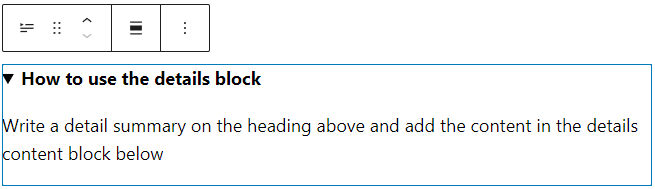
    This block comprises a header at the top and a collapsible nested block portion beneath it. It’s highly beneficial for efficiently showcasing lengthy material such as code snippets, product details, and spoiler information.

    When you add the details block, you will have two spaces – the detail title and the hidden block content. 

    The title only accepts text, but you can still customize the design. On the other hand, the collapsible section allows you to add various blocks, including image, code, or list blocks.

    A details block on the editor

    Footnotes

    If you have any part of the text that requires a footnote, such as a citation or further information, you can now add a footnote in WordPress 6.3.

    Select the text you want to annotate and click More on the block toolbar. Select Footnote, and its block will appear at the end of your content. Then, you can add the citation or information on the footnote block.

    The footnote options on the block toolbar

    Note that this is the only way to add the footnote block. You can’t currently add one via the block inserter panel.

    Block Improvements

    Improving the block editing experience is not limited to adding new blocks. WordPress 6.3 also adds plenty of block enhancements.

    Featured Image Aspect Ratio

    The post featured image block now has an aspect ratio control as part of its design tools. Whether you add this block to a post or a template, you have eight options, including portrait and landscape orientation:

    • Original aspect ratio
    • Square (1:1)
    • 16:9
    • 4:3
    • 3:2
    • 9:16
    • 3:4
    • 2:3
    The Site Editor interface with a featured image block selected and the aspect ratio options on the block settings panel displayed

    Post Modified Date Variation

    The post date block now offers various ways to display the last modified date. You can configure the block from the settings panel and enable the Display last modified date toggle option.

    The post modified date on the editor, showing the block settings panel with the highlighted display last modified date toggle option

    The post date block placeholder will show Post Modified Date when enabled. 

    You can also add two post date blocks on a template – one that displays the original display post and another that displays the last modified date. This way, you can tell your reader that although the post was originally published a while ago, it was updated recently.

    Cover Block Enhancements

    Some users put several texts on the cover block. To streamline the workflow, WordPress 6.3 introduces text design tools to change the color and typography of all text on the cover block. This way, users don’t have to manually change individual text block one by one.

    Another improvement is the seamless transformation of the cover block into a media & text block and vice versa. When you transform the block, all design customization is transferred, eliminating the need for redesigning.

    Dimensions Control

    The dimensions control receives a UI revamp in WordPress 6.3. Instead of using text to describe the sides for the settings – top, bottom, left, and right – it now uses small icons to control the dimensions.

    The updated dimensions control for padding and margin

    Performance Improvements and Updates for Developers

    Moving on from new user-facing features, we will look into the back-end improvements. All major WordPress updates bring performance enhancements and updates tailored for developers, and WordPress 6.3 is no exception.

    Dropped Support for PHP 5

    As only 3.8% of all monitored installations use PHP 5.6, the WordPress core team dropped the support for PHP 5 and raised the minimum supported version to 7.0.0. For the record, the team usually uses a 5% baseline to determine the minimum PHP version.

    That said, websites that run on PHP and WordPress 6.2 will continue receiving security updates.

    If you still use PHP version 5.6 or lower, we recommend updating to version 7.4 for better performance and security. Read our tutorials on how to easily change the PHP version via hPanel.

    Command Palette API

    The WordPress core team introduced the command palette API for this release, which allows developers to add or remove commands.

    There are two types of commands for the API – static and dynamic. In addition, you can add contextual properties to the commands.

    Static Commands

    The static command is the simplest type to add to the command palette list. It uses the wp.data.dispatch( wp.commands.store ).registerCommand action or the wp.commands.useCommand React hook.

    Here’s an example of a static command registered using the wp.commands.useCommand hook:

    wp.commands.useCommand( {
    	name: 'myplugin/my-command-name',
    	label: __( 'Add new post' ),
    	icon: plus,
    	callback: ({ close }) => {
    		document.location.href = 'post-new.php';
    		close();
    	},
    } );

    Dynamic Commands

    Dynamic commands only appear on the Command Palette list depending on the search term input from the users. As such, dynamics commands use command loaders to register, including useCommandLoader and usePageSearchCommandLoader.

    For example, here’s a snippet to register a command for a page search. It consists of two parts – the first is for retrieving the pages based on the search term, and the second is for creating the command.

    function usePageSearchCommandLoader( { search } ) {
    	// Retrieving the pages for the "search" term
    	const { records, isLoading } = useSelect(
    		( select ) => {
    			const { getEntityRecords } = select( coreStore );
    			const query = {
    				search: !! search ? search : undefined,
    				per_page: 10,
    				orderby: search ? 'relevance' : 'date',
    			};
    			return {
    				records: getEntityRecords( 'postType', 'page', query ),
    				isLoading: ! select( coreStore ).hasFinishedResolution(
    					'getEntityRecords',
    					[ 'postType', 'page', query ]
    				),
    			};
    		},
    		[ search ]
    	);
    
    	// Creating the command
    	const commands = useMemo( () => {
    		return ( records ?? [] ).slice( 0, 10 ).map( ( record ) => {
    			return {
    				name: record.title?.rendered + ' ' + record.id,
    				label: record.title?.rendered
    					? record.title?.rendered
    					: __( '(no title)' ),
    				icon: icons[ postType ],
    				callback: ( { close } ) => {
    					const args = {
    						postType,
    						postId: record.id,
    						...extraArgs,
    					};
    					document.location = addQueryArgs( 'site-editor.php', args );
    					close();
    				},
    			};
    		} );
    	}, [ records, history ] );
    
    	return {
    		commands,
    		isLoading,
    	};
    }
    
    useCommandLoader( {
    	name: 'myplugin/page-search',
    	hook: usePageSearchCommandLoader,
    } );

    Contextual Commands

    Contextual commands have a higher priority and they always appear on the command palette list in a given context. For example, you can set a static command with the Site Editor context property, and it will always be visible when you’re in the Site Editor.

    In WordPress 6.3, there are only two contexts available:

    • site-editor. Makes the commands available when users browse the Site Editor with an open navigation sidebar.
    • site-editor-edit. Makes the commands available when users edit any content on the Site Editor.

    To make a command contextual, simply add the context property when registering the command. For example, here’s the same static command example we had before, but with the site-editor context applied:

    wp.commands.useCommand( {
    	name: 'myplugin/my-command-name',
    	label: __( 'Add new post' ),
    	icon: plus,
    	callback: ({ close }) => {
    		document.location.href = 'post-new.php';
    		close();
    	},
    	context: ‘site-editor’,
    } );

    Caching Improvements

    The WordPress Performance team made some enhancements to the core WordPress caching system. The notable ones are improvements in WP_User_Query caching and cache group changes.

    WP_User_Query Caching

    WP_User_Query was the remaining class lacking database caching capabilities. Thankfully, the WordPress performance team has implemented the update in WordPress 6.3.

    The implementation for WP_User_Query is similar to the other query classes – when a user sends a query, the cache stores the results from the database, and the same queries will get data from the cache. This update will reduce the overall database query load, improving the site’s performance.

    For the record, WordPress already implements query caching in other classes like WP_Comment_Query, WP_Site_Query, WP_Network_Query, and WP_Term_Query.

    New Groups in Cache API

    Since WordPress 6.3 implements query caching for WP_User_Query, the Performance must change the cache storing approach. As a result, the WordPress team introduced six new cache groups specific to the queries. Here are the new cache groups:

    • post-queries
    • term-queries
    • comment-queries
    • network-queries (global cache group)
    • site-queries (global cache group)
    • user-queries (global cache group)

    This update also provides greater control over cache objects, enabling you to specify expiration times for any cache group. You can also clear a specific cache group using the wp_cache_flush_group() function.

    Update Your Website to WordPress 6.3 Now

    Now that you know the nitty-gritty of WordPress 6.3, it’s time to prepare your website for the update.  

    Create a backup and use a staging environment to test WordPress 6.3 with a copy of your site. This will ensure that no compatibility issues that may affect your live site. If you find any critical error, be sure to troubleshoot it in the staging site.

    Suggested Reading

    Learn how to set up a WordPress staging environment and deploy the update to the live site.

    Once you’re sure your website runs smoothly with the new version, implement the update to your live site.

    The post WordPress 6.3 Update: A Detailed Overview appeared first on Hostinger Blog.

  • This Month in WordPress: July Roundup

    As the first WordPress 6.3 beta arrived in June, July was all about fixing bugs, delivering developer notes, and finalizing release candidates. Plus, there were updates about the upcoming two flagship WordCamps.

    But there’s more to it. We have exciting news about our in-house WordPress products. 

    Hostinger Updates: AI Assistant and New Blog Theme Layouts

    Let’s begin with updates from Hostinger – we have introduced a new WordPress AI Assistant plugin. It is available for our Business web hosting and Cloud hosting clients. 

    Once everything is set up, you can use the AI tool to generate blog posts from your WordPress dashboard. 

    Hostinger WordPress AI Assistant interface

    Then, export the generated copy to the post editor with a single click and make the final edits before publishing the content.

    Suggested Reading

    Check out our Hostinger WordPress AI Assistant blog post for more details.

    The next update we brought this month is the new layouts for Hostinger Blog Theme. Now, you can choose from three layouts during the onboarding process, giving more flexibility.

    Let’s take a closer look at the three layouts we offer:

    • Hero image with overlay text
    Hostinger blog theme with hero image layout
    • Symmetrical design, with text on the left and an image on the right
    Hostinger blog theme with symmetrical layout
    • Header text follower by the hero image
    Hostigner blog theme with header copy layout

    Suggested Reading

    Read our Hostinger Blog Theme product update blog post for more details.

    WordPress Updates

    The core contributors have continued working on WordPress 6.3 after the beta release in June. As such, we have more updates regarding the core development.

    WordPress 6.3 RC and Live Product Demo

    The WordPress 6.3 development entered the Release Candidate phase in mid-July, which means the development version is more stable for testing.

    This is a perfect opportunity for you to test your projects with the new version or sharpen your web development skills. If you find any bugs, be sure to inform the core contributors via the Core Trac ticket.

    For developers, head to the WordPress Core blog to check out dev notes in more detail. This will help you know what new features and APIs you can benefit from the new version.

    Additionally, check out the Live Product Demo from WordPress 6.3 Release Squad. Here’s a quick glimpse:

    • Synced patterns – this new type of pattern replaces the reusable blocks, enabling you to create patterns in the block editor.
    • Command palette feature – helps you quickly search and navigate through the WordPress dashboard, whether to start a new post or customize your categories.
    • New blocks – WordPress 6.3 brings new blocks developed in various Gutenberg releases, including footnote and details ones.
    • Dropped PHP 5 support – the new version will require PHP 7 as its minimum requirement.

    Gutenberg Phase 3 Road Map

    After refining the block editor in the upcoming release, WordPress and Gutenberg projects are expected to move forward to phase 3 – collaboration.

    Throughout July, Matias Ventura, the Lead Architect of Gutenberg, has posted a detailed roadmap for the collaboration phase. To save you time, we have summarized the phase 3 projects from the WordPress Core blog:

    • Real-time collaboration – enabling multiple users to work on the block editor simultaneously. This means no more locked posts when one user is editing them.
    • Workflows – streamlining the editorial process when multiple users collaborate on content, from draft to publishing. For example, users will be able to write comments or add suggestions for the content.
    • Revisions – collaborating for a project requires transparency and the capability to track back the changes. Revisions in phase 3 should go beyond saving the textual edit history and provide a better visual appearance, especially in the block environment.
    • Media library – updating its interface, management, and workflow.
    • Block library – improving the block organization management, such as allowing users to enable or disable any block globally.
    • Admin design – renewing the wp-admin design to improve accessibility, user workflow, and interface personalization. 

    WordPress Security News

    Even though July was a relatively quiet month in terms of critical vulnerabilities for major plugins, there was a significant security issue.

    Back in mid-June, the Patchstack team discovered a site-wide reflected cross-site scripting (XSS) vulnerability in Freemius WordPress SDK. If you’re unfamiliar, Freemius is a platform for selling digital products, and its WordPress SDK is widely used to sell freemium WordPress plugins and themes.

    The XSS vulnerability scored 7.1 in the CVSS score, meaning it’s a high-severity issue. As Freemius is used by over a thousand plugins and more than 50 themes, it could have affected millions of websites. Luckily, Freemius and almost all affected plugins and themes have fixed the issues, and updates are available.

    You can check whether it affected any of your plugins by searching for them in the Patchstack database. However, we recommend simply updating all the plugins you use to prevent any other vulnerabilities.

    For Hostinger users, use our WordPress security feature from your Members Area, which will show you the security status of plugins and themes on your site. Be sure to check them out and perform necessary updates in case any vulnerabilities are discovered.

    WordPress security interface on hPanel

    WordCamp News

    We have some exciting news for the upcoming WordCamps.

    WordCamp US

    WordCamp US 2023 is just around the corner – it will take place on August 24-26 in National Harbor, Maryland. If you still haven’t got your ticket for the final flagship WordCamp of the year, hurry up and buy it now.

    We will also be there as a super admin sponsor. If you’re going to the event, be sure to drop by our booth. We’d love to have a chat with you about WordPress and hosting.

    WordCamp Asia

    WordCamp Asia 2024 will be the next flagship WordCamp event. Planned for March 7-9, the event will take place in Taipei, Taiwan.

    While the tickets aren’t available for purchase yet, brilliant minds like you can get the chance to share your insights in the event as the organizers are opening the call for speakers

    This is an excellent opportunity to present your unique thoughts and insights, as well as introduce yourself to hundreds or thousands of WordPressers from around the world.

    What’s Coming in August

    WordPress 6.3 will be released on August 8, 2023, so mark your calendars for the major update. Use a staging environment to safely update your website and minimize downtime.

    With the WordCamp US coming up, we will have exciting WordPress content in the pipeline – stay tuned.

    The post This Month in WordPress: July Roundup appeared first on Hostinger Blog.

  • WordPress 6.3: What’s Coming In the Next Major Update

    The development of WordPress 6.3 is in full swing – the beta version is undergoing rigorous testing, and the Release Candidate is anticipated later this month. WordPress 6.3 introduces many enhancements to the editor by integrating Gutenberg versions 15.2 to 16.1 into the WordPress core.

    In this article, we’ll explore the upcoming features of WordPress 6.3 and explain how you can test it prior to the final release. Let’s delve into what you can anticipate in the next version.

    New Features in WordPress 6.3

    The aim is to perfect the Site Editor before shifting the focus to Phase 3 of the Gutenberg project. Therefore, it’s no surprise that many of this release’s enhancements are centered around the interface and workflow of the Site Editor.

    Patterns

    Two notable changes in WordPress 6.3 are the renaming of reusable blocks to patterns and the introduction of synced and unsynced pattern options. Although it sounds complicated, it essentially merges reusable blocks and patterns for better customizability and ease of use.

    Up until now, creating custom patterns in WordPress was limited to three methods – utilizing the WordPress pattern directory, using a pattern management plugin, or adding pattern PHP files in the installation folder. None of these methods currently allow the creation of patterns via the Site Editor.

    WordPress 6.3 streamlines pattern creation, mirroring the process of creating a reusable block. You can customize a block or group of blocks and select Create pattern from the block toolbar menu.

    The create pattern option in the block toolbar options

    Once the pattern creation pop-up appears, you’ll find the Keep all pattern instances in sync toggle option. It determines whether the pattern will be synced or unsynced.

    Synced patterns, akin to reusable blocks, apply changes site-wide and are housed under the Synced patterns tab on the block inserter panel.

    Synced patterns tab on the block inserter

    On the other hand, unsynced patterns can be inserted and edited on any page or post independently without affecting the same patterns used elsewhere. They appear under the My patterns category on the block inserter panel.

    My patterns section on the block inserter

    Seamless Editing in the Site Editor

    The Site Editor will receive a substantial makeover in WordPress 6.3. If you use the Gutenberg plugin, you have probably noticed the incremental appearance of alterations since version 15.2. If you haven’t, the revamped Site Editor promises a more efficient, user-friendly experience.

    Updated Navigation Sidebar

    The existing navigation sidebar, which currently consists of Templates and Template Parts, will be expanded in WordPress 6.3 to streamline navigation between editor components.

    The updated navigation sidebar, showing five new menu items.

    Here’s a brief overview of the newly designed menus:

    • Navigation. This menu houses the links available on your navigation block, allowing you to rearrange or remove menu items easily. Note, however, that you can’t add new links here.
    • Styles. This menu lets you choose and preview the style variations of your theme. There are also buttons to navigate to the style book and the global styles panel.
    • Pages. This menu lists all available pages on your website, including drafts. What’s new in this version is that you can open and edit the page directly via the Site Editor, eliminating the need to go to the dedicated page editor.
    • Templates. Like in the current version, it lists all available templates and lets you select one for editing. There’s also the option to create a new template.
    • Patterns. This replaces the previous Template Parts menu, and it contains template parts and both synced and unsynced patterns.

    Command Palette

    Introduced as the experimental Command Center in Gutenberg, Command Palette provides a quicker way to navigate between templates, open specific panels, or create a new post or page.

    This feature is located at the top of Site Editor, where you can see the name of the template you’re viewing. Alternatively, use the CTRL+K keyboard shortcut to open it. Once you’re in the command palette, simply search for the panel you want to open or the task you want to do.

    Command pallete location on the editor

    For example, if you’re editing the home template and want to quickly go to a page and edit it, just type the page name on the command palette and click on it – this will take you to the page.

    Command pallete interface, with post query as an example

    Style Revision

    WordPress 6.3 introduces a handy style revision panel, which lets you revert global style changes. Accessible through the ellipsis icon on the global styles panel, this feature presents a list of available revisions, time stamps, and users who made the changes. Simply select the version you wish to revert to and click Apply.

    The style revision panel on the editor

    Switching Between Page Editing and Template Editing

    We’ve mentioned that you can edit pages directly via the Site Editor. But what if you want to edit the template to adjust its layout?

    You don’t have to use the navigation sidebar or command palette to open the template. Simply open the Settings panel, and you will see the Edit template option at the bottom of the Page tab.

    The option to edit template

    Reducing Distractions in the Site Editor

    There are a couple of improvements to reduce the distraction in the Site Editor so that you can work more efficiently.

    The first is the availability of the distraction-free mode. This is currently only available on the page and post editor for content creation. In WordPress 6.3, it will be available for the Site Editor too.

    In case you’re not familiar with it, the distraction-free mode essentially hides all side and top panels and disables the block toolbar so you can focus on editing the content.

    The second improvement is made to the Top toolbar feature. Instead of adding the block toolbar on an additional level at the top, making it take up more space, in WordPress 6.3, the block toolbar will be placed at the same, single top panel.

    The toolbar located at the top panel when the top toolbar feature activated.

    Block Improvement

    As with any significant update, WordPress 6.3 will introduce improvements to blocks, including the addition of three new blocks:

    • Details. This block comprises a title at the top and a collapsible nested block section. It’s useful for compactly presenting extensive content such as code snippets, product specifications, and spoilers.
    An example of a detail block
    • Footnotes. Useful for adding citations, the footnotes block can be accessed by selecting the text you wish to cite, clicking More on the block toolbar, and selecting Footnote. The footnotes block will automatically be added at the end of your content.
    Footnote option to create a footnote block after selecting a text

    In addition to these new blocks, WordPress 6.3 offers new customization options, including caption styling for the image block. Accessible through the styles panel, this feature lets you tailor the font, size, and appearance of the caption text.

    Dropped Support for PHP 5

    WordPress has supported PHP version 5.6.20 since 2019. However, with only 3.9% of monitored installations currently using PHP 5.6, the Core Team has decided to drop support for PHP 5.6.20 and elevate the minimum supported version to 7.0.0. Note that the recommended PHP version remains the same – 7.4 or greater.

    Pro Tip

    Using newer versions of PHP has many benefits, including better performance and security. If you still use PHP 5.6, you can easily change the PHP version settings via hPanel.

    Testing and Release Schedule

    Right now, WordPress 6.3 is still being beta tested. The first Release Candidate is set to launch on July 18, 2023, with the final release scheduled for August 8, 2023.

    We encourage you to test the development version, especially once the Release Candidate is released. By doing so, you can preemptively identify any compatibility issues, especially if your website contains custom code or utilizes various plugins and themes.

    If you are a theme or plugin developer, testing the development version is crucial to ensuring your product is compatible with the new version upon release.

    Pro Tip

    Always perform testing on a staging site. The staging environment feature is available with select Hostinger hosting plans. Read our WordPress staging tutorial on how to set up a test environment.

    There are two easy ways to get the development version. You can use the WordPress Beta Tester plugin. Choose the Bleeding Edge channel and the Beta/RC Only stream from the plugin’s settings panel. Once set, you’ll be able to update your test site to the development version.

    Alternatively, you can manually download and install the development version. While it’s perfectly fine to experiment with the new version on a blank WordPress website, this method can be difficult if you want to test it with a copy of your site.

    The post WordPress 6.3: What’s Coming In the Next Major Update appeared first on Hostinger Blog.

  • This Month in WordPress: June Roundup

    June was an exciting month for the WordPress community. WordCamp Europe was successfully hosted in Athens, Greece, and the first beta version of WordPress 6.3, the upcoming major release, was launched by contributors.

    But that’s not all that happened in June – Hostinger also released a new feature for WordPress users. 

    Hostinger Blog Theme

    Earlier this month, we launched our Hostinger Blog Theme to simplify the setup process for WordPress sites that we host. This theme is available to Business Web Hosting and Cloud Hosting users who set up their WordPress sites with the hPanel onboarding feature.

    Homepage of a sample website using the Hostinger Blog Theme

    The theme was specifically built with the Hostinger AI Content Generator in mind. During the onboarding process, users can enter their business and blog descriptions, and the tool will deliver the website with pre-built content. Moreover, its integration with Unsplash includes relevant stock images for blog visuals.

    The AI Content Generator panel where user can enter their blog name and description

    Read our Hostinger Blog Theme product update post to learn more about these new features and how to use them.

    WordPress Updates

    Two new Gutenberg versions launched in June – 16.0 and 16.1. Each comes with additional features and refinements to the block editor. Here are some of the most noteworthy updates:

    • Refined Site Editor page management – Gutenberg 15.8 introduced a new feature to ease navigation between pages using the Site Editor. Gutenberg 16.0 now allows users to add new pages without leaving the editor.
    WordPress site editor with the page navigation shown
    • Lightbox element – a new option to modify image blocks with lightbox behavior is now available, eliminating the need for an additional plugin with the functionality.
    • Changing reusable blocks to patterns – one of the biggest changes introduced with Gutenberg 16.1 involves reusable blocks. They’re now known as synchronized patterns. The merging of reusable blocks and patterns means that it’s now possible to create custom patterns in the editor, removing the need for an additional plugin or coding.
    Synced pattern options that replaces reusable blocks

    Most importantly, the WordPress 6.3 Beta version has been released for testing. This next major version integrates various features from Gutenberg 15.2 to 16.1 into the core software, along with numerous other enhancements and bug fixes.

    You can test this release with the WordPress Beta Tester plugin. Choose the Bleeding edge channel and the Beta/RC Only stream to update your site to the WordPress 6.3 Beta. To keep everything safe during testing, be sure to use a staging website.

    Stay tuned – we’ll shortly publish a blog post to inform you of what you can expect from WordPress 6.3.

    WordCamps

    One of the main highlights of June was WordCamp Europe 2023, which coincided with WordPress’ 20th anniversary. At the same time, the WordPress Community Team has announced exciting news about upcoming WordCamps.

    WordCamp Europe 2023

    WordCamp Europe 2023 was held in Athens, Greece, from 8 to 10 June 2023. Attended by 2,545 people from 94 countries, it was the biggest flagship WordCamp so far this year.

    The event also featured several sessions relevant to recent trends, including 20 years of WordPress and AI presence in the WordPress ecosystem. Read our WordCamp Europe 2023 Roundup to learn about the event’s highlights.

    Subscribe For more educational videos!
    Hostinger Academy

    Next-Gen WordCamp Pilot Events

    The WordPress Community Team has come out with new ideas for WordCamps and community events. The community is encouraged to experiment with new formats and specific focuses.

    After much discussion, 64 ideas were shared for the next-gen WordPress events, with 59 organizers willing to participate. More importantly, eight pilot events have been confirmed, six of which are scheduled for this year:

    • Low-cost WordCamp – a WordCamp with attendance limited to 90 people without swag, social dinners, and after-parties. It was held in Leipzig, Germany, on July 1, 2023.
    • WordPress Day – held in Sevilla, Spain, on July 2, 2023. This event resembled Contributor Day, with 50 attendees focusing on three specific contribution areas.
    • Rural – a quarterly community event organized in rural areas with the aim of teaching WordPress to local communities and people who have limited access to big-city WordPress events. This type of event is being piloted in Spain, with the date still to be determined.
    • WordPress for Publishers – a one-day WordPress event in Bangalore, India, targeted at publishers. This event will serve two purposes – existing WordPress users will discuss and brainstorm new WordPress features, while non-WordPress users will get to know WordPress better and make the switch. 
    • Community Day – scheduled for September 29, 2023, in Rome, Italy. It will gather all WordPress Meetups representatives in the country for event management workshops to ensure healthy and sustainable WordPress communities.
    • Scale-up Workshop – a one-day WordPress proficiency workshop event in Tegal, Indonesia, scheduled for October 22, 2023.

    These pilot events, while diverse in format, share a common theme – they are smaller and less expensive than traditional WordCamps. These events should pave the way for more affordable community get-togethers, enabling WordPress users to meet more frequently in various engaging formats.

    WordPress Playground

    WordPress Playground was a hot topic during WordCamp Europe 2023. As noted by Matt Mullenweg in his State of the Word 2022 keynote address, this browser-based sandbox is becoming increasingly stable and incredibly useful for testing themes, plugins, or even designing a website.

    If you would like to experiment with WordPress Playground, simply visit the Playground URL, and you’ll be instantly provided with a temporary site you can tweak. Use the admin bar at the top to enter the admin panel.

    WordPress Playground interface

    What’s cool about the Playground is that you can switch between PHP and WordPress versions, so it’s easy to do compatibility checks for any plugin and theme.

    You can also upload and download the website, making it easy to experiment and customize, and then upload your work to your live site.

    WordPress Playground has some limitations, though. For example, you can’t install themes or plugins from the directory in the admin panel. Instead, you have to install them manually by uploading ZIP files.

    WordPress Security News

    When it comes to WordPress security news, we’ve examined the Patchstack database to identify significant security issues in popular plugins. The good news is that fewer vulnerabilities were found this month, and all the popular plugins listed below have already released updates to address these vulnerabilities.

    Abandoned Cart Lite for WooCommerce

    CVSS Score: 9.8 (Critical Severity)

    This abandoned cart plugin for WooCommerce was vulnerable due to broken authentication. It could allow attackers to gain access to user accounts – namely, customers who had abandoned carts in their accounts. Higher-level users, including administrators, were also vulnerable.

    While no exploitation has been reported, the developers already fixed this issue with version 5.15.0.

    WooCommerce Stripe Payment Gateway

    CVSS Score: 7.5 (High Severity)

    This WooCommerce-developed plugin with 900,000+ installations was susceptible to two vulnerabilities – broken access control and insecure direct object references. Although they’re different types of vulnerabilities, both could result in malicious actors getting high-level access to a site.

    Despite this, they got the same Common Vulnerability Scoring System grade – 7.5. The vulnerabilities were fixed in version 7.4.1. However, almost 50% of active installs still use earlier versions, making over 450,000+ websites vulnerable.

    Download Monitor

    CVSS Score: 9.9 (Critical Severity)

    One of the most popular download manager plugins with 100,000+ active installations was vulnerable to critical arbitrary file upload vulnerability. Malicious attackers could upload any type of file to a website, granting them backdoor access to it.

    All versions of Download Monitor up to 4.8.3 are vulnerable, with the fix available with version 4.8.4.

    Unlimited Elements For Elementor

    CVSS Score: 8.3 (High Severity) to 9.9 (Critical Severity)

    Multiple vulnerabilities were detected in Unlimited Elements For Elementor plugins, including broken access control, restrictions bypass, and arbitrary file upload. Users who have installed this plugin’s version 1.5.65 and lower are at high risk of security breaches.

    If you’re using this plugin, ensure your site is safe by updating it to at least version 1.5.67.

    What’s Coming in July

    In July, most of the WordPress community’s focus will be dedicated to the upcoming WordPress 6.3. Although the final release is slated for August, you can start testing the Release Candidate version from July 18, 2023. 

    If you are a website, plugin, or theme developer, we highly recommend testing your products with the Release Candidate version to ensure everything functions as expected.

    The post This Month in WordPress: June Roundup appeared first on Hostinger Blog.