EDITS.WS

Author: N. Fakes

  • 11 Ways ChatGPT Can Help You As a WordPress Developer

    With the evolution of AI technologies like ChatGPT, many questions linger about the future of WordPress development and how AI can actually help – not hurt – your job or business.

    Sophisticated artificial intelligence tools like ChatGPT can perform many tasks that previously required human intelligence.

    If you’re concerned about AI eventually replacing you and taking your job (we’ve written before about how AI will affect the WordPress industry), fear not.

    This article explores some of the many ways that AI, specifically ChatGPT, can actually help you as a WordPress developer.

    After reading this article and trying out some of the applications described below, hopefully you’ll see why an AI tool like ChatGPT can be a valuable assistant to help you get things done faster and more efficiently.

    We’ll cover the following:

      1. Generating Code
      2. Testing
      3. Technical Documentation
      4. Debugging
      5. Comment Generation
      6. Simplifying Complex Code
      7. Data Processing
      8. Engineering
      9. Generating Alternative Code
      10. Model Development and Deployment
      11. Research

    Let’s kick things off with…

    The Rundown on ChatGPT

    ChatGPT, short for Chat Generative Pretrained Transformer, is an AI tool created by OpenAI, an AI research and implementation company.

    This powerful tool has been fine-tuned using reinforcement learning and a supervised learning approach, and serves as a long-form question-answering AI that can effectively respond to complex queries.

    ChatGPT is a type of Generative AI, which means that when it is trained, it can generate outputs similar to the examples it was trained on, although not identical. It can assist you in various tasks, such as coding, crafting essays, generating outlines, and even composing emails.

    11 Ways ChatGPT Can Help You As a Developer

    As a WordPress developer, ChatGPT offers many advantages that you can leverage to enhance your work. Let’s go through some of the ways it can benefit you.

    Note: the examples below were generated using GPT-3 (its free version) — so there’s no cost to experiment with the methods described below.

    1. Generating Code

    ChatGPT is an invaluable tool for WordPress developers when it comes to generating code. By simply providing a few lines specifying the type of code required, ChatGPT can understand and interpret your needs, saving you significant time and effort.

    But it doesn’t stop at basic code generation. ChatGPT possesses the ability to generate intricate code for complex tasks, such as creating entire modules or classes. This means that even if you’re unfamiliar with a particular code, ChatGPT can serve as a crash course, allowing you to grasp its inner workings and learn the essentials.

    To demonstrate ChatGPT’s capabilities, I requested a line of code for an opt-in form where customers can choose from a variety of food items. Remarkably, ChatGPT swiftly generated the necessary code in a matter of moments.

    Line of code example.
    Developing a WordPress site that requires opting-in and food choices? This example shows you how quickly you can generate code for this specific need.

    If you’re not happy with the response, you can regenerate it. It will then give you another option. Additionally, it tells you what exactly is on this form, and you can vote on whether this response is better, worse, or the same.

    Another line of code example.
    The 2nd code option that ChatGPT gave me.

    Freeing up time for your WordPress business by eliminating time-consuming coding can be extremely beneficial to focus on other areas of your business.

    2. Testing

    ChatGPT is also an invaluable tool for WordPress developers when it comes to creating test cases. It offers several ways to assist in this process.

    Firstly, ChatGPT has the ability to analyze and understand the logic and structure of the code you enter in its chat area. This enables it to generate test cases that cover different code paths and edge cases, providing comprehensive test coverage.

    Furthermore, ChatGPT generates clear and easy-to-understand documentation for these test cases. This documentation includes the test inputs, predicted outcomes, and conditions involved. Having such organized information at your disposal greatly simplifies the testing process.

    With this valuable information at hand, as a developer, you can easily update your code and determine the most effective variables to use based on the test case outcomes. This allows for efficient code refinement and optimization.

    3. Technical Documentation

    Technical documentation can be a daunting task for developers. Luckily, ChatGPT can help, thanks to ChatGPT’s natural language skills.

    Simply give ChatGPT a snippet of code, and instruct it to generate documentation explaining the code’s purpose, inputs, and other important information.

    For example, here’s a snippet from the code it generated featuring food items. There was a lot to it, so this is just a short excerpt from the provided documentation.

    A documentation example.
    This was just a small snippet of what was generated.

    You can get even more detailed information, like parameters, returns, error handling, and much more.

    Be sure to check for accuracy. ChatGPT isn’t perfect (which we’ll discuss later in this article); however, using it for documentation – if anything – can provide a great outline to edit accordingly.

    It’s a terrific way to quickly punch up documentation for code and focus on other relevant things in your WordPress business.

    4. Debugging

    If you need to track down bugs or apply good code practices, ChatGPT is extremely beneficial. It can recommend debugging strategies and find bugs.

    Plus, it can examine a piece of code and make suggestions that you can do to find and fix any bug issues. This eliminates hours of painstaking looking for bugs on your own.

    Also, you can recommend code restructuring, which helps by suggesting modifications to improve readability, maintainability, and a bug-free nature, so there are fewer bugs and faster development.

    Example of bug in code.
    An example of a bug in the code and how to fix it.

    Debugging quickly with ChatGPT can save a lot of time (and a headache) when coding for your clients.

    5. Comment Generation

    ChatGPT provides a valuable feature for WordPress developers: code commenting. It helps you gain a clear understanding of what your code does by adding comments and explanations to specific code segments.

    In fact, ChatGPT often offers comments on its own, but you can also request detailed comments as needed.

    This commenting feature greatly aids other developers in comprehending your code more easily. It serves as a form of documentation that provides clarity and context, making it simpler and easier for both you and other developers to understand your code’s functionality.

    Moreover, ChatGPT is capable of providing clarifications and explanations for specific parts of the code. This feature is particularly useful when you don’t require full documentation but still need specific insights and details about certain code segments.

    Code comments.
    A bit of clarification on a line of code.

    6. Simplifying Complex Code

    ChatGPT allows programmers to produce simple language explanations of complicated code areas so that others can maintain the code more easily.

    This works because ChatGPT can automatically generate code comments and documentation, and the AI can simplify code. This helps save a lot of time as a developer.

    Additionally, with the capability of simplifying code, it’s often times even more accurate than what a developer might write.

    Explaining complex code in snippets is extremely useful for developers to understand difficult code and have it explained simply. ChatGPT can even break down what each line of code does, how it works, and so forth.

    7. Data Processing

    Need assistance in data processing? ChatGPT can help by generating code that cleans, transforms, and prepares the data for training and testing models. This includes managing tasks such as encoding categorical variables, dealing with missing values, or imputing missing values with a straightforward strategy.

    Plus, it can create new features from existing data. It generates code that extracts information from unstructured data (e.g. text or images). From this point, it turns that info into structured data used for machine learning.

    This helps make the preprocessing process more streamlined, time efficient, and accurate.

    8. Engineering

    ChatGPT assists in feature engineering for machine learning programming. It does this by offering automated text generation capabilities.

    When you have a machine learning platform with different data and relevance, it can improve performance.

    So, feature engineering assists with reducing the dimensionality of a dataset and enhancing the interpretability of a model – quickly and accurately.

    9. Generating Alternative Code

    This feature is for WordPress developers who want to produce alternative code that improves performance. So, you can take an old piece of code and ask ChatGPT to suggest improvements.

    It may suggest limiting memory usage or perhaps reducing the number of operations.

    For example, here’s a snippet of code for which I asked ChatGPT to make an alternative.

    Alternative code example.
    This isn’t a very complex example. However, ChatGPT can do very complex code alternatives.

    It then answers back.

    A portion of code example.
    This is just a portion of the code.

    There is also an explanation for it.

    Explanation of code.
    This explains exactly what it did with the original code.

    Generating alternative code has never been easier, thanks to ChatGPT.

    10. Model Development and Deployment

    ChatGPT can assist in the preparation and cleaning of text data. This enhances the performance of a model and can create human-like text, which can then be used to mimic human-computer communication.

    This is unique and helpful when you want to develop and deploy conversational AI systems, such as a chatbot.

    Additionally, ChatGPT can create natural language explanations of a model’s predictions. This helps make the model more explainable.

    For natural language, ChatGPT has the power to generate natural language text that can relate and work well with any interaction it has with people.

    11. Research

    For Q&A’s and finding answers, ChatGPT is a great tool for researching as a developer. It can comprehend complex programming questions and deliver answers.

    Basically, you can use ChatGPT as a search engine. Ask it complex questions, and get answers. It’s a way to get an answer quickly and easily instead of combing numerous sources.

    It also provides relevant code examples and snippets with its answers, so you can see for yourself if the answers it gives suffices.

    For example, here I asked it to generate a library that adds a pop-up feature to my website.

    A portion of what ChatGPT can generate for features.
    This is just a portion of what it had to offer.

    AI is not always 100% accurate. However, you can, more often than not, get good, accurate information regarding coding and development answers. Please check elsewhere if you feel it’s not providing accurate information. This being said, you should gain some useful and accurate information more often than not.

    This brings us to…

    Can You Trust ChatGPT’s Responses?

    ChatGPT has some limitations that you should be aware of as a WordPress developer. While it can be a helpful tool, it’s important to understand its potential shortcomings.

    ChatGPT is not always accurate and may struggle with basic logic. It has been known to generate incorrect information or “hallucinate” facts that are completely inaccurate.

    The model’s training data consists of a wide range of written content created by people over time. This means that ChatGPT may exhibit biased behavior and reflect the biases present in the data it was trained on.

    In summary, it’s essential to exercise caution and not blindly accept everything ChatGPT generates as true. The model still has room for improvement before achieving complete accuracy. However, it can offer valuable insights that can complement your skills as a developer.

    Moreover, if you come across any mistakes made by ChatGPT, it has the capability to learn from them, apologize, and make improvements to better cater to your specific needs.

    ChatGPT response acknowledging errors or confusing responses.
    ChatGPT can recognize the error of its ways and learn from its mistakes.

    As a developer, your role remains crucial. ChatGPT can serve as a helpful tool to assist you in your work, but it should not be relied upon to take over entirely.

    Know Why to Use AI

    As AI technology like ChatGPT continues to advance, it’s crucial to stay ahead of the curve and embrace transformative changes. Understanding the benefits of using AI will help you make informed decisions about incorporating it into your workflow.

    Even though it’s far from perfect, ChatGPT can be a valuable tool for WordPress developers. By leveraging its capabilities as shown above, you can save time and concentrate on improving other aspects of your WordPress development business.

    So, instead of worrying about AI replacing your job, consider it as a beneficial technology that, used wisely and with good judgement, can enhance your productivity, cut down costs, and ensure high-quality WordPress development.

    But … don’t take it from us! We’ll let ChatGPT have the final word…

    A poem for WordPress developers generated by ChatGPT
    WordPress developers, don’t fear AI, put ChatGPT to work…and give it a try!
  • 10 Incredible AI Design Tools for WordPress

    With AI rapidly advancing its design capabilities, and new AI design tools emerging every week, now is the time for web developers to get educated on, and take advantage of, the once-futuristic opportunities that are arising in the industry. To help get you started, we’ve collated 10 of the best AI design tools for WordPress.

    We recently talked about how AI will affect the WordPress industry, and when it comes to design, it’s becoming a real game-changer: Artificial Intelligence help is at hand for all aspects of creation – from images and animations, to web design and more.

    So, without further ado, here is our list of hand-picked (and seriously top-notch) options that are available now:

    Please note that none of these are affiliated with us (WPMU DEV). We just found them to be excellent choices based on our research.

    Also, we realize and acknowledge the controversy with AI at the moment. Any art or work used without compensation for or permission from the original artist is one area where AI can be deemed unethical. So, it’s essential to understand how to use AI art as ethically as possible.

    It’s up to you to decide how to handle the ethical question and who to go with. Obviously, AI ethics, copywriting, and legalities are still being sorted out with this new technology.

    (Worth mentioning here that if you’ve got design work to be done and you’d rather stick with humans at the helm, check out our Agency Partners directory. You’ll find a whole host of amazing options at the ready!)

    With that being said, AI thinks it’s time to begin…

    Best AI Design Tools

    Designs.AI

    designs.ai header
    For a lot of design aspects, Designs.ai has you covered!

    With its logo maker, Designs.AI uses 10,000+ icons from its library to create a logo suitable to your needs. It analyzes your brand information and, from there, will generate a logo. Opt for a complete brand identity package, including your logo, brand narration, business card mockups, and more.

    One prominent feature is that it includes a logo editor, so it’s simple to customize your logo accordingly.

    Regarding its video editing capabilities, Designs.AI can convert text to videos. It updates a library of fully licensed assets based on what you want. From there, you can edit however you’d like.

    Finally, for design, its design maker is based on imputed text and a selected template. There are thousands of variations, custom fonts, and layout suggestions. Plus, you can resize your text and content in just a few clicks.

    Bertha.AI

    Bertha.ai header.
    Bertha AI is a popular up-and-coming AI WordPress plugin.

    Bertha AI does a number of things, but when it comes to design, it can create images based on image descriptions with its Bertha Art feature.

    You choose what styles you want to use for painting and images. Likewise, you can resize and adjust images however you want.

    It’s a plugin that works well with the major page builders (e.g. Divi, Elementor) and is a tool used for cross-functionality of writing and art for your WordPress designs.

    The designs are created for banners, images in your web content, and blog articles. Additionally, you can use Bertha.AI for your brand imaging.

    10Web

    10 Web Header
    10Web can assist with design layouts with the help of AI.

    With 10Web, you can easily convert any website (e.g. Wix, SquareSpace) with the help of AI. It works by adding the URL of the site layout, and AI copies the layout, design elements, and content.

    This saves hours of time and effort by simply having AI replicate a site, and then you can edit from there. The editing works with the 10Web platform, which is based on Elementor (you can read more about the process here).

    It’s a headstart for website creation, starting with a few questions about your business. Then, AI generates content and images based on your answers.

    And hey, it’s bound to save you time because this AI-powered WordPress platform can automate website building, hosting, and more in just a few minutes.

    CodeWP

    CodeWP header
    For coding that helps with design, CodeWP might be precisely what you need.

    CodeWP works by asking its AI generator for help with anything, and it will create something for you. That includes WP_Queries, complex workflows, WooCommerce PHP – practically any snippet you need, which can overall help design function for your WordPress site.

    The CodeWP system allows you to save, export, and share snippets publicly or with specific users. Once snippets are created, you can also easily manage and browse them.

    It’s a great software option to eliminate Google searches and wasted time on trial and error. If you’re not a developer, it works as a helpful mentor. Or, if you are a developer, you can maximize your efficiency.

    CodeWP AI is trained specifically for WordPress and WooCommerce, making it a perfect solution for backend building for your design functionality. Additionally, it’s rapidly growing, with new features every week.

    Adobe Sensei

    Adobe header.
    Adobe is no stranger to the WordPress community.

    Adobe Sensei works to deliver the perfect customer experience by using AI. It helps developers and designers create easier, make informed decisions, and use target marketing technology.

    Sensei optimizes and scales experiences with real-time intelligence regarding informed decision-making. Plus, it can predict customer behavior based on attributes, differences, and conversion factors.

    When designing, you can create essential edits quickly and accurately, find the right content with intuitive search, and achieve photorealistic effects.

    Sensei helps take the guesswork out of your advertising when creating a website promoting products or services.

    GPT AI Power

    gpt-3 header
    GPT AI Power is an AI plugin that can enhance your designs.

    GPT AI Power is an AI plugin that generates customizable images, content, and forms.

    One unique aspect of GPT AI Power is that it features integration in posts and includes a playground for testing. You can train your chatbot with your content and products.

    The image generator uses content from OpenAI’s DALL-E and Stable Diffusion. You can create hundreds of configurations and customize the images according to your needs.

    Additionally, there are a ton of content generators for blogs, languages, tone, product writing – and more.

    AutoDraw

    AutoDraw header
    Simplistic — but effective.

    AutoDraw is a straightforward tool that can create images based on what you’re trying to draw. Plus, it uses in-house artists – which is great ethically.

    Though simplistic, you can easily design images that might fit well with whatever design you’re trying to create for WordPress. It pairs machine learning with drawings that can be done on a tablet, smartphone, or laptop – any device that allows you to make images.

    It has a suggestion tool that uses the same technology as QuickDraw – to analyze and guess what you’re trying to create. Plus, you can contribute your drawings to them if you allow them permission.

    Deep Art Effects

    Deep Art Effects header
    For some significant image enhancement, Deep Art Effects can do wonders.

    Need to create unique images for your website? Deep Art Effects can turn photos into art with just a few clicks. It enables you to edit the background or foreground using a variety of parameters.

    Brush size and styles can be altered however you want, based on your favorite artists. They have 120 pre-installed art styles so you can use their application offline.

    It will even color grayscale images automatically. For example, if you have an old black-and-white photo or video, you can bring it to life with its AI colorization technology.

    Let’s Enhance.io

    Let's enhance header

    An excellent way to enhance images is Let’s Enhance. Let’s Enhance is an image enhancer and upscale that uses AI to increase image resolution without losing quality. Its intelligent algorithm will expand images to customized dimensions, all while optimizing the texture, tone, color, and clarity.

    It works by choosing a desired output size. This is perfect for a WordPress eCommerce website so users can zoom in and out with high-quality images.

    With Let’s Enhance, you can save time with its automated preset feature. This is perfect for real estate, eCommerce, or any website with multiple images that need to be similar.

    Also, its Smart Enhance feature allows you to clean up your images by making them clearer while maintaining their size.

    Claid.AI

    claid.ai
    Claid.AI was created by Let’s Enhance.

    For businesses and creating content that converts, Claid.AI is a great tool to use. You can automate image creation and boost your business with the help of these AI products.

    For your brand, you can create multiple product images that are suitable. It will take boring, simple pictures and make them stand out by boosting their quality. Also, you can be consistent with uniform backgrounds and frames.

    With Claid.AI, you can change a few variables to control and enhance your images, saving you time and money.

    Design with AI

    As this post is published, new and emerging AI technology for design and WordPress is in the works. It seems that almost daily, some innovative AI feature appears. So, we’re bound to expand on our 10 recommendations. However, hopefully this article has helped spark some initial ideas that you can use with AI’s help.

    Be sure to regularly check our blog for the latest updates regarding AI – for, as new AI technology keeps emerging in the WordPress spectrum, so too will new AI-related articles keep being published on our platform!

  • The Ultimate Web Developer Toolkit

    What constitutes the ultimate toolkit for web developers? To find out, we surveyed our members about what tools they use for their WordPress development business – and the results are in!

    To be clear, we’ve written previously about Must Have tools, but this list is based on what the members of our WPMU DEV community recommend. So, the results are a bit different. We won’t cover every recommendation, but we have narrowed down specifics mentioned more than others.

    We’ll break them down by the most discussed categories…

    Keep in mind, we are not affiliated with ANY of these companies (well, except for us, WPMU DEV, of course). These are strictly companies that were mentioned by our members as top choices for what they use in their WordPress development business.

    So, let’s open up this thing and get started!

    WordPress Management

    WPMU DEV

    wpmu dev header.
    You might be a bit familiar with this company.

    We asked, “What do you use for WordPress management?” And here are a few answers.

    “WPMUDEV for managed hosting, technical support, premium plugins, automated updates and backups.”

    – Keith, WPMU DEV Member

    “Definitely WPMUDEV. I don’t want to blow their horn too much but honestly, it’s just really nice having half this stuff available. That being said, I wouldn’t want to replace any of them. I like them all.”

    – G-Kodes, WPMU DEV Member

    Not to pat ourselves on the back, but WPMU DEV is key to developers’ toolkits around here. Obviously, we asked on our platform, so it’s natural that we’d rank at the top. Still, even if asked elsewhere, we have the essential tools for management, and we’re pretty confident we’d get mentioned.

    We’re used for our award-winning plugins, hosting, 24/7/365 support, the capability of managing multiple sites from our Hub dashboard, domains, client billing – and much more.

    Every aspect of running a successful WordPress development business can be obtained here – where you’re reading this!

    If you’re not a member, sign up for free and get started. You’ll find that everything you need is right at your fingertips in one place.

    ManageWP

    ManageWP header.
    ManageWP was also recommended by some users.

    Like us (WPMU DEV), ManageWP is another popular management platform where you can organize your websites from one dashboard.

    It can add unlimited sites, including team and client collaboration, incremental backups, white-label capabilities, and other features.

    Regarding plugins, it doesn’t feature any built from ManageWP (like WPMU DEV), but you can add plugins into their system – where they can be updated, monitored, and overwritten.

    In our poll, ManageWP seems to complement WPMU DEV as another system of management that works well for some developers.

    Site Development and Plugins

    Divi

    Divi header.
    Divi is no stranger to the WordPress community.

    With a seemingly endless variety, Divi is the go-to theme builder for many WordPress developers. Its visual page builder makes setting up a spectacular website quick and easy, which is why it’s the most popular theme.

    Aside from being easy to use, Divi collaborates well with our services and plugins (such as Smush and Hummingbird).

    Additionally, almost any website can be created for practically any use. It features over 200 website elements and packs for business, eCommerce, and services – you name it.

    Every aspect of Divi is highly customizable, so developers can ensure their clients get the site needed.

    Astra

    astra logo
    Trusted by over 2 million websites and many of our developers.

    Featuring pre-built websites, Astra is a page builder that’s also extremely easy to implement and popular among our developers.

    Everything is highly customizable – from layouts, headers, and colors – it all can be adjusted how you want. Plus, you can mix and match any of your favorite third-party tools, like WooCommerce integration.

    For an accessibility-ready website, Astra continues to be a popular choice.

    Elementor

    Elementor header.
    Elementor has the power to build websites in a streamlined way.

    With its live drag-and-drop editor, website designs, and hosting aspect, Elementor is a platform that many of our developers agree is worth using in their toolbox.

    With Elementor, creating landing pages, blogs, eCommerce stores – anything is easy. It’s all customizable, and additional CSS can be added.

    Their biggest attribute is having an “all under one roof” solution for editing, themes, and hosting. They keep everything updated, perform backups, and include top-notch support.

    Like with Divi, we’ve mentioned Elementor in our blog before and how to optimize it with Smush and Hummingbird.

    Domain Registration and Hosting

    WPMU DEV

    Wpmu dev header.
    Us again!

    We discussed our domains and hosting above as a reason developers use us, but it’s worth mentioning it again. That’s because it’s all easily managed in The Hub – with easy registration, domain transfers, and more.

    Plus, with domain reselling, you can purchase domains from us at wholesale prices and sell them to your clients. Additionally, you can white-label the domain service and hosting and use that as an add-on to your development business.

    Be sure to check out some of our domain registration and hosting resources. We have articles that cover it all, including:

    Transferring Your Domains to The Hub

    Registering New Domains

    Doing More with Your Hosting

    These are just several resources. More information can be found on our blog and documentation.

    Namecheap

    Namecheap header.
    Cheap domains? Namecheap strives for that.

    Namecheap has various services for domains, hosting, security, and email. It allows you to transfer domains, select various hosting options (e.g. shared, reseller, VPS, etc), and more.

    With over 2 million users, it’s a highly trusted company for domains and hosting.

    In regards to hosting, they have a walk-through that helps individuals determine what type of hosting is right for them. It’s interesting to figure out what is best for each unique situation.

    With Namecheap focused on WordPress and its discounted prices, it’s a widely used platform for developers.

    GoDaddy

    GoDaddy header.
    GoDaddy is a household name.

    With domains, email, hosting, and WordPress implementation, GoDaddy is also popular choice for many developers. After all, it’s a brand that’s been around a while (since 1997), so it’s an established go-to company for many needs.

    It’s by far the biggest company out of the others mentioned, with over 21 million customers worldwide.

    Plenty of TLDs are available, plus they have hosting, security, and support.

    Bluehost

    bluehost logo
    Bluehost was recommended by quite a few developers in our survey.

    With hosting and domain, Bluehost offers some very appealing discounts to web developers. You can get an eCommerce store, WooCommerce integration, and more at a good rate.

    Plus, they have a dashboard for developers where you can manage all of your WordPress sites in one spot. Additionally, they offer 24/7 support.

    Along with WPMU DEV, Bluehost was one of the most recommended services for hosting and domains when we surveyed our developers.

    Communication

    Google Workspace

    Google Workspace logo.
    Google has a ton of solutions for developers and their businesses.

    “Gmail’s multiple inbox feature – lifesaver!”

    – Greg, WPMU DEV Member

    Whether it be Gmail, Meet, Drive, Calendar, or Docs, Google Workspace checks a lot of the boxes in communication for developers.

    Here at WPMU DEV, we use Google Workspace for our email, calendars, and docs (in fact, the drafts of all of these posts are written on Gdocs).

    Google has a reputation for quality and efficiency. Rarely does Google Workspace stop working or have issues. It’s no wonder that it’s such a popular communication tool.

    Also, implementing everything under one system is quite beneficial (e.g. adding an appointment from Gmail to Google Calendar). It’s a streamlined process for flawless integration.

    MS Teams

    MS Teams logo.
    MS Teams is another popular collaboration tool.

    Microsoft Teams is a powerful platform that provides many benefits for developers’ businesses.

    One major highlight is having centralized communication for file sharing, messages, and other information in one place – keeping things organized and reducing the need for emails.

    Additionally, it’s a good way for developers to collaborate with other team members. For example, if you’re working with a graphic designer, you can go back and forth seamlessly.

    Like Google, it integrates with other Microsoft products, such as SharePoint, OneDrive, and Outlook. This helps with working across various platforms in the Microsoft universe.

    Slack

    Slack header.
    Slack is no stranger to us.

    Slack is another platform that we use here at WPMU DEV. It’s also used by developers worldwide as a go-to source for cloud-based communication.

    It features organized communication with channels and direct messaging. The messaging is done in real-time, eliminating the need for email.

    Plus, you can share files and documents in just a few clicks across channels and messages.

    When it comes to integration, we integrate Google Calendar and Jira. Other integrations, such as Trello and Zoom, are available, too.

    Another big benefit of Slack is the Huddles. It’s how we communicate via voice in meetings all around the world. This can be done in specific channels, where team members can hop on and participate in calls quickly and easily.

    WhatsApp

    WhatsApp header.
    WhatsApp is a good communication tool for messaging.

    With voice and video calls, chats, and private messages, WhatsApp is a communication tool for developers and clients.

    It features end-to-end encryption so that personal messages and calls are secured. Nobody, not even the app itself, can read or listen to them.

    Plus, you can create groups, so if you’re working with a team on a development project, you can all be in the loop in one spot.

    They even have a WhatsApp Business that offers business solutions for banking, eCommerce, and much more.

    Loom

    loom header
    For a quick messaging solution, Loom has you covered.

    Loom is a popular solution with over 14 million users who are used to saving time from meetings by providing a quick video.

    You can record your screen and camera from any device. They have desktop and mobile apps and a Chrome extension. When sharing with your clients or team members, paste a link to your video so recipients can view it without logging in or creating an account.

    Also, you can use emoji reactions, time-stamped comments, and interactive features for interactions. Whatever works best for the clearest lines of communication.

    Organization

    Jira

    Jira header.
    Jira is a great way to stay organized.

    Like Google WorkSpace and Slack, Jira is another software we use daily at WPMU DEV. Other developers mentioned Jira as one of the best, too.

    It breaks big ideas into smaller chunks across teams via stories, issues, and tasks. For example, for this blog, we have our individual writers and the topics they’ll be writing about. Then, as the process goes from conception to rough draft and final, its progress is moved along for the team to see.

    Great for teams of all sizes, Jira can organize and streamline workflow better than a lot of software out there. So if you’re a developer that has a team working on a specific goal, your progress will be easily monitored and can be adjusted along the way.

    TidyCal

    TidyCal header.
    A way to book meetings and more.

    TidyCal is a perfect solution for setting client availability, creating a meeting length, and much more.

    You can set up a specific date, show the number of spots available, and create your booking page. From this, you can embed on WordPress sites, set up multiple booking types, and create email reminders.

    It’s a quick and easy way to set up appointments, meetings, and everything your development business needs.

    Trello

    Trello header.
    Trello’s another way to improve workflow.

    “I use Trello for project management and to organize my worklists.”

    – Marianna, WPMU DEV Member

    With boards, lists, and cards, Trello has what it takes to get your development projects on target.

    You can keep tasks in order and assign specific members to each to meet deadlines on time. It keeps all the projects organized in one place, viewable from every angle.

    With their system, you can see the big vision and edit any upcoming projects to get a real sense of the pipeline heading your way (or your team member’s way).

    In a nutshell, Trello simplifies things and organizes your workflow. It’s a top choice for many developers surveyed.

    Figma

    Figma header.
    Figma is a good fit for designers in WordPress.

    Figma is a collaboration tool that allows designers and other team members to work together in real time. With all the remote work developers do, it’s a great platform to get design work done.

    Each design version is saved, so designers can easily make any adjustments or edits. With all the complex designs that can go into web development, this is useful in case you need to revert to the original design.

    Our designers at WPMU DEV use Figma for various illustrations and design projects (including the banners you see on our blog).

    Notion

    Notion header.
    When it comes to working with your team, consider Notion.

    “Notion. I’m in it all day, every day. I even built a client dashboard template, and want to create more for others.”

    – Keith, WPMU DEV Member

    Notion is a collaboration tool with many organizing, integration, and customization features.

    It’s great for product roadmaps, managing the execution of projects, and keeping everything in one place. You can set up brand guidelines for specific development clients, including code guidelines.

    Plus, you can customize the workflow to your team’s style to have the perfect system that works for you.

    Regarding integration, it works well with Google Docs, Dropbox, Trello, Asana, and many more third-party companies.

    Design

    Adobe

    Adobe Creative Cloud header.
    With Photoshop, Illustrator, and more, Adobe Creative Cloud is often a designer’s choice for creating images.

    The ultimate creative toolkit is Adobe Creative Cloud, which includes awesome design tools such as Photoshop, Illustrator, InDesign, and more.

    Creative Cloud is a membership-based program. It includes fonts, stock images, collaboration tools, and the capabilities to create, design, edit, and so forth.

    Plus, there are communities for Adobe users, like Behance – where designers can show off their work.

    As an established brand, Adobe products have been and will continue to be, a top choice among designers in the WordPress industry.

    Canva

    Canva header.
    Canva is another designer software company.

    “Canva for work with some client graphics.”

    – Keith, WPMU DEV Member

    Canva is another top choice for developers and designers we surveyed. One difference from Adobe products is it has ready-made templates, images, and content.

    You can invite people to edit, brainstorm ideas on whiteboards, and scale content. Once a project is ready for launch, you can easily present, download, schedule, and share designs.

    When it comes to templates, there are a lot to choose from. Everything from real estate businesses to blogs. Plus, there are infographics, backgrounds, videos, and much more.

    Payments

    Stripe

    stripe header
    Stripe is used around the world as a payment platform.

    Stripe is a payment solution for millions of companies worldwide. It’s easy to implement to accept payments and send payouts in numerous platforms.

    Not only is it used online, but it’s also implemented in-person.

    Regarding development business, its easy-to-use API can be used as a client payment method quickly and easily. We use Stripe as an option for our products (e.g. Client Billing and our Forminator plugin).

    Considering WordPress developers have clients worldwide, it’s the perfect solution for global commerce.

    PayPal

    PayPal logo
    PayPal is no stranger to eCommerce and more.

    PayPal is another payment method used by clients and customers for WordPress development businesses. Like Stripe, it can easily be implemented and used worldwide.

    Their secure platform lets you set up payment options and make payments with just a few clicks. Additionally, they have systems for invoicing, installment payments, and POS systems.

    Along with being a top choice for developers, we also use PayPal as an option with our products.

    Office Essentials

    Spotify

    Spotify logo
    Spotify is essential for music for many developers.

    Spotify features albums, singles, playlists, podcasts, and more from favorite artists and entertainers. If you’re the type that needs some background noise to be productive, or if you enjoy listening to the latest album from your favorite band while working on code, Spotify might prove to be an essential in your toolbox.

    Almost any song or album imaginable is on their platform. Plus, they automatically create a customized playlist for you, or you can create your own. If you enjoy podcasts, there are thousands of options.

    It’s no wonder Spotify became an important part of developers’ workflow. Its digital streaming of music can boost mood and productivity and makes working from home much more enjoyable.

    Pandora

    Pandora header.
    Pandora is another popular choice for background music while working.

    Pandora is another streaming platform that came out as a favorite for developers. Like Spotify, it creates uniquely personalized music and podcasts experience.

    You select what interests you, and Pandora creates stations based on songs, artists or genres you like. Then, it will play related content.

    From this, you can select songs you like or don’t like. Pandora will then tweak the preferences to what you’ve selected.

    It’s a bit more like a radio than Spotify, but that’s not bad. Pandora helps you discover new music, play what you enjoy, and gives you a nice variety. It’s used by developers worldwide to get through a busy day working on WordPress-related business.

    BONUS ESSENTIAL: Coffee

    coffee image
    Yes, this is essential for some developers.

    For some developers, coffee is the boost they need to get through the day. It awakens the senses, helps keep them alert, wakes them up, and tastes great! So, we thought this might be a nice bonus essential to add to a developer’s toolbox. Just don’t spill it on your computer.

    All the Tools are in One Place

    What does your toolbox look like? Hopefully, whatever it is, you have the essentials all in one place and easily accessible to ensure your development business runs smoothly!

    These were some top picks based on our survey from our members, so results will vary across the WordPress spectrum. However, you might find some of these tools essential to add to your toolbox today – or, more likely, are using some already.

    If WPMU DEV isn’t a part of your development, try us today. We have all the essentials in one place, including hosting, plugins, domains, site management, and more. Plus, 24/7 support, a member community, and other resources.

    And as you can see, there was no hammer in this toolbox. You won’t need it to smash your computer out of frustration since these recommended tools help your development business run smoothly. After all, if our members use them, there’s a good chance many will work for you!

  • How AI Will Affect the WordPress Industry

    AI is becoming more prominent every day, and there’s no question it will change the WordPress business. Many changes are already taking place. This article showcases what might be different in the near future, as well as what’s happening currently.

    You’ve probably been hearing a ton about AI (artificial intelligence), which describes human reasoning mimicked in machines – especially computer systems. Specifically, AI includes natural language processing, speech recognition, machine vision, and expert systems.

    In this article, we’ll focus on advancements that pertain to WordPress and what it looks like now that AI has its grip on the industry.

    This introductory article covers the following:

    Plus, we’ll try to answer the biggest question of them all: Will WordPress Developers Be Out of a Job?

    So, adjust those AI-created reading glasses, and let’s begin!

    How AI Will Change the WordPress Industry

    AI image.
    AI has its eye on the WordPress industry.

    Knowing that AI is here to stay, there’s bound to be speculation about how AI will change the WordPress industry. Will it be for the better? Worse? Can AI take my job as a developer?

    We’re no fortune tellers here, but we can determine a few industry changes that will more than likely take place. A lot of it has already.

    Here’s a breakdown of some of AI’s major changes to the WordPress industry.

    Website Building

    Machines that build websites? It’s not a sci-fi movie, it’s reality. There are already companies that are in the process of building algorithms that can build websites (e.g. Wix ADI, Hostinger, and Jimdo).

    ChatGPT is also a game changer for WordPress developers. It’s a chatbox developed by OpenAI that uses a language processing model to generate text based on user inputs. Its applications range from making code based on texts to generating content.

    AI models like ChatGPT give users access to an AI assistant that works with them on developing the perfect website based on a user’s criteria. It makes determinations about layout, design, branding, and more.

    All of this being said, these are pretty simplistic websites. Therefore, web designers and developers are still essential and provide a service unsurpassed by AI… for now.

    Machine-Aided Writing

    Like website building, machine-aided content creation and writing are on the horizon. AI assistants will create content writing, copywriting, social media writing – and basically all written content.

    This article you’re reading right now exemplifies how things will change. Currently, technology isn’t where you can get insightful, meaningful, and engaging content fully produced by AI. However, it’s coming.

    And it will outperform current writing tasks by analyzing the best content to include without a human manually searching.

    That’s not putting myself or any other writers down, but AI can research articles in a matter of seconds, whereas a writer like myself has to look up various resources – which can take a while.

    The good news is that humans can currently put an article like this together and (hopefully) make it engaging, and AI just doesn’t have the creative chops (patting myself on the back).

    AI is already implemented to help with writing, including software like Grammarly – which is getting better and better at understanding context, making good suggestions, and ensuring that your words are well written.

    Grammarly example.
    This Grammarly example shows how AI adds suggestions and corrections.

    There’s also software like Jasper, Hypertenuse, and Writesonic that help create unique articles, copywriting, and social media content by writing it for you. And AI journalism is also here for stock insights, business reports, sports recaps, and more.

    User Experience That’s Customized

    As AI advances, it will understand the customer more and more, providing them with a customized shopping experience.

    An example is a facial recognition plugin, such as Real ID. Beyond Real ID, there will be plugins allowing AI to suggest products. This will be based on color, size, and brand – whatever would look good on an individual consumer. This will eliminate the need for browsing and can instantly match products.

    This takes it further than “suggested items” based on browsing history by knowing what is a good match with an AI assistant. It’ll be like your best friends saying, “Oh, that looks great on you!” Or, “Eh, not your style.”

    Customer Service Automation

    You’ve probably had automated customer service already. Chatbots exist all over the WordPress community and social media. They learn from various interactions, add answers to their system, and respond automatically. Even when making calls, voice recognition answers questions via an AI assistant.

    Automation is even apparent at your grocery store. The self-checkout aisle is a good example. It is edging towards the point where humans will be out of the equation (in its current state, it’s definitely not satisfactory… yet).

    Along with answering questions, AI can find prospective customers and improve the sales process – plus much more.

    SEO Booster

    AI can give you a boost in the SEO department. It’s already here for WordPress – and getting better all the time. The days of painstakingly going through your website and optimizing SEO for WordPress are already over.

    A plugin like SmartCrawl automatically analyzes your website’s SEO, provides recommendations, and leverages your social media SEO. Additionally, for images, Smush can optimize images automatically.

    As AI advances, plugins like SmartCrawl and Smush will, too.

    Reduction of Human Error

    Humans, of course, make mistakes. We’re wired for them. And mistakes can be costly – especially with WordPress development.

    AI will be used more and more to prevent errors by developing flawless systems of coding, security, and specifications. This is another example of AI taking over WordPress development completely.

    Machine learning is here to improve efficiency. It can eliminate the need for costly meetings regarding decision-making, for example. AI will already know what’s best, and you can eliminate that hours-long Slack call with a dozen employees.

    When decisions by AI are made, it is decided on information gathered and a set of algorithms criteria. So, when programmed well, it can eliminate any errors.

    Unbiased Decisions

    Humans, driven by emotions, can sometimes make decisions based on bias. However, AI is emotionless, practical, and rational in any decision-making process.

    When eliminating biased views, it can disrupt programming by allowing agencies to make decisions on sites they want to build, what to include, and what clients to work with.

    Zero Risks

    Ever want to remove a line of code but decided it was in your best interests not to in case it would crash an entire website? When AI robots are on the job, they can take more risks without the backlash of losing a job in case of a bad decision.

    Plus, they can provide more accuracy with greater responsibility.

    So, AIs can be written-up for bad work performance, so that’s good news for developers. However, it can also take a developer’s job, so there might not be any opportunity to be written up in the first place.

    Graphics and Images

    Part of website development is images; AI can produce images with just a few words of what it is you’d like.

    This can also be used when creating websites for clients who need images for their WordPress site, social media, emails, and other marketing. AI generators like fotor, DeepAI, and craiyon are a few examples of companies that can provide this service.

    fotor example.
    An example of AI-generated artwork from fotor.

    Almost anything imaginable can be generated with these programming languages, and the art is becoming increasingly complex as time goes on.

    The Upside to AI

    We’ve gone over how AI will change the WordPress industry – and much of it is positive. Beyond streamlining web development, AI can:

    – Drive down the time it takes to perform a task and enable multi-tasking with a hands-off approach.

    – Work 24/7 with no breaks needed.

    – Increase eCommerce sales by learning the customer’s needs and catering to them (e.g. like the clothing example mentioned above).

    – Make decision-making faster and smarter.

    – Save time and energy by implementing SEO practices practically instantly.

    – Be deployed across industries.

    There are other examples, but AI has great potential in the WordPress business.

    Still, there’s also some bad with the good.

    The Downside of AI

    Of course, there can be a downside to AI as well. And when saying “downside”, that can depend on the context of individual situations and circumstances – so keep that in mind. However, there could be some unpleasant disruptions to how WordPress has operated throughout the years that might not bode well.

    Some unsavory aspects will be:

    – Unemployment could rise as AI can take over positions in WordPress development, such as with graphics, web building, copywriting, and more.

    – A personalized experience on a human level will disappear if AI performs the tasks.

    – High costs can occur when using AI software, tools, robots, etc.

    – No creativity.

    – No ethics, which we all have when it comes to our work.

    All of this also begs the question…

    Will WordPress Developers Be Out of a Job?

    As of right now, AIs are capable of churning out websites that are quite limited, basic, and lack imagination. Sure, this will improve over time. However, at the moment, AI isn’t there. WordPress developers and designers are a necessity.

    AI is on a trek to form a next-generation workplace that relies on collaboration between systems and individuals. So, humans are essential and not obsolete. If anything, human efforts are strengthened by the emergence of AI.

    Tasks will be able to be performed quicker, jobs can be done around the clock, and decisions can be made in a few moments.

    A personalized touch on web development, design, graphics, and writing is still needed (and valuable). Additionally, updating and maintaining web design is done by humans.

    So… will AI ever completely take over WordPress development?

    Fear not — it’s not likely to happen too soon.

    BUT…

    What you can do as a WordPress developer is adapt to AI. There’s no point in turning a blind eye to AI – it’s here already and will become more and more prominent.

    Be aware of AI tools, and get to know them well. Learn about what an AI web design tool does and how it works. Then, decide what tools you can use in your web development business. And finally, practice using the tools until you figure out exactly what it does.

    No amount of AI can replace human creativity. The best AI out there doesn’t know what a customer wants. There will be an increase in one-off AI-generated websites now and from here on out, but it’s unlikely that full automation will take over web development jobs soon.

    It’s a matter of combining your skills as a web developer with AI – and adapting to this new technology.

    Seeing Eye-to-Eye With AI

    With AI emerging, there’s a lot of speculation, excitement, worry — you name it — in the WordPress community. But, like everything else, it’s not the demise of WordPress developers, illustrators, writers, and every other job required for good web development.

    It’s just a matter of embracing change and working with it. And at the end of the day, if you get on top of what’s coming, you can expand and grow tremendously with the AI resources at your disposal.

    Don’t worry about a robot coming along and handing you a termination letter anytime soon. Sure, there’ll be some changes, but as much anxiety as change can bring, try to see eye-to-eye with AI.

    Be sure to check back with us soon as we dive deeper into AI with more articles about this ever-evolving technology.

  • The Dos and Don’ts of Domain Registration

    When it comes to domain registration, there are some dos and don’ts of how to go about it properly. This article shows you what you need to know to lead you to a good domain name.

    It goes without saying, choosing a domain name is a crucial decision. After all, it’s your website’s calling card that you want to be attractive, relevant, and effective. It can boost SEO, increase your brand awareness, and raise the number of site visitors when created well.

    A good domain establishes authority and credibility, reinforces brand identity, and promotes your business. On top of that, you want to ensure it’s safe!

    This article covers the Dos and Don’ts of domain registration to help ensure your domain name is top-notch and sets up your site for success.

    We’ll cover:

    After reading this article, you should know… wait for it… what to do.

    Dos

    Pick Correct Domain Extension

    Deciding upon the perfect Domain Extensions, aka TLDs (top-level domains), will affect your online presence and overall business.

    Beyond .com, there are numerous other domain extensions available. Everything from .edu, .gov, .blog – and plenty more. Each extension can be used to associate with your brand (e.g. .org is great for organizations).

    Pick a domain extension related to your business, organization, or personal site – whatever it may be. This lets readers know what your website is about from the very beginning.

    A safe bet is typically .com if you can’t decide on other extensions that might be more beneficial. It’s the most popular extension and is recognized universally.

    However, go with your niche if you want to be more specific.

    Make It Easy and Foolproof

    Don’t go crazy and make a domain that’s hard to type or not easy to remember. Be sure to make it foolproof because, well, typos happen to the best of us.

    If you choose a domain that’s different or painful to type, it will hurt your business and brand.

    Misspelled domains lead visitors to the wrong site, 404 errors, and frustration. If you’re lucky, they may try again to find your website. But, chances are, they’ll give up and you lose a visitor.

    Avoid slang (“4” instead of “for”), and don’t use words with numerous spelling options. Don’t mix numbers with words, avoid abbreviations, and don’t use homonyms (e.g. “write” and “right”).

    In a nutshell, use common vocabulary, and make it easy to spell and type – without the user having to think about it too much.

    Make Sure It’s Registered In Your Name or Business

    When registering domain names, you often don’t second guess the registration process and may overthink what name to put it under. However, it’s essential to put it under your name or business — depending on your purpose.

    This ensures that you’ll have control over it for the long term. You can keep or sell it as long as you want.

    If it’s under someone else, you may have to buy it from an individual or company. It’s best to ensure you’re in control right from the start.

    Make a Memorable Impression

    Making a good first impression is important and easy to do with a good domain. There are just a few things you should do. After all, your domain will be out there in the ether with millions of others, so it’s important to be seen amongst the competition.

    One is to make it unique – so it stands out. Whatever your domain is, having it be unique and memorable is a key factor. Something catchy is especially important (e.g. boredpanda, JoeKnowsCoffee).

    Think of one of your favorite websites. Does it have a catchy title? Chances are, it does.

    Also, it’s best to keep a domain as short as possible; however, if a longer domain makes yours stick out and “pop”, it may be worth doing.

    Use Keywords

    Like domain extensions, Keywords in your domain name help tell visitors what your website is about.

    An example might be if you run a WordPress development agency, insert ‘agency’ and ‘WordPress’ (or ‘wp’) somewhere in the name.

    If you need assistance with coming up with a domain name, there are tools like Zyro or NameStudio to help generate a name for you. They work by simply inputting keywords and then coming up with names.

    Also, a lot of domain providers offer ideas for a new domain. For example, when you enter a new domain with us, we give you some suggestions for what you might want to use.

    Domain suggestions
    These are just a few examples.

    Whatever name you choose, keep in mind that keywords can help show what type of website you are, making it more likely that a visitor will be interested in stopping by.

    Make It Long-Term

    Considering your website and domain are for the long-term, it’s important to contemplate a domain name and not rush it.

    After all, you’ll use this for your brand and SEO for years! So, choose something relevant to your business that will continue to work down the road.

    A good example of what NOT to do would be to name your company BobsFurniture2023.com or something with a specific time stamp.

    Your domain should define your business, so ensure your domain has lasting appeal.

    Know Your Market

    If you know your target market, coming up with a domain name is easier.

    This is another example of keywords – choose words that relate to your audience. For example, do you have a pet shop in Palm Springs? Maybe PalmSpringsPets.com. It’s relatable for the audience you’re after, memorable, and simple.

    And the more specific, the better.

    Be Creative

    Get creative when choosing a domain. Why? Because you’ll be more memorable and attract visitors.

    Wordplay, synonyms, and catchy combinations can do a lot to make your website stand out. Think of some of the most popular websites – like YouTube, TikTok, or DuckDuckGo. Each one has a creative edge to it that is memorable.

    So, get creative and create unique words, phrases, and ideas when deciding on your catchy domain.

    Keep It Safe

    Finally, in our Dos — when registering a domain, use a reliable domain provider, lock your domain name, and activate domain privacy. Be safe.

    You can do much to keep your domain protected from being hijacked and taken over. Read our Ultimate Guide to Domain Name Security for more information.

    Now that you know what to do, it’s time for the…

    Don’ts

    Use Certain Characters

    Using unnecessary characters, such as hyphens, symbols, and numbers is a death knell for some websites.

    These often make for a sloppy longer address that doesn’t come across as professional. Also, they’re hard to type and pronounce. So, don’t use certain characters (like the ones mentioned).

    That said, IF you need to use a special character, try to limit it (one would be best).

    If you’re using numbers, try to make them sequential (e.g. 123) or recognizable so that it’s easy on the eyes of visitors.

    Special characters, complicated numbers, and symbols can frustrate a user trying to type it in, and they may bail on getting to your website sooner rather than later.

    Be Complex, Long, Bland, or Hard to Type

    We mentioned long domain names could be okay if they’re relevant but don’t make them complex, bland, or hard to type (which we also touched on).

    A good example is if you’re, let’s say, a physicist. “Physicist” isn’t exactly an easy word to spell if you’re not used to doing so, so you’d probably want to avoid a domain name like “localphysicist.com” or something like that.

    If it’s not clear by now – the easier, the better. Long domains can work but have a good reason if going that route.

    Be Trendy

    It might be tempting to use buzzwords, but they often don’t have staying power. Things can rapidly go from the hottest trend to nothing tomorrow. Just think about viral videos, songs, shows, etc. One minute they’re hot – the next, they’re not.

    So, don’t be too trendy with your domain, even though it might seem cool and mainstream at the time.

    Try to Be Like Someone Else

    Once in a while, someone tries to make their domain similar to a popular one to ride on their success.

    This tactic is usually pretty obvious (e.g. if you name your site Bamazon.com – or something like this) and it will ultimately hurt your reputation and brand. Plus, it gets old – fast.

    This is your time to shine with your unique domain, so don’t try to ride someone else’s coattails.

    Buy All of the Extensions

    Owners of businesses want to protect their brand, and buying up almost any combination of extensions for a domain can be tempting. It helps ensure no one else will grab them.

    But don’t buy all the extensions. As enticing as that is, it’s not necessary.

    This can cost you thousands of dollars, and the benefits are few. There is practically no way you can buy up all the extensions, so you might as well not even attempt it.

    Your brand will be fine with your chosen domain, and, more than likely, no schmuck will steal your thunder by choosing another TLD with your name attached.

    If you’re buying a new domain name or one used before, you should check out the backlink history completely. The backlink history of a domain is important because it can affect how it will rank.

    If there are hesitant backlinks in the past, search engines might remember them and negatively impact rankings. The backlinks could’ve been blocklisted for spam or other bad activity.

    There are backlink checkers, like Majestic, that can ensure you have a solid domain with no unsavory history.

    Doing the Dos and Don’ts for Domains

    When it comes to domain registration, these Dos and Don’ts can help ensure you have success. Whether picking the right TLD, excluding special characters, or security, there’s a lot to consider. After all, this domain is in it for the long haul.

    Consider registering a domain with us for security, selection, and wholesale price. You have domain management in The Hub, 24/7 support, client billing options, resell capabilities, and more!

    Be aware of what to do when deciding on a domain, and you’ll be domain-ate online.

  • Say Goodbye to Multiple Registrars: Transfer Your Domains to The Hub

    Have a domain purchased from somewhere else besides WPMU DEV? It’s now easier than ever to transfer them to our platform in The Hub with our domain transfer-in feature.

    As you’ll see, it only takes three steps to quickly establish a domain into a new home at WPMU DEV – so you can manage everything under one roof!

    Plus, you’re in control regarding nameservers, autorenewal, associating a domain with a client, and more.

    In this article, we’ll look at:

    After reading this, you’ll immediately be able to implement transferring domains into one easy-to-manage system – cheaply and effectively.

    But first…

    Before we get into the steps to transfer a domain, here are some general guidelines to get you in good shape:

    transfer tips
    These tips will set you on the right course to domain transfer!

    Now, if you’re ready — let’s begin!

    Triggering Domain Transfers

    There are several ways to transfer a domain over. Whether it’s an established domain with us or you have a third-party domain service, it’s a breeze.

    There are just a few differences…

    New User

    If you’re a new user with no registered or connected domains, you’ll get started in The Hub by clicking the Domains tab and Transfer a Domain.

    New user view for domains.
    No domains in our system? This area will get you started.

    Already have domains registered or connected? Under Registered Domains, you’ll start by clicking Transfer Domain.

    Transfer domain tab
    This gets you started right away.

    Another route is if you have connected any domain(s), click on the ellipsis icon on any domain’s row to show the available management options for that domain. From that, click on the Transfer Domain to Us button.

    Use us for domain
    You have other options under the ellipsis as well, such as managing and rechecking DNS.

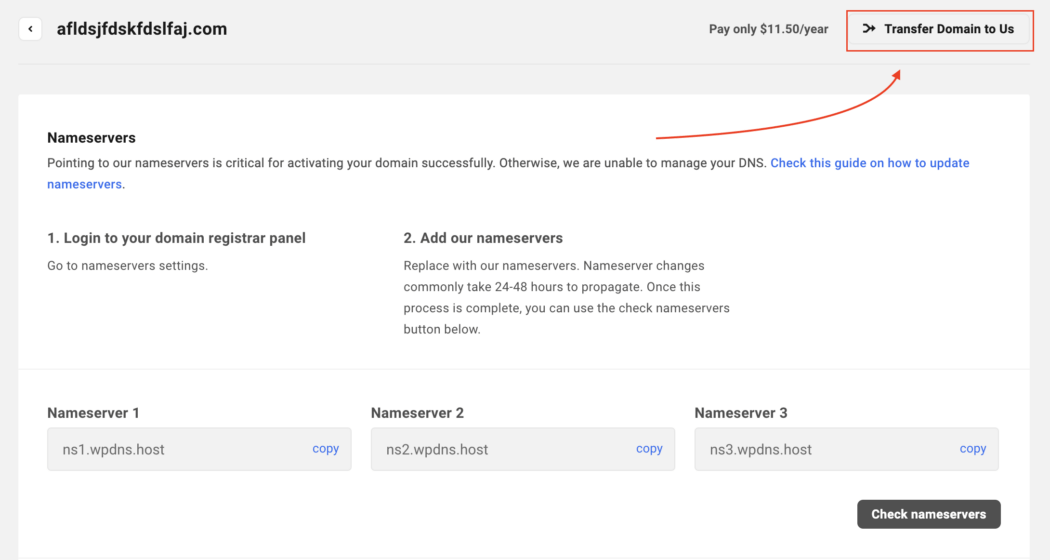
    Additionally, you can click on any connected domain’s row, which will open up Nameserver details for that specific domain. Clicking the Transfer Domain to Us button is another way to get the process going.

    transfer domain to us.
    As you can see, the price per year is also mentioned here.

    Whatever option you choose will lead to an area where you can start the 3-step process.

    Step 1: Domain Eligibility Check

    In this first step, we check whether the domain is transferable.

    To start, you’ll specifically enter the domain you want to transfer. Enter it completely with its TLD (e.g. .com).

    Transfer existing domain
    Once entered, hit ‘Transfer’ to continue.

    If a domain is ineligible, you’ll get an error message. The messages will vary, depending on the issue.

    error message.
    In this example, it’s an invalid TLD.

    Almost any domain TLD is okay to transfer. We have over 260 TLDs that are available for use and transfers. For any questions or issues about this, please contact support or see our documentation for rules and reasons a domain doesn’t transfer.

    That being said, if all is good and the domain is eligible, once you hit Transfer, it will take you to the nameserver step.

    Step 2: Nameserver Settings

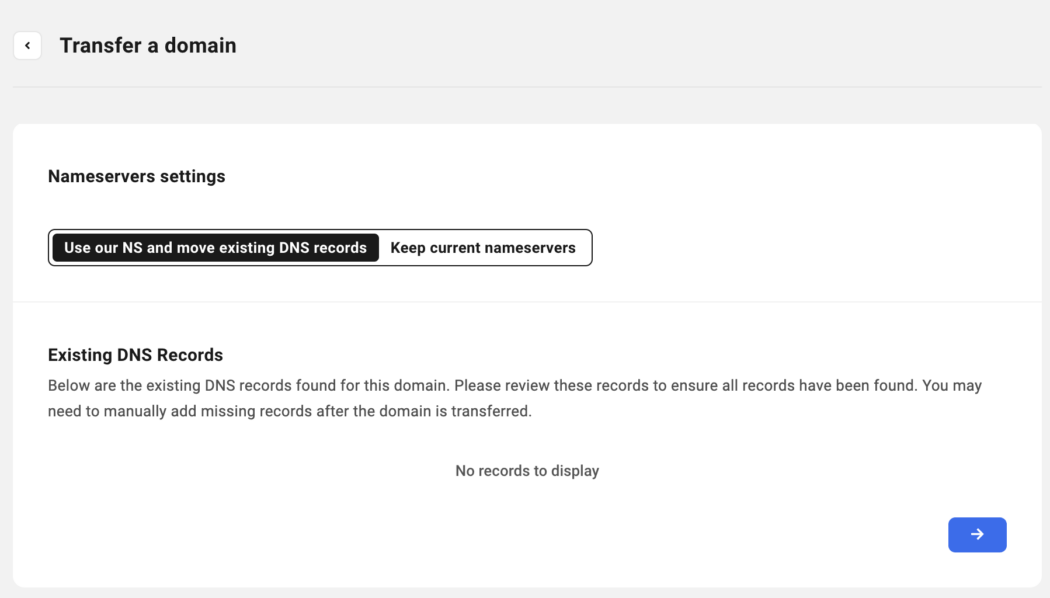
    This step is where you can choose to use our nameservers and DNS records, or keep current nameservers. If existing DNS records are available, they will be shown here. If not, it will be blank and state that there are no records to display.

    Nameservers options.
    Choose where you’d like to manage your DNS in one click.

    If you choose to Keep Current Nameservers, it will keep the current nameserver records for the domain.

    Current nameservers.
    The type of nameserver and TTL is listed.

    Once you decide on what’s best for you, you can continue on…

    And for help pointing a domain to our nameservers, check out our complete guide on how to do so.

    Step 3: Transfer Registration

    Registering a domain is all done in one area.

    You can start by viewing the Registration Terms. You’ll notice the transfer price, renewal price, auto-renew option, and whether domain privacy is active or not.

    Want auto-renew? It’s a click away.

    Next, the domain will need an Authorization Code from your current registrar. This is a normal process that is universal amongst domains. You’ll get this from the losing domain register you’re transferring from.

    Authorization code area.
    You’ll need this code from the domain provider you’re transferring from.

    Additionally, you’ll also add the Registrant Information. You can associate the domain with a client or add personal details.

    Registrant information area.
    You can always go back and edit this information at any time.

    Then, checkout in the Summary. This has the Domain Name, Registration Period, and Price. Plus, it shows whether Auto-Renew is activated or not.

    The price summary for the domain.
    Read the Terms of Service and Privacy Policy for more information.

    After hitting Pay Now, you’re all set!

    By default, the Registration Period of all the transfer-in domains is set to One year. Pay the transfer fee on our pricing page to transfer a domain to WPMU DEV. Upon successful transfer, the domain’s expiration date will be extended by one year.

    It’s also important to note that if the Authorization code is invalid, the domain transfer will fail, and the transfer amount will be refunded to your account.

    The Domain Transfer Process

    Once the new domain transfer-in payment is complete, the Domain Registration process begins. You’ll be able to see the status under Domain Overview.

    The transferring status.
    The transferring part is always highlighted in orange.

    The system will verify three registrant contact data pieces: First Name, Last Name, and Email Address. For more information about registrant verification, please read our documentation.

    When complete, you’ll see that it’s Active OR Verifying. Also, additional information will be displayed (e.g. Registration Date, Expiration date, Costs, etc).


    Sign indicating that a domain is active.
    All other information is displayed, too.

    Be aware that the domain transfer can take up to five days – and that’s out of our control. It depends on how quickly the verification can take place from the losing register (e.g. GoDaddy).

    Once completed, your domain will then be available in the Domains area in The Hub – along with any others you have.

    Bulk Domain Transfer

    Last but not least, if you need to do a Bulk Domain Transfer, contact our 24/7/365 support to help assist with this. It’s the easiest and quickest way to get any bulk domains transferred over to our system.

    The Main Way to Manage Your Domain

    As you can see, bringing in domains from third-party providers is quick and easy, with only three steps. And once done, you can manage all your domains in one place with The Hub!

    Adding domains to a client’s site, setting up auto-renewal, connecting nameservers – the process couldn’t be more streamlined. So, try bringing a new domain in today. Good luck, and enjoy!

    Oh, and if you’re not on our Agency Plan yet, give it a go. Not only do you get domain management like bringing in third-party domains, you’ll also have access to unlimited site licences, 500GB CDN, $144 hosting credits, and more.

  • 10 Best Point-of-Sale Tools and Plugins for Your WordPress Business

    If your commerce platform is online and in-person, you need flexibility regarding payments. This article covers agile point-of-sale tools and plugins that can power your business on WordPress.

    We will showcase some plugins and other options that allow you to have the flexibility of selling face-to-face with a customer or online, setting up your business for omnichannel success!

    As you’ll see, many options are free and can be upgraded accordingly. They all have a good track record and are established point-of-sale (POS) systems that perform as a modern-day cash register (and are much less clunky, too).

    We’ll take a look at the following:

    Hopefully, after reading this post, you’ll have a good idea of what type of POS tool works best for your business and can set it up accordingly.

    But first…

    Why Should You Use a Good POS system?

    It may seem obvious. It’s because you need to sell in-person and online, right? However, there’s a bit more to it than that. A good POS system goes beyond just ringing up a customer.

    Systems today can integrate with other systems, keep track of sales, manage merchandise – and offer some tech that can enhance your services to the next level.

    Some benefits include:

    — Sales can be streamlined from multiple locations.

    — Your functionality increases.

    — Ability to keep track of real-time data.

    — Having a better grasp on managing employees.

    — Automatically get your taxes managed.

    And more…

    It’s vital to be up-to-date on what you can do when selling in-person and online with your WordPress website.

    So, are you ready to cash in? Let’s go!

    Point of Sale Systems

    Here are a handful of modern, efficient, and well-known POS systems to help your WordPress site. They’re in no particular order. (And please note: We are not affiliated with ANY of these. We just find them to be top-notch choices.)

    FooSales

    FooSales header
    FooSales syncs your WooCommerce inventory with a point of sale.

    If you’re using WooCommerce, the FooSales plugin is a POS system that will make any computer, iPad, or Android tablet into a physical retail space.

    This plugin helps allow you to run your business from anywhere in the world and sell your WooCommerce items quickly and easily. It automatically syncs your WooCommerce product inventory, orders, and customer data.

    The sales screen and search tools can promptly locate products with images and descriptions so that you can focus on the clients when they’re checking out. It adds items, shows the amounts of products, and offers a quick one-click checkout.

    FooSales checkout process.
    All the items are displayed – making it easy to locate and check out customers.

    Payments can be made with Square and Stripe. It leverages the strengths of both platforms and allows you to enter credit card information or purchase add-on terminals for a monthly fee.

    There is also a monthly fee associated with using this plugin. They vary depending on the number of websites and add-ons.

    Hike

    Hike header.
    Hike is another plugin option for WooCommerce POS.

    For another WooCommerce option, Hike offers a POS solution in-store and online. It integrates with WooCommerce, allowing access to your customers, product catalog, inventory, and other necessary information.

    With Hike, you can control and manage your entire business from a retail POS system. It works with iPads, PCs, and Mac products. It’s fully interactive with card payment systems like PayPal Here, Tyro, and iZettle.

    There are many POS options, including offering discounts to sales, parking orders, enabling a custom sale, and adding order notes.

    Plus, you can use your existing card terminal – so you don’t need to purchase one directly from them. That said, they offer hardware bundles for complete POS systems (cash register, receipt printer, etc).

    Prices vary depending on the outlet, registers, and other factors.

    Square

    Square header.
    Square is no stranger to modern POS systems.

    A very popular POS is Square. Millions of brands use their software to accept payments in-store and online.

    You can incorporate Square into your business quickly and easily – whether that be a WordPress developer’s website, restaurant, or street vendor – you name it!

    They have great solutions for getting paid with their flexible omnichannel commerce tools. They offer registers, terminals, stands, readers, and more for in-person sales. For online, there’s an app-like shopping experience, customization, the ability to highlight products, and more.

    Their plans vary – but you can start for free. The free plan does take transaction fees, but otherwise, there are no costs. You can upgrade to include more features.

    wePOS

    wePOS header.
    wePOS is a WooCommerce-focused plugin.

    wePOS is another plugin that offers a fast and responsive WooCommerce POS option. You can easily take orders and track your inventory in your WooCommerce store.

    Plus, you can physically count WooCommerce products by scanning bar codes and adding them directly to a customer’s cart to process the order.

    It features a sleek UI that’s simple to navigate. From this, you can manage your inventory and orders.

    wePOS example.
    You can see the organized items, total costs, tax, and more.

    There is a free version and upgrades available. They also have 24/7 support.

    Oliver

    Oliver header.
    Oliver is here for your WooCommerce store needs.

    With a 5-star rating, the Oliver  plugin for WooCommerce might be a great option for a POS system for your business.

    They state: “It’s simple, smart, and easy to use.” Made specifically for WooCommerce, it allows for a consistent combination of eCommerce and physical brick-and-mortar stores. Everything is in one place, and there’s no need for multiple integrations.

    It’s designed to work with numerous devices, including iPad, Mac, or PC. The system supports using a mouse, touchpad, and keyboard entry.

    They also have POS hardware, like a terminal, printer or all-in-one solutions.

    Oliver is free to use, but upgrades are available. Plus, they include support.

    Toast

    Toast header.
    Toast can be the toast of your POS solution.

    Toast is named this for a reason – it specializes in restaurants. So, if your restaurant runs on WordPress or another platform, you may consider this system.

    You’re able to manage all in-person and online sales in one place. They note that their restaurant-grade hardware is 3x faster than competitors, and you can integrate your FOH (front of house) and BOH (back of house) to reduce ticket times by up to 40%.

    The Toast platform even includes payroll and team management – so it goes beyond just a POS option.

    Their hardware includes handheld devices for ordering, kitchen display systems, self-ordering kiosks, and much more.

    It’s free to use. Like many of our other systems, upgrades are available depending on your needs.

    Shopify

    Shopify header.
    Shop it to me: Shopify might be the POS solution you’re looking for.

    Another well-known platform (millions of merchants and 10% of US eCommerce) is Shopify. Shopify allows customers to order online or in-person. It features one-click checkout that lets shoppers pay how they want – through digital wallets or multi-currency.

    It includes a ton of insights into customer data. Everything from their behavior, total sessions, order numbers, and more.

    Additionally, they incorporate your social media with tools for Facebook, Instagram, TikTok, and other channels.

    There’s a whole range of what Shopify offers, hence why it’s so popular. Be sure to visit their website for more information.

    And when it comes to pricing, there’s a free trial – otherwise, it does cost.

    There are various levels that you can purchase, depending on what your needs are for your store.

    Stripe

    Stripe header.
    Stripe is no secret to POS.

    Stripe is a very well-known POS company that offers solutions to millions of companies worldwide. It works with some of the biggest brands (Amazon, Instacart, Zoom, Lyft, etc).

    For us, Stripe is incorporated into our Client & Billing in The Hub and Forminator plugin for accepting payments.

    They feature everything that brings websites and apps together for payment. With support for 135+ currencies, it’s available for use with credit, and debit cards, virtual wallets, and more. Additionally, they have items, such as terminals, for in-person sales.

    Plus, they are big on security, with a team of world-class security experts at their helm. They’ve also received regulatory licenses around the world.

    Stripe is free to use but takes a percentage of the costs.

    PayPal

    PayPal header.
    PayPal is another POS giant in the industry.

    Like Stripe, PayPal is another payment solution we use for our products. PayPal’s popular with millions of other companies, too.

    It’s known chiefly online; however, they offer POS software so you can run your business online and off.

    Their POS offers streamlined checkout, business metrics, and an app. You can easily manage products with prices, stock levels, and more – all in one place.

    The portable terminal PayPal uses is entirely portable. It accepts most forms of payment (credit, debit, Google Pay, etc), and works with chip and contactless payments.

    There is currently a 2.29% transaction fee and costs for the terminal. However, the PayPal Zettle app is completely free to use.

    Stay On Top of Your Shop

    Out of all of these 10 options we just covered, surely you can stay on top of your WordPress website’s sales – in-person and online. Whether it be a plugin or a separate system, modernizing your selling platform is quick and easy.

    And with all of the latest advancements in selling (real-time analytics, instant checkout, inventory control, etc), there’s no reason to be stuck with anything but the most efficient method for your business.

    For more information on online sales, check out our article on eCommerce gateways.

    Once you have systems implemented, there is no stopping customers from shopping!

  • 10 Best Point-of-Sale Tools and Plugins for Your WordPress Business

    If your commerce platform is online and in-person, you need flexibility regarding payments. This article covers agile point-of-sale tools and plugins that can power your business on WordPress.

    We will showcase some plugins and other options that allow you to have the flexibility of selling face-to-face with a customer or online, setting up your business for omnichannel success!

    As you’ll see, many options are free and can be upgraded accordingly. They all have a good track record and are established point-of-sale (POS) systems that perform as a modern-day cash register (and are much less clunky, too).

    We’ll take a look at the following:

    Hopefully, after reading this post, you’ll have a good idea of what type of POS tool works best for your business and can set it up accordingly.

    But first…

    Why Should You Use a Good POS system?

    It may seem obvious. It’s because you need to sell in-person and online, right? However, there’s a bit more to it than that. A good POS system goes beyond just ringing up a customer.

    Systems today can integrate with other systems, keep track of sales, manage merchandise – and offer some tech that can enhance your services to the next level.

    Some benefits include:

    — Sales can be streamlined from multiple locations.

    — Your functionality increases.

    — Ability to keep track of real-time data.

    — Having a better grasp on managing employees.

    — Automatically get your taxes managed.

    And more…

    It’s vital to be up-to-date on what you can do when selling in-person and online with your WordPress website.

    So, are you ready to cash in? Let’s go!

    Point of Sale Systems

    Here are a handful of modern, efficient, and well-known POS systems to help your WordPress site. They’re in no particular order. (And please note: We are not affiliated with ANY of these. We just find them to be top-notch choices.)

    FooSales

    FooSales header
    FooSales syncs your WooCommerce inventory with a point of sale.

    If you’re using WooCommerce, the FooSales plugin is a POS system that will make any computer, iPad, or Android tablet into a physical retail space.

    This plugin helps allow you to run your business from anywhere in the world and sell your WooCommerce items quickly and easily. It automatically syncs your WooCommerce product inventory, orders, and customer data.

    The sales screen and search tools can promptly locate products with images and descriptions so that you can focus on the clients when they’re checking out. It adds items, shows the amounts of products, and offers a quick one-click checkout.

    FooSales checkout process.
    All the items are displayed – making it easy to locate and check out customers.

    Payments can be made with Square and Stripe. It leverages the strengths of both platforms and allows you to enter credit card information or purchase add-on terminals for a monthly fee.

    There is also a monthly fee associated with using this plugin. They vary depending on the number of websites and add-ons.

    Hike

    Hike header.
    Hike is another plugin option for WooCommerce POS.

    For another WooCommerce option, Hike offers a POS solution in-store and online. It integrates with WooCommerce, allowing access to your customers, product catalog, inventory, and other necessary information.

    With Hike, you can control and manage your entire business from a retail POS system. It works with iPads, PCs, and Mac products. It’s fully interactive with card payment systems like PayPal Here, Tyro, and iZettle.

    There are many POS options, including offering discounts to sales, parking orders, enabling a custom sale, and adding order notes.

    Plus, you can use your existing card terminal – so you don’t need to purchase one directly from them. That said, they offer hardware bundles for complete POS systems (cash register, receipt printer, etc).

    Prices vary depending on the outlet, registers, and other factors.

    Square

    Square header.
    Square is no stranger to modern POS systems.

    A very popular POS is Square. Millions of brands use their software to accept payments in-store and online.

    You can incorporate Square into your business quickly and easily – whether that be a WordPress developer’s website, restaurant, or street vendor – you name it!

    They have great solutions for getting paid with their flexible omnichannel commerce tools. They offer registers, terminals, stands, readers, and more for in-person sales. For online, there’s an app-like shopping experience, customization, the ability to highlight products, and more.

    Their plans vary – but you can start for free. The free plan does take transaction fees, but otherwise, there are no costs. You can upgrade to include more features.

    wePOS

    wePOS header.
    wePOS is a WooCommerce-focused plugin.

    wePOS is another plugin that offers a fast and responsive WooCommerce POS option. You can easily take orders and track your inventory in your WooCommerce store.

    Plus, you can physically count WooCommerce products by scanning bar codes and adding them directly to a customer’s cart to process the order.

    It features a sleek UI that’s simple to navigate. From this, you can manage your inventory and orders.

    wePOS example.
    You can see the organized items, total costs, tax, and more.

    There is a free version and upgrades available. They also have 24/7 support.

    Oliver

    Oliver header.
    Oliver is here for your WooCommerce store needs.

    With a 5-star rating, the Oliver  plugin for WooCommerce might be a great option for a POS system for your business.

    They state: “It’s simple, smart, and easy to use.” Made specifically for WooCommerce, it allows for a consistent combination of eCommerce and physical brick-and-mortar stores. Everything is in one place, and there’s no need for multiple integrations.

    It’s designed to work with numerous devices, including iPad, Mac, or PC. The system supports using a mouse, touchpad, and keyboard entry.

    They also have POS hardware, like a terminal, printer or all-in-one solutions.

    Oliver is free to use, but upgrades are available. Plus, they include support.

    Toast

    Toast header.
    Toast can be the toast of your POS solution.

    Toast is named this for a reason – it specializes in restaurants. So, if your restaurant runs on WordPress or another platform, you may consider this system.

    You’re able to manage all in-person and online sales in one place. They note that their restaurant-grade hardware is 3x faster than competitors, and you can integrate your FOH (front of house) and BOH (back of house) to reduce ticket times by up to 40%.

    The Toast platform even includes payroll and team management – so it goes beyond just a POS option.

    Their hardware includes handheld devices for ordering, kitchen display systems, self-ordering kiosks, and much more.

    It’s free to use. Like many of our other systems, upgrades are available depending on your needs.

    Shopify

    Shopify header.
    Shop it to me: Shopify might be the POS solution you’re looking for.

    Another well-known platform (millions of merchants and 10% of US eCommerce) is Shopify. Shopify allows customers to order online or in-person. It features one-click checkout that lets shoppers pay how they want – through digital wallets or multi-currency.

    It includes a ton of insights into customer data. Everything from their behavior, total sessions, order numbers, and more.

    Additionally, they incorporate your social media with tools for Facebook, Instagram, TikTok, and other channels.

    There’s a whole range of what Shopify offers, hence why it’s so popular. Be sure to visit their website for more information.

    And when it comes to pricing, there’s a free trial – otherwise, it does cost.

    There are various levels that you can purchase, depending on what your needs are for your store.

    Stripe

    Stripe header.
    Stripe is no secret to POS.

    Stripe is a very well-known POS company that offers solutions to millions of companies worldwide. It works with some of the biggest brands (Amazon, Instacart, Zoom, Lyft, etc).

    For us, Stripe is incorporated into our Client & Billing in The Hub and Forminator plugin for accepting payments.

    They feature everything that brings websites and apps together for payment. With support for 135+ currencies, it’s available for use with credit, and debit cards, virtual wallets, and more. Additionally, they have items, such as terminals, for in-person sales.

    Plus, they are big on security, with a team of world-class security experts at their helm. They’ve also received regulatory licenses around the world.

    Stripe is free to use but takes a percentage of the costs.

    PayPal

    PayPal header.
    PayPal is another POS giant in the industry.

    Like Stripe, PayPal is another payment solution we use for our products. PayPal’s popular with millions of other companies, too.

    It’s known chiefly online; however, they offer POS software so you can run your business online and off.

    Their POS offers streamlined checkout, business metrics, and an app. You can easily manage products with prices, stock levels, and more – all in one place.

    The portable terminal PayPal uses is entirely portable. It accepts most forms of payment (credit, debit, Google Pay, etc), and works with chip and contactless payments.

    There is currently a 2.29% transaction fee and costs for the terminal. However, the PayPal Zettle app is completely free to use.

    Stay On Top of Your Shop

    Out of all of these 10 options we just covered, surely you can stay on top of your WordPress website’s sales – in-person and online. Whether it be a plugin or a separate system, modernizing your selling platform is quick and easy.

    And with all of the latest advancements in selling (real-time analytics, instant checkout, inventory control, etc), there’s no reason to be stuck with anything but the most efficient method for your business.

    For more information on online sales, check out our article on eCommerce gateways.

    Once you have systems implemented, there is no stopping customers from shopping!

  • Stacking Up on Security: Defender Pro Now Works with Patchstack

    Defender Pro has just stepped up its security game by teaming with Patchstack – a powerful security tool that automates WordPress security on every one of your sites.

    Defender Pro just started using Patchstack to get information about vulnerabilities in the WP core, plugins, and themes – ensuring solid protection for all your WordPress sites.

    Having Patchstack with Defender Pro is for prevention when a new security threat is present on your WordPress site. Whether it be the WordPress core, plugins, or themes, Patchstack monitors them within Defender’s system!

    Patchstack logo.
    Patchstack and Defender Pro team up together to pack a punch on WordPress security.

    This is a quick overview of what’s involved now that Defender has Patchstack onboard.

    We’ll cover:

    Let’s get started!

    What is Patchstack?

    Patchstack is focused on making open-source software safer, including WordPress. They actively research and report thousands of vulnerabilities discovered in WordPress plugins, core, and themes.

    Their developers are notified when a vulnerability is located and issue a security update – where it’s promptly handled.

    Patchstack statistic.
    3rd party plugins can lead to security issues if not monitored. Source: Patchstack

    Zero-day virtual patches are created and automatically applied to vulnerable websites connected to Patchstack (and Defender Pro).

    For another perspective on how Patchstack works, check out this quick video:

    So – how is Patchstack implemented with Defender Pro?

    Implementing Patchstack

    We’ll make this easy – there’s nothing to do! It’s already implemented and ready to go.

    As a user, you won’t notice any differences, and there’s nothing that you need to set up to implement Patchstack except make sure Defender Pro is up-to-date. It’s all taken care of with Patchstack’s and WPMU DEV’s team of developers.

    How Patchstack Works with Defender Pro

    As mentioned, Defender Pro uses Patchstack to get information about vulnerabilities in WordPress core, plugins, and themes.

    Since Patchstack is built-in to Defender Pro, again you won’t notice anything on your end. Patchstack works by finding known vulnerabilities – which is done with automated or manual scans in Defender.

    Defender's scan in progress.
    Defender running a scan – tracking any vulnerabilities.

    Once a scan is run, any known vulnerabilities will appear on Defender’s dashboard. Or, if you have notifications set up, you’ll receive an email.

    Vulnerabilities in Defender.
    In this example, one vulnerability was found.

    Click on the issue and get it resolved immediately. You’ll see exactly what the threat is and what is needed to fix it.

    Issues in Defender.
    In this example, an update is needed for Astra Pro Addon from Astra Pro theme.

    That’s Patchstack in a nutshell: finding vulnerabilities before they become an issue. And as you can see, it’s all tied in with Defender Pro on one platform.

    For further information about running security scans and more, be sure to check out our article on getting the most out of Defender.

    Defender Pro Doesn’t Slack When Combined with Patchstack

    With the exciting new inclusion of Patchstack, there’s no slacking with security! Defender Pro has you covered – everything from monitoring security details from The Hub, blocklist, two-factor authentication, malware detection – and much more.

    If you don’t have Defender Pro, start a free trial today. It easily handles your automated WordPress security, includes 24/7/365 support, and even a full WAF integration.

    Also, if you’re a plugin developer, join PatchStack’s mVDP program that makes it easier to report, manage, and address vulnerabilities in your software. Lastly, if you’re a security researcher, join Patchstack Alliance to report vulnerabilities and earn rewards.

    Patchstack with Defender means nothing can stack up to your WordPress security.

  • Stacking Up on Security: Defender Pro Now Works with Patchstack

    Defender Pro has just stepped up its security game by teaming with Patchstack – a powerful security tool that automates WordPress security on every one of your sites.

    Defender Pro just started using Patchstack to get information about vulnerabilities in the WP core, plugins, and themes – ensuring solid protection for all your WordPress sites.

    Having Patchstack with Defender Pro is for prevention when a new security threat is present on your WordPress site. Whether it be the WordPress core, plugins, or themes, Patchstack monitors them within Defender’s system!

    Patchstack logo.
    Patchstack and Defender Pro team up together to pack a punch on WordPress security.

    This is a quick overview of what’s involved now that Defender has Patchstack onboard.

    We’ll cover:

    Let’s get started!

    What is Patchstack?

    Patchstack is focused on making open-source software safer, including WordPress. They actively research and report thousands of vulnerabilities discovered in WordPress plugins, core, and themes.

    Their developers are notified when a vulnerability is located and issue a security update – where it’s promptly handled.

    Patchstack statistic.
    3rd party plugins can lead to security issues if not monitored. Source: Patchstack

    Zero-day virtual patches are created and automatically applied to vulnerable websites connected to Patchstack (and Defender Pro).

    For another perspective on how Patchstack works, check out this quick video:

    So – how is Patchstack implemented with Defender Pro?

    Implementing Patchstack

    We’ll make this easy – there’s nothing to do! It’s already implemented and ready to go.

    As a user, you won’t notice any differences, and there’s nothing that you need to set up to implement Patchstack except make sure Defender Pro is up-to-date. It’s all taken care of with Patchstack’s and WPMU DEV’s team of developers.

    How Patchstack Works with Defender Pro

    As mentioned, Defender Pro uses Patchstack to get information about vulnerabilities in WordPress core, plugins, and themes.

    Since Patchstack is built-in to Defender Pro, again you won’t notice anything on your end. Patchstack works by finding known vulnerabilities – which is done with automated or manual scans in Defender.

    Defender's scan in progress.
    Defender running a scan – tracking any vulnerabilities.

    Once a scan is run, any known vulnerabilities will appear on Defender’s dashboard. Or, if you have notifications set up, you’ll receive an email.

    Vulnerabilities in Defender.
    In this example, one vulnerability was found.

    Click on the issue and get it resolved immediately. You’ll see exactly what the threat is and what is needed to fix it.

    Issues in Defender.
    In this example, an update is needed for Astra Pro Addon from Astra Pro theme.

    That’s Patchstack in a nutshell: finding vulnerabilities before they become an issue. And as you can see, it’s all tied in with Defender Pro on one platform.

    For further information about running security scans and more, be sure to check out our article on getting the most out of Defender.

    Defender Pro Doesn’t Slack When Combined with Patchstack

    With the exciting new inclusion of Patchstack, there’s no slacking with security! Defender Pro has you covered – everything from monitoring security details from The Hub, blocklist, two-factor authentication, malware detection – and much more.

    If you don’t have Defender Pro, start a free trial today. It easily handles your automated WordPress security, includes 24/7/365 support, and even a full WAF integration.

    Also, if you’re a plugin developer, join PatchStack’s mVDP program that makes it easier to report, manage, and address vulnerabilities in your software. Lastly, if you’re a security researcher, join Patchstack Alliance to report vulnerabilities and earn rewards.

    Patchstack with Defender means nothing can stack up to your WordPress security.