EDITS.WS

Author: Sarah Gooding

  • Gutenberg 16.3 Adds New Tools for Patterns

    Gutenberg 16.3 was released today as a maintenance release but includes several new tools that make pattern management smoother and easier for users. Most notably, custom user patterns now have a dropdown menu for renaming, duplicating and deleting them. Patterns and template parts that come with themes will only have the “duplicate” option available since they cannot be deleted or renamed.

    video credit: Gutenberg 16.3 release post

    Gutenberg 16.3 adds a sticky header bar on the Patterns page. It also brings the “focus mode” to patterns, which is already available for template parts in the Site Editor but not available when editing patterns. Users may not notice but it provides more a consistent editing interface.

    Those who have been keenly following the evolution of the Patterns page will notice that the “Theme patterns” heading has been removed and the pattern categories rearranged. Theme and plugin patterns now appear above template parts.

    image credit: Gutenberg PR #52570

    The icon for synced patterns isn’t self evident and some users may need more context. A new tooltip identifies synced patterns as those for which edits will apply anywhere the pattern is used.

    Gutenberg 16.3 includes more than two dozen pattern interface-related fixes, among other editor bug fixes. If you are using and managing patterns frequently, having the Gutenberg plugin installed will enable a better experience with this interface until these updates make their way into core WordPress. Check out the release post for a full list of all the changes and fixes in 16.3.

  • WordPress 6.3 RC2 Released, Watch the Live Product Demo

    WordPress 6.3 RC2 has been released and is ready for community testing. Since RC1 landed a week ago, 15 changes have come in from the Editor and Trac, including bug fixes for footnotes, internationalization fixes, a missing command for opening the distraction free in the Site Editor, and a few other issues. 

    This release also brings in work completing the About page and adds a “Get Involved” section, closing a 10-year old ticket that suggested adding a “Contribute” tab to the About page.

    The new Get Involved page features both code-based and no-code contribution opportunities with a link to WordPress’ contributor teams.

    The video of the WordPress 6.3 Live Product Demo has been published so anyone who was not able to attend can get a preview of what is coming in the next release. Automattic-sponsored contributors Anne McCarthy and Rich Tabor hosted the demo, showing users how to use the new command palette to zip around the editor and manage settings views. They also guide viewers through browsing and editing pages within the Site Editor, managing synced patterns (formerly called Reusable Blocks), and showcased various new blocks and design tools.

    Check out the highlights post for all the links to features referenced in the demo and the Q&A portion of the broadcast.

    For those interested in performance improvements coming in 6.3, an upcoming hallway hangout is happening tomorrow Thursday, July 27, 2023 at 11:00 AM EDT. Participants can check the #core-performance Slack channel for the Zoom link before the event. Team leads will cover highlights from the 170+ performance improvements included in 6.3 and will discuss future improvements for 6.4.

    WordPress’ Training team is calling for volunteers to help with updating and revising existing Learn WordPress resources ahead of the 6.3 release. The team has created a board on their GitHub repository which highlights high priority tasks.

    WordPress 6.3 RC3 is expected to be released on August 1, and the general release is scheduled for August 8, less than two weeks away. There is still time to find and report some bugs. One easy way is to install the WordPress Beta Tester plugin on a local testing site or use a quick throwaway site from services like InstaWP or TasteWP. Bugs can be reported on Trac or via the Alpha/Beta section of the support forums.

  • Learn How to Use WordPress Playground

    WordPress Playground, an experimental project that uses WebAssembly (WASM) to run WordPress in the browser, was number 1 on Hacker News recently and was also featured on TechCrunch. Word is getting around about how easy it is to fire up a sandbox environment in just a few seconds for testing plugins and themes and even different versions of WordPress and PHP.

    Visiting playground.wordpress.net instantly creates a real WordPress instance with admin access and everything without having to install PHP, MySQL, or Apache. Instead, it runs inside the browser using a SQLite database.

    The Playground isn’t just for developers. It also makes it easy for users who would not ordinarily maintain a local development environment to quickly test plugins or themes they find on WordPress.org, or to just explore new WordPress features in a safe place where you can’t break anything.

    If you have found it difficult to wrap your head around WordPress Playground, Learn WordPress has published a timely new tutorial called How to start using WordPress Playground. In this 10-minute video, WordPress Playground creator Adam Zieliński offers a quick demonstration of how to install plugins and themes and customize a site, and how to export design work from a customized theme. He also covers how to download the entire site and import it into a new WordPress instance, and guides users through basic compatibility testing of a theme, by switching the WordPress version on the playground site.

    Learn WordPress Tutorial: How to start using WordPress Playground

    Developers who want try some more complicated things with this tool can check out the Playground API and learn how to integrate it with an app in five minutes. It’s also useful for previewing pull requests from a repository or setting up a local WordPress development environment using the VisualStudio Code plugin or a CLI tool called wp-now.

  • Mojeek Search Engine Adds WordPress’ Openverse to Image Search

    Mojeek, a UK-based privacy-oriented search engine, has added Openverse to its image search. For more than 15 years, Mojeek has provided independent, unbiased search without tracking or building profiles on users. It is one of just a handful of genuine search engines that uses its own technology and algorithms, unlike the metasearch engines that syndicate Bing, Google, and Yandex. In October 2022, Mojeek passed a major milestone of having indexed more than 6 billion pages.

    The search engine had previously provided Pixabay as the default for its image search with the option to use Bing as an alternative.

    “We have always wanted to eventually get rid of Bing,” Mojeek Head of Marketing Joshua Long said. “Due to both Microsoft’s API pricing decisions, and informed comments by people using Mojeek to search the web, we recently took that step.”

    Openverse’s openly-licensed media was a natural fit for the independent search engine. In 2021, Creative Commons Search was rebranded to Openverse when it came under the umbrella of the WordPress open source project. With more than 700 million Creative Commons licensed and public domain image and audio files, Openverse exceeds Pixabay’s 4 million+ royalty-free and stock images, greatly expanding users’ abilities to search deeper on more topics.

    Although Pixabay is still Mojeek’s default image search provider, users can change their preferences, which are set using a local cookie and contain no personal data.

    “This addition is a testament to the utility that Openverse brings, as well as the ease and extensibility when it comes to using its API,” Long said.

  • Ollie Theme Previews New Onboarding Wizard in Development

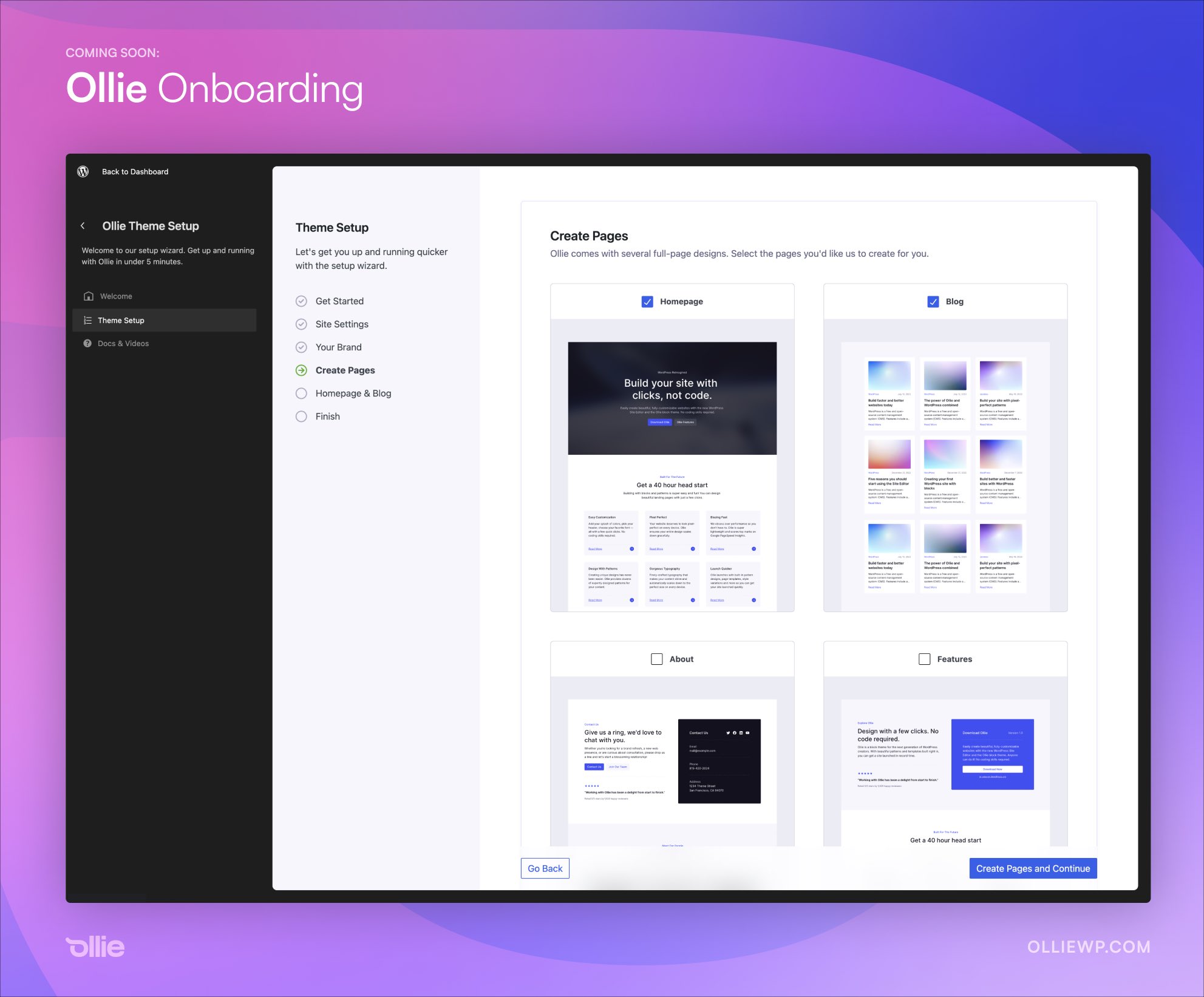
    Unless you are some kind of wizard with the block editor, starting a WordPress website from a blank slate can be overwhelming and ultimately defeating. Mike McAlister, maker of the free Ollie theme, is developing an onboarding experience that aims to drastically reduce the amount of time users spend setting up a new site.

    “I suspect we’re cutting out a half hour or more of finagling a new WordPress site,” McAlister said. “No more wrestling with a blank canvas.”

    The Ollie Onboarding Wizard creates a guided setup experience that allows users to add basic site settings, select a color palette, input their brand colors, add a logo and site icon, and move on to creating pages. It eliminates the necessity of hunting all these settings down inside blocks and the Site Editor.

    Instead of having to create pages individually and assign them the correct template or place the right full-page pattern, Ollie onboarding makes it possible for users to simply check which pages they want automatically created.

    “The goal of this wizard is to help WordPress users zoom through a site setup with the Ollie theme and abstract away those annoying and disconnected setup steps we have to do for every site,” McAlister said.

    “The wizard is also a way to educate users along the way. WordPress is going through a much-needed evolution, but as expected, users are having a tough time with the transition. Change is tough, especially when you power half of the internet. Workflows like this can help.”

    The onboarding interface leans heavily towards the design of the Site Editor to make it seem naturally at home inside WordPress. It demonstrates just how nice plugins and themes can look in the admin with a more modern interface, which could soon be a reality once the ambitious admin UI revamp plans are complete.

    “Months ago, Patrick Posner and I agreed that the future of WordPress is in the new Site Editor view, so that’s where we built this wizard,” McAlister said. “That assumption has since been validated, and because of that, our interface blends in seamlessly with native WordPress.”

    “This is just a v1, but we’re already planning on how to seamlessly integrate choosing a vertical with curated plugins (eCommerce, landing page, email marketing, etc.) and surfacing pro features to really bring this experience together. This isn’t just a WordPress theme.”

    McAlister said the interface is all React with largely native WordPress components and a few custom components sprinkled in to handle some of the more unique aspects of the tool.

    After previewing the onboarding wizard, some people have asked if it will be available as a standalone product. McAlister confirmed that he doesn’t have any plans of productizing it but if there is enough demand he is willing to entertain the idea. Others have asked if there is an API for developers to add their own sections.

    “No API yet, although with the announcements of the admin overhaul initiative, perhaps one is coming,” McAlister said. “Right now, this is just a custom React layer that mimics the site editor view. It’s built to be flexible though, so if a core solution opens up, we can migrate to that.”

    McAlister previewed the wizard on Twitter and in his newsletter, but it’s still in development and not yet available for testing. He plans to launch the Ollie theme on WordPress.org once the wizard is ready for public use.

  • WordPress Contributors Demand Transparency and Objective Guidelines for Listings on Recommended Hosting Page

    WordPress’ Recommended Hosting page is a hotly contested piece of online real estate, and has recently come into focus again following the removal of SiteGround from the listings. When the change was highlighted during a recent Meta team meeting, Audrey Capital-sponsored contributor Samuel “Otto” Wood said, “Matt asked me to remove SiteGround because that page is getting revamped. I know no more than that.” Bluehost and Dreamhost are the only two hosts remaining on the page at this time.

    The process for being listed on the Recommended Hosting page has historically been shrouded in secret, causing contributors to speculate that large sums of money were required. Although the current criteria is posted on the page, the process of getting listed and de-listed is not transparent. It’s not clear if and how the criteria is being applied, as it states that listings are “completely arbitrary:”

    We’ll be looking at this list several times a year, so keep an eye out for us re-opening the survey for hosts to submit themselves for inclusion. Listing is completely arbitrary, but includes criteria like: contributions to WordPress.org, size of customer base, ease of WP auto-install and auto-upgrades, avoiding GPL violations, design, tone, historical perception, using the correct logo, capitalizing WordPress correctly, not blaming us if you have a security issue, and up-to-date system software.

    WordPress co-creator Matt Mullenweg has recently hinted at the possibility of re-opening the survey, inviting contributors in WordPress’ Hosting Slack channel to weigh in on questions or data the survey should collect “to help us discern who we recommend.” He linked to questions from the survey used in 2016 when the page was updated to include Bluehost, DreamHost, Flywheel, and SiteGround.

    The new draft for the survey states: “It’s time to loop back and give every host an opportunity to be on the recommended page, and also make it international because we never really got recommended hosts in non-English countries right.”

    The WordPress Hosting team has been working on a related effort called “Project Bedrock” that aims to create a directory in which any hosting company that meets a series of predefined requirements can appear as recommended hosting or compatible with the WordPress CMS.

    “Yes, project bedrock is a goal,” Hosting team rep Javier Casares said. “Some months ago we left the project in stand-by to create a pre-version of the project, creating a list of hosting companies inside the Make/Hosting, a ‘everyone can be on the list’ (if criteria) as a complement for the /hosting), but the idea is that /hosting, this pre-project or the project should have the same criteria (the base).

    “We know Matt is the responsible for the /hosting, our idea is creating a ‘longer list’ for the Hosting Handbook / page at Make/hosting. The idea is having the same criteria. So, both are complementary.”

    Although contributors to the project view it as complementary to the official recommendations, it may be confusing for WordPress to have multiple similar hosting resources with the same criteria but different listings. These appear to be conflicting efforts that have a lot of overlap but may ultimately be at odds with the goal of simplifying the host selection process for new WordPress users who don’t know which ones to consider.

    Casares suggested a few technical criteria that the survey should focus on, including PHP versions, database versions, SSH access, automatic updates, one-click WordPress installation, free TLS certificates, backup, and more.

    The 2023 survey is still in the early stages in draft form. WordPress Hosting team contributors suggested that requirements for revamping the page would be a good topic for discussion at WordCamp US’ upcoming Community Summit next month.

    In the Post Status hosting channel, Namecheap co-founder Matt Russell suggested Mullenweg leverage WPHostingBenchmarks performance data.

    “[WPHostingBenchmarks is] probably the most open, fairest, and long-term performance evaluation in the WP space,” Russell said. He also recommended Mullenweg revamp the page as more of a directory with options to select budget, regions/country, and more.

    Review Signal founder Kevin Ohashi, who publishes the WPHostingBenchmarks site, shared concerns about transparency that he has had since the last time the page was updated:

    Who is reviewing this information? What criteria will be used in evaluating them? I know last time you said you were involved, as were other folks from Automattic. Automattic is a competitor in the hosting space, and no matter the hat being worn, there is some concern over sharing sensitive business info with a competitor.

    Getting listed on that page is likely worth millions of dollars to any company in terms of business generated. I think the process and criteria should be transparent and clear from the beginning. I also think who is involved with evaluating should be known beforehand as well. At least give companies, and consumers, the information they deserve to evaluate participating and the outcome.

    Ohashi recommends that no person employed by a hosting company should be involved in the evaluation of submissions. This would eliminate bias from competitors in the space trying to suppress those they deem to be a threat.

    “I’d like to see more ethics and accountability, a code of ethics for any company getting listed would be a positive in my mind,” Ohashi said. “Companies should be competing on quality and product, not on astroturfing, deceptive billing practices and other shady behavior we often see in the space. In my benchmarks, I push measuring default performance because I believe that benefits the greatest number of customers. I think there’s an opportunity to push for a better ecosystem here and would love to see you take it.”

  • WordCamp US 2023 Contributor Day Signup Is Open

    WordCamp US 2023 is happening next month in National Harbor, Maryland. The Contributor Day will kick off the event on Thursday, August 24, preceding the conference days. It is open to any attendee, including those who have never contributed before and seasoned contributors alike. There are many technical and non-technical ways to contribute to WordPress.

    Those who are not able to attend WordCamp US are also welcome to join the event virtually via the the #contributor-day Slack channel. New contributors attending in person will begin at 8:30 AM EST and returning contributors will join at 9:30. A guide will be present in the Slack channel at 10 AM EST to help virtual contributors.

    Recommendations for preparing for Contributor Day are on the event page, along with a list and description of all the Make WordPress teams that contributors can elect to join.

    The sign up form is now open for everyone who plans to attend the event in person. It includes the opportunity to give feedback on anticipated accessibility needs and meal preferences for the lunch provided during the event. Contributors will also be asked to select their preferred contributor team(s) during sign up so organizers can be prepared with team leads available.

  • Gutenberg 16.2 Brings Improvements to Pattern Management, Introduces Vertical Text Orientation

    Gutenberg 16.2 was released with a number of important changes to pattern management. Most notably, Reusable blocks have been renamed to Patterns, and the Library section of the Site Editor has been renamed to Patterns.

    This release also introduces a sync status on the pattern details screen to give more information to site owners when managing patterns. The custom patterns label has been changed to “My Patterns” in the Patterns sidebar. A new lock icon designates theme patterns as unable to be edited or modified. All of these changes were cherry-picked from this version of Gutenberg and are included in the upcoming WordPress 6.3 major release, as of Beta 3.

    Changes to Patterns – Gutenberg 16.2 release post

    Gutenberg 16.2 introduces a vertical text orientation, which can be applied using a block’s typography settings. At this time the feature is only available when the theme author opts in for the theme to support it, but it may be expanded in the feature.

    “This new feature is a first step towards full support of vertically written languages as well as for decorative purposes in website design,” Automattic-sponsored Gutenberg contributor Bernie Reiter said in the release post.

    Footnotes, which were introduced in Gutenberg 16.1, received several usability improvements in this release. The first iteration was bare bones with the footnotes created automatically and then inserted at the bottom of the content. This update makes a Footnotes block available in the block inserter, so users can place it again in case it gets deleted.

    Other notable improvements in Gutenberg 16.2 include the following:

    • Command Tool has been renamed to Command Palette
    • “Home” template renamed to “Blog Home” for clarity
    • Adds confirmation step when deleting a template
    • Experiments: Create wordpress/interactivity with the Interactivity API

    It also appears the Gutenberg team is preparing for the eventual deprecation of TinyMCE.

    “We’ve added a new Gutenberg Experiment to explore a potential path towards the deprecation of TinyMCE,” Reiter said. “When enabled, it prevents loading TinyMCE assets and Classic blocks by default, only enabling them if usage is detected. The update also handles scenarios where posts contain Classic blocks or users input raw HTML, offering conversion options or reloading to use the Classic block.”

    Check out the Gutenberg 16.2 release post for more details on the enhancements and bug fixes included in this release.

  • WordPress 6.3 to Introduce a Development Mode

    As the dev notes for the upcoming WordPress 6.3 release are rolling out, there are so many exciting features that have not yet been highlighted. The new development mode, initiated by declaring the WP_DEVELOPMENT_MODE constant, is one that will be particularly useful for theme developers initially.

    “The development mode configured on a site defines the kind of development work that the site is being used for,” Google-sponsored WordPress Core Committer Felix Arntz said. This mode is not recommended for production sites.

    The possible values for the WP_DEVELOPMENT_MODE constant include core, plugin, theme, all, or an empty string (which is the default). The “all” value is applicable to sites where all three aspects may be modified, such as a client website in progress.

    “There are currently only a few use-cases in WordPress core which are determined by the development mode, but this will likely increase in the future,” Arntz said. “Most usage today relates to theme.json caching.”

    Since the cache is usually only invalidated when the theme is updated, it can become cumbersome to developers who are actively modifying theme.json and have to manually invalidate it to see their changes. This caching functionality is bypassed when the value is set to “theme.”

    Although the WP_ENVIRONMENT_TYPE constant seems similar to the new developer mode, it specifically denotes whether the environment is development, staging, or production but does not specify what type of development is being done.

    “It is likely that you will only use the WP_DEVELOPMENT_MODE constant on a site where WP_DEBUG is enabled and WP_ENVIRONMENT_TYPE is either ‘development’ or ‘local,’ since it is not advised for development to occur directly against staging or production environments,” Arntz said.

    For more details on when and how to use Developer Mode, and code samples for checking if development mode is active on a site, developers can refer to the dev note published to the make.wordpress.org/core blog.

  • Bluehost Launches WonderSuite Product with AI-Powered Site-Building Guide

    Bluehost launched its new WonderSuite product this week, which introduces a setup and site creation experience guided by AI. In September 2022, the hosting company debuted its managed WooCommerce packages after acquiring YITH, a WordPress plugin company with more than 100 WooCommerce extensions. The new WonderSuite product is included in all Bluehost WordPress hosting plans and is not specific to online stores.

    WonderSuite brings together solutions from YITH and Yoast and integrates them into a new unified design that is based on Yoast’s open source React component library. This interface was introduced as an update in Yoast 20.0 with mixed feedback. Although many users reacted positively to the modern design, some are not keen on plugins building their own UI in the admin. Bluehost is using this component library to streamline and unify the UI for its various products inside the admin.

    WonderSuite is aimed at small and medium-sized businesses, agencies, and freelancers who are just getting online. The major update here is the WonderStart onboarding experience that asks the user specific questions and then populates other parts of the website building process with their answers. For example, social media handles will automatically sent to SEO optimization and added to the social buttons block.

    Bluehost also pulls the WonderStart data into the WonderBlocks, which are used to create a library of block patterns and page templates using images and suggested text based on the user’s entries during onboarding. All of this works with the block-based YITH Wonder Theme, which is free on WordPress.org and active on more than 10,000 sites.

    Wonder theme users have access to some patterns and templates but Bluehost customers have more designs available to them in combination with WonderBlocks. Those hosting with Bluehost who don’t want to use the default Wonder Theme will can still use the WonderBlocks pattern library with any block-based theme.

    Bluehost is one example of a host that is putting AI to use inside the admin. The new WonderHelp section is an AI-powered guide that users can tap into during the site-building process. Users can ask it to create a blog and the feature will provide a guide inside the site builder with instructions for what to do on each page.

    The company is working on a feature called WonderAssist that is anticipated later in 2023. It will provide AI-powered content generation with relevant copy, product descriptions, and SEO-friendly excerpts integrated with the other parts of WonderSuite.

    Bluehost’s e-commerce customers also have access to WonderCart, which provides a collection of cross-sell and upsell features, along with promotional and discount options inside a single, unified interface, instead of spread across multiple plugins and tools.

    Existing Bluehost customers can find the updated plugin in their WordPress sites with the new products available. Onboarding is currently only available for users starting new websites but a representative said they are working on creating a path that allows existing customers to re-route through the onboarding experience.