EDITS.WS

Author: Will Morris

  • 16 Best Booking Plugins for WordPress in 2023

    As a business owner, it’s important to leverage tools that help streamline key tasks. One way to do that is to eliminate the amount of time you have to spend manually scheduling appointments with your customers. Fortunately, WordPress booking plugins can make your job easier. Plus, they can improve the experience for your visitors.

    In this post, we’ll introduce you to 15 of the best WordPress booking plugins, discussing their key features and pricing.

    What is a WordPress Booking Plugin?

    A WordPress booking plugin integrates with WordPress and enables users to create and manage bookings for services or products. It allows you to set up a booking system on your WordPress website, allowing visitors to select a date and time, input their information, and make a reservation directly from your site.

    Some of the features that you’ll typically find in a booking plugin are:

    • Customizable booking forms
    • Availability calendars
    • Payment integration
    • Automated confirmation and reminder emails
    • Customer management tools
    • Integration with Google Calendar, iCal, and other calendar systems

    To compile this list, we took into account functionality, updates, support, and ratings and reviews.

    Let’s dive in!

    1. WPForms

    The WPForms WordPress plugin

    If you’ve been using WordPress for a while, you’ve probably heard of WPForms. Along with being a very popular form builder, this freemium plugin can help you schedule bookings through your website. This tutorial goes more in depth on how the plugin works.

    It lets you quickly and easily create booking forms using a user-friendly drag-and-drop builder:

    The WPForms form builder interface

    You can set certain fields to be “required”, such as the day and time for the appointment. You can also add completed forms anywhere on your site. That includes pages, posts, sidebars, and widget areas.

    WPForms Lite is a powerful free version of the plugin that you can use for various forms. However, you’ll need to upgrade to a Pro plan if you want to use the date/time form field features.

    Key Features for WPForms:

    • Pre-built form templates
    • Drag-and-drop form builder
    • Required fields
    • Spam protection
    • PayPal and Stripe integrations
    • Integration with Divi

    Divi users benefit from seamless integration with WPForms by way of a custom module inside the Divi Builder. This makes it easy to add forms to your posts and pages, then customize them with tons of design settings.

    WPForms is for you if…

    … you’re looking for a quick and easy way to build your forms. This plugin can help you create many different types, from signup and booking to survey and contact forms.

    Price: Free, with premium plans starting at $49.50 per year | Learn More About WPForms

    2. Simply Schedule Appointments

    The Simply Schedule Appointments plugin

    Another simple yet powerful WordPress booking plugin you might consider using is Simply Schedule Appointments. This freemium tool makes accepting appointments through your WordPress site seamless. It’s quick and easy to set up and promises to have you ready to display your availability within minutes.

    Simply Schedule Appointments comes in both free and premium versions. While the plugin is feature-rich, it doesn’t come with any unnecessary bloat or confusing settings. The interface is one of the most modern and clean ones included on this list:

    The interface of the Simply Schedule Appointments plugin

    You can create appointment types and manage all of your bookings from the back end. This plugin is also ideal for arranging phone calls and meetings. For example, it’s a solid option if you’re a trainer, counselor, or consultant.

    Thanks to the interactive setup wizard, you can create a booking form and add it to your site quickly. It also fully integrates with our own Divi Builder, making it all the easier to use.

    Key Features:

    • Easy setup and installation
    • Intuitive and easy-to-use User Interface (UI)
    • Interactive setup wizard
    • Unlimited appointment types
    • Customizable notification emails and styles
    • Advanced scheduling options and blackout dates
    • One-click support
    • Gutenberg Blocks
    • Google Calendar and Mailchimp integration (premium only)
    • Integration with popular page builders, including Divi Builder

    Simply Schedule Appointments is for you if…

    … you want a plugin that lets your customers quickly and easily schedule phone calls, meetings, or sessions. It’s perfect if you want a freemium tool that isn’t overly simple or too complex.

    Price: Free, with premium plans starting at $99 | Learn More About Simply Schedule Appointments

    3. Hotel Booking Plugin by MotoPress

    Hotel Booking Plugin by MotoPress

    The Hotel Booking Plugin by MotoPress is a great choice for those wanting to build a hotel booking or rental property website. You can book, list, and manage properties or rooms with ease using any WordPress theme.

    The plugin works with any WordPress theme and allows you to create a booking site with ease. Some key features include:

    Key Features for WordPress Hotel Booking Plugin:

    • Accept reservations
    • Integrates with Divi and other page builders
    • Mobile-friendly custom forms
    • Custom search fields
    • Real-time availability calendars
    • Collect taxes, offer coupons, and the ability to make multiple reservations
    • Integration with multiple payment gateways

    Divi users will be happy to know that Hotel Booking integrates with Divi by adding a booking module directly into the Visual Builder. With so many design options at your disposal, you’re able to create beautiful booking pages for real estate, campsites, rentals, and more.

    Bookings with Divi Builder

    Hotel Booking Plugin is for you if…

    …you want a full solution booking platform for real estate, camping, hotels, or any other type of reservation-based website. With Hotel Booking by MotoPress, you’ll be able to create stunning booking pages that match the look and feel of the rest of your website.

    Price: $99/yr | Learn More About Hotel Booking by MotoPress

    4. Amelia

    The Amelia WordPress booking plugin

    Amelia is an events and appointments booking calendar plugin geared towards enterprise-level businesses. The feature-rich booking system lets you automate the appointment scheduling process on your site’s back and front ends:

    The back-end calendar view of the Amelia WordPress booking plugin

    One of this tool’s unique advantages is its performance optimization. For example, Amelia incorporates page preloading and other advanced technologies. This helps it deliver the best experience possible to both you and your customers.

    Key Features for Amelia:

    • Seamless appointment scheduling
    • Front-end booking wizard
    • User-friendly UI
    • Intuitive calendar view in the admin area
    • Flexible appointment management
    • Email notifications
    • Booking for recurring appointments (premium only)
    • Group services and coupons (premium only)
    • WooCommerce, PayPal, and Stripe integration (premium only)

    Amelia is for you if…

    … you want a plugin with a quick installation and setup process. It’s also a handy tool if you want to primarily book in-person appointments and meetings (gyms, salons, etc.). Your customers will be able to pay online (premium only) or offline.

    Price: Free, with premium plans starting at $79 per year | Learn More About Amelia

    5. Appointment Hour Booking

    The Appointment Hour Booking WordPress plugin

    Appointment Hour Booking is a freemium WordPress booking plugin that lets you build appointment forms and apply specific times for availability. On the front end of your site, your customers can select from the displayed start times for the chosen service. Then they can submit payments.

    Also, the UI is more beginner-friendly when compared to many other WordPress booking plugins on this list:

    The interface of the Appointment Hour Booking plugin

    The Appointment Hour Booking plugin’s visual configuration makes building your calendar and forms straightforward. It also offers a wide range of customization and configuration options that make it flexible enough for small and large businesses alike.

    Key Features for Appointment Hour Booking:

    • Appointments with start and end times
    • Multiple services with different prices and durations
    • Definable open hours
    • Double-booking prevention
    • Automatic price calculator
    • Customizable email notifications

    Appointment Hour Booking is for you if…

    … you’re looking to create booking forms for appointments that have specified start and end times. Therefore, it’s a useful plugin if you offer classes and workshops, events, or meetings.

    Price: Free, with premium plans starting at $7.28 per month | Learn More About Appointment Hour Booking

    6. Events Calendar

    The Event Calendar plugin

    Events Calendar is one of the best WordPress events calendar plugins, and it can be an all-in-one solution for event ticketing. It lets you easily create and add an events calendar to your website. Your users can then book tickets for those events (whether online or in person):

    The Events Calendar plugin interface

    This feature-rich plugin is highly customizable and extensible. In addition, it is easy to use and comes with a lot of support. That’s especially true if you upgrade to Events Calendar Pro.

    Key Features for The Events Calendar:

    • Event ticketing and scheduling
    • Month/list/day views
    • Categories and tags
    • Google Calendar and Google Maps integration

    The Events Calendar is for you if…

    … you run an events website. This powerful tool is an excellent way to sell tickets and book guests.

    Price: Free, with premium plans starting at $99 | Learn More About The Events Calendar

    7. WP Simple Booking Calendar

    The WP Simple Booking Calendar plugin

    Next on our list, WP Simple Booking Calendar is a popular WordPress booking plugin that lets you streamline renting out your property to customers via your website. Visitors can check your home or room’s availability, and then book it with ease.

    You’ll be able to manage calendars and appointments from the back end easily:

    The WP Simple Booking Calendar plugin settings

    The free version comes with standard features for creating a booking calendar and displaying it on your site. However, premium plans are available that unlock more features, including advanced editing, customizing, and publishing options.

    Key Features for WP Simple Booking Calendar:

    • Booking calendar and calendar legend
    • Holiday home bookings
    • Simple UI
    • Language translation
    • Calendar data backup and restoration
    • Gutenberg Block
    • Syncing with third-party sites such as Airbnb and Booking.com (premium only)
    • Unlimited booking calendars (premium only)

    WP Simple Booking Calendar is for you if…

    … you want a freemium WordPress booking plugin for a property rental website. Whether you’re renting your vacation home, office space, or personal items and equipment, it’s worth checking out. However, keep in mind that it doesn’t let you accept online payments. For that, you would need to switch to WP Booking System.

    Price: Free, with premium plans starting at $39 | Learn More About WP Simple Booking Calendar

    8. StartBooking

    The Start Booking website

    Next on our list of WordPress booking plugins is StartBooking. This plugin is a bit different than many of the other options we’ll see. First, it’s essentially an all-in-one solution. StartBooking is premium online scheduling software that lets you add a calendar to your WordPress site.

    From your site’s front end, your visitors can schedule appointments, view appointment details, and cancel appointments:

    SmartBooking demo

    StartBooking uses innovative cloud technology to power its managed scheduling system. Plus, it provides you with a collection of handy features and functionality for streamlining your booking process. With this robust tool, you can schedule unlimited appointments and assign specific staff members to individual services.

    Key Features for StartBooking:

    • Fully managed scheduling system software
    • Custom integrations
    • Classes and group bookings
    • Reminder notifications and customizable emails
    • Online payments
    • Google Calendar integration
    • Booking locations and analytics
    • Services and staff management

    StartBooking is for you if…

    … you’re looking for a scalable scheduling solution for service appointments. Therefore, it’s especially useful if your business offers classes or other services that require group booking.

    Price: Plans start at $25 per month | Learn More About StartBooking

    9. Bookly

    Bookly plugin

    Next, Bookly is a freemium scheduling plugin that automates the online booking process. You can use it to effortlessly accept reservations on your website and manage your services calendar.

    The robust, feature-rich, and modern admin panel is easy to navigate. It also offers a plethora of settings and tools for viewing and managing your appointments. This includes a well-organized dashboard that gives you a snapshot of important appointment-related data:

    Bookly dashboard

    Bookly is a powerful option for many types of businesses, from salons to transportation companies. If you want advanced features such as online payments, you can upgrade to Bookly Pro. However, unlike other premium WordPress booking plugins, this is a one-time fee rather than a monthly or annual subscription.

    Key Features for Bookly:

    • Intuitive booking management system
    • Filter, search, and sort options for the booking list
    • Fully customizable booking forms
    • Unlimited forms
    • Services grouped by category
    • Calendar viewable in daily/weekly/monthly formats
    • User-friendly interface
    • SMS and email notifications
    • Staff scheduling and task assignment
    • Payment gateway integrations with detailed reports (premium only)

    Bookly is for you if…

    … you want a reliable and flexible freemium WordPress booking plugin. It’s an excellent choice for salons, health and wellness spas, gyms, and professional services with multiple staff members.

    Price: Free, with a premium version available for $62 | Learn More About Bookly

    10. BirchPress Scheduler

    The BirchPress Scheduler plugin.

    BirchPress Scheduler is another modern WordPress booking plugin that lets you create and embed a scheduling calendar just about anywhere on your site. It’s aimed largely toward small businesses, making it a quality option for spas, salons, studios, etc.

    This premium plugin doesn’t offer a free version. However, the features you get make it a worthwhile investment. This is especially true if you’re looking for a tool to help with staff assignments and accept online payments.

    In addition, the interface is clean and easy to use:

    BirchPress dashboard

    You can make bookings for specific times and service durations, as well as assign pricing information. In addition, the plugin offers multiple pricing tiers for you to choose from.

    Key Features for BirchPress Scheduler:

    • Booking management system
    • Built-in form editor
    • WooCommerce and PayPal integrations
    • Booking availability limitations and restrictions
    • Staff assignments
    • Google Calendar, iPhone, Android, and Outlook integrations
    • Automated email notifications
    • Group booking
    • Developer-friendly customization features (including thousands of functions and hooks)

    BirchPress Scheduler is for you if…

    … you run a service-based business, such as a salon or yoga studio, and want a powerful premium booking manager. It’s also a smart choice if you have multiple staff members who handle your services. That’s because this tool lets you leverage helpful staff appointment features. Plus, BirchPress is developer-friendly, coming with a wide range of customization features for advanced users.

    Price: Plans start at $99 | Learn More About BirchPress Scheduler

    11. Booking Calendar

    Booking Calendar plugin

    Booking Calendar is one of the most popular WordPress booking plugins available. It has over 60,000 active installations, and a 4.5 out of 5-star rating. In addition, it’s one of the oldest scheduling tools for the Content Management System (CMS).

    This freemium plugin lets you customize calendars and use them to display booking availability for properties and services. It’s also effortless to use, and comes with a clean, user-friendly admin panel:

    The Booking Calendar plugin dashboard.

    Your users will be able to select specific days and time slots from the calendar view. Then, both they and you will receive email notifications about the bookings, which you can either approve or deny.

    Key Features for Booking Calendar:

    • User-friendly interface
    • Customizable calendar designs
    • Calendars in daily/weekly/monthly formats
    • Time-slot bookings with time picker tool
    • Booking Calendar Blocks for Gutenberg
    • Prevention of double-booking
    • Email notifications
    • Option to import .ics feeds from third-party sites (Airbnb, Tripadvisor, etc.) via shortcodes

    Booking Calendar is for you if…

    … you’re looking for a quick and easy way to manage multiple appointments per day. It’s also an excellent option if you want to integrate data from other travel-and-stay websites. That includes Airbnb, TripAdvisor, and Booking.com.

    Price: Free, with premium plans starting at $47.40 | Learn More About Booking Calendar

    12. WooCommerce Appointments

    The WooCommerce Appointments plugin by BookingWP

    Most of the WordPress booking plugins we’ve discussed so far are for WordPress in general. However, WooCommerce Appointments by BookingWP is ideal if you’re looking for a premium scheduling tool for your e-commerce store. It offers full integration with WooCommerce, as well as with Google Calendar.

    From the front end of your shop, users will be able to view your services. They can also filter appointments by availability, and schedule their preferred times:

    The WooCommerce Appointments plugin demo

    You can also let users filter by price or by category. In addition, WooCommerce Appointments enables you to add extra form fields. You can also apply flexible availability and pricing rules, and assign multiple staff members to appointments.

    Key Features for WooCommerce Appointments:

    • Appointment scheduling software
    • WooCommerce and Google Calendar integration
    • Options to accept and request payments
    • Staff management/login
    • Notifications and reminders
    • Flexibility pricing and availability rules
    • Time zone conversion

    WooCommerce Appointments is for you if…

    … you’re already a WooCommerce site owner and want a straightforward way of booking appointments. You’ll also be able to request and accept payments. In addition, it’s a more affordable alternative to the other WooCommerce-specific plugin on this list.

    Price: Plans start at $89 | Learn More About WooCommerce Appointments

    13. Easy Appointments

    The Easy Appointments WordPress booking plugin

    Easy Appointments is a widely-used and highly-rated WordPress booking plugin. It simplifies the process of scheduling and managing multiple appointments for different locations and services via your website. While the interface can be a little overwhelming, it is packed with helpful features:

    The Easy Appointments plugin interface

    All of the settings and configurations are neatly organized. This makes finding what you’re looking for relatively easy.

    The free version is sufficient for basic booking forms and calendars. However, there is also a paid extension available if you want access to features such as online payment gateway integrations.

    Key Features for Easy Appointments:

    • Flexible time management
    • Multiple locations, services, and workers
    • Email notifications
    • Custom form fields
    • Date picker localization (77 languages available)
    • Google Calendar, PayPal, and WooCommerce integration (premium extension)

    Easy Appointments is for you if…

    … you have a business that offers multiple services requiring appointments. This includes law offices, cleaning companies, and doctors.

    Price: Free, with extension packages available starting at $39 | Learn More About Easy Appointments

    14. Booked

    The Booked plugin

    Booked is a premium appointment booking plugin for WordPress that is quick to set up and easy to use. Sold exclusively on CodeCanyon, this powerful tool is excellent for letting registered users and guests schedule appointments on your site.

    You can use the plugin’s front-end calendar shortcode and widgets to display multiple appointment times per date. In addition, it can be fully integrated with WooCommerce. This makes it easy for your visitors to check out online when booking.

    Key Features:

    • Appointment management calendar
    • Unlimited calendars and booking agents
    • Registered and guest booking
    • Custom time slots and fields
    • Built-in calendar color pickers
    • Customer profiles
    • Custom login/registration form
    • WooCommerce payments

    Booked is for you if…

    …you have a membership website. Booked also offers a guest booking feature. This means that users only have to provide their names and emails to book appointments.

    Price: $49 | Learn More About Easy Appointments

    15. WooCommerce Bookings

    WooCommerce Bookings Plugin

    WooCommerce Bookings is an official WooCommerce extension that lets you add booking and scheduling functionality to your e-commerce shop. With this premium tool, you can easily integrate your booking system into your existing storefront:

    WooCommerce Bookings demo

    WooCommerce Bookings lets you create schedules the same way you would products. Also, you can integrate with various payment gateways for automatic invoicing.

    Key Features for WooCommerce Bookings:

    • Fixed and “blockable” time slots
    • One-on-one appointments or multi-person events
    • Flexible and special pricing (groups, events, etc.)
    • Localization
    • Email notifications
    • List and calendar formats

    WooCommerce Bookings is for you if…

    … you’re looking for a reliable, premium WooCommerce extension for booking appointments through your e-commerce site. It’s especially valuable if your business model involves selling your time. For example, it’s handy if you sell professional services, classes, training sessions, or property, such as a rental home.

    Price: $249 per year | Learn More About WooCommerce Bookings

    16. Team Booking

    The Team Booking plugin

    Rounding off our list of the best WordPress booking plugins is Team Booking. This premium tool has thousands of sales on CodeCanyon and a nearly 5.0-star rating. In addition, the innovative booking system comes with an impressive range of features for creating appointment and booking calendars.

    The Team Booking interface

    With Team Booking, all availability plans are made using Google Calendar. First, you can simply create events. Then, those availability slots become visible to your customers on the front end.

    Key Features for Team Booking:

    • Flexible form builder
    • Google Calendar, PayPal, and Stripe integrations
    • Dynamic pricing with discounts and promotions
    • Customizable email notifications

    Team Booking is for you if…

    … you want an affordable yet premium booking plugin. In addition to regular appointments and events, you can also use Team Booking for unscheduled meetings. In other words, it’s useful for bookings that don’t require specific time slots (such as support tickets).

    Price: $39 | Learn More About Team Booking

    Conclusion

    As a business owner, you’re tasked with many responsibilities. Fortunately, tools such as WordPress booking plugins can help lighten your workload. By using appointment scheduling software, you can save time for both you and your customers.

    As we’ve seen, there are various quality WordPress booking plugins to choose from. Therefore, the best option for you depends on your budget and needs. For an all-around flexible and freemium option, we recommend WPForms. It functions both as a great form plugin as well as a full-featured booking plugin. Not only will it help you schedule bookings, but it gives you the ability to utilize a drag-and-drop builder, as well as integrate with the Divi Theme.

    Featured Image Illustration via ivector/shutterstock

    The post 16 Best Booking Plugins for WordPress in 2023 appeared first on Elegant Themes Blog.

  • 7 Best Paywall Plugins for WordPress in 2023

    Using paywalls and memberships is one of the best ways to monetize your WordPress site. You can offer exclusive content in exchange for ongoing subscriptions or one-time payments. Fortunately, WordPress has some great plugins to help you create a paywall that restricts paid (or membership) content on your site.

    In this guide, we’ll take a closer look at paywalls and why you might consider using one. Then, we’ll review seven of the best WordPress paywall plugins. Let’s get started!

    An Overview of Paywalls (And Why You Might Want to Use One)

    A paywall is a content restriction method. It prevents visitors from accessing a particular area on your site unless they subscribe, pay a one-time fee, or have membership status on your site.

    You’ve probably seen paywalls before. They’re common on newspaper websites such as The Washington Post:

    Washington- Post paywall

    Paywalls are also common on membership sites. Here, users pay to access exclusive content such as articles, videos, podcasts, and online courses. Typically, experts in particular fields, such as finance or digital marketing, offer their services to members only.

    You’ll also see paywalls on video streaming sites. These websites might offer exclusive video galleries, streaming events, or recorded content. Usually, the clips are available as “pay per view”, meaning users will pay each time they want to see the content.

    Overall, using a paywall is one of the easiest ways to monetize your WordPress website. If readers are willing to pay for exclusive content, you can quickly turn a profit from one-time payments or subscriptions.

    However, you’ll need to make sure that your content is worth paying for. Otherwise, you might struggle to attract members or customers. Therefore, you might like to focus on building organic traffic and reader engagement before introducing a paywall.

    What Are WordPress Paywall Plugins?

    A WordPress paywall plugin is a tool that enables you to set up paywalls, memberships, and other restricted content from your dashboard. Essentially, you’ll control all your settings without using custom coding or directing your readers to third-party websites.

    Additionally, a paywall plugin will typically have integrated payment processors. These platforms enable you to accept payments directly from your website. Therefore, you can offer convenient and secure transactions to your subscribers.

    7 Best WordPress Paywall Plugins

    There are plenty of free and premium WordPress paywall plugins. We’ve compiled a list of our favorite options, basing our selections on the features and flexibility offered by these tools.

    1. MemberPress

    MemberPress

    MemberPress is one of the most popular and best WordPress paywall plugins on the market. It offers various features, including paywalls, content drips, different membership levels, and online courses. Moreover, you can set up different billing methods for your subscriptions.

    Key Features for MemberPress:

    • Create memberships, paywalls, online courses, and communities.
    • Offer automated billing and upgrades to your members.
    • Drip content with timed releases and expiration dates.
    • Create coupons for your customers.
    • Offers powerful integration with Divi and Divi Modules.

    MemberPress WordPress paywall plugin

    If you’re looking for powerful yet customizable access rules, MemberPress could be the best option for you. The plugin enables you to restrict content to pages, child pages, custom post types, and more. Plus, it offers a wealth of front-end pricing tables to help you attract new subscribers.

    MemberPress is for you if…

    • You use Divi and would like convenient integrated options for Divi Modules.
    • You want to sell your online course.
    • You’re looking for a user-friendly solution.
    • You’d like to offer “gifted” memberships, coupons, and free trials to incentivize users.

    Pricing: From $179 per year. | Learn More About MemberPress. 

    2. Paid Memberships Pro

    Paid Memberships Pro

    Paid Memberships Pro is a complete solution for setting up memberships and subscriptions in WordPress. This plugin is designed for sites that offer premium content, online courses, members-only discounts, and more.

    Key Features for Paid Memberships Pro:

    • Restrict custom post types, including events and courses, as well as posts, categories, and pages.
    • Create unlimited membership levels with different pricing models, including recurring and one-time payments.
    • Integrate your members-only area with Stripe, Paypal, and other payment gateways.
    • Access reports on signups, cancellations, expirations, and more.
    • Integrates with Divi for easy membership restriction within the Divi Builder.

    Paid Memberships Pro dashboard

    Paid Memberships Pro comes with an easy-to-use interface that helps you set up multiple membership levels, create discount codes, and edit email templates. Additionally, this tool enables you to easily manage your members and subscriptions from your dashboard, as well as track orders and user activity.

    Paid Membership Pro is for you if…

    • You want to offer flexible payment methods for members.
    • You offer courses, host events, or want to create paywall content for your blog.
    • You use Divi and are looking for a Divi-integrated solution.

    Pricing: Free, with premium plans that start at $247 per year. | Learn More About Paid Memberships Pro.

    3. LearnDash

    LearnDash LMS

    LearnDash is a popular WordPress plugin that is widely used for creating and managing online courses. One of its best features is its user-friendly course builder, which makes it easy to create and organize course content, such as lessons, topics, and quizzes. The course builder also allows you to add gamification elements to your courses, such as badges and points, to increase student engagement and motivation. Additionally, LearnDash provides detailed progress tracking, allowing students to see their progress and how much they have left to complete.

    Key Features of Learn Dash

    • Certificate creator
    • Integrations with MailChimp, Slack, PayPal, and Zapier
    • Advanced course builder
    • Users can collect course points
    • Integrated paywall system

    Additionally, LearnDash makes it easy to create and manage certifications and badges, providing students with a tangible reward for their hard work. Furthermore, LearnDash provides in-depth reporting and analytics, allowing you to see how students are progressing through your courses, their quiz results, and more. LearnDash also integrates with a variety of tools and services, making it a versatile solution for creating and managing online courses.

    Finally, you can match your business branding with custom colors, logos, and more.

    LearnDash settings

    LearnDash is for you if…

    • You need a full-service online academy for WordPress
    • You want the ability to collect payments for courses
    • Drag-and-drop course building is a must.

    Pricing: $199 per year for 1 site | Learn More About LearnDash.

    4. Paid Member Subscriptions

    Paid Member Subscriptions

    Paid Member Subscriptions is an easy-to-use plugin that lets you set up subscription plans and restrict access to premium content. Moreover, it integrates with WooCommerce. This means that you can also restrict product access to members only or offer discounted prices to subscribers.

    Key Features for Paid Member Subscriptions:

    • Display partial content to non-members.
    • Create unlimited membership plans.
    • Enable members to manage their subscriptions.
    • Offer a free trial period and charge signup fees.

    Adding a new subscription plan in Membership and Content Restriction

    With this plugin, you can also sell group subscriptions. Additionally, you can allow users to sign up for more than one membership plan. Thus, this tool can be particularly useful if you offer different courses on your site.

    Paid Member Subscriptions is for you if…

    • You want to give users tasters of your premium content.
    • You run a WooCommerce store and want to restrict product viewing and purchases.

    Pricing: Free, with a premium version that starts at €149 (that’s about $159) | Learn More About Paid Member Subscriptions. 

    5. Restrict Content Pro

    Restrict Content Pro

    Next up, Restrict Content Pro could be ideal if you’re looking for a premium membership and paywall plugin, and it sits near the top of our list of the best WordPress membership plugins. You can create custom subscription levels, content restriction rules, and discount codes to offer users free trials of your paywalled articles. You can also receive payments directly through the plugin and monitor subscriptions in your WordPress dashboard.

    Key Features for Restrict Content Pro:

    • Create and customize unlimited subscription levels.
    • Receive payments through Stripe, Paypal, or your payment gateway.
    • Enable users to upgrade or downgrade their subscriptions.
    • Send welcome emails, receipts, and payment reminders to subscribers.

    Restrict Content Pro dashboard

    Additionally, Restrict Content Pro has one of the most user-friendly interfaces. You can create paywalled content with a quick shortcode, or add it to your posts manually. Furthermore, the plugin has a range of free and premium add-ons that extend its functionality.

    We recommend checking out our complete Restrict Content Pro review guide. This post gives a breakdown of the plugin’s main features.

    Restrict Content Pro is for you if…

    • You’re happy to invest in a premium WordPress paywall plugin.
    • You’re looking for a paywall solution with advanced content restriction settings.

    Pricing: From $59.40 per year. | Learn More About Restrict Content Pro.

    6. Leaky Paywall

    Leaky Paywall Plugin

    Finally, Leaky Paywall is a freemium tool and a good choice for WordPress paywall plugins. It enables you to create paywalls that restrict content according to post types, categories, tags, and more. Plus, you can sell various plans, including subscriptions, premium memberships, ad-free plans, and one-time purchases.

    Key Features for Leaky Paywall:

    • Offer extra content for free to new email subscribers.
    • Use targeted messages to upsell subscriptions.
    • Create hybrid subscription models.
    • Integrate the plugin with leading payment gateways, email marketing software, and circulation software.

    Leaky Paywall dashboard

    Leaky Paywall is designed specifically for news and magazine websites. However, it’s suitable for all kinds of content restriction models, including group subscriptions and donations.

    Leaky Paywall is for you if…

    • You run a news or magazine website.
    • You’re looking to offer multiple subscription models.
    • You’d like access to detailed analytics.

    Pricing: Free, with premium versions that start at $149 per month. | Learn More About Leaky Paywall.

    7. Pay For Post with WooCommerce

    Pay for Post with WooCommerce is one of the best WordPress paywall plugins

    Pay For Post with WooCommerce is a unique paywall solution. This plugin enables you to sell your posts and pages as WooCommerce products. This way, customers can simply purchase the content they’re interested in.

    Key Features for Pay For Post with WooCommerce:

    • Sell posts and pages as WooCommerce products.
    • Handle payments through your store and delay your paywall.

    Setting up Pay For Post with WooCommerce

    Overall, Pay For Post with WooCommerce is a very simple solution. It’s so simple you can spend more time working on your WooCommerce SEO, rather than trying to configure a complicated plugin. If you’re looking for a no-frills way to add a paywall to your site and sell access to articles, the plugin could be perfect for your needs.

    Pay For Post with WooCommerce is for you if…

    • You run a WooCommerce store and want a simple paywall solution.
    • You want to sell access to your articles.

    Pricing: Free, with a premium license that costs $69 per year. | Learn More About Pay For Post with WooCommerce.

    Final Thoughts on WordPress Paywall Plugins

    A paywall enables you to restrict your content and monetize your website. You can ask readers for one-time payments, subscriptions, or even full memberships that give users access to a member portal.

    If you’re looking for a sophisticated paywall solution, both MemberPress and Paid Memberships Pro fit the bill. Plus, Divi users will enjoy the convenient integration with Divi to make things a lot easier.

    The post 7 Best Paywall Plugins for WordPress in 2023 appeared first on Elegant Themes Blog.

  • 8 Best WordPress Image Optimization Plugins in 2023

    Most websites don’t skimp when it comes to images. A single blog post can have dozens of photographs and screenshots since media makes content more engaging and scannable. However, the more images you add to each page, the longer it may take to load. That’s where a quality WordPress image optimization plugin can come to the rescue.

    This kind of tool takes your images and “optimizes” them so they take up less space. In this article, we’ll highlight the best WordPress image optimization plugins available. We’ve chosen them based on their feature sets, ratings and reviews, update histories, and pricing.

    Let’s get to it!

    1. EWWW Image Optimizer

    EWWW Image Optimizer plugin

    EWWW Image Optimizer is one of the most powerful WordPress image optimization plugins you can use. Once you enable this tool, it automatically compresses any new images you upload to your website.

    You can also use its Bulk Optimizer to compress existing images in your Media Library:

    Using the Bulk Optimizer feature in EWWW

    Using EWWW Image Optimizer, you can automatically resize images as you upload them, and remove metadata from your media files to save space. The plugin also includes lazy-loading functionality and enables you to convert image files to the WebP format for increased compression ratios.

    The free version of EWWW Image Optimizer compresses images on your server and doesn’t have a file size limit. You can also opt for the plugin’s premium version, which uses a cloud service for image optimization and boasts higher compression ratios.

    Key Features for EWWW Image Optimizer:

    • Compress image files as you upload them to your website
    • Optimize existing files in your Media Library
    • Automatically resize new images
    • Enable lazy loading
    • Convert images to WebP

    EWWW Image Optimize is for you if…

    …your server can handle the additional load from image compression tasks. That shouldn’t be a problem unless you’re using a very basic shared hosting plan or you routinely upload hundreds of images to your website.

    Price: Free, with a premium version available starting at $7 per month | Learn More About EWWW Image Optimize

    2. ShortPixel Image Optimizer

    The ShortPixel Image Optimizer plugin

    ShortPixel Image Optimizer enables you to automatically optimize images and PDF files, as well as resize images. While this is a standard offering, one new feature this plugin offers is the choice between lossy, lossless, and glossy compression.

    Few WordPress image optimization plugins offer glossy compression. From a technical standpoint, it provides a middle ground between lossless and lossy compression types:

    Enable glossy compression in ShortPixel

    ShortPixel Image Optimizer also lets you back up your original image files after they’re optimized. It can help you remove metadata from images, and automatically resize them after the upload process. In addition, this plugin can automatically convert PNG files to JPEGs, as well as optimize Retina images and thumbnails.

    Despite all of its advanced functionality, there are a few downsides to using ShortPixel. First, the plugin requires you to share your email address to get an API key for activation. Second, the plugin’s free version limits you to 100 image optimizations per month, which may not be enough for some users.

    Key Features for ShortPixel Image Optimizer:

    • Automatically compress new images on your website (up to 100 per month)
    • Use bulk optimization to compress existing images
    • Choose between lossless, lossy, and glossy compression
    • Create backups of your images before compression
    • Remove metadata from image files
    • Automatically resize images
    • Convert PNG files to JPEGs
    • Optimize Retina images and thumbnails

    ShortPixel Image Optimizer is for you if…

    …you can work with the 100 image optimization limit per month, or pay for the plugin’s premium version. In terms of features, ShortPixel Image Optimizer offers more functionality than most WordPress image optimization plugins.

    Price: Free, with a premium version available starting at $9.99 per month | Learn More About ShortPixel Image Optimizer

    3. WP-Optimize

    WP-Optimize plugin

    WP-Optimize is more than just a WordPress image optimization plugin. This plugin also includes tools that enable you to clean your database, modify your caching settings, and minify scripts. In short, it’s an all-in-one solution for WordPress optimization.

    When it comes to image optimization specifically, the plugin relies on the reSmush.it engine to compress your images. You can automatically optimize new images after uploading them, or compress files from your Media Library:

    Compressing an image using WP-Optimize

    WP-Optimize gives you full control over your image optimization settings. However, it doesn’t include an option to compress existing files in bulk, so it’s best suited to new websites.

    Key Features for WP-Optimize:

    • Automatically optimize images after uploading them to WordPress
    • Compress images from your Media Library
    • Optimize your WordPress database
    • Configure your website’s caching settings
    • Minify your website’s scripts

    WP-Optimize is for you if…

    …you want a one-in-all performance optimization solution for your website. WP-Optimize helps you tackle multiple key tasks using a single plugin. However, if your website’s speed is already strong, you may be better off using a dedicated image compression plugin.

    Price: Free, with a premium version available starting at $49 per year | Learn More About WP-Optimize

    4. Optimole

    Optimole WordPress plugin

    Optimole is a free image optimization plugin that serves as an all-in-one solution for image optimization. Images are processed in real time using a cloud-based server so that your server remains fast during the process. Optimole goes further than other optimization plugins by picking the right image size from a visitor’s viewport and using lazy loading to display your images.

    Key Features for Optimole:

    • Cloud-based image optimization
    • Images served by CDN
    • Automatic image sizing for visitor viewport
    • 5000 images per month for a free plan

    For those seeking advanced optimization, upgrading to a premium plan will provide unlimited image conversions. In addition to this, you’ll benefit from features such as high-quality image compression which maintains the original image quality while reducing its size, and automatic creation of Retina and WebP versions of your images, resulting in faster loading times and enhanced image quality on modern devices and browsers.

    Optimole is for you if…
    …you need WebP and Retina image support and the ability to optimize unlimited images for your websites. Optimole can be installed on multiple websites, making it suitable for freelancers and agencies who have more than one website.

    Pricing: Free to $22.99/month for Premium | Learn More About Optimole.

    5. WP Smush

    The WP Smush plugin

    WP Smush is part of WPMU DEV’s family of plugins. This particular tool enables you to automatically optimize images after uploading them to your website. Just like our previous pick, WP Smush includes a bulk optimization option (up to 50 images at a time) for compressing existing images.

    What stands out about WP Smush is its User Interface (UI). As with most of WPMU DEV’s plugins, the display is sleek and easy to understand:

    The WP Smush dashboard

    WP Smush also includes resizing and lazy-loading functionality. Plus, you can configure the plugin to strip image metadata after you upload new files.

    This particular plugin supports images up to 5 MB. If you want to go over that limit, you’ll need to use the premium version, which also lets you integrate a Content Delivery Network (CDN) for even faster loading times.

    Key Features for WP Smush:

    • Automatically optimize image files (up to 5 MB) after uploading them
    • Compress existing images in your Media Library (up to 50 files at once)
    • Strip metadata from your image files
    • Automatically resize images as you upload them
    • Enable lazy-loading

    WP Smush is for you if…

    …you don’t regularly use image files over 5 MB. This plugin offers the most user-friendly interface you’ll find among WordPress image optimization plugins. We’ve also tested WP Smush with Divi, and the two make for a great combination.

    Price: Free, with a premium version available starting at $7.50 per month | Learn More About WP Smush

    6. Compress JPEG & PNG Images

    The Compress JPEG and PNG Images plugin

    Compress JPEG & PNG Images is a straightforward tool for image optimization in WordPress. By default, this plugin compresses images aggressively using a lossy approach. It lets you resize images automatically, and compress every size that WordPress generates when you upload new files:

    Selecting which type of image optimization to use

    One downside of using Compress JPEG & PNG is that you need to register for a free Tinify account to get an API key. Plus, the service limits you to 500 free image optimizations per month. Every additional image size that you want to compress takes up another slot.

    Key Features for Compress JPEG & PNG Images:

    • Optimize images as you upload them to WordPress, or in the background after they’re on your server
    • Resize images automatically

    Compress JPEG & PNG Images is for you if…

    …you want a hassle-free plugin that optimizes images aggressively. In our experience, the files that Compress JPEG & PNG Images generates still look great for most purposes.

    Price: Free, with premium plans available for $39 per year | Learn More About Compress JPEG & PNG Images

    7. Robin Image Optimizer

    The Robin Image Optimizer plugin

    Robin Image Optimizer enables you to optimize WordPress images using multiple third-party server options. The plugin can help you compress images in bulk, or optimize new files as you upload them to WordPress. In either case, you get to choose whether to use a free server that limits image size to 5 MB, or a second option that works on a credit system (with 300 free optimizations per month):

    Robin image optimizer dashboard

    This plugin also lets you choose between multiple compression modes, including lossless, lossy, “high”, and custom options.  Robin Image Optimizer includes a feature that lets you create image backups before optimizing them, and you can also use the plugin to remove metadata from your media files. Finally, it provides a handy feature that lets you schedule image optimizations in the background.

    Key Features:

    • Choose from multiple image compression types
    • Automatically optimize images after uploading them
    • Choose from multiple servers to manage image optimization
    • Create backups of your image files before optimizing them
    • Schedule image optimizations to run in the background

    Robin Image Optimizer is for you if…

    …you want full control over how comprehensive your WordPress image optimization plugin is. Robin Image Optimizer also offers an interesting mix of free features, such as enabling you to choose between servers.

    Price: Free, with a premium version available starting at $39 per year | More Information

    8. reSmush.it

    The reSmush.it plugin

    If you’re looking for a plug-and-play WordPress image optimization plugin, reSmush.it should be one of your top picks. This plugin enables automatic image optimization right after you activate it, and it only includes a handful of settings. Among those, you’ll have the option to modify image quality, enable logs, preserve metadata, and not save image backups:

    Configuring the reSmush.it plugin

    reSmush.it also lets you schedule image optimization to run in the background. However, it’s important to note that the plugin can only optimize files up to 5 MB. Aside from that, you can use it without restrictions.

    Key Features:

    • Automatically optimize images after uploading them to WordPress
    • Schedule image optimization in advance
    • Preserve or delete image metadata
    • Create backups of your images before optimization

    reSmush.it is for you if…

    …you want to use a hassle-free image optimization plugin. The only downside to reSmush.it is its 5 MB image file size limit.

    Price: Free | More Information

    Conclusion

    There are a lot of choices when it comes to WordPress image optimization plugins. Most tools offer automatic image optimization and compression, but in a lot of cases, that comes with a few caveats. With free plugins, there’s often a limit to how many images you can optimize or what maximum file size you can compress.

    With that in mind, our top suggestions for WordPress image compression plugins are EWWW Image Optimizer and ShortPixel. Both tools offer a broad range of optimization options and provide good value for the price. Either plugin can get you up and running with a sustainable long-term optimization solution quickly.

    Featured Image Illustration via Andrew Krasovitckii / shutterstock.com

    The post 8 Best WordPress Image Optimization Plugins in 2023 appeared first on Elegant Themes Blog.

  • 9 Best Comment Plugins for WordPress in 2023

    Comments remain one of the primary forms of user engagement on most blogs. Allowing your readers to share their thoughts and opinions can help them feel more invested in your brand and build community. However, it also opens the door to spam, trolls, and other unsavory characters. This means it’s important to actively manage your blog’s comments. And beyond that, you can choose to alter or optimize your comments section from the WordPress default in order to encourage the types of interaction you want to see. That’s where this list of the best comment plugins for WordPress can help.

    A quality comment solution will provide advanced moderation functionality and user identification features. It may also help improve the User Experience (UX) of your comments section to make participation enjoyable for readers. In this post, we’ve curated a list of nine top tools for you to consider.

    Let’s dive in!

    Why You May Need a Comments Plugin for Your Website

    WordPress is used to build many types of websites, but it’s still incredibly popular for blogs and similar projects. If you want to create a strong readership or community of any sort, WordPress is an excellent choice.

    One of the reasons for this is the platform’s built-in comments system. By default, you can enable user discussion for any post or page on your site. Visitors can leave their thoughts, ask questions, and interact with both you and one another. This is a great way to drive engagement and keep readers coming back.

    However, the default comments system is fairly simple. There are a few settings to tweak, but if you want full control over the way comments operate on your website, you may find those basic options lacking. You might want readers to be able to log in and comment through third-party platforms, for example, or you may desire social features such as “likes.”

    Whatever the reason, there are plenty of ways to give your WordPress site’s comments system more depth and flexibility (and also protect against spam comments). In the following sections, we’ll introduce you to some of our favorite tools.

    9 Best Comment Plugins for WordPress in 2023

    The nine plugins below offer a wide variety of different improvements to your WordPress comments. We’ve selected them based on their diversity of features, as well as their reviews, ratings, and popularity. We’ve also made sure to choose plugins that are frequently updated by their developers, so you can feel confident that they won’t negatively impact your site.

    1. WordPress Comments Import & Export

    The WordPress Comments Import & Export plugin.

    At times, you may need to import or export comments on your WordPress site. For example, if you have multiple blogs and want to move a post from one site to another, you might want to migrate its existing comments along with it. Alternatively, if you’re making changes to your site in a staging environment, your live site will likely continue accruing comments while you’re working.

    WordPress Comments Import & Export provides a solution to these problems and is simple to use. It provides a sample CSV file to help you format your comments properly, and straightforward and user-friendly options on its settings page:

    The WordPress Comments Import & Export settings.

    If at any point you’re unsure how to proceed, you can click on the Help tab to access the plugin’s documentation.

    Key Features:

    • Filter comments for export by date or title
    • Import and export WooCommerce product comments
    • Schedule automatic comment imports and exports
    • Merge identical imported and existing comments to prevent duplicates

    WordPress Comments Import & Export is for you if…

    …you want to migrate comments from one site to another.

    Price: Free | More Information

    2. Disable Comments

    The Disable Comments plugin.

    Next up, we have Disable Comments, which lets you turn off comments on your WordPress site. Although this is technically possible via the default WordPress Discussion Settings, this plugin gives you more control over the process.

    In addition to turning off commenting for certain post types, it will remove all the related settings from the back end of your site:

    Removing the Discussion settings from WordPress with the Disable Comments plugin.

    It’s important to note that you should delete any existing comments on your site before activating the Disable Comments plugin. Depending on your theme, existing discussions may continue to be visible on the front end even if you turn off commenting for your entire site.

    Key Features:

    • Remove comment-related widgets from your site
    • Disable comment RSS feeds
    • Delete the X-Pingback HTTP header from your site
    • Turn off outgoing pingbacks

    Disable Comments is for you if…

    …you want to completely remove comments functionality from WordPress.

    Price: Free | More Information

    3. Simple Comment Editing

    Simple Comment logo

    Have you ever left a comment on a website, only to be left in horror at a misspelling or grammatical error? Well, Simple Comment Editing might be for you! This lightweight plugin provides a solution to this problem by allowing users to edit their own comments on your site.

    Key Features of Simple Comment Editing:

    • Allows users to edit their own comments
    • Allows website administrators to set a time limit for comment editing
    • Protects against spammers adding links to approved comments

    Simple Comment Editing settings page

    With Simple Comment Editing, users can quickly make changes to their comments, avoiding any confusion or frustration caused by spelling mistakes or other errors. The ability to set a time limit for comment editing ensures that your website stays protected from unwanted changes made by spammers.

    Simple Comment Editing is for you if…

    You have a WordPress website where user-generated comments are important, and you want to provide a better experience for your visitors by allowing them to make changes to their comments.

    Simple Comment Editing Pricing: Free with premium add-ons| Learn More About Simple Comment Editing

    4. Jetpack Comments

    The Jetpack plugin.

    Jetpack is a multipurpose plugin that can help with your site’s security, performance, and more. It also includes several discussion settings that you can configure to enhance your posts’ comments sections.

    To turn on these features, you’ll need to navigate to Jetpack > Settings > Discussion:

    The Jetpack Comments settings.

    Key Features:

    • Enable users to comment using a WordPress.com, Facebook, or Google account
    • Add pop-up business cards for users’ Gravatars
    • Turn on Markdown for comments
    • Let users “like” comments
    • Set up comment subscriptions

    Jetpack Comments is for you if…

    …you want a multi-featured solution for managing comments along with other key areas like security and performance.

    Price: Free, with premium versions starting at $5.97 per month | More Information

    5. Akismet

    The Akismet plugin.

    One of the best-known comment plugins for WordPress is Akismet, an anti-spam tool. It helps moderate your comments by using machine learning to identify low-quality submissions and delete them automatically.

    You can improve the plugin’s accuracy by marking comments in the moderation queue as spam. Over time, Akismet will start to pick up on recurring elements that indicate a comment is spam and will start moving them to the trash without requiring you to interfere:

    Marking a comment as spam in WordPress.

    Key Features:

    • View each comment’s status history
    • Show links in the comment body so you can remove suspicious ones
    • See the number of approved comments for each user
    • Discard the worst comments, so they don’t take up space in your database

    Akismet is for you if…

    …you’d like a largely automated way to moderate comments efficiently on your website.

    Price: Free, with premium versions starting at $10 per month | More Information

    6. Fancy Comments

    The Fancy Comments plugin.

    Along with blog comments, social media is another key channel through which you can drive engagement. With Fancy Comments, you can bring these two strategies together by pulling Facebook comments into your blog:

    A Facebook comment box on a WordPress blog post.

    Users will be able to leave comments by logging into their Facebook accounts. You can post their comments to your profile’s timeline as well as on your site in order to drive traffic from Facebook and vice versa.

    Key Features:

    • General Data Protection Regulation (GDPR) compliance
    • Facebook comments widget and shortcode to display comments anywhere on your site
    • Comment sorting
    • Option to choose which posts, pages, and custom post types feature Facebook comments
    • Compatibility with WooCommerce, BuddyPress, and bbPress

    Fancy Comments is for you if…

    …you’d like to promote cross-engagement between your comments sections and Facebook.

    Price: Free, with a premium version starting at $11.99 | More Information

    7. Subscribe to Comments Reloaded

    The Subscribe Comments Reloaded plugin.

    If you’ve ever left a question for an author in a blog post comment, you know the frustration of having to check back periodically to see if you’ve received an answer. You can eliminate this problem for your readers by enabling comment subscriptions using Subscribe to Comments Reloaded.

    Users can sign up to receive email notifications whenever new comments are posted. On the back end, you can completely customize the message they’ll receive:

    Customizing the comment subscription emails.

    Key Features:

    • Turn off comment subscriptions for specific content
    • Enable users to suspend notifications for one post or all content
    • Show a subscription confirmation message so you don’t spam users’ inboxes
    • Enable subscriptions to all comments or replies only

    Subscribe to Comments Reloaded is for you if…

    …you’re looking to offer a more user-friendly comments experience for users.

    Price: Free | More Information

    8. wpDiscuz

    The wpDiscuz plugin.

    If you want to drive engagement on your blog, it’s important to make the process as easy and enjoyable as possible for your readers. With wpDiscuz, you can completely customize the native commenting system in WordPress to improve its UX for you and your visitors.

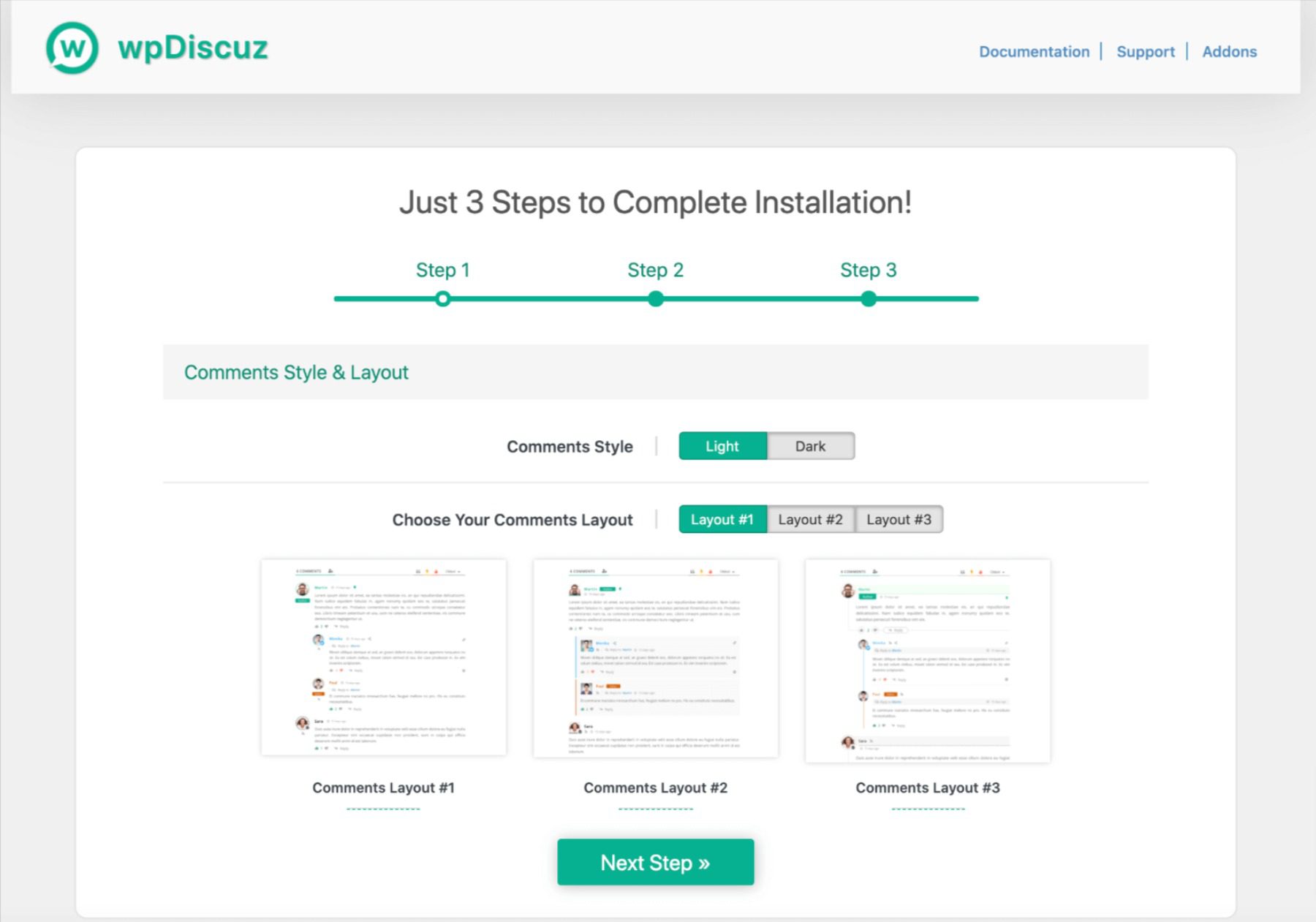
    One of the most notable features of this plugin is the comment form layouts it provides:

    The wpDiscuz comment form layout options.

    It also enables inline commenting, which can be useful for long-form content that covers several subtopics:

    The wpDiscuz inline commenting feature.

    Key Features:

    • Social commenting and social login
    • Real-time comment updates
    • Five-star article rating system
    • Read more buttons for long comments, and View replies buttons for comment threads
    • Author notifications and comment subscriptions
    • Smart comment voting system with cookie tracking

    wpDiscuz is for you if…

    …you want a fully customized commenting experience.

    Price: Free with premium add-ons | More Information

    9. WP Discourse

    The WP Discourse plugin.

    Finally, the last of our best comment plugins for WordPress is WP Discourse. Discourse is a third-party discussion platform that you can integrate with your website.

    Discourse is primarily a forum-style discussion platform. It’s open source, so you can download and install it on your own server, or purchase a hosting plan if you would prefer not to deal with the technical aspects of using it.

    You can publish your WordPress posts to Discourse to facilitate community interaction there, and also display Discourse forum comments on your site. This gives users multiple ways to engage with your content. Plus, you may pick up some new readers by featuring your blog posts in multiple locations.

    To help you manage all this, the WP Discourse plugin provides advanced comments settings for you to configure:

    The WP Discourse comments settings.

    Just keep in mind that the plugin only connects your site to Discourse. You still have to install the software yourself or pay to have it hosted for you.

    Key Features:

    • Automatically publish WordPress content to Discourse
    • Sync author accounts between WordPress and Discourse
    • Embed forum discussions in your blog posts
    • Log in to Discourse via WordPress using Single Sign On (SSO)

    WP Discourse is for you if…

    …you’d like to offer your users a more forum-like comment experience.

    Price: The plugin is free, while you can self-host Discourse or pay for a hosting plan starting at $100 per month | More Information

    Conclusion

    Whether you’re looking to gain more control over your WordPress comments settings or you want to integrate your site with a community platform, there’s a plugin that can help. With the right tool, you can boost user engagement and prevent unruly spam.

    In this post, we reviewed nine of the best comment plugins for WordPress. If you want more control over your site’s comment section, we recommend starting with Disable Comments. It’s simple to use and provides the settings you need for your comment section.

    Do you have any questions about which comment plugin to use on your WordPress site? Ask away in the comments section below!

    Featured Image Illustration via Julia Tim / shutterstock.com

    The post 9 Best Comment Plugins for WordPress in 2023 appeared first on Elegant Themes Blog.

  • 11 Best WordPress Contact Form Plugins in 2023

    Contact forms provide a quick and easy way for customers and potential clients to get in touch with you. Plus, they can do a lot more than that. They can also serve as a lead generation tool, there’s no limit to what you can use forms for. However, to add them to your site without manual coding, you’ll want to use a WordPress contact form plugin.

    In this post, we’ll look at the evolution of WordPress forms plugins. Then we’ll explore 11 of the best options and help you find the right one for your website.

    Let’s get started!

    The Evolution of WordPress Forms Plugins

    In the early days of the Content Management System (CMS), WordPress contact form plugins served a somewhat singular and straightforward purpose: to create basic forms on websites so that customers could contact businesses or bloggers via email. However, these forms have since evolved far beyond the contact page.

    Over the years, the once humble contact form plugins have grown to become fully functional form builders. Today they can be used to serve a wide range of purposes on just about any type of WordPress site. This includes, but is not limited to:

    • Lead generation
    • Email newsletter sign-ups
    • Membership Registration
    • E-commerce orders
    • Quizzes and surveys

    Thanks to WordPress contact form plugins, you can now easily build dynamic, aesthetically pleasing forms without having to manually code them. You can even create animations and special effects, such as pop-up forms. Plus, you can place them just about anywhere on your site and integrate them with payment, email, and Customer Relationship Management (CRM) platforms.

    The best WordPress contact form plugin for you to use will depend on a handful of factors. Some tools serve as all-in-one solutions that let you easily build and customize a variety of complex forms. Others are geared more toward beginners looking to create simple contact forms. So before beginning your search, it’s a good idea to know what you’re looking for and what kinds of features you’ll need.

    11 Best WordPress Contact Form Plugins in 2023

    Now that you understand a little more about WordPress forms and the kinds of content you can use to create on your website, it’s time to explore some of your options. In the following sections, we’ll introduce 11 of the best WordPress contact form plugins.

    To compile this list, we considered a handful of factors. This includes each plugin’s active installations and ratings, features and support, and pricing. No matter what you plan to use your WordPress contact form plugin for, one of these tools should be able to help you out.

    1. WPForms

    WPForms banner

    First up, WPForms is perhaps the most well-known WordPress contact form plugin and the all-around best option for many users. It lets you build beautiful, dynamic forms in minutes using its intuitive drag-and-drop interface:

    Conditional Logic Forms

    You can also choose from a library of pre-built templates to make the creation process that much quicker. This plugin is incredibly beginner-friendly, and it is offered in both a lite and premium version.

    You can use the free version on as many sites as you’d like. You can also leverage its impressive collection of handy features, including email notifications, spam protection, and more. If you want to upgrade to a premium plan, you can use advanced functions such as multi-page, payment, and order forms.

    Key Features:

    • Drag-and-drop interface
    • 150+ pre-built form templates
    • Entry management system
    • Smart conditional logic for creating high-performance forms
    • File uploads
    • Integration with Mailchimp, AWeber, PayPal, and more (premium)
    • Instant notifications
    • Login and user registration
    • Survey & polls add-on
    • Spam protection
    • Landing page forms

    WPForms is for you if…

    …… you’re looking for a reliable, flexible, and powerful WordPress contact form plugin. It can be used on everything from basic start-up sites to complex e-commerce sites.

    Price: Free, with premium licenses starting at $39.50 per year | More Information

    2. Gravity Forms

    Gravity Forms logo

    Next on our list, Gravity Forms is a premium WordPress contact form plugin that, like Formidable Forms, is also mostly aimed at developers and other advanced users. However, unlike many premium tools, it doesn’t offer a free version (aside from a Custom Post Types add-on).

    With the paid version, you can easily create complex forms, including ones with multiple pages. It also lets you schedule forms to limit when they’re displayed, limit entries (such as for contests), and export entry data as CSV files.

    Gravity Froms settings

    Key Features:

    • Drag-and-drop form builder
    • More than 30 form fields
    • Advanced forms for quizzes, surveys, subscriptions, web directories, and more
    • CSV export
    • Built-in conditional logic
    • Entry Limitations
    • Paragraph fields
    • File uploads
    • Front-end user content submissions
    • Schedule forms
    • Tons of support, including a ticketing system and a knowledge base

    Gravity Forms is for you if…

    … you’re looking for a premium and sophisticated WordPress contact form plugin. It’s a solid option if you have a customer support website. Also, because you can incorporate schedule forms, it can help let your users book appointments via your site.

    Price: Licenses start at $59 per year | More Information

    3. Formidable Forms

    Formidable Forms banner

    Formidable Forms is a freemium WordPress contact form plugin that helps you quickly create and customize a variety of form types. As with WPForms, it offers a clean drag-and-drop interface that is suitable for beginners:

    Formidable Forms creation page

    Through this plugin, you’ll have the option of creating your own forms from scratch or selecting one of the ready-made templates. If you’re looking to build standard contact forms, the lite version is usually sufficient. However, if you want to expand your forms beyond the seven fields the free plugin offers, you’ll need to upgrade to the premium version.

    The premium plugin offers a wide range of features that are ideal for building complex forms. It’s focused largely on developers, making it an excellent tool if you plan on creating a range of forms for various websites.

    Key Features:

    • Drag-and-drop builder
    • Unlimited email notifications
    • Over 17 paid add-ons for email and payment integrations
    • Import/export forms in XML format
    • Advanced forms, including quizzes, surveys, polls, registration, etc.
    • Advanced calculation fields and smart calculators
    • Highly extendable design
    • reCAPTCHA integration to prevent spam
    • Style editor that enables you to modify CSS

    Formidable Forms is for you if…

    … you’re a developer looking for an advanced, premium WordPress contact form plugin. While the free version is suitable for creating simple forms, the real value of Formidable Forms is in its premium tool, which is ideal for creating complex elements. It’s targeted at advanced users and developers. Therefore, if you’re looking for a beginner-friendly option, this may not be the best choice.

    Price: Free, with premium licenses starting at $49.50 per year | More Information

    4. Ninja Forms

    The NInja Forms WordPress plugin.

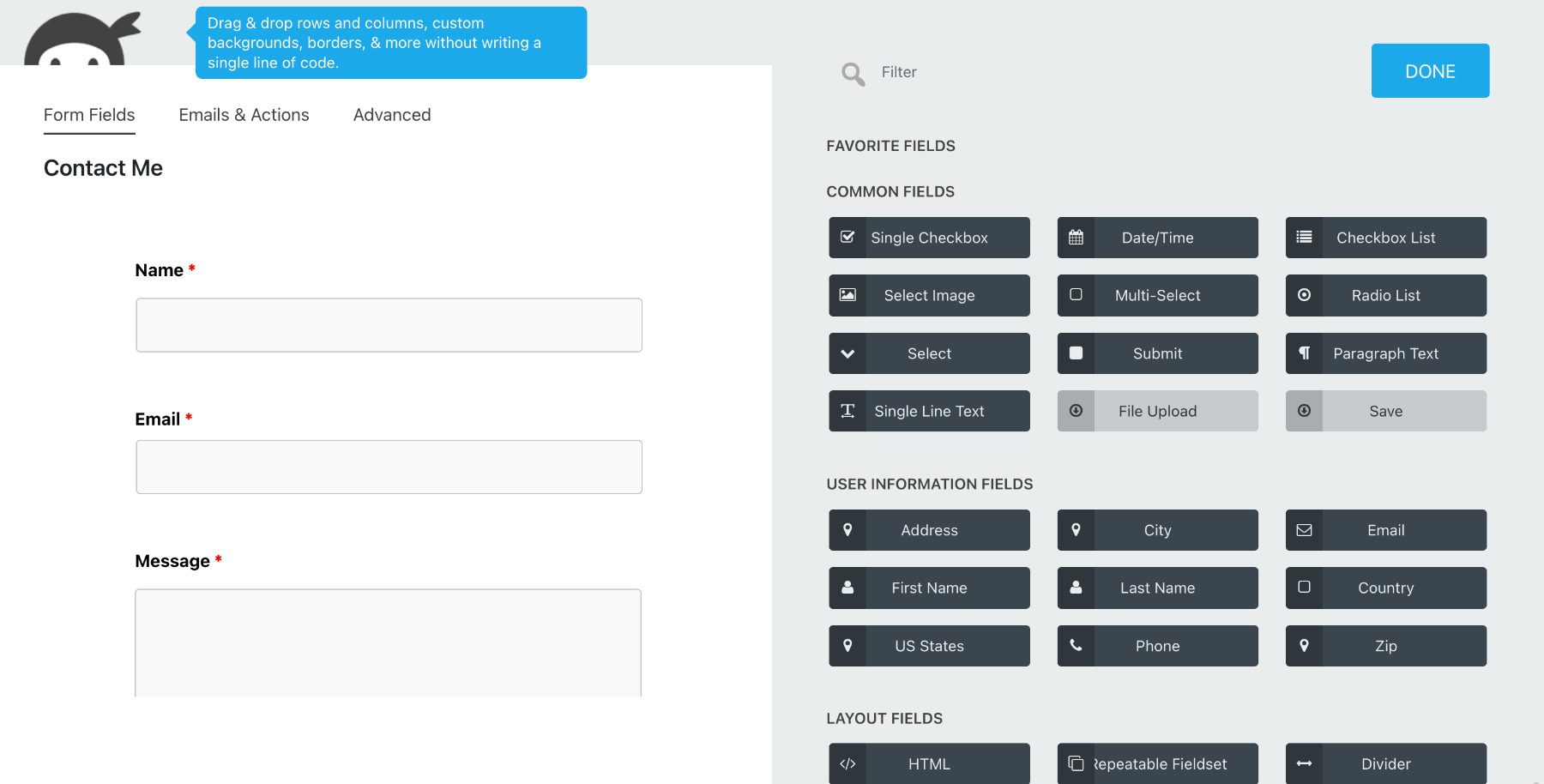
    Ninja Forms is a flexible freemium plugin that can be helpful whether you’re a developer or a beginner WordPress user. It boasts a modern, drag-and-drop interface that you can use to create unlimited forms and fields:

    Form builder interface

    Ninja Forms is simple enough for beginners to use. However, there are also plenty of customization features that make it helpful for developers as well.

    Key Features:

    • Drag-and-drop interface
    • Filters and custom field templates
    • Conditional logic add-on
    • Date picker feature
    • Unlimited number of forms, fields, and submissions
    • More than 40 extensions
    • Multi-part forms
    • Mailchimp, AWeber, and Campaign Monitor integration
    • Payment processor connections
    • Manage and export submissions
    • Save form fields for future use
    • Plenty of support documentation

    Ninja Forms is for you if…

    … you’re looking for a freemium option that lets you create unlimited forms. You can use the free version on as many sites as you wish, while the premium tool lets you access advanced features and paid add-ons.

    Price: Free, with premium licenses starting at $49.50 per year | More Information

    5. Form Maker

    The Form Maker plugin.

    If you want to create simple yet customizable contact forms, Form Maker is another freemium WordPress contact form plugin that’s worth checking out. Like most of the tools included on this list, it features a drag-and-drop builder that makes creating forms straightforward, even for beginners:

    The Form Maker plugin demo.

    Whether you want to create your form from scratch or use a pre-made template, this tool includes plenty of options for you to choose from by default. Then you can easily display the resulting forms on your site as popups, top bars, or scroll boxes. You can also embed them into your posts and pages.

    The free version of Form Maker includes handy features such as conditional logic and multi-page forms. The premium option is even more impressive, enabling you to accept payments via Stripe or PayPal, upload files, and more.

    Key Features:

    • Drag-and-drop interface
    • Pre-built templates
    • Fully-customizable themes
    • Multi-page forms
    • Conditional logic
    • Submission management
    • Spam protection
    • Customizable emails
    • Paid add-ons for Mailchimp, Dropbox, and more
    • Payment Acceptance

    Form Maker is for you if…

    … you’re looking for a powerful freemium plugin. While it’s not as popular as some of the other freemium options, it does include an expansive range of features that are suitable for many different types of forms and websites. You can try the free plugin to get a feel for whether it’s the right fit, and then upgrade to the paid tool when you’re ready to unlock more advanced functionality.

    Price: Free, with premium licenses starting at $30 | More Information

    6. Divi Contact Forms Module

    The Divi Builder plugin website.

    If you’re an Elegant Themes member, you can use our Divi Contact Forms module to create stunning, dynamic forms for your site. While it’s not a standalone plugin like some of the other tools included on this list, it’s the most accessible option if you already use Divi Builder.

    As a powerful page builder, Divi makes creating beautiful, fully-functional pages as quick and easy as possible. We offer a ton of elements and modules for you to choose from, including a Forms module:

    The Divi Contact Forms module.

    One of the advantages of using Divi Builder is that you won’t need to install any additional plugins in order to create contact forms. Our Forms module comes built-in, so you can quickly add it via the searchable module list when building your pages and posts.

    Key Features:

    • Visual builder
    • Translatable and localized form fields
    • Content, design, and advanced form options
    • Conditional logic
    • Form field and button style customization
    • Field validation
    • Option to create custom form fields
    • Ability to hide/display input fields
    • Radio buttons and dropdowns

    Divi Forms is for you if…

    … you’re an Elegant Themes member looking for a quick and simple way to add forms to your site. It’s a high-quality solution for creating both forms and entire pages for your WordPress website. Plus, you can ensure that any form you add will perfectly match your current theme’s branding and styling.

    Price: Access starts at $89 per year (as part of an Elegant Themes membership) | More Information

    7. Contact Form 7

    The Contact Form 7 plugin.

    There’s a good chance you’ve heard of Contact Form 7 – it’s among the most popular WordPress contact form plugins, especially when it comes to free tools. With over 5 million active installations, it’s also one of the oldest form plugins out there.

    While it’s certainly not as advanced or feature-rich as some of the premium or freemium options on this list, this solution does boast an impressive array of features for creating and managing multiple contact forms:

    Contact Us Form from Cotact form 7

    Although the interface is by no means as clean or modern as some of the other plugins on our list, the forms are easy to customize and let you add simple markup. If you’re used to creating WordPress pages and posts, you should have little trouble navigating this plugin to create new forms.

    While some people have complained about the plugin causing compatibility issues, its main advantage is that it’s free. As long as you’re not looking for advanced functionality or complex solutions, Contact Form 7 is worth checking out. We’d recommend testing it out on a staging site first (which is a smart practice for any new plugin you’re considering).

    Key Features:

    • Quick and easy setup
    • Customizable messages
    • Defined mail settings
    • Support documentation and forum
    • Unlimited forms
    • Support for unique fields such as CAPATCHAs, drop-down menus, and file submissions

    Contact Form 7 is for you if…

    … you’re looking for a free, simple plugin. It’s a flexible tool that is perfect for beginners wanting to create standard contact forms on their WordPress sites. Also, it’s incredibly lightweight and shouldn’t affect your site’s performance.

    Price: Free | More Information

    8. Jetpack Forms

    Jetpack logo

    Jetpack Forms is a comprehensive contact form solution part of the Jetpack plugin suite. Unlike the other solutions, Jetpack is an incredibly robust tool that goes way beyond a simple forms plugin. It can be used to optimize your website’s speed or boost its security.

    It’s a great choice for those who use or plan to use multiple Jetpack features on their WordPress site.

    The Jetpack Form block in the WordPress editor.


    With Jetpack Forms, you can create custom contact forms, surveys, quizzes, and more with just a few clicks. The issue is that, because it isn’t as specialized, the customization options are lacking compared to the other plugins.

    Key Features for Jetpack Forms:

    • Pre-built templates for quickly creating forms
    • Integration with popular payment gateways for accepting payments and donations
    • Spam protection with Akismet

    Jetpack Forms is for you if…

    … you’re looking for a plugin that can also help you improve your site in other ways. For example, in addition to creating user-friendly forms, you can also use this tool to enhance your site’s performance and security. However, if you’re looking for a highly customizable-form builder, this probably isn’t the plugin for you.

    Price: Free, with premium licenses starting at $4.77 per month | More Information

    9. Quform WordPress Form Builder

    Quform2 logo

    Quform WordPress form builder is an extremely versatile  WordPress contact form plugin. You can use it to build nearly any type of form using a simple, modern drag-and-drop interface:

    Qufrom contact us setup

    One of the best aspects of this plugin is the expansive array of customizable elements it offers. From button styles and animations to labels and loaders, there are plenty of features for tailoring the design of your forms to your liking.

    Key Features:

    • Drag-and-drop form builder
    • Custom autoreply and filters
    • Built-in and custom validators
    • 19 element types
    • 11 button styles
    • FontAwesome integration
    • Custom device-targeted CSS
    • Import and export files
    • Fully translatable

    Quform is for you if…

    … you want a highly-customizable yet user-friendly premium form builder. It’s also a solid choice if one of your main concerns is personalizing your forms’ appearance to match your business’ branding. Quform is also a great option if you want a premium tool but need to keep costs low, as it is one of the least expensive paid options.

    Price: Licenses start at $29 | More Information

    10. FormCraft

    The FormCraft plugin website.

    FormCraft is another premium-only tool offered on CodeCanyon. It has a 4.5-star rating and nearly 20,000 users, which is a clear testament to its reliability and usefulness as a WordPress contact form plugin.

    The tool is a powerful, feature-packed form builder that is both fast and scalable. You can choose from an array of templates, or create your own forms from scratch:

    FormCraft Dashboard

    Another aspect we appreciate about this plugin is the variety of forms you can create. This includes (but is not limited to) surveys, booking appointments and scheduling, and pop-up forms.

    Key Features:

    • Drag-and-drop builder
    • Dozens of add-ons, including one for multi-page forms
    • Pop-up form builder
    • Advanced logic and math formulas
    • GDPR compliant
    • Developer tools
    • Multisite support

    FormCraft is for you if…

    … you’re a developer or advanced user who plans on creating many different types of forms. It’s also a cheaper alternative to Formidable Forms Premium or Gravity Forms.

    Price: Licenses start at $36 | More Information

    11. Forminator

    Forminator Pro banner

    Forminator is a comprehensive contact form plugin that offers a variety of features to create different forms, including contact forms, surveys, quizzes, and more. It comes with a drag-and-drop form builder, so you don’t need to know any coding to create custom forms. Additionally, it comes with pre-made templates and ready-to-use forms, which makes it a great option for those who want to get started quickly.

    Forminator works with popular email services, CRM, storage, and project management apps. It supports real-time feedback with live stats displayed in charts and graphs for your polls.

    Key Features for Forminator:

    • Drag-and-drop form builder
    • Pre-made templates and ready-to-use forms
    • Integration with popular email marketing and CRM services
    • Option to add custom styles to match your website
    • Integration with multiple third-party services, including PayPal and Stripe
    • Captcha and spam protection to keep your forms secure

    Formidable Pro Demo

    Forminator offers both free and paid (pro) versions of its contact form plugin. The free version provides you with almost everything you would need for a basic contact form while the pro version offers more advanced features and increased functionality.

    Forminator creation page

    Free Features:

    • Easy form builder: Drag-and-drop interface makes it simple to create forms.
    • Basic form fields: You can add basic fields like text, email, number, etc., to your forms.
    • Responsive forms: Forms will look good on any device.
    • Basic form submissions management: You can view form submissions and export them as CSV.
    • Customizable confirmation messages: You can customize the confirmation message after a form is submitted.

    Pro Features:

    • Advanced form fields: You can add fields like dropdown, radio button, checkbox, etc., to your forms.
    • Multi-page forms: You can create multi-page forms that are more engaging and increase form completion rates.
    • Form analytics: Track form views, submissions, conversion rates, and more with detailed analytics.
    • Advanced submissions management: You can view form submissions, export as CSV/PDF, and integrate with Google Sheets, Zapier, etc.
    • Conditional logic: Show or hide form fields based on user selections with conditional logic.
    • Payment integration: Accept payments through your forms with integration with PayPal and Stripe.

    Forminator is for you if…

    …you want an all-in-one form builder solution that offers custom styling, multi-page forms with conditional logic, pre-made templates, and the ability to create a variety of forms beyond just contact forms like surveys, quizzes, and payment forms.

    Forminator Pricing: Free | $39/year | Learn More About Forminator

    Final Thoughts on Contact Form Plugin for WordPress

    Contact Form plugins are essential for any website looking to improve communication with its audience. With a variety of options available, finding the right one for your website can be a challenge. However, with our guide, we hope you have found the plugin that best suits your needs.

    Our top two picks for the best Contact Form plugin for WordPress go to WPForms and Ninja Forms. These plugins are highly recommended for their ease of use, UI, and advanced features. Whether you are looking to create simple contact forms or complex registration forms, they are the best contact form plugins available. But if you’re using Divi, you’re in luck because the built-in contact form is beyond stellar!

    Did we miss any Contact Form plugins? Leave a comment telling us below!

    Featured image illustration via Dzianis_Rakhuba/shutterstock

    The post 11 Best WordPress Contact Form Plugins in 2023 appeared first on Elegant Themes Blog.

  • 8 Best WordPress Events Calendar Plugins in 2023

    In the 21st century, planning any kind of event manually can feel too ‘old school’. If you have access to the right tools, you can easily set up a website that enables you to schedule events, manage attendance, send reminders, and even process payments. All of that is possible with the right WordPress events calendar plugin.

    In this article, we’re going to help you find the best WordPress events calendar plugin by checking what they have in common, and then we’ll introduce you to our top picks.

    Let’s get right to it!

    What Makes for a Quality WordPress Events Calendar Plugin?

    WordPress events and calendar plugins usually offer a variety of features that enable you to plan and manage multiple events (even simultaneous ones). In most cases, this type of plugin gives your users the opportunity to see a calendar of upcoming happenings, and decide which ones they want to sign up for:

    example event from event calendar plugin

    The primary goal of an events plugin is to make it so you don’t have to process attendance, confirmations, and payments manually. You can set up an event using your tool of choice, and let users sign up for it through your website at their leisure.

    Other features to look out for in a WordPress events plugin include:

    • Broad theme compatibility. The events plugin you choose should work with your favorite theme, so you don’t have to switch to a new one.
    • A variety of customization options. Ideally, your plugin of choice should provide you with plenty of calendar styling options and customization features for event signups.
    • Integration with third-party event planning and calendar services. If you want to use Google Calendar or Facebook (or any other service) to plan events, your WordPress plugin should offer easy integration options.

    By using a plugin to manage events, you’ll be able to focus more of your attention on other, more important tasks like SEO techniques, or growing your business. Fortunately, since this is WordPress we’re talking about, you get plenty of options to pick from.

    8 Best WordPress Events Calendar Plugins

    For this roundup, we put together a list of WordPress events plugins that offer free versions. In many cases, you can also opt to purchase a premium license to get access to additional features.

    It’s our goal to recommend plugins that work well and offer plenty of features, which may mean a premium license is necessary. Plus, these plugins have strong reviews, satisfied user bases, and consistent updates.

    1. The Events Calendar

    Events Calendar Plugin

    The Events Calendar is perhaps the most popular WordPress events plugin, and it’s one that we’ve covered in the past. This tool lets you import events from other calendars, and create your own using a simple editor:

    Adding a new event using The Events Calendar plugin

    With this plugin, you can set up a calendar that includes featured events and search functionality. It can also display date information for whichever time zone your users are in, show locations using maps, and much more.

    Key Features for The Events Calendar:

    • Set up an events calendar for your website
    • Add as many events as you want
    • Create featured events
    • Provide a search bar to help users find the events they’re looking for
    • Import events from third-party platforms
    • Customize your calendar’s style using CSS
    • Events Calendar Plugins for Divi

    The Events Calendar offers a basic template for your calendar that works well with most themes. However, you can also customize your calendar’s appearance using CSS or with a premium theme such as Divi.

    Divi users can benefit from using the Divi Events Calendar extension that adds dedicated modules to create custom events within Divi’s Visual Builder. If you’d rather spend time doing other important things for your site, there’s even an Events Calendar child theme for Divi available in our marketplace.

    The Events Calendar is for you if…

    • You want a responsive events calendar that looks good with most themes.
    • CSS customization isn’t a roadblock.
    • You need compatibility with Divi for easy customization.

    Price: Free, with premium licenses starting at $99 per year | Learn more about The Events Calendar

    2. Timetable and Event Schedule by MotoPress

    Timetable and Event Schedule by MotoPress

    When you need to create complex timetables with multiple types of events, Timetable and Event Schedule is a fantastic choice. For example, if you offer multiple types of classes, you can add custom columns to your calendar and use color coding to differentiate each one:

    An example of a color-coded calendar

    You can also use Timetable and Event Schedule to create event calendars. However, the plugin really shines when it comes to daily timetables. To insert a timetable on your website, you can use shortcodes or blocks.

    Key Features for Timetable and Event Schedule:

    • Create complex event timetables for your website
    • Color-code your timetables
    • Add custom columns to each table
    • Use shortcodes or blocks to insert timetables onto your website

    Timetable and Event Schedule is for you if…

    • You run a business that offers events on a set schedule.
    • Your visitors need to find events when they’re happening.
    • Timetables are a must.

    Price: Free | Learn more about Timetable and Event Schedule

    3. Modern Events Calendar Lite

    The Modern Events Calendar Lite plugin

    Next up, Modern Events Calendar Lite is perhaps the easiest WordPress events plugin to get started with. It provides an intuitive setup wizard that covers everything from calendar styles to colors, countdowns, and more:

    Configuring the Events Calendar Lite plugin

    With Modern Events Calendar Lite, you can add events manually and enable users to submit their own. The plugin also lets you store information about categories, locations, and organizers.

    This solution’s free version doesn’t include calendar theme functionality. However, it does let you customize your calendar’s style, including its typography and colors. You can also use custom CSS for further modifications.

    Key Features for Modern Events Calendar Lite:

    • Set up an events calendar
    • Add new events manually and enable users to submit their own
    • Use a setup wizard to configure your events calendar
    • Manage event categories, locations, and organizers

    Modern Events Calendar Lite is for you if…

    • You want to use a WordPress events plugin that’s easy to set up and customize.
    • A catalog of add-ons is available.

    This particular plugin also offers a broad range of add-ons, including one for Divi integration.

    Price: Free, with premium licenses starting at $75 per year | Learn more about Modern Events Calendar Lite

    4. Eventin

    Eventin Events plugin

    Eventin is a user-friendly events plugin for WordPress that allows you to organize and promote events with ease. It offers features like customizable event pages, integration with popular payment gateways, and the ability to manage event schedules, ticket sales with pricing tiers, and attendee data. It provides an intuitive interface for creating and managing events.

    Eventin Divi integration

    With the integration of Divi and Eventin, Divi users are given an extra advantage. This integration enables you to create a tailored event template using Divi’s Theme Builder, equipped with specialized modules like a calendar for events, advanced search, event listings, event tabs, schedules, and Zoom integration.

    Key Features for Eventin:

    • Divi integration
    • Front-end event management
    • Host Zoom meetings and webinars
    • Multiple ticket price tiers
    • Easy-to-use interface
    • Unique QR codes for attendees

    With Eventin, most of its features come with the free version. However, some exceptions require an upgrade to the premium license for full access. To brand events, use an advanced search widget, generate QR codes for attendees, receive notifications, or include unlimited FAQs for events, an upgrade to the premium license is necessary.

    Eventin is for you if…

    • You want highly-customizable events pages.
    • Event notifications for users are a priority.
    • You want to track attendees with a QR code.

    Price: Free, with premium licenses starting at $69 per year | Learn more about Eventin

    5. Event Manager

    Events Manager

    The Events Manager plugin lets you add events to a central calendar and manage locations, categories, and even bookings for them. Although the base plugin doesn’t include payment functionality, you can enable that using a WooCommerce add-on.

    Another feature that sets Events Manager aside is that you can enable users to submit events using a front-end form:

    Enabling users to submit events to your calendar

    Although you don’t get a lot of styling options for your calendar, this plugin gives you a lot of control over your events pages and how users interact with them.

    Key Features for Events Manager:

    • Set up an events calendar
    • Add events manually or enable users to submit their own
    • Manage event bookings
    • Customize the behavior of your events pages

    The premium version offers additional features such as recurring event limits, attendance tracking, mobile check-in with QR codes, PDF ticket downloads, waitlists, iCal attachments, and coupon/discount management.

    Event Manager is for you if…

    • You want a plugin that lets users add their own events to your calendar.
    • Need a useful tool to process bookings.
    • You don’t mind adding a plugin for processing payments.

    Price: Free, with premium licenses starting at $89 per year | Learn more about Events Manager

    6. WooCommerce Event Manager

    The WooCommerce Event Manager plugin

    If you want to manage events and sell tickets using WooCommerce, this is the plugin for you. WooCommerce Event Manager enables you to sell multiple types of tickets, include add-ons with each sale, and manage attendance:

    Configuring event tickets for sale

    Since this is a WooCommerce extension, you can set up any payment processors you’d like to use.  WooCommerce Event Manager also helps you send email confirmations and even PDF versions of the tickets users purchase.

    Key Features for WooCommerce Event Manager:

    • Use WooCommerce to sell tickets for your events
    • Manage events and create multiple ticket types with different values
    • Create add-ons for your event tickets
    • Process payments using your preferred WooCommerce-compatible gateways

    If you’re looking to enhance your events website, the pro version provides additional features such as the ability to download PDF tickets, customize registration forms, bulk edit event dates, and receive automatic email confirmation messages with custom email templates.

    WooCommerce Event Manager is for you if…

    • You’re already familiar with WooCommerce.
    • You want to process ticket sales.
    • The ability to add upsells to ticket purchases is important.

    Price: Free, with premium licenses starting at $60 | Learn more about WooCommerce Event Manager

    7. WP Event Manager

    The WP Event Manager plugin

    WP Event Manager enables you to add events to a calendar and lets users sign up for them. However, the plugin’s main selling point is that it enables users to create and submit events for your website’s calendar through the front end:

    Enabling users to submit events for your calendar

    Event organizers get access to dashboards where they can review their submissions, check signups, and edit entries. On your end, you can customize the form that visitors use to submit events, and even add new fields to it.

    Key Features for WP Event Manager:

    • Add events to your calendar manually
    • Enable users to submit events and add them to your calendar
    • Provide users with a dashboard they can use to review their submissions
    • Add custom fields to the public event submission form

    WP Event Manager is for you if…

    • You want to run a website that enables users to coordinate events with one another.
    • Create your own version of Meetup using WordPress.

    Price: Free, with premium add-ons available | Learn more about WP Event Manager

    8. Event Organiser

    The Event Organiser plugin

    Last on our list, Event Organiser enables you to create an events calendar and add as many entries as you need to it. It also lets you manage organizers and venues, as well as event categories.

    However, what really sets this plugin apart is that it makes it easy to create recurring events with complex schedules:

    Adding a recurring event to your schedule

    For example, you can set up events that occur on the third Tuesday of every month, or once every quarter. The plugin also helps you set up exceptions for recurring events, and you can add custom fields to the individual event information pages (in addition to the wide range of fields provided by default).

    Key Features:

    • Set up an events calendar
    • Add events to your calendar manually
    • Create one-off or recurring events
    • Configure recurring events with complex schedules and exceptions
    • Add custom fields to your event pages

    Event Organiser is for you if…

    …you want to set up a calendar that includes recurring events. In that area, this plugin gives you more control than almost every other option. However, it doesn’t include booking or user management options unless you opt for its premium extensions.

    Price: Free, with premium licenses starting at £50 (approx. $71) | Learn more about Event Organiser

    Which WordPress Events Calendar Plugin Will You Choose?

    Planning events is already a full-time job, and managing them as well is often too much for one person to do alone. With the right WordPress event plugin, you’ll be able to focus on planning and let your website handle the management for you. That can include sharing event information, processing bookings and payments, and simply sharing a calendar or featuring upcoming occasions.

    Fortunately, there are a lot of fantastic WordPress event plugins to choose from. One of the best all-around picks is The Events Calendar, which is fully compatible with Divi.

    The post 8 Best WordPress Events Calendar Plugins in 2023 appeared first on Elegant Themes Blog.

  • 7 Best WordPress Security Plugins in 2023

    When it comes to website maintenance, the importance of security can’t be understated. With so many risks threatening sites today, making sure yours is protected is critical. Unfortunately, figuring out the best WordPress security plugin to use can be challenging.

    In this post, we’ll explain why you might want a dedicated tool to strengthen your site. Then we’ll introduce you to seven of the best WordPress security plugins, discussing their key features and pricing.

    Let’s get started!

    Subscribe To Our Youtube Channel

    Why You Might Want to Use a WordPress Security Plugin

    Unfortunately, many people don’t spend much time or effort on website security until it’s too late. As a site owner, one of the worst things you can do is put safety on the back burner.

    Between malware, data breaches, and the dozens of other threats plaguing the internet today, taking website security seriously should be a priority for all business owners. If you fall victim to an attack, it can compromise your customers’ data and both the integrity and reputation of your brand.

    Of course, being proactive about protecting your website is often easier said than done. This is why we recommend using a WordPress security plugin. Doing so can place an added layer of protection on your site and reduce your chances of being hacked.

    There is a wide range of functions that a WordPress security plugin can help with. This includes:

    • Strengthening passwords and enabling Two-Factor Authentication (2FA)
    • Updating and backing up WordPress and database files
    • Adding file permissions and user role configurations

    However, it’s important to note that your entire site’s security shouldn’t be dependent on one plugin (nor could it be). Instead, you can think of a WordPress security plugin as a key way to accomplish specific tasks, rather than as a complete solution.

    This is something you may want to keep in mind when considering the following list of security plugins. It’s important to consider what security features you already have access to and what you’re lacking. For example, if backups aren’t something your hosting provider handles, then backup functionality may be a priority.

    7 Best WordPress Security Plugins

    Now that we’ve discussed why site security is so important, it’s time to look at some of the tools that can help. For the following list, we’ve compiled seven WordPress security plugins that cover a wide range of features and functionality. To ensure that we’re presenting you with the best options possible, we’ve also factored in ratings and reviews, customer support and updates, and pricing.

    1. iThemes Security

    The iThemes WordPress security plugin.

    iThemes Security, formerly known as Better WP Security, is another robust tool that deserves a spot as one of the best WordPress security plugins. It comes in both free and premium versions, with multiple tiers available depending on your specific needs.

    This solution helps to secure your site in over 30 different ways, including through password protection, user activity monitoring, and more:

    The iThemes Security plugin settings.

    If you upgrade to the paid version, you will get regular backups of your site. You’ll also be able to remotely manage multiple WordPress sites with the iThemes Security Pro features.

    Key Features:

    • Brute-force attack prevention
    • File integrity monitoring
    • Hidden login and admin pages
    • Limited login attempts
    • 2FA
    • Control over user roles and file permissions
    • Scheduled backups
    • Email alerts
    • 404 error detection
    • Google reCAPTCHAs

    iThemes Security if for you if…

    … you want a beginner- and user-friendly plugin with standard yet powerful security features. It’s also helpful if one of the main tools you’re looking for is backup functionality.

    It’s worth noting that the developers behind the iThemes Security plugin are also the ones who created the popular BackupBuddy plugin. Also, although this plugin doesn’t include a firewall or malware scanner, it does use Sucuri’s malware scanner, which we’ll discuss in more detail in the next section.

    Price: Free, with premium plans starting at $80 | More Information

    2. WP Activity Log

    The WP Activity Log plugin.

    WP Activity Log is a plugin that is slightly different than the others on this list. Rather than offering an all-in-one solution that includes a variety of different features, this tool aims to serve a specific purpose: to help you keep track of every change and activity occurring on your site.

    With this freemium plugin, you can leverage comprehensive activity monitoring to heighten your site’s security:

    The log viewer screen of the WP Activity Log plugin.

    This kind of tool can be particularly helpful if you manage a network of sites. For example, if you manage a team of users, having an easy way to monitor their activity can help keep your site protected from malicious behavior.

    Key Features:

    • Real-time user activity logs
    • Event enabling and disabling
    • Notifications and reports
    • User activity and site change monitoring
    • WooCommerce, Yoast SEO, and WPForms extensions
    • Multisite support
    • HTML and CSV reports (premium only)
    • Free and premium support

    WP Activity Log is for you if…

    … you’re looking for an activity logging and monitoring solution. It’s an awesome choice if you want to gain more insight into your site activity, which can be especially useful if you have a multisite network or need to manage multiple users. However, it’s probably not the best tool if you’re currently lacking a firewall, malware scanner, or other key security features.

    Price: Free, with premium plans starting at $99 | More Information

    3. Sucuri Security

    The Sucuri plugin.

    Similar to Wordfence, Sucuri Security is a popular plugin that can help you with a wide range of security-related tasks on your WordPress site. This includes scanning for malware and running checks:

    Sucuri WP plugin integrity

    One thing we want to note about this plugin is that because it runs a Domain Name Server (DNS)-level firewall, it’s a bit more effective than plugins such as Wordfence that use a built-in WordPress firewall. Therefore, if site performance is of particular concern, Sucuri is an option worth exploring.

    Key Features:

    • Malware scanning and removal
    • Website hardening
    • Application Program Interface (API) key connection
    • Web Application Firewall (WAF) with a premium license
    • Login security, password protection, and user tracking
    • Site tracking (file changes, failed login attempts, etc.)
    • Malicious traffic blocking
    • File integrity and blacklist monitoring
    • Quick and easy setup

    Sucuri is for you if…

    … you’re interested in a WordPress security plugin that operates almost completely offsite. The free version offers a powerful scanner that you can use directly from your WordPress dashboard. However, if you don’t mind paying for the paid version (which we highly recommend), you can get a comprehensive security solution with even more features, including WAF, Secure Sockets Layer (SSL) certificate support, and much more.

    Price: Free, with premium plans starting at $199.99 | More Information

    4. Wordfence Security

    The Wordfence WordPress security plugin.

    With over 4 million active installations and a 4.5 out of 5-star average rating, Wordfence Security is one of the best WordPress security plugins out there. This freemium tool lets you scan your site for malware or any other suspicious activity, such as code injections. Everything is easily managed from the custom Wordfence dashboard:

    The Wordfence plugin dashboard.

    With the paid version, you can access even more features, including advanced, coordinated scanning. Also, because this plugin is so widely used, you can expect to find a great deal of online support if you need it.

    Key Features:

    • Endpoint firewall
    • Scans for file changes
    • IP address blocking
    • Threat assessment features
    • 2FA
    • Monitoring for visits and hack attempts
    • Breached password alerts and custom email notifications
    • Login attempt limits to prevent brute-force attacks
    • Country blocking and redirects (premium only)

    Wordfence is for you if…

    … you’re looking for a premium tool with flexible pricing. The cost varies depending on how many licenses you’ll need. As such, it’s a solid option if you plan to use it on multiple websites or for your clients’ sites.

    The more sites you plan to use this plugin for, the less expensive the premium version becomes. Of course, the free version also comes with a lot of helpful features and can be a great solution on its own.

    Price: Free, with premium plans starting at $99 | More Information

    5. All-In-One WP Security & Firewall

    The All In One WP Security plugin.

    All In One WP Security & Firewall is not as popular as the first three WordPress security plugins on this list. However, it’s still a high-quality option that is worth considering, especially if you’re looking for a free tool. It’s incredibly user-friendly and presents information in visual graphics broken down into three main categories (Basic, Intermediate, and Advanced):

    The All In One WP Security plugin dashboard.

    This plugin also provides a handful of incredibly useful and robust features, especially considering that you don’t have to pay anything for it. This includes brute-force attack prevention, firewall protection, comment spam filtering, and more.

    Key Features:

      • Login Lockdown feature for protecting against brute-force attacks
      • Firewall protection
      • File change detection
      • File backups and restoration
      • Comment spam prevention
      • User account monitoring
      • IP filtering

    All In One WP Security is for you if…

    … you want a free, easy-to-use WordPress plugin to help secure your site. It’s an excellent choice if you only have one (relatively simple) website to manage, and don’t need any overly advanced bells and whistles. It’s also a strong contender if you’re looking for a quick and easy way to understand where your site can be improved, thanks to its grading system.

    Price: Free | More Information

    6. Jetpack

    Jetpack logo

    Next up, Jetpack is one of the most popular and commonly used WordPress plugins out there, so chances are that you’ve probably already heard of it. It can be used for a wide range of features, from performance to marketing purposes. However, there are a few features you may not know about that make it one of the best WordPress security plugins.

    This freemium tool offers intuitive, beginner-friendly security solutions that include real-time backups, malware scanning, and spam protection:

    The Jetpack plugin settings.

    It also helps with brute-force protection and uptime monitoring. Best of all, these features are included in the free plan. It’s also worth noting that this plugin is made by the team behind WordPress.com (Automattic), so you can feel confident knowing that it’s safe, secure, and reliable.

    Key Features:

    • Automatic, real-time backups and restores
    • Malware scanning
    • Spam protection and blocking
    • Brute-force protection
    • Uptime and downtime monitoring
    • 2FA
    • Plugin updates

    Jetpack is for you if…

    … you’re looking for a cost-effective plugin that can be used for a wide range of purposes. If you plan to use it for its security features specifically, however, we suggest upgrading to the premium version. It’s also a solid option if you’re looking to enhance your site’s performance.

    Price: Free, with premium plans starting at $4.77 | More Information

    7. Defender

    Defender Logo

    Defender is a relatively new but promising WordPress security plugin that has received over a million downloads so far. It only takes a few clicks to install and configure the program, and it starts defending your website right away.

    Defender provides an astonishing array of security capabilities without any cost. It offers a firewall with IP blocking enabled for free, just like Wordfence. Malware scans, brute-force login protection, threat notifications, and two-factor authentication via Google are also included in the free edition.

    Key Features of Defender:

    • 2-Factor Authentication
    • Brute force attack prevention
    • Blacklisting features

    Defender dashboard

    This plugin provides many of the key security features you might want to implement; it sports a five-star rating with over 70,000 active users, so you can be confident that this solution can provide you with the security your website needs.

    Defender is for you if…

    …you want to enhance the security of your WordPress website by implementing various security measures such as malware scans, two-factor authentication, brute force protection, and other security enhancements in a simple and user-friendly manner.

    Defender Pricing: Free, $49 per month for the pro version | More Information

    Final Thoughts on WordPress Security Plugins

    With so many WordPress plugins available, it could be a challenge to find the one that works best for you. Choosing the ideal tools for your site may seem difficult because there are so many features and options available in each one; hopefully, you found one that checks your boxes on this list.

    We advise looking into iThemes Security or WP Activity Log if you’re searching for a freemium, all-in-one solution. iThemes offers basic security tools like firewalls and virus scanners, as well as more sophisticated capabilities if you subscribe to a premium license. WP Activity Log, on the other hand, is incredibly useful for monitoring your website’s activities and always staying ahead of security risks.

    Featured Image via

    The post 7 Best WordPress Security Plugins in 2023 appeared first on Elegant Themes Blog.

  • 8 Best WordPress Popup Plugins in 2023

    Whether you’re looking to increase newsletter signups, generate more leads, or boost subscribers, adding opt-in and popup forms to your site can help. Plus, thanks to the many WordPress popup plugins available, you have plenty of options to choose from. However, deciding which tool is the right one for you can be time-consuming.

    In this post, we’ll introduce you to WordPress popup plugins and explain the benefits of using them on your website. Then we’ll provide you with a list of eight of the best options to choose from.

    Let’s get started!

    Why You Might Want to Use a WordPress Popup Plugin

    When most people think of ‘popup plugins,’ they assume these tools can only be used to increase email newsletter sign-ups. While they are certainly helpful for that use case, it’s not the only goal you can pursue.

    There is a wide range of ways you can use popup plugins, such as:

    • Newsletter sign-ups
    • Login forms
    • Subscription opt-ins
    • Exit intent content
    • Content downloads and upgrades
    • Reminders, updates, and announcements
    • Notices and privacy policies

    The purpose of using popups on your website is to grab visitors’ attention. However, you might fear that adding this element to your site could annoy or turn away customers.

    However, popups don’t necessarily need to be irritating. When used correctly, they can effectively and conveniently engage your visitors and help you generate more leads, subscribers, and conversions.

    The key is finding the right WordPress popup plugin for your needs. There are many options available and a handful of factors to consider depending on your specific needs. For example, some tools come with drag-and-drop builders that let you quickly and easily design popups, which can be a significant time saver.

    Other tools let you specify when and where the popups appear on your site. This level of customization can help you seamlessly create engaging and effective WordPress popups for your website.

    8 Best WordPress Popup Plugins

    Now that you understand a little more about the different ways you can use popup plugins let’s take a look at some of the top options. To compile this list, we took into account a handful of important factors, including features and functionality, updates and support, and pricing. Below are eight of the best WordPress popup plugins!

    1. OptinMonster

    OptinMonster banner

    OptinMonster is one of the most popular WordPress popup plugins out there. This freemium tool is designed to help you promote and increase newsletter sign-ups. The easy-to-use popup builder and template library let you create stunning popups and subscription forms for your WordPress site in a matter of minutes:

    OptinMonster settings

    It also includes targeting, personalization, and optimization features. In addition to A/B testing, OptinMonster also lets you gather useful statistics and insights into your conversions.

    Key Features:

    • Drag-and-drop popup maker
    • Pre-built popup templates
    • Intuitive dashboard
    • Exit Intent Technology
    • Page-level targeting and personalization
    • A/B testing
    • Popup analytics
    • Email marketing integrations

    OptinMonster is for you if…

    … you’re looking to create exit-intent popups for your site. Thanks to its unique Exit Intent Technology, OptinMonster excels in this area. It also includes a basic free version that you can use to build forms, as well as a handful of plans if you’re looking for more advanced features and functionality.

    Price: Free, with premium plans starting at $9 per month | More Information

    2. Thrive Leads

    The Thrive Leads plugin website.

    Thrive Leads is part of the Thrive Themes Suite. The premium plugin comes with a variety of opt-in types and customization features, which let you build and personalize popups for your site with ease.

    The features on offer include screen filler overlays, content locking, sticky ribbons, and more. In addition, you can use this plugin to create exit intent popups, timed displays, scroll triggers, and so on.

    Key Features:

    • Form builder for various opt-in types
    • Pre-designed templates
    • A/B testing
    • Advanced targeting and analytics
    • Yes/No, multiple-choice, and two-step opt-in forms
    • Reporting and insights

    Thrive Leads is for you if…

    … you’re looking for a Bloom alternative. While it doesn’t offer as many features and advanced customization options, it can be a powerful and intuitive solution for creating a wide range of popups. What’s more, it can be the ideal choice if you’re already using a Thrive theme.

    Price: Included with a Thrive Suite package, starting at $19 per month | More Information

    3. Icegram Engage

    Icegram logo
    Icegram Engage is a WordPress plugin that allows you to create popups, lead magnets, opt-ins, call-to-action buttons, and promotions for your website. It offers a wide range of customizable options for creating and designing these elements, as well as detailed analytics and reports. My favorite feature is its advanced targeting options that allow you to display popups to specific audiences based on their location or device.

    Key Features for Icegram Engage:

    • Wide range of customizable options for creating popups, lead magnets, opt-ins, and promotions
    • Intuitive form building
    • A/B Testing
    • Mobile-responsive
    • Campaign templates

    Icegram popup creator
    This plugin is highly customizable and lets you edit your content verbiage and placement to tailor-make your campaigns. It also integrates seamlessly with leading email services like MailChimp, Constant Contact, or MailerLite.

    Icegram Engage is for you if…

    … you want a wide range of customizable options for creating popups, lead magnets, opt-ins, and promotions with detailed analytics reporting. Keep in mind you’ll need the pro version to take advantage of the full suite of tools.


    Icegram Engage Pricing:
    Free | Premium plans starting at $97 per year| More Information

    4. Bloom

    Bloom banner

    Bloom is our email opt-in and lead generation plugin, which you can use for free if you’re an Elegant Themes member. It’s a powerful tool that lets you easily convert your website visitors into loyal customers and subscribers.

    With Bloom, you can create highly-targeted content to help grow your email list and significantly increase engagement. Plus, you can choose from our library of over 100 stunning design templates:

    The template library of the Bloom plugin.

    The plugin also comes with six different display types. They include an automatic opt-in popup, fly-ins, below content opt-ins, and more.

    Key Features:

    • 100+ design templates
    • Extensive design options
    • 6 display types
    • User action triggers
    • 19 email marketing integrations
    • Highly-targeted display options
    • Custom admin panel dashboard
    • 24/7 support

    Bloom is for you if…

    … you’re already an Elegant Themes member and are looking for a quick, powerful, and effective way to add popups on your WordPress site. Our plugin is easy to use and highly customizable, with dozens of email marketing integrations and an extensive library of pre-made templates.

    Price: Free with an Elegant Themes membership, starting at $89 per year | More Information

    5. TrustPulse

    The Trust Pulse website.

    TrustPulse is a robust marketing platform that helps you streamline lead generation and conversion processes through your WordPress site. One of the things that makes this WordPress popup plugin so unique is its recent sales and social proof notifications.

    When used on your site, these features encourage shoppers to make purchases and instill a sense of urgency. They can also build trust among your visitors by showing users that other consumers are shopping on your site in real time.

    Key Features:

    • Social proof and recent sales popup notifications
    • Smart targeting
    • Flexible and customizable designs
    • Multi-platform support (WordPress, Shopify, Drupal, etc.)
    • Timed-display control
    • Real-time tracking

    TrustPulse is for you if…

    … you’re looking for a robust marketing and lead generation solution for your e-commerce site. While the platform is a bit more extensive and complex than some of the other WordPress popup plugins on this list, it has a lot of features to offer that make it worth the premium price. That’s especially true if you want plenty of insight into visitor activity.

    Price: Plans start at $5 per month | More Information

    6. Ninja Popups

    The Ninja Popups plugin.

    Next on our list, Ninja Popups is another popular premium tool. With nearly 40,000 sales and an almost 5.0-star average rating, it’s a widely-used and highly-rated option.

    This plugin features an intuitive and easy-to-use visual drag-and-drop builder and a popups library:

    The Ninja Popups theme library.

    It’s also popup blocker proof and includes eight free “opt-in panels”. If you’re looking to create more eye-catching popups, you can choose from over 74 animation effects.

    Key Features:

    • Visual drag-and-drop builder
    • Popups library
    • Over 60 beautiful popup themes
    • Highly customizable
    • Animation effects
    • A/B testing
    • Page-level targeting
    • Mailing systems support and email marketing integrations
    • Social network integrations
    • WooCommerce compatible

    Ninja Popups is for you if…

    … you’re looking for a premium WordPress popup plugin that only requires a one-time fee rather than an ongoing subscription. This tool offers an impressive array of features, and is easy to use for users of any experience level. Plus, it’s more affordable when compared to some of the other premium options on this list.

    Price: $24 | More Information

    7. Popup Maker

    The Popup Maker plugin

    If you’re looking to create email opt-ins for your website, Popup Maker is a WordPress popup plugin worth considering. This freemium tool isn’t as intricate or complex as some of the other options on this list. However, that might be an advantage if you’re looking for a beginner-friendly option.

    To create a new popup, you can use a built-in interface that is similar to the Classic WordPress Editor:

    The Popup Maker plugin interface.

    Beneath the editor, you can conveniently configure the popup’s settings. For example, you can create triggers, select targeting conditions, and more.

    Key Features:

    • Email opt-in, content upgrade, and lead generation popups (and more)
    • Form builder integrations
    • Timed-delay and click-based triggers
    • Conditional targeting
    • Popup campaign analytics (Premium)
    • Exit-intent popups (Premium)

    Popup Maker is for you if…

    … you’re looking for a simple, straightforward popup builder tool. It’s also an excellent choice if you want the option to upgrade if you eventually want more advanced features.

    Price: Free, with premium plans starting at $87 per year | More Information

    8. Popup Builder

    The Popup Builder plugin.

    Rounding out our list of the best WordPress popup plugins is Popup Builder. This flexible tool can help you create multiple elements to increase sales and conversions:

    The Popup Builder plugin interface.

    For instance, you can use it to build HTML, subscription, and image popups. In addition to being easy to use, it also offers a premium version with more advanced options, such as video, login, and exit intent popups.

    Key Features:

    • Unlimited popups
    • Drag-and-drop builder
    • Time-based segmentation
    • Advanced Targeting
    • Analytics
    • Promotion modal popups
    • Display locations
    • Triggers

    Popup Builder is for you if…

    … you want an easy-to-use, freemium plugin that offers unique popup types. However, keep in mind that if you want to create video or exit intent popups, you’ll need to upgrade to the premium tier.

    Price: Free, with premium plans starting at $39.95 per year | More Information

    Conclusion

    Adding popups to your website is a powerful way to help increase your newsletter subscribers. However, they can be used for far more than that. From exit intent to sign-up and lead generation forms, there are a variety of purposes popups can serve. The key is finding the right WordPress popup plugin to help you achieve your goals with ease.

    As we’ve seen, there are plenty of top-quality WordPress popup plugins you can choose from, depending on the specific functionality and features you’re looking for. For example, as a general freemium opt-in tool, OptinMonster and Thrive Leads have a lot to offer! Bloom, our own plugin, will also cover all your needs. Be sure to take a look at your websites and test the water before committing to a plugin.

    Do you have any questions about these WordPress popup plugins? Let us know in the comments section below!

    Featured Image via AI Studio / shutterstock 

    The post 8 Best WordPress Popup Plugins in 2023 appeared first on Elegant Themes Blog.

  • 6 Best WordPress Membership Plugins in 2023

    Membership websites allow marketers, bloggers, and businesses to restrict content, create subscription-based membership levels, build forums, and even incorporate paywalls. In order to build a successful membership website, you’ll need a good membership plugin. In this post, we’ll explore some of the best WordPress membership plugins, both free and paid, so you can decide which one is right for you.

    Let’s get started.

    What is a WordPress Membership Plugin?

    A WordPress membership plugin restricts content to certain posts, pages, and other types of content. In addition to being able to password-protect or gate content, it utilizes user profiles and allows you to create new user roles to create membership tiers. They can be subscription-based, which can control the amount of content a user can access at the membership level.

    There are many membership plugins with different features. They usually have member levels, directories, gated content, forums, courses, and a paywall system.

    6 Best WordPress Membership Plugins

    We have listed popular plugins with good features for any membership website. Out suggestions are all paid options that give you more value instead of free ones that have limited features. We will briefly describe each plugin and show its important features. The best plugin for you depends on what you need for your membership site.

    1. MemberPress

    MemberPress

    MemberPress is one of the more popular membership plugins for WordPress. It serves not just as a membership plugin but also functions as a learning management system (LMS) This allows you to launch a comprehensive online academy without the extra cost for an LMS plugin.

    Key Features for MemberPress:

    • Paywall & content dripping
    • Subscription billing
    • Course/quiz creator
    • Digital downloads
    • Seamless integration with Divi

    MemberPress has built-in paywall functionality and allows you to create paid membership levels and accept payments via Stripe, PayPal, and others. The MemberPress Divi Add-On integration provides added benefits for Divi users by allowing them to restrict modules, rows, sections, or pages within Divi using the MemberPress tab in the Visual Builder.

    Key Features for MemberPress:

    • Paywall & content dripping
    • Subscription billing
    • Course/quiz creator
    • Digital downloads
    • Seamless integration with Divi

    Divi MemberPress integration

    Plus, you can create multiple membership levels to suit your needs, set up community forums without the need for additional plugins, and harness the power of Zapier for even more integrations and functionalities. If you have custom post types on your site, you’ll be pleased to learn that MemberPress supports Advanced Custom Fields and Toolset, which also integrate seamlessly with Divi.

    With MemberPress, you also get the ReadyLaunchâ„¢ page maker to easily create pricing, login, and registration pages with your branding and images. Plus, you can discount courses or subscriptions with coupons, launch affiliate programs, and set up member email automation.

    The lack of chat functionality is a drawback of MemberPress. However, incorporating chat software can enhance engagement with potential members who are considering your site. To address this, there are several good chat plugins that can easily integrate with your MemberPress site.

    MemberPress is for your if…

    • You want to create online courses with ease.
    • You want responsive, no-code custom landing pages.
    • Need a highly customizable option compatible with Divi.

    MemberPress Pricing: starting at $179.50/yr | Learn More About MemberPress

    2. Paid Memberships Pro

    Paid Memberships Pro WordPress membership plugin

    Paid Memberships Pro offers many of the same features as other membership plugins, but with a couple of unique capabilities. Firstly, it allows for content to be hidden based on post type, including posts, products, categories, or tags. Secondly, it provides a dedicated theme for those starting from scratch.

    Key Features for Paid Memberships Pro:

    • Dedicated theme, or seamless integration with page builders such as Divi
    • Restrict custom post types
    • Dedicated theme
    • Content dripping
    • Custom member homepages
    • WordPress multi-site support

    Divi users get seamless integration with Paid Memberships Pro. You’ll have the ability to restrict content to pages, as well as sections of pages or posts. Restricting content can be easily done within Divi’s Visual Builder.

    Paid Memberships Pro Divi-integration

    Paid Memberships Pro boasts several distinctive features, such as content dripping, which schedules the release of content based on a member’s start date. It also provides a dedicated theme and allows for the creation of custom member pages based on membership level. Additionally, comprehensive documentation is available through the Paid Memberships Pro website.

    Lastly, if you opt for the plus price tier, you have the ability to gate content and manage memberships over a network using WordPress multi-site installations.

    Paid Memberships Pro is for your if…

    • You want a highly customizable membership site.
    • A free theme is a must.
    • You need premium-level documentation and support.

    Paid Memberships Pro Pricing: Starting at $247/yr | Learn More About Paid Memberships Pro

    3. Wishlist Member

    Wishlist Member

    Wishlist Member is a powerful membership plugin for WordPress that you may not be familiar with. It enables you to establish a comprehensive membership site, equipped with various membership levels, subscription-based offerings, and payment integration options. Additionally, it functions as a complete Learning Management System, allowing you to create and administer courses and quizzes.

    Key Features for Wishlist Member:

    • Seamless integration with Divi
    • Functions as an LMS
    • Comprehensive configuration wizard
    • More than two dozen payment and email integration options
    • Woocommerce integration
    • Customizable member pages

    The first-time configuration wizard in Wishlist Member is an excellent tool that makes it easy to set up your membership levels, integrate with payment and email providers, and generate important pages such as the registration page, sales page, login page, member welcome page, and member dashboard.

    Wishlist Member dashboard

    The configuration wizard leads to the membership dashboard where you can manage email providers, customize member pages, view member metrics, use shortcode tools, backup data, and access tutorials.

    Wishlist Member is for your if…

    • You need a step-by-step process to set up your membership site.
    • You want a comprehensive dashboard for user metrics.
    • Payment and email provider choices are a necessity.

    Divi users will be pleased with the robust integration with Wishlist Member. Content can be assigned at the module level, assigned to various membership levels, and is easily visible in the content tab for any Divi element.

    Wishlist Member Pricing: Starting at $149.50/yr | Learn More About Wishlist Member

    4. Member Mouse

    Member Mouse WordPress membership plugin

    As one of the more expensive options on our list, Member Mouse is geared toward those who want to build a fully functional sales-based membership site. Rather than yearly billing, you’ll be billed monthly, which makes the cost easier to swallow. Plus, you’ll get a 14-day free trial, so you’ll have plenty of time to decide if it’s right for you.

    Key Features for Member Mouse:

    • Complete e-commerce solution for memberships and subscriptions
    • 14-day free trial
    • Multiple payment gateway options
    • One-click purchase technology
    • Extensive member management dashboard

    Member Mouse is a versatile tool for managing paid subscriptions, memberships, and products. With an intuitive interface, setting up your offerings is straightforward. You can create multiple membership levels and offer one-click product purchases. The dashboard provides a comprehensive membership management system, integration with email automation services such as Mailchimp, Active Campaign, and Constant Contact, and support for various payment options including Stripe, Authorize.net, and PayPal.

    Member Mouse training videos

    Member Mouse lacks the convenience of creating custom forms for your membership site, requiring knowledge of HTML and CSS. However, there are several form plugins available to bridge this gap and provide the functionality you need.

    Member Mouse is for your if…

    • You want a one-stop shop for subscriptions and marketing automation.
    • Want to track members’ purchase history, subscriptions, and revenue.
    • You need a comprehensive subscription system for your website.

    Member Mouse Pricing: Starting at $29/mo | Learn More About Member Mouse

    5. Restrict Content Pro

    Restrict Content Pro membership plugin

    Next on our list is Restrict Content Pro. It comes standard with unlimited membership levels, membership management, Stripe payments, invoicing, and content restriction, to name a few.

    Key Features for Restrict Content Pro:

    • Coupon and discount codes
    • Password sharing prevention
    • Multiple payment gateway options
    • Free trials
    • Member email customization
    • 34 pro add-ons and integrations

    The paid version of the product has extra features compared to the free one. You can create coupon codes to offer discounts to different membership levels, either just once or repeatedly. It also stops people from sharing passwords by limiting how many times certain content can be viewed. Plus, you’ll have more options for payment, like PayPal and Braintree.

    The best thing about the paid version is that you can offer free trials. This lets people try your products before they decide to buy.

    Restrict Content Pro is for your if…

    • You want to limit password sharing.
    • Coupons and discount codes are necessary.
    • You’d like to give your members the option of a free trial.

    Restrict Content Pro Pricing: Starting at $99/yr | Learn More About Restrict Content Pro

    6. Ultimate Member

    Ultimate Member WordPress membership plugin

    The last plugin on our list is Ultimate Member, a user-friendly WordPress membership plugin. With its convenient shortcodes and intuitive drag-and-drop builder, you can effortlessly create stunning member profile pages and directories in just a few clicks.

    Ultimate Member allows for customization of registration, login, and member profile forms using a drag-and-drop form builder with over 50 fields available, including options for member bios and social media profiles.

    ultimate member form creator

    Key Features for Ultimate Member:

    • Drag-and-drop form builder with conditional logic
    • Private messaging system
    • Woocommerce integration
    • Multi-payment gateway support
    • Mailchimp integration
    • User verification system

    Additional notable features include a private messaging system, real-time notification system, social login, online user notifications, and the ability to restrict content to registered users. As an added bonus, Ultimate Member integrates seamlessly with other plugins such as WooCommerce to create subscription and membership-based products for the ultimate sales-driven website.

    Ultimate Member is for your if…

    • You want to integrate a forum into your site.
    • Custom forms are a necessity.
    • You need Woocommerce integration.

    Ultimate Member Pricing: starting at $249/yr | Learn More About Ultimate Member

    We’ve picked the top membership plugins for this list. But we know that sometimes people don’t need such a complicated solution for their website. That’s why we’ve also made a list of the best free membership plugins you can choose from.

    Best Free WordPress Membership Plugins

    The free plugins listed here are very basic in nature, mostly allowing you to gate content, add members, and in some cases, create membership tiers. Don’t expect to run a complex membership site with any of these, but simple membership websites will work just fine using any of the following options.

    • Members s a free version of MemberPress and is one of the most popular options with over 200,000 installs. It doesn’t have many features, but you can add, clone, and edit user roles, restrict access to content using shortcodes, and make your site private.
    • Ultimate Member Free is a lightweight version of its paid version. It still offers custom forms, member directories, email configurations, and conditional navigation menus based on user login status.
    • Simple Membership offers gated content with payment options through PayPal, Stripe, and Braintree. It also has email automation and subscription features.
    • Paid Memberships Pro Free provides basic features to restrict content, create recurring payments, and integrates with Zapier. Ideal for simple paid subscriptions.
    • WP-Members is a simple plugin to gate content, show navigation links based on logged-in status, and create custom fields for profile and registration forms. Bear in mind, this is a no-frills plugin that doesn’t have a ton of options, but it’s easy to use and will have your membership site up and running in minutes.

    Final Thoughts on WordPress Membership Plugins

    There are dozens of membership plugins available for WordPress. Despite this, there is only a handful that has the features most WordPress users will need. Which plugin you choose largely depends on what you need it to do, but there is a couple of entries on our list that are a complete solution for building a successful membership site.

    MemberPress and Paid Memberships Pro tick all of the boxes when it comes to membership sites. Whether you need gated content, paid memberships or subscriptions, paywall integration, or a robust learning management system, both have something for everyone.

    The post 6 Best WordPress Membership Plugins in 2023 appeared first on Elegant Themes Blog.