Fine tuning your website through manual optimization can be tricky, but our new Safe Mode feature in Hummingbird puts that problem in the rearview.
Now, you can now test optimization in a temporary area that allows for non-permanent changes, so you can work out any kinks, then push them to your live site. For free!
Introducing Safe Mode for Manual Asset Optimization – allowing you to optimize in a private space while your users still enjoy a fully functioning site.
In this article, we’re going to look at how Safe Mode in Hummingbird works, while touching on a few related features and settings in the plugin. Plus, we’ll take a look at an additional (surprise!) feature also included in this release.
Continue reading, or jump ahead using these links:
Hummingbird makes your website faster by optimizing site performance with fine-tuned controls. Setting enhancements make things easy and efficient, giving you new ways to boost PageSpeed Insights.
First, it identifies files that can be optimized (HTML, Javascript, and CSS), then offers a variety of means (compress, combine, or move) to make that happen.
The result gives you marked improvement in your website’s performance.
There are two different modes for asset optimization in Hummingbird:
Automatic – use our preset options to optimize your assets and improve page load times.
Manual – configure each file yourself to achieve the setup best suited to your specific site needs.
Drilling down even further, there are two options within Automatic Optimization mode:
Speedy – compresses & auto-combines smaller files together, and optimizes your fonts for faster delivery.
Basic – compresses all your files to deliver a faster version of each.
Automatic mode allows for a quick setup, providing positive gains without the time commitment that manual adjustment requires.
Both of the Automatic options can be configured for Files (CSS, JavaScript), and/or Fonts.
Hummingbird lets you optimize CSS, JS, and font files.
Manual mode allows you to tinker with any and every file individually, so you can optimize your site on a very granular level.
It’s a good idea to test files one at a time to measure results; that way if something doesn’t work it’s easy to identify what caused it and revert back without issue.
We’ve mapped out specific steps for what to do in each mode, so that you can easily follow along in Hummingbird and produce optimal results.
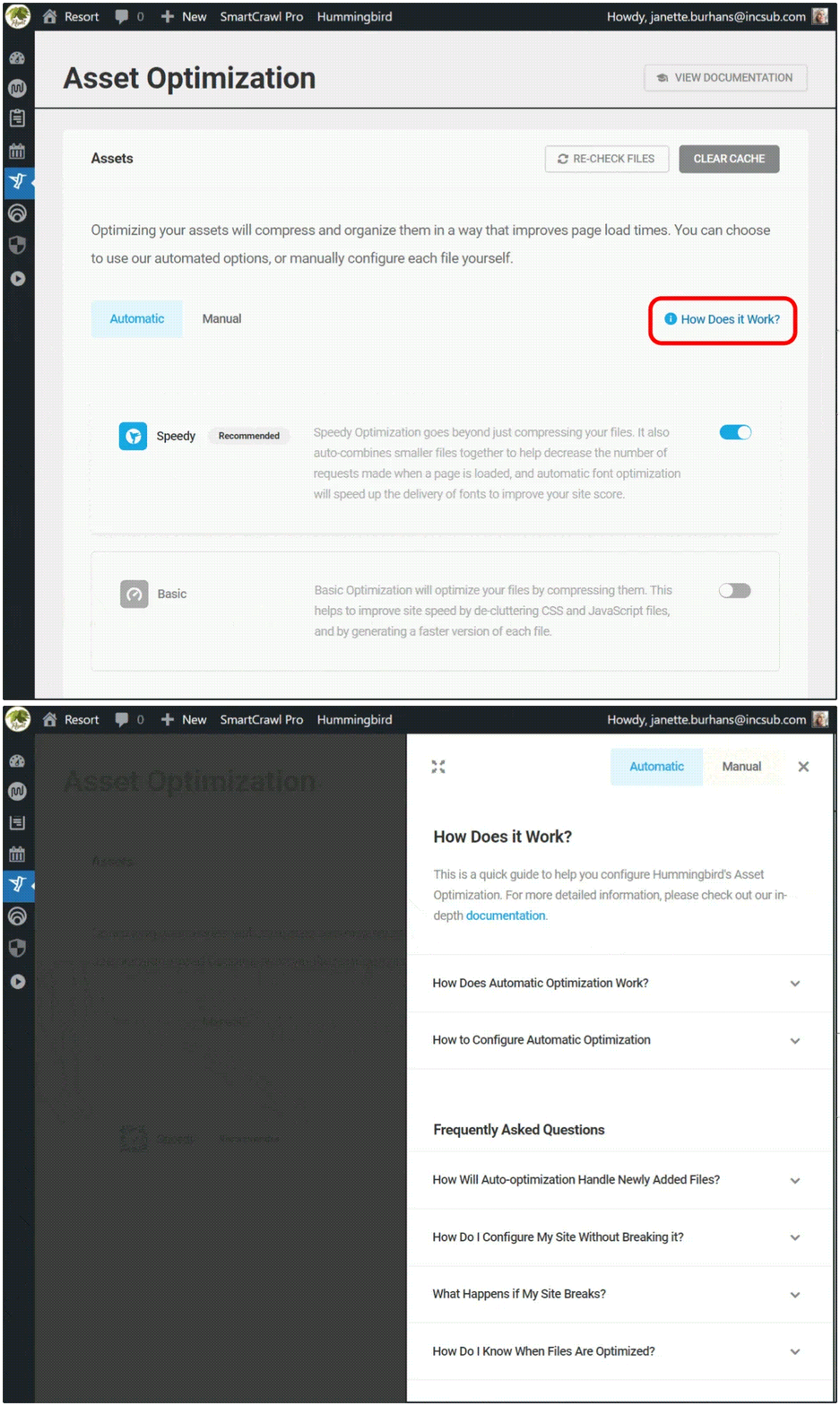
You can see these anytime by navigating to Hummingbird > Asset Optimization > Assets, then click on the How Does it Work? text at right.
There is a page for Automatic and one for Manual; just click on the corresponding header button that you’d like to read about.
Get one-click access to summarized details on both modes of asset optimization.
If you’re just starting out with Hummingbird, we recommend selecting Automatic optimization in Speedy mode to start. As you use and test your site and the plugin further, you can switch to auto basic or manual mode to check for possible improvements.
And of course, you can always view our detailed documentation, or reach out to our customer support gurus, available 24/7/365.
Testing Changes in Safe Mode
We’re going to zero in today on optimization done in Manual, as that’s where the new Safe Mode lives.
Hummingbird’s Safe Mode allows you to test different asset optimization settings in a safe environment, without affecting your website visitors’ experience.
You’ll be able to preview your site from the frontend and check for any errors in your browser’s console, then publish your changes to go live once you’ve got everything just right.
To enable this feature, go to Asset Optimization > Manual Asset Optimization, and click on the toggle button next to Safe Mode.
From here, you can also click on the filter icon, which will open a panel for finding files faster. You can free type or select from the dropdown menu.
You can filter to search for files while in Safe Mode.
When you’re in Safe Mode, clicking on any icon box will change its state.
You will see a solid outline around it, indicating it’s been selected, and a circular info icon will also appear on the far left of the row.
These visuals are to remind you’re in preview mode, and will remain until you click Publish, committing the changes you’ve made.
Visual cues will alert you to unsaved changes.
With Safe Mode enabled, you can start tweaking your files for peak optimization.
Each asset will have a status icon indicating its current state, and these vary based on the asset they’re attached to.
As an example, the Compress option can have the following states:
Gray icon – files that are already compressed
White icon – indicates which files can be compressed
Blue icon – New assets selected for compression
Can’t be compressed – marks files that can’t be compressed
Hover your mouse over any icon for a popup description of what action this change would make.
Need info on a particular icon? Just hover over it for a status popup.
To see the effect any change makes, click the Preview button.
The Preview button shows up once you turn Safe Mode on, taking the place of the Publish Changes button.
Hitting Preview will load the frontend of your site, where you can check on the asset optimization you configured, making sure it doesn’t generate errors or break anything on your site.
What our Preview page looks like in Hummingbird’s Safe Mode.
As you can see, the preview page has three clickable buttons at the top: Go Back, Copy Test Link, and Publish.
Click on Copy Test Link if you want to gauge asset optimization you’ve made using a third-party performance test. Just paste the copied text into your preferred tool.
Click on the Publish button if you’re content with the change(s) you made, and are ready to save.
Click on the Go Back button if you’ve gotten an error message, a site break, or had no observable performance improvements, so you can continue to tweak your assets further.
Once you’ve completed this exercise, turn Safe Mode OFF, as leaving it on can cause page load delays on your live site.
And there you go! Maximum optimization achieved, which is completely changeable at any time.
What’s The Other New Feature in Hummingbird 3.4?
There’s another new feature in the latest release that I wanted to mention, as it’s sure to make your search experience in Hummingbird better.
In the past, if you were working with a particular encrypted file from your performance test reports, locating it on the Manual Asset optimization tab by filename was a bit messy.
That was because Hummingbird generates special filenames for optimized files, and there was no direct way to find them there. Until now!
Copy filenames, then use Ctrl/Cmd+F to quickly find them in the browser search.
With this release, you can copy filenames from the performance reports, then look them up directly in the browser search in the Manual Asset Optimization tab.
This makes finding optimized files easier and faster.
Get Your Site Humming with Optimal Performance
Hummingbird is the ultimate performance suite for all users – whether you’re looking for simple, one-click solutions, or want to fine-tune your site performance down to the last CSS file.
You’ll get faster loading pages and higher search rankings and PageSpeed scores with Hummingbird’s speed optimization.
Now with Safe Mode for asset optimization, you can manually configure and test any files without worrying about a site break or interrupting the visitor experience on your site.
Hummingbird is only one of our highly rated and multi-functional Pro plugins. You can try them all – along with WPMU DEVs membership or hosting – for free! Everything comes with our money-back guarantee, fully supported by our always on-call, 5-star support.
We’ll help you keep your sites humming and your clients happy.
Our new Global IP Banning feature saves you loads of time securing sites. Simply create your IP block and allowlist once, then automatically sync to some or all of your WordPress sites with a few clicks.
A global IP allowlist and blocklist feature has been a top Defender security request for a while. So now…
“I logged into a client site this morning and saw a notification about the new global IP list-banning feature that allows us to sync our IP ban lists across Hub sites. I have raised this request in previous topics with Support and I am sooooooo happy that it has been made live. You guys rock!â€
Andre – WPMU DEV Member
It’s here, free to use, and managed directly from your Hub! As you’ll see, it’s easy to quickly apply the same allowlist and blocklist IPs to all of your sites in bulk.
So, let’s show you how it’s done! First though…
Why Block and Allow IPs?
Just to touch on it quickly, there are many reasons for configuring a WordPress site to allow or block IPs.
For example, maybe you want to monitor online behavior (e.g. to restrict specific web platforms from accessing an educational site). Or, to protect your website from attacks. Also, you may not want a particular country or place to access your online information.
So, there are practical scenarios (like not allowing access to unwanted sites) and security protocols (preventing unwanted or harmful sites or servers from connecting with your network or computer).
Whatever the purpose, allowing and banning IPs should be in your control. With Defender, they are.
Let’s show you how our Defender security plugin makes it easy.
IP Banning and Allowing From The Hub
The Hub makes it easy and simple to create and manage IP Banning.
You can block and allow IP addresses from this area and automatically sync those lists with all or several of your WordPress sites.
The IP Banning section is located in the MySites menu area.
IP Banning is a click away whenever you need to access it in The Hub.
In this section, you can see your Global Blocklist and Global Allowlist, where you’ll add your IPs.
These are the sections where all of the IPs will be entered.
Simply insert one IP address per line and keep in mind that IPv4 and IPv6 are supported. Plus, IP ranges are also accepted in CIDR or hyphenated format.
Once you have your IPs added, click ‘Save.’
Ever want to edit? It’s no problem. You can add and remove IPs at any time!
Selecting Sites to Block and Allow IPs
It’s up to you to determine what sites of yours you want IPs blocked or allowed. So, before syncing IPs with sites, decide what sites you want to associate with IP block and allow lists.
Head to Activate on Site(s) to pick what site you want to include.
All of your sites will be listed here.
After clicking, you’ll see all the available sites to activate global IP banning.
You’ll also be able to see any website that doesn’t have Defender activated and any other issues that would affect syncing.
Select all in one-click or individually.
If you want, you can search with Filters & Labels when browsing through your websites. There are options for filtering by ‘Hosted with us,’ ‘Hosted elsewhere,’ favorites/non-favorites, and labels.
Plus, you can enter a site title and search relevant sites.
Want just sites hosted with us? Click that option to filter and browse those.
When your sites are selected, tap Activate – and that’s it! It takes just a few moments for the sites to be included.
With that being said, it’s time to…
Sync IPs with WordPress Sites
It takes one click to sync your IPs with your WordPress sites. Just tap on the bright blue Sync IPs with Sites, and all the selected sites will be synced.
After listing all your IPs, click ‘Save’ before syncing.
A message informing you of what is about to take place will pop up to ensure you’d like to proceed.
Sounds good to still sync? Then click Continue.
Click ‘Continue’ will get the sync started.
After hitting Continue, you can sit back and relax as all of your chosen sites are synced with IPs on your blocklist and allowlist! It takes just a few moments.
Global IPs From Defender’s Dashboard
Now that you know how to set up global IPs from The Hub, you can also monitor and sync IPs in WordPress under Defender > Firewall > IP Banning.
You’ll see it synced up here as long as the Block/Allow Global IPs are activated.
After syncing, all the IPs you have entered in The Hub will be in a list.
One thing to note is that you can’t add new IPs from Defender’s WordPress admin. Simply add them in The Hub and re-sync – and that’s it!
It’s also an area where you can enable and disable the global IP feature anytime.
Allow and Block Global IPs with Ease
As you can see, allowing and blocking global IPs can be done in just a few clicks with Defender and The Hub. It’s never been simpler to control global IPs across any number of sites simultaneously!
If you aren’t using The Hub yet, sign up for free. The same goes for Defender, which also doesn’t cost a thing from wp.org.
Registering a new domain through WPMU DEV? This Domain Security Guide provides all the information you need to learn how to keep your domains safe, secure, and protected.
Keeping your online presence safe, secure, and protected from hackers, malicious software, and unforeseen events that can compromise your business is complex. Web security involves many areas, including web hosting security, website security, password security, the security of WordPress itself, and domain name security.
In this article, we cover all you need to know about securing your domain name. You will learn how to keep your domain name(s) safe, adding another layer of protection to the overall security of your business for greater peace of mind.
Domain hijacking or domain theft, is taking wrongful control of a domain name from the rightful name holder.
Domain hijacking is usually associated with cybercrime. It involves the theft of a domain name via unauthorized access to the domain management account, or changing a domain’s name servers by illegally accessing the domain name system (DNS), also known as DNS hijacking.
Domain hijacking also takes place more often than you can imagine.
Verisign is a global provider of domain name registry services and internet infrastructure. They are not only the authorized registry for top-level domains (TLD) like .com, .net, .name, .cc, etc., but every quarter, they also review the state of the domain name industry and provide a brief highlighting important trends in domain name registrations.
According to Verisign’s Domain Name Industry Brief (DNIB), there are currently over 350 million registered domains around the world. Based on this figure and the number of domain transfer disputes and other claims related to domain hijacking handled by GoDaddy’s Domain Compliance and Advanced Support Team (DCAST) team, GoDaddy calculated that malicious cyber-criminals make around 170,000 attempts every year to steal domains from their registered name holder (RNH).
This means that every hour of every day, around 20 attempts are made to steal someone else’s domain name.
According to GoDaddy, criminals attempt to steal domains 170,000 times every year.
Why is Domain Name Security Important?
Devices connect and communicate with each other on the web using unique IP addresses.
As an IP address is just a string of numbers (e.g. 2607:f8b0:4004:815::200e), it’s difficult for the human brain to remember these, so we map domain names to IP addresses to make finding sites easier.
For example, the string of numbers shown above is the IP address for Google’s website. It’s much easier to remember Google.com than to tell someone searching for answers online to “just 2607:f8b0:4004:815::200e it,” wouldn’t you agree?
This example also illustrates just why domain names are so important and necessary to protect. Domains not only represent your brand and your identity online, they are also the primary method the rest of the world has to communicate with your business online.
If someone takes over your domain, they not only control your online brand and identity, they also control all email addresses based on that domain, and can wreak absolute havoc with your website and your business.
As ICANN, the organization responsible for managing domain names worldwide puts it…
“Domain hijacking can have a lasting and material impact on a registrant. The registrant may lose an established online identity and be exposed to extortion by name speculators.
Domain hijacking can disrupt or severely impact the business and operations of a registrant, including (but not limited to) denial and theft of electronic mail services, unauthorized disclosure of information through phishing web sites and traffic inspection (eavesdropping), and damage to the registrant’s reputation and brand through web site defacement.”
Once a hijacker gains access to a domain’s account and its control panel, they can make account administrator and password changes, and redirect the domain to a new server (“DNS hijacking”), effectively gaining complete control of the domain.
If you want to read about the kind of hassles you can expect to deal with if your domain name gets hijacked, check out this insider account of the domain name hijacking of perl.com.
So, what can you do to protect your domain from being hijacked?
To answer this question properly, first let’s look at who is responsible for ensuring the various aspects of domain security.
Next, we’ll look at industry-wide domain name security recommendations and what you can do to keep your domain name(s) safe and secure.
Domain Name Security: Who Is Responsible For What?
Domain name security involves many players. These include:
ICANN (Internet Corporation for Assigned Names and Numbers). This is the global not-for-profit public-benefit corporation responsible for ensuring a stable, secure, and unified global Internet and the authority in charge of overseeing the infrastructure that allows any browser to connect to any domain on the internet anywhere in the world. ICANN also maintains the global database containing all of the world’s IP addresses and domain names, called the Domain Name System (DNS) and often referred to as the phonebook of the Internet, connecting web browsers with all websites.
Domain Registry – Every allowed top-level domain (TLD) – e.g. .com, .net, .store, .site, etc. is supervised by an organization officially appointed by ICANN. Domain registries, then, are the official organization responsible for managing all domains under that TLD.
Domain Registrar – An ICANN-accredited entity that makes the purchase and registration of domain names available to businesses and individuals. Essentially, they are domain name providers who can make adjustments to the domain name’s information in the database maintained by ICANN. A domain registrar can source and sell domains from different domain registries.
Domain Reseller – These are also domain name providers but not ICANN-accredited. Domain resellers are a distribution outlet for domain registrars. They pass on information to domain registrars, who then update ICANN’s global database.
Domain Registrant – These are the entities (companies, businesses, or individuals) who purchase and register domain names. It’s important to note that domain names cannot be owned, only leased.
See the chart below if you need help understanding how the domain name world is organized.
Who’s who in the domain name zoo!
A report compiled by ICANN detailing incidents and threats of domain name hijacking found that domain name hijacking incidents often result from a combination of security failures that can involve all of the above parties.
These failures include:
Flaws in registration and related processes
Failure to comply with the transfer policy
Poor administration of domain names by registrars, resellers, and registrants
How Domains Get Hijacked
In the above-mentioned report, ICANN found that many security incidents leading to domain name hijacking occur when registrars and resellers fail to adhere to its transfer policy and their registrant identity verification processes are insufficient to detect and prevent fraud, misrepresentation, and impersonation of registrants.
ICANN, however, also plays a role in this. Its policy on transfer of registrations between registrars makes transfer contact email addresses an acceptable form of identity.
All a domain hijacker needs to hijack a domain is the domain name and an administrative contact’s email address.
Registrant email addresses and contact information are often accessible via the Whois service. This allows anyone with an email address matching the transfer contact email address to impersonate registrants.
From there, it’s not difficult for malicious users and attackers to apply their ill-gotten social engineering skills to target a domain. They can do this by gathering contact information using Whois services and by registering expired domains used by administrative contacts.
Given the above, it’s no wonder that so many domain hijacking attempts are made every year.
Consider just how simple it can be for a fraudster to obtain the information needed to impersonate an authorized account administrator and contact a domain registrar hoping to gain access to a domain’s control panel:
It can be an “inside job” if someone in the company has access to the owner’s account information.
It can come from security breaches and compromises such as hacking the owner’s device or email account, or from the theft of personal documents containing account information.
It can even be someone calling up the registrar with a made-up story feigning a dire need to gain immediate access to the account as a result of an “emergency.” For example, by pretending to be a family member or an employee of a business that has closed down or saying that the account owner has died and the business needs urgent access to the domain to continue trading.
Other contributing factors to the high incidence of domain hijacking attempts mentioned in ICANN’s report include:
Registrants allowing registration records to become stale
ICANN’s policy requires registrars to request registrants to update their records annually, but registrars have no obligation to take any action other than to notify registrants.
A lack of accurate registration records and Whois information in the transfer process makes a domain name vulnerable to attacks.
Domain resellers can become “invisible” to ICANN
ICANN and registries deal with domain registrars, but have no relationship with domain resellers.
While resellers can operate with the privileges of a registrar when registering domain names, it is the responsibility of the registrar to ensure that policies are enforced by resellers and that records of domain name transactions are accurately maintained.
This “gap” in the business relationship chain leading from registrants to ICANN has been identified as an area with potential opportunities for attackers to exploit.
Dispute mechanisms are not designed to resolve urgent issues
ICANN’s Inter-Registrar Transfer Policy is not designed to prevent incidents requiring immediate and coordinated technical assistance across registrars and has no provisions to resolve the urgent restoration of domain name registration information and DNS configuration.
Registrants also have a part to play
ICANN, registries, registrars, and resellers need to do everything in their power to ensure that domains remain secure and protected.
As we’ll explore later in this guide, however, registrants also have an important part to play in keeping their domains secure.
After all, as the saying goes, a chain is only as strong as its weakest link, and often domain name registrants become the weakest link by failing to take all the necessary precautions and then falling prey to social engineering tactics (e.g. phishing emails, domain spoofing, etc.) leading to identity theft or impersonation. Once this happens, hackers can easily hijack and take control of a domain name.
Domain Hijacking – Common Scenarios
Before we move on to what can be done to improve domain security, let’s look at some of the most common types of domain hijacking scenarios and then briefly discuss what to do if you experience any of the incidents described below:
Domain Name Transfer
Typically, when someone attacks your domain, they are usually aiming for one of two (or both) outcomes:
Change your domain registration contact information to gain control of any domains registered under your account, or
Modify the DNS settings so that your domain name’s resolution is handled by another server (this is called DNS hijacking and we cover it further below)
If the aim of the domain thieves is to maintain the name, they may update the registration data (WHOIS) linked to the domain name, change payment details, and then attempt to transfer the domain name to a new registrar so as to erase the history of their registration activity.
As mentioned earlier, once a hijacker gains access to your domain’s account and its control panel, they can take complete control of your domain by making account administrator and password changes, redirect the domain to a new server, and wreak havoc in your business.
In worse case scenarios, a hijacker can cause significant loss of revenue and damage to your brand.
This is exactly what happened to ShadesDaddy.com in 2015 when hackers took over their registrar account and transferred the domain to an account in China which sold counterfeit merchandise, causing the company to suffer great loss of traffic, revenue, and damage to their brand.
The hijacking of ShadesDaddy.com illustrates what can happen when malicious users gain control of your domain name.
Domain Takeover
If a hijacker takes over a valuable domain name, they can sell it or extort the owner by holding them up for ransom.
Business Disruption
As was made clear in the hijacking of Perl.com article described earlier, if your domain account email contact details are tied into your domain and your domain is hijacked, all business communications over email are effectively hijacked too.
Domain hijackers can do anything from disabling and interfering with communication channels like your website and email to sending out fake emails, to completely blanketing out all business communications online.
DNS Hijacking
As explained in this article, if a hacker is able to modify the information in the DNS server, they can potentially send someone to an IP address that isn’t necessarily where they thought they were going.
There are many ways to do this, most of which involve taking control of the DNS server. This is called DNS hijacking or DNS poisoning.
With domain hijacking, hackers don’t need to change anything in the existing DNS server. They can simply change the domain information in the domain registration account (where all of the primary DNS information is input) and point to a domain server that they control.
Pharming
Pharming is when a hijacker takes control of your website and points it to a malicious site or posts offensive content on your site. This can cause serious damage to your reputation, as all traffic is directed to content that you have no control over.
Phishing
Domain hijackers can cause even wider damage when taking over your domain by using your website to collect valuable information from users such as credit cards, social security numbers, logins, etc. and engage in serious criminal activities that can impact the lives of many people.
What To Do If Your Domain Is Hijacked
Recovering a hijacked domain may take time and involve a lot of hassle and expense, but it is possible, so if it happens to you, don’t despair…take action!
In the previous section, we mention the hijacking of ShadesDaddy.com. Here is a first-hand account from the domain owner describing what it took to recover their domain.
As Pablo Palatnik, owner of ShadesDaddy.com states in the article, it’s important to understand the role that companies like ICANN and Verisign play in domain names.
We have covered ICANN quite a bit in this guide. If you are the victim of domain hijacking, ICANN recommends contacting their Security Team for guidance. They will then ask about the circumstances relating to the attack.
It’s also important to note, that as mentioned in the above article, Verisign is the only organization with the authority to transfer a domain name in the case of a hijack (with a court order or ICANN compliance notice).
As the article also points out, as soon as you become aware that your domain name may have been attacked, the first step is to alert and inform your domain registrar immediately and push them to take immediate action and start putting ICANN procedures like the Registrar Transfer Dispute Resolution Policy in place to communicate with the registrar that currently has your domain name.
Request that the transfer be revoked right away. Registrars usually apply a 60-day transfer lock to the transfer procedure, so if your domain has been transferred to an internal account with the same registrar, you have a better chance of recovering it.
Don’t wait too long, as the domain thief may attempt to move the domain name several times to cover their tracks and this will only complicate things and make recovering your domain more difficult.
Next, you should change all of your passwords to prevent the hacker from getting into your other accounts.
If you have a registered trademark, the Uniform Domain-Name Dispute-Resolution Policy (UDRP) is a contract that all ICANN-accredited registrars must follow to handle disputes about domain name ownership. It permits quick banning of the domain, preventing its data from being modified or moved to another registrar, and also preventing internal transfers between registrar accounts.
Keep in mind, however, that the UDRP was primarily developed as a way to counter cybersquatting or trademark breaches, so if your domain name is not associated with a trademark, it may not be very helpful.
Since it is crucially important that you be able to demonstrate to your sponsoring registrar that the registration or use of the domain is rightfully yours, ICANN provides a list of documentation you should maintain to create a “paper trail” should a dispute ensue over domain ownership with whoever is listed as the registrant in a hijacked domain name.
Some of the basic documentation you should be able to provide includes things like:
A domain history (copies of registration records that show you or your organization as the registrant, billing records, email receipts, web logs, archives, tax filings, etc.).
Financial transactions linking you to the hijacked domain name (e.g. credit cards or bank statements showing purchase details)
Correspondence from your registrar relating to the hijacked domain name (e.g. domain renewal notices, notices of DNS change, telephone call records, etc.)
Legal documents mentioning the domain name (e.g. a contract for the sale of a business listing the domain name as being included).
Some additional things you can do, according to Pablo Palatnik (who eventually did manage to get his domain name back) is to get an experienced lawyer, try to expedite things with a court order, and start making some noise about what happened to you (e.g. post about it on social media).
Reverse Domain Hijacking
One more thing to keep in mind is that if you own a valuable domain name, you may also become a victim of “reverse domain hijacking” (RDNH).
This is where a trademark owner attempts to obtain your domain name by initiating a domain name dispute and fraudulently claiming that you are cybersquatting (i.e. registering domain names that are identical or similar to trademarks, service marks, company names, or personal names in the hope of reselling them at a profit.)
Where domain name hijacking (which is also known as reverse cybersquatting) is usually associated with cybercrime, reverse domain hijacking is basically acting in “bad faith” to attempt to deprive a registered domain name holder of their domain name.
Now that we have seen just how damaging and serious domain hijacking can be, let’s take a look at what can be done to minimize and prevent the threat of incidents.
Domain Name Security Improvements And Recommendations
ICANN’s report not only points out factors that can result in domain hijacking incidents but it also offers registries and registrars various recommendations for improving domain security and helping to protect and safeguard registrants from having their domains hijacked.
These recommendations cover areas like:
Strengthening identity verification requirements in electronic correspondence
ICANN recommends raising all identify verification requirements to the same level as used when verifying by mail or in person.
Improving records
ICANN recommends investigating additional methods to improve the accuracy and integrity of registrant records.
Registrar-Lock and EPP authInfo implementations and best practices
A registrar-lock is a status code set on a domain name by the registrar to prevent unauthorized, unwanted or accidental changes to the domain name.
When set, the domain registry prohibits certain actions from taking place, such as modifying, transferring, or deleting the domain name, changing domain name contact details, etc.
The EPP authInfo code (also known as an Auth-Code, EPP code, authorization code, transfer code, or Auth-Info Code), is a generated passcode required to transfer a domain name between domain registrars and indicates that the domain name owner has authorized the transfer.
ICANN recommends that the same EPP authInfo code not be used for all domains by a registrar and that registries and registrars provide resellers and registrants with Best Common Practices describing appropriate use and assignment of EPP authInfo codes and risks of misuse when unique EPP codes are not used.
Improved communications
ICANN recommends investigating whether making pending transfer notices between registries and registrars to registrants mandatory instead of optional would reduce incidences of domain name hijacking.
Providing emergency channels and procedures
ICANN recommends that registrars should obtain emergency contact information from registrants and share emergency support staff contact information with other registrars, resellers, and registries to provide 24 x 7 access to registrar technical support staff in an emergency situation.
Additionally, ICANN recommends emergency procedures and policies to be defined by registrars for allowing registrants to obtain immediate intervention and restoration of their domain name registration information and DNS configuration.
Improving public awareness
ICANN recommends providing better education to registrants on areas like:
Threats of domain name hijacking and registrant impersonation and fraud.
Procedures for requesting intervention and obtaining immediate restoration of a domain name and DNS configuration.
Keeping registration information accurate.
Protection mechanisms like Registrar-Lock, EPP authInfo, etc.
Improving accountability
ICANN recommends investing stronger enforcement mechanisms for dealing with registrars that fail to comply with the transfer policy, and holding registrars more accountable when working with resellers.
Domain Name Security Best Practices:Â What You Can Do To Keep Your Domain Name Safe
Now that we have covered all that is being done and proposed by ICANN to improve domain security for registries, registrars, and resellers, let’s turn our attention to what domain name registrants can do to keep their domain names safe.
Choose a Reliable Domain Provider
Ideally, you want to purchase your domains from an accredited registrar or a reputable domain name reseller offering a secure DNS management panel and 24×7 technical support.
Having access to an online support team focused on protection and security is important, as they will be your first point of contact if you experience any issues with your domains and need immediate help or assistance.
Assign Your Domain Ownership To A Business Entity
Always register domains to a business or corporate entity. Avoid registering a domain name under an individual’s name. This ensures business continuity regardless of the individuals who may come and go from the business.
As an example, suppose your business manager registers a domain name under their own name and then leaves the company. Your business risks losing the domain, being disrupted, or if there are any issues involved, going through a lot of hassle to reclaim domain name ownership.
Lock Your Domain Name
Domain locking (Registrar Lock) provides extra protection to domain names by preventing the transfer of your domain to another registrar by unauthorised third parties.
Leaving a domain “unlocked” creates an opportunity for domain hijackers to try and transfer your domain name or redirect your domain’s name server without your permission, so lock your domain name through your domain name management system immediately after securing your domain registration.
Activate Domain Privacy
As mentioned earlier, all a domain hijacker needs to hijack a domain is the domain name and an administrative contact’s email address.
It’s critically important, then, to protect the email account associated with your registered domain. The best way to do this is to consider using private domain registration when registering your domain.
Private domain registration (also referred to as Domain Privacy, Domain Privacy & Protection, WHOIS Privacy, or WHOIS Privacy Protection) provides a simple and inexpensive way to hide your name, phone number, and email address from public viewing within the WHOIS database, ensuring online anonymity.
Domain privacy makes hijacking domains so much harder…Google it and you’ll see!
Note: Some domain registries do not allow domain privacy services.
For example, when registering .com.au domains or any other .au extensions, auDA‘s (the authorized .au name space overseer) notes in section 2.4, clause b) of its Registrant Contact Information Policy that:
“registrants must not do anything which may have the effect of concealing the true identity of the registrant or the registrant contact (eg. by using a private or proxy registration service)…”
Choose A Strong Password
In today’s world of rampant cybercriminal activity, we shouldn’t even be discussing password security anymore. Weak passwords, however, remain one of the top threats to data security, so don’t choose weak passwords for your registrar account. You will only be inviting trouble.
Choose a strong password instead so that guessing it becomes next to impossible. Follow basic password security recommendations: Generate a password that’s at least 8 characters long (the longer, the better), with at least one numeric value, one symbol and randomly selected letters.
Regularly Update Your Passwords
This is another basic but important area of password security. Despite all security advice, many businesses end up sharing passwords internally with team members, who may then share it with other team member. Over a period of time, having the information being shared around multiple times can present a real security threat, especially if people who are no longer with the company have access to it.
So, make sure to regularly change your domain registration account passwords. A good time to do this is when registrars send out requests to verify and update your contact details, as they are required to do per ICANN’s policy.
While still on the subject of password security…
Never Share Your Domain Registrar Login Details
The less people who have access to your domain registration account, the less chances of security breaches coming from inside the organization.
If possible, try to restrict access to your domain registrar login details only to those who absolutely need to know it. And if they are no longer part of the organization, then change the login details immediately.
Register Your Domain Name For 10 Years
Choose the maximum registration period available. Many registrars allow you to secure your registration for up to ten years.
If you plan to be in business for a while, consider registering your domain for the next 10 years.
Turn On Auto-Renew
If you miss your domain name renewal reminder and forget to renew your domain name, you run the risk of having it expire and having someone else register it.
You can avoid losing your domain name by choosing maximum registration periods and turning on auto-renew.
Provide Backup Payment Details
If your domain name account allows more than one payment method to be input, then provide details for a second payment method.
This will minimize the risk of losing your domain name due to a failed domain renewal charge (e.g. an expired credit card).
Provide Backup Contact Information
If your domain name account allows you to provide backup contact information (including a backup contact email address), this helps to make it easier for authorized users to retrieve access to your domain name account if anything happens to the main contact email.
Which brings up another important point…
Use A Different Contact Email Address Than Your Registered Domain’s Email
As the domain hijacking case of Perl.com illustrates, if your registration account’s contact email address is tied to the same registered domain name, your entire organization could be “incommunicado” if your domain is hijacked (i.e. the hijackers will have complete control of your domain AND your email).
For this reason, it’s best to use a different email address than the one associated with the registered domain. Also, having a backup contact email address on the account helps.
Regularly Monitor Your Domain Name Status
One of ICANN’s recommended practices for registrants to protect their domains includes routinely monitoring domain name status and performing timely and accurate maintenance of the domain’s contact and authentication information.
Making proactively monitoring your domain name registration status a part of your regular business reviews will help you detect any issues sooner rather than later.
Additional Domain Security Tips
Here are some other options to explore to keep your domains and online presence secure:
Register Domain Name Variations
Scammers and hackers often look to register domain names similar to other known domains so they can impersonate the brand or trick unsuspecting users into providing confidential details like login details, banking information, etc.
Registering popular variations of your domain name not only protects your brand, it also creates an additional layer of protection against common hacking techniques like phishing or domain name typosquatting (a type of social engineering attack that targets internet users who incorrectly type a URL into their web browser and land on another registered domain name containing a typo, mispelled variant, alternative spelling, singular/plural variant, or a different domain extension. Typosquatting is also known as domain mimicry, URL hijacking, sting sites, or fake URLs).
Use Domain SSL Certificates
Adding an SSL Certificate to your domain prevents hackers from being able to “listen in” to encrypted connections between user’s devices and your website and steal sensitive data such as credit card numbers, bank login details, contact details, email addresses, etc.
Use Multi-Factor Authentication
Multi-factor authentication (MFA) is a security measure that requires at least two or more proofs of identification in order to grant users access.
AÂ 2-step verification method like two-factor authentication (2FA) adds an extra layer of protection by making sure that only you can sign in to your account.
2FA adds another layer of security and protection to online accounts.
Use DNSSEC
Domain Name System Security Extensions (DNSSEC) is an advanced DNS feature that strengthens DNS authentication using cryptographic digital signatures and adds an extra layer of security to domains by attaching digital signature (DS) records to their DNS information to determine the authenticity of the source domain name.
When DNSSEC is enabled, DNS lookups use a digital signature to verify that the source of your site’s DNS is valid. If the digital signature doesn’t match, web browsers won’t display the site.
Although DNSSEC can improve domain security, protect your domains from potential cache poison attacks and DNS spoofing, and is useful if you have valuable data to protect, it is not automatically enabled as implementation often requires significant effort and expense and needs to be specifically enabled by network operators and domain name owners.
DNSSEC can also reduce site performance, make DNS more prone to failure, and some domain extensions (e.g. country code domains) don’t support it. Hence support and adoption of DNSSEC worldwide is currently slow.
Use A VPN
If you have the need to be extremely security-conscious about your site, you can use a Virtual Private Network (VPN) to access your domain name account and stave off hackers on the lookout for unsecure connections where they can siphon valuable data.
A VPN hides your public IP address and adds security and anonymity when connecting to web-based services and sites.
Don’t Let Your Security Guard Down
In addition to all of the above recommendations, it’s important to also use common sense and remain vigilant to scams, malware, and other attempts to trick you into giving up valuable details that could see your domain name account being hacked and hijacked.
Some basic precautions you can take include:
Don’t share logins, passwords, and email addresses. Especially not for administrative accounts.
Use SPAM filters. Yes, spammers have ways of getting around filters, but any suspected spam you can automatically send into a junk mail folder will provide at least a modicum more protection than not using any spam filters at all.
Never open attachments sent from unknown sources. Unfortunately, even family and friends can forward you emails with attachments containing viruses, so it’s important to be extra vigilant. If you are unsure about an attachment, check with the sender to make sure it’s legit.
Don’t click any links inside spam messages. Not even the “Unsubscribe” link. It not only makes you vulnerable to viruses and malware, it also confirms to spammers that your email address is active.
Make Your Domain Name Security A Priority
Hopefully, this guide has helped to increase your awareness of how important it is to keep your domain name safe, secure, and protected. The security of your entire digital presence depends on it.
As mentioned at the beginning of this article, keeping your business secure is a complex undertaking. It requires hardening on many levels, and working with trusted partners and solutions.
At WPMU DEV, our aim is to become more than your all-in-one WordPress platform provider. We want to be the business partner you can trust and rely on to grow your business profitably and securely.
When you register a domain with WPMU DEV either for your own business or on behalf of your clients as a reseller, you get the following security features to help keep your domain safe and protected included at no additional cost:
Registrar Lock
Privacy Protection
HTTPS (if your site is hosted with us, we provide free SSL and force HTTPS).
Longer Registration Periods (up to 10 years)
Contact Info Update Verification (whenever you update your contact information, we check our database and if we don’t have that data, you will receive a verification email before updating the information.)
2FA Options For Members (should your WPMU DEV account password ever become compromised, unauthorized users will still require a 2FA code to be able to login).
24/7 Technical Support. Receive expert support on all things WordPress, hosting, and domains any time, any day.
Registering a new domain through WPMU DEV? This Domain Security Guide provides all the information you need to learn how to keep your domains safe, secure, and protected.
Keeping your online presence safe, secure, and protected from hackers, malicious software, and unforeseen events that can compromise your business is complex. Web security involves many areas, including web hosting security, website security, password security, the security of WordPress itself, and domain name security.
In this article, we cover all you need to know about securing your domain name. You will learn how to keep your domain name(s) safe, adding another layer of protection to the overall security of your business for greater peace of mind.
Domain hijacking or domain theft, is taking wrongful control of a domain name from the rightful name holder.
Domain hijacking is usually associated with cybercrime. It involves the theft of a domain name via unauthorized access to the domain management account, or changing a domain’s name servers by illegally accessing the domain name system (DNS), also known as DNS hijacking.
Domain hijacking also takes place more often than you can imagine.
Verisign is a global provider of domain name registry services and internet infrastructure. They are not only the authorized registry for top-level domains (TLD) like .com, .net, .name, .cc, etc., but every quarter, they also review the state of the domain name industry and provide a brief highlighting important trends in domain name registrations.
According to Verisign’s Domain Name Industry Brief (DNIB), there are currently over 350 million registered domains around the world. Based on this figure and the number of domain transfer disputes and other claims related to domain hijacking handled by GoDaddy’s Domain Compliance and Advanced Support Team (DCAST) team, GoDaddy calculated that malicious cyber-criminals make around 170,000 attempts every year to steal domains from their registered name holder (RNH).
This means that every hour of every day, around 20 attempts are made to steal someone else’s domain name.
According to GoDaddy, criminals attempt to steal domains 170,000 times every year.
Why is Domain Name Security Important?
Devices connect and communicate with each other on the web using unique IP addresses.
As an IP address is just a string of numbers (e.g. 2607:f8b0:4004:815::200e), it’s difficult for the human brain to remember these, so we map domain names to IP addresses to make finding sites easier.
For example, the string of numbers shown above is the IP address for Google’s website. It’s much easier to remember Google.com than to tell someone searching for answers online to “just 2607:f8b0:4004:815::200e it,” wouldn’t you agree?
This example also illustrates just why domain names are so important and necessary to protect. Domains not only represent your brand and your identity online, they are also the primary method the rest of the world has to communicate with your business online.
If someone takes over your domain, they not only control your online brand and identity, they also control all email addresses based on that domain, and can wreak absolute havoc with your website and your business.
As ICANN, the organization responsible for managing domain names worldwide puts it…
“Domain hijacking can have a lasting and material impact on a registrant. The registrant may lose an established online identity and be exposed to extortion by name speculators.
Domain hijacking can disrupt or severely impact the business and operations of a registrant, including (but not limited to) denial and theft of electronic mail services, unauthorized disclosure of information through phishing web sites and traffic inspection (eavesdropping), and damage to the registrant’s reputation and brand through web site defacement.”
Once a hijacker gains access to a domain’s account and its control panel, they can make account administrator and password changes, and redirect the domain to a new server (“DNS hijacking”), effectively gaining complete control of the domain.
If you want to read about the kind of hassles you can expect to deal with if your domain name gets hijacked, check out this insider account of the domain name hijacking of perl.com.
So, what can you do to protect your domain from being hijacked?
To answer this question properly, first let’s look at who is responsible for ensuring the various aspects of domain security.
Next, we’ll look at industry-wide domain name security recommendations and what you can do to keep your domain name(s) safe and secure.
Domain Name Security: Who Is Responsible For What?
Domain name security involves many players. These include:
ICANN (Internet Corporation for Assigned Names and Numbers). This is the global not-for-profit public-benefit corporation responsible for ensuring a stable, secure, and unified global Internet and the authority in charge of overseeing the infrastructure that allows any browser to connect to any domain on the internet anywhere in the world. ICANN also maintains the global database containing all of the world’s IP addresses and domain names, called the Domain Name System (DNS) and often referred to as the phonebook of the Internet, connecting web browsers with all websites.
Domain Registry – Every allowed top-level domain (TLD) – e.g. .com, .net, .store, .site, etc. is supervised by an organization officially appointed by ICANN. Domain registries, then, are the official organization responsible for managing all domains under that TLD.
Domain Registrar – An ICANN-accredited entity that makes the purchase and registration of domain names available to businesses and individuals. Essentially, they are domain name providers who can make adjustments to the domain name’s information in the database maintained by ICANN. A domain registrar can source and sell domains from different domain registries.
Domain Reseller – These are also domain name providers but not ICANN-accredited. Domain resellers are a distribution outlet for domain registrars. They pass on information to domain registrars, who then update ICANN’s global database.
Domain Registrant – These are the entities (companies, businesses, or individuals) who purchase and register domain names. It’s important to note that domain names cannot be owned, only leased.
See the chart below if you need help understanding how the domain name world is organized.
Who’s who in the domain name zoo!
A report compiled by ICANN detailing incidents and threats of domain name hijacking found that domain name hijacking incidents often result from a combination of security failures that can involve all of the above parties.
These failures include:
Flaws in registration and related processes
Failure to comply with the transfer policy
Poor administration of domain names by registrars, resellers, and registrants
How Domains Get Hijacked
In the above-mentioned report, ICANN found that many security incidents leading to domain name hijacking occur when registrars and resellers fail to adhere to its transfer policy and their registrant identity verification processes are insufficient to detect and prevent fraud, misrepresentation, and impersonation of registrants.
ICANN, however, also plays a role in this. Its policy on transfer of registrations between registrars makes transfer contact email addresses an acceptable form of identity.
All a domain hijacker needs to hijack a domain is the domain name and an administrative contact’s email address.
Registrant email addresses and contact information are often accessible via the Whois service. This allows anyone with an email address matching the transfer contact email address to impersonate registrants.
From there, it’s not difficult for malicious users and attackers to apply their ill-gotten social engineering skills to target a domain. They can do this by gathering contact information using Whois services and by registering expired domains used by administrative contacts.
Given the above, it’s no wonder that so many domain hijacking attempts are made every year.
Consider just how simple it can be for a fraudster to obtain the information needed to impersonate an authorized account administrator and contact a domain registrar hoping to gain access to a domain’s control panel:
It can be an “inside job” if someone in the company has access to the owner’s account information.
It can come from security breaches and compromises such as hacking the owner’s device or email account, or from the theft of personal documents containing account information.
It can even be someone calling up the registrar with a made-up story feigning a dire need to gain immediate access to the account as a result of an “emergency.” For example, by pretending to be a family member or an employee of a business that has closed down or saying that the account owner has died and the business needs urgent access to the domain to continue trading.
Other contributing factors to the high incidence of domain hijacking attempts mentioned in ICANN’s report include:
Registrants allowing registration records to become stale
ICANN’s policy requires registrars to request registrants to update their records annually, but registrars have no obligation to take any action other than to notify registrants.
A lack of accurate registration records and Whois information in the transfer process makes a domain name vulnerable to attacks.
Domain resellers can become “invisible” to ICANN
ICANN and registries deal with domain registrars, but have no relationship with domain resellers.
While resellers can operate with the privileges of a registrar when registering domain names, it is the responsibility of the registrar to ensure that policies are enforced by resellers and that records of domain name transactions are accurately maintained.
This “gap” in the business relationship chain leading from registrants to ICANN has been identified as an area with potential opportunities for attackers to exploit.
Dispute mechanisms are not designed to resolve urgent issues
ICANN’s Inter-Registrar Transfer Policy is not designed to prevent incidents requiring immediate and coordinated technical assistance across registrars and has no provisions to resolve the urgent restoration of domain name registration information and DNS configuration.
Registrants also have a part to play
ICANN, registries, registrars, and resellers need to do everything in their power to ensure that domains remain secure and protected.
As we’ll explore later in this guide, however, registrants also have an important part to play in keeping their domains secure.
After all, as the saying goes, a chain is only as strong as its weakest link, and often domain name registrants become the weakest link by failing to take all the necessary precautions and then falling prey to social engineering tactics (e.g. phishing emails, domain spoofing, etc.) leading to identity theft or impersonation. Once this happens, hackers can easily hijack and take control of a domain name.
Domain Hijacking – Common Scenarios
Before we move on to what can be done to improve domain security, let’s look at some of the most common types of domain hijacking scenarios and then briefly discuss what to do if you experience any of the incidents described below:
Domain Name Transfer
Typically, when someone attacks your domain, they are usually aiming for one of two (or both) outcomes:
Change your domain registration contact information to gain control of any domains registered under your account, or
Modify the DNS settings so that your domain name’s resolution is handled by another server (this is called DNS hijacking and we cover it further below)
If the aim of the domain thieves is to maintain the name, they may update the registration data (WHOIS) linked to the domain name, change payment details, and then attempt to transfer the domain name to a new registrar so as to erase the history of their registration activity.
As mentioned earlier, once a hijacker gains access to your domain’s account and its control panel, they can take complete control of your domain by making account administrator and password changes, redirect the domain to a new server, and wreak havoc in your business.
In worse case scenarios, a hijacker can cause significant loss of revenue and damage to your brand.
This is exactly what happened to ShadesDaddy.com in 2015 when hackers took over their registrar account and transferred the domain to an account in China which sold counterfeit merchandise, causing the company to suffer great loss of traffic, revenue, and damage to their brand.
The hijacking of ShadesDaddy.com illustrates what can happen when malicious users gain control of your domain name.
Domain Takeover
If a hijacker takes over a valuable domain name, they can sell it or extort the owner by holding them up for ransom.
Business Disruption
As was made clear in the hijacking of Perl.com article described earlier, if your domain account email contact details are tied into your domain and your domain is hijacked, all business communications over email are effectively hijacked too.
Domain hijackers can do anything from disabling and interfering with communication channels like your website and email to sending out fake emails, to completely blanketing out all business communications online.
DNS Hijacking
As explained in this article, if a hacker is able to modify the information in the DNS server, they can potentially send someone to an IP address that isn’t necessarily where they thought they were going.
There are many ways to do this, most of which involve taking control of the DNS server. This is called DNS hijacking or DNS poisoning.
With domain hijacking, hackers don’t need to change anything in the existing DNS server. They can simply change the domain information in the domain registration account (where all of the primary DNS information is input) and point to a domain server that they control.
Pharming
Pharming is when a hijacker takes control of your website and points it to a malicious site or posts offensive content on your site. This can cause serious damage to your reputation, as all traffic is directed to content that you have no control over.
Phishing
Domain hijackers can cause even wider damage when taking over your domain by using your website to collect valuable information from users such as credit cards, social security numbers, logins, etc. and engage in serious criminal activities that can impact the lives of many people.
What To Do If Your Domain Is Hijacked
Recovering a hijacked domain may take time and involve a lot of hassle and expense, but it is possible, so if it happens to you, don’t despair…take action!
In the previous section, we mention the hijacking of ShadesDaddy.com. Here is a first-hand account from the domain owner describing what it took to recover their domain.
As Pablo Palatnik, owner of ShadesDaddy.com states in the article, it’s important to understand the role that companies like ICANN and Verisign play in domain names.
We have covered ICANN quite a bit in this guide. If you are the victim of domain hijacking, ICANN recommends contacting their Security Team for guidance. They will then ask about the circumstances relating to the attack.
It’s also important to note, that as mentioned in the above article, Verisign is the only organization with the authority to transfer a domain name in the case of a hijack (with a court order or ICANN compliance notice).
As the article also points out, as soon as you become aware that your domain name may have been attacked, the first step is to alert and inform your domain registrar immediately and push them to take immediate action and start putting ICANN procedures like the Registrar Transfer Dispute Resolution Policy in place to communicate with the registrar that currently has your domain name.
Request that the transfer be revoked right away. Registrars usually apply a 60-day transfer lock to the transfer procedure, so if your domain has been transferred to an internal account with the same registrar, you have a better chance of recovering it.
Don’t wait too long, as the domain thief may attempt to move the domain name several times to cover their tracks and this will only complicate things and make recovering your domain more difficult.
Next, you should change all of your passwords to prevent the hacker from getting into your other accounts.
If you have a registered trademark, the Uniform Domain-Name Dispute-Resolution Policy (UDRP) is a contract that all ICANN-accredited registrars must follow to handle disputes about domain name ownership. It permits quick banning of the domain, preventing its data from being modified or moved to another registrar, and also preventing internal transfers between registrar accounts.
Keep in mind, however, that the UDRP was primarily developed as a way to counter cybersquatting or trademark breaches, so if your domain name is not associated with a trademark, it may not be very helpful.
Since it is crucially important that you be able to demonstrate to your sponsoring registrar that the registration or use of the domain is rightfully yours, ICANN provides a list of documentation you should maintain to create a “paper trail” should a dispute ensue over domain ownership with whoever is listed as the registrant in a hijacked domain name.
Some of the basic documentation you should be able to provide includes things like:
A domain history (copies of registration records that show you or your organization as the registrant, billing records, email receipts, web logs, archives, tax filings, etc.).
Financial transactions linking you to the hijacked domain name (e.g. credit cards or bank statements showing purchase details)
Correspondence from your registrar relating to the hijacked domain name (e.g. domain renewal notices, notices of DNS change, telephone call records, etc.)
Legal documents mentioning the domain name (e.g. a contract for the sale of a business listing the domain name as being included).
Some additional things you can do, according to Pablo Palatnik (who eventually did manage to get his domain name back) is to get an experienced lawyer, try to expedite things with a court order, and start making some noise about what happened to you (e.g. post about it on social media).
Reverse Domain Hijacking
One more thing to keep in mind is that if you own a valuable domain name, you may also become a victim of “reverse domain hijacking” (RDNH).
This is where a trademark owner attempts to obtain your domain name by initiating a domain name dispute and fraudulently claiming that you are cybersquatting (i.e. registering domain names that are identical or similar to trademarks, service marks, company names, or personal names in the hope of reselling them at a profit.)
Where domain name hijacking (which is also known as reverse cybersquatting) is usually associated with cybercrime, reverse domain hijacking is basically acting in “bad faith” to attempt to deprive a registered domain name holder of their domain name.
Now that we have seen just how damaging and serious domain hijacking can be, let’s take a look at what can be done to minimize and prevent the threat of incidents.
Domain Name Security Improvements And Recommendations
ICANN’s report not only points out factors that can result in domain hijacking incidents but it also offers registries and registrars various recommendations for improving domain security and helping to protect and safeguard registrants from having their domains hijacked.
These recommendations cover areas like:
Strengthening identity verification requirements in electronic correspondence
ICANN recommends raising all identify verification requirements to the same level as used when verifying by mail or in person.
Improving records
ICANN recommends investigating additional methods to improve the accuracy and integrity of registrant records.
Registrar-Lock and EPP authInfo implementations and best practices
A registrar-lock is a status code set on a domain name by the registrar to prevent unauthorized, unwanted or accidental changes to the domain name.
When set, the domain registry prohibits certain actions from taking place, such as modifying, transferring, or deleting the domain name, changing domain name contact details, etc.
The EPP authInfo code (also known as an Auth-Code, EPP code, authorization code, transfer code, or Auth-Info Code), is a generated passcode required to transfer a domain name between domain registrars and indicates that the domain name owner has authorized the transfer.
ICANN recommends that the same EPP authInfo code not be used for all domains by a registrar and that registries and registrars provide resellers and registrants with Best Common Practices describing appropriate use and assignment of EPP authInfo codes and risks of misuse when unique EPP codes are not used.
Improved communications
ICANN recommends investigating whether making pending transfer notices between registries and registrars to registrants mandatory instead of optional would reduce incidences of domain name hijacking.
Providing emergency channels and procedures
ICANN recommends that registrars should obtain emergency contact information from registrants and share emergency support staff contact information with other registrars, resellers, and registries to provide 24 x 7 access to registrar technical support staff in an emergency situation.
Additionally, ICANN recommends emergency procedures and policies to be defined by registrars for allowing registrants to obtain immediate intervention and restoration of their domain name registration information and DNS configuration.
Improving public awareness
ICANN recommends providing better education to registrants on areas like:
Threats of domain name hijacking and registrant impersonation and fraud.
Procedures for requesting intervention and obtaining immediate restoration of a domain name and DNS configuration.
Keeping registration information accurate.
Protection mechanisms like Registrar-Lock, EPP authInfo, etc.
Improving accountability
ICANN recommends investing stronger enforcement mechanisms for dealing with registrars that fail to comply with the transfer policy, and holding registrars more accountable when working with resellers.
Domain Name Security Best Practices:Â What You Can Do To Keep Your Domain Name Safe
Now that we have covered all that is being done and proposed by ICANN to improve domain security for registries, registrars, and resellers, let’s turn our attention to what domain name registrants can do to keep their domain names safe.
Choose a Reliable Domain Provider
Ideally, you want to purchase your domains from an accredited registrar or a reputable domain name reseller offering a secure DNS management panel and 24×7 technical support.
Having access to an online support team focused on protection and security is important, as they will be your first point of contact if you experience any issues with your domains and need immediate help or assistance.
Assign Your Domain Ownership To A Business Entity
Always register domains to a business or corporate entity. Avoid registering a domain name under an individual’s name. This ensures business continuity regardless of the individuals who may come and go from the business.
As an example, suppose your business manager registers a domain name under their own name and then leaves the company. Your business risks losing the domain, being disrupted, or if there are any issues involved, going through a lot of hassle to reclaim domain name ownership.
Lock Your Domain Name
Domain locking (Registrar Lock) provides extra protection to domain names by preventing the transfer of your domain to another registrar by unauthorised third parties.
Leaving a domain “unlocked” creates an opportunity for domain hijackers to try and transfer your domain name or redirect your domain’s name server without your permission, so lock your domain name through your domain name management system immediately after securing your domain registration.
Activate Domain Privacy
As mentioned earlier, all a domain hijacker needs to hijack a domain is the domain name and an administrative contact’s email address.
It’s critically important, then, to protect the email account associated with your registered domain. The best way to do this is to consider using private domain registration when registering your domain.
Private domain registration (also referred to as Domain Privacy, Domain Privacy & Protection, WHOIS Privacy, or WHOIS Privacy Protection) provides a simple and inexpensive way to hide your name, phone number, and email address from public viewing within the WHOIS database, ensuring online anonymity.
Domain privacy makes hijacking domains so much harder…Google it and you’ll see!
Note: Some domain registries do not allow domain privacy services.
For example, when registering .com.au domains or any other .au extensions, auDA‘s (the authorized .au name space overseer) notes in section 2.4, clause b) of its Registrant Contact Information Policy that:
“registrants must not do anything which may have the effect of concealing the true identity of the registrant or the registrant contact (eg. by using a private or proxy registration service)…”
Choose A Strong Password
In today’s world of rampant cybercriminal activity, we shouldn’t even be discussing password security anymore. Weak passwords, however, remain one of the top threats to data security, so don’t choose weak passwords for your registrar account. You will only be inviting trouble.
Choose a strong password instead so that guessing it becomes next to impossible. Follow basic password security recommendations: Generate a password that’s at least 8 characters long (the longer, the better), with at least one numeric value, one symbol and randomly selected letters.
Regularly Update Your Passwords
This is another basic but important area of password security. Despite all security advice, many businesses end up sharing passwords internally with team members, who may then share it with other team member. Over a period of time, having the information being shared around multiple times can present a real security threat, especially if people who are no longer with the company have access to it.
So, make sure to regularly change your domain registration account passwords. A good time to do this is when registrars send out requests to verify and update your contact details, as they are required to do per ICANN’s policy.
While still on the subject of password security…
Never Share Your Domain Registrar Login Details
The less people who have access to your domain registration account, the less chances of security breaches coming from inside the organization.
If possible, try to restrict access to your domain registrar login details only to those who absolutely need to know it. And if they are no longer part of the organization, then change the login details immediately.
Register Your Domain Name For 10 Years
Choose the maximum registration period available. Many registrars allow you to secure your registration for up to ten years.
If you plan to be in business for a while, consider registering your domain for the next 10 years.
Turn On Auto-Renew
If you miss your domain name renewal reminder and forget to renew your domain name, you run the risk of having it expire and having someone else register it.
You can avoid losing your domain name by choosing maximum registration periods and turning on auto-renew.
Provide Backup Payment Details
If your domain name account allows more than one payment method to be input, then provide details for a second payment method.
This will minimize the risk of losing your domain name due to a failed domain renewal charge (e.g. an expired credit card).
Provide Backup Contact Information
If your domain name account allows you to provide backup contact information (including a backup contact email address), this helps to make it easier for authorized users to retrieve access to your domain name account if anything happens to the main contact email.
Which brings up another important point…
Use A Different Contact Email Address Than Your Registered Domain’s Email
As the domain hijacking case of Perl.com illustrates, if your registration account’s contact email address is tied to the same registered domain name, your entire organization could be “incommunicado” if your domain is hijacked (i.e. the hijackers will have complete control of your domain AND your email).
For this reason, it’s best to use a different email address than the one associated with the registered domain. Also, having a backup contact email address on the account helps.
Regularly Monitor Your Domain Name Status
One of ICANN’s recommended practices for registrants to protect their domains includes routinely monitoring domain name status and performing timely and accurate maintenance of the domain’s contact and authentication information.
Making proactively monitoring your domain name registration status a part of your regular business reviews will help you detect any issues sooner rather than later.
Additional Domain Security Tips
Here are some other options to explore to keep your domains and online presence secure:
Register Domain Name Variations
Scammers and hackers often look to register domain names similar to other known domains so they can impersonate the brand or trick unsuspecting users into providing confidential details like login details, banking information, etc.
Registering popular variations of your domain name not only protects your brand, it also creates an additional layer of protection against common hacking techniques like phishing or domain name typosquatting (a type of social engineering attack that targets internet users who incorrectly type a URL into their web browser and land on another registered domain name containing a typo, mispelled variant, alternative spelling, singular/plural variant, or a different domain extension. Typosquatting is also known as domain mimicry, URL hijacking, sting sites, or fake URLs).
Use Domain SSL Certificates
Adding an SSL Certificate to your domain prevents hackers from being able to “listen in” to encrypted connections between user’s devices and your website and steal sensitive data such as credit card numbers, bank login details, contact details, email addresses, etc.
Use Multi-Factor Authentication
Multi-factor authentication (MFA) is a security measure that requires at least two or more proofs of identification in order to grant users access.
AÂ 2-step verification method like two-factor authentication (2FA) adds an extra layer of protection by making sure that only you can sign in to your account.
2FA adds another layer of security and protection to online accounts.
Use DNSSEC
Domain Name System Security Extensions (DNSSEC) is an advanced DNS feature that strengthens DNS authentication using cryptographic digital signatures and adds an extra layer of security to domains by attaching digital signature (DS) records to their DNS information to determine the authenticity of the source domain name.
When DNSSEC is enabled, DNS lookups use a digital signature to verify that the source of your site’s DNS is valid. If the digital signature doesn’t match, web browsers won’t display the site.
Although DNSSEC can improve domain security, protect your domains from potential cache poison attacks and DNS spoofing, and is useful if you have valuable data to protect, it is not automatically enabled as implementation often requires significant effort and expense and needs to be specifically enabled by network operators and domain name owners.
DNSSEC can also reduce site performance, make DNS more prone to failure, and some domain extensions (e.g. country code domains) don’t support it. Hence support and adoption of DNSSEC worldwide is currently slow.
Use A VPN
If you have the need to be extremely security-conscious about your site, you can use a Virtual Private Network (VPN) to access your domain name account and stave off hackers on the lookout for unsecure connections where they can siphon valuable data.
A VPN hides your public IP address and adds security and anonymity when connecting to web-based services and sites.
Don’t Let Your Security Guard Down
In addition to all of the above recommendations, it’s important to also use common sense and remain vigilant to scams, malware, and other attempts to trick you into giving up valuable details that could see your domain name account being hacked and hijacked.
Some basic precautions you can take include:
Don’t share logins, passwords, and email addresses. Especially not for administrative accounts.
Use SPAM filters. Yes, spammers have ways of getting around filters, but any suspected spam you can automatically send into a junk mail folder will provide at least a modicum more protection than not using any spam filters at all.
Never open attachments sent from unknown sources. Unfortunately, even family and friends can forward you emails with attachments containing viruses, so it’s important to be extra vigilant. If you are unsure about an attachment, check with the sender to make sure it’s legit.
Don’t click any links inside spam messages. Not even the “Unsubscribe” link. It not only makes you vulnerable to viruses and malware, it also confirms to spammers that your email address is active.
Make Your Domain Name Security A Priority
Hopefully, this guide has helped to increase your awareness of how important it is to keep your domain name safe, secure, and protected. The security of your entire digital presence depends on it.
As mentioned at the beginning of this article, keeping your business secure is a complex undertaking. It requires hardening on many levels, and working with trusted partners and solutions.
At WPMU DEV, our aim is to become more than your all-in-one WordPress platform provider. We want to be the business partner you can trust and rely on to grow your business profitably and securely.
When you register a domain with WPMU DEV either for your own business or on behalf of your clients as a reseller, you get the following security features to help keep your domain safe and protected included at no additional cost:
Registrar Lock
Privacy Protection
HTTPS (if your site is hosted with us, we provide free SSL and force HTTPS).
Longer Registration Periods (up to 10 years)
Contact Info Update Verification (whenever you update your contact information, we check our database and if we don’t have that data, you will receive a verification email before updating the information.)
2FA Options For Members (should your WPMU DEV account password ever become compromised, unauthorized users will still require a 2FA code to be able to login).
24/7 Technical Support. Receive expert support on all things WordPress, hosting, and domains any time, any day.
Pointing domains… nameservers… figuring out DNS… it can all feel daunting! Fortunately, WPMU DEV makes it easy, whether you’re working with a domain purchased from us or from another provider. We break it all down in this article.
Keep reading to learn how to easily connect your domain to our hosting service.
With our new domain service recently rolled out, you can directly purchase domains and register them through WPMU DEV – in which case we automatically do the DNS hookup (i.e., the pointing part) for you.
If you purchased your domain through another DNS provider and are hosting with us, the tutorial below will show you exactly what you need to do and explain why this is also a great choice.
Prepping for a Change in Domain Nameservers
Nameservers are often referred to as the phone book of the internet, sending you to the correct domain when you type in a web address.
There are two primary components to making your website accessible to the public:
Your domain name (purchased from a registrar)
Nameservers (provided through a host)
The first must point to the second to connect the two.
The registrar you purchased your domain from also has its own nameservers (if it offers hosting), however if you want them managed elsewhere you must change the DNS records.
Doing it all from a single location is ideal, as it cuts out the middle agent and puts the same quality that powers your sites behind your DNS.
DNS propagation is the term for your site’s nameservers and other records (e.g., A, AAAA, CNAME, MX, etc) updating across the web. This process can take anywhere from a few minutes to a couple days to finalize.
If your site was already live, it might become briefly inaccessible to visitors during the nameserver change. You could create a temporary page with info regarding the approximate downtime, then publish it just prior to the server change. (Remember to change it back once the process is complete).
It’s also helpful to handle nameserver changes during a period when traffic volume is typically on the low end.
Importing Your Domain Records to WPMU DEV
Alright, we’re ready to start our edits. The first thing we’re going to do is navigate to The Hub on WPMU DEV.
Click on Domains from the top menu bar, then Connected Domains from the submenu, then the Connect Existing Domain button.
Connecting domains in WPMU DEV’s The Hub.
The Add New Domain modal will pop up. Here you will enter your domain name in the text field – making sure to include the extension (e.g. .com, .net, .xyz) – then click the blue button.
Step 1 of 2 in WPMU DEV’s Add New Domain modal.
The Hub DNS Manager will run a scan for common DNS records, then automatically import and list them for your verification.
Verifying the scanned records to import into a WPMU DEV DNS configuration.
Here you’ll see the summary of record information, which will include:
Type – A, CNAME, MX, TXT
Hostname – @ for root; www for www. subdomain
Value – if record is an alias, directs, or returns
TTL (seconds) – Time To Live is how long the DNS query caches before expiring and needing a new one. (The lower this number, the better/faster.)
You can remove any records, if you want to exclude them from being imported, by clicking on the Trashcan icon.
You can also manually add any records that are missing. See Add or Edit DNS Records for details.
If you’re in any doubt as to whether records should be added or deleted, just reach out to support (any time, day or night) and they’ll happily walk you through it.
Once you’re satisfied with the populated DNS records, click the blue button once more.
After the ellipsis bounce, the page will load with the imported information specific to your domain.
WPMU DEV nameservers are listed towards the top of this page, where you’ll see there are three of them.
WPMU DEV’s trio of nameservers, ready to copy/paste into your domain registry records.
Keep your Hub page open, as we’ll be copying & pasting the nameservers in the next step. (Or, do what I do, and just copy the first one, then replace the “1†with “2†then “3†as you paste each, since these ordinal numbers are the only difference.)
Putting WPMU DEV Nameservers in Your Domain Registry Records
Now that we’ve imported your domain details into WPMU DEV, the next step is to overwrite the nameserver records of your registrars with ours.
There are a lot of registrars, so how your domain details are kept and displayed will vary, but they should all have the same key elements. We cover more than a dozen of the most popular ones here.
In the case of registrars that serve as hosts, what they permit when it comes to allowable changes in nameservers can vary. For example, pointing nameservers to another host is not permissible for a Wix-purchased domain. However, you can transfer your domain away from them (although it involves a different process).
Assuming your domain registrar allows for pointing nameservers away from them, or that you’ve taken any necessary prior steps in preparation, login to their website and locate the records for your domain.
Changing nameservers through the Registrar; in this case, Namecheap.
Popping back over to the Hub, copy that first nameserver, then head back to your domain registrar details page, pasting it in the appropriate text field. Do this for all three nameservers, then save your input.
Depending on your registrar, you’ll probably get a confirmation message with time estimates on how long it will take the DNS hosting server to update.
As with any significant edit, verifying everything is working as it should is an important last step.
Some registrars will send you an email notifying you that the propagation is complete. With others, you might need to revisit the site and continue checking.
Either way, we can verify things through The Hub. Let’s head there, and navigate to Domains > Connected Domains.
For the domain name in question, if you see the green check marked Propagated correctly under Nameservers Status – you’re good to go. If it says Pending, click on the vertical ellipsis icon to the right, and select Manage DNS from the dropdown.
Managing DNS through WPMU DEV’s The Hub is effortless.
If everything was done properly and the process has completed, you’ll see a row of green highlighted text, confirming Your nameservers are propagated correctly. If that message isn’t displayed, click on the Check nameservers button.
Success! Nameservers have been propagated to WPMU DEV.
You’re all set! Your nameservers are successfully pointing to WPMU DEV as your acting DNS provider.
As an additional option, you can use this DNS propagation checker to verify the current IP address and DNS record information for your domain name(s).
The Benefits of Pointing Domains to WPMU DEV Nameservers
Nameservers are essential in directing internet traffic as they locate and translate hostnames into IP addresses.
If you host your own or your client sites with WPMU DEV, pointing your domains to our nameservers has definite advantages.
For starters, subpar nameservers will experience difficulties more often, and your visitors could get “DNS server not responding†messages. Quality nameservers, like ours, can limit or avoid that altogether.
Additionally, pointing your domains to our nameservers allows you to keep the settings with your current email client as is, eliminating the hassle of making a bunch of changes in that regard. (Just make sure existing MX records are imported during the DNS record setup.)
Finally, with the ability to purchase domains now directly through WPMU DEV, managing client sites becomes even more centralized, as your hosting provider and domain provider will be one in the same.
This gives you all of your domains in one place/one dashboard, with auto renewal, free protection, and a built-in grace period; priced incredibly low for Agency members.
Pointing domains… nameservers… figuring out DNS… it can all feel daunting! Fortunately, WPMU DEV makes it easy, whether you’re working with a domain purchased from us or from another provider. We break it all down in this article.
Keep reading to learn how to easily connect your domain to our hosting service.
With our new domain service recently rolled out, you can directly purchase domains and register them through WPMU DEV – in which case we automatically do the DNS hookup (i.e., the pointing part) for you.
If you purchased your domain through another DNS provider and are hosting with us, the tutorial below will show you exactly what you need to do and explain why this is also a great choice.
Prepping for a Change in Domain Nameservers
Nameservers are often referred to as the phone book of the internet, sending you to the correct domain when you type in a web address.
There are two primary components to making your website accessible to the public:
Your domain name (purchased from a registrar)
Nameservers (provided through a host)
The first must point to the second to connect the two.
The registrar you purchased your domain from also has its own nameservers (if it offers hosting), however if you want them managed elsewhere you must change the DNS records.
Doing it all from a single location is ideal, as it cuts out the middle agent and puts the same quality that powers your sites behind your DNS.
DNS propagation is the term for your site’s nameservers and other records (e.g., A, AAAA, CNAME, MX, etc) updating across the web. This process can take anywhere from a few minutes to a couple days to finalize.
If your site was already live, it might become briefly inaccessible to visitors during the nameserver change. You could create a temporary page with info regarding the approximate downtime, then publish it just prior to the server change. (Remember to change it back once the process is complete).
It’s also helpful to handle nameserver changes during a period when traffic volume is typically on the low end.
Importing Your Domain Records to WPMU DEV
Alright, we’re ready to start our edits. The first thing we’re going to do is navigate to The Hub on WPMU DEV.
Click on Domains from the top menu bar, then Connected Domains from the submenu, then the Connect Existing Domain button.
Connecting domains in WPMU DEV’s The Hub.
The Add New Domain modal will pop up. Here you will enter your domain name in the text field – making sure to include the extension (e.g. .com, .net, .xyz) – then click the blue button.
Step 1 of 2 in WPMU DEV’s Add New Domain modal.
The Hub DNS Manager will run a scan for common DNS records, then automatically import and list them for your verification.
Verifying the scanned records to import into a WPMU DEV DNS configuration.
Here you’ll see the summary of record information, which will include:
Type – A, CNAME, MX, TXT
Hostname – @ for root; www for www. subdomain
Value – if record is an alias, directs, or returns
TTL (seconds) – Time To Live is how long the DNS query caches before expiring and needing a new one. (The lower this number, the better/faster.)
You can remove any records, if you want to exclude them from being imported, by clicking on the Trashcan icon.
You can also manually add any records that are missing. See Add or Edit DNS Records for details.
If you’re in any doubt as to whether records should be added or deleted, just reach out to support (any time, day or night) and they’ll happily walk you through it.
Once you’re satisfied with the populated DNS records, click the blue button once more.
After the ellipsis bounce, the page will load with the imported information specific to your domain.
WPMU DEV nameservers are listed towards the top of this page, where you’ll see there are three of them.
WPMU DEV’s trio of nameservers, ready to copy/paste into your domain registry records.
Keep your Hub page open, as we’ll be copying & pasting the nameservers in the next step. (Or, do what I do, and just copy the first one, then replace the “1†with “2†then “3†as you paste each, since these ordinal numbers are the only difference.)
Putting WPMU DEV Nameservers in Your Domain Registry Records
Now that we’ve imported your domain details into WPMU DEV, the next step is to overwrite the nameserver records of your registrars with ours.
There are a lot of registrars, so how your domain details are kept and displayed will vary, but they should all have the same key elements. We cover more than a dozen of the most popular ones here.
In the case of registrars that serve as hosts, what they permit when it comes to allowable changes in nameservers can vary. For example, pointing nameservers to another host is not permissible for a Wix-purchased domain. However, you can transfer your domain away from them (although it involves a different process).
Assuming your domain registrar allows for pointing nameservers away from them, or that you’ve taken any necessary prior steps in preparation, login to their website and locate the records for your domain.
Changing nameservers through the Registrar; in this case, Namecheap.
Popping back over to the Hub, copy that first nameserver, then head back to your domain registrar details page, pasting it in the appropriate text field. Do this for all three nameservers, then save your input.
Depending on your registrar, you’ll probably get a confirmation message with time estimates on how long it will take the DNS hosting server to update.
As with any significant edit, verifying everything is working as it should is an important last step.
Some registrars will send you an email notifying you that the propagation is complete. With others, you might need to revisit the site and continue checking.
Either way, we can verify things through The Hub. Let’s head there, and navigate to Domains > Connected Domains.
For the domain name in question, if you see the green check marked Propagated correctly under Nameservers Status – you’re good to go. If it says Pending, click on the vertical ellipsis icon to the right, and select Manage DNS from the dropdown.
Managing DNS through WPMU DEV’s The Hub is effortless.
If everything was done properly and the process has completed, you’ll see a row of green highlighted text, confirming Your nameservers are propagated correctly. If that message isn’t displayed, click on the Check nameservers button.
Success! Nameservers have been propagated to WPMU DEV.
You’re all set! Your nameservers are successfully pointing to WPMU DEV as your acting DNS provider.
As an additional option, you can use this DNS propagation checker to verify the current IP address and DNS record information for your domain name(s).
The Benefits of Pointing Domains to WPMU DEV Nameservers
Nameservers are essential in directing internet traffic as they locate and translate hostnames into IP addresses.
If you host your own or your client sites with WPMU DEV, pointing your domains to our nameservers has definite advantages.
For starters, subpar nameservers will experience difficulties more often, and your visitors could get “DNS server not responding†messages. Quality nameservers, like ours, can limit or avoid that altogether.
Additionally, pointing your domains to our nameservers allows you to keep the settings with your current email client as is, eliminating the hassle of making a bunch of changes in that regard. (Just make sure existing MX records are imported during the DNS record setup.)
Finally, with the ability to purchase domains now directly through WPMU DEV, managing client sites becomes even more centralized, as your hosting provider and domain provider will be one in the same.
This gives you all of your domains in one place/one dashboard, with auto renewal, free protection, and a built-in grace period; priced incredibly low for Agency members.
There’s more to choosing a domain provider than just the price of registering domains. Sure, the cost is something to consider; however, many factors come into play. This article shows you what to look for.
There are some questions you should consider when picking a domain provider. Like, do they offer bulk domain purchases for your agency? Or, can you quickly transfer a domain? What about customer support? And more…
So, how do you determine which domain provider to go with?
We have a breakdown in this post, along with some insight on what registering a domain entails, to help you make a good decision. Plus, we’ll show you a glimpse of why you should consider choosing WPMU DEV (wink, wink) for your domains!
We’ll be looking at domain-related topics, such as:
By the end of this article, you should have a good idea of what to look for before registering your domain(s) with a specific company — and feel good about your choice!
But, before we begin, let’s quickly touch on…
What a Domain Provider Does
In a nutshell, a Domain Provider is a company or business that handles the reservation of domain names and the assignment of IP addresses for those domain names.
They permit the purchase and registration of domain names that are accredited by ICANN (Internet Corporation for Assigned Names and Numbers). ICANN supports domains by helping companies apply for accreditation to become domain registrars and sell them to the public.
Domain name registration is allowed by ICANN to make adjustments to the domain name’s information in the database on your behalf.
With all of the options for domain providers – how are you supposed to choose? There’s a lot to think about, so let’s break down some components that might help you make a clear decision.
Here are the main factors to consider:
1. Paid vs Free Domain Protection
There are precautions to take when purchasing a domain, so luckily, there is Domain Protection. And depending on your domain registrar, it’s either free or it comes at a price.
Just for context, signing up for a domain also includes providing specifics for a WHOIS directory– a resource database of all the registered domains in a country. It’s available to lookup users who have purchased a domain and/or created an IP address – including the contact info, name, and more.
Domain information for WPMUDEV.com.
It’s so that the public can find information about any person with a domain name. So, spammers are big fans of this directory. It grants them easy access to different people all around the world.
With WHOIS Protection, the WHOIS data about your contact information will be hidden. However, it doesn’t hide any DNS records or IP addresses.
When determining the right domain provider, you may want to consider if there’s a fee for WHOIS Protection – or if it’s included. Many other providers have it set up automatically as well.
However, if it’s not included, expect to pay an extra $12-$15 a year for protection.
2. Extension (TLDs) Options
When it comes to domain name extensions (TLDs — Top Level Domains), like .info, .bike, .shop, etc. – make sure the company you’re with has plenty of options or specific ones you want to use.
A good domain provider should have ample extensions to choose from.
3. Simple Domain Transfer
Ensure that the domain company you decide on makes it easy to transfer domains.
It’s probable that you will transfer your domain (or many) at some point. Making sure that the domain company that you’re with has a clear path for domain transfer is vital.
Remember that transferring a domain can take a while, and very few domains don’t charge a transfer fee (about 5%). Though there’s usually a fee when you transfer a domain name, you get an extra year of registration along with the transfer.
4. Purchasing Domains in Bulk
Bulk purchasing domains are the norm if you own a web development company. Therefore, check and see if the domain company has bulk purchasing options. Also, see about a bulk discount.
If they do, make sure it’s simple to do. Plus, ensure there are no upsells or hidden fees.
5. Include Hosting with Domain
Many companies offer to host services with domains as bundles – or discounted rates.
Though getting a discount is tempting, be careful lumping the two together. When doing so, you lose some flexibility that you may want down the road. For example, if you ever want to change web hosts or domain registrants, you may encounter some complications.
However, there can also be advantages of having everything under one company, such as it’s easily manageable and accessible.
Be sure to know how simple it would be to transfer services (e.g. domains) to a new company if you ever decide to do so and how it would affect the price.
6. Expired Domain Policy
Considering domains are registered for a specific amount of time, be sure you know what happens when they expire with your company, and there’s a grace period.
In most cases, features like autorenewal can prevent expired domains, but look into the domain company’s expiration policy. Do they have an ample grace period?
Also, what’s their redemption period? The domain might be released to the general public when the redemption period is over.
Rules can differ for this, but this process of expired domains is generally the norm. So, make sure you know the guidelines on this to prevent any mishaps down the road.
7. Support
Does the company you purchase domains through offer good support? You shouldn’t need them in most cases (if transferring, implementing, purchasing, etc., is simple to do – which it should be); however, ensure that they are accessible if needed.
24/7 support is the best bet and shows a dedicated company’s seriousness about its domain business.
8. Reputable
Make sure that the company you’re with has a good, established reputation. Look for things, like Trustpilot, on their website. Or reviews from other sources. After all, you’re looking for a long-term relationship when it comes to domains, you want to ensure that you – and the domains – are in good hands.
9. Registration Period
Check and see what type of registration period the domain company offers. For example, do they have it, so you can register a domain for more than a year? Also, do they have convenience, like auto-renewal?
Most domains can be registered for up to 10 years at a time, so ensure that you have some flexibility when registering.
(And, if you didn’t know, you can’t permanently purchase a domain. Think of them as a lease – not permanent — unless you renew regularly.)
10. Price
Many companies offer a low price to get clients “hooked†into purchasing a domain and then become sticker shocked once up for renewal. Make sure you read the fine print and ensure the renewal price won’t break the bank.
All of this information should be easy to find in any good domain registrar. Plus, a good business model is not to hike up the prices tremendously (or at all) upon renewal.
11. Domain Management Console
Easily managing domains and having them under one roof in a domain management console is great for running your WordPress development agency.
Any management system that allows you to bill, renew, edit contact information and more can save you a ton of time and streamline the domain management process.
This is especially useful if you’re managing multiple domains for numerous clients as an agency.
What Are the Average Costs of a New Domain Name?
Now that you know what to look out for, it’s good to be aware of what a fair price to pay for a domain is as you decide which company to go with.
They all vary by companies and extensions, so there’s no exact figure for them; however, for a regular .com domain, prices tend to range from as cheap as $7 to $15 per year.
Also, some offer package deals, such as a free domain with hosting. Or discounts and promos are often available (especially for new customers). Additionally, discounts can be added if you pay annually instead of monthly.
All this being said, often, renewing a domain can cost more. Hence, if you know you want a domain for the long term, it’s usually a good idea to purchase for an extended length of time (e.g. ten years) right away.
A Note on Premium Domains…
If you purchase an existing domain, the owner can determine the price. This can become very expensive, depending on the domain and business. It’s different from buying a brand-new domain at a regular price.
Domain Extension Differences
We mentioned that it’s important to see what extensions a domain provider includes if you wish to use some specific ones other than .com. That being said – what’s the difference between them?
The most popular is .com. Then some other popular TLDs include .org, .net, .edu, and .gov. There are thousands of others to choose from.
A big difference between them all (as we touched on earlier) is the expense. Some extensions (such as the ever-growing .io and .co) are becoming more popular, thus, more expensive.
Also, some extensions are restricted, and you can’t purchase them unless you meet specific requirements. Several of these include .edu and .gov because they are related to education and government.
Probably the biggest reason for various extensions is to be unique to your site. Have a dance studio? You might want a .dance to fit in with your business.
An extension often won’t make or break a website, but that being said, they do make a difference and should be unique to your specifications.
Why WPMU DEV is a Good Choice for Domains
We’ve covered quite a bit of information in this article (whew!), and we’d be doing ourselves a disservice if we didn’t mention our domains here at WPMU DEV. Why? Because we check a lot of the boxes on what to look for when choosing a domain provider.
After all, our main goal IS to be the best domain provider around, so we want to make sure we have as much covered on our end, and make you aware of it, too.
Here’s a rundown of what we offer.
Paid or Free Domain Protection: Our domains automatically come with WHOIS protection, so it’s covered without additional costs.
Extension Options: We have over 120 extensions — and will be adding another 100-150 very soon.
Simple Domain Transfer: Coming soon, you’ll be able to quickly and easily transfer 3rd party domains to WPMU DEV, and if you need to transfer out of our platform, that will be simple, too. Stay tuned for updates on this…
Purchasing Domains in Bulk: Considering we sell our domains purely at cost, we don’t need a bulk domain discount. They’re already as low priced as they can get. You can purchase as many domains as you need.
Hosting & Domain: Though they are two different features (domains are not included with hosting), we have fully dedicated hosting and credits with our Agency plan.
Expired Domains Policy: An expired domain will enter into a 40-day grace period and can be renewed during that time by simply paying the renewal costs. Then, the domain enters a 30-day redemption period.
Support: We offer 24/7 support.
Reputation: We’ve been around for a while (since 2006!) and have extremely high marks from Trustpilot. Additionally, we’ve been a repeatedly “Top Choice” for web developers, won awards for our plugins, and have high reviews from over 5,000 places worldwide.
Here’s a sample of what our reputation consists of.
Registration Period: Domains can be registered for 1-10 ten years (except for a few examples, like .co — which can only be registered for five). Read more about registration periods in our documentation.
Price: As mentioned earlier, with purchasing domains in bulk, we charge purely at cost and won’t sticker shock you on renewal. We offer domains exclusively through our Agency Plan, so we can keep them at a discounted rate. It’s strictly for our members’ benefit to have domains; we’re not in it for profit.
Domain Management Console: All domains are in one place in The Hub. From here, you can set up auto-renewal, edit information, set registration periods — and much more. Be sure to read our article about setting up domains from WPMU DEV.
For more about our domains, be sure to visit our domains page for more info — or to get started!
Providing You Info for the Right Domain Provider
Hopefully, this article answered some questions and helps you understand what to look for in a domain provider. Whether it’s price, the convenience of a domain console, or support — whatever it is, it’s important to choose the right company to go with. After all, there are over a thousand options out there, and it’s not always simple to decide on a single platform.
On top of that, you got a glimpse of what we can offer regarding domains here at WPMU DEV. We’re proud to be able to offer them at cost with our Agency plan and provide the best in many categories when it comes to domains. If you’re not a member yet, give us a trial run (for free!) today!
Make sure that whatever domain provider you go with, make sure it’s (dot)amazing!
Donations are a great way to show support, providing businesses and nonprofits with a monetary contribution to assist in the continued creation of goods or services that they deem important or valuable.
It’s pretty much the norm in today’s service industry to have tip jars prominently displayed at counters and checkouts. Customers will often throw in a little extra in appreciation for quality service – using that jar for cash & coins, or rounding up a small percentage on their credit/debit transactions.
Either way, it’s common practice to give monetary thanks for a job well done. This applies online as well, and not just as a result of specific transactions, but as a way to say, “I really like what you’re doing here, and would like to help keep it goingâ€.
Of course when you’re online, cash, coins, and tipping jars don’t exist, so monetary gifts have to go through some sort of payment platform.
In the case of micro-donations, where amounts are typically on the low end, it’s important to choose an option that doesn’t absorb the majority of your gift in processing fees.
We’re going to look at some payment portals that are ideal for micro-donations via WordPress websites.
Continue reading, or jump ahead using these links:
Incremental amounts anywhere up to ten dollars are typically considered micro-donations, and are making micro-philanthropy a significant portion of the fundraising landscape.
Historically, businesses effectively used micro-donations through the collection of spare change at the checkouts of their brick & mortar locations. However, with the growth of the internet and increased time spent on the web, online and mobile donations have become the dominant source of this form of philanthropy.
Millennial and Gen-Z donors top the leaderboard when it comes to micro-donations. Thanks to the popularity of smartphones and social networks constantly within reach, these younger donors can be tapped into through effective use of social media.
A Fraction of Your Funding
An interesting phenomenon is that most individuals are more willing to give a little bit a lot of the time, than to give a lot all at once.
Consider this coffee shop example… If a friendly, skilled barista asked for a $35 monthly donation upfront, most people would balk. However, those same customers buy a cup of coffee every morning for $3.50, pull out a five dollar bill, and toss the remaining change into the jar. Let’s say after taxes they’re tipping $1.25 each time. Add that up over 4 weeks – and there’s your $35.
This is the benefit of micro-donations; small, incremental amounts that become significant over time, especially if they come from a number of people, and/or are given on a repeated basis.
Using this same formula, many of you who are running WordPress websites could also benefit from micro-donations, whatever type of businesses they might be.
Perhaps you want to support philanthropy on your site by collecting and contributing to a charitable cause. Or, maybe you’re a writer hoping to get a little financial bonus for the time-consuming creative content you produce for your readers. Or, could be you’re a coder who could really use supplemental funds to cover the development & distribution of your plugin.
Most hard-working online creators are appreciative of a little boost in income. Why not present the opportunity to your audience? They might be ready and willing… you just need to make them able.
Qualities to Look for In a Micro-donation Solution
What exactly makes for a good micro-donation platform?
Most importantly, it has to be simple to use, quick to submit, and recognizable. Any transaction method that requires significant time to complete will cause potential donors to bounce. Likewise if the payment platform they’re considering opening up their wallet for is something they’ve never heard of.
Secondly, transaction fees should be relatively low. If the user is only contributing a few bucks, it’s important that most of that isn’t eaten up by a processing fee – or worse, actually costs you money.
So which micro-donation plugins fit the bill? Let’s take a look.
Recommended Micro-donation Plugins
We researched what was available in the arena of WordPress donation plugins, and are sharing the ones we thought were best. Bonus: they’re all free.
Forminator is much more than a simple donation plugin, but earns a spot here because it handles this specific task quite well. And hey, why not use a plugin that has more than one function? You’ll cut down on resources, and your learning curve.
In addition to being an all-around form building wiz, Forminator does feedback widgets, interactive polls (with real-time results), buzzfeed-style quizzes (no wrong answer), and service estimators – including the option to include payment elements.
It’s easy to use, appealing to look at, and has a proven track record for successful leads and conversions.
Forminator’s dashboard provides a lot of detail in a concisely summarized section.
Instead, I’ll just quickly demonstrate how things look on the front end using a donation form I created.
Forminator helped me create a donation form in minutes.
When creating in Forminator, Fields, Appearance, Email notifications, Integrations, and Settings are all editable, with a significant amount of options.
This allows you to make the content, format, look, and behaviors of your forms customizable to the smallest detail.
Payment gateways Stripe and PayPal are included in the free version, as well as every other powerful feature Forminator offers (minus, the e-signature field). And of course, it includes a testing mode.
There’s also a Submissions section, so you can easily track all the donations that come in, along with their associated details.
Forminator has 5/5 stars, and the pro version is available with a WPMU DEV membership, along with all of our other premium plugins, managed WP hosting, and our site management maestro “The Hubâ€.
GiveWP
This plugin is smooth and polished from the starting line, with a setup wizard that gets things going as soon as you activate it.
Almost everything is customizable, from text to images to the process itself (choose defined amounts or allow the donor to enter) – and it’s all very nice to look at.
GiveWP’s donation form: default vs customized.
Options allow you to create a number of different donation forms, all with their own format, features, and content. You can view or edit a form’s content at any time, as well as keep tabs on actual donation information.
GiveWP‘s donation summary reveals details like donor info, gateway used, payment type & amount, and more.
The free version allows you to connect with PayPal or Stripe, and make test payments.
GiveWP has 4.5/5 stars, and offers paid individual addons or tiered plans with preselected features (like Recurring Donations and more payment platforms).
Accept Donations with PayPal
This plugin does a nice job of putting basic donation options on your site. Instructions are easy to follow, and you can place your PayPal Donation button anywhere on your site with a simple embed code.
As you can tell from the name, this connects to your PayPal account, so you have to have one (or create one for free). The process is quick, and allows for a fair amount of flexibility – you can choose from different button types (including making your own), create a sandbox account to test in, designate custom redirect URLs for Cancel and Return pages, and choose predetermined currency amounts (or allow for free entry at time of donation).
Selecting a donation amount from your predefined drop down in Accept Donations with PayPal.
Additionally, there is a section with details on all donations that come in, including info like payment amount & fee, transaction ID, date, and payer email.
Accept Donations with PayPal plugin’s donation details screen.
This plugin works with any WP theme, and the developer is an official PayPal partner.
Accept Donations with PayPal has 4.5/5 stars, and offers a premium paid version with additional features (such as Recurring Donations).
Paymattic
Formerly known as WPPayForm, this plugin allows you to build your own donation form.
It comes with a selection of prebuilt forms (which are editable), to help you get started.
Creating a form from scratch works similarly to the WP block editor, but with fields. You can select from general fields (name, email, dropdowns, radio field, text area, etc), donation & product fields (payment item, item quantity, etc), and payment method fields.
Form creation in Paymattic, from both the front and back end.
Stripe is the only payment method included in the free version, but the premium upgrade includes an additional 8 gateways (plus an offline option).
There isn’t much in the way of customizing the look; colors and fonts are locked into the plugins’ default selections. You can add a checkout image in the Stripe setup, and choose the wording for your text fields and form name.
It allows for payment testing, and provides a full listed summary of donations made.
Paymattic’s donation summary screen in the WP dashboard.
Paymattic has 4.5/5 stars, and offers paid plans with additional features (like Advanced Reports & Analytics, and pro support).
Charitable
Charitable touts itself as The WordPress Fundraising Toolkit.
Forms are added and created as campaigns, which are basically WordPress pages.
You can add multiple suggested donation amounts (as well as a custom donation field), extended descriptions, and change the creator of the campaign if desired.
Emails are available for donor, admin, and user, and include options like donation receipt (donor), donation notification (admin), and password reset (user), among others.
Design options are included, and work as if you’re in a theme. You can select any color (affects links and button backgrounds), choose where your form will show (separate page, same page, or in a modal), and whether or not to show required fields only.
You can use their prefab text for Privacy and Terms & Conditions fields, or edit to suit your preferences.
Making a test donation in Charitable.
Stripe, PayPal and offline donations are all available in the free version, and testing mode is included.
There is also a donation summary list with assorted details (e.g., amount, donor name, campaign name, and status ) to keep tabs on the status of donations.
Donation Forms by Charitable has 5/5 stars, and offers paid plans with additional features (like unlimited campaigns, no transaction fees, and additional payment gateways).
Seamless Donations
This plugin works by placing a single embed code on any page or post. There are no additional arguments or options, but it’s been designed so that extensions can add features to the main shortcode.
Seamless donations automatically keeps logs on system information and Cron data, both of which are viewable from the plugins dashboard menu in WordPress.
By default, it uses the Stripe payment platform, which initializes in sandbox mode for testing. Also readily available is the option for PayPal, which you can set up in Live or Test mode.
There are six predefined donation amounts (referred to as ‘Giving Levelsâ€), which you can select or deselect, but cannot edit.
Options for which form fields and sections you’d like to display include repeating donation, employer match, anonymous donor checkbox, and more.
As for styling options, there are two defaults built-in: classic or modern (or you can go with none). Or, you can purchase from the premium add-ons, which include a library of 35 additional form designs with customizable images.
Seamless Donations uses a single embed code on pages/posts to display your donation form.
Emails have a Thank You template which is editable, and can include four available placeholders for personalized text. Sections include name, email address, message body, designated fund, anonymous donations, closing, and more. A separate Thank You message page can also be set up.
As with the other plugins reviewed today, Seamless Donations keeps a summary of donations, each with associated details, like date, name, payment platform, and amount. However, this one also keeps two additional summary sections, for donors and funds.
Seamless Donations has 4/5 stars, and offers seven premium add-ons with additional features and benefits (such as Giving Level Manager, Basic Widget Pack, and Thank You Enhanced).
Payment Portals and Their Associated Fees
Fees are dependent on what payment portal you are using, and the country that is associated with any given donation.
Because of the variance in these deciding factors, and the knowledge that they are subject to change at any time, we’re not going to include specific amounts in this post.
If the donations you will be accepting are strictly nonprofit, it is possible to get discounts from PayPal, Stripe, and Mollie. (Sidebar: Mollie is currently not supported in the U.S., but available in about 30 other countries.)
Your best bet is to do a little math in advance. Using the associated fees of any given payment platform, determine what base figure wouldn’t cause you a transactional loss, and set your lowest donation option to that amount. You can always change it later if rates should fluctuate higher or lower.
A quick disclaimer: When it comes to the status of a business entity – LLC, Inc, 501(c) nonprofit, etc – there are financial and legal implications regarding how you report different types of income (including donations). Make sure to check with a certified, licensed attorney or other legitimate lawful source. WPMU DEV does not claim to give nor are we qualified to give legal advice.
Giving Feels Good and Getting Brings Gratitude
Micro-donations are a fantastic way to collect small monetary gifts that can add up to substantial gains.
Amazon is a great example of micro-donations. Through its Amazon Smile website, 0.5% of total spend amounts are made to the nonprofit of a customer’s choice. Given how much business Amazon does, these can and do make a huge impact over time.
But even on a smaller scale, you can benefit from the generosity of others. That might be collecting to contribute to a cause you believe in, or allowing your customers to tip you when they’re feeling generous.
With so many options for adding donation capabilities to websites, it’s as simple as choosing one you like and setting it up. Even if no one ever donated, it doesn’t cost you anything – assuming you’re using a free plugin. And if donations did start to really pick up on your site, you could always add premium features to improve the process.
If you’re a WPMU DEV member and have any questions about Forminator – or any of the plugins we reviewed – just reach out to our excellent support team, and they’ll get you sorted in no time. If you’re not a member yet, get your free trial on, and see what you’ve been missing. 🙂
Register, manage, and connect unlimited affordable domains directly from WPMU DEV – making creating websites for you and your clients easier than ever!
Domain registration is all done right from WPMU DEV’s Hub. It just takes a few clicks, with unlimited options for picking top-level domains.
As you’ll see, domain management has been streamlined for web developers on our Agency Plan. Especially when managing domains for multiple clients.
In this article, we cover everything you need to know about using domains with WPMU DEV, including:
Registering a New Domain is quick and simple. Whatever domain you’re looking for, we have 120+ extensions — whether it be .com, .org, .shop — you name it! They’re all affordable. (And P.S. — We’ll be adding another 100-150 TLDs VERY soon.)
It’s also important to note that domains are for Agency Plan members ONLY. We can only offer this kind of service at wholesale pricing by making it exclusive (just as we did with Quantum hosting).
We provide domains purely at cost (purchase and renewal), with no margin for us (except to cover transaction fees) so that you can resell them to your clients with your own markup and save money on your existing provider.
Every domain type has a different cost. You can also request a domain extension if you have another extension in mind!
So, now that you know the gist of our domains, here’s…
Where to Begin
Registering a new domain starts from the Domains tab and Register New Domain. Just type the domain name you want to use.
Whatever domain suits your needs, type it in.
Once you type in the domain name you prefer, a list of options will appear with various prices.
In this example, I’d like to register the name ‘awesomewebguy.’ As you can see, many top-level domain options appeared (e.g. .org, .net, .online, etc.) under Matches.
The prices vary for all domains.
Want to see other options? Click Load More, and you’ll get others.
There are plenty of options to choose from.
WPMU DEV domains also have Suggestions for a new domain based on your search criteria.
More options that may be suitable for a domain.
Once you have a domain name, click Buy Now. And that’s it!
You’ll be directed to a registration page. From this page, you pick out the Registration Terms. This includes the Registration Period, Renewal Price, and Auto-Renew.
To start, select a Registration Period. This can be anywhere from one to ten years!
Choose between 1-10 years in a click.
Also, determine whether you’d like to auto-renew or not (you can always change this later – as you’ll see).
Auto-renew is a hands-off approach to ensure your domain stays active.
Just to note, Domain Privacy is automatically incorporated with every domain.
Domain Privacy is automatically included.
Next, enter the Registrant information. From here, you can also associate the registrant information with a client from the dropdown (we’ll have more on associating domains with a client later in this article).
This is information about you as the domain owner. None of this information is publicly shared or on WHOIS.
Want to save it as default registration info? Just check the circle at the bottom of this section — and you’re all set!
Once your domain is successfully registered, you can automatically add DNS records by clicking connect to a hosted site. If you don’t want to connect your domain to a hosted site – no biggie. Click Skip for Now.
The registration was successful!
That being said, let’s say you want to connect domain to a hosted site. Here’s how it’s done…
Add Domain to Hosted Site
Adding a domain to a hosted site with WPMU DEV doesn’t take much at all to set up.
You can do this while creating your domain or after the domain is verified and completed. Just select from the dropdown what site you would like the domain to be hosted on.
All of your hosted domains will appear here.
Add your domain to a hosted site at any time. From the Domains tab, you’ll see by your site a Link Icon.
Click on the link icon, and then Connect to a Hosted Site. It will bring up a dropdown (just like the image above) where you select the site to host from.
Just click Connect to a Hosted Site, and select from the dropdown what site you’d like to use.
Select any site you want to add your domain to!
Click Save, and you’ll see your domain’s DNS status. It may take a little while to complete. You can recheck your status by tapping Settings (the ellipsis).
It will take just a little while to get the DNS and SSL status completed.
Below this area, you’ll also see the DNS information for the site you’re using with your domain. It includes the CNAME Record, A Record, and AAAA Record.
Note: if you use the Connect Domain feature, you don’t have to manually add any DNS record.
All the information is clearly displayed for quick reference.
Once you register a new domain, it will be located under Registered Domains. If you view it soon after registering a domain, you’ll see that its Registrant Status maybe be ‘verifying.’
The domain name, status, registrant, registrant status, and expiration date are displayed.
A message will appear indicating that as well.
Times vary, depending on several factors.
So, how do you go about verifying the registrant status?
Confirm Your Registrant Information
Once you register your domain, you’ll receive an email. This is to ensure that you are who you say you are regarding your domain ownership and to complete your registration.
Whatever email address you include in your Registrant Information is where this email will be sent. Once opened, this is what it says:
Your particular domain will be displayed in the body of the email.
It contains two links: one is to review ICANN’s Policy, and the other is to continue on with verification.
Once you verify your information — you’re all set!
When verified, you’ll get notified immediately.
Once your contact info is verified, you’ll be notified.
Please keep in mind that if you don’t verify within 15 days, the domain will be suspended until you verify it. So, make sure to complete this important step.
Domain Management in The Hub
All of your domains are in one place in The Hub under Domains. This is your one-stop area where you can new, update, manage, and more.
Every domain you have will be shown here, whether it be one or thousands of domains.
By clicking on the ellipsis by individual domains, you instantly have access to key features, such as:
Manage Domain
Renew Domain
Update Contact Information
Update Nameservers
Update DNS
Want to manage a domain? It’s quickly and easily accessible.
To make it easier for you and your clients, you can activate Auto Renew in one click.
The renewal price is also indicated.
Click on the name or status of the domain to get to the Domain Overview page. From the Overview, you can view a ton of information. Everything from Domain Status, Registration Date, GDPR status- – and more!
All the contact information regarding the domain Owner, Admin, Billing, and Tech are in the Contact Information tab. You can always adjust, add, and delete information.
Need to make any changes? Just click ‘Edit Info’ – and change as needed.
Manage DNS
All of the current DNS records are located in the Manage DNS area. From you, you can add a Subdomain, email, or custom DNS records.
Filtering domains is a way to quickly and easily find specific domains, organize the list of domains you want to view, find who’s registered for domains, and more!
The Filter button gets you started.
Once clicking Filter, you have options for:
Domain Status
Registrant
Registrant Status
Auto Renew
Hosted Site Status
Click Apply to look for a specific domain.
Each option has different varibles in their dropdowns. For example, if you choose Domain Status, the dropdown includes Active, Suspended, and Expired.
Filter domains by status.
Connected Domains
View all of your Connected Domains in one place. This section displays all your connected domains and their status (e.g. propagated correctly or pending).
In this example, there are two propagated domains and one pending propagation.
You can Manage DNS, Recheck DNS, and Delete on the ellipsis.
Want to manage DNS? Just click the ellipsis.
If you click Manage DNS, you can add the Nameservers and view Records (e.g. AAAA and A). It also displays the TTL for each record.
DNS management is all available in one spot!
It also indicates where it directs to by each type of DNS record.
Client Association
The Client Association feature lets you associate a domain with a client from your Clients & Billing portal. Additionally, it allows you to easily change or remove the client that you may have associated with the domain when you registered it.
By associating a client with a domain, it automatically populates the Owner Contact Information of that domain with the client’s information, making it quick and less time-consuming to input. Also, this can be edited at any time.
The Client Assocationa section is located under any specific domain. Or, as mentioned earlier, you can select this from the dropdown when creating a new domain.
Click Add Client to get started.
Get started with a click.
From there, there’s a dropdown where you’ll choose the client to associate with the domain.
Scroll down and select the client you’d like this domain to be associated with.
That’s it! Your client is now associated with this domain.
You can remove clients at any time, and also, if you have granted the client a Client Role that includes View Domains, they can do just that and also change information — if allowed. For more information, be sure to read our documentation.
Domain Management Made Simple
You can see how simple and easy it is to set up, implement, and manage domains with WPMU DEV and The Hub! With a new domain, you can be up and running in just a few clicks.
Plus, coming soon in 2023 — you’ll essentially be able to create your own GoDaddy! More on that to come…
Since we launched WPMU DEV hosting you’ve been asking us for integrated domain purchase and management. So today, we deliver. Wholesale pricing, 120+ extensions (many more on the way) and reseller ready.
Read on for a quick overview or, if you are a member, jump in now.
Even your most non-tech-savvy client knows how much a domain costs.
If it’s GoDaddy, SquareSpace, or Namecheap, there’s a standard pricing method of offering heavy discounts during domain registration and charging higher prices on renewals. However, nobody is going to become rich off it (unless you sell a million of them a month).
So we are providing you domains purely at cost (purchase and renewal), with no margin for us (except to cover transaction fees) so that you can provide them to your clients at whatever price you’d like to set and save a decent bit of money on your existing provider.
For example:
Get wholesale domain pricing at WPMU DEV!
Fully Integrated with WPMU DEV
With our domains, simply click “Connect to a hosted site†and your domain will be automatically configured and set up for your site.
One-click setup? Yep!
That’s all you need to do to manage your domains alongside your hosting and your site management tools.
One-click domain setup and easy automatic integration with WPMU DEV hosting.
120+ Different Extensions and Counting
If you’re after a .com, .club or a .casino… we’ve got you covered.
Right now you’ll find over 120 different extensions (or .tlds) available through our hosting.
We’ll be adding more – country specific domains are coming REALLY soon!
And of course, all domains come with free privacy by default, plus free email and a bunch of other features too if you connect them to one of our hosting plans.
Search from A to Z to find and register the perfect domain at WPMU DEV!
Next up, let’s tie these all together so you can create your own GoDaddy… coming in 2023!
Agency Only
We can only offer this kind of service at wholesale pricing by making it exclusive to our Agency plan (just as we did with Quantum hosting).
As an Agency member, you get loads of other amazing benefits (like an unlimited site license for all of our plugins, white labelling and reseller facilities, fee-free client billing and team and client management tools in The Hub… and that’s just the start!). See our documentation for more details.