EDITS.WS

Category: wptavern.com

  • New Plugin Adds Citations and Bibliography Block to WordPress Editor

    Citations is a new plugin created by WP Munich and the team at Luehrsen // Heinrich, a German WordPress agency. It makes it easy to create in-text citations and assign them a specific source. Most of the existing plugins that do this are for older versions of WordPress. This one is created specifically for those using the block editor.

    Citations introduces a new menu item to the rich text formatting toolbar. Users can highlight the text they want to cite, click ‘Cite’ in the toolbar, and then define the source in the pop-up by inputting the source information into the fields provided.

    The Citations plugin includes one Bibliography block, which will be automatically populated with all the sources of the in-text citations added in the content. Citations are linked to the corresponding source inside the Bibliography block. The block can be positioned anywhere in the document, although readers likely expect it at the bottom.

    Users can edit the citations and the sources in the Bibliography block by clicking on them.

    What’s the difference between citations and WordPress’ core Footnotes block? Although both are used in academic and scholarly writing to provide references and additional information about sources used in a document, there are a few key differences.

    Citations credit the original source of the information with all the source details in the bibliography at the end of the document. Footnotes are more flexible in that they can include additional context or comments at the bottom of the document, to keep the text from becoming too cluttered with explanatory notes. They may also be used to source citations with the author, title, and publication details, but do not always follow the bibliography format.

    The Citations plugin also includes a pattern that will insert some Lorem Ipsum paragraphs with citations and a sample bibliography with sources at the bottom. This gives users an idea of how the plugin can be used to structure a document for citing sources, if they are just getting started. Users can search for “Citations Demo” in the pattern search bar to find it.

    Download the plugin for free from WordPress.org, or give it a test drive using WordPress Playground.

  • Developers Claim Damaged Trust Following Public Confrontations with WordPress Leadership

    The WordPress community is ending two days of heated discussions that rapidly descended into a mire of unbridled emotional confrontations across multiple social channels, following a tweet from John Blackbourn that raised concerns about WordPress.com plugin listings outranking WordPress.org on Google Search.

    Developers expressed concerns about the SEO impact of the practice of cloning WordPress.org’s plugin directory for use on WordPress.com, with no backlinks to the original plugin. Another concern is that it perpetuates the longstanding confusion between WordPress.org and WordPress.com.

    “I don’t think the SEO concern is real, and by that I mean that besides John’s screenshot, which I think is related to the .org en-gb subdomain decision/bug,” Matt Mullenweg told the Tavern when asked whether WordPress.com will considering not indexing these pages that duplicate content from WordPress.org.

    “For general searches I’m seeing .com 5 pages down,” he said. “Just looking at traffic to those pages, they don’t seem to be getting much if any from search engines! So I’m not really concerned about SEO of those pages.

    “The vast majority of the traffic to those is to logged in users. When they click ‘manage’ they can easily install it across multiple sites or see where it’s already installed, which actually works across .com and Jetpack sites.”

    He offered a similar explanation to Freemius founder Vova Feldman on X, who claimed that WordPress.com has an SEO advantage over independent plugins.

    Plugin developers also expressed concerns about new users arriving to a plugin’s duplicated page on WordPress.com and seeing that the plugin is Free only on the (paid) Business plan. This gives the visitor the impression that the plugin isn’t available for free elsewhere, because there is no link back to WordPress.org with an explanation.

    Many WordPress.org plugin authors were not aware until recently that their plugin pages are being scraped for use on WordPress.com. Yesterday, Patchstack updated its readme file to ensure that WordPress.com users and visitors are made aware that the plugin is available for free in the official WordPress plugin repository, using the following text:

    This plugin can be downloaded for free without any paid subscription from the official WordPress repository.

    “I was at a Python conference last week and a guy came to our booth and said he has a WordPress site but he hasen’t been able to purchase any plugins yet,” Patchstack CEO Oliver Sild said. “I told him that they are all free, and then it turned out he had a WordPress.com site where he has to pay to install any plugins. These people think that THIS IS the WordPress.”

    When asked if WordPress.com could at least link back to the .org plugin for logged-out views to eliminate some of the confusion, Mullenweg confirmed that he told Sild that WordPress.com would work on adding links to the .org equivalent page this week.

    “But that confusion that people claim is causing huge issues for WordPress isn’t supported by the numbers or growth of non-.com solutions over 17 years now,” Mullenweg said.

    “So at some point we should stop accepting it as within our top 100 issues for WordPress.

    “It’s much more likely like a road bump for some newbies, than an actual blocker, not unlike learning the difference between categories and tags, or how to identify a normal-looking comment that’s actually spam.”

    In response to WordPress developer Daniel Schutzsmith saying that WordPress.com is causing confusion for OSS, Mullenweg contended that it “creates a false dichotomy between WP on .com and ‘open source software.’ Every site on .com is part of the OSS community as much as on any other host.

    “When there is confusion, it assumes that it’s a top issue for WordPress. Nothing about WP’s growth, including vis a vis other projects, indicates that the existence of a .com and .org with the same name has held us back.”

    In support of his claims about the growth of non-WordPress.com solutions, he cited a W3Techs report on hosting company usage stats with extrapolated revenue on Post Status Slack.

    “On revenue: If you extrapolate out public domain numbers with plan pricing, and look at public filings like the amount GoDaddy makes from hosting and what % of that hosting is WP-powered, you pretty quickly see that GoDaddy, Newfold/Bluehost, Siteground, Hostinger, and WP Engine make more than .com from WordPress hosting.,” Mullenweg said. “You can check out those companies on the five for the future page.”

    Mullenweg has previously criticized large hosting companies for what he perceives to be a lack of support for the open source WordPress and WooCommerce projects in proportion to how much they benefit from the use of these platforms. His comments in Post Status yesterday indicate that while he is still unsatisfied with their core contributions, he acknowledges these companies as important to WordPress’ overall growth.

    “By the way, despite not looking great for core contributions, I think each of those companies has been essential for the growth of WordPress, and particularly the work they invest into upgrade PHP, MySQL, core auto-updates, plugin auto-updates, and security are crucial for the health of our ecosystem,” Mullenweg said.

    “It’s ‘cynically cool’ to hate on some of the bigger ones, but it’s a free and open market, none of their WP users are locked in and could easily switch to other hosts if they weren’t happy with the price and value they were getting. In fact by that measure, you could argue they’ve all done a much better job than .com at connecting with customers. Maybe I spend too much of .com’s engineering and investment on things like 2fa/passkeys, reader/notifications, stats, the mobile apps, Gutenberg, and Calypso and not enough on marketing or paying off affiliate host review sites.”

    The Damaging Community Impact of Public Confrontations

    Mullenweg continued to be active on Post Status Slack and X (Twitter) throughout the day, attempting to debunk claims that Automattic is exploiting open source contributors for profit. These interactions included personal attacks which followed after Mullenweg blocked WordPress Marketing Team co-rep Sé Reed who claimed that he is standing in the way of contributors improving the open source project and that he was “vilifying, dismissing, and insulting” the WordPress community.

    Some perceived him blocking Reed as him shutting down criticism, despite the fact that he said this is the first person he has ever blocked on Twitter. Although her comments were tangential to the original issue (the impact of the WordPress.com plugin listings), they became a focal point after Mullenweg lashed out at developer and product owner Dan Cameron who accused him of “actively doing more harm than good.”

    I reached out to Automattic-sponsored WordPress Executive Director Josepha Haden-Chomphosy who said she did not have additional comments about what has happened with the recent confrontational exchanges, nor the impact on the community.

    “I find it kinda refreshing to see Matt throw an elbow or two and stick up for himself,” WP All Import Product Manager Joe Guilmette said in Post Status Slack.

    “It’s not the greatest look, but that’s for his PR people to sort out. I don’t have any idea how I’d handle being criticized so heavily for years by the people who built businesses and careers on a project that I helped bring in to the world, but it probably would be a lot worse than calling a few people out on Twitter.”

    Others who gathered in various Slack instances, watching things play out on Twitter, felt collectively traumatized by witnessing the interactions between Mullenweg and different community members.

    “I think Matt did way more damage this time than ever before,” one prominent WordPress consultant said, requesting to remain anonymous. “It generated good but quite wearied and sad expressions of grief and anguish in my company Slack and no doubt many others.

    “The instantly and deeply (however crudely researched) personal nature of Matt’s attacks leads people to paranoid fears that he has a shitlist of enemies who are just regular people, not giant companies etc. It’s a fearsome kind of punching down where the community gets stuck in the psychological position of the children of an abusive parent. Different personalities and different perspectives based on our own experiences lead us to different coping responses. But it’s very ugly now to have the paranoia confirmed as Matt basically taunted the fact that he feeds on what he’s told second or third hand about things others say about him in private.”

    Matt Cromwell, Senior Director of Customer Experience at StellarWP, said that discussions that start and stay on X/Twitter generally have very little fruit, especially when resolving something as complicated as the WordPress.com plugins SEO issue.

    “The community keeps leaning on this platform for these discussion but things like the impact of duplicate content on two sites both called ‘WordPress’ requires more nuanced and trusting conversations which Twitter can’t provide,” Cromwell said.

    “Mullenweg used the whole thing as an excuse to make so many of the plugin owners that drive WP adoption feel small. It was extremely hurtful to the trust product owners put into the leadership of the WP project. I expect to see more product owners prefer to build SaaS integrations with WP rather than dedicated products because they don’t trust that Mullenweg has their mutual interest in mind at all anymore – and I don’t see a way for him to ever put that genie back in the bottle after this behavior both on Twitter and in Post Status Slack.”

    WordPress developer and contributor Alex Standiford said Mullenweg’s public confrontations yesterday are “a bad look for WordPress, and deflate the passionate contributors who genuinely believe in WordPress.” Despite recent events, he continues to believe in the larger impact of people building open source software together.

    “I believe that WordPress isn’t software,” Standiford wrote on his blog. “It’s not community. It’s not a single person, no matter how significant that person thinks they are. I believe that WordPress is the manifestation of a belief that the web is at its best when it’s open. If I genuinely believed that forking WordPress would be good for WordPress, and the web, I’d contribute to it over the existing platform in a heartbeat.”

  • WooSesh 2023 Publishes Speaker Lineup, Launches Seshies Awards

    WooSesh 2023, the virtual conference for WooCommerce store builders, will be broadcast live on October 10-12. This year’s theme is “Next Generation Commerce.” Registration is not yet open, but the speaker lineup and broadcast schedule have just been published. Over the course of three days, WooSesh will feature 31 speakers across 23 sessions.

    The event will kick off with the State of the Woo address, delivered by WooCommerce CEO Paul Maiorana and other product leaders from the company. Speakers will cover a wide range of topics like complexities of sales tax and product taxability, accessibility, block themes, security, AI tools, and automation, with case studies and workshops mixed in.

    New in 2023: The Seshies

    WooSesh organizer Brian Richards is launching “The Seshies” this year, a community awards ceremony that will recognize the best examples of the WooCommerce ecosystem across six categories: Innovation, Store, Extension, Agency, Developer, and Community Advocate.

    The Seshies will include a community awards ceremony that will celebrate the winners. Anyone can nominate candidates for the awards, and participants can even nominate themselves and their own WooCommerce projects.

    “These awards are something that have been on my heart for quite some time,” Richards said. “And now, after 6 years of hosting WooSesh and 10 years of running WPSessions, I think I’ve amassed enough authority and (critically) a wide enough reach to deliver awards, on your behalf, that have real meaning.”

    The week before the event, Richards plans to publish the top three nominees in each category. The community will vote throughout the first two days of WooSesh and the winners will be announced on the final day. Winners will receive a digital badge of recognition and Richards said he is also working on producing physical awards to ship to winners anywhere in the world.

  • ActivityPub 1.0.0 Released, Introducing Blog-Wide Accounts and New Blocks

    Version 1.0.0 of the ActivityPub plugin was released this week with major updates that make it possible to have a blog-wide account, instead of just individual author accounts, where followers receive updates from all authors. This new feature allows people to follow blogs on decentralized platforms like Mastodon (and many others) with replies automatically published back to the blog as comments.

    In the ActivityPub plugin settings, users can check “Enable blog” to have the blog become an ActivityPub profile. Authors can be enabled at the same time as a blog-wide profile.

    Activities originating from a Blog profile can be further customized through the existing post content and image settings. Users can also set the activity object type to default, article, or WordPress post format which maps the post format to the ActivityPub object type. Supported post types include posts, pages, and media. Note that the blog-wide profile only works with sites that have rewrite rules enabled.

    An experimental hashtags setting is also available, which adds hashtags in the content as native tags and replaces the #tag with the tag link. Users should be aware that it may still produce HTML or CSS errors.

    ActivityPub 1.0.0 introduces two new blocks – one for displaying Fediverse Followers and the other for displaying a “Follow” button to allow people to follow the blog or author on the Fediverse. The Follower system has also gotten a complete rewrite based on Custom Post Types.

    Other notable updates in this release include the following:

    • Signature Verification: https://docs.joinmastodon.org/spec/security/
    • Simple caching
    • Collection endpoints for Featured Tags and Featured Posts
    • Better handling of Hashtags in mobile apps
    • Update: Improved linter (PHPCS)
    • Fixed: Load the plugin later in the WordPress code lifecycle to avoid errors in some requests
    • Fixed: Updating posts
    • Fixed: Hashtag now support CamelCase and UTF-8

    Automattic acquired the plugin in March 2023 from German developer Matthias Pfefferle, who joined the company to continue improving support for federated platforms. Next on the roadmap for the ActivityPub plugin is threaded comments support and replacing shortcodes with blocks for layout.

  • Developers Raise Concerns About WordPress.com Plugin Listings Outranking WordPress.org on Google Search

    WordPress core developer John Blackbourn sparked a heated discussion yesterday when he posted an image of his WordPress User Switching plugin ranking higher for the WordPress.com listing than the page on WordPress.org.

    Blackbourn later apologized for the inflammatory wording of the original post, but maintains that .com plugin listings being displayed higher in search results is not healthy for the open source project.

    “This was a frustrated 2AM tweet so I could have worded it better, but the point still stands,” he said. “The plugin pages on dotcom are little more than marketing landing pages for the dotcom service and they’re strongly competing with the canonical dotorg pages. That’s not healthy.”

    Several others commented about having similar experiences when searching for plugins, finding that the WordPress.com often ranks higher, although many others still see WordPress.org pages ranked highest.

    Blackbourn said his chief concern “is the process that introduced the directory clone on .com either disregarded its potential impact on .org in favor of inbounds or never considered it in the first place – both very concerning given the ranking power of .com.”

    The tweet highlighted the frustration some members of the open source community feel due to the perennial branding confusion between WordPress.com and WordPress.org. Nothing short of renaming WordPress.com will eliminate the longstanding confusion, but this is unlikely as Automattic benefits from tightly coupling its products to WordPress’ name recognition.

    “Duplicate content confuses the human + search engines,” SEO consultant Rebecca Gill said. “Search engines won’t like it, nor will humans trying to find solutions to their problems. There is already enough confusion w/ .org + .com for non-tech folks. This amplifies it. Noindex .com content or canonical it to .org.”

    Participants in the discussion maintain that the duplication of the open source project’s plugin directory “creates ambiguity and confusion” but WordPress co-creator and Automattic CEO Matt Mullenweg contends it also gives plugin authors greater distribution.

    “It’s providing distribution to the plugin authors, literally millions and millions of installs,” Mullenweg said. He elaborated on how the cloned plugin directory is integrated with Calypso, WordPress.com’s admin interface:

    .com has its own plugin directory which includes the .org one, it provides more installs and distribution to the plugin authors, which helps their usage and for commercial ones gets them more sales. The plugins are not altered. .com takes no cut for the distribution.

    When participants in the discussion suggested that other hosts doing the same thing would create a wild west situation for plugin rankings, Mullenweg said he would not mind if the plugins were “duplicated and distributed by every host and site on the planet,” as they are all licensed under the GPL.

    Outrage against distributing WordPress.org plugins in this fashion was not universal in the discussion. A few commenters support this strategy and see it as beneficial for the long-term health of the open source project.

    “I’m all for it to be honest,” WordPress developer Cristian Raiber said. “Anyone could scrape those pages but not everyone gives back to WordPress and makes sure it’s here to stay for the next decades. Controversial, I know. But I prefer we build together instead of alone.

    “I fail to see how this is not an advantage to anyone who hosts their plugins (for FREE) on w[dot]org ?” Raiber continued in a separate response. “Is it about being outranked in Google’s SERPs for brand kws? Why has this generated so much outcry when the intent is clearly beneficial?

    “This FINALLY solves a friction point for potential buyers. Streamlined plugin installation and usage vs ‘here’s a list of 55 steps you have to take to install my plugin.’ Users want options, different uses cases and all. I want wp.com to make money so they keep growing this product.”

    XWP Director of Engineering Francesco Marano suggested that WordPress.com has benefitted from the branding and reputation of .org, which is built by volunteers. She also proposed that Automattic “has the resources to do a whole rebranding which would ultimately benefit both projects.”

    Mullenweg responded to these comments, defending WordPress.com’s efforts in fending off early WordPress competitors and cited Automattic’s preeminence in contributing back to core, despite taking in less revenue than some larger companies making money from the software:

    Since its foundation, .org has benefitted from the branding and reputation of having a robust SaaS version available from .com, including a free version, something basically no other host does. Over 200M people have used it, and countless started on .com and then migrated to another host. The shared branding made it very difficult for services like Typepad to compete. You want to see what WP would look like without it? Go to Joomla.

    .com has also been the source of countless performance improvements, we deploy pre-release versions of core to millions of sites to find bugs and do testing, making WP releases way more stable for regular users and hosts. No company contributes more, even though many make more from WP than .com’s revenue. It would have been way easier to fork the software, not merge MU. Most hosts (and many community members) bad-mouth .com while not contributing a fraction back to core. Hosts spend tens of millions a year on ads against .com. I get attacked constantly.

    In 2010, when the WordPress Foundation was created, Automattic transferred the WordPress trademarks to the Foundation, after having been the temporary custodian of the trademarks until that time. As part of the transfer, the Foundation granted Mullenweg use of the WordPress trademark for WordPress.com.

    This trademark was deliberately secured, and the company does not appear to be open to renaming the platform. This doesn’t mean WordPress.com can’t do anything to mitigate the confusion that scraping the WordPress.org plugin directory creates. Participants in the discussion suggested that WordPress.com forego indexing the pages they created for plugins that developers submitted to the open source project.

    “You can control SEO by telling search engines to not index those pages of open source software developed for .org on the .com domain,” WordPress plugin developer Marco Almeida said.

    “I have 20 free plugins on the repository and I don’t see how my plugins will benefit if we open this pandora box and normalize cloning these pages and diluting the WordPress.org importance on search engines.”

    Developers who are just now discovering their WordPress.org plugins cloned to WordPress.com listings are also wanting to know how many of their installs come from WordPress.com so they can better understand their user bases. Mullenweg suggested developers who want a different listing for WordPress.com users can sign up for the .com marketplace.

    Tensions remained high as the heated discussion continued throughout the day and into the evening with criticism flowing across X (Twitter), Post Status Slack, and other social channels, as many developers learned for the first time that their plugin listings have been cloned on WordPress.com. As long as a commercial entity shares the open source project’s branding, these types of clashes and friction will continue popping up.

    “Personally, I can’t help but empathize with plugin authors that chose to support OSS and find the directory cloned in a commercial service, albeit free, with no access to stats,” Francesca Marano said. “As I mentioned before, the main issue is the confusion around the two projects.”

  • #90 – Olga Gleckler on How Anyone Can Contribute to the WordPress Project

    Transcript

    [00:00:00] Nathan Wrigley: Welcome to the Jukebox podcast from WP Tavern. My name is Nathan Wrigley.

    Jukebox is a podcast which is dedicated to all things WordPress. The people, the events, the plugins, the blocks, the themes, and in this case, how you can assist the WordPress project by contributing.

    If you’d like to subscribe to the podcast, you can do that by searching for WP Tavern in your podcast player of choice. Or by going to WPTavern.com forward slash feed forward slash podcast. And you can copy that URL into most podcast players.

    If you have a topic that you’d like us to feature on the podcast, I’m keen to hear from you, and hopefully get you all your idea featured on the show. Head to WPTavern.com forward slash contact forward slash jukebox, and use the form there.

    So on the podcast today we have Olga Gleckler. Olga is a self-taught developer with many years of experience. After initially pursuing a career in marketing, she turned back to her passion for programming and became a full-time developer. She has been contributing to WordPress for four years, and is currently serving as the Core triaged lead for version 6.4.

    In addition, Olga is a maintainer for two components in Core, and actively participates in various teams within the WordPress community.

    Outside of work, she’s also writing a fantasy book, which has a significant personal project for her.

    Olga has tried her hand in various teams within the WordPress community, ranging from Polyglots to Training, Support and more. She challenges the commonly held misconception that only coders can contribute to the WordPress project, highlighting the many different ways individuals can contribute without coding skills.

    During our conversation, Olga shares some examples of non-coding contributions that can be made to the WordPress project. We talk about the process of submitting patches and contributions to WordPress, discussing the schedule for releases, and the importance of understanding the processes and deadlines.

    Olga also emphasizes the essential steps of testing, reviewing for coding standards and ensuring correct documentation in order to make impactful contributions.

    Olga’s journey and the WordPress community has been very varied. She discusses how being part of this ecosystem has improved her career prospects, and gained her trust from others. However she acknowledges that not everyone finds their place immediately and may struggle to get started.

    She explores how to contribute without becoming discouraged, and shares her experiences in the mentorship program that paired mentors with mentees in navigating the WordPress community.

    Throughout the conversation Olga shows a deep passion for the WordPress project and the collaborative nature of the community. She reminds us that contributing to open source projects requires patience and persistence and shares her insights on learning methods, seeking guidance and asking questions in order to make progress.

    If you’ve thought about contributing to WordPress, but are not sure where to begin, this episode is for you. If you’re interested

    in finding out more, you can find all of the links in the show notes by heading over to WPTavern.com forward slash podcast, where you’ll find all the other episodes as well.

    And so without further delay, I bring you Olga Gleckler.

    I am joined on the podcast today by Olga Gleckler. Hello, Olga!

    [00:04:08] Olga Gleckler: Hi.

    [00:04:09] Nathan Wrigley: Very nice to have you with us. Olga is going to be chatting to us today about contributing to WordPress, probably specifically around WordPress Core, but we will no doubt in the introduction discover that Olga’s done a lot more in the WordPress space.

    Olga, just before we begin, let’s orientate our listeners a little bit about you. This is a chance to give us your biography. Tell us who you are, how long you’ve been working with code and computers and in the WordPress space more specifically. You can go as far back as you like.

    [00:04:43] Olga Gleckler: Sounds great. I wanted to be a programmer at school, but I messed up with my education and turned out to be a marketer. Then I was a bit disappointed in marketing because you cannot promise to deliver something and actually deliver it. And I switched back to my previous passion to development, and become a developer like a self taught.

    And already nine years I’m working full time as a developer. And four years I’m contributing to WordPress. To find the WordPress community, it was a big discovery for me, and actually turning point for the whole experience, because WordPress is good, is great, and I liked it.

    When I discovered the community, I started to love it. And since Berlin in 2019, I joined marketing team and several other teams. I contributed to polyglots team, to training team, to support, I love support. And some other teams. And right now I am Core triage lead for 6.4. I was Core triage co-lead for 6.3 as well.

    I’m a maintainer for two components in Core, so I think I know a bit about how you can actually contribute to Core, and I still enjoying all the process.

    Apart from full time job and contribution, I also want to mention that I’m writing a fantasy book. It’s like a big deal for me. It’s a draft, but it’s another passion I carry on with myself all around the world.

    [00:06:25] Nathan Wrigley: That’s really interesting. So you’ve been involved in all sorts of different sides of WordPress. You mentioned there specifically that you joined the marketing team, obviously based upon your past history with studying marketing and things like that. But you found that that maybe wasn’t the best fit for you. And I guess that’s going to be part of the conversation today, is that there’s a lot of different places that you can contribute. And if you join a team and it doesn’t seem to be the right fit first time, that’s not a reason to give up, because there are just multiple different ways that you can contribute to WordPress, right?

    [00:07:02] Olga Gleckler: I love marketing. I cannot kick it out of me, and I still deeply involved in marketing team activities and most of my efforts I am making are between teams. For example, between marketing and mobile team, between marketing and Core team. It’s something inside me and I cannot kick it out, and I’m looking at Core tickets from the marketing point of view, and trying to find something significant, something to change, something to improve user experience, to deliver improvement and make a difference and impact.

    So, yes. I joined marketing team first and I’m still there, part of the marketing team, but I tried different things like in support, in polyglots. They are all very different and very important as well. So I poke around a lot, and finally I pluck up the courage, with help, and starting to contribute to Core team.

    [00:08:06] Nathan Wrigley: It sounds like on your journey you have dabbled in, you said, poking around, you’ve had a go at various different teams and you’ve obviously enjoyed that. In some of the show notes that you shared with me, you list out some of the different things. So you’ve been involved in several different teams, for example, polyglots, training, and you mentioned support and TV actually, which is kind of an interesting one.

    That gives us an idea of the different things that you can be involved in. There’s a whole range there, but I want to drive this message home. The idea that if you’re in the WordPress community, I think there is a perception that if you don’t code, you’re probably not going to be able to contribute. And I think it’s fair to say that you really don’t believe that. That’s just not true. You don’t have to have any coding skills at all.

    Now, clearly, if you’re tackling contributions where code is required, that’s probably different, but there’s loads of different ways that you can contribute. And I wonder if you wouldn’t mind just telling us about some of those different things. Some of the things that teach us that you don’t need to be a coder to contribute to the project.

    [00:09:17] Olga Gleckler: For example, Community team. Community team is handling all the organization processes for meetups, WordCamps, other events and supporting people. It’s a great and a big job for managers. People who are taking care about things. You don’t need to be a developer at all. You just need to manage things.

    And this is only one team, and we have more than 22 teams. We have security team. It’s a bit obscure because obvious reasons, but you can contribute to all other teams. For example, if you are teacher, you can contribute to training team. If you are purely WordPress user, you can contribute to a lot of teams.

    For example documentation and checking if things are clear, and documentation is actually following the actual result or not, or something needs to be changed.

    And users, just users without any experience in development can bring a huge value because developers are, we have such flaw because everything is working for us. We know how it should go, and it’s going in the right direction. And if you don’t know how it’s supposed to work, you can poke around a bit and discover some flaws, some doubts, some things which are unclear, and bring a huge value for the code itself.

    And apart from it translation. Polyglot team is your goal if you like to translate. And this is the way to improve your own understanding of English and your own language. Because if you are starting to translate, it’s become apparent, obvious that it isn’t easy to do. And you need to put your brain, your heart to this task at hand.

    And support also a good point for people who want to learn. Because if you, for example, can answer like one question from ten, you can make someone else’s day better.

    And in the process, you can learn more and more, and answer more questions, and improve your own skills this way. Just helping other people. And. This is only few teams you can contribute.

    And also TV. You can edit videos for other people. You can translate and make subtitles for these videos. You can of course review them.

    And the team everyone is just love right now is photo team. You can contribute your photos to photo directory and contribute this way. If you are a photographer you can contribute to WordPress your ideas in pictures. And of course, if you like looking at pictures, you can go and review these contributions. Because there are some rules, for example, people not, should not be present on these images, et cetera. So there are some rules about quality, et cetera.

    So we have a lot more abilities. It’s just top of things and we have a lot more.

    [00:12:37] Nathan Wrigley: There are, from everything you’ve just said, so many different avenues that you could go down. And I know, even though you gave us quite a list there, you’ve still probably only scratched the surface, and if you were to get into the weeds of those teams, I’m sure there’d be something for everybody.

    I have a question. It’s a bit of a personal question. And I’m really wondering why you do this. And the reason I’m asking that is because a couple of times in what you just said, you mentioned how it was good for your, your heart. If you like, it made you feel better. But also you said that it was helping other people.

    And so let’s, for example, say that you answer a support ticket, you’ve helped somebody out. You’ve taken them from a place of not knowing, to a place of knowing. So, why do you give up your time? What is it that you get out of it? That may be simply that it makes you feel good, you want the project to be better, so that you can be employed from working with WordPress.

    It may be that you just enjoy it, that you get to meet new people, attend events, go in any direction you like. I’m really curious.

    [00:13:37] Olga Gleckler: I think I love everything. I put my trust in WordPress. This is best choice there is. I believe in it, and of course I’m going to improve, to put back this Five For The Future of myself. To be able to work and use WordPress continuously, and improve it like it’s obvious choice for people who are working on it. And this is only one way.

    The second, I love all this gathering, all these people with passion. Open minded people and everyone is curious and want to learn and want to do something. And everyone is open and this is a safe environment. We’re all following code of conduct. So, it’s completely different space. Open source project. It’s blow minded. I think how it can change your mind and your perspective.

    And of course I got job proposal, previous one, because people know me in the community. And this one is also partly because what I’m doing, because I’m well known, a developer. So I was wondering, where is the technical interview? And I was told that there is no need for you, because we know that you are up to scratch already. So it was a good point.

    So people are amazing. You are improving your skills. You are getting understanding of your level in comparison to other people’s level. You can learn on their efforts and, for example, patches, examples, documentation, etc. So you are continuously improving yourself. A lot of reasons.

    [00:15:26] Nathan Wrigley: Yeah, there are a lot of reasons. Really interesting though. There’s obviously a lot of desire from you. You obviously enjoy the whole ecosystem and all of the different tendrils and spokes on the wheel. But also interesting to note that you’ve also done your career prospects no harm by contributing, because you get to the point where you’ve contributed enough that people are going to start looking for you as somebody that they can trust and rely on. So you kind of jumped over the hurdle of job interviews a little bit there as well. So that’s really interesting.

    Okay. Let’s move on to the, another part of the conversation, which is beginning contributing, how you might do that. Because I’m guessing that for some people, it may be that you hit the ground running and you decide, okay, I’d like to be part of the contribution community and you find the right project and you find the right thing to do immediately. But I’m also fairly sure that other people will get discouraged. They’ll perhaps jump in to the wrong part of the project, or maybe tackle something which is a little bit difficult. They can’t find the people to help them and so on. So I wonder if you’ve got any advice about that? Trying to contribute without getting discouraged.

    [00:16:40] Olga Gleckler: Firstly, you need to know what is your learning curve, what is best for you. Sometimes it takes some time to figure it out. For example, some people are purely reading documentation and they are fine with it. But some people need video recording, or they need like a leg up from mentor or just little help for like facilitators.

    And we are trying to provide all this to make it really easy. Right now, there is a barrier, yeah. But if you want to start to contribute to Core, for example, you need to go to new contributor chat. This is like bi-weekly meeting before the main dev chat. And it’s better to ask questions. For example, we are like going through the usual script, we are highlighting several documents and links you’re supposed to browse, but you can be stuck at any moment and actually these meetings are for providing help and we are there.

    I’m mostly present there to help if people are stuck. And you need to understand that asking questions, it’s normal state for everyone. We all are continuously asking questions, and there is no stupid questions, because everyone knows that sometimes it’s hard to begin. Or even you can miss something obvious, even if you are the smartest person in the world, you can miss something obvious, because it’s obvious for someone else.

    So, this is how you can start. But in addition to this, we started a contribute mentorship channel in the Slack. This is dedicated channel for contributor mentorship program. We just finished first pilot program when we took 13 people and they got their own mentors. But everyone else was hanging around, and facilitators like me was providing help for people and answering questions. Specific questions, like how to start, how to pick up ticket, what I should do etc. And if I am like with such background, what is better fit for me, etc.

    But as well, apart from this, you can just poke around and be present in usual developers chats, but it can take time. So to make things quickly, you need some help from people. And we are actually ready for help. And in the documentation, there is a list of people whom you can ask if you have questions and difficulties. I’m listed there as well. So people are actually writing for me in DM if they don’t like comfortable enough to write openly, and asking such questions.

    But if you want your question answered sooner, you can just go to Core channel in the Slack and ask this question openly for everyone to see. And this way you can contribute to other people’s success as well, because some people not ready to answer this, the same question, and they can see your question and pick up what was written to you. But you don’t need to jump in the middle of usual, regular chats. You need to wait until open floor if there is like a dev chat going on. So your question can be like, just be flooded with everything else which is happening. Or this is a release going on, no one will be able to answer your questions properly.

    [00:20:27] Nathan Wrigley: Yeah, that’s a good point. Timing is crucial. I’m just going to circle back to the mentorship program because I think that’s really interesting. So this is a new initiative, and it may be of interest to people who perhaps have thought about contributing, but have been a little bit unwilling or discouraged, or they had some bumps in the road and decided not to continue.

    Can you just tell us what that is, how that process works? And I know it’s new and I know you’re trying to figure it all out, but what is it? How does it work? My understanding is that you will be partnered, in certain teams, at least anyway, with people who have done the role that you’re hoping to do and can therefore sort of shepherd you for a period of weeks. Set the expectations for you, give you some advice about where to go for help and all of that kind of stuff. Have I more or less got that right?

    [00:21:17] Olga Gleckler: Yeah, it was a pilot, so we were just trying things. The plan for people was decided, how they can proceed. And we received 50 applications, but was able to take 13 people to partner them with mentors. Mentors were people with wide knowledge inside the community and contribution, but not exactly the match on person’s interests. This person was providing like general support. And actually it’s works great.

    They make contribution plans and providing feedback, what’s working, what is not working. And first two weeks mentees was doing learn courses. And I think 11 of them finished all courses. And then we started sessions, introductory sessions, for many WordPress teams. I had one introduction session for Core. It was also training team, polyglot team, support team, community team, and several other teams.

    So we put a lot of efforts and most of these sessions are recorded, so you can rewatch them. And this was only the first pilot try. So I think the next time we will do better. And we actually scheduled this to be finished next day after release. So our mentees was able to see the whole process of the release alongside with us, and take part in this.

    And several people actually contribute to Core. They made patches, they tested things. From our point of view, it’s a real success and we provided people ability to start quickly, and when there are dedicated people, it’s much easier to ask questions and get answers, and be oriented in this huge area. And because this mentees got an overview of the whole project, like general.

    They was easy to understand what will fit them better. If they like Core, or if they want to translate things, or if they are going to support. Actually, I think one guy answered 200 questions on the support, on the spot, yeah. I have much difference in answering questions. It’s actually takes time, but he went passionate about this, and it’s great.

    [00:23:43] Nathan Wrigley: You mentioned in the shared show notes that we’ve got together for this podcast episode well, I just think this is a lovely phrase, so I’m going to read it out. You wanted to talk about setting the right expectations and understanding of processes, and the fact that these are the key points to, this is the bit that I really like, joyful contribution. So I wonder if you could outline some of those things, some of the wrinkles, some of the expectations that you need to, not only have set for you, but need to set yourself. Because it may be that there are going to be bumps in the road, things that don’t quite work out.

    You may tackle something which ultimately never gets used, or you may think that you’ve created a solution, I’m thinking about coding in Core in this particular case, which then has an impact on something else. And so it needs to be iterated on over and over again. So I guess what we’re trying to say is, it’s not always going to be plain sailing. Not every contribution that you make might be used or suitable. But there are things that you think you can do to make sure that the process is more likely to work in your favour.

    [00:24:46] Olga Gleckler: Yeah, because it’s open source. We have a huge community and we are working together. And if you did something like your part, it’s a bit naive to expect that someone else will pick immediately, like next day. And everything will be done until Friday. It’s not happening. So if you know that things are taking time and can be more complicated than they look like in the first place, you can adjust your expectations and don’t expect your shiny new Core Contributor badge next morning on your profile.

    You will get this badge, but only when you’re patch, or testing involvement, or other contribution will be going to release. So you will get this batch after the release, right after. But still it takes time. So if you are like in a hurry, you need to adjust.

    And of course, sometimes people are creating a patch, like I’ve done everything and it’s not going anywhere. And they are becoming disappointing and interest is going away for contribution. So, what you should do if you did something and no one is paying attention, at least it looks like it. You need to understand that we have more than 8,000 open tickets. So, it’s a huge thing and we are continuously triaging these tickets. This is why we need continuously triage and component maintainers in the first place.

    So if you did something and no one is bothering about it, you should look if this ticket has an owner. Owner is not a person who is doing the patch. This is person who should care, who supposed to care, about this ticket and push it forward. If this ticket has an owner, ping this owner right in the ticket. I did this, please take a look and how we can proceed.

    And this ticket has no owner, you can’t ping component maintainer. Some components don’t have maintainers because we have a lot of components and a bit short in maintainers. What should you do? You can turn up on regular dev chat, wait until open floor, and ask about your ticket and what you want to do about this. There will be a lot of seasoned Core contributors around at this point, and your ticket will be noticed. If it will be like good to go further or you need to rework, it will be seen. But at least you will be starting in the right direction forward. So, you need to be a bit pushy about things to make them happen.

    [00:27:31] Nathan Wrigley: Yeah, I guess that’s a really interesting lesson, isn’t it? If you contribute something and it doesn’t either immediately get noticed, or you feel that it’s not being noticed, I think that’s interesting advice. There are different ways that you can make your voice heard, shall we say, and you’ve mentioned some of those there.

    You also wanted to point out that there are roadblocks in the timeline of WordPress, where if you submit, let’s say a patch to something, there are periods in the calendar where things are frozen. And so there are periods, for example, just prior to a release, when we get to release candidate one or beta one, where really, you’re probably best doing something else because there are freezes. You say that the polyglots team needs to be able to translate strings and things like that. So don’t know if you want to talk about that.

    [00:28:19] Olga Gleckler: Yes, sometimes people made something and turn it up, right before the release. And they are disappointed because their patch will not go to this release. Because we have schedule and schedule for the next release, you can easily look on the make wordpress dot org slash core slash 6 hyphen four, for example, right now for this release, and understand the process.

    So if, for example, you are working on enhancement or a feature, they need to be in the trunk before better one. Because it’s like a significant changes, and they need good testing coverage, et cetera. Big things needs to be, go first. If ticket has a keyword early, it should be even before beta one, like right after the previous release. It should be done quickly, because these things can impact a lot.

    And then there’s a release candidate one. If you are working on a bug or if you are anything have content change, it should be in the trunk for release candidate one. Because with release candidate one, we have strings freeze. This is time before release candidate one and actual release for Polyglot’s team to be able to translate this new, or changed strings, to their own languages and make WordPress great in their own language.

    People need time for this, and we have a huge amount of strings. If you will be starting to contribute to Polyglot’s team, you will start to understand that it’s also a big deal and a big job. So if you’re working on something, you need to fit your patch in this right moment and not after.

    And of course, your patch needs to be tested, your patch needs to be reviewed from coding standards, for possible regressions. Possibly you will need to rework some things, or make changes in supporting documentation. For example, each function has this description, yeah, documentation for this function.

    This is why WordPress is so great. It’s clear, good written documentation inside code. So everything should be fine before it will go to trunk, even if the thing is working itself. Sometimes you need to cover this code with unit tests and you need to take into account these things as well. Sometimes, most of the time, people are surprised about unit tests.

    And we have a huge coverage of the code and it’s actually great. It makes things robust. So if you fix some bug, you are covering this part of the code with unit test to be sure that this will not be happening again. And it’s actually great.

    [00:31:09] Nathan Wrigley: There are some places, probably it’s fair to say, which are better places to start. And again, in the show notes that you’ve shared, you’ve alerted me to the fact that it may be that you think something is going to be relatively straightforward. So again, we’re talking about bug fixes here. So we are talking about the code.

    But it may be that you submit something and it turns out to be more difficult. So what you suggest then is that there are some recommendations for where a new contributor might start. So perhaps not the best idea to find the most difficult and challenging thing first time around. And there is some guidance that you can give in terms of where to look and tickets that are marked in a certain way. So yeah, I wonder if you could get into that.

    [00:31:53] Olga Gleckler: Yes, sometimes ticket can be, look very simple, but can turn into a rabbit hole. For example, my best example so far is changing double equal to triple equal. It can bring a lot of regressions, and you will be browsing, trying to fix other things. And most likely this change will not be worth it. And it will be very difficult to convince everyone else that it’s actually worth doing. And, we will not have ten more bugs because of this one.

    So sometimes good new patch, like a feature or enhancement, works better. And robust piece of code, when you have like head or tail, it’s great. And we have tickets which are marked as good first bugs. So if you are browsing tickets in Core track, you can see these tickets by this keyword, by search, custom search. And you can even subscribe to this good first bug hashtag on Twitter and following these tickets.

    For example, if some ticket is not good for you. If you don’t like it or you don’t want to work on UI, for example, or you prefer some other stuff, you can be subscribed to this hashtag, and following along and see what is actually working for you. And start when there will be like right ticket for you.

    But this can be like a bit shock, because a lot of people are subscribed to this good first bugs, they can be taken and already someone else can make a patch. But another thing is that if there is a patch, it does not mean that you cannot contribute because you can review this patch, you can make improvement to this patch.

    You can collaborate with other people on this ticket and make it work, and be great and quick. So, don’t abandon some ticket if there is a patch. Work is not done with the patch, it’s just the beginning.

    [00:34:01] Nathan Wrigley: You also make a recommendation to look out for, I guess, if you’re beginning at least anyway, to look out for tickets where the scope is really clear. And you’ve also got channels for feedback.

    [00:34:13] Olga Gleckler: Yes, definitely. Because sometimes scope isn’t clear and it also can turn rabbit hole. So if you have any doubts about tickets, just any, like a tickling feeling inside your head that something is not actually right, you can turn up into the Core channel on Slack, and ask about this ticket.

    Seasoned contributors will look through and clarify things for you. It’s actually better than put up a lot of work and then turn out that something was wrong in the beginning with the ticket and approach is not working. So don’t waste your time, and be ready to collaborate on the ticket from the beginning with other people. And it’s what actually is working.

    If you are like staying alone and doing something, you can feel lonely and a bit abandoned, and then disappointed. But if you are open to conversation to other people and can receive help, you can provide this help as well. And we are all working on the final result, on WordPress, and it’s great.

    [00:35:23] Nathan Wrigley: I like the way that you’ve rounded off the show notes, because you make the point that whole process of improving WordPress is a continuous learning process. And you may feel that you’ve just provided lots of your time. Maybe your patch wasn’t used, or you ran up against something which you couldn’t work out for yourself, and you needed additional help.

    But you make the point that it’s okay, you know. It wouldn’t be wise to view that as a waste of time because even negative experiences, when you view them from a distance can often be helpful. You may learn something along the way. So negative results, negative experiences may also turn out with time to be positive experiences. And so I guess that’s kind of a nice way to frame it.

    [00:36:05] Olga Gleckler: Yeah, you can like cut out things that are not working and to make clear paths to things which are working. And then the result, everyone’s contributions count. No matter if you make patch and it wasn’t working, and someone else went and improved your patch and make some additional things. And another iteration, another approach discovered some other possibilities. Upon your negative result, they will be going forward.

    [00:36:37] Nathan Wrigley: Just before we round it off, I do wonder what your thoughts are. It’s very clear from everything that you’ve said that you’re very committed, you’re very keen. You love all this stuff. I wonder what the state of contributions is? I’m particularly thinking about things like the pandemic, for example. And whether or not that had an impact in the amount of time that people were able to give.

    My understanding is that contributions may have taken a little bit of a dip. I don’t know where we’re at right now. Obviously the program that you mentioned for mentoring earlier is a great way to encourage people, to get people back in. But I don’t know what the situation is. Are people contributing this year in the same way that they were, let’s say, five years ago? I don’t know if you have any data on that at all.

    [00:37:24] Olga Gleckler: I don’t think any data, but yeah, we had a drop in contribution when pandemic started, because everyone was distressed and we need to take care about our family, our health. So we went through this and not once, but several times having this thing.

    But right now I think we are on the right track. It comes down and we used to new things, and it’s actually turned to be better for everyone. Because, for example, employers understand that people are able to work remotely. And many people right now are working remotely. They got more time. They are saving time on this road to work and back at home.

    So they are keeping this time and they can contribute more easily. I’m an example for this because I’m working remotely all these nine years. This is why I was able to contribute at the beginning, because otherwise I wouldn’t have time. So I think pandemic, it was horrible, yeah, but it’s turned for the better. And right now we can do more. We can contribute more and we can be more flexible in what we are doing.

    [00:38:45] Nathan Wrigley: Olga, I think we’ll wrap it up there. But before we do, obviously, you’re very keen, and if your passion for contributing has rubbed off on somebody else, and perhaps they would like to talk to you before they jump in with both feet. I wonder if you wouldn’t mind telling us a little bit about where we can find you. That might be a website or a Twitter handle, whatever you like.

    [00:39:07] Olga Gleckler: I think best place to find me is on Slack. Why my name? Because there are several channels, I can put people in the right direction straight away. And because I’m almost always there. I just want everyone to join. But, yes, if you have problems with Slack, and it can happen, then you can reach me on Twitter, and I will be able to help you join WordPress org, create an account, etc. But, probably you can try it yourself.

    [00:39:42] Nathan Wrigley: Olga Gleckler, thank you very much for joining us on the podcast today. I really appreciate it.

    On the podcast today we have Olga Gleckler.

    Olga is a self-taught developer with many years experience. After initially pursuing a career in marketing, she turned back to her passion for programming and became a full-time developer. She has been contributing to WordPress for four years and is currently serving as the Core triage lead for version 6.4. In addition, Olga is a maintainer for two components in Core, and actively participates in various teams within the WordPress community. Outside of work, she is also writing a fantasy book, which is a significant personal project for her.

    Olga has tried her hand in various teams within the community, ranging from Polyglots to Training, Support, and more. She challenges the commonly held misconception that only coders can contribute to the WordPress project, highlighting the many different ways individuals can contribute without coding skills.

    During our conversation, Olga shares some examples of non-coding contributions that can be made to the WordPress project. We talk about the process of submitting patches and contributions to WordPress, discussing the schedule for releases, and the importance of understanding the processes and deadlines.

    Olga also emphasises the essential steps of testing, reviewing for coding standards, and ensuring correct documentation in order to make impactful contributions.

    Olga’s journey in the WordPress community has been very varied. She discusses how being a part of this ecosystem has improved her career prospects and gained her trust from others. However, she acknowledges that not everyone finds their place immediately, and may struggle to get started. She explores how to contribute without becoming discouraged, and shares her experiences in the mentorship program that paired mentors with mentees in navigating the WordPress community.

    Throughout the conversation, Olga shows a deep passion for the WordPress project and the collaborative nature of the community. She reminds us that contributing to open-source projects requires patience and persistence, and shares her insights on learning methods, seeking guidance, and asking questions in order to make progress.

    If you’ve thought about contributing to WordPress, but are not sure where to begin, this episode is for you.

    Useful links.

    Contribute Mentorship Program

    Learn WordPress

    WordPress 6.4 Development Cycle

    Polyglots Team

    WordPress Core Trac

    Olga’s Twitter

  • WordPress.org Plugin Developers Renew Demands for Better Plugin Metrics

    It has be nearly one year since WordPress silently turned off active install growth data for plugins hosted in the official plugin repository, a key metric that many developers rely on for accurate tracking and product decision-making. “Insufficient data obfuscation” was cited as the reason for the charts’ removal, but this opaque decision landed without any communication from those who had made the call in a private discussion.

    In a ticket originally titled “Bring back the active install growth chart,” RebelCode CEO Mark Zahra made the opening plea for thousands of plugin developers who were asking for the return of this data. From those who simply host hobby plugins and enjoy the thrill of watching people use software they made to business owners who need this data to make critical decisions, the overwhelming consensus was that this data is valuable and should be available to those who are contributing to WordPress through plugins.

    In an appearance on the WPwatercooler podcast last year, Audrey Capital-sponsored meta contributor Samuel “Otto” Wood confirmed the decision was made through private channels via Slack DMs in a discussion initiated by Matt Mullenweg. He also revealed that the active install growth chart was removed because it was giving inaccurate data and that the data one could derive from it was inaccurate:

    I read through all that discussion and we worked, they worked on it for a long, Scott and several people tried various things before removing it. They adjusted the values, they adjusted numbers. They, they went through a ridiculous amount of iteration and in the end, none of it worked. People were still using it even though it was giving them basically garbage. So finally removing it was the only thing to do. We did have a plan for replacing it. We just didn’t have a plan for replacing it immediately. Nevertheless, giving them active install count numbers that are wrong is more harmful, we felt, to both users and developers interests than simply not giving them at all. 

    Wood offered an explanation on the podcast that should have been delivered weeks earlier by those involved in the discussion on official channels. Despite the earlier data being flawed and “insufficiently obfuscated,” developers still want access to the raw data, not interpretations of that data.

    These are the posts that track the history and development of developer’s pleas to reinstate access to the data:

    During the height of this discussion, developers made many suggestions for different data points that would be meaningful for tracking their efforts, and Matt Mullenweg responded that he was amenable to showing more stats to plugin authors about their plugins. No progress on this effort has been reported since then.

     StellarWP Product Marketing Director Taylor Waldon has reopened this discussion nearly a year later, calling on Mullenweg to stop restricting access to plugin data from people who are hosting themes and plugins on WordPress.org.

    “I talked to a bunch of folks at [WCUS] contributor day,” Paid Memberships Pro co-founder and CEO Jason Coleman said in response to Waldon’s tweet. “As far as I know, there isn’t any other current effort to update or replace the install count numbers or old ‘growth’ chart.’”

    Coleman put together a draft proposal with some ideas from his conversations. The document describes a common scenario where plugin developers are left in the dark about the growth or decline of their plugins’ active installations:

    Imagine a developer with a plugin with 150k active installations. That developer has effectively 0 quantitative feedback on whether users of his plugin are growing or falling. The download count has a trend, but there is no separation between new downloads and updates. The download count tracks developmental pace as much as user growth. A bump in downloads could be due to a security vulnerability being patched or an influx of new users. The current active installations count is severely rounded and offers no feedback until such a plugin either gains or loses 33% of its users, which are drastically different outcomes.

    Coleman contends that plugins hosted outside of WordPress.org are able to gather more meaningful metrics. Popular plugins have resorted to including features in non-WordPress.org add-ons or simply removing their extensions altogether from the repository for lack of data.

    His proposal includes a few metrics that would help developers better track their plugins, even if that data is only shown to the authors themselves:

    • Share a more accurate active installations count with the owners of a plugin.
    • Share more accurate version number counts with the owners of a plugin.
    • Differentiate the download count by type: website downloads, dashboard installs, dashboard downloads, updates, other (hits to the zip file).
    • Allow plugin developers to define custom event triggers to be tallied and displayed to the plugin owners on the plugins .org profile page.

    Coleman’s draft is still in progress. He was not immediately available for comment when I asked about the next step once the proposal is further developed.

    WordPress.org has always been the most popular distribution channel for the most widely used plugins, but the data available has not kept pace with developer and business needs. Releasing the raw data, while respecting any privacy limitations, would allow developers to extract their own interpretations of that data and allow services to present it in creative ways.

    At the very least, this data should be available to developers (even if it’s not public) to help them better track the trajectory of their plugins and the efficacy of their marketing efforts. More data can only serve to improve the WordPress ecosystem’s ability to continue powering a multi-billion dollar economy. There are undoubtedly many technical requirements for supporting the release of this data, and they need to be prioritized if WordPress.org is to continue attracting the best products for distribution.

    “This is not about vanity metrics or inflating numbers for marketing purposes,” Coleman said. “This is about getting valuable feedback on the relative use of a plugin hosted in the .org repository so developers can make informed decisions and investments in those plugins.”

  • WordPress Training Team Seeks Community Feedback on Learning Pathways

    Earlier this year, the WordPress Training Team published the results from the Individual Learner Survey completed in 2022. The goal of the survey was to identify the most useful and high-impact resources and content for Learn.WordPress.org and guide the future development of this community learning tool.

    One of the main takeaways of this survey was the need for a clear, structured, and user-friendly approach to presenting Learn WordPress content. This need was also confirmed by feedback from WordCamp Europe Contributor Day attendees.

    As a result, the training team launched the Learning Pathways on Learn WordPress project in July of this year. The objective of this project is to create and launch progressive user-friendly learning pathways tailored to different types of Learners on Learn WordPress. The training team anticipates that this project will be a year-long effort, working collaboratively with multiple different teams, including the Meta and Marketing teams. 

    Since WordCamp Europe, the Training Team has started the process of drafting rough outlines for learning pathways intended for Users, Designers, and Developers.

    In August, Automattic-sponsored training team contributor Wes Theron published a post on the training team blog, asking for community feedback on the proposed learning pathways. 

    I asked Theron why he feels this project is so important, and what feedback he would like from the community:

    The Learning Pathways project focuses on improving the educational experience on Learn WordPress by creating personalized learning journeys for various learner profiles. These tailored pathways aim to enhance the Learn WordPress platform’s effectiveness and user-friendliness.

    We have drafted the rough outlines for learning pathways intended for Users, Designers, and Developers. We’re excited to get the community’s thoughts and ideas to help shape them further before moving forward.

    The Training Team has set the deadline for feedback for the 15th of September 2023. If you would like to review the proposed learning pathways and provide your feedback, you can do so from the Looking for feedback: Learning pathway outlines post on the Training Team blog.

  • 10up Merges With Fueled, Backed by Insignia Capital

    10up, a leading development agency and contributor to the WordPress project, has merged with Fueled, a technology consultancy that specializes in mobile and web application development. Together, the companies now employ more than 400 full time team members, forming a digital powerhouse with expanded market reach across mobile and publishing sectors.

    “Fueled has built stand out iOS and Android apps – several of which I’ve personally used – for clients like Warby Parker, Verizon, the United Nations, and even Apple themselves,” 10up President Jake Goldman said. “Just as 10up has built some great mobile applications, Fueled has executed notable works in the web application space for clients like Wall Street Journal and The New York Times – but content management systems and editorial experience has never been a core focus and strength. Until now.”

    The merger transaction was made possible by investment from Insignia Capital, a firm that previously invested in Fueled. Insignia has made Fueled’s merger with 10up its first major growth investment, paying to restructure the companies’ ownership model. All parties invested in the merger hold meaningful shares, with none of them holding a majority share.

    Goldman said 10up owners rolled over meaningful equity into the joint business, “but there was also a very healthy purchase of 10up equity to make this possible.”

    10up’s announcement hinted at more acquisitions in the newly combined companies’ future.

    “Insignia brings a whole new class of financial and investment capabilities to 10up and Fueled, with an appetite for responsibly paced growth through acquisition,” Goldman said. “They don’t just bring capital – they also bring expertise and impressive connections.”

    He further elaborated on their acquisition strategy as seeking to expand their combined capabilities “to compete with the biggest digital transformation agencies:”

    In the broadest of terms, I think that we’re pretty open minded to what we find in the market, but opportunities that meaningfully expand what we can offer – shoring up weaker spots in our capabilities – are going to be the most attractive. As examples, while we’ve each done CRM and CDP integration work and strategy, I’d imagine a first rate CRM and/or CDP consultancy with some great case studies and clients would be the kind of opportunity that would be particularly interesting.

    Open Source Contribution Will Continue To Be a Priority at 10up

    Nearly 12 years after Goldman started 10up with what he said was “a small personal savings account and the sweat equity of more than a decade making websites and other media,” he is no longer the sole leader of the organization and will take on the role of Partner in the merged companies. Integral to the success of 10up, which Goldman has scaled to $40M+ in annual revenue, is its consistent commitment to supporting the open source ecosystem from which it has derived millions of dollars in value. Fueled acknowledged this in its announcement about the merger:

    10up has long held a commitment to the open web, and open source contributions as a core value. This will remain a priority, especially towards the WordPress community, and will be further strengthened by the additional market reach gained from the merger.

    Fueled shares this same ethos, which they intend to continue cultivating following the merger.

    “Fueled has always been supportive of open source, even if their part of the market (mobile apps) hasn’t embraced that model in the way web CMS has,” Goldman said. “They have open sourced projects (in fact, we incidentally found that we were using one!), and, like 10up, have fully embraced and focused on open technology solutions like NodeJS and React for web applications.”

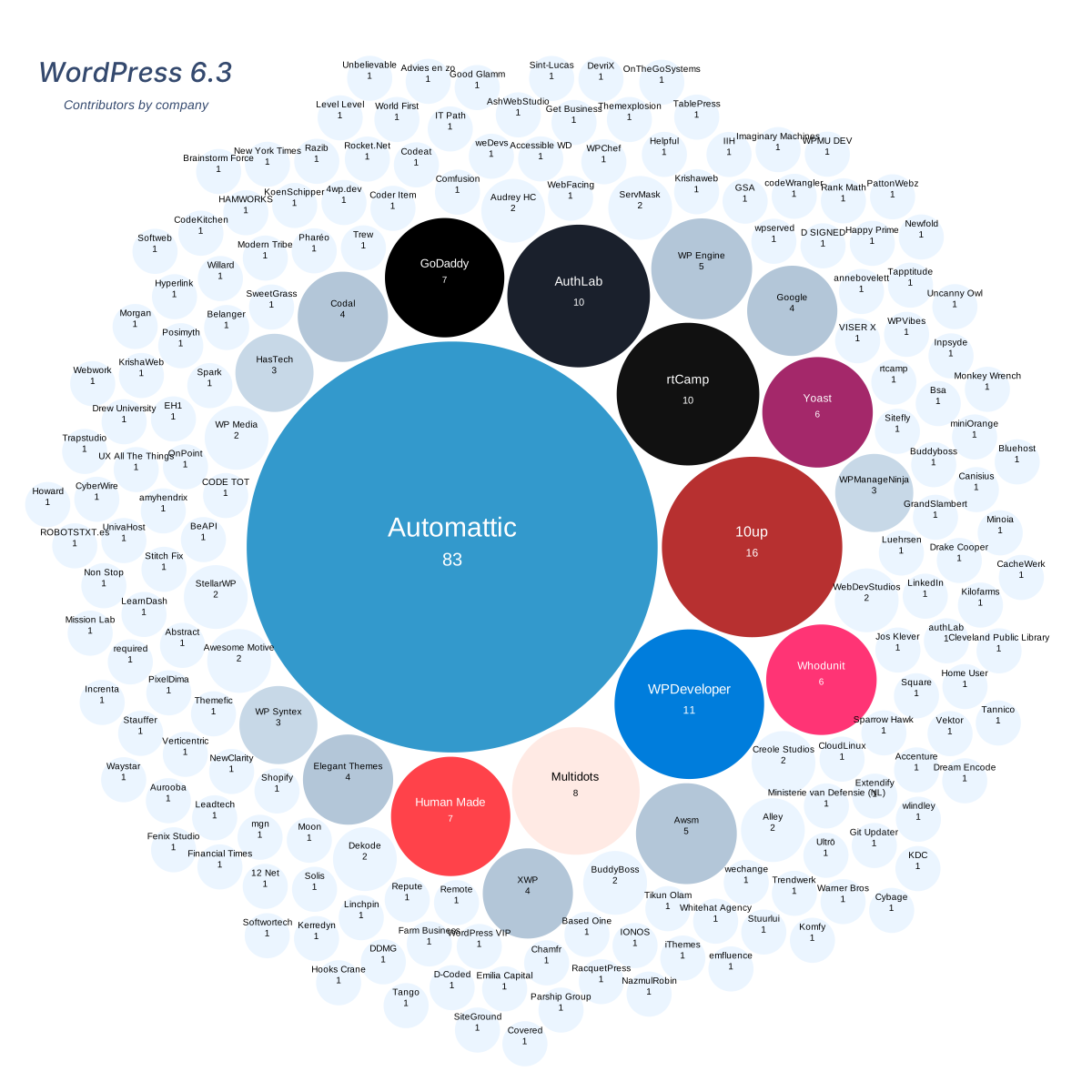
    For the most recent WordPress 6.3 release, 10up had the second most contributions by company, with 290 contributions from 16 people, superseded only by Automattic, which boasts 83 contributors.


    image credit: WordPress 6.3 contribution stats

    10up has consistently been among the top contributors to the software, which has been essential to the world-class publishing experiences the company has built for its clients.

    “That commitment to giving back to the web, making sure there’s a ladder for the next generation of developers to climb, and helping open technologies thrive remains with us,” Goldman said. “Our new business partners understand that this is deeply intertwined with 10up’s identity, and perhaps more importantly, our success. It’s not just a generosity thing – it’s also good business.

    “Merging with and investing in 10up would be pretty foolish if you aren’t comfortable with the tools and platforms we use and prefer, most especially the web’s most popular open source CMS, and you can bet that being comfortable with that, and researching that question, was essential to their comfort with merging. In many ways, that’s a validation for WordPress.”

    10up and Fueled Will Gradually Merge Services and Administration, Pursuing Large Scale Digital Transformation Clients

    10up and Fueled will largely operate as two companies and close partners for the time being, sharing leads and pursuing customer growth together. Goldman said the vision is not to simply have web publishing/WordPress customers and separate mobile app customers but rather to go after large scale digital transformation projects.

    “That means having a fully integrated way to deliver everything from the mobile apps, to the website and CMS, to advanced e-commerce and CRM integrations (even if we may only provide one of those services to some clients),” he said. “That means we’re not just operating as separate companies in the future, but truly merging and unifying our companies from leadership and sales on down through project and product management, user research and design, and engineering delivery.”

    Given that both brands hold considerable weight and influence in their respective markets, Goldman said they agreed “it would be incredibly foolish to discount that and rush to a single brand.” Instead, they plan to explore how the companies can work together.

    “We honestly don’t know where we’ll land on the external brand question, and didn’t think it was fundamental to the question of merging,” Goldman said. “We’ll be exploring and researching that question together, and any change would, again, be gradual and planned.

    “We all similarly agree that when we think out into the future, whether that’s 12 or 24 months from now (probably something in between), that we probably don’t want two separate, external, top line company brands competing for attention and oxygen in the space, to say nothing of competing for internal focus and resources.”

    He said that could play out in a number of ways, and may be a data driven decision. For example, 10up could evolve to be the brand name for the WordPress engineering services team or the company’s open source and productized solutions. Nothing has been predetermined about the branding.

    In the meantime, it appears to that the combination of companies will be a more gradual merging of services and administration.

    “In the mid term, maybe the next year, we want to focus on building a highly collaborative world class sales and growth operation, unifying back office (benefits management, financial operations, recruiting ops, etc), and looking at where some of our smaller capabilities and disciplines that aren’t very specific to 10up or Fueled delivery might benefit from joining forces and achieving some economy of scale,” Goldman said.

  • WP Includes Launches Women in WordPress Mentorship Program

    photo credit: Brodie Vissers

    WP Includes is a new initiative that launched this week with the goal of improving equal representation of women at global WordPress companies. It was founded by Human Made COO Siobhan McKeown and XWP Director of Engineering Francesco Marano.

    “I’ve been in WordPress a long time and I’ve met a lot of talented women but not enough in leadership roles. It’s time to change that,” McKeown said.

    The website states the founders’ mission in launching the initiative:

    Disappointed by the lack of representation of women in leadership roles at companies in the WordPress ecosystem we’ve decided to do something about it.

    We want to drastically increase representation of women in leadership roles at WordPress companies. We will do this by mentoring and supporting women to take the next step in their careers.

    WP Includes is recruiting women leaders who are C-Level or Directors
    at a WordPress company to volunteer as mentors and build a supportive network of mentees.

    The mentorship program lasts five months and calls for mentees/mentors goes out twice a year in September and March. Mentors commit to meet with mentees for a 1:1 on a regular basis and support them in achieving their goals. Mentee applicants are required to be working at a business in the WordPress ecosystem and actively developing their careers.

    WP Includes is accepting sponsorships from companies with some rigorous requirements:

    • Acknowledge gender disparity and a lack of representation in your organization, wherever it exists.
    • Proactively address gender disparity in your leadership and executive roles.
    • When senior roles become available, actively seek to place women within those roles.
    • Support women within their career in your organization, working to ensure that any gender-related barriers are removed.
    • Create opportunities to showcase women leaders in your organisation so that they can act as role models for future leaders.

    Supporting organizations can also contribute by sharing open roles within the network and by providing mentorship to future leaders who may potentially be considered for leadership roles in the sponsoring organizations. This is effectively changing representation from the inside out with cooperating organizations contributing to the cultivation of the leaders they need in order to purse more diverse leadership teams.

    Prospective mentees, mentors, and sponsors can apply on the WP Includes website.