EDITS.WS

Category: wptavern.com

  • WordPress 6.3 RC2 Released, Watch the Live Product Demo

    WordPress 6.3 RC2 has been released and is ready for community testing. Since RC1 landed a week ago, 15 changes have come in from the Editor and Trac, including bug fixes for footnotes, internationalization fixes, a missing command for opening the distraction free in the Site Editor, and a few other issues. 

    This release also brings in work completing the About page and adds a “Get Involved” section, closing a 10-year old ticket that suggested adding a “Contribute” tab to the About page.

    The new Get Involved page features both code-based and no-code contribution opportunities with a link to WordPress’ contributor teams.

    The video of the WordPress 6.3 Live Product Demo has been published so anyone who was not able to attend can get a preview of what is coming in the next release. Automattic-sponsored contributors Anne McCarthy and Rich Tabor hosted the demo, showing users how to use the new command palette to zip around the editor and manage settings views. They also guide viewers through browsing and editing pages within the Site Editor, managing synced patterns (formerly called Reusable Blocks), and showcased various new blocks and design tools.

    Check out the highlights post for all the links to features referenced in the demo and the Q&A portion of the broadcast.

    For those interested in performance improvements coming in 6.3, an upcoming hallway hangout is happening tomorrow Thursday, July 27, 2023 at 11:00 AM EDT. Participants can check the #core-performance Slack channel for the Zoom link before the event. Team leads will cover highlights from the 170+ performance improvements included in 6.3 and will discuss future improvements for 6.4.

    WordPress’ Training team is calling for volunteers to help with updating and revising existing Learn WordPress resources ahead of the 6.3 release. The team has created a board on their GitHub repository which highlights high priority tasks.

    WordPress 6.3 RC3 is expected to be released on August 1, and the general release is scheduled for August 8, less than two weeks away. There is still time to find and report some bugs. One easy way is to install the WordPress Beta Tester plugin on a local testing site or use a quick throwaway site from services like InstaWP or TasteWP. Bugs can be reported on Trac or via the Alpha/Beta section of the support forums.

  • #85 – Giulia Laco on the Importance of Typography for Your Websites

    Transcript

    [00:00:00] Nathan Wrigley: Welcome to the Jukebox podcast from WP Tavern. My name is Nathan Wrigley.

    Jukebox is a podcast which is dedicated to all things WordPress. The people, the events, the plugins, the blocks, the themes, and in this case the importance of typography for your websites.

    If you’d like to subscribe to the podcast, you can do that by searching for WP Tavern in your podcast player of choice, or by going to WPTavern.com forward slash feed forward slash podcast. And you can copy that URL into most podcast players.

    If you have a topic that you’d like us to feature on the podcast, I’m keen to hear from you, and hopefully get you or your idea featured on the show. Head to WPTavern.com forward slash contact forward slash Jukebox, and use the form there.

    So on the podcast today, we have Giulia Laco. Giulia is a web designer and developer who has been working on the web since the mid 1990s. Her primary interests are web typography and font design. In addition to project development, she’s a consultant and a trainer, mostly working with CSS, web fonts and web typography.

    This is the last of our podcasts from WordCamp Europe, 2023. I spoke to Giulia in Athens because she had just finished her presentation entitled “typographic readability in theme design and development”.

    In this session, she explored how designers can assist with the readability of websites through careful consideration of the fonts they choose and why they choose them.

    It turns out there’s quite a lot to consider. And if you’ve not given this topic much thought in the past, you’ll perhaps learn something new. I certainly did.

    We begin the podcast talking through how, at the start of the web, we were making do with a limited range of tools to help us make typographic choices. There were no web fonts available, but that started to change around 2010. Now we have access to hundreds of fonts and need to be mindful that some fonts can pose readability challenges for some users of your website.

    Giulia talks about the fact that the manner in which we read has changed since the dawn of the internet. Many people now mostly consume small passages of text, which need to be considered in a different way to longer writing.

    Concentrating upon the letters in the Latin alphabet, we talk about the ways in which readers typically break up words into smaller units, and the fact that the way letters are shaped can make them easier to parse. There’s some technical language here, ligatures X-height, apertures, and more. Which tell us about the shaping and spacing of letters. Giulia explains the current state of research into how these characteristics of fonts can affect readability.

    We talk about whether or not there are fonts which are more readable than others. Is there a collection of fonts, which you can use and be confident that you’re going to make it easy for all users of your websites?

    Giulia talks about how designs need to consider the spaces into which the text is put. Most people have a proclivity for the order in which they view a page. And knowing about this path across the page can help your readers access the text.

    The width of the text is also important. You want people to be able to read from side to side without having to move their head. How does this work across different device sizes and what can be said about text, which runs right to left, or top to bottom?

    We round off the conversation with Giulia telling us where we can find out more, as well as some of the thought leaders in this space.

    It’s a fascinating conversation about a subject that often gets overlooked. Web designers, this episode is for you.

    If you’re interested in finding out more, you can find all of the links in the show notes by heading to WPTavern.com forward slash podcast, where you’ll find all the other episodes as well.

    And so without further delay, I bring you Giulia Laco.

    I am joined on the podcast by Giulia Laco. Hello Giulia.

    [00:04:43] Giulia Laco: Hello.

    [00:04:43] Nathan Wrigley: It’s very nice to have you on. Giulia is joining me at WordCamp EU in Athens. It’s the last conversation that I’m recording, so very nice to have you on. You are going to be talking to us today about something that I genuinely didn’t know about.

    This was a really interesting topic to research from my point of view. You’re going to be talking to us a little bit about typography. That’s based upon a workshop that you did yesterday. How did it go?

    [00:05:12] Giulia Laco: I’m happy about that. I’m happy to hear that you are interested in typography as well.

    [00:05:17] Nathan Wrigley: Was it well attended? Did you get your information across? Did people engage with the topic?

    [00:05:22] Giulia Laco: I think so. I divided people in two groups, developers and designers. So to let them think about typography with the mentality of the others. So that was the point I was trying to have.

    [00:05:35] Nathan Wrigley: Well, the reason I wanted to talk to you was because when I was looking through the list of presentations and workshops, yours was really different, a topic that I genuinely hadn’t thought about in the way that you’ve made me think about it.

    Because whenever I think about typography, I am really just thinking about whether I like a font. So if I go to a website, I just make a quick judgment. Do I like that font? Do I not like that font? But there’s a lot more to it than that, which we’re going to get into. But can you just tell us why you’re interested in this? Do you have a history with working with type? Why are you so fascinated by typography?

    [00:06:17] Giulia Laco: Okay, well, maybe it’s because I’ve started making websites at the very beginning of the internet era. It was around, mid nineties. And we didn’t have the possibility to use web fonts of any kind on the web. We did what we could with very few tools. Whereas later on in 2009 or 10, we had this great possibility of using web fonts, and I started to get engaged with, with the typography. And that was the time when I was starting typography for the first time actually.

    [00:06:52] Nathan Wrigley: Are you interested in typography away from the internet? Are you interested in the way that type is presented in books and on paper?

    [00:07:00] Giulia Laco: Yes, everywhere. On menus as well.

    [00:07:03] Nathan Wrigley: Yeah, because when you actually turn your attention to typography, which is what I did after we booked this interview. Text is everywhere, and it’s really, really different wherever you look. So we are sitting in a room. There’s almost no text, but there’s a little bit of text behind you. It has a particular font.

    [00:07:22] Giulia Laco: Montserrat.

    [00:07:23] Nathan Wrigley: Montserrat probably, yeah. I’m looking at my computer. It has a font on it. I’ve just been downstairs, looked at a menu. It had three or four fonts on it. Wherever you look, there is text, and usually the typography has been thought about.

    But you were talking about typography from the point of view of how can be done better. How can be a problem for some people, and that I didn’t really realize. I knew that people would perhaps struggle to read text because it was too small, or there was a background color, which clashed with the color of the text. But I didn’t realize that the font itself could be a problem. So tell us how it can be a problem. How can some people struggle to read one font but not another?

    [00:08:08] Giulia Laco: Well, it’s a big question, because, there’s a lot of research about that, recent research on readability. Because very few people read a lot nowadays in each country. So a lot of countries are worried about that.

    So there are movements to let people read better by making some tools. And big companies like Adobe, Google are on this concern. They’re concerned about that. So they’re trying to study that subject. The Readability Consortium, a consortium from between these big companies and universities in America.

    And it’s working interdisciplinary. So with psychologists, typographers, graphic designers. And started to focus on what makes text legible. And what they are, as far as I know, they’re saying is that it’s different for everybody. So you test it.

    And so that’s why you need to make tools that help people adjust their texts when they read for long form reading, of course. Not for just a menu or, very few words you are going to read. And they’re trying to do those tools. And maybe it’s difficult for a user to know what they need.

    [00:09:30] Nathan Wrigley: Right.

    [00:09:30] Giulia Laco: So, they are working also with AI. Trying to have some patterns and, have some themes, let’s say. So that can adapt to very different kind of people. But they’re trying to reach that patterns by research, not by guessing. So that’s very intereting.

    [00:09:50] Nathan Wrigley: Yeah, really interesting. I mean, again, when I was researching this, it suddenly occurred to me that, I have children, they’re grown up largely now. But I remember when they came home from school, at the beginning, their homework was in child-friendly fonts. Let’s put it that way. Often it was something along the lines of comic sans something like that. And it didn’t occur to me at all at the time, I just thought, oh, well it’s a child-friendly font. It’s kind of round and it’s got, you know, there’s no hard edges.

    I just thought it’s just a pleasant thing to look at. But now that I’m thinking about it, it was probably an easier font for the child to begin to learn to read with. Because all of the letters were clear. There was no confusion between one letter and the other. You know, you couldn’t mistake the L for the I, for example. And I did wonder, you were saying that there’s less people reading than ever. If the typography is a, quotes, difficult font, it may be more difficult to begin learning to read. I don’t know if that’s something that you were trying to say there.

    [00:10:59] Giulia Laco: Well actually, when a child start reading has a very tough task. And helping that process is important. I remember seeing books in upper case letters only, it was meant to be simpler. But they started only to recognize only one kind of letters. In the Latin alphabet, we have upper case and lower case, and they’re very different because of their history.

    Uppercase letters comes from the engraved Latin letters. Whereas the small, lowercase, comes from calligraphy. So they’re very different origins,. And it’s not the same to learn lowercase a and a lowercase a. Recognizing them as the same letter, the same sound.

    And with sound is also difficult, especially in English, you have so much problem with sounds and letters.

    [00:11:57] Nathan Wrigley: Yeah. I think we have 44 sounds, but only 26 letters.

    [00:12:02] Giulia Laco: And the combination. When you use a letter and a sound, other languages are much more simpler on that respect.

    [00:12:09] Nathan Wrigley: Yeah again, remarkable. I’d never really given any thought to how different uppercase and lowercase are. But they don’t bear, in some cases they’re quite similar.

    [00:12:17] Giulia Laco: Yes.

    [00:12:18] Nathan Wrigley: So an l and a capital L, broadly the same. But something like an a, the capital letter A and the lowercase letter. They’re just utterly different, aren’t they? They’re really, really remarkably different. Oh, that’s fascinating. I hadn’t given any thought. So what makes text legible to a lot of people, or not legible to a lot of people? Are there any kind of guidelines around that?

    [00:12:41] Giulia Laco: Okay, I will distinguish between legibility and readability. Because, you have this distinction in English and it’s great. We don’t have it in Italian. I guess the legibility comes from lighting as we have for legibilita in Italian. And it’s something that has to do with decoding. So that’s something that has to do with the typeface.

    Whereas readability is something you want to read, you like to read something, you want to read. And not you’re just trying to decode things. So that’s a big difference, when you start to understand why a text is readable or not. I would say that trying to take a legible font means to have a font with certain characteristics.

    For example, it’s let’s say proved that a font with a higher X-height is more legible. I’m talking about running text, the body text for long reading experience. So X-height is basically the medium height of the lower case letters, based on the letter x, that’s why X-height, you see.

    And so for example, I don’t Helvetica has a higher X-height than Times New Roman, for example, if you compare it. And having a higher X-height is a typeface, be more readable.

    And another very important thing is with apertures. Apertures, how can I say, the white space inside the part of the letters that are open. Take a lowercase e in the lower part of the letter. You have this room. If it’s more closed, it’s less legible because it can be taken for an o for example, you see. So Helvetica, for example, is very well used, but it’s not legible as a body copy. Helvetica is wonderful for display type for titles, but not so well for body text.

    [00:14:42] Nathan Wrigley: So you are saying, so this X-height? So is typically the height of the letter x. So if I put an x next to the letter h, for example, it’s the height of the rounded bit of the letter h?

    [00:15:55] Giulia Laco: Yes, exactly.

    [00:14:57] Nathan Wrigley: Or it would be the height of the letter a? Or the rounded bit of the letter p? The more tall that bit is, the more legible it is for most people to read. I had no idea.

    [00:15:09] Giulia Laco: Well, it’s just one thing because, not only that, because it’s also how you set type. For example, if you have a large X-height, typeface and you set it with a very small space between the lines, the line height, the leading, they say in typography. You don’t take advantage of that highness, you see.

    [00:15:32] Nathan Wrigley: Okay. So if letters are squashed. If one line of letters is compressed, so line height.

    [00:15:37] Giulia Laco: Mm-hmm.

    [00:15:37] Nathan Wrigley: Is compressed up against another line of letters beneath it, that makes it more difficult to read because there’s just no room for the letters to breathe, There’s no gap. They’re all just squished together. Okay?

    [00:15:48] Giulia Laco: But you have to pay attention not to put too much line height. Otherwise you lose the next line when you jump from one line to the other, it’s too far and you can’t find it.

    [00:15:59] Nathan Wrigley: So this is the eyes ability to go from the end of one line and track, and immediately find the beginning the next line.

    [00:16:46] Giulia Laco: Yes exactlly.

    [00:16:47] Nathan Wrigley: I confess I have experienced that problem before, and I hadn’t noticed, until just now, that that was because of that. I’ve definitely had books that I’ve been reading where I’ve struggled to begin the next line, and sometimes repeated the line that I was supposed to be on. Or I’ve skipped a line and missed a line out and only halfway through thought, actually that doesn’t make any sense. Let me go back. I had no idea. But also you are saying that the amount of, what did you call it, the space?

    [00:16:30] Giulia Laco: Oh, typographers call it leading because it’s comes from lead, lead, lead, I don’t know, of the metal types. With metal types they used to put some space between the lines with some lead. So the lead bars.

    [00:16:45] Nathan Wrigley: Oh, okay. So they spaced them out with a physical object.

    [00:16:30] Giulia Laco: Yes, exactly.

    [00:16:45] Nathan Wrigley: And it was a bar of lead, and the wider the bar of lead, the more space. This is fascinating. But you also mentioned in the letter e for example, the lowercase e, forgive me if I misunderstood. So the bottom half of the letter e, there’s a gap, a little gap, and the amount of gap, if the gap is bigger.

    [00:17:07] Giulia Laco: That’s the aperture, yes.

    [00:17:08] Nathan Wrigley: The bigger the gap is, the more you are likely to be able to read it, typically?

    [00:17:13] Giulia Laco: Yes, because you’re likely to distinguish it from an o.

    [00:17:16] Nathan Wrigley: Of course.

    [00:17:17] Giulia Laco: You decode it easiest.

    [00:17:19] Nathan Wrigley: You keep mentioning Helvetica. Is that a font which has lots of problems? Is that why you mention it, because it’s full of things you can identify?

    [00:17:26] Giulia Laco: It’s very well known. That’s why I’m mentioning. And very much used. But it’s better to use it as a display type.

    [00:17:34] Nathan Wrigley: The only thing that I’ve ever had a problem reading, was the thing that I’ve just described where I have skipped a line or gone back and reread the other line. But I’m imagining that you’ve done this talk because there are problems which people experience, which I fortunately, don’t appear to have a problem with. What trips people up? If you were somebody that, I don’t know how to say this correctly. If you are somebody who struggles to read, what are the trip wires, if you know what I mean?

    What are the things in a font could be wrong that make you unable to read it? So you mentioned that the line height, you mentioned the X-height. Is there more to it than that?

    [00:18:14] Giulia Laco: Well, there might be a lot. One thing that I can think of are ambiguous forms of letters. Let’s take lowercase letters, p and q or b and d. So for these four letters in a sans serif font, for example, are usually with the same shape, just flipped or rotated. That’s said to be a problem with people that experience dyslexia. But it’s actually opinionated because we don’t know exactly how it works. Actually for everybody can be a problem to distinguish between similar shapes.

    For example, as you said before, a child who is starting to read, or to write as well, may experience the same problem. No matter if it’s, if there’s a problem of dyslexia or not. So if you are going to avoid these kind of things, you can pick a font, a serif font that generally has different letters, different forms. The four letters I mentioned, typically with small serfis in different parts of the letters so they can be distinguished, for sure.

    [00:19:27] Nathan Wrigley: Can you, I know it’s probably obvious to most people, but will you just tell people what a serif font is and what it isn’t? You know, if you’ve got a non serif font or serif font, what’s the difference?

    [00:19:39] Giulia Laco: Let’s take the example of Helvetica and Times New Roman. So maybe it’s easier for people to visualize the difference. Helvetica has straight lines, nothing at the termination of the strokes. Whereas Times New Roman has some small shapes that derive from the calligraphic or the, in that case, for the upper case, the engraving, the instrument that we use to engrave. And so they had this little [feet?] let’s say so, that distinguish the kind of font.

    And the font has a different mood, very different mood. And a lot of other characteristics. There are, well, history of typography is based on that more or less.

    [00:20:24] Nathan Wrigley: It always feels to me as if a font, a serif font, which has these, I think you use the word where the letter terminates. I’ve never really

    [00:20:31] Giulia Laco: thought about that. They always look as if they’re more, I don’t know, maybe in a legal document or something like that. They have this feeling of something more powerful or more important or something. It’s quirky that, isn’t it?

    I’m looking at a Google Doc where I’ve written my show notes and, I don’t see any that. I can’t tell you that either of those fonts are a serif font or a non serif font. I find them both equally easy to read. It doesn’t trip me up at all. But typically, is there a problem for some people with a serif font or a non serif font? Is there one, to catch everybody would it be better to not deploy a serif font or is there just no difference in people’s ability to cope with either?

    Each font is maybe very different. Most people at the first level, when they start talking about topography, they started to see this difference. But that’s not the main point. Maybe the main point in readability is the rhythm of letters. The rhythm where the white space and the black space, meaning when you have black text on white. They alternate each other.

    Try to figure out this word, minimum. You’ll have a lot of rhythm. Minimum in, written in lower case letters. You see? So, the rhythm is very, very different. And maybe that’s important in typography, in reading. And is very important for people who struggle with reading, because you don’t interrupt the rhythm. The rhythm helps reading.

    [00:22:03] Nathan Wrigley: It just sort of bounces along, doesn’t it? If you look at the word minimum, it genuinely has a, it’s almost like a little wave pattern going up and down, isn’t it? That’s fascinating. So what did you call it? Your ability to read it. There was a word you just said. Rhythm, rhythm. So words can have rhythm, and the more rhythm there is, the easier it is to read. So if a font provides rhythm, that’s a good thing.

    [00:22:24] Giulia Laco: I think so. But it depends also on the purpose. Long reading. I think that’s important. Otherwise it’s different. It’s totally different. I mean concepts with display types because they have a different purpose, you know, text and function. The titles have different purpose. They have to catch the attention. Whereas the long, the body text has to be read, so needs a different kind of attention.

    [00:22:53] Nathan Wrigley: Right. And are there any guidelines which kind of fonts catch the attention more, and which kind of fonts work better with the body content? You know, where you’re reading long paragraphs and so on? Does it matter or is there one kind of font that you would recommend in each case?

    [00:23:08] Giulia Laco: Generally, when you buy a font, you’ll have a font that is meant for body text and some other for display type. So if you rely on what the designer, the type designer, has done, you are safe. Otherwise you have to. try. But also if you go on a repository like Google fonts for example, you have this distinction among display types and other kind of types. So it’s quite a common mistake at the beginning to take display type and use it as a body text. And that’s a typographic crime.

    [00:23:47] Nathan Wrigley: I like it. Typographic crime. That’s great. We’re all of us using our devices more and more. It’s funny that you said that reading is becoming less and less, because it feels like we have text in front of us all the time now. So we’re constantly staring at our mobile phones, and our computers. But when I was a child, if I wasn’t holding book, I probably wasn’t reading.

    I mean, maybe there was a poster somewhere or something, but I’m surprised that reading is, there’s less desire to read, because it feels like every day I’m reading more or less constantly, you know, I’m scanning Twitter or Facebook or whatever.

    [00:24:26] Giulia Laco: It’s a new kind of reading, Because we had long form reading for books. Then we have glanceable reading for, I don’t know, street signs. Or maybe a manual in a website. And then we have this, they call it interlude reading. You read when you’ve time, you’re doing, you don’t have a lot of attention, you scroll. And then you have also that the way we read on the web is very different from what we read, elsewhere.

    For example, we have this shape, F shaped reading. When we, in a website, eye tracking has shown it quite a lot. You start from the top left where the logo generally is. Then you go on the right, then you go on the left, but a bit bottom, and then a bit, you are just drawing an F more or less, when you read.

    [00:25:17] Nathan Wrigley: So that’s what the eye typically does when it lands on a webpage.

    [00:25:20] Giulia Laco: Yes.

    [00:25:20] Nathan Wrigley: What was that? Top left, top right.

    [00:25:23] Giulia Laco: Bottom.

    [00:25:23] Nathan Wrigley: Bottom.

    [00:25:24] Giulia Laco: A bit in the middle, right. And then bottom again.

    [00:25:27] Nathan Wrigley: So it makes an, if you were to draw on top of that screen, it coincidentally looks a bit like a capital F.

    [00:25:32] Giulia Laco: Yes, exactly.

    [00:25:33] Nathan Wrigley: That’s fascinating.

    [00:25:34] Giulia Laco: Capital F reading.

    [00:25:36] Nathan Wrigley: Capital F reading. Presumably that’s on a desktop. On this, I’m not doing that am I? I’m holding up my phone. If I’m looking at a webpage, presumably it’s a different experience. It’s just left to right, left to right, left to right.

    [00:25:49] Giulia Laco: Also because you are hiding some part of the text with your thumbs. Are you right-handed? Left-handed? It depends what you do. And it change a lot. For example, in the UX design, we generally change some patterns with smartphones because we put some menus at the bottom because the area near the thumb, for example.

    So, if it changes where you put your fingers, your changes also where you put your eyes. Focusing in which part of the screen.

    [00:26:20] Nathan Wrigley: Yeah, that’s interesting. My experience of the internet is that usually the menu on a mobile device comes at top right. There’s usually some icon.

    [00:26:28] Giulia Laco: But that’s for convention.

    [00:26:29] Nathan Wrigley: But what you’ve just described is much more sensible, having the menu the bottom because.

    [00:26:33] Giulia Laco: I hope it will change soon.

    [00:26:34] Nathan Wrigley: Because my thumb can just go right to it. It’s just there. Yeah, that’s fascinating. It does matter what device you’re on. But are you using the same? I know that you’ve said that you reposition things like the menu or what have you, but are you using the same font on a desktop as you would be on a mobile device? Is it broadly the same? You don’t need to worry about the view port of a mobile device in terms of the CSS for setting the font. It’s just the same desktop, mobile, tablet, same fonts.

    [00:27:03] Giulia Laco: From the readability point of view, I would say yes. And it’s for branding. I guess it’s better to have different environments recognizable. Whereas you have to pay attention to licensing. If you buy a font, for example, you put it on an app, you might need a different license. If you’re using open type, open source phones, you are not going to have a problem. But if you buy, if you rent, web fonts, yeah, you might have some problem or you have to check if you can put that web front on an app. You might need a different license.

    [00:27:39] Nathan Wrigley: Yeah, I hadn’t really thought about that. It’s always quite common in the circle of friends that I have, comic sans is a font, which most of my friends ridicule. They think it’s a childish font. Nobody would put it on a professional website. Are there some fonts like that, which you would just always avoid? Not because they look childish, but because they are largely unreadable.

    [00:28:00] Giulia Laco: There might be some, for example, well comic sans has a very big history of love and hate, basically of hate actually. But remember the case and presentation of the Higgs Boson?

    [00:28:16] Nathan Wrigley: Yes. Was that done in comic sans?

    [00:28:18] Giulia Laco: Yes. There was a Twitter storm. Okay, you couldn’t use that informal font on a formal presentation, and that raised the topic actually. You have to use the font that is proper to the situation. It’s like clothing. The clothes you wear, it’s like the font you use. It depends on the situation.

    But I can understand the feeling that people have when they choose comic sans. And maybe I can suggest something similar, but a bit more proper, or a bit more interesting in that context.

    There’s one font. I am on Google fonts repository. That’s called Amantic Small Caps, and it’s a small caps, so it’s a more, it’s not lowercase. But it’s, I think has a similar mood and I would dare it’s quite a new comic sans in the mood. I mean, it has the same mood, in my opinion. I say in my opinion, it’s also because it’s in my culture, it’s very culture dependent. Because it’s based on what you saw, what you associate to those fonts for example.

    [00:29:28] Nathan Wrigley: Yeah, it’s really interesting when I travel to the US. The US have a really different set of fonts which they use, especially on government documents, than we have in the UK. And wherever I look, so I don’t know, I buy some sun cream or something like that. The font choice is utterly different from how it would typically look in the UK. And it’s kind of curious, that it’s so obvious to me that that’s an American box. And yet it’s merely a font that tells me that. But I can see it all the time.

    But what you’re saying though is you’ve got to use your intuition. There’s no rule for this is a good font, that’s a bad font. It’s really where are you putting it and your own personal preference. There are no fonts which are out of the question because they’re just literally unreadable by a subset of the people, no, you look like you’re about to say something.

    [00:30:18] Giulia Laco: Well, there might be some fonts that are really illegible, but there are some really nice experiment by a very talented type designers, David Jonathan Ross. He tried to push the boundaries of readability, making good fonts, but making how long you can go to draw a very new kind of letter and still have it readable. So that’s interesting to see. But made by people who know what they do.

    Whereas if you start, if you look at the, I don’t know, fonts that you can have on a lot of websites, just experiments by people who start. But if you, look at experiments by very good designers, oh, you know what they do.

    [00:31:06] Nathan Wrigley: You make client websites still. Do you get into this conversation quite a lot with your clients? Is typography something that you bang the drum of?

    [00:31:14] Giulia Laco: I try to listen as for everything else, to the client and understand what they need. And then I’ll try to suggest what I think is proper. It’s like also for the colour of a website for example. I ask and I give an advice maybe.

    [00:31:30] Nathan Wrigley: Are there any kind of hard and faster rules for where you, really, it would be unwise to put typography. In our show notes, I was talking about things like is it a bad idea to put, I don’t know, fonts into images.

    So you’re overlaying fonts on images. In other words, is it better always to have fonts on a plain background rather than on, let’s say you’ve got a mountain scene or something and you want to write something, you put it onto the image. Is it better to keep the text away from the images? That was just one thought.

    [00:32:02] Giulia Laco: That’s definitely better. But you have to distinguish between titles and body copy. A title might be, how can I say? It would be okay anyway. It’s only a word. You might have some tricks, for example, reducing the contest of the underground image. As long as you stick with accessibility guidelines, you’re safe for that regard.

    There are very good starting point for readability. I mean, I generally say that it’s better to start from accessibility and there are a lot of accessibility guidelines that help with the text. And then you go on and if you have some tools, like a very powerful web font, you can do more. And then you go with type setting and start type setting.

    Well, for example, you have to stop the line length. That’s very, very important. You don’t have to let your user go through all the screen, a very huge screen to go to the other line, to the second line.

    [00:33:04] Nathan Wrigley: Is there any guidance about how wide the text line should be? So maybe that’s a, I don’t know, you said using a number pixels is not always the best idea. But is there a character limit, or a word limit typically where the eye can cope with scanning from left to right and then beginning again. Because I’m staring at a Google Doc at the moment and it’s kind of interesting that the Google Doc looks like a piece of paper.

    And they’ve obviously deliberately taken it in. The Google doc could consume the whole width of my monitor, but it doesn’t. They’ve confined it to what looks like a piece of paper, and I presume that’s a convention, just so that my eye doesn’t have to go far left, far right, far left, far right. I could keep my nose pointed at the document and just let my eye do the work, whereas if it went from left to right, I would be moving my neck all the time as well. So is there a guidance of how wide text should be?

    [00:33:56] Giulia Laco: Typographers, for a long time, had recommended a line length of between 45 and 65 characters per line. It depends for Latin alphabets. The Web Accessibility Guidelines says, I think at the level Triple A. They say that they need 80 characters maximum per line for Latin, I think 40 for languages with ideograms. So they say something about that.

    And it’s very interesting to see that there’s a correlation between this line length and the way we read. The way we read is basically with eye and brain because, it’s a really complex process. But when we read with the eye, we just focus on few letters at the time, maybe six, seven characters. Then we jump to another area of fixation. And so you can do some math. A very good typographer Bruno Maag made that math.

    And he discovered that calculating the number of characters you see in each fixation has a relationship with what typographers said for years, for decades, for centuries actually. So they arrived at the same conclusions. So let’s say 55, 65 characters per line is a good measure.

    [00:35:18] Nathan Wrigley: Yeah.

    [00:35:18] Giulia Laco: On the other hand, all these factors are correlated. And especially font size, line height, and line length. Some typographers says that it’s like a triangle of these three elements have to be on balance. So if you change one, you have to change the others. Adapt the others.

    [00:35:40] Nathan Wrigley: So we’ve just been talking about the left to rightness, the line length. Is there anything about the length of the paragraphs that you use as well? I mean, I’m just used to reading books and obviously they’re confined by the width. The line length is taken account of. But I’m conscious that everything’s broken up into paragraphs and those chunks of meaning have often got little gaps between them. I’m imagining in many cases, paragraphs could go on for pages, but it’s better to break it up and it helps the brain to associate that this is a body of meaning and here’s another body of meaning and so on.

    [00:36:10] Giulia Laco: Yes. I think absolutely. The basic of our work as web designers actually. So it’s different from what we do on paper, because on screens we have to catch the attention. And so we need to make things very easy for the reader. That’s the purpose. Maybe it’s not always the case that that’s the purpose, but on web design generally, that’s the purpose.

    So it’s better to split a paragraph in a few small chunks, let’s say so, and give different, styling and introduce hierarchy as well. So that helps a lot in reading.

    [00:36:48] Nathan Wrigley: So headings and paragraphs and other headings and so on. You mentioned in the show notes that when you did your workshop, were going to give some helpful CSS to break up the text. Can you just tell us what that was? What helpful CSS did you have?

    [00:37:02] Giulia Laco: Basically, I would say that’s very important not to use an absolute unit when you set the font size. Where font size is what is more relevant in readability? Because if it’s too small, you can’t read at all. If it’s too big, also so you can’t read it well. So font size is very important and after the responsive web design, we’ve had the responsive web typography. It didn’t come at the same time. Because with responsive web design, we started to make things different for different devices. But we didn’t touch the font size.

    [00:37:40] Nathan Wrigley: Right, it was just the same. Yeah.

    [00:37:42] Giulia Laco: But it was really important to change the font size. At the beginning I thought that it was important to make smaller font size on smartphones. Because you had a very smaller screen, but that was not the reason I realized later on.

    And the reason is the distance of reading. So when you read something that is near, you don’t need a big font size. You generally keep an iPhone at 20, 30 centimeters of distance from your eye. Whereas if you read to a computer you are 70 centimeter, 80, 1 meter, I don’t know. If you read to a screen in a room, for example, yeah, it’s very, very different.

    For example, yesterday I had this at the workshop. I had this CSS Codepen. I realized I had some minimum and maximum font size in my slider. It was perfect for desktop reading. As soon as I was in the room, I said, oh no, I have to change, and I changed it to a different values because of that.

    [00:38:48] Nathan Wrigley: So, the presentation looked good on your computer, but as soon as it went on the big screen.

    [00:38:52] Giulia Laco: Okay, the presentation was okay because I knew it in advance. I mean, it was a presentation, but it was in the playground, I realized, yes. And because I had all those values, I was guessing what was reasonable values. But I didn’t test it before on such a big room.

    [00:39:10] Nathan Wrigley: So I’m guessing that at some point soon we’ll be able to make a link to WordPress TV. It occurs to me that the whole time we’ve been talking about typography, but we’ve probably been concentrating on English. Although it’s a common language, it’s by no means what everybody reads.

    So we’re going from top to bottom, left to right. But other parts of the world, let’s say people that read Arabic or Hebrew or Korean or Japanese or Chinese, whatever it is. They’re going in completely different directions, left to right, bottom to top and so on.

    Do they have similar concerns with their characters? Or is it just uniquely the Latin set of characters which has these problems?

    [00:39:54] Giulia Laco: I’m sure they have. Also maybe different problems. I’ll distinguish between Arabic to the other languages you mentioned, like Japanese, Chinese, and Korean, for example. They have ideograms. With Arabic it’s quite a calligraphic origin of the way of writing. And they make a lot of use of ligatures. It means it changes the shape of letters according to their combination.

    We have ligatures in Latin as well. For example, if you think of f and i, small lowercase letters f and y. Sometimes you have one glyph that put the dot of the i inside the f. And that’s coded inside the file, the font file.

    So in Arabic they have a lot of ligatures. And lately I’ve discovered that they also use color for accent. And Google fonts has some new fonts with this characteristic. Color fonts. Do you know color fonts?

    [00:40:54] Nathan Wrigley: No.

    [00:40:54] Giulia Laco: They’re very, very new. They’re coming.

    [00:40:57] Nathan Wrigley: How do you deploy color to. What? You’re going to have to explain that.

    [00:41:00] Giulia Laco: Well, they have color coded inside the typeface. It’s a new format we can use. And, it’s linked to CSS. It’s not so much ready, but it’s coming. It’s a new technology after variable fonts.

    [00:41:17] Nathan Wrigley: So certain aspects, certain portions of the letter receive different colors?

    [00:41:22] Giulia Laco: Yes.

    [00:41:23] Nathan Wrigley: And it provides, I have to just ask why? Why would you want to have a different portion of the letter in a different color?

    [00:41:30] Giulia Laco: Apart from Arabic, why not?

    [00:41:31] Nathan Wrigley: Oh, so it is, it’s just style. It’s not from the point of view of readability or legibility?

    [00:41:37] Giulia Laco: No. New frontiers of typography.

    [00:41:39] Nathan Wrigley: Oh, that is interesting.

    [00:41:40] Giulia Laco: But that was one point, but for Arabic might be for readability purpose. That’s why I mentioned it.

    [00:41:46] Nathan Wrigley: Honestly, this is such a fascinating subject. Unfortunately, we’re running out of time. Where would we go if we’ve been inspired by the talk that you’ve given today to me? Have you got any tips or places, websites to go to? If people are curious, where would you send them?

    [00:42:03] Giulia Laco: Okay. There are plenty of places and topography has been receiving quite an attention lately on the web. I’m always talking about on the web. But you can start with books from the tradition of typography. There are, I don’t know, from the sacred book of yypography, Robert Bringhurst, The Elements of Typographic Style. That’s a really nice starting point. Well, it’s not only a starting point.

    Erik Spiekermann’s, Stop Stealing Sheep and Find Out How Type Works. It’s very funny name. It has a history. I won’t spoiler it.

    Or I really, really liked the book by Richard Rutter, that is more on the web. It’s called Web Typography. It’s a manual on that.

    Or otherwise you can follow Jason Parmental that has been making a lot of experiments. It depends which part are you interested in.

    [00:42:59] Nathan Wrigley: You’ve given three or four things there. There’s probably something to get teeth into. And what about you? Where would we find you if people have listened to this and quite fancy having a chat with you about all this. Where do you hang out online?

    [00:43:09] Giulia Laco: Quite everyone. Maybe on LinkedIn, maybe you can reach me there so it’s better.

    [00:43:14] Nathan Wrigley: I will find your LinkedIn profile and I will link to that in the show notes. So let’s wrap it up there. Giulia, thank you so much for chatting to me today. Honestly, a real eye-opener. I’ve enjoyed that a lot.

    [00:43:24] Giulia Laco: Thank you. Me too.

    On the podcast today we have Giulia Laco.

    Giulia is a web designer and developer who has been working on the web since the mid 1990s. Her primary interests are web typography & font design. In addition to project development, she is a consultant and a trainer, mostly working with CSS, web fonts and web typography.

    This is the last of our podcasts from WordCamp Europe 2023. I spoke to Giulia in Athens because she had just finished her presentation entitled “Typographic readability in theme design & development”.

    In this session she explored how designers can assist with the readability of websites through careful consideration of the fonts they choose, and why they choose them.

    It turns out there’s quite a lot to consider, and if you’ve not given this topic much thought in the past, you’ll perhaps learn something new.

    We begin the podcast talking through how, at the start of the web, we were making do with a limited range of tools to help us make typographic choices. There were no web fonts available, but that started to change around 2010. Now we have access to hundreds of fonts and need to be mindful that some fonts can pose readability challenges for some users of your website.

    Giulia talks about the fact that the manner in which we read has changed since the dawn of the internet. Many people now mostly consume small passages of text, which need to be considered in a different way to longer writing.

    Concentrating upon the letters in the Latin alphabet, we talk about the ways in which readers typically break up words into smaller units, and the fact that the way letters are shaped can make them easier to parse. There’s some technical language here, ligatures, X-height, apertures, and more, which tell us about the shaping and spacing of letters. Giulia explains the current state of research into how these characteristics of fonts can affect readability.

    We talk about whether or not there are fonts which are more readable than others. Is there a collection of fonts which you can use and be confident that you’re going to make it easy for all users of your websites?

    Giulia talks about how designs need to consider the spaces into which text is put. Most people have a proclivity for the order in which they view a page, and knowing about this path across the page can help your readers access the text. The width of the text is also important; you want people to be able to read from side to side without having to move their head. How does this work across different device sizes, and what can be said about text which runs from right to left, or top to bottom?

    We round off the conversation with Giulia telling us where we can find out more, as well as some of the thought leaders in this space.

    It’s a fascinating conversation about a subject that often gets overlooked. Website designers, this episode is for you.

    Useful links.

    Giulia’s WordCamp Europe 2023 Session “Typographic readability in theme design & development

    The Readability Consortium

    Amantic Small Caps font

    David Jonathan Ross’ website

    Web Accessibility Guidelines website

    Bruno Maag Wikipedia page

    Google fonts

    Robert Bringhurst’s The Elements of Typographic Style

    Erik Spiekermann’s Stop Stealing Sheep and Find Out How Type Works

    Richard Rutter’s Web Typography

    Jason Parmental’s website

    Giulia’s LinkedIn page

  • Learn How to Use WordPress Playground

    WordPress Playground, an experimental project that uses WebAssembly (WASM) to run WordPress in the browser, was number 1 on Hacker News recently and was also featured on TechCrunch. Word is getting around about how easy it is to fire up a sandbox environment in just a few seconds for testing plugins and themes and even different versions of WordPress and PHP.

    Visiting playground.wordpress.net instantly creates a real WordPress instance with admin access and everything without having to install PHP, MySQL, or Apache. Instead, it runs inside the browser using a SQLite database.

    The Playground isn’t just for developers. It also makes it easy for users who would not ordinarily maintain a local development environment to quickly test plugins or themes they find on WordPress.org, or to just explore new WordPress features in a safe place where you can’t break anything.

    If you have found it difficult to wrap your head around WordPress Playground, Learn WordPress has published a timely new tutorial called How to start using WordPress Playground. In this 10-minute video, WordPress Playground creator Adam Zieliński offers a quick demonstration of how to install plugins and themes and customize a site, and how to export design work from a customized theme. He also covers how to download the entire site and import it into a new WordPress instance, and guides users through basic compatibility testing of a theme, by switching the WordPress version on the playground site.

    Learn WordPress Tutorial: How to start using WordPress Playground

    Developers who want try some more complicated things with this tool can check out the Playground API and learn how to integrate it with an app in five minutes. It’s also useful for previewing pull requests from a repository or setting up a local WordPress development environment using the VisualStudio Code plugin or a CLI tool called wp-now.

  • Mojeek Search Engine Adds WordPress’ Openverse to Image Search

    Mojeek, a UK-based privacy-oriented search engine, has added Openverse to its image search. For more than 15 years, Mojeek has provided independent, unbiased search without tracking or building profiles on users. It is one of just a handful of genuine search engines that uses its own technology and algorithms, unlike the metasearch engines that syndicate Bing, Google, and Yandex. In October 2022, Mojeek passed a major milestone of having indexed more than 6 billion pages.

    The search engine had previously provided Pixabay as the default for its image search with the option to use Bing as an alternative.

    “We have always wanted to eventually get rid of Bing,” Mojeek Head of Marketing Joshua Long said. “Due to both Microsoft’s API pricing decisions, and informed comments by people using Mojeek to search the web, we recently took that step.”

    Openverse’s openly-licensed media was a natural fit for the independent search engine. In 2021, Creative Commons Search was rebranded to Openverse when it came under the umbrella of the WordPress open source project. With more than 700 million Creative Commons licensed and public domain image and audio files, Openverse exceeds Pixabay’s 4 million+ royalty-free and stock images, greatly expanding users’ abilities to search deeper on more topics.

    Although Pixabay is still Mojeek’s default image search provider, users can change their preferences, which are set using a local cookie and contain no personal data.

    “This addition is a testament to the utility that Openverse brings, as well as the ease and extensibility when it comes to using its API,” Long said.

  • Ollie Theme Previews New Onboarding Wizard in Development

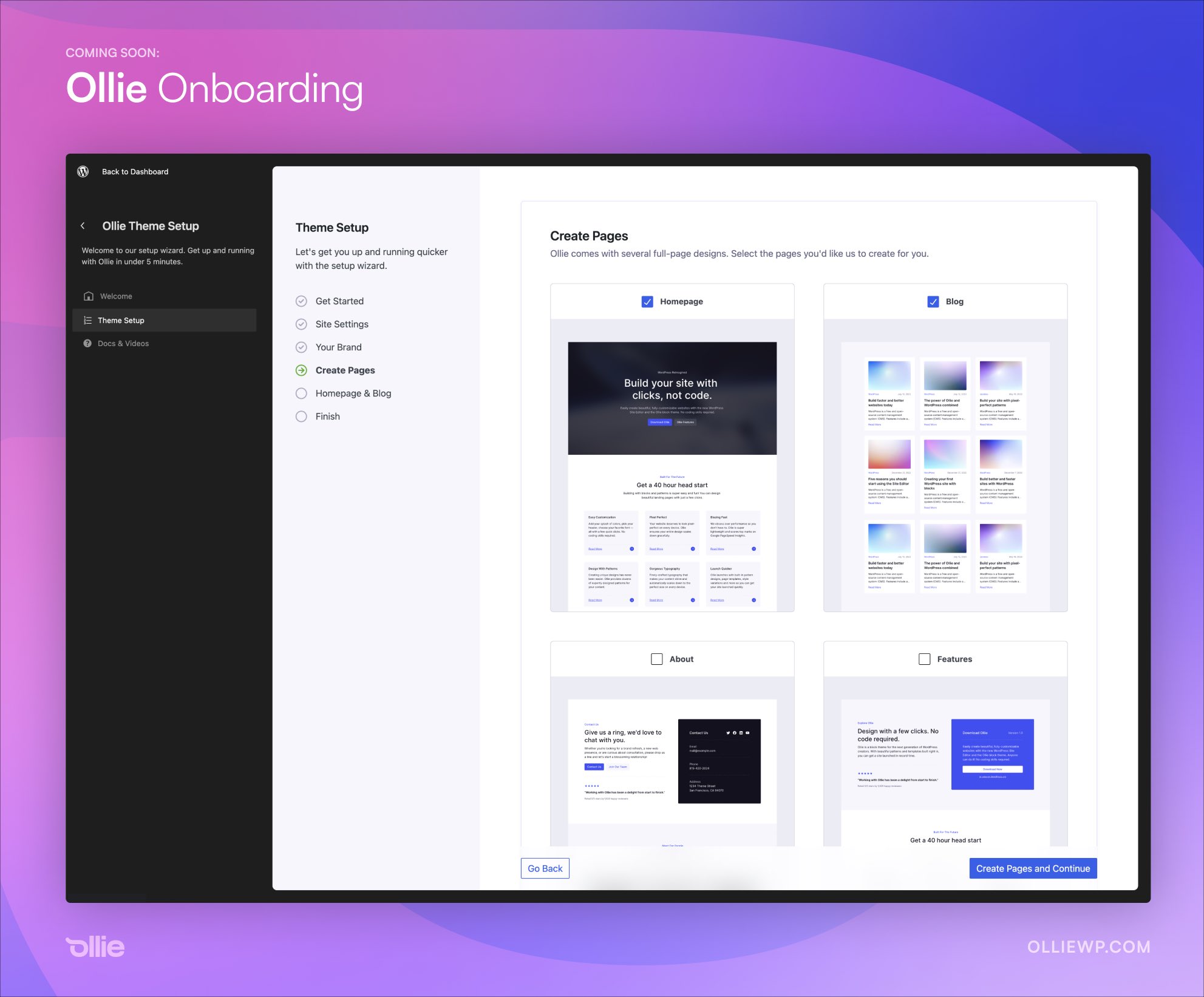
    Unless you are some kind of wizard with the block editor, starting a WordPress website from a blank slate can be overwhelming and ultimately defeating. Mike McAlister, maker of the free Ollie theme, is developing an onboarding experience that aims to drastically reduce the amount of time users spend setting up a new site.

    “I suspect we’re cutting out a half hour or more of finagling a new WordPress site,” McAlister said. “No more wrestling with a blank canvas.”

    The Ollie Onboarding Wizard creates a guided setup experience that allows users to add basic site settings, select a color palette, input their brand colors, add a logo and site icon, and move on to creating pages. It eliminates the necessity of hunting all these settings down inside blocks and the Site Editor.

    Instead of having to create pages individually and assign them the correct template or place the right full-page pattern, Ollie onboarding makes it possible for users to simply check which pages they want automatically created.

    “The goal of this wizard is to help WordPress users zoom through a site setup with the Ollie theme and abstract away those annoying and disconnected setup steps we have to do for every site,” McAlister said.

    “The wizard is also a way to educate users along the way. WordPress is going through a much-needed evolution, but as expected, users are having a tough time with the transition. Change is tough, especially when you power half of the internet. Workflows like this can help.”

    The onboarding interface leans heavily towards the design of the Site Editor to make it seem naturally at home inside WordPress. It demonstrates just how nice plugins and themes can look in the admin with a more modern interface, which could soon be a reality once the ambitious admin UI revamp plans are complete.

    “Months ago, Patrick Posner and I agreed that the future of WordPress is in the new Site Editor view, so that’s where we built this wizard,” McAlister said. “That assumption has since been validated, and because of that, our interface blends in seamlessly with native WordPress.”

    “This is just a v1, but we’re already planning on how to seamlessly integrate choosing a vertical with curated plugins (eCommerce, landing page, email marketing, etc.) and surfacing pro features to really bring this experience together. This isn’t just a WordPress theme.”

    McAlister said the interface is all React with largely native WordPress components and a few custom components sprinkled in to handle some of the more unique aspects of the tool.

    After previewing the onboarding wizard, some people have asked if it will be available as a standalone product. McAlister confirmed that he doesn’t have any plans of productizing it but if there is enough demand he is willing to entertain the idea. Others have asked if there is an API for developers to add their own sections.

    “No API yet, although with the announcements of the admin overhaul initiative, perhaps one is coming,” McAlister said. “Right now, this is just a custom React layer that mimics the site editor view. It’s built to be flexible though, so if a core solution opens up, we can migrate to that.”

    McAlister previewed the wizard on Twitter and in his newsletter, but it’s still in development and not yet available for testing. He plans to launch the Ollie theme on WordPress.org once the wizard is ready for public use.

  • WordPress Contributors Demand Transparency and Objective Guidelines for Listings on Recommended Hosting Page

    WordPress’ Recommended Hosting page is a hotly contested piece of online real estate, and has recently come into focus again following the removal of SiteGround from the listings. When the change was highlighted during a recent Meta team meeting, Audrey Capital-sponsored contributor Samuel “Otto” Wood said, “Matt asked me to remove SiteGround because that page is getting revamped. I know no more than that.” Bluehost and Dreamhost are the only two hosts remaining on the page at this time.

    The process for being listed on the Recommended Hosting page has historically been shrouded in secret, causing contributors to speculate that large sums of money were required. Although the current criteria is posted on the page, the process of getting listed and de-listed is not transparent. It’s not clear if and how the criteria is being applied, as it states that listings are “completely arbitrary:”

    We’ll be looking at this list several times a year, so keep an eye out for us re-opening the survey for hosts to submit themselves for inclusion. Listing is completely arbitrary, but includes criteria like: contributions to WordPress.org, size of customer base, ease of WP auto-install and auto-upgrades, avoiding GPL violations, design, tone, historical perception, using the correct logo, capitalizing WordPress correctly, not blaming us if you have a security issue, and up-to-date system software.

    WordPress co-creator Matt Mullenweg has recently hinted at the possibility of re-opening the survey, inviting contributors in WordPress’ Hosting Slack channel to weigh in on questions or data the survey should collect “to help us discern who we recommend.” He linked to questions from the survey used in 2016 when the page was updated to include Bluehost, DreamHost, Flywheel, and SiteGround.

    The new draft for the survey states: “It’s time to loop back and give every host an opportunity to be on the recommended page, and also make it international because we never really got recommended hosts in non-English countries right.”

    The WordPress Hosting team has been working on a related effort called “Project Bedrock” that aims to create a directory in which any hosting company that meets a series of predefined requirements can appear as recommended hosting or compatible with the WordPress CMS.

    “Yes, project bedrock is a goal,” Hosting team rep Javier Casares said. “Some months ago we left the project in stand-by to create a pre-version of the project, creating a list of hosting companies inside the Make/Hosting, a ‘everyone can be on the list’ (if criteria) as a complement for the /hosting), but the idea is that /hosting, this pre-project or the project should have the same criteria (the base).

    “We know Matt is the responsible for the /hosting, our idea is creating a ‘longer list’ for the Hosting Handbook / page at Make/hosting. The idea is having the same criteria. So, both are complementary.”

    Although contributors to the project view it as complementary to the official recommendations, it may be confusing for WordPress to have multiple similar hosting resources with the same criteria but different listings. These appear to be conflicting efforts that have a lot of overlap but may ultimately be at odds with the goal of simplifying the host selection process for new WordPress users who don’t know which ones to consider.

    Casares suggested a few technical criteria that the survey should focus on, including PHP versions, database versions, SSH access, automatic updates, one-click WordPress installation, free TLS certificates, backup, and more.

    The 2023 survey is still in the early stages in draft form. WordPress Hosting team contributors suggested that requirements for revamping the page would be a good topic for discussion at WordCamp US’ upcoming Community Summit next month.

    In the Post Status hosting channel, Namecheap co-founder Matt Russell suggested Mullenweg leverage WPHostingBenchmarks performance data.

    “[WPHostingBenchmarks is] probably the most open, fairest, and long-term performance evaluation in the WP space,” Russell said. He also recommended Mullenweg revamp the page as more of a directory with options to select budget, regions/country, and more.

    Review Signal founder Kevin Ohashi, who publishes the WPHostingBenchmarks site, shared concerns about transparency that he has had since the last time the page was updated:

    Who is reviewing this information? What criteria will be used in evaluating them? I know last time you said you were involved, as were other folks from Automattic. Automattic is a competitor in the hosting space, and no matter the hat being worn, there is some concern over sharing sensitive business info with a competitor.

    Getting listed on that page is likely worth millions of dollars to any company in terms of business generated. I think the process and criteria should be transparent and clear from the beginning. I also think who is involved with evaluating should be known beforehand as well. At least give companies, and consumers, the information they deserve to evaluate participating and the outcome.

    Ohashi recommends that no person employed by a hosting company should be involved in the evaluation of submissions. This would eliminate bias from competitors in the space trying to suppress those they deem to be a threat.

    “I’d like to see more ethics and accountability, a code of ethics for any company getting listed would be a positive in my mind,” Ohashi said. “Companies should be competing on quality and product, not on astroturfing, deceptive billing practices and other shady behavior we often see in the space. In my benchmarks, I push measuring default performance because I believe that benefits the greatest number of customers. I think there’s an opportunity to push for a better ecosystem here and would love to see you take it.”

  • #84 – Aaron Reimann on WordPress’ First Twenty Years

    Transcript

    [00:00:00] Nathan Wrigley: Welcome to the Jukebox podcast from WP Tavern. My name is Nathan Wrigley.

    Jukebox is a podcast which is dedicated to all things WordPress. The people, the events, the plugins, the blocks, the themes, and in this case a history of WordPress’s important moments.

    If you’d like to subscribe to the podcast, you can do that by searching for WP Tavern in your podcast player of choice, or by going to WPTavern.com forward slash feed forward slash podcast. And you can copy that URL into most podcast players.

    If you have a topic that you’d like us to feature on the podcast, I’m keen to hear from you and hopefully get you, or your idea, featured on the show. Head to WPTavern.com forward slash contact forward slash jukebox, and use the form there.

    So on the podcast today we have Aaron Reimann. Aaron is a PHP developer who started working with WordPress in 2008. He’s currently running ClockworkWP, a design, development and hosting shop. He’s built sites for companies of all shapes and sizes ranging from small nonprofits to Fortune 100 companies.

    He’s been an organizer for WordCamp Atlanta and the Atlanta WordPress meetup, and he also speaks regularly at events throughout the WordPress community, including WordCamp Europe, 2023 which is where this podcast was recorded.

    Aaron gave a presentation at the event called ‘where did we come from?’ In that session, he spoke about something which we don’t often dwell upon, WordPress’ history. In the technology space we’re always looking towards the future. What new features are being worked on? What’s in the latest version of WordPress. So this is an opportunity to gaze back over the previous 20 years and see just how far WordPress has come.

    We do this by looking at some of the more important milestones in the WordPress landscape. Which features were added that allowed the CMS to become the success that it now is.

    Back in the early days, WordPress’ success was anything but certain. There were a set of rival CMS platforms all vying for the attention of developers and website builders. Joomla and Drupal may be familiar names, but there were many others as well. All of these platforms, WordPress included, had their strengths and weaknesses. And at the time it seemed like any of them could become the dominant CMS.

    We discuss what might have been the key things which set WordPress apart, and made it the pick for many people who needed an online presence. The fact that WordPress was easy to install, and easy on the eye, were certainly important.

    Then there’s the advent of the plugin architecture within WordPress. It’s fair to say that a vanilla version of WordPress will get you many of the features you need to get a website up and running. But if you want to do more then it’s likely that you’ll be relying on plugins. The fact that you could install and update from a growing range of plugins made WordPress indispensable. Able to create websites for almost any purpose.

    Then there’s themes. It’s nice to have a functioning website, but it’s nicer still to have a functioning website which looks great. Themes enabled non-designers to make an impact online and made an entire industry for those who could turn their hand to theme creation.

    Another pivotal moment was when custom fields were added into core, you were no longer bound by simply adding content to your posts and, later, pages. You could now create complex websites in which all sorts of data could be manipulated and displayed. WordPress now had all the hallmarks of a fully fledged CMS.

    Then there’s Gutenberg in WordPress’ more recent past. Aaron is not yet completely sold on Gutenberg, still preferring the page builder that he’s grown accustomed to. But no discussion of WordPress’ first 20 years would be complete without a mention of this important change.

    Then there’s the community of people who made and continue to make the software. Without the people there would be no WordPress.

    We round off the discussion, talking about the fact that there appears to be a very high chance that WordPress will still be around in another 20 years. Will it still be the popular choice for website building? Who knows, but it’ll be fun to see what the future holds.

    If you’re interested in finding out more, you can find all of the links in the show notes by heading over to WPTavern.com forward slash podcast. Where you’ll find all the other episodes as well.

    And so without further delay, I bring you Aaron Reimann.

    I am joined on the podcast by Aaron Reimann.

    [00:05:30] Aaron Reimann: Correct.

    [00:05:30] Nathan Wrigley: Thank you. Very nice to have you with us. How you doing?

    [00:05:33] Aaron Reimann: Well actually, I guess that just by default I want to say, yeah I’m doing great. I am doing great, but I am jet lagged. We landed from, came from Atlanta to Athens. Landed on Monday, and I’m, I think I’m just now getting back to normal, but I’m still just a little, little tired.

    [00:05:46] Nathan Wrigley: Well, you’re very brave if you are suffering from jet lag. You’ve just had the bit of WordCamp Europe, which for you at least anyway, was going to be the most challenging.

    [00:05:53] Aaron Reimann: Right.

    [00:05:53] Nathan Wrigley: You had a presentation, workshop?

    [00:05:56] Aaron Reimann: Presentation.

    [00:05:56] Nathan Wrigley: Presentation, and it was all about, well, the subject that we’re going to talk about. Tell us how that went.

    [00:06:01] Aaron Reimann: I think it went well. Of course, I’m biased and I was a little blinded by the lights while I was talking on stage. But I think it went well. Some people had some good questions at the end, and then some of the people that weren’t exactly willing to ask the questions in front of everyone, I had a few people ask questions afterwards and two of them you know, said this was great. I wanted to know the history of WordPress and I’m new. I thought that was really good.

    [00:06:25] Nathan Wrigley: Yeah, that’s perfect. Great introduction. So we’re going to talk about the history of WordPress, but just before we do that, probably to give us a bit of orientation and information about you, just tell us a little bit about your background, your relationship with WordPress.

    [00:06:36] Aaron Reimann: Okay. I’ve been a web developer since 1996, which I know dates me quite a bit. I started using WordPress in 2005, I think it was version 1.5.5 or something like that. And I only used it for a blog and I just kind of dumped my brain on the blog. Ran it for about three years, and it wasn’t until 2008, until I really started digging into WordPress. But in 2008 I quit my job. I was an IT guy, maintaining servers and computers and stuff like that and quit my job.

    Started an agency with a friend of mine. Didn’t know what I was doing. But I had to figure out what platform do I want to use, and we’ll probably get into that. But ever since 2008 I’ve been using WordPress, and I’ve been running an agency. I sold, my business partner sold our agency in 2019, and then started a new company. I used basically the same contracts and things like that. When I started my business in 2008, I didn’t know what I was doing. Doing the reset in 2019. I had a process and a and knew how to run an agency. So it was much easier the second go round.

    [00:07:49] Nathan Wrigley: So anybody that’s been using WordPress from one point anything, you really have been there from pretty early on.

    [00:07:56] Aaron Reimann: Pretty early on.

    [00:07:56] Nathan Wrigley: And used it a lot with, presumably with different clients for different applications. So the purpose of this conversation is to talk around the history of WordPress. This is kind of perfect because we are right up against the 20th anniversary. Software has managed to keep going for 20 years, which is pretty amazing. Just that is pretty amazing.

    [00:08:13] Aaron Reimann: I’m sure we could probably sit there and just list them. This project died. This one died. This one died. I mean it’s common.

    [00:08:19] Nathan Wrigley: But for some reason WordPress kept going. I’m going to begin the podcast interview with whole history of CMSs around the time that you began. Because it wasn’t really clear that WordPress was going to take the spot that it did. I think it’s fair to say now, if you were describing this as a race, it would be fair to say that WordPress won the CMS race?

    [00:08:42] Aaron Reimann: Absolutely.

    [00:08:43] Nathan Wrigley: But back then, back in the early 20 somethings, there was quite a few rivals. There was a few projects that could easily have taken off. They had the same open source ethos in many cases, some of them not so. Some of them you had to pay for and so on. So I just wondered if you’ve got any stories to tell or information about projects that you’ve used with other CMSs, like Drupal or Joomla, or Expression Engine, whatever it may be.

    [00:09:04] Aaron Reimann: Yeah. So in 2008, I actually started using CMS Made Simple, because I saw it as easier than WordPress and more featured than WordPress. But WordPress is one of those things where once you get the ball rolling WordPress became unstoppable because it had so many more people joining and adding to the community. Which means more plugins, more features, more everything.

    And so I dropped CMS Made Simple after building about three websites I think. I wound up dropping that to use WordPress. And I also had a business partner that wasn’t technical at all, and he really liked the fact that he could, I don’t know if it was cPanel or some kind of hosting platform. Gave him a one button push to install WordPress, and so he could start working on a website and he didn’t have to do anything technical. And I think that probably has had a big effect on WordPress because it just became so easy to install.

    [00:10:05] Nathan Wrigley: Yeah, I genuinely thought that at the time, at least I was using different platforms. I came to WordPress in probably about 2015. So a long time after you and I played with all these other ones. And in many cases I felt that the features that they offered were superior. But the one thing that separated them from WordPress, the one thing that I should probably say, the one thing that separated WordPress from them, was the UI.

    I felt that the UI was much more straightforward to use. It was actually quite beautiful. It hasn’t changed much in those years. It was just easier on the eye. It was much more straightforward. Dare I say it, there were less options, which might be a good thing or a bad thing.

    [00:10:43] Aaron Reimann: I would agree with you. I think things like anytime I had to work on Joomla, I think it was around 2008 or so, Mambo I don’t know what the argument was, but all the developers dropped and started Joomla and Joomla became the thing, and Mambo died. Or Mamba, I don’t remember how to pronounce it.

    But any time I had to log into a Joomla site, it was a mess. I looked at it and I didn’t know exactly where to go. WordPress, even with version as I demonstrated today in my talk, version 7, 0.7.1, it was really simple. You log in there, there actually wasn’t even a dashboard at the beginning. You just log in and boom, you are right in the editor to create a post.

    People don’t have to sit there and think, how do I use this? It’s one of those things where like my mom could write a blog post. It was that simple. Whereas Joomla or Drupal, there’s a few more layers before you get into what you’re trying to get into.

    [00:11:40] Nathan Wrigley: Yeah, it’s interesting. A lot of the rival platforms, they decided for more complexity. So they could, in effect, they could probably out of the box achieve more complicated things. But it turns out that plugins, as well probably come onto a bit later, plugins kind of stepped in and fixed that problem for us anyway.

    [00:11:55] Aaron Reimann: Absolutely.

    [00:11:56] Nathan Wrigley: So WordPress is 20 years old. The next thing that we’ve written down on our shared show notes is the milestones, if you like, during those past 20 years. There are certain things which happened in that past 20 years, which are probably more significant. I mean, there’s probably literally thousands of things that we could talk about, little tiny things. Some of them are much bigger bumps in the road. Things that really changed WordPress.

    [00:12:15] Aaron Reimann: There’s probably a ton of them too, that I am not even aware of. Even though I’ve been in the community for so long. I’m focused on my use case of WordPress where I build marketing sites basically. I mean we write some plugins and do that, but mostly we focus on marketing sites. And I’m sure there’s a ton of things that I’m not even aware of that has happened that it doesn’t affect me, so I didn’t pay attention to it.

    [00:12:39] Nathan Wrigley: Yeah, but there certainly have been some big bumps. We’ve listed out a few here that between us, I think we think are significant. The first one, now we may not get this in the right order, it may be very well that some of these came prior to other ones.

    [00:12:52] Aaron Reimann: It’s fresh in my head, so I probably will get it right. I think.

    [00:12:55] Nathan Wrigley: You lead off then.

    [00:12:56] Aaron Reimann: Well, if I remember correctly, going from 0.7.1 to 1.0, the only thing that really was added. They cleaned it up a little bit. It had less references to b2. If you look at the first version, all the files started with b2.

    [00:13:11] Nathan Wrigley: We should say what b2 is.

    [00:13:13] Aaron Reimann: That, might be helpful. So WordPress is a fork of b2/cafelog. I think I’m saying that correctly.

    [00:13:21] Nathan Wrigley: That’s correct, yeah.

    [00:13:23] Aaron Reimann: Okay, and so everything was prefixed with b2, in the first version of WordPress and 1.0, there’s only three files that were prefixed with b2, and they were, I think XML-RPC files, or XML feeds or something like that.

    But everything got a lot cleaner. And so with 1.0 is where it, to me it looks more like WordPress. And then with 1.2 is when we got the plugin framework. And then in 1.5 is when we got themes. And those to me, I think we could probably talk the rest of the show about those two things. Probably shouldn’t, but we could.

    [00:14:01] Nathan Wrigley: I think themes and plugins, plugins in particular, I think are where, for me at least, a lot of the magic has lay. A lot of the success is down to third party developers and the plugin architecture of WordPress. WordPress’s mission to democratize publishing is laudable, and it would be lovely, but a bare bones version of WordPress, a vanilla version of WordPress will only get you so far if you want something complicated. So the ability to open up WordPress to plugin developers was pretty seismic, I think.

    [00:14:30] Aaron Reimann: Yeah, I agree. With plugins also comes with bloat, which is the thing that I run into, and I mentioned it on my talk. Someone asked me a plugin question and I said the worst site I ever worked on, I logged in once and I said, I’m not going to work on this site because there were 104 active plugins, active. There were some inactive ones there. I said I’m afraid to edit anything. So plugins are a blessing. And if you don’t know enough about what that can do to your site, it becomes a curse.

    [00:15:06] Nathan Wrigley: Yeah, I’ve had similar experiences where, there’s just simply too much on there. And for WordPress’s promise to make it possible for almost anybody to create a website, maintain a website, update a website, that can be difficult. Because there is no indication anywhere that if you’re adding more plugins, you’re adding more bloat. You’re adding more time for pages to load because there’s things going on in the background.

    [00:15:24] Aaron Reimann: It’s creating more tables in the database, and that is one of the things that you’ll see. People will have a live website and they’ll try a bunch of plugins and they’ll try five or six plugins, and it’s leaving these little imprints mostly, maybe in the files, but mostly in the database.

    It creates tables, but there’s no cleanup. That’s a problem. And then when, five years later when you’re trying to migrate the site, you see all these tables and you’re like, why are these tables, do they, are they in use? Can I delete ’em? Stuff like that. It’s just, it just comes with lack of knowledge.

    [00:15:57] Nathan Wrigley: I guess, if you had to have a seesaw of whether plugins were a good thing or a bad thing. I think for me, definitely it’s heavily weighted on the side of they’re a good thing. You’re right, they can be overused and what have you may be put in functionality that really you don’t actually need just because you want to play with it.

    But the ability to turn a pretty basic blogging platform as it was, into something which could do literally anything that the internet allows is pretty compelling. And that, for me, the plugin and theme, more plugin in my mind.

    [00:16:30] Aaron Reimann: Yeah.

    [00:16:30] Nathan Wrigley: But the plugin and theme architecture is one of the key pieces for its popularity and success.

    [00:16:36] Aaron Reimann: Yeah. I think that theming though is super important. As much as I don’t like some of the theming shops that are out there. I’m not naming names or anything like that. But a lot of those themes that people would purchase, they were bloated. They would come in with five custom post types that they don’t need, but people would see my website can look this pretty. I like what that screenshot of that theme looks like and people would buy it. It’s eye candy, and I don’t know if Drupal and Joomla, they don’t have anything like that.

    [00:17:09] Nathan Wrigley: Certainly not on the same scale. There are theming engines in there, but no. And it became very commercial, didn’t it as well. You were able to purchase themes for really quite extraordinarily cheap prices.

    [00:17:21] Aaron Reimann: Right.

    [00:17:21] Nathan Wrigley: And again, sometimes I think a blessing and a curse because I tried all of these things, guilty as charged. Tried downloading themes, and then realized that I had to take out more than I, I’d see something and think, oh, that’s exactly what I want. I would download the theme, use the theme, and then figure out. It was more work to remove the bits that I didn’t need, but it still worked. And for me, it drew me into the WordPress ecosystem.

    Then I learned that’s not for me. I’d like something more bare bones. So that’s the way I went, but it got me into it, which was the important part. So, yeah, themes as well then. Okay, what else? After themes and plugins, what else have we got?

    [00:17:56] Aaron Reimann: Themes and plugins. And then I think it was in 2.9, the functionality was in 2.9, but it wasn’t documented and it came out in 3.0, were the custom post types. And the custom post types were a game changer for me because before, let’s take press releases. A client wants to have their press releases separate from their blog. The only way you could do that before was to create a category in your blog and make it not show up with the blog, but show up over here. And you feel like you’re just trying to hack something together, to make it fit.

    And then when custom post types came out, it was amazing to me because it allowed us where, yeah, we can do that. You know, a client say I need to have this type of content show. Like, we can do that. It wasn’t trying to rig something that was impossible anymore.

    And we use custom post types almost every site that we build. It’s just a, it’s a no-brainer. They say we need a way to do X and we’re like, okay, custom post type. We use that more than anything else probably.

    [00:19:02] Nathan Wrigley: It’s interesting because we were talking earlier about things like Joomla and Drupal. I can’t speak to Joomla because I didn’t really use it, but Drupal even inversions significantly before the era that we’re now talking about, that kind of functionality was built into the core of the platform.

    And because I was a user of Drupal when I came to WordPress, and it wasn’t immediately obvious in any part of the UI how to create a custom post type, and I know that you can do that. I had to figure out how to do it. In many cases, I think people will install some plugin, which takes care of that, but you can obviously do that in different ways.

    [00:19:33] Aaron Reimann: Like, three different ways to do it.

    [00:19:35] Nathan Wrigley: I do remember scratching my head thinking, where’s the button? Where’s the button for the, whatever it’s called. And it turns out it was custom post type. But then figuring out, okay, you can do this and you can create metadata around those and you can separate your website up. Like you said, this is the portfolio aspect of the website. And these are the, these are the other bits of the website.

    Yeah, that’s really important. And it essentially, it turned it from a blogging platform into more of a, well, a fully featured CMS. In fact, I’d say you can’t really talk about it being a CMS until custom post types.

    [00:20:03] Aaron Reimann: I say that made it a platform. It’s a platform. Where In 2006 and 2007, I was learning Ruby on Rails. And I realized every time I was creating something in Ruby on Rails, I needed to create, I had to figure out a way for people to log in. So that’s a module basically, that you’d have to install, and all these little pieces. And then I looked at WordPress and I’m like, oh, WordPress has all these things. And so to me, WordPress became in 3.0, just became a platform where if you’re smart enough, if you know how to develop plugins, you can make it do anything you want it to do. Which is awesome.

    [00:20:40] Nathan Wrigley: Anybody who’s been using WordPress for a small amount, well not even a small amount of time, a fairly long amount of time. But certainly when you began using it, this feature didn’t exist. And it strikes me as so bizarre that you couldn’t create pages at at the beginning.

    [00:20:54] Aaron Reimann: Oh, right, right.

    [00:20:56] Nathan Wrigley: I mean, it was a blog roll, it was a blogging platform, so everything was a post.

    But tell us about that, because that also is a fairly significant thing. You could create pieces of static content, which are not in some sort of hierarchy with other pieces of content, and that, again, crucial, important step.

    [00:21:09] Aaron Reimann: Yeah, and to be honest, I’m kind of going in the back of my head. I probably, maybe 15% of the websites that we build use the blog. That’s probably a high number for us. Most of our clients don’t want a blog. They don’t see the value. And sometimes I think, you probably should have a blog, and try to push them. It’s a way to create content. If it’s a marketing site and their goal is for someone to push the button, fill out this form, and that’s the call to action. You don’t need a blog, but what would you do without pages?

    So, that really, that kind of predates me. I always had pages with 1.5. I used it, All I had for my blog was I had one page that was a contact page. I mean, that’s it. But I needed that. I couldn’t have a blog post about my contact information because it’ll get lost in the shuffle.

    [00:22:01] Nathan Wrigley: It’s kind of interesting that, well, I’ve read a post recently, I can’t remember where, if I can summon up where it was, I will add it into the show notes. But I read a piece recently, which describes what you’ve just been talking about, this 15% or less. The person writing the post essentially said, can we make it so that the blog, the posts are an option? So it’s toggleable. So you download WordPress and you enable or disable all of the blogging functionality. So the posts menu disappears, and actually would clean up a lot of the interface.

    And in the sites that you are describing, building where it’s page, page, page, page, custom post type, whatever. That might be quite a neat feature, but it’s curious that it is totally the opposite of how the thing began. It began that way, and yet it has morphed. My use is the same as your use. It’s all about the pages. And quite often clients will say, I will create a blog, and you know, it never gets beyond the first post.

    [00:22:55] Aaron Reimann: They’ll write one or two and then it just, it disappears. I try to always try to tell them, if you’re going to start this, you can’t stop. It just makes you look bad when you, your most recent blog post was five years ago. At least go in and change the date, do something. It is interesting that we don’t have much of a use case for blogs and I don’t think I host a single web, I also do hosting. I host probably about 300 websites and I don’t think any of them are just a blog. All of them are WordPress installs that’s page focussed, that maybe, maybe has a blog. So it is interesting how it completely shifted and that’s probably true for the majority.

    [00:23:37] Nathan Wrigley: Yeah, I think so. That seems to fit. I’m not suggesting that we get rid of that functionality. It’s crucial, but it’s kind of interesting. Just that blog post, it was interesting to me that you could switch that off. And they also showed what the UI might look like when all of the different things that are attached to WordPress’ post functionality. If you remove those from the UI, it does become a little bit easier for a novice who’s got no intention of using a blog to manage.

    [00:24:00] Aaron Reimann: I remember when I was first trying to theme, I was trying to figure out what are the differences between pages and posts. I just couldn’t figure it out for a little, I kept getting confused. Should this be a post or should this be a page? Then I just realized, okay, so posts are chronological, it’s date based, and pages are not. And I’m like, okay, that makes sense. Have you’ve looked at the hierarchy graphic?

    [00:24:24] Nathan Wrigley: Yeah.

    [00:24:24] Aaron Reimann: If you’re listening to this and you don’t, you’re not familiar with that and you make themes, you’re missing a big golden nugget of information because the hierarchy page, it’s awesome. It’s really cool and it’s gotten more complex as things progressed.

    [00:24:38] Nathan Wrigley: So we have pages, we’ve done custom post types. We’ve done the beginning of the platform, with its rivals there. One other thing which we haven’t touched on, which I think we should is Gutenberg. That’s been a very, very big push for WordPress over the last three or four years?

    [00:24:53] Aaron Reimann: Five.

    [00:24:53] Nathan Wrigley: Five.

    [00:24:54] Aaron Reimann: It’s been five years. It was released, sound like a know-it-all. It’s just, I only know this stuff because I just did a, did a talk about it. 2018, 5.0, is when it came out. It seems like it would’ve been just a couple years ago.

    [00:25:07] Nathan Wrigley: Right, it really does.

    [00:25:08] Aaron Reimann: We’re coming up on, I think five years of Gutenberg.

    [00:25:11] Nathan Wrigley: It was a radical change. It really did upend the way that you create content. For some people it’s highly desirable. It allows them to do all sorts of things that they were not able to do. And it puts the, if you like, page building type functionality in front of people without the need to download any kind of plugin.

    But from the shared show notes that we’ve got, it’s one of the things in the last 20 years roadmap, which you are not entirely sold on.

    [00:25:38] Aaron Reimann: Not yet. So I’ve got a project, we’re going to be starting in the fall where I’m going to be using Gutenberg. The reason why we’re going to be using Gutenberg for pages and posts is I’m going to need this website to last me 10 or 15 years with content. Most websites that we build, it’s a marketing site. It’s going to get rebuilt, redesigned or whatever in three or four years, where if the page builder goes kaputs, you know, and disappears, no big deal, we’ll just, when we rebuild the site, we’ll just pick a better page builder.

    In this case, this is going to be, this is for a state project and it’s going to be, the content needs to last 10 years or so. And to me, at that point, that’s where, okay, I’ve gotta use Gutenberg because I know Gutenberg, because that was the chosen way to do it. I’m going to stick with that, and that’s going to be good for my client for this specific case.

    In the day-to-day stuff, simple marketing websites, it would be hard for me to go to a client and say, here’s Gutenberg and you can edit the pages using this. It’s a lot more overwhelming than, I’m a big Beaver Builder fan. And every client that we hand over the site, we give them these little videos. Here’s how you edit this. We record it and give it to ’em. So they’re able to see how to do it. They’ve got a video on how to do it, and it’s, to me, just Beaver Builder is, it’s so easy.

    And so that’s why I’ve, still haven’t jumped, you know, on that bandwagon yet. I know I’m going to have to you know, at some point. So, it’s a hard shift for me.

    [00:27:12] Nathan Wrigley: Yeah. I can well understand when it’s shipped in version five, the UI looks broadly the same as it does today, but the things that you could do with it then.

    [00:27:22] Aaron Reimann: A lot more.

    [00:27:24] Nathan Wrigley: Well, you can really do a lot more now, but it also felt that it was extremely limiting at the time it was released. I wonder if we could rewind history and replay that moment in time, I do wonder if perhaps more features should have been added so that the experience was much more obvious.

    In other words, maybe it should have been an opt-in thing for a period of time, rather than, here’s Word Press 5.0, it’s now the default, and I wonder what your thoughts are on that. That it should be some kind of toggleable on, off thing?

    [00:27:53] Aaron Reimann: I have no problem with, I like diversity when it comes, just options with things. I love the fact that the Elementor people that are here. Obviously that’s a plugin that’s very, very popular, but no one’s forced to use it. You know, you can use whichever one you want and, knock on wood, right, and hope that that will continue. Where WordPress doesn’t get so Gutenberg focussed where Beaver Builder and Elementor and Divi and all those, can’t work on WordPress. At that point then there’ll probably be some forking of some projects, which would be kind of interesting.

    But I think it probably came out a little too early, in the aspect of it was the chosen choice, but I don’t think people had much of a choice. I mean it seems like it was decided, and you kind of had to start using it. And then you have the Classic Editor plugin becomes extremely popular. All of a sudden there’s what, 6 million? I don’t know, it seemed like it was five or 6 million active installs for that, because that was a big, we’re not interested in Gutenberg. We tried it. We didn’t like it.

    It’s different now. If it were released today, you know, where it has a lot more features, we wouldn’t have had so much of a, should I use the word backlash? I mean it, I don’t know if it was a backlash. I know in my WordPress community in Atlanta, Georgia, nobody embraced it. It was too abrupt.

    [00:29:20] Nathan Wrigley: I think it’s fair to say that in the time that I’ve been a user of WordPress, the stories that got generated, the amount of time that was given over to talking about it. It’s like nothing else. It was really, kind of bifurcated the community. There were those that loved it, and there were those that didn’t like it. And I think you’re right, it’s definitely matured and it’s got to the point now where I think a lot of people have just, they’ve gotten on with it and they’re using it.

    But interestingly, like you, you’re still able to use the tools that you liked and trusted prior to that as well anyway.

    [00:29:49] Aaron Reimann: Right. And I tell people, when you’re editing a page, you’re going to be using Beaver Builder, and when you are blogging, you’ll be using this new thing called Gutenberg. And they’re okay with that, because they’re not trying to, it’s a post, right? So I mean, it’s going to have text and pictures and not much else.

    We’re not trying to build functionality like a slider or anything crazy in there. I don’t even know, is that even in, I hope that’s not in Gutenberg. I think using it just for a blog, you’re not going to push the limits of Gutenberg. Like I’ve said, I’m going to have to start doing it, because I know it is the future.

    [00:30:27] Nathan Wrigley: So far we’ve talked entirely really about WordPress as a piece of software, but yet here we are at WordCamp in Europe, Athens in particular. You’ve just presented in front of a bunch of people, so you probably have a much greater idea of the magnitude of this event. If you just walk downstairs, I know this is going to be hard to get across in the audio, but it really is a giant event. It’s truly enormous.

    So I wanted to get into the community side of things, and whether or not, when you think the word WordPress, do you generally think of just software, the piece of software that you download from the internet? Or do you also have the community of WordPress in your head when you are thinking about that over the last 20 years?

    [00:31:03] Aaron Reimann: I started using WordPress in 2008 and I went to my first WordCamp, I don’t know if it was 2012 or 13. I think it was 12, in Nashville. And that is where I just fell in love with the community, because nowhere else in the world have I been able to just ask people, the people are just so willing to help.

    So if you’re a newbie or you need someone, you’re trying to figure out how do you fix this plugin, or add this functionality and you’re at a WordCamp. People are, they’ll jump in and just start, oh, maybe you should do this. I mean people are extremely helpful. That’s where I started falling in love with WordPress as far as the community.

    And since then I’ve spoken at 20 plus WordCamps. Mostly in the southeast, US. It’s something that I don’t think is replicated anywhere else. For a little while I was in the Rails, Ruby on Rails world. They don’t have a community like that. The PHP community in Atlanta at least is it’s good, but it’s still not, and in Atlanta pre covid, we had 14 active meetups in the Atlanta area. It was extremely popular, and our WordCamp that we used to have every year, we would have 650 people there. And the only reason why it was 650, limited at 650 is because the venue that we used, that’s all we could do.

    The community, at least in Atlanta, it’s been incredible. I’ve made friends there. Now we’re planning WordCamp Atlanta, and, you know, every Friday we’re on a call. Talking to these people that have become my friends over the past 10 years, which is really cool.

    [00:32:45] Nathan Wrigley: I can’t disassociate the piece of software from the community now. In my head when I say WordPress, those two things are inextricably linked. And I think the fact that WordPress is able to be used by a whole different swathe of people. So you’ve obviously got the really technical people who enjoy the code, there’s all of that.

    And then there’s the people who are into their SEO and marketing, and who knows what. There’s a million different pathways. And the fact that they can all combine in an event like this. The talks are not limited to one subject. There really is a broad spectrum of things on offer.

    I think it is pretty special. I don’t know, I don’t quite know what the secret sauce was there that made that happen. But it did happen, and it is pretty unique. I think you hit the nail on the head. I’ve yet to encounter another community that’s loosely based around software that is quite as welcoming. It’s amazing.

    [00:33:32] Aaron Reimann: Where these people become your friends, that’s weird. And this being at WordCamp Europe, I haven’t seen people since 2019, and I’m running into people and it’s great. I’m remembering people’s names, you know, which sometimes I don’t do great at, but it’s awesome. And it sounds kind of cheesy, but you have friends and brothers and sisters, you know, it’s a really cool thing.

    [00:33:56] Nathan Wrigley: If you’re listening to this podcast episode and you never have attended any kind of WordPress event, I would say give one a try. It is definitely worth it. And if the first one doesn’t hit your expectations, give a few more a try, and see what happens. Because I can absolutely identify with what you’ve said. It’s embedded in my life. Lots of long-term friendships. And with people that I definitely, definitely would never have met. And who now I consider to be my good friends.

    So over the last 20 years, WordPress, if you look at the graph, so on the one hand we’ve got the years running, and then on the other we’ve got the usage data. The line just keeps going up. 2011 is higher than 2010. 2013 is higher than 2012. We keep talking about this figure of roughly 40 something, 43, 42, it hovers around there, percent of the web. So it’s seemingly experienced more or less unstoppable growth.

    What do we think about the next 20 years? Do you think there’s a plateau at which one platform like WordPress can reach, and then we just have to meter our expectations and say, well, that’s as far as one can expect it to go? Or are we after, I don’t know, 86%, double?

    [00:35:02] Aaron Reimann: Has it not plateaued? I feel like it has plateaued, and I can’t tell you why. I don’t know why it’s plateaued. I can just give you general ideas. There’s still some people that will never use WordPress. They’ll say, oh, I see it in the news. It’s hacked all the time. And it’s like, it’s not hacked. It’s WordPress core is secure. It’s hosting issues, not updating things, or a plugin that’s not updated.

    But there’s always going to be, you’re going to get the stigma from certain groups of people, that are never going to want to use that. And then there’s people that are going to want to use different, they don’t want to use PHP. If they’re going to build, they’re not going to until WordPress is no longer PHP based, you know. I think it’s not going to be able to surpass that, because of the fact that there are other technologies out there that aren’t compatible with that stack.

    [00:35:55] Nathan Wrigley: I guess it’s impossible for something to keep growing exponentially, because at some point there’s just a natural limit. There’s other people who will be interested in other things. It’s amazing that it got, even if it did stay where it is or possibly decline, it’s pretty remarkable that it got where it did in 20 years. So I think we can all be content with where it is right now anyway.

    [00:36:14] Aaron Reimann: Yeah, well I ended my talk telling people that chances are, even if WordPress were to stop today, I don’t know what would, cause, you know, where everyone’s like, we don’t want to build on WordPress anymore. I probably will still retire fixing WordPress sites because there are so many millions of sites that are out there that are going to linger for years on end.

    I’ll be able to make a little money off of maintaining WordPress sites 20 years from now. Which is pretty cool. And I think about like Cold Fusion. I know Cold Fusion, I think they got an update a couple years ago or maybe a year ago or something like that.

    There’s still Cole Fusion sites, which Cold Fusion to me died in 2007 or, or something like that. But it’s still lingering. And I think if WordPress stopped today, we’d have a very similar thing. Where I could still make a living off of WordPress. Which is a cool feeling, I guess.

    [00:37:05] Nathan Wrigley: The rise of WordPress, if you drill down into the statistics, you just look over the last, let’s say eight years. It’s risen remarkably quickly. It’s got faster and faster towards this 43 or whatever it may be, percent. It feels like if you drill down into the data that page builders were a big part of that. And I do wonder, we were talking a moment ago about Gutenberg, and I wonder if in the future, I wonder what that dynamic will do? If the page builders all get consumed or Gutenberg eats their launch.

    I don’t know what’s going to happen there, but I thought that was a curious thing to tease out of this. That the growth that we’ve had recently, probably in large part can be attributed to page builders, and the ability to create pages, and all of that relatively easily inside the UI. I don’t really have any thoughts on how that will carry on?

    [00:37:53] Aaron Reimann: I would definitely agree with you. I kind of went down the path of, I first used Visual Composer, probably like 2015 or so. I was like, that’s a cool idea. It seemed buggy to me, but once I tried Beaver Builder, I was sold. And I think once people realize, for example, a couple weeks ago I built a website for my brother. And he just needed something pretty simple, but I showed him using a page builder. I said, I built the header and footer, and I said, here’s how you put content in. And he built the other pages. He did, change it, upload the images and stuff like that. He knows nothing about computers.

    So the page builders have definitely made it where you don’t need a developer. I mean, obviously for something more complex, if you need some kind of functionality to talk to some third party API, yeah you’re going to need a developer. But I mean, if all you’re trying to do is display content, the page builders have just made it so easy. Beyond easy.

    [00:38:52] Nathan Wrigley: I do wonder in the future, it seems like every podcast that I record at the minute ends up at this question, what AI will do to WordPress. And I know that we didn’t discuss this in our show notes, but it’s interesting, Page builders made it fairly straightforward for non-technical people to, what you see is what you get. And it truly did that. It literally almost pixel for pixel. It was exactly what you were looking at before you click publish.

    And I wonder what’s going to happen to WordPress with AI, and whether or not the job in the future will be entirely different for people like you. Whether it will be more talking to an interface and telling it, no move left. Make that red. Get me a picture of a cat over there.

    [00:39:33] Aaron Reimann: I don’t know man. I watched Terminator 2, when I was 15 and I’m not interested. And I think people are going to be using it to write their term papers and, you know, all that. It’s interesting, I think, I don’t know, have me back in five years. We’ll figure out was this a good thing or a bad thing? I’m not using, ChatGPT much. I’ve tinkered with it, but I can’t, I haven’t put it into my, day-to-day yet.

    I’m talking to a developer friend of mine. He is, at his company, they’re making them learn how to use it because it’s going to, not replace them, but it’s going to make them more powerful and make them quicker and be able to build things faster. And I think that’s where we get to look forward to. You know, until the robots take over. We’ll see.

    [00:40:19] Nathan Wrigley: Yeah. We’ll have you back in five years and we’ll see. We’ve really gone around the whole subject, but I was wondering over the last 20 years, if you had any wishlist things that you wish had gone into WordPress. If you could rewind and say, wouldn’t it have been good to put that in, to slot that in, in year five or seven. Honestly you can make anything you like up here. Really interesting just to get your insight.

    [00:40:41] Aaron Reimann: Yeah. I don’t, because of the fact that I’ve always been a, I shouldn’t say always because I don’t write code anymore, but I, you know, I had 15 years of writing code and I now have people that write code for me at my company. And anything that WordPress couldn’t do, we just built it. So I needed WordPress to be stable and be a core where it gives us a login. Something that gives us pages and posts, just the real basics and everything else we can build, which is pretty awesome. I love it.

    [00:41:13] Nathan Wrigley: That’s a perfect place to end it, I think. Aaron, If there’s a URL you want to drop or a Twitter handle or someplace that people can get in touch with you to talk about this, what would we do?

    [00:41:22] Aaron Reimann: My company is clockworkwp.com, and then my Twitter handle is @reimann, so A R E I M A N N.

    [00:41:32] Nathan Wrigley: Thank you very much for talking to us on the podcast today. I really appreciate it.

    [00:41:35] Aaron Reimann: All right. Thank you.

    On the podcast today we have Aaron Reimann.

    Aaron is a PHP developer who started working with WordPress in 2008. He is currently running ClockworkWP, a design, development and hosting shop. He’s built sites for companies of all shapes and sizes, ranging from small nonprofits to Fortune 100 companies. He’s been an organiser for WordCamp Atlanta and the Atlanta WordPress Meetup. He also speaks regularly at events throughout the WordPress community, including WordCamp Europe 2023 where this podcast was recorded.

    Aaron gave a presentation at the event called ‘Where did we come from?’ In that session he spoke about something which we don’t often dwell upon, WordPress’ history. In the technology space we’re always looking towards the future. What new features are being worked on? What’s in the latest version of WordPress? So this is an opportunity to gaze back over the previous twenty years and see just how far WordPress has come.

    We do this by looking at some of the more important milestones in the WordPress landscape. Which features were added that allowed the CMS to become the success that it now is.

    Back in the early days WordPress’ success was anything but certain. There were a set of rival CMS platforms all vying for the attention of developers and website builders. Joomla and Drupal may be familiar names, but there were many others as well. All of these platforms, WordPress included, had their strengths and weaknesses, and at that time it seemed like any of them could become the dominant CMS.

    We discuss what might have been the key things which set WordPress apart, and made it the pick for many people who needed an online presence. The fact that WordPress was easy to install, and easy on the eye were certainly important.

    Then there’s the advent of the plugin architecture within WordPress. It’s fair to say that a vanilla version of WordPress will get you many of the features you need to get a website up and running, but if you want to do more, then it’s likely that you’ll be relying on plugins. The fact that you could install and update from a growing range of plugins made WordPress indispensable; able to create websites for almost any purpose.

    Then there’s themes. It’s nice to have a functioning website, but it’s nicer still to have a functioning website which looks great. Themes enabled non-designers to make an impact online, and made an entire industry for those who could turn their hand to theme creation.

    Another pivotal moment was when custom fields were added into Core. You were no longer bound by simply adding content to your posts and, later, pages. You could now create complex websites in which all sorts of data could be manipulated and displayed. WordPress now had all the hallmarks of a fully fledged CMS.

    Then there’s Gutenberg in WordPress’ more recent past. Aaron is not yet completely sold on Gutenberg, still preferring the page builder that he’s grown accustomed to, but no discussion of WordPress’ first twenty years would be complete without a mention of this important change.

    Then there’s the community of people who made, and continue to make, the software. Without the people, there would be no WordPress.

    We round off the discussion talking about the fact that there appears to be a very high chance that WordPress will still be around in another twenty years. Will it still be the popular choice for website building? Who knows, but it’ll be fun to see what the future holds.

    Useful links.

    Aaron’s talk at WordCamp Europe 2023

    Drupal

    Joomla

    Expression Engine

    CMS Made Simple

    cPanel

    Mambo

    b2

    Custom Post Type WordPress release 3.0

    Ruby on Rails

    Beaver Builder

    Elementor

    Divi

    Classic Editor plugin

    Cold Fusion

    Visual Composer

    ClockworkWP website

    Aaron’s Twitter

  • WordCamp US 2023 Contributor Day Signup Is Open

    WordCamp US 2023 is happening next month in National Harbor, Maryland. The Contributor Day will kick off the event on Thursday, August 24, preceding the conference days. It is open to any attendee, including those who have never contributed before and seasoned contributors alike. There are many technical and non-technical ways to contribute to WordPress.

    Those who are not able to attend WordCamp US are also welcome to join the event virtually via the the #contributor-day Slack channel. New contributors attending in person will begin at 8:30 AM EST and returning contributors will join at 9:30. A guide will be present in the Slack channel at 10 AM EST to help virtual contributors.

    Recommendations for preparing for Contributor Day are on the event page, along with a list and description of all the Make WordPress teams that contributors can elect to join.

    The sign up form is now open for everyone who plans to attend the event in person. It includes the opportunity to give feedback on anticipated accessibility needs and meal preferences for the lunch provided during the event. Contributors will also be asked to select their preferred contributor team(s) during sign up so organizers can be prepared with team leads available.

  • Gutenberg 16.2 Brings Improvements to Pattern Management, Introduces Vertical Text Orientation

    Gutenberg 16.2 was released with a number of important changes to pattern management. Most notably, Reusable blocks have been renamed to Patterns, and the Library section of the Site Editor has been renamed to Patterns.

    This release also introduces a sync status on the pattern details screen to give more information to site owners when managing patterns. The custom patterns label has been changed to “My Patterns” in the Patterns sidebar. A new lock icon designates theme patterns as unable to be edited or modified. All of these changes were cherry-picked from this version of Gutenberg and are included in the upcoming WordPress 6.3 major release, as of Beta 3.

    Changes to Patterns – Gutenberg 16.2 release post

    Gutenberg 16.2 introduces a vertical text orientation, which can be applied using a block’s typography settings. At this time the feature is only available when the theme author opts in for the theme to support it, but it may be expanded in the feature.

    “This new feature is a first step towards full support of vertically written languages as well as for decorative purposes in website design,” Automattic-sponsored Gutenberg contributor Bernie Reiter said in the release post.

    Footnotes, which were introduced in Gutenberg 16.1, received several usability improvements in this release. The first iteration was bare bones with the footnotes created automatically and then inserted at the bottom of the content. This update makes a Footnotes block available in the block inserter, so users can place it again in case it gets deleted.

    Other notable improvements in Gutenberg 16.2 include the following:

    • Command Tool has been renamed to Command Palette
    • “Home” template renamed to “Blog Home” for clarity
    • Adds confirmation step when deleting a template
    • Experiments: Create wordpress/interactivity with the Interactivity API

    It also appears the Gutenberg team is preparing for the eventual deprecation of TinyMCE.

    “We’ve added a new Gutenberg Experiment to explore a potential path towards the deprecation of TinyMCE,” Reiter said. “When enabled, it prevents loading TinyMCE assets and Classic blocks by default, only enabling them if usage is detected. The update also handles scenarios where posts contain Classic blocks or users input raw HTML, offering conversion options or reloading to use the Classic block.”

    Check out the Gutenberg 16.2 release post for more details on the enhancements and bug fixes included in this release.

  • WordPress 6.3 to Introduce a Development Mode

    As the dev notes for the upcoming WordPress 6.3 release are rolling out, there are so many exciting features that have not yet been highlighted. The new development mode, initiated by declaring the WP_DEVELOPMENT_MODE constant, is one that will be particularly useful for theme developers initially.

    “The development mode configured on a site defines the kind of development work that the site is being used for,” Google-sponsored WordPress Core Committer Felix Arntz said. This mode is not recommended for production sites.

    The possible values for the WP_DEVELOPMENT_MODE constant include core, plugin, theme, all, or an empty string (which is the default). The “all” value is applicable to sites where all three aspects may be modified, such as a client website in progress.

    “There are currently only a few use-cases in WordPress core which are determined by the development mode, but this will likely increase in the future,” Arntz said. “Most usage today relates to theme.json caching.”

    Since the cache is usually only invalidated when the theme is updated, it can become cumbersome to developers who are actively modifying theme.json and have to manually invalidate it to see their changes. This caching functionality is bypassed when the value is set to “theme.”

    Although the WP_ENVIRONMENT_TYPE constant seems similar to the new developer mode, it specifically denotes whether the environment is development, staging, or production but does not specify what type of development is being done.

    “It is likely that you will only use the WP_DEVELOPMENT_MODE constant on a site where WP_DEBUG is enabled and WP_ENVIRONMENT_TYPE is either ‘development’ or ‘local,’ since it is not advised for development to occur directly against staging or production environments,” Arntz said.

    For more details on when and how to use Developer Mode, and code samples for checking if development mode is active on a site, developers can refer to the dev note published to the make.wordpress.org/core blog.