EDITS.WS

Tag: ai tools

  • 12 Best AI Text-to-Image Tools in 2023 (Compared)

    You don’t need to scour Google Images for the ideal photo anymore. AI text-to-image tools transform your text into the images, graphics, and digital art required for your endeavors. Leveraging the prowess of artificial intelligence, you can now generate all sorts of AI artwork and incorporate it into your blog articles, videos, or even printed materials. In this post, we’re comparing the best AI text-to-image tools available to you. We’ve highlighted their key features, pricing, and more so can make an informed choice and select the right AI tool for your upcoming project.

    What is an AI Text-to-Image Tool?

    As the name suggests, an AI text-to-image tool uses artificial intelligence, machine learning, and neural networks to convert language into digital images. Paintings, drawings, illustrations, and more can be generated quickly and efficiently by issuing a few lines of text to an AI text-to-image generator. A typical AI text-to-image tool starts by accepting a text input (or prompt). It then allows you to use filters or templates to implement additional styles to your prompt before generating a selection of digital images based on your text.

    Similar to AI art generators, AI text-to-image generators come in a variety of forms. Some are mobile apps, others are desktop programs, and some are integrated into larger image editing platforms. There are even WordPress AI image generators to help build websites. All in all, an AI text-to-image tool will transform simple words into AI-generated works of art.

    12 Best AI Text-to-Image Tools in 2023

    Our list of the best AI text-to-image tools showcases the best in what AI has to offer. Platforms, mobile apps, and AI bots can be found on our list. No matter the type of tool you’re looking for, we’ve got a perfect match for you to begin creating cyber art today.

    1. Photosonic

    Photosonic by Writesonci

    Photosonic is a text-to-image art generator part of the Writesonic suite of AI tools. This AI text-to-image tool converts your text prompt into images with style. Still-life photography, 3D images, animal portraits, cityscapes, abstract art, and more can be created from a few lines of text.

    In addition to creating your prompts and digital art, Photosonic allows you to build off the prompts and art generated by other Photosonic users. Photosonic’s Recent and Best Generations tab gives you design inspiration that you can then use to build your creative art pieces. Use Photosonic’s simple interface to turn your words into beautiful digital artworks today.

    Key Features of Photosonic:

    • Three image dimensions are available: horizontal, vertical, and square
    • Generates up to five images at a time
    • Directly download images to your hard drive
    • Share your digital art on Facebook, Twitter, Pinterest, LinkedIn, Reddit, and Whatsapp

    Photosonic enhance prompt feature

    The Enhance Prompt feature of Photosonic is truly a highlight. It takes your basic prompt and adds extra detail, creating fantastic digital art. This guarantees that Photosonic’s AI can produce the perfect image for you.

    Best For:

    If you’re searching for a user-friendly text-to-image art generator that enables swift sharing of your digital art to social media, try Photosonic. This tool will serve as your go-to for converting text to images simply.

    Pricing: Free, Paid plans start at $16 per month

    Get Photosonic

    2. Jasper Art

    Jasper Art, a text to image art generator

    Jasper Art is an art generator part of the Jasper AI suite of tools. In seconds, it transforms your text into unique images, photos, and illustrations. Jasper Art can create high-resolution graphics from simple text prompts, reducing your need to invest in stock photography subscriptions. It allows you to generate unlimited images without watermarks and edit them with text prompts as you see fit.

    Jasper Art also gives you an array of settings to use and adjust to craft any art you can imagine. In addition to creating your images, you can bookmark and save your favorite ones in your searchable image library, which is great for those writing content with Jasper. Having your copy and pixel-perfect images in the same place makes Jasper Art one of the best text-to-image tools for today’s digital content creators.

    Key Features of Jasper Art:

    • Adjust settings like mood, medium, inspiration, and style for your images
    • Accepts prompts in 30+ languages
    • Upload a reference photo and adjust it with text prompts and AI
    • Download graphics in three different sizes at 1:1 resolution
    • Copy, share, screenshot, and bookmark images with native tools

    Jasper AI Art templates

    Jasper Art is more than a simple text-to-image generator. It allows you to elevate your computer-generated art pieces with more than just text. You can start with one of Jasper Art’s templates, which serve as a springboard for the text prompts you provide. Options like food photography, wallpaper, realistic person, and others are included. These templates offer you a curated set of options ready to be transformed by your prompts into unique, digitally-generated artwork.

    For more, check out our honest review and beginner’s guide to Jasper AI.

    Best For:

    Jasper Art is best for users who create written content and want to create and keep their written and graphic content organized and sorted in one location. With Jasper Art, you can quickly generate graphics for your blog post while optimizing it from the same online platform, saving time, energy, and resources.

    Pricing: Paid plans start at $49 per month

    Get Jasper Art

    3. Midjourney

    Midjourney

    Midjourney is a different kind of text-to-image generator. Unlike its competitors, it isn’t a standalone platform but a Discord bot. You need a Discord account and access to the Midjourney Discord server to use the bot to create images. While this may seem tedious, once you have created your Discord account and joined the Midjourney server, your options for image creation are expansive.

    Midjourney has a strong community of users who can help you create inspiring prompts for your art. Midjourney can create portraits, cityscapes, abstract art, and more! We’ve even used it to inspire web design layouts for Divi. Though Midjourney is different from the other text-to-image creators on our list, it is one of the most powerful tools that you can use to turn your words into art.

    Key Features of Midjourney:

    • Works within the Discord environment
    • Generates four images at a time
    • Has the ability to merge multiple images with text prompts at a time
    • Has a strong community of like-minded digital artists who can help with prompts and sharing knowledge

    MidJourney command list

    Midjourney offers a variety of commands for enhancing text-to-image prompts. Initiating with the “/describe” command optimally prepares you for a unique user experience. Furthermore, the “/fast” command ensures swift image execution time. The comprehensive Midjourney command library is designed to boost your text prompts without compromising the art’s quality.

    For more, check out our complete guide on how to use Midjourney to create AI art.

    Best For:

    Midjourney is best for users who are comfortable using Discord and want to create mind-blowing digital art. Furthermore, if you want to join a community of digital artists and push the limits of your knowledge regarding digital art creation, using Midjourney would be a good choice for you.

    Pricing:  Free, Paid plans start at $10 per month

    Get Midjourney

    4. DALL-E

    DALL-E-2 AI Art Generator

    DALL-E is celebrated as a pioneer in the field of text-to-image generators. Originating from the same family as ChatGPT, this AI art tool powers several generators we’ve discussed on our list. Thus, it is among the most popular text-to-image tools available due to being an early contender in this field. DALL-E can craft various art styles and types with just a few lines of text as input. It can conjure photorealistic pieces, landscapes, abstract art, and more.

    An added benefit is DALL-E’s ability to remember the history of your artwork. This history feature allows you to further experiment with your previous pieces, saving you valuable time and helping ensure you produce the perfect image to match your vision.

    Although DALL-E’s user interface doesn’t have the additional features like templates or filters that some may expect, it remains among the top-tier text-to-image tools available.

    Key Features of DALL-E:

    • Clean and simple to use online interface
    • Create digital art from your prompts, an uploaded image, or random text prompts
    • Favorite and save your best images into collections
    • Unlimited image generations without watermark

    DALL-E editing features

    A key feature of DALL-E is its editor interface. Using inpainting and outpainting, DALL-E allows you to edit your AI-generated images further. You can select, pan, and, most importantly, the generation frame, which allows you to use text prompts to fill in gaps in your images or create new sections of your digital art with AI.

    Best For:

    DALL-E is the art generator for those looking for a clean, easy-to-use text-to-image tool with no fluff.

    Pricing: $15 for 115 credits

    Get DALL-E

    5. NightCafe

    Nightcafe

    NightCafe is a tool aimed at community-oriented text-to-image conversions. With regular art contests, community exhibitions, and public albums, this AI tool has become a top pick among digital art enthusiasts. If you aspire to push the boundaries of digital art within a community of similar-minded individuals, NightCafe will be your go-to solution. It lets you conjure mythical landscapes, stunning cityscapes, or anime-inspired cartoons within seconds.

    The tool comes with additional editing options to further enhance your artwork. Its Evolve feature allows you to tweak an existing artwork without starting from scratch. Simply adjust the seed, prompt, model, or algorithm, and observe the changes reflected in your creation. For serious digital artists aiming to establish a community of creative enthusiasts, all having a shared passion for AI art, NightCafe is the perfect text-to-image tool.

    Key Features of NightCafe:

    • Nine stable diffusion methods to choose from
    • Eleven preset styles
    • Five different aspect rations: 1:1, 3:4, 4:3, 9:16, and 16:9
    • Find, start, or join chatrooms to create digital art collectively

    Nightcafe's advanced prompt editor

    NightCafe’s prompt generator is one of its best features. If you struggle with verbalizing the perfect prompt for your art piece, NightCafe’s advanced prompt editor is just the tool. Click or randomize over ten options to craft perfect text directions for NightCafe’s AI. You can even layer text prompts on each other, generating genuinely unique works of art.

    Best For:

    For those who want to contribute or be a part of a community of digital art enthusiasts, using NightCafe as your text-to-image tool is a good choice.

    Pricing: Free, Paid plans start at $5.99 per month

    Get NightCafe

    6. Image Creator from Microsoft Bing

    Bing Image Creator

    Image Creator from Microsoft Bing offers a quick way to generate cyber art. It encompasses various forms and styles, including illustrations, cartoons, and photos. Whether you provide detailed or minimal text prompts, Image Creator produces exceptional multimedia. Four pieces of art are developed concurrently from your text input.

    Additionally, there’s a randomization feature available. It can spark your creativity, introducing unexpected yet impressive ideas that this tool can muster. All images come in a 1024px, 1:1 square, perfect for sharing online or on social networks. For quick and convenient online image creation, consider Image Creator from Bing. It’s an all-in-one solution for your digital artistry needs.

    Key Features of Image Creator from Microsoft Bing:

    • Easy-to-use interface
    • Share, save, and download AI-generated artwork
    • Create collections of your favorite art or stay organized
    • Generates four images at a time
    • Saves a history of generated images that you can re-edit and rescue over and over again

    AI generated social media posts with Microsoft Designer

    The collaboration between Image Creator and Microsoft Designer is impressive, introducing artificial intelligence into content creation. With Image Creator, you can craft social media posts aided by AI through Microsoft Designer. Text prompts will enhance and implement your digital artwork in social media posts. These posts can then be downloaded and shared across various platforms such as Instagram, Facebook, and LinkedIn.

    Best For:

    If you’re an aspiring digital marketer seeking a quick and effective method to transform digital art into social media content, consider using Image Creator by Bing. It’s a handy text-to-image tool. Generate your images, and then use the same tool to craft social media posts with the help of AI. This way, you can create all your content from a single toolkit.

    Pricing: Free

    Get Image Creator from Microsoft Bing

    7. Dream by WOMBO

    Dream by WOMBO

    Dream by WOMBO provides an incredible opportunity for you to make compelling digital art. It’s a mobile and online platform that crafts any art your imagination can dream up with text prompts. Be it abstract art, watercolors, retro style, or sci-fi, you will have a variety of diverse templates to choose from. You can apply these to your text inputs to create unique virtual creations. Although the free version allows the generation of a single image at a time, you can create unlimited generations.

    Moreover, your downloaded images come without any watermarks. The premium version further broadens your horizons. Not only can you generate up to four images simultaneously, but it also gives you the capability to transform your AI art into a video. Thus, Dream by WOMBO is more than just an art creation tool—it’s a gateway to exploring your creativity in profound new ways.

    Key Features of Dream by WOMBO:

    • 30+ styles and presets
    • Available as an Android, Apple, Discord, and desktop
    • Works as a text-to-image and image-to-image tool
    • Remix your NFTs with AI

    Dream by WOMBO

    Add, remove, or edit specific elements from your AI-generated artwork with the Edit with Text feature on the Dream by WOMBO app. Use text prompts to refine sections of your artwork further while maintaining the overall spirit of your creation.

    Best For:

    If you want to create AI-generated art with text and style templates, Dream by WOMBO is your tool. Furthermore, if you prefer to work and create from your cellphone instead of your computer, use Dream as your text-to-image tool.

    Pricing: Free, Paid plans start at $9.99 per month

    Get Dream by WOMBO

    8. Divi AI

    Divi AI

    Divi AI serves as a powerful AI assistant for website development in WordPress. This is achieved through the use of the Divi Theme or page builder plugin. Apart from its AI writer, which generates text content, it features an AI image generator distinctly created for WordPress websites. As you construct your website, Divi AI diligently creates images, photographs, pop art, and more straight from the Divi Builder. This tool presents numerous image styles to harmonize with your brand’s aesthetic. Whether your preference is realistic paintings, minimalist vector graphics, playful watercolors, or others, Divi AI has got you covered. You can easily generate photography that aligns with your brand or striking graphics to enhance your website.

    Divi AI styles

    This powerful tool allows you to upload and refine your images using text prompts and effortlessly removes unwanted details. Merely upload your photo, issue a command, and Divi AI will act accordingly. Divi AI’s unique ability lies in crafting and editing images directly on your WordPress website. So, there’s no need to navigate away from your site to craft engaging artwork. It saves time and energy and streamlines your web creation workflow. With this handy tool, you’ll always have fresh and exciting visual content for your site right at your fingertips.

    Key Features of Divi AI:

    • Unlimited artwork generation and revisions
    • Twelve image styles
    • Generates four photos at a time
    • Quickly generate images with AI directly in your WordPress page builder
    • Three aspect ratios:
    • Set a custom size for your AI-generated artwork
    • Upload a reference photo to adjust with text prompts
    • Generate unlimited variations of artwork

    Upscale image with Divi AI

    Not only does Divi AI generate your image for you with prompts, but you can upscale your image, increasing both quality and size. With two sizes available, sharpen images, make colors more vibrant, and enlarge your image with this text-to-image tool for WordPress.

    Best For:

    WordPress users looking to add text-to-image features to their website should use Divi AI today.

    Pricing: Limited Free Trial; $24 per month for unlimited usage; a paid Divi plan is required and starts at $89 per year

    Get Divi AI

    9. Shutterstock AI

    Shutterstock AI

    Shutterstock ranks among the top providers of stock photos, footage, and illustrations. It’s a provider of stock content and an efficient tool for generating text-to-image art. The interface of Shutterstock AI is straightforward, enabling you to create diverse digital art forms.

    After creating your art pieces, a key feature of Shutterstock AI is its capability to generate four versions of your images concurrently. Not stopping there, you can use your initial concepts to spawn variations of images, granting you a chance for deeper refinement with additional text prompts. Moreover, after generating your images, downloading or importing them into Shutterstock’s Creative Flow, their photo and graphic editor, is a breeze.

    As a bonus, if monetizing your digital art interests you, Shutterstock offers a platform to license and sell your digital artwork.

    Key Features of Shutterstock AI:

    • Five image styles to choose from
    • Generates AI art in 300DPI
    • Download images in 512px or 1024px, 1:1 ratio
    • Save images to your Shutterstock library

    Shutterstock's design assistant

    Shutterstock’s Design Assistant is an excellent addition to Shutterstock AI. With this chatbot, you input your project requirements, and the design assistant will collaborate with you to refine your concept until you attain the ideal AI-generated image for your project.

    Best For:

    If you’re interested in selling your digital artwork online, creating with Shutterstock’s AI text-to-image tool will ensure a smooth ride regarding licensing and getting paid for your creative work.

    Pricing: Paid plans start at $49 per month

    Get Shutterstock AI

    10. Picsart

    Picsart AI

    Picsart offers a photo and video editor complete with AI tools. Acting as a free tool that generates text-to-image, it allows limitless creation of images. Using their design tools library, put together your blog post images, social media posts, and AI avatars from a single screen. Add effects like lens flares, shadows, and filters to your AI-generated art immediately after making them.

    Picsart doesn’t stop there. It lets you embrace your creativity by adding animations, turning your static AI art into dynamic videos. Exportation is also a breeze, with diverse options such as JPG, GIF, and MP4 available. For those who wish to bring out more than just digital art with AI, Picsart aids in enhancing the creativity present within your pieces.

    Key Features of Picsart:

    • 35+ image styles and presets
    • Adjust the settings of your AI art using quality, colors, artist inspiration, and mood.
    • Generates four images at a time
    • AI enhance feature, reduces blur, fixes details, adds pixels, and more to created art.

    Create GIFs, stickers, images, and more with Picsart

    PicsArt’s text-to-image generation doesn’t just stop at images, photos, and computer-generated art. Make GIFs, stickers, and backgrounds with text prompts from the same interface you use to create your digital art.

    Best For:

    Should you like to create more than just static images for your online presence and are interested in making content like GIFs and stickers for use on social media, utilizing the Picsart suite of tools is a solid choice to ensure that each aspect of your digital design process and it’s deliverables are carefully crafted with powerful text-to-image tools.

    Pricing: Free, Paid plans start at $15 per month

    Get Picsart

    11. Canva

    Canva AI

    Canva is a household name when it comes to online image editors. So, it’s no surprise that it jumped onto the bandwagon when it came to creating an AI tool to be used by the masses. Canva’s text-to-image tool fits within its famed editor, bringing AI images to your posts, letterheads, documents, and more.

    Unlike other image generators on our list, even with a pro account, Canva only provides a set amount of credits you can use to create images. However, Canva’s text-to-image tool is still a powerful player in digital design. Once your image is created, drag and drop it to Canva’s editor screen and scale, edit, cut, and more to your newly created image.

    Key Features of Canva:

    • 15+ image styles
    • Edit AI-generated images with photo editing settings
    • Layer your AI art with effects and filters
    • Generates four images and four variations at a time

    Canva's editing tools

    Canva’s editing tools, like filters, effects, and more, are all available for you to use on your digital art generated from the Canva text-to-art tool. Add shadows, remove the background, blur, and many more options are available to you, enabling you to integrate your newly minted digital creations into your work made with Canva.

    Best For:

    Users of Canva would benefit most from using this. However, if you’re looking for a text-to-image editor that also allows for extensive editing of your new artwork, Canva is a super choice for a text-to-image tool to use.

    Pricing: Free, Paid plans start at $18.99 per month

    Get Canva

    12. CF Spark

    CF Spark AI Art Generator

    CF Spark boasts a broad spectrum of AI art tools, categorizing it as one of the leading text-to-image generators currently available. The diversity of AI products under the CF Spark umbrella makes it an outstanding addition to any marketing and design stack. CF Spark Art concentrates on transforming text into digital masterpieces. Similarly, their CF Spark Pattern feature turns your text into repetitive patterns suitable for various uses, such as website backgrounds or desktop publishing documents.

    Apart from these, CF Spark’s Imagemix is another worthy mention. This feature artistically combines multiple images based on text prompts and AI. This feature results in a beautiful amalgamation of images. Completing a comprehensive suite of AI text-to-image tools, CF Spark caters to various digital design needs. So, if you want to create compelling AI imagery, make CF Spark your platform of choice.

    Key Features of CF Spark:

    • Eight image styles
    • Six aspect ratios to choose from
    • Save images to public or private collections and feeds
    • Save your favorite prompts in a prompt library
    • Advanced prompt builder to help you build custom prompts and templates

    CF Spark Prompt builder

    The Prompt Builder allows you to create text prompts that convert into pre-defined styles for your art in CF Spark. Choose from a vast and expansive number of options spanning light effects, art mediums, and more to create the perfect prompt to use across all your work in CF Spark. You can save your prompt in the Prompt Library to use repeatedly when making art for a particular brand or project.

    Best For:

    CF Spark is best suited for the digital designer who wants to create more than just images with text and AI. With its wide array of creative AI tools for every need or project, using CF Spark’s text-to-image generator is a great way to ensure that your creations are in one place and that you can create any digital art type you need.

    Pricing: Free, Paid plans start at $29 per month

    Get CF Spark

    Comparing the Best AI Text to Image Tools

    Our comprehensive list of text-to-image tools showcases the best in mobile apps, desktop programs, and online platforms that allow you to create out-of-this-world imagery with AI. Let’s see how they compare to each other on various factors.

    Best AI Text to Image Tools Price Comparison

    Find out how each one of our text-to-image generators stacks up to each other in terms of price:

    Text-to-Image Tool Price Free Option
    🥇 Photosonic $16 per month ✔️ Visit
    🥈 Jasper Art $49 per month ❌ Visit
    🥉 Midjourney $0 ✔️ Visit
    4 DALL-E $15 per 115 credits ❌ Visit
    5 NightCafe $5.99 per month ✔️ Visit
    6 Image Creator from Bing $0 ✔️ Visit
    7 Dream by WOMBO $9.99 per month ✔️ Visit
    8 Divi AI $24 per month ❌ Visit
    9 Shutterstock AI $49 per month ❌ Visit
    10 Picsart $15 per month ✔️ Visit
    11 Canva $18.99 per month ✔️ Visit
    12 CF Spark $29 per month ✔️ Visit

    What is the Best AI Text to Image Tool?

    Our list of the best AI text-to-image tools has mobile apps and online platforms, AI-powered tool suites, and standalone products that get the job done. For the digital marketer who wants to create AI imagery to go with AI-optimized content, Photosonic is the platform for you. Jasper Art makes organizing your AI copy and AI-created images a breeze, ensuring that your workflows are tight and optimized with AI-influenced tools. Finally, for digital artists who enjoy the company of a community of other creatives in the AI art space, Midjourney makes a solid text-to-image tool.

    If you’re looking for more AI-powered tools, from video generators to AI website builders, check out all our articles featuring the best tools to use as you build and promote your next project.

    Featured Image via Author / shutterstock.com

    The post 12 Best AI Text-to-Image Tools in 2023 (Compared) appeared first on Elegant Themes Blog.

  • Picsart (AI): Review (Details, Pricing & Features)

    In the past, if creatives wanted to edit photos or videos, they would need to purchase a high-end program like Adobe Photoshop or Premiere Pro to do it. With the introduction of artificial intelligence (AI), people don’t have to spend time learning complicated software or pay hundreds of dollars a year to use one. In this post, we’ll dive into the world of Picsart AI, where even beginners can create stunning photos, videos, and other creative assets for their projects.

    Let’s get started.

    What is Picsart AI?

    Picsart AI

    Picsart is a creative platform that allows you to edit photos and videos and make various enhancements. Touted as a tech unicorn by Forbes, Picsart is one of the most popular photo editing programs on the market. In 2022, Picsart joined the AI revolution by offering nearly a dozen generative AI tools that allow you to create and edit images and videos, write copy, make logos, and more. Picsart has its own research and development team whose sole purpose is to develop highly effective AI-powered programs to turn even the most novice user into a creative professional.

    Features of Picsart AI

    Picsart offers one of the most impressive AI suites on the market today. With tools to edit photos, create GIFs, create and edit videos, and more, its market share is one of the largest in the world. In addition to web-based AI tools, they also offer apps for both iPhone and Android devices, so you can take your creative programs with you on the go. Let’s take a look at the various features you’ll gain by adding Picsart to your creative portfolio.

    AI Photo Editing

    Picsart AI’s bread and butter is its image editing features. With options like AI enhance, replace, and the background generator, busy creatives can edit photos in a flash with AI.

    AI Enhance

    enhanced image

    The AI Enhance features allow users to sharpen photos, reduce noise, and increase image pixels by up to two times their original size. If you’ve ever spent hours enhancing images in other programs, you know how tedious this task can be. With Picsart AI, you can turn those grainy, low-quality images into upscaled masterpieces in seconds.

    AI Replace

    Picsart AI Replace tool

    Picsart’s AI Replace tool allows you to select a section of an uploaded photo and replace it with something else entirely. For example, in the image above, we removed the pajamas in the photo with a fluffy place for the kitty to rest her head. While this is just a basic example, you can generate and replace any aspect of your photos with a simple text prompt.

    AI Background Generator

    Picsart AI background generator

    A cool feature of Picsart AI is the AI background generator tool. With it, you can create unique photo backgrounds with a text prompt. This is a great feature for making custom backdrops for product images, eye-catching scenes for social media campaigns, and more.

    AI Style Transfer

    AI Style Transfer

    Image style transfer uses artificial intelligence to copy a photo’s style. It analyzes an uploaded image and then transfers styling to another image. This is very useful for creators who are batch-editing pictures for a project. For example, you could bulk-edit product images and apply the same style. With Picsart, that can be achieved in a few minutes.

    AI Avatar Generator

    AI Avatar Generator

    Picsart offers an app for those looking to create custom AI avatars. Available for iPhone and Android, creatives can easily create a new avatar for online forums or social media in minutes. It works by uploading 10-30 quality images of yourself (or a pet) and then choosing up to 10 styles for your avatar.

    AI Image Generator

    Picsart AI image generation

    Another helpful feature of Picsart AI is the image generation feature. Like other AI art generators, you have to describe the image you want, then sit back and watch as the AI does its magic. While you can generate decent imagery with Picsart, it could be better at hyperrealistic renders. However, it does a good job of generating animals and landscapes in various styles.

    AI Writing Assistant

    writing assistant

    If you need help crafting headlines for your social media posts, Picsart has you covered. Using their AI content generator, you can describe what you want your post to say in a few words, then watch as AI works its magic.

    AI Video Generator

    AI Video Generator

    If you want to create a quick video for use on social media, Picsart’s video creation feature comes in handy. Now, it’s not on the same level as AI video generators like Pictory, but it will work well for certain applications. For example, if you want to create quick clips for Instagram or Facebook, Picsart’s AI video generator is a good choice.

    AI video filters

    AI video filters

    After generating videos, you can use the AI video filters to add a bit of flair. They provide filter presets like Van Gogh or allow you to describe the effect you’d like to use.

    AI Gif Generator

    AI GIF Generator

    Are you looking to create the perfect meme? Picsart AI has an amazing GIF generator that allows you to develop cool animated visuals for your projects. Just describe the GIF you want with a brief text description, then incorporate other tools to add text, stickers, or other design elements to make your meme stand out.

    Sketch AI

    SketchAI

    Sketch AI is another app available through Picsart. It’s great for sketching ideas and turning them into digital art. It comes with a wide range of drawing tools to allow you to start a drawing from scratch. Alternatively, you can upload an image and have AI improve it based on your text prompt. Sketch AI is available on iPhone or Android devices.

    AI Logo Generator

    AI Logo Generator

    If you’re starting a new company or freelance venture, Picsart can help you create the logo you need to properly represent your brand. Like the other AI tools they offer, a text prompt starts the entire process. From there, you can use different effects and filters to refine your logo to suit your needs.

    Picsart Pricing Plans

    Picsart pricing

    Picsart offers standard photo and video editing tools and nearly a dozen AI tools to aid your creativity. There are three plans available: Free, Plus, and Pro. The free plan allows unlimited use of standard photo and video editing tools, free images, videos, and templates. You can even try some of the AI tools in a limited capacity.

    However, if you want to get more out of Picsart, you can sign up for Plus. It offers more image and video assets, mobile and web-based tools, and full access to hundreds of premium templates for $5 per month. Unfortunately, you won’t have access to AI tools with Plus. For that, you’ll need to sign up for Picsart Pro, which grants you access to everything on the other plans and unlimited access to their full suite of AI tools for $7 per month.

    How to Use Picsart AI

    We won’t go over every aspect of what Picsart AI can do, but we will give you a glimpse into the interface. That way, you can decide if Picsart is something you’d like to incorporate into your creative workflow. The first step is to get a feel for Picsart and the tools they offer. As previously mentioned, Picsart’s standard editing tools are free to use.

    free editing tools

    You can also try out their AI tools, such as the AI GIF, background, and image generators.

    Picsart AI tools

    However, if you want to save and export your work you must sign up for their 7-day free trial.

    Picsart free trial

    The Picsart AI Web Interface

    After choosing a tool or subscribing to a plan, you’ll get your first look at the Picsart dashboard. There are tools (1) to select your layout, edit photos, and add stickers, amongst others. Upon clicking More Tools (2), you can access the AI programs (3) mentioned in the section above. You can use any combination you wish, then add them to the pasteboard (4).

    Picsart AI dashboard

    To use a tool, click on it to reveal its interface. For example, let’s click on AI logo creator.

    select a tool

    When the screen refreshes, you’ll see a set of tools to aid you in creating your logo. You’ll enter your brand name, color scheme, and business industry to give the AI enough information to generate a logo.

    logo generator

    You can edit your chosen logo’s colors, add animations, or apply various effects to make it more impactful.

    edit logo

    Getting inspiration for branding is a good use of Picsart AI. You likely won’t get the perfect result the first time. You may not ever get the ideal result. However, it does inspire creativity and a different way of thinking. With each button click, you’ll be provided with four logo options. If you want to see more, click the generate button again. With unlimited generations with paid plans, you can tinker with it as much as you like without worrying about replenishing credits.

    Picsart App Interface

    Where Picsart shines is its mobile app. It’s a great tool for creatives who want to sketch a quick idea, generate a GIF on the fly, or create AI avatars. When you first log in to the app, you’re met with plenty of inspiration. You can check out other user’s work, follow artists, and try some example prompts to get a feel for the app.

    One of the best features of the mobile app is the AI Avatar Generator. All you have to do is upload some images of yourself, your pet, or a couple, and Picsart will generate up to 100 avatars based on the styles you choose. To create your own avatars, start by clicking the + icon (1) at the bottom center of your screen. Next, choose the avatar type (2). On the next screen, you’ll upload between 10-30 quality photos of yourself (3) in varying angles to help the AI learn your face. Next, choose up to 10 styles (4) for your avatar. Finally, generate your avatars by clicking the continue button (5).

    generate avatars

    The downside to creating your avatars is that it costs an additional $5.99 on top of the monthly Picsart subscription price. That’s per avatar set. On top of that, you’ll need to be okay with taking a break from your work while they are created. In our experience, creating an avatar set took close to 45 minutes. The upside is that it produces amazing results.

    Picsart AI avatars

    Pros and Cons of Picsart

    There is a lot to unpack with Picsart. Aside from the awesome standard photo and video editing tools, there are many AI tools to experiment with and learn. So, to help you decide whether Picsart is right for you, we added a short pros and cons list to help guide you.

    Pros of Picsart

    • It is an all-in-one creative image and video editing platform.
    • The mobile apps are amazing.
    • Free tools for the casual creator.
    • Excellent for generating GIFS, quick videos, and AI avatars.

    Cons of Picsart

    • Their writing and image tools aren’t on the same level as Jasper or Midjourney .
    • The apps (SketchAI and AI Avatar) must be purchased separately from a Picsart subscription.
    • AI Avatars can take up to 30 minutes (or more) to generate.
    • It’s not the easiest interface to master (web app).

    Final Thoughts on Picsart

    Artificial intelligence is transforming the way creatives work. With platforms like Picsart AI, creating captivating visuals no longer requires extensive knowledge of difficult programs or even a keen eye for design. Picsart AI is a great choice for aspiring creatives to learn the concepts of design while creating assets for social media and the web.

    One of the most compelling arguments for purchasing a subscription is the mobile apps and the sheer volume of tools it comes with. Some standouts include the AI Enhance, GIF generator, background generator, AI Replace, and AI Avatar generator. However, some features require additional purchases besides the monthly subscription, and some AI tools have room for improvement. Despite those minor setbacks, Picsart AI is a versatile platform that caters to casual and professional creators alike.

    The post Picsart (AI): Review (Details, Pricing & Features) appeared first on Elegant Themes Blog.

  • Murf AI: Review, Details & Pricing (2023)

    Digital creators often know the struggle of creating voiceovers for videos and other projects. The process can be time-consuming and expensive. Thanks to the latest advancements in artificial intelligence (AI), it’s now possible to create lifelike voiceovers in a fraction of the time. In this post, we’ll introduce you to Murf AI, one of the popular AI voice generators on the market.

    Let’s get started.

    What is Murf AI?

    Murf AI

    Murf AI is a powerful AI voice generator that enables you to create realistic-sounding voiceovers for your projects. It uses machine learning through generative AI to work its magic. Unlike most AI voice software, Murf’s voices sound human. They offer more than 120 of them, each with different characteristics and styles, so finding one that meets your needs is a breeze.

    That said, it’s more than just a voice generator. It can help you create videos, too. It’s not a traditional AI video generator where you generate a video from a text prompt. Instead, it provides millions of stock music, image, and video assets that you can use to create videos for the web, social media, marketing or training videos, and more.

    Benefits of Using Murf AI

    Murf AI is a powerful software that has many benefits. Whether you’re a business professional looking to save time and money or a novice marketer looking for tools to help you expand your reach, Murf AI is a solid tool for generating voiceovers for your projects.

    Some benefits include:

    • Saving time and money: You can create natural-sounding voiceovers in a few clicks, negating the need to hire professionals or spend hours editing them.
    • Choices: Murf AI provides over 120 voices available in 20 languages, so you’ll never run out of options.
    • Media assets: Murf AI offers millions of media assets you can use to create quick videos inside the editor. You can also upload your videos and other media assets for on-brand results.
    • Customization: The voice editor allows you to change the pitch, tone, and speaking style to create the perfect voice for your projects.
    • Ease of use: One of the strongest arguments for using Murf is its intuitive dashboard. There are only a few tools to learn, and the interface is simple.

    Murf AI Features

    The folks at Murf offer many features to create voiceovers for your projects. Let’s review them to better understand what you have at your disposal should you sign up for it.

    Text-To-Speech

    text-to-speech

    Murf AI’s text-to-speech feature is, in our opinion, its best feature. As previously mentioned, they offer 120 AI voices and 20 languages, so you can be certain you’ll find the perfect fit for your projects. With simple tools, you can edit your voice’s style, tone, speed, and other characteristics. It also allows you to add pauses in the right places, making voices sound incredibly human.

    Canva Add-On

    Murf AI Canva add on

    If you’re a Canva user looking to incorporate voiceovers into your projects, you’re in luck. Murf has full integration with Canva, allowing you to easily import voiceovers. They can be used in Facebook or Instagram videos, AI presentations, and more.

    AI Voice Cloning

    Voice cloning

    Another great feature of Murf AI is its voice cloning feature. However, it’s only available as a separate purchase. It works by recording your voice and then uploading the voice samples to Murf’s team so they can build a custom AI voice for you. You’ll need professional equipment for the best results, but in the end, you’ll have an exact clone of your voice to use in all your projects. This tool is great for medium to large businesses who want to streamline the process of voiceovers while saving time and money.

    Voice Over Video

    voice over video

    Suppose you have a video but need a quick and easy way to add narration. In that case, Murf AI’s voiceover video feature is the perfect solution. Whether you’re creating a catchy commercial, an engaging video tutorial, or even a comprehensive learning management system (LMS), this tool has you covered. The best part? You can unleash your creativity by accessing millions of images, music, and video assets to create video from scratch. Their AI voices range from young and old to different ethnicities, genders, and characteristics, giving you plenty of choices for your project. With that said, we found the video preview feature a bit buggy in our testing, so keep that in mind.

    Google Slides Add-On

    Google Slides add-on

    You’re in luck if you want to add voiceovers to your presentations and use Google Slides. Murf AI offers a handy add-on, allowing you to easily add spoken words to your slides. It integrates directly with GS, so you can write and edit your voiceover script as your work. The best part? You’ll have access to all of the voices in your plan – directly within the GS interface. Additionally, the AI will choose the best voice for your project based on the content within your presentation.

    Murf API

    Murf API

    Do you need AI voice integration on your application or website? With Murf API, you can do it. As with the voice cloning feature, you’ll need to request Murf to develop a custom solution. The API comes with more than 40 available voices you can use. However, you must purchase this feature separately, as it’s not part of their subscription plans. The cost of API integration is steep for smaller businesses, costing roughly $ 3,000 per year. That said, if you are part of a large business or corporation, this is a steal compared to the cost of hiring voice actors.

    Murf AI Pricing

    Murf AI pricing

    If you’re considering signing up for Murf AI, you’ll be pleased to know that the pricing is very affordable. They offer a free tier and three paid plans, so there’s something for everyone. The free plan comes with 32 AI voices, 10 minutes of voice generation, 10 minutes of transcription, and up to three users. The downside to the free plan is that you can’t download anything you generate. However, it is a great way for users to test Murf and decide if it’s the right choice.

    The Basic Plan includes unlimited downloads, 60 basic voices, access to 10 languages, 24 hours of voice generation per user per year, and over 8000 licensed soundtracks. Basic starts at $19 per user per month, billed annually. The Pro plan offers the benefits of Basic but adds access to all 120+ AI voices, 20+ languages, the AI voice changer, commercial usage rights, and high-priority support for $26 per month.

    Finally, the Enterprise plan will cost you $75 per month for 5 users. It offers all of the benefits of Pro but sweetens the deal with unlimited voice generation, transcription, and storage. You’ll also receive a dedicated account manager, advanced collaboration tools, and a security assessment. This is especially important because of the voice cloning feature. With deep fakes becoming a real concern, there is the potential for nefarious actors to gain access to your content to impersonate others.

    How to Use Murf AI

    Murf AI offers many compelling features but shines with text-to-speech. To put it plainly, they absolutely nail it. Most of its voices are really good. In most instances, it’s hard to tell the difference between human vs AI. It offers a simple interface, so you won’t get bogged down trying to learn complicated software. You can write directly in the editor or paste it from various sources, including AI writing software.

    To demonstrate how simple it is to create a voiceover, we’ll walk you through the interface and the steps needed to make your first voiceover.

    Start by navigating to the Studio Home Screen, then click the Create Project button.

    create project

    Next, give your project a name (1), select the video tab (2), choose social media as the format (3), and click the Create Project button (4).

    create new video

    Choosing a Murf AI Voice for Your Project

    On the next screen, you’ll complete a series of steps to create your video. First, you’ll need to select an AI voice for your video. For this tutorial, we’re using the free version of Murf AI, which gives us over 30 voices to choose from. Go ahead and click on Explore AI Voices (1), or click the dropdown (2) at the top of the text field.

    choose AI voice

    If you’re following along with the free version, toggle Hide Pro Voices to view the available voices.

    Hide pro voices

    When browsing, you can drill down more using the provided filters. They include US, UK, and Australian voices, sorted by gender, age group, or use case.

    Murf AI voice filters

    We’ll use Ava for our video because she has the most natural-sounding voice for our project. However, feel free to preview each one to determine which one works best for your situation. Once decided, click the select button.

    select AI voice

    Adding a Video Script

    The next step requires you to write a script for your video or use another program such as Jasper, ChatGPT, or an alternative to write it for you. We’ll ask Jasper to write a short script about 5 web design trends in 2024. Next, we’ll select the YouTube script outline tool, add our title, and set a witty tone of voice for our video.

    Jasper video script

    We’ll copy the first section of the script and paste it into Murf AI. Click the play icon on the right to generate the audio clip. Once complete, you can preview your clip using the same button.

    Generate voice-over

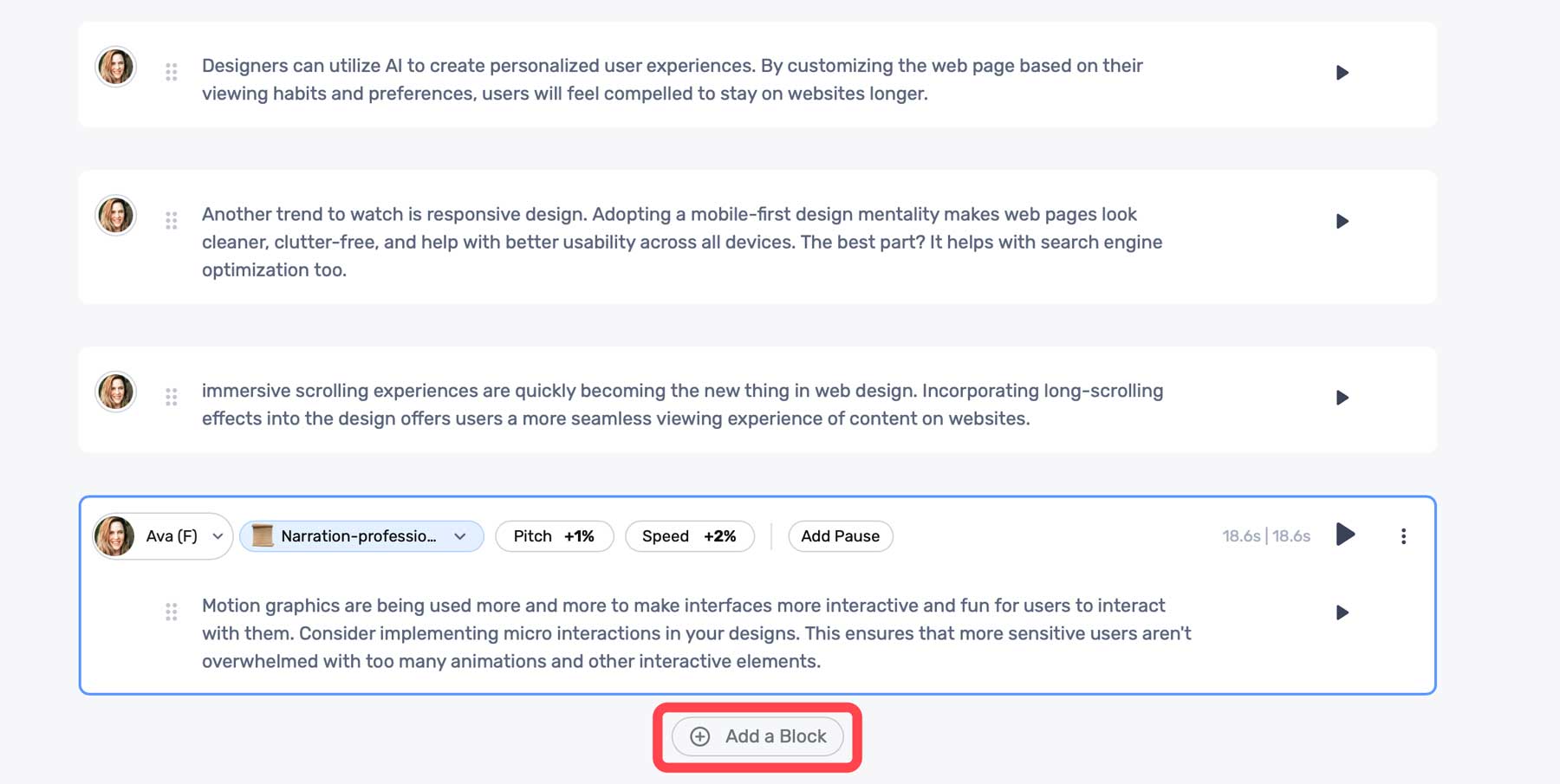
    Once your audio is generated, you can preview the audio using the same play button. Murf AI comes with a few settings to help you adjust the output. These include tone (1), pitch (2), speed (3), and the ability to add a pause (4). These come in handy if the generated voice is too computer-like, has awkward run-on sentences, or needs to be adjusted to a lower or higher sound (pitch).

    audio settings

    Click the + Add a Block button to add more text.

    Murf AI content blocks

    Adding Media To Murf AI Project

    In addition to text-to-speech, Murf AI offers its users stock media assets you can use in your projects. These include stock music, images, and videos. To add media, click the Add Media tab in the dashboard.

    Add media

    You can search the media library for assets to build your video from there.

    Murf AI stock media

    Click on any media to preview it. You can easily add it to your project by clicking the Add to Timeline button.

    Add to timeline

    Using the Voice Changer Feature

    If you prefer, you can add an audio sample and allow Murf AI to transcribe it. It’ll use its proprietary algorithms to analyze your sample and convert it to written text. Once completed, it will automatically be added to the timeline, where you can edit it. At that point, you can make audio edits as necessary for tone or pitch, choose an AI voice, and generate a voiceover in seconds.

    Murf AI voice changer

    Creating an AI voiceover with Murf AI is easy, and the voices are quite good. As an added bonus, Murf AI does an excellent job of allowing its users to customize AI models to get the most realistic sound possible. However, it’s important to mention that when using the free version, you won’t be able to export your projects. However, they are saved in your user account, should you decide to upgrade.

    Here’s a short audio clip of the AI voice model, Ava, reading a portion of our script:


    Pros and Cons of Murf AI

    To be transparent for our readers, weighing the pros and cons of subscribing to Murf AI is important. While there are a lot of pros, including the wide range of AI voices available, there are some cons that you should be aware of.

    Pros of Using Murf AI

    • Over 120+ realistic AI voices with support for 20+ languages
    • Saves time and money over hiring professional voice actors
    • Simple interface
    • Many ethnicities, tones, and styles to choose from

    Cons of Using Murf AI

    • The free plan doesn’t allow downloads
    • Customization of pitch and tone could be better
    • Potential security concerns with voice cloning
    • In our experience, the voice-over-video tool is a bit buggy at times

    Final Thoughts on Murf AI

    Murf AI is a versatile and valuable tool for creating voiceovers for presentations, videos, and more. With more than 120 natural-sounding voices and support for more than 20 languages, it saves time and resources and simplifies creating compelling voiceovers.

    However, it’s important to note that Murf AI isn’t without its flaws. There are occasional bugs with the voice-over-video tool and a need for better customization options for pitch and tone. Despite that, Murf AI stands out above its competition due to how realistic its voices are. If you need a quick way to generate natural-sounding voiceovers, you’ll be hard-pressed to find a better solution than Murf AI.

    The post Murf AI: Review, Details & Pricing (2023) appeared first on Elegant Themes Blog.

  • 11 Best AI Web Design Tools in 2023 (Compared)

    At times, the role of a web designer can be challenging. Occasionally, you may need assistance locating suitable fonts, drafting content, or finding apt images for your project. Thankfully, with the aid of artificial intelligence (AI), you can gain assistance with these difficult tasks. In this post, we’re going to share with you our top choices for the best AI web design tools intended to ignite your creativity.

    Ready to dive in? Let’s get started.

    What is an AI Web Design Tool?

    AI web design tool

    Image created with Midjourney

    AI web design tools aid creators during the web design process. You can use them to generate text, images, and code or even help you find the perfect font combination or color scheme. There are dozens of them available due to the explosion of generative AI. Some are better than others, so it’s important to find the right ones to benefit you the most.

    What You Should Look for in an AI Web Design Tool

    There are a few things to consider when looking for the perfect AI web design tools to get the most out of AI. Consider things like ease of use, the cost to implement, and how it can be used to streamline your workflow.

    Ease Of Use

    The most important factor to consider is ease of use. After all, people use tools to assist in the creative process, not to add to their workload. Choosing a tool that doesn’t take much time to master is one of the best ways to incorporate AI into your design process.

    Keep it on Budget

    Take time to research the cost of each platform so you can decide which tools are right for your situation. There are plenty of tools to choose from, all coming in at different price points. Determine what you need vs. what it will cost so you can weigh the benefits compared to the cost.

    Streamline Your Workflow

    When researching tools, look for those that will make your life easier. Use AI web design tools to provide creative inspiration, help you match fonts, or automate other mundane tasks that would typically take hours.

    Add Functionality

    A great use of AI web design tools is adding functionality to your site without needing a plugin. For example, you can use an AI coding assistant to extend the functionality of WooCommerce, debug errors in your site’s code, or help you become a more efficient coder.

    Enhance Image Assets

    Finding the right image is one of the most frustrating aspects of web design. Sometimes, as creators, we are limited to our client’s pictures. Often, these images are too small or don’t accurately depict what the site is about. In that case, you can use an image upscaling tool or AI art generator to create your own images.

    11 Best AI Web Design Tools in 2023

    There are dozens of AI tools on the market, with more popping up daily. That said, there are only a handful that we can wholeheartedly recommend. These tools are great for generating text and/or images, building complete layouts, creating wireframes, or adding functionality through custom code, to name a few. We conducted extensive testing on over a dozen tools, balancing features and cost, to bring you our picks for the best AI web design tools you can get for your websites. So, without further ado, let’s get to it.

    1. Divi AI

    Divi AI

    Up first on our list is Divi AI. Built using ChatGPT and Stable Diffusion, Divi AI integrates directly into Divi’s no-code Visual Builder. It can generate text and images, improve upon existing images, rewrite existing copy, and even make suggestions based on surrounding content. Divi AI can generate content with one click, including text, images, or modules containing both. It uses powerful features to learn from your site. Simply provide it with a bit of context and watch the magic unfold.

    Key Features of Divi AI:

    • Generate text and images
    • Improve upon existing text and images
    • Learns from your site to provide relevant, on-brand content

    Divi AI image generation

    Divi AI can even generate images automatically. You can use the generate automatically feature to create an image based on your site’s niche in the right size. For example, if you want to replace an image in one of Divi’s layout packs, you can use this tool to generate an image based on the page’s content in the correct size.

    Best For:

    Divi AI is the best AI web design assistant you can get. With the ability to generate text and images based on your site’s unique content, you can build the perfect website in a fraction of the time. If you’re a Divi user, Divi AI is a no-brainer. If not, check out all that Divi has to offer.

    Pricing: Free to try with unlimited generations for $24 per month, with 25% savings if you purchase an annual plan for $216.

    Get Divi AI

    2. Hostinger AI

    Hostinger's AI Website Builder

    Hostinger AI Website Builder is a revolutionary tool that combines the power of AI with an easy-to-use site builder to help you launch a brand-new website with amazing speed and design. Getting started takes about 1 minute. Users can enter a few details about their website and, with a single click, watch as the builder crafts a website tailored to their needs.

    To do this, the builder uses a variety of premade layouts to fit various types of websites. It uses generative AI technology like ChatGPT to fill your page layouts with unique content, images, fonts, and colors for your website design automatically.

    If you need to make customizations to polish your design, the builder has advanced design tools and AI-powered features such as an AI writing assistant, image generator, and even an AI Logo Maker, making it a comprehensive solution for both beginners and seasoned website creators.

    Key Features of Hostinger AI Website Builder:

    • Quick and easy website creation using AI
    • Responsive and customizable design with drag-and-drop functionality
    • Variety of premade templates for different categories
    • Built-in AI writer tool for content generation
    • AI Logo Maker for instant custom logo creation
    • Integrated AI Heatmap tool for user behavior analysis
    • SEO optimization tools and Google Analytics integration
    • eCommerce tools and features for online store creation

    Best For: 
    Hostinger AI Website Builder is ideally suited for individuals or small business owners seeking a quick and efficient way to establish a professional online presence. It is a user-friendly and affordable option for creating a professional website with AI and one of only a few builders that can generate an entire site based on a simple prompt. It offers AI-powered tools and customizable templates suitable for both beginners and experienced users. As an all-in-one site builder on one of the most reliable hosting platforms, it is a popular choice for many.

    Pricing: Limited free trial; Plans start at $2.99 per month

    Try Hostinger AI Website Builder

    3. Framer

    Framer AI

    Our next AI web design tool is Framer. It works much like Webflow, where you can create a design in Figma, and then import it directly into the platform. However, the difference is that Framer takes a fraction of the time, thanks to AI. Built on the React framework, Framer gives even the most novice designer the chops to create a website complete with animations, menus, and other graphic elements on a responsive framework. This means that your site will look awesome on any device.

    Key Features of Framer:

    • Built on the React framework
    • Design a fully responsive website in minutes
    • Integrates with Figma
    • Easily convert HTML-based websites

    Framer Chrome extension

    Another cool feature of Framer is its ability to transfer HTML-based websites into Framer in minutes. It uses a Chrome extension to grab the code, then import it directly into Framer, converting it to a pixel-perfect responsive design.

    Best For:

    If you’re looking for an AI tool to create a small informational website, Framer may be the right choice. Thanks to AI, it allows you to create a fully functional website in a matter of minutes. However, if you want a more robust site, you’ll likely need coding knowledge to get a finished product. For those who want more options, we suggest using Divi AI, which gives you more control over the design and integrations.

    Pricing: Free, with plans starting at $5 per month.

    Get Framer

    4. WixADI

    WixADI

    WixADI is an AI website builder that generates complete websites in a few steps, thanks to an advanced AI assistant. It works by answering a few questions about your business and your design preferences and then produces a fully functional website complete with pages, integrations, and branded results in minutes. It’s a powerful tool for those with limited time or design ability to create a website that’s attractive, functional, and capable of powering an online store.

    Key Features of Wix ADI:

    • Create websites without design experience
    • Highly customizable
    • 100% mobile-friendly
    • Built-in SEO features
    • AI text creator

    One of the best features of WixADI is that every site generated with it is fully responsive. Your website will look great on every device, regardless of screen size. Anyone who’s ever attempted web design on their own knows what a huge plus this is. Responsive websites provide mobile users a seamless experience and rank better in search engine ranking pages (SERPs), primarily because Google takes a mobile-first approach when displaying search results.

    Best For:

    WixADI is an excellent choice for beginners or small business owners who want to showcase their business online but lack the time or expertise to do it themselves. With prices starting at a mere $16 per month, people with even the smallest budget can harness the power of AI. The downside of WixADI is that it only includes some of the tools available in the standard Wix editor. If extensive customization is important, we suggest opting for Divi AI.

    Pricing: Free, with plans starting at $16 per month.

    Get Wix ADI

    5. Photoshop

    Photoshop AI beta

    Next on our list is Photoshop, the grandfather of image editing software. Adobe has worked hard in the past year, incorporating AI features into its flagship product. Among its best features is generative fill, which allows you to add visual elements to your photos with a text prompt.

    Key Features of Photoshop:

    • Generative fill – add elements with a text prompt
    • Extend the pixels of photos
    • Generate full composite images

    Photoshop AI generative fill

    Aside from generative fill, there are a couple of other things that make Photoshop AI stand out. One of which is image extension, which allows you to extend the image area of a photo with the crop tool. From there, you can draw a selection around the blank area of the canvas, click the generative fill button, and watch the magic happen. Photoshop can evaluate the existing pixels of a photo and extend it as if those pixels were already there. In addition to that, you can start with a blank canvas and generate composite images, all with a simple prompt.

    Best For:

    Photoshop is the gold standard for image editing software. With the incorporation of AI features, it’s better than ever. However, there is a steep learning curve to Photoshop, so if you’re looking for an easy way to edit images, we suggest checking out Canva.

    Pricing: Plans start at $20.99 per month.

    Try Photoshop

    6. Uizard

    Uizard AI design tool

    As a web design professional, creating the mockup is one of the process’s most time-consuming yet crucial parts. It allows you to show clients your vision for their site without spending countless hours designing a site they disapprove of. That’s where Uizard comes in. It allows you to create mockups, wireframes, and prototypes to generate UI designs with a text prompt. You can upload sketches, screenshots, or a URL to transform them into editable designs in minutes.

    Key Features of Uizard:

    • Create mockups with a text prompt
    • Generate a functional wireframe from a screenshot
    • Hundreds of pre-designed templates

    Uizard Autodesigner

    One of the best features of Uizard (currently in beta) is the Autodesigner tool. It allows you to create a design based on a series of text inputs describing the project along with design style or keywords, then pick relevant ones, such as light or dark theme, modern, corporate, etc.. Using a text prompt to generate a mockup is a great way to spark creativity and give you a head start on the design process.

    Best For:

    Uizard is an excellent tool for creating mockups from sketches, screenshots, or something simple as a cocktail napkin. It allows you to streamline the beginning of the web design process, saving hours. It’s free to use and offers tons of benefits for creatives. That said, if you want to use the Autodesigner feature, you’ll need to pay for a Pro license, which starts at a very reasonable $12 per month.

    Pricing: Free, with pro plans starting at $12 per month.

    Get Uizard

    7. CodeWP

    CodeWP

    If you’re a WordPress user, CodeWP can help you add custom functionality to your website without needing a plugin. You can add tax rates to WooCommerce, set up a custom shopping cart, or troubleshoot errors such as the WordPress white screen of death. It works by inputting a text prompt describing what you want to create, then watching as CodeWP makes custom code snippets you can use in your WordPress website.

    Key Features of CodeWP:

    • Troubleshoot WordPress coding errors
    • Integrates with page builders such as Elementor and Oxygen
    • Generate custom WP code with a text prompt

    CodeWP integrations

    One of the upcoming features of CodeWP is seamless integration with page builders, such as Elementor and Oxygen. Soon, you can insert snippets directly into the page builder for easy integration.

    Best For:

    Currently, CodeWP is great for creating PHP snippets for your WordPress website. If you’re a WooCommerce user looking to save some cash, CodeWP can create custom snippets for tax calculation, shipment tracking, detecting duplicate product attributes, and more.

    Pricing: Free, with pro plans starting at $12 per month.

    Try CodeWP

    8. Canva

    Canva home page

    Canva has been a part of many web designer’s workflow for years. It offers countless templates to easily create social media, web, and other types of graphics. Recently, Canva incorporated several AI features to make them even more popular with creators, such as magic design, magic erase, magic replace, and magic edit. With these tools, you can easily replace backgrounds, add additional design elements, and more.

    Key Features of Canva:

    • Magic design, erase, replace, and edit tools
    • Thousands of pre-made templates
    • Auto-adjust image correction

    Canva Magic Design AI

    One of the most robust features is Canva’s magic design tool, which allows you to create custom on-brand templates from an uploaded image. There’s also an AI-powered copywriting assistant that generates written content from a text prompt. This is useful for creating presentations, adding website copy, or simply creating a headline for a social media graphic.

    Best For:

    Canva is a great tool for those with limited design knowledge. You can easily create templates for any media using a simple text prompt. If you need to create infographics or other graphic elements for your website, try Canva. They have a free plan to let you try out their AI tools. However, to get the most out of Canva, you’ll need to sign up for a pro license, which will cost you around $15 per month per person.

    Pricing: Free, with plans starting at $14.99 per month per person.

    Try Canva

    9. Font Joy

    Font Joy

    This next AI web design tool, Font Joy, is a stellar choice for pairing Google fonts. As a web designer, looking for the best font pairings for your new web project is time-consuming. Thankfully, Font Joy makes that process a lot less painless. There are only a few bells and whistles with Font Joy, so what you see is what you get. However, it’s still a powerful tool for developing a good user experience with fonts.

    Key Features of Font Joy:

    • Font visualizer
    • Picks supporting fonts based on a chosen font
    • Generates font pairings automatically

    AI web design tool Font Joy

    One of the best features of Font Joy is the font visualizer tool. It allows you to choose a font and then suggests pairings based on their similarities and proximity on a 3-dimensional map. It uses a variety of factors, including font-weight, obliqueness, and X and Y axis, to determine the best font pairing for your chosen font. The best part? You can watch the magic happen in real time and then easily select a pairing that suits you.

    Best For:

    If you waste too much time figuring out what fonts to use in your web design projects, you should try Font Joy. It’s free and offers data-driven font pairings in a matter of seconds.

    Pricing: Free

    Try Font Joy

    10. Midjourney

    MidJourney AI design tool

    Midjourney is one of the most popular AI image-generating products on the market today. It’s known for its ability to create realistic images, 3D characters, and more from a text prompt. It’s also an excellent tool for generating webpage layouts, logo concepts, characters, and icon sets as well.

    Key Features of Midjourney:

    • Generate images, web page mockups, icon sets, and more from a text prompt
    • Ability to change the aspect ratio of images
    • Comes with a list of commands and parameters to improve generated results

    best AI web design tools

    One of the best features of Midjourney is how versatile it is. Using a variety of parameters, you can choose different styles, aspect ratios, and even upload a resource image for stellar results. For example, you can upload a webpage layout as a basis for your generated content and assign the –iw (image weight) parameter to tell Midjourney how heavily your image output should relate to your uploaded image. This is handy if you have a layout in mind but want to improve it.

    Best For:

    Midjourney is a great tool for inspiration for your next web design project. You can create image assets, icon sets, or use a webpage layout as a source image to improve upon. The only downside to Midjourney is the free tier, which dumps your prompt in with thousands of other users. That said, you can sign up for a pro license to create our own chat room to dialog with the bot.

    Pricing: Free, with pro plans starting at $10 per month.

    Try Midjourney

    11. AB Testing AI

    Best AI web design tool AB testing

    One of the most important aspects of a good web design is ensuring that it is optimized for conversions. Most successful web developers and designers know that gathering feedback on designs and how they perform is A/B testing. This is where AB Testing AI comes in. It allows you to input a URL and watch as AI breaks down every aspect of your landing page, offering variations to improve it.

    Key Features of AB Testing AI:

    • Works as a Javascript snippet or as a plugin for WordPress, or Wix
    • Analyzes your site with AI
    • Offers multiple variations to improve conversion rates

    AB Testing AI integrations

    One thing that makes AB Testing AI stand out is that you can run multiple A/B tests simultaneously. This reduces workload and provides actionable insights faster than other A/B testing solutions. Not only that, but it works with various platforms including WordPress, Wix, Squarespace, Shopify, and Workflow.

    Best For:

    If you’re looking for a way to test what will work best on your landing pages, AB Testing AI may be a good choice. With a button click, you can gain valuable insights into your website’s designs through integration with WordPress, Wix, and static HTML sites.

    Pricing: Free, with pro plans starting at $19 per month.

    Try AB Testing AI

    Best AI Web Design Tools Price Comparison

    While most of the entries on our list have different strengths and applications, it’s important to showcase the pricing for each of our featured AI web design tools so you can budget for the ones you are most interested in. So, look at the comparison table below to plan which ones to incorporate into your web design process.

    AI Web Design Tool Price Free Option
    🥇 Divi AI $24/month ✔️ Visit
    🥈 Hostinger AI Website Builder $2.99/month ❌ Visit
    🥉 Framer $5/month ✔️ Visit
    4 Wix ADI $16/month ✔️ Visit
    5 Uizard $12/month ✔️ Visit
    6 CodeWP $12/month ✔️ Visit
    7 Photoshop $20.99/month ❌ Visit
    8 Canva $14.99/month ✔️ Visit
    9 Font Joy Free ✔️ Visit
    10 Midjourney $10/month ✔️ Visit
    11 AB Testing AI $19/month ✔️ Visit

    What are the Best AI Web Design Tools?

    When considering which of our recommended AI web design tools are the best, we must consider their roles in the process. If you are a Divi user or pondering becoming one, we highly suggest Divi AI. With its text and image generation and ability to generate content based on your website’s niche, you won’t find a better AI page builder.

    If you are looking for an all-in-one AI web design and hosting solution, the Hostinger AI Website Builder can get your entire site up and running from start to finish with the power of AI. It has all the additional AI tools needed for optimizing your design, content, and SEO as well.

    On the other hand, if you’re looking for a way to incorporate your Figma designs, Framer is an excellent option. Either way, incorporating any AI web design tools on our list will save valuable time and inspire creativity for your next web design project.

    Need more AI tools? Check out all our articles featuring the best AI tools for your business.

    Featured Image via ProStockStudio / shutterstock.com

    The post 11 Best AI Web Design Tools in 2023 (Compared) appeared first on Elegant Themes Blog.

  • 5 Best AI Story Generators in 2023 (Reviewed and Ranked)

    Unlike general-purpose AI writers, which are designed to handle a broad range of tasks from email drafting to SEO optimization, AI story generators are fine-tuned for the art of storytelling. These advanced platforms have features that allow for intricate plot development, character arc creation, and emotional narrative weaving. They serve as a digital canvas for writers, providing the tools needed to craft compelling stories that resonate on a profoundly human level. In this post, we’ll compare and review the best AI story generators to take your storytelling to a whole new level.

    AI Story Generator Features

    When writing stories, there are important distinctions between a standard AI writer and AI story generators. Whether you’re working on a short story, a graphic novel, or a traditional fiction book, short-form AI services may not provide the necessary assistance. So, as you compare AI story-writing tools, remember these factors.

    1. Story organization is essential for longer works. Being able to, at the least, sort and separate chapters of your story is vital. Some even let you section off scenes within a chapter. This enables you to stay focused on what you are writing without getting overwhelmed by the vastness of your work.
    2. An AI explicitly trained for story creation will behave much differently than an AI designed for marketing. You will need the flexibility to change the tone for different characters while retaining narrative and perspective throughout the piece. It is easy enough to switch from first person to third when you don’t mean to, and AI story generators can keep you consistent.
    3. You will need AI templates and quick actions that match story writing. Maybe you need to add more description of the surrounding science, or you want to interject more dialogue between characters. These are particular situations that are vital to story writing.

    While AI writers, in general, are malleable and can adapt to your needs, let’s focus on the ones that can help you with creative story writing the best.

    Best AI Story Generators


    Subscribe To Our Youtube Channel

    If you’re in the market for an AI tool that can elevate your storytelling, opting for a dedicated story generator is a decision that will pay off. Here’s a look at the best options on the market, starting with Sudowrite.

    1. Sudowrite

    Sudowrite - Homepage August 2023
    Sudowrite is the most trusted AI story writer out there. If you haven’t worked with Sudowrite, you are missing out on its unique approach to augmented story writing. It helps writers transform their ideas into working manuscripts using defined AI tools for story writers.

    Key Features:

    • Character name generator
    • Built for writing multi-character dialogue
    • AI tools for changing pace, writing the next part of a story, outlining a chapter, and more

    Sudowrite - Edit Story Selection with AI

    Story Engine is Sudowrite’s AI tool that is the most enticing. It works across the whole writing process and workflow but brings AI to every part. It takes your story ideas, creates an outline (with your guidance), starts fleshing out chapters, and can write whole sections of your book. From there, the inline AI editor helps you spruce up any selected text as you iterate through the drafts of your story.

    Best For:

    Sudowrite is ideal for novelists and storytellers (of any kind) who want excellent efficiency in crafting their stories. Most esteemed writers say that the first draft is the hardest part. Sudowrite gives you complete control of the first (and second, and third) draft while speeding up its production time.

    Pricing: Free Trial; Pricing starts at $19/mo

    Try SudoWrite

    2. Jasper AI

    Jasper - Homepage August 2023
    Jasper AI is a massive player in the AI writing space. It launched well before ChatGPT took the world by storm and has constantly been rolling out features to make it the de facto AI writing platform. Many know Jasper as a robust AI writer for marketing and business, but many don’t realize it has built-in use cases for story writing. Its long-form editor and custom commands are more than flexible enough to accommodate story writing.

    Key Features:

    • AI writing templates for business, marketing, and story writing
    • Brand and Voice Knowledge pieces can be customized to fit the details of your story
    • Long-form editor (like a Google Doc) that helps you create stories, chapter by chapter

    Jasper AI Writing Templates for Stories and Marketing

    Jasper’s template library of pre-trained writing tasks is some of the best. While most don’t have anything to do with story writing, a few do, and many others are great for writing in general (content improver and sentence expander, for instance).

    Best For:

    Indie writers who want an all-in-one tool will want to consider Jasper. While its long-form editor isn’t necessarily built for novels or short stories, it could be a superb AI story generator to choose from if you also want AI assistance for writing marketing and business material for book promotions and deals.

    Pricing: Prices start at $39/mo

    Get Jasper AI

    3. Plot Factory

    Plotfactory - Homepage August 2023
    Plot Factory is a dream for writers looking to utilize AI and other tools to flesh out an entire book idea. However, Plot Factory works differently than other AI story generators—it is built to help you create story plots and outlines. Whether you are writing a creative story or a novella, Plot Factory helps you create the bones of your story so you can move on with the utmost confidence.

    Key Features:

    • Digital locker for saving details about your story universe, characters, places, and
    • Writing views so you can focus on individual scenes and quickly move them around within a chapter
    • AI name and outline generators to banish writer’s block
    • AI story narration so you can listen to your story aloud and catch what you couldn’t by reading your own writing

    Beats Mode Plot Factory Feature

    Plot Factor’s main selling point is its ability to maintain context and coherence across an entire work. It stores all the nitty-gritty details that make a story make sense using one of its many features (Universe Notebook, Place Keeper, Character Lists, and Object Library). Storing these helps writers stay consistent while they develop a story.

    Best For:

    Screenwriters and novelists who need a structured approach to storytelling will find Plot Factory indispensable. Though it is light on the AI features (though its text-to-speech is a nice touch), it is well organized for writers who want to get down to writing. The UI is dated, but if this doesn’t bother you, you will benefit significantly from this story organization tool.

    Pricing: Free plan available with paid plans starting at $9/mo

    Get Plot Factory

    4. Shortly AI

    Shortly AI - Homepage August 2023
    Shortly AI is another AI writer that got its start as an AI story writer. It has now grown into something that can handle all sorts of writing tasks. Shortly AI was acquired by Jasper a couple of years ago but still runs as a standalone service.

    Key Features:

    • Easy to use slash commands in document editor to get AI to write for you quickly
    • Simplified UI for distraction-free writing and editing
    • Unlimited word generation

    Shortly AI Document Writer UI

    Shortly AI stands out for its simplicity. There aren’t hundreds of use cases or templates (only a few slash commands). This means you get to focus on what you are writing, and when you need AI, you can ask it to pick up right where you left off. It’s an excellent way for writers to own the process while calling on AI only when needed.

    Best For:

    While not for everyone, Shortly AI is the perfect companion for writers who need a distraction-free workspace along with capable AI writing.

    Pricing: Pricing is not cheap and starts at $79/mo for unlimited AI words

    Get Shortly AI

    5. NovelAI

    Novelai - Homepage August 2023
    NovelAI is an immersive AI writing companion and story generator that allows anyone to create high-quality literature. Some unique features of Novel AI include the ability to generate images to depict characters in your story and to train the AI to mimic the style of famous authors. It has all the AI tools you’d expect and packages them together into an easy-to-use UI that is a joy to be in. As such, it is probably the most fun platform to write on.

    Key Features:

    • Image AI generation to pair story with pictures to tell something more
    • Unlimited text generation with Kayra, its AI Storyteller
    • Lorebook that lets you store world and character information for consistent storytelling

    Novelai Lorebook for Story Memory

    The Lorebook is like a locker for the concrete aspects of your stories. Characters with defined traits, styles, and static elements that should remain consistent can be stored. Likewise, Worlds and everything in them, like particular locations, altered natural rules, and other phenomena, can also be stored. These let the AI remember pieces of your story’s lore so that your character doesn’t change from having brown hair to blond or the Palisades being a Northern to a Southern feature of your world.

    Best For:

    Aspiring fiction writers who crave depth and complexity in their storytelling will find NovelAI a pleasure to work with. It is reasonably priced and allows for a lot of customization and fine-tuning of how the AI works. This gives writers who want complete control over every aspect of story creation just that.

    Pricing: Plans start at $10/mo

    Get NovelAI

    Best AI Story Generators: Price Comparison

    Now that we’ve compared the top AI tools for writing stories, here is a recap of the list with the pricing of each to help make your decision.

    Rank AI Story Generator Starting Price Free Option
    🥇 Sudowrite $19/mo ❌ Get
    🥈 Jasper AI $39/mo ❌ Get
    🥉 Plot Factory $9/mo ✔️ Get
    4 Shortly AI $79/mo ❌ Get
    5 NovelAI $10/mo ❌ Get

    Which is the Best AI Story Generator?

    The best AI story generator and writer is Sudowrite. It has all the AI features to write, refine, and expand your stories. Story organization is intuitive and doesn’t get in the way. Plus, there are many ways to get AI to do particular tasks that you can always fine-tune exactly what you need.

    Jasper AI is the next best option if you need AI writing software that can create more than just stories. Plot Factory is interesting and retains human involvement for most story writing. But where it does use AI or NPL, it serves to help the writer increase efficiency.

    For other creatives and creative pursuits, you might also like these top AI music generators for creating easy tunes. And, for the audio storytellers among us, check out the best podcasting platforms to get your stories heard.

    Looking for more AI tools? Check out our complete list of best AI tools.

    Featured Image by Moor Studio / shutterstock.com

    The post 5 Best AI Story Generators in 2023 (Reviewed and Ranked) appeared first on Elegant Themes Blog.

  • 6 Best AI Presentation Tools in 2023 (Compared)

    If you’ve ever been tasked with creating a presentation for your business or a client, you know how time-consuming it can be. Sitting in front of a blank page, combing through endless templates, or spending hours on a presentation probably isn’t high on your list of priorities. Thanks to artificial intelligence (AI), there’s a better way to create presentations. In this post, we’ll delve into the best AI presentation tools so you can spend more time on other tasks.

    Let’s dive in.

    What is an AI Presentation Tool?

    what is an AI presentation tool

    image created with Divi AI

    An AI presentation tool is a system that uses machine learning generative AI that allows you to create presentations in minutes rather than hours. These revolutionary tools will enable you to craft your presentation from script to finished product, all with a descriptive text prompt.

    What to Look for in an AI Presentation Maker

    As we explore the top AI presentation makers available, it’s best to look for features that will make your life easier, not harder. Here are a few things that your chosen tool should offer:

    • Ease-of-use: If you’re looking to incorporate an AI presentation tool into your workflow, you’ll want to find something easy to use. After all, you seek a less time-consuming way to create presentations. You shouldn’t have to spend hours learning a new interface.
    • Integration with popular software: Those in the business world know that there are three primary presentation tools that almost everyone uses: Microsoft PowerPoint, Adobe Keynote, and Google Slides. When shopping for AI presentation tools, look for products that can easily export your creations for those popular programs.
    • Customization options: Another important factor to consider is how easily you can customize your presentation. Look for programs that won’t force you to stick with cookie-cutter AI-generated templates. Make sure you can make design and text edits as you need them.
    • Tutorials: Learning new software can be intimidating, so make sure to choose a platform that offers plenty of tutorials and support should you encounter any problems.

    6 Best AI Presentation Tools in 2023

    We evaluated over a dozen AI presentation tools. While some decent ones didn’t make our list, we wanted to focus on tools that are easy to use, work with popular programs like PowerPoint or Google Slides, and offer the most features. Without further ado, here are our top picks for the best AI presentation tools money can buy. Most offer free versions or a free trial, so feel free to try all of them out to find the best fit for your situation.

    1. Simplified

    Simplified

    Simplified is one of the most robust AI tools on the market today. Through generative artificial intelligence, it can create presentations, images, memes, thumbnails, social media quotes, and more. What makes it unique is its wealth of AI features that appeal to creatives and content creators across different mediums, including digital art, writing, videos, and online advertising through social media.

    Key Features of Simplified:

    • Generate presentations and other forms of media
    • Edit images and text with AI
    • Create logos and design elements with AI
    • One-click editing tools for image editing

    Simplified image editing

    Another cool feature of Simplified is the image editing feature. You can remove or replace the background, erase elements, magically remove artifacts or other imperfections, autofocus, or use generative fill to add additional details to your photos. The generative fill feature works much like Photoshop AI, where you can select an area of a photograph and fill it with a new element you describe with a text prompt.

    Best For:

    Simplified may be for you if you’re in the market for an all-in-one design tool. With AI tools for generating presentations and all their elements, you can design like the pros for a very affordable price.

    Pricing: Free, with design pro plants starting at $9 per month.

    Try Simplified

    2. Slides AI

    AI presentation tools Slides AI

    Slides AI is an extension for Chrome designed to work inside Google Slides. Provide it with a topic, including any requested elements, and Slides AI will create up to a 10-page presentation in minutes. There are limited features, but it adds slides, generates text, and sets formatting based on your prompt. In addition to generating slides, Slides AI has a Magic Write feature, which allows you to paraphrase sentences, suggests images for your presentations, and helps you search for citations for your work.

    Key Features of Slides AI:

    • Magic write
    • Generate slides based on original content
    • Create slides from a topic

    Slides AI text prompt

    Slides AI has a simple interface, allowing you to focus more on creating content than learning new software. Since it works as an extension within Google Slides, you simply have to click a button, type in some text, and Slides AI will do the rest.

    Best For:

    If you are a regular Google Slides user, Slides AI is a no-brainer. You can save time creating your slides and give them a fresh look in seconds. The downside to Slides AI is that there is no text generator. That said, plenty of AI writers, such as Rytr or Jasper can help.

    Pricing: Free, with pro plans starting at $10 per month.

    Try Slides AI

    3. Gamma

    Gamma AI presentation tool

    Gamma is one of the most intuitive platforms on our list. It uses generative AI to build your presentation from a text prompt, complete with visual aids, such as charts, graphs, images, and other visual elements – automatically. One of our favorite features is the interface. Once Gamma creates your presentation, you can easily add more elements. It functions much like a page builder or Gutenberg for WordPress, where you can drag and drop visual elements into your pages and then tweak them accordingly.

    Key Features of Gamma:

    • Analytics tracking
    • Share over the web and solicit feedback through comments
    • Drag-and-drop visual editor
    • Export to PowerPoint or PDF

    Gamma presentation wizard

    Gamma creates presentations on the fly simply by typing in a text prompt. One of our favorite features is watching in real-time as Gamma makes your presentation. Once completed, you can use generative AI to edit, improve, or change any presentation aspect to match your branding and style. Another unique feature is Gamma’s analytics feature, which allows you to see who’s viewed your presentation and track engagement down to the element level.

    Best For:

    Gamma’s intuitive interface and quick start wizard make getting started a breeze. Plus, with their AI-powered text editing feature, you can tweak the content as much as you’d like. They offer access to millions of royalty-free stock images and an AI-powered image generator that suggests a relevant prompt based on your content.

    Pricing: Free, with pro plans starting at $15 per month.

    Try Gamma

    4. Beautiful AI

    Beautiful AI

    Another popular choice is Beautiful AI, a feature-packed AI presentation tool that allows you to create stunning presentations with one click. They offer several AI-powered design elements you can edit to match your branding. Plus, it’ll even line these up automatically, so you don’t have to spend time on tedious tasks. If you’d rather start from a previously created presentation, you can easily import a PowerPoint file and then use AI to improve it.

    Key Features of Beautiful AI:

    • Create AI-generated presentations with one click
    • AI-powered design elements
    • Rewrite and improve text with AI
    • 110+ pre-designed templates
    • Integrates with PowerPoint (import/export)

    Beautiful AI stock photography

    One of the best features of Beautiful AI is the millions of royalty-free stock images at your disposal. Sure, you can create your own AI images, but if you’re familiar with AI Art generators, you know that sometimes the photos they produce don’t look very natural. It’s nice they thought to include this feature because it saves you the time and cost of signing up for a stock photography service.

    Best For:

    If you’re tasked with creating presentations for your company or corporate freelance clients and must use PowerPoint, Beautiful AI is an excellent choice. While they don’t have a free plan, they offer a 14-day free trial, so you’ll have plenty of time to play with it and decide if it’s right for you.

    Pricing: Starting at $12 monthly (billed annually).

    Get Beautiful AI

    5. Tome

    Tome AI presentation tool

    Tome is one of the most popular AI presentation tools on the market. Since its release in late 2022, it has raced to become one of the fastest-growing platforms in record time, with over 1 million users. It allows you to create live, interactive presentations, mood boards, design portfolios, pitch decks, webpages, and more. Tome offers over 25 templates to give you a good starting point, which is a great time-saving feature. Its intuitive generative AI allows you to create scripts, text, images, charts, and more.

    If you already have an outline in mind, you can easily paste it into Tome, allowing it to convert your thoughts into structured presentations in a single click. Does your business require a multi-lingual solution? Tome has you covered with support languages other than English, so you can translate your text to share your presentations with anyone, anywhere.

    Key Features of Tome:

    • Creates live, interactive presentations
    • Responsive layouts for any screen size
    • Generates text, images, graphs, 3D models, and more
    • Multi-language support

    Tome interface

    Tome is web-based and provides a sharable link for your creations. Not only that, it integrates with popular platforms, such as Figma, Spline, YouTube, Twitter, Google Sheets, and other popular AI website builders like Framer. With these integrations, you can import videos, layouts, text, and even full web pages.

    Best For:

    Tome is an excellent platform for creating web-based presentations, landing pages, interactive pitch decks, and more. It does a pretty good job of text and image generation, but its integrations are the best features. Try Tome if you want an easy way to incorporate Figma layouts or YouTube videos into your presentations.

    Pricing: Free, with pro plans starting at $8 for unlimited credits.

    Try Tome

    6. PowerPoint

    AI presentation tools Microsoft 365

    Microsoft is the founding father of business software, including the widely popular PowerPoint. Sure, there are other products out there that are geared toward businesses, but PowerPoint is the gold standard for making presentations. Did you know that it comes with AI features built right in?
    Companies that already use Microsoft products will be pleased to know that you can generate incredible designs for all of your presentations through artificial intelligence.

    Key Features of Microsoft 365:

    • AI Designer for generating slides
    • Uses AI to add additional slides based on the original design
    • Generate rehearsal reports to get feedback on presentation delivery

    Microsoft reheasal report

    One of the best features of PowerPoint is the Rehearse with Coach AI tool. It records your voice and image on video to evaluate your performance. It allows you to read through your presentation and then get a professional critique of how you did. You’ll get a rehearsal report that analyzes your body language, notes how many filler words you used, and analyzes your pace and pitch.

    Best For:

    If you make presentations for a living or your company requires PowerPoint, you should check out their AI tools. The Rehearsal Report feature is well worth the cost, especially if you are the one who has to give the presentation you create. Microsoft will even give you a 30-day risk-free trial so you can try it out. The downside is that it doesn’t come with a text generator, but you can get around that by adding an AI chatbot like ChatGPT to your arsenal of tools.

    Pricing: Plans start at $6.99 per month.

    Try Microsoft 365

    Comparing the Best AI Presentation Tools

    Before deciding on which AI presentation tool to choose, take the time to compare prices and the features of every tool on our list. As previously mentioned, all of our featured tools either include a free trial or a free version to assist you in making gorgeous presentations.

    Best AI Presentation Tool Price Comparison

    We’ve created this hand comparison table to help you decipher pricing for each of our recommended AI presentation tools.

    Plugin Price Free Option
    🥇 Simplified AI $9/month ✔️ Visit
    🥈 Slides AI $10/month ✔️ Visit
    🥉 Gamma AI $15/month ✔️ Visit
    3 Beautiful AI $12/month ❌ Visit
    4 Tome $8/month ✔️ Visit
    6 PowerPoint $69/year ❌ Visit

    Best AI Presentation Tool Feature Comparison

    For you to make the most informed decision, it’s important to not only know the pricing but compare the features as well. Here’s a feature comparison table for all of the AI presentation tools on our list so you can decide which is the best fit.

    🥇 Simplified 🥈 Slides AI 🥉 Gamma
    Price $9/month $10/month $15/month
    AI Image Generation ✔️ ✔️ ✔️
    AI Image Editing ✔️ ✔️ ✔️
    AI Text Generation ✔️ ✔️ ✔️
    AI Text Editing ✔️ ✔️ ✔️
    One-Click Presentation ✔️ ✔️ ✔️
    Try Simplified Try Slides AI Get Gamma

    What is the Best AI Presentation Tool?

    After thoroughly testing over a dozen AI presentation tools, we feel that Simplified and Slides AI offer the best set of features. Simplified stands out for its intuitive interface, logo, and other design element generation. It also gets the nod for its one-click editing tools. On the other hand, Slides AI is a close second due to its wealth of AI tools. You can create presentations, generate written content, and create on-topic slides effortlessly. Either way, if you’re in the market for a good AI assistive tool to speed up the process of creating presentations, you can’t go wrong with either.

    Need more AI tools? Check out these articles featuring the best AI tools to use for your business:

    Featured Image via Nattasid Thapsang / shutterstock.com

    The post 6 Best AI Presentation Tools in 2023 (Compared) appeared first on Elegant Themes Blog.

  • 3 Best WordPress AI Page Builders in 2023 (Compared)

    With the rapid advancement of WordPress page builders and the integration of AI technology, creating stunning websites has never been easier. By harnessing the power of generative artificial intelligence (AI), users can now experience AI within a drag-and-drop builder. AI page builders are revolutionizing how we generate content, enabling effortless text and image creation directly on the front end. In this post, we’ll look at the top WordPress AI page builders currently available and AI plugins that complement them.

    Let’s get started.

    What Is a WordPress AI Page Builder

    An AI page builder is a plugin or theme that allows you to build web pages with the help of AI. Using a drag-and-drop visual interface on the front end, usually without the need for coding. Page builders keep you from bouncing between the front and back end, so you can view design changes in real time. With AI page builders, you can create posts, pages, and templates by adding simple text prompts to aid in text and image generation.

    Why Do We Need a WordPress AI Page Builder

    There are many benefits of using a WordPress AI page builder, including:

    • Saving time: Using a page builder with AI built-in, you can effortlessly build web pages, write text, and generate images in a fraction of the time it would take to write the content yourself.
    • Pre-made templates: Most page builders offer free design layouts that you can customize to match your branding.
    • Generate high-quality content: Using an AI page builder, you can input keywords, specify a writing tone, and generate content for your site effortlessly.
    • There’s no need for stock image subscriptions: With AI image generation built-in, there’s no need to sign up for an expensive stock photography subscription.
    • Save money: By using an AI page builder, you lower your costs for generating text and images. With other AI art generators or AI chatbots, you’ll pay for credits. This can sometimes be more expensive than monthly fees for unlimited generations.

    The Best WordPress AI Page Builders

    With the technology relatively new, only a few AI page builders are out there. That said, we fully expect this to change. In fact, we have it on good authority that many popular page builders are hard at work building AI integrations, so we expect this list to grow exponentially. In the meantime, here are a few that are available or set to be released soon.

    1. Divi

    Divi AI

    First on the list is Divi, which comes packed with AI features to increase your productivity and make building web pages a snap. It can write content and generate images right inside the Visual Builder, so you can view text and image creation in real time. Not only that, but Divi AI can generate text automatically based on the surrounding content on your website.

    With Divi AI, you can create unlimited text and images, which is great when considering the cost of other generative AI. Unlike its competitors, you won’t need to purchase credits or tokens to generate content. Those who have used AI in the past can tell you that those credits will run out quickly while you’re trying to perfect the text and images you create. With one flat monthly fee, you can tweak, improve, and perfect until your heart’s content without reloading your balance.

    Key Features of Divi

    • Auto-Generate content with one click
    • Produces highly relevant, on-brand results by analyzing the content on your site
    • Auto-Generate images
    • Refines & modifies existing images
    • Translate languages automatically
    • Built with ChatGPT and Stable Diffusion

    Divi AI interface

    Divi AI improves upon Divi’s already amazing capabilities. You’ll have access to over 200 design elements, 2000+ design layouts, and seamless integration with popular plugins like Toolset, WPForms, WooCommerce, and more.

    Best For

    Divi is best for beginners and professional web designers who want a robust visual page builder that also creates text and images on the fly through the power of artificial intelligence.

    Pricing: Divi AI starts at $18 per month when paid yearly, which includes unlimited text and image generation for you and your entire team.

    Get Divi

    2. Elementor AI

    Elementor AI page builder

    Similar to Divi AI, Elementor AI works within a drag-and-drop front-end editor. Using generative AI, you can generate images, write copy, and add code snippets. Elementor AI activates once you click the Create with AI button in the Elementor builder. You can describe the type of content you want to generate, and within a minute, you’ll have a new image or copy ready for use on your website. If you want to refine an existing image, Elementor AI can do that, too. You can edit pictures, add design elements, and even extend photos, making filling in white space easy.

    Key Features of Elementor AI

    • Generate text
    • Generate images
    • Refine existing images
    • Automate translations
    • Generate custom CSS

    Elementor AI interface

    In addition to image and text generation, Elementor AI can create custom CSS snippets for your design elements. Describe what you want your element to look like, and Elementor AI will transform it into a usable CSS snippet you can copy and paste into your site.

    Best For

    Elementor AI is a cost-effective way to incorporate AI into your website. However, unlike Divi AI, Elementor limits the number of generations you can have. For example, the lowest-tiered plan allows for 18,000 generations. For some, that may be more than enough for what you need. That said, those with larger sites may require a higher-tiered plan.

    Pricing: Starts at $2.99 per month for 18,000 credits.

    Get Elementor

    3. Spectra Pro

    Spectra Pro

    Spectra Pro is a page builder that works within the WordPress editor. It comes with 28 Spectra blocks that can be used alongside the blocks that come standard with WordPress. At the time of this writing, Spectra Pro is in the process of adding AI features, including AI-powered design suggestions, text generation, and the ability to revise existing copy with a text prompt.

    Key Features of Spectra Pro

    • Text generation (coming soon)
    • Improve existing copy with AI (coming soon)
    • AI design suggestions (coming soon)

    Spectra Pro AI

    One of the best features of Spectra Pro is its ease of use. WordPress users can easily drag elements onto the page, style them, and see their design changes in real time. It provides an excellent way to extend the Gutenberg block editor without bloating your site.

    Best For

    Those who prefer to work within the Gutenberg block editor will love Spectra Pro. Spectra Pro has something for everyone, with over 28 additional blocks, design templates, and a lightweight footprint. Soon, the folks at Spectra will be adding AI features, so those looking to add AI to Gutenberg should closely monitor their progress.

    Pricing: $49 per year.

    Get Spectra Pro

    AI Plugins that Integrate with Popular Page Builders

    While there aren’t a ton of AI page builders out there (yet), there are quite a few WordPress AI plugins that integrate into popular page builders like Divi, Elementor, Visual Composer, Beaver Builder, and Oxygen. While functionality is limited, these will allow you to generate text and images or improve SEO titles and meta descriptions within the page builder interface.

    Here’s a short list of some of those plugins:

    Get Genie

    Get Genie AI

    Get Genie is a WordPress AI plugin that boasts improved SEO copy through text generation. You can generate long-form content, blog posts, optimize for SEO, write product descriptions, and more. It offers integration with Gutenberg and Elementor. It has over 37 templates, including social media, blogs, WooCommerce, FAQ, and more.

    Get Genie offers a free version that allows you to use it on one website. You’ll get 2,500 words, 10 SEO keyword analyses per month, access to all templates, a WordPress blog post wizard, and more. If you need a more robust plan with unlimited words, opt for the Agency Unlimited plan for around $69 monthly.

    Pricing: Free, with monthly plans starting at $69.

    Try Get Genie

    Bertha AI

    Bertha AI

    BerthaAI is an AI plugin that helps you craft web copy, product descriptions, or blog posts with artificial intelligence. In addition, you can create images and illustrations to use within your WordPress website. It works with all of the major page builders, including Elementor, Divi, Beaver Builder, Thrive, Visual Composer, and more.

    For one monthly fee, unlimited users will have access to 1 million words and 20 image generations per month. Alternatively, you can sign up for a pay-as-you-go plan offering 100 images for $15.

    Pricing: $20 per month.

    Get Bertha AI

    Rank Math

    Rank Math content AI

    Rank Math is a powerful SEO plugin that integrates seamlessly with Divi. It works within the Visual Builder, so you can tweak on-page SEO on the front end. It comes with Content AI, which allows you to generate SEO-optimized copy for your website. Content AI also gives suggestions based on your current content, including suggested word count, link count, and more.

    Content AI comes standard with both free and paid versions of Rank Math. You’ll get 5 free credits so you can test out the functionality. When depleted, you can purchase additional credits through the WordPress dashboard or your Rank Math account.

    Pricing: Free with pro plans starting at $59 for the first year. Free plans come with 5 AI credits, while the pro plan offers 25. Additional credits cost $49 for 75.

    Get Rank Math

    AI Engine

    AI Engine

    AI Engine is an AI plugin for WordPress that allows you to generate text and images inside WordPress. The plugin has a free version, but you’ll need OpenAI and Stable Diffusion API keys to create text and images. One of the coolest things about AI Engine is the ability to create your own chatbot, which can be displayed through a shortcode. This allows you to use AI Engine in any page builder or Gutenberg.

    AI Engine also offers a paid version with all the benefits of the free version, along with an AI form generator that allows you to create dynamic forms to answer common questions. Additional features include content-aware, which enables AI to analyze your site’s content and make suggestions to improve it.

    Pricing: Free with pro plans starting at $49 per year.

    Get AI Engine

    Comparing The Best WordPress AI Page Builders

    We’ve compared the top three AI page builders so you can get a feel for what’s out there and the features that they offer. Although there are only a few, each option featured in this post will give you plenty of AI features to help create or improve your website’s content.

    AI Page Builder Price Comparison

    We’ve compiled this handy table to provide pricing for our top AI page builders. Divi AI and Elementor AI have a free trial, so you can test them and decide which you prefer.

    Plugin Price Free Option
    🥇 Divi AI $18/month ✔️ Visit
    🥈 Elementor AI $2.99/month ✔️ Visit
    🥉 Spectra Pro $49/year ❌ Visit

    AI Page Builder Feature Comparison

    Here’s another table showcasing the features of each AI page builder.

    🥇 Divi AI 🥈 Elementor AI 🥉 Spectra Pro
    Theme + AI price $18/month $2.99/month $49/year
    AI Image Generation ✔️ ✔️ (coming soon)
    AI Image Editing ✔️ ✔️ (coming soon)
    AI Text Generation ✔️ ✔️ (coming soon)
    AI Text Editing ✔️ ✔️ (coming soon)
    Active Installations 881,346 5 million 500,000+
    Community Rating 4.9/5
    ⭐⭐⭐⭐⭐

    Read Reviews

    4.6/5
    ⭐⭐⭐⭐

    Read Reviews

    4.5/5
    ⭐⭐⭐⭐

    Read Reviews

    Get Divi Get Elementor Get Spectra Pro

    What is The Best WordPress AI Page Builder

    If you’re looking for an AI page builder with unlimited text and image generation, Divi AI can’t be beaten. With the power of Divi’s no-code Visual Builder with AI onboard, Divi is a must-have for creators looking to create SEO-quality written content, generate images, or improve upon both. Unlike competitors such as Elementor AI, Divi doesn’t cap the number of generations you can have. This excellent feature will allow you to make as many tweaks and content changes as you wish. Additionally, Divi AI is tied to your Elegant Themes account, so it can be used on unlimited Divi websites. If you’re looking for the perfect AI assistant for your WordPress website, try Divi AI.

    Featured image via BestForBest | Shutterstock.com

    The post 3 Best WordPress AI Page Builders in 2023 (Compared) appeared first on Elegant Themes Blog.

  • Best AI-Powered WordPress Themes to Try in 2023

    AI-powered WordPress Themes are beginning to be the future of web design. Many WordPress themes offer users no AI capabilities, and the few that do are sparse. This article covers the best themes that use AI so you can lean into this emergent technology. Most people are missing out on these powerful features. We’ll guide you through this exciting new frontier in web design by showing you the best AI themes for WordPress.

    How is AI Being Used by WordPress Themes?

    Artificial intelligence (AI) is improving things in the web design field. AI is speeding up the creative process, enabling designers to explore new horizons. It is also taking care of many of web design’s most mundane or boring parts. Here are some concrete ways AI transforms building with WordPress:

    1. Generating Basic Layouts: AI is starting to be used to generate web page layouts. AI can create whole web pages or sections by analyzing a user’s needs via a prompt. This speeds up design and allows designers to focus on more complex aspects of web design.

    2. Create Custom Code: AI code generators are becoming increasingly reliable in helping users create code snippets. WordPress AI landing page builders may include code generation as the technology is refined.

    3. SEO Optimization: AI can help with SEO in multiple ways through SEO plugins like Rank Math and various AI SEO tools. Themes like Divi with Divi AI can specifically help with AI content generation using specified keywords for SEO.

    4. Enhancing User Experience: Well-trained AI chatbots go a long way toward helping visitors understand your content and offerings with less manual work. These are easily implemented through Divi Theme Options in the integration tab.

    AI is not a replacement for human effort, critical thinking, and legwork. However, just like automation or efficient technologies that have been adopted, AI is another resource for real people to leverage as they try to be more productive and creative.

    Best WordPress Themes Using AI

    There are only a few options for WordPress themes using AI currently. We cover your main choices, starting with the only well-rate theme with AI capabilities—Divi.

    1. Divi

    Divi AI for image and text generation

    Divi is our very own WordPress theme and AI page builder that continues to be one of the most popular and innovative solutions for designing WordPress websites. One of its newest features is Divi AI, a powerful AI assistant that brings generative AI directly inside your WordPress website. Divi AI includes an AI image generator and an AI text generator, allowing you to create AI content on the fly when building your website. Divi’s AI features are integrated seamlessly within its already great theme-building and visual page editing abilities.

    What sets Divi AI apart from other WordPress AI plugins or themes is its ability to generate AI content based on the context of our website or page. You can use any module to generate content automatically with a single click! Or use easy-to-use prompts and quick actions to improve copy like a pro!


    Divi AI interface

    Divi AI for Content Creation and Editing

    Along with incredible AI features, Divi has the best WordPress support, tons of powerful integrations, and built-in eCommerce capabilities with WooCommerce—all there to create powerful WordPress websites.

    Key Features of Divi AI:

    • Divi AI learns from your website, understands the context, and generates new content on demand
    • Create stunning on-brand images or refine existing ones with built-in AI image styles, text prompts, and upscaling
    • Out of ideas? Divi AI’s prompt generator provides suggestions for new content and even entire blog posts
    • Quickly build a website tailored to your business using Divi’s extensive selection of premade designs

    Divi AI's image styles

    The AI image generator is a feature that genuinely sets Divi AI apart. It can create spectacular images automatically or refine and alter existing imagery. It’s a feature that feels like magic, transforming the way you approach visual design. It’s an instant great pair with all of the Divi Theme features and perks users have used for years. For instance, users have grown to love all the free Divi layout packs that make new website builds faster than ever. Those layout packs are much easier to reimagine based on your own goals and a little help from Divi AI.

    Best For:

    Divi is ideal for any WordPress user looking for a powerful AI solution for generating images and copy to create breathtaking websites with an easy-to-use visual page builder. Whether you’re a digital entrepreneur or a small business owner, Divi AI saves you time and money, allowing you to build a professional website that stands out.

    Looking at how to use Divi AI? Try one of these great tutorials:

    Pricing: $89/yr + Divi AI subscription for unlimited team members and unlimited account websites

    Get Divi

    2. Elementor

    Elementor AI - Landing Page - August 2023

    Elementor is the next closest WordPress product to an AI-powered theme—though it is a page builder plugin that requires a separate theme to run. However, their most popular Hello Theme works seamlessly with Elementor AI. Its AI tool, Elementor AI, is integrated into the page builder to enhance the process of building your site. It allows users to generate images, text, and simple code to be used on pages.

    Elementor AI Text Generator Screenshot

    Elementor AI Key Features:

    • Create unique images or fine-tune previously loaded images to get exactly what you want
    • Generate new and compelling content with AI assistance
    • Create custom CSS code to help you style your Elementor elements

    Elementor AI Image Generator Screenshot

    The Text-to-Image Generator is Elementor’s standout feature. It allows you to use plain English prompts to create unique images or fine-tune previous ones to get the look you want. This feature alone can transform the way you approach design, making it a compelling reason to choose Elementor. It can edit photos as well as create new ones. And just like Divi AI, it can create images in a custom aspect ratio for the best-fitting images for your layouts.

    Best For:

    Content creators and designers who want to leverage AI for generating images and writing copy. Perfect for those looking to streamline their creative process. Since Elementor is not a WordPress Theme but a page builder plugin, users will need to find a fast theme and pay for Elementor Pro and Elementor AI.

    Pricing: $59/year for Elemtors Pro Plugin plus $35.88/year for Elementor AI’s basic plan (Yearly total of $94.88)

    Get Elementor AI

    3. Brizy

    Brizy next gen website builder

    Brizy is another WordPress page builder that isn’t actually a theme but a plugin. Themes with meaningful AI implementation are hard to come by—and as such, Brizy’s AI features are still forthcoming. They announced an AI content and image generator in late 2022. It’s yet to be released, but anticipation is building.

    Key Features of Brizy:

    • Brizy sports a full visual page editor
    • Customize every aspect of your theme (headers, footers, and theme elements)
    • Dozens of premade templates and sections (called blocks)
    • Option for a hosted cloud option for even more design features and perks

    Brizy Premade Blocks

    Best For:

    The anticipation of Brizy’s AI content generator is definitely exciting for users of this page builder but not something to hold your breath over. Current users and early adopters who want to be at the forefront of AI integration in Brizy are the main people who’d be interested in investing in it.

    Pricing: $60/yr for Brizy with no public pricing for AI features

    Get Brizy

    Need a WordPress AI Page Builder Plugin?

    If you are looking for an AI-powered page builder plugin, Divi is also available as a plugin that you can use as an AI page builder on any other theme (it’s included in the same Divi membership). Unlike the full-fledged Divi Theme, which encompasses theme-building aspects, the Divi Plugin focuses solely on page building. This means you can install the Divi Builder Plugin and use Divi AI to craft stunning designs within your existing third-party theme!

    divi ai theme and divi ai page builder plugin

    Elementor’s page builder plugin is also a solid page builder with AI capabilities as well. You can use it on most WordPress Themes or use their popular Hello Theme.


    Comparing the Best AI WordPress Themes?

    When looking at the best WordPress themes that use AI, you need to look for two things:

    1. Best-in-class AI features + normal theme features
    2. Reasonable price

    Here’s a look at the top three choices for AI themes for WordPress:

    🥇 Divi 🥈 Elementor 🥉 Brizy
    Theme Price $89/year (Lifetime available) $59/year $60/year
    AI price $288/year $35.88/year Not yet available
    Visual Page Editor ✔️ ✔️ ✔️
    Theme Builder ✔️ ✔️ ✔️
    AI Image Generation ✔️ ✔️ ❌ (not yet)
    AI Image Editing ✔️ ✔️ ❌
    AI Text Generation ✔️ ✔️ ❌ (not yet)
    AI Text Editing ✔️ ✔️ ❌
    Unlimited AI Requests ✔️ ❌ ❌
    AI Access for Teams ✔️ ❌ ❌
    Active Installations 881,346 5 million 90,000+
    Community Rating 4.9/5
    ⭐⭐⭐⭐⭐

    Read Reviews

    4.6/5
    ⭐⭐⭐⭐

    Read Reviews

    4.7/5
    ⭐⭐⭐⭐

    Read Reviews

    Get Divi AI Get Elementor Get Brizy

    AI-powered WordPress themes have greater costs because AI has associated costs each time it is used. AI themes will have a price for the theme itself and a separate price for AI usage (usually with limits).

    Divi’s lifetime membership is a steal and the best value for any serious WordPress theme. On top of that, for agencies and heavy users of AI, Divi AI’s pricing is also the best value on the market. You don’t want to spend money on lazy AI features or stingy limits.

    Divi AI is available for all team members inside a Divi Teams account, and each person has unlimited usage across all account websites. That is tremendous value considering that you can replace other AI writers and AI art generators with Divi AI.

    What is the Best AI WordPress Theme?

    With the addition of Divi AI, Divi is the best and currently only true WordPress theme that meaningfully gives users AI capabilities. Adding AI image generation, image editing, text generation, and text editing inside the editor gives users uncompromising power to create websites with the highest degree of creativity and speed.


    Featured Image by Tr Nguyen / shutterstock.com

    The post Best AI-Powered WordPress Themes to Try in 2023 appeared first on Elegant Themes Blog.

  • How to Use ChatGPT in WordPress (2023 Tutorial)

    ChatGPT has greatly impacted how we create since it burst onto the scene in November 2022. With the chops to help you craft outlines, headlines, paragraphs, or full blog posts, digital creators everywhere are warming up to the idea of creating content with artificial intelligence (AI). As AI continues to evolve, we see integration with ChatGPT in several ways, including within WordPress. In this post, we’ll showcase how to use ChatGPT in WordPress.

    Let’s dive in.

    What is ChatGPT?

    ChatGPT in WordPress

    ChatGPT (or generative pre-trained transformers) is an AI chatbot, created by OpenAI, that makes humanlike dialog through natural language processing. It can respond to questions, carry on conversations, and even write code for you. It uses a form of artificial intelligence called generative AI, which is also used to create images, videos, music, and text.

    What is Generative AI?

    Generative AI explained

    Generative AI is a unique form of artificial intelligence that learns from large amounts of data to produce high-quality text, images, and other forms of media. It uses deep learning, such as generative adversarial networks (GANs), to learn from a dataset and generate new content based on that data. GANs are made up of two systems: a discriminator and a generator.

    During training, the generator’s job is to create new content to try and fool the discriminator. The discriminator receives the data, processes it, and determines whether it’s real. Initially, the generator could be better at creating new content so the discriminator can easily spot the fake. As training progresses, the generator gets better at its job, eventually being able to fool the discriminator.

    Benefits of Using ChatGPT in WordPress

    There are several benefits to using ChatGPT within WordPress. First and foremost, it can save you a ton of time in the content creation process. With ChatGPT, you can quickly write blog posts, product descriptions, and more within a few clicks. Another benefit of ChatGPT is increased customer engagement.

    AI chatbots answer common questions, personalize recommendations, and quickly access information. Using ChatGPT as a live chat agent, you can provide customers with a service without hiring live agents to field questions. That said, there are plenty of other use cases for ChatGPT.

    7 Use Cases for Using ChatGPT in WordPress

    There are a few ways to use ChatGPT within WordPress. It’s great for researching blog post ideas, generating outlines, writing code, and creating plugins. Here are a few tasks that ChatGPT can assist you within WordPress.

    Researching Blog Post Ideas

    Coming up with fresh blog post ideas can be a challenge. With ChatGPT integrated into WordPress, you can brainstorm ideas by conversing with it. It can suggest topics, trends, or even niche subjects, helping to overcome writer’s block and ensuring your blog has fresh content regularly.

    Generating Outlines

    Crafting a well-structured blog post starts with an outline. ChatGPT can help you build an online based on an idea, adding main points, subheadings, and key points, allowing you to keep your thoughts organized and on track.

    Writing and Debugging Code

    If you’re looking for a way to add functionality to your site but don’t have coding knowledge, ChatGPT can help you write CSS, HTML, and even PHP. In addition, if you’re experiencing an error and need help deciphering it, you can plug error messages into ChatGPT to help identify the problem.

    Creating Plugins

    If you need your site to encompass functionality that isn’t possible with existing plugins, you can ask ChatGPT for help. It can assist you in creating plugins to handle several different tasks, from something simple as a link finder to more complex functions like a mortgage calculator.

    User Engagement

    ChatGPT can increase user engagement through chatbots. You can integrate it to offer recommendations, answer questions, and assist in finding relevant content on your site. You can even use it to provide technical support should you offer products and services.

    SEO Optimization

    One of the most important ways to ensure your site gets noticed in the search engine ranking pages (SERPs) is by using an SEO plugin. Did you know that one of the more popular ones, AIOSEO, uses ChatGPT? With AIOSEO, you can use ChatGPT to generate titles and meta descriptions, making your life much easier.

    Generating Web Content

    Writing high-quality, engaging content is a time-consuming task. ChatGPT can aid in writing content for your site, saving you time and effort. It’s perfect for crafting headlines, paragraphs, or entire landing pages.

    How to Use ChatGPT in WordPress: 2 Methods

    There are many ways to use ChatGPT for your website, but most involve using OpenAI’s interface to do it. In this post, we want to concentrate on ways to use ChatGPT within WordPress itself. The first is through Divi AI, which allows you to generate text (and images) when building pages in the Divi Builder. The second is through a WordPress plugin called AI Engine.

    Divi AI

    Elegant Themes’ new flagship AI product, Divi AI, incorporates ChatGPT (3.5) inside the Visual Builder, so you can generate text on the fly. It can also be used to build a webpage, write a blog post, or simply improve copy you’ve already written.

    Divi AI

    You can use Divi AI to create posts or pages, but for this post, we’ll create a page. Log in to the WordPress admin dashboard, then create a new page to start using Divi AI with ChatGPT.

    add new page

    Next, give your page a title (1), then click the Use Divi Builder button (2).

    new Divi page

    You can create a new page from scratch or choose a premade layout. We’ll choose to build our page with a premade layout:

    Premade layout

    Select the ramen shop layout pack for Divi:

    choose layout pack

    Next, choose the landing page layout (1), then click the Use This Layout button (2).

    ChatGPT in WordPress

    With the layout loaded, we can start using Divi AI to generate copy for our page.

    Divi AI: Generating Copy Automatically with ChatGPT

    One of the fastest ways to use ChatGPT in WordPress is to generate copy automatically. Divi AI uses proprietary technology combined with ChatGPT that gives Divi unique insight into the content you want to create. Divi AI can examine surrounding content and make suggestions when using a pre-made layout or previously built page. To showcase this, select the text box under the page title by hovering over it to reveal the gray settings icon.

    edit text module

    Click it to bring up the module settings. You’ll have two options to create copy with Divi AI. If you want to automatically generate copy for your module, click the Generate Content With AI button (1). Alternatively, you can hover over the text area to reveal the AI icon (2).

    activate Divi AI

    Upon clicking the Generate Content With AI button, a new dialog box will appear with AI-generated text. As you can see, it used other elements within the layout pack to create copy directly associated with the content on the page.

    ChatGPT copy

    To use the text, click the Use This Text button to insert the newly generated text into the text module.

    use this text

    Improving Copy with Divi AI

    What if you want to improve the text? Thankfully, Divi AI lets you make improvements to copy just as easily. With the same text module activated, click the AI icon within the text box to bring up the options. As you can see, there are quite a few to choose from.

    AI text options

    Let’s choose Improve with AI. A new dialog box will appear, revealing a few options:

    1. Content Type: Choose from a title, paragraph, button, blog post, or social media post.
    2. What are you writing about: Allows you to provide context to give Divi AI a better shot at producing what you want.
    3. Added context: Choose from this page content, this section content, this module content, or no context.
    4. Tone of voice: Allows you to provide the tone for ChatGPT to follow, including creative, informative, or funny.
    5. Must use keywords: Add keywords (short or long tail) that you’d like included in the text.
    6. Content length: Specify how many words, characters, sentences, paragraphs, or list items you want to generate.
    7. Language: Choose the language for your text.

    improve text with Divi AI

    These settings allow you to fine-tune copy generated with Divi AI or written by a human. The great thing about ChatGPT within Divi AI is that you can guide it using keywords and other settings to produce content more attuned to your needs. For example, suppose we want to shorten the content created in the last section. In that case, we can easily specify how many words we’d like the text to have.

    AI Engine

    AI Engine, a powerful WordPress AI plugin

    Another good way to use ChatGPT in WordPress is through a WordPress AI plugin called AI Engine. It allows you to create chatbots, generate blog post ideas, and create images. To use AI Engine, you’ll need to obtain an API key through OpenAI and purchase credits. In our experience, generating a three-paragraph blog post will cost roughly a fraction of a penny, so it’s very cost-effective. Before we walk you through using AI Engine, let’s get you set up with an API Key.

    Setting up AI Engine

    After searching for and installing AI Engine, the first step is getting the settings squared away. Before you do anything else, you’ll need to acquire an API key through OpenAI. To do this, click on the settings tab in the AI Engine interface.

    AI Engine settings tab

    Before proceeding to the next step, be sure that you sign in (1) to an active OpenAI account and have purchased credits. If you need to sign up, click the sign up button (2) on the top right of the OpenAI website.

    OpenAI signup

    To add credits, navigate to the billing overview screen and click the add to credit balance button to add credits to your account.

    ChatGPT in WordPress

    Once you’ve purchased credits, click API keys (1) under the user tab. From there, click + Create new secret key (2).

    ChatGPT in WordPress

    Next, give your API key a name (1) and click Create secret key (2).

    ChatGPT in WordPress

    Once the key is created, click the copy button to copy the key to your pasteboard.

    ChatGPT in WordPress

    Finally, head to the AI Engine settings screen and paste your new API key into the text field.

    Activate AI Engine

    AI Engine Content Generator Settings

    Now that AI Engine is set up, we can start generating content. Start by clicking the content tab at the top right of your screen.

    AI Engine content

    Once your screen refreshes, you’ll be taken to the AI Engine content generator. Here, you can easily use it to create content for your site, emails, or even code. Here’s a brief overview of the interface:

    1. Topic: Start by adding a topic for the content you want to generate.
    2. Templates: Create new templates based on current settings.
    3. Title: Insert a title for your content. Alternatively, you can use the topic box to create one for you.
    4. Sections: Input text to rewrite it using ChatGPT, or have the AI generate it for you.
    5. Content: The body of your content.
    6. Excerpt: Used to generate a post excerpt.
    7. Select between posts and pages.
    8. Create Post button.
    9. Content parameters: Includes a language selector, writing style, and writing tone for your content.
    10. Post Parameters: Choose between posts and pages.
    11. Model Parameters: Set the temperature, max tokens, and model.
    12. Prompts: Shows the prompts used, along with variables. Prompts are saved in templates for reuse.
    13. Usage Cost: Allows you to see the cost of the current generation.

    AI Engine Settings

    Generating Content With AI Engine

    Now that you are familiar with the settings in the content generator, we’ll demonstrate how easy it is to create a blog post with AI Engine. Start by adding the following topic: How to Make Money with ChatGPT. Then click the Generate button.

    AI Engine Topic

    After clicking the generate button, AI Engine will enter a title based on the topic you entered. The next step is to create sections. Choose the number of sections you’d like. For this tutorial, we’ll set the number of sections to 3. Then click the generate sections button. ChatGPT will create them and add them to the page.

    generate sections

    Next, choose how many paragraphs you’d like to generate per section, then click generate content. We’ll add two paragraphs per section here. Depending on how many you choose to create, it could take up to a couple of minutes.

    generate content with ChatGPT

    Then, you can generate an excerpt for your post based on the surrounding content.

    Generate excerpt

    Finally, choose whether you want your new content added as a post or a page. We’ll select posts (1), then click the create post (2) button.

    create post with ChatGPT

    Your new post will be created as a draft, so you can go in and make edits, add images, and publish it at your convenience.

    Adding a Chatbot to WordPress

    ChatGPT in WordPress

    Another cool feature of AI Engine is the ability to create a chatbot to display on your website. It only takes a few minutes and can help with customer engagement by answering questions, pointing customers to a specific product or service, and more.

    By default, AI Engine comes with a chatbot ready to integrate into your site, so to get it up and running, you can leave the settings as is and copy the shortcode to embed it wherever you wish. However, you can use some additional settings to make it more functional. For example, you can set it as a popup, make it full-screen, and style it to match your branding.

    ChatGPT chatbot

    Whether you need to generate copy for your website or incorporate a chatbot to help with customer service, AI Engine is a great way to incorporate ChatGPT in WordPress.

    Final Thoughts on Using ChatGPT in WordPress

    The emergence of ChatGPT has significantly changed how business owners and creative professionals create content. It can handle many tasks, including making headlines and blog outlines to complete blog posts in minutes. The integration of ChatGPT in WordPress through breakthrough generative AI tools like Divi AI and WordPress plugins like AI Engine, stand to change the way we work within WordPress. These tools empower creators to efficiently generate high-quality content, enhance user engagement, optimize SEO, and more. As the partnership between the two advances, we should all look forward to the future of AI in WordPress.

    Would you like to learn more about using AI? Check out a few of our AI-related posts:

    Featured Image via sofirinaja / shutterstock.com

    The post How to Use ChatGPT in WordPress (2023 Tutorial) appeared first on Elegant Themes Blog.

  • How to Make an AI Voice in 2023 (Tutorial)

    Since ChatGPT hit the scene in late 2022, new generative AI (artificial intelligence) programs have been popping up everywhere. One of the more unique types of artificial intelligence is AI voice, which allows you to use text prompts to create voice clips for marketing, employee training, and more. In this post, we’ll show you how to make an AI voice using a popular program, PlayHT. Let’s dive in.

    What is AI?

    what is AI

    image created with Midjourney

    Artificial intelligence is an expansive technology that allows computers to perform extensive tasks that humans would normally do. However, those tasks take a fraction of the time with AI systems. There are several types of AI, the most common being narrow AI. This type of AI is used to create images, voice, music, and text from a simple text prompt.

    What is AI Voice Generation?

    AI voice generator

    image created with Midjourney | Photoshop AI

    AI voices are computer-generated voices that mimic human voices’ sounds, features, and tones. They either start as text or by recording your own voice to create a unique human-sounding voice. Through the power of AI’s text-to-speech technology, creators can develop voices for podcasts, voiceovers, or serve as assistive tools for the visually impaired.

    How do AI Voice Generators Work?

    how voice generators work

    image created with Leonardo | Photoshop AI

    AI voice generators require a text preprocessor, phonetic transcription, and voice synthesis in order to work. The first step, text preprocessing, takes the raw text and makes it all neat and organized. It breaks down words into smaller parts called tokens, fixes weird artifacts like contractions or special characters, and turns numbers into actual words.

    Then, in the second step, those tokens are analyzed and given tags like verbs, nouns, or adjectives. This helps the system understand how each word should be used and what it means in the context.

    Now, here’s where the magic happens. The text goes through phonetic analysis, which means it’s converted into a special kind of writing that captures how words should sound when spoken. This includes stress, tone, and rhythm to make the speech sound natural.

    Finally, in the last step, all that hard work pays off. The phonetic transcriptions are turned into real speech using sound waves. Thanks to modern AI algorithms, the speech generated nowadays sounds way more natural and human-like than the text-to-speech engines of the past.

    How to Make an AI Voice

    Play.HT AI voice

    Voice generators have come a long way since IBM released Shoebox in 1962. Modern systems, such as PlayHT, have a variety of synthetic voices with varying tones, making it possible to create the most realistic voices. Other tools, such as MurfAI, will allow you to adjust the pitch, tone, and speed. In this tutorial, we will use PlayHT to create an AI voice.

    Step 1: Creating an Account

    The first step in the process is to create a free PlayHT account. Start by navigating to the home page, then click the try for free button at the top right of the screen.

    create account

    You can sign up using a Google account or enter your name and email. Use your chosen method, then click sign up to continue.

    sign up Play.HT

    In the next step, choose whether you plan to use PlayHT as an individual or in a company setting.

    setup steps

    PlayHT will ask questions about how you will use the software in the next few screens.

    setup PlayHT AI voice

    Once your selections are made, and your account is created, you can begin exploring the interface.

    Step 2: Exploring the Interface

    Let’s get familiar with the interface before we generate our first voice:

    1. Create new file: This is where you’ll create your first project.
    2. Recent files: A list of your most recent projects.
    3. Files: Where all of your files are located.
    4. Voice cloning: You can upload audio of a voice, then clone it for use in the software.
    5. API access: For integrating PlayHT into other applications
    6. Billing: Manage your account.
    7. Language selector: English is the only option right now, but other languages are in the works.
    8. Word count: Allows you to see how many remaining words are available.
    9. Generate all paragraphs: Used to generate an AI voice.
    10. Import video: Add voiceovers to an uploaded video.
    11. Text prompt: Text input for AI voice generation.
    12. Audio controls: Adjust the timeline of your voice, and rearrange clips.
    13. Export project: Save your project by paragraph or as one wav file.

    PlayHT interface

    Step 3: Generating Your First AI Voice

    Generating an AI voice with PlayHT is simple. You can create your own script or use an AI chatbot to assist you. In this tutorial, we’ll use ChatGPT to generate the text for our voice. Start by clicking the create new file button to create a new project for our voice.

    create new file

    Next, we’ll choose a synthetic voice for the project. To do this, click the voice icon directly above the text prompt.

    select AI voice

    A new popup window will appear, allowing you to sample one of more than 130 AI voices. To choose one, simply click on it (1), select the playback speed (2), choose to apply the voice to all paragraphs in your project (3), then confirm the changes (4).

    switch AI voice

    We’ll choose Hudson because he sounds the most realistic and has a good narrative voice for our script.

    Use ChatGPT to Generate a Video Script

    Now that we have our voice selected, we’ll need to generate some text. We’ll ask ChatGPT to create a short video script providing interesting facts about dogs. We used the following prompt: Provide a brief video script to showcase 5 unknown facts about dogs.

    ChatGPT video script

    Once the script is generated, we’ll need to input some text for our project. We’ll start by pasting the intro of our script into PlayHT: Hello, dog lovers! Today, we will uncover five fascinating and lesser-known facts about man’s best friend, dogs! So, grab a treat, sit back, and let’s dive in!

    first AI voice paragraph

    To generate the voice, click the play icon to the left of the text prompt.

    generate AI voice

    PlayHT will generate the text using Hudson’s voice. Depending on the amount of text you use, the generation process could take up to a few minutes. Once complete, you’ll be able to preview the voice by clicking the play button (1) to the right of the screen. If you aren’t satisfied with the result, you can click the regenerate button (2) to try again.

    regenerate output

    Here’s how the first paragraph sounds:


    While this does sound pretty good, it could use a bit of adjusting. The breaks in the voice don’t sound quite right, so we’ll make a couple of adjustments.

    Regenerating Output

    PlayHT allows you to make changes to the text input, then regenerate it. This is helpful when the output isn’t up to your standards. A good tip is to add dashes between sentences to create a natural pause. With AI voice generators, there is a tendency to rush the text, creating unnatural run-on sentences. So, to correct this, we’ll change our original prompt to: Hello dog lovers! – Today, we will uncover five fascinating and lesser-known facts about man’s best friend – dogs! – So, grab a treat, sit back, and let’s dive in!

    Here are the results:

    Step 4: Voice Cloning

    Another cool feature of PlayHT is the ability to create your own AI voices. It works by uploading a 30-second clip, then transforming it into a usable AI voice for your projects. To start, click the voice cloning tab in the PlayHT interface.

    AI voice cloning

    Next, click the create a new clone button.

    create new clone

    Since we are using the free license, our only option is to choose the instant option, which creates an AI voice from a 30-second sound clip.

    instant cloning

    Next, give your voice a name (1), choose a gender (2), upload an audio file (3), confirm that you have the rights to use the clip (4), and click create (5).

    AI voice clone settings

    Once the clone is created, it will appear underneath the create a new clone button (1). From there, you can use it (2), share it (3), or delete it (4).

    using AI voice clone

    To see how it sounds, add a text prompt to preview it. To be honest, we were pretty impressed with the results:

    Step 5: Exporting a Project

    The last step in the creation process is exporting your sound files. You can do this one of two ways: exporting one paragraph at a time or all paragraphs in one file. For most creators, it makes sense to export files separately. That way, you can add cut scenes and other effects between each one. To export your files, click the export button at the top left of the screen.

    export AI voice

    A drop-down menu will appear with two options: each paragraph separately and as a single audio file.

    export files

    All files are exported as wav audio files, which can be imported using any audio software.

    Best Practices for AI Voice Generators

    Understanding a few best practices when creating clips to get the most out of AI voice generators is important. First, separate sentences by adding a dash (-). This lets the algorithm know there should be a pause and will typically eliminate run-on sentences. Similarly, commas and semi-colons can add a natural pause between words. On the other hand, avoid hyphens between words in a sentence. For example, you would use landlocked rather than land-locked.

    You should also add spaces between acronyms to help AI understand that there should be individual spoken letters rather than words. For example, instead of using AI, use A I. You can also add a period between letters in acronyms. To avoid word repetition, rephrase your text to include punctuation, such as commas, semicolons, or hyphens. Another way to remedy repetition is to break sentences down into smaller ones. This prevents the AI from becoming confused, which usually ends with undesirable results.

    Final Thoughts on Creating an AI Voice

    AI voice generators are changing the way creators make audio. Through artificial intelligence software like PlayHT, you can create voices for podcasts, YouTube videos, marketing videos, training materials, and more. As AI technology advances, the future of voice generation holds tremendous potential, opening doors to more immersive experiences.

    For those interested in exploring other AI applications, our blog has plenty of posts to help you become an AI superstar in no time.

    Featured Image via Pro_Vector / Shutterstock.com

    The post How to Make an AI Voice in 2023 (Tutorial) appeared first on Elegant Themes Blog.