EDITS.WS

Tag: ai

  • Meet Your New Creative Writing Partner — The Jetpack AI Assistant

    We are excited to present the Jetpack AI Assistant, our latest feature aimed at enriching your WordPress experience. Available today on WordPress.com and all Jetpack-powered sites, this tool utilizes the potential of artificial intelligence, adding a formidable ally to your writing process.

    Let’s explore the Jetpack AI Assistant and see how it can make your writing more efficient and engaging.

    Seamless Integration with WordPress

    The Jetpack AI Assistant effortlessly integrates with the WordPress Editor, offering an intuitive interface to interact with AI. This powerful block lets you generate diverse content at your command, significantly reducing the time and effort required in content creation.

    AI-Powered Content Generation

    Simply provide a prompt, and watch as Jetpack AI Assistant crafts compelling blog posts, detailed pages, structured lists, and comprehensive tables — all customized to match your unique requirements.

    Adaptive Tone Adjustment

    Tailor the tone of your text to match your desired style. Make your writing humorous, confident, or empathetic. Whether you aim for a formal tone or a conversational one, Jetpack AI Assistant adjusts to your goals.

    Title & Summary Generation

    Struggling to find a good title or summary? Jetpack AI Assistant has you covered. It will create fitting titles and concise summaries for your posts.

    Translate Effortlessly

    Reach audiences in 12 languages like Spanish, French, Chinese, and Hindi. Or if English is your second language, write in your native language and translate to English. AI‑powered translations are at your fingertips so you can break down language barriers. 

    Superior Spelling and Grammar Correction

    Avoid those embarrassing mistkaes mistakes with Jetpack AI Assistant’s spelling and grammar correction features.

    Conversational UI

    It’s just like sitting with a co-author. Communicate with the Jetpack AI Assistant as if you were chatting with a colleague.


    And this is just the beginning! We’re working to expand Jetpack AI Assistant’s capabilities, so stay tuned for even more exciting features in the coming weeks.

    Give the Jetpack AI Assistant block a whirl! It’s ready for you to explore, with 20 free requests on us. After that, it’s just $10 per month. 

    Also, exciting news for WordPress.com users — the Jetpack AI Assistant is available free of charge on all WordPress.com sites for a limited time. Note that Jetpack AI is an experimental feature, so pricing may change in the future. 

    To get started, just add the AI Assistant block to any page or post. Pro-tip: type “/ai” to use the block shortcut.

    Don’t wait — power up your Jetpack and try the AI Assistant today. 

  • Jetpack 12.2 – AI Assistant at your fingertips

    We’re thrilled to announce some major enhancements and exciting new features that will revolutionize the way you work and interact with your audience. Jetpack is here to supercharge your online presence, boost your productivity, and help you reach new heights of success. Let’s dive right into the change log and explore what’s in store for you!

    New AI Assistant Block: Unleash the Power of AI Directly from Your Editor!

    Imagine having an intelligent assistant right at your fingertips, ready to assist you in creating captivating content. Well, now you can! Introducing the AI Assistant block, a groundbreaking addition to Jetpack. With this powerful feature, you can harness the extraordinary capabilities of artificial intelligence directly from your editor. Whether you need help with writing, research, or generating creative ideas, the AI Assistant is here to make your life easier and your content even better. Say hello to your new writing companion!

    Monetize Your Content with Donations, Paid Content, and Payment Buttons!

    We believe that your valuable content deserves recognition and rewards. That’s why we’re excited to announce that Donations, Paid Content, and Payment Buttons blocks are now available to all. Monetizing your passion has never been easier. Whether you’re accepting donations, selling exclusive content, or offering products or services, Jetpack provides you with the tools you need to effortlessly integrate these features into your website. Please note that a commission is charged (depending on your plan). Start earning what you deserve today!

    Social Sharing Made Effortless: Mastodon and Instagram Integration

    It’s time to take your social media game to the next level! We’ve made it even easier for you to connect with your audience by automatically sharing your new posts to Mastodon and Instagram. With just a few clicks, you can effortlessly expand your reach and engage with your followers across multiple platforms. Share your latest articles, updates, and insights with the world without any hassle. Get ready to make a lasting impression on your audience!

    Enhancements

    We’ve carried out numerous updates on different features. Including being able to see your site’s speed performance score from your Jetpack dashboard.

    Boost performance scores displayed in your dashboard.
    Speed scores in dash

    Enhancements also include renaming the “Premium Content” block to “Paid Content” block, improving spam filtering on Contact Forms, and a visual refresh to the Modules list to make it easier to turn on or off any modules you’d like.

    Visual refresh of modules to find what you need easier.
    Modules refresh

    We’ve added lots of new features to Newsletters including enabling on self-hosted environments, adding misconfiguration warning functionality, and much more.

    Improved Compatibility

    We’re committed to keeping Jetpack compatible with other services and plugins. This includes allowing disabling Jetpack’s Image CDN in requests made for the ActivityPub plugin, avoiding errors when using non-official Bit.ly plugins alongside Jetpack, and enhancing PHP 8 compatibility.

    Bug Fixes

    Your feedback has been invaluable in helping us identify and address various bugs. We’ve fixed a race condition bug in the Plugin update endpoint, fixed styling for the Stats banner in the At-a-Glance feature, ensured the correct file path for all images in the “My Plan” screen, among many other fixes.

    A big thank you to everyone who contributed to this release:

    Adnan Haque, André Kallehauge, arthur791004, Brad Jorsch, Brandon Kraft, Brent Nef, Candy Tsai, Carlos Garcia, Caroline Moore, Chris Jean, Christian Gastrell, Clemen, Damián Suárez, Daniel Post, dkmyta, Donncha Ó Caoimh, Douglas Henri, Dusty Reagan, Dylan Munson, Foteini Giannaropoulou, Francesco Bigiarini, Gergely Márk Juhász, Glen Davies, gogdzl, Grant Kinney, Ian Ramos, James Kenneth Guidaven, Jason Johnston, Jasper Kang, jcheringer, Jeremy Felt, Jeremy Herve, Jeremy Yip, Karen Attfield, Kev, Kevin L, Konstantin Obenland, Kosta, Kuba Birecki, Luiz Kowalski, Manzoor Wani, Marcelo Vega, Mark Biek, Matt Wiebe, Miguel Lezama, Miguel Torres, Mikael Korpela, Mike Stott, MILLER/F, Nate Weller, Nauris Pūķis, nelsonec87, Nino Mihovilic, nunyvega, Osk, ouikhuan, Panos Kountanis, Paul Bunkham, Paulo Marcos Trentin, Peter Petrov, Rafael Agostini, Renato Augusto Gama dos Santos, Robert Sreberski, Romario Raffington, Rustam Shaikh, Samiff, Sergey Mitroshin, Sérgio Gomes, Siddarthan Sarumathi Pandian, Siobhan Bamber, tbradsha, thingalon, Tim Broddin, villanovachile, Wojtek Naruniec

  • What is ChatGPT & 10 Creative Ways To Use It

    As one of the best AI chatbots available, ChatGPT is a fantastic tool that can help you with nearly everything, from crafting engaging video scripts to designing stunning websites. With its ability to generate unique output quickly, it’s an excellent tool for creating exceptional work, regardless of your skill level. In this post, we’ll explore ten creative ways to use it, some of its limitations, and tips on how to get the most out of it.

    Let’s dive in.

    What is ChatGPT?

    ChatGPT is a conversational software that uses three advanced models called generative pre-trained transformers (GPT) to generate text and code based on user input. These models have been trained on vast amounts of text data from various sources like books, social media, websites, and Reddit discussions. During this training process, the models learn language rules, such as how words are used in sentences.

    It’s important to note that ChatGPT’s 3.5 version only has information up to 2021. However, if you upgrade to the 4.0 version with a paid plan, you can access a limited amount of information beyond that date.

    Although ChatGPT is a series of language models, it generates output differently. Instead of using individual letters, ChatGPT uses tokens and pieces of words to create words. For example, the word dog is one token, but the word alligator is made up of two tokens: all and igator. To create output, ChatGPT calculates the likelihood of one word appearing with other words. However, there are other factors in generating output. The temperature setting is also essential.

    ChatGPT tokenizer

    Temperature determines how random or focused the output will be. A lower temperature setting, such as .2, will give a more focused and predictable answer. A higher temperature setting, such as 1.0, will provide more creative and random output, giving you a more comprehensive range of possibilities. By default, ChatGPT’s temperature setting is around .7, giving you a balance of focused and creative output.

    Now that you understand ChatGPT and how it works, let’s discuss what it can and can’t do.

    Understanding the Capabilities of ChatGPT

    ChatGPT has been one of the most popular AI chatbots since its launch in 2022. It’s so popular that over 100 million people signed up for it in the first two months. With AI technology evolving at unprecedented rates, it can be challenging to determine what it can and can’t do.

    Benefits of ChatGPT

    ChatGPT is an incredibly versatile tool with limitless possibilities, making it an excellent choice for various tasks. Whether you need to research topics, extract and paraphrase information, translate text, grade tests, or want to have a conversation, ChatGPT can help.

    As AI is still a relatively new technology, there’s still much to learn, and there may be some hiccups. Some say that technology is evolving too quickly and could lead to the loss of jobs. However, it’s undeniable that AI is here to stay. You can achieve more in less time by embracing it and learning how to use it ethically.

    That said, some potential drawbacks to using ChatGPT and AI, in general, are worth considering.

    What Are the Limitations of ChatGPT?

    The first and most important thing is to take what it gives you with a grain of salt. It has been known to provide entirely inaccurate information, so always double-check the facts. Another area for improvement with it is the fact that it can’t access the Internet for up-to-date information. As previously stated, ChatGPT’s results are based on information available as of 2021. Therefore, it can’t give you the latest news or information on the latest technologies, which can cause issues.

    Furthermore, it cannot generate images or videos, so you may need to use other AI technologies, such as AI art generators or video generators, to create digital assets. Nevertheless, there are plenty of great tools available to help with that.

    Lastly, ChatGPT’s results may not be as human-like as some would like. You’ll need to do a lot of fine-tuning to get the most out of it. However, that’s a good thing, considering using what it gives you word for word is unethical. After all, it’s designed to assist you, not do your job for you.

    How to Generate Prompts with ChatGPT

    To be successful with ChatGPT (or other AI Chatbots), you’ll need to develop the skill to create effective prompts. It’s more complex than you would think. As previously mentioned, AI models tend to spit out falsehoods occasionally, so starting with a good, descriptive prompt is essential. It’s so important in this evolving technology that new jobs are being created for prompt engineers. If you find yourself looking for a new way to make money with AI, it all starts with the prompt.

    Here is a short list of practical ways to generate prompts:

    Talk to AI like it’s human: ChatGPT is conversational AI, so to get the best results, talk to it like you’re sitting across the table from someone having a conversation. When entering prompts, try to include casual details, be descriptive, and clarify what you want, down to even the most minute details.

    Provide context: Try to include some explanatory text when crafting prompts. Don’t just make statements like create a headline about WordPress. Instead, use something like: I’m looking to introduce new users to WordPress so they’ll know how easy it is to use. Can you craft me some potential headlines that will entice users to read about WordPress??

    creating ChatGPT prompts

    Have ChatGPT assume an identity:

    Another tip is to have the AI embody the person or company you’re inquiring about. For example, let’s say you want to write a review about Divi. Rather than saying tell me why Divi is a great theme, say something like from the point of view of its CEO, describe why Divi may be the best choice for WordPress users.

    AI point of view

    Those are just a few specific examples of ways to enhance AI’s output, but there are additional tips to consider:

    • Re-ask the question until you get the answer you desire
    • Make changes to your prompts to alter the output
    • Specify the length of the answer you’re looking for
    • Ask it to cite sources

    Regardless of the type of answer, using a well-constructed prompt when using ChatGPT will give you better results than a standard prompt devoid of context, descriptors, or clarification.

    10 Creative Ways to Use ChatGPT

    There’s a long list of things that ChatGPT can help you with, including creative tasks. If you are a creative professional or new to design, writing, or web development, incorporating ChatGPT – or another good AI chatbot – can make your job much easier. Let’s look at ten ways to boost your creativity and save time on your projects.

    1. Blog Topics and Keyword Research

    Sometimes adding a new blog post to your website can be challenging. If you need a little help with keyword research and creating effective headlines for your posts, ChatGPT is a great tool to use. Using a good prompt, ChatGPT can generate keyword ideas based on the subject of your choice.

    keyword ideas

    After picking a topic, you can ask ChatGPT to generate some related headlines. As an example, it gave us a list of 15 topics related to WordPress. After choosing WordPress Design Trends, it gave us ten pretty engaging titles that we can use.

    blog post titles

    Next, we prompted ChatGPT to provide an outline based on responsive design in WordPress. It ironed out a list of main points to craft our outline. While we had to make adjustments here and there, it provided a great start to draft our post.

    blog outline

    2. Assist in Generating Copy for a Website

    Using ChatGPT as a guide, you can generate copy for your posts, blurbs, FAQs, and more. However, as previously mentioned, you should never use AI to write your entire post. Using it to generate ideas is OK, but you should rewrite any generated copy in your voice. Aside from the ethical implications (a huge part), Google doesn’t care for AI-generated content, which could hurt your ranking in search engines. It’s always best to have it guide you, inspire you, and discover facts that you might not know. That said, be sure to fact-check everything it gives you, as it can generate false information.

    ChatGPT generated content

    Better yet, rather than having it generate copy for you, it’s best to refine copy that you have written yourself.

    3. Proofreading and Editing

    When writing new content, especially as a beginner, it can be too easy to be wordy, misspell words, or omit a point that may be relevant. Thankfully, ChatGPT is the perfect tool to help revise, condense, or make your original content flow better. After writing a few paragraphs for your posts or other web content, input it into ChatGPT and prompt it to improve your content. One tip to follow is telling it to keep the original tone of voice. This lets the tool know that you intend to control what is written yet improve it based on the parameters you provide.

    revise copy

    As an example, we took the paragraph we’ve written above and asked it to make it more concise while keeping the original writing tone. Because ChatGPT is a conversational tool, it will try to utilize earlier prompts in the thread for relevancy. Based on this process, you can use ChatGPT to trim excess fluff, spot misspellings, make things more concise, or provide ideas on making your copy more relevant.

    4. Creating WordPress Plugins

    Another great way to use ChatGPT is to create plugins that you can use on your WordPress website. For the plugin to be functional and avoid further prompts, you must be more creative with your initial prompt.

    For instance, we provided this information:

    Create a WordPress plugin called “Dee Maintenance” that does the below actions once activated.

    1. After a user logs in, redirect them to the home page after logging in.
    2. If a user lands on the site but is logged out, show them a maintenance mode message that says this website is under maintenance. Give us a little time as we’re making things look awesome for you.
    3. Style the maintenance message with a grey background with a 5px border radius.
    4. Give the text a font size of 2em and make it red.

    example maintenance plugin

    It provided a functional PHP file and told us how to implement it on our website. While you could use ChatGPT to code complex plugins, it can also be essential in creating plugins like these to help you keep your website bloat down.

    5. Writing and Debugging Code

    If you’re a web developer, chances are you’ve encountered errors with your website’s code or discovered console errors on your website. Thanks to ChatGPT, you can get the assistance you need with a well-crafted prompt. For example, we asked ChatGPT to identify a common console error to get help understanding the problem and how to fix it. It successfully identified the problem and provided us with the steps to correct it.

    common console error

    So, what happens if you have a more complex problem to solve? No worries because ChatGPT can assist with that too. In addition to debugging code issues, it will also write code for you. It understands various programming languages such as CSS, HTML, Javascript, PHP, etc.

    If you’re a beginner, ChatGPT is an excellent tool for explaining what a code’s function is. For example, we grabbed a script from a Divi website and asked it to explain it. It described the code’s purpose with detailed information to make it easier to understand (as if we were a beginner). As a result, ChatGPT turned into an instructor, making it an excellent tool for people wanting to learn more about coding.

    ChatGPT code explanation

    6. Generate Video Scripts

    If you want to create promotional videos for marketing campaigns, ChatGPT is a great asset. Generating video scripts is the same process as blog posts but with a few differences. Of course, you’ll need to start with a keyword or title, then provide as many details as possible to get the best results. Anyone who creates videos can tell you the process can sometimes take hours or even days to develop a script. ChatGPT can do it in minutes. You can even use detailed prompts for effects and transitions that you can copy and paste into a good AI video generator to enhance it.

    It can even be used to create YouTube videos, TikTok videos, and much more. For instance, we asked it to make a 30-second clip about five unknown dog facts. It generated a full script with ideas on which assets to use—pretty amazing stuff.

    creating video scripts

    7. Generate Surveys and Quizzes

    Quizzes and surveys are great tools for gaining valuable insights from your customers. Marketers can take these answers and use them to develop good marketing strategies. They are short, simple, and engaging, making good conversation pieces for users to share on social media. ChatGPT excels at this, so making them is a lot easier. You can create topics, titles, descriptions, and, yes, questions to include in your surveys and quizzes in a few short minutes.

    For example, we asked ChatGPT to create a survey for an online jewelry store with lagging sales. We entered a concise prompt and got some pretty good questions about their shopping experience. You can take what ChatGPT gives you to gain other ideas for questions or reformat them to meet the needs of your specific business.

    Survey example

    If you’re a WordPress user, you can use a good quiz plugin or survey plugin to add a quiz to your site quickly. That said, the possibilities are endless. You can ask ChatGPT to create HTML to incorporate your quiz into a static website, prompt it to make a text-to-image description to use with an AI art generator, and more.

    8. Market Research

    When conducting market research with ChatGPT, being specific is the best way to start. Tell it about the product or service you’d like insight on, provide specific demographics to look at, and even ask it to embody your target audience.

    For instance, we asked ChatGPT to help identify people in Birmingham, Alabama, that would likely be interested in purchasing web design services. With a well-crafted prompt, it provided us with the age groups, income and education levels, and the specific locations of that area that would be our best demographic to target. While this is a basic example, it gives you a good concept of what ChatGPT can do.

    ChatGPT market research

    Additionally, you can prompt ChatGPT to give a perspective or speak as a particular entity. It will help if you continue feeding it after the initial prompt to ensure you get the best results. Finally, as we’ve stated many times in our article, please don’t take what it says as absolute. Following up with your research is essential to ensure you have the correct facts.

    9. Write Product Descriptions

    If you have an ecommerce website, one of the most tedious tasks is writing good product descriptions. This is especially true if you have hundreds of products to create. Thankfully, ChatGPT and other AI writing software can help with that. As with any other task you ask of ChatGPT, you get what you give. So, to get the best results, be descriptive yet precise in telling it what you want.

    We asked it to create a product description for an insulated 20-ounce cup we want to sell. After the initial prompt, it spits out five paragraphs, which is too much for a product description. So, in a follow-up prompt, we instructed it to provide two concise yet easy-to-read sections that make our product sound fun.

    ChatGPT product descriptions

    10. Generating AI Art

    Our final creative way of using ChatGPT combines it with other AI programs to create beautiful artwork. Since ChatGPT is a language model, it can’t currently create images for you. However, there is a plethora of AI software that can help. When you are ready to create your art, you can combine it with a program such as MidJourney to design webpages, image assets, and so much more.

    Using ChatGPT and MidJourney with Divi

    Alternatively, you can use ChatGPT to generate prompts for AI image generators. However, this method requires quite a bit of tweaking to get things like you want them, and most text-to-image AI software can do that for you.

    Final Thoughts on Using ChatGPT

    ChatGPT is a powerful tool with many practical uses, from blog topics and proofreading to coding websites and WordPress plugins. While it does have some mighty AI chops under the hood, it’s important to remember that it does have some limitations. We highly suggest you use it as a guide rather than having it do all of your work for you. After all, it’s meant to be an assistive tool, not a job replacement.

    With its innovative technology, ChatGPT has the potential to revolutionize how we approach content creation, marketing, and technology. The sky’s the limit with AI, and it is exciting to see what kind of advancements it will bring.

    How do you use ChatGPT, and are there other AI tools you swear by? Let us know in the comments below.

    The post What is ChatGPT & 10 Creative Ways To Use It appeared first on Elegant Themes Blog.

  • WordPress Contributors Discuss How Core Can Better Enable AI Innovation

    As AI-powered technology is rapidly evolving to exponentially extend human capabilities, WordPress contributors do not want the platform to get left behind. AI-powered website creation could even become a threat to its existence, more than a competing CMS, if WordPress doesn’t ensure the platform is easily pluggable for AI-powered extensions. A new discussion on the Core developer’s blog asks what WordPress can do to better enable AI innovation.

    “WordPress Core always seeks to provide a stable foundation for folks to build upon directly and extend as they see fit,” Automattic-sponsored core contributor Anne McCarthy said. “Even if a new technology is not actually included in Core, the project aims to enable innovation and progress through extension (plugins, themes, etc.) wherever possible and sensible.”

    McCarthy shared a video of what it might look like to have AI integrated into Gutenberg’s experimental command center to build out pages based on AI-suggested designs. She asked three questions of contributors:

    • How would you want to see Core updated so it can be extended in ways accessible to AI technologies?
    • For those  building, or trying to build, with AI today, how does Core currently enable or hinder this effort?
    • Are there any concerns that you think the community should be aware of as this space is explored?

    WordPress co-founder Matt Mullenweg is optimistic about the prospect of further integrating AI into open source development.

    “In 2015 I told you to learn Javascript deeply,” Mullenweg said last month in the Post Status Slack. “I don’t have a catchy phrase yet, but my message for 2023 will be to spend as much time leveraging AI as possible. The boosts to productivity and capability are amazing. This is not a web3/crypto/widgets hype cycle. It’s real.”

    Mullenweg also encouraged WordPress professionals to consider how AI and open source can work together.

    “Open source and AI are the two mega-trends of the next 30 years,” he said. “They complement each other, and you should think deeply about how. ChatGPT can’t ready Shopify’s code.”

    StellarWP-sponsored contributor Matt Cromwell commented on the latest core discussion, suggesting that AI innovation is better left to plugin developers.

    “All AI options currently require integration with a 3rd party system, some sort of pricing and authentication, this feels to me to clearly be plugin territory,” Cromwell said.

    “The other concern here is that the current Core roadmap is very full. At what cost would the project chase an AI integration? At the expense of multi-editing collaboration features? At the expense of multi-lingual features? I find it hard to imagine pursuing the current roadmap with excellence and stability AND adding a huge AI integration as well.”

    Bluehost-sponsored contributor Jonathan Desrosiers, one of the reviewers of the post, clarified that the intention was to “fuel discussion around what AI looks like in the WordPress ecosystem and how that may be blocked currently.”

    “As you said, the roadmap is definitely full and adding new things should not be done unless there are extremely compelling reasons,” Desrosiers said. “But, if there are small “paper cut” changes that can be made in Core (new filter or action hooks, etc.) to allow plugins to better experiment and flesh out AI integrations in the WordPress world, I think that we certainly should consider these.”

    Cromwell suggested WordPress could add a settings panel for integrating various API’s, such as payment gateways and OpenAI API keys, to prevent conflicts and streamline API usage across multiple plugins.

    Rob Glidden proposed that contributors consider the possibility of having AI chatbots as a user type for the future collaboration workflow inside WordPress:

    I would suggest looking at AI chatbots as (“just another”) user type in the upcoming Phase 3 of collaboration/workflow.

    I for one want an AI chatbot on my multiuser collaboration team in a phase 3 WordPress.

    In the multiuser collaborative workflows already described in “Phase 3 Collaboration” it seems like basically the same infrastructure should work for both human users and AI “users”.

    Indeed, it is not a huge stretch in reading that document to think of “users”, “collaborators”, and “creators” as also being bot-ish users, assigned and performing tasks within a workflow.

    CodeWP-sponsored contributor James LePage echoed Cromwell’s concerns that focusing too much on integrating AI might make WordPress less competitive on the features that have already been identified for Gutenberg’s Phase 3 roadmap:

    As some others said here, as a WP user, I’d much prefer a really strong focus on the existing Phase 3 roadmap items as I think it would make our CMS a lot more valuable and competitive to other tools out there, as opposed to integrating AI somehow.

    One other thing is that there aren’t really any standards here. There are large players, but they keep changing the way their AI works, and probably will continue to do so. We’d be trying to hit a moving target.

    As much as WordPress contributors are spread thin across the project’s current Gutenberg roadmap of goals and improvements, you don’t get to choose when new technology is bearing down on your industry, forcing you to act or become obsolete. The WordPress community has built a robust plugin ecosystem, but leaving it all to third-party integrations may not be enough to keep the software relevant in the coming years. Ensuring that WordPress is compatible with the future of AI-powered innovation is critical if contributors want the platform to continue to be the best CMS and website builder available on the web.

  • 16 Best AI Chatbots in 2023 (Reviewed and Compared)

    Artificial intelligence (AI) powered chatbots are revolutionizing how we get work done. You’ve likely heard about ChatGPT, but that is only the tip of the iceberg. Millions of people leverage all sorts of AI chat tools in their businesses and personal lives. In this article, we’ll explore some of the best AI chatbots and what they can do to enhance individual and business productivity.

    What Types of AI Chatbots Are There?

    AI Chatbot platforms are built on some fantastic technology. Large Language Models have a knack for following complex instructions without breaking a sweat. Most AI bots are text-based, but some can generate images, video, code, and audio or even solve complicated math. They’re used in all sorts of applications, like image generators and article rewriting tools.

    They help humans with just about anything related to information gathering, pattern-making, and generally tedious tasks. Because of these unique features, they can fill many holes in business and personal productivity.

    Popular Use Cases for Business Chatbots

    • Chatbots schedule appointments and meetings, reducing the effort needed for staff and increasing efficiency.
    • Businesses can utilize chatbots to engage with website visitors, collect contact information, and qualify leads, resulting in easier identification of potential customers.
    • Chatbots can be used on company websites as live customer service agents. By directing users to relevant documentation, guides, and frequently asked questions (FAQs), chatbots enable customers to find the answers they need quickly.
    • Employees benefit from chatbot assistance in locating information, completing tasks, and accessing company resources, which leads to improved productivity and efficiency.
    • Chatbots also gather customer feedback, conduct surveys, and collect valuable insights and even come in WordPress chat plugins.

    How You Can Use a Personal Chatbot

    • Personal chatbots can be valuable research assistants, delving into topics of interest and providing suggestions for further exploration.
    • Chatbots can enhance the experience by offering conversation prompts, vocabulary lessons, and grammar tips when learning a new language.
    • Personal chatbots ensure you have various entertainment options by recommending movies, music, books, or events tailored to your interests and preferences.
    • Meal preparation becomes more enjoyable and efficient with chatbots that suggest recipes based on dietary preferences, provide cooking instructions, and assist in planning weekly meals.

    The Best AI Chatbots

    1. Writesonic (Botsonic + Chatsonic)

    Writesonic AI Chatbots Homepage April 2023

    Writesonic is a leading AI-powered platform that performs many tasks to help businesses with efficiency and creativity. Backed by Y Combinator, it has gotten a lot of attention and development. It offers different products using the same underlying AI technology to save businesses money. We’ll focus on two AI chatbot tools by Writesonic: Chatsonic and Botsonic. We’ll go over the key features and then explain who the whole Writesonic platform is for.

    Writesonic Library of Use Cases

    Chatsonic is an AI-powered chatbot by Writesonic that is a powerful ChatGPT alternative. It is built on top of GPT-4 but introduces other proprietary technology to bring even more capabilities for those used to the text-only output of ChatGPT. Botsonic is another integrated product from Writesonic that can create conversation AI experiences for your website users. It can connect your sales and support data to develop AI automated conversations with your customers and leads.

    Writesonic’s free plan includes 10,000 monthly words and access to nearly all of Writesonic’s features (including Botsonic and Writesonic)

    Key Features of Chatsonic:

    • Connected to the internet using Google Search technology
    • Generate AI art and images in the same chat flow
    • “Personality Avatars” can be set to help with different tasks (math teacher, translator, general AI, etc.)
    • Chrome extension to bring AI to all the places you write
    • Enter prompts using a voice command (you speak, and it listens)
    • Can cite sources (but still need to verify)

    Key Features of Writesonic:

    • No-code, website chatbot builder
    • Built leveraging GPT 4, arguably the most advanced AI model on the market
    • Brand customization is available and allows for changing chat window colors, logo, and avatar
    • Simple embed script + API that makes it usable on almost any website

    Best For:

    Chatsonic is ideal for businesses needing AI-powered personal assistants. Its personality avatars make it adept at performing specific tasks while still being able to do just about anything. As helpful as ChatGPT has been for teams, Chatsonic tries to be even more valuable by doing what it can’t. Botsonic is perfect for website owners who offer online customer support. Powered by GPT 4, Botsonic can leverage your customer support material and provide dedicated support to your customers 24/7.

    Pricing: Free plan with paid plans starting at $19/mo (30% discount for non-profits and students)

    Get Writesonic

    2. Chat by Copy.ai

    Chat by Copy.ai Landingpage April 2023
    Chat by Copy.ai is a versatile chatbot that works like ChatGPT but has access to more data and is trained for marketing and sales tasks. But it is also great as an all-purpose AI that can help with creativity, solving problems, and any writing task. Chat by Copy.ai is built for the workplace, and paid plans can be used across teams, starting with five users per account.

    Key Features of Chat by Copy.ai:

    • Access to the web so it can talk back with live information
    • Prebuilt prompts to save you time and get consistent results for routine queries
    • Go from a chat conversation to a long-form editor to create content with your AI assistant

    Chat by Copy.ai Screenshot

    Best For:

    Chat by Copy.ai is perfect for businesses looking for an assistant-type chatbot for internal productivity. It is built for sales and marketing professionals but can do much more. Since it can access Live-data on the web (and through API), it can be used to personalize marketing materials and sales outreach.

    Pricing: Free plan available with paid plans starting at $49/mo

    Get Chat by Copy.ai

    3. ChatBot

    ChatBot by LiveChat Homepage April 2023
    Chatbot by LiveChat is an AI chatbot provider focused on allowing businesses to provide excellent customer service using a live chat widget. It enables companies to create web chatbots and reduce dependencies on a 100% human support team. Its robust integration capabilities make it easy to incorporate into existing workflows and communication channels, including social media.

    Key Features of ChatBot:

    • Integrates with several chat services (WhatsApp, SMS, Email, etc.) to create a unified support platform
    • Provides customer support based on the integrated HelpDesk and can create support tickets
    • Display product cards in chat to develop leads and even customers through Conversational AI
    • Tag visitors for powerful marketing and CRM segmentation campaigns
    • Ten high-powered SaaS integrations + Zapier

    AI ChatBot Stories

    Best For:

    ChatBot is an ideal solution for businesses that want a customer-facing virtual chatbot solution for sales and customer support. It integrates with LiveChat’s other products, LiveChat and HelpDesk, to offer a 306-degree support system for any business. If your business is poised to scale into the major leagues, the LiveChat ecosystem is something to consider.

    Pricing: Starting at $65/mo

    Get ChatBot

    4. Jasper Chat

    Jasper AI Chat Page April 2023
    Jasper Chat is an AI chat platform built into one of the best AI writing software tools on the market. It is a prompt or command-based AI chat tool—put in a query or prompt, and Jasper will get to work. Built into Jasper Chat is a refining experience where you can slightly modify your prompt to optimize for a preferable generated output. It’s an ideal AI assistant with an easy-to-use chat interface.

    Jasper AI Chatbot

    Key Features of Jasper Chat:

    • Jasper is trained on data from as late as 2021, so it is behind the ball compared to Chatsonic
    • Quickly transfer chat outputs into Jasper’s long-form editor
    • Built for business use cases like marketing, sales, and business writing

    Best For:

    Jasper Chat is a decent chat assistant that can help you with writing tasks. Not the most advanced AI chatbot on our list, but it will likely mature as the rest of the Jasper platform has.

    Pricing: Starts at $24/mo for Jasper subscription, including Jasper Chat

    Get Jasper Chat

    5. Tidio+

    Tidio - Homepage April 2023
    Tidio is a customer service chatbot platform. Most of its plans help people build traditional chatbots based on workflows, but with their Tidio+ plan, users can get the power of AI incorporated into advanced chatbots that help reduce customer churn and improve retention.

    Key Features of Jasper Chat:

    • Tidio+ comes with unlimited chat interactions
    • Chatbot can handle conversations with customers but fallback onto live agents for a human touch when needed
    • It comes with a ticketing system when solutions will take a little bit of time
    • Ran from the cloud allowing operators to interact with customers on mobile device apps or using desktop applications

    Best For:

    Tidio is great for any business that has either a chat-based customer support organization or an inbound sales team. It integrates with major website platforms, including WordPress, as well as several popular messaging channels so you can deploy high-level chat solutions where ever your customers are. The AI tool is best suited for customer support for any business and automated sales chat with connected eCommerce stores.

    Pricing: Tidio+ starts at $329/mo, with non-AI chatbot plans starting Free

    Get Tidio+

    6. Liveperson

    Liveperson Homepage April 2023
    LivePerson is an advanced conversational AI chatbot platform. They built their platform to improve the old “rule-based” chatbot model that was limited to providing programmed responses based on keywords entered by the user. This was clunky and didn’t fit the nature of how language works. The new Conversational AI technology by LivePerson is much more powerful. It is based on natural language understanding (NLU) and natural language processing (NLP) to handle complex interactions and deliver natural-sounding responses. This allows companies to enhance customer experience, engagement, and support.

    Key Features of LivePerson:

    • Conversational AI technology for natural responses
    • Past AI chat interactions power and inform future conversations—Liveperson is always learning your business needs
    • Understands user intents to craft the best possible responses
    • Can connect with eCommerce platforms for conversation commerce experiences powered by AI chat

    Best For:

    LivePerson is for enterprise-sized businesses that want to leverage conversational bots across their business. It can be used in customer and eCommerce sales support and provide a casual chat experience across multiple mainstream messaging platforms.

    Pricing: Pricing not available; contact Liveperson for a custom quote

    Get LivePerson

    7. You.com

    You.com AI Search Engine Chat April 2023
    You.com is an AI-based search engine that also has a chatbot (YouChat) connected to it. Its powerful search algorithms enable it to understand conversational user queries and deliver accurate, context-aware answers. It can also interact with the prompter as it surfaces web results and creates custom answers in chat.

    Key Features of You.com:

    • Advanced AI-powered search capabilities
    • Context-aware chat responses
    • A great alternative to Bard or Bing AI
    • Includes AI search tools for generating various types of content including images, videos, code, and more.

    Best For:

    You.com is excellent for anyone surfing the web, especially those trying to avoid the obvious search giants (Google, Bing) and use something else.

    Pricing: Free search engine

    Try You Chat

    8. Ada

    Ada Homepage April 2023
    Ada is a customer experience-driven chatbot platform that streamlines support processes while delivering personalized interactions. The platform’s AI technology enables it to understand complex user requests and respond conversationally. It can connect with your operational technology to create a deep and relevant customer experience.

    Key Features of Ada:

    • Cross-channel AI chat conversations
    • Measure performance and iterate on how your chatbot works over time
    • No-code chatbot builder that is easy to deploy on a website
    • Multilingual (50+ languages) so you can deliver customer support at scale more accessible than ever
    • Integrates with 28 platforms (from eCommerce to appointment booking and more)

    Best For:

    Ada is the perfect solution for businesses that want an integrated chat solution that can pull from multiple business-critical data sources. Have it connect with your order management solution, helpdesk, or booking software to automate business processes at scale.

    Pricing: No public pricing; contact for a customized quote for your business

    Get Ada

    9. Laiye Conversational AI

    Laiye AI Chat Homepage April 2023
    Laiye Conversational AI is another cutting-edge AI chatbot solution that excels in automating customer service and sales processes. The platform offers comprehensive tools for designing, training, and deploying AI chatbots across multiple channels.

    Key Features of Laiye Conversational AI:

    • The AI assistant can collect information and qualify a customer before sending them to a human agent
    • Multi-channel deployment and integration so you can help people on your website and beyond
    • Real-time analytics and performance tracking to see just how much time and money you are saving
    • Rates and learns from its conversations, so it gets better at supporting your unique customers over time
    • SaaS and On-site versions of Laiye are available to fit the most complicated use cases that enterprises have

    Best For:

    Laiye is an enterprise AI chatbot and automation platform for businesses delivering support at scale. This platform should only be considered for large companies with large budgets. These companies stand to benefit from a lot of cost savings once deployed.

    Pricing: No public pricing is available; contact Laiye directly for a customized quote

    Get Laiye Conversational AI

    10. Botsify

    Botsify AI Chatbot Homepage April 2023
    Botsify is an easy-to-use chatbot platform that allows small-to-medium-sized businesses to create, deploy, and manage AI-powered chatbots for customer support and engagement. It is built to help automate sales processes and customer support and balance growing workforce needs with AI.

    Key Features of Botsify:

    • Multilingual AI chatbot
    • Whitelabel platform for agencies to offer chatbot building services
    • Integration with popular messaging apps and platforms
    • Integrates with WooCommerce and other eCommerce platforms
    • Agent fallback for when AI has done its job, but it is time for a human to step in

    Best For:

    Botsify is an excellent option for smaller businesses. It has most of the tools they’d need at pricing that matches their budgets. They offer a do-it-for-you development team that can help build you an AI-automated chatbot for business and help deploy it.

    Pricing: Starting at $49/mo for 5k chat interactions

    Get Botsify

    11. Bard

    Bard Homepage April 2023
    Bard is an innovative chatbot platform that leverages advanced natural language processing (NLP) and machine learning (ML) technologies to deliver engaging and intelligent conversations. Built by Google, Bard aims to be a helpful collaborator with whatever you bring to it. The platform focuses on providing human-like interactions and understanding complex user queries.

    Key Features of Bard:

    • Advanced NLP and machine learning capabilities
    • It acts as a personal assistant where you can ask it to follow prompts
    • Trained with internet data newer than ChatGPT

    Best For:

    Bard is perfect for anyone wanting help with anything that comes to mind (that can be expressed in text, at least).

    Pricing: Free to use

    Try Bard

    12. ChatGPT

    OpenAI's ChatGPT Homepage April 2023
    ChatGPT is the AI-driven chatbot of the hour. Created by OpenAI, it excels in providing contextual and meaningful conversations across various industries and topics. It is easy to use for countless personal and professional tasks like planning events, writing emails, and generating code. The paid version is based on GPT-4 which is trained on 45 gigabytes of data, making it one of the most prominent and valuable Large Language Models (LLMs). Paid users of ChatGPT have access to GPT-4 in its chat, but GPT 3.5 is available for all users (free and paid).

    ChatGPT Code Output Example

    Key Features of ChatGPT:

    • State-of-the-art AI models that are used as a base technology for many of the tools mentioned in this article
    • Context-aware conversationalist that remembers what has previously been stated to inform current responses
    • The gold standard of basic chat functions with very sophisticated responses
    • It can help write and fix multiple coding languages

    Best For:

    ChatGPT is a great companion assistant. This AI chatbot is great for fleshing out ideas and performing text-based tasks. It is usable in almost any domain with enough context and prompt engineering.

    Pricing: Free to use with the paid plan at $20/mo; API access costs are separate

    Try ChatGPT

    13. Zendesk Answer Bot

    Zendesk Answer Bot Homepage April 2023
    Zendesk Answer Bot is an AI-powered chatbot solution built into the popular Zendesk ecosystem of products. As another customer support-focused AI, Zendesk Answer Bot is excellent at taking support materials in Zendesk and leveraging those in conversational live chats with customers.

    Key Features of Zendesk Answer Bot:

    • AI-driven support automation that works 24/7
    • Bots can triage interactions and transfer customers without manual sorting
    • Multiple messaging channels such as Slack, website, and Facebook Messenger
    • Can collect personalized customer data for segmentation and issue tracking

    Best For:

    Zendesk Answer Bot is perfect for businesses already using Zendesk products and looking to enhance their customer support processes with an AI-powered chatbot solution.

    Pricing: Pricing is based on chat resolutions starting at $1 per resolution

    Get Zendesk + Answer Bot

    14. Landbot

    Landbot AI CHatbot Homepage April 2023
    Landbot is a versatile chatbot platform that enables businesses to create engaging, interactive chatbots for customer support, lead generation, and more. Their core product is more of a traditional chatbot though they’ve launched Landbot AI as a beta experiment for their chatbot platform.

    Key Features of Landbot:

    • No-code chatbot flow builder
    • Wide range of customization options and integrations
    • It can be used for customer support and lead generation

    Best For:

    Landbot is ideal for businesses with more minor chatbot needs. This can include wanting to automate your business’s most common customer interactions. Its intelligent chatbot features are in their infancy but will show a lot of promise once they are out of beta.

    Pricing: Free plan with 100 monthly chats and paid plans starting at $39/mo

    Get Landbot

    15. Drift Conversational AI

    Drift Homepage April 2023
    Drift Conversational AI is an effective enterprise chatbot platform that delivers personalized, engaging interactions to drive customer engagement and generate leads. The platform uses advanced AI technology to understand user queries and respond based on connected data sources. It goes beyond a chatbot by providing advanced landing pages and engagement options that bring even more data into your business.

    Key Features of Drift Conversational AI:

    • Real-time, AI-driven customer interactions via chat
    • Schedule meetings automatically by connecting Google or Microsoft calendars
    • Use conversational engagement to gather actionable data and to de-anonymize critical data
    • Conversational landing pages that sell and interact

    Best For:

    Drift Conversational AI is for enterprises wanting to bring conversational bots to live chat and marketing flows. It excels at filling a CRM with actionable data through automated conversations. It’s a high-growth platform for large-scale businesses.

    Pricing: Starting at $2,500/mo

    Get Drift Conversational AI

    16. Socratic

    Socratic - Homepage April 2023
    Socratic is an AI chat app that helps students with their learning goals. It uses AI to understand questions submitted by a wondering student and matches that query with the best online resources to help find an answer or to dig further into the topic. Users will need to download the Android or iPhone app, type a question into the chat, and surf the supplied resources related to the question. It works like a specialized version of Google Search, only completely tailored toward common learning objectives.

    Key Features of Socratic by Google:

    • Free chat app available on Android and iPhone platforms
    • Step-by-step help with math problems so you can break them down instead of giving the answers
    • Provides practice test questions so you are prepared for any subject with realistic questions
    • Surfaces helpful content and sources (including videos and diagrams) to help you learn complex concepts

    Best For:

    Socratic is for life-long learners and students. It’s best used for general academic subjects, and your mileage may vary when you get into graduate-level academics focusing on very narrow topics. If you are looking for a study partner, Socratic is always available and can even tutor you in a wide range of subjects. This is best for students who want to learn more efficiently and not just those who want to get the correct answers without putting in the work.

    Pricing: Free

    Get Socratic

    Conversational AI Chatbot FAQ

    What is the best AI chatbot?

    Many other chatbot services use ChatGPT’s underlying technology (GPT 3.5 and GPT 4). ChatGPT itself is one of the best personal chatbots out there. If you are using an AI chatbot for business, Writesonic and Chat by Chat.ai are some of the best to consider.

    Which AI chatbot is right for you?

    If you need AI-powered writing software + chatbots, check out Writesonic. Small businesses can try Botisfy or Zendesk Answers Bot for customer support, while enterprises may prefer Drift or Ada. For personal chat AI, try Socratic for students or ChatGPT/Bard for general use.

    What is an AI chatbot?

    AI chatbots are software applications that use artificial intelligence to simulate human-like conversations via messaging applications. These chatbots can understand natural language and respond to user inquiries, making them valuable tools for providing customer support and sales assistance around the clock without human intervention. Whether integrated into a website or used as standalone applications, AI chatbots can help businesses engage with customers conversationally and interactively, improving customer satisfaction and overall experience. With the ability to handle a wide range of inquiries, from basic FAQs to complex product and service inquiries, AI chatbots can be a valuable addition to any customer support or sales team.

    What is the Best AI Chatbot?

    There are all types of AI chatbots available online. Here’s a quick overview of our top choices.

    Tool Languages Starting Price Free Plan
    🥇 Writesonic 24 $19/mo ✔️ Yes Visit
    🥈 Chat by Copy.ai 27+ $49/mo ✔️ Yes Visit
    🥉 ChatBot 48 $65/mo ❌ Trial Visit
    4 Jasper Chat 30+ $29/mo ❌ Trial Visit
    5 Tidio+ 8 $329/mo ❌ Not w/ AI Visit
    6 Liveperson 28+ Must Request Quote ❌ Trial Visit
    7 You AI Search English Free ✔️ Yes Visit
    8 Ada 100+ Must Request Quote ❌ No Trial Visit
    9 Laiye Conversational AI 2 Must Request Quote ❌ Trial Visit
    10 Botsify 100+ $49/mo ❌ Trial Visit
    11 Bard English Free ✔️ Yes Visit
    12 ChatGPT 100+ Free ✔️ Yes Visit
    13 Zendesk W/ AI Bot 18+ $1/Resolution ❌ Trial Visit
    14 Landbot 5+ $39/mo ✔️ Yes Visit
    15 Drift Conversational AI 100+ $2,500/mo ✔️ Yes Visit
    16 Socratic 6 Free ✔️ Yes Visit

    Our Recommendations

    Writesonic arguably has the most comprehensive AI chatbot solution. Not only is it a powerful AI writing software, but it also includes Chatsonic and Botsonic—two different types of AI chatbots. All of these are available in its free plan.

    For businesses wanting to bring conversational AI to their support and sales operations, Botisfy and Zendesk Answers Bot are both within reach for most small businesses. Enterprises will want to look at Tidio+ or Drift/Ada.

    There’s no doubt that personal Chat AI is helpful as well. We recommend Socratic for students and ChatGPT or Bard for general-purpose AI chatting.

    Looking for other tools to increase productivity and achieve better business results? Check out all our recommended tools for website owners.

    Featured Image by Irina Strelnikova / shutterstock.com

    The post 16 Best AI Chatbots in 2023 (Reviewed and Compared) appeared first on Elegant Themes Blog.

  • How to Use AI to Create Amazing Web Design with Divi (Using ChatGPT & MidJourney)

    It’s no secret that artificial intelligence (AI) is becoming a significant part of our day-to-day lives, from Netflix recommendations to chatbots, and facial detection to text editors. Today, the impact of AI is not only seen on screens but is felt. An arena that is now seeing an influx of AI’s presence is digital design and art. Conversations are sprouting up about the power and people – or lack thereof – participating in this medium. Is it possible to use AI to create amazing artwork while still supporting artists? Can AI be used as a tool to help facilitate better digital creations? We’d like to think so, so we’ll explore using ChatGPT and MidJourney with Divi.

    In this tutorial, we’ll use two AI tools — MidJourney and ChatGPT — to help influence a homepage design in Divi. We will use the MidJourney bot to create the visual aspect of our design. Then we will use ChatGPT to create the copy that we’ll use in our test. Finally, we will recreate the design, using the design from MidJourney and the copy from ChatGPT in Divi.

    Let’s get into it!

    Using MidJourney to Inspire Amazing Web Design

    MidJourney, according to their website, “is an independent research lab exploring new mediums of thought and expanding the imaginative powers of the human species.”. The MidJourney Discord bot allows you to use your Discord account to create four, custom AI-generated images from simple text prompts. You can then use other commands to modify and interact with the images created.

    Create a MidJourney Account

    Before we start using the AI, you will need to create an account on the MidJourney Discord server.

    Sign up or join the MidJourney Discord server

    If you already have a Discord account, you can log in to your existing account and begin using MidJourney right away.

    Sign into the MidJourney Discord server with your current Discord account

    Enter the MidJourney Discord

    Once on the MidJourney Discord, take a quick read through the quick start guide. This will help you familiarize yourself with the server’s guidelines. You will also gain insights into how the bot works and the other cool things you can do once you are comfortable using the bot.

    Read the MidJourney quick start guide

    Remember that the free version of MidJourney allows you to do 25 queries. Once you enter the MidJourney Discord server, you want to look to join a newbies channel. You can see the available channels on the server by looking in the menu on the left-hand side.

    Joining a newbies channel within the MidJourney Discord

    Click on any newbies channel to start generating images.

    Begin Creating with MidJourney

    Now that you’re in your newbies channel on MidJourney, the real fun begins… creating some images!

    Issue Initial Command

    We want to generate some inspiration to create a clean homepage design. To issue your first command, click in the textbox at the bottom right of your screen. You can be as descriptive or concise as you’d like. In our case, we entered, “create a clean, modern and material design homepage template. Included the CN tower. Use the colors white, grey, gray, and gold.”

    Issuing your first command to MidJourney

    This is what was generated from that command.

    Begin your search in MidJourney

    Here’s what it looks like outside of Discord.

    MidJourney generated homepage layout

    Refine Initial Command

    While these layouts are a good jumping-off point, let’s see what happens when we try to refine our AI-generated web design layouts. To do this, we’re going to refine the fourth option from our list.

    Upscale variation 4 of our AI generated image

    Rework AI-Generated Design

    Once you’ve created your first design, MidJourney allows you to upscale (make larger) or create variations from one of your four options. We decided that we wanted to see some variations of the fourth option and to make it bigger.

    Upscale option 4 and create a variation of this selection in MidJourney

    These are the results of MidJourney making variations of our fourth design.

    Second iteration of MidJourney

    Let’s take a closer look.

    MidJourney generated homepage layout versions

    Notice the addition of elements such as menus, icons, titles, and social media icons. From this layout, we’re going to use the fourth option. This is the design that we are going to emulate in Divi.

    Using ChatGPT to Create AI-Generated Web Design Copy

    Now that our design has been created, we’re going to use AI to create the copy to go into our design. We will use ChatGPT to create a headline, a short paragraph, and a call-to-action to use on our button.

    Create a ChatGPT Account

    To begin, we create an account with ChatGPT. If you already have an account, you can log in.

    Login or signup for a ChatGPT account

    To save time, you can also use your Gmail or Outlook account.

    Create your ChatGPT account

    Issue Initial Command

    Once you are logged in, you’ll be presented with this screen. This is the dark mode version, but there is also a light mode version.

    Using ChatGPT and MidJourney with Divi

    Let’s start by creating our first request. In the text box, we’re going to ask ChatGPT to “create a short slogan for a Toronto-based web design firm.”

    Asking ChatGPT to create a short slogan for our website

    This is the result of that request.

    Results of our first ask

    Refine Copy with ChatGPT

    The beauty of ChatGPT is that we can ask many questions and get some great options to use in our copy. Let’s ask for 5 other variations, but let’s ask that each variation is, at most, 5 words. In the textbox, enter, “Make the slogan only 5 words. Create 10 different variations.”

    Refine slogan for ChatGPT

    These are the variations that ChatGPT came up with for our slogan.

    Different slogan options in ChatGPT

    Let’s use option 5 for our slogan. We’re going to repeat the process for our paragraph of text. Let’s enter into ChatGPT, “Craft a 5-sentence paragraph promoting web design services to Toronto business owners.”

    Creating copy for intro paragraph

    This is the result that was created. It’s pretty good!

    ChatGPT generated welcome paragraph

    Instead of asking for more versions of this paragraph, let’s ask ChatGPT to change the tone of the welcome paragraph. Let’s ask ChatGPT to “Make this paragraph more casual, leaning toward light and fluffy.”

    Change the tone of the welcome paragraph

    Notice that the tone of the paragraph has become more casual and is still on track with what one would need to introduce their web design company.

    Casual copy for welcome paragraph with ChatGPT

    To complete our copy, let’s create 10 different versions of call-to-action text that we can use on our button. Our next command for ChatGTP is, “Come up with 5 versions of call to action text that I can use on a button.”

    Creating a variety of call-to-action text for a button

    While these options are great, they’re a little long for a button.

    Button CTA options

    As our final request to ChatGPT, let’s ask it to make our text shorter by saying, “make them shorter.”

    Our final CTA text options

    We will use the last option Launch Now as the CTA for our button.

    Using ChatGPT and MidJourney with Divi

    Now, we have both our design inspiration and the content to use within this design. We can bring these findings to Divi and start building a real-life working homepage layout. Let us proceed to begin using ChatGPT and MidJourney with Divi.

    Create a New Page in WordPress

    Let’s start by creating a new page in WordPress. From the WordPress Dashboard, we hover over Pages from the left-hand menu. Then, we click Add New. This will create a brand new page.

    Add new page

    When your new page has been created, add a title. Then, publish the page by clicking on the blue Publish button. Lastly, activate the Divi Builder by clicking on the purple Use Divi Builder button.

    Title and publish new page before activating Divi Builder

    With the Divi Builder activated, click the blue button that says Start Building. We’ll build our page from scratch but use assets from the layout generated by MidJourney.

    Build page from scratch

    Creating Sections and Rows

    Once the visual builder has loaded, we are now presented with several column structures that we can add to our default row and section. We will delete this section and use a Special section layout instead. Firstly, we click the X button to exit the row selection menu.

    Exit out of the regular section menu

    Then, we click on the blue button at the bottom of the section. This will allow us to add a new section. We want to click the Speciality section icon. This will allow us to add a section that is similar to the layout that MidJourney generated.

    Add new specialty section

    From the options of Specialty sections, we click the second option.

    Select second specialty section option

    With our section selected, we now have the option to start adding rows to our section. When we refer back to the layout generated by MidJoureny, we see a row containing the headline, paragraph, and call-to-action button. Then, we notice that there is a decorative set of columns. So, let’s add a one-column layout that will hold our copy.

    Add row to column layout, first

    Next, we’re going to add another row beneath this by clicking on the green plus icon. We’ll add a two-column row underneath the initial one-column row. This will function as our decorative columns.

    Add second row to specialty section

    With our Specialty section layout now complete, we can now delete the default section from our page. Click on the trash can icon from the section’s menu to delete it.

    Delete regular section

    Adding Divi Modules

    This is what our base layout looks like in Divi.

    Section and row layout in Divi

    We’re now going to add Divi’s native modules to the layout to create our homepage. This will act as a low-fi wireframe.

    Adding the Image Module

    To begin, let’s add an Image Module to the first column of our section. Click on the gray plus icon within the column. Then, select the Image Module icon.

    Add Image Module to column

    Click the green checkmark to save the Image Module in place.

    Exit out of Image Module

    Inserting the Text Modules

    Next, we’re going to move over to the second column of our section. In the first row, we’re going to add two Text Modules. The first one will hold the headline, and the second will hold our paragraph copy. Both of which were generated in ChatGPT. Click on the gray plus icon within the first row. Then, select the Text Module. This is going to be our Text Module holding our headline.

    Add first text module

    We’re now going to add our heading content. However, we’re going to format it to look like our MidJourney design. To do this, break up the text and use the h3 tag to highlight a keyword within our headline. This is an important step, as we’ll be applying separate styling to that part of the text. Click on the green check mark to save our content.

    Add headline text from ChatGPT to first text module

    Now, we’re going to add a second Text Module for our paragraph content. Click on the gray plus icon again, and select the Text Module icon.

    Add second text module

    This time, however, add the paragraph copy from ChatGPT and click the green check mark to save our content. To complete this row, we can add our last module, which is a Button Module.

    Add paragraph from ChatGPT to second text module

    Add Button Module

    We’re going to add a Button Module to this row. To do that, we click on the gray plus icon and select the Button Module.

    Add Button Module

    Add the text from ChatGPT to the button’s text and click the green check mark to save our content.

    Add CTA text from ChatGPT to our button

    Inserting the Social Media Follow Module

    If you look closely at our AI-generated design, you’ll see some icons underneath the image. We’re going to use the Social Media Follow Module to add a few social media icons under our image module.

    Add Social Media Follow Module

    With our Social Media Follow Module added, let’s add a few social media networks to this module. I’ve added 5 to emulate our AI-generated image.

    Add social media networks to the social media follow module

    Click the green check mark to save your social networks. Now, with all our modules in place, we can begin styling our homepage layout!

    Implementing Visual Branding and Design Elements

    For this next section of our tutorial, we will need some external tools to help us utilize the assets generated by MidJourney. While we are using ChatGPT and MidJourney with Divi, these aren’t the only software we’ll use. You will need a tool that will allow you to select the hex codes from the AI-generated image. You will also need an image editor to crop the photo from the image to use in our design. We will also use Google Fonts to replicate the fonts created by MidJjourney.

    The tools that I used to do this were:

    • ColorZilla: An eyedropper Chrome extension that allows you to select and save hex codes from web pages.
    • Photoshop: To crop and make photo edits. You can also use Photoshop to select the hex codes from your MidJourney image.

    Ultimately, use whatever tools are available to you.

    Uploading Your Image

    Open your image editor of choice, and crop the focal image from the original MidJourney image.

    Crop image from MidJourney photo

    Save this image to your hard drive. Then in Divi, edit the Image Module.

    Edit image module

    Click on the gear icon to open the Media Library. This is where you’ll upload your image.

    Edit image module

    Upload your image from your hard drive and insert it into the module.

    Upload image module

    With our image uploaded, we can now move to the Design tab of the Image Module. In the Design tab, click on the Sizing tab. From there, select Yes next to the Force Full Width toggle.

    Set Image Module to full width

    Next, on the docket, let’s style our social media icons.

    Styling the Social Media Module

    To begin, we click on the gear icon of our Social Media Icon Module.

    Edit social media follow button

    Once we have all our social media links presented to us, we will go into each one and remove the background. To do that, click on the gear icon next to each network.

    Edit individual social media networks

    Then, click on the Background tab and delete the background color present. Click the green check mark, then repeat this for all the social media networks you have added to this module.
    Remove social media network background

    After removing the backgrounds for each social media network, click on the Design tab. Set the alignment of the icons to the right-hand side, exactly as it is in the MidJourney image.

    Change social media icon alignment

    Now, let’s add some color to our icons. Click on the Icon tab, and set the icon color to #000000.

    Set social media icon colors

    Finally, we click on the Spacing tab to add some padding to the right of our module. Add a right padding value of 25px. Then, click on the green check mark to save our edits.

    Add right spacing to module

    Styling Our Text

    At this time, we have styled our modules on the left-hand side. We will now move onto the right-hand side, beginning with our headliner Text Module. Click on the gear icon so that we may enter the Text Module settings.

    Edit first text module

    We navigate straight to the Design tab. Next, click on the Text tab. We can slightly make out that the headline text is in all caps. So, let’s set the text font style to All Caps.

    Set text to all caps

    Then, we set the alignment to center and the text color to Dark.

    Set text alignment and color

    We used the H3 tag to draw attention to the middle word in our headline. So, we now click on the Heading Text tab. Then, we click on the H3 heading to begin to style it. Let’s set the font for the heading to Cantarell.

    Begin heading text styling

    Next, let’s increase the font size to 63px. Finally, we’ll set the letter spacing to -5px. Then, we can click the green checkmark to save our text changes.

    Set font size and letter spacing

    For the paragraph, the default Divi settings a similar to that which MidJourney created. As such, we will simply change the alignment of the text. Enter the text settings by clicking on the gear icon.

    Edit second text module

    Then, select the Design tab. Finally, from the Text tab, set the alignment to the center. Save your changes by clicking the green checkmark.

    Set second text module text alignment

    Customizing the Button

    For our Button Module, we’ll use our color picker tool to find the button color from MidJourney. I used the picker in Photoshop and discovered that the background color’s hex code is #c1aa85.

    Select button hex code color from image

    With this information, we can move into Divi and begin designing our button. As always, click on the gear icon to enter the module’s settings.

    Edit button module

    Then, click on the Design tab and then click the Button tab. For the Use Custom Styles for Button Option, select yes.
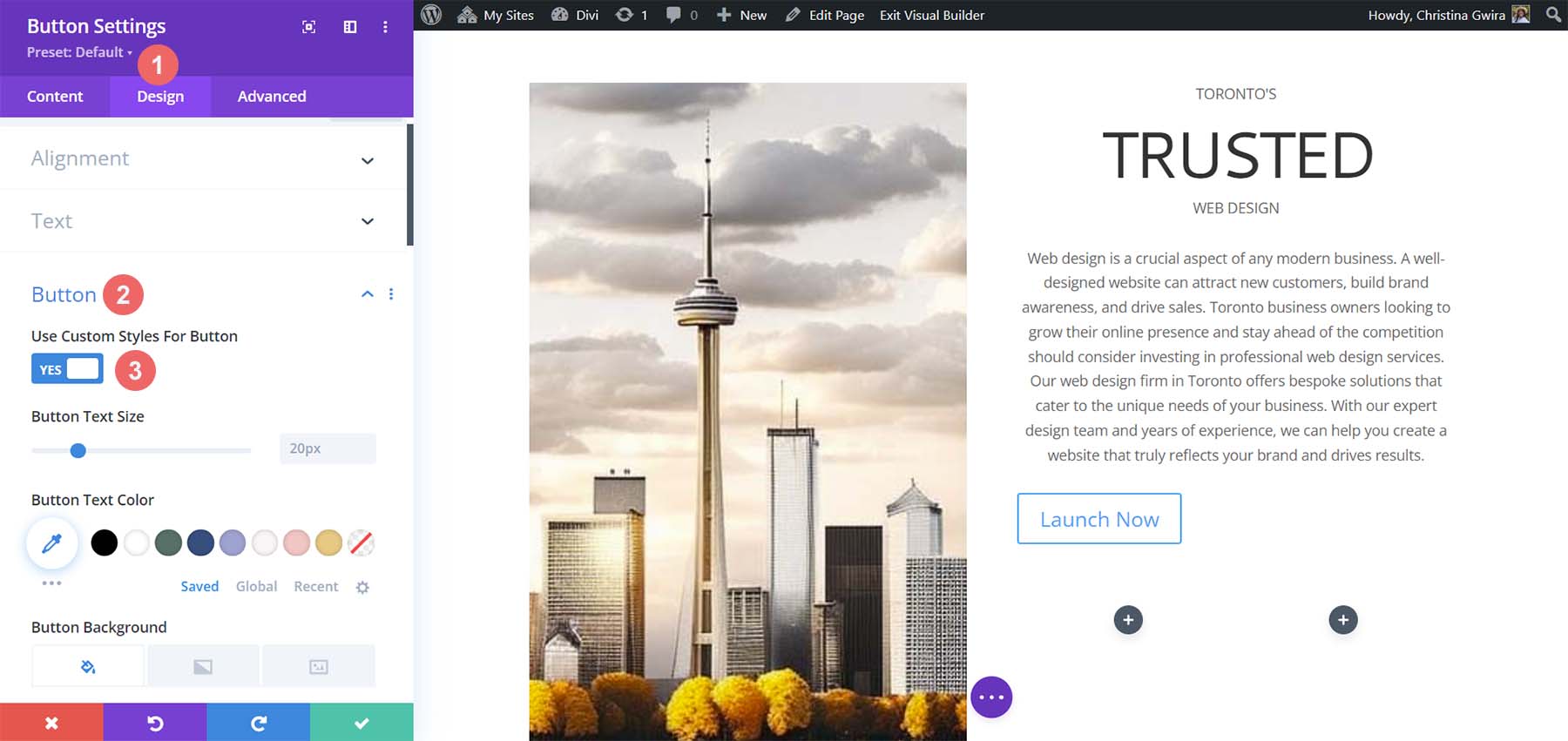
    Begin to set custom styles for button

    These are the settings that we’ll be using to style our button.

    Button Design Settings:

    • Button Text Size: 14px
    • Button Text Color: #ffffff
    • Button Background Color: #c1aa85
    • Button Border Width: 0px
    • Button Border Radius: 15px
    • Button Font Style: All Caps
    • Spacing:
      • Top and Bottom Padding: 10px
      • Left and Right Padding: 35px

    This is what our Button Module now looks like after using MidJourney to inspire our design using Divi’s tools.

    Button and Text final preview

    Creating Decorative Columns

    The final design piece of our layout is the decorative columns underneath our copy. To create these, we will need a Divider Module in each column. To begin, click on the gray plus icon and select the Divider Icon.

    Add divider module to column

    While in the Content tab of our Divider Module, de-select the Show Divider option under Visibility.

    Remove divider visibility

    Next, move to the Design tab. From there, click on the Spacing tab. Set the left and right padding to 100%. While it looks like there isn’t much happening with this module, all will be revealed when we add our colors and padding to our sections, rows, and columns. Click on the green check mark to save your changes.

    Add spacing to Divider Module

    Duplicate the Divider Module and move it into the column next to it.

    Duplicate Divider Module

    Adding Backgrounds, Spacing, and Padding

    Now that all our modules are styled and designed, we can add the finishing touches to our homepage layout. For reference, this is where we stand.

    Using ChatGPT and MidJourney with Divi, halway point

    A far cry from the design that MidJourney created for us. However, with a bit of color and spacing, we will be successful at using ChatGPT and MidJourney with Divi.

    To start, let’s click the gear icon of our Specialty section.

    Edit section background color

    Next, click the Background tab. Using our color picker, we deduced that the background color for our section will be #e7e6e4. So, set the background color for our section to #e7e6e4.

    Set section background color

    Now, let’s move to the Design tab. From here, click on the Sizing tab. Here are the settings that you’ll need in the Sizing tab.

    Sizing Design Settings:

    • Equalize Column Heights: Yes
    • Use Custom Gutter Width: Yes
    • Gutter Width: 1
    • Width: 100%
    • Inner Width: 100%
    • Inner Width Max: 100%

    Set section sizing settings

    Now, we move to the Spacing tab. We want all the padding and module within the section to be set to zero. Here are the settings that we’ll be using there.

    Spacing Design Settings:

    • Margin:
      • Top and Bottom: 0px
      • Left and Right: 0px
    • Padding:
      • Top and Bottom: 0px
      • Left and Right: 0px
    • Column 1 Padding:
      • Top and Bottom: 0px
      • Left and Right: 0px
    • Column 2 Padding:
      • Top and Bottom: 0px
      • Left and Right: 0px

    Set all spacing within the section to zero

    Once these settings are in place, remember to save them by clicking the green check mark. With these settings, we can already see that our design in Divi is spacing up to look very similar to that which MidJourney generated.

    Spacing, Backgrounds, and Padding for the Second Column

    We now move on to the second column of our section. We begin editing the first row within this column by clicking on the gear icon for the row.

    Edit the first row within the second column of our section

    While in this row, click on the Design tab. Next, we move to the Spacing tab. Set the padding for the top, bottom, left, and right to 50px. We finish off this section by saving our work.

    Add padding to row

    We move onto our final row, again, clicking on the gear icon to enter the row settings.

    Edit second row or second column

    For the two columns that are a part of this row, we will use the background colors #b0b2b1 and #bfb192 for the first and second columns respectively. Click on the gear icon next to each column.

    Edit columns in the row

    Then, set the background color to each column’s respective color.

    Set background color of each column

    With both columns styled, notice that we are getting closer to our end product. To tie it all together, we need to add some final spacing edits to the row where these decorative columns reside. To start, click on the Design tab of the row. Then, set the Custom Gutter Width to Yes. Set the width of the gutter to 1. Also, activate the Equalize Column Height option.

    Row sizing design settings

    Next, move to the Spacing tab and set the margin and padding to 0.

    Add margin and padding of 0 to row

    And with that, we’ve successfully used ChatGPT and MidJourney to create a homepage layout in Divi. Here’s our finished product!

    The results of using ChatGPT and MidJourney with Divi

    Closing Thoughts on Using ChatGPT and MidJourney with Divi

    Using ChatGPT and MidJourney with Divi can help you to brainstorm ideas for your web design faster. Using AI in web design does not necessarily mean the end of digital design as we know it. It is possible to allow AI into your workflow to help speed up processes. AI can also help to bring things to the forefront in terms or concepts that may not have been highlighted. With Divi, it is easy to re-create AI-generated layouts and designs. If you aren’t a natural writer, creating copy for your business or your client’s websites could be difficult. Tools like ChatGPT can help you cover a blind spot you may not have realized you had. Consider using ChatGPT and MidJourney with Divi for your next project.

    Have you started to use AI in your web design business? Would you consider using tools like ChatGPT or MidJourney in your design process? Let us know your thoughts in the comment section below. Let’s get a discussion going!

    The post How to Use AI to Create Amazing Web Design with Divi (Using ChatGPT & MidJourney) appeared first on Elegant Themes Blog.

  • 8 Best ChatGPT Alternatives in 2023 (Free and Paid)

    While ChatGPT is a highly advanced language model, there are other ChatGPT alternatives out there that offer similar and more advanced capabilities. Whether you are looking for AI writing software, virtual assistants, SEO tools, or code generators, there are many advanced AI-based alternatives to ChatGPT to help you achieve your goals. By exploring the options available, you can find the right solution for your business or personal needs.

    With this post, we’ll discover some of the best ChatGPT alternatives, giving you the knowledge to make an informed decision for choosing an AI-powered tool for your distinctive needs and tailored requirements.

    Why Use ChatGPT Alternatives?

    ChatGPT is an AI-based chatbot platform by OpenAI designed to interact with people, providing helpful responses to queries. It uses natural language processing (NLP) and machine learning algorithms to understand and respond to users. With ChatGPT, you can write code, plan an event, get homework help, and much more. However, if you’re looking for nuanced or specific uses of AI, ChatGPT may not be the right tool for you.

    As such, there are several alternatives to ChatGPT. These platforms often use similar NLP and machine learning to provide highly customized and engaging conversational experiences for users. But some extend beyond the limited capabilities of ChatGPT, offering more powerful generative AI solutions.

    Each platform has unique features and pricing plans, making it essential to research and compare different options to find the one that best fits your needs and budget. Ultimately, the suitable ChatGPT alternative for you will depend on factors such as the type of interactions you want to enable, the number of queries you may want to run, the kind of content you want to be generated, and your target audience.

    8 Best ChatGPT Alternatives

    If you’re looking for ChatGPT alternatives, the list of tools below should do the trick. They offer powerful AI solutions to fit a variety of needs. Hopefully, these will help you find the right one for your needs and budget.

    1. ChatSonic

    Chatsonic by WriteSonic, best ChatGPT alternative

    ChatSonic is a powerful feature by WriteSonic that is probably the best ChatGPT alternative. It is an AI-powered chatbot (and AI writing tool) that utilizes NLP and machine learning algorithms. Now powered by CPT-4, ChatSonic is able to understand context and nuances at a higher level than the free version of ChatGPT. Additionally, this platform provides users with suggestions for sentence structure, tone, and word choice to create high-quality content quickly and efficiently. Furthermore, Chatsonic can create digital artwork and use voice commands to send tasks to the chatbot.

    ChatSonic is a part of WriteSonic’s suite of AI writing tools. The platform offers many templates and tools to help users streamline their writing process and get started quickly. This can be an invaluable asset for businesses and individuals looking to improve their writing skills and create engaging content with ease.

    Chatsonic Dashboard

    ChatSonic’s library of templates empowers you and your writing skills. You can use the Content Rephrase tool to rehash your content in a different tone or style. Additionally, the library provides AI-generated article ideas that can help you through the brainstorming portion of writing. Furthermore, ChatSonic’s template library can also help you with your ad writing, eCommerce content, social media, and website copy.

    Key Features:

    • Offers a variety of templates for generating content quickly
    • Includes a built-in plagiarism checker to ensure content uniqueness
    • Provides suggestions for sentence structure, tone, and word choice
    • Has an easy-to-use interface for inputting ideas
    • Offers “language switching” to change content language in real-time
    • Integrates with other tools such as Google Docs and WordPress

    Best For:

    ChatSonic is best for those looking for a powerful ChatGPT alternative with a suit of AI writing tools. It extends the capabilities of ChatGPT in a variety of ways. If you write professional content like blog posts, articles, and technical documents, you will love ChatSonic.

    Pricing: Paid plans start at $13 per month

    Get ChatSonic

    2. Jasper AI

    Jasper AI, ChatGPT Alternative

    Jasper AI is a ChatGPT alternative writing software that allows businesses, brands, and individuals to create SEO-friendly content quickly and accurately. Those familiar with ChatGPT will particularly enjoy Jasper Chat, which allows you to interact with AI and generate content using natural dialog.  Jasper’s primary focus is helping those developing marketing pieces work effectively and accurately. You can use Jasper for ads, email, blogging, website content, social media, etc. Jasper comes with several AI-powered templates that you can use to start using their platform immediately.

    A unique feature of Jasper AI is its generative AI platform. This platform allows users to quickly generate content tailored to their needs without manually inputting all the information. Additionally, Jasper Recipes are premade sets of text commands that can cause writing in a particular format. This makes it easy for users to create engaging and persuasive content.

    Key Features of Jasper AI:

    • 50+ AI-powered templates
    • 20+ languages supported
    • Jasper Chat
    • Integrates with Sufer SEO to provide SEO-friendly content
    • Generates digital art
    • Create documents directly inside the platform
    • Share documents with team members for collaboration

    Jasper AI dashboard

    Jasper Workflows give you the power to create long-form content in one go. With Jasper Workflows, you can create your email marketing, social media campaign, and blog posts for multiple campaigns in one fell swoop. You can use Workflows to generate hashtags, create email campaigns, write blog posts, and generate Facebook ad ideas from one blank document.

    Best For:

    Jasper suits social media managers, copywriters, content publishers, marketers, bloggers, students, and small business owners.

    Pricing: Paid plans start at $29 per month

    Get Jasper AI

    3. Bard

    Bard AI interface

    Google has developed Bard, a highly anticipated AI chatbot that harnesses NLP and machine learning to provide real-time responses to a diverse range of inquiries. Unlike ChatGPT’s dark mode, Bard sports a clean, sleek design consistent with Google’s signature Material design.

    Along with a user-friendly interface, Bard offers numerous convenient features, including the ability to edit prior questions and restart conversations at any point. The chatbot can perform several functions, including generating text, translating languages, crafting creative content, and answering questions clearly and concisely. Additionally, Bard boasts of fast response times, making it an efficient tool for quickly obtaining information and insights on various topics.

    Bard is available to a cross-section of US and UK-based customers. At this time, there is a short waiting list for those who are interested in using the chatbot. But many gain access within a few days or weeks.

    Key Features of Bard:

    • Ability to clear your chat so you can ask a new question
    • Bard activity shows you previous requests
    • Ability to give thumbs-up or thumbs-down responses
    • “Google It” integration to search the web through the search engine
    • Has access to more updated information than ChatGPT
    • Alexa and Google Assistant integration

    Bard AI results interface

    Bard offers three alternative responses as suggested drafts at the top of the answer to your question, providing users with more options. In contrast, ChatGPT provides only one response to a user’s request. This makes Bard useful for those seeking multiple perspectives on a given topic.

    Best For:

    Bard can be used by anyone who seeks to engage with an AI chatbot for various purposes and is partial to Google’s interface design and suite of products.

    Pricing: Free

    Try Bard

    4. The New Bing (Bing AI)

    Bing AI interface

    The new Bing (also called Bing AI) is a conversational AI-powered search engine by Microsoft. Users can enter questions, and Bing will provide answers as found on the web. When you search with Bing, it will provide you with deeply accurate results that are personalized to your queries. It is also possible to use your voice to issue commands to Bing. The search engine reviews and summarizes search results from across the web, so you get what you seek without multiple and sometimes overwhelming answers.

    Bing AI works best with the Microsoft Edge browser and is also integrated with other Microsoft services and programs, such as Microsoft Office and Microsoft Teams, making it a valuable tool for businesses and individuals. If you need multilingual assistance in your search, Bing is helpful. The search engine can translate text and phrases and supports over 100 languages!

    Bing AI video results

    Since Bing is a search engine, it can provide your results in the form of videos and images. Whereas ChatGPT is strictly an AI language model and cannot browse the internet, with Bing AI, you can look up documents, videos, photos, and more that can be found on the world wide web.

    Key Features of Bing AI:

    • Improved search accuracy
    • Personalized recommendations based on user data
    • Voice search capabilities
    • Select conversation style: creative, balanced, and precise
    • Provides insights into user behavior and search trends for businesses
    • Can be used natively on Apple and Android devices

    Best For:

    If you use Microsoft Edge and you’re looking for more profound, personalized search results, using the new Bing as your search engine would benefit you.

    Pricing: Free

    Try Bing

    5. CoPilot

    ChatGPT alternative for coding, CoPilot

    CoPilot is an AI-powered code completion tool by Github that helps developers write code more efficiently and effectively. The platform uses the OpenAI Codex and advanced NLP and machine learning (ML) technologies to understand and analyze code, providing real-time suggestions and predictions to help developers write code faster and with fewer errors.

    CoPilot also autocompletes code based on contextual understanding, meaning it can try filling in the gaps in your work as you code. When a developer starts typing a code snippet, CoPilot can analyze the codebase and suggest relevant code completions that fit the current context. This can help to reduce errors and speed up the coding process significantly.

    Copilot, favorite editor

    CoPilot can easily be integrated into commonly used IDEs and editors as a plugin. Visual Studio Code, Visual Studio, JetBrains, and Neovim can all have CoPilot assist you as you type your code.

    Key Features of CoPilot:

    • AI-powered code completion
    • Supports many programming languages, including Python, JavaScript, Ruby, and more
    • Code context analysis
    • Integrates well with several popular IDEs and editors
    • Large codebase support
    • Realtime coding suggestions and predictions

    Best For:

    CoPilot can be helpful for developers of all levels of experience, from beginners to advanced coders.

    Pricing: Free trial with paid plans starting at $10 per month

    Get CoPilot

    6. Elsa Speak

    Elsa Speak ChatGPT alternative for language learning

    Elsa Speak is a useful mobile app for anyone looking to improve their English pronunciation and speaking skills, whether for personal or professional reasons. Available on both Apple and Android devices, with the help of AI, Elsa provides insight into users’ strengths and weaknesses when learning to speak English. The app uses advanced speech recognition technology to provide real-time feedback and corrections, helping users to identify and correct pronunciation errors.

    When it comes to language learning and translation, Elsa is the best ChatGPT alternative. Elsa’s lessons are designed to be engaging and interactive, focusing on practical speaking skills for everyday situations. The app covers various topics, from basic vocabulary and grammar to more advanced topics like business English and public speaking.

    Key Features of Elsa Speak:

    • 7,100+ lessons and 22 essential skills to master English
    • AI algorithms analyze users’ speech patterns to provide personalized learning
    • Detailed analysis of users speaking through assessments and test
    • Daily customized coaching program
    • Tools to track progress and achievements
    • User-friendly interface for easy learning

    Elsa Speaks ChatGPT alternative for language learning

    Elsa Speak has over 7,100 lessons organized into the 22 critical skills needed to master English pronunciation. New classes are added daily. This sets it apart from ChatGPT, as Elsa Speak is a fully featured language learning platform that can provide much-needed structure and real-time feedback when learning English. You can build a profile and track your progress.

    Best For:

    Non-native English speakers who want to improve their knowledge and use of the language would benefit from using this ChatGPT alternative for language learning.

    Pricing: Free, Paid plans from $11.99 per month

    Get Elsa Speak

    7. You.com (YouChat)

    You.com ChatGPT alternative for search

    YouChat is an AI-powered chatbot search assistant feature by You.com that allows users to query the internet through messaging. Users can search using natural language input and receive results in a conversational format. YouChat can understand the intent behind user queries and provide relevant answers. It uses a combination of language models and search algorithms to generate accurate and informative responses.

    Users can access YouChat through various platforms, including web and mobile. They can use it to perform multiple tasks, from finding information and making plans to purchasing products and services. Overall, YouChat offers a conversational and intuitive way for users to interact with the internet and get the necessary information.

    Key Features of You.com’s YouChat:

    • Uses AI to understand user queries and provide accurate, informative results
    • Learns from user input to provide more personalized results over time
    • Accepts natural language input via voice or text
    • Presents results in a conversational format
    • Cross-platform compatibility for web and mobile
    • Integration with messaging apps like Facebook Messenger and WhatsApp

    YouChat, You.com ChatGPT alternative

    YouChat can provide citations for its answers, making it useful for research and fact-checking. This is done by incorporating information from reputable sources and providing links to those sources in response to user queries. Additionally, YouChat provides snippets of information and key facts to answer user queries, making it fast and efficient.

    Best For:

    YouChat is best suited for anyone looking for a conversational and intuitive way to search the internet and get information. It can benefit individuals who prefer a natural language input to traditional search engines.

    Pricing: Free

    Visit You.com

    8. Poe by Quora

    Poe by Quora interface

    Poe by Quora is a unique ChatGPT alternative that gives users access to multiple AI chatbots using human language to generate answers to questions and other useful content. In addition to ChatGPT, users can access Sage, GTP-4, Claude, and Dragonfly (with limitations). This makes it useful for those looking to access various AI chatbots created by Open.ai and Anthropic.

    Key Features of Poe by Quora:

    • User-friendly interface
    • Has access to Sage, GPT-4, Claude+, Claude-instant, Dragonfly and ChatGPT
    • Provides grammar, spelling, tone, and style recommendations
    • Integrates with writing tools like Google Docs
    • Provides personalized feedback on writing
    • One-click citation for sources referenced

    Sage by Quora interface

    You can use Sage as a writing assistant that uses artificial intelligence to help users improve their writing skills. It provides suggestions for improving grammar, syntax, and overall writing style. Unlike ChatGPT, Sage can highlight words or phrases in your text that you can expand upon within your writing. By activating Sage, you can quickly identify and improve specific words, phrases, or sentences in your text that may require adjustments for greater clarity, conciseness, or relevance to your target audience. Once highlighted, Sage provides helpful suggestions to help you refine your writing and effectively communicate your message.

    Best For:
    Poe is best for those who want access to multiple AI chatbots in one place. It is a great ChatGPT alternative for those looking for a more advanced writing tool without the extra cost.

    Pricing: Free, Paid plans start at $13 per month

    Try Poe

    What are the best ChatGPT Alternatives?

    Tool Starting Price Free Version
    🥇 ChatSonic $13/mo ❌ (Trial) ChatSonic“>Visit
    🥈 Jasper AI $29/mo ❌ (Trial) Visit
    🥉 Bard AI N/A ✔️ Visit
    4 Bing N/A ✔️ Visit
    5 CoPilot $10/mo ❌ (Trial) Visit
    6 Elsa Speak $11.99/mo ✔️ Visit
    7 YouChat N/A ✔️ Visit
    8 Poe by Quora N/A ✔️ Visit

    If you are looking for the best overall alternative to ChatGPT, consider adding ChatSonic to your arsenal. It extends the limitations of ChatGPT and gives you access to a suite of AI Writing tools. For established content creators and marketing professionals, Jasper AI will help speed up your process while maintaining quality. And its Jasper Chat feature is a powerful conversational AI solution.

    Overall, AI and machine learning are rapidly becoming commonplace. It’s good to know there are alternatives and new ways of working with well-established platforms like ChatGPT. Do you know if we missed any ChatGPT alternatives that we should highlight? Let us know in the comments section down below!

    The post 8 Best ChatGPT Alternatives in 2023 (Free and Paid) appeared first on Elegant Themes Blog.

  • 8 Best AI Voice Generators in 2023 (Compared)

    AI voice generators use deep learning algorithms and neural networks to create a lifelike speech that sounds natural. They are an increasingly popular tool for generating voiceovers in various applications. These software programs convert written text into humanlike speech that can be customized to sound different ages, genders, and accents. With the ability to produce realistic voice simulations, they are frequently utilized in creating voiceovers for audiobooks, videos, and virtual assistants.

    In this post, we’ll examine several top AI voice generator tools, evaluating their overall performance, ease of use, and features.

    What are AI Voice Generators?

    Before diving into our review of the best AI voice generators, it’s important to understand what AI voice generators are and what they can do.

    AI voice generators are predominately online tools that use artificial intelligence and machine learning to create speech and audio that sounds natural and realistic. Along with other AI tools for writing and SEO, voice generators are becoming more popular in use in a variety of sections, including marketing, video production, and content creation as a whole. One of the main benefits of AI voice generators is their ability to create high-quality audio content like voiceovers quickly and cost-effectively.

    The best AI voice generators have a variety of voices that can work in numerous languages and accents, making them more accessible and localized for businesses and creators who have a global reach. They are quickly becoming powerful tools for any user who wants to add high-quality, natural-sound speech to their projects.

    The Best AI Voice Generators

    In this blog post, we will explore a range of AI voice generators currently available. We will focus on their features, the ease of use of their interfaces, and overall performance to help you make an informed decision when choosing a tool for your project.

    1. Play.ht

    Play.HT AI Voice Generator

    Play.ht is a powerful text-to-voice generator that provides an efficient way to create high-quality, professional-sounding audio from text. Whether you’re making podcasts, videos, or articles, Play.ht has a wide selection of synthetic voices. With its powerful online text-to-speech editor, you can easily convert your text to audio. You can then customize the audio with speech styles and pronunciations. In many cases, the text-to-speech synthesis is real-time, taking just a few minutes to convert input text into audio.

    Play.ht securely stores and manages your audio files. You can export them in MP3 and WAV formats and collaborate with team members. Moreover, Play.ht offers a podcasting solution, making it easy to distribute your audio content.

    It is also considered to be one of the best text-to-speech plugins for WordPress, allowing you to embed audio widgets on your website to increase accessibility and engagement, which is great for SEO.

    Play.HT Studio

    Key Features of Play.HT:

    • 907 AI Voices
    • Customize and use emotional speaking styles
    • Create conversation-like voiceovers by using different voices
    • Fine-tune rate, pitch, emphasis, and pauses
    • Save and re-use custom pronunciations
    • Listen and preview text before converting it to speech

    Best For:

    If you create video content online and want consistent quality with your voiceovers, Plat.ht is a good choice. Also, if you are a podcaster that wants to embed audio versions of your podcast or show notes online, Play.ht would work best for your needs.

    Pricing: Free, Paid plans start at $39 per month

    Get Play.ht

    2. Murf.AI

    Murf.AI AI Voice Generator

    Murf.AI is an AI speech generator that is powerful and versatile. It provides users with a vast selection of natural-sounding voices in many languages and accents. The quality of the audio produced makes it almost indistinguishable from human speech. Murf.AI’s voices can be edited with their pitch, speed, and tone tools. Because of this, the platform is suitable for a variety of uses, including videos, podcasts, and audiobooks, as well as in the creation of virtual assistants and chatbots.

    The online interface is easy-to-use and makes generating and downloading your voice recordings easy. You can adjust settings and preview your audio before generating your final audio file. Finally, Murf.AI is part of a suite of tools to help you create better video content. With Murf Studio, you can natively build explainer videos or presentations within their platform with voiceovers, background music, and more.

    Murf.AI voice generator

    Key Features of Murf.AI:

    • Clean and uncluttered interface
    • 120+ text-to-speech voices in 20+ languages
    • Filter voices by use case, tone, gender, age, and more
    • Import scripts, articles, and large documents
    • Library of templates to use as a starting point for projects
    • Integrates with Google Slides for voiceovers

    Best For:

    If you are a content creator, business owner, or individual who wants to use AI voice generation in your presentations and want an all-in-one suite of tools to help you create content and not just voice, Murf.AI Studio is for you. Murf.AI’s interface was the easiest to use out of all the generators mentioned.

    Pricing: Free, Paid plans start at $19 per month

    Get Murf.AI

    3. Listnr

    Listnr AI voice generator tool

    Listnr is an AI voice generator that claims to have some of the best AI voices available. The generator has a vast library of voices that you can use to create voiceovers for online courses, explainer videos, ads, and more. Listnr has the ability for you to record and edit your podcasts directly from their dashboard. Furthermore, you can edit the embed module provided by Listnr within their platform.

    Using Listnr, you can insert a link to an online article or blog post, and Listnr will quickly generate the accompanying audio version for it. You can change the voice style, pronunciations, speed, and audio output from their minimal and easy-to-navigate interface. Audio generated by Listnr can be shared on various social networks like Tiktok, Instagram, and YouTube, to name a few. For programmers, Listnr grants you access to their TTS API so that you can integrate their solution into your application.

    Listnr AI generator dashboard

    Key features of Listnr:

    • 600+ voices and 75+ different languages offered
    • Five different voice styles
    • State-of-the-art text-to-speech editor
    • Unlimited downloads, exports, and audio embeds on external websites
    • Speedy voice cloning service
    • Podcast hosting, recording, and editing

    Best for:

    New podcasters would benefit best from using Listnr as their podcast tools give ample support to new creators.

    Pricing: Paid plans start at $19 per month

    Get Listnr

    4. Speechify

    Speechify AI text reader

    Speechify creates high-quality and natural-sounding audio from written text. You can adjust voice speed, choose from different voices, select a variety of accents, and more. For those who prefer a visual component, the platform also can highlight text as it is being read.

    Speechify comes as an app for both Android and Apple devices, in addition to its web-based interface. A favorite among those in the education section, Speechify has the ability to import documents from various sources. On top of being able to read PDFs, emails, and eBooks, you can upload a photo with text to the platform and have it read back to you. All in all, Speechify is a versatile and powerful AI voice generation tool that helps make reading and listening to text easy and accessible.

    Speechify's dashboard

    Key Features of Speechify:

    • 50+ premium voices
    • Sophisticated user interface
    • Works on Chrome, as well as Apple and Android devices
    • Advanced highlighting, note-taking, and importing tools​
    • Change listening and playback speeds to increase productivity
    • Screenshot images with text to audio

    Best for:

    Students, educators, and users who need to digest and listen to a large volume of text will benefit from Speechify’s services.

    Pricing: Free, Paid plans start at $11.58 per month

    Get Speechify

    5. LOVO (Genny)

    Lovo.AI / Genny AI Voice Generator

    LOVO is one of the best AI voice generators for video producers and audio engineers looking for deep control of their audio files. It uses natural and human voices to create audio content in various languages and accents. The platform allows users to generate humanlike voiceovers and comes with a video editor that allows you to manage all your content from one dashboard. You can import articles, videos, images, and sounds into Lovo (or Genny) and create engaging content for audiobooks, social media, training videos, and more.

    Lovo’s platform has a library of third-party resources from sites like Pixabay. This lets you add creative commons and royalty-free images, video, and audio to your projects. You can create unlimited projects that you can download without restriction.

    Genny dashboard

    Key Features:

    • 400 voices in 100 languages
    • Can express 25+ emotions
    • Full-featured UI for video editing and audio production
    • Upload your videos, audio, documents, images, and slides
    • Add sound effects and background music
    • Adjust pitch, add emphasis to words, and customize pauses

    Best for:

    Video producers and content creators who want a complete platform to create quality video content. Audio engineers who wish to have granular control over their audio will enjoy using Lovo’s interface in their workflow.

    Pricing: Free, Paid plans start at $25 per month

    Get Lovo

    6. Synthesys

    Synthesys AI voice generator

    The Synthesys suite of products allows users to create AI audio content, video content, digital art, and even AI avatars. If you want to create video content but don’t want to get in front of the camera, consider using Synthesys. In addition to generating AI voices in over 140 languages with over 254 different voices, you can create AI-generated videos with their suite of digital avatars.

    Their AI generation interface is easy to use, and you can browse through their list of voice actors to see which one matches your project. You can merge audio clips, improve pronunciation, and add word replacements for special characters, words, or numbers. With the Human Synthesys Studio, you can create videos with human avatars. These avatars can be used in presentations, videos, and more within the Synthesys suite of tools.

    Synthesys AI voice generator dashboard

    Key Features of Synthesys:

    • Unlimited voiceover downloads
    • 35+ real human voices
    • 140 Languages & 374 Voices
    • Lip-synching AI video technology
    • Upload your own voice for voice cloning
    • Choose from a library of AI avatars or create custom avatars based on yourself

    Best for:

    Camera-shy users or those who want to create a virtual brand ambassador for their content will benefit from the lip-syncing technology and AI avatars that Synthesys provides on their platform.

    Pricing: Paid plans start at $35 per month

    Get Synthesys

    7. Resemble.AI

    Resemble AI Voice Cloning Platform

    If you’re interested in using AI for your voiceover projects but want to use your own voice, Resemble AI is right up your alley. The web-based platform gives you the tools to upload, type or speak and generate your very own AI voice, birthed from your natural voice. While it does come with a suite of voices for you to use, if you want a truly unique voice, Resemble AI can help you create that.

    You can create your own AI voice from text or your own speech. Their editor allows you to add inflections and emotions and can be converted into various languages, allowing you to create custom and localized audio for your next content piece.

    Resemble AI Voice Cloning

    And, if you want professional help, Resemble AI has a marketplace where you can hire voice actors and use their voices to generate custom voices for your next project.

    Key Features of Resemble.AI:

    • Cross-lingual support in 24+ languages
    • Unlimited projects, users, and audio downloads
    • Quickly clone your voice via the web
    • Generate and create custom AI voices from uploaded audio files
    • Build your own AI-generated voice from the marketplace of voice actors
    • Enhanced emotion control for generated voices

    Best for:

    Users who want a high-quality AI generator service focusing on custom voice cloning will appreciate Resemble AI.

    Pricing: Paid plans start at $0.006 per second

    Get Resemble.AI

    8. Clipchamp

    Clipchamp video editor

    Clipchamp is one of the best video creation tools with AI voice generation. The editor allows you to clip, merge, import, and record video clips from the comfort of your web browser. In addition to video editing, their text-to-speech feature allows you to enter text and turn it into AI-generated voiceovers for your video projects.

    After entering your text into the editor, you can fade it in, edit the speed, trim, and clip the audio generated. You can also generate captions from your voice to help create accessible videos for your viewers. Clipchamp is not a standalone AI voice-generating platform, so it does not have the most elaborate tools for editing and using AI voices. Nevertheless, the platform can benefit those who would like AI-generated voiceovers as an option for their videos.

    Clipchamp Video Editing Suite

    Key Features of Clipchamp:

    • 170 voices across 70 languages
    • Control voice pitch, style, speed, and voice
    • Speaker Coach feature gives real-time feedback to improve voiceovers
    • Easy-to-use online video editor
    • Hundreds of video templates to choose from
    • Generates real-time captions to create more accessible videos

    Best for:

    Content creators and users who want an easy-to-use video editor with the option to generate voiceovers and audio with AI will benefit from the ease of use of the Clipchamp platform.

    Pricing: Free, Paid plans start at $13 per month

    Get Clipchamp

    What is the Best AI Voice Generator?

    Tool Starting Price Free Option
    🥇 Play.ht $39/mo ✔️ Visit
    🥈 Murf.ai $19/mo ✔️ Visit
    🥉 Listnr $19/mo ❌ Visit
    4 Speechify $11.58/mo ✔️ Visit
    5 LOVO (Genny) $25/mo ✔️ Visit
    6 Synthesys $35/mo ❌ Visit
    7 Resemble.AI $0.006 per second ❌ Visit
    8 Clipchamp $13/mo ✔️ Visit

    As with most review lists, the choice is up to you to decide which AI voice generator is best for your next project. If you want a rock-solid AI voice generator, Play.ht is our top choice. With consistent quality voices, custom pronunciations, and a simple-to-understand interface, it is the best choice for those who want great AI voice generation every single time.

    If you create presentations extensively and use Google Slides, you will love the integration that comes built into Murf.ai. Upload your Slides to the platform and enjoy creating annotations for your work quickly and effectively.

    To wrap it up, for those interested in getting started with podcasting, Listner’s podcast hosting, editing, and recording platform will be of great help to you. Whether you want to use AI to generate your podcast or upload and edit your podcast episodes, Listnr makes it simple to incorporate AI voice generation into your content creation process.

    Were there any tools that you think we missed? Who would you say is the best AI voice generator tool? Let us know down below in the comments!

    The post 8 Best AI Voice Generators in 2023 (Compared) appeared first on Elegant Themes Blog.

  • 13 Best AI Writing Software in 2023 (Compared)

    AI writing software has exploded in popularity and effectiveness over the last few years. Coming out of its novelty stage, AI writing has become mainstream, with hundreds of capable software solutions flooding the market and innovating in a space that didn’t exist a few years ago.

    The AI writing assistant software market is expected to grow at a rate (CAGR) of 26.94% from 2023 to 2030, reaching a market size of $6.464 billion by 2030. – VerifiedMarketResearch.com

    AI writers and assistants are not going anywhere, so it is best to research early on and find the best tools disrupting the writing industry. We will walk you through the best AI writing software on the market and highlight what each is best suited for.

    How AI Can Help Your Writing Workflows

    AI writing platforms provide various solutions, which makes sense considering all the different types of writing and writing tasks people encounter daily. For instance:

    • There are copywriting AI tools to help your marketing strategy by generating high-quality content for marketing, product descriptions, and sales copy.
    • There are AI tools for rewriting existing content so your content remains fresh and relevant.
    • SEO AI tools can use Natural Language Processing (NPL) based on keywords to help create quality SEO content. All the best SEO tools already use AI to help with advanced SEO techniques.
    • Story and creative writing software quickly generate innovative ideas and help write illustrative content.
    • And there are proofreading AI tools (like Grammarly) that offer spelling and grammar checks and plagiarism checkers to ensure content is fit for publishing.

    Suppose you’re someone in charge of writing or editing multiple types of content (brand, ads, long-form, stories, PR). In that case, you’ll probably benefit from having various AI writing assistants. With that in mind, let’s explore some of the best.

    The Best AI Writing Tools

    AI can speed up virtually any writing task. By selecting the right one, you should easily be able to increase your editorial output (no matter what type of content you create). We’ve done some un-bias research to show you the best AI Writing Apps you can choose from today. Take a look at these AI writing tools that can eliminate writer’s block and the fear of the blank page.

    1. Rytr

    Rytr - Homepage April 2023

    Rytr is an AI-powered writing platform with one of the largest footprints of all AI writing tools on the market. It’s an all-purpose AI tool that is handy for any diversified marketer. It has copywriting frameworks, templates for blog writing, and use cases for creating product descriptions. You will never write quite the same again after using this.

    Rytr uses AI technology to create high-quality content quickly and easily. Users can generate content for various applications and industries, including marketing, eCommerce, and more. The easy-to-use interface makes it easy to start, even for users without previous AI writing (or writing!) experience. They’ve also launched Rytr Chat, which allows human writers to write prompt-based commands to generate specific content that can be easily added to its long-form editor.

    Key Features of Rytr:

    • AI-generated content with support for over 30 languages
    • 40+ templates and use cases that eliminate the need for writing detailed prompts
    • Easy-to-use interface with a long-form editor and dark mode
    • Chrome extension that brings the power of AI to your favorite apps like the WordPress editor and emails
    • Semrush integration to get accurate keyword research suggestions when using Blog Idea and Blog Outline templates

    Best For:

    With over 5.5 million writers using Rytr, it’s hard to imagine someone who wouldn’t benefit from its AI writing platform. If you’ve never used an AI tool, this is one to start with—free plans are available, and it has the cheapest paid plan out of all the tools on this list. It’s the perfect tool for anyone looking to have AI improve their writing productivity. Whether you’re a freelancer, small business owner, or part of a larger team, Rytr is an essential tool for any writer looking to boost their efficiency and streamline their workflow.

    Pricing: Free plan available with its starter plan at as little as $9/mo!

    Get Rytr

    2. Jasper

    Jasper is another wildly popular AI writing platform (originally called Jarvis). It is home to some of the most powerful AI tools for writing long-format content, SEO content, blog posts, sales emails, and more. It also provides training, courses, and conferences around its feature set that get a lot of traction among AI users. Jasper is probably among the more respected brands known for constantly iterating on their world-class AI solutions.

    Jasper’s built for the more extensive operations among us. Generative content produced by Jasper is high quality, with plenty of tools that make the whole platform sparkle.

    Key Features of Jasper:

    • Integrates with other powerful tools like Surfer SEO, Chrome extension, and Grammarly
    • Incredible documentation, support, and training made by the company
    • AI-generated art included with each plan
    • “Boss Mode” and business plans for greater output and collaboration across teams
    • It has access to the internet, so it can write on news that happened this morning

    Best For:

    Jasper is best for businesses that need to automate various internal functions (like marketing, sales, support, and more). It’s relatively expensive, but you pay for its quality and editing workflow.

    Pricing: Starting at $59/mo with a limited free trial

    Get Jasper

    3. Sudowrite

    Sudowrite - Homepage April 2023

    Sudowrite is an AI writing software built exclusively for stories and all content that uses even a little storytelling. It does not have the recipes/templates that some other platforms have but instead focuses more on a writing workflow than the parts and pieces of a particular work.

    Sudowrite gives you a draft, suggestions, editing advice, and more tailored toward creative and descriptive writing. While most other AI writing software focuses on business use cases and blogs, Sudowrite goes against the grain and offers something truly unique.

    Key Features of Sudowrite:

    • “First draft” takes a simple prompt and turns it into 1000 words
    • It gives auto-complete, styled suggestions in a toolbar that are easy to add and relevant to your context
    • Use “Describe” to add more captivating language and “Expand” that adds natural content to slow the pace of sections of writing

    Best For:

    Sudowrite is best for creative professionals in branding and PR. It is also meant for storytellers of all kinds (poems, books, scripts) and delivers.

    Pricing: Starting at $19/mo for 30,000 words

    Get Sudowrite

    4. WordHero

    Wordhero - Homepage April 2023

    WordHero is another all-purpose AI writing tool particularly suited for business purposes. Launching on AppSumo with a lifetime deal with unlimited words, it’s quickly come into its own.

    WordHero best suits on-the-fly content generation that you’d paste into a Word document, Slack channel, or marketing campaign. Its long-form editor works well but could benefit from better UX and file organization.

    There’s a dedicated and loyal user base that uses WordHero and constantly suggests improvements that the team takes into consideration. So it is likely the platform will continue to improve.

    Key Features of WordHero:

    • Template-based AI outputs that can be attached to its long-form editor or give on-the-spot outputs
    • Better than Rytr at generating blog introductions and conclusions
    • Generate unlimited content (subject to their fair use policy)
    • It supports over a hundred languages tying it for first on our list

    Best For:

    Like Rytr and others on this list, WordHero is best for those in business or marketing. It creates excellent blog section content and does a good job with copywriting frameworks and product descriptions. It does not currently have advanced integrations, so it’s ideal if this is the only AI writing tool you expect to use in your workflow.

    Pricing: Starting at $49/mo

    Get WordHero

    5. Article Forge

    ArticleForge - Homepage April 2023

    Article Forge is an AI writing software built for long-form content creation. Put in a keyword, select some basic parameters like length, and Article Forge will forge ahead with a fresh piece of generated content.

    Article Forge’s power comes from its ability to create a lot of content simultaneously. That is also its sticking point which places more responsibility on humans to read, edit, and substantiate what the AI-generated. However, it’s a refreshing change of pace from other AI tools that build content sections at a time until you’re done.

    Key Features of Article Forge:

    • Generate high-quality, long-form content with a single click
    • Built-in SEO optimization
    • Ability to add negative or excluded topics that Article Forge will attempt not to use
    • Automatically creates content and content headings that naturally flow
    • Content guaranteed to pass copy-scape

    Best For:

    Article Forge is best for more extensive content operations that want to increase their editorial output dramatically. Great for creating supporting content (clusters) in quick succession. It still takes work to edit and fact-check the output correctly. It also scores high marks on all major review sites, which tells us they are doing something right.

    Pricing: Starting as low as $27/mo

    Get Article Forge

    6. ClosersCopy

    Closerscopy - Homepage April 2023

    ClosersCopy is one of the more celebrated general-purpose and marketing AI content writers on the market. It specializes in sales and marketing copy but is also very good for blog content using its long-form editor.

    ClosersCopy’s ability to create and share frameworks means that there are even more possibilities and use cases for using AI to write niche content. Frameworks specially train ClosersCopy AI to do a particular writing task (such as AIDA copywriting or creating a product description). Most AI writing software limits users to the frameworks (often called use cases or recipes) to what is officially released by the platform. ClosersCopy gives users control over sharing their best frameworks that others can benefit from. It has put together its AI tools into a unique pricing model that many will find compelling.

    Key Features of ClosersCopy:

    • 700+ Frameworks (includes community-submitted Frameworks)
    • NPL-guided SEO insights inside the text editor (pulls from live search results)
    • Workflows string together ClosersCopy Frameworks into one generative output (ex., Blog Title -> Blog Outline -> Blog Introduction -> Blog Conclusion, all in a single Workflow)

    Best For:

    ClosersCopy is best for salespeople and marketers that need high-quality sales copy. Blog writers and affiliate marketers also benefit significantly from this software. For those looking for a more affordable option, Rytr has fewer features but a much cheaper rate.

    Pricing: Starting at $49.99/mo

    Get ClosersCopy

    7. Copy.ai

    Copy.ai - Homepage April 2023

    Copy.ai is a prevalent (over 6 million users) AI content generator specially tailored to writing AI blog content, social media posts, and email marketing copy.

    It offers innovative integrations and tools for sales and marketing professionals. This can dramatically increase an individual’s or team’s output with the help of AI for specific tasks. Its API for Linkedin, for example, can pull prospect info from a CRM or their Linkedin profile to help create a tailored cold-outreach message that is personalized and written with copywriting principles.

    Key Features of Copy.ai:

    • API connects with CRMs, LinkedIn, and other sales/marketing tools for uber-effective cold outreach
    • Chat by Copy.ai is a ChatGPT-like chat interface that is optimized for sales and marketing tasks and includes a prompt library
    • Pricing bases output on the number of AI generations instead of word or character count and gives you multiple generations per output, making it stand out from many AI writers

    Best For:

    Copy.ai is best for salespeople and marketers whether or not they work on a team. Teams stand to benefit from its Pro plan, which includes unlimited words, unlimited projects, and up to five user seats.

    Pricing: Free plan with Pro starting at $49/mo

    Get Copy.ai

    8. Frase.io

    Frase - Homepage April 2023

    Frase.io is a powerful AI writing tool that can help you with all aspects of your content creation process. It can help you create high-quality content that will engage and inform your readers, from researching topics to writing and editing your content. Whether you’re a blogger, a content marketer, or just someone who wants to write better content, Frase.io can help you take your content to the next level.

    With Frase’s advanced AI technology, businesses can create high-quality content quickly and easily. Additionally, the advanced SEO tools ensure that the content is optimized for search engines. Frase analyzes published content and provides actionable, AI-generated next steps that save valuable time.

    Key Features of Frase:

    • Create content briefs from SERP research in just “6 seconds” (and create content brief templates for the types of content you produce most)
    • The long-form editor that lets you write content or have AI take over at any point
    • Optimize your content for SEO using topic model NPL
    • Track the performance of content using a Google Search Console (GSC) integration to find content decay (and fix it before it becomes a problem)

    Best For:

    Frase.io is ideal for content marketers or teams who need their content to rank well in organic search. With GSC integration included in every plan, Frase is particularly useful for large content sites that rely on content decay warnings without manually checking each post every quarter.

    Pricing: Starts at $14.99/mo with Pro add-on for any plan being $35/mo extra

    Get Frase

    9. Writesonic

    Writesonic - Homepage April 2023

    Writesonic is an AI writing software that packs a lot of features into its platform. Its free plan gives 10,000-word access to its optimized GPT 3.5 platform, while its paid plans can be powered by GPT 4. Writesonic also has innovative products like Photosonic and ChatSonic that bring even more AI-powered tools to its customers.

    Writesonic’s advanced AI technology allows users to generate high-quality written content quickly and easily. The platform also includes various advanced editing tools, enabling users to fine-tune their content perfectly.

    Key Features of Writesonic:

    • AI copywriting tools for creating blog posts, landing pages, and more with 100+ templates
    • Collaborative editor (SonicEditor) that lets multiple team members jump in and spruce up a text
    • The landing page copy generator can also code out static landing pages along with the copy
    • Integrates with Surfer SEO and Zapier
    • All plans have access to ChatSonic, a GPT-4-styled chat solution with access to current trending topics (not just GPT-4 training data)

    Best For:

    Writesonic is a comprehensive platform for marketers and content writers with AI tools for several writing tasks. Its fast pace of innovation means that any user needing generative AI content, images, or chat interfaces would likely benefit from the platform. It’s one of the better all-purpose AI writing websites with a free plan.

    Pricing: Free plan with paid plans starting at $19/mo (30% discount for students and non-profits)

    Get Writesonic

    10. Surfer SEO

    Surfer SEO - Homepage April 2023

    Surfer SEO is the premier writing AI that can help you rank #1 on Google. It does this by analyzing the top-ranking pages for your target keywords and then providing you with suggestions on how to optimize your content. This can save you a lot of time and effort and help you improve your chances of ranking higher in search engine results pages (SERPs). You may have noticed how many other AI writers integrate directly with Surfer—that’s a testament to what Surfer SEO can do for you and your websites.

    Surfer SEO’s advanced AI technology allows businesses to optimize their online content for search engines quickly and easily. The platform includes various advanced SEO analysis tools, content optimization recommendations, and competitor analysis tools to help businesses improve their online presence.

    Key Features of Surfer SEO:

    • Create a content brief and outline based on already top-ranking SERP results
    • It gives you a content score based on SERP analysis, natural language processing, word count, # of images, and other key ranking factors
    • Plagiarism checker helps your site avoid ranking penalties that can sink the party before you arrive
    • Integrates with many top AI Writing Software (like Jasper, Rytr, and Writesonic) as well as Google Docs, Semrush, and WordPress
    • Grow Flow connects with GSC and acts as a content manager—handing out tasks and suggestions so your content quietly surfs to the top of the SERPs

    Best For:

    Surfer SEO, right now, is the go-to AI and NPL tool for SEO content writing. Likely, you want to pair Surfer with an advanced AI writer like Jasper or Rytr. Surfer SEO is the perfect companion for these fantastic tools and helps keep your AI content in the good graces of Google and other search engines.

    Pricing: $59/mo

    Get SurferSEO

    11. Scalenut

    Scalenut - Homepage April 2023

    Scalenut is another world-class AI writing assistance created explicitly for SEO and content marketing. It does this by analyzing the top-ranking pages for your target keywords and then providing you with suggestions on how to optimize your content. It can do this for one article or an entire cluster for a full-fledged content strategy that builds topical authority.

    Using Scalenut, businesses can automate their entire content lifecycle to streamline planning, keyword research, writing, and optimization. This is great for reducing the workload on human staff and improving overall efficiency while not replacing your team.

    Key Features of Scalenut:

    • Builds content strategies and keyword clusters using fast AI
    • Analyzes audience search intent and competitor articles in SERPs to find the best plan for each piece
    • AI-guided writing with real-time optimization, SERP stats, and content scoring
    • 40+ Marketing task templates for creating product descriptions to newsletter emails

    Best For:

    Scalenut is there for businesses looking to rapidly create content at scale to build topical authority and start winning in the SERPs. Lower pricing for SEO content than Surfer SEO, though with fewer integrations. It can be used by itself since it has plenty of AI content creation capabilities.

    Pricing: Essential plan starting at $39/mo for 100,000 AI-generated words

    Get Scalenut

    12. INK

    INKforAll - Homepage April 2023

    INK is an AI writing tool that can help you create high-quality content in minutes. Any paid plan allows the generation of unlimited words and images, making it an exciting platform to try out.

    INK’s Content Sheild adds a lot of protection so that you can use AI responsibly without wreaking havoc by garnering penalties on your content. It scans unlimited content, finds plagiarism, and detects if common technologies will likely mark the content as written by AI. Performing these checks gives you even more peace of mind as you schedule or hit publish on your Ink-guided content.

    Key Features of INK:

    • Content Sheild protects website reputations by making sure content is plagiarism free and likely to pass “Written by AI” detection
    • Create AI-generated images (512×512) based on text-based prompts to create visuals that match your content for less than stock image prices
    • Keyword research pulls search volume, trend, and CPC data into the platform to help you create data-backed clusters and individual pages

    Best For:

    INK is best for individuals and businesses needing unlimited content generation through 130+ marketing templates, a long-form editor, or fast paraphrasing. It’s also of great value with the addition of data-informed SEO tools and a plagiarism detector, and it generates AI images and written content.

    Pricing: Starting at $49/mo

    Get INK

    13. WriterZen

    WriterZen - Homepage April 2023

    WriterZen is a powerful AI-based SEO writing tool that stands out from many other platforms because of its data-based approach. Anyone creating SEO content for websites, landing pages, and authoritative blogs should consider adding WriterZen to their workflow.

    WriterZen’s AI-informed workflow helps you create content that enables you to score valuable organic traffic. Based on SERP data, WriterZen scores keywords on its “Keyword Golden Score” metric, which shows you the best ratio of keyword competition, traffic, CPC, and ranking difficulty. SEO-informed content gets a degree easier with WriterZen.

    Key Features of WriterZen:

    • Finds high-traffic/low-competition keywords to write content for
    • Create content outlines based on other top search results using advanced NPL analysis
    • Finds relevant keyword clusters to use from Google Keyword data and Google Suggest Database
    • Plagiarism and originality detection so you can be confident in the content you push to your sites

    Best For:

    WriterZen is built for content teams and websites pushing out a lot of SEO-optimized content. Bringing SEO tools into a writing platform speeds up content creation. It reduces the work of SEO analysis of content (though it doesn’t replace the need for skilled search specialists and SEO strategies).

    Pricing: Starting at $23/mo

    Get WriterZen

    What is the Best AI Writing Software?

    AI writing tools are rapidly evolving, with many tools specializing in specific purposes.

    Tool Languages Templates Models Starting Price Free Plan Updated 3/31/23
    1 Rytr 30+ 40+, Long form editor GPT 3.5 + Proprietary $9/mo ✔️ Yes Visit
    2 Jasper 29+ 50+, Long form editor GPT 3.5** + Others $59/mo ❌ Trial Visit
    3 SudoWrite 30+ Long form editor GPT 3 + Proprietary $19/mo ❌ Trial Visit
    4 WordHero 100+ 70+, Long form editor GPT 3.5** + Proprietary $89/mo ❌ Trial Visit
    5 Article Forge 20 Long form editor Proprietary Only $27/mo ❌ Trial Visit
    6 ClosersCopy 100+ 50+, Long form editor Proprietary + GPT 3.5 $49.99/mo ❌ Trial Visit
    7 Copy.ai 27+ 90+, Long form editor GPT 3* $49/mo ✔️ Yes Visit
    8 Frase 19 13, Long form editor Proprietary Only $14.99/mo ❌ Trial Visit
    9 Writesonic 24 100+, Long form editor GPT 3.5 + Proprietary + GPT 4* $19/mo ✔️ Yes Visit
    10 Surfer SEO 4 Long form editor, SEO Analyzer Surfer NLP $59/mo ❌ Trial Visit
    11 Scalenut English 40+, Long form editor, SEO Analyzer GPT 3 + Scalenut NPL $39/mo ❌ Trial Visit
    12 INK 20+ 130+, Long form editor GPT 3 $49/mo ❌ Trial Visit
    13 WriterZen 46 60+, Long form editor, SEO Analyzer GPT 3 $23/mo ❌ Trial Visit
    *GPT 4 only used in certain use-cases
    **GPT 4 planned usage

    Our Recommendations

    Rytr is an excellent starting point for those looking for a budget-friendly, all-purpose AI writer. Jasper (with Boss Mode) and Article Forge are worth considering if you need to produce long-format writing. For creative writing, Sudowrite is the standout tool. We’d also be remiss if we didn’t say that Surfer SEO is one of the best companions for an AI writer, and if your writer has an integration, definitely consider getting it.

    Are you looking for more amazing suggestions about the best business and marketing tools? Please take a look at all of our guides on the best software and tools.

    Frequently Asked Questions (FAQs)

    Before we wrap up, let’s answer some of your most commonly asked questions regarding AI writing software. Did we miss one? Leave a comment below and we’ll reply!

    What is the best AI Writing Tool?

    Rytr is the ultimate AI writing tool, equipped with one of the largest AI writing footprints on the market. It provides a wide range of features, including copywriting frameworks, templates, and support for over 30 languages. With its easy-to-use interface, long-form editor, and dark mode, Rytr makes it effortless to generate high-quality content. It’s perfect for anyone who wants to streamline their writing process, and its affordable pricing makes it an accessible tool for everyone. Try Rytr today and experience a new level of writing efficiency.

    What is the free best AI writing tool?

    Writesonic is the best free AI writing tool, allowing 10,000 free words a month on their free plan. Rytr also offers a free plan with 10,000 characters of free generation per month. Rytr offers the lowest-priced program of all referenced AI writing software.

    What is the best long-form AI writing assistant?

    Jasper (with Boss Mode) and Article Forge are the best long-format AI article writers on the market.

    Featured Image via BestForBest / shutterstock.com

    The post 13 Best AI Writing Software in 2023 (Compared) appeared first on Elegant Themes Blog.

  • Navigating the New Era of AI-Assisted Code Generation in WordPress

    The world is learning new ways of moving faster with the help of AI, as the increased availability of the technology is poised to transform the way humans work. Generitive AI is decades old but recent advances and new tools like DALL-E (launched in January 2021) have made AI more accessible to the public.

    When ChatGPT arrived in November 2022, it sparked an explosion of tools built to extend its capabilities to nearly every aspect of work. Conversational AI tools can now handle a myriad of mundane tasks like updating your resume, reading and summarizing PDFs, and creating slides for presentations. Yesterday Google announced it is testing Bard, its AI chatbot rival to ChatGPT and Bing AI. In the fast-moving world of companies innovating with AI, GitHub also announced Copilot X, which is powered by GPT-4 and adds Copilot to pull requests, docs, and the command line and introduces chat and voice features for Copilot.

    WordPress plugin developers are adopting AI-powered tech and building it into their products, such as RankMath’s AI-generated suggestions for creating SEO-friendly content, WordPress.com’s experimental blocks for AI-generated images and content, and a Setary’s plugin that uses AI to write and bulk edit WooCommerce product descriptions. The wpfrontpage site is tracking these plugins but WordPress.org also lists dozens of plugins with AI, many of them created to write content or generate images.

    In addition to adding AI to plugins, developers have attempted to have ChatGPT build plugins for them, with varying degrees of success:

    So far developers report having more success with ChatGPT than Bard. In some cases the creation process is incomplete and requires some expertise to ensure the plugin will work, but it’s also opening up the world of plugin development to those who would not be able to create one without hiring a developer.

    WordPress developers who want to share their AI-assisted creations with the community have also started submitting them to WordPress.org.

    After receiving a string of violations, WordPress’ Plugin Team is warning developers that code submitted to the official directory must be GPL compatible.

    “There is no guideline AGAINST using generated code,” Plugin Review Team rep Mika Epstein said.

    “You’re welcome to use whatever tool you want to build plugins. That said, you are 100% responsible for that code if you chose to host it here…

    “But the important bit here is that it means if ChatGPT, for example, built your plugin, you have to verify that all the code used is GPL compatible. Just like you are expected to validate licenses on libraries and code-snippets, everything in your plugin has to be GPL compatible. Should we determine that your code is a copy of someone else’s or includes code from non-GPL plugins, your submission will be rejected and any live plugins will be closed.”

    Epstein cited an example where a developer built a “scroll to top” plugin with code that was copied from another, existing plugin hosted on WordPress.org. It was submitted five times and rejected every time.

    “Yes it’s fine to fork code,” Epstein said. “You have to credit them, however, and that’s something those AIs have been pretty bad at doing.” 

    Commenters noted that autocomplete in modern IDEs workin in a similar way, as well as snippets. These types of tools can enhance productivity but prospective plugin developers who may not be as informed about software licensing, should stay away from wholesale copying another’s work without crediting them. This may require doing some extra research on the code that AI spits out.

    In this new era of AI-assisted creation, we have essentially hitched our wagon to a star, as Ralph Waldo Emerson described in his essay on Civilization in 1870:

    Now that is the wisdom of a man, in every instance of his labor, to hitch his wagon to a star,’ and see his chore done by the gods themselves. That is the way we are strong, by borrowing the might of the elements. The forces of steam, gravity, galvanism, light, magnets, wind, fire, serve us day by day and cost us nothing.

    Ralph Waldo Emerson, Civilization

    That decade brought humanity inventions like the phonograph, telephone, and the incandescent light bulb, followed by the automobile in the next decade. Emerson’s essay explores man’s relationship to technology where principles—”justice, love, freedom, knowledge, utility”— are the guiding light and accelerant of technology’s impact.

    The GPL is one of those principles for the WordPress community, which has enabled its uncommon growth and its wildly successful ecosystem. There are still a lot of grey areas when it comes to licensing and the code generated by AI. Developers would do well to use AI-generated code for inspiration and give credit where they can.

    Web developer Mark Praschan created his first plugin for WordPress.org using ChatGPT. He used the free version, gave it a few prompts describing what he wanted it to do, and ChatGPT produced a functional plugin.

    NorthStar allows users to display a message in the WordPress admin bar with settings to customize it along with the text and background colors.

    “The first version worked great,” Praschan said. “I made a few small aesthetic improvements to the settings page and the display of the message, but we were already 95% of the way there!”

    Praschan also had ChatGPT design an ASCII Art logo for the plugin. It required a few back-and-forth prompts but took just a few minutes before it was ready to be copied and pasted into Photoshop.

    The plugin did not pass the code review on the first try for two reasons that Praschan shared on Twitter:

    • Issue # 1: Variables and options must be escaped when echo’d. There were 2 instances of not “escaping late”
    • Issue # 2: Generic function/class/define/namespace names. One function was missing the “northstar_” prefix.

    “How did I fix it? I made ChatGPT do it, of course,” Praschan said. “I copy/pasted the problems and a few snippets of my code and it spat out the fixed code.”

    There are more of these plugins coming – where a person need only dream up the idea and prompt their chosen AI tool for the code. These will more than likely be simple plugins for the time being, but it’s not too early to establish some best practices for using code generators. WordPress is navigating new territory where anyone can create a plugin with a dash of creative prompts and very little code experience.