EDITS.WS

Tag: Best WordPress Plugins

  • 7 Best Timeline Plugins for WordPress in 2023

    Effective storytelling is a key part of building a successful brand identity. However, to make the historical roadmap of your business compelling, it helps to present it in a visually engaging manner. This is why we recommend using a timeline to showcase milestones, achievements, and other important dates for your organization.

    WordPress timeline plugins make adding a timeline of events or milestones to your site effortless. In this post, we’ll discuss what these tools are and explore their benefits. Then we’ll introduce you to seven of the best timeline plugins for WordPress.

    Let’s get started!

    An Introduction to Timelines for WordPress Websites

    As a business, you must be able to build trust and credibility with your audience. One of the most powerful ways to do that is through engaging storytelling. Letting customers know about where you started and how your brand came to be is an effective way to personalize your company and demonstrate your values.

    Incorporating timelines on your website can help with this. In a nutshell, these are visual graphics that display a map of business-related milestones or content, typically in chronological order.

    There are various types of timelines that you can add to your website. For example, one of the most popular options is a “dynamic content timeline”. Typically, this is used to arrange your blog posts in chronological order (either ascending or descending). However, you can also organize them by category.

    A content timeline example

    The purpose of this is to provide your users with a better way of browsing your content and locating content that was published at a certain time. Another benefit is that you can add an interactive element to the otherwise basic and bland list of posts.

    A second popular type is “static announcement timelines”, which are used to display company history and important events. For instance, you might use one on your About Us page to showcase the milestones your business has reached over the years.

    A static timeline example

    Adding either type of timeline to your site becomes significantly easier when you’re armed with one of the best timeline plugins for WordPress. There are both free and premium options available, with features and functionalities ranging from basic to advanced.

    7 Best Timeline Plugins for WordPress

    The type of timeline plugin you pick for your WordPress site will depend on a variety of factors. For example, you’ll need to consider what kinds of timelines you’d like to create, as well as how much you’re willing to pay.

    In the list that follows, we’ve considered features, ratings and reviews, support, ease of use, and more. The result is seven of the best timeline plugins you can find for your WordPress website. At least one of these plugins should be a suitable option for your site, regardless of the type of timeline you want to create or your experience level.

    1. Timeline and History Slider

    The Timeline and History Slider plugin for WordPress

    True to its name, the Timeline and History Slider plugin for WordPress lets you create a timeline slider to organize your blog posts by date. This freemium tool makes building and showcasing vertical timelines on your site quick and easy.

    With this plugin, you can add a title, featured image, and custom content to each item:

    The Timeline and History Slider plugin in action

    Also, the easy-to-use interface lets you navigate the timeline with your keyboard’s arrow keys.

    As with several other options we’ve looked at, there is both a free and paid version available. The free plugin ships with all the standard features you need to create a unique timeline. You can add it anywhere on your site via a shortcode.

    Alternatively, if you don’t mind paying a bit of money, you can invest in the premium version. However, it’s important to note that this tool is included as part of an “Essential Plugins” bundle, so it will be notably more expensive than other premium plugins on this list.

    Our favorite aspect of this handy plugin is that it comes with Divi Page Builder support. This means you can seamlessly integrate it with your posts and pages, and ensure an aesthetically-pleasing design without any coding.

    Key Features for Timeline and History Slider:

    • Over a dozen beautiful designs
    • Shortcode options
    • Support for timeline touch-scrolling navigation
    • Vertical and horizontal timeline options
    • Fully responsive
    • Category management
    • Divi Page Builder native support

    Timeline and History Slider is for you if…

    …You want access to a lot of customization options, or you’re a Divi user.

    Pricing: Free, with a premium version starting at $169 per year.

    Get Timeline and History Slider

    2. Essential Add-Ons for Elementor

    Essential Addons for Elementor

    Essential Addons for Elementor gives you a variety of styling options for the more than 90 elements available. One of which is the Post Timeline widget, which allows you to showcase your site’s posts beautifully.

    With the “Post Timeline” element, you can customize the timeline to your liking by choosing the layout, number of posts, pages, or custom links to display, sorting options, timeline position, and more. You can also customize the style of the timeline by changing the colors, typography, and spacing.

    essential addons layout

    Key Features for Essential Add-Ons for Elementor:

    • 50+ design elements with the free version
    • Unlimited styling options
    • Two vertical timeline layouts
    • Excellent Support through WP Developer

    Essential Add-Ons for Elementor is for you if…

    …You use Elementor and you’re looking for elements to display timelines on your website. Essential Addons has nearly endless styling options, as well as other blocks to create an eye-catching layout.

    Pricing: Free, with premium licenses starting at $49.97 per year.

    Get Essential Add-Ons for Elementor

    3. Qi Blocks for Gutenberg

    Qi Blocks for Gutenberg

    Qi Blocks for Gutenberg is a collection of 48 free blocks created specifically for use with Gutenberg. One of the blocks – The Timeline Showcase block – is functional on any page or post, as well as templates and template parts through full site editing.

    timeline block settings

    Styling is impressive with Qi Blocks. The Timeline Showcase block offers four layout options for both horizontal and vertical orientations. Furthermore, you can control the animation effects, number of columns, and adjust how the block appears on various mobile devices. However, the best feature of this block is the abundance of style settings. With this block, you can customize the appearance of both the images and text by changing the font color, family, and weight. Additionally, you can also vary the padding and margins to further enhance the design.

    219430

    Key Features for Qi Blocks for Gutenberg:

    • Plenty of styling options
    • Extension of Gutenberg blocks
    • 48 free blocks
    • Pro version offers 33 additional blocks

    Qi Blocks for Gutenberg is for you if…

    …You use Gutenberg Blocks and want more control over the elements you can use. The base plugin offers a variety of options and even more for the premium license.

    Pricing: Free, with a premium version starting at $49 per year.

    Get Qi Blocks for Gutenberg

    4. Timeline Express

    The Timeline Express WordPress plugin

    Timeline Express is a freemium WordPress plugin that offers an expansive set of features for creating animated vertical timelines. This includes timelines for events, dates, announcements, and more.

    You can easily add these features to your site via shortcodes. This tool is also packed with customization and design options, letting you choose from a collection of fonts, icons, and images:

    The Timeline Express plugin in action

    One of our favorite aspects of Timeline Express is its flexibility. You can use it for websites of all sizes and scales. For example, the free version ships with everything you need to build and display aesthetically-pleasing, vertical timelines. However, if you’re looking for something a bit more intricate, you can access various advanced features by upgrading to a premium license.

    Key Features for Timeline Express:

    • Flexible, responsive, and cross-browser compatible
    • Easy-to-use shortcodes for seamless integration
    • Custom images and Font Awesome icons
    • CSS3 animations
    • Ascending and descending order options
    • Localized date formatting
    • Translation-ready for international users
    • Multiple timelines (Pro)
    • Announcement categories (Pro)
    • Timeline sorting features (Pro)
    • Priority support (Pro)

    Timeline Express is for you if…

    …You want a single tool that can easily be used for various purposes and on multiple types of websites.

    Pricing: Free, with a premium version starting at $29 per year.

    Get Timeline Express

    5. Cool Timeline

    The Cool Timeline WordPress plugin

    If you’re looking for the best timeline plugins for WordPress that offer both free and premium versions, Cool Timeline is another option to consider. It provides a quick and easy way to spice up the way you display your blog posts instantly.

    This tool is loaded with various style options, making it easy to customize the timeline to your branding:

    The Cool Timeline plugin in action

    It also supports multimedia elements such as sliders, images, and videos.

    Cool Timeline is an excellent option if you’re interested in creating both vertical and horizontal timelines. You can use it to showcase important dates and milestones in your company’s history and display blog content engagingly and practically.

    Key Features:

    • Free and premium versions available
    • Both-sided and one-sided timeline options
    • Compact timeline option for saving space
    • User-friendly with extensive documentation
    • Over 20 horizontal and vertical timeline styles
    • Responsive, retina-ready, and modern design
    • Pop-up timeline images and the option to link to stories
    • Translation-ready with support in three languages
    • Animation effects (Pro)
    • Multiple timelines (Pro)

    Timeline Express is for you if…

    …You need your timelines to mesh well with your branding, or you’d like to experiment with their formatting.

    Pricing: Free

    Get Cool Timeline

    6. Event Timeline

    The event timeline plugin for WordPress

    If you’re looking for a very straightforward solution, Event Timeline is worth exploring. This freemium timeline plugin for WordPress lets you create and display vertical and horizontal timelines in either a classic or modern style.

    Additionally, you can streamline the process by choosing from one of 18 pre-built themes:

    The Event Timeline plugin in action

    It’s an ideal solution if you want a simple way to display your company’s history as a timeline.

    Plus, thanks to its clean code, Event Timeline is also incredibly lightweight. Depending on the level of support and the extent of features you need, you also have the option of upgrading to the premium version.

    Key Features for Event Timeline:

    • Classic and modern styles
    • Vertical or horizontal timeline displays
    • 18 stunning themes
    • Responsive and mobile-ready
    • Support for multimedia files including images, audio files, and videos
    • Color picker and customization options
    • Multiple timeline stories
    • Clean, sleek design

    Event Timeline is for you if…

    …You want to keep it simple and create appealing timelines very quickly.

    Pricing: Free, with a premium version starting at $10 per year.

    Get Event Timeline

    7. Divi Plus

    Divi Plus

    Divi Plus is a powerful plugin that enhances the already impressive design capabilities of Divi. With over 50 modules, 50 starter templates, and more than 250 sections, it provides a wide range of options to create stunning designs. One standout feature is the timeline module, which gives you the ability to display beautiful timelines on your website.

    Divi Plus timeline plugin

    Furthermore, Divi Plus seamlessly integrates with the Visual Builder, the best no-code page builder available. By using this plugin, you gain access to all the design elements you need to create your timelines. You can display any type of content in a timeline format, making it a great tool for showcasing company history, product features, and more.

    Key Features for Divi Plus:

    • 50 starter templates
    • 50 modules
    • 250 sections
    • Highly customizable timeline module
    • Extends the functionality of Divi

    Divi Plus is for you if…

    …You’re a Divi user looking to build timelines on your website. As an added bonus, you’ll get additional elements to extend the number of design elements to choose from.

    Pricing: Premium licenses starting at $79 per year.

    Get Divi Plus

    Which Timeline Plugin is Right For You?

    Your website likely serves many purposes. However, one of the most important is to let your audience know about your business, including its history. Whether you’re dealing with an extensive amount of blog posts or need to organize a specific set of dates and milestones, adding a timeline can help.

    Fortunately, there are plenty of timeline plugins for WordPress that you can use to simplify this process. To find the best one for your specific needs, we recommend taking a look at the list above and giving some of the demo versions a try.

    Plugin Price Free Option
    🥇 Timeline and History Slider Free, $169 per year ✔️ Visit
    🥈 Essential Add-Ons for Elementor Free, $49.97 per year ✔️ Visit
    🥉 Qi Blocks for Gutenberg Free, $49 per year ✔️ Visit
    4 Timeline Express Free, $29 per year ✔️ Visit
    5 Cool Timeline Free ✔️ Visit
    6 Event Timeline Free, $10 per year ✔️ Visit
    7 Divi Plus $79 per year ❌ Visit

    The Best of the Best

    That being said, there are two that stand out the most. If you are a Divi user, Divi Plus is an excellent choice to create gorgeous timelines on your website. On the other hand, if you’re looking for something that will work with any WordPress website, your best bet is Timeline and History Slider,

    What features are most important for you to have in a WordPress timeline plugin? Let us know in the comments section below!

    Featured image illustration  via VectorMine/shutterstock

    The post 7 Best Timeline Plugins for WordPress in 2023 appeared first on Elegant Themes Blog.

  • 6 Best WordPress Order Tracking Plugins 🥇 2023 (Free & Pro)

    Don’t miss another order. Streamline your order tracking process with the right WordPress Order Tracking Plugins. Get tracking now!

    The post 6 Best WordPress Order Tracking Plugins 🥇 2023 (Free & Pro) appeared first on BetterStudio.

  • 5 Best WordPress Menu Plugins for 2023

    Website navigation is an important part of any website. Your menus will show your customers and visitors the best way to get the information that they need from your site. We’ve gone ahead and compiled a list of the best WordPress menu plugins for you. We’ve got drag-and-drop builders, custom design panels, and more. These menu plugins will help you to create easy-to-understand navigations for your website viewers.

    What are WordPress Menu Plugins?

    There are many WordPress menu plugins on the market (even some for breadcrumbs). Some specialize in certain types of menus while others offer a wide range of options. But, some basic features that you can expect from menu and navigation plugs are:

    • Mega menus: These are dropdown menus that offer multiple levels of navigation, providing your visitors with a better understanding of your website’s structure and content.
    • Sticky menus: These menus stick to the top of the page, ensuring that they are always visible, even when visitors scroll down.
    • Custom icons: With custom icons, you can make your menu more visually appealing and recognizable.
    • E-commerce cart integrations: If you have an e-commerce website, integrating your cart into your menu can make it easier for customers to access and manage their orders.
    • Drag-and-drop builder: This feature allows you to create and rearrange menu items quickly and easily without the need for coding skills.

    Knowing your own needs and non-negotiables will go a long way in choosing the right solution for yourself. Regardless, a menu plugin is a great alternative to creating basic WordPress menus or editing your WordPress header from scratch.

    The Best WordPress Menu Plugins

    Choosing the right WordPress menu plugin can be overwhelming, with so many options available. To make your life easier, we have put together a list of the top plugins on the market. These plugins are designed to help you create stunning WordPress menus quickly and easily, without sacrificing quality or features. Whether you are looking for a basic menu plugin or something more complex, these plugins have you covered.

    1. Responsive Menu

    Responsive Menu WordPress menu plugin

    If you’re looking to upgrade your WordPress website’s navigation system, Responsive Menu is a popular plugin worth considering. The plugin offers a vast range of customization options, even in the free version, and allows users to create visually impressive menus that work well on all devices. The plugin’s streamlined menu creation process makes it easy to use, even for WordPress beginners. And because of its focus on mobile-first design, it is one of the best mobile plugins out there.

    Key Features of Responsive Menu:

    • 150 customization options to perfect menus with
    • Disable background scrolling of content when your menu is open
    • W3C focuses on accessibility and compatibility across multiple devices to ensure compliance
    • Fully customizable and integrated search
    • WPML/Polylang integrations

    Responsive Menu Header bar settings

    A visual drag-and-drop interface allows you to customize your mobile menu in just a few clicks. You can personalize elements such as the background image, title, search bar, and logo, as well as manage the appearance of sub-menu items and set mobile breakpoints, enabling you to customize your menu depending on your users’ screen size.

    Responsive Menu is for you if you…

    • Want a visual menu editing experience to customize your menu with the elements and design you need
    • Need a fully responsive menu solution that looks good on mobile devices

    Pricing: From $49 per year

    Get Responsive Menu

    2. WP Mobile Menu

    WP Mobile Menu

    If you want to enhance your website’s mobile menu to improve performance and user experience, WP Mobile Menu is an excellent option. Since mobile traffic is increasing every year, it is crucial to optimize the mobile user experience. And that optimization starts at the top with your website’s header and navigation menu. This plugin has a free version, a premium version, and a premium plugin version for eCommerce stores using WooCommerce.

    Key Features for WP Mobile Menu:

    • Build your navigation menu up to 3 levels deep
    • WooCommerce-specific tools to increase product conversions
    • Set conditional rules to show alternate menus
    • Complete control over menu layout and responsive configuration
    • Nice core features like (google fonts, slide and push display types, naked header, and more)

    WP Mobile Menu general options

    With the WP Mobile Menu plugin, you have full control over the appearance of your mobile menu on your WordPress site. In addition to deciding whether the mobile menu appears on the left or right side of the screen, you can customize its total appearance. It is specifically built to offer you the ability to build out a mobile responsive menu with custom breakpoints.

    WP Mobile Menu is for you if you…

    • Want advanced settings for displaying and loading elements
    • Don’t mind the non-visual editing interface
    • Need eCommerce tools built into your menu

    Pricing: Free; Paid plans from $77.88 a year (or 8.99 per month)

    Get WP Mobile Menu

    3. WP Mega Menu Pro

    WP Mega Menu

    WP Mega Menu Pro is yet another great plugin that has a visual WordPress menu editor. The amazing visual builder of this tool allows you to easily create your mega menu with a simple drag-and-drop system, even if you don’t know how to code. It lets you create advanced navigational elements with ease and deploy them as you see fit.

    Key Features for WP Mega Menu:

    • Row and column or grid-based layouts
    • Widget ready to bring in even more functionality
    • Easy to add company logos and social media elements
    • Integrated with Font Awesome and Dashicons
    • Handy auto-save so you never lose any of your work
    • WooCommerce support for including custom product displays, custom cart icons, and more.

    WP Mega Menu Menu Builder

    The drag-and-drop builder is one of the key features of the WordPress Mega Menu plugin, which allows you to easily create complex, multi-level menus without needing to write any code. You can then drag and drop these items to create a hierarchy of menu items, with multiple levels of submenus if needed. This allows you to create very complex and structured menus, which can be ideal for large websites with a lot of content.

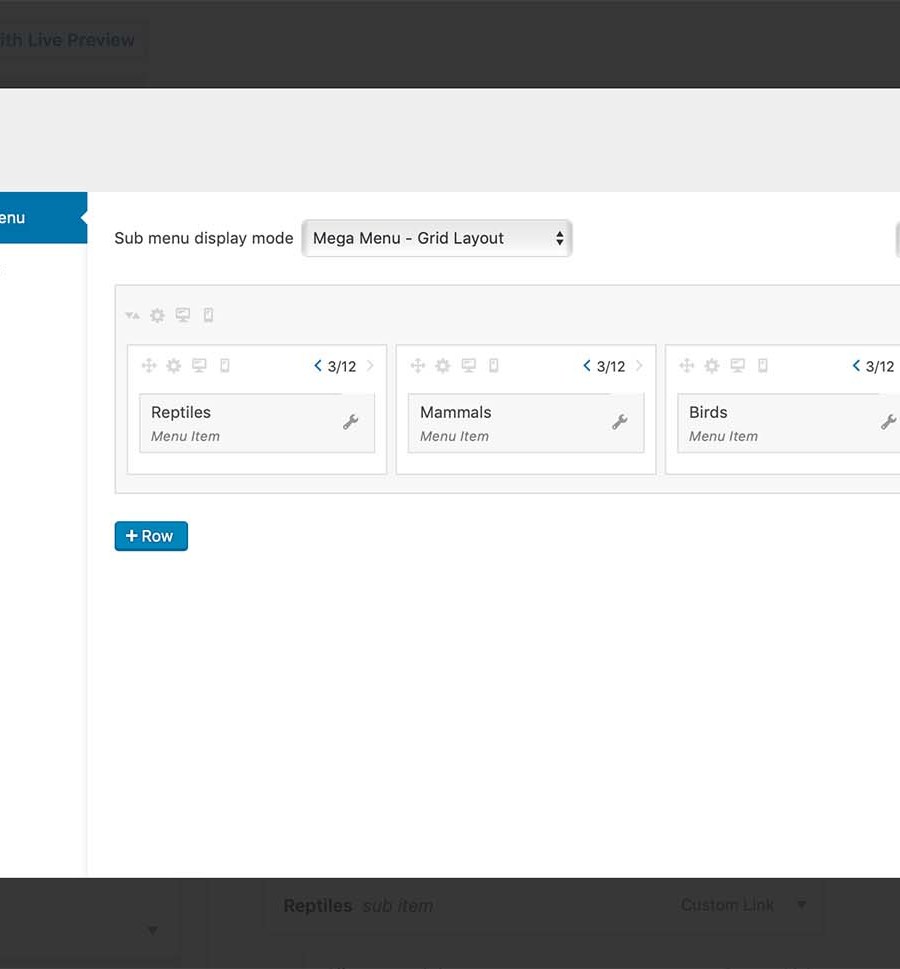
    WP Mega Menu WooCommerce exampleThe built-in integration with WooCommerce allows you to create beautiful mega menus for product displays with a cart menu icon that has an item counter.

    WP Mega Menu is for you if you…

    • Want a low-cost menu builder with visual editing
    • Use other Themeum products like Qubely or TutorLMS
    • Need a solution that is compatible with WordPress widgets

    Pricing: From $29 per year

    Get WP Mega Menu

    4. Max Mega Menu

    Max Mega Menu

    Max Mega Menu is a freemium menu plugin that swaps the existing menu of your WordPress theme with a more customizable one. This allows you to modify the look and feel of your website’s navigation and menus with ease. It offers a variety of customization options and a drag-and-drop builder that makes it easy to build out mobile responsive mega menus for any website. This plugin is suitable for all types of WordPress users, regardless of their WordPress or coding experience.

    Key Features for Max Mega Menu:

    • Lightweight plugin with the ability to configure multiple menu locations
    • Drag-and-drop editor for rearranging items and adding widgets
    • Supports responsive menus and touch menus
    • Create horizontal mega menus and sticky menus
    • WooCommerce and Easy Digital Downloads integrations for showing cart totals
    • 100+ customization options

    Max Mega Menu's visual editor

    Max Mega Menu is a powerful menu plugin that comes with a built-in panel that seamlessly integrates with WordPress’ native menu builder. This feature extends the default menu builder’s functionality with over 100 customization options for each menu and menu item. These options include features such as hover intent, effects, mobile effects, and themes, which allow you to create menus that are both aesthetically pleasing and highly functional.

    Max Mega Menu is for you if you…

    • Need a feature-rich (including eCommerce) menu plugin
    • Want something that provides adequate features in its free version
    • Like its low yearly cost

    Pricing: Free; Paid plans from $29 per year

    Get Max Mega Menu

    5. DiviMenus

    DiviMenus Menu Builder for Divi

    DiviMenus is the go-to menu solution for Divi theme users looking to add extra customization to WordPress menus. This Marketplace plugin has over 4000 purchases and comes highly reviewed. It’s the best of Divi and advanced menu creation and can be yours.

    Key Features for DiviMenus:

    • Build creative mega menus using layouts from the Divi Libray within your menu
    • Shopping cart and eCommerce integration
    • Create clever circular menus with text and/or images on hover
    • Create a vertical menu to reveal text and/or images on hover
    • Create timeline or process menus
    • Built-in options for different types of animation effects

    DiviMenus Circle Menu

    The DiviMenus module can design creative menu displays in different shapes using your WordPress menus. The plugin allows you to modify various attributes such as alignment, labels, borders, and more, to create a unique menu that meets your specific design requirements. Plus, you can use countless menus in a variety of different ways throughout your site to boost content engagement.

    DiviMenus Menu Examples

    DiviMenus is for you if you…

    • Love the Divi Theme but want even more freedom for creativity
    • Have ideas beyond the typical headed menu

    Pricing: $49 per year

    Get DiviMenus

    Bonus: Ubermenu

    UberMenu - WordPress Mega Menu Plugin

    As a bonus plugin recommendation, we present to you UberMenu—a popular CodeCanyon tool for creating robust menus in WordPress. We particularly like the dynamic menu content features that can add menu items based on new content added to your website.

    Submenu settings

    UberMenu comes highly rated (4k+ reviews at 4.5+ stars) and has a low lifetime rate.

    Pricing: $26 LTD

    Get Ubermenu

    What is the Best WordPress Menu Plugin?

    Plugin Price Free Option
    🥇 Responsive Menu $49/yr ✔️ Visit
    🥈 WP Mobile Menu $77.88/yr ✔️ Visit
    🥉 WP Mega Menu $29/yr ❌ Visit
    4 Max Mega Menu $29/yr ✔️ Visit
    5 DiviMenus $49/yr ❌ Visit
    BONUS Ubermenu $26 LTD ❌ Visit

    For all those Divi users looking for a powerhouse all-in-one menu solution, DiviMenus is hard to beat. We really think you’ll enjoy it as so many others have already. Responsive Menu is a top pick for WordPress mobile menus because of its powerful mobile-first design features. But if you want a highly customizable mega menu that is packed with features and easy to build, you can’t go wrong with WP Mega Menu. We hope these suggestions get you a good way towards updating your website menus.

    Looking for more plugins? Check out our entire collection of the best plugins for WordPress

    Featured Image by Lauritta / shutterstock.com

    The post 5 Best WordPress Menu Plugins for 2023 appeared first on Elegant Themes Blog.

  • 7 Best WordPress Database Optimization Plugins in 2023

    Every WordPress website has a unique database. It contains all of the information on your website, from user data to comments, posts, and more. As your site grows, so does its database, and in many cases, you’ll end up storing a lot of information well beyond the point that it’s useful. This can slow down your site unnecessarily.

    In this article, we’ll introduce you to seven of the best WordPress database optimization plugins you can use to keep your site lean and fast. We’ve chosen them based on their performance, configuration options, ratings and reviews, and support from their developers.

    Let’s get to it!

    Subscribe To Our Youtube Channel

    Why Do I Need a Database Optimization Plugin?

    Every time you revise a post, delete a post or plugin, useless data takes up valuable space in your site’s database. Without regular maintenance, you database can get clogged, causing your site to down down dramatically. You see, the larger your database is, the longer it takes your web server to search and load information from the database tables.

    This is where a database optimization can help. Once installed, you can clean out unnecessary pieces of data to make your WordPress site run faster and smoother.

    The Best WordPress Database Optimization Plugins

    While there are many database optimization tools available for WordPress, there are some that stand out from the crowd. Our carefully curated list features only the best of the best, including tools that can perform multiple functions to keep your site’s speed running smoothly and your database clutter-free.

    Let’s go!

    1. WP-Optimize

    The WP-Optimize plugin

    First on our list, WP-Optimize is an all-in-one WordPress optimization plugin. It includes tools to help you clean up your database, minify scripts, enable lazy loading, perform image optimization, and more.

    If you’re using WP-Optimize for database optimization, you can choose what information the plugin will try to clean up. For example, you can configure it to clear out old post revisions, erase trashed posts, remove spam comments, and more:

    Cleaning up your database using WP-Optimize

    This plugin also lets you identify orphaned tables within your database and delete them manually.

    However, one feature that is missing is the ability to create database backups before you run optimizations. WP-Optimize addresses that problem by integrating with the UpdraftPlus plugin. If you use UpdraftPlus as well, WP-Optimize includes settings that will automate database backups before you run a cleanup.

    Key Features for WP-Optimize:

    • Choose what parts of your WordPress database to optimize
    • Identify and remove orphaned tables within the database
    • Configure your site’s caching settings
    • Enable lazy loading
    • Automate image optimization
    • Minify scripts on your website
    • Integrate the plugin with UpdraftPlus to take care of database backups

    WP-Optimize is for you if…

    …you want a plugin that doesn’t just help you optimize your database, but multiple aspects of your WordPress website. It’s also a solid pick if you’re already using UpdraftPlus.

    Price: Free, with premium licenses starting at $49 per year.

    Get WP-Optimize

    2. Litespeed Cache

    Litespeed cache plugin

    Litespeed Cache is not just one of the best caching plugins for WordPress, it is also a fully functional database cleaner and optimizer. In addition to its ability to optimize tables in your database, Litespeed Cache can clean post revisions, auto drafts, trashed posts, spam comments, and more.

    LiteSpeed database optimizer

    Litespeed offers a range of benefits for optimizing your data, but perhaps its biggest advantage is it’s powerful site caching capabilities. With Litespeed, you’ll have access to a host of features designed to optimize the performance of your website, including support for content delivery networks (CDNs), multi-level page caching, minification of CSS, JavaScript, and HTML, browser cache support, and even the ability to lazy load images. These features enable Litespeed to handle site caching like a boss.

    Key Features for Lightspeed Cache:

    • Stellar database table optimization
    • Ability to clean post revisions, trashed posts, spam comments, and more
    • Speeds up database queries
    • Combines caching, CDN, and database optimization into one plugin

    Litespeed Cache is for you if…
    …you’re looking for an all-in-one solution for database and image optimization, CDN support, and site caching. With its comprehensive suite of both database and caching features, Litespeed Cache is an indispensable tool for keeping your WordPress site running smoothly and efficiently.

    Price: Free

    Get Litespeed Cache

    3. Advanced Database Cleaner

    The Advanced Database Cleaner plugin

    Advanced Database Cleaner gives you an overview of what elements you can safely remove from your database to keep it lean. You can also use it to delete tables and cron jobs from your website.

    One standout feature this plugin offers is the option to ignore some of the most recent changes to your database when cleaning it up. You can tell the plugin to keep data from the last “X” days for each type of element it optimizes:

    Configuring Advanced Database Cleaner to keep recent data

    Advanced Database Cleaner also lets you schedule database optimization processes, and configure multiple tasks to run later on. For example, you can schedule the plugin to clean posts within your trash weekly, and have it delete post revisions monthly.

    Key Features for Advanced Database Cleaner:

    • Remove unnecessary information from your database
    • Clean up tables and cron jobs
    • Exclude recent data from cleanups
    • Schedule multiple database cleanups in advance

    Advanced Database Cleaner is for you if…

    …you want a plugin that enables you to set up recurring database optimization processes. Plus, you get full control over what data you want to optimize and when which makes this one of the best WordPress database optimization plugins for advanced users.

    Price: Free, with premium licenses starting at $39 one-time payment.

    Get Advanced Database Cleaner

    4. Optimize Database After Deleting Revisions

    Optimize Database after Deleting Revisions plugin

    Optimize Database After Deleting Revisions does much more than its name implies. By default, this plugin will help you delete revisions for all of the post types on your website. However, you can also configure it to help you optimize your database by deleting items in the trash, unused tags, spam content, and more:

    one-click database optimization

    You can use this tool to configure scheduled optimizations, and it can also help you delete specific tables from your database. However, it doesn’t tell you which custom tables correspond to which plugins, which makes using that feature a bit risky unless you know what you’re doing.

    Key Features for Optimize Database After Deleting Revisions:

    • Delete post revisions for all of your WordPress post types (or specific ones)
    • Preserve recent revisions
    • Configure how many revisions you want to keep for your posts
    • Schedule database optimizations
    • Delete specific tables from your database

    Optimize Database After Deleting Revisions is for you if…
    …you run a website with a hectic posting schedule. Post revisions can quickly add up if you publish a lot of content, and this plugin can help you optimize your database by keeping unnecessary revisions down to a minimum.

    Price:Free

    Get Optimize Database After Deleting Revisions

    5. WP-Sweep

    WP-Sweep database plugin

    WP-Sweep enables you to optimize your WordPress database by “sweeping” everything from revisions to automatic drafts, deleted posts, spam comments, orphaned users, and more. As with many of the other best WordPress database optimization plugins, you can choose what data to clean up or to do a full sweep:

    database sweep

    One downside of using WP-Sweep is that it doesn’t enable you to select specific tables or elements to optimize automatically. Instead, you can either perform a complete sweep or clean up individual elements manually.

    Key Features for WP-Sweep:

    • Clean specific types of elements from your database
    • Do a full “sweep” of your database and optimize all of its tables

    WP-Sweep is for you if…

    …you want a tool that enables you to perform one-click database optimization and offers the option to clean up individual tables manually.

    Price: Free

    Get WP-Sweep

    6. WP Reset

    The WP Reset plugin

    Sometimes, the best way to optimize your WordPress database is to start from scratch. If you want to re-launch your website and start over, you’ll need to clean up its database, which is precisely what WP Reset does:

    site reset

    With this plugin, you can wipe most of the information from your database, while preserving key elements such as your admin user account, basic site configuration (such as your WordPress address and indexing settings), plugins, and themes. In short, the plugin lets you delete all of the content from your site without overwriting your WordPress installation.

    Key Features for WP Reset:

    • Reset your WordPress database
    • Preserve key data such as your admin user account

    WP Reset is for you if…

    …you want to start over with your website without re-installing WordPress, your plugins, and your themes.

    Price: Free, with premium licenses starting at $79 per year.

    Get WP Reset

    7. Database Backup for WordPress

    The Database Backup for WordPress plugin

    This last plugin is a little different. When you back up your WordPress website, you not only make a copy of its files but also of its database. Without a database backup, you’re liable to lose most of your website’s content if you have to restore it.

    Moreover, if you’re planning to optimize your database by deleting some tables, it’s always a smart move to create a backup beforehand. That’s precisely what Database Backup for WordPress enables you to do:

    Creating a database backup

    It helps you back up your core WordPress tables (while excluding revisions and spam comments). However, you can also add custom tables to your backups, and set up a schedule that creates new copies periodically.

    When it comes to storage, the plugin gives you the option of downloading your backup files directly or having them emailed to you. If you use its backup scheduling feature, you’ll receive those files via email.

    Key Features for Database Backup for WordPress:

    • Back up your WordPress database
    • Exclude post revisions and spam comments
    • Select which custom tables you want to include
    • Schedule backups
    • Download backup files to your computer, or configure the plugin to send them to an email address

    Database Backup for WordPress is for you if…

    …you plan on working directly with your database in any capacity. Altering your database manually or using a plugin to delete tables can wreak havoc on your website if you’re not sure what you’re doing. If you’re not already using a tool such as a backup plugin that also saves your database, Database Backup for WordPress is a key tool to have on hand.

    Price: Free

    Get Database Backup for WordPress

    Which Database Optimization Plugin Is The Best?

    Using one of the best WordPress database optimization plugins can help you clean up a lot of the unused entries and data that accumulate as your website grows. If you’ve been working on your website for a while now, these tools should help you recover some storage space and perhaps even increase your site’s performance.

    Plugin Price Free Option
    🥇 WP-Optimize Free, $49 per year ✔️ Visit
    🥈 Litespeed Cache Free ✔️ Visit
    🥉 Advanced Database Cleaner Free, $39 one-time ✔️ Visit
    4 Optimize Database After Deleting Revisions Free ✔️ Visit
    5 WP-Sweep Free ✔️ Visit
    6 WP Reset Free, $79 per year ✔️ Visit
    7 Database Backup for WordPress Free ✔️ Visit

    If you’re still not sure which plugin to use, WP-Optimize is a great all-around choice for most websites. Regardless of which solution you choose, we recommend that you also set up a backup plugin such as Updraftplus to ensure that your site’s database is fully protected.

    Do you have any questions about how to optimize your WordPress database? Let’s talk about them in the comments section below!

    Featured image illustration via FGC / shutterstock.com

    The post 7 Best WordPress Database Optimization Plugins in 2023 appeared first on Elegant Themes Blog.

  • 9 Best Redirect Plugins for WordPress in 2023

    Setting up redirects can become a regular task if you run a WordPress website. For example, you may take some of your pages down over time, or you might want to move them from one URL to another. Whenever that happens, configuring a redirect properly ensures that users still arrive where they want to go.

    In this article, we’ll talk about what types of redirects you can set up. We’ll also introduce you to the best redirect plugins for WordPress and help you choose the right one for your site.

    Let’s get to it!

    What Type of Redirect to Use on Your Website

    There are several types of redirects that you can use on your WordPress website. Most of the plugins we’ll introduce you to in the following sections enable you to set up any type of redirect you want. With that in mind, it’s essential to understand the difference between each of them.

    Redirect Breakdown

    Let’s break down the most common types of redirects and when to use them:

    • 301 (permanent redirection). This type of redirect tells the visitor that the page they tried to access has moved elsewhere permanently. Then it helpfully sends them to that new address.
    • 302, 303, 307 (temporary redirection). These types of redirects tell visitors that the page they’re trying to access is temporarily unavailable.
    • 304 (not modified redirection). This type of redirect sends visitors to a cached version of the page since there haven’t been any new changes to it. We have an excellent overview that explains what the 304 status code means and how to fix it if you are seeing unwanted 304 redirects on your website.
    • 308 (permanent redirection). This is an alternative to 301 redirections and accomplishes essentially the same outcome, although the original is still the most popular option.

    In theory, there are particular situations when you’ll want to use 302, 303, and 307 redirects, respectively. For example, you can use 303 and 307 redirects to tell browsers not to refresh a confirmation page after users submit a form.

    For practical purposes, however, you probably won’t use a lot of 303 or 307 redirects. Form and e-commerce plugins usually handle those situations via built-in functionality. As for 302 redirects, there aren’t a lot of scenarios when it makes sense to move visitors to another page temporarily.

    In practice, you’ll most often use 301 redirects. In case you have particular needs, though, we’ll let you know what types of redirects each of the plugins we recommend enable you to use.

    Finally, it’s also worth noting that you can implement redirects in WordPress manually by modifying your site’s .htaccess file. However, that’s not an approach that we recommend unless you’re very comfortable editing WordPress core files.

    The Best Redirect Plugins for WordPress

    We selected the seven plugins below based on their feature sets, ease of use, and positive reviews. However, it’s important to note that implementing redirects on your website can lead to errors and SEO penalties if you don’t do it properly (or if your plugin is poorly coded or out of date). With that in mind, we’re also recommending plugins that are well-established and frequently updated.

    1. Rank Math

    Rank Math SEO plugin

    Rank Math is a popular all-in-one WordPress SEO plugin that includes redirection functionality. It’s similar to Yoast in terms of features, and there’s plenty of debate about which is the superior WordPress SEO plugin.

    If you use Rank Math on your own site (or are interested in adding it), you’ll be glad to know that it makes configuring redirects easy. This SEO plugin uses a module system that enables you to turn on or off the specific functionalities you want to use. Among those modules, you’ll find options for a 404 error monitor and redirects:

    Rank Math example

    The 404 error monitor is enabled by default. However, once you turn on the redirection feature, you’ll be able to set up individual redirects:

    Add redirections

    Rank Math supports multiple types of redirects, and it also enables you to automatically reroute 404 errors to any page of your choosing. Of course, you get access to a lot of useful SEO functionality as well.

    Key Features:

    • Improve your website’s SEO
    • Monitor your site for 404 errors, and implement automatic redirects for them.
    • Set up custom redirects for any page you need

    Rank Math is for you if…

    …you already use this plugin on your site, or you’re in search of an SEO plugin that also includes redirect functionality. In comparison with other SEO plugins, Rank Math offers a more modular approach. That means that you can turn off any features that you don’t need for easier configuration.

    Price: Free, with a premium version available starting at $59 per year

    Get Rank Math

    2. LoginWP

    The Peter's Login Redirect plugin

    LoginWP (Formerly Peter’s Login Redirect) is unlike any of the other redirect plugins for WordPress we’ve talked about so far. With this plugin, you can set up automatic redirects that trigger when users log in or out of your website.

    We’ve talked about how to set up and configure LoginWP in the past. So let’s instead focus on why this type of redirect can be useful. For example, it can enable you to divert users from seeing the WordPress dashboard after they log in.

    You can add redirect rules for specific users or roles. The plugin also enables you to set up post-registration redirects, which you can use to send users to a ‘thank you’ page:

    Setting up login redirection rules

    If you’re running a membership-based website, this type of redirect can be incredibly useful. With this plugin, you can set up as many login and logout redirection rules as you need.

    Key Features:

    • Redirect users after they log in or out of your website
    • Set up rules for specific users or roles
    • Create custom post-registration redirects

    LoginWP is for you if…

    …you run a membership website or any other type of operation that requires users to log in to access key features.

    Price: Free, premium version starts at $49

    Get LoginWP

    3. Redirection

    Redirection

    Redirection is by far the most popular redirect plugin for WordPress, and it’s easy to see why. This tool enables you to set up many types of redirects, including:

    • 301
    • 302
    • 303
    • 304
    • 308

    Redirection can do other things as well, such as automatically monitoring your website for permalink changes and setting up redirections for you when it detects updates. It can also keep a log of 404 errors that visitors encounter and share that information with you.

    By monitoring 404 errors, you’ll have a full list of potential URLs for which you need to set up redirects. Here’s how the redirection setup process looks when using this plugin:

    Set up new redirection

    Another benefit of Redirection is that it enables you to determine conditions for each redirect that you set up. For example, you can create redirects that only trigger based on a visitor’s login status, language, or the referrer, among other parameters.

    Key Features:

    • Set up multiple types of redirects in WordPress
    • Automatically generate redirects when a permalink changes
    • Keep logs of 404 errors on your website
    • Set up parameters for your redirect rules

    Redirection is for you if…

    …you want to be able to set up multiple types of redirects and monitor your website for 404 errors. This plugin is also a fantastic choice if you want to configure redirects with advanced rules and parameters.

    Price: Free

    Get Redirection

    4. Quick Page/Post Redirect

    The Quick Page/Post Redirect plugin

    This next plugin is all about 301 redirects. Quick Page/Post Redirect enables you to add multiple 301 redirects for your website at once using a simple menu and without tinkering with too many settings:

    Adding multiple 301 redirects to WordPress

    You can configure redirects to open in a new window or add the nofollow attribute to them. Quick Page/Post Redirect also enables you to add redirect rules directly from the Block Editor when editing individual pages or posts:

    Configuring a redirect within the Block Editor

    If you opt for this approach, the plugin enables you to choose from a broader range of redirect types, including 301, 302, 307, and “meta redirects.” That last type occurs on the client side. Meta redirects aren’t beneficial from an SEO perspective, however, so we recommend against using them.

    Key Features:

    • Set up multiple 301 redirects at once
    • Create individual redirect rules from within the Block Editor
    • Set up global redirects or turn off all existing ones with a click

    Quick Page/Post Redirect is for you if…

    …you want to set up multiple 301 redirects at once using a simple menu that doesn’t require you to tweak additional settings for any rule.

    Price: Free

    Get Quick Page/Post Redirect

    5. Safe Redirect Manager

    The Safe Redirect Manager plugin

    Safe Redirect Manager offers a much more streamlined approach than other redirect plugins for WordPress. It saves redirect rules as custom post types and shies away from features such as 404 error logging since it claims this can cause performance issues (which shouldn’t be a problem with proper optimization).

    Regardless of the plugin’s philosophy, it does make it easy to set up new redirect rules. It also supports multiple types, including the following options:

    • 301
    • 302
    • 303
    • 307

    Here’s what it looks like when you’re setting up a new 301 redirect using Safe Redirect Manager:

    Using the Safe Redirect Manager plugin

    Another feature worth mentioning is that Safe Redirect Manager supports “wildcard redirects.” A wildcard redirect will divert any visitors trying to access a subdomain to your website instead. That can be useful if you have subdomains that you’re not currently using.

    Key Features:

    • Set up multiple types of redirects
    • Create wildcard redirects
    • Add notes to each redirect rule that you set up
    • Save redirect rules as custom post types in your database

    Safe Redirect Manager is for you if…

    …you want to use a plugin that enables you to set up multiple types of redirects without having to tinker with advanced configuration options. It’s also one of the only options that support wildcard redirects.

    Price: Free

    Get Safe Redirect Manager

    6. All 404 Redirect to Homepage

    All 404 Redirect to Homepage

    In some cases, you might not need to set up advanced redirect rules, and all you want is a way to take care of 404 errors. What All 404 Redirect to Homepage does is set up automatic redirects for any 404 error on your website, so visitors are automatically sent to your homepage. In addition, you can customize what URL the plugin redirects users towards:

    Setting up a redirect rule for 404 errors

    This plugin also includes a 404 error log, but it doesn’t enable you to set up any other type of redirect rule.

    Key Features:

    • Redirect all 404 errors to your homepage (or any other page that you choose)
    • Log 404 errors on your website

    All 404 Redirect to Homepage is for you if…

    …you want a simple way to take care of 404 errors on your website, and you don’t have a need for any other type of redirect.

    Price: Free, with a premium version available starting at $29 per year

    Get 404 Redirect to Homepage

    7. 301 Redirects

    The 301 Redirects plugin

    The 301 Redirects plugin enables you to log 404 errors and set up multiple types of redirects, including:

    • 301
    • 302
    • 307

    The plugin offers a simple menu that makes it easy to create new redirect rules. For example, if you don’t want to enter URLs manually, you can choose whether to redirect an address to a post, page, media file, or product:

    Creating a product redirect rule

    By using this plugin, you can set up as many redirect rules as you need. Plus, if you’re just starting a new WordPress site, the plugin will let you know if your permalink structure isn’t compatible with redirects.

    Key Features:

    • Set up multiple types of redirects
    • Redirect visitors to specific pages, posts, media files, or products
    • Log 404 errors on your website

    301 Redirects is for you if…

    …you want to use a plugin that includes dropdown menus for choosing which pages, posts, media files, or products to redirect visitors to.

    Price: Free, with a premium version available starting at $49

    Get 301 Redirects

    8. Yoast SEO

    The Yoast SEO plugin.

    Yoast SEO hardly needs an introduction. It’s the most popular SEO plugin among WordPress users, and with good reason. We’ve talked about how to set up Yoast SEO in the past, and it’s still the tool we use for optimizing the content on our own blog.

    If you use the premium version of Yoast SEO, you get access to a lot of extra features that we didn’t have time to cover in the post linked above, including a redirect manager. This tool enables you to set up new redirects or let Yoast SEO do it for you when you delete or move a page:

    Using the Yoast SEO redirect manager

    Yoast SEO’s redirect manager supports multiple types of redirection, including:

    • 301
    • 302
    • 307

    You can also set two HTTP statuses that aren’t commonly used, which are 410 and 451. The 410 code tells search engines that a page is gone for good, and they should de-index it. With the 451 code, you signal that a page is unavailable for legal reasons.

    Key Features:

    • Improve your website’s SEO and readability
    • Set up multiple types of redirects
    • Detect when a page is gone or moves to a new URL and set up an automatic redirect to it.

    Yoast SEO is for you if…

    …you’re already using the free version of Yoast SEO, and it’s baked into your day-to-day WordPress operations. In that scenario, purchasing a premium license can be worth it. Yoast SEO premium includes a broad range of other features beyond redirects, including keyword and internal link suggestions, on-demand support, and more.

    Price: Yoast SEO Premium licenses start at $89 per year

    Get Yoast SEO

    9. 404 to 301

    404 to 301 logo

    404 to 301 – Redirect, Log, and Notify is a WordPress plugin that helps website owners manage 404 errors on their websites. The plugin automatically redirects the user to a relevant page on the website using a 301 redirect. This ensures that the user is directed to a useful page and that the website’s SEO is not negatively impacted by broken links. The plugin also logs all 404 errors and provides notifications to the website owner so that they can take action to fix broken links.

    404 to 301 settings page

    In addition to redirecting users and logging errors, 404 to 301 allows users to set up custom redirects for specific URLs. This is useful for website owners who have changed the structure of their website and need to redirect old URLs to new ones.

    Key Features:

    • Automatically redirects users to a relevant page on the website using a 301 redirect
    • Logs all 404 errors and provides notifications to the website owner
    • Allows users to set up custom redirects for specific URLs

    404 to 301 Errors is for you if…

    …you want to improve your website’s user experience and SEO by effectively managing 404 errors and setting up custom redirects for specific URLs.

    Price: Free

    Get 404 to 301

    Which WordPress Redirect Plugin Is The Best?

    Plugin Price Free Option
    🥇 Rank Math $59/yr ✔️ Learn More
    🥈 LoginWP $49/yr ✔️ Learn More
    🥉 Redirection Free ✔️ Learn More
    4 Quick Page/Post Redirect Free ✔️ Learn More
    5 Safe Redirect Manager Free ✔️ Learn More
    6 All 404 Redirect to Homepage $29/yr ✔️ Learn More
    7 301 Redirects $49/site ✔️ Learn More
    8 Yoast SEO $99/yr ✔️ Learn More
    9 404 to 301 Free ✔️ Learn More

    As your website grows, you’ll probably need to implement a few redirects to ensure visitors reach the pages they’re looking for. Thanks to redirects, you can even minimize the impact of 404 errors on your website. However, that is only possible with the right redirect plugin for WordPress.

    If you’re looking for an all-in-one tool for managing redirects, Rank Math is your best bet. Rank Math’s redirect management tool allows you to set up and manage 301 and 302 redirects directly from your WordPress dashboard. It also includes a powerful redirection engine that automatically detects and fixes 404 errors on your website.

    Do you have any questions about how to implement redirects in WordPress? Then, let’s talk about them in the comments section below!

    Featured image illustration via Thomas Knopp / shutterstock.com

    The post 9 Best Redirect Plugins for WordPress in 2023 appeared first on Elegant Themes Blog.

  • 4 Best WordPress Reset Plugins 🥇 2023 (Free & Pro)

    Are looking for the Best WordPress Reset Plugins for your websites? If yes, you come to the right place. Choose from these top reset plugins and get back on track.

    The post 4 Best WordPress Reset Plugins 🥇 2023 (Free & Pro) appeared first on BetterStudio.

  • 4 Best WooCommerce Shop the Look Plugins 🥇 2023 (Free & Pro)

    Create attractive Shop the Look pages for your WooCommerce store without hassle. Our guide features the best plugins to get the job done fast!

    The post 4 Best WooCommerce Shop the Look Plugins 🥇 2023 (Free & Pro) appeared first on BetterStudio.

  • 9 Best WordPress CRM Plugins in 2023

    If you’re running a business on WordPress, you know how important it is to be engaged with your customer base. The best tools help you with reliable customer relationship management. A CRM can help you keep track of your leads, customers, and sales and can make it easier to manage every aspect of your involvement with them.

    In this article, we’ll explore some 9 of the best WordPress CRM plugins available to help you decide which one is best for your needs.

    What is CRM and Why Its Important?

    Customer relationship management (CRM) is software that helps businesses manage their interactions and relationships with leads, prospects, and customers. It allows businesses to store and organize customer data, track customer interactions and communications, and manage sales and marketing efforts. Businesses can use CRM tools to improve their customer service, increase customer retention, and boost sales.

    WordPress is a powerful content management system (CMS) that allows businesses complete control and freedom over how they build their websites. But a CMS is different from a CRM. That said, WordPress can still be the engine for your very own CRM. With the installation of a simple plugin, you can transform a basic website into a sprawling management system that is intimately connected to your website and other necessary technology.

    Different Types of CRM

    CRMs can be built for certain types of businesses or tasks. So, it becomes really important to know what your business needs are and how a CRM can alleviate some pressure from your job (and not add to it). Here are some specialties that CRMs can focus on:

    • Sales Focused – Made to help sales teams manage communication, deal value, and lead scoring
    • Marketing Focused – Built-in tools that connect with advertising platforms and email marketing tools and often provide a level of automation for marketing efforts
    • Project Management/Invoicing – Made for service-based teams that need client management post-sale including managing projects
    • Niche – Created for particular industries such as Real Estate, SaaS, or Health Care

    While all CRMs should have a little of each of these, some do specific tasks particularly well. At this point, you should agree that using one should be a no-brainer! But finding the right CRM plugin can be a bit of a hassle. Don’t worry, we’re here to help you find the best solution.

    The 9 Best WordPress CRM Plugins

    We have scoured every corner of the internet, looking to find the top WordPress CRM plugins for your needs. Let’s start with a crowd-pleaser—FluentCRM—and move on through a total of 9 killer WordPress options. Note, the last 2 plugins on the list are important if you use a standalone CRM like Hubspot CRM or Zoho CRM.

    1. FluentCRM

    FluentCRM Plugin Homepage Feb 2023

    FluentCRM is a cutting-edge WordPress plugin that offers both self-hosted email marketing automation and CRM solution. It was built to rival other email marketing solutions such as Mailchimp, ActiveCampaign, and Groundhogg (also on this list). What sets FluentCRM apart from its competitors is that it is a self-hosted WordPress plugin, allowing you to access and manage your email campaigns and contacts directly within your WordPress installation.

    Key Features for FluentCRM :

    • Automatically import your contacts from CSV, WordPress users, and WooCommerce customers
    • Comprehensive data analysis to give you better visibility into your contacts, pulling from integrations with WooCommerce, EDD, LearnDash, and LifterLMS.
    • Feature-rich email marketing straight from the WordPress dashboard
    • Contacts’ can store notes, custom fields, and tags, and can be segmented based on triggers
    • User-friendly interfaces

    FluentCRM is a highly flexible plugin that can handle various types of businesses, including eCommerce, membership, and learning management. With user-friendly interfaces and a flexible automation builder and email campaign editor, FluentCRM provides an easy and efficient way to manage and create your marketing campaigns.

    FluentCRM Automated Workflow Builder

    FluentCRM is for you if you…

    • Need a CRM + Email Marketing that runs off of WordPress
    • Want state-of-the-art features like funnel builders and deep campaign analytics
    • Don’t ever want to look back to subscribers and campaign sends being limited by your provider
    • Enjoy a tight ecosystem of integrated plugins (they also built FluentForms and FluentSMTP which both have free versions)
    • Want to pay one price for all the features

    FluentCRM Pricing: Free, Premium starting at $129 a year

    Get FluentCRM

    2. Groundhogg CRM

    Groundhogg CRM Plugin Homepage Feb 2023

    Groundhogg is an all-in-one CRM and marketing automation plugin that offers advanced features typically found in large SaaS tools but at a much more affordable price. The plugin competes with other popular SaaS tools like Keap and Zoho but it is a 100% native WordPress plugin. We have a much broader review of Groundhogg but here are the highlights. Like FluentCRM, Groundhogg is a marketing automation CRM that is especially useful for eCommerce brands and marketing-heavy industries.

    Key Features for Groundhogg CRM:

    • Total contact management with tagging and segmentation
    • Marketing automation including email marketing and SMS
    • Many integrations to save time (some only come with higher priced tiers) including a Divi integration with “Plus tier”

    Groundhogg WordPress CRM Plugin Email Sequence

    Groundhogg CRM allows business owners to do more with WordPress. You can easily create marketing automation and sales funnels and manage your email campaigns directly within your WordPress installation. Even creating automated sequences is easy enough from the dashboard

    Groundhogg CRM is for you if you…

    • You’re a small business looking for a comprehensive CRM solution
    • You are interested in getting help with your marketing from the Groundhogg support team
    • You want to automate your sales and marketing process

    Pricing: Free, Paid plans starting at $20 a month

    Get Groundhogg CRM

    3. Propovoice

    Propovoice Invoicing CRM Plugin Homepage Feb 2023

    Propovoice is a comprehensive CRM and invoicing plugin for business owners and freelancers. It’ll allow you to manage clients, projects, estimates, invoices, and more—all in the comfort of your own WordPress installation. If you’re looking to scale up your freelancing or service business, Propovoice is a must-have tool to help you manage your clients and projects more efficiently. It, however, is not a marketing-focused CRM but a sales and project-focused one making it stand out from the first two plugins on our list.

    Propovoice Lead to Deal Desk

    Key Features for Propovoice:

    • Sales and lead management
    • Estimate, invoice, and project management
    • Project management (with a forthcoming client communication portal)
    • Templates to make your estimates and invoices look professional

    One thing about Propovoice is its simplicity and modern design. Whether working through the deal desk Kanban board or selecting an invoice template, the plugin doesn’t feel dated at all. Being a newer plugin, though, Propovoice has limited integrations. Though, it is in active development and is getting new integrations fairly often.

    Propovoice Estimate Creator from Templates

    Propovoice is for you if you…

    • Are a small to medium-sized business looking for a sales-based CRM
    • Want a modern-looking CRM for WordPress and are tired of dated WP dashboards
    • Need a sales CRM that costs just a little less than average

    Propovoice Pricing: Free, Paid plan starts at $59 a year

    Get Propovoice

    4. FunnelKit

    Funnel Kit CRM Plugin Landing page Feb 2023

    FunnelKit is a marketing CRM that is built to power WooCommerce websites to new heights. It brings in tools that are focused exclusively on eCommerce growth. It covers every aspect of lead generation, email marketing, and store conversion rate optimization/automation.

    Key Features for FunnelKit:

    • Funnel builder for WordPress with Analytics, A/B testing, and Lead Generation
    • Contact management for email marketing and eCommerce account tracking
    • Visual, drag-and-drop email designer (all inside WordPress)
    • Workflow builder for email and contact automation tasks (create contacts, add a tag, and track upsell performance)

    FunnelKit Automation Workflow Builder

    This plugin’s contact management features enable users to store and organize customer information in a central location; combined with its email marketing tools, this is one of the best CRM solutions available.

    FunnelKit is for you if you…

    • Run a WooCommerce store and want to squeeze every last bit of performance from it
    • Looking for a native WordPress CRM built for WooCommerce
    • Need eCommerce features such as product-specific funnels and upsells

    FunnelKit Pricing: Starting at $99.50 a year

    Get FunnelKit

    5. WP ERP

    WP ERP CRM Business Platform Homepage Feb 2023


    WP ERP is a total business management platform that includes CRM as a core function. This base plugin consists of three main modules: HR Management, CRM, and Accounting. There are a total of 23 extensions that add specific functionality to the base plugin. WP ERP aims to be your business’ operating system—not just for CRM but operations over the span of your business’ footprint.

    WP ERP Solutions Modules

    Key features for WP ERP:

    • Lead and contact management with customer segmentation
    • Extension for Help Desk, email marketing, and advanced accounting
    • Module pricing structure so you only pay for what you use

    The CRM Dashboard for WPERP

    One of the standout features of WP ERP is its easy-to-navigate dashboard which can help you schedule meetings and track tasks that are assigned to leads and opportunities.

    WP ERP is for you if you…

    • Need more than just a CRM baked into your WordPress installation
    • You want to automate your marketing efforts
    • You need a free tool to help you forecast future sales

    WP ERP Pricing: Free, Premium tier starts at $129 a year (extension ranging from $2.49/mo to $9.49/mo)

    Get WP ERP

    6. WP-CRM

    WP-CRM Homepage Feb 2023

    WP-CRM is another, long-standing, CRM interface that works inside WordPress. Though some aspects of it look dated, it handles client management and project tracking between users. Like WP ERP, it has premium add-ons available to add extra features, integrations, and functionality.

    Key Features for WP-CRM:

    • CRM and contact management
    • Handles projects for teams and tasks for individual users
    • Allows for custom fields to create a CRM that fits your needs


    WP-CRM Calendar View of Tasks and Projects

    WP-CRM is for you if you…

    • Want to improve your customer relationships and grow your business
    • Need a platform that is customizable to fit the operations and strategy of your company
    • Don’t mind its “traditional” WordPress look

    WP-CRM Pricing: Free, Premium Extensions (ranging from $29/yr to $89/yr)

    Get WP-CRM

    7. Jetpack CRM

    Jetpack CRM banner

    Jetpack CRM is a plugin for WordPress that offers small businesses a secure and customizable solution for managing their customer relationships. You have probably heard of Jetpack in other contexts (like CDN or advertising) but it also has a CRM module. With Jetpack CRM, you own and host your own data, giving you complete control over access and security. The plugin runs on your server and can be used in conjunction with other security plugins, allowing you to set roles and permissions to determine who can do what within the CRM. We have a detailed Jetpack CRM review but here are the highlights.

    Key Features include:

    • Complete contact management
    • Deal tracking and reporting
    • Task and appointment scheduling
    • Sales and marketing analysis
    • Email marketing integrations (Aweber, Convertkit, Mailchimp, and more)
    • Paid Add-ons to integrate CRM with Membermouse, Gravity Forms, and Optinmonster

    Jetpack CRM offers a range of features to help businesses manage their customer relationships, including a client portal, contact management, and invoicing. It also provides a customizable dashboard that allows users to keep track of their sales and revenue. The plugin allows users to add or remove modules to create a personalized CRM tool that meets their specific needs.

    Jetpack dashboard

    Jetpack CRM is for you if you…

    • Are a business owner looking for a secure and customizable CRM solution
    • Want to manage your customer relationships in one place
    • Need to track your sales and revenue

    Jetpack CRM Pricing: $129 a year

    Get Jetpack CRM

    8. Bit Integrations

    Bit Integrations Landing Page Feb 2023

    Bit Integrations is a WordPress integration suite for connecting different plugins (same-site) to create advanced automation between your installed tools. Many plugins connect your WordPress website with external tools, but this one connects your internal tools together so that they work as one cohesive machine—instead of frustrating silos.

    This may seem like a weird plugin to feature in an article about WordPress CRM plugins, but it could prove consequential. If you are already using a standalone CRM (think Hubspot, Zoho, or ActiveCampaign) you might be able to use Bit Integrations to connect even more than you originally thought possible. It may not work for your particular setup, but it (and its competitor, Flowmattic) is perfect for creating a little more automation and integration within your website.

    Key Features for Bit Integrations:

    • They have over 150 WordPress integrations to leverage
    • Expertly works with their other products (Bit Form, Bit SMTP, and Bit Assist)
    • Lowly yearly pricing for an automation platform

    Bit Integrations ActiveCampaign Example

    Take a look at its listed integrations and see what is possible that you previously thought couldn’t be done without custom-coded APIs and webhooks.

    Bit Integrations is for you if you…

    • Want to realize new integrations between your plugins and external apps
    • Have an external CRM but want to explore even more automation with it

    Bit Integrations Pricing: Free, Premium version $19 a year

    Get Bit Integrations

    9. WP Forms

    WP Forms is another plugin that we bet you didn’t expect on this list. CRMs (WordPress or not) are data-eating machines. If they don’t have very much data (or actionable data) consider your investment in a CRM moot. Forms plugins, therefore, are a vital step in your data machine. WP Forms (though there are other great contenders in our best form plugins article) is an excellent choice when it comes to forms with a lot of integrations. Those integrations are the pipes between your website and CRM that are sending over precious data.

    Key Features for WP Forms:

    • Hundreds of templates for every use case
    • Integrations on top of integrations to send data through
    • Tons of flexibility with different types of forms (conventional, newsletter email opt-ins, contact, etc.)

    Choose from hundreds of categorized templates for fast form-building that powers your business. Everything from donation forms to opt-in—WP Forms has got you covered with time-saving features.

    WPForms 500+ Available Templates

    WP Forms is for you if you…

    • Haven’t explored what a premium form builder can do for your data strategy
    • Know your budget for a form plugin and can find the pricing tier that has the integrations you need
    • Don’t want to waste time creating forms from scratch

    WP Forms Pricing: Free, Premium starts at $49.50 a year

    Get WP Forms

    What is the Best CRM Plugin for WordPress?

    In today’s competitive business landscape, it is more important than ever for companies to have strong relationships with their customers. WordPress-based CRM plugins are significant assets for businesses that are looking to manage and track customer interactions. As we saw, some have specific tools built into them that make them better at certain tasks than other CRMs.

    Plugin Price Free Option
    🥇 FluentCRM $129/yr ✔️ Visit
    🥈 Groundhogg $240/yr ✔️ Visit
    🥉 Propovoice $59/yr ✔️ Visit
    4 FunnelKit $99.50/yr ✔️ Visit
    5 WP ERP $129/yr ✔️ Visit
    6 WP-CRM Free ✔️ Visit
    7 Jetpack CRM $129/yr ✔️ Visit
    8 Bit Integrations $19/yr ✔️ Visit
    9 WP Forms $49.50/yr ✔️ Visit

    For those who are after the best marketing automation CRM, we suggest you take a look at FluentCRM or FunnelKit. If you are needing more sales and post-sale management, check out Propovoice and see if it covers your needs. For anyone with any CRM setup, Bit Integrations and WP Forms may prove useful as well.

    Remember, CRMs are a tall commitment. It takes time to properly set up all the custom fields, automation, and processes that make for a well-oiled machine. But, all that work will be worth it as that data comes in and makes you able to stay on top of your customers’ needs.

    Article featured image by Grafvish / shutterstock.com

    The post 9 Best WordPress CRM Plugins in 2023 appeared first on Elegant Themes Blog.

  • 7 Best WordPress Real Estate Plugins in 2023

    If you’re a realtor, you need a website that can show off your listings in all their glory. On the other hand, if you’re a web developer who works with realtors or agencies, you’ll have to understand how to implement real estate features in websites for your clients. Either scenario is one you can solve using the best WordPress real estate plugins on the market.

    Why Do you Need a Real Estate Plugin?

    Those in the real estate business have more options than they realize for building a successful real estate site. WordPress actually has some really good options if you’re trying to avoid expensive MLS listing services to showcase your listings. Using a combination of plugins, you can create a fully functional real estate site that features listings complete with floor plans, virtual tours, as well as agents working for you.

    The Best WordPress Real Estate Plugins

    In this article, we’ll introduce you to the 7 best WordPress real estate plugins available. We’ll focus on a range of solutions that offer different feature sets, but all have excellent reviews and are well-supported.

    Let’s get to it!

    1. Realtyna WPL

    The WPL Real Estate plugin

    Realtyna WPL is a powerful real estate WordPress plugin by Realtyna that enables you to set up a property listing system for your website. You can add new properties yourself, or let individual real estate agents do so if you belong to an agency.

    Listings can be incredibly detailed, including information about property types, prices, square footage, and other key features:

    Adding a new listing using the WPL Real Estate plugin

    You can upload photos for each property and set up image galleries, videos, and attachments. Moreover, you can fully customize the fields that will appear within each listing.

    WPL Real Estate comes with a robust user management system that enables you to decide what permissions each agent will have on your website. That makes it perfect for agencies with multiple realtors:

    Editing realtor permissions

    It’s worth noting that WPL Real Estate also includes an option to add meta descriptions and keywords for each new listing, which is fantastic for local Search Engine Optimization (SEO). WPL Real Estate also works well alongside Divi, with an assortment of layout packs to help you with designing your site.

    This plugin also offers a broad range of paid extensions. Those add-ons make WPL Real Estate incredibly flexible, but they’re fairly expensive with prices starting at $199 per year.

    Key Features for Realtyna WPL:

    • Add a listing management system to WordPress
    • Create new listings with dozens of custom fields
    • Give other realtors permission to create and edit listings
    • Modify the default fields for each listing

    WPL Real Estate is for you if…

    …you want to add real estate listing functionality to WordPress via a fully customizable system. This plugin is a fantastic choice for agencies with multiple realtors due to its built-in user permissions system.

    Price: Free, with a premium version available for a $199 lifetime payment.

    Get WPL Real Estate

    2. Easy Property Listings

    The Easy Property Listings plugin

    Easy Property Listings adds a full-featured listings system to WordPress. You can include dozens of property-specific details in each listing, including options such as available inspection times, which realtor is the listing agent, and more:

    Adding listing details using Easy Property Listings

    One advantage Easy Property Listings has is that it gives you plenty of display options. You can use shortcodes or widgets to showcase your properties. The plugin even includes some unique widgets, such as a search feature that’s designed specifically for real estate properties. Plus, it uses the Gutenberg blocks, so adding other blocks to your listings is a breeze.

    Last but not least, it also offers a broad range of add-ons that can provide useful functionality for your site, some of which are much cheaper than what other real estate tools offer.

    Key Features for Easy Property Listings:

    • Add a real estate listing system to WordPress
    • Modify the default fields for each listing you publish
    • Display listings using their own pages, widgets, or shortcodes
    • Add a search bar that’s dedicated to listings

    Easy Property Listings is for you if…

    …you want to use a listings plugin that offers multiple choices for displaying the properties on your website. Putting aside those options, Real Estate Listings is evenly matched in terms of features with WPL Real Estate, so you can choose whichever plugin you feel more comfortable using.

    Price: Free, with premium add-ons starting at $27 per year.

    Get Easy Property Listings

    3. WP VR

    The WP VR plugin

    Virtual real estate tours keep growing in popularity, partly due to being very convenient. Scheduling and planning real estate tours can be a lot of work, particularly for popular listings. One alternative is to create virtual tours using a plugin such as WP VR.

    Using this tool, you can upload panoramic images to WordPress that users can move around and zoom in on. It also supports videos and includes a gyroscope mode for mobile phones, which makes tours all that more engaging:

    Setting up a virtual tour using WP VR

    WP VR also enables you to connect multiple panoramic images using a “hotspot” feature. That means you can provide seamless virtual tours of larger areas by having users click on specific spots within an image to load the next one.

    Although WP VR has a lot of applications beyond just real estate, it’s a fantastic solution to offer potential customers a closer look at your best listings. You can add virtual tours to your listings using the Block Editor or via shortcodes, depending on which approach you prefer.

    Key Features:

    • Create virtual tours for your listings
    • Enable users to “navigate” panoramic images
    • Link multiple images and let users move between them in a single element
    • Add virtual tours to your listings using blocks or shortcodes

    WP VR is for you if…

    …you want to provide virtual tours for your properties. This is a key feature that most real estate websites don’t offer, and it’s a fantastic way to draw more attention to your hottest listings. For virtual tours to work, however, you’ll need to get comfortable taking panoramic pictures.

    Price: Free, with a premium version available starting at $79.99 per year.

    Get WP VR

    4. Draw Attention

    the Draw Attention plugin

    So far, we’ve focused solely on real estate listing plugins. Draw Attention is a unique tool that has incredibly useful applications for real estate websites, but it doesn’t have anything to do with listings.

    Instead, Draw Attention enables you to take images and make them interactive. For example, you can display information when a user hovers over a specific section of an image, create interactive maps, and design infographics. You’ll also find that Draw Attention is the perfect tool to publish interactive floor plans:

    Creating an interactive floor map

    Ideally, we recommend that you use Draw Attention alongside one of the listing plugins we discuss in this list. Each annotated image you create comes with a unique shortcode, so you can show floor plans within listing descriptions or anywhere else on your site.

    Key Features for Draw Attention:

    • Create annotated images and floor plans for your listings
    • Display interactive media using shortcodes

    Draw Attention is for you if…

    …you want to give your real estate listings an edge and make them more interactive. In our experience, interactivity leads to more user engagement, and annotated real estate images can help you convey details about your properties more effectively than mere text.

    Price: Free, with a premium version starting at $99 per year.

    Get Draw Attention

    5. Estatik

    Estatike real estate plugin

    Estatik is a WordPress real estate plugin that’s all about listings. It shares several features with the other tools we’ve talked about so far, including the option for you to add new listings and customize what fields they include.

    However, it also brings some new features to the table, such as enabling customers to save searches, create property wishlists, and share publications on social media:

    Wishlists on Estate

    With Estatik, you get access to over 50 shortcodes you can use to display listings in any way you see fit. The plugin also includes a property slideshow and listing search widgets. Plus, it comes with a free theme designed for real estate websites. The theme itself is rather simple, but it makes listings look appealing (although there are plenty of other real estate themes you can use instead).

    One downside of using Estatik is that the plugin’s free version only enables the WordPress administrator to add listings. If you want support for multiple agents, you’ll need to purchase the premium version.

    Key Features for Estatik:

    • Add a real estate listing system to WordPress
    • Customize each listing’s fields
    • Use shortcodes to display your listings
    • Use widgets to display listings and include a search feature
    • Enable users to save listings and share them on social media

    Estatik is for you if…

    …you want to enable prospective customers to create property wishlists or share their dream homes on social media. Estatik works best for solo realtors, as it doesn’t include support for multiple agents in its free version.

    Price: Free, with a premium version available starting at $89 per year.

    Get Estatik

    6. Essential Real Estate

    The Essential Real Estate plugin

    Essential Real Estate is less about publishing your own listings, and more about creating a marketplace where other realtors and agencies can share their properties. The plugin enables you to add listings manually, but it’s clearly optimized for front-end submissions:

    Submitting a new property via the front end

    With this tool, you can monetize your real estate marketplace by offering subscriptions. Realtors will have to subscribe before they can submit listings, which you then approve before they go live. Essential Real Estate also includes payment processing functionality, and it supports PayPal, Stripe, and wire transfers out of the box, making it function much like a membership plugin.

    Along with enabling realtors to register individually, you can also offer subscriptions to entire agencies. On the front end, listings are easy to navigate, and can easily be integrated with themes like Divi because of the use of shortcodes, and clients will be able to save their favorite properties to wishlists.

    Key Features for Essential Real Estate:

    • Create a real estate listing marketplace
    • Enable realtors and agencies to submit new properties using a front-end form
    • Approve submissions before they go live
    • Set up multiple subscription levels within your marketplace
    • Process payments via PayPal, Stripe, and wire transfers

    Essential Real Estate is for you if…

    …you want to create a marketplace where other realtors and real estate agencies can publish listings. It’s one of the best WordPress real estate plugins for businesses that want to band together to show a broader listing portfolio, especially in areas where there aren’t any similar portals available.

    Price: Free

    Get Essential Real Estate

    7. dsIDXpress

    iDXpress real estate plugin

    Last on our list, dsIDXpress is a powerful plugin designed to optimize your MLS listings for SEO. With its user-friendly features, you can effortlessly attract more visitors to your website and convert them into leads. This plugin offers a range of tools, such as customizable widgets, shortcodes, and search tools, to help your users easily search for properties in their desired area. Additionally, the plugin comes equipped with robust lead-capturing tools, making it an effective solution for driving sales and growing your business.

    dsIDXpress demo screenshot

    By tapping into an extensive MLS database, this plugin provides your users with the latest and most accurate listings of homes for sale, pending, or sold. Additionally, users will benefit from access to valuable information, such as school district data, indexable city and neighborhood pages, and themes that match the styling of your website.

    Key Features for Essential Real Estate:

    • Easy setup and customization
    • SEO-friendly and responsive layouts
    • live MLS listing updates
    • City and neighborhood pages
    • Advanced search features and filters

    dsIDXpress is for you if…

    …you want a full-service IDX solution for your real estate site that will feed not only your listings but other listings in your area. Plus, you’ll get a hands-off experience thanks to the dsIDXpress support staff who will make sure your site’s listings are up to date.

    Price: Starting at $59 per month.

    Get dsIDXpress

    Which Real Estate Plugin is the Best?

    There are a lot of contenders for the best WordPress real estate plugins. Many of these tools focus on listings and enable you to publish properties on your website in style. Other plugins help make your properties look more attractive, such as through detailed floor plans and even virtual tours. Yet others handle all of the work for you, making sure your listings are always up to date.

    Plugin Price Free Option
    🥇 Realtyna WPL $199 lifetime payment ✔️ Visit
    🥈 Easy Property Listings Free, $27 per year ✔️ Visit
    🥉 WP VR Free, $79.99 per year ✔️ Visit
    4 Draw Attention Free, $99 per year ✔️ Visit
    5 Estatik Free, $89 per year ✔️ Visit
    6 Essential Real Estate Free ✔️ Visit
    7 dsIDXpress $59 per month ❌ Visit

    If you’re looking for a good all-around real estate listings plugin, we recommend Realtyna WPL because of its ability to function as a full-service MLS service right inside WordPress. With this plugin, you’ll be able to add listings, and agents, and even add users to help you manage the workload.

    Do you have any questions about how to publish real estate listings on your WordPress site? Let’s talk about them in the comments section below!

    Featured Image via elenabsl illustration / shutterstock.com

    The post 7 Best WordPress Real Estate Plugins in 2023 appeared first on Elegant Themes Blog.

  • 10 Best WordPress Quiz Plugins in 2023

    Driving engagement is key to keeping users on your site and encouraging conversions. Interactive elements can capture your audience’s attention and increase their interest in your brand. Fortunately, there are many WordPress quiz plugins out there that make it easy to add intriguing personality tests or even surveys and polls to your site.

    In this post, we’ll share some of the benefits and use cases of quizzes for your WordPress site. Then we’ll round up the best WordPress quiz plugins that you can use to start building quizes today.

    Let’s dive in!

    Why Use a WordPress Quiz Plugin?

    The main goal of adding quizzes to your WordPress website is to boost user growth through engagement. Online personality tests and trivia games are proven to be addictive in nature; in fact, entire industries have been predicated on these quizzes. Websites like Buzzfeed made their mark on the internet with relatable quizzes that sucked their users in and kept them coming back. It can also increase social sharing activity as your users want to share the results of quizzes with their friends.

    But that’s not all; you can also use online quizzes to learn more about what your clientele wants more rapidly. Consider websites like Stitch Fix, which offer quizzes to personalize what products are displayed to their users.

    Stich Fix quiz example

    After the user takes the quiz, the website will generate more specific suggestions for items to purchase that are more likely to appeal to that customer.

    Quizzes can also give you insightful data that you can use to improve your services and marketing approach. For example, you can add a quiz to see what aspects of the customer experience your users enjoyed or need improvement and adjust accordingly. You can even gatekeep quizzes to expand your customer email list by having users input their contact information. This can give you opportunities to engage with customers in future marketing efforts and potentially generate sales.

    The Best WordPress Quiz Plugins

    WordPress developers know the value of online quizzes. As such, there’s a WordPress quiz plugin for every niche, need, and budget. Below, we’ve rounded up ten of the top contenders. All receive regular updates and have high user ratings.

    1. Quiz And Survey Master

    Quiz and Survey Master Banner

    Quiz And Survey Master is the most popular free solution dedicated entirely to helping you create engaging quizzes for your WordPress site. It’s earned this status by providing a wide range of customization options, so you can create the ideal test for your users.

    Speaking of quiz creation, this plugin’s editing interface is fairly easy to pick up. First, you can select from one of its pre-built templates, or choose to build your test from scratch:

    Then you’ll be taken to a screen where you can simply type in your questions and answers:

    The Quiz And Survey Master editor.

    You can choose from many different question types, including multiple-choice, short-answer, fill-in-the-blank, or even file uploads. Quiz And Survey Master also supports quiz categories, so you can easily organize your content for users to find. Furthermore, all the text provided by the plugin is customizable, so you can add personalized messages, labels, and more to make your quiz match your branding.

    On top of all of that, Quiz and Survey Master provides advanced functionality such as:

    Remarkably, all of these features are free. You can also install the free Leaderboard add-on to incorporate an element of friendly competition between your users. In addition, there are a handful of paid add-ons that can grant you access to more detailed analytics, integrate your quizzes with Google Analytics, and more.

    Price: Free with premium add-ons

    Get Quiz and Survey Master

    2. Formidable Forms

    The Formidable Forms plugin.

    Another premium form builder you can use to create quizzes is Formidable Forms. Like Forminator, it features a visual drag-and-drop builder that enables you to combine pre-built elements to put together custom forms (including quizzes):

    The Formidable Forms editor.

    Unfortunately, the free version is relatively limited. Although you could still use the blank form to create multiple-choice or short-answer questions, you can’t access the full power of this WordPress quiz plugin without an expensive add-on.

    The Quiz Maker extension includes:

    • Scoring and custom grading scales
    • Email integration
    • Analytics and Reporting
    • PayPal integration
    • Advanced styling options

    If you’re hoping for high-quality quiz templates to work from, this plugin probably isn’t your best choice. The primary reason to choose Formidable Forms over other solutions on this list is if you’re already using it to create contact forms or other content.

    Price: Free with a premium upgrade. The Business Plan, which includes the Quiz Maker, is $199.50 per year.

    Get Formidable Forms

    3. Thrive Quiz Builder

    Thrive Quiz Builder

    If gathering user data is a strong motivation behind your WordPress quiz plugin search, Thrive Quiz Builder might be the solution for you. It provides an advanced visual editor with branching conditional logic, so you can set up complex quizzes with ease. The built-in troubleshooter will catch errors and notify you of them so you can fix them before making your test live.

    In addition to boosting engagement and lowering your bounce rate, Thrive Quiz Builder can help you increase traffic with social media sharing. This is also the best WordPress quiz plugin for data collection. All results are compiled into detailed reports so you can see how many people submitted each answer.

    Key features include:

    • Custom content suggestions based on users’ results
    • Email list segmentation
    • A/B testing
    • Four quiz-type templates
    • Social sharing badges
    • A quiz dashboard to track your analytics

    Thrive quiz builder settings

    Additionally, this is the top WordPress quiz plugin for data gathering. You can check how many people submitted each response by looking at the comprehensive reports that contain all the insights conveniently from your dashboard.

    Note that you’ll need an active Thrive Suite license to install the Quiz Builder.

    Price: Thrive Suite starts at $19 per month

    Get Thrive Suites

    4. Quiz Maker

    Next up we have Quiz Maker, another budget-friendly WordPress quiz plugin. The free version is perfect for those who want to make simple quizzes fast.

    To build your quiz, you first have to add each question to your site separately. This makes it possible to efficiently reuse them between quizzes:

    Quiz maker example

    Quizzes can be made in a variety of formats. You can select from fields with radio buttons, checkboxes, dropdown menus, numbers, or plain text. Plus, you can add contact forms or other media with the pro version.

    Additionally, Quiz Maker provides several quiz themes for you to choose between, as well as color customization and other styling options. Other settings enable you to randomize the order of the questions, score answers by correctness or points, write your own results messages, and more.

    Beyond that, this plugin’s features include:

    • Question images
    • Timed quizzes
    • User login status restrictions
    • A quick quiz generator
    • Results and data tracking

    These options are all available for free. The premium version includes email integration, leaderboard functionality, password-protected quizzes, and more.

    Price: Free with premium upgrade starting at $29

    Get Quiz Maker

    5. Poll, Survey & Quiz by OpinionStage

    The Poll, Survey & Quiz plugin by OpinionStage.

    By now, you probably know what to expect from a quality WordPress quiz plugin. Poll, Survey & Quiz by OpinionStage provides all of these standard features, plus a few hidden gems.

    You’ll need an OpinionStage account to get started. You can then connect it to your website via the plugin, and start building quizzes and other interactive content from your OpinionStage dashboard:

    The OpinionStage quiz, poll, and survey templates.

    You have the choice of several quiz templates to help get you started. Once you’re done building, you can add your quiz as a popup in your site’s sidebar or at the end of all your blog posts. Statistics on your quiz’s views, responses, and lead generation activity are all visible in your OpinionStage account.

    This plugin is best for those who want to include the same quizzes across multiple sites. You can simply build your test once in OpinionStage, and then add it to all your WordPress installations via the plugin. It’s also suitable for professionals, as it includes white-label widgets for the back end.

    Other features include:

    • CSV results exporting
    • Social sharing
    • Quiz submission email notifications
    • Branching logic
    • Integration with marketing platforms such as Mailchimp
    • Lead generation forms
    • Styling customizations

    It is possible to use OpinionStage completely free, but only for up to 250 views per month. You’ll then need to upgrade to a paid account.

    Price: The Poll, Survey & Quiz plugin is free. OpinionStage pricing starts at $19 per month for 10,000 views

    Get Poll, Survey & Quiz

    6. Quiz Cat

    Quiz Cat logo

    Quiz Cat claims to offer a lightweight alternative to other WordPress quiz plugins. Its stripped-down editor is certainly less flashy than some of the other options we’ve looked at in this post, but that helps it minimize its impact on your site’s speed:

    Quiz cat settings

    If you just want to generate simple multiple-choice quizzes quickly, then Quiz Cat can get the job done. However, you won’t see any of the more intriguing functionality or integrations offered by other solutions – at least, not in the free version.

    Upgrading to Quiz Cat premium will get you social sharing buttons and Facebook Pixel integration for data tracking. It also enables you to build personality quizzes and weighted quizzes in addition to the default multiple-choice format.

    Other premium features include:

    • Email marketing integration
    • Lead generation and segmentation
    • The ability to redirect users to new page after they finish the quiz
    • Question order shuffling
    • Analytics reporting and CSV exporting

    Price: Free, with premium upgrades starting at $49 per year

    Get Quiz Cat

    7. Forminator

    Forminator logo

    Many form builder plugins, including Forminator, also offer quiz creation features. These tools can help you cut down on the number of plugins your site is running by doing double duty.

    Although it might seem like a dedicated plugin would provide better and more advanced options than a multi-purpose solution, that’s not necessarily true in the case of a WordPress quiz plugin. Most of the best WordPress contact form plugins already provide deep integration with email platforms, which can be beneficial if you want to use quizzes to grow your subscriber list.

    This is especially true in the case of Forminator. When creating a new quiz, you’ll first be asked to choose if you want it to be personality or knowledge-based:

    Creating a new Forminator quiz.

    Then Forminator will ask you want to use your quiz for lead generation. If so, it will automatically set up a corresponding form for you. After that, you’ll gain access to the plugin’s sleek drag-and-drop quiz builder:

    The Forminator quiz editor.

    Here you can add questions, customize your lead generation form, tweak design elements such as color scheme and font choice, and configure email reports.

    Additionally, Forminator includes:

    • Integration with top CRM platforms
    • A custom WordPress block for adding forms and quizzes to your pages
    • Stripe and PayPal integration
    • Developer API
    • General Data Protection Regulation (GDPR) compliance

    What’s more, Forminator is surprisingly affordable. All of the features above come free. In fact, the only premium feature is an e-signature field (which you likely won’t need if you’re primarily using it for quizzes).

    Price: Free with a premium version available starting at $5 per month

    Get Forminator

    8. HD Quiz

    HDQuix

    HD Quiz is a free, user-friendly WordPress quiz plugin that will get you off to a running start. Its simple, straightforward interface makes it clear how to add new quizzes and questions. In the question editor, you can easily choose the type and add up to ten answer choices:

    Editing a quiz.

    You can also add featured images for each question and customize the tooltip that will appear when users hover over it.

    Besides that, HD Quiz packs a lot of punch for a free plugin, with features including:

    • The ability to reuse questions across multiple forms
    • Social sharing
    • Timed quizzes
    • Image-based multiple-choice answers
    • CSV question importer
    • Quiz translator built right into the plugin settings
    • Randomized question order
    • Mobile optimization, including touch-friendly answer choices

    With that being said, you might have a little more trouble with this solution if you want to use your quizzes for lead generation or to collect user data. However, it’s perfect for driving engagement and spreading brand awareness on social media. Add-ons for advanced styling and saving participant results are available.

    Price: Free with premium add-ons available. Patreon members receive add-ons for free.

    Get HD Quiz

    9. eForm

    The eForm plugin.

    The eForm plugin is another multipurpose solution you can use to create quizzes for your WordPress site. It comes with several templates and a drag-and-drop editor that enables you to customize your test’s layout.

    In addition to quizzes, you can use eForm to make price calculators, login and registration forms, a guest post submission page, and more. It even includes an e-signature feature if you want to build digital contracts.

    Some top features of this plugin include:

    • Conditional logic
    • Social sharing
    • Integration with Google Analytics
    • Scoring and ranking system
    • Secure file uploader
    • Data reports in your WordPress dashboard
    • WooCommerce integration
    • Payment processing via Stripe and PayPal
    • Compatibility with third-party platforms such as Mailchimp and AWeber

    All in all, this plugin is a decent alternative to more popular form builders like Forminator or Formidable Forms. However, its quiz functionality doesn’t exceed that of some of the free solutions on this list.

    Price: $39 for lifetime support and updates

    Get eForm

    10. Watu Quiz

    The Watu Quiz plugin.

    Finally, we have Watu Quiz. This WordPress quiz plugin is also more basic in design, as you can see by looking at the editor:

    The Watu Quiz question editor.

    There’s no fancy visual drag-and-drop interface here. However, the results look nice enough on the front end, especially if you prefer a more understated aesthetic:

    A quiz made with the Watu quiz plugin.

    You can score quizzes by grade or personality type, randomize questions, and enable social sharing on Facebook and Twitter. This plugin also enables you to view a list of all the users who have taken your quiz, along with their results.

    Note that connecting this plugin to your email marketing platform may prove tricky. There is a Watu Mailchimp integration plugin, but it has not been updated recently, so we don’t recommend using it.

    Price: Free, with premium upgrades starting at $47

    Get Watu Quiz

    Which WordPress Quiz Plugin Is The Best?

    Plugin Price Free Option
    🥇 Quiz and Survey Master Free ✔️ Visit
    🥈 Formidable Forms $199.50/yr ✔️ Visit
    🥉 Thrive Suites $19/mo ❌ Visit
    4 Quiz Maker $29/yr ✔️ Visit
    5 Poll, Survey, & Quiz $19/mo ✔️ Visit
    6 Quiz Cat $49/yr ✔️ Visit
    7 Forminator $5/mo ✔️ Visit
    8 HD Quiz Free ✔️ Visit
    9 eForm $39/site ❌ Visit
    10 Watu Quiz Free ✔️ Visit

    Considering how inundated internet users are with ads and other branded content, it can be easy for your site to get lost in the shuffle. Driving engagement through the use of quizzes can help make your business more memorable to potential customers.

    In this post, we covered several top WordPress quiz plugins. Quiz And Survey Master is a highly rated free option that should give most users the biggest bang for their buck. For those already using a form builder such as Formidable Forms, there’s no need to go looking for an additional solution. Finally, it’s worth checking out Quiz Maker for a user- (and budget-) friendly option.

    Do you have any questions about using quizzes on your WordPress site? Leave them for us in the comments section below!

    Featured Image via Name / shuttestock.com

    The post 10 Best WordPress Quiz Plugins in 2023 appeared first on Elegant Themes Blog.