EDITS.WS

Tag: contact forms

  • 9 Best WPForms Alternatives Compared (Free and Paid)

    Are you looking for the best WPForms alternatives? 

    WPForms is the powerful drag and drop WordPress forms plugin out there. It lets you quickly create contact forms, payment forms, surveys, and more without any coding at all. However, there are a lot of other forms plugins out there, and we want to help you find the one that works best for your site.

    In this post, we’ll explore some of the best alternatives to WPForms. 

    Best WPForms Alternatives

    Is There a Free Alternative to WPForms?

    Yes, there’s a free version of WPForms! WPForms Lite gives you the most important features you need to get started with creating forms. 

    With WPForms Lite, you can access ready-made templates and create unlimited forms right in the form builder. 

    That said, let’s look at the best WPForms Pro alternatives. 

    1. WPForms Lite

    WPforms lite

    We do think that WPForms is the best form builder available, and if you’re not ready to purchase a license just yet, we suggest that you give WPForms Lite a shot.

    It is the best alternative WordPress form plugin to WPForms Pro and offers plenty of features for free. With over 6 million professionals using the product on their websites, it’s one of the most popular plugins available. 

    You can use WPForms Lite to: 

    • Build unlimited forms without writing a single line of code
    • Get unlimited responses 
    • Protect your forms against spam 
    • Receive entry notifications by mail 
    • Create payment and subscription forms with Stripe integration 

    Building forms only takes a few minutes, too. WPForms Lite lets you build many types quickly with its user-friendly drag and drop interface.

    Simply choose your template and drag any field you want from left to right. 

    WPforms drag and drop builder

    The Lite version alone has plenty of field options, including multiple choice, dropdown, reCAPTCHA, payment fields, and a GDPR agreement.

    Also, with the free version, you can email users when forms are completed for confirmation or direct them to the next steps.

    WPForms Lite can connect with Constant Contact for lead generation, too. Once users submit their information through a newsletter form, the new contact will be added to your email list. Newsletter signup and user registration forms are a powerful way to get more leads from your WordPress site

    Constant contact

    You will want to use WPForms Pro to connect with other email marketing services like Mailchimp, GetResponse, AWeber, Drip, and others. 

    WPForms Lite also easily integrates popular page builders SeedProd and Divi so that you can create and embed contact forms without complex shortcodes. 

    But what if you want to connect your forms to a service that doesn’t have an addon? WPForms Lite connects with Uncanny Automator, which allows you to send WPForms submissions to other plugins and services. 

    Unlike most free plugins which lack proper customer support, WPForms Lite provides support in the WordPress.org forums, and you can expect a typical response time of 1 to 3 business days.

    If you’re a Pro member, you get help even faster since you can open a support ticket and expect a response within 1 business day. 

    While it’s missing some advanced features like conditional logic and multi-page forms, WPForms Lite is the perfect tool for freelancers, creatives, or other business owners who only need simple forms. 

    Pricing: WPForms Lite is completely free to use. If you want to upgrade to the Pro version, WPBeginner users can enjoy an exclusive 50% OFF discount on all plans by using our WPForms coupon

    2. Formidable Forms

    Formidable forms

    Formidable Forms is an advanced WordPress form builder and a great alternative to WPForms if you’re looking to create complex forms. 

    WPForms and Formidable Forms share many similarities. For instance, both have user-friendly drop form builders to create forms. 

    That said, Formidable Forms tends to favor developers and brands requiring complex forms with advanced functionality, while WPForms specializes in powerful forms that are easy to design and embed. 

    Formidable Forms lets you create calculation forms, which is very useful for businesses like real estate or finance businesses.

    You also get unique templates like car payment, paycheck, and mortgage calculations (along with many others), making Formidable Forms really stand out. 

    Besides that, you can turn your form results into user-generated content. They create eye-catching reports, graphs, and charts using form submission data. The plugin can also export the data into many different formats, such as proposals, invoices, certifications, and more. 

    Pricing: Formidable form plans start at $39.50 per year. However, you can also use the free version of the plugin as an alternative to WPForms. 

    3. WP Simple Pay

    WP simple pay

    WP Simple Pay is a plugin that makes creating and accepting payment forms on your WordPress site super easy. 

    Your forms can capture one-time payments or recurring subscriptions to fit your needs. This is perfect for business owners, freelancers, and agency owners who want to accept payments on their site without the fuss of creating an online store

    With WP Simple Pay, you can accept over 10 different payment methods, including credit or debit cards, ACH, Google Pay, Apple Pay, and other payment methods. This is more than just any other payment form builder, including WPForms.

    If you need to take payments or donations on your site, then WP Simple Pay is a great alternative to using WPForms payment forms.

    Pricing: Pricing plans start at $49.50 per year, giving you access to unlimited payment forms and no monthly fees. Higher plans offer features like Buy Now, Pay Later installment plans, and dedicated landing pages to help boost conversions. 

    4. WP Charitable

    WPCharitable

    WP Charitable is the best plugin for building non-profit donation forms and fundraising campaigns. 

    Collecting and managing donations in WordPress can be difficult since most donation and fundraising plugins are either too pricey or too limited. Expensive platform fees can quickly add up and eat into your fundraising efforts. 

    If you’re building donation forms, WP Charitable is the best choice. Since the platform doesn’t charge transaction fees, you can be assured that your donors’ generous donations won’t be taxed on your website.

    With WP Charitable, you can create unlimited fundraising campaigns and set goals for each cause. 

    The free version of WP Charitable supports PayPal donations and offline payments. With the paid plans, you can add other payment gateways like Authorize.net and Stripe. 

    Pricing: Plans start at $99 per year with access to unlimited campaigns and donors. With higher plans, you will get addons such as recurring donations, peer-to-peer fundraising and crowdfunding, and newsletter software integration.  

    5. Typeform

    Typeform

    Typeform is a popular form builder that allows you to create forms, applications, quizzes, and even surveys or polls. 

    Like WPForms, there’s no coding involved. There are over 120+ integration options, and everything from logos to videos can be edited in the Typeform software, so you can build an appealing form. 

    You can also choose from 100+ templates based on different industries and use cases, including ecommerce sites, medical institutions, and more.

    That said, Typeform does have some drawbacks. The biggest downside is the cost. The Basic plan starts from $25 per month to create unlimited forms. That’s something WPForms Lite can do for absolutely free. 

    There’s also a cap on how many monthly responses you can receive based on the type of plan you choose. The Basic plan only captures a mere 100 responses, which isn’t enough for most small businesses. 

    Plus, the most expensive plans run $996 USD per year, which drives up the cost of running a website by a lot. 

    Also, it’s a SaaS (software as a service) tool, meaning it stores data onto external services. This can be a security threat since you’ll be leaving your customer’s personal data in someone else’s hands. 

    Pricing: Typeform’s Basic plan starts at $300 per year with a small limit of 100 responses. The most advanced plan costs $996 per year and gives you extra features like conversion tracking, custom branding, and priority support. 

    6. HubSpot Form Builder

    Hubspot form builder

    HubSpot Form Builder allows you to create simple contact forms. It is a great alternative to WPForms if you already use other HubSpot products like the HubSpot customer relationship management (CRM), email marketing, or live chat tool.

    What’s unique about HubSpot Form Builder is that you can create custom forms that meet your website need and automatically sync your new contacts collected from your forms into the HubSpot CRM.

    You can create embedded forms, popup box forms, forms as standalone pages, or as dropdown banners. As a result, you can place lead generation forms at the right time and place in the customer journey. 

    Also, the plugin has an automation feature, allowing you to send emails to the user once they’ve submitted your forms. However, it’s only available as part of paid plans. 

    One of the biggest disadvantages is that the HubSpot Form Builder is quite limited in form templates, giving users only a handful of templates to work with. So if there isn’t a template to match your needs, you’ll have to create the form from scratch. 

    HubSpot Form Builder is part of a larger ecosystem of tools, meaning you don’t have to use third-party tools like Google Analytics for insights. You will have a built-in analytics dashboard to see how your forms are performing. And best of all, you can create a HubSpot form right in WordPress.

    Pricing: The HubSpot Form Builder is free. However, if you want to access some of the other tools along with the form builder, pricing starts at $216 per year. 

    7. Gravity Forms

    Gravity forms

    Gravity Forms is a powerful solution to create custom forms in WordPress. 

    With this plugin, you can build contact forms, surveys, and quizzes for your website with ease. 

    It comes with plenty of advanced features like conditional formatting, which shows or hides certain questions based on the user’s previous answer. 

    Gravity Forms also offers many addons to help you get the most out of the plugin. You can track users by geolocation, allow signatures, and collect partial form entries. 

    That said, Gravity Forms does fall short when compared to WPForms. It only comes with 15 templates and lacks a free version. If you’re using Gravity Forms on multiple sites, the licenses still provide a decent value for money. 

    Pricing: The Basic license starts at $59 per year, providing only access to 1 site and a few integrations. 

    8. Ninja Forms

    Ninjaforms

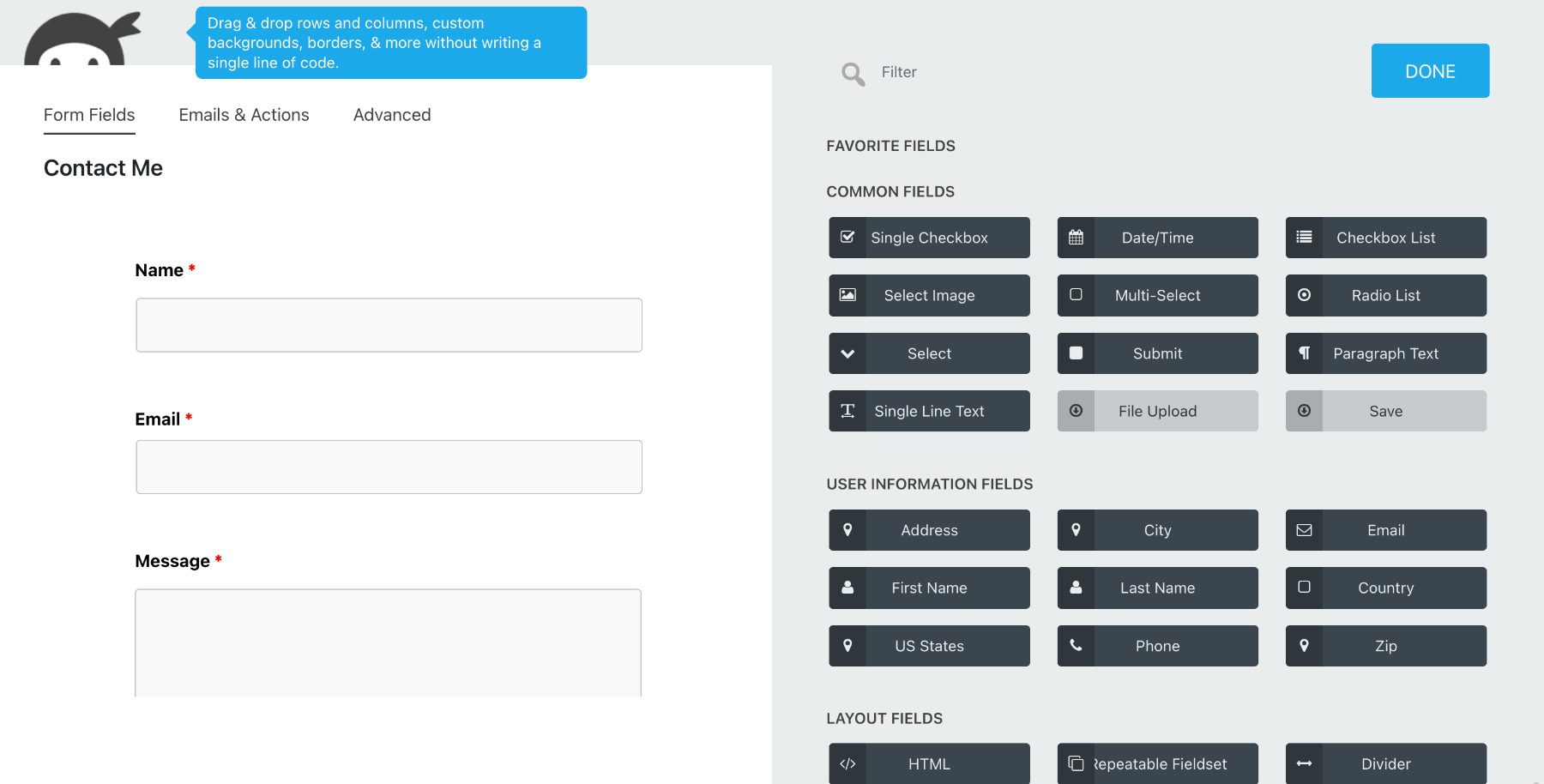
    Ninja Forms is another WPForms alternative you can start using for free. It features a drag and drop form builder so you can build interactive online forms without coding. 

    The plugin offers a wide range of addons for purchase, such as conditional logic, file uploads, Excel export, and multi-step forms. Unfortunately, you have to buy each one separately, which can quickly rack up, especially when buying more than one or two addons. 

    Out of this list, Ninja Forms offers some of the most integrations out of any tool. For example, you can connect them with different payment apps like Stripe and PayPal, CRMs like Salesforce, and other tools like webhooks and Slack. 

    Pricing: The base plugin is free to download in the official WordPress repository. However, you can buy a subscription with additional features starting at $99 per year or purchase individual addons. 

    9. Contact Form 7

    Contact form 7

    Contact Form 7 rounds out our list because it is the oldest and most downloaded contact form plugin in the official WordPress plugin directory.

    It is a WPForms alternative, but we don’t recommend that you use it. The only real benefit of using Contact Form 7 is that it’s free to use, and you can create simple forms. WPForms Lite does everything it can and more.

    That said, Contact Form 7 is not user-friendly. There are no drag and drop builders or templates to use. Instead, you have to copy shortcodes to embed forms and toggle with dynamic merge tags to build the most basic contact forms. 

    Additionally, all forms are styled plainly. You can’t customize the style of your forms, making it hard to match the form’s design to your WordPress theme

    If you’re looking for a free WordPress contact form plugin, then WPForms Lite, Ninja Forms, and Formidable Forms Lite are all considerably better solutions than Contact Form 7. 

    Pricing: It’s a free plugin. However, it lacks many basic features, no real customization is available, and you get limited support. 

    What to Look for in an Online Form Builder 

    When you’re on the hunt for an online form builder for your WordPress website, there are many features and factors to consider. 

    Fortunately, WPForms offers all of these features and then some. This makes it the most comprehensive form builder plugin on the market.

    Let’s look at a few of them. 

    Pre-built Templates

    The best online form builders have pre-built form templates, allowing you to set up the forms you need in minutes. You never have to start from scratch as you do with plugins like Contact Form 7. 

    Instead, look for a form builder with a template gallery that includes the most popular forms needed for WordPress websites, like contact forms, newsletter signup forms, application forms, donation forms, order forms, and more. 

    In fact, the WPForms Lite version alone has 900+ form templates, meaning there’s a form to fit almost anything you could need. 

    WPforms templates

    Conditional Logic 

    In some cases, you may want to show or hide specific fields to users based on their responses. 

    That way, your visitors won’t see tons of empty fields that don’t apply to them. 

    Conditional logic

    You can use conditional logic to create dynamic forms that adapt as your visitor fills out the form. For example, you may want to: 

    • Filter your survey questions based on a demographic question
    • Process payments only when certain conditions are met
    • Provide customized support based on the type of issues your customers are experiencing  

    Surveys & Polls 

    A good form builder should also include the ability to create survey forms, polls, and quizzes. 

    Unlike most professional survey tools, WPForms Pro lets you easily embed surveys and polls onto your site. This helps you share and distribute them to a wider audience. 

    Everything is housed and stored within WordPress, meaning all your survey responses will be stored on your website, so you don’t have to log into different platforms and you can ensure your users’ data is secure.

    Also, you’ll see survey charts to visually see how responses are segmented. You can also download MonsterInsights, the best Google Analytics plugin, to measure your form completion rates as well. 

    Conversational Forms 

    Static forms can feel plain, which increases the likelihood of form abandonment. Online form builders should be able to create conversational forms. 

    This is a more interactive layout that only focuses on one question at a time rather than showing all of the questions at once. 

    Conversational forms

    Also, conversational forms can be completed using a keyboard only, making them more suitable for mobile users.

    Multi-Page Forms 

    Long forms can be overwhelming, causing users to abandon the form altogether. However, creating multi-page forms splits your single-page form into smaller sections with a progress bar to help reduce fatigue. 

    Page break

    Respondents are more likely to finish the form when separated into pages rather than seeing one long form.  

    Spam Protection 

    Online forms are vulnerable to spam bots that crawl through websites to find ways to email you through a non-secure form. 

    Since website owners often don’t give out their email addresses, forms are an easy way for hackers to add spam comments, send phishing links, and spread malware. 

    That’s why you need built-in security features in your online form builder to prevent spam emails. 

    WPForms features the latest spam defense methods. For example, you can add a CAPTCHA to bypass spambots so that only humans can submit your forms. 

    Which WPForms Pro Alternative is the Best? 

    In our experience, the best alternative to WPForms Pro is WPForms Lite. For many users, the options in the free version can get them started with their website or business.  

    It is a powerful and easy-to-use plugin that lets you build just about any type of form. The Lite version can do all of the basic functions users need without any of the bloat other contact form plugins have. 

    There simply is no other free forms plugin that has the same ease of use and number of features as WPForms Lite. 

    However, if you need direct CRM integration, HubSpot Form Builder is the way to go.

    For more complex forms or calculations, Formidable Forms is the clear winner.

    If you want to be able to choose and pay for only the features you will use the most, then we think that Ninja Forms is your best option.

    We hope this article helped you decide on the best WPForms alternative so you can create the forms you need on your WordPress site. While looking at these alternatives, you may want to check out our guide on the “must-have” WordPress Plugins & tools for business sites and the best WordPress popup plugins

    If you liked this article, then please subscribe to our YouTube Channel for WordPress video tutorials. You can also find us on Twitter and Facebook.

    The post 9 Best WPForms Alternatives Compared (Free and Paid) first appeared on WPBeginner.

  • 9 Best WordPress Forum Plugins in 2023

    Forums are a great tool to foster discussion and connection on the internet. With some of the best WordPress Forum plugins out there, it is easier than ever to create your own online community.

    In this post, we’ll provide you with our list of the most helpful WordPress forum plugins to help you get a forum up and running on your site.

    Key Features of the Best Forum Plugins (What to Look For)

    For those looking to create an online community, WordPress is a great platform to build on. When looking for a forum plugin, it needs to be able to do the job well. Look for these features of the best forum plugins:

    • User Accounts and Dashboards: User registration and management should be simple and efficient so users can register an account with ease and you can track user activity, receive real-time updates, and engage with the community.
    • Customization of Styles and Layouts: Look for a forum plugin with a wide range of customization options to help you create a forum that matches your brand’s style and layout, from color schemes to custom fonts.
    • Advanced Moderation Tools: To keep forums clean and spam-free, look for plugins with a variety of moderation tools that allow administrators to manage the content of their forums, including features like moderation queues, flags, and automatic spam filters.
    • Simple to Use: You want a simple forum that does not inhibit a community from growing, with a user-friendly interface and clear navigation to help users find what they’re looking for and participate in the community with ease.
    • Option to Subscribe to Topics and Receive Notifications: Subscribing to topic notifications is an essential feature for keeping users engaged with the forum. Participation is key in keeping the forum interesting and worth visiting.
    • Compatibility: Make sure your forum plugin is compatible with essential plugins and themes you will use on your site.

    The Best WordPress Forum Plugins

    Most would agree that the two most popular WordPress forum plugins are bbPress and BuddyPress. Although these plugins are free and provide a core foundation for building forums, they are often used with other themes and plugins to get a more polished design and user experience. Some of the best membership plugins and LMS plugins have built-in forums using bbPress and BuddyPress integration. So, we’ve expanded our list to include other plugins and themes that can help you build online communities with the tools you need.

    Here they are:

    1. Answers by Creative Minds (CM Answers)

    CM Answer Q&A Plugin for WordPress

    Answers by Creative Minds (a.k.a. CM Answers)  is a Q&A-style WordPress forum plugin designed to help you build engaging communities around answering questions. Its forum-like layout and functions focus on questions versus topics—making it perfect for creating a Stack Exchange/Quora-style forum. The basic free version has enough features to start, but the pro version is what makes Answers a great choice for building forums.

    Key Features for CM Answers:

    • Forum topic views and answer counters
    • Forum-related email notifications for administrators and users
    • Sorting options in the question and answer pages
    • The forum template can be easily customized
    • Ability to monetize forums with PayPal/Stripe integrations

    CM Answers Monetization

    Not only is CM Answers a great tool for building a Q&A-style forum, but it also offers unique features that set it apart from other forum plugins. For instance, website owners can use it to replace the commenting system on regular blog posts (without the need for a comment plugin). And, the forums can be monetized which is an ideal choice for thought leaders and bloggers who want to create a paid community around their offerings.

    CM Answers is for you if you…

    • Need a total Q&A forum solution
    • Have been kicking around the idea of creating a paid community (similar to a paid Facebook Group or Discord server)

    CM Answers Pricing: $39 per year

    Get CM Answers

    2. ForumEngine

    ForumEngine WordPress Forum Theme

    ForumEngine is a WordPress theme that makes it easy to turn your site into a discussion forum. Yes, theme. We’ve included it for those who may want a complete forum solution (or website) without having to build and design one yourself. A theme may be of particular interest to those who want to run a community forum on a separate WordPress installation on a sub-domain or in a root folder (eg. community.example.com or example.com/community).

    Key Features of ForumEngine:

    • Frontend style customizer with other frontend controls
    • Adaptive design for mobile use
    • User badges and achievements
    • Live notification system
    • Translation support

    ForumEngine Frontend User Styling

    One of its standout features is its detailed styling function, which gives you complete control over the look and feel of your forum. That, and individual users can customize styling their way with a front-end styler.

    ForumEngine is for you if you…

    • Have the flexibility to use a theme versus a plugin for your forum solution
    • Want to pay a low Lifetime (LTD) price for the software
    • Like an active developer who listens to feedback and posts updates regularly

    ForumEngine Pricing: $49 per year

    Get ForumEngine

    3. bbPress

    bbPress WordPress Forum Plugin

    bbPress is an incredibly popular WordPress plugin that makes it easy to add a forum to your site. Developed by some of the same team behind WordPress.org (the open-source project)—bbPress has an air of familiarity that is classically WordPress. We like that it seamlessly integrates with membership plugins like MemberPress and Paid Memberships Pro so that you can easily add a forum to your membership site. It even integrates with Lifter LMS to create a community forum for your online course as well.

    Key Features for bbPress:

    • Ability to create multisite forums
    • Customizable forum templates
    • Forum spam protection through Akismet
    • Fast, light, and built to WordPress standards
    • Extend your forum with numerous free, third-party plugins
    • Allow users to subscribe to topics and specific forums

    bbPress showcase of Free plugin user groups

    The key feature and advantage of bbPress are that it is completely free and open-source. This means that you can go to the website and download the plugin without having to worry about any upsells or hidden costs. And since it is developed to the highest standards, free and open source feels pretty good.

    bbPress is for you if you…

    • Want a lightweight and reliable forum plugin
    • Want a free solution that works without a lot of design options
    • Use a membership or LMS plugin that already has built-in integration for it.

    bbPress Pricing: Free

    Get bbpress

    4. Asgaros Forum

    Asgaros Free WP Forum Plugin

    Asgaros Forum is a lightweight and straightforward WordPress plugin that makes it easy to add a forum to existing websites. It’s designed to provide all the basic features of a forum without getting bogged down in unnecessary features and bloat, making it an ideal choice for websites that need a small and simple forum.

    Key Features of Asgaros Forum:

    • Users create profiles that come with notifications and personal feeds
    • Users have access to media uploads within the forum
    • Forum statistics and analytics
    • Guests can guest-post within forums
    • Moderation system for approval processes and forum banning
    • Compatible with Multisite

    Asgaros Forum Moderation Reports

    One of the great features of Asgaros Forum is its moderation tools. Moderators have deep visibility about who is online (in real-time), which makes it easy to keep an eye on what’s happening in the forum. Additionally, the plugin offers a simple admin page with topic/user monitoring, usage reporting, and moderation tools.

    Asgaros Forum is for you if you…

    • Need a forum solution that can be added to an existing website
    • Want just enough features to open up a forum but not too many to manage

    Asgaros Forum Pricing: Free

    Get Asgaros Forum

    5. wpForo

    wpForo free WP Forum Plugin

    wpForo is a comprehensive and user-friendly forum plugin for WordPress. It allows site owners to easily create modern forums where their users can participate, ask questions, answer, up-vote, and subscribe to topics. This plugin brings everything you need to run an efficient and professional community, including a powerful and beautiful forum with unique features. The core features of the plugin are free, but if you need more, some affordable add-ons allow you to integrate WooCommerce memberships, GIPHY, private messaging, and many more.

    Key Features for wpForo:

    • Easy drag-and-drop forum management system for admins
    • Member ratings and badges
    • Built-in forum sitemap, forum SEO tools, and caching system
    • Six end-user forum styles, including dark mode
    • Four forum layouts and designs
    • Built-in topic and forum subscription

    wpForo Forum Quality Sytyles and Design

    One of the reasons why many users prefer wpForo over other forum plugins is its modern design. Other forum solutions can tend to look dated (plus forums are hard to style anyways). It includes four major layout styles for site admins to use and six styles (sometimes called skins) that individual users can use to customize their experience (including dark mode!).

    Engage your community even more with gamification and reward points to users for getting likes and up-votes using MyCred plugin integration.

    wpForo is for you if you…

    • want a modern-looking forum option out of the box
    • Enjoy the core features and don’t mind paying for the occasion extension/add-on

    wpForo Pricing: Free with Paid add-ons available

    Get wpForo

    6. WP Discussion Board

    Discussion Board Forum Plugin

    WP Discussion Board – WordPress Forum Plugin is a user-friendly and practical solution for those looking to add a forum to their WordPress site. With a simple setup and a form-driven front-end design, this plugin is accessible to users with no prior WordPress knowledge.

    Key Features of Discussion Board:

    • User management for forum administrators
    • Frontend user self-serve and management
    • Spam reduction tools
    • Shortcode library to show forum on other pages and posts
    • Designed to look beautiful and work with any theme

    Discussion Forum Minimalistic Design

    The Discussion Board offers a minimalist and modern forum that can be placed anywhere on your WordPress website. The user registration process is streamlined and effortless. Overall, Discussion Board is easy to look at which isn’t the case with every forum plugin out there.

    Discussion Board is for you if you…

    • Like the idea of using form submissions as part of the forum experience
    • Need dedicated moderation and spam protection tools built-in

    WP Discussion Board Pricing: Free; Paid plans start at $49 per year

    Get WP Discussion Board

    7. BuddyPress

    BuddyPress WordPress Community Plugin

    BuddyPress is a powerful plugin developed by the same team behind bbPress and WordPress. It goes in a slightly different direction than bbPress in that it can transform your website into a social media network. BuddyPress can work with any WordPress theme to help you create an online community complete with user profiles, messaging, and networking options. It’s ideal for business owners and bloggers who want to build a community around their content and product.

    Key Features for BuddyPress:

    • Users can control profile visibility
    • Admins can create custom profile fields
    • Friendships and friend connections
    • Public and private messaging
    • Customizable emails

    BuddyPress Personal Profile and Friend Requests

    Forums are often great for creating community. BuddyPress goes the extra mile and brings social networking functionality directly into a WordPress website. It offers an exciting alternative to traditional forums and comment plugins with less emphasis on “staying on topic” and more emphasis on community engagement.

    BuddyPress is for you if you…

    • Like the idea of building a social network for your users directly on your site
    • Want community engagement that goes beyond forums
    • Don’t mind the extra setup that is entailed in creating social features

    BuddyPress Pricing: Free

    Get BuddyPress

    8. Sabai Discuss

    Sabai Discuss WordPress Forum Plugin

    Sabai Discuss is a premium WordPress plugin that offers a unique take on forums. It combines the best of both worlds by offering both a discussion stream and a question-and-answer tool, making it ideal for those who want to create a community-driven Q&A website, a discussion forum, a knowledge base, or even a helpdesk portal.

    Key Features for Sabai Discuss:

    • Discussion Stream makes it easy to stay on top of new activities with a streamlined information feed
    • Voting engine for threads within the forum
    • Upvote or downvote questions
    • Moderation system with user reporting
    • Forum users can use the frontend markdown editor

    Sabai Discuss Attractive Forum Layouts

    One of the standout features of Sabai Discuss is its attractive and easy-to-read interface. It’s designed to look like a Q&A platform like Quora or Stack Overflow, and it does so in a way that’s both functional and visually appealing. This makes it a great choice for those who want a forum that feels modern and engaging.

    Sabai Discuss is for you if you…

    • Enjoy purchasing products from Envato Marketplace
    • Need a Q&A-based forum setup

    Sabai Discuss Pricing: $24 (LTD) with 6 months of support

    Get Sabai Discuss

    9. Simple:Press

    Simple:Press Ultimate Forum Plugin

    Simple:Press is a feature-packed WordPress forum plugin that offers a sleek and customizable interface. Its threads are clean and have simple colors that complement your website’s content. The free version is fairly basic, but you can enhance its functionalities by purchasing a premium plan. Ideal for businesses that are planning for very large and complicated communities.

    Key Features for Simple:Press:

    • Sub-forum support
    • Forum ranking and badges
    • User-defined signatures
    • Upload avatars or use Gravatar or WordPress avatar
    • Forum statistics for the admin
    • Member profile options for users
    • Monetization potential

    SimplePress Clean and Advanced Forums

    Simple:Press touts itself as an enterprise solution. If you are looking for a robust and complex community forum, Simple:Press aims to be the ideal plugin for your needs.

    Simple:Press is for you if you…

    • Have enterprise-level dreams for your community
    • Don’t mind paying a pretty penny for advanced features
    • Want a modern-looking forum

    Simple:Press Pricing: Free; Paid plans start at $199 per year

    Get Simple:Press

    What are the Best WordPress Forum Plugins?

    Our list of the best WordPress forum plugins provides you with a glance into what’s available to you as you build your online forum. Should you want to monetize your community, you can consider using bbPress with a membership plugin like MemberPress or Paid Memberships Pro. Or you can use CM Answers or Simple:Press .

    If you are after a forum theme, check out Forum Engine as it is a complete forum built into a theme instead of a plugin.

    Plugin Price Free Option
    🥇 CM Answers $39/yr ✔️ Visit
    🥈 ForumEngine $49/yr ❌ Visit
    🥉 bbPress Free ✔️ Visit
    4 Asgaros Forum Free ✔️ Visit
    5 wpForo Free (Paid Add-ons) ✔️ Visit
    6 Discussion Board $49/yr ❌ Visit
    7 BuddyPress Free ✔️ Visit
    8 Sabai Discuss $24 (6 months support) ❌ Visit
    9 Simple:Press $199/yr ✔️ Visit

    When choosing any plugin on WordPress, it is important to look at features and pricing carefully. This means paying very careful attention to what is (and isn’t) offered with each pricing tier. WordPress offers many great free and cheap options for forum plugins. Enjoy building your community.

    Featured Image via M. Ageng sumantri / shutterstock.com

    The post 9 Best WordPress Forum Plugins in 2023 appeared first on Elegant Themes Blog.

  • 8 Best WordPress Form Plugins in 2023

    Form plugins are crucial for website owners to easily collect and organize visitor data. Without them, gathering leads and improving front-end strategies can be hindered. With many form plugins available for WordPress, choosing the right one can be difficult. That’s why we’ve listed the best options to help you find the perfect fit for your needs. But, make sure to consider your specific requirements before making a choice. In this article, we’ll give a detailed analysis of each plugin so you can pick the best one for your WordPress website.

    Best Form Builder Plugins for WordPress

    When it comes to forms, there are some excellent contact form plugins to consider. So this time we’re focusing on what forms bring the most value and features to meet the needs of any user.  Regardless of your choice, don’t forget to test your form to make sure it is performing as expected. You don’t want to miss any new contacts or leads.

    Here is our list of the best form plugins for WordPress:

    1. WPForms – Best Form Builder for Beginners

    WPForms Home Page Feb 2023

    WPForms is a beginner-friendly WordPress form builder plugin with over 5 million active installations. It offers a drag-and-drop interface to design unlimited forms, including contact, registration, login, order, and other custom forms.

    WPForms is also compatible with popular WordPress themes and comes with features like smart conditional logic, detailed user journeys, geolocation, and payment integrations with PayPal, Authorize.Net, Stripe, and Zapier.

    WPForms User Journeys Addon

    The WPForms Lite version is free and comes with basic contact form features, while the paid version offers more advanced features, including multi-page forms, surveys, user registration, payment forms, and local submission saving.

    Key Features of WPForms

    • Drag-and-drop form builder
    • 500+ pre-built form templates
    • Smart conditional logic for high-performance forms
    • Integrates with Divi
    • Instant notifications and spam protection
    • Advanced features such as surveys, polls, and user registration are available as add-ons

    The 500+ pre-built templates offered by WPForms really stand out and could save lots of time for website owners. It offers plenty of integrations in the free tier as well as tons in its paid tiers. Of note is that it integrates with Divi and other popular page builders. For these reasons, it is considered to be

    WPForms 500+ Available Templates

    WPForms is for you if…

    … you’re looking for a reliable, flexible, and powerful WordPress contact form plugin. It can be used on everything from basic start-up sites to complex e-commerce sites. Perfect for beginners and agencies alike (with good yearly prices).

    WPForms Pricing: Free; paid plans start at $49.50 per year.

    Get WPForms

    2. Gravity Forms

    Gravity Forms Home Page Feb 2023

    Gravity Forms is a premium form builder for WordPress that offers a visual form editor with advanced features for both beginners and advanced users. It has a drag-and-drop form builder that allows you to create forms without any programming knowledge and includes features such as conditional logic, numeric calculations, and file uploads.

    Gravity Forms Conditional Logic

    With Gravity Forms, you can create multi-page and mobile-responsive forms, limit the number of submissions, schedule forms, and create posts from filled-out forms. The plugin also offers spam protection, email marketing integrations with popular platforms like Mailchimp and Constant Contact, and the ability to accept payments. Each integration or additional feature, however, is packaged as an add-on making getting the right mix of capabilities a chore.

    Key Features of Gravity Forms

    • Drag-and-drop form builder with over 30 form field types
    • Advanced forms for quizzes, surveys, subscriptions, web directories, and more
    • Powerful eCommerce capabilities (Pro and up)
    • Built-in conditional logic, entry limitations, and scheduling
    • Integrates with Divi for advanced styling and customization forms using Divi Gravity Forms.

    Gravity forms can be used to build multiple types of forms. Plus, it can handle eCommerce-powered forms very well. We enjoy Gravity Form’s clean and simple UI for the backend editor which other options (like WPForms) sometimes lack.

    Gravity Forms is for you if…

    … you’re looking for a premium and sophisticated and extendable WordPress contact form plugin. Also, as pricing tiers go up, the number of available add-ons and the number of site licenses both increase making it a solid option for agencies.

    Gravity Forms Pricing: No free version. Paid plans start at $59 per year.

    Get Gravity Forms

    3. Formidable Forms – Best Advanced Form Builder

    Formidable Forms Home Page Feb 2023

    Formidable Forms is a powerful online form builder plugin for WordPress that offers both free and premium versions. The plugin is versatile and can be used to create complex forms such as quizzes, surveys, payment forms, registration forms, real estate forms, and much more.

    Formidable Forms is aimed at advanced users and developers, but its drag-and-drop builder makes it easy to use even without coding skills. It offers a comprehensive and versatile form-building platform that can scale with any business’s needs.

    Key Features of Formidable Forms

    • Drag-and-drop builder that is WCAG and A11Y compliant
    • Advanced forms with calculations, quizzes, polls, and registration
    • User tracking and signature-enabled forms
    • Spam protection on all paid plans

    The plugin provides a simple drag-and-drop builder for creating complex forms for data-driven web apps, such as directories, listings, and event registration. There are plenty of ways to tweak forms with custom code and use webhooks to get the most out of the form plugin for developers too.

    Formidable Drag and Drop Builder

    The plugin works great for surveys as well. Check out how we used it to create a survey on WordPress

    Formidable Forms is for you if…

    … you’re looking for an advanced, premium WordPress contact form plugin that can seemingly do it all. While the free version is suitable for creating simple forms, the real value of Formidable Forms is in its premium tool, which is ideal for creating complex forms of all kinds. Therefore, if you’re looking for a beginner-friendly option, this may not be the best choice. The starting paid tier, for instance, has no integrations available but the highest tiers have a lot to offer enterprise and business users.

    Formidable Forms Pricing: Free; paid plans start at $39.50 per year.

    Get Formidable Forms

    4. Ninja Forms – Best Pricing for Web Agencies

    Ninja Forms Home Page Feb 2023

    Ninja Forms is a popular WordPress form plugin that offers a range of features to help you create custom forms for your website. The core plugin is free and available in the WordPress plugin repository. In addition to the free version, Ninja Forms offers a premium version with even more features. The plugin is beginner-friendly, with a drag-and-drop builder and a range of pre-built form templates to choose from. With Ninja Forms, you can customize your forms using custom CSS and add dedicated fields, a success message, and spam management.

    Ninja Forms works with some of the most popular email automation & CRM software, such as Zoho CRM, Mailchimp, AWeber, Campaign Monitor, and many more. The benefit of their extensive integration capabilities is that you can streamline your marketing efforts. The plugin also has a user analytics tool to help you see data regarding form submissions.

    Key Features of Ninja Forms

    Ninja Forms is for you if you…

    • Drag-and-drop interface and unlimited forms, fields, and submissions
    • Filters and custom fields
    • Conditional logic add-on and multi-part forms
    • Integrations with email service providers like Mailchimp, AWeber, and Zoho; Plus various payment processors
    • Manage and export submissions, save form fields for future use, and plenty of support documentation

    Ninja Forms supports Ajax form submission (like others on the list), so there’s no need for a page reload when a form is submitted. You can extend the plugin’s functionality by purchasing various add-ons, including conditional logic, file uploads, and multi-step forms. There’s also integration support for payment forms via PayPal and Stripe. The premium version offers additional layouts and styles for even more customization options.

    Ninja Forms Visual Form Builder

    Ninja Forms is for you if…

    … you’re looking for a freemium option that lets you create unlimited forms. You can use the free version on as many sites as you wish, while the premium tool lets you access advanced features and paid add-ons.

    Ninja Forms Pricing: Free plan; paid plans start at $49 per year.

    Get Ninja Forms

    5. Fluent Forms – Best Form + CRM Combo

    Fluent Forms Home Page Feb 2023

    Fluent Forms is a powerful and user-friendly WordPress form builder plugin that offers a range of features to help you create dynamic and visually stunning online forms. It may just be the most underrated WordPress form plugin on this list. It has a drag-and-drop editor, 60+ pre-built form templates, and a conversational form workflow. The plugin is cost-effective and integrates with its ever-popular sister product, FluentCRM.

    Fluent Forms Conversational Form Workflow Builder

    Key Features of Fluent Forms

    Fluent Forms is for you if you…

    • Conversational Forms, Classic Form Builder, Drag & Drop Contact Form Builder, Multi-column Contact Form Layout, Smart Conditional Logic Form Fields, 30+ Form Field Types
    • Responsive and Mobile Friendly Design, Reusable Templates
    • In-Depth Performance Analytics
    • Export/Import Forms, Export Data with Advanced Data Filtering
    • Integrations including Mailchimp and Slack

    It comes with a drag-and-drop form builder, 60+ pre-built form templates, 30+ form field types, and 15+ third-party integrations. With the built-in data analysis tool and multi-column form layout, you can easily analyze your form data and create stunning forms. The plugin is also GDPR compliant and secured by reCAPTCHA to protect against spam submissions.

    WP Fluent Forms offers standard form features like Conditional Logic, Ajax form submission, and time-restricted submissions. Since it is built by the creators of FluentCRM, it offers a truly seamless experience from lead/subscriber/user form submission to customer lifecycle and sales functions that can be attended to in the CRM.

    FluentCRM Dashboard Shoing Fluent Form Subscriber Growth

    Fluent Forms is for you if…

    … you’re looking for an underdog product that has lifetime pricing available. You can use the free version with no domain count restrictions, while you get a few more robust perks with the Pro version.

    Fluent Forms Pricing: Free; paid plans start at $49 per year.

    Get Fluent Forms

    6. Jetpack Forms

    Jetpack Home Page Feb 2023

    Jetpack is a multi-purpose WordPress plugin that includes various performance, site management, and security modules, both free and premium. The free version includes a contact form module, which can be used to create simple forms on both the Classic and Block editors. This plugin makes it easy to add new forms to your website and lets you leverage WordPress in-built settings to alert you via email when someone submits a form.

    With Jetpack’s built-in contact form, users can add a form to any post or page with just a few clicks. The plugin has a drag-and-drop editor that allows users to insert, organize, and freely edit form fields, and it comes with some decent template options. The forms can be configured to send custom email notifications to multiple people, and there is also spam filtering with Akismet. The plugin provides detailed documentation and support, and it ensures that users won’t have to worry about site speed or performance issues.

    Key Features of Jetpack Forms

    • Ability to add contact forms directly in pages and posts
    • Customizable email notifications
    • Anti-spam and caching support with a paid subscription (monthly)
    • Comes packaged with other tools that WordPress beginners appreciate such as analytics and site speed improvement

    Integrates well with WordPress.com and WordPress.org websites. If you are a user of WordPress’s native block editor, Jetpack jumps right into the tools you use every day.

    Jetpack Form Builder Plugin

    Jetpack Forms is for you if…

    … you’re looking for a plugin that can also help you improve your site in other ways. In addition to creating user-friendly forms, you can also use this tool to enhance your site’s performance and security. However, if you’re looking for a highly customizable-form builder, this probably isn’t the plugin for you. It brings in other features that experienced webmasters might have covered with dedicated plugins (like security plugins, caching plugins, and advertisement management plugins).

    Jetpack Forms Pricing: Free; paid plans start at $10 per month.

    Get Jetpack Forms

    7. Contact Form 7 – Best Free Option

    Contact Form 7 Plugin Download Page Feb 2023

    Contact Form 7 is a free WordPress contact form plugin that has been one of the most popular on the market. It offers the basic functionality of creating simple WordPress forms with checkboxes and dropdown menus, integrates with anti-spam tools, and is completely free. Because it is so light and built with a good core foundation, developers can easily customize it with a little HTML/CSS magic.

    However, it has some limitations, such as not having a visual form builder and requiring basic HTML knowledge to create or customize the forms. So it can be difficult to match the style of your form with your site. The code syntax in Contact Form 7 is not very user-friendly, making it difficult for beginners to set up. Additionally, there is limited support available for this free plugin, and finding add-ons to extend its functionality can be challenging due to the lack of an add-ons directory.

    Despite these drawbacks, Contact Form 7 has a lot of free add-ons available in the WordPress plugin directory that can enhance its functionality. However, it may not be the best choice for those who are looking for a more user-friendly solution.

    Key Features of Contact Form 7

    • Completely free
    • Support forums with years of activity
    • Lots of free add-ons by the community
    • Unlimited forms

    There are plenty of other options on this list but there are still features that make CF7 attractive to some people. The fact that is completely free and well-supported is enough for some people.

    Contact Form 7 Text Based Form Builder

    Contact Form 7 is for you if…

    … you’re looking for a free plugin and don’t mind learning the syntax for creating forms. It’s a very flexible tool that is perfect for those with a bit of web DIY skills wanting to create standard contact forms on their WordPress sites. Contact Form 7 may be for you if you use the Divi Theme since Divi helps you style and build Contact Form 7 with ease using an essential marketplace product.

    Contact Form 7 Pricing: Free to use.

    Get Contact Form 7

    8. Typeform – Best for Engagement

    Typeform is a leading online platform for creating stunning, interactive forms. The form questions appear one at a time making the experience more conversational. And you can easily include images and videos in your form to keep your audience engaged.

    Key Features of Typeform

    • Easy to embed on any WordPress Website
    • Forms are full-page, interactive, engaging, and conversational
    • Add images and videos to your form as possible answers.
    • Large collection of templates and form content types to choose from.
    • Integrates with popular services like Mailchimp, Slack, and HubSpot.
    • Powerful conditional logic functionality.
    • Tools to collect and analyze data from surveys and forms, including charts, graphs, and data exports

    With a user-friendly drag-and-drop builder and pre-built elements, Typeform offers a superior experience compared to many of its competitors. There are dozens of form templates and a wide variety of form content types that make it easy to get started.

    Typeform is for you if…

    … you’re looking for a more engaging way to capture leads. The plugin is built entirely outside of WordPress but is easy to embed anywhere you want it or have it open in fullscreen. If you want a simple form you can manage within WordPress, you are better off going with one of the other options in this post.

    Typeform Pricing: Limited free plan, Paid plans start at $25 per month.

    Get Typeform

    What is the Best Form Plugin for WordPress?

    There are many excellent WordPress form plugins available, each offering unique features and benefits. Here is a list of all the plugins we covered, along with their prices for easy comparison. 👇

    Plugin Price Free Option
    🥇 WPForms $49.50 ✔️ Visit
    🥈 Gravity Forms $59 ❌ Visit
    🥉 Formidable Forms $39.50 ✔️ Visit
    4 Ninja Forms $49 ✔️ Visit
    5 Fluent Forms $41 ✔️ Visit
    6 Jetpack Forms $120 ✔️ Visit
    7 Contact Form 7 Free ✔️ Visit
    8 Typeform $300 ✔️ Visit

    WPForms is the best for bloggers or small businesses that need a user-friendly form for their site that has all the basic features one would expect. If you are looking for a more advanced form solution, then you can’t go wrong with Formidable Forms or Gravity Forms. Both offer a user-friendly drag-and-drop form builder, a wide range of form fields and templates, and advanced features such as conditional logic and file uploads. They also integrate with popular email marketing platforms and payment processors.

    Looking for an email opt-in form to grow your subscriber list? Check out these top WordPress Newsletter Form Plugins.

    Featured Image via Chilly design / shutterstock.com

    The post 8 Best WordPress Form Plugins in 2023 appeared first on Elegant Themes Blog.

  • 11 Best WordPress Contact Form Plugins in 2023

    Contact forms provide a quick and easy way for customers and potential clients to get in touch with you. Plus, they can do a lot more than that. They can also serve as a lead generation tool, there’s no limit to what you can use forms for. However, to add them to your site without manual coding, you’ll want to use a WordPress contact form plugin.

    In this post, we’ll look at the evolution of WordPress forms plugins. Then we’ll explore 11 of the best options and help you find the right one for your website.

    Let’s get started!

    The Evolution of WordPress Forms Plugins

    In the early days of the Content Management System (CMS), WordPress contact form plugins served a somewhat singular and straightforward purpose: to create basic forms on websites so that customers could contact businesses or bloggers via email. However, these forms have since evolved far beyond the contact page.

    Over the years, the once humble contact form plugins have grown to become fully functional form builders. Today they can be used to serve a wide range of purposes on just about any type of WordPress site. This includes, but is not limited to:

    • Lead generation
    • Email newsletter sign-ups
    • Membership Registration
    • E-commerce orders
    • Quizzes and surveys

    Thanks to WordPress contact form plugins, you can now easily build dynamic, aesthetically pleasing forms without having to manually code them. You can even create animations and special effects, such as pop-up forms. Plus, you can place them just about anywhere on your site and integrate them with payment, email, and Customer Relationship Management (CRM) platforms.

    The best WordPress contact form plugin for you to use will depend on a handful of factors. Some tools serve as all-in-one solutions that let you easily build and customize a variety of complex forms. Others are geared more toward beginners looking to create simple contact forms. So before beginning your search, it’s a good idea to know what you’re looking for and what kinds of features you’ll need.

    11 Best WordPress Contact Form Plugins in 2023

    Now that you understand a little more about WordPress forms and the kinds of content you can use to create on your website, it’s time to explore some of your options. In the following sections, we’ll introduce 11 of the best WordPress contact form plugins.

    To compile this list, we considered a handful of factors. This includes each plugin’s active installations and ratings, features and support, and pricing. No matter what you plan to use your WordPress contact form plugin for, one of these tools should be able to help you out.

    1. WPForms

    WPForms banner

    First up, WPForms is perhaps the most well-known WordPress contact form plugin and the all-around best option for many users. It lets you build beautiful, dynamic forms in minutes using its intuitive drag-and-drop interface:

    Conditional Logic Forms

    You can also choose from a library of pre-built templates to make the creation process that much quicker. This plugin is incredibly beginner-friendly, and it is offered in both a lite and premium version.

    You can use the free version on as many sites as you’d like. You can also leverage its impressive collection of handy features, including email notifications, spam protection, and more. If you want to upgrade to a premium plan, you can use advanced functions such as multi-page, payment, and order forms.

    Key Features:

    • Drag-and-drop interface
    • 150+ pre-built form templates
    • Entry management system
    • Smart conditional logic for creating high-performance forms
    • File uploads
    • Integration with Mailchimp, AWeber, PayPal, and more (premium)
    • Instant notifications
    • Login and user registration
    • Survey & polls add-on
    • Spam protection
    • Landing page forms

    WPForms is for you if…

    …… you’re looking for a reliable, flexible, and powerful WordPress contact form plugin. It can be used on everything from basic start-up sites to complex e-commerce sites.

    Price: Free, with premium licenses starting at $39.50 per year | More Information

    2. Gravity Forms

    Gravity Forms logo

    Next on our list, Gravity Forms is a premium WordPress contact form plugin that, like Formidable Forms, is also mostly aimed at developers and other advanced users. However, unlike many premium tools, it doesn’t offer a free version (aside from a Custom Post Types add-on).

    With the paid version, you can easily create complex forms, including ones with multiple pages. It also lets you schedule forms to limit when they’re displayed, limit entries (such as for contests), and export entry data as CSV files.

    Gravity Froms settings

    Key Features:

    • Drag-and-drop form builder
    • More than 30 form fields
    • Advanced forms for quizzes, surveys, subscriptions, web directories, and more
    • CSV export
    • Built-in conditional logic
    • Entry Limitations
    • Paragraph fields
    • File uploads
    • Front-end user content submissions
    • Schedule forms
    • Tons of support, including a ticketing system and a knowledge base

    Gravity Forms is for you if…

    … you’re looking for a premium and sophisticated WordPress contact form plugin. It’s a solid option if you have a customer support website. Also, because you can incorporate schedule forms, it can help let your users book appointments via your site.

    Price: Licenses start at $59 per year | More Information

    3. Formidable Forms

    Formidable Forms banner

    Formidable Forms is a freemium WordPress contact form plugin that helps you quickly create and customize a variety of form types. As with WPForms, it offers a clean drag-and-drop interface that is suitable for beginners:

    Formidable Forms creation page

    Through this plugin, you’ll have the option of creating your own forms from scratch or selecting one of the ready-made templates. If you’re looking to build standard contact forms, the lite version is usually sufficient. However, if you want to expand your forms beyond the seven fields the free plugin offers, you’ll need to upgrade to the premium version.

    The premium plugin offers a wide range of features that are ideal for building complex forms. It’s focused largely on developers, making it an excellent tool if you plan on creating a range of forms for various websites.

    Key Features:

    • Drag-and-drop builder
    • Unlimited email notifications
    • Over 17 paid add-ons for email and payment integrations
    • Import/export forms in XML format
    • Advanced forms, including quizzes, surveys, polls, registration, etc.
    • Advanced calculation fields and smart calculators
    • Highly extendable design
    • reCAPTCHA integration to prevent spam
    • Style editor that enables you to modify CSS

    Formidable Forms is for you if…

    … you’re a developer looking for an advanced, premium WordPress contact form plugin. While the free version is suitable for creating simple forms, the real value of Formidable Forms is in its premium tool, which is ideal for creating complex elements. It’s targeted at advanced users and developers. Therefore, if you’re looking for a beginner-friendly option, this may not be the best choice.

    Price: Free, with premium licenses starting at $49.50 per year | More Information

    4. Ninja Forms

    The NInja Forms WordPress plugin.

    Ninja Forms is a flexible freemium plugin that can be helpful whether you’re a developer or a beginner WordPress user. It boasts a modern, drag-and-drop interface that you can use to create unlimited forms and fields:

    Form builder interface

    Ninja Forms is simple enough for beginners to use. However, there are also plenty of customization features that make it helpful for developers as well.

    Key Features:

    • Drag-and-drop interface
    • Filters and custom field templates
    • Conditional logic add-on
    • Date picker feature
    • Unlimited number of forms, fields, and submissions
    • More than 40 extensions
    • Multi-part forms
    • Mailchimp, AWeber, and Campaign Monitor integration
    • Payment processor connections
    • Manage and export submissions
    • Save form fields for future use
    • Plenty of support documentation

    Ninja Forms is for you if…

    … you’re looking for a freemium option that lets you create unlimited forms. You can use the free version on as many sites as you wish, while the premium tool lets you access advanced features and paid add-ons.

    Price: Free, with premium licenses starting at $49.50 per year | More Information

    5. Form Maker

    The Form Maker plugin.

    If you want to create simple yet customizable contact forms, Form Maker is another freemium WordPress contact form plugin that’s worth checking out. Like most of the tools included on this list, it features a drag-and-drop builder that makes creating forms straightforward, even for beginners:

    The Form Maker plugin demo.

    Whether you want to create your form from scratch or use a pre-made template, this tool includes plenty of options for you to choose from by default. Then you can easily display the resulting forms on your site as popups, top bars, or scroll boxes. You can also embed them into your posts and pages.

    The free version of Form Maker includes handy features such as conditional logic and multi-page forms. The premium option is even more impressive, enabling you to accept payments via Stripe or PayPal, upload files, and more.

    Key Features:

    • Drag-and-drop interface
    • Pre-built templates
    • Fully-customizable themes
    • Multi-page forms
    • Conditional logic
    • Submission management
    • Spam protection
    • Customizable emails
    • Paid add-ons for Mailchimp, Dropbox, and more
    • Payment Acceptance

    Form Maker is for you if…

    … you’re looking for a powerful freemium plugin. While it’s not as popular as some of the other freemium options, it does include an expansive range of features that are suitable for many different types of forms and websites. You can try the free plugin to get a feel for whether it’s the right fit, and then upgrade to the paid tool when you’re ready to unlock more advanced functionality.

    Price: Free, with premium licenses starting at $30 | More Information

    6. Divi Contact Forms Module

    The Divi Builder plugin website.

    If you’re an Elegant Themes member, you can use our Divi Contact Forms module to create stunning, dynamic forms for your site. While it’s not a standalone plugin like some of the other tools included on this list, it’s the most accessible option if you already use Divi Builder.

    As a powerful page builder, Divi makes creating beautiful, fully-functional pages as quick and easy as possible. We offer a ton of elements and modules for you to choose from, including a Forms module:

    The Divi Contact Forms module.

    One of the advantages of using Divi Builder is that you won’t need to install any additional plugins in order to create contact forms. Our Forms module comes built-in, so you can quickly add it via the searchable module list when building your pages and posts.

    Key Features:

    • Visual builder
    • Translatable and localized form fields
    • Content, design, and advanced form options
    • Conditional logic
    • Form field and button style customization
    • Field validation
    • Option to create custom form fields
    • Ability to hide/display input fields
    • Radio buttons and dropdowns

    Divi Forms is for you if…

    … you’re an Elegant Themes member looking for a quick and simple way to add forms to your site. It’s a high-quality solution for creating both forms and entire pages for your WordPress website. Plus, you can ensure that any form you add will perfectly match your current theme’s branding and styling.

    Price: Access starts at $89 per year (as part of an Elegant Themes membership) | More Information

    7. Contact Form 7

    The Contact Form 7 plugin.

    There’s a good chance you’ve heard of Contact Form 7 – it’s among the most popular WordPress contact form plugins, especially when it comes to free tools. With over 5 million active installations, it’s also one of the oldest form plugins out there.

    While it’s certainly not as advanced or feature-rich as some of the premium or freemium options on this list, this solution does boast an impressive array of features for creating and managing multiple contact forms:

    Contact Us Form from Cotact form 7

    Although the interface is by no means as clean or modern as some of the other plugins on our list, the forms are easy to customize and let you add simple markup. If you’re used to creating WordPress pages and posts, you should have little trouble navigating this plugin to create new forms.

    While some people have complained about the plugin causing compatibility issues, its main advantage is that it’s free. As long as you’re not looking for advanced functionality or complex solutions, Contact Form 7 is worth checking out. We’d recommend testing it out on a staging site first (which is a smart practice for any new plugin you’re considering).

    Key Features:

    • Quick and easy setup
    • Customizable messages
    • Defined mail settings
    • Support documentation and forum
    • Unlimited forms
    • Support for unique fields such as CAPATCHAs, drop-down menus, and file submissions

    Contact Form 7 is for you if…

    … you’re looking for a free, simple plugin. It’s a flexible tool that is perfect for beginners wanting to create standard contact forms on their WordPress sites. Also, it’s incredibly lightweight and shouldn’t affect your site’s performance.

    Price: Free | More Information

    8. Jetpack Forms

    Jetpack logo

    Jetpack Forms is a comprehensive contact form solution part of the Jetpack plugin suite. Unlike the other solutions, Jetpack is an incredibly robust tool that goes way beyond a simple forms plugin. It can be used to optimize your website’s speed or boost its security.

    It’s a great choice for those who use or plan to use multiple Jetpack features on their WordPress site.

    The Jetpack Form block in the WordPress editor.


    With Jetpack Forms, you can create custom contact forms, surveys, quizzes, and more with just a few clicks. The issue is that, because it isn’t as specialized, the customization options are lacking compared to the other plugins.

    Key Features for Jetpack Forms:

    • Pre-built templates for quickly creating forms
    • Integration with popular payment gateways for accepting payments and donations
    • Spam protection with Akismet

    Jetpack Forms is for you if…

    … you’re looking for a plugin that can also help you improve your site in other ways. For example, in addition to creating user-friendly forms, you can also use this tool to enhance your site’s performance and security. However, if you’re looking for a highly customizable-form builder, this probably isn’t the plugin for you.

    Price: Free, with premium licenses starting at $4.77 per month | More Information

    9. Quform WordPress Form Builder

    Quform2 logo

    Quform WordPress form builder is an extremely versatile  WordPress contact form plugin. You can use it to build nearly any type of form using a simple, modern drag-and-drop interface:

    Qufrom contact us setup

    One of the best aspects of this plugin is the expansive array of customizable elements it offers. From button styles and animations to labels and loaders, there are plenty of features for tailoring the design of your forms to your liking.

    Key Features:

    • Drag-and-drop form builder
    • Custom autoreply and filters
    • Built-in and custom validators
    • 19 element types
    • 11 button styles
    • FontAwesome integration
    • Custom device-targeted CSS
    • Import and export files
    • Fully translatable

    Quform is for you if…

    … you want a highly-customizable yet user-friendly premium form builder. It’s also a solid choice if one of your main concerns is personalizing your forms’ appearance to match your business’ branding. Quform is also a great option if you want a premium tool but need to keep costs low, as it is one of the least expensive paid options.

    Price: Licenses start at $29 | More Information

    10. FormCraft

    The FormCraft plugin website.

    FormCraft is another premium-only tool offered on CodeCanyon. It has a 4.5-star rating and nearly 20,000 users, which is a clear testament to its reliability and usefulness as a WordPress contact form plugin.

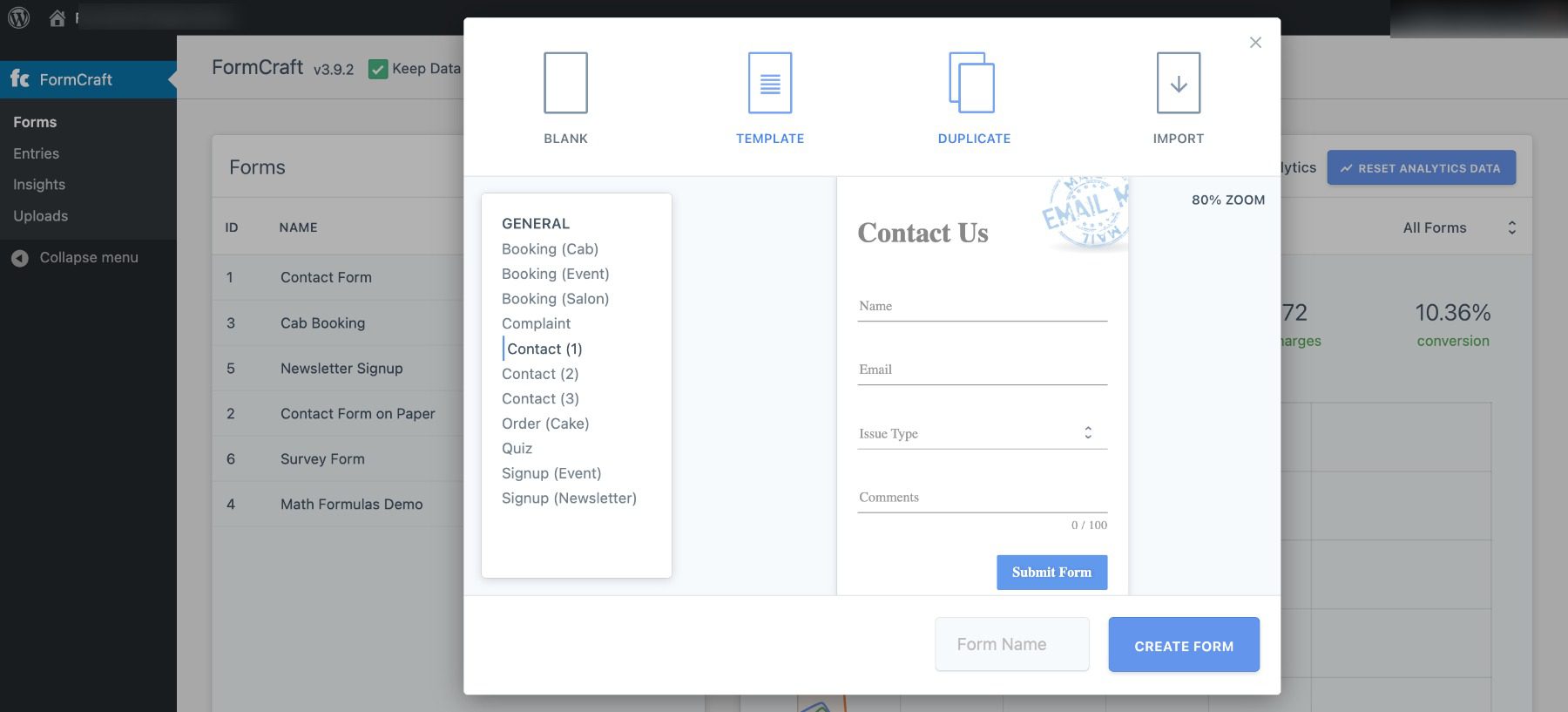
    The tool is a powerful, feature-packed form builder that is both fast and scalable. You can choose from an array of templates, or create your own forms from scratch:

    FormCraft Dashboard

    Another aspect we appreciate about this plugin is the variety of forms you can create. This includes (but is not limited to) surveys, booking appointments and scheduling, and pop-up forms.

    Key Features:

    • Drag-and-drop builder
    • Dozens of add-ons, including one for multi-page forms
    • Pop-up form builder
    • Advanced logic and math formulas
    • GDPR compliant
    • Developer tools
    • Multisite support

    FormCraft is for you if…

    … you’re a developer or advanced user who plans on creating many different types of forms. It’s also a cheaper alternative to Formidable Forms Premium or Gravity Forms.

    Price: Licenses start at $36 | More Information

    11. Forminator

    Forminator Pro banner

    Forminator is a comprehensive contact form plugin that offers a variety of features to create different forms, including contact forms, surveys, quizzes, and more. It comes with a drag-and-drop form builder, so you don’t need to know any coding to create custom forms. Additionally, it comes with pre-made templates and ready-to-use forms, which makes it a great option for those who want to get started quickly.

    Forminator works with popular email services, CRM, storage, and project management apps. It supports real-time feedback with live stats displayed in charts and graphs for your polls.

    Key Features for Forminator:

    • Drag-and-drop form builder
    • Pre-made templates and ready-to-use forms
    • Integration with popular email marketing and CRM services
    • Option to add custom styles to match your website
    • Integration with multiple third-party services, including PayPal and Stripe
    • Captcha and spam protection to keep your forms secure

    Formidable Pro Demo

    Forminator offers both free and paid (pro) versions of its contact form plugin. The free version provides you with almost everything you would need for a basic contact form while the pro version offers more advanced features and increased functionality.

    Forminator creation page

    Free Features:

    • Easy form builder: Drag-and-drop interface makes it simple to create forms.
    • Basic form fields: You can add basic fields like text, email, number, etc., to your forms.
    • Responsive forms: Forms will look good on any device.
    • Basic form submissions management: You can view form submissions and export them as CSV.
    • Customizable confirmation messages: You can customize the confirmation message after a form is submitted.

    Pro Features:

    • Advanced form fields: You can add fields like dropdown, radio button, checkbox, etc., to your forms.
    • Multi-page forms: You can create multi-page forms that are more engaging and increase form completion rates.
    • Form analytics: Track form views, submissions, conversion rates, and more with detailed analytics.
    • Advanced submissions management: You can view form submissions, export as CSV/PDF, and integrate with Google Sheets, Zapier, etc.
    • Conditional logic: Show or hide form fields based on user selections with conditional logic.
    • Payment integration: Accept payments through your forms with integration with PayPal and Stripe.

    Forminator is for you if…

    …you want an all-in-one form builder solution that offers custom styling, multi-page forms with conditional logic, pre-made templates, and the ability to create a variety of forms beyond just contact forms like surveys, quizzes, and payment forms.

    Forminator Pricing: Free | $39/year | Learn More About Forminator

    Final Thoughts on Contact Form Plugin for WordPress

    Contact Form plugins are essential for any website looking to improve communication with its audience. With a variety of options available, finding the right one for your website can be a challenge. However, with our guide, we hope you have found the plugin that best suits your needs.

    Our top two picks for the best Contact Form plugin for WordPress go to WPForms and Ninja Forms. These plugins are highly recommended for their ease of use, UI, and advanced features. Whether you are looking to create simple contact forms or complex registration forms, they are the best contact form plugins available. But if you’re using Divi, you’re in luck because the built-in contact form is beyond stellar!

    Did we miss any Contact Form plugins? Leave a comment telling us below!

    Featured image illustration via Dzianis_Rakhuba/shutterstock

    The post 11 Best WordPress Contact Form Plugins in 2023 appeared first on Elegant Themes Blog.