EDITS.WS

Tag: Divi Header & Footer

  • Download a FREE Header & Footer for Divi’s Toy Store Layout Pack

    Hey Divi Nation! Thanks for joining us for the next installment of our weekly Divi Design Initiative where each week, we give away brand new freebies. We recently shared a brand new Toy Store Layout Pack. To help you get your website up and running as soon as possible, we’re sharing a global header & footer template that matches this layout pack perfectly as well! Hope you enjoy it.

    divi layout

    Check Out The Toy Store
    Global Header & Footer Template Below

    Get it for free today!

    Toy Store Template Header Design

    Desktop Design

    Divi Toy Store desktop header design

    Tablet and Mobile Design

    Divi Toy Store tablet and mobile header design

    Toy Store Template Footer Design

    Desktop Design

    Divi Toy Store desktop footer design

    Tablet and Mobile

    Divi Toy Store tablet and mobile footer design

    Download The Global Header & Footer Template For The Toy Store Layout Pack

    To lay your hands on the free global header & footer template, you will first need to download it using the button below. To gain access to the download you will need to subscribe to our newsletter by using the form below. As a new subscriber, you will receive even more Divi goodness and a free Divi Layout pack every Monday! If you’re already on the list, simply enter your email address below and click download. You will not be “resubscribed” or receive extra emails.

    How to Upload The Toy Store Template

    Go to Divi Theme Builder

    To upload the template, navigate to the Divi Theme Builder in the backend of your WordPress website.

    Open Divi Theme Builder

    Upload Global Default Website Template

    Then, in the top right corner, you’ll see an icon with two arrows. Click on the icon.

    Import the template into the Divi Theme Builder

    Navigate to the import tab, upload the JSON file which you were able to download in this post, and click on ‘Import Divi Theme Builder Templates.

    Finish importing the template into the Divi Theme Builder

    Save Divi Theme Builder Changes

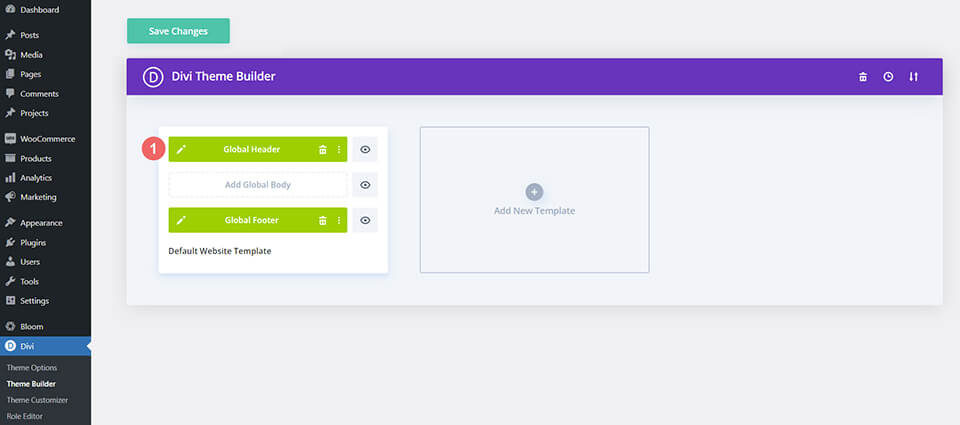
    Once you’ve uploaded the file, you’ll notice a new global header and footer in your default website template. Save the Divi Theme Builder changes as soon as you want the template to be activated.

    Save Divi Theme Builder Changes

    How to Modify The Toy Store Template

    Open Header Template

    To modify the global header template’s elements, start by opening the template.

    Open Header Template

    Upload Your Logo

    Replace the default template logo with your own logo within the Menu Module.

    Update the default logo in the Toy Store Template

    Select Menu of Choice

    Select a menu of your choice in the Menu Module.

    Choose and change your menu in the Menu Module of your Toy Store Template

    Add Links to Social Media Icons

    We use three of Divi’s new Icon Module to create a social media bar at the top of our header. Add your social media links to each module so that your clients are directed to the correct social media account for your business or brand.

    Add link URLs to social media icons

    Add Button URL

    Update the Button Module with a link or change the call-to-action written on the button.

    Add link CTA to header button

    Update Static Text Banners

    We have a banner of Text Modules that we are using to showcase the slogan of Divi Toy Store. You can go in and edit these modules and add in any text that you see fit for your brand.

    Update Text Modules with your own personalized call-to-actions

    Open Footer Template

    Continue by opening the global footer inside the default website template.

    Open Footer Template

    Connect Your Email Marketing Platform

    Our footer has an Email Optin Module. Connect your email marketing solution of choice to this module to be able to collect email addresses from website visitors.

    Connect your email marketing solution of choice

    Update Static Footer Content

    You will need to go through and update the content of the footer, including adding your own text, link URLs, and social media networks. Don’t forget about the copyright text at the bottom of the footer as well.

    Update static modules within the footer

    New Freebies Every Week!

    We hope you’ve enjoyed the Toy Store Layout Pack and the Header & Footer freebie that goes along with it. We look forward to hearing your opinions in the comment section below. Make sure you check back next week for more freebies!

    The post Download a FREE Header & Footer for Divi’s Toy Store Layout Pack appeared first on Elegant Themes Blog.

  • Download a FREE Header & Footer for Divi’s Streamer Layout Pack

    Hey Divi Nation! Thanks for joining us for the next installment of our weekly Divi Design Initiative where each week, we give away brand new freebies. We recently shared a brand new Streamer Layout Pack. To help you get your website up and running as soon as possible, we’re sharing a global header & footer template that matches this layout pack perfectly as well! Hope you enjoy it.

    divi layout

    Check Out The Streamer
    Global Header & Footer Template Below

    Get it for free today!

    Header Design

    Desktop View

    Header design for the Divi Streamer Layout Pack for desktop

    Tablet & Mobile View

    Header design for the Divi Streamer Layout Pack for tablet and mobile

    Footer Design

    Desktop View

    Footer design for the Divi Streamer Layout Pack for desktop

    Tablet and Mobile View

    Footer design for the Divi Streamer Layout Pack for desktop

    Download The Global Header & Footer Template For The Streamer Layout Pack

    To lay your hands on the free global header & footer template, you will first need to download it using the button below. To gain access to the download you will need to subscribe to our newsletter by using the form below. As a new subscriber, you will receive even more Divi goodness and a free Divi Layout pack every Monday! If you’re already on the list, simply enter your email address below and click download. You will not be “resubscribed” or receive extra emails.

    How to Upload The Divi Streamer Template

    Go to Divi Theme Builder

    To upload the Divi Streamer template, navigate to the Divi Theme Builder in the backend of your WordPress website.

    Getting started with the Divi Conference Layout Pack

    Upload Global Default Website Template

    Then, in the top right corner, you’ll see an icon with two arrows. Click on the icon.

    Importing the Header and Footer Layout into the Divi Theme Buidler

    Navigate to the import tab, upload the JSON file which you were able to download in this post, and click on ‘Import Divi Theme Builder Templates’.

    Import settings for the header and footer layout pack

    Save Divi Theme Builder Changes

    Once you’ve uploaded the file, you’ll notice a new global header and footer in your default website template. Save the Divi Theme Builder changes as soon as you want the template to be activated.

    Save global header theme builder

    How to Modify The Divi Streamer Template

    Open Header Template

    To modify the global header template’s elements, start by opening the template.

    Editing the global header within the Divi Theme Builder

    Select Your Menu of Choice

    Select a menu of your choice in the Menu Module.

    Update menu within the Divi Streamer header

    Upload Your Logo

    Within the same Menu Module, upload your logo.

    Update logo within the Menu Module

    Add CTA Link URLs

    The header of the Divi Streamer template has a button on the top right. Open the settings of each to update the link URL to the destination of your choice.

    Update button URL for the main header section

    Update Announcement Bar

    This header template also comes with a secondary menu. Edit the text and add a URL – if you’d like – for this announcement bar.

    Update Text Module within the secondary menu/announcement bar

    Open Divi Streamer Template Footer

    Continue by opening the global footer inside the default website template.

    Editing the footer template within the Divi Theme Builder

    Update Footer Content

    You will need to go through the footer of the Divi Streamer template and make some updates. If need be, you can modify the content that comes with the template. You may also want to update the Social Media Follow Module with your social networks as well as their corresponding links. Don’t forget about the copyright text at the bottom of the footer as well.

    Update footer static content and social media networks

    Update Footer Menu

    Similarly to the header, we will need to connect our footer menu to the Menu Module.

    Update your footer menu in your Divi Streamer Layout Pack

    Connect Email Marketing Platform

    Our footer design has an Email Optin Module. As such, remember to connect your email marketing service provider to the module to begin to collect email addresses from your users.

    Connect your email marketing platform of choice

    New Freebies Every Week!

    We hope you’ve enjoyed the Streamer Layout Pack and the Header & Footer freebie that goes along with it. We look forward to hearing your opinions in the comment section below. Make sure you check back next week for more freebies!

    The post Download a FREE Header & Footer for Divi’s Streamer Layout Pack appeared first on Elegant Themes Blog.

  • Download a FREE Header & Footer for Divi’s Interior Designer Layout Pack

    Hey Divi Nation! Thanks for joining us for the next installment of our weekly Divi Design Initiative where each week, we give away brand new freebies. We recently shared a brand new Interior Designer Layout Pack. To help you get your website up and running as soon as possible, we’re sharing a global header & footer template that matches this layout pack perfectly as well! Hope you enjoy it.

    divi layout

    Check Out The Interior Designer
    Global Header & Footer Template Below

    Get it for free today!

    Header Design

    Desktop View

    Desktop version of the Divi Interior Designer header layout

    Tablet and Mobile View

    Tablet and mobile version of the Divi Interior Designer header layout

    Footer Design

    Desktop View

    Desktop version of the Divi Interior Designer footer layout

    Tablet and Mobile View

    Tablet and mobile version of the Divi Interior Designer footer layout

    Download The Global Header & Footer Template For The Interior Designer Layout Pack

    To lay your hands on the free global header & footer template, you will first need to download it using the button below. To gain access to the download you will need to subscribe to our newsletter by using the form below. As a new subscriber, you will receive even more Divi goodness and a free Divi Layout pack every Monday! If you’re already on the list, simply enter your email address below and click download. You will not be “resubscribed” or receive extra emails.

    How to Upload The Divi Interior Designer Template

    Go to Divi Theme Builder

    To upload the template, navigate to the Divi Theme Builder in the backend of your WordPress website.

    Open Divi Theme Builder

    Upload The Divi Interior Designer Template’s Header

    Then, in the top right corner, you’ll see an icon with two arrows. Click on the icon.

    Import the template into the Divi Theme Builder

    Navigate to the import tab, upload the JSON file which you were able to download in this post, and click on ‘Import Divi Theme Builder Templates’.

    Finish importing the template into the Divi Theme Builder

    Save Divi Theme Builder Changes

    Once you’ve uploaded the file, you’ll notice a new global header and footer in your default website template. Next, save the Divi Theme Builder changes as soon as you want the template to be activated.

    Save Divi Theme Builder Changes

    How to Modify The Template

    Open Header Template

    To modify the global header template’s elements, start by opening the template.

    Open Header Template

    Update Your Logo

    Replace the default template’s logo with your logo. If your background will be a light color, ensure that the logo you upload has a transparent background and is dark. If the background of the logo section will be dark, ensure that your logo is a light, transparent background.

    Change your llogo

    Select Menu of Choice

    Select a menu of your choice in the Menu Module.

    Choose your menu

    Add CTA Link URLs

    This header has a button on the right. Open the settings menu to update the link URL to the destination of your choice.

    Add CTA Link URLs

    Add Social Media Accounts and Links

    On the left hand side, we have a Social Media Follow Module. Update the module with your chosen social media networks. Don’t forget to input the correct links for your various accounts!

    Update and Add Social Media Accounts and Links

    Open the Divi Interior Designer Template Footer Template

    Continue by opening the global footer inside the default website template.

    Open Footer Template

    Update Footer Logo

    Update the Image Module with your own logo.

    Update Footer Logo

    Modify the Divi Interior Designer Template’s Static Content

    You will need to go through and update the content of the footer, including adding your own call-to-action text, link URLs, and social media networks. Don’t forget about the copyright text at the bottom of the footer as well.

    Modify the Divi Interior Designer Template's Static Content

    New Freebies Every Week!

    We hope you’ve enjoyed the Interior Designer Layout Pack and the Header & Footer freebie that goes along with it. We look forward to hearing your opinions in the comment section below. Make sure you check back next week for more freebies!

    The post Download a FREE Header & Footer for Divi’s Interior Designer Layout Pack appeared first on Elegant Themes Blog.