EDITS.WS

Tag: email marketing services

  • 7 Best Mailchimp Alternatives in 2023 (Free and Paid)

    Mailchimp alternatives abound, and each specializes in a unique use case. Mailchimp has outstanding market saturation among small and medium-sized businesses, and in the mind of many people, they are the service to beat. Millions of customers use and love their email and digital marketing suite. This article will cover details about Mailchimp and the best email marketing services you can use to replace Mailchimp if you are looking elsewhere. You’ll probably find something you’ll be able to use for years.

    Why You Should Consider Mailchimp Alternatives

    Email and digital marketing have grown up. Niche providers are stepping up to offer small businesses appealing and valuable solutions in ways that Mailchimp may lag in because of their status as a “general” service provider. Just because it is the industry giant doesn’t mean you have to feel stuck with it. It offers a lot of great tools but may not be the best for your situation based on price and features.

    About Mailchimp

    Mailchimp got its start in 2001. Known for its popular marketing campaigns in the mid-2010s and generous free tier for new customers, Mailchimp quickly grew to hold the most market share among email marketing platforms.

    Intuit Mailchimp Logo

    In 2021, Intuit, the personal and business financial mega-corporation, purchased Mailchimp for ~$12 billion—demonstrating the value Mailchimp brings to its customers and the vast amount of small business data that Mailchimp brings to the table for Intuit.

    Some have felt that Mailchimp’s gotten too generic and does too much for too many people. Others are uncomfortable with the new ownership and prefer a different provider instead. Whatever the reason or rationale, there are alternatives to Mailchimp worth looking into.

    In this article, we’re exploring all the best Mailchimp alternatives. This means we’ll be focusing on email marketing a lot. But Mailchimp offers more than just email marketing, so there will be other digital marketing tools that are handy replacements for Mailchimp. If you have any questions about the services listed here, leave and comment and come back later for helpful thoughts and answers.

    Best Mailchimp Alternatives

    Lots of businesses use email marketing services differently, so there isn’t just one de facto alternative for Mailchimp. Here are 7 of the best:

    1. Mailpoet

    MailPoet WordPress Email Marketing

    If you love WordPress, then you know why it’s unique. Having an infinitely extendable platform has its perks. And with MailPoet, WordPress just got a lot more power.

    Competitively priced and as powerful as you’d expect your WordPress site to be, MailPoet is a genuine contender for your email marketing attention, especially if you like to keep things in-house as much as possible.

    With MailPoet, you can manage your lists, craft beautiful emails, and set up segmentation—all on your WordPress installation. We love WordPress, so we love recommending MailPoet. It’s the best email marketing for WordPress websites.

    Key Features:

    • Option for SMTP mail service or from your server on the creator level
    • Send emails when you publish new blog articles
    • 50+ pre-designed templates
    • WooCommerce integration to handle Woo emails
    • Include dynamic content within your emails
    • GDPR compliant

    MailPoet Campaign Types in WP Dashboard

    Best For:

    If you are searching for an email marketing solution that operates within your WordPress installation, MailPoet is the ideal option. WordPress gives you the flexibility to create the solution you need and Mailpoet performs well.

    Price: Plans start free for 1000 contacts, with paid plans starting at $10 a month

    Get Mailpoet

    2. ActiveCampaign

    Active Campaign - Homepage April 2023

    ActiveCampaign is a “Customer Experience Automation” (CXA) platform and software company. The company empowers businesses of all sizes to automate their customer experience through marketing automation, sales automation, and CRM. ActiveCampaign is often mentioned because of its powerful automation capabilities. And that automation extends beyond email marketing—while certainly including it. ActiveCampaign rightfully is named one of the best email marketing services out there.

    The “Customer Experience” part of their description comes from the fact that ActiveCampaign’s tools are built for more than marketing. Its tools also empower sales with sale pipeline, lead scoring, and lead automation workflows. ActiveCampaing also helps support teams through CRM automation that helps keep tabs on customers and their needs. Automation plays a huge role in marketing where ActiveCampaign’s automations power email, SMS, website chat, and website personalization.

    ActiveCampaign gives you a full-fledged CRM + Automation suite to power your business. If your head is spinning—it should be. It is big, and it is powerful. Startups and inexperienced marketers might have a long road ahead if they start with ActiveCampaign and are expected to utilize the full potential beyond the login portal.

    See our full review of ActiveCampaign if you’re interested.

    Key Features:

    • Powerful integrations to unite your tech stack
    • Website and behavior automation
    • Automations and A/B tests
    • Leverage an email builder with hundreds of free templates
    • CRM and Sales Tools

    ActiveCampaign Workflow Automation Builder

    Best For:

    ActiveCampaign is a great option for businesses needing an all-in-one email marketing solution with excellent integration capabilities. It’s marketing automation, and CRM components are ideal for creating personalized campaigns and building strong customer relationships.

    Price: Marketing plans start at $49 a month

    Get ActiveCampaign

    3. Constant Contact

    Constant Contact Email Marketing Homepage

    Constant Contact is a worthy alternative to Mailchimp. They’ve been rivals since the beginning, and both command a lot of brand recognition. Constant Contact is a great platform for email marketing, offering pre-made templates, campaign reporting, and automation features. It integrates with WooCommerce and can segment customers based on purchase activity.

    Using Constant Contact, you can send abandoned cart emails, collect online donations, and manage contacts with an ultra-simple UI. The service also includes ad functionality for multiple platforms, including Google Ads, Facebook, and Instagram.

    Although their Core plan lacks some functionality, such as automated emails, those features are available in Plus. Constant Contact starts at only $9.99 per month after a free trial.

    Key Features:

    • Integrates with WooCommerce and other eCommerce solutions
    • Enables you to send emails based on customer behavior
    • Integrates with tons of website platforms, including a Divi integration
    • Integrates with Google Ads, Facebook, and Instagram
    • Generative AI writing for email copy and subject lines
    • Phone support for all customers

    Constant Contact Email Reporting

    Best For:

    Constant Contact is an excellent email marketing platform for businesses seeking a user-friendly and straightforward solution that provides phone support from customer service agents. If you’re unsure which email marketing platform to use, Constant Contact is worth considering and is used by hundreds of thousands of small businesses.

    Check out our dedicated article comparing Constant Contact vs Mailchimp.

    Price: Plans start at $12 a month

    Get Constant Contact

    4. ConvertKit

    ConvertKit Email Marketing for Creators

    ConvertKit stands as an excellent alternative to Mailchimp for Creators and Solopreneurs. The toolset within is perfect for a one-person band with its hands in many things.

    With ConvertKit, you can create landing pages, sell digital products, and sign up users to your email list. The platform provides all the tools for someone trying to make cash with a side hustle or one-person business. Its free account includes landing pages, forms, broadcasts (email campaigns), segmentation, and eCommerce (digital downloads). Paid tiers introduce 3rd party integrations, automations (including a visual builder), and customer support.

    Although ConvertKit offers a free tier, you won’t get the most out of the service unless you opt for the Creator plan or higher. That option starts at $9 a month (paid yearly) for up to 300 subscribers.

    Key Features:

    • Create landing pages that can include eCommerce functionality
    • Create email signup forms and send campaigns to your subscribers
    • Design intricate automation workflows using flowcharts

    ConvertKit Automations

    Best For:

    ConvertKit is a top choice for businesses that want an all-in-one solution for increasing conversions, including email marketing and a variety of other tools. With ConvertKit, you can build landing pages, create automated sequences, and segment your audience, all designed to help improve your overall conversion rates.

    Price: Free and premium options are available, with the latter starting at $15 a month

    Get ConvertKit

    5. Emma

    Emma Easiest Email Marketing

    This platform holds no punches back and doesn’t try to go the budget service provider route. Emma is built for medium to enterprise-sized businesses that have teams of email marketers. The cheapest plan starts at $99/mo for basic email marketing.

    For that price, you get up to 10,000 contacts on your list and unlimited emails per month. Emma is particularly appealing to teams because of its built-in approval system. Users can be assigned various roles to create a hierarchal approval process. That means no emails are sent without the proper checks and balances.

    With Emma, you get real-time reporting and analytics, segmentation, A/B testing, and dynamic content, all using its “Essentials” plan ($159/mo). They aren’t going after brand-new businesses or email marketers. But, for established brands with up to 10,000 contacts, Emme offers an exciting option.

    Key Features:

    • Easy form builder
    • Monitor your campaigns with analytics
    • Email approval workflows
    • Segment and Automate email campaigns
    • Include dynamic content within your emails
    • Email and Phone Support for all customers

    Emma Form Builder

    Best For:

    Emma might be the perfect fit for you if you want an email marketing solution that is both premium and packed with features but still easy to use. It’s not the cheapest starting price, so smaller businesses and freelancers should look below for other services.

    Price: Plans start at $99 a month

    Get Emma

    6. Buffer

    Buffer Social Media Management

    Mailchimp provides impressive social media management, given that most people only associate email marketing with them. But, Buffer stands as a better all-around experience with social media management stands as a true alternative to Mailchimp in its own right.

    With Buffer, business owners can connect their social profiles to their accounts and reap massive benefits for having everything “under one roof.” Buffer allows social managers to schedule and post to their various accounts. They can save time using the same content but tailoring it to specific platforms in a simple workflow. Buffer handles the posting.

    More than posting, Buffer pulls back social data into your account for robust reporting and analytics. This shows you what channels are performing and what types of content. The beauty is that you also get cross-channel reporting to see your combined stats—giving you a picture of the whole enchilada, as they say.

    If Buffer didn’t do enough for you yet, it handles engagement for all your channels. Reply to customers and fans that have commented on your posts. Buffer’s ML can categorize and prioritize incoming comments based on negative sentiment, questions, and purchase intent.

    Key Features:

    • Create “link in bio” web pages
    • Publish, Engage, and Report on all social efforts
    • Work in one place while working on Google My Business, Facebook, Instagram, TikTok, Twitter, and more

    Buffer Post Calendar

    Best For:

    Buffer is a great option for businesses looking for an all-in-one tool to manage their social media presence. While it doesn’t offer email marketing features, it excels at social media management, allowing you to easily schedule posts, track analytics, and engage with your followers across multiple platforms. With Buffer, you can streamline your social media strategy and save time by managing all of your accounts in one place.

    Price: Free option available with the paid plans starting at $5 a month per channel

    Get Buffer

    7. Omnisend

    Omnisend Omnichannel eCommerce Marketing

    Omnisend is one of the best email marketing automation platforms for eCommerce businesses. It allows companies to send omnichannel marketing campaigns and segment their customers. What does that mean? Well, Omnisend’s automation works across email, SMS, push notifications, and ads. Omnisend’s segmentation works across the board to power a true omnichannel marketing initiative.

    The best part is that it is an eCommerce data machine. It can pull all your product and store data and create dynamic customer segments that can be used across these various channels. Gone are the days of manually building lists and hoping you get them right.

    Key Features:

    • Omnichannel eCommerce campaigns
    • Powerful forms
    • Detailed cross-channel reporting
    • Detailed segmentation options

    Omnisend Segmentation Options

    Best For:

    Omnisend is an ideal solution for businesses running large eCommerce stores that want to increase their conversion rates and average order value. With its powerful automation features, including abandoned cart recovery and product recommendations, Omnisend helps to drive sales and improve customer engagement. Omnisend’s advanced segmentation capabilities also allow you to create highly targeted campaigns and deliver personalized messaging to your audience. Overall, if you want to optimize your eCommerce store for success, Omnisend is an excellent choice.

    Price: Free and premium options are available, with paid plans starting at $16 a month

    Get Omnisend

    Best Mailchimp Alternatives: Price Comparison

    Mailchimp is a robust tool, but it can’t be for everybody. Many people are searching for true replacements and alternatives to Mailchimp that better suits them and their businesses. Many platforms on this list have specialties that Mailchimp can’t match. Here’s our list of the best replacements for Mailchimp and how they compare in price.

    Rank Mailchimp Alternatives Starting Price Free Option
    🥇 Mailpoet $10/mo ✔️ Get
    🥈 ActiveCampaign $49/mo ❌ Get
    🥉 Constant Contact $12/mo ❌ Get
    4 ConvertKit $15/mo ✔️ Get
    5 Emma $99/mo ❌ Get
    6 Buffer $6/mo ✔️ Get
    7 Omnisend $16/mo ✔️ Get

    What is The Best Mailchimp Alternative?

    For avid WordPress users, we heartily recommend Mailpoet as being an excellent email marketing service and alternative to Mailchimp.

    For anyone looking at SaaS email marketing services, we’d have you look at ActiveCampaign, Constant Contact, and ConvertKit. Anyone running a large eCommerce operation would also do well to consider Omnisend.

    Want to grow your email list like a pro? Check out these top email opt-in plugins that work with all the popular email marketing platforms.

    Frequently Asked Questions (FAQs)

    Is there something similar to Mailchimp?

    Yes, there are several alternatives to Mailchimp that offer similar email marketing features and functionalities. Some popular options include ConvertKit and Constant Contact.

    Is there a cheaper option than Mailchimp?

    Mailpoet, ConvertKit, Buffer, and Omnisend offer more budget-friendly options than Mailchimp. These services provide affordable plans, with some even offering free plans for users to get started.

    What are cheaper alternatives to Mailchimp?

    If you’re looking for more affordable alternatives to Mailchimp, you can consider Mailpoet and ConvertKit. These platforms offer cost-effective email marketing solutions, with some even providing free plans.

    Do people still use Mailchimp?

    Yes, Mailchimp remains a widely used email marketing service, and many businesses and individuals continue to utilize its features. However, with the availability of various alternatives, such as Mailpoet, ActiveCampaign, Constant Contact, ConvertKit, Buffer, and Omnisend, users now have more options to choose from based on their specific needs and preferences.

    Featured Image via Nikolai V Titov / shutterstock.com

    The post 7 Best Mailchimp Alternatives in 2023 (Free and Paid) appeared first on Elegant Themes Blog.

  • 7 Best Email Marketing Services in 2023 (Compared & Ranked)

    Over the past decade, Email Marketing has become increasingly popular and essential. It serves as a reliable marketing channel to educate new subscribers, establish your brand, and boost your CRM efforts while progressing toward your sales funnel. However, choosing the right email marketing service has become more challenging than before. With numerous contenders, you need to scrutinize a lot to get a suitable service that combines affordability and features.

    This article will introduce you to our top email marketing providers and assist you in selecting the service that aligns with your needs.

    Why You Should Consider Using an Email Marketing Service

    Email marketing platforms provide you with a lot of key functionality, including:

    • Sign-up forms that you can use on your website
    • High email delivery rates (managing your own deliverability is a big job)
    • Templates for different types of campaigns, as well as editors for customizing them
    • Advanced email automation features based on engagement, behavioral, and eCommerce data
    • Analytics for learning about your subscribers
    • A/B functionality for improving your campaigns

    That’s just a quick rundown of some of the features we expect to see from any quality email marketing service in 2023. You may have additional requirements based on your unique needs and target audience. Since so many options are available at various price points, it makes sense to opt for a service that focuses on the features that matter to you.

    6 Best Email Marketing Services for Your Blog, Business, or Organization

    To help you decide what tool to use, we will focus on email marketing services that we recommend for all types of businesses and across a broad range of price points. A few of these services include free tiers, but by and large, they’re premium solutions.

    We’ve selected them based on their pricing options, feature sets, popularity, and reliability.

    1. Mailchimp

    Mailchimp - Homepage April 2023

    Mailchimp is the most popular email marketing service on the market. It made a splash with relatable marketing and free tools, making it an attractive pick for small businesses and freelancers. As of late, those free features have been scaled back, but its dominance still is undisputed.

    Using Mailchimp, you can have up to 500 contacts in your list and send up to 1000 emails monthly on the free plan. In our experience, that’s just enough for new businesses, enabling you to get started with email marketing without spending any money.

    Integrating Mailchimp with WordPress is relatively simple, and the service also works with the Bloom plugin. That makes setting up stylish opt-in forms on your website even more accessible. And because of its popularity, it is supported by nearly every form plugin and marketing tool out there.

    Key Features:

    • Get access to multiple marketing channels (email + social)
    • Use templates to create campaigns faster
    • Automated customer journeys and triggered email sequences
    • With paid plans, create segmentation and run customer surveys
    • Divi Forms integrates with it

    Mailchimp Contact Journey Visual Builder

    Best For:

    Best for those who want a huge and popular email marketing service. You’ll know that other tools will support it and that you shouldn’t have problems. It is also a great platform as you move up the paid tiers, so you won’t quickly outgrow Mailchimp

    Price: Limited free level, with premium plans available starting at $13 per month

    Get Mailchimp

    2. Hubspot

    HubSpot CMS - Homepage April 2023

    HubSpot is the best-integrated email marketing service that connects with other HubSpot tools like CMS, CRM, and live chat. It is a comprehensive inbound marketing platform offering various tools to help businesses attract, engage, and delight customers. Its email marketing service is just one of its many features, but it is a powerful one that can help you create and execute effective email campaigns.

    HubSpot’s email marketing platform allows you to create targeted email campaigns using personalized content and automation workflows. You can also use HubSpot to segment your email list based on various criteria, such as past purchase behavior, website activity, or demographics. It also works with WordPress websites.

    HubsSpot WordPress Plugin

    Key Features:

    • Create targeted email campaigns using personalized content and automation workflows
    • Segment your email list based on various criteria
    • Use a drag-and-drop email builder to create visually appealing emails
    • Integrate with a wide range of third-party tools
    • Includes unique features such as video in emails and personalized subject lines

    Best For:

    Businesses that need a comprehensive inbound marketing platform that includes email marketing and integrates with a wide range of third-party tools.

    Price: Free plan available; paid CRM plans start at $50 per month

    Get Hubspot

    3. MailerLite

    MailerLite Homepage Nov. 2022

    MailerLite is one of the best available free email marketing platforms. As a great up-and-coming service, many people have switched to it and been delighted by its features and free offerings.

    Beyond that, MailerLite offers all the features you’d expect from an industry-leading email marketing service. A free plan supports up to 1000 contacts and lets you send 12,000 emails monthly (much more generous than Mailchimp).

    Key Features:

    • Integrate your campaigns with hundreds of third-party services
    • Websites, landing pages, and sign-up forms included in the free plan
    • Visual automation builder for easy-to-build conditional sequences
    • Drag and drop email builder with templates (templates only in paid plans)
    • Get access to a library of free stock photos alongside your subscription

    Best For:

    MailerLite is best for businesses of all sizes that want to create and send email newsletters, landing pages, and forms. It’s a powerful email marketing platform that offers a wide range of features.

    Price: Generous free with premium pricing starting at $10 per month

    Get MailerLite

    4. Constant Contact

    Constant Contact - Homepage May 2023

    Constant Contact is the best small business email marketing service offering campaign templates, AI campaign content, and automation features. It shines by making email marketing easy for busy business owners and their staff. It’s not the most advanced platform on the list, but it has all the necessary features you need, plus some other nice-to-haves.

    Using Constant Contact, you can send abandoned cart emails, collect online donations, and ask for event RSVPs. Included with it also is a platform for posting organic posts to Facebook, Instagram, Google My Business, and more. In addition, it allows you to create paid ads for many of these platforms as well. Check out our Constant Contact review to learn more.

    Constant Contact Email Reporting

    Included in most plans are AI content suggestions. This is particularly helpful for creating engaging (and openable) subject lines based on the best generative AI tech plus all of Constant Contact’s learnings to get users to open emails.

    Key Features:

    • Integrates with WooCommerce and other eCommerce solutions
    • Visual builder for creating automation paths for both email and SMS (SMS separate addon)
    • Templates for emails, landing pages, and even automation paths
    • Integrates with Google Ads, Facebook, and Instagram

    Best For:

    Constant Contact is best for small businesses that want to create and send effective email marketing campaigns with confidence. Constant Contact has some of the best deliverability rates, and customer support is easy to reach.

    Price: Plans start at $12 per month

    Get Constant Contact

    5. ConvertKit

    ConvertKit Email Marketing for Creators

    ConvertKit is the best email marketing provider for content creators. Aside from having the basics like custom landing pages and sign-up forms, ConvertKit also offers tools for managing content experiences. For instance, you can create landing pages that sell digital products and sign-up users to your email list. Not many providers have shoppable landing pages built into their services; if they do, they aren’t the best.

    Just to show how creator-oriented it is, they also have Linktree-styled “link pages” that you can use on your social pages to help your followers get to the content and platform they want to see you on. It also can create paid newsletters, content subscription plans, and tip jars, giving more creators access to simple monetization tools.

    ConvertKit Automations

    Key Features:

    • Create landing pages that can include e-commerce functionality
    • Create email sign-up forms and send campaigns to your subscribers
    • Design intricate automation workflows using flowcharts

    Best For:

    ConvertKit is for creators who want to grow their audience and monetize their work.

    Price: Free and premium options are available, with the latter starting at $29 per month

    Get ConvertKit

    6. Emma

    Emma by Marigold - Homepage April 2023

    Emma is the best scalable yet premium email marketing service. It is made for large organizations (their starting plan includes 10,000 contacts for $99/mo). What you get with Emma is a highly curated set of tools with excellent UI and data management across platforms.

    Emma is built for marketing teams, not solo marketers sending their first campaigns. As such, you can expect things to be suited for that purpose. It features brand controls so specific characteristics of your email campaigns can be locked and not changed by people on your team. It also has advanced user permissions and roles so that you can give people just the right access and require approval stages for specific work. Single sign-on can be activated to ensure greater security over who has access to your internal systems.

    Key Features:

      • Get access to a vast library of templates and a drag-and-drop email builder
      • Monitor your campaigns with analytics
      • Automate email campaigns
      • Include dynamic content within your emails

    Best For:

    Emma is best for larger businesses looking for team controls and enterprise-level reliability from their marketing provider.

    Price: Plans start at $99 per month (with a yearly contract)

    Get Emma

    7. AWeber

    AWeber - Homepage May 2023

    AWeber is one of the most longstanding email marketing platforms still on the market (see how these rivals, AWeber vs Mailchimp, compare. While it may not be the flashiest or most advanced, it still has a great reputation.

    Beyond that, AWeber offers all the features you’d expect from an industry-leading email marketing service. A free plan supports up to 500 contacts added to one email list. It is on par with the basic features of others on this list. Bloggers will enjoy the auto-newsletter feature that turns your scheduled content into scheduled newsletters. AWeber is also one of the few email marketing platforms that can power Web Push notifications and help you with those messages and analytics.

    AWeber email automation starting points templates

    Automation Templates for quickly building quality autoresponders

    Key Features:

    • Integrate your campaigns with hundreds of third-party services
    • Use behavioral automation
    • Industry-leading email deliverability
    • Modern email builder with free templates
    • Web push notifications system
    • Get access to a library of free stock photos alongside your subscription

    Best For:

    For businesses needing a reliable email marketing provider with all the basics plus some nice eCommerce features built in.

    Price: Free with premium plans starting at $14.99 per month

    Get AWeber

    What is the Best Email Marketing Service?

    Plugin Paid Starting Price Free Plan
    🥇 Mailchimp $13/mo ✔️ Visit
    🥈 HubSpot $50/mo ✔️ Visit
    🥉 MailerLite $10/mo ✔️ Visit
    #4 Constant Contact $12/mo ❌ Visit
    #5 ConvertKit 29/mo ✔️ Visit
    #6 Emma $99/mo ❌ Visit
    #7 AWeber $14.99/mo ✔️ Visit

    Email marketing services are necessary whether you’re a blogger, an influencer, or an eCommerce store owner. Email is one of the best ways to do it if you have an online audience you want to stay in touch with.

    If you’re on the fence about which email marketing service to use, here are our top two suggestions:

    1. Mailchimp: Best for those needing a marketing platform that is stable and has every feature for when your business scales its growth
    2. ConvertKit: Best email marketing for content creators and especially those looking for easy monetization tools connected

    We also recommend getting a subscriber popup plugin for creating advanced popup forms in WordPress.

    Do you have any questions about choosing the best email marketing service? Let’s talk about them in the comments section below!

    Frequently Asked Questions (FAQs)

    Before we wrap up, let’s answer some of your most common questions regarding email marketing services. Did we miss one? Leave a question below and we will respond!

    Image by Tetiana Diana Herashchenko / shutterstock.com

    The post 7 Best Email Marketing Services in 2023 (Compared & Ranked) appeared first on Elegant Themes Blog.

  • Sendinblue Review: Best Affordable Email Marketing Solution?

    Email is still one of the most effective marketing channels available, with a return on investment of $36 for every $1 spent. Using the right tools can greatly enhance the success of your email marketing campaigns. One such tool is SendinBlue, one of the most cost-effective email marketing platforms with powerful features. In this SendinBlue review, we’ll dive into the features and pricing of SendinBlue to help you make the right decision.

    What is Sendinblue?

    Sendinblue is an all-in-one email marketing and marketing automation platform that helps businesses reach their customers through email, SMS, and chat. It is surprisingly easy to use and has a wide range of features like email templates, automation, list management, analytics, and more. It also offers a pricing model based on the number of emails sent each month, making it an affordable choice for businesses of all sizes.

    Sendinblue Homepage

    Review of Sendinblue Features

    Sendinblue has a lot of features that help businesses and brands manage their email marketing. But sending emails is just the beginning. Additional features include:

    • Drag-and-drop visual email builder
    • SMS messaging
    • CRM
    • Forms and Landing pages
    • Automation
    • Web Chat
    • Transactional emails

    While Sendinblue isn’t the best email marketing provider in each of these individual categories, their feature mix and price point give them a right to be considered in many marketers’ tech stack.

    Sendinblue Email Marketing Campaigns

    The Sendinblue visual email editor makes creating beautiful emails easy. With its drag-and-drop interface, you can add all the email elements you may need to create your email and use the inline text editor for an intuitive visual editing experience. This allows anyone to create stunning emails in minutes.

    Sendinblue Email Template Preview

    In addition to the drag-and-drop editor, you can use a rich text editor or create your campaign using custom HTML (if you need that sort of functionality).

    Sendinblue CRM

    If you’re looking for a Customer CRM to manage contacts and notes, Sendinblue is definitely worth consideration. With Sendinblue, you can easily add and update contact information, as well as add notes, see email activity, and create reminders.

    SIB CRM Company Profile with Tasks

    There is even a deal desk with a Kanban view of active deals and the stages that they are in.

    SIB CRM Pipeline Kanban

    Plus, the CRM fully integrates with your Sendinblue email marketing and automation to make marketing a breeze. This helps you create useful segments for your email marketing campaigns. Find out why email segments are very important.

    Sendinblue Automation

    Sendinblue provides a marketing automation creator that lets you build workflows based on your contacts’ website behavior, purchase/store behaviors, and email opens/clicks. You can use these workflows to send automated emails and SMS messages that are tailored to your contacts’ needs and interests.

    Here are a few automation ideas to consider:

    • Send a welcome series of emails based on the list they sign up for
    • Set priority pages that when visited trigger a targeted email about the page’s subject (since they are interested)
    • Send abandoned cart email or up-sell recommendations based on products they view in your eCommerce store or add to cart
    • Create lead scoring that gives and removes points from contacts based on actions they take within your web and marketing properties

    SIB Lead Scoring Visual

    Sendinblue offers a high level of automation at an affordable price, making it a standout feature among other platforms. There are plenty of other more expensive automation platforms (ActiveCampaign) that have more automation capabilities.

    Automation Pricing Feature Chart

    The fact that Sendinblue includes automation in the free plan is astounding. This makes it a strong contender for businesses and websites that have some marketing chops that can fully utilize medium-tiered automation tools.

    Sendinblue Transactional Email

    Transactional emails are automated email messages that are sent to customers/visitors after they take a specific action. For example, a customer might receive a transactional email after they make a purchase, sign up for an appointment, or change their password on your website. They deliver necessary information to customers based on particular actions taken with your business.

    Creating a transaction email can be done using the drag-and-drop editor using a template or from scratch.

    Sendinblue Transactional Purchase Confirmation Email Example

    Sendinblue has a robust transactional email platform that is outfitted with webhooks and an API that lets you meld your website and operational systems with Sendinblue.

    Sendinblue Review of Webhooks

    Sendinblue is particularly good with transactional emails because you can easily manage transactional and marketing emails all in one place. This could streamline a lot of the email functions for many businesses. Instead of learning two different platforms, site owners can focus on mastering one platform that can do almost it all.

    Sendinblue WordPress Plugin Marketing Automation and SMTP

    Sendinblue also works nicely with WordPress. Their SMPT WordPress plugin lets Sendinblue handle the SMTP marketing, transactional emails, and more for your WordPress websites. This makes your system-generated email deliverability more reliable.

    Check out a step-by-step guide on how to use SMPT to send email with WordPress and Sendinblue.

    Social Sharing and Ads with Sendinblue

    Next, we are taking a look at how Sendinblue handles social posting and advertising.

    Social Media Sharing

    Sendinblue lets you easily connect your social accounts so that you can easily share your email campaigns with your social audiences. It’s a nice way to give audiences on other channels the ability to see what’s going on in your email campaigns. Sendinblue lets you share your campaigns on your Facebook, Twitter, and LinkedIn accounts.

    Email Campaign Share on Social

    Social Chat Integrations

    Sendinblue’s chat features also integrate with a few compelling social channels. Sendinblue offers a standalone chat widget that you can deploy to your website (by adding the chat script or by connecting to Shopify, WooCommerce, and other integrations). The chat functionality can also integrate with your business page’s Facebook Messenger or with your Instagram account’s inbox.

    Sendinblue Review of Chat Integrations

    Social Advertising

    Sendinblue allows customers to create advertising on Facebook. If you’ve ever delved into ads on Meta Ads Manager (formerly Facebook Ads Manager) you’ll know how difficult this can be to do manually.

    Sendinblue simplifies the process by creating an easier ad creation process and by connecting your CRM to your Ads Manager account. This creates undeniable efficiencies. It also limits the workload customers have to put in to be successful with both types of marketing. Lastly, with this all being on one platform, you can better use lead ads with CRM and Automation.

    Social Ads are made easy by Sendinblue’s audience creation.

    Create Audience for FB Ad

    You can set the timing and budget of your ads easily in Sendinblue.

    Set Budget for FB Ad

    Designing an Ad on Facebook or Instagram is very easy and Sendinblue gives you a preview of your work. Certain ad types are not available in Sendinblue.

    Create Facebook Ad Content

    Sendinblue Ease of Use

    One of the first things we noticed when we logged into our test account is how intuitive the dashboard is. There are a limited number of menu items in the top navigation which made it feel much less daunting. In the new account creation, we answered questions that created a custom onboarding experience tailored to our initial stated goals. This made it so that we only saw the features we said we wanted when we first logged in.

    Sendinblue Onboarding

    Jumping into the settings, you’ll see more options under the hood. Each feature is well-organized in a grid format and each feature listed has an on-off toggle. This allows you to control what features are active and visible in the dashboard with a simple click.

    Sendinblue Review of Addons

    For example, if you are just doing marketing emails, you can turn off transactional emails and not see them in your dashboard. This is a brilliant way to improve user experience. Sendinblue gets an “A+” for modular feature toggles.

    Powerful Automation

    Sendinblue sports an attractive and easy-to-use automation workflow builder. The nice thing is that Sendinblue has pre-built recipes or workflow templates for you to choose from.

    These pre-made workflows include:

    • Most Popular Workflows
    • Increase Engagement
    • Increase Traffic
    • Increase Revenue (eCommerce)
    • Build Relationships

    Prebuilt workflows are a great time saver, especially for those new to marketing automation. They can choose a workflow that fits their business needs and create email/SMS campaigns based on where they land in the workflow.

    This mid-level automation could not be easier and gives marketers enough power to push business forward.

    Email Creation

    As an email marketing campaign, how Sendinblue handles creating emails is very important. We’ll start with Sendinblue’s email templates. Their premade email starters are separated into layouts and templates.

    • Layouts – Paired down templates without images and design elements. Just the visual layout
    • Templates – Full-fledged starter emails. Pick a template based on the design elements

    There are 41 templates available but the real value is the ability to create your own templates that you can reuse and stay on brand.

    Sendinblue Email Visual Editor

    Their visual editor is powerful, simple, and attractive.

    Sendinblue Email Visual Editor

    Standout visual editor features include:

    • Drag and drop blocks
    • Simple Block settings (colors, spacing, alignment
    • HTML block
    • Reusable content blocks
    • Block Visibility Toggle – to hide blocks but not delete
    • Duplicate Block
    • Repeat Block for Dynamic Content Varaitations

    Sendinblue’s email editor is, in some ways, more powerful than the likes of Constant Contact and Mailchimp. But, a lot of that comes down to familiarity. Power users will enjoy the HTML block that allows for a visual editor plus some additional HTML.

    Sendinblue Pricing

    Sendinblue’s Pricing is where it really sets itself apart. Their pricing structure is proving to be a uniquely effective marketing strategy, attracting users that want more bang for their buck.

    Sendinblue Pricing Chart Review

    A Generous Free Plan

    They have a generous free plan for email marketing with nearly all necessary features included. The free plan is limited to 300 emails per day ( 9,000 per month) with a cap of 2,000 contacts for email automation. That’s a great deal for small businesses with less than 500 contacts and could reasonably be all they need.

    Scalable Paid Plans

    Sendinblue bases its prices on the number of emails sent instead of the number of contacts you have. That means you can have as many contacts as you want and Sendinblue won’t charge extra. This is a huge value for companies that send fewer emails and have a large audience.

    The Starter plan ($25/m) includes reporting, email support, and no daily email limit. The Business plan ($65/m) offers full automation, A/B testing, advanced reporting, and multiple user access. The Enterprise plan ($1000/m) provides white-glove onboarding, flexible pricing, advanced integrations, and top security.

    SendinBlue vs Mailchimp

    Sendinblue seems to have made significant strides to compete with Mailchimp. They’ve changed their pricing structure and feature mix (especially in the free tier) to truly offer a better product for small businesses. The below figure shows what sending 1 email per contact would cost you as compared to Mailchimp.

    Sendinblue vs Mailchimp Pricing

    Mailchimp’s free plan has some notable limitations compared to Sendinblue including limited number of monthly sends (9,000 vs 2,500) and no live chat, CRM, or transactional email options. Plus, Sendinblue allows unlimited contacts (excluding automation) while Mailchimp does not.

    Sendinblue vs Mailchimp Free Features Comparison

    Digging deeper into Mailchimp vs. Sendinblue feature comparisons, Sendinblue offers a few features that would be add-ons with Mailchimp. The cost savings could be quite large if you need these features.

    Sendinblue vs Mailchimp All Features Comparison

    Notably, the Business Plan with Sendinblue (at $65 per month currently) comes with phone support but phone support is only available with Mailchimp with their $300 per month plan. Mailchimp also charges by the contact so Sendinblue’s unlimited contacts (especially if you are using CRM and Automation) are quite appealing.

    One of the Best Free Email Marketing Platforms with Affordable Upgrades

    Sendinblue is proving to be one of the best affordable email marketing platforms. If you’re looking for a powerful email marketing tool that won’t break the bank, SendinBlue is the perfect solution.

    With a free account, you can send up to 300 emails per day. And if you need more, you can upgrade anytime with scalable plans that charge by the number of emails rather than the number of contacts. Plus, their free plan includes most of the features of their paid plans, so you can give it a try and see how fits with your marketing strategy.

    Have you tried Sendinblue within the last year? How was it? How did it help you with your marketing goals? What else would you add to this Sendinblue Review?

    Featured Image via TMvectorart / shutterstock.com

    The post Sendinblue Review: Best Affordable Email Marketing Solution? appeared first on Elegant Themes Blog.

  • Constant Contact Email Marketing: A Detailed Review

    When most people think of Constant Contact they think of “Email Marketing”. Over the years, Constant Contact has grown from a reliable email marketing solution to an all-in-one digital marketing platform for small businesses. But is it still a good choice for email marketing today? This article provides the information needed to decide if Constant Contact is the right email marketing system for your business.

    What is Constant Contact?

    Constant Contact Branded Logo White

    Constant Contact is an all-in-one digital marketing platform that has been a consumer favorite for decades as one of the best email marketing services. Although it is known to be incredibly stable for email marketing, in recent years, it has kicked up innovation to create a suite of performance tools for its small business customers.

    Constant Contact Email Marketing Homepage

    Constant Contact surpasses what is typically expected of email marketing with features such as email automation, social media handling, texting, eCommerce, and AI. So, whatever industry you are in, it seems that Constant Contact has the tools any small business would need to implement a successful marketing strategy.

    Pros and Cons of Using Constant Contact

    Any email marketing platform will have to make trade-offs with what it offers its customers. Overall, Constant Contact is a reliable platform that is investing heavily in innovation. Here is a brief look at some of the pros and cons of the platform:

    Pros Cons
    • Free Trial
    • Simplest Interface
    • Scalable Platform
    • Great Customer Service
    • High Deliverability Rate
    • Native SMS Marketing
    • No Free Plan ($9.99)
    • Low number of 3rd Party Integrations
    • Surveys & Event Solutions are pretty dated
    • No In-built CRM (Except in the $449 tier)

    To fully understand what Constant Contact offers, we need to quickly dive into their tiered pricing structure and what features belong to each.

    Constant Contact Pricing

    With Constant Contact, plans start at $9.99. For Digital Marketing, it offers a Core Plan and a Plus plan. But it also offers an all-in-one Marketing Automation+ plan as well (though technically that is a separate product suite).

    • Core: Starting at $9.99/mo
    • Plus: Starting at $45/mo
    • Marketing Automation+: Starting at $449/mo

    Constant Contact Core and Plus Pricing 2022

    Each subsequent plan has more and more features offered to deliver exactly the solutions particular use cases need. The plans and their general use case are:

    • Core – Email Newsletters and Social Media Management
    • Plus – Mid-ranged Email Automations and eCommerce Insights/Segmentation
    • Marketing Automation+ – Advanced Automation, Lead Scoring, Opportunity Management, and CRM
    • *SMS – SMS can be added to Core and Plus plans

    Currently, with the Core plan, you are allowed up to 500 contacts for $9.99/mo. The number of emails you can send per month is limited to 24 times your total contact count. You can upgrade for more contacts and email sends with their tiered pricing.

    constant contact priced tier

    See the Current Constant Contact Pricing.

    It isn’t a hidden secret that Constant Contact’s Marketing Automation+ plan is technically outside of Constant Contact itself. In late 2021, SharpSpring was acquired by the email marketing giant to add a professional suite of tools to the company’s portfolio. Time will tell if the two platforms are merged or continue to operate as two separate tools.

    Sharpspring Marketing Automation+ Homepage

    Regardless of the business details, Constant Contact has developed a strong set of tools for marketers and business owners at every stage of sophistication. Next, we’ll take a deeper dive into the features of each of these plans that can be taken advantage of.

    Constant Contact Email Marketing Features

    Constant Contact is one of the most popular email marketing platforms available. It’s known for its easy-to-use automation features and excellent customer support. We’ll take a deep dive into several feature categories so you can understand what Constant Contact fully has to offer.

    At the end of the day, managing contacts and sending email blasts is the basic job of an email marketing service. Some platforms offer more complex tools and services catered to professional marketers rather than to DIY small business owners who are juggling multiple tasks. Constant Contact allows users to easily create emails and manage their contact lists seamlessly. While it may not be perfect for everyone, the company has made great strides, providing various levels of complexity in its features.

    Email Templates

    To get into it, the cornerstone of the Constant Contact experience is in the email creation flow. For most, they start with one of the hundreds of email templates that are pre-built and ready to be customized.

    Constant Contact Pre-made Email Templates

    Constant Contact has also been slowly developing a brand template creator that works with a simple URL. For businesses just beginning, you can even use your Facebook business page instead of a website.

    Branded Template URL Insertion

    It works by quickly pulling in your website’s logo and brand colors, and gives you a quick choice of layout preference for your template. Many drag-and-drop interfaces are great for building emails but can be difficult to when it comes to styling. The branded template option gives a headstart on those settings so that business owners can get to the meat of their email building.

    Branded Template Editor

    One downside to Constant Contact templates is that they save as “Campaigns”. These campaigns are merely copied for reuse. Mailchimp, for instance, allows you to create a template that is altogether different from campaigns. This helps to differentiate between their use cases. In Constant Contact, you might find yourself editing a template without realizing it.

    Creating Emails

    Constant Contact has a strong drag-and-drop editor. There are several “blocks” that you can drag into the email to visually place them where you want. This is dead simple and lets you get right into creating your content.

    Constant Contact Email Marketing Drag and Drop Editor

    Constant Contact’s emails are reliable in rendering fidelity to a myriad of email clients (new and old). It has solid industry relationships with email service providers (ESPs) that allow them to quickly troubleshoot new issues. In addition, Constant Contact emails are mobile responsive. And, the editor gives you a chance to see both desktop and mobile views of your email while you are creating it.

    Pre-made Email Template Responsive

    Contacts and List Management

    Contacts and Contact Lists are a vital part of sending emails. Usually, it is contact lists that hold most of the strategy behind email marketing.

    Constant Contact lets you create contacts, add them to lists, add tags to individual contacts, and assign notes to each contact. This basic functionality is present in every pricing plan.

    Individual Contact Management

    For the Plus plan, you can unlock more powerful email segmentation functionality. You can create segments using conditional for activity, engagement, dates, and tags. These segments may refresh with the latest data at any point.

    Contact Segmentation

    We won’t cover segmentation for Marketing Automation+ since, as we mentioned above, that plan is actually with Constant Contact’s acquired brand, SharpSpring.

    Constant Contact Email Marketing Reports

    Reporting is essential to any effective email strategy. Being able to see progress over time as your lists grow and mature is the only way to tell if you are doing everything correctly. Your contacts will be the first to tell you if your emails are off-base or uninteresting (unsubscribes).

    Constant Contact gives detailed, real-time reporting on your sent email campaigns. Reported data includes:

    • Successful Sends
    • Bounces (Various Types)
    • Opens
    • Did Not Open
    • Clicks
    • Spam Reports
    • Unsubscribes
    • Comparisons of Vital Metrics to Industry Averages and List Averages

    It also shows trends in audience responses to marketing emails by providing an overview of campaigns in certain timespans.

    Email Campaign Reporting

    For eCommerce stores (such as WooCommerce or Shopify) Constant Contact’s reporting can go a little further for you. Connecting the integration will pull eligible subscribers into your Constant Contact account and will do so automatically every day. One less list upload on your hands.

    More than that, Constant Contact can automatically segment your customer data into powerful yet easy-to-use segments. Want to send an email to your best customers? What about people who haven’t purchased in a while?

    WooCommerce Customer Auto Segmentation

    Constant Contact can analyze store sales data to determine if an email campaign had an impact. Email attribution reports give you a glimpse into what is working and where you can improve.

    Email Marketing Attributed Sales

    List Growth and Lead Generation Tools

    Constant Contact’s email marketing tools are more than sufficient, to be sure. Its lead generation tools are a weakness for them but it does have some working tools to help out its customers.

    Constant Contact Lead Generation Options

    Signup Forms

    Constant Contact signup forms are bare and offer very little nuance. For website owners who want the easiest possible solution and then never think about it again, Constant Contact forms are the right bet.

    It offers these types of forms:

    • Pop-up
    • Flyout
    • Banner
    • Inline
    • Hosted Landing Pages

    Constant Contact’s forms offer very few styling options outside of background, font colors, and button colors. It does the minimum in that regard.

    Build Constant Contact Opt-in Form

    Their landing pages use the same editing interface as the form builders. Yet instead of outputting a Javascript embed code, it gives you a Constant Contact-hosted URL to link to. The URL can be partially branded but not as much as a self-hosted landing page URL.

    If your website is on WordPress, using a dedicated WordPress contact form plugin or a newsletter opt-in form plugin would be a huge asset. Those tools usually have all the missing features of Constant Contact native sign-up forms.

    Facebook Lead Ads Integration

    We know that email marketing has matured into a complex marketing strategy best used when intermixed with other marketing channels. Thus, an omnichannel marketing approach is a tide that elevates all singular marketing strategies with it.

    As far as straight lead generation goes, Constant Contact has a Facebook Lead Ads integration that allows marketers to create Lead Ads on Facebook and Instagram. Those who signup on those lead ads are automatically added to Constant Contact in a dedicated list succinctly named “Facebook Lead Ads”. This makes it a cinch to create an automated series that fires based on a newly added contact.

    Design Facebook Lead Ad

    This feature is a very nice touch that makes the process much easier for first-time advertisers. And the integration means no manual list uploads or time spent with additional Zapier automation to port those contacts over in real time.

    Email Automation

    Constant Contact makes it easy to automate your simple email marketing campaigns.

    Constant Contact Email Marketing Automation Options

    Though, for most of the automation features, you’ll have to be in their Plus plan. The Core package enables sending “Welcome Emails” when a contact first subscribes to a list. This gets the job done for downloadable lead magnets.

    Setup Automated Welcome Email

    With the Plus plan, more automation features are at your fingertips. You can set up automatic email series (multiple emails strung together), birthday messages, yearly anniversary emails, and several eCommerce automation emails based on store interactions.

    “Automated Customer Journeys” is the newest feature on the platform that allows marketers to create advanced automation based on visual decision trees. This is especially helpful for eCommerce stores since common store interactions are common conditional triggers.

    Automated Customer Journey Builder

    All these automated features can save you a lot of time and help ensure that your customers always receive timely and relevant information.

    For more, check out our list of the best marketing automation platforms for your business.

    SMS Marketing

    In 2022, Constant Contact announced support for sending SMS messages as part of its marketing platform. This new feature allows businesses to send multi-channel campaigns and track results with detailed reporting.

    Constant Contact SMS Pricing 2022

    With SMS, businesses can reach customers where they are—on their mobile devices. SMS messages are easy to see and are often read, making them a great way to send customers urgent information or deals.

    Constant Contact SMS Marketing

    Constant Contact’s easy-to-use platform makes it simple to create and send SMS campaigns. And with detailed reporting, businesses can track who opens and clicks on links in their messages, so they can adjust future campaigns accordingly.

    Integrations

    Connected systems are growing more and more important for digital marketers. This is especially so when using tailored technologies and platforms for specialized tasks.

    For most website integrations, all you need is an email opt-in form that easily integrates with Constant Contact. With advanced email opt-in forms like Bloom, you can integrate Constant Contact to your site and start growing your audience with ease.

    However, Constant Contact does offer more integrations with Zapier.

    Zapier Homepage - Automation and Integrations

    Zapier is a data-connecting platform that connects APIs from thousands of serves so that data doesn’t remain siloed. More than that, Zapier can create highly customized automation using conditional logic from each connected platform.

    This means that an end user can get data from one platform and (under certain conditions and rules) send that data to be used on another platform.

    Constant Contact has a searchable list of integrations (3rd party and native) but the list is only found inside an active account.

    Constant Contact Email Marketing Integrations

    Other Third-Party Constant Contact Integrations

    Of the listed integrations for Constant Contact, you can also see a healthy spread of other marketing and business essential services.

    • Canva – Imports Canva designs into the email creation flow
    • Vimeo – Imports Vimeo videos into the email creation flow
    • Shopify – Easily adds products into emails and collects customer interaction data for automations
    • WooCommerce – Easily adds products into emails and collects customer interaction data for automations
    • Stripe – Syncs Stripe contact data and pulls email data into Stripe’s dashboard
    • Facebook & Instagram – Allows for posting to these platforms as well as creating Ads
    • Twitter – Schedule or immediately publish Tweets
    • WordPress – Brings over subscriber data into Constant Contact contact lists
    • Salesforce – Contacts from CRM are automatically brought over so you can have a single source of truth
    • Eventbrite – Easily promote your events by adding event details into the email creation flow
    • Gmail – Sync Gmail contacts with Constant Contact as you transition to professional email marketing

    If you are concerned about particular services that you use, you can see if those individual services have created their own integrations using Constant Contact’s API.

    Constant Contact Ease of Use

    Constant Contact has always been a favorite among small businesses because it is user-friendly. Most small businesses need the most streamlined experience possible. Balancing that with features is a tall order but Constant Contact has done that well.

    For starters, the pricing plans by Constant Contact are strategically selective. The available features for each tier cater to particular use cases. This ensures that beginning email marketers are not getting lost in the Core Constant Contact email marketing plan with unneeded and overly complicated features.

    Its Plus plan adds complicated features that dedicated marketers crave. The addition of Automated Customer Journeys brings a lot more power to the automation suite.

    The email creation flow is also one of the best there is. It sports a nice integration with Canva so that you can bring in your designs without downloading them from Canva and reuploading them in Constant Contact. Your Downloads folder can be happy about that. Plus, AI can create and analyze email subject lines that will perform well, based on the content of the email and data from related campaigns.

    Canva Constant Contact Email Integration

    Its forms are easy-to-use, but that is particularly because the forms lack styling, A/B testing, and conditional logic. The social posting / social ads feature makes creating posts and ads easy. For advanced marketers, these tools may be limiting, but for the average small business owner, the ease of use is liberating.

    Overall, Constant Contact is one of the easiest-to-use email marketing platforms.

    Constant Contact vs Other Email Marketing Services

    Let’s dive into the key difference between Constant Contact and a few rival platforms to see how they stack up.

    Mailchimp vs Constant Contact

    Mailchimp small business email marketing

    It’s no secret that many use Mailchimp for email marketing. Constant Contact and Mailchimp are email marketing platforms that offer similar features. However, there are some key differences between the two.

    Constant Contact offers less customizable signup forms and landing pages. Mailchimp’s brand template creation tool is also more sophisticated. Mailchimp offers a free plan, which is why it has many more third-party integrations to its name.

    Constant Contact, on the other hand, offers a simpler interface that helps new customers get started easier. Its verbiage describing “contact lists” and how they work are easier to grasp than Mailchimp’s use of “audiences”.

    It is worth knowing that all Constant Contact plans (even the free trial) include unlimited access to customer support through phone, live chat, or email interactions. Mailchimp has no support for its free plan and limited support for most of its plans.

    ActiveCampaign vs Constant Contact

    ActiveCampaign Customer Experience Platform

    When looking at Constant Contact’s Automation+ plan, both platforms offer lead scoring, website tracking, and a variety of other features to help businesses manage their customer relationships. However, there are some key differences between the two platforms.

    Most people thinking about Constant Contact won’t go for that suite of tools. They’ll likely stay with Constant Contact’s Core and Plus plans which don’t compete with what ActiveCampaign brings to the table. ActiveCampaign offers a comprehensive CRM solution while Constant Contact mostly handles list management. It includes features such as deal management, website tracking, and pipeline processes that Constant Contact does not offer. ActiveCampaign also has a more robust lead-scoring system, which can be helpful for businesses that generate a lot of leads.

    Constant Contact is less expensive than ActiveCampaign, making it a better option for small businesses or businesses on a tight budget. It focuses mostly on external email and digital marketing activities since it doesn’t focus as much on CRM as ActiveCampaign.

    ActiveCampaign is a more advanced tool than Constant Contact. A better comparison if you are looking for advanced features would be SharpSpring by Constant Contact and ActiveCampaign.

    Conclusion

    In conclusion, Constant Contact is a great platform for any small business or website owner needing email marketing. Its simple UI and reasonable price make it a great choice for anyone looking to get started in email marketing.

    For you WordPress users, here are some of the best marketing plugins you may find helpful.

    Featured Image via Net Vector / shutterstock.com

    The post Constant Contact Email Marketing: A Detailed Review appeared first on Elegant Themes Blog.

  • How to Use Mailchimp for Email Marketing

    Email marketing has been a constant staple for over 20 years. Its success is because of steady consumer email behaviors and the continuous development of exceptional email marketing platforms. These platforms make it easy to send emails that get results. Mailchimp has been a leading email marketing platform used by millions to grow their audience and business. In this post, we’ll show you how to start using Mailchimp for Email Marketing step by step.

    Why Use Email Marketing?

    Marketing your website or business is an interesting challenge. Technology, strategies, and platforms constantly change, making it hard to stay on top. The fact is, email marketing remains one of the most effective ways to reach customers. It has a high return on investment (ROI), with an average of $36 for every $1 spent. Many marketers are investing a lot of time in and money building their lists and cultivating email campaigns with segmentation and automation tools to help streamline the growth of their business.

    If you’re not already using email marketing, now is the time to start.

    What is Mailchimp?

    Mailchimp Email and Marketing Platform

    Mailchimp is primarily known as an email marketing service provider. Mailchimp had its founding in Atlanta circa 2001. It now enjoys over 11 million account users who send more than 18 billion monthly emails through the platform. The service includes features like contact segmentation, opt-in forms, automation, and a digital marketing platform. Mailchimp is clearly one of the most popular email marketing platforms used by businesses of all sizes.

    WordPress users love Mailchimp because it offers easy integration with their sites with a free tier much like many plugins they use in the Repo—which allows them to scale at will. Divi even sports a built-in MailChimp integration.

    How to Use Mailchimp for Email Marketing – 8 Steps

    In order to string together a successful email marketing campaign, you need to establish a few things between Mailchimp’s marketing platform and your website. We’ll look into how to use Mailchimp for email marketing with a WordPress website.

    Get Started with Mailchimp Email Marketing Account

    The obvious first step, if you’ve not already done this, is to sign-up for a Mailchimp account. It takes less than 2 minutes to get into the actual account.

    Step 1 - Create Free Mailchimp Account

    If you have a particular pricing tier in mind, you can select that. Of course, they offer a free plan with all the basic needs included (for up to 500 contacts).

    Step 2 - Select Free Mailchimp Email Marketing Tier

    Then, you need to set up your account by providing your email, username, and password preferences for Mailchimp.

    Step 3 - Signup Mailchimp

    Mailchimp offers a smooth onboarding experience. It’ll ask you several stages of questions that will populate your account with the correct settings. Very important among these are your business information, physical business address, and the type of business/how you plan to use Mailchimp. Each of your answers creates a customized onboarding experience where they show you what they’d recommend you set up to achieve success.

    Step 4 - Account Setup Mailchimp

    Once you’ve set up your accounts, there are 2 very nice WordPress-focused integrations you can set up between Mailchimp and your website. They are:

    • WooCommerce Integartion
    • WordPress Subscriber Integration

    The WooCommerce integration connects your store information (buyers, purchases, and inventory) to your Mailchimp accounts which gives you ecommerce marketing abilities within Mailchimp (subject to Mailchimp’s pricing tiers).

    The general WordPress integration with Mailchimp brings your site’s subscriber information into Mailchimp. It essentially creates an easy import of those contacts into Mailchimp so you don’t have to export your WordPress subscribers into an Excel file and import it into Mailchimp.

    Step 5-6 - Mailchimp Optional Integrations

    At this point, your account is created and you can start diving into the depths. Next, we’ll quickly show you how to add contacts not found in WordPress or WooCommerce.

    How to Create a Contact List

    Mailchimp’s email marketing platform has multiple terms used for creating mailing lists. The big bucket term for Mailchimp is “Audiences”. Mailchimp recommends most businesses use 1 audience though you are allowed to use multiple should your needs be more advanced.

    You can categorize and separate your audience into smaller chunks using “Groups”, “Tags”, and “Segments”. Each helps organize and filter audiences with specific criteria allowing you to send specific messages/emails to the exact people you want to.

    • Mailchimp Groups: From Mailchimp, “Groups are specialized audience fields that let contacts self-categorize based on interests or preferences using uniform responses you set.” You can think of groups as Custom Fields that you can insert into contact forms for user-generated data.
    • Mailchimp Tags: From Mailchimp, “Tags are labels you create to help organize your contacts. Tagging lets you bring your own contact structure into Mailchimp and label contacts based on data you know about them.” Tags are not seen on signup forms or by your contacts. They are an internal designation that you can set up to create a customized organization structure based on your business processes and data collection practices.
    • Mailchimp Segments: From Mailchimp, “Your audience contains a lot of information about your contacts, like when they were added, where they live, and how they interact with your marketing. You can use this information to filter contacts into segments, and then target them with email, postcards, or ad campaigns.” Segments are groups of filtered contacts based on available data. These segments routinely update so you can send automated campaigns based on the platform’s conditional logic.

    So, creating a contact list involves data management. To get started, however, we can easily add contacts to our audience. If you are starting a new venture and have no contacts to add you can skip down to creating a sign-up form to use on your website to start getting contacts.

    How to Add/Import Contacts into Mailchimp

    To start, click under “Audience” in the Mailchimp sidebar or select the “Audience dashboard” sub-item. This will show an “Add Your Contacts” button that you can click on.

    Step 1 - Add Contacts to Audience

    This will bring you to a few import options you have at your disposal. You can import from:

    • Another Service
    • Contact File
    • Copy and Paste (Manual Entry)

    Step 2 - Choose Contact Import Method

    Import Contacts from another service

    Mailchimp allows you to import contacts from the following services:

    Import Contacts from File

    Mailchimp uses CSV files to import contacts into an audience. If you have a past website, CRM, or accounting software that allows contact export, you can usually bring that into Mailchimp. The only required piece of data is a unique email address for each contact.

    Once exported from your program, you can edit or clean up the contact list in a program like Google Sheets or Microsoft Excel. Simply save the list as a CSV file format and import it into Mailchimp. It should let you know if there are errors or invalid formatting of your file.

    Manually Enter Contacts

    Mailchimp also allows for a manual entry of contacts where you can copy and paste data from your various programs and files. This is a great way to collect data from random and disparate places (like email threads, text messages, and sticky notes) and add them to your account. This isn’t recommended for entering large amounts of data. You should compile large amounts of contact data into CSV files when possible.

    Create a Signup Form

    Whether or not you are starting out with contacts, adding a Signup form is very important to the continued growth and health of your email lists.

    To get started creating a signup form, under the “Audience” sidebar section, click “Signup forms”. To create a form in your account for use on your website select the “Embedded forms” option which gives you an HTML code for installation on your site.

    Step 3 - Create Mailchimp Embed Form

    There is also an option to create a Pop-up form right under the Embedded form option. Note, that popups can harm your SEO by affecting website UX which in some cases is taken into consideration for ranking by Google. Other than that, they are typically pretty effective at gathering new subscribers (up to 11% conversion rate) from frequent website visitors.

    Step 2 - Choose Contact Import Method

    Next, you will see the Embedded Form Builder page. You will have the option of editing displayed form fields (and required fields) and various form settings. At all times, you will see a live preview of your visual changes in the center of your screen.

    Step 4 - 7 - Create Mailchimp Embed Form

    Once you’re happy with your form, you can click “Copy Code” to save the form HTML code to your clipboard.

    Step 8 - Create Mailchimp Embed Form

    Add the Signup form to your WordPress Website

    You can now add the form to your website. There are a few ways of doing this that we’ll briefly go over with links out to specific instructions for deploying custom inline code on your website.

    Add Mailchimp Embeddable Form Code Using Custom HTML Block

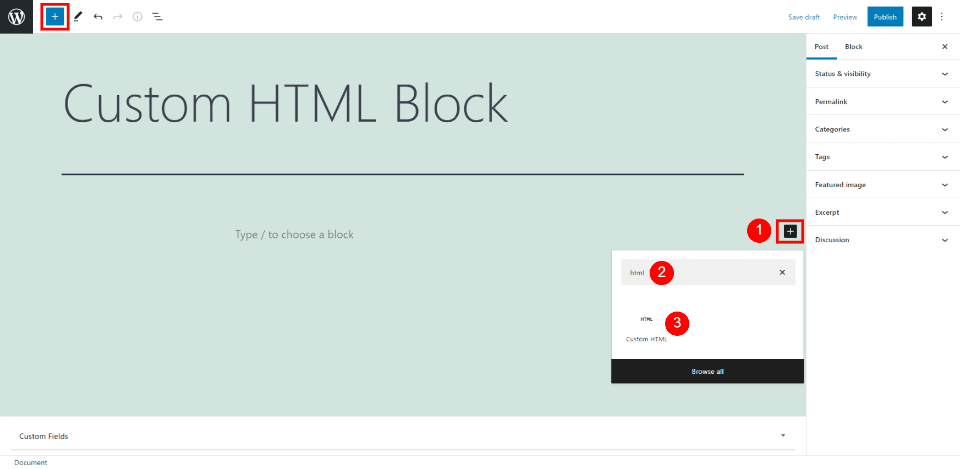
    On your preferred WordPress Page or Post, open the Block Editor. Add an HTML Block where you want it, and paste the HTML code.

    Mailchimp Embeddable Form in WP Block Editor

    For more information, learn how to use the WordPress Custom HTML Block.

    Create Opt-in Forms and Popups with Bloom that Connect to Mailchimp

    Bloom is an advanced email opt-in form builder for WordPress websites that integrates with Mailchimp. It is built by the developers of the Divi Theme so you can trust that it allows for maximum design freedom.

    Design Beautiful and Functional Email Opt-in Forms with Bloom

    To set up the Mailchimp Integration with Bloom, install the Bloom Plugin. After that, you’ll want to follow the steps in this video to set up your Mailchimp API in the Bloom plugin settings. Mailchimp set-up instruction ends at 5 minutes and 17 seconds.

    Once you’ve set up your Mailchimp account integration, you can create opt-in forms in Bloom that feed new contacts to your Mailchimp account.

    Create a Mailchimp Email Marketing Template

    Email templates can save a lot of time in your email campaign workflow. Being able to reuse or repurpose an email template means that you don’t have to start from a blank screen while creating your emails. Templates also keep your email uniform which helps build brand recognition and trust over time.

    To create a template, on the “Campaigns” section of the sidebar, select “Templates”.

    Steps 1 -2 - Create Email Template

    This will open up your first options. There are pre-made templates that you can choose from. You can choose between basic layouts and fully built templates that Mailchimp calls “themes”.

    The layouts are nice if you know what you want to build but don’t want to undo a bunch of design settings when you insert your branding into an email. The themes are nice when you are unsure of how to use the email editor and want a quick start. Sometimes you can also find something really close to your business’ branding. Either way, the time savings are massive.

    It is worth knowing that with the free tier of Mailchimp, there are limitations to which templates you are able to use.

    From there, you can go on designing your template email. If you are having trouble with the email builder or just want a quick primer, see the support doc for using the email builder.

    Once your template is designed, you can go ahead and save it and give it a name that you’ll remember.

    Steps 5 - 7 - Create Email Template

    We can now use the Mailchimp template that we created for a campaign we’ll send to our lists.

    Create a Mailchimp Email Marketing Campaign

    After you’ve created a template in Mailchimp, we can use that to create an email campaign. To do that, on the template window, find your template, click the dropdown arrow and select “Create campaign”. This will create a new campaign based on the template without altering the template.

    Steps 8 - Use Email Template

    To create a campaign, there are a few pieces of information that have to be in place before sending it to your contacts.

    1. Campaign Name
    2. To Field: Who is it that you are sending this campaign to?
    3. From Field: What display name and email address will this email look like it is coming from?
    4. Subject: What is the email subject line that your contacts will see in their email client?
    5. Campaign Design: Iterating off your template to create a campaign that is ready to send

    Steps 9 - 13 - Use Email Template

    Once you’ve completed each of these steps and have a green checkmark next to them you are allowed to schedule or send your email.

    Sending and Scheduling a Campaign

    Scheduling lets you schedule a send into the future to try and send at the perfect time. Mailchimp also has tools that can help you find your best email sending times.

    You also have the ability to send the email right away. This will let the email send to your contacts when Mailchimp servers are ready to handle the request. This usually does not take much time at all but may be longer for first-time senders.

    Steps 14 - 15 - Use Email Template

    From template to campaign, Mailchimp makes it easy to send business newsletters and marketing emails.

    Following Up On Campaign Reports

    The last thing for you to do is analyze the results of your campaign. Don’t stare at the campaign report dashboard for too long after sending your campaign because it could be hours or even upwards of 2 days for the final results of your email to come in.

    When the dust has settled, here’s what to look for:

    • Opens: Opens correspond with how many people opened your campaign. This number is growing more unreliable because of the transition away from cookies
    • Clicks: This is how many link and image clicks happened in your email.
    • Bounces: Bounces are an email delivery term indicating how many times your email went to email addresses that could not receive it. There are different types of bounces but this number reflects your overall list health.
    • Unsubscribes: This is how many times this campaign was used to unsubscribe from all your future emails. This number indicates good list growth practices, consistent branding, and content that is relevant to your audience.

    Steps 16 - Analyze mailchimp email marketing campaignCampaign

    If you have the WooCommerce integration for Mailchimp, you may see ecommerce stats populate at the bottom of the report. These numbers are those that Mailchimp can prove that this campaign helped achieve. It shows the number of orders and revenue figures for that specific campaign.

    FAQs

    Got questions about Mailchimp, WordPress, and Divi? We’ve got answers.

    Is Mailchimp Free?

    Mailchimp is a popular email marketing platform that offers a free plan for up to 500 total contacts. This makes it an excellent option for small businesses and site owners just starting out with email marketing. While the free plan does have some limitations, it is still a great way to get started with Mailchimp email marketing.

    Does Mailchimp Work with WordPress?

    Do you have a WordPress website and want to use Mailchimp to create an email marketing campaign? You’re in luck! Mailchimp is compatible with WordPress websites. You can either use the Mailchimp WordPress plugin or embed a Mailchimp signup form on your website using an embed code. Or, if you use Divi Theme, Divi’s forms can connect with the Mailchimp API for effortless integration between WordPress and Mailchimp.

    Can I integrate my email opt-in form with Mailchimp?

    Chances are, yes, you can integrate your WordPress form plugin with Mailchimp. Mailchimp by far has the most integrations of all the email marketing platforms. Divi Forms, Bloom, WPForms, Gravity Forms, Ninja Forms, and others all have easy-to-use integrations with Mailchimp.

    Does Mailchimp integrate with Divi?

    Yes, Mailchimp integrates with the Divi Theme. Simply connect the Mailchimp marketing integration with Divi to seamlessly use native forms that connect with your Mailchimp contact lists. See what else Divi can connect with to make marketing your website and business easier.

    Conclusion

    In conclusion, if you are looking for an easy way to get started with email marketing, Mailchimp is a great option. With its user-friendly interface and integrations with popular WordPress plugins, Mailchimp makes it simple to create and send newsletters, automated emails, and targeted campaigns. Plus, its affordable pricing makes it a good choice for small businesses and startups.

    Have you used MailChimp for Email Marketing? If so, share your experience in the comments below.

    Featured Image via premiumicon / shutterstock.com

    The post How to Use Mailchimp for Email Marketing appeared first on Elegant Themes Blog.