To get the best results and the highest email open rates, you should aim to use only the best email subject lines. It doesn’t matter if your email holds the key to world peace and unlimited food and energy for all – no one will ever know if the subject line doesn’t entice them to click through.
Tag: email marketing
-
20 Best Email Subject Lines & Templates You Can Use in 2023
-
How to Use Mailchimp for Email Marketing
Email marketing has been a constant staple for over 20 years. Its success is because of steady consumer email behaviors and the continuous development of exceptional email marketing platforms. These platforms make it easy to send emails that get results. Mailchimp has been a leading email marketing platform used by millions to grow their audience and business. In this post, we’ll show you how to start using Mailchimp for Email Marketing step by step.
Why Use Email Marketing?
Marketing your website or business is an interesting challenge. Technology, strategies, and platforms constantly change, making it hard to stay on top. The fact is, email marketing remains one of the most effective ways to reach customers. It has a high return on investment (ROI), with an average of $36 for every $1 spent. Many marketers are investing a lot of time in and money building their lists and cultivating email campaigns with segmentation and automation tools to help streamline the growth of their business.
If you’re not already using email marketing, now is the time to start.
What is Mailchimp?

Mailchimp is primarily known as an email marketing service provider. Mailchimp had its founding in Atlanta circa 2001. It now enjoys over 11 million account users who send more than 18 billion monthly emails through the platform. The service includes features like contact segmentation, opt-in forms, automation, and a digital marketing platform. Mailchimp is clearly one of the most popular email marketing platforms used by businesses of all sizes.
WordPress users love Mailchimp because it offers easy integration with their sites with a free tier much like many plugins they use in the Repo—which allows them to scale at will. Divi even sports a built-in MailChimp integration.
How to Use Mailchimp for Email Marketing – 8 Steps
In order to string together a successful email marketing campaign, you need to establish a few things between Mailchimp’s marketing platform and your website. We’ll look into how to use Mailchimp for email marketing with a WordPress website.
Get Started with Mailchimp Email Marketing Account
The obvious first step, if you’ve not already done this, is to sign-up for a Mailchimp account. It takes less than 2 minutes to get into the actual account.

If you have a particular pricing tier in mind, you can select that. Of course, they offer a free plan with all the basic needs included (for up to 500 contacts).

Then, you need to set up your account by providing your email, username, and password preferences for Mailchimp.

Mailchimp offers a smooth onboarding experience. It’ll ask you several stages of questions that will populate your account with the correct settings. Very important among these are your business information, physical business address, and the type of business/how you plan to use Mailchimp. Each of your answers creates a customized onboarding experience where they show you what they’d recommend you set up to achieve success.

Once you’ve set up your accounts, there are 2 very nice WordPress-focused integrations you can set up between Mailchimp and your website. They are:
- WooCommerce Integartion
- WordPress Subscriber Integration
The WooCommerce integration connects your store information (buyers, purchases, and inventory) to your Mailchimp accounts which gives you ecommerce marketing abilities within Mailchimp (subject to Mailchimp’s pricing tiers).
The general WordPress integration with Mailchimp brings your site’s subscriber information into Mailchimp. It essentially creates an easy import of those contacts into Mailchimp so you don’t have to export your WordPress subscribers into an Excel file and import it into Mailchimp.

At this point, your account is created and you can start diving into the depths. Next, we’ll quickly show you how to add contacts not found in WordPress or WooCommerce.
How to Create a Contact List
Mailchimp’s email marketing platform has multiple terms used for creating mailing lists. The big bucket term for Mailchimp is “Audiences”. Mailchimp recommends most businesses use 1 audience though you are allowed to use multiple should your needs be more advanced.
You can categorize and separate your audience into smaller chunks using “Groupsâ€, “Tagsâ€, and “Segmentsâ€. Each helps organize and filter audiences with specific criteria allowing you to send specific messages/emails to the exact people you want to.
- Mailchimp Groups: From Mailchimp, “Groups are specialized audience fields that let contacts self-categorize based on interests or preferences using uniform responses you set.” You can think of groups as Custom Fields that you can insert into contact forms for user-generated data.
- Mailchimp Tags: From Mailchimp, “Tags are labels you create to help organize your contacts. Tagging lets you bring your own contact structure into Mailchimp and label contacts based on data you know about them.” Tags are not seen on signup forms or by your contacts. They are an internal designation that you can set up to create a customized organization structure based on your business processes and data collection practices.
- Mailchimp Segments: From Mailchimp, “Your audience contains a lot of information about your contacts, like when they were added, where they live, and how they interact with your marketing. You can use this information to filter contacts into segments, and then target them with email, postcards, or ad campaigns.” Segments are groups of filtered contacts based on available data. These segments routinely update so you can send automated campaigns based on the platform’s conditional logic.
So, creating a contact list involves data management. To get started, however, we can easily add contacts to our audience. If you are starting a new venture and have no contacts to add you can skip down to creating a sign-up form to use on your website to start getting contacts.
How to Add/Import Contacts into Mailchimp
To start, click under “Audience” in the Mailchimp sidebar or select the “Audience dashboard” sub-item. This will show an “Add Your Contacts” button that you can click on.

This will bring you to a few import options you have at your disposal. You can import from:
- Another Service
- Contact File
- Copy and Paste (Manual Entry)

Import Contacts from another service
Mailchimp allows you to import contacts from the following services:
- Zapier
- Salesforce
- WooCommerce
- QuickBooks Online
- Squarespace Commerce
- Shopsync
Import Contacts from File
Mailchimp uses CSV files to import contacts into an audience. If you have a past website, CRM, or accounting software that allows contact export, you can usually bring that into Mailchimp. The only required piece of data is a unique email address for each contact.
Once exported from your program, you can edit or clean up the contact list in a program like Google Sheets or Microsoft Excel. Simply save the list as a CSV file format and import it into Mailchimp. It should let you know if there are errors or invalid formatting of your file.
Manually Enter Contacts
Mailchimp also allows for a manual entry of contacts where you can copy and paste data from your various programs and files. This is a great way to collect data from random and disparate places (like email threads, text messages, and sticky notes) and add them to your account. This isn’t recommended for entering large amounts of data. You should compile large amounts of contact data into CSV files when possible.
Create a Signup Form
Whether or not you are starting out with contacts, adding a Signup form is very important to the continued growth and health of your email lists.
To get started creating a signup form, under the “Audience” sidebar section, click “Signup forms”. To create a form in your account for use on your website select the “Embedded forms” option which gives you an HTML code for installation on your site.

There is also an option to create a Pop-up form right under the Embedded form option. Note, that popups can harm your SEO by affecting website UX which in some cases is taken into consideration for ranking by Google. Other than that, they are typically pretty effective at gathering new subscribers (up to 11% conversion rate) from frequent website visitors.
Next, you will see the Embedded Form Builder page. You will have the option of editing displayed form fields (and required fields) and various form settings. At all times, you will see a live preview of your visual changes in the center of your screen.

Once you’re happy with your form, you can click “Copy Code” to save the form HTML code to your clipboard.

Add the Signup form to your WordPress Website
You can now add the form to your website. There are a few ways of doing this that we’ll briefly go over with links out to specific instructions for deploying custom inline code on your website.
Add Mailchimp Embeddable Form Code Using Custom HTML Block
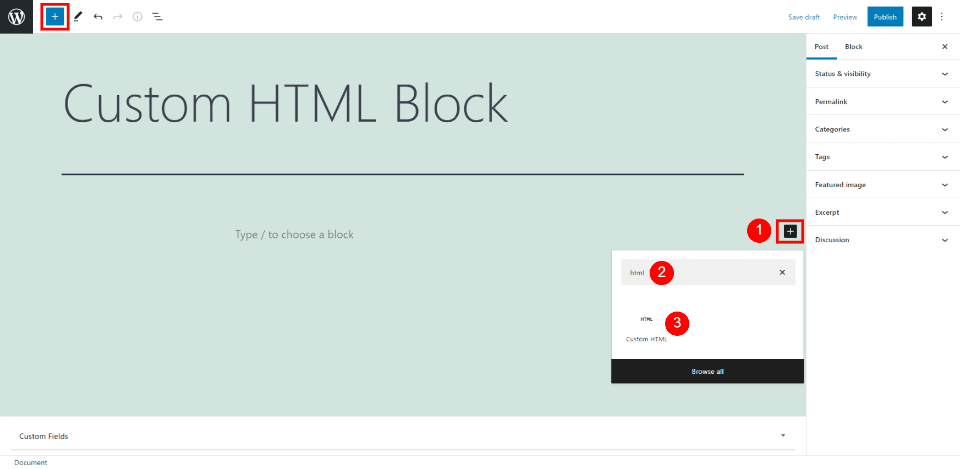
On your preferred WordPress Page or Post, open the Block Editor. Add an HTML Block where you want it, and paste the HTML code.

For more information, learn how to use the WordPress Custom HTML Block.
Create Opt-in Forms and Popups with Bloom that Connect to Mailchimp
Bloom is an advanced email opt-in form builder for WordPress websites that integrates with Mailchimp. It is built by the developers of the Divi Theme so you can trust that it allows for maximum design freedom.

To set up the Mailchimp Integration with Bloom, install the Bloom Plugin. After that, you’ll want to follow the steps in this video to set up your Mailchimp API in the Bloom plugin settings. Mailchimp set-up instruction ends at 5 minutes and 17 seconds.
Once you’ve set up your Mailchimp account integration, you can create opt-in forms in Bloom that feed new contacts to your Mailchimp account.
Create a Mailchimp Email Marketing Template
Email templates can save a lot of time in your email campaign workflow. Being able to reuse or repurpose an email template means that you don’t have to start from a blank screen while creating your emails. Templates also keep your email uniform which helps build brand recognition and trust over time.
To create a template, on the “Campaigns” section of the sidebar, select “Templates”.

This will open up your first options. There are pre-made templates that you can choose from. You can choose between basic layouts and fully built templates that Mailchimp calls “themes”.
The layouts are nice if you know what you want to build but don’t want to undo a bunch of design settings when you insert your branding into an email. The themes are nice when you are unsure of how to use the email editor and want a quick start. Sometimes you can also find something really close to your business’ branding. Either way, the time savings are massive.
It is worth knowing that with the free tier of Mailchimp, there are limitations to which templates you are able to use.
From there, you can go on designing your template email. If you are having trouble with the email builder or just want a quick primer, see the support doc for using the email builder.
Once your template is designed, you can go ahead and save it and give it a name that you’ll remember.

We can now use the Mailchimp template that we created for a campaign we’ll send to our lists.
Create a Mailchimp Email Marketing Campaign
After you’ve created a template in Mailchimp, we can use that to create an email campaign. To do that, on the template window, find your template, click the dropdown arrow and select “Create campaign”. This will create a new campaign based on the template without altering the template.

To create a campaign, there are a few pieces of information that have to be in place before sending it to your contacts.
- Campaign Name
- To Field: Who is it that you are sending this campaign to?
- From Field: What display name and email address will this email look like it is coming from?
- Subject: What is the email subject line that your contacts will see in their email client?
- Campaign Design: Iterating off your template to create a campaign that is ready to send

Once you’ve completed each of these steps and have a green checkmark next to them you are allowed to schedule or send your email.
Sending and Scheduling a Campaign
Scheduling lets you schedule a send into the future to try and send at the perfect time. Mailchimp also has tools that can help you find your best email sending times.
You also have the ability to send the email right away. This will let the email send to your contacts when Mailchimp servers are ready to handle the request. This usually does not take much time at all but may be longer for first-time senders.

From template to campaign, Mailchimp makes it easy to send business newsletters and marketing emails.
Following Up On Campaign Reports
The last thing for you to do is analyze the results of your campaign. Don’t stare at the campaign report dashboard for too long after sending your campaign because it could be hours or even upwards of 2 days for the final results of your email to come in.
When the dust has settled, here’s what to look for:
- Opens: Opens correspond with how many people opened your campaign. This number is growing more unreliable because of the transition away from cookies
- Clicks: This is how many link and image clicks happened in your email.
- Bounces: Bounces are an email delivery term indicating how many times your email went to email addresses that could not receive it. There are different types of bounces but this number reflects your overall list health.
- Unsubscribes: This is how many times this campaign was used to unsubscribe from all your future emails. This number indicates good list growth practices, consistent branding, and content that is relevant to your audience.

If you have the WooCommerce integration for Mailchimp, you may see ecommerce stats populate at the bottom of the report. These numbers are those that Mailchimp can prove that this campaign helped achieve. It shows the number of orders and revenue figures for that specific campaign.
FAQs
Got questions about Mailchimp, WordPress, and Divi? We’ve got answers.
Is Mailchimp Free?
Mailchimp is a popular email marketing platform that offers a free plan for up to 500 total contacts. This makes it an excellent option for small businesses and site owners just starting out with email marketing. While the free plan does have some limitations, it is still a great way to get started with Mailchimp email marketing.
Does Mailchimp Work with WordPress?
Do you have a WordPress website and want to use Mailchimp to create an email marketing campaign? You’re in luck! Mailchimp is compatible with WordPress websites. You can either use the Mailchimp WordPress plugin or embed a Mailchimp signup form on your website using an embed code. Or, if you use Divi Theme, Divi’s forms can connect with the Mailchimp API for effortless integration between WordPress and Mailchimp.
Can I integrate my email opt-in form with Mailchimp?
Chances are, yes, you can integrate your WordPress form plugin with Mailchimp. Mailchimp by far has the most integrations of all the email marketing platforms. Divi Forms, Bloom, WPForms, Gravity Forms, Ninja Forms, and others all have easy-to-use integrations with Mailchimp.
Does Mailchimp integrate with Divi?
Yes, Mailchimp integrates with the Divi Theme. Simply connect the Mailchimp marketing integration with Divi to seamlessly use native forms that connect with your Mailchimp contact lists. See what else Divi can connect with to make marketing your website and business easier.
Conclusion
In conclusion, if you are looking for an easy way to get started with email marketing, Mailchimp is a great option. With its user-friendly interface and integrations with popular WordPress plugins, Mailchimp makes it simple to create and send newsletters, automated emails, and targeted campaigns. Plus, its affordable pricing makes it a good choice for small businesses and startups.
Have you used MailChimp for Email Marketing? If so, share your experience in the comments below.
Featured Image via premiumicon / shutterstock.com
The post How to Use Mailchimp for Email Marketing appeared first on Elegant Themes Blog.
-
What is an Email Blast? And How to Send an Email Blast for Best Results
Email blasts have been a staple of email marketing and general-purpose newsletters since the advent of bulk email. They certainly aren’t going away either. But email recipients are growing more discerning and skeptical, especially with marketing emails, so it is important to know how to send an email blast the right way.
In this article, we’ll explore what an email blast is, what you should be careful of, and how to send one to get the best results.
What is an Email Blast?
An email blast is a single email sent to a large list of contacts, all at once. It is a way to reach a lot of people at once without having to email each individual contact on the list. Email blasts can be called single emails, email campaigns, newsletters, or e-blasts. But no matter what you call them, when done well, they are an effective way to reach out to your audience and keep them in the know.

Curtisoy of Teachable and Really Good Emails
Email blasts are often used for promotional purposes, such as announcing a sale or new product. Still, they can also be used to send important information, like an announcement or an update.
Using the term “blast” can easily turn people off from the idea. Nobody wants to be “blasted” with any kind of message. It sounds impersonal, promotional, and untrustworthy. It is important, instead, to make sure to provide value that is welcome by your contacts rather than only trying to exploit your readers to gain value for yourself. Businesses and marketing campaigns flourish when all parties leave with value.
Email Blasts vs. Segmentation—Which Should You Use?
If you are getting serious about email marketing, you’re going to need to be more strategic in your approach. That’s why most email marketers use list segmentation instead of relying on a simple email blast.
Email segmentation is the process of separating your entire list of contacts into smaller groups based on certain criteria. This allows for more targeted (personalized) email campaigns, unlike email blasts which are more generic and impersonal. Segmentation increases revenue from email marketing by 720%. This is because segmented email campaigns tailor messages toward different groups, buyer personas, and needs that exist among your many contacts.

Image Assets by Gazlast, iconohek and, magic pictures / shutterstock.com
That doesn’t mean an email blast doesn’t still serve a purpose. There are times for blasting your entire list (or a large portion of it) and there are times for targeting only a segmented list. Both have a place.
Here are some things to consider when deciding which one to use.
When to Use an Email Blast
Any company, non-profit organization, or person with contacts should utilize email blasts for informational updates that apply to their entire audience. The level of sophistication of your business’ marketing needs will dictate how much you can rely on e-blasts instead of automation, segmentation, and personalization.
Those with small contact lists will mostly use email blasts. It’s not necessary to use segmentation on a list that will stay below a few hundred contacts indefinitely. They may need to build your list a bit more before looking into more advanced email marketing strategies. Also, businesses with one service or product also might not need segmentation since their customers share enough similarities with one another.
When to Use Segmentation
In most cases, it is a good idea to use email list segmentation whenever possible, even for smaller lists. But if you have a large list, you will definitely want to use segmentation. The beauty of segmentation is that it allows you to meet your customers where they are. A music service app might send very different email content based on contact age or music preferences. Segmentation can tailor messages to separate sub-groups that otherwise would go to your general list. And larger businesses with a sales team and/or multiple products/services should use segmentation to send targeted emails based on buyer personas and/or differentiated customer journeys.
To learn more, view our article on getting started with email segmentation.
How to Send an Email Blast for Best Results (7 Tips)
There are common steps for sending out an email blast. Follow these steps and best practices to make sure you stay reputable among your contacts.
1. Choose a Reputable Service Provider
First, you need to choose an email marketing service provider. There are plenty of options. If you need the field narrowed down, consider these suggestions:
- For basic and easy-to-use email marketing software you can rely on Constant Contact and Mailchimp to get the job done.
- For advanced automation and omnichannel marketing features, consider ActiveCampaign, Hubspot, and Omnisend.
- For an email marketing solution that is runs atop your WordPress installation, consider Sendinblue and Mailpoet.

Image by eamesBot / shutterstock.com
The primary features that you are looking for, at minimum, are:
- High deliverability rates – Do emails reliably reach the inbox?
- Easy contact management – Is uploading and syncing contacts from other platforms easy?
- Deatiled reporting features – Will you be able to tell if your emails are a success or not?
- Easy, visual email editor – Can you make design-forward emails easily?
For more check out these top email service providers.
2. Clean Contact Lists
Once you have a reliable email marketing provider on your side, you need to ensure you have cleaned contact data. At a minimum, you should clean contacts twice a year (or more if you are a heavy sender).
Cleaning contacts is a best practice for maintaining your lists. Contact cleaning involves looking at contact activity data, trying to re-engage unengaged contacts, and removing those proven to be a lost cause. You’re essentially looking for abandoned email addresses and people who’ve lost interest that they never open your emails.
Keeping your lists clean boosts your sender reputation, makes your stats easier to interpret, and lowers your payment for total contacts.
3. Choose the Right Content and Occasion
Since random messages aren’t the best for your brand or marketing, be selective with what you send to your contacts. If every occasion is an occasion for sending out an email blast, your contacts might experience inbox fatigue and unsubscribe (or worse—mark it as spam).
Be selective about what you choose to send to your entire list. Make sure it is relevant for a large group of people. Email blasts are excellent at getting out really important information but they lack nuance. This can make an email irrelevant to entire sub-groups on your list. Being selective avoids sending information that is only relevant to a few contacts.
4. Define a Single Goal for the Email Blast
Once you’ve determined a viable occasion to send an email blast, you need to craft it in an engaging and effective way.

Image by olesia_g / shutterstock.com
An email blast should have one goal. That means all the text, images, and call-to-actions move readers toward one desired result. If you have too many CTAs, graphical elements, or even text, all of it will suffer. Narrowing down the major details is paramount.
The only exception might be for contacts lists that truly expect a newsletter (in the traditional sense) for you. If you provide a newsletter that offers curated content, updates about news/events, and multiple types of content, this would be the exception to the rule. Still, it might make sense to find a way to harmonize your content in a way that makes your main push clear. Having a consistent CTA in each of these emails may prove to be beneficial even in a traditional newsletter. But, don’t assume that a newsletter is the best email marketing strategy that you should be employing.
5. Personalize Email Blasts
Personalization is a best practice for email marketing in general and no less with email blasts. As we’ve discovered, e-blasts often lack some of the elements of really effective email marketing—like segmentation and targeting. Leveraging the data you have about contacts is a great way to add elements that make emails effective. This is called “Personalization”.

Personalization can be as simple as adding a first name to a subject line or using tags to create sections of dynamic content. As long as personalization is tactful, it captures the attention of your recipients and benefits the message of your email blasts.
Different platforms call their personalization tools different things. Mailchimp calls them “Merge Tags” but Constant Contact calls them “Greetings Tags” inside email content or “Personalization” in the subject line editor. These tools let you dynamically add personalized details based on the availability of that information on a contact-by-contact basis. If a particular contact entry does not have “First Name” listed, your personalization tag can still work. By setting up a fall-back entry you can have the contact without a first name read “Friend” or “Valued Customer” instead of the first name. This lets you personalize every email for contacts with a First Name and have a fallback to a more generic option for contacts without.
The big thing is collecting personalization information and adding it to your email marketing software routinely. An opt-in form like Bloom can collect email addresses and important details that you wish to collect. From there, it can also push those contact details to your platform of choice with its 19+ email provider integrations.
One other practical way to make your email blasts more personal and effective is to avoid using spam words. For a list of spam words to avoid along with tips for creating emails that stay out of the spam folder, check out our article on spam words to avoid.
6. Send the Email Blast at the Best Time
Sending the email blast is the part most people think about. They skip right to the step where they just shoot out a message to their contacts. Hopefully, following the previous steps, you’ve crafted a careful email that is sure to delight your readers.
At this point, there is a need to consider the best time to send out an email blast. Many platforms will analyze past email data and let you know the average days of the week and times that work best for sending emails. They do this by analyzing when emails were opened by your contacts and tracking those averages over time.
If you don’t have this ability or there is not yet enough data to determine this, you can find general best practices for your industry by Googling “best email marketing send times for _______ industry”. Just know that this data is getting fuzzier and fuzzier because of the sheer saturation of marketing emails being sent on a daily basis. It’s best to use your provider’s data on your own campaigns when you are able to.
7. Analyze Email Blast Reporting and Stats
Now is the time to determine if the email was a success.
Did contacts open the email? Did contacts submit a large number of unsubscribes or spam reports? How about going to your website and converting in meaningful ways? What links were clicked on and which ones were largely ignored? Any surprises?

Image by olesia_g / shutterstock.com
This is the point where you really get to know your list. By looking at the data, you are completing a postmortem on your email blast. Did it serve the business purpose you intended for it and did your contacts receive it well? Over time, you’ll be able to dial in the messaging, graphics, and content that your contacts crave. If you see negative trends, change things and see what corrects course. Seeing strong, growing numbers? Find out what is contributing to that and double down.
Reports are what will keep you investing in email marketing. Without them, you are flying blind. Here are some key email marketing metrics you should track and the tools to help you.
Conclusion
Email blasts are a contentious topic—but they can be done well. Some senders will only utilize email blasts while others will have more sophisticated needs and also sprinkle in segmentation and automation. Those who are serious about email marketing should never settle for generic email blasts that lack personalization or strategy. That is how you lose followers. Instead, it’s best to limit email blasts to those occasions where it makes sense and use a more targeted approach using segmentation for the bulk of your communication.
Also, if you’re looking to grow your list, here are the best email opt-in plugins for WordPress. And, for Divi users, don’t forget that Bloom easily integrates with email marketing services.
What’s your experience with email blasts? Have they worked well for you
Featured Image via Gazlast /Â shutterstock.com
The post What is an Email Blast? And How to Send an Email Blast for Best Results appeared first on Elegant Themes Blog.
-
How to Get Started with Email Segmentation
Email segmentation is key to a successful email marketing strategy. In fact, selling to or engaging with your email contacts effectively is impossible without developing a list segmentation strategy. Email list segmentation enables you to break down your audience’s key characteristics so you can have personalized communication with them.
This one practice will make your email marketing many times more effective. In this article, we’ll show you how to leverage segmentation to truly get the most out of your email marketing.
Let’s get to it.
What is Email Segmentation?
Email Segmentation is the practice of collecting data in ways that allow for ultra-targeted email campaigns to your contacts. It is the exact opposite of a newsletter “blast” sent to all your contacts in one bulky batch. While a newsletter sent to everyone is easy to manage, the results you want are in the details, especially that of your audience.
Email segmentation is usually a built-in feature of popular email marketing platforms which also include automation tools to make it easier to manage segmented campaigns.
In short, Email Segmentation breaks your audience into smaller clusters which allows you to send more relevant messaging to each. This, in turn, can significantly improve your marketing strategy and returns.
Benefits of Email Segmentation
If you are a website or business owner who needs to grow your business, email segmentation is something you should absolutely look into. Email marketing starts out as one of the best marketing channels for ROI (Return on Investment). Current figures peg its ROI at 36:1. That is $36 made for every $1 spent on email marketing.
Campaign Monitor, a leading email marketing platform published a statistic that should make you pause and reconsider the rest of your day (and marketing strategy). They found that marketers who segmented their email campaigns saw a 760% increase in revenue. Revenue. We’ll leave you alone with that for a moment.

Image by Photoroyalty / shutterstock.com
Not only will segmentation improve your results, it lets you get to know your customers at a more granular level. You’ll find new buyer/customer personas and address their needs more easily. You can even use these segments off of email. Having dialed-in segments can help your remarketing efforts by being able to (for instance) create a look-a-like audience in Facebook Ads based on segments versus every last one of your contacts.
60% of consumer goods and services companies are using data-rich insights to create both personalized and segmented email content. Keep reading to see how you can set up Email List Segmentation for your company.
How to Segment Your Email Lists
How you choose to segment will depend on your business needs and the tools you use to capture user data. Segmentation comes down to creating categorical data on your audience. Specifically, this data will need to be relevant to your business and to the communication you have with your customers.
Ready to increase your email marketing performance with segmentation? Read on!
1. Welcome Emails for New Subscribers

This type of segment is best for pretty much any business that sends out regular newsletters. This is the chance to tell them what they can expect from your emails and also possibly contain something that they want. Typically businesses will use a signup form on their best landing pages or in a strategic part of their site. Segmentation comes in when they have multiple different signup forms and contextualized signup offers. This means that the welcome email they get is catered to the exact signup form (and more importantly, the context) by which they signed up with.
Once users fill out your signup form, including an automated welcome email can help your new subscribers get up to speed with your brand and newsletter. It is very important to set the expectation for your newsletter’s sending frequency (weekly, monthly, daily) so that they won’t get inbox fatigue. Also, clarify what the newsletter will cover. If the topic changes too much you are bound to get unsubscribes often. Set these expectations.
Also, show them where to go to see some of your best past material. Maybe they sign up on a Wednesday but the newsletter won’t come out until the next Monday. Maintain their interest in the meantime with relevant content from past newsletters.
New Subscriber Welcome Emails yield 3 times more clicks than regularly scheduled newsletters. So, it is important to make your first email count!
Capturing new subscribers can be done on your website using an email opt-in and lead generation plugin like Bloom that integrates with platforms like Campaign Monitor or GetResponse.
2. Drip Campaign / Automated Series
This type of segment is best for getting new subscribers up to speed with information and/or leading them through a sales/marketing funnel.
Drip Campaigns help drive marketing qualified leads (MQLs), sales, demos, and other business objectives. They are particularly helpful for businesses with a longer sales cycle. Drip campaigns start off slow. It’s important to not go straight for a sale or major conversion but rather nurture the new contact slowly. Assuming they stick around for the whole series, they may be a very good lead for sales to call out to.
3. Segments by Lead Magnet Opt-In

This type of segment is best used when you offer a lead magnet from a landing page. The email typically includes the download or a link to the resource.
The important thing with these emails (and the lead magnets they offer) is that they deliver the goods. There is nothing that erodes brand trust like a weak offering. Make it compelling and make it easy for them to use! The email itself should be clear (Here’s your copy of “14 places to Jet Ski in The Keys”).
Once you have someone opted-in for a specific lead magnet, you should know what general topic they were interested in. If you offer multiple different lead magnets you have built yourself segments based on interest with a fairly high intent to engage within that category.
Also, landing Pages that offer a webinar as their lead magnet can get an even higher conversion rate typically.
4. Segment by Birthday

This type of segment is used for creating a personal occasion to connect with your audience.
Birthday emails give businesses another excuse to slide into the inbox of their subscribers. If there is a good enough offer or celebration in the email, it might just be one they look forward to all year. Many retail businesses employ this segment strategy.
Birthday or birth month emails are oftentimes considered an “automation” in email marketing platforms. However, considering that this automation requires additional data, it might as well be considered a segment. And a segment you should use!
The hard part about birthday automation is collecting your contacts’ personal information. Here are a few tips for collecting birthday information:
- Only ask for Month and Day, it feels less risky to your contact.
- Only ask for Birthday information in a context that makes sense. Better to ask it in an account creation workflow rather than in a popup form asking people to subscribe.
- Make your privacy and data policies noticeable and stick to promises you can keep in regard to people’s data.
In 2014, Birthday emails generated more transactions at 481% the rate of an average email. This figure is likely much lower now, but the fundamentals of personalization work.
5. Website Behavior Segments
This type of segment is used for SaaS products and businesses with steep sales cycles or that are in highly-competitive niches.
Wouldn’t it be ideal if you knew that a potential customer went to your pricing page 4 times over the last 17 days? You could have a Business Development Representative (BDR) call out to them to answer any questions and help push the sale.
That’s the exact scenario where Website Behavior Segments come in. Some Email Marketing platforms were built around this entire idea (like ActiveCampaign). The features for this behavior gathering are usually called Lead Scoring but the idea is that you can create email automation based on common actions performed on your web and app properties.
It is safe to say to most (more like 98%) of website visitors, on a given day, are not ready to purchase from you. So trying to convert a sale too early could sour the relationship. Website Behavior segments take time to set up, but if your business relies on a sales team to close deals, then this is the ideal way of creating multiple segments.
6. Email Engagement Segments

This type of segment is best for re-engaging disinterested contacts and maintaining interest with your best contacts.
Many platforms may break your entire contact list into segments based on engagement with email campaigns. The more opened emails, click-throughs, and re-opens increase the engagement score of that contact. Less engagement lowers their engagement score over time.
You can use these email engagement segments to your advantage. You can email engaged contacts to stay top of mind. For un-interested contacts, you can try an urgent offer (50% Off a Year’s Subscription, Today Only) to get them to take action. The trick is to not over-incentivize your contacts. Offering 37% Off to your most engaged contacts would likely lose money over time since their chances of purchase are much higher—notably without incentivization.
Ultimately, you can try re-engaging your lowest-performing contacts and eventually cut them from your list. You don’t want to send to (or pay for!) contacts that have a very, very low chance of bringing your business value.
7. Segment Mobile vs. Desktop Users
This type of segment is used by marketers to optimize each campaign for maximum CTR. Especially if they notice under-performance in their emails for certain device types.
Layouts and images can operate very differently from device to device. Some layouts don’t render well on Mobile and may be costing you precious results. Most email marketing platforms offer basic reporting on Open Rate and Click-Through Rates based on mobile/desktop. If you notice a huge discrepancy between the two, it is worth segmenting these audiences and building emails that cater to their device type.
To avoid this (as much as is possible) it would be important to make sure your emails are responsive (they scale up and down depending on device screen resolution) and that you are testing how different variables affect performance on each. Some of the best email marketing services will provide split testing (or a/b testing) for this reason. The biggest things to watch out for are image aspect ratios and text sizes as those can make the biggest differences.
8. eCommerce Purchase Behavior

This type of segment is best for leveraging eCommerce data in your email marketing to drive sales and create repeat customers.
eCommerce Purchase Behavior has been the gold standard for behavior-based email segmentation. eCommerce businesses and the platforms they are built on are data-rich. Many of these platforms have direct integrations with the leading email marketing solutions on the market which make this one of the easiest ways for advanced segmentation.
We all have heard of Abandoned Cart emails. But there are many segments that can be based on purchase frequency, purchase dollar amount, product category, and other details made in the purchase flow.
Constant Contact, for instance, connects with WooCommerce to create (automatically syncs) segments for your best customers, customers to upsell, big-ticket spenders, and even potential customers who weren’t ready to purchase on their last visit.
AI is in the mix here as well with Email Marketing companies like Retention Science (ReSci) constantly taking in users’ website and purchase data to send the most timely and relevant emails to make a sale.
According to Statista.com, eCommerce emails drove 24% of all online sales in 2019. By 2040, it is projected that 95% of all purchases will be made via eCommerce channels.
9. Location Segments
Next, this type of segment is best for online businesses or wide-footprint businesses that reasonably have contacts from many different geographic locales.
In real estate, it is all about location, location, location. And the same can be true with your email segmentation.
Building segments based on location can oftentimes bring you that much closer to your customer. Think about an airline that can try to sell plane tickets to anyone in the country. Knowing if they are in warm weather or cold weather climates could make all the difference in the images and copy used in an email for a Winter Vacation. Chances are people in cold climates are dreaming of a beachside vacation more than a cabin in the mountains in the dead of winter.
10. Segment by Custom Fields

This type of segment is best for any business that is doing email marketing.
Segments by Custom Fields are powerful. That is because they are custom to your personal marketing strategy. You decide what information to collect and how to tailor your email marketing to those data points. Notice how the example email from GasBuddy pulls in avg. driving speed and the average length of trip? Those are custom figures unique to that person.
The trick is to keep your data uniform when collecting custom field data. It is best if you create automation based on various interactions (form submissions, surveys, in-email click segmentation, etc.) to fill in your custom fields. This way those fields are automatically populated as the data becomes available.
What custom fields should you create? The sky is the limit but you can start with: gender, language, business category, company size, job title/level, email frequency preference, content format (video, infographic, written) preference, buyer/customer persona, psychographics, education level, and many more.
The biggest thing is to only choose things that would actually move the dial. An online cookie retailer probably doesn’t have any business asking about political affiliation whereas a grassroots cause and change maker could get away with it.
Ask yourself two questions: Does this custom field make business sense to me? and Does this custom field (in the form of the question you’d ask) make sense to my customers?
Once you’ve done that, you can test and experiment. Keep a watchful eye on how your segments perform. Do segments outperform or under-perform compared to your master list averages? If they under-perform you can first tweak your messaging but also get rid of that custom field segment if it isn’t providing value to anyone.
Best Tools for Email Segmentation
There are actually a few different types of tools for us to take a look at. Some platforms include multiple tool sets and others specialize and do one thing particularly well. Quickly, here are the basic types of tools you need for success in segmenting:
Email Marketing Software – These platforms allow you to build and send emails, as well as manage your contact lists. Make sure to pick the provider that matches your budget, and feature needs, and that integrates with your CRM software (if it doesn’t itself offer CRM). A second consideration is if it integrates with your WordPress form plugin. Luckily for Divi Designers, Divi integrates with all the big email players—making your life much simpler. Some hosting providers, like Cloudways, make it easier to create email marketing campaigns as well.
Opt-in/Signup Form Software – Your choice of opt-in form is going to make a massive difference in your on-page conversions. You’ll want to look for something that has 1) ease of use, 2) integrations, and 3) design customization. Here are some of the best newsletter email option plugins for WordPress.
Behavior Capture Software – Other than the behavior that your Email Marketing provider has built-in, you may want to capture website behavior as an email segmenting option. To do this, you need something that can “listen” for certain events and automatically update email contacts with the most up-to-date information.
Here are the best tools for Email Segmentation that incorporate some or all of the above categories.
1. Bloom

Bloom is the go-to Email Opt-in plugin for thousands of WordPress site owners. It gives you the ability to create beautiful and highly functional opt-in forms to capture your visitor’s contact information. From detailed targeting and triggers to integrations with all leading email marketing platforms, Bloom brings your marketing to another level. It offers full design customization and hundreds of templates to get you started- no fuss included.
Bloom Key Features
- 6 different display types (Popup, fly-in, widget area, etc)
- Triggers to capture folks after particular events (timed delay, after visitor comments, etc.)
- Robust Dashboard to manage all your Opt-In Forms
- A/B Test forms to find what works
- 19 Integrations so you get the powerful feature of Bloom with any marketing platform
Bloom is for you if you own or work on a WordPress site and collect email signups.
2. RightMessage

RightMessage is a website behavior monitoring platform that looks at how people come to your site, which content they viewed, and pushes surveys — all to segment your email lists and even personalize landing pages for those same site visitors. It boasts several powerful integrations which connect to your marketing email service provider of choice.
RightMessage Key Features
- Email List Segmentation with Email Provider Integrations
- Website Personalization (Increase Conversation Rate Optimization)
- Survey/Quizzes that inform your segmentation efforts in a non-obstructive way
RightMessage is for website and business owners looking to personalize their website experience while also pulling that into your email marketing software. The powerful features, while intuitive, take some setting up so this tool is for businesses with a marketing team where one person can continuously optimize the settings.
3. ActiveCampaign

ActiveCampaign is a total CRM, Email, Marketing & Sales Automation platform. It boasts powerful email marketing, SMS, and transactional email abilities. All these functions are connected to the AcitveCampaign CRM (no outside CRM needed) for strong data integrity. What’s unique about ActiveCampaign is that its sales tools are built-in which include Lead Scores based on website behavior, email behavior, and baked-in automation workflows.
ActiveCampaign Key Features
- Built-in CRM connects directly with your marketing machine
- Automations for Emails, SMS, and Lead Segment Progressions
- Integrates with WooCommerce
- Ability to handle Transactional Emails as well as Marketing Emails
ActiveCampaign is for you if you need one powerful platform to handle your owned marketing efforts. If you do not have the personnel to spare an expansive platform with endless customization (and setup) this might not benefit you.
4. Retention Science

Retention Science (ReSci) is the premier AI email and SMS marketing automation system for large eCommerce brands. They power some of the biggest retail brands by scaling email marketing personalization and segmentation based on their AI platform. Their AI pulls real-time data from potential customers to offer them the best marketing to get them to make a sale. This goes way beyond Abandoned Cart emails.
Retention Science Key Features
- Segments based on user behavior using Churn Scores and LTV metrics
- Predicts buyer intent to send relevant messaging
- Integrates with WooCommerce Stores
- Takes these AI learnings and puts them into Facebook Custom Audiences for targeted ads outside of the inbox.
Retention Science is for you if you are an established eCommerce with an established customer base and want to scale your eCommerce operations. Smaller brands won’t be able to handle the setup and the price point.
5. HubSpot

HubSpot is ubiquitous with sales/marketing automation. It is most similar to ActiveCampaign on this list as it boasts a built-in CRM and includes Sale team-specific features — while also catering to non-sales-oriented businesses. It has a large and healthy ecosystem of connected apps and offers a generous CRM and Marketing package for free.
HubSpot Key Features
- Marketing software is built on top of HubSpot’s CRM for maximum data integrity
- Great toolset for lead scoring for sales teams
- Many connected apps including chatbots and Landing Pages
- List segmentation, even with their Free CRM package
Hubspot is for you if your business needs advanced tools. As such, you can start out with their free tools as you work your way into their more advanced paid features. They also offer world-class support to help you along the way. (If you want to grow in your digital marketing career and skills, we also recommend HubSpot’s courses and Certificates which are free and a top-tier resource).
6. Mailchimp

Mailchimp is the first email marketing platform that many small business owners gravitate towards. In fact, they offer a full suite of digital marketing tools to make digital marketing accessible to busy business owners and their staff. They are known for their free plan for accounts with less than 2,000 contacts. They offer segmentation and eCommerce integrations that get the job done.
Mailchimp Key Features
- Landing Pages, email/SMS automation, and segmentation.
- Direct Integration with WooCommerce sites
- Free plan to get you started. Paid plans come with more features and higher limits.
- One of the most integrated email marketing platforms on the market. All your CRM and marketing tools probably connect with it.
Mailchimp is probably for you if you need a budget email marketing service that has room for you to grow.
7. Divi Contact Form Helper

Divi Contact Form Helper is a community extension on our Divi Marketplace that adds more features to Divi Contact Forms. The additional features may prove to be helpful in your segmentation efforts.
Divi Contact Form Helper Key Features
- Include Date Picker of forms. Could be used for birthday and anniversary segmentations.
- Send Confirmation Emails (double opt-in) which is a best practice in email marketing
- Message Pattern Tags
- Save entries to your WordPress database as a backup
Divi Contact Form Helper is for you if you want a few more features to the native Divi Contact Forms but don’t want to replace them.
8. Yieldify

Yieldify is a full-scale website personalization platform with advanced form and email targeting. It turns eCommerce websites into revenue-making machines. Advanced rules trigger personalized and contextualized forms. For customers who have filled out a lead gen form, it will send remarketed emails based on user behavior on the website.
Yieldify Key Features
- Advanced personalization on webpages
- Trigger remarketing emails to increase conversions
- Easy installation via one tag (code snippet)
Yieldify is for those operating larger-scale eCommerce businesses who want to increase on-page personalization to increase conversions or off-page email segmentation using rules and AI.
9. AutomateWoo

Last on our list is, AutomateWoo is an advanced workflow manager for WooCommerce stores on WordPress. It handles many different types of automation — they call them workflows. There are automated behavior-based email workflows that you can set up to increase conversions to your store.
AutomateWoo Key Features
- Advanced workflows for email based on shopping behavior
- Full control of your automation (no 3rd party email provider needed)
- Session tracking for accurately attributing user actions with user emails
- Unlimited email sending
- Essential email analytics built into your dashboard
AutomateWoo is for WooCommerce store owners looking for an “all WordPress” solution for growing their store. The cost to use is a one-time payment instead of recurring payments. Additionally, it is ideal for those who don’t want to learn a different UI and like the feel of WooCommerce.
Conclusion
As we wrap up and send you off to explore segmentation on your own, take these facts with you. Segmenting your contacts and sending catered emails to those segments outperforms email “blasts” by 760% in revenue. It’s that important.

Segmenting is all about data collection. Strategize about where and how you can ask for and collect data. This data is specific data—not random data. As you use this specific data to build your segments, test out segmented messaging to see what strikes a chord with your audience. If it does not work; rework it or get rid of it and move on to the next idea.
Most modern email marketing platforms have built-in segmentation features (some with a level of automation mixed in as well), so utilize those tools to your full advantage.
In closing, your business performs better when you segment your lists and tailor content to your audiences. Come back to this article often as you start to build out your segmentation strategy. There is always more to do but at least you know that this is at the top of your list.
Have you implemented email list segmentation as a part of your email marketing strategy? Share your thoughts and questions in the comments below!
Featured Image via magic pictures / shutterstock.com
The post How to Get Started with Email Segmentation appeared first on Elegant Themes Blog.
-
9 Proven Ways How to Monetize a Newsletter
 Starting your own newsletter is easier than it’s ever been. And, as a byproduct of that, many are looking for different options, services, and tools to help them learn how to monetize a newsletter.
 -
6 Welcome Email Series Examples That Drive Conversions
 Having access to a proven set of welcome email series examples can save you significant time and make your email marketing strategy easier to implement. That’s true whether you’re into ecommerce, do affiliate marketing, or manage a blog.