EDITS.WS

Tag: lead generation

  • How to Create a Landing Page with AI

    The age of digital marketing has seen the need to create high-converting, professional, and creative landing pages. Whether selling an eBook, online software, or a high-ticket course, your potential customers expect to interact with a landing page at some point. In this guide, we’ll walk through the various tools and methods you can use to build your next landing page with the power of AI.

    What is a Landing Page?

    In the world of web design and digital marketing, a landing page usually refers to a page specifically designed for lead generation and conversion. Most landing pages are created to have users take one specific action. Whereas regular pages on a website might have a variety of endpoints or goals, a landing page’s mission is singular. Some essential aspects of a landing page include:

    • Captivating Headlines: Since landing pages focus on one main call to action, the section headings used throughout it must be attention-grabbing.
    • Convincing Copywriting: Copywriting is different from traditional content writing. Your landing page copy should be more sales-driven and focused on getting your visitor to complete the goal set for it.
    • Engaging Visuals: Landing pages should have engaging visuals like images and videos to help illustrate your products or services.
    • Social Proof: Adding social proof like testimonials or reviews can help build trust with your audience and increase sales and conversions. No landing page is complete with a testimonial or reviews section.
    • Clear Call to Action: Whether it is a button, an email opt-in, or a contact form, every landing page needs a clear call to action to make it easy for users to take the step you want.

    What are the Benefits of Creating a Landing Page with AI?

    Creating a successful landing page can be time-consuming and expensive, especially when hiring professionals. But with the help of AI, you can create landing pages with all the essential elements without wasting time and money to get professional results.

    Here are some of the benefits of using AI to create your landing pages:

    • Faster Development: AI allows you to build landing pages quickly. AI has progressed to the stage where you can create content, generate images, and spin high-quality videos quickly and efficiently. All of these features are important when building a solid landing page.
    • Professional AI Copywriting: AI writing tools can help you add professional copywriting to your landing page consistent with your brand and conversion goals, making headlines pop and the content more engaging and compelling.
    • Custom AI Visuals and Videos: Various AI tools can quickly create a landing page’s welcome video or sizzle reel. And there are powerful AI art generators for creating high-quality images and illustrations for your landing page. This can save you significant time and money from hiring a professional.
    • Integrated Automation: With AI, it’s possible to add a level of automation to the interactions that your users experience on your landing page. Integrations with third-party tools, A/B testing, dynamic content, and others are examples of automation AI can help you bring to your landing page. Furthermore, the actual landing page-building can be automated with AI.
    • Enhanced Personalization: Tailoring content and features to the needs of your users is easier to do with AI. Quickly increase user engagement by utilizing AI tools that bring individualization to your landing pages. AI Chatbots are a common way to personalize the user experience your future customers may have on your landing page.
    • Deeper Data Insights: AI can also analyze and process data to improve landing pages. User behavior analysis, conversion rate optimization (CRO), and other insights can be gleaned, processed, and analyzed more easily with AI. Furthermore, running AI-driven tests can help you fine-tune your pages for your future customers.

    Now that we’ve looked at some benefits of using AI to build your landing pages let’s learn how to do this practically.

    Ways to Create Landing Pages with AI

    There is a myriad of ways that you can create landing pages with AI, including:

    • Using AI website builders or landing page generators
    • Using AI Tools and Platforms for help
    • Using AI Page Builders and Plugins for WordPress

    First, look at how AI website builders can help us build landing pages.

    Using AI Landing Page Generators to Create Landing Pages Automatically

    Many website builders can be used to create landing pages for your product or service. Most come with a library of modules, a repository of templates, plus apps and add-ons to include additional features. Some website builders have taken this a step further. By including AI in their platforms, there are a few AI website builders on the market that you can use to generate and optimize landing pages.

    For example, Hostinger’s AI Website Builder takes four simple steps to create a website. Plus, you can quickly generate landing pages for your site using their AI assistant.

    Hostinger's AI Website Builder

    Wix ADI is another AI website builder by Wix, which can generate entire websites and landing pages with a single prompt. It also has an AI Assistant within its builder to adjust your landing page content with the power of AI. For example, Wix’s AI Text Creator within Wix Studio can generate titles, paragraphs, and more based on easy-to-use prompts.

    Wix' AI Text Creator

    We have compiled a list of the top AI website builders to study if using an AI website builder is a good choice for your landing page.

    Creating Landing Pages With the Help of AI Tools

    Not all website builders or platforms have built-in AI solutions for generating an entire landing page for you automatically. However, you can still use external AI tools to help create more effective landing pages on any website platform. Most website builders and CMS platforms like WordPress will have many premade landing page templates or themes you can use to get a high-quality landing page up and running in minutes. Then, you can use other AI tools to finish the job. When you blend these tools, great things can happen, resulting in landing pages with the best each software can offer.

    For example, you can use ChatGPT or an AI writing tool, Jasper, to create professional copywriting for headlines, content, and essential CTAs for your landing pages.

    You can also use AI image generators like Midjourney to create beautiful digital art that you can use on your landing pages.

    Sythesia's Video Templates

    AI video generators like Synthesia are at the cutting edge of creating professional tutorials and sales pitch videos for you to use on your landing page. You can create compelling and captivating landing pages for your next launch by interweaving the wealth of tools available in the AI space.

    Create Landing Pages in WordPress Using AI

    Finally, WordPress is joining the ranks of tech products employing AI in their ecosystem. From themes to plugins, you can now find more than a handful of WordPress AI tools that you can use to create your next landing page.

    Best WordPress content writer-Divi AI hero section

    A plugin like AI Engine brings chatbots, code creation, image generation, and other AI features to your WordPress website. Installing the Uncanny Automator plugin lets you bring automation and AI to your WordPress website. Furthermore, themes like Elementor and Divi bring AI into the theme space. Divi AI, combined with its no-code builder, split testing, and marketing integrations, makes it a solid choice for building a landing page with WordPress and AI.

    How to Create a Landing Page with AI in WordPress (Step by Step)

    At this point, we’ve learned the differences between a typical web page and a landing page. Additionally, we understand the various ways we can use AI to build a landing page. Now, we’ll use Divi to create our landing page’s layout and essential sections, like our hero area and call-to-actions. Then, we will create a landing page in WordPress with Divi AI.

    1. Map Out Your Landing Page with AI

    Creating an outline before building your landing page puts you on the right track to a successful launch. An outline will guide you on the sections to create, the headings to use, and the potential add-ons or plugins you’ll need to invest in for your landing page to run smoothly. We can use a chatbot like ChatGPT to generate an outline for our website.

    To start, navigate to ChatGPT. Then, enter a prompt. This prompt generated an outline to promote a podcast episode, “Outline a simple four-section landing page for a podcast episode.” This was the outline that was created:

    Creating a landing page outline with ChatGPT

    ChatGPT has provided a simple guide on the titles, call-to-actions, and content we can create on our landing page. This can help inspire us as we create. With our outline in hand, let’s build our WordPress installation.

    2. Setup WordPress

    There are a few ways that you can set up your WordPress install. We have a step-by-step tutorial showing you how to install and set up WordPress. At the bare minimum, you’ll need a domain name and web hosting to get your WordPress website off the ground. When it comes to the installation of the WordPress CMS, you can use your web host’s one-click installer. However, it would be best to install WordPress manually for more customization. Once your WordPress install is live, you can now move on to install Divi.

    3. Install Divi and Divi AI

    We’ll use Divi with Divi AI to build a landing page in WordPress. If you are new to Divi, you will need to get a membership and download Divi from your member page. Follow this great walkthrough of how to install Divi, which goes in-depth about downloading the theme file, installing it in WordPress, and authenticating your website.

    Divi AI

    Building your landing pages with Divi and Divi AI is an intelligent choice. Divi has a powerful no-code page builder, making building beautiful yet complex landing pages quick and easy. Divi has a vast library of landing page templates optimized for conversions and can help you meet your targets. Coupled with Divi AI, your landing page is taken to the next level. Divi AI can automatically generate content by just scanning your page context. It can also create unique, custom digital art that can be resized, upscaled, and downloaded for use in other marketing materials. Choosing to use Divi and Divi AI to power your next landing page build is the best way to create your sales and squeeze pages with AI.

    4. Set Your Website’s Site Name and Tagline

    Divi AI uses your website’s site title and tagline as a starting point to create on-brand and relevant content for your website. After we have installed WordPress and Divi, we must set these two up. After logging into your WordPress dashboard, hover over the Settings menu from the left-hand menu. Then, click General.

    Set site title and tagline

    Next, enter your site title, as well as your tagline. We included one of the keywords we’d like to use as we optimize our content for search engines – podcast – within our site title and tagline.

    Create site title and tagline for your new WordPress website

    Finally, click on the blue Save Changes button. Next, we will begin creating and laying out our landing page in Divi with Divi AI.

    5. Create Your Landing Page

    We’ll create a landing page in this guide to encourage listeners to join our email list. Hover over the Pages link from the left-hand menu to create a new page. Next, click Add New.

    Add new page to AI powered WordPress website

    Next, give your page a title. Then, click the blue Publish button to create your page. Finally, click the purple Use Divi Builder button to activate the Divi Builder.

    Create your new landing page for your podcast

    You’ll have three options to create a new page in Divi. We’ll use a layout from the many layout packs Divi provides. So, click the purple Browse Layouts button to open the Divi Layout Library.

    Browse the Divi layout library

    Next, enter podcast in the search box to pull up the various podcast layouts from the Divi Layout Library. We’ll be using the landing page layout from the Podcaster Layout Pack.

    Select the Landing Page Layout from the Podcaster Layout Pack

    Next, click the blue Use This Layout Button.

    Click Use this Layout to install the landing page layout

    Once your layout is installed, click the green Save button at the bottom right of your screen.

    Save Landing Page Layout of the Podcast Layout Pack

    We’ll use the Divi-provided layout with all its sections for this tutorial. Now that our page layout is in place, we can begin editing and adding our landing page copy with Divi AI.

    6. Add an Exciting Section Title

    While the free Divi layout packs contain some language within their layouts, we can create better and more impactful content for our landing pages using Divi AI.

    Setting Up the Initial Text Module for the Hero Section

    While we have an outline from ChatGPT, we will follow the flow of the default landing page from our layout for this tutorial. To start, let’s add a title to our hero section. Click on the gear icon over the Text Module. Here, we will add an exciting title to encourage people to sign up for our mailing list, which is the primary goal of our landing page.

    Edit the title Text Module

    Next, click the Divi AI icon. Then click Write with AI. This will activate Divi AI.

    Begin creating a new title for your landing page with Divi AI

    Now that Divi AI is activated let’s create a title for this landing page that will encourage users to sign up to our mailing list. To do this, change the content type to title. Then, add a prompt to the text field. Our prompt was, “Create an exciting page title, encouraging people to join our podcast’s mailing list.” Finally, set the added context of our title to This Page Content.

    Create a compelling title with Divi AI

    Divi AI generated this title for our landing page:

    Final title generated by Divi AI

    As opposed to simply having the name of our podcast on our landing page, Divi AI created a title for our landing page that entices viewers to join our podcast’s inner circle, our mailing list.

    Using Divi AI to Refine the Hero Section’s Subtitle

    Notice we have two Text Modules in our hero section. Again, we want to focus on promoting our podcast’s newsletter. Let’s add some additional text to our hero section to do this. Before we add our content, let’s save our styling using Divi’s copy and paste feature—Right-click on the text module. Then, click Copy Module Styles.

    Copy text module styles

    Now, let’s click on the gear icon for the first Text Module.

    Edit subtitle module

    Next, we navigate to the text editor and click the Divi AI icon. Now, we’ll click on the Improve with AI button.

    Improve the subtitle with Divi AI

    With Divi AI activated, we will set the Content Type to Title. We will use the following prompt to generate our subtitle: “Create a compelling statement getting viewers to join our email list.” Thirdly, we’ll change the Added Context to This Section. Lastly, click the blue Generate Text button.

    Generate subtitle with Divi AI

    This is what Divi AI created to support our title and the primary goal of our landing page:

    Updated results for the subtitle with Divi AI

    Divi AI was able to pick up that we had called our email list the “Inner Circle” and was able to use that and establish continuity on our landing page with our subtitle. Now, we click on the blue Use This Text. Then, click the green check mark to save our content. Don’t forget to paste back the module styles!

    7. Create Content for Section

    Our hero section has its title and subtitle created, so we can move on to creating content for the final Text Module within this section. As before, we click the gear icon to edit our Text Module.

    Edit second hero section body text module

    Next, we will use another Divi AI feature to improve this copy. Click on the Divi AI icon. Then, click on the Improve with AI text link.

    Improve your body text with Divi AI

    Before we enter our prompts, we will click on the Guide Me text link. We are now presented with a comprehensive modal box with additional settings that we’ll be using to create the final content for our hero section.

    Activate Guide Me within Divi AI

    For our hero section, we set the content type to a Paragraph. Then, we specified our prompt, “Encouraging people to join our newsletter and listen to our podcast.” We want to change the context of this Text Module to This Section’s Content. For our tone of voice, we want to set it to Creative. We add a keyword to help with search engine optimization. Lastly, we don’t want the text to be too long, so we set the content length to precisely three sentences.

    Additional settings that we can edit for Divi AI

    Divi AI was able to add our podcast name, provide some information about our podcast, and encourage viewers to subscribe. This is the power of using Divi AI to build your landing page! To finish with our section, click the blue Use This Text button. Then, click the green check mark to save our changes.

    Use our newly created content

    This is what our hero section looks like thus far:

    Updated hero section

    By only inputting our podcast title, we were able to generate supporting content for our landing page that is on-brand, unique, and flows well with the rest of the content on our landing page. Before we finish with our hero section, let’s create a new image with Divi AI.

    8. Generate Unique Digital Art for Your Landing Page

    Divi AI not only works with text but can also work with images. We will replace the Image Module within the hero section with a custom image created by AI. To begin, let’s click on the gear icon for the image.

    Edit image module

    Next, click the Divi AI icon. Then, click the Generate with AI link.

    Generate image with Divi AI

    Now, we can enter a set of options into Divi AI. Following the landing page style, we set the Image Style to Cartoon. Then, we issue a prompt to Divi AI, “Create an illustration podcast equipment with a cityscape.” Next, we set the aspect ratio to portrait and assign a size to our image.

    Add settings and prompts to Divi AI

    With these commands, Divi AI creates unique, custom digital art that we can use on our website and in other marketing materials. Once we’ve selected it, click the Use This Image button. Finally, click the green checkmark to save our new digital art piece.

    Select your image from Divi AI

    Now, this is what our hero section looks like:

    Final hero section

    Divi AI created our headline, encouraged users to join our podcast, told users about our email list, and generated a piece of custom digital art. A task that could be done across multiple tools has been simplified with Divi AI. Continue this process for the other sections of your landing page using prompts and Divi AI’s quick actions to efficiently create landing page images and written content.

    9. Add Modules and Call-to-Actions to Your Landing Page

    After creating your landing page’s content, it’s time to focus on the most essential aspect of a landing page: the call to action. This landing page layout has multiple Button Modules throughout. It also has a bold section with an Email Optin Module in the footer. Let’s see how Divi AI can transform this section into a compelling call-to-action for our landing page.

    First, click the gear icon on the Text Module with the title of this section. Remember to copy the styling!

    Edit the call-to-action title with Divi AI

    Next, click the Divi AI icon. Then, click the Write With AI text link.

    Edit the call-to-action title with Divi AI

    Next, change the Content Type to Title. Give Divi AI a prompt to create an engaging title to encourage viewers to subscribe to your email list. Finally, click This Page Context for the added context of this Text Module.

    Generate title for the call-to-action

    While this title is good, we can improve it with Divi AI. Click the Improve With AI button. Then, click Change Tone. Finally, click Funny. We’ve used a funny tone throughout creating the content for our landing page. So, it follows that we’d want to use that same voice when creating our call-to-action.

    Improve the call-to-action title with Divi AI

    Our new title matches closely with the tone of voice of our landing page! As such, click the blue Use This Text button and click the green checkmark to save our work.

    Save call-to-action title

    Now, let’s create the body text for our call to action.

    Create Content for the Call-to-Action Body

    Firstly, click on the gear icon for the body text module and remember to copy the module’s styling.

    Edit call-to-action body text

    Then, click the Divi AI icon within the text editor. Click the Write with AI text link to start writing copy.

    Write call-to-action body text with Divi AI

    For our body text, set the Content Type to Paragraph. Next, give Divi AI a prompt to create a copy to encourage our website views to subscribe to our email list. Finally, set the Added Context to This Page Content.

    Create call-to-action body text

    The body text created takes from content within our page and provides ample information to potential listeners on the benefits of signing up for our newsletter. So, click the Use This text button and the green check mark to save our call-to-action body text.

    Use and save call-to-action body text

    The last part of our call-to-action is our Email opt-in module. We’ll use Divi AI to create some new text for our button.

    Change the Call-to-Action Button Text

    First, click on the gear icon to edit the Email Optin Module.

    Edit the Email Optin Module

    Next, click the Divi AI icon from within the text box on the Email Optin button. Then, click Write With AI.

    Write your call-to-action's button text

    Then, set the Content Type to Button. Leave the prompt area blank. Lastly, set the Added Context to This Section Content.

    Generate your button text

    Finally, Divi AI creates a witty phrase for our button. We’ll use this text, so click the blue Use This Text. Finally, click the green checkmark to save our Email Optin Module.

    Save your button's text

    With that, we’ve used Divi AI in various ways to create content for our landing page. Whether it’s titles, body content, or call-to-actions, Divi AI is the perfect tool to help you build your landing pages with AI.

    Optimizing Your WordPress Landing Page with AI

    Now that our landing page has been created, there are a variety of ways to enhance the landing page with AI tools:

    • Check spelling and grammar: You can use Divi AI’s Spelling and Grammar quick action to ensure your content has no mistakes. Also, don’t forget to read through your AI-generated content to ensure that it flows well for human readers.
    • Don’t forget to add keywords and optimize for search: Divi AI allows you to add keywords to your content. Adding keywords to your content helps you get found by search engines, which will help more people find your product or service’s landing page online. Additionally, using a solid SEO plugin will help your landing page’s search ranking.
    • Compress images: A good WordPress AI tool that you should consider using is ShortPixel. This tool helps to compress your images while maintaining the quality of your photos and images on your landing page.
    • Consider adding a chatbot: Setting up a chatbot can help drive conversions. Using an AI chatbot like Tidio, you can answer your users’ frequently asked questions, better prepping them for a sale.
    • Collect and showcase testimonials: Use plugins like Strong Testimonials or Thrive Ovation to display your testimonials and other forms of social proof on your landing page.
    •  Add a video intro or explainer video to your hero section: Placing a well-made video above the fold of your landing page is a great way to engage views, tell your brand story, and build a personal connection with visitors. A professional video can be very impactful for a website. If you’re on a budget, consider using an AI video generator to make your landing page’s video stand out.

    After considering these things, you are on your way to creating a beautiful yet practical landing page with WordPress and AI.

    Conclusion

    There are many ways to create a landing page with AI. Today, there are hundreds of AI-powered tools that you can use simultaneously to build a robust landing page. AI content creators like Jasper and Copy.ai provide high-quality, search engine optimized content on the fly. Midjoureny are image generators that bring your digital art to life through the power of a few simple prompts and templates. Website builders like Hostinger and Wix are slowly adding AI into their website-building process. Divi AI can bring aspects of these tools together, helping you create a standout landing page powered by AI. To stay on the cutting edge, consider using AI as you build your landing pages. Save time, increase productivity, and gain new perspectives that can help increase your bottom line.

    The post How to Create a Landing Page with AI appeared first on Elegant Themes Blog.

  • How to Create a Landing Page in 2023 (Detailed Guide)

    Creating landing pages is a superpower. Master it, and your conversion rates will soar as visitors turn into customers right before your eyes. But like any leverageable skill, it requires practice and the right resources to harness its potential. This guide will provide a treasure trove of tools, tips, and strategies to create a landing page. We’ve got you covered, from design principles to copywriting tips and conversion optimization strategies. We’ll show you one of the quickest ways to build a landing page, using Divi, as well!

    What is a Landing Page?

    A landing page is a standalone web page that has everything on it that a visitor would need to take a specific action. It serves as the entry point for potential customers, guiding them towards taking a desired action, such as signing up for a newsletter, subscribing to a service, or purchasing a product.

    The magic of a landing page lies in its ability to focus on a single objective. Unlike regular website pages, which may have multiple links and distractions, a well-crafted landing page keeps the visitor’s attention fixed on the intended goal. Whether a product launch, a special offer, or an upcoming event, a carefully constructed landing page can significantly boost conversion rates.

    Do I Need a Landing Page?

    The answer is a resounding “Yes! You need to use landing pages if you have a clear offer.” Regardless of your business size or industry, a landing page can be a game-changer for your online success. Let’s explore why:

    1. Landing pages allow you to create highly targeted marketing campaigns tailored to specific audiences. By aligning your messaging with the needs and interests of your various target customers, you can increase the chances of converting them into valuable leads or loyal customers.
    2. Sending everyone to your homepage may not provide a clear path to action, leading to missed opportunities. A well-optimized landing page, on the other hand, provides a clear call-to-action (CTA), guiding users toward a specific next step you want them to take.
    3. Landing pages equipped with analytics tools like Google Analytics can provide invaluable data about visitor behavior. You can track conversion rates, understand what drives traffic to your page, and make data-driven decisions to optimize your campaigns further.

    Essential Elements of an Effective Landing Page

    To create a successful landing page that drives conversions, you must focus on specific elements that captivate your audience and guide them toward your desired action.

    Single Goal or Call to Action (CTA)

    The call to action (CTA) is the most essential element on a landing page. It drives all conversions and will be central to designing your whole page.

    When coming up with one, it should be prominent (color and weight) and action-oriented, guiding visitors toward your goal.

    Strong verbs and concise language, such as “Start Your Free Trial” or “Get Exclusive Access Now,” create urgency and encourage an immediate response. The same applies to all your copywriting, but you can go a long way with an undiluted CTA.

    Zapier One CTA Example Landing Page

    Zapier gives visitors multiple ways to do the same thing: create a free account.

    A well-crafted CTA eliminates confusion and makes it easy for visitors to understand what action they should take next, streamlining the conversion process. The above example from Zapier gives visitors who want to move forward one option—create an account and try it out.

    Attention Grabbing Headline and Hero Section

    The hero section and headline serve as your visitors’ first point of contact with your landing page. It will have a compelling yet concise headline that immediately grabs readers and tells them what they are in for. A well-crafted headline ignites curiosity and entices visitors to scroll through your landing page’s content. It should also pair well with your CTA.

    LearnDash Hero Section Landing Page

    Hero Section by LearnDash

    By conveying your unique value proposition clearly and succinctly, you communicate what sets your offering apart from the competition, encouraging visitors to stay and learn more about your product or service.

    You may also include a subheading with the headline, which can add more context and clarity to the headline. The headline and subheading should be paired with your most straightforward CTA.

    LearnDash’s CTA above is “Demo” and gives readers a chance to put the headline to the test. Is it the most powerful LMS? Let’s see the demo.

    Captivating Copywriting

    Copywriting is table stakes for a landing page because it aims to persuade readers.

    By crafting persuasive copy, you highlight your product or service’s key benefits, clarifying to potential customers why they should take action. Using language that instills confidence and urgency in your visitors creates a sense of excitement and motivation, driving them to explore further and ultimately convert.

    Copywriting Headline for Landing Page Example

    Copywriting Example by Brevo (SendinBlue)

    Copywriting Frameworks for Landing Pages

    Here are some copywriting frameworks that you can use on landing pages.

    1. Problem-Agitate-Solve (PAS): This classic copywriting formula identifies a problem, intensifies it, and finally presents a solution. It’s a powerful way to connect with your audience’s pain points and demonstrate how your product or service can help.
      Example: “Struggling to create eye-catching graphics? You’re not alone. Many businesses find it hard to stand out in a saturated marketplace. With our graphic design services, you can create stunning visuals that capture attention, and you don’t have to do anything.”
    2. Before-After-Bridge (BAB): This formula paints a picture of the reader’s world before and after using your product, then provides the ‘bridge’ or steps to get there.
      Example: “Before using our web design services, your website was just another drop in the digital ocean. But now, imagine a website that stands out, engages visitors and drives new revenue. We move you where you need to be with our expert web design services.”
    3. Features-Advantages-Benefits (FAB): This formula highlights your product’s features, advantages, and benefits to the customer.
      Example: “Our eCommerce store specializes in handmade leather boots (feature). Each pair is crafted with attention to detail, ensuring a unique, durable product that stands out (advantage). Step out in style and enjoy the comfort and longevity of our boots, making every purchase a worthwhile investment (benefit).”

    Copywriting goes beyond headlines and CTAs. It should be used with every word on a landing page. Your USPs, image captions, and bullet points also deserve the same level of detail.

    Engaging Visuals

    Visual content can convey mood, quality, experience, and value faster than the best headlines. By selecting visuals that resonate with your target audience and reinforce your brand message, you create an emotional connection and leave a lasting impression, increasing the likelihood of conversion.

    Ritz-Carlton Yacht Collection Engaging Visuals

    Example of Engaging Visuals from Ritz-Carlton Yacht Collection

    If possible, go beyond stock photographs to include people using your products or the general aesthetic of your brand and the benefits you hope to sell customers on. This is why so many commercials have storylines of happy, healthy people—they are trying to sell a brighter future through their offerings versus merely selling gadgets.

    If you are in dire need, try out an AI image generator to create images that will move the needle.

    Social Proof

    Building trust and credibility is crucial in converting potential customers. Showcase real customer testimonials, positive reviews, and success stories that demonstrate the value of your product or service. Include photos or names of satisfied customers to add authenticity and make the testimonials more relatable.

    Copy.ai Testimonials and Social Proof Example LP

    Copy.ai does an excellent job showing (1) social proof, (2)  reputation credentials, and (3) testimonials—all in one section.

    By any means necessary, ensure that what you are selling is up to snuff—and be sure to back up every claim.

    Minimal Lead Generation Form Fields

    Keep lead form fields minimal and easy to fill out. Long or complicated forms can deter potential leads, leading to lower conversion rates.

    CodeAcademy Landing Page Short Simple Lead Form

    Landing Page from CodeAcademy

    By requesting only essential information, you reduce friction and make it easier for visitors to provide the necessary details. Prioritizing simplicity in your form design enhances the user experience, making visitors more likely to complete the form and take the next step in the conversion process.

    This is often a hard choice in landing page design because we all think, “If I can just get a little more info, my future marketing efforts will be so much easier.” But it’s better not to sacrifice present conversion results for future email marketing and CRM ease. Build a strategy to collect new information throughout the funnel instead of all at once at the moment of truth for your visitors.

    We recommend using Divi Forms or one of WordPress’s best lead-generation plugins.

    5 Steps to Building a Landing Page

    Depending on what platforms you use, building a functioning landing page can happen in many different ways. No matter what, if you keep the LP elements mentioned above in mind, you can create a solid landing page.

    Here’s the high-level view of creating a landing page.

    1. Choose a Landing Page Builder

    Choosing the right landing page builder will save you a lot of headaches. Many think building a landing page from scratch requires technical expertise and significant time investment. All that is needed is a platform that can handle the unique needs of a landing page. Tools like the Divi theme for WordPress, WPFunnels, or ClickFunnels all bring to the table essential LP tools.

    The top features to look for in a landing page builder are a drag-and-drop visual builder, customizable templates, A/B testing, integration with email marketing tools, and advanced analytics. The best Landing Page plugins can help with this, though you don’t need to use WordPress to create a landing page.

    Here’s why many think Divi is perfect for any landing page build:

    2. Build a Landing Page Using a Template

    Most reputable landing page builders will offer templates to kickstart your design process. Divi provides a wide range of professionally designed landing page templates to kickstart your creative process. Within the Divi theme, you can access these templates at no additional cost. Templates span industries and page types to create a whole site with pre-made templates, not just one landing page.

    Here’s how to use a layout pack using Divi:

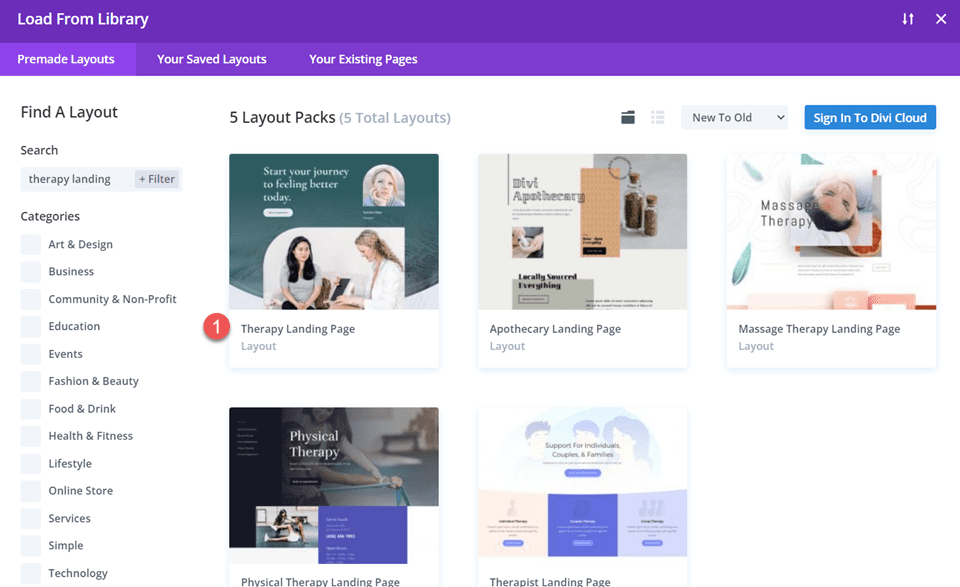
    Once in the Divi Builder, click the purple “+” button to add a new section. In the popup, choose “Choose a Premade Layout.” Here, you’ll find a collection of pre-designed templates available to you. Browse the thousands of pre-built pages to see what sparks something for you.

    Divi Include Multiple Email Addresses In Contact Form Module Find Layout

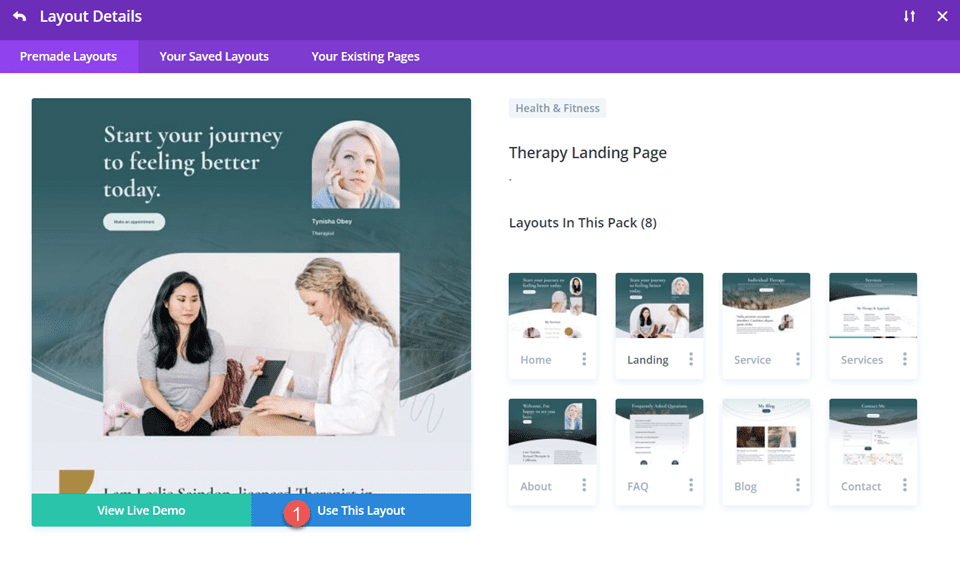
    You can preview the layout by clicking into the pack, selecting the page, and clicking “View Live Demo.” When you’ve found one you like, click “Use this Template” to load it to your page.

    Divi Include Multiple Email Addresses In Contact Form Module Use Layout

    Our Marketing layout pack is ideal for creative agencies. The landing page layout has everything you need to quickly set up a landing page with all the essential elements (plus, it already comes with superb illustrations for you to use).

    This layout and many others include an easy-to-read hero section with room for all the needed elements. It has CTA buttons throughout the page and placeholder text to make your case with solid copywriting. It has beautiful illustrations or places to place your images and videos. Lastly, the “How We Work” section can be easily adapted to fit case studies or testimonials.

    If you want more than the 2000+ free templates, you can explore the Landing Plus collection (and others) in the Divi marketplace.

    3. Set Up Lead Generation

    The lead generation form is one of the most crucial elements of a successful landing page. This form is the gateway to capturing valuable information from your visitors, turning them into potential leads or customers.

    Divi’s contact form offers a wide range of customization options, allowing you to create forms that match your brand and cater to your needs. It is included with the theme at no extra cost.

    You can also consider using WordPress lead-generation plugins if you want something else. These plugins offer powerful features to boost your lead-capturing efforts and seamlessly integrate with your email marketing and CRM services.

    For instance, you can explore options like OptinMonster or Thrive Leads, as mentioned in the best WordPress lead generation plugins article.

    Note that the goal of your landing pages may vary based on your specific business needs. While some businesses aim to gather contact information for potential follow-ups, others might focus on product sign-ups or demo requests. This is particularly true if they offer software-as-a-service (SaaS) products.

    4. Boost Landing Page SEO

    Landing pages are excellent when traffic is sent directly from email marketing or social/ad campaigns. However, there is a lot of opportunity to create landing pages that perform well in search results pages (SERPs) and potentially convert top-of-funnel traffic (TOFU).

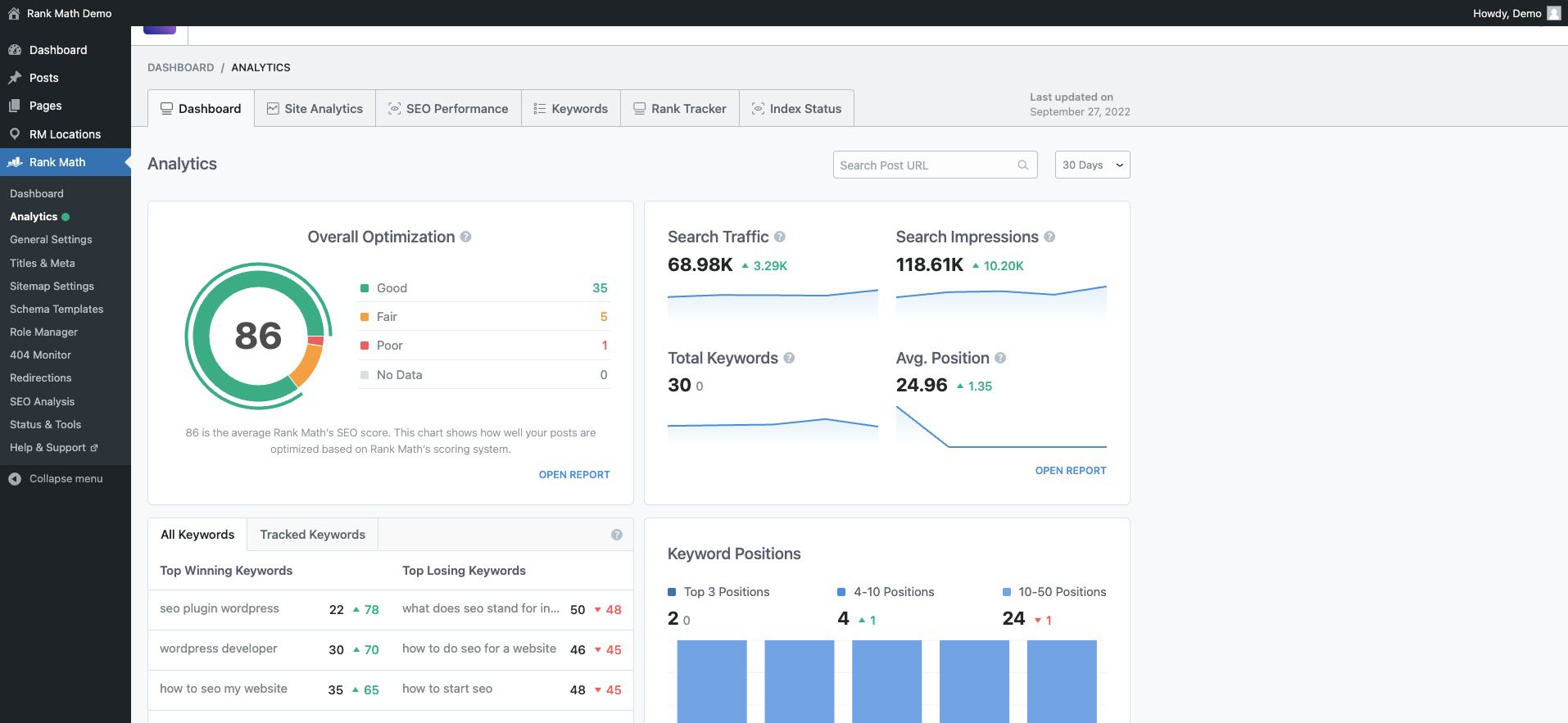
    With WordPress, SEO is easy. All it takes is one of the best SEO plugins (there are many). One of our favorites is Rank Math.

    It makes it easy to see your whole site’s SEO readiness with a great dashboard. Rank Math gives vital insights and allows effortless drill-down when you see something you want more detail on.

    Rank Math SEO Dashboard

    It also makes optimization of every page easy. It scores your page and its content and compares it against the competition. Rank Math then tells you what needs to be changed and tweaked to be in a good position to rank.

    Rank Math integration with Divi

    5. Improve Landing Page Performance

    There is no shortage of tools that can help you analyze the performance of your landing pages. Sometimes, it comes down to choosing a few tools to get a clear picture.

    You can consider some of these tools for analytics and analysis of your landing page performance:

    While you should use an analytics platform and could consider a heatmapping tool, having conversion-focused tools built into your landing page builder is an excellent addition. It means that you save some money and get the tools built in.

    Divi’s marketing tools offer valuable insights and features to enhance your landing page’s performance. You can conduct A/B tests to compare page variations against a set goal. This lets you identify which design elements or content variations you’ve created resonate better with your visitors.


    Additionally, it would be best to leverage conditional display logic to display personalized experiences based on user interactions. (See the explainer video for condition options).

    Divi Conditional Display Example

    These tools empower you to make data-based decisions and continuously improve your landing page’s effectiveness. Best of all, they are included with the Divi theme and are as intuitive to use as the rest of the visual builder.

    Additional Tips for Creating Good Landing Pages

    Optimize Your Page Load Speed

    A fast-loading landing page is crucial for enhancing user experience and improving conversion rates. To achieve this, analyze your page’s speed using tools like Google PageSpeed Insights or GTmetrix. Look for ways to optimize images, enable browser caching, and consider using a Content Delivery Network (CDN) to distribute content closer to your users for faster loading times. Take a look at all our recommended optimization plugins for WordPress. Additionally, ensure your hosting provider offers sufficient resources to handle traffic efficiently.

    Learn Copywriting or Employ AI Writers

    No one wants to be pitched or sold to. But copywriting disarms visitors’ and gets them to see what would be of interest to them. Beyond hooking visitors, copywriting also conveys your value proposition and sparks curiosity about how your product can help them with their problems.

    Copywriting is a deep well and might as well border on being an art. That makes it hard yet worthwhile to learn. Online learning platforms like Udemy have tons of courses on copywriting. If you write a lot, you should brush up on this and SEO copywriting.

    There is also a place for AI writers that specialize in marketing and sales copy. They certainly can create content faster and help you fill a knowledge gap if you have a long way to go in your copywriting.

    F-shaped Content/Page Structure:

    Organizing your content following the F-shaped reading pattern aligns with users’ natural reading behavior, ensuring that essential information, headlines, and critical points are noticed quickly. Placing important details along the top and left side of the page capitalizes on users’ tendency to skim through content, making it more likely they will absorb crucial information without feeling overwhelmed.


    F-Shaped Landing Page Design Structure Example

    Example Landing Page w/ F Pattern by SEOPress

    The F-Pattern for landing pages is backed up by a lot of heatmap data that shows our eyes start at the top left and work their way to the right and down, just like if you were reading a book. The only thing is that as we move down the page, we start to skim more, and thus, we go to the right less and less.

    Create a Sense of Urgency

    Incorporate time-sensitive elements on your landing page to create a sense of urgency and prompt immediate action. Limited-time offers, countdown timers, or flash sales can encourage visitors to act quickly and take advantage of your offer before it expires. This can be done with the conditional display referenced above. Watch how it transforms your conversion experience.

    Mobile-Optimize Your Landing Page

    Ensure your landing page is fully responsive and mobile-friendly to cater to users accessing your page from different devices. Test your page on various mobile devices and screen sizes to verify responsiveness and user-friendliness. Utilize responsive design principles to adapt the layout seamlessly for mobile users.

    Maintain Consistency with Ads and Email Marketing

    Consistency in messaging and design between your ads, email marketing, and landing pages reinforces your brand identity and builds recognition. Ensure the tone, color scheme, and key messages align seamlessly across all touchpoints. This cohesion enhances brand trust and fosters a sense of familiarity with your offerings.

    Conclusion

    Now is the time to unleash your creativity and bring your vision to life. So take the first step and start crafting your compelling landing page. Success is just a few minutes away, and the possibilities are endless with Divi as a trusted partner.

    Whether you opt for pre-made templates to get started quickly or embrace the creative freedom of the visual builder, Divi offers the tools you need to craft captivating and high-converting landing pages.

    Remember, a compelling headline, engaging visuals, a clear Call to Action (CTA), and captivating copywriting are the building blocks of an effective landing page. By incorporating these elements strategically, you’ll capture your audience’s attention and drive them toward your desired action.

    Looking for more resources? Checkout our top-notch guides for building powerful websites:

    1. How to Build an Online Store
    2. How to Build a Membership Site with Divi
    3. Creating a Learning Management (LMS) Website with Divi

    Let us know your progress while building out your landing pages.


    Feature Image by Overearth / shutterstock.com

    The post How to Create a Landing Page in 2023 (Detailed Guide) appeared first on Elegant Themes Blog.

  • 12 Best Lead Generation WordPress Plugins (Powerful)

    Are you looking for the best lead generation WordPress plugins?

    Using the right lead generation tools can help you get more customers and sales faster so that you can grow your business.

    In this article, we will share some of the best lead generation WordPress plugins to help you improve your marketing.

    Best Lead Generation WordPress Plugins (Powerful)

    What Is Lead Generation, and Why Does It Matter?

    Lead generation means getting the interest of prospective customers. It can be done in several different ways.

    On your website, lead generation might mean getting visitors to:

    • Join your email newsletter.
    • Submit a contact or inquiry form on your website.
    • Contact someone at your company through live chat.
    • Talk to a chatbot (automated chat).
    • Call your sales team, or book a call with them.

    Lead generation is essential for all online businesses. Of course, it’s also important to have a strong process for converting the leads into customers. However, most businesses struggle to get enough leads in the first place.

    Even if you run a nonprofit, lead generation matters. It can help you get more donations and more support.

    Our goal with this list is to share the absolute best WordPress lead generation plugins that you can use to grow your business faster.

    Unlike other best lead generation tool lists, we are not just sharing a list of plugins that do the same thing. Instead, we’re focusing on lead generation from a holistic point of view.

    For each lead generation solution category, we share an expert pick along with one alternative option for that category. This will help us keep this list comprehensive without causing choice paralysis.

    With that said, here are the best lead generation plugins for WordPress.

    1. WPForms

    WPForms

    WPForms is the best contact form plugin on the market. Over 6 million website owners use the beginner-friendly, drag-and-drop builder to create any kind of online form for their WordPress sites.

    It comes with over a hundred pre-built form templates you can use as a starting point. After that, you can customize the form to match your needs using the drag-and-drop form builder interface.

    Here are just some of the lead generation forms you can create:

    WPForms also integrates with your favorite email marketing services and CRM providers. This lets you automatically add leads to your email list.

    Each time someone submits the form, you will automatically get an email notification. You can easily turn this off if you prefer not to receive email alerts. WPForms will store each completed form entry in your WordPress database too.

    It’s also possible to send notifications to multiple recipients using WPForms. For example, you might want to send a customer inquiry notification to a specific person in the sales team and their supervisor.

    Price:

    WPForms pricing starts at $49.50/year. There’s also a free version of the plugin, which has limited features.

    Alternative:

    Formidable Forms ($39.50 per year) is a good alternative to WPForms. It has powerful tools that let you create different forms, including lead generation calculators. However, it’s not as beginner friendly as WPForms.

    2. OptinMonster

    OptinMonster

    OptinMonster is a powerful lead generation and popup plugin that you can use on your WordPress site.

    It lets you create high-converting popups and email signup forms that help you turn abandoned website visitors into subscribers and customers.

    It has lots of useful features, including Exit Intent® technology. This lets you show your popup at the exact moment when someone is about to leave your site.

    You can combine it with their page targeting feature to show customized popup messages for each page on your site, which is proven to increase conversions.

    With OptinMonster, you even get special popups like spin the wheel popups and Yes/No optins. These can boost your conversion rate even further.

    OptinMonster Spin Wheel Campaign

    There are lots of different professionally designed templates included in the app. This makes it quick and easy to create your lead forms using the drag-and-drop builder.

    You can also use OptinMonster to generate leads in other ways. For instance, you might use the content-locking feature to ask visitors to join your email list before they can read your full content.

    You don’t necessarily need to use it to generate email leads, either. You could add a click-to-call button to your popup, use it to show special discount codes, and more.

    Price:

    OptinMonster starts at $9/month when billed annually. To get advanced features like Exit Intent technology and Yes/No forms, you need the Pro plan from $29/month.

    Alternative:

    Thrive Leads ($99 per year) is a good alternative to OptinMonster. It offers a range of different types of lead generation forms and popups. It also has a built-in template library to speed up the building process.

    3. SeedProd

    SeedProd website builder

    SeedProd is the best WordPress website and theme builder on the market. It’s used by over a million website owners to easily create any type of website without writing any code.

    It has dozens of professional templates you can customize easily with the drag and drop builder.

    SeedProd also provides you with a beginner-friendly landing page builder. And you will find a ready-made sales page, opt-in page, webinar registration, coming soon page templates, and more.

    All of these landing page templates can be completely customized to help you start generating leads as quickly and easily as possible.

    Customize SeedProd

    It includes dozens of blocks designed to help you build better landing pages, like testimonial blocks, countdown timers, CTA buttons, pricing tables, and so much more.

    You will find a searchable stock photo library with over 2 million photos that you can add to your pages to improve conversions.

    It also has powerful integrations with the top email marketing software and thousands of third-party apps via Zapier. This lets you easily send your leads to your lead management tool of choice.

    For online store owners, you can use the WooCommerce blocks to build custom WooCommerce product pages easily, thank you pages, and more to collect leads and sell more products.

    Price:

    SeedProd starts from $39.50 per year (only $3.29 per month). Plus, there’s a free version you can try to see how the plugin works.

    Alternative:

    Instapage offers similar page builder features but is more expensive and starts at $199 per month (billed annually).

    4. LiveChat

    Live Chat Inc Website

    LiveChat is the best live chat software for WordPress websites. It’s very easy to set up, and you can integrate it with dozens of other marketing services.

    By adding live chat support to your WordPress website, you can build a better relationship with your users and convert more visitors into customers.

    This plugin places a chat button in the bottom right-hand corner of your website. Visitors can click on this to chat with your team in real time.

    Plus, your support team members don’t need to log in to WordPress to use LiveChat. Instead, they can use the LiveChat app on their laptop or mobile devices.

    LiveChat will create a support ticket if a visitor contacts your team outside of support hours.

    LiveChat is fast and easy to use for your visitors and your support team. It lets you quickly turn leads into customers by answering pre-sales questions straight away.

    Price:

    LiveChat starts at $20 per month when billed annually with a 14-day free trial. Our LiveChat coupon gives you an extended 30-day free trial plus a 30% discount.

    Alternative:

    Brevo (Previously Sendinblue) offers a simple, free live chat feature that you can use on your website. It also offers email, SMS, and a CRM tool that integrate with live chat.

    5. ChatBot

    ChatBot

    ChatBot is one of the best AI chatbot software options on the market and lets you use automated live chat to connect with your potential customers and respond to questions 24/7.

    To help you get started quickly, ChatBot has lots of pre-designed templates. For instance, you can use the lead generation bot to book calls. Meanwhile, the sales bot template allows you to sell products directly from the chat window.

    ChatBot can be used in Facebook Messenger as well as on your website. That makes it a great option for companies and organizations that get a lot of inquiries through Facebook.

    It’s easy to integrate it with other apps, such as LiveChat. A live agent can step into the conversation seamlessly if needed.

    Price:

    ChatBot pricing starts at $52 per month. There’s a 14-day free trial available.

    Alternative:

    Hubspot offers a suite of business CRM tools, including a chatbot builder and live chat. You can get started free, and paid plans start at $30 per month.

    6. RafflePress

    RafflePress

    RafflePress is one of the best WordPress giveaway plugins on the market. It allows you to easily create viral giveaways and contests that you can use to grow your website traffic and email list.

    You can use the drag and drop builder to quickly create giveaway campaigns in minutes without writing any code. Plus, there’s a built-in template library to help make giveaway creation even faster.

    A unique refer-a-friend feature lets you do word-of-mouth marketing by letting users share your contest on their social media profiles.

    This helps to build engagement and can get you a lot of new visitors to your WordPress blog.

    You will find many other powerful features that help improve your campaigns, like email verification, fraud protection, social logins, giveaway landing pages, success tracking, and more.

    Plus, your giveaways will run on mobile devices, so you can reach your visitors no matter where they happen to be.

    For more details, see our guide on how to run a giveaway/contest in WordPress.

    Price:

    RafflePress has a free version of the plugin you can use to get started. Paid plans start at $39.50 per year for the starter plan.

    Alternative:

    Gleam is an advanced giveaway platform you can use to run contests and giveaways. However, it’s not as beginner friendly, and you will need at least the $97 per month Pro plan to unlock useful features.

    7. PushEngage

    PushEngage

    PushEngage is the best web push notification software on the market, used by over 10,000 companies, including Harvard, Dominoes, and Business Insider.

    It lets you easily send targeted push messages to visitors after they leave your website.

    We use push notifications here at WPBeginner, and they are consistently a top 5 source of our traffic. They are a highly-effective way to convert website visitors into loyal followers and customers.

    Visitors simply give their permission to receive push notifications by clicking a button:

    An example of a push notification optin on the WPBeginner website

    You can set up push notifications to automatically send out to your subscribers whenever you publish a blog post or use them to send completely custom messages.

    It’s a very easy-to-use solution for beginners to advanced users. You will find powerful features like A/B testing, custom-triggered campaigns, interactive messages, custom drip campaigns, and so much more.

    Plus, you can use the marketing automation features to create abandoned card sequences, scheduled messages, and more.

    You will be able to see a detailed breakdown of your subscriber engagement and even the transactional revenue generated from your push campaigns.

    Price:

    PushEngage starts at $9 per month and gives you support for 100,000 subscribers and unlimited campaigns. There’s also a free plan available that gives you 30 campaigns per month for 200 subscribers.

    Alternative:

    OneSignal has a free plan for unlimited notifications on mobile. For advanced features like delayed notifications, pricing starts at $99 per month.

    8. FunnelKit

    FunnelKit homepage

    FunnelKit, formerly known as WooFunnels, is the best sales funnel builder for WordPress.

    You can use it to create lead-generation funnels, sales funnels, high-converting checkout pages, one-click upsells, and more.

    It’s essentially a ClickFunnels alternative that helps you convert website visitors into leads and customers.

    FunnelKit comes with a built-in library of beautiful funnel templates that you can import in one click.

    FunnelKit templates

    You can easily customize the templates using the WordPress block editor as well as popular page builder plugins like Elementor, Divi, and others.

    FunnelKit offers in-depth analytics so that you can see how your funnels are performing in real time. Plus, it comes with A/B testing that lets you experiment with different versions of your funnels to find out which one converts best.

    In addition, FunnelKit has a marketing automation solution called FunnelKit Automations. It allows you to set up automated email and SMS campaigns for lead nurturing, welcome series, abandoned cart recovery, post-purchase upsell, and more.

    Price:

    FunnelKit starts at $99.50 per year. To access FunnelKit Automations, you need at least the Professional plan, which costs $249.50 per year.

    Alternative:

    SeedProd, which we mentioned earlier in this list, can also be used to easily create lead generation pages, sales pages, custom WooCommerce checkout pages, and more.

    9. WP Call Button

    WP Call Button

    WP Call Button allows you to easily add a ‘click to call’ button on your WordPress website or WooCommerce store. Visitors can simply click or tap the button to call you straight away.

    If your customers need to call you before purchasing a service or booking an appointment, adding a click-to-call button on your website will increase your leads and sales.

    It can also be used to easily set up business call forwarding.

    WP Call Button makes adding your button to any post or page easy. You can include it in your WordPress sidebar, too. It’s also easy to create a sticky floating call button that stays visible all the time.

    Price:

    WP Call Button is free and works with all top business phones and business VoIP providers.

    Alternative:

    You can also create a click-to-call link using the manual method covered in our article on adding a click-to-call button in WordPress.

    10. AffiliateWP

    AffiliateWP

    AffiliateWP is one of the best affiliate tracking and management solution for WordPress. It lets you simply create your own fully featured affiliate program on WordPress.

    By creating an affiliate program, you can have your own team of affiliates promoting your products in exchange for a commission.

    This can help you get more visibility online, traffic, and of course, make more sales. You can even create your very own WooCommerce affiliate program using this plugin.

    It comes with everything you need to manage your program, including accurate affiliate tracking, integrated payouts, real-time reporting, affiliate coupon tracking, and so much more.

    With manual affiliate approval and top-performing affiliate data, you can build lasting partnerships with your most valuable affiliates for years to come.

    Price:

    AffiliateWP starts at $149.50 per year and has everything you need to run a successful affiliate program.

    Alternative:

    Easy Affiliate is another popular WordPress plugin for creating and managing an affiliate program. The basic plan starts at $99.50 per year.

    11. All in One SEO

    All in One SEO

    All in One SEO is the best WordPress SEO plugin used by over 3 million websites. It’s the most comprehensive SEO toolkit that makes it easy to improve your SEO rankings without learning any complicated SEO jargon.

    Doing WordPress SEO is an important part of lead generation. You need to bring people to your website before they can join your email list, call you, subscribe to push notifications, or do anything else on this list.

    Once you install and activate the plugin, an easy-to-use setup wizard will help you choose the best SEO settings for your business, so you can start getting more traffic.

    It has a TruSEO score, which offers detailed on-page SEO analysis and gives you an actionable SEO checklist to help you easily optimize your posts and pages.

    AIOSEO checklist

    All in One SEO can help you improve your post SEO titles and meta descriptions, generate rich snippet schema markup and create smart XML sitemaps and RSS sitemaps.

    Plus, there are built-in WooCommerce SEO settings, like individual product optimizations, product image SEO, and more, to help your online store get more visitors from the search results.

    Price:

    AIOSEO starts at $49.60 per year for access to advanced SEO features. You can also try out the free version to begin optimizing your site for SEO.

    Alternative:

    Yoast SEO is another popular SEO plugin for WordPress that will help you optimize your site. There is a free version and a premium version that starts at $99 per year.

    12. MonsterInsights

    The MonsterInsights Google Analytics plugin

    MonsterInsights offers a powerful way to add Google Analytics to your WordPress website. It lets you quickly and easily see crucial statistics about your site and find your most important pages.

    This means you can easily find out what’s working and what’s not, focusing on the areas that really matter.

    For instance, you might use MonsterInsights to enable author tracking and see which writers for your site are producing the best-performing posts.

    Or you could use MonsterInsights to track link clicks and button clicks. This lets you figure out which links and buttons are getting clicked and which ones aren’t, letting you pinpoint areas for improvement.

    MonsterInsights is quick and easy to set up and gives you real-time stats. It can even track things like your eCommerce data, form completions, and file downloads. This gives you more insights into your lead generation efforts.

    Price:

    MonsterInsights starts at $99.50/year. There’s also a free version available for WordPress with limited features.

    Alternative:

    ExactMetrics offers similar features to MonsterInsights and starts at $99.50 per year.

    Bonus: Nextiva

    Nextiva

    Nextiva is the best business phone service for small business owners in terms of features and ease of use.

    If your business relies on phone calls for lead generation, then Nextiva can help you improve your business communication across the board.

    It has a web-based admin panel that will let you manage your entire unified communications platform in one place.

    You will find business phone features like call routing, voicemail to text and email, SMS messaging, unlimited domestic calling, online faxing, and so much more.

    Every new account can get a free local or toll-free number. Plus, you get all standard features like caller ID, call forwarding, routing, custom greetings, and more.

    You can even integrate your business phone with powerful features like live chat and CRM services.

    We use Nextiva at WPBeginner for our business phone service. It works well for our remote team since they can receive business calls on their cell phones while still keeping their numbers private.

    Price:

    Nextiva starts at $14.95 per month per user for all your business phone needs. The Enterprise plan costs $26.95 per month per user and includes video conferencing, call recording, and more.

    Alternative:

    RingCentral is another popular business phone provider that’s packed with features. Paid plans start at $20 per month per user.

    What Is the Best Lead Generation Plugin for WordPress?

    We believe you need multiple plugins for a robust lead-generation strategy on your site.

    With that said, WPForms is the best lead generation plugin for WordPress. You can use their drag-and-drop form builder to create any online form.

    If you are looking for a live chat solution to improve leads and support, then LiveChat and ChatBot are both great options.

    If you want to improve your overall conversion rate on your website, then nothing beats the powerful features that OptinMonster has to offer.

    If you want to improve your existing website and product pages to generate more leads and make more sales, then SeedProd is a must-have plugin.

    With any lead generation strategy, attracting leads is only the first part. You have to ensure a proper sales process to close the deal.

    If you rely on phone calls, then we recommend using Nextiva. It comes with auto-attendant, call-routing, CRM, and powerful sales features that you can use to increase your sales.

    To summarize, our top lead generation tools are:

    1. WPForms
    2. OptinMonster
    3. SeedProd
    4. LiveChat.com
    5. ChatBot.com
    6. Nextiva

    We hope this article helped you learn about the best lead-generation plugins and tools for WordPress.

    You might also want to see our other guides that can help you generate new leads and turn them into customers.

    Best WordPress Guides for Lead Generation

    If you liked this article, then please subscribe to our YouTube Channel for WordPress video tutorials. You can also find us on Twitter and Facebook.

    The post 12 Best Lead Generation WordPress Plugins (Powerful) first appeared on WPBeginner.

  • 10 Best WordPress Lead Generation Plugins in 2023

    As companies shift toward the online space, the importance of lead generation cannot be overstated. And given that WordPress is among the most commonly used CMS for businesses, it follows that there are a ton of choices for lead generation plugins.

    In this post, we’ll provide an in-depth review of some of the best WordPress lead generation plugins that can help take your website to the next level.

    What is a Lead Generation Plugin for WordPress?

    A lead generation plugin for WordPress is a tool that helps users capture leads by gaining user information, such as name and email address, and turning them into potential customers.

    So, with the help of a lead generation plugin, users can create highly targeted lead capture forms that can help them convert website visitors into leads. The plugin usually offers a range of forms, including pop-ups, slide-ins, or quizzes. Businesses can also use advanced targeting and segmentation features to reach a more specific audience.

    In summary, a lead generation plugin for WordPress is a valuable tool for users that want to create leads and grow their business. It can help businesses create highly targeted lead capture forms that can help them convert website visitors into leads and increase their revenue.

    8 Best Lead Generation Plugins for WordPress in 2023

    With a vast array of lead generation plugins available for WordPress, it can be difficult to decide which is right for you. Here are some popular choices you’ll want to consider:

    1. FunnelKit

    FunnelKit logo

    FunnelKit is a tool designed for online marketers to create effective and high-converting sales funnels for their products or services. The tool offers a range of features, such as drag-and-drop page builders, customizable templates, split testing, and analytics to help users optimize their sales funnels for maximum leads.

    With FunnelKit’s integration with Divi, users can create customized sales funnels using the Divi page builder and then optimize them for lead generation using FunnelKit’s features. Users can create landing pages and squeeze pages, for lead generation and then use FunnelKit’s split testing to improve their performance.

    Key Features for FunnelKit:

    • Drag-and-drop page builder
    • Customizable templates
    • Split testing
    • Analytics and tracking

    FunnelKit Dashboard

    Moreover, FunnelKit’s analytics and tracking provide users with a valuable look into the effectiveness of their efforts. By tracking their progress and monitoring page performance over time, users can identify areas for improvement and make data-driven decisions to optimize their strategies.

    Additionally, FunnelKit enables users to see how their pages are performing in real-time, giving them the ability to make quick changes to improve their conversion rates.

    Best For:

    FunnelKit is best for those looking to create effective sales funnels for their products or services. It’s also great for those who want to track their progress with their funnels and adjust for maximum conversions.

    Pricing: Free, Pro version starts at $99.50/yr

    Get FunnelKit

    2. RafflePress

    RafflePress WordPress Giveaway Marketing Plugin

    RafflePress is a powerful WordPress plugin designed to help website owners run successful giveaways and contests. It is an ideal tool for building excitement around your brand, connecting with your audience, and generating leads.

    Moreover, RafflePress’s drag-and-drop giveaway builder makes it easy to create stunning giveaways and contests without any coding knowledge. Plus, users can choose from a variety of templates, customize their designs, and add entry options that align with their goals.

    Key Features for RafflePress:

    • Mobile friendly
    • Contest fraud protection
    • Drag-and-drop contest builder
    • Social media integrations
    • Email marketing integrations
    • Advanced tracking

    RafflePress dashboard

    Also, RafflePress integrates with email platforms like Mailchimp, making it easy to grow your email list and convert your contest participants into subscribers. Plus, with advanced tracking, users can monitor their contest’s performance in real-time and optimize their strategies for maximum results.

    Best For:

    RafflePress is ideal for website owners looking to build their email lists, engage with their audience, and drive traffic to their sites. Its simple UI, social media integrations, and email marketing make it a top choice for anyone looking to run successful online contests.

    However, if you are looking for a lead generation plugin with a focus on building sales funnels, FunnelKit may be a better fit.

    Pricing: Free. The pro version starts at $79.00/yr

    Get RafflePress

    3. AffiliateWP

    AffiliateWP Homepage Jan. 2023

    AffliateWP is a fantastic lead generation plugin that is perfect for websites that want to leverage the power of affiliate marketing to increase sales and garner more leads.

    This plugin allows users to easily create and manage affiliate programs on their WordPress website, making it easy for affiliates to promote and sell their products.

    Key Features for AffiliateWP:

    • Robust tracking
    • Customization options
    • Automated affiliate registration
    • Email notifications
    • Payout logs

    AffiliateWP UI Screen Shot

    One of the best features of AffiliateWP is its tracking capabilities, which enable users to monitor and manage affiliate marketing campaigns. This feature ensures that users can easily track referrals and commission payments to their affiliates, helping their marketing efforts and generating more revenue.

    In addition, AffiliateWP offers a nice range of customization options, allowing businesses to tailor their affiliate program to their specific needs. This feature makes it easy to create a personalized affiliate program that aligns with a business’s unique branding and messaging.

    But wait, there’s more! AffiliateWP also provides users with a range of tools to help manage their affiliates, including automated affiliate registration, email notifications, and payout logs.

    Best For:

    AffiliateWP is best for businesses that want to harness the power of affiliate marketing to generate more leads and increase sales.

    Pricing: $149.50/year

    Get AffiliateWP

    4. Thrive Leads

    Thrive Leads

    Thrive Leads is another great option for a lead generation plugin for WordPress. It allows you to create and customize various types of opt-in forms to help grow your email list and increase conversions.

    First, you have access to a wide range of form types, including pop-ups, sticky ribbons, in-content forms, slide-ins, and more. You can customize each form with a simple drag-and-drop editor, choosing from a range of templates and designs to create a form that matches your website’s branding.

    Key Features for Thrive Leads:

    • Multiple form types
    • A/B testing
    • Advanced targeting options
    • Email marketing integration
    • Analytics reports

    Thrive Leads builder

    Thrive Leads’ conversion-focused form templates make it easy for users to create professional-looking forms that encourage visitors to subscribe to their email lists. The A/B testing feature allows users to test different form designs, and offers to determine which ones perform best.

    Another cool feature is the advanced targeting options available, allowing users to show their forms to specific visitors based on factors like their location, behavior on the website, and more.

    Best For:

    Thrive Leads is best suited for website owners who are serious about growing their email list and improving their website’s conversion rates.

    Pricing: $299/yr

    Get Thrive Leads

    5. Quiz and Survey Master

    Quiz and Survey Master Banner

    Quiz And Survey Master is a highly-rated WordPress plugin designed to help users create engaging quizzes and surveys that can help create leads and engage their audience. Moreover, it’s incredibly easy to use and comes with a ton of question types that can easily be incorporated into any website.

    Key Features for Quiz and Survey Master:

    • Customizable quiz and survey options
    • Conditional logic for quizzes and surveys
    • Integration with popular email marketing tools

    To begin, Quiz and Survey Master enables users to create quizzes to gather valuable insights into their audience’s preferences. Furthermore, this plugin offers a wide range of question types, such as multiple-choice, open-ended, and true or false, making it easier for businesses to obtain relevant information.

    In addition to its survey and quiz creation features, Quiz and Survey Master offers businesses the ability to customize the design of their quizzes and surveys to match their brand’s aesthetics. This is made possible through the use of pre-built themes or the drag-and-drop builder that comes with the plugin.

    Best For:

    Quiz and Survey Master is best suited for users that want to engage their audience and generate leads through quizzes and surveys. However, for users that want to focus more on pop-ups and opt-in forms, OptinMonster and Thrive Leads are great alternatives.

    Pricing:  Free, with premium licenses starting at $129.00/yr.

    Get Quiz and Survey Master

    6. Tidio

    Tidio logo

    Tidio is a great live chat plugin that can be an effective tool for generating leads and growing your WordPress business. In addition to a chatbot, Tidio also offers email marketing services to help users convert help chats into potential sales opportunities.

    Key Features of Tidio:

    • Chatbox widget
    • Tools for email marketing
    • View a list of the pages that users have viewed

    Tidio's customizable chat widget

    To further support branding efforts, the plugin offers a range of customization options for the chat windows. Additionally, it supports over 200 languages, allowing users to communicate with a global audience.

    Plus, integrated email marketing allows users to follow up with users who have left the website, giving you an opportunity to further nurture leads and guide them toward conversion.

    Best For:

    Tidio is an excellent choice for users seeking leads through live chat and email marketing. Notably, it offers several customization options to match chat windows to your brand, and it supports over 200 languages out of the box, making it an ideal solution for reaching a global audience.

    Pricing: Free. The pro version starts at $15.83/per year

    Get Tidio

    7. Bloom

    Bloom banner

    Bloom is an intuitive WordPress email list-building plugin that enables users to create opt-in forms and pop-ups effortlessly to collect email addresses and expand their email lists for lead generation. The plugin provides numerous options for customization and is compatible with the most popular email marketing platforms.

    Developed by Divi, it is a robust plugin that comes with a variety of features to help users create eye-catching email opt-in forms.

    Key Features for Bloom by Elegant Themes:

    • A wide range of opt-in forms and pop-ups to choose from
    • The ability to customize the design and layout of opt-in forms and pop-ups
    • Integration with popular email marketing platforms

    The template library of the Bloom plugin.

    With Bloom, users can easily create opt-in forms, including pop-ups, fly-ins, and widgets, and customize them to match their brand. The plugin also allows for targeted display settings, enabling users to show opt-in forms to specific users based on their behavior on the website.

    Also, it offers integrations with over 20 email marketing platforms, including Mailchimp, Aweber, and Constant Contact, making it easy to manage email lists and automate campaigns.

    Best For:

    Bloom is best for users looking to grow their email list and increase conversions with stunning visuals. Plus, It’s particularly useful for those who want to create highly customizable and targeted email opt-in forms.

    Pricing:  Free with Elegant Themes, starting at $89.00 per year

    Get Bloom

    8. OptinMonster

    OptinMonster banner

    OptinMonster is a robust WordPress plugin that provides the ability to create and manage email opt-in forms, pop-ups, and other campaigns to nurture lead generation.

    The form builder makes it easy to create and customize your forms, and the targeting and the A/B testing and analytics tools help you to optimize your campaigns and improve your results.

    Key Features for OptinMonster:

    • Drag-and-drop form builder
    • Powerful targeting and personalization options
    • Analytic tools to track performance

    OptinMonster settings

    Firstly, the plugin’s drag-and-drop form builder, along with its analytical tools, makes it easy to use. Additionally, OptinMonster has robust targeting and personalization options that allow you to show different messages to users based on their behavior, location, and other factors.

    Furthermore, this feature is particularly noteworthy, as it helps you to connect with your audience and make your marketing efforts more effective.

    Best For:

    OptinMonster is ideal for users that want to grow their email list and improve their conversion rates. Its powerful features and customization options make it a popular choice among marketers and website owners.

    Pricing: $9/month

    Get OptinMonster

    9. WPForms

    WPForms banner

    WPForms is an incredibly popular form-building plugin for WordPress that offers a wide range of features to its users. By using WPForms, you can create custom surveys without any difficulty and analyze them by utilizing automatically generated reports and graphs. Not only that, but you can also share these graphs on various social media platforms to gain traction.

    Moreover, despite having a ton of features, the pricing of the plugin is quite reasonable.

    Key Features for WPForms:

    • Customizable forms and surveys
    • Recover lost leads
    • Conditional logic
    • Users can upload files to forms

    Conditional Logic Forms

    Another key feature of WPForms is its integration with various third-party tools such as PayPal, Stripe, and Mailchimp, allowing users to easily accept payments, collect donations, and manage their email lists.

    Best For:

    WPForms is best for users that want to create custom forms, surveys, and questionnaires on their WordPress websites.

    Pricing: $49.50/yr

    Get WPForms

    10. Kliken WooCommerce

    WooCommerce Google Ads Marketing by Kliken

    Kliken WooCommerce is a marketing plugin specifically designed to help eCommerce businesses increase their online visibility, attract more customers, and drive sales.

    With its one-click installation and setup process, you can easily get started with Kliken’s lead-generation efforts. Additionally, the plugin integrates with popular advertising platforms such as Google, Facebook, and Instagram, enabling businesses to create and manage ads that effectively target potential customers.

    Key Features for Kliken WooCommerce:

    • One-click setup
    • Integrations with Google, Facebook, and Instagram ads
    • Dynamic retargeting
    • Automated product feed optimization
    • Real-time performance reporting

    Kliken setup page

    Moreover, Kliken WooCommerce offers dynamic retargeting, which enables businesses to target visitors who have previously shown interest in their products. By doing so, businesses can convert website visitors into customers, which results in higher sales and revenue.

    In addition, the automated product feed ensures that a business’s products are accurately represented in its advertising campaigns, saving time and eliminating errors. This feature is especially useful for businesses with large product catalogs.

    Best For:

    Kliken WooCommerce is ideal for eCommerce businesses looking to optimize their online marketing campaigns and generate more leads.

    Pricing: Free. The pro version starts at $20.00/mo

    Get Kliken WooCommerce

    Final Comparison

    Plugin Price Free Option
    🥇 FunnelKit $99.50 per year ✔️ Visit
    🥈 RafflePress $79.00 per year ✔️ Visit
    🥉 AffiliateWP $149.50 per year ❌ Visit
    4 Thrive Leads $299.00 per year ❌ Visit
    5 Quiz and Survey Master $129.00 per year ✔️ Visit
    6 Tidio $15.83 per year ✔️ Visit
    7 Bloom $89.00 per year ❌ Visit
    8 OptinMonster $9.00 per month ❌ Visit
    9 WPForms $49.50 per year ❌ Visit
    10 Kliken WooCommerce $20.00 per month ✔️ Visit

    What is the Best Lead Generation Plugin For WordPress?

    In conclusion, choosing the best lead generation plugin for WordPress is critical for any business looking to grow its customer base. With so many options available, it can be hard to choose the right plugin that suits your needs. However, by carefully considering your goals and requirements, you can find a plugin that fits your budget and maximizes your potential leads.

    One of the most popular options is OptinMonster, which offers a wide range of features and customizations to increase your lead generation efforts.

    Alternatively, Thrive Leads is another powerful option that offers A/B testing and extensive targeting options to optimize your lead generation campaigns. It also boasts an impressive array of designs to enhance your lead generation efforts.

    Ultimately, the best lead generation plugin for WordPress depends on your specific needs and budget. By researching your options and testing different plugins, you can identify the right solution to drive your business growth and success.

    Need more plugins? Check out our article featuring the best WordPress podcast plugins.

    Featured Image via astel design/ shutterstock.com

    The post 10 Best WordPress Lead Generation Plugins in 2023 appeared first on Elegant Themes Blog.