EDITS.WS

Tag: marketing

  • 12 Best Website Builders in 2023 (Reviewed and Compared)

    Website builders are increasing in popularity every year as more users and companies look for streamlined solutions for building websites. They are designed to make it easy for anyone to get a new website up and running. With built-in templates and drag-and-drop page interfaces, you won’t need advanced technical skills or coding knowledge to use them. However, even the best website builders will have unique strengths and limitations to consider before choosing one for your website.

    In this post, we’ll give a detailed review of each of the best website builders. We’ll compare key features, price, ease of use, flexibility, and more so you can make the best choice.

    What are Website Builders?

    In general, a website builder is an online tool that allows users to build websites. They are usually offered by hosting companies or other hosted Software as a Service (Saas) platforms that provide an all-in-one suite of tools for building a site from the ground up. You can use them to build anything from a simple blog to a large online store equipped with tools for email marketing, social sharing, SEO, and more.

    Also, website builders will give you more control and ownership of your website than some blogging platforms like Blogger or Medium. But they won’t give you as much flexibility and control as a dedicated CMS like WordPress. As such, they are best for those who want enough control over their site to get the design and functionality they want without spending much time on other technical aspects of a website.

    The Pros and Cons of Website Builders

    What makes website builders great is that they are so easy to set up and use. You don’t have to worry about making sure all the pieces or your website are put together correctly. It’s already done for you. You can get a custom domain name, hosting, SEO, security, pre-made template designs, a drag-and-drop visual interface, and a content management system for your pages and posts all in one place.

    The drawback of using website builders is that they can be limiting. This is the tradeoff for ease of use. Website builders are easier to use because the platform does most of the heavy lifting for you. Because of this, you are bound to the limitations set by the platform for things like hosting, SEO, functionality, and design features. Additionally, site builders often require users to upgrade to higher-priced plans to access certain functionalities. So, finding a platform that can scale to your needs as your website grows without breaking the bank is essential.

    Despite any drawbacks, in most cases, the stress-free benefits of website builders far outweigh the limitations. And getting the right website builder can make all the difference.

    The Best Website Builders

    The best website builders provide the complete package for creating your website. But each website builder on our list comes with its strengths and weaknesses. Let’s look at some of the top picks across the web and see how they match against each other.

    1. WordPress

    WordPress.org Website Builder

    WordPress powers over 1/3 of all websites and has grown into a powerful content management system (CMS) that can be used to build just about any kind of website. The software is open-source and available to download for free. It is also self-hosted, meaning it can be installed on any hosting provider.

    Although the creators of WordPress offer an all-in-one hosted service platform at WordPress.com, it is much more limiting than using the .org version. Check out this post explaining their differences.

    WordPress is More Flexible than Other Website Builders

    WordPress is not bound by the same limitations as other hosted website builders. The customization options are virtually limitless. Countless WordPress plugins, themes, and integrations (both paid and free) allow you to build any type of site you want with advanced design and functionality.

    Additionally, the WordPress block editor makes it easy to build websites using a visual drag-and-drop builder. You can also use a visual page builder like Divi to create custom layouts and stunning designs without any coding knowledge using thousands of pre-made templates.

    Divi, premium WordPress website builder plugin

    There are also tons of WordPress plugins for extending the functionality and capabilities of your WordPress website. For example, you can use WooCommerce to add exhaustive eCommerce features to any WordPress site for free. There are high-quality plugins for SEO optimization, eCommerce, memberships, speed optimization, and much more.

    A common drawback of using WordPress versus other website builders on this list is that it requires a steeper learning curve and more technical knowledge to get everything set up. You’ll be carrying more responsibilities when managing and maintaining your site. However, once the work is done, you have complete control over every aspect of your site.

    Although WordPress is free software, the actual cost of getting a complete website up and running will depend on other factors, like hosting and any premium themes or plugins you may need.

    Key Features

    • Blocks-based editing for easy creation of complex page layouts
    • Exhaustive library of plugins and themes both natively and in third-party marketplaces
    • Excellent native blogging platform with commenting system and social media integration
    • Powerful eCommerce capabilities with the WooCommerce plugin
    • Works with popular drag-and-drop page builders like Divi to give you thousands of pre-made layouts and powerful design options.

    Pros

    • User-friendly interface for easy website creation and management
    • Customizable with thousands of themes and plugins
    • Scalable to grow with your website’s needs
    • You have more control over your website than other hosted platforms for security, SEO, and speed optimization.
    • Available managed WordPress Hosting providers that handle all the technical stuff for you.
    • A large community of developers and users

    Cons

    • Steeper learning curve
    • User must find a hosting provider and domain separately
    • The large number of resources and tools can be overwhelming for beginners
    • Requires more hands-on management and optimization

    Best For:

    WordPress is best for any user or company that wants complete control over their website using a drag-and-drop builder that doesn’t have the limitations of other hosted website builders. Although you may need more technical expertise or resources to manage website hosting, security, and backups, you are rewarded with the highest levels of flexibility for your website.

    Pricing: Free

    Start a WordPress Website

    2. Weebly

    Weebly Website Builder

    Weebly is one of the best website builders known for its easy-to-use interface and robust eCommerce platform, making it a popular choice for small businesses, entrepreneurs, and individuals.

    The platform includes several themes and pre-made layouts to jumpstart the design of various types of websites. Online stores, portfolios, personal brands, event sites, and blogs can all be built with the Weebly website builder. You can customize the design of your page using an intuitive drag-and-drop interface with all content elements like forms, testimonials, PDFs, and even Instagram feeds.

    The Weebly page builder

    Weebly for eCommerce

    Weebly’s eCommerce features make it a uniquely powerful builder for online stores. Because Weebly is tightly integrated with Square, the POS service provides much power to online shops built on the platform. With Square POS tightly knit into the Weebly ecosystem, your website integrates quickly with several payment gateways, including PayPal, Stripe, and Square.

    Weebly allows users to organize and add products to their store with images, descriptions, prices, and shipping options. You can generate a menu PDF with Weebly if you’re a food-based business.


    Weebly abandoned cart sequence

    Weebly’s abandoned cart sequence is a feature of their eCommerce platform that allows store owners to automatically send emails to customers who have added items to their cart but still need to complete the checkout process. They also have built-in email marketing tools, including pop-ups. Plus, it has built-in SEO functions that help store owners optimize their stores for search engines. This includes adding meta tags, descriptions, and keywords to products and pages.

    Key Features

    • Sell physical products, services, or food online for pickup or delivery
    • Accept reservations or bookings
    • Automatically sync with Square POS
    • Provides a selection of form templates for surveys, events, and more
    • Manage communications with customers through Facebook Messenger, text and email alerts
    • Create popups with popup builder

    Pros

    • Easy-to-understand and use builder
    • Quick to set up an eCommerce store
    • Sell from multiple sales channels like Facebook and Google
    • Set global styles for your logo, fonts, colors, images, and form fields
    • Manage multiple websites and stores from one account

    Cons

    • Scare number of third-party integrations
    • Limited modules and design options
    • Doesn’t integrate with many shipping carriers
    • Can’t create complex product variations

    Best For:

    Cost-conscious small businesses and individuals looking to build a complete website with a wide array of features and ease of use would benefit from using Weebly as their website builder.

    Pricing: Free, Paid plans start at $10 per month

    Get Weebly

    3. Wix

    Wix Website Builder

    Wix is a well-known website builder that allows users to create professional-looking websites. With over 200 million users in 190 countries, Wix has become one of the best website builders on the market. One of the main features of Wix is its visual page builder, which allows users to add and arrange elements on their website easily.

    While Wix has essential elements such as text, images, videos, and buttons in its arsenal, it also boasts some unique modules like in-page menus, member profile cards (helpful if you’re building an online community), forum posts, and more. Wix also provides a wide range of responsive templates that can be customized with CSS and HTML. However, Wix has some limitations when customizing the code of templates that can limit some users.

    Library of Wix's elements

    Wix’s SEO management is more in-depth than its competitors by customizing meta tags, URL structure, site speed, and using structured data. With Wix, it is easy to build an eCommerce store surrounding tickets, products, appointments, and more. Standard features like product management,  inventory, order tracking, and shipments are all available.

    Key Features

    • Visual drag-and-drop page editor
    • Drag-and-drop header and footer builder
    • Create and customize your website’s color and text
    • Library of pre-designed layouts and sections
    • An exhaustive list of essential and complex content elements
    • Add page and element animations and hover interactions

    Wix AI generated homepage and website

    In addition to building your website from scratch, Wix’s website builder can utilize AI technology to create your website. Wix asks users about their industry and preferred color scheme during the setup process. Using this information, Wix’s builder generates working page templates with relevant copy, providing users with a starting point for their website.

    Pros

    • Build your website with zero coding skills
    • Add CMS functions with Wix’s Content Manager
    • Comprehensive eCommerce platform
    • Ability to build a multilingual website
    • Provides personalized content for sections and pages
    • An app store that has many dependable third-party extensions

    Cons

    • Displays its branding and ads on free websites
    • Challenging to migrate to a different platform or website builder
    • Unable to apply a different template to a site you already created
    • Premium plans can be expensive

    Best For:

    Small business owners and non-technical users who seek deep functionality will enjoy using Wix. If you need a website builder that is easy to administer and allows you to expand your website with minimal coding experience, Wix is for you.

    Pricing: Paid plans start at $15 per month

    Get Wix

    4. Shopify

    Shopify

    Shopify is an eCommerce platform and website builder that allows users to create and manage online stores. Their builder will enable you to add various modules to the header, body, and footer of set pages on your site. Depending on the template used, your website page could have multiple sections with which you can find a selection of modules to build your pages. While the builder is simple, it lacks complexity compared to other builders on our list.

    Shopify’s template store boasts several hundred free and premium template offerings. Templates are built using a combination of CSS, HTML, and Liquid, which can be customized should you know how to use these coding languages.
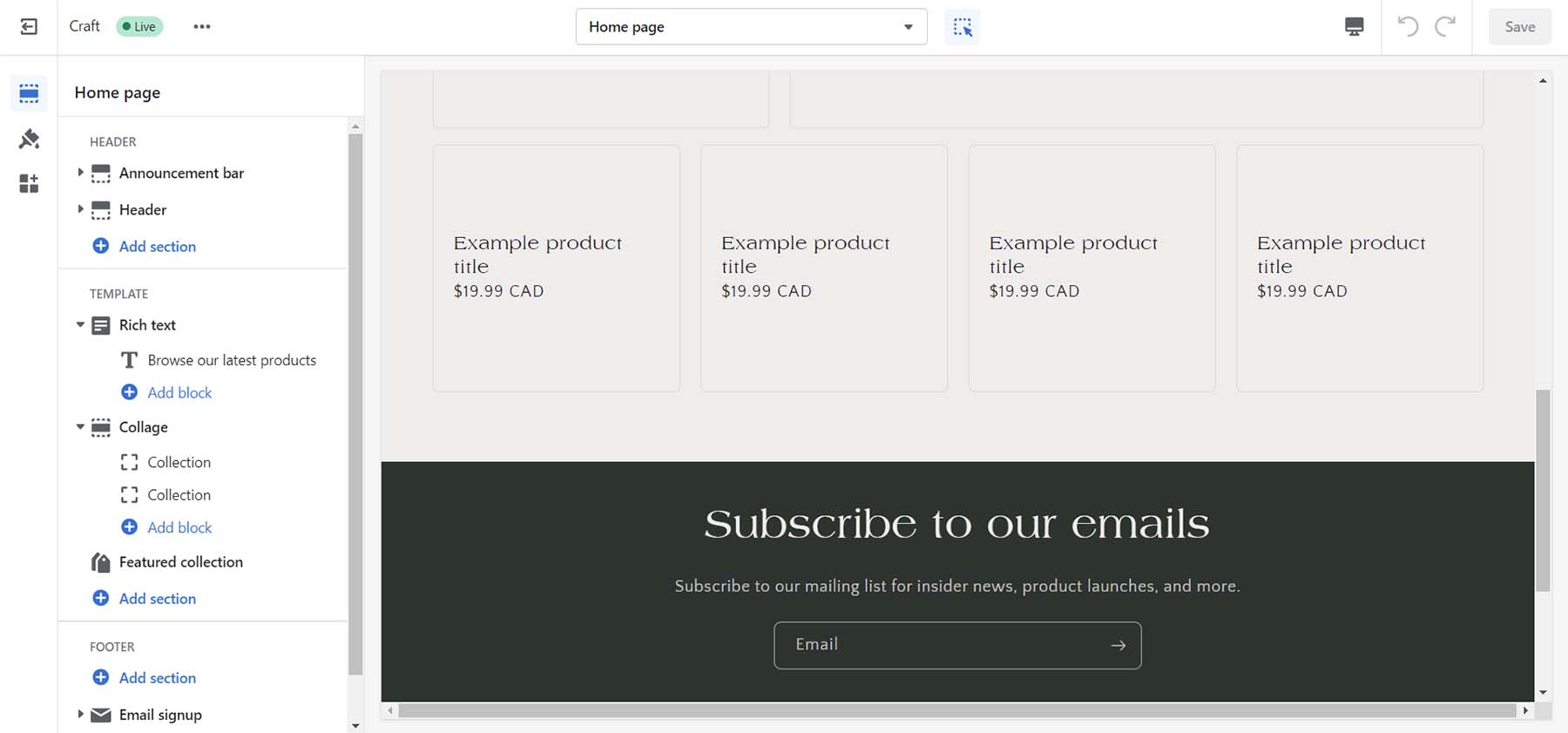
    Shopify page builder

    As an eCommerce platform, Shopify stands head and shoulders above the rest with native functionality for simple and complex eCommerce needs. Shipping, fulfillment, marketing, and analytics are built into the website builder allowing the smallest of companies and the biggest of brands to flourish.

    Key Features

    • Simple website builder with several feature blocks
    • Hundreds of free and premium themes
    • Payment processing with Shopify Payments or other payment gateways
    • Order management and inventory tracking
    • Analytics and reporting to track sales and customer behavior
    • App store with a wide range of add-ons and plugins

    Shopify, the eCommerce website builder and the Shopify app store

    You can further expand your store with the apps available on the Shopify app store. Third-party developers create free and premium apps that you can install to add extra features to your site. Shopify’s app store is a valuable resource for merchants looking to enhance their online store’s functionality and improve their eCommerce business.

    Pros

    • Drag-and-drop visual builder
    • Quickly set up an online store with no technical knowledge
    • Simple website management and design tools
    • Payment processing, order management, marketing tools, and analytics
    • Customizable templates

    Cons

    • It can be expensive compared to other eCommerce platforms
    • Limited native design blocks
    • Little control over core code, hosting, and domain name
    • App dependencies and compatibility issues may arise if not properly managed

    Best For:

    Businesses and brands looking to build a stable eCommerce website can benefit from this website builder.

    Pricing: Paid plans start at $37 per month

    Get Shopify

    5. Duda

    Duda Website Builder

    Duda is a professional website builder designed for businesses and agencies that want to create and manage multiple websites for their clients. Because Duda is a website builder geared towards agencies and designers, it offers a range of pricing plans to cover your needs.

    Unlike many builders featured, Duda allows users to create custom templates from scratch or import templates from other sources. This gives users a high degree of flexibility in designing their website and ensures it stands out.

    Duda Page Builder

    Duda’s builder has a library of pre-designed widgets you can edit as you see fit. This can help you quickly build and edit websites for you and your clients. The builder also allows you to set global colors and fonts and style content elements like images and buttons.

    Duda offers more robust SEO tools than most builders. Redirects, SSL, Google Analytics integration, and more are accessible and editable within the builder. You can enable local business schema and integration with the WooRank app to add more SEO features to your site.

    You can build various eCommerce stores with Duda, including memberships, physical products, etc. Products, shipping, and payments are easy to manage, and if you sell memberships, you have a separate interface to manage the nuances of building a membership site.


    Collect content from client

    A unique feature of Duda is its ability to allow users to collect content from their clients. Directly from their builder, you can gather, organize and insert content clients have sent you into your websites built by Duda.

    Key Features

    • Builder allows for pixel-perfect mobile-optimized design
    • Global styling across custom fonts, colors, and modules
    • Decent library of pre-made templates and content widgets
    • eCommerce functionality for online stores, appointments, digital products, and memberships
    • White-label agency and team collaboration features
    • Built-in website analytics and reporting tools

    Pros and Cons

    • Visually build pages and blogs posts in real-time
    • Hundreds of sleek website templates
    • Builder created with designers and agencies in mind
    • Built-in SEO tools and management
    • Native popup, notification, and announcement bar management

    Cons

    • Duda App Store is smaller than most
    • Pricing is per site, per month
    • Building multiple websites can get expensive
    • You can’t switch templates once the website is built

    Best For:

    Web design and marketing agencies looking to quickly build complex websites for their clients would benefit from using Duda. If you’re a freelancer, who wants an all-in-one platform for managing your clients, hosting, marketing, and web design needs, Duda is for you.

    Pricing: Paid plans start at $19 per month

    Get Duda

    6. Squarespace

    Squarespace Website Builder

    Squarespace is a website builder that allows users to create professional-looking websites without coding or technical expertise. The platform is known for its clean and modern designs, making it a popular choice for creatives, artists, and small businesses. Squarespace’s templates are highly customizable and easy to use. The platform is also known for its responsive design, ensuring that websites look great on any device.

    Its drag-and-drop interface allows you to place your elements with pixel-perfect precision. Design blocks included with Squarespace include your typical type, images, and galleries, but also exciting modules like scrolling text, CSS3 shapes, and three different types of charts.

    Squarespace builder

    You can also dip your toe into online selling with Squarespace. You can sell on social media, pull your products from Esty, and more. Additionally, Squarespace provides various analytics tools to track website performance and audience behavior. You can easily handle your online booking calendar with Squarespace’s Acuity Scheduler or run simple email marketing campaigns with its native email marketing solution.

    Squarespace and eCommerce

    Squarespace is known for its sleek and modern designs. However, regarding eCommerce, Squarespace allows you to sell almost any product online beautifully. Whether you want to offer digital downloads, a membership, or create a video-on-demand website, Squarespace gives you the tools to do this in a highly aesthetic way.

    Key Features

    • All Squarespace templates are mobile-responsive
    • Set up an online store with a variety of product and service types
    • Create and publish blog posts on your website
    • Native promotional popup builder, announcement bar, and email marketing solution
    • Includes marketing tools, such as email campaigns, social media integrations, and analytic
    • Integrates with a range of third-party services, including Google Analytics, Mailchimp, and Adobe Creative Suite

    Pros

    • Advanced design and styling options
    • The template library is expansive and uses eye-catching, trendy designs
    • Allows you to sell a variety of product types on your eCommerce store
    • Natively provides scheduling, email marketing, and analytics
    • Ability to password-protect pages and create members’ areas
    • Custom domain name registration and management

    Cons

    • It doesn’t have an app/plugin repository, so third-party integrations are limited.
    • While easy to learn, the builder has a learning curve that may dissuade beginners from website building.
    • Blogging functionality leaves much to be desired
    • Expensive options for some eCommerce functions and support

    Best For:

    Photographers, designers, and creatives who want to build a beautiful website will love Squarespace. If you’re a small business that wants to sell simple products online or take appointments will also enjoy how simple it is to do this with Squarespace.

    Pricing: Paid plans start at $16 per month

    Get Squarespace

    7. GoDaddy Builder

    GoDaddy Website Builder

    GoDaddy has been a significant player in the domain and web hosting industry for a long time. And their website builder is one of their most refreshing features, allowing users to start a new site quickly and easily. Their builder offers a user-friendly interface and a range of features to help users design and customize their websites. It comes with a drag-and-drop editor and various widgets for adding content. The platform offers pre-made templates for simple one-page sites and more complex multi-page sites with eCommerce functionality.

    GoDaddy Website Builder with AI

    GoDaddy’s InSight is an AI-powered tool that guides you as you build your website. Directly within the page builder, the device prompts you with ideas and steps to consider as you develop your site. InSight doesn’t just tell you what pages would be an excellent addition to your site. It also helps with marketing, suggesting integrations (like videos, email marketing, eCommerce, etc.) that can better your website as you are building it. This is good for those without knowledge of web design and who would like some hand-holding through the creative process.

    Key Features

    • A library of modern, professional templates
    • Sleek, responsive, mobile-friendly templates
    • AI-powered advice from GoDaddy InSight
    • Built-in tools for SEO, social media, and email marketing
    • Sites include free professional images that you can use freely
    • Build a full-featured online store

    Pros and Cons

    • No coding experience is necessary
    • Consists of a variety of pre-made templates to build your site
    • Easily integrate appointments, eCommerce, and email marketing
    • Integrates with other GoDaddy services, such as domain name registration, email hosting, and online marketing tools

    Cons

    • A limited number of templates, design features, font, and color options
    • Limited storage for media files, basic website analytics, and primitive SEO tools

    Best For:

    Godaddy’s website builder is best for beginners and small businesses looking to start a website quickly and have their domain and hosting managed all in one place. Godaddy has a lot of additional services that scale to your needs. However, the builder will have limited options compared to more advanced website builders.

    Pricing: Paid plans start at $14.99 per month

    Get GoDaddy Builder

    8. Webflow

    Webflow Website Builder

    Webflow is known for being a multi-faceted website builder, making it a popular choice for designers and developers. The platform offers eCommerce functionality, responsive templates, web hosting, and collaborative features. With Webflow, users can create fully responsive websites. The builder includes the ability to add custom CSS and HTML. This makes the builder attractive to those who are familiar with coding.

    Though Webflow is a drag-and-drop website builder, it is more geared toward advanced users with a good understanding of website design and development. Nevertheless, it also offers a good selection of free and paid templates to help users get started.

    Though other builders may have more eCommerce features, Webflow offers solid tools for building an online store. For example, you can use Stripe and PayPal as payment processors. And you can create a custom shopping cart and checkout page and even customize the emails and invoices sent to customers.

    webflow website builder tutorial

    As a website builder, Webflow provides much more flexibility than other website builders. But because of this, you may need more technical knowledge to create more complex designs. However, Webflow does simplify the building process for beginners with a 2-minutes walk-through when you start building your first site.

    Key Features

    • Powerful drag-and-drop website builder
    • Custom HTML and CSS
    • Integrates with Mailchimp, Google Shopping, Facebook, and Instagram
    • Has eCommerce and CMS functions
    • WebP support
    • Pre-built interactions and After Effects Lottie integration

    Pro

    • A powerful, flexible design tool
    • The ability to add custom code
    • All templates are mobile-responsive
    • Generates clean code
    • Robust and reliable hosting infrastructure to ensure that websites load quickly
    • Allows for custom templates and themes to be installed

    Cons

    • It has many restrictions when it comes to user seats, storage, eCommerce, and more
    • Coding knowledge can make your experience better
    • The drag-and-drop editor can be intimidating and complex
    • There are limits on the eCommerce plan that could pose a hindrance to those who plan to build large-scale eCommerce stores
    • eCommerce is limited to two payment processors: Stripe and PayPal

    Best For:

    Web designers and developers who want the comfort of no-code design with the option of adding clean code to their projects will love using Webflow.

    Pricing: Paid plans start at $18 per month

    Get Webflow

    9. IONOS

    IONOS Website Builder

    IONOS offers a web hosting and website builder service with various features for building and managing a website. With pre-made templates, a drag-and-drop editor, and content management features, it is easy to create a website using IONOS. The built-in blogging platform and social media integration features are also helpful. While the mobile-friendly templates are customizable, there is a limited selection of templates available compared to other website builders.

    However, where IONOS shines is in its SEO capabilities. The website builder provides clean, well-structured code that follows SEO best practices, including semantic HTML and customizable meta tags and descriptions for each page and post. IONOS also includes a site map generator and an SEO analyzer tool.

    For eCommerce, the website builder relies on WordPress’ WooCommerce and the Ecwid platform, which may not be ideal for those seeking a native eCommerce experience.

    IONOS Website builder's multilingual support

    A standout feature of the IONOS website builder is its multilingual support for creating websites in multiple languages. Visitors to your website can select their preferred language from a dropdown menu, and the website content will be translated accordingly. You can use automatic translation through Google or upload your translations through the builder. The IONOS website builder also provides an SEO-friendly architecture for multilingual websites, which allows search engines to understand the different language versions of a website and index them separately.

    Key Features

    • A wide range of widgets, including galleries, forms, and social media icons
    • Customizable headers and footers for consistent branding
    • Integration with Google Analytics for advanced tracking and reporting
    • Image editing tools for resizing, cropping, and optimizing images
    • Advanced customization options with CSS and JavaScript editing
    • Secure payment processing through PayPal and Stripe integrations

    Pros

    • Easy-to-use drag-and-drop builder with unique elements
    • Multilingual support
    • Display and design popups, banners, and announcements
    • Provides access to an extensive library of free images and icons
    • Built-in backup and restore features

    Cons

    • No free option or trial
    • A small selection of website templates
    • Does not have native eCommerce support
    • Limited third-party apps and integrations

    Best For:

    Small business owners who want a website available in multiple languages for an affordable price should consider using IONOS’ website builder.

    Pricing: Paid plans start at $9 per month

    Get IONOS

    10. Hostinger

    Hostzinger Website Builder

    Hostinger is a powerful hosting provider that has everything you need to create a website. Their website builder offers a wide range of customizable templates for users to create their websites. The templates cover a range of categories such as business, portfolio, eCommerce, and more. Each template can be customized with different colors, fonts, images, and other elements to create a unique website. Furthermore, the builder includes advanced design tools such as a color palette generator, a background image remover, and a shape divider tool.

    The website builder provided via the Hostinger platform differs from Zyro, Hostinger’s standalone website builder platform. The website builders are essentially the same, but they offer different features and serve different audiences.

    Regarding SEO, Hostinger’s website builder includes built-in SEO optimization tools that allow users to customize meta tags, descriptions, and other SEO elements. The platform also provides users access to Google Analytics and other SEO analytics tools to help them track their website’s performance.

    Hostinger AI writing tools

    Hostinger’s website builder includes AI tools to help users quickly and easily create a website. For example, the AI Writer tool can generate content for a website based on user input. In addition, the AI Heatmap tool can provide insights into how users interact with a website. Moreover, you can also create a logo in seconds with their AI logo maker.

    Key Features

    • Uncomplicated drag-and-drop builder with interesting modules
    • Simple eCommerce builder and features
    • Code editor for advanced customization and coding
    • Image editor for basic image editing and optimization
    • Blogging tools, including a built-in blog editor
    • Contact form builder for creating custom forms

    Pros

    • Simple to use and understand drag and drop builder
    • Global color generator to speed up the branding process
    • Integrated with Google Font library
    • AI-powered website design assistance
    • Includes AI-powered tools for writing, logo design, and heat maps
    • Websites can be migrated to WordPress or another CMS

    Cons

    • Feature set pales in comparison to sister platform Zyro
    • Does not have an app store or extension gallery for third-party integrations
    • Each blog post needs to be laid out individually

    Best For:

    Small business owners, consultants, and service providers who want to create a professional-looking website quickly and efficiently will like the features of Hostinger’s platform.

    Pricing: Paid plans start at $11.99 per month

    Get Hostinger

    11. Web.com

    Web.com Website Builder

    Web.com is a user-friendly and affordable website builder platform for those who want to create a website quickly and easily. The drag-and-drop interface allows users to customize templates fast, making it simple to match your website to your branding and style. The drag-and-drop website builder makes it easy to create a mobile-friendly website. With pre-designed building blocks, access to 2 million stock photos, and custom code blocks, you have everything needed to build your perfect website.

    Web.com’s responsive templates ensure that websites look great on any device. Web.com provides 24/7 customer support through phone, email, and chat, and users can also opt to have a personal website designer who can help them create a custom website.
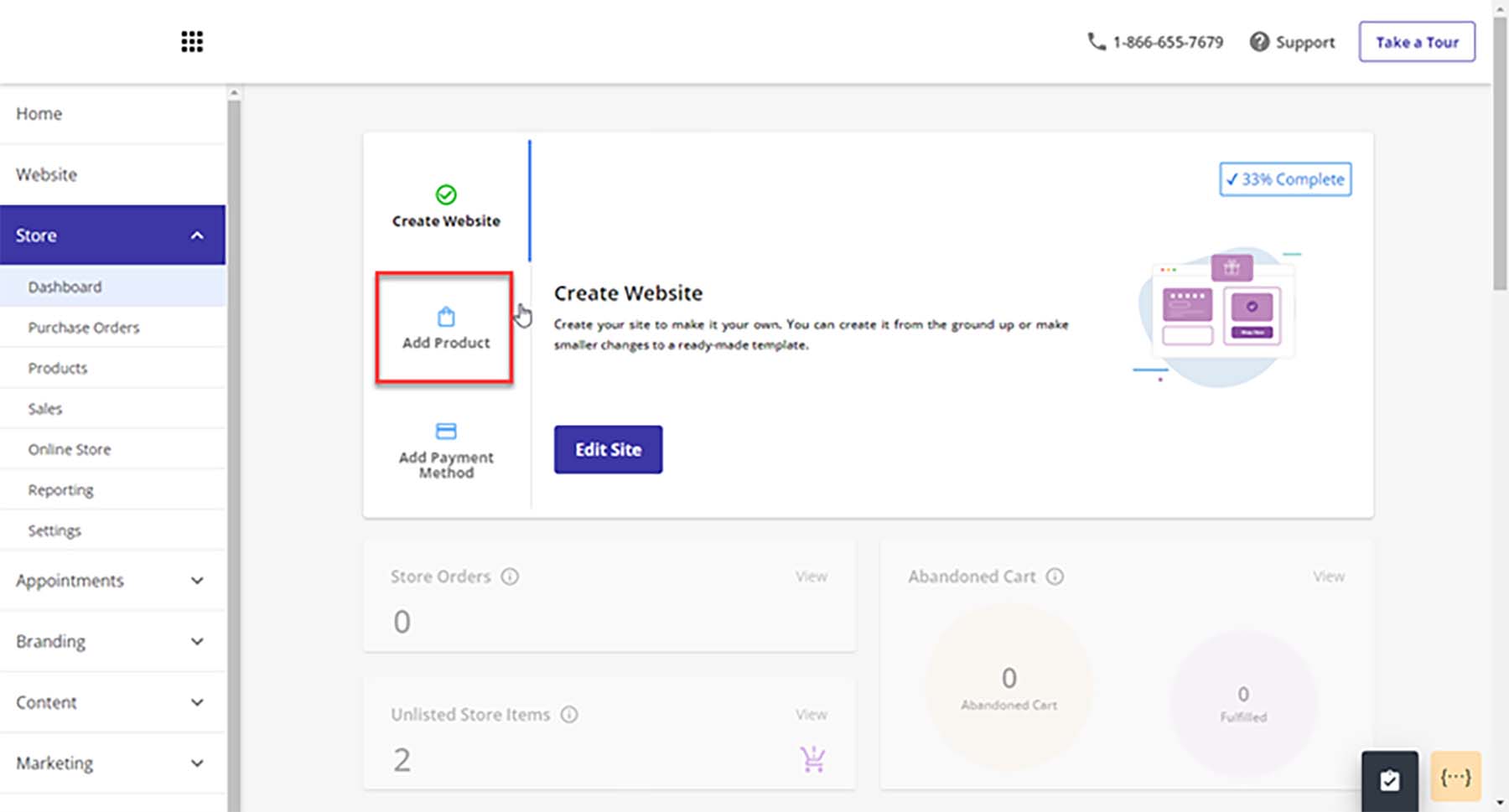
    Web.com eCommerce website builder

    Web.com also offers eCommerce features, which allow users to set up an online store with a shopping cart and checkout. This feature is handy for small businesses that want to start selling online without investing in a separate e-commerce platform.

    Key Features

    • Free Domain and SSL for one year
    • 150+ responsive templates
    • Advanced eCommerce features
    • Connect to Quickbooks and Xero
    • Sell on Facebook and Instagram
    • Simple Google site verification with monthly SEO checks and to-do lists
    • Built-in customer relationship management (CRM)

    Pros

    • eCommerce features are good value for the price paid
    • Templates are easy to use and mobile-friendly
    • Ability to manage email marketing, SEO, and pay-per-click from one place
    • Built-in SEO tools
    • Customizable forms to gather user data and feedback

    Cons

    • Pricing can increase significantly for additional features or support options.
    • Offers limited storage for your website and its associated media
    • Some customers have reported slow load times on websites
    • Limited blogging features

    Best For:

    Small businesses and individuals who want to build a website quickly. While Web.com’s website builder may offer fewer features than other website builders, it is an excellent option for those who want a simple and affordable platform that includes eCommerce functionality and SEO optimization tools.

    Pricing: Plans start at $14.99 per month

    Get Web.com

    12. Google Sites

    Google Sites

    Google Sites is a free website builder provided by Google that allows users to create basic websites and collaborate with others in real-time. The platform is designed to be user-friendly and straightforward, with a drag-and-drop interface that requires zero coding experience. You can use several elements on your sites: textboxes, images, image carousels, table of contents, social links, and spaces.

    A unique feature of Google Sites is its tight integration with Google’s suite of products. With Google Sites, you can quickly embed your Google Calendar, pull videos from YouTube and connect your site to your Google Analytics accounts.

    If you’re looking to build the most basic of websites, Google Sites is a good option. Creating a complex website with advanced customizations (like eCommerce) is not available with this tool. For building the most basic of sites, Google Sites is an excellent choice, but there are better, free options available, like Wix.

    Google Sites website builder and collaboration tools

    An exciting feature of Google Sites is its collaboration functionality. You and others can efficiently work on your website as quickly as editing documents in Google Workspace. Because Google Sites is a product of Google, the same robust version control you’re used to with Slides, Sheets, and Docs is also present in Google Sites.

    Key Features

    • Easily connect with Google Drive, Analytics, Slides, Docs, and other Google products.
    • Powerful collaboration features allow you and your team to work on your site in real time.
    • Build-in announcement banner builder
    • Build an unlimited amount of mobile responsive websites
    • Connect easily to Google Domains for custom domain names
    • Pull assets directly from your Google Drive, Google Photos

    Pros

    • Free
    • Very easy to build a site in a matter of minutes
    • Deeply integrated into the Google Workspace and Google suite of tools
    • Easy click-and-drop builder
    • Zero coding experience of knowledge required

    Cons

    • Less customizable than other builders
    • Limited themes and design elements
    • Limited access to fonts and colors
    • No eCommerce functionality
    • No ability to add custom scripts or plugins

    Best For:

    Google users and beginners who want a familiar way to create a simple website without all the bells and whistles.

    Pricing: Free, Paid plans start at $7.80 per month

    Get Google Sites

    Quick Overview of the Best Website Builders

    Plugin Price Free Option
    🥇 WordPress Free
    (additional costs required)
    ✔️ Visit
    🥈 Weebly $10/m ✔️ Visit
    🥉 Wix $15/m ✔️ Visit
    4 Shopify $37/m ✔️ Visit
    5 Duda $19/m ❌ Visit
    6 Squarespace $23/m ❌ Visit
    7 Godaddy Website Builder $11.99/m
    (paid yearly)
    ❌ Visit
    8 Webflow $18/m ✔️ Visit
    9 IONOS $9/m ❌ Visit
    10 Hostinger Website Builder $11.99/m ❌ Visit
    11 Web.com $14.99/m ❌ Visit
    12 Google Sites ✔️ Visit

    What is the Best Website Builder?

    For the most flexibility with your website, WordPress is an ideal choice for a website builder. Although it requires more work than other builders to get started, you won’t have to worry about limitations. With its easy-to-use block editor, themes, plugins, and countless integrations, WordPress is the best website builder for those who want complete control over their website. We also recommend using a powerful page builder like Divi, which takes visual, no-code design to a new level.

    For those looking for a hosted website builder solution that is easier to use and manage, you may consider Wix or Weebly to help you build your website. Weebly has impressive features for eCommerce, and Wix is surprisingly flexible to handle any website you may need.

    At the end of the day, the best website builder is the one that matches your needs. Who would you consider to be the best website builder? Did we miss anyone from the list? Let us know in the comments section down below!

    The post 12 Best Website Builders in 2023 (Reviewed and Compared) appeared first on Elegant Themes Blog.

  • The Best SEO Tools to Grow Organic Traffic in 2023

    In today’s digital landscape, driving consistent traffic to your website can be a daunting task. However, ranking at the top of search engine results pages (SERPs) can be a game-changer, allowing you to attract qualified visitors, increase sales, and establish yourself as an authority. To achieve this, you need the best Search Engine Optimization (SEO) tools at your disposal.

    In this article, we’ll cover the best SEO tools available today, both free and paid, and explain how you can use them to grow your organic traffic.

    Why is SEO so Important?

    Search is the leading lead-generation tactic for the whole web. 68% of online experiences start with a query in a search engine. That outpaces organic social, social ads, and email marketing combined!

    68% of online interactions begin with search - BrightEdge 2019 Channel Report

    BrightEdge 2019 Channel Report

    That is why SEO is more important than ever before. But getting to the top of the SERPs is no small feat. And your competitors are probably already using SEO tools, making this a more pressing need. But before you start choosing tools, you need to know how they work together because no one SEO tool does it all. Especially if you use free SEO tools, you will have some coverage gaps in your data gathering and workflows that you’ll need to fill with other tools—eventually.

    How SEO Tools Can Help

    SEO is a vast ocean of terms, tools, and techniques. Getting comfortable with all the basics takes a lot of immersion. Thankfully, using the right SEO tools can make it much easier to implement fundamental and advanced SEO techniques into your overall strategy.

    With these tools, you can execute an effective SEO strategy that will cover essential tasks within each of the various types of SEO. These SEO essentials often include:

    • SEO Research – This is all the groundwork you do before touching your website. Competitor Research, Keyword Research, and SERP Analysis fall into this category.
    • On-page SEO – Content-related tasks that start to employ your hard-won research. Creating quality SEO Content and optimizing page titles, meta descriptions, SEO links, and heading tags cover a good chunk of on-page work. But we have a more detailed checklist.
    • Off-page SEO – Optimization efforts outside of your website, like getting backlinks and social media mentions that improve your website’s visibility, reputation, and authority online. However, it is important to make sure to do it the right way.
    • Technical SEO – Improving a website’s technical elements, including site speed, mobile SEO, and Core Web Vitals. It also involves implementing Schema markup through your site, usually with the help of a plugin.
    • SEO Reporting – Accurately tracking progress and learning the proper lessons from the data you collect so you can iterate on all the above steps.

    Below, we’ve provided a comprehensive list of all the best SEO tools you can use to accomplish these tasks and more. We’ve also taken the time to let you know the tasks each SEO tool is best suited for, so you can effectively combine them for maximum SEO results.

    The Best SEO Tools

    1. Semrush

    Semrush Homepage March 2023

    Semrush is easily one of the most recognizable SEO tools on the market today. It has created an imposing suite of tools to help you understand what is happening on Google. They are one of the only SEO platforms that truly gets near to being an all-in-one SEO toolkit (no SEO Pro uses only one tool, even for the sake of principle). Some of the high-level features it provides search engine marketers are deep keyword research, routine rank tracking, content analysis, and competitor analysis. They even go above and beyond to impress us with their Semrush WordPress Plugin and the ever-popular SEOquake browser extension.

    Key Features of Semrush, the Best SEO Tool on the Market

    • A swiss-army knife built with periphery tools for content marketing, social media, and advertising
    • Expert ability to track and report on every aspect of your SEO campaigns
    • Content analysis that scores content on difficulty, voice, keywords/NPL, and how it stacks up with competing content

    With Position Tracking, you can see how all your keywords are performing on a day-to-day basis. Track up to 5 projects (unique websites) in the Pro plan and each one’s keywords positions. Know precisely which changes you push are moving the dial.

    Best for:
    Semrush is a powerful SEO platform best suited for those serious about their SEO campaigns and willing to invest time into learning how to use it effectively. This SEO software is ideal for SEO professionals and agencies needing an industry-leading SEO tool. While Semrush is not cheap, those with mid-sized to large budgets will find it a valuable investment.

    Pricing: Starting at $119.95/mo with free trials available for select tools

    Semrush
    Starting Price $119.95/mo
    Number of Sites 5
    Keywords Tracked 500
    Best For Competitor Research
    Backlinks
    Technical SEO
    Keyword Research
    Position Tracking
    Trustpilot Rating ⭐⭐⭐⭐
    Read the reviews
    Get Semrush

    2. SE Ranking

    SE Ranking Homepage March 2023

    SE Ranking is another all-in-one SEO tool designed to help website owners track and plan for their website’s search engine success. The tool is well-suited for newer SEO specialists or those on a smaller budget, as it offers affordable SEO features.

    SE Ranking provides a variety of keyword research and analysis tools. This includes a keyword research tool that supplies data on search volume, competition, and other metrics to help users select the best keywords to target for their content. Additionally, the platform features a keyword position tracking function that enables users to monitor their website’s performance in search results over time.

    The website audit tool provides users with an in-depth SEO audit analysis of their website’s performance in search engines. This includes analyzing factors such as on-page optimization, technical SEO, and backlinks to identify areas for improvement and give tailored suggestions for optimization.

    Key Features of SE Ranking

    • Website audit tool for analyzing on-page optimization, technical SEO, and backlinks.
    • Keyword research and analysis tools, including a keyword research tool and keyword position tracking feature.
    • Backlink analysis tool for identifying high-quality backlink opportunities for your website.

    Best for:
    SE Ranking is a budget-friendly and user-friendly SEO tool that’s ideal for small business owners, bloggers, and website owners seeking to enhance their site’s search engine optimization. It has an intuitive interface and comprehensive features, such as keyword research, site audits, and competitor analysis, making it an excellent choice for those new to SEO or with limited technical experience.

    Pricing: $49/mo with a free trial. Try it out now

    SE Ranking
    Starting Price $49/mo
    Number of Sites 10
    Keywords Tracked 250
    Best For Position Tracking
    Site Monitoring
    Backlink Checker
    Competitor Research
    Trustpilot Rating ⭐⭐⭐⭐
    Read the reviews
    Get SE Ranking

    3. BrightLocal

    brightlocal Homepage March 2023

    BrightLocal is a bright spot on this list of best SEO tools if you run a small business and market to a local community. It takes all the guesswork out of Local SEO. BrightLocal is 100% geared to helping location-dependent businesses succeed with local search terms, map results, and “near-me” requests, along with managing your business’s reputation and citations (citations in local SEO are a good thing).

    The local rank tracking reports are top-notch. They track the most important keywords for your business and show you how they perform based on different locations searches can come from in your area. Search results may be different if someone uses your keyword at different parts of your city, for instance. It shows this information using a grid-like heatmap overtop a map of your service area/general location.

    Key Features of BrightLocal

    • Local rank tracking reports that keep you in the know about how your business is showing up in Local SERPs
    • Monitors reviews and provides tools to help showcase the best ones on your website
    • Build white-label reports if you offer local SEO services as an agency to your clients

    Best for:
    BrightLocal is an ideal tool for businesses that rely on local search results, including brick-and-mortar stores and service-based businesses serving a specific geographic region. It is designed to scale, with pricing plans available for businesses with a single location and those with multiple locations or franchises globally. With features like local search rankings, reputation management, and citation building, BrightLocal is a valuable tool for any business looking to improve its local search visibility and attract more customers.

    Pricing: Starting at $29/mo for up to 3 locations

    BrightLocal
    Starting Price $29/mo
    Number of Sites 3
    Keywords Tracked 10 per 5×5 Grid
    Best For Local SEO
    Citation Builder
    Reputation Reports
    Trustpilot Rating ⭐⭐⭐⭐⭐
    Read the reviews
    Get BrightLocal

    4. SEObility

    SEObility Homepage Marche 2023

    SEObility is excellent for every essential SEO task, including website auditing, keyword analysis, on-page optimization, and link building. It also offers features for analyzing and monitoring backlinks and tracking search engine rankings. It’s one of the best beginner SEO tools you can get (similar to Ubersuggest) in that it will help anyone learn the basics of SEO without busting budgets. It even has a generous free tier that we couldn’t recommend enough.

    Key Features of SEObility

    • The free plan will crawl up to 1000 pages of one tracked website and will track 10 keywords
    • Tracks mobile and desktop keywords, CPC, and competitors (paid)
    • Monitors backlinks and helps you know where to try your hand with link building (paid)
    • Will monitor the health of your pages through on-page checks (free)

    This tool has the basics down pat—especially for keyword tracking and number of pages crawled. Paid plans start at a very reasonable $50/mo, which is way below Semrush and Ahrefs.

    Best for:
    SEObility is an excellent tool for beginners just starting with SEO and web admins who have never optimized their websites for search engines. It has excellent tools for you to learn the trade.

    Pricing: Free plan with paid plans offering more websites and keyword tracking

    SEObility
    Starting Price Free
    Number of Sites 1
    Keywords Tracked 10
    Best For Position Tracking
    Site Monitoring
    Backlink Checker
    Trustpilot Rating ⭐⭐⭐⭐
    Read the reviews
    Get SEObility

    5. Rank Math Pro

    Rank Math SEO Homepage March 2023

    Rank Math is the most feature-rich WordPress SEO plugin that helps website owners with a wide range of SEO tasks—directly from their website’s dashboard. According to W3Techs, WordPress is used on 43.2% of all websites. This makes WordPress and a plugin like Rank Math something that SEO professionals should be familiar with. Rank Math is designed to be very user-friendly while bringing all sorts of tools into your content creation workflows.

    Rank Math SEO Backend Dashboard

    Rank Math is especially useful for two reasons. It analyzes content as you create it and gives you tools for optimizing your content directly. Many SEO plugins can analyze content and make SEO suggestions, but Rank Math also allows you to change your content directly. It can suggest specific changes (like titles) in real-time with Content AI. And it can make sure your site is appropriately formatted for SEO (like schema, sitemaps, internal link suggestions, redirects/404 monitoring, and so much more).

    For a complete overview of its incredible features, see our extensive review of the Rank Math plugin.

    Key Features of Rank Math Pro

    • Onboarding flow that quickly sets up a whole website with all the essential SEO configurations (including adequately setting up metadata, breadcrumbs, and analytics)
    • Automatically submits for indexing all new and updated content to major search engines
    • Creates a powerful SEO dashboard on your website backend that monitors search traffic, keywords, and how well your content is  optimized (sitewide)
    • Content AI that analyzes all the key aspects of content against SERP needs for a specific KW

    Best for:
    Rank Math is a must-have tool for anyone serious about SEO and uses WordPress as their CMS. It integrates seamlessly with Divi, the most powerful WordPress theme, enabling you to create custom websites with an optimal SEO structure. Additionally, Rank Math offers a free version of its plugin, making it an ideal choice for website owners who are just starting with SEO and want to get started right away. If you have a WordPress website but no SEO tool yet, you need to stop reading this and install it now.

    Pricing: Free plugin with paid Pro options

    Rank Math Pro
    Starting Price $59/yr
    Number of Sites Unlimited
    Keywords Tracked 500
    Best For Position Tracking
    Site Monitoring
    Schema Generator
    Get Rank Math Pro

    6. Surfer SEO

    Surfer SEO Homepage March 2023

    Surfer SEO is an AI content tool that helps you create high-ranking SEO content. Its whole purpose is to help content creators with SEO mindfulness so you aren’t spinning your wheels, creating content that no one sees. It does this in stages by helping you with keyword research, then analyzing the SERPs of those keywords. After that, you start building your content with its content planner. Writers can then start writing their content and auditing other content with it. They create a seamless process from research to publishing that will help you rank.

    Surfer SEO is all about creating a workable content creation workflow that has an SEO-first approach. We love that you can create content briefs (for editors assigning out a lot of work) and analyze all your content against vital SEO /keyword metrics.

    Key Features of Surfer SEO

    • Surfer SEO “Grow Flows” that break content creation up into smaller, automated/low-effort tasks (talk about an ROI boost!)
    • Content creation workflow from research to clicking on “Publish”
    • Reports on the success you’ve had from content created in SUrfer SEO
    • Integrates with Semrush, Jasper AI, WordPress, and Google Docs

    Best for:
    Surfer SEO is an ideal tool for websites that produce a large volume of content. It is designed to streamline the SEO workflow for content creation, making it a valuable time-saving tool for individuals and teams alike.

    Pricing: Starting at $49/mo with a 7-day free trial

    Surfer SEO
    Starting Price $59/mo
    Number of Sites 2
    Article Edits 10
    Best for: Content Optimization
    Keyword Research
    Get Surfer SEO

    7. Mangools

    KWFinder Homepage March 2023

    Mangools is a suite of branded SEO tools that have names that are almost more popular than the company that offers them all (KWFinder and SERPWatch come to mind). It’s another all-in-one SEO platform that helps users research, create, and track all SEO efforts.

    Mangools keyword research tool (KWFinder) provides users with data on search volume, domain authority, keyword difficulty, and other metrics to help them identify the best keywords to target for their content. It’s one of the easiest-to-look-at keyword tools out there and gives you everything you need to know. You can even see what keywords competitor websites are ranking for and what position they rank at.

    Key Features of Mangools

    • Daily keyword research allotment with suggestions and views of what competitors are using
    • SERP analysis to see what’s ranking for what and some of the data points that contribute to those positions
    • Ability to lookup competitor websites to see where they are at in their SEO implementation

    Best for:
    Mangools is a trusted platform among organic search strategists. Although not as well-known as Semrush or Ahrefs, Mangools offers a comprehensive set of tools that provides a great all-in-one solution for reliable SEO tools. With a price point comparable to other budget-friendly options like SE Ranking and SEObility, Mangools is an affordable option for beginners looking for reliable SEO tools.

    Pricing: Starting at $49/mo with a 10-day free trial

    Mangools
    Starting Price $49/mo
    Keywords Tracked 200
    Keyword Lookups 100/day
    Best For Keyword Research
    Keyword Tracking
    Trustpilot Reviews ⭐⭐⭐⭐
    Read the reviews
    Get Mangools

    8. Wincher

    Wincher Homepage March 2023

    Wincher is an SEO tool that specializes in keyword tracking and analysis to help increase your organic traffic. It makes it easy to find the right new keywords for your content. It makes it especially clear when it finds a keyword with decent search volume but low competition (the dream scenario). And you can use it to track the performance of those keywords using an intuitive interface.

    With features like keyword research, keyword gap analysis, position tracking, and site audits, Wincher helps improve search engine rankings and increases your qualitative traffic.

    Key Features of Wincher

    • Track your position rankings based on defined keywords
    • Discover keywords that you haven’t used so far
    • Reports and alerts to stay on top of keyword positions
    • WordPress plugin that integrates your website with Wincher

    Best for:
    Wincher is an excellent tool for beginner search engine marketers seeking a more comprehensive solution for analyzing keywords and tracking their content’s position. Its simple interface and focused feature set make it a great option for entry-level SEO or content marketers.

    Pricing: Starting at $39/mo with a free trial waiting for you

    Wincher
    Starting Price $39/mo
    Number of Sites 10
    Keywords Tracked 500
    Best For SERP Analysis
    Position Tracking
    Trustpilot Reviews ⭐⭐⭐⭐
    Read the reviews
    Get Wincher

    9. Link Whisper

    Link Whisper Homepage March 2023

    Link Whisper is a WordPress plugin and Shopify app for internal link building. Internal linking is an essential practice for SEO as it helps search engines crawl your website and understand what your content is about (by relating it with other linked content). But it is hard to stay on top of, especially for large websites with tons of content—we know the struggle! Link Whisper makes managing internal links much easier since it can automatically apply links to your old content based on new content you are publishing (this is a huge time saver if set up correctly).

    Key Features of Link Whisper

    • Provides advanced suggestions for internal links you can create while you are in a page/post editor
    • Can connect with Google Search Console to bring in basic performance stats (not needed if you’re using a Google Analytics plugin)
    • Create automated internal linking campaigns that find instances of specific keywords and link them to a pre-defined page of your choosing

    Best for:
    Link Whisper is ideal for large WordPress and Shopify websites, particularly those with a hub and spoke or pillar/cluster content strategy. It is beneficial for websites that publish a large volume of content and need to stay on top of internal linking. With features like automated link suggestions and in-content linking, Link Whisper is a valuable tool for improving search engine rankings and driving more traffic to your site.

    Pricing: WordPress – $77/year for 1 site | Shopify – $7/mo for 1 site

    Link Whisper
    Starting Price $77/yr
    Number of Sites 1
    Best For Internal Link Building
    Internal Link Reports
    WordPress + Shopify
    Get Link Whisper

    10. Moz Pro

    Moz Pro Homepage March 2023

    Moz Pro is another all-purpose SEO tool designed to help website owners and digital marketers increase their traffic from organic search results. It has long been celebrated as one of the best SEO tools out there and has been running since 2004! Moz has a tremendous reputation in the SEO world, making their Pro tool something you should consider. If you’re a local business, MozLocal is also worth checking out, even though we are not directly reviewing its features here.

    Moz Pro is excellent at tracking page positions inside SERPs for defined keywords. It helps you know what is contributing to SERP boosts or fallen positions with tailored SEO Insights. And its competitor research tools (including MozBar) help you keep up with competitor changes.

    Key Features of Moz Pro

    • Offers comprehensive keyword research and analysis to optimize website content
    • It has a site audit tool that identifies technical SEO issues, such as broken links and missing meta-tags
    • Includes a backlink analysis tool to monitor backlinks and helps you disavow low-quality backlinks
    • Users can track their search engine rankings for specific keywords over time to monitor SEO efforts and improvements

    Best for:

    Moz Pro is an all-in-one SEO tool that’s ideal for any serious SEO professional looking to streamline their SEO workflow. It provides a comprehensive solution for improving search engine rankings and increasing traffic. Use it for keyword research, site audits, backlink analysis, and more. While the monthly pricing is higher than many budget SEO tools, it’s comparable to other industry leaders like Semrush and Ahrefs.

    Pricing: $99/mo for three campaigns/websites

    Moz Pro
    Starting Price $99/mo
    Number of Locations 3
    Keywords Tracked 300
    Best For Keyword Research
    Local SEO
    Competitor Research
    Get Moz Pro

    11. WooRank

    WooRank Homepage March 2023

    WooRank is an SEO tool that offers a range of features to help website owners and digital marketers improve their search engine rankings and drive more traffic to their sites. It’s a mid-tier total-SEO platform that does a whole lot well.

    WooRank’s competitor analysis tracks competitor keywords, technical specs, and position changes. All these help you better understand your competitors and how to outrank them.

    Key Features of WooRank

    • Users can track keywords with WooRank’s keyword tracking tool to monitor their website’s search engine rankings for those keywords
    • WooRank’s site crawl tool can crawl site pages to identify technical SEO issues that may hurt a website’s rankings
    • Compare website performance against competitors to identify areas for improvement

    Best for:
    WooRank is an ideal tool for website owners and marketers who want to improve their website’s SEO quality and ranking position across multiple keywords. With features like site audits, keyword tracking, and competitor analysis, WooRank provides a comprehensive solution for improving search engine rankings and driving more traffic to your site. While it is priced a little higher than other tools in this article, it can be a great fit for those looking for more advanced features.

    Pricing: $79.99/mo for one website

    WooRank
    Starting Price $79.99/mo
    Number of Sites 1
    Keywords Tracked 50
    Best For Keyword Tracker
    Page Technical Auditor
    Competitor Research
    Get WooRank

    12. Clearscope

    Clearscope Homepage March 2023

    Clearscope is an SEO content optimization tool that uses AI and natural language processing (NPL) to help content creators optimize content for search engines. Search engines attempt to catalog the whole internet and rely on NPL to understand its content semantically. Clearscope analyzes your content with similar methods to make sure that it is in line with what search engines expect (based on keywords and search intent). This all can happen in the SaaS application or for those with WordPress websites, on your site via the use of their plugin.

    Its content analysis is very actionable, often giving you explicit grades, comparison metrics, and other scores to let you know where your content is across several essential areas.

    Key Features of Clearscope

    • Analyzes the top-ranking pages for a given search term
    • Identifies the keywords, phrases, and topics most relevant to that search
    • Gives content suggestions based on the above findings

    Best for:
    Clearscope is an ideal tool for content-focused SEO professionals who are writing or editing content that needs to rank. While its price tag may be hefty for some, Clearscope is a valuable tool for optimizing content for search engines and driving more traffic to your site. Other tools like Scalenut, Dashword, and ContentPace may also be worth considering for those seeking more affordable alternatives.

    Pricing: Starting at $170/mo

    Clearscope
    Starting Price $170/mo
    Number of Users 1
    Content Reports 10
    Best For Content Optimizer
    Content Brief Creator
    Keyword Research
    Get Clearscope

    13. Ahrefs

    Ahrefs Homepage March 2023

    Ahrefs is last on our list but certainly far from the least. It is a premium all-in-one SEO tool that has been a market leader for many years. Ahrefs gives SEO experts every instrument needed to succeed in SEO. It can be daunting to new users, but that is because there is so much data inside the platform.

    Ahref covers every type of SEO task, including backlink audits, URL position ranking, competitor research, keyword research, site audits, and more.

    Ahrefs backlink profile is one of the best out there. It shows you a histo-graph of your backlinks and how many you’ve gotten in specific look-back timeframes (1 day, 7 days, etc.). The profile also includes the number of referring domains (with a breakdown of crucial info about those domains). And it also gives you high-level stats like URL rank, Domain Rank, and the number of organic keywords your site ranks for.

    Key Features of Ahrefs

    • Unlimited projects if they are verified with a site tag and five unverified projects (Lite plan)
    • Track page rankings across defined keywords broken into desktop and mobile searches (and see ranking history)
    • Keyword research through Ahrefs exquisite database using Keywords Explorer
    • You can add plan add-ons if you rely on specific tools more than others

    Best for:
    Ahrefs is a go-to tool for SEO experts. It offers reliable data and excellent filtering options to drill down to the data you need to rank for competitive topics. It’s a valuable investment for those looking to improve their SEO game. Along with Semrush, Ahrefs is a tried and tested solution that is widely used by SEO professionals.

    Pricing: $99/mo

    Ahrefs
    Starting Price $99/mo
    Number of Sites Unlimited Verified
    Keywords Tracked 750
    Best For Position Tracking
    Competitor Research
    Keyword Research
    Site Auditor
    Get Ahrefs

    SEO Tools FAQ

    What are the best SEO Tools for WordPress websites?

    Link Whisper, Semrush, Rank Math, and Surfer SEO are all great SEO tools for using with WordPress since they have plugins providing users with a range of features to optimize their website’s SEO. Their plugins bring the wide range of tools these platforms offer directly into your WordPress environment and consolidate where you have to go for performing SEO tasks.

    Can you do SEO for free?

    SEO is much harder but still possible to do with free tools and resources. When using free SEO tools, it is all about finding the right mix of tools that each cover an essential task. Start with a keyword research tool like SEObility or Ubersuggest’s free accounts. See all our recommended free SEO tools.

    Who uses SEO tools?

    • Business owners and marketers: SEO tools can help businesses and marketers improve their website’s visibility in search results, attract more visitors, and generate more leads and sales.
    • Website developers: SEO tools can help website developers identify and fix technical SEO issues, such as broken links and missing meta tags.
    • SEO professionals: SEO professionals use SEO tools for auditing websites, analyzing keywords, optimizing pages, building links, and more.

    Anyone who is looking to improve their website’s visibility in search results can benefit from using SEO tools.

    Why do SEO tools cost so much?

    SEO tools can cost a significant amount due to the resources required to develop, maintain, and update the software. They involve large data sets and are crawling millions of pages a day. Also, the value that SEO tools provide in terms of improving a website’s search engine rankings and driving more traffic and conversions can justify the cost for businesses that rely on organic search traffic to drive revenue.

    What are the Best SEO Tools?

    Semrush is the best all-in-one SEO tool. It offers all the essential features like keyword research, site audits, backlink analysis, rank tracking, on-page optimization, and competitive analysis. So it is a safe bet to start with if you want to get serious about SEO.

    SE Ranking is ideal for beginners looking for a more budget-friendly solution that packs a similar punch as SEMrush.

    BrightLocal is the best solution for Local SEO. It includes local search rank tracking, citation management, review monitoring, and more.

    Plugin Starting Price Free Option
    🥇 Semrush $119.95/mo ✔️ Visit
    🥈 SE Ranking $49/mo ❌ Visit
    🥉 BrightLocal $29/mo ❌ Visit
    #4 SEObility Free ✔️ Visit
    #5 Rank Math Pro Free, Pro $59/yr ✔️ Visit
    #6 Surfer SEO $59/mo ❌ Visit
    #7 Mangools $49/mo ❌ Visit
    #8 Wincher $39/mo ❌ Visit
    #9 Link Shisper $77/yr ❌ Visit
    #10 Moz Pro $99/mo ❌ Visit
    #11 WooRank $79.99/mo ❌ Visit
    #12 Clearscope $170/mo ❌ Visit
    #13 Ahrefs $99/mo ✔️ Visit

    Using the right combination of these tools can significantly improve website search performance and drive more traffic and qualified conversions.

    Need SEO tools you can use directly on your website? Check out the best SEO plugins for WordPress.


    Featured Image via Sammby / shutterstock.com

    The post The Best SEO Tools to Grow Organic Traffic in 2023 appeared first on Elegant Themes Blog.

  • What Is a Social Media Handle? Setting It Across Platforms + Tips for Creating One

    Strategizing social media marketing starts with getting the perfect social media handle. A unique handle is crucial not only for launching a business but for boosting its growth, as it can help business owners build a brand. This article discusses everything you need to know about social media handles – their importance, best practices, and […]

    Read More…

    The post What Is a Social Media Handle? Setting It Across Platforms + Tips for Creating One appeared first on Hostinger Tutorials.

  • Google My Business SEO: How to Set Up and Optimize a Google Business Profile for Local SEO

    Ranking for local search results can be challenging, even for those familiar with search engine optimization (SEO). One of the best ways to improve visibility on Google Search is by creating and maximizing your Google My Business SEO. Now called Google Business Profile, this free service lets you manage your business appearance on Google Search […]

    Read More…

    The post Google My Business SEO: How to Set Up and Optimize a Google Business Profile for Local SEO appeared first on Hostinger Tutorials.

  • Sell More WooCommerce Products Using These 5 Tips

    WooCommerce is a user-friendly e-commerce tool, but setting up product pages isn’t enough to boost sales. To maximize conversions, store optimization is essential. Here are five simple ways to achieve this.

    The post “Sell More WooCommerce Products Using These 5 Tips” first appeared on WP Mayor.

  • 11 Best Blogging Platforms in 2023 (& How to Choose One)

    Are you ready to start your own blog but are having trouble deciding on the best blogging platform for your needs? We are here to help. Right now there are more choices than ever for starting a blog. In this article, we’ll help you choose the right blogging platform by giving you some things to consider beforehand. Plus we’ll give an overview of the most popular blogging sites out there – their pros and cons, features, pricing, and more.

    How to Choose the Best Blogging Platform? (What to Look for)

    Here are a few things to consider before choosing a blogging platform:

    What kind of blog do you want?

    Not all blogging platforms are the same. WordPress is a popular content management system (CMS) that can run an entire website as well as a blog but require a steeper learning curve for optimization. Other publishing platforms like Squarespace can handle all that technical stuff for you (domain, hosting, security, SEO, etc.) so you can concentrate more on creating content. And some blogging sites, like Tumblr, are more for social networking. So depending on your goals, the type of platform you choose will need to be able to handle them.

    It is important to think long-term. You don’t want to join a platform that isn’t scalable to your future needs. You might find you will want to add more features to grow your blog and monetize it later. So it’s important you make sure the platform you choose offers these options.

    Should You Host Your Blog or Have the Platform Host It?

    Perhaps the biggest decision to make for your blog is hosting. Do you want to handle hosting your blog or do you want the platform to take care of that for you? If you want to go the self-hosted route, WordPress is hard to beat. But if you want a hosted platform, your options are more difficult. The most important difference between self-hosted platforms like WordPress and hosted platforms is that hosted platforms can be more limiting when it comes to adding customizations and functionality beyond the scope of the platform you choose. A hosted platform will definitely simplify the blogging experience initially, but choosing the wrong one may limit you in the future.

    How Much Can You Afford?

    Hosted blogging platforms are typically cheaper than hosting a blog yourself depending on which hosting provider you choose. Some hosted publishing platforms cost as little as $5 per month for a fully functional website with a personalized domain. And some self-hosted platforms can offer a free option. That being said, once you add hosting costs, premium plugins, and themes, the cost for a hosted website (even on WordPress) can get pretty pricey.

    Be careful of signing up for a cheaper all-in-one platform that will require paid upgrades later on. And, if you want to host your own site, consider hosting platforms that have plans that scale to your needs as your blog grows.

    Are You a Creative Type?

    Another thing you should determine is how much control you need over your site’s design and layout. With self-hosted sites, you have ultimate control over which theme you use, the way it looks, and how it functions. With the hosted website builders, you’ll have limitations depending on the platform you choose. Some hosted website providers offer hundreds of templates to choose from, while others provide a few.

    The 11 Best Blogging Platforms (Compared)

    While there are other considerations (overall traffic and user scaling, number of contributors, and so on), these should help you narrow down your choices considerably and let you choose the best blogging platform for you. With that in mind, let’s take a look at your options.

    1. WordPress.org

    Best Blogging Platform

    WordPress.org is one of the most robust and flexible blogging platforms out there. WordPress can handle any needs a blogger would need. With built-in full site editing, a drag-and-drop block editor, countless themes and plugins, and page builders like Divi, you can rest assured your blogging site will be easy to design and never lack the functionality you may need in the future. The WordPress CMS software is perhaps the best CMS for websites.  It is free to use but to get your blog up and running, you’ll need to pay for a hosting provider yourself. However, with a good WordPress hosting platform, the sky is the limit for your blog.

    Pros

    • Massive repository of free themes and plugins for all your blogging needs.
    • A dedicated community of developers and users with countless tutorials to help the learning curve.
    • Easy to install and set up for beginners.
    • Can run any kind of website, from a blog to an eCommerce store to a membership site to anything else you can think of
    • A publishing-centric content editor that rivals other all-in-one platforms like Wix and Squarespace.
    • Managed WordPress hosting providers (such as Cloudways, Siteground, and Flywheel) are available if you don’t want to worry about the technical side of hosting your own website.
    • Available plugins give you more control over security, performance, and SEO than with other hosted platforms.

    Cons

    • Basic installation isn’t enough in most cases. You need to customize it to be production-ready
    • Extra work is needed to maximize the security of WordPress websites. Other hosted platforms may be more secure out of the box.
    • There is still a learning curve for beginners.
    • No customer support included
    • You’re responsible for getting your own domain name and hosting platform but other performance and SEO optimizations.

    WordPress.org is for you if…

    …you want to own and control your content without limitations. You can run any kind of website you want, from a simple blog to a complex eCommerce shop. And you can go crazy and customize everything exactly as you want it, rely on pre-made designs and templates, or some mix of them both depending on your budget, time, and skills. For those who aren’t up for the technical side, Squarespace or WordPress.com is a better choice.

    Pricing: FREE

    Get WordPress

    2. WordPress.com

    WordPress.com blogging platform

    Although built by the same people, WordPress.com is quite a bit different from its .org counterpart. WordPress.com was initially created for people who want the features of WordPress.org without the hassle of all the technical issues (like hosting).

    For beginners, there are a few benefits to WordPress.com. You can choose your own theme, add some plugins, customize the appearance, and add users. However, those features are quite a bit more limited than WordPress.org. There is no setup, it’s free for a basic account, and you can get started with your first blog post in a few minutes after signing up.

    The free plans are limited in what you can do and add, but for a monthly fee starting at around $5 USD, you can add your own URL, install (some) premium themes and plugins, and remove the WP.com advertising.

    WordPress.com stats dashboard

    JetPack is built-in, and offers site stats, backups, security features, and expanded search functionality which is perfect for bloggers.

    Pros

    • Easy to set up and use
    • Basic plan is free
    • Behind-the-scenes tech issues are handled for you
    • Similar publishing tools as WordPress.org
    • Built-in features from Jetpack (security, site stats, limited CDN, and more)
    • Built-in features for marketing and integration
    • Huge community and reliable support.

    Cons

    • The free tier is ad-supported, so you have to pay to make them go away.
    • Access to premium plugins and themes is restricted
    • Monetization restrictions on the free plan.

    WordPress.com is for you if…

    …you are a beginner that wants a more streamlined hassle-free blogging experience. WordPress.com handles all the technical stuff for you so you can concentrate on blogging. As long as you can deal with some limitations on design and functionality, WordPress.com is a great middle-ground between the freedom of WP.org and the accessibility of something like Wix or Squarespace.

    Pricing: FREE, Paid plans start a $5 per month

    Get WordPress.com

    3. Squarespace

    Squarespace

    Squarespace is an all-in-one website builder and blogging platform geared toward eCommerce users. Best known for its eye-catching templates, Squarespace makes it easy to establish an online presence with ease, making it a big competitor to WordPress. They offer good value for those without much technical experience that want to be able to integrate social media, sell products, and customize their site effortlessly.

    Squarespace offers a fully functional blog post editing tool with over 45 modules to choose from including image galleries, newsletter opt-ins, custom code, accordion, charts, scheduling, and social media integrations. Users can connect social media accounts and the drag-and-drop editor gives bloggers a great way to personalize their posts and products to stand out from the competition.

    Squarespace publishing tools

    Users can choose from 100 premade sections, a portfolio page option, and pre-built color palettes to get those creative juices flowing.

    Sqaurespace site styles

    Squarespace offers some good marketing tools including email campaigns, promotional pop-ups for customer acquisition, an announcement bar, and social media promotions on Instagram, Facebook, and Pinterest.

    Pros

    • Stunning website designs out of the box
    • No design or development experience required
    • Can run full websites or just blogs
    • You get full control of audience info and retention
    • Dozens of free templates to choose from
    • Hosted by Squarespace, so you don’t need to have a separate host

    Cons

    • Monthly fee
    • Tied to their platform
    • Might be restrictive to people who are used to having full control over design and development
    • No add-ons outside of the official Squarespace themes

    Squarespace is for you if…

    …you prefer the hands-off approach. If you want to keep your focus on blogging or selling and not on the website itself, Squarespace will be a good fit. In a lot of ways, Squarespace is the iPhone of the blogging platform industry. It is slick, pretty, easy to use, does pretty much everything, and has just enough customization to keep most folks happy. Some folks may feel restricted, and if that’s you, WordPress or Ghost are better options. For those who like to be taken care of, Squarespace is the way to go.

    Pricing: FREE, Paid plans start at $23 per month

    Get Squarespace

    See our review on Squarespace vs WordPress

    4. Weebly

    Weebly blogging platform

    Weebly is a hosted website builder that can function as a full website or blog. In fact, Weebly now focuses on a built-in integration with Square (not to be confused with Squarespace) to take payments and work as an eCommerce platform to rival Shopify. If that’s part of your focus as well as blogging and content creation, Weebly might just be a good option. Plus, they have incredibly slick and well-made templates and themes, not to mention a robust plugin library. Weebly is aiming for a more professional user base than platforms like Blogger.

    Weebly’s no-code drag-and-drop editor is considered by some to be even more user-friendly than WordPress, Creating and publishing a post is easy. Simply drag one of many elements into the page, then start typing. The writing process is quite similar to the WordPress editor, so those familiar with how WordPress functions will find it quite simple to master.

    Publishing with Weebly

    Pros

    • User-friendly interface
    • Professional themes and lots of plugins
    • Solid eCommerce platform with a secure payment portal
    • Easy to set up and use
    • Not a lot of technical experience required to get started

    Cons

    • The free plan is fairly limited
    • Outside of the plugin library, not a lot of customization options
    • Potential trouble if you leave the platform
    • SEO limitations

    Weebly is for you if…

    …you want a blog that looks like it was professionally designed out of the box. Weebly is easy to use, and you don’t need a lot of design experience to get it looking good. It is also a great option for adding an eCommerce store.  With the Square payments integrated, you don’t have to worry about nearly as much setup as you would with WooCommerce on WordPress, for instance.

    Pricing: FREE with paid plans starting at $13 per month

    Get Weebly

    See our review on Weebly vs WordPress

    5. Wix.com

    Wix.com

    Wix.com is a popular website builder that also offers blogging capabilities. It is best for those wanting to get any kind of website or blog up and running quickly. When signing up for Wix, the setup process is quick, and the Wix dashboard is intuitive for getting started with adding blog posts right away. Wix has a similar post structure as WordPress where posts are assigned to categories for easy structuring.

    Wix dashboard

    Wix gives you the ability to import WordPress blog posts from another site if you’re contemplating switching platforms. Additionally, you can choose a pre-made blog post template for your posts if you don’t have the time or desire to create a layout yourself. The site builder is an easy-to-use site builder with a drag-and-drop interface. You can have your blog up and running within an hour when choosing a template.

    Wix blog features

    There are some nice marketing tools integrated with Wix. You can create opt-in forms, manage email subscribers, set up email automation, segment your subscribers, and create a workflow to assist you in visually tracking your leads and automation. Additionally, you can set up chat functionality in your dashboard to communicate with your site visitors.

    Pros

    • Well designed templates
    • Easy to use for beginners
    • Built-in tools for social media, SEO, analytics, and marketing
    • You can sell digital products, accept payments, and run affiliate marketing programs

    Cons

    • Templates can be difficult to customize.
    • SEO options are limited.
    • Ads are prevalent if you’re not paying

    Wix.com is for you if…

    … you are a beginner who wants a create a blog website that you want to market and monetize. There are a lot of built-in features that will help you grow your audience, scale your business, and keep track of leads, conversions, and email subscribers. But, if you want more advanced customization and SEO options, consider other options on the list.

    Wix.com Pricing: FREE, Paid plans start at $16 per month

    Get Wix.com

    See our review on Wix vs WordPress

    6. Hubspot CMS (Best Blogging Platform for Marketing Agencies)

    HubSpot blogging platform

    HubSpot CMS is a powerful and robust CMS platform built for marketing professionals as well as developers. HubSpot’s drag-and-drop website builder makes it easy for casual bloggers to benefit from HubSpot’s full-service marketing platform. HubSpot is a secure hosted platform where backups, marketing automation, subscriber management, email segmentation, and intuitive publishing tools are all standard. For customer management, you can gain new subscribers, build customer lists, and segment them. Additionally, you can create stunning email templates and newsletters, right within the platform.

    For those who would rather use WordPress for blogging, HubSpot integrates with WordPress so you can still take advantage of HubSpot’s CRM.

    Creating a blog is easy with HubSpot’s drag-and-drop builder. You can choose from a number of themes in its Marketplace, which can be edited to match your branding. You can easily edit colors and fonts, and add forms or other elements.

    HubSpot drag and drop editor tutorial


    Setting up your blog is a simple process. HubSpot allows you to enter the details of your blog, choose a template, and publish content within a simple setup wizard that takes mere minutes to complete.

    HubSpot blog setup wizard

    The visual editor displays your blog content as your viewers will see it. All the elements of your theme are visible including the hero section, sidebar, navigation, and footer. For a simpler approach, the distraction-free mode promotes ease of writing.

    HubSpot publishing tools

    Pros

    • Custom templates and tools to style your blog
    • Powerful professional marketing tools for lead generation, email marketing, and analytics to help grow your audience.
    • Built-in SEO features
    •  Easy to create and publish content

    Cons

    • The cost is more than other less robust blogging platforms
    • Not for beginners. The advanced features require someone with more technical skills.
    • More difficult to use and learn than other platforms.

    Hubspot CMS is for you if…

    you want a robust platform to grow your blog and business. Anyone who wishes to scale their business can benefit from it. That being said, the casual blogger will likely find HubSpot CMS a bit too much to handle. HubSpot is more suited to those who run medium to large businesses, or full-scale web agencies.

    Pricing: Free, Paid plans start at $25 per month

    Get Hubspot CMS

    See our review on Hubspot CMS vs WordPress.

    7. Medium

    Medium

    Medium is a popular FREE blogging platform that emphasizes the quality of content more than anything else. Literally, anyone can sign up for an account with Medium and start blogging. That being said, Medium does have some caveats. First, you don’t control your content. Once you publish it, it belongs to Medium. Secondly, there is a ton of competition since there are millions of people putting their content out into the world. However, one of the best features of Medium is that it’s totally free. And, you can make money on Medium based on how many claps or likes your content receives.

    Writing a post on Medium is easy. There aren’t a lot of bells and whistles, but there are enough to be effective. Aside from text, you can insert photos, video, and embed content from such media platforms such as Twitter. Plus, there’s a direct integration from Unsplash, which allows you to quickly link photos from their extensive royalty-free library.

    Medium publishing tools

    Pros

    • Absolutely free to use
    • Hosted so you don’t have to
    • Free to focus on writing because you don’t have to worry about design
    • Bloggers have the potential to reach a wider audience and build a following
    • Paid subscription allows bloggers to earn revenue
    • No designing experience is needed (there is nothing to design!)

    Cons

    • There is nothing to design
    • Cannot run your own monetization or ad campaigns
    • It’s a closed platform so you don’t fully own your content.

    Medium is for you if…

    …you don’t need an individual website (yet) but want to start blogging to reach a wider audience. The no-frills approach makes it easy to publish content for a huge potential audience. Plus, those who already have a blog website can still use Medium as a way to attract new subscribers.

    Pricing: Free, Paid membership starts at $5 per month

    Join Medium

    See our review on Medium vs WordPress.

    8. Ghost

    Ghost blogging platform

    Ghost started out primarily as a blogging platform, but has evolved over recent years. No longer just for bloggers, Ghost advertises itself as a service for creators. You can publish content, send newsletters, offer paid subscriptions, create popups and opt-ins, and more – all from the Ghost dashboard. At first glance, Ghost appears to be positioning itself as a competitor against other drag-and-drop website builders on our list. With a price point for any user, Ghost offers premium features for a much lower price point than other platforms.

    When it comes to blogging, Ghost makes it easy. The interface is comparable with WordPress’s Gutenberg, although there aren’t nearly as many options. You do have some choices for content including images, dividers, html, and some other common content types.

    ghost post creation

    Where Ghost shines is in the extras you’ll get for growing your audience. With the ability to add subscribers, create membership tiers, and accept payments, you’ll have everything you need to easily create a premium content delivery system. In addition to that, Ghost allows you to easily manage your memberships – both paid and free – through their handy membership management system.

    Pros

    • Incredibly fast to use as a writer and a reader
    • A blogging-first platform
    • Intuitive interface
    • Can use markdown or HTML to write your posts
    • Continuously updated by the developers and the community
    • Open source
    • Membership and Email marketing tools to grow your audience

    Cons

    • Not every host is ready to support Ghost
    • Installation on a host that does support Ghost can be complicated if you aren’t tech-savvy
    • As a self-hosted option, you are limited to customization options
    • Very few themes are available without hand-coding your own
    • The community is still relatively small, but it is growing

    Ghost is the best blogging platform for you if…

    …you are a blogger who wants to grow your audience and easily monetize. Unlike other drag-and-drop website builders and blogging platforms, you’ll get membership and subscription tools built right in – even at the lowest price tier. Ghost probably isn’t the best blogging platform for beginners, but if you want a totally different experience from Blogger or WordPress, Ghost is it.

    Pricing: FREE, Paid plans start at $9 per month

    Get Ghost

    See our review on Ghost vs WordPress

    9. Web.com

    Web.com best blogging platform

    Web.com is another well-known site builder and blogging platform that enables you to easily build your blog in a few clicks. While not as robust as Wix, it has plenty of attractive features. One of the best things about Web.com is its ease of use, which is why some may prefer web.com over WordPress for simple sites. You can browse from a list of pre-made themes to build your site on, including those who wish to create a blogging site, and have your site up and running in a matter of minutes.

    Web.com blog templates

    Web.com makes it easy to add content using its simple drag-and-drop builder. But, there aren’t a ton of options for content. You’ll get basic things like text, buttons, image galleries, sliders, form, and call-to-action blocks to name a few.

    Adding a blog in Web.com

    The look and feel of Web.com’s blog writing tool are similar to WordPress. This could be due to Web.com’s WordPress hosting offerings. There aren’t a ton of editing tools, but that doesn’t seem to be an issue. The point of Web.com is to make it easy to write and publish posts.

    Pros

    • range of design templates
    • user-friendly drag-and-drop editor to create and manage blog posts
    • includes hosting

    Cons

    • Primarily a website builder so blogging functionality more limited to other platforms
    • You will have to pay for advanced features and customization options
    • Template designs aren’t as good as other platforms
    • Can be difficult to integrate with other services.

    Web.com is the Best Blogging Platform for you if…

    … you are a small business owner or blogger who’s looking for a super affordable option to start your blog. There are quite a few features included with their basic plan. Also, building a blog or website is super easy with Web.com. With a drag-and-drop editor, simple publishing tools, and marketing features, you’ll have your blog up and running in no time.

    Web.com Pricing: $4.95 – $19.95/mo

    Get Web.com

    See our review on Web.com vs WordPress

    10. Blogger (or Blogspot)

    Blogger

    Blogger is Google’s free blogging platform. Although it’s not a full CMS, it can definitely be considered software. If you’re simply looking for a way to share your thoughts with the world, Blogger will do that with very little effort on your part. Similar to Google Docs, writing and posting content will seem intuitive. Even though Blogger is free, it does have quite a few features that are worth taking a look at.

    Blogger makes it easy to add content. The post editor looks and functions much like Word documents or Google docs. There aren’t a lot of options here other than the standard text, image, links, and video options.

    blogging on blogger

    There are no integrations to use, no plugins, or add-ons. Blogger is simple, which makes it an attractive choice for beginners. And you can actually earn money using Blogger.

    A key advantage to using Blogger is its integration with other Google services such as Google Analytics and AdSense. So users can insert ads or affiliate links into their posts for monetization. Plus, you can actually use your own domain free of charge, which is a nice feature. Lastly, if you decide to choose a different platform, such as WordPress, you can export your posts with very little effort.

    Pros

    • Integrated with your Google account
    • Easy to monetize and track analytics
    • Focuses on your writing and personal story
    • Thousands of free layouts are available, with many premium ones out there online
    • Hosted by Google
    • Easy for the non-technical to set up and use
    • Free to add a custom URL

    Cons

    • Limited customization options
    • No plugins
    • Cannot run anything but AdSense ads
    • Not set up for eCommerce or as a full CMS, so you can’t use Blogger as your company’s blog on the same URL
    • Google has a history of abandoning projects they feel underperform — Reader, Wave, Goo.gl, Inbox, and so on. However unlikely, with Google it is always possible

    Blogger is for you if…

    …you are looking for a simple blogging platform with a wide audience. Blogger is the oldest standalone blogging platform on the internet, so they have it down pat. And it is a great option for those who want to integrate other Google services and monetize their blog with ads.

    Pricing: FREE

    Get Blogger

    See our review on Blogger vs WordPress

    11. Tumblr

    Tumblr

    Tumblr is a microblogging platform that is popular for its social media-like features and visual focus. It is a unique platform on the list that offers a mix of blogging and social media capabilities, making it an ideal option for bloggers who want to share their content and connect with their audience in a visually appealing and interactive way.

    Perhaps the best feature of Tumblr is the ability to post several types of content. With Tumblr, users can create text, as well as share photos, quotes, links, chat, audio, or video files.

    Tumblr content types

    Creating new posts is a straightforward and easy process. Simply add a title, write your body content, and click post now. That’s it. While there isn’t thing fancy about Tumblr, its ease of use makes it a popular platform. There’s no software to learn, no themes to choose from, and no integrations to fiddle with. What you see is what you get.

    post easily with Tumblr

    Pros

    • Building a community is a focus of the platform
    • Blogging and creating content at the forefront
    • Built-in tools for users to contact you
    • The hosted platform is stable and secure
    • Image-heavy for people already used to Instagram
    • Reblogging lets you focus on curation, rather than original content
    • You can queue up reblogs to always keep your blog active, even if you are not

    Cons

    • Non-traditional blogging and comment structure can be off-putting
    • No control over your audience information (such as email lists)
    • Very little customization or style choice
    • No ability to monetize with ads or to run an eCommerce store or full website

    Tumblr is the best Blogging Platform for you if…

    … you’re looking for a more social media-like experience for blogging focused on visuals. It isn’t a social network, but it’s more like that than anything else. That being said, you can post a lot of different types of content, and you can easily chat with your readers. Plus, there are no fees, no software to set up, and no worries about SSL’s security or anything related to managing a stand-alone website.

    Tumblr Pricing: Free

    Get Tumblr

    See our review on Tumblr vs WordPress

    What is the Best Blogging Platform? (The Verdict)

    Plugin Price Free Option
    🥇 WordPress.org Free ✔️ Visit
    🥈 WordPress.com $5/month ✔️ Visit
    🥉 Squarespace $23/month ✔️ Visit
    4 Weebly $13/month ✔️ Visit
    5 Wix $16/month ✔️ Visit
    6 HubSpot CMS $25/month ✔️ Visit
    7 Medium Free ✔️ Visit
    8 Ghost $9/month ✔️ Visit
    9 Web.com $4.95/month ❌ Visit
    10 Blogger Free ✔️ Visit
    11 Tumblr Free ✔️ Visit

    The best self-hosted blogging platform is WordPress.org. Nothing compares to the WordPress CMS if you are looking for full control over your blog and website. The countless themes and plugins can extend the functionality of your blog in endless ways. Plus, page builders like Divi can give you all the design tools you need for your blog without having to know how to code. But if it becomes too much of a learning curve for beginning bloggers, WordPress.com is a great hosted option.

    If you are looking for a true blogging platform, Medium has a great established audience that you can use to grow your following as a new blogger. But we wouldn’t recommend using Medium as your main blogging home in the long run.

    Squarespace is probably the best website builder for blogging on the market. If you want an all-in-one hosted platform for your blog, Squarespace has some great core features, especially for eCommerce, and overall better-looking designs. Weebly would be a close second in the website builder space for its amount of built-in features. And if you are a beginner, you might want to give Wix a try. That said, every platform has its benefits, and you should be able to find the platform you need with any of these we’ve listed.

    Article featured image by PureSolution / shutterstock.com

    The post 11 Best Blogging Platforms in 2023 (& How to Choose One) appeared first on Elegant Themes Blog.

  • How to Create a Hyperlink: Step-by-Step Guide, Benefits, and Best Practices

    A hyperlink offers readers quick access to information on another webpage or document. It can also bring readers to a specific section on the current page, helping you optimize its navigation. This article will teach you how to create a hyperlink in WordPress and Microsoft Office. We’ll also explain the benefits of hyperlinks and five […]

    Read More…

    The post How to Create a Hyperlink: Step-by-Step Guide, Benefits, and Best Practices appeared first on Hostinger Tutorials.

  • What is Double Opt-in? Why It’s Effective and How to Set It Up

    Email marketers are split over single opt-in or double opt-in strategies. The debate largely centers around short-term goals vs. long-term goals—admittingly an oversimplification—but there are certain things you should consider. But, when it comes to email marketing, the benefits of double opt-in are clear. We’ll go over what you need to know about double opt-in vs single opt-in as well as some key double opt-in strategies.

    What is Double Opt-in?

    Double Opt-in refers to a two-step process that requires new subscribers to confirm their list subscription after they completed an email opt-in form to join your list. This is also called a “confirm opt-in” by some email marketing services (like Constant Contact).

    The idea is to give potential subscribers every opportunity possible to determine whether they really want to subscribe to marketing emails. As we’ll see, this has advantages for both the potential subscriber and the business. But, it also comes with some risk for the business as well.

    Advantages of Using Double Opt-in in Email Marketing

    Builds Qualified Email Lists

    A double opt-in strategy increases the quality of contacts that come in as subscribers. Contacts who don’t double opt-in can still be contacted by a sales team (as a lead) but since they signaled less intent, they are not sent any marketing emails. Double opt-in settings also make sure that people added from eCommerce platforms like WooCommerce (and other integrations) really do want to receive your emails.

    A double opt-in strategy, in the short term, yields fewer subscribers to send emails to. This could make it feel as if email marketing initiatives are floundering. The pain is especially felt by those new to email marketing with smaller lists or who want to maximize their content marketing funnel.

    But, it’s important to keep in mind that any subscribers you may have missed out on with a Single opt-in strategy mostly likely were not interested in your content. And you don’t want your time and money wasted managing those subscribers who will eventually unsubscribe, or worse, mark your email as spam.

    Plus, having a smaller qualified list can save you money if your email provider charges you based on the number of subscribers on your lists (like Mailchimp or AWeber).

    Increases Email Engagement and Reduces Bounce Rates

    Having a qualified list built using double opt-in can ensure you get better results with every email blast. You won’t have to worry so much about sending emails to addresses that are invalid or don’t exist. And because subscribers have already chosen to join your newsletter, they are more likely to open your emails, read them, and click on important links. That’s the main goal anyway.

    Helps with GDPR Compliance

    Double opt-in can provide another level of proof that your subscriber has given consent to receive your emails. Although double opt-in isn’t required for GDPR compliance, it is considered the best practice. That said, GDPR compliance is more dependent on your email opt-in forms including a checkbox consent along with a clear privacy policy so make sure to include those. A good email marketing platform combined with a GDPR-friendly opt-in form should be all you need.

    Improves Email Deliverability

    Using double opt-in to vet your subscribers can protect your email marketing efforts from spam complaints (users marking your email as spam). Too many of those can have a negative impact on your email deliverability and reputation. Regardless, it is important to manage your list and get rid of those unengaged visitors when possible. This kind of housekeeping is key to building a quality list.

    How to Setup Double Opt-in

    Setting up double opt-in is usually a short task with your email marketing service. The hard part is deciding if you should or want to do it.

    We’ll go through how to set this up on Mailchimp, Constant Contact, and MailerLite.

    Setting Up Double Opt-in on Mailchimp

    Mailchimp makes it easy to setup up double opt-in. In the “Audience dashboard” go to “Settings”. Then, find the section header “Form Settings” and check the “Enable double opt-in” check box. This needs to happen for each of your audiences.

    Mailchimp How to Turn on Double Opt-in

    New subscribers, through your forms, will now receive an email asking them to confirm their decision to subscribe to your list.

    Setting Up Double Opt-in on Constant Contact

    Constant Contact also makes it easy to set up double opt-in (confirm opt-in). In the top right, click on “My Account”. Navigate to the “Advanced settings” tab. You’ll see several options buttons but click on the “Manage” button for the “Manage contact emails” settings.

    Constant Contact How to Turn on Confirm Optin

    From there, simply check the “Confirm Opt-in” setting to get it firing for all your forms right away.

    Setting Up Double Opt-in on MailerLite

    MailerLite lets you enable double opt-in on a form-by-form basis. This is nice when there are some forms you want this to work on but not others.

    To start, click on the “Forms” tab on the left. You’ll see all your forms—so choose the form(s) that you want to enable it on. Click on “Overview” and then toggle the “Double opt-in” dial to turn it on for that form. Click “Save and Exit” at the bottom for it to take place.

    MailerLite How to Turn on Double Opt-in

    Now that form is using double opt-in.

    Double Opt-in Email Marketing Tips

    Double opt-in is really the gold standard of contact and subscriber collection. It places the power in the would-be subscriber’s hands. This makes certain their intention to get emails from you creates loyalty, trust, and improved metrics.

    There are a couple of ways to improve your double opt-in strategy.

    1. Incentivize Subscribers to Follow Through

    Offering or incentivizing contacts to double opt-in is a very popular email marketing tactic. The two most popular ways everyone has seen it done is 1) by offering a discount/coupon or 2) by offering a lead magnet/something of value upon successful subscription.

    This could easily offset the positive results of the double opt-in. Subscribers could simply sign up to get the offer and then hit that “SPAM” button on the very first marketing email. That would be a less-than-ideal situation.

    The goal would be to create a call-to-action with an offering that attracts visitors with a genuine interest in your product or service.

    Example Incentive Offer for Opt-in Form

    Try not to offer something that anyone and everyone would want. Giant giveaways often bring in tons of new subscribers but you could be putting your future email marketing at risk by getting too many people who really don’t care about your brand. This can quickly create more instances of Spam complaints and unsubscribes.

    Email service providers (Google, Outlook, Yahoo, etc.) track unsubscribes and spam complaints and reduce sender reputation accordingly. Lower sender reputation means that your emails go to the “Promotions”, “Clutter”, and even “Spam” folders.

    So, offer things that only people interested in your business or industry would appreciate. This will ensure they confirm that double opt-in and are happy to hear from you.

    2. Make Informative and Enticing “Thank You” Messages on Your Forms

    Believe it or not, your forms themselves play a big role in your double opt-in strategy. This comes as no surprise for those who specialize in conversion rate optimization (CRO).

    The worst-case scenario is that someone fills out a subscription form and all the form says, after hitting submit, is “Thank You!”. Thank you means “Thank you, you’re done, have a nice day”, but that is not the case with double opt-in. There is one more step that they need to take. And since that is the case, your forms should inform them of what they need to do next.

    Example Bloom Success Message

    Placing a clear message on the “thank you” or “success” message portion of your form can let your subscribers know exactly what they need to do. They’re never going to be more engaged than the very moment that they signed up—so make sure to capitalize on that intent.

    If you are offering some incentive with the signup, you can mention that they’ll get the promotion after confirming their email address. This helps them know that there is one more step before they get your signup offering.

    The easiest way to do this on your site is to use an email opt-in plugin (like Bloom) that allows you to create custom success messages that instruct users on the next step.

    Bloom Success Message Input

    In addition to having a landing page optimized for conversion, an email opt-in form that gives an instruction success message will go a long way.

    Single Opt-in vs Double Opt-in for Email Marketing

    A single opt-in strategy is very common. A subscriber can fill out a form and be added to a mailing list. No extra work for the subscriber and minimal friction created by the marketer. Single opt-ins add more contacts to lists because of reduced signup friction. And it is legal to do in the U.S. assuming no spam laws are being broken and you are in compliance with GDPR for contacts outside the U.S. The trouble is, adding contacts as subscribers in this fashion is liable to erode brand loyalty and campaign results.

    Double opt-ins may reduce the number of subscribers you send emails to but it often increases the quality of the contacts you are sending to. It also protects your “send reputation” since you are avoiding the most common spam and unsubscribe remarks from contacts who weren’t even really interested in the first place. This helps build loyalty with your subscribers so you can keep sending optimized emails to a vested audience which will eventually lead to more engagement and conversions.

    Do you use double opt-in for your email marketing? Do you have reservations about implementing it?

    Featured Image via Evgenia Vasileva / shutterstock.com

    The post What is Double Opt-in? Why It’s Effective and How to Set It Up appeared first on Elegant Themes Blog.

  • Instagram Feeds & Divi: A Step-by-Step Guide

    Create an engaging Instagram Feed using Divi with this step-by-step guide. Learn how to connect your Instagram account to the module, customize the feed, and add extra features like a follow button and lightbox.

    The post “Instagram Feeds & Divi: A Step-by-Step Guide” first appeared on WP Mayor.

  • How to Use Google Ads: Understanding How to Run Successful Ad Campaigns + Profit Tips

    Knowing how to use Google Ads is crucial for every business owner. With a wide network, great supporting tools, and a customizable budget, Google Ads can help grow businesses of any size. In fact, more than 80% of global businesses use Google Ads for their paid campaigns. With this in mind, we’re going to explore […]

    Read More…

    The post How to Use Google Ads: Understanding How to Run Successful Ad Campaigns + Profit Tips appeared first on Hostinger Tutorials.