EDITS.WS

Tag: mastodon

  • Automatically share content to Instagram & Mastodon with Jetpack Social

    Dedicating time to publish content on all your social media platforms can be tedious and time-consuming. That’s why Jetpack has been working hard to create robust tools to help you automatically share more content across more platforms, with less effort. Now you can connect your Instagram Business & Mastodon accounts to Jetpack Social, and your content will be shared the moment you hit publish.

    Jetpack Social now allows you to auto-share your WordPress content to Instagram, Mastodon, Facebook,
    LinkedIn, and Tumblr!
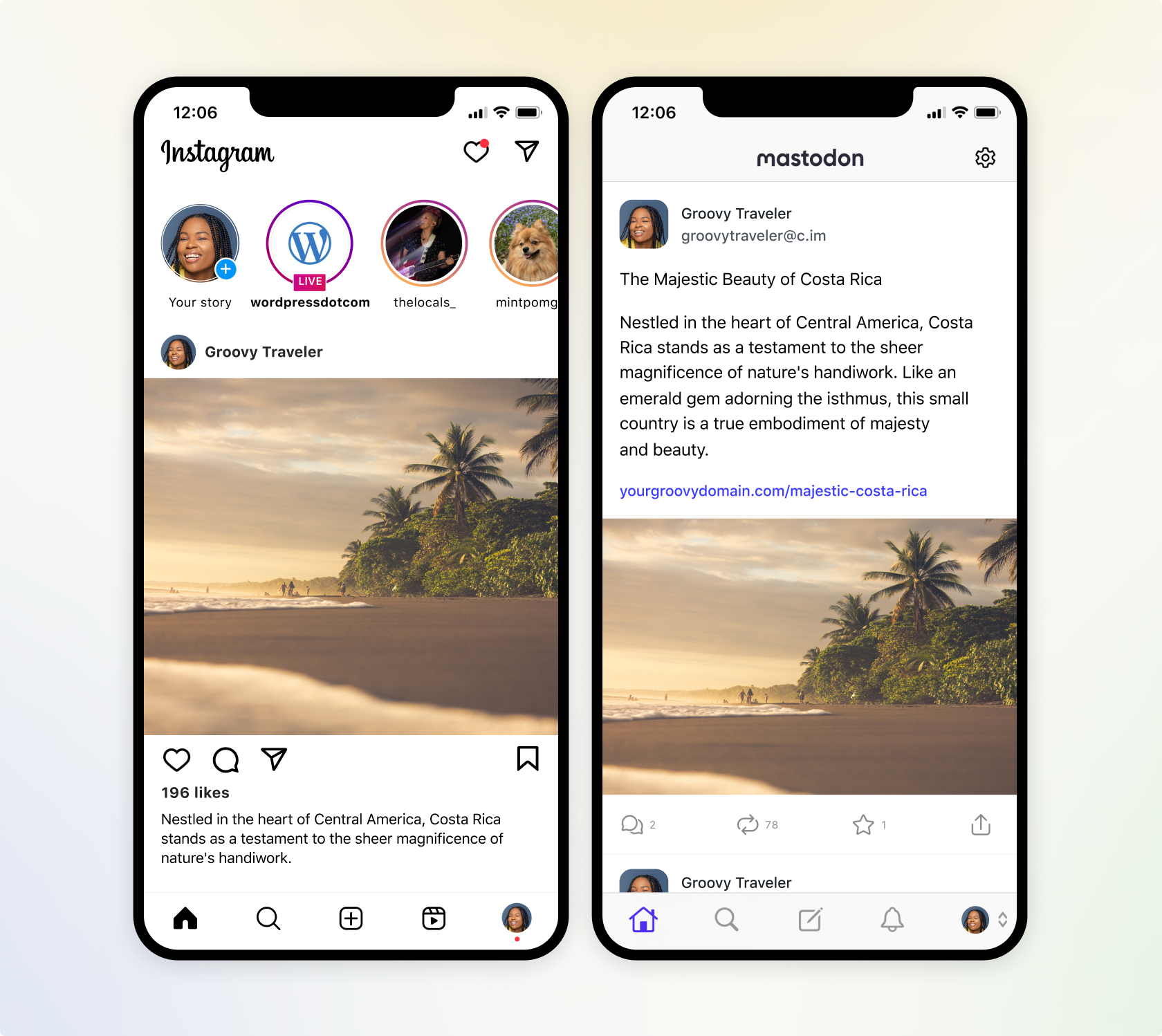
    A screenshot of how Jetpack Social will send content to Instagram and Mastodon.

    Instantly share to Instagram

    Instagram has a greater reach than any other social media platform and it is now available within Jetpack Social. Engage your target audience by sharing your post featured image to your Instagram Business account, directly from the WordPress editor. Learn how to connect Jetpack to Instagram.

    We’re also working on adding automatic video sharing capability, which will allow you to share the videos you’ve uploaded to your WordPress site, directly to Instagram Video Reels. That premium feature is coming soon to Jetpack Social Advanced.

    Multiply your reach with Mastodon

    Now you can also extend your influence to the newly popular social platform, Mastodon. Similar to Twitter, Mastodon allows you to share media and text content. Learn how to connect Jetpack to Mastodon.

    Mastodon is part of a larger ecosystem known as the “Fediverse.” This interconnected network allows users on Mastodon to interact with users on other compatible platforms, such as PixelFed (for image sharing). This allows you to connect with a broader audience.

    A screenshot of Jetpack Social displaying social previews on each social media network it supports

    Flexibility with every post

    • Select where you share with every post: Easily toggle which social media networks you want your content to automatically go to, with every WordPress post. Got some photos that you want to share on Instagram, but not LinkedIn? No problem.
    • Preview before you publish: We’ve improved the social preview tool, which allows you to see how your post will appear on all the social platforms you’re connected to, without ever leaving the WordPress editor.
    • Control your message: If you have long-form content, you can easily overwrite the default message and create your own custom messages to be shared amongst your social networks, alongside your media. This is also great for social media platforms that restrict character counts.

    Drive more engagement with Jetpack Social Advanced

    • Save time creating images with our social image generator: Social image generator automatically creates a composite image from your blog title and featured image, or create your own custom image in a few clicks. Learn more about our Social Image Generator.
    • Automate sharing with style: Ditch the default featured image, and make your auto-shared posts truly one-of-a-kind by selecting your own images or videos and crafting engaging custom messages.
    • Unlimited shares: With Jetpack Social Advanced, you can auto share unlimited content to your favorite social networks and engage your followers without limits.
  • Create custom visuals for your social media with the Jetpack Social Image Generator

    Traditionally, creating unique and engaging imagery for social media platforms often required a basic understanding of image editing tools. Adding text to images, changing photo orientation, and tinkering with different visual styles for each social network was tedious and frustrating. But not anymore.

    With Jetpack Social Advanced, you can overlay custom text onto your images and choose from a variety of styles to increase engagement on your social posts. Most importantly, you’ll save time by doing it all within the WordPress editor.

    Choose your image & add custom text

    Jetpack Social Advanced gives you the freedom to create social images with custom text applied to them. This is handy if you often have long blog post titles for SEO purposes, but prefer to use specific calls-to-action with your social media post images.

    A screenshot of the new Jetpack Social Image Generator working within the new WordPress Editor

    Sometimes the featured image of your blog post may not be the best fit to share on social platforms. With the Jetpack Social Image Generator, you can choose to share your featured image, select a different image from your media library, upload a new image, or select “no image” if you just want to create a text-based image for your socials.

    Pick a template to make it your own

    A screenshot of a user choosing a visual template to share on their social media accounts

    Tie everything together by exploring creative templates with various fonts and text placement around your image. Choose from full width images with text overlays or images with text aligned to either side.

    Preview before you share

    A screenshot of the social preview tool within Jetpack Social

    Finally, use the built-in Jetpack social preview tool to see exactly how your image will look on each of your connected social media platforms. Publish right away or schedule your posts to be shared when your audience is most active on social media.

    With Jetpack Social, it’s never been easier to share your WordPress content to social media.

  • Automattic Acquires ActivityPub Plugin for WordPress

    Automattic has acquired the ActivityPub plugin for WordPress from German developer Matthias Pfefferle, who will be joining the company to continue improving support for federated platforms. Pfefferle, who is also the author of the Webmention plugin, said his new role is to see how Automattic’s products can benefit from open protocols like ActivityPub.

    In 2021, Automattic CEO Matt Mullenweg indicated that he would be interested in having Tumblr support the ActivityPub protocol for a greater level of interoperability across networks like Mastodon and others using the same protocol. That is still in the works, but WordPress sites already have this capability through the plugin.

    “ActivityPub and a lot of other Open Web Plugins (like the Webmention plugin) were spare time projects, so I was not looking for an acquisition,” Pfefferle said.

    “When Matt announced that Tumblr wants to implement ActivityPub on Twitter, I asked why not WordPress, so I came in contact with Automattic and they offered me the opportunity to work full time on the plugin and other Open Web projects.”

    The ActivityPub plugin makes it possible for readers to follow a WordPress site in the fediverse using the ActivityPub protocol. This includes Mastodon, one of the most popular platforms using the protocol, and other platforms like Pleroma, Friendica, HubZilla, Pixelfed, SocialHome, and Misskey. For those using Mastodon, this plugin will automatically send posts to the network and replies to it will become comments on the post.

    Last March, the ActivityPub plugin had just 700 users. Today it has grown to more than 2,000 active installs. Although it is not yet widely used, it has gotten more exposure since Elon Musk bought Twitter.

    “Thanks to Elon Musk, the number of downloads from my ActivityPub (WordPress) plugin and my followers on Mastodon have increased at least tenfold!” Pfefferle said in a post on his blog in January 2023. “This inspired me to work more actively on the plugin again and some great changes came about.”

    Most recently, Pfefferle added a new onboarding screen with recommended plugins, added the published date to author profiles, and added outgoing mentions, among other features.

    Pfefferle said he thinks the idea of the acquisition is not to have the protocol merged into core, but to “guarantee that it will stay open source and to maybe make it a canonical plugin.”

    As more social networks unite on open protocols, it won’t matter where you choose to create your home on the web. Interoperability between apps allows people to post from whatever network they enjoy, creating a richer, more diverse web. Automattic’s support of the ActivityPub plugin ensures WordPress’ place in the fediverse, where blogs will not isolated islands but rather interconnected as many were in the early days of blogging. Pfefferle’s work embodies these ideals.

    “I think my drive was always to build an alternative to the big walled gardens of Facebook & co,” Pfefferle said.

    “I fell in love with the idea of blogging and the spirit of the Web 2.0 movement and tried to keep the idea alive. I worked on several WordPress plugins and participated in several movements (DiSo, DataPortability and others) starting in 2007.

    “It is so exciting to finally see such a big interest in Open and Federated technologies!”

  • Jetpack 11.9 Adds Sharing Button for Mastodon, Updates Stats Dashboard Design

    Jetpack 11.9 was released this week with support for sharing posts to Mastodon. The new button allows readers to click an icon to launch a sharing window that will ask the user to enter the full URL of the Mastodon instance where they want to share the post.

    Adding the URL will update the window to automatically insert the link for the post and share from your account.

    Mastodon makes its usage numbers publicly accessible. As of March 8, 2023, the total user count is at 6,487,821, with 1,293,309 considered active users. Many WordPress community members who have moved over to Mastodon report having more quality interactions and higher engagement than on other social media platforms. This new sharing button gives your posts more opportunities to reach that audience. It can be enabled at Jetpack > Settings > Sharing in the admin.

    The Jetpack team is also looking at adding Mastodon support to Publicize so users can have their posts automatically shared when they are published. Many people have requested this feature on GitHub and it may land in the plugin sometime in the future.

    Jetpack 11.9 also updates the design of the Stats dashboard. In place of the dusty blue bar graphs and sections with referrers and top pages and posts, the updated design is now more in line with Jetpack’s green branding. It features 7-day highlights at the top and the trends shown are in comparison to the previous seven days. The UI is more modern than the previous version and provides a more mobile-friendly experience. It is enabled by default but can be disabled in the Settings for those who prefer the traditional Stats design.

    Also included in version 11.9 is a new “Sync Fields” style option in the Forms block that allows users to ensure fields maintain the same style as the blocks are edited.

    This release includes more than a dozen bug fixes and compatibility updates. Check out the changelog for all the details on the Development tab on the plugin’s WordPress.org page.

  • WordPress Community on Mastodon Launches “Toot the Word” Survey

    Last month’s Twitter outage gave Mastodon a boost, as the company also announced unpopular changes to its API access. People from the WordPress community continue to trickle into the fediverse, with many going so far as to shutter their Twitter accounts. A fledgling community of WordPress users on Mastodon has made the network home and are reporting more quality interactions than they experience on other platforms.

    Daniel Auener, who runs a WordPress agency based in Sweden, curates and maintains a list of WordPress community members’ Mastodon accounts that anyone can follow by downloading a CSV file and importing it into Mastodon. He and the other admins of the five largest WordPress-related Mastodon instances have joined together to create a survey for WordPress users.

    The survey is being organized by the following admins:

    “The goal of this two-minute survey is to help us improve the WordPress-related Mastodon instances and Mastodon as a meeting place for the WordPress Community in general,” Auener said.

    “We want to know your needs and challenges and how you think we – as WordPress-related instances – can strengthen the WordPress community on Mastodon.”

    Respondents will be asked how frequently they use Mastodon and how important it is to their overall WordPress-related social media activity. They will also be asked about the quality of communication with the community and what they would like to see more of on Mastodon. So far the survey has received 112 responses. If you have embraced the fediverse, take two minutes to leave your feedback on the “Toot the Word Survey” before it closes on March 5, 2023.

  • Twitter Outage Uncovers More Details on Upcoming API Access Changes, Giving the Fediverse a Shot in the Arm

    Twitter experienced a major outage today lasting several hours, which left most users unable to tweet or send private messages to each other. Some reported receiving error messages telling them they were “over the daily limit for sending tweets.”

    Twitter’s development team took the opportunity to update users on the upcoming changes to API access, which it appears the team was working on before CEO Elon Musk advised them to pause “in favor of maximizing system stability and robustness, especially with the Super Bowl coming up.”

    The Twitter Dev account announced that after February 13, free access users will be limited to 1,500 tweets per month:

    We have been busy with some updates to the Twitter API so you can continue to build and innovate with us. We’re excited to announce an extension of the current free Twitter API access through February 13. Here’s what we’re shipping then:

    Paid basic access that offers low level of API usage, and access to Ads API for a $100 monthly fee.

    A new form of free access will be introduced as this is extremely important to our ecosystem – limited to Tweet creation of up to 1,500 Tweets per month for a single authenticated user token, including Login with Twitter.

    Also on February 13, we will deprecate the Premium API. If you’re subscribed to Premium, you can apply for Enterprise to continue using these endpoints.

    This is a new chapter for the Twitter API to increase quality, reduce spam, and enable a thriving ecosystem. We appreciate your patience as we implement these changes and we can’t wait to see what you build next! Stay tuned for more information on continued Twitter API access.

    With no more third-party clients, Twitter has severely diminished its resilience during outages like these. Many users were driven to platforms like Mastodon to speculate about the reasons for Twitter breaking. Cloudflare also found some lucky timing today in launching Wildebeest, an AcitivityPub and Mastodon-compatible server that enables anyone to operate their Fediverse server and identity on their domain with minimal setup and without needing to keep up the infrastructure.

    For those who are looking to get started on Mastodon as the result of Twitter’s recent outage, WordPress developer Daniel Auener curates and maintains a list of WordPress community members’ Mastodon accounts that anyone can follow by downloading a CSV file and importing it into Mastodon.

    The list includes all accounts, where the account owner has at least one community badge on their WordPress.org profile page. Auener has also published a WordPress guide to the Fediverse with helpful information on finding an instance, following hashtags, and engaging with the WordPress community.