WordPress meta contributors have just logged an important milestone in their efforts to explore replacing Slack communication with Matrix, an open source federated chat system. The team hosted a meeting on the Meta Slack channel and the corresponding #meta:community.wordpress.org Matrix room simultaneously, enabled by the project’s new Slack/Matrix bridge.
The bridge allows users to follow the chat and participate from either Matrix or Slack, with messages showing up in real-time. It’s a tool that will make the transition easier as the WordPress project moves towards replacing Slack. The team is still in the process of importing the history for channels but the bridges are already in place for all public Slack channels/Matrix rooms.
DM’s do not work over the bridge, although they work between Matrix users. The bridge doesn’t have access to anything that is private, and the historic data import into Matrix will only apply to public Slack channels. DMs and private channel history will not be ported over.
Meta contributor meeting inside Chatrix instance with room switcher disabled
The Matrix team has created a Gutenberg block that embeds a Matrix client called Chatrix, which can be added to any WordPress page/post or P2 blog, as shown in the screenshot above. This example can be accessed at https://make.wordpress.org/meta/chat/. WordPress.org users can sign in with SSO inside the block and authorize their accounts to connect:
Now that the Matrix server is live at community.wordpress.org, WordPress users who want to attend team meetings or join rooms via Matrix can now do so using their choice of Matrix clients that support SSO. Logging in uses the same credentials as the WordPress.org account.
“Compared to Slack this means a vastly simplified onboarding process,” Automattic-sponsored contributor Alex Kirk said. “Instead of waiting for an e-mail arriving at a special e-mail address, you set the server in your Matrix client to community.wordpress.org and click ‘Login with WordPress.org’ (the name of that button might vary by client).”
As the channels’ history gets migrated over, Kirk said WordPress users will be automatically invited to rooms on Matrix that they have already joined from the Slack side. The team is planning to make more wide-scale public announcements after the Slack/Matrix bridge has demonstrated that it is running stable.
ClassicPress, the fork that has been keeping WordPress 4.9 on life support for those who don’t want to use the block editor, will soon be moving into version 2.0 after the community voted to re-fork a newer version of WordPress (6.x) to keep moving forward. Version 1.6.0 was released a few weeks ago as the last minor release before version 2.0.
ClassicPress contributors are discussing the future of Classic Commerce, which is a fork of WooCommerce 3.5.3 created to provide a reliable e-commerce solution for ClassicPress users. The community is now bracing for the inevitable compatibility issues introduced by version 2.0 that will require a massive undertaking to resolve.
In a forum thread seeking community input, @shimmy, an IT solutions business owner with an interest in supporting a long term e-commerce solution, proposed the following options for Classic Commerce’s future:
Re-Fork Woo-Current
Re-Fork Woo-Previous
Fork a different eCommerce solution
Migrate CCv1 to current
Complete Rewrite
“We can talk about re-forking, using something that works or asking ourselves: are we ready to really fork and support it on our own developing it in a way it works in ClassicPress or do we fork it and continue to patch it every time it doesn’t work because blocks or just keep it frozen?” Elisabetta Carrara said.
After some discussion multiple participants in the conversation were in agreement that forking the latest version of WooCommerce to make it work with ClassicPress is not a viable option.
ClassicPress director Viktor Nagornyy suggested exploring a refork similar to the method used for ClassicPress 2.0.
“With CP v2.0, we didn’t take WP v6.2 and rip out blocks, FSE, and React,” he said. “@MattyRob merged develop branch with CP v1, and worked his way through all the files to resolve merge conflicts. That was a lot of work, and he did a great job. WooCommerce and Classic Commerce are plugins, so I assume they have fewer files than WP/CP core.
“This type of ‘merge-fork’ could be a viable option for CC to save time and effort.”
@shimmy, who would be leading this effort, said he is leaning toward this approach.
“I think this provides a more natural upgrade path and to some degree backwards compatibility,” he said. “At some point in the course of merge-fork WC plugins will no longer be compatible with CC; which is fine because I think that CC should have it’s own plugin ‘bazaar.’ This ensures compatibility with CC; if you need a feature then it should be a filtered result with what you already have in place.”
Nagornyy also encouraged a nascent plugin ecosystem to grow up around these forks to provide additional features. Although the WooCommerce plugin ecosystem has thousands of options for extending stores, they are not guaranteed to be compatible with forks built on older versions of WordPress and WooCommerce.
“While the core CC is free, I encourage plugin developers to consider developing paid plugins for CC to ensure they get paid for their time and effort,” Nagornyy said. “It only strengthens CP and CC knowing premium, supported plugins are available. For e-commerce, the two profitable (and critically important) categories of plugins are payment gateways and shipping integrations.”
With the major changes coming to the WordPress admin in Phase 3 of the Gutenberg project, maintaining these forks will continue to be an uphill slog, as fewer plugins from the wider ecosystem will remain compatible with ClassicPress.
Maintaining payment gateways and shipping integrations for compatibility with these forks is also going to be challenging, as this discussion indicates that the community doesn’t have many experienced e-commerce developers who are eager to step up and donate their time to this project. If Classic Commerce cannot deliver on the ambitious ‘merge-fork’ option, users may need to look towards integrating external e-commerce solutions.
Gutenberg 16.3 was released today as a maintenance release but includes several new tools that make pattern management smoother and easier for users. Most notably, custom user patterns now have a dropdown menu for renaming, duplicating and deleting them. Patterns and template parts that come with themes will only have the “duplicate” option available since they cannot be deleted or renamed.
Gutenberg 16.3 adds a sticky header bar on the Patterns page. It also brings the “focus mode” to patterns, which is already available for template parts in the Site Editor but not available when editing patterns. Users may not notice but it provides more a consistent editing interface.
Those who have been keenly following the evolution of the Patterns page will notice that the “Theme patterns” heading has been removed and the pattern categories rearranged. Theme and plugin patterns now appear above template parts.
The icon for synced patterns isn’t self evident and some users may need more context. A new tooltip identifies synced patterns as those for which edits will apply anywhere the pattern is used.
Gutenberg 16.3 includes more than two dozen pattern interface-related fixes, among other editor bug fixes. If you are using and managing patterns frequently, having the Gutenberg plugin installed will enable a better experience with this interface until these updates make their way into core WordPress. Check out the release post for a full list of all the changes and fixes in 16.3.
WordPress 6.3 RC2 has been released and is ready for community testing. Since RC1 landed a week ago, 15 changes have come in from the Editor and Trac, including bug fixes for footnotes, internationalization fixes, a missing command for opening the distraction free in the Site Editor, and a few other issues.Â
This release also brings in work completing the About page and adds a “Get Involved” section, closing a 10-year old ticket that suggested adding a “Contribute” tab to the About page.
The new Get Involved page features both code-based and no-code contribution opportunities with a link to WordPress’ contributor teams.
The video of the WordPress 6.3 Live Product Demo has been published so anyone who was not able to attend can get a preview of what is coming in the next release. Automattic-sponsored contributors Anne McCarthy and Rich Tabor hosted the demo, showing users how to use the new command palette to zip around the editor and manage settings views. They also guide viewers through browsing and editing pages within the Site Editor, managing synced patterns (formerly called Reusable Blocks), and showcased various new blocks and design tools.
Check out the highlights post for all the links to features referenced in the demo and the Q&A portion of the broadcast.
For those interested in performance improvements coming in 6.3, an upcoming hallway hangout is happening tomorrow Thursday, July 27, 2023 at 11:00 AM EDT. Participants can check the #core-performance Slack channel for the Zoom link before the event. Team leads will cover highlights from the 170+ performance improvements included in 6.3 and will discuss future improvements for 6.4.
WordPress’ Training team is calling for volunteers to help with updating and revising existing Learn WordPress resources ahead of the 6.3 release. The team has created a board on their GitHub repository which highlights high priority tasks.
WordPress 6.3 RC3 is expected to be released on August 1, and the general release is scheduled for August 8, less than two weeks away. There is still time to find and report some bugs. One easy way is to install the WordPress Beta Tester plugin on a local testing site or use a quick throwaway site from services like InstaWP or TasteWP. Bugs can be reported on Trac or via the Alpha/Beta section of the support forums.
WordPress Playground, an experimental project that uses WebAssembly (WASM) to run WordPress in the browser, was number 1 on Hacker News recently and was also featured on TechCrunch. Word is getting around about how easy it is to fire up a sandbox environment in just a few seconds for testing plugins and themes and even different versions of WordPress and PHP.
Visiting playground.wordpress.net instantly creates a real WordPress instance with admin access and everything without having to install PHP, MySQL, or Apache. Instead, it runs inside the browser using a SQLite database.
The Playground isn’t just for developers. It also makes it easy for users who would not ordinarily maintain a local development environment to quickly test plugins or themes they find on WordPress.org, or to just explore new WordPress features in a safe place where you can’t break anything.
If you have found it difficult to wrap your head around WordPress Playground, Learn WordPress has published a timely new tutorial called How to start using WordPress Playground. In this 10-minute video, WordPress Playground creator Adam Zieliński offers a quick demonstration of how to install plugins and themes and customize a site, and how to export design work from a customized theme. He also covers how to download the entire site and import it into a new WordPress instance, and guides users through basic compatibility testing of a theme, by switching the WordPress version on the playground site.
Mojeek, a UK-based privacy-oriented search engine, has added Openverse to its image search. For more than 15 years, Mojeek has provided independent, unbiased search without tracking or building profiles on users. It is one of just a handful of genuine search engines that uses its own technology and algorithms, unlike the metasearch engines that syndicate Bing, Google, and Yandex. In October 2022, Mojeek passed a major milestone of having indexed more than 6 billion pages.
The search engine had previously provided Pixabay as the default for its image search with the option to use Bing as an alternative.
“We have always wanted to eventually get rid of Bing,” Mojeek Head of Marketing Joshua Long said. “Due to both Microsoft’s API pricing decisions, and informed comments by people using Mojeek to search the web, we recently took that step.”
Openverse’s openly-licensed media was a natural fit for the independent search engine. In 2021, Creative Commons Search was rebranded to Openverse when it came under the umbrella of the WordPress open source project. With more than 700 million Creative Commons licensed and public domain image and audio files, Openverse exceeds Pixabay’s 4 million+ royalty-free and stock images, greatly expanding users’ abilities to search deeper on more topics.
Although Pixabay is still Mojeek’s default image search provider, users can change their preferences, which are set using a local cookie and contain no personal data.
“This addition is a testament to the utility that Openverse brings, as well as the ease and extensibility when it comes to using its API,” Long said.
Unless you are some kind of wizard with the block editor, starting a WordPress website from a blank slate can be overwhelming and ultimately defeating. Mike McAlister, maker of the free Ollie theme, is developing an onboarding experience that aims to drastically reduce the amount of time users spend setting up a new site.
“I suspect we’re cutting out a half hour or more of finagling a new WordPress site,” McAlister said. “No more wrestling with a blank canvas.”
The Ollie Onboarding Wizard creates a guided setup experience that allows users to add basic site settings, select a color palette, input their brand colors, add a logo and site icon, and move on to creating pages. It eliminates the necessity of hunting all these settings down inside blocks and the Site Editor.
Instead of having to create pages individually and assign them the correct template or place the right full-page pattern, Ollie onboarding makes it possible for users to simply check which pages they want automatically created.
“The goal of this wizard is to help WordPress users zoom through a site setup with the Ollie theme and abstract away those annoying and disconnected setup steps we have to do for every site,” McAlister said.
“The wizard is also a way to educate users along the way. WordPress is going through a much-needed evolution, but as expected, users are having a tough time with the transition. Change is tough, especially when you power half of the internet. Workflows like this can help.”
The onboarding interface leans heavily towards the design of the Site Editor to make it seem naturally at home inside WordPress. It demonstrates just how nice plugins and themes can look in the admin with a more modern interface, which could soon be a reality once the ambitious admin UI revamp plans are complete.
“Months ago, Patrick Posner and I agreed that the future of WordPress is in the new Site Editor view, so that’s where we built this wizard,” McAlister said. “That assumption has since been validated, and because of that, our interface blends in seamlessly with native WordPress.”
“This is just a v1, but we’re already planning on how to seamlessly integrate choosing a vertical with curated plugins (eCommerce, landing page, email marketing, etc.) and surfacing pro features to really bring this experience together. This isn’t just a WordPress theme.”
McAlister said the interface is all React with largely native WordPress components and a few custom components sprinkled in to handle some of the more unique aspects of the tool.
After previewing the onboarding wizard, some people have asked if it will be available as a standalone product. McAlister confirmed that he doesn’t have any plans of productizing it but if there is enough demand he is willing to entertain the idea. Others have asked if there is an API for developers to add their own sections.
“No API yet, although with the announcements of the admin overhaul initiative, perhaps one is coming,” McAlister said. “Right now, this is just a custom React layer that mimics the site editor view. It’s built to be flexible though, so if a core solution opens up, we can migrate to that.”
McAlister previewed the wizard on Twitter and in his newsletter, but it’s still in development and not yet available for testing. He plans to launch the Ollie theme on WordPress.org once the wizard is ready for public use.
WordPress’ Recommended Hosting page is a hotly contested piece of online real estate, and has recently come into focus again following the removal of SiteGround from the listings. When the change was highlighted during a recent Meta team meeting, Audrey Capital-sponsored contributor Samuel “Otto” Wood said, “Matt asked me to remove SiteGround because that page is getting revamped. I know no more than that.” Bluehost and Dreamhost are the only two hosts remaining on the page at this time.
The process for being listed on the Recommended Hosting page has historically been shrouded in secret, causing contributors to speculate that large sums of money were required. Although the current criteria is posted on the page, the process of getting listed and de-listed is not transparent. It’s not clear if and how the criteria is being applied, as it states that listings are “completely arbitrary:”
We’ll be looking at this list several times a year, so keep an eye out for us re-opening the survey for hosts to submit themselves for inclusion. Listing is completely arbitrary, but includes criteria like: contributions to WordPress.org, size of customer base, ease of WP auto-install and auto-upgrades, avoiding GPL violations, design, tone, historical perception, using the correct logo, capitalizing WordPress correctly, not blaming us if you have a security issue, and up-to-date system software.
WordPress co-creator Matt Mullenweg has recently hinted at the possibility of re-opening the survey, inviting contributors in WordPress’ Hosting Slack channel to weigh in on questions or data the survey should collect “to help us discern who we recommend.” He linked to questions from the survey used in 2016 when the page was updated to include Bluehost, DreamHost, Flywheel, and SiteGround.
The new draft for the survey states: “It’s time to loop back and give every host an opportunity to be on the recommended page, and also make it international because we never really got recommended hosts in non-English countries right.”
The WordPress Hosting team has been working on a related effort called “Project Bedrock” that aims to create a directory in which any hosting company that meets a series of predefined requirements can appear as recommended hosting or compatible with the WordPress CMS.
“Yes, project bedrock is a goal,” Hosting team rep Javier Casares said. “Some months ago we left the project in stand-by to create a pre-version of the project, creating a list of hosting companies inside the Make/Hosting, a ‘everyone can be on the list’ (if criteria) as a complement for the /hosting), but the idea is that /hosting, this pre-project or the project should have the same criteria (the base).
“We know Matt is the responsible for the /hosting, our idea is creating a ‘longer list’ for the Hosting Handbook / page at Make/hosting. The idea is having the same criteria. So, both are complementary.”
Although contributors to the project view it as complementary to the official recommendations, it may be confusing for WordPress to have multiple similar hosting resources with the same criteria but different listings. These appear to be conflicting efforts that have a lot of overlap but may ultimately be at odds with the goal of simplifying the host selection process for new WordPress users who don’t know which ones to consider.
Casares suggested a few technical criteria that the survey should focus on, including PHP versions, database versions, SSH access, automatic updates, one-click WordPress installation, free TLS certificates, backup, and more.
The 2023 survey is still in the early stages in draft form. WordPress Hosting team contributors suggested that requirements for revamping the page would be a good topic for discussion at WordCamp US’ upcoming Community Summit next month.
In the Post Status hosting channel, Namecheap co-founder Matt Russell suggested Mullenweg leverage WPHostingBenchmarks performance data.
“[WPHostingBenchmarks is] probably the most open, fairest, and long-term performance evaluation in the WP space,” Russell said. He also recommended Mullenweg revamp the page as more of a directory with options to select budget, regions/country, and more.
Review Signal founder Kevin Ohashi, who publishes the WPHostingBenchmarks site, shared concerns about transparency that he has had since the last time the page was updated:
Who is reviewing this information? What criteria will be used in evaluating them? I know last time you said you were involved, as were other folks from Automattic. Automattic is a competitor in the hosting space, and no matter the hat being worn, there is some concern over sharing sensitive business info with a competitor.
Getting listed on that page is likely worth millions of dollars to any company in terms of business generated. I think the process and criteria should be transparent and clear from the beginning. I also think who is involved with evaluating should be known beforehand as well. At least give companies, and consumers, the information they deserve to evaluate participating and the outcome.
Ohashi recommends that no person employed by a hosting company should be involved in the evaluation of submissions. This would eliminate bias from competitors in the space trying to suppress those they deem to be a threat.
“I’d like to see more ethics and accountability, a code of ethics for any company getting listed would be a positive in my mind,” Ohashi said. “Companies should be competing on quality and product, not on astroturfing, deceptive billing practices and other shady behavior we often see in the space. In my benchmarks, I push measuring default performance because I believe that benefits the greatest number of customers. I think there’s an opportunity to push for a better ecosystem here and would love to see you take it.”
When WordPress 5.0 was released in late 2018, it came with a brand-spankin’-new block editor known as Gutenberg. In contrast to the Classic Editor, which was far more reliant on manual code, the block editor offers a modular approach to page and post editing making each piece of content in the editor—from a paragraph to an image gallery to a headline— its own editing block.
WordPress presents a larger barrier to entry for some, and the Gutenberg Editor was created to make building and updating site content easier. With WordPress 5.0, the block editor was absorbed into WordPress core, and WordPress development has been optimized for Gutenberg’s use ever since.
Additionally, the team behind Gutenberg has continued to make massive strides both for user interface and design-facing capabilities.
Staying informed on Gutenberg’s latest updates is advantageous for designers, developers, and anyone else who wants to keep their WordPress game sharp. The Gutenberg team is constantly refining the block editor with new version releases to improve the experience, so check back every few weeks for what’s new in Gutenberg!
This version update was released on July 14, 2023.
The weather isn’t the only thing heating up this July. Gutenberg 16.2 allows users to use footnotes, consolidate patterns, and more.
Highlights of Gutenberg 16.2 include:
While footnotes were added in 16.1, they’ve been optimized in 16.2. Not only are they more reliable, you can now add the block manually in case you delete them.
Using the Typography setting in a text block, you can change the way the text is oriented. This is a step toward supporting vertically-written languages.
The Patterns section is more intuitive than ever before. Users can now see a Pattern’s sync status right in the sidebar.
Other highlights include the Command Tool being renamed The Command Palette, the “Browse All†button in the quick inserter has been restored, bug fixes, and much more.
Check out the official release post to see what else Gutenberg 16.2 has to offer.
Gutenberg 16.1
This version update was released on June 29, 2023.
72 contributors worked on this massive release. Let’s get into the highlights from Gutenberg 16.1.
Highlights of Gutenberg 16.1 include:
Access all your patterns directly from the new Pattern Library and sync them across your entire site.
We previously had a “Distraction Free†Editing experience but now you can design without distractions. Cut out all distractions and get your work done.
A very exciting update introduces automatic footnotes. You can find them in text blocks including paragraph, heading and lists, and can be added from the block context menu.
This is a massive update leading Gutenberg into the future and beyond. It also comes with bug fixes and other performance enhancements.
Check out the official release post to see what else Gutenberg 16.1 has to offer.
Gutenberg 16.0
This version update was released on June 14, 2023.
Gutenberg 16.0 provides a glimpse into upcoming features that will soon be integrated into core WordPress, coinciding with the release of WordPress 6.3 Beta 1.
Highlights of Gutenberg 16.0 include:
Users now have the ability to create new pages and access page details through the sidebar. This empowers website creators to efficiently build their sites within the Site Editor, eliminating the need to switch between editors.
Previously, theme authors had to resort to custom CSS for controlling block spacing within the Post Template block, which is part of the Query block. However, Gutenberg 16.0 introduces block spacing and layout controls directly within the Editor. This improvement enables easier management of the space between posts, empowering theme authors with more flexibility.
Initially introduced as an experiment in Gutenberg 15.6, the Details block has undergone revisions and stabilization based on community testing and feedback. In Gutenberg 16.0, this block employs <details> and <summary> HTML elements to conceal content until readers are ready to view it. Users can also configure the visibility of content as per their preferences.
Gutenberg 16.0 includes a wide array of additional enhancements and bug fixes.
Check out the official release post to see what else Gutenberg 16.0 has to offer.
Gutenberg 15.9
This version update was released on May 31, 2023.
Gutenberg 15.9 includes several exciting features that improve the Site Editor user experience.
Highlights of Gutenberg 16.0 include:
Gutenberg 15.9 introduces a new, yet-to-be-named Command Tool, which allows for enhanced navigation and content creation within the Site Editor. You can access the tool by opening the Site Editor and using the keyboard shortcut Cmd+k on Mac or Ctrl+k on Windows. Once opened, you’ll have access to a variety of different commands that enable swift actions and interactions. You can also customize the tool by adding your own commands. Detailed documentation is available here.
Users can now resize the Site Editor, allowing you to preview how your site will appear on smaller screens (i.e. mobile devices). This feature helps optimize your site’s layout for various screen sizes.
When moving blocks, you will now experience a visual cue that clearly indicates the drop location, especially when working with empty groups. This enhancement streamlines the process of rearranging your site’s layout, making it more intuitive and efficient.
You can now access style variations and all navigation menus of your site. This enhancement simplifies the process of switching between different styles and menus, providing a convenient interface to make adjustments effortlessly.
Gutenberg 15.9 also includes the introduction of an API that allows for prioritizing inserter items, better accessibility through arrow keys in certain input types, keyboard focus improvements for enhanced accessibility, and numerous bug fixes..
Gutenberg 15.8 introduces a range of improvements that enhance the user interface (UI) and user experience (UX) for content creators, site owners, and theme developers.
Highlights of Gutenberg 15.8 include:
The site editor now provides direct access to the ten most recently updated pages, allowing users to jump straight into editing them. This step is part of our exploration to reintroduce the ability to edit content directly from within the site editor. This enhancement aims to streamline the editing process and improve efficiency.
In the global styles interface, users can now navigate through revisions and explore how the site appeared at different points in time. The revisions timeline displays saved changes along with timestamps and author information. This feature empowers users to review and compare previous versions of their site, facilitating better decision-making and content management.
Previewing different themes has become more convenient with the introduction of the theme_preview parameter. Users can now preview how their site would look with different themes directly within the site editor. This capability simplifies the process of selecting the perfect theme, ensuring a seamless and visually appealing site design.
Gutenberg 15.8 introduces additional bug fixes, improvements to responsiveness, and more.
Gutenberg 15.7 comes with a number of small yet impactful changes aimed at improving workflows, fixing bugs, and enhancing responsiveness.
Highlights of Gutenberg 15.7 include:
To streamline creator workflows, the Site Logo block now offers a direct method to replace the logo within the sidebar for the block. Although it may seem like a minor feature, simplifying the management of a site’s branding identity is crucial and warrants an easy and intuitive process.
The inclusion of duotone filter controls in the block sidebar represents another step in streamlining workflows. Previously, these controls were hidden within the Block Toolbar, but now they are readily available alongside the style settings in the sidebar.
While fluid typography was introduced with WordPress 6.0, users and designers encountered challenges with large custom fonts, as the previous fluid calculation didn’t scale down sufficiently for smaller screens. In this release, a more refined handling of fluid typography has been implemented using a logarithmic scale factor to calculate a minimum font size for smaller screen.
Gutenberg 15.7 includes a ton of additional highlights, enhancements, bug fixes, and more.
This version update was released on April 5, 2023.
This release comes with a ton of user-facing updates and great news for theme editors. Let’s take a look at what’s inside Gutenberg 15.5.
Highlights of Gutenberg 15.5 include:
Users can now create new templates from theme-registered template patterns. This greatly improves customization.
Caption editing has been integrated into the Site Editor so you can change caption styles without using code.
A brand new experimental layout type has been added in 15.5. Though it only supports column width, it creates the foundation for more future configuration options.
This version update was released on December 7, 2022.
We are nearing the end of the year but that hasn’t slowed down the Gutenberg developers! Gutenberg 14.7 is better than ever. Let’s take a look.
Highlights of Gutenberg 14.7 include:
The block inspector now separates appearance and settings controls by tabs in this experimental sidebar view.
Add videos and images directly from the inserter. Add a block, toggle over to Media and then choose your image or video. Just like that.
Template and Reusable Blocks will now be outlined in a different color making them easier to identify.
All these updates make it easier to design and create content quickly. The update comes with these and an array of bug fixes and other performance enhancements.
This version update was released on November 23, 2022.
This is a gargantuan update with a lot of features to get through. There are a number of design and block updates.
Highlights of Gutenberg 14.6 include:
Upon picking the Group Block, you are given the option to pick a layout. This way you don’t have to format after putting in content.
You can now drag items in the Navigation Menu. Want to move your About Me page above Contact Me? Do that quickly right from the sidebar.
Looking for a rebrand? Try out the “Randomize colors†feature to get a random color palette just for your site.
This just scratches the surface of what Gutenberg 14.6 brings. You can also define a minimum height, adjust your fluid typography minimum and maximum, and more.
This version update was released on November 9, 2022.
Gutenberg 14.5 adds a ton of design functionality making it easy to customize every part of your site. Let’s dive in.
Highlights of Gutenberg 14.5 include:
Quickly toggle between List View and Document Info all in one place. The Details popover and List View have been combined making it easy to see your entire post at a glance.
It has always been difficult to customize margins and padding in WordPress. Gutenberg 14.5 added improved visualizers that allow you to change margins with a slider.
Just like with the Image block in 14.4, a button was added to the Audio and Video blocks that allow you to quickly add a caption.
These updates along with big fixes and more performance enhancements allow you to take more control of your website with Gutenberg 14.5.
This version update was released on October 12, 2022.
Gutenberg 14.3 continues the march toward Full Site Editing with design and UX enhancements. Let’s get into it.
Highlights of Gutenberg 14.3 include:
In huge news, you can now drag and drop an image into a paragraph block to turn it into an image block. This is a massive time saver.
The Styles interface is now consistent with the Block Settings interface.
New keyboard combinations make it easier to navigate big blocks of text. Use alt + up arrow or alt + down arrow to move your cursor through blocks of text.
The writing flow has been greatly improved in Gutenberg 14.3. You can drag and drop and navigate your way through your post to make editing and designing a dream.
This version update was released on September 28, 2022.
The latest version of Gutenberg improves the writing flow, letter spacing in headings, and more.
Highlights of Gutenberg 14.2 include:
Big improvements have been made to the writing flow such as making selecting multiple blocks visually consistent and hiding the block inserter to clear up clutter.
In the Global Styles interface, you can modify letter spacing in headlines.
You can now edit the background color and text color of the Calendar Block.
This version update was released on August 3, 2022.
The latest version of Gutenberg comes with accessibility updates, block updates, UX enhancements, and much more.
Highlights of Gutenberg 13.8 include:
Fluid typography got more support in 13.8. This allows text to scale and adapt to any screen size.
New template parts have been added including “Header,†“Footer,†and “Subscribe to Newsletter†sections. You can also now search for the template part you’re looking for.
Gutenberg 13.8 includes big accessibility updates such as keyboard-friendly clickable elements in the “Add template†modal and improved and consistent labels in the Editor.
Other updates include the consolidation of the Post Comments and Comments block, new settings for full-width content in the theme, bug fixes, and more.
This version update was released on July 20, 2022.
This was a massive release with 127 pull requests. Lots of features were added. Let’s get into it.
Highlights of Gutenberg 13.7 include:
Lock settings were updated in 13.7. For Group, Cover, and Column blocks, you can choose to lock with just the toggle of a button.
You can now create templates for specific categories and pages. For example you can have one template for a product page, one for a calendar, and one for a blog.
The Information Panel now excludes a “Time to Read†readout beside word count and character count.
Performance was the focus of Gutenberg 13.6. There were enhancements for accessibility and development with Gutenberg.
Highlights of Gutenberg 13.6 include:
This update works with an API introduced in WordPress 6.0 that allows you to provide patterns for any post category. This is going to cut design time in half, especially with clients.
Directly from the editor, you can now create more template types. You don’t need to know post type identifiers or post slugs.
The theme.json engine that was updated in 13.4 has been expanded to allow you to create a cohesive theme across all your blocks. You can fully control all block styles.
This was a jam-packed update with added keyboard shortcuts, bug fixes, performance enhancements and more.
This version update was released on June 22, 2022.
Gutenberg 13.5 improves the featured image UX, expanded design tools, and some accessibility updates.
Highlights of Gutenberg 13.5 include:
When using the Cover Block to add a Featured Image, a placeholder now displays so you can get a better idea how much space the image will take up. Also when you hit “Replace†on an image block, there’s a drop down option to add the Featured Image.
A huge update to the Post Navigation Link allows you to customize your link color.
Context was added to the Edit/New buttons increasing accessibility.
Along with these updates, there were 15 bug fixes and 12 performance enhancements. All of which add customization.
WordPress 6.0 “Arturo†is out and Gutenberg 13.4 just builds on that momentum! Let’s look at what changed.
Highlights of Gutenberg 13.4 include:
The sidebar got a rework with Gutenberg 13.4. The Publish popover has a new look that’s easier to understand. The color-picking interface now uses the ToolPanel.
The Gallery Block now supports axial spacing, so you can add space on either side of an image or on the top and bottom.
A huge update is that Themes can now add buttons using theme.json.
Gutenberg 13.3 has a long-awaited update, a Table of Contents block. This and a variety of other enhancements makes this a very exciting update.
Highlights of Gutenberg 13.3 include:
You can now display custom taxonomy terms in the Post Terms Block. This allows the user to add things like product categories to a post.
The Query Loop Block now supports a “parent†filter so you can see any of the children content defined for that parent.
The new Table of Contents Block works like a charm by automatically finding all the headers and automatically adding them with anchor links. This is such a time saver.
This update puts the focus on the editor and makes things easier. Along with bug fixes and other performance enhancements, Gutenberg 13.3 is a big one.
The Comment Block got a tune up as well as a brand new API in Gutenberg 13.2.
Highlights of Gutenberg 13.2 include:
The placeholders for the post excerpt, post comments, and post comment form have been greatly improved and look more realistic.
Padding and margins now have much greater customization. As you adjust them, they highlight in blue so you can see exactly what you’re changing.
A new API was created that allows you to save your editor preferences so your experience looks exactly the same on any browser or any device. This is incredibly exciting because you can edit no matter where you are.
Gutenberg 13.2 is a huge step forward in Full Site Editing. The Separator Block supports top and bottom margins, bugs to the Comment Block have been fixed, and more.
This version update was released on April 27, 2022.
Gutenberg 13.1 comes with updates to important blocks as well as numerous performance enhancements.
Highlights of Gutenberg 13.1 include:
The Columns Block got a huge facelift with this update. You can now customize the width and color of borders within columns.
The Comments Block also got an update including a better view of nested comments.
Most notably, a variety of accessibility updates were made including closing the welcome dialogue in the post editor, installing blocks from the directory, and more.
A lot of work was done in Gutenberg 13.1, so thank you to all the new contributors who helped make it happen.
This version update was released on April 14, 2022.
This is a loaded update because it has all the features that will be released with WordPress 6.0. Blocks are more responsive, the Editor has been improved. Let’s get into it.
Highlights of Gutenberg 13.0 include:
In a huge relief to editors and writers everywhere, you can now select text from different blocks. No longer do you need to delete and edit one block at a time.
The Cover Block has been updated and you can now view your featured image and headline in one place before publishing.
Patterns are here! Staring at a blank page can be very intimidating, but now you can plug in a pattern and start designing immediately.
Like we said at the top, this release has a lot to cover. Along with these highlights there was also the ability to build responsive groups, rows, and stacks. Increased customization for borders and columns. Bug fixes, performance enhancements, and more.
This version update was released on March 30, 2022.
Gutenberg 12.9 introduces several features that provide greater flexibility and ease of use for both theme developers and website administrators.
Highlights of Gutenberg 12.9 include:
The new block locking UI introduced in Gutenberg 12.9 allows you to disable specific actions for locked blocks. When a block is locked, users are prevented from moving or removing it. This is particularly useful for site-level blocks like Post Content, which many themes may want to restrict.
You can now adjust the whitespace, allowing for zero spacing or large art-gallery-style gaps. This feature enables the creation of beautiful and unique layouts using blocks.
Previously, the Site Editor had limited options for creating new templates. Now, you can create templates for various page types on your site, including Category, Author, Taxonomy Date, Tag, and Attachment pages.
When exporting a theme from the Site Editor, all theme files are now included, simplifying the process of exporting themes between sites along with all edits. This update is a significant step towards creating new themes directly from the Site Editor. Additionally, including patterns with your theme is now effortless and doesn’t require any PHP coding. You can simply include patterns in a patterns folder, similar to how templates and parts are organized.
In the List View, you can now use the Shift + Home and End keys for multi-block selection, facilitating the selection of blocks from a specific point to the beginning or end of a post.
Gutenberg 12.9 includes several additional enhancements, such as displaying the name of custom colors in the color palette selection, providing more precise font size control for tag clouds, enabling easy previewing of drafts right after saving, and offering the option to choose suggested or custom date formats.
With these updates, Gutenberg 12.9 empowers users with enhanced control, improved defaults, and more intuitive options for creating engaging content with blocks and block themes.
This version update was released on March 16, 2022.
Gutenberg 12.8 comes with new APIs, iterative UX enhancements, and numerous bug fixes to enhance the stability of the editor.
Highlights of Gutenberg 12.8 include:
The new Webfonts API represents a significant step towards loading fonts in a performance-friendly, privacy-conscious, and future-proof manner. The API also paves the way for additional tools and optimizations that will ensure WordPress delivers the best possible experience and privacy to users.
Inline links can now be inserted using a direct keyboard shortcut. If you thought the slash inserter was fast, you’ll be impressed with the new [[ keyboard trigger, which allows you to add an inline link without navigating through the inserter.
When using the export tool in the Site Editor, the generated zip file now includes the theme.json file, which contains the Styles settings, along with the index.php and styles.css files..
Gutenberg 12.8 further refines placeholder and loading states. The Navigation block now provides a clear loading state during initial setup and subsequent loading of existing blocks.
As WordPress continues to evolve, Gutenberg 12.8 also comes with valuable enhancements and bug fixes to enhance the editing experience.
This version update was released on March 2, 2022.
Gutenberg 12.7 introduces new features that make working with patterns even more convenient and user-friendly.
Highlights of Gutenberg 12.7 include:
The block quick inserter now prioritizes patterns over blocks in specific conditions. When editing a template in the site editor or post editor, and the inserter is at the root level between other blocks (not as the first or last block), patterns will be given priority.
The creation flow for template parts like Header, Footer, and Sidebar now also includes patterns, providing a smoother experience for adding complex designs.
Themes now have the ability to highlight specific patterns to their users. By adding a pattern field to the theme.json file, themes can recommend patterns to enhance the user experience. When accessing patterns from the Pattern Directory, their slugs can be found in the URL when browsing individually.
Gutenberg 12.7 includes a few other noteworthy improvements. Columns blocks now have the option to add border styles, while Group blocks can have margins applied. These additions offer greater design flexibility. Additionally, to address backward compatibility issues reported in WordPress 5.9, the automatic anchor generation for headings introduced in Gutenberg 11.8 is now an opt-in feature. Developers can enable this feature by adding the provided code snippet to their settings:
This update also improves the ListView functionality, introduces frontend HTML changes, and includes various iterative enhancements for a more refined block editor experience.
This version update was released on February 16, 2022.
Gutenberg 12.6 introduces a long list of updates, including numerous design enhancements to the block editor as well as accessibility improvements.
Highlights of Gutenberg 12.6 include:
Following the pattern set by Gutenberg 11.9 and Gutenberg 12.2, which incorporated the ToolsPanel component for typography tools and border controls, this update brings the ToolsPanel to the color sidebar. Users can now expand and collapse Text, Background, and Link colors in different contexts, improving the color editing experience and aligning the controls with other design tools.
Two new blocks have been introduced in 12.6. The Post Author Biography block is part of an ongoing effort to separate the existing Post Author block into its individual components. The Read More block provides a simple way to link to a specific page or post within the Query block.
Certain styles like color and font size are now retained when transforming between blocks. Furthermore, new block transforms have been added, such as converting Tag Cloud to Categories, Calendar to Archives, Paragraph to Code, and Group to Row variation.
The editor now includes an error boundary specifically for plugins, enhancing its resilience against plugin-related issues. Beginning with Gutenberg 12.6, plugin errors are displayed at the top of the editor, providing users with information on which plugins are causing the problem.
Building on the accessibility improvements made in Gutenberg 12.4, the List View is now more accessible for keyboard navigation and screen readers. Other accessibility improvements include VoiceOver now reading placeholder descriptions and search results in the block manager being announced.
This update also includes numerous enhancements and bug fixes for the Block Library, Components, and more.
This version update was released on February 2, 2022.
Gutenberg 12.5 comes with some excellent improvements meant to expand on existing functionality and help streamline workflows.
Highlights of Gutenberg 12.5 include:
Users now have even more flexibility with the introduction of style variations, which allow for quick and effortless switching between different appearances within the same theme.
The Query Loop feature has been enhanced to include custom taxonomies and filtering and more. In the filters panel, the Query Loop block now displays custom taxonomies based on the selected post type, providing comprehensive filtering options. Additionally, filtering by multiple authors is now supported in the Query Loop block.
When inserting a new Button Block, the new button will automatically inherit the styling from adjacent buttons, simplifying the design workflow.
The Code Editor view is now accessible in the Site Editor. This allows users to access the underlying code, providing a peek behind the curtain for anyone who needs it.
This update also includes a variety of enhancements and bug fixes for the Block Library, Site Editor, and more.
This version update was released on January 19, 2022.
Gutenberg 12.4 has a big focus on accessibility as well as the usual performance and bug fixes.
Highlights of Gutenberg 12.4 include:
It is now much easier to navigate through the List View and Block Inserter Sidebar. This will make it much easier for screen readers to work through the page.
The post publish panel now reminds the writer to add tags and categories before you push it live.
The site editor now has a list of keyboard shortcuts you can pull up and add into your daily use.
This version update was released on January 5, 2022.
Happy New Year, WordPressers! We are kicking the year off with an exciting Gutenberg update.
Highlights of Gutenberg 12.3 include:
The update comes with two new blocks, an Author Block, and a Comment Pagination Block. Both of these make creating your layout easy.
Using the Site Logo Block, you can now set your site icon. This is what you see in your browser tabs, bookmark tabs, and on mobile.
We’ve talked about block spacers, but now you can get even more customization with custom units including VH, viewpoint height, EM, relative to parent font size, and more.
Along with other performance enhancements and bug fixes, Gutenberg 12.2 comes with improvements to post comments, new font sizes in the FontSizePicker component, and more.
This version update was released on December 8, 2021.
Another big update on the heels of WordPress 5.9, Gutenberg 12.1 is jam-packed. Let’s get into it.
Highlights of Gutenberg 12.1 include:
The Template List View has returned. This allows you to easily toggle between all your pages.
Global Styles got a big update. The typography panel now allows you to toggle between text and link elements. You can view duotone styles in the color palette and preset your own gradients.
The Navigation Block has been reworked. Menu names are added automatically right off the bat. The dropdown menu now only displays what you choose it to.
This was a big update with a variety of ux updates, changes to block themes, bug fixes, and even more.
This version update was released on September 16, 2021.
The block gap support introduced in 11.4 is expanded in 11.5, as well as other performance updates and design tools.
Highlights of Gutenberg 11.5 include:
You can now choose the distance between items in a block. In 11.5, it was added to Columns, Title, and Navigation blocks.
Flex Layouts, which were introduced in 11.2, are now supported in the Group and Social Links blocks.This will ensure the content in the blocks finds the best fit within the post.
In huge news, Global Styles are now available to themes by default. That means block, theme, and patterns can access styles in Core.
Gutenberg 11.5 brought a lot of exciting design enhancements and bug fixes.
This version update was released on September 1, 2021.
Block design is the star of the Gutenberg 11.4 update with a refactored Gallery Block, duotone filters for featured images, and more.
Highlights of Gutenberg 11.4 include:
The Gallery Block has been greatly updated. It is now a wrapper for the Image block, which means individual gallery images now contain all the functionality of the Image Block.
Duotone filters for featured images have been extended and can be made consistent across all post and page templates, query blocks, and more.
Support has been added for gap spacing control to a variety of blocks including Columns, Images, and more.
The updates in Gutenberg 11.4 are adding the groundwork for more precise layout options. And as always comes with bug fixes and other enhancements.
This version update was released on August 18, 2021.
Featured post images get an update in Gutenberg 11.3, as well as new controls for Block Dimensions and more.
Highlights of Gutenberg 11.3 include:
The Spacing Panel has been renamed to the Dimensions Panel and now has greater capabilities. You have more control over spacing and other style options than ever before.
The block inserter got a significant performance boost, making finding and inserting blocks way faster and easier.
The Featured Image block got a huge facelift with new width, height, and scale options.
Gutenberg 11.3 makes it even easier to create and customize a post.
This version update was released on July 20, 2021.
To the relief of many designers, Gutenberg 11.1 support has been added to edit block borders. You can now also drag and drop in the list view, and much more.
Highlights of Gutenberg 11.1 include:
The biggest thing to come out of 11.1 is begging support to edit block borders. You can change the width, style, radius, color, and more. Until now, this had to be done with custom code.
Click on the List View and you can reorder all of the blocks in your post without copying and pasting. This is a huge time saver.
These are huge advancements toward Full Site Editing. The update also comes with other enhancements and bug fixes.
Gutenberg 11.0 coincides with efforts still underway on the WordPress 5.8 release. As such, this version is heavily focused on updates and bug fixes. Nonetheless, the release also introduces the following notable highlights.
Highlights of Gutenberg 11.0 include:
A new “clickthrough” behavior has been added, requiring active selection of the block before interacting with its child blocks. This introduces a new editing overlay and interaction for reusable blocks. When the block is not selected, hovering over it displays a blue overlay. Clicking anywhere inside the block selects the block itself, preventing the selection of children before the parent. This change addresses user feedback about the lack of friction when editing these reusable elements, leading to a frustrating experience.
Support for CSS Shorthand Properties in theme.json and Block Attributes Theme JSON is increasingly being used to define reusable CSS rules across themes. As the usage of this feature grows, it becomes important to support common methods of setting style properties. In this release, full support for CSS shorthand properties (e.g., margin: 0) and longhand properties (e.g., margin-left: 0) has been introduced.
The Gutenberg team has also addressed a list of bugs and implemented numerous enhancements, ensuring a smoother and more refined user experience for all.
This version update was released on June 23, 2021.
Gutenberg 10.9 comes with several new features and improvements that have been introduced to enhance the editing experience.
Highlights of Gutenberg 10.9 include:
The Link Control feature now includes rich URL previews, providing users with visual and contextual information about the linked content. This helps with better understanding and managing links within the editor.
List View now allows users to expand and collapse nested blocks, providing a more organized and streamlined view of complex block structures. This makes it easier to navigate and edit content within nested blocks.
The Query Loop block has been renamed as the Post Template block. This change clarifies its purpose, which is to create custom templates for displaying posts dynamically.
The Widgets Editor has received various enhancements and bug fixes, improving its functionality and addressing any reported issues. These improvements ensure a smoother and more reliable experience when working with widgets.
Additionally, Gutenberg 10.9 brings valuable enhancements and bug fixes to the editor, making it more user-friendly and robust.
Gutenberg 10.8 comes with several new features and improvements that have been introduced to enhance the editing experience.
Highlights of Gutenberg 10.8 include:
Significant attention has been given to improving performance through iterative enhancements. One notable improvement is the ability to pass __experimentalLayout to a memoized object, preventing unnecessary re-renders when layout data remains unchanged. This optimization greatly benefits blocks like BlockList, reducing the frequency of re-rendering and enhancing overall editor performance.
The heading block now supports font-weight customization, allowing for greater typographic control. Additionally, the List block now offers support for custom fonts, enabling users to create visually appealing lists with their preferred font choices. These design tools can be easily configured in the theme.json file, providing flexibility for customization.
The title area in the Template Editor now corresponds to the current post title, providing clear context during editing. The template details popover has also been improved, offering more detailed information and an enhanced layout. These enhancements provide users with a clearer and more descriptive interface, making it easier to understand and work with the post and template being edited.
Overall, Gutenberg 10.8 focuses on performance optimizations, introduces additional design tools, and enhances the Template Editor to provide a smoother and more efficient editing experience.
Gutenberg 10.7 is the last Gutenberg release to be included in the coming WordPress 5.8 release. As such, much of the focus for this release has been on bringing forward features that will be included in WordPress version 5.8
Highlights of Gutenberg 10.7 include:
In previous versions of Gutenberg, the List View in the Post Editor was displayed as a popover that closed when focus was shifted elsewhere on the page. However, starting from Gutenberg 10.7, the List View now remains persistent in the Post Editor, just like it was in the Site Editor. This means that a sidebar displaying the full post block tree is available.
Gutenberg 10.7 also introduces the initial version of responsive menus in the Navigation block. By enabling the “Enable responsive menu” block option, the Navigation block now collapses into a “Hamburger menu” when viewed on smaller screens. This implementation prioritizes accessibility by ensuring full keyboard navigability of the menu.
Continuing its focus on design tools, Gutenberg 10.7 introduces new features and support for existing ones in blocks. For example, the Site Title and Site Tagline blocks now support custom margin blocks with configurable sides. The Query block receives special attention in this release, offering new design options including layout and color choices.
The behavior and placement of the “Top toolbar” mode have been refined. Wider screens will no longer display the editor bar and block toolbar together, resulting in an improved user experience. When enabled, the top toolbar remains fixed on top of the canvas, positioned below the editor top bar, regardless of the browser width. Implementers will also benefit from a simplified implementation with all toolbar APIs unified under a single <BlockTools /> component.
Patterns can now be inserted directly from the WordPress.org Pattern Directory, similar to how blocks are inserted.
Additionally, Gutenberg 10.7 brings valuable enhancements and bug fixes to the editor, making it even more user-friendly and robust.
This version update was released on April 14, 2021.
Gutenberg 10.4 introduces block widgets to the customizer and lots of other cool stuff.
Highlights of Gutenberg 10.4 include:
This update introduces the first iteration of block widgets in the customizer, making it much easier to find the block you’re looking for.
The Site Editor List View got a facelift with updated icons, new colors, and more.
More description has been added to the publisher widget. You can now see where you’re publishing to, whether it’s on mobile, a full screen option, and more.
One of the most exciting improvements is you can now revert to theme defaults without leaving the Site Editor.
This version update was released on April 2, 2021.
Gutenberg 10.3 comes with an editor performance boost, improvements to the navigation block, inserter and more.
Highlights of Gutenberg 10.3 include:
In order to simplify the way themes define and style alignments, the team has introduced the concept of layout and layout configuration, something that is automatically rendered with the theme.json file
You can now drag and drop a new background image in the Cover Block
The Navigation Block got a facelift with a better-flow to build nested menus, in-between inserter, and a list-view in the editor.
This only scratches the surface of the changes made in 10.3. To see what else it has to offer, check out the official release post.
Gutenberg 10.2
This version update was released on March 17, 2021.
We are getting even closer to Full Site Editing with the updates in Gutenberg 10.2.
Highlights of Gutenberg 10.2 include:
When choosing a Query block there’s now a setup step that allows picking a block pattern for it to use. This is done using a new API that allows you to fetch various patterns.
The new Spacer Block allows you to slide for the width of your spaces. This works particularly well in horizontally-stacked blocks.
When you transform media and text blocks to columns, you will automatically be given two columns with the media and the text side-by-side.
The “Start writing or type / to choose a block†prompt will only be shown in the top block, and not in all of them in your post.
As always, the update comes with various bug fixes and enhancements.
This version update was released on March 2, 2021.
Gutenberg 10.1 continues Full Site Editing enhancements as well as updates to widgets and navigation screens and Global Styles.
Highlights of Gutenberg 10.1 include:
Reusable blocks saw a big upgrade with this update. The Reusable block’s title is displayed next to the block type in the navigation list in the toolbar. You can now also modify the saved title of reusable block in the sidebar inspector.
The Image block’s toolbar now displays as, “meta, block level, inline†in the block toolbar. This update will be made to other blocks.
You can now add more spacing around your social links and buttons, making them easier to see.
This version update was released on February 17, 2021.
Gutenberg 10.0 is the 100th release of Gutenberg. While that in and of itself is an impressive feat (The Gutenberg project launched just over two years ago), there’s nothing particularly extraordinary about this release. It offers improvements for existing features, fixes bugs, adds new features, and experiments with new ideas.
Highlights of Gutenberg 10.0 include:
You can now use a dynamic Pages block that updates with new pages and can be added inside a Navigation block or used on its own.
You can also make the parent block selector visible and offset within the block toolbar.
This version update was released on February 5, 2021.
Gutenberg 9.9 marks the 99th release of the Gutenberg plugin! This version, which will be included in the WordPress 5.7 release, continues to push forward on exciting features like Full Site Editing, Global Styles, the Navigation block, and the Widgets screen.
Highlights of Gutenberg 9.9 include:
You can now customize the background color and icon color for all the icons within a Social Icons block. This update allows you to create a cohesive, visually appealing design matching your unique style.
The Options modal has transformed and re-emerged as Preferences. With its brand-new look, Preferences offers a sleek, updated interface that enhances usability and navigation. Explore the improved interface and effortlessly fine-tune your settings to personalize your editing experience.
By enabling the “Display button labels” setting, you can now use text labels in the block toolbar instead of relying solely on icons. This feature allows for more precise and intuitive navigation, ensuring you can quickly identify and utilize the tools you need to create your content.
The Gutenberg team has also addressed various bugs and implemented enhancements, ensuring a smoother and more refined user experience for all.
This version update was released on January 20, 2021.
As WordPress continues making steady progress with Full Site Editing, this release pushes ahead with ongoing enhancements, including updates to Global Styles, numerous bug fixes, and other improvements.
Highlights of Gutenberg 9.8 include:
The Spacer block has been updated with a semi-transparent background, replacing the opaque light grey background. This enhancement aims to improve visibility by distinguishing the spacer from lighter-colored layers that might be behind it.
Continuing the enhancements introduced in block variations with version 9.7, the block switcher now showcases the specific variation’s icon instead of the generic icon associated with the block. This change provides a more intuitive and visually appealing experience for users.
The Site Editor now utilizes an iframe to render its content. This implementation offers several advantages, such as preventing unwanted interference from admin CSS and enabling the use of a theme stylesheet without any adjustments. The team plans to adopt the same approach for the Post Editor once its stability has been established.
Full Site Editing no longer generates auto-drafts for template and template part post objects. Previously, these auto-drafts were necessary for block templates and template parts directly derived from files in a Full Site Editing theme without any user modifications. However, managing and synchronizing these auto-drafts proved to be complex.
This release also features new bug fixes and multiple enhancements.
This version update was released on January 6, 2021.
It’s the first release of the new year, bringing some great improvements and fixes to the publishing experience!
Highlights of Gutenberg 9.7 include:
The ability to drag and drop block patterns from the inserter into the post canvas. (This builds upon the ability to drag and drop blocks into the post, which was released in version 9.6)
Updates to reusable blocks, specifically how they’re shown and edited. This will likely inspire some UI updates in weeks to come!
When you insert a block variation, the editor will match it to the block being used and show the icon and description of the variation, so you can keep track of exactly what variant you’re working with.
This release also features three new APIs, a number of bug fixes, and several experiments to kick the year off right.
This version update was released on November 18, 2020.
Gutenberg 9.4 focused on updates to existing blocks and APIs, while work on Full Site Editing and Global styles continues.
Highlights of the Gutenberg 9.4 release include:
The ability to change the width of buttons based on percentage, instead of just the dynamic width. (For example, if you have two buttons side by side, you can set one to have a larger width than the other, to establish a little hierarchy.)
The option to change the size of social icons via the Social Icon block.
The option to change the font size of text in a list block.
You’ll also find a bunch of bug fixes with this release, including the option to add headers by typing /h1, /h2, etc. and small polishes to various UI elements like improving the high-contrast mode for Windows 10.
This version update was released on November 4, 2020.
With WordPress 5.6 getting closer and closer, this release focused on some stability improvements as well as full-site editing flows. (If you activate a block-based theme, this will be automatically enabled.)
Highlights of the Gutenberg 9.3 release include:
Support for all units in font-size presets.
Making sure all alignment options are always rendered in the same order. (So less clicking the wrong one!)
Dark mode UI enhancements for those of you (like me!) who prefer a darker screen.
New Patreon, Tiktok, and Telegram icons for social links.
This release also included over 20 bug fixes, bringing lots of little quality of life improvements to the block editor experience.
This version update was released on October 21, 2020.
This release is the final version that made it into the WordPress 5.6 beta, with features and enhancements to continue improving the block editor.
Highlights of the Gutenberg 9.2 release include:
Support for video subtitles! You’ll find a new drop-down in the video block.
The ability to select multiple blocks and transform them into a Columns block. (You can see an example converting three images into a three-column layout in the official release post.)
The option to add background patterns (repeating images) in Cover blocks.
As for enhancements, there were a lot of improvements made to the widget screen and new APIs added/updated to further expand functionality.
This version update was released on September 30, 2020.
This release includes almost 200 commits from 77 contributors. Wow! The primary focus is on features related to WordPress 5.6, such as the Widgets Screen and Block API.
Highlights of Gutenberg 9.1 include:
Progress on the Global styles project, with the possibility to use the theme.json config file to control block editor features and presets (like color palettes, font sizes, etc.)
Block patterns are now organized per category for better navigation.
There’s now an “Open in new tab” option for the “Social Links” block.
There’s a new “Image Size” control in the Media & Text block.
You’ll also find a bunch of enhancements, like reducing the minimum height for the Spacer block to 1px and allowing HTML editing and rich text content in Code blocks.
This version update was released on September 16, 2020.
The Gutenberg 9.0 release included several highly anticipated updates to the navigation screen. You’ll notice a newly designed user interface and improved functionality here! The query block was another strong focus for this update as it got jacked with several new commands.
Highlights of the Gutenberg 9.0 version release include:
The navigation block got a facelift in terms of a new interface and features. It can now support drag and drop functions inside the list view!
New robust features added to the query block. Updates to this block include the ability to search all, filtering by author, order options, and added support for tags (woohoo!).
Saying goodbye to Facebook and Instagram embedding options since Facebook will be dropping their own embedding support in the future.
Several experimental features including heaps of new support for the block editor theme control!
Gutenberg 9.0 included several updates to the navigation block with a new interface and drag and drop features inside the list view. Photo credit: WordPress.
This version update was released on September 2, 2020.
The Gutenberg team has two main focuses to refine and update which are full site editing capabilities and the widgets screen additions.
Highlights of the Gutenberg 8.9 version release include:
Block-based widgets have moved out of experiments as a full-fledged feature, enabled by default now. Lots of testing and feedback is still needed to get this feature right but it’s a great step in the right direction for the future of Gutenberg!
The option to add a character count to the info panel.
30(!) bug fixes were added to refine and improve the overall editing experience.
Gutenberg 8.9 included removing the block-based widget feature from an experimental one to an automatically enabled one. Photo credit: WordPress.
This version update was released on August 19, 2020.
Cheers to WordPress 5.5 and the release of Gutenberg 8.8 to go along with that!
The Gutenberg team has made major progress in their move towards full-site editing capabilities with several UI enhancements and experimental features with this release.
Highlights of the Gutenberg 8.8 version release include:
A redesigned widget screen that’ll rely on new dedicated endpoints. This is a part of a bigger goal to add more block enabled sections to the WordPress experience!
The ability to add undocumented global style blocks and properties.
This version update was released on August 5, 2020.
With the release of WordPress 5.5 right around the corner, the Gutenberg team has released a quieter update this go-around with the bulk of this release containing minor enhancements and bug fixes.
Highlights of the Gutenberg 8.7 version release include:
This version update was released on July 22, 2020.
The Gutenberg expansion plan continues forward with the release of version 8.6. This time around, don’t expect a ton of new shiny features but do expect the Gutenberg team to continue refining the overall editing experience through interface redesigns and enhancements.
Highlights of the Gutenberg 8.6 version release include:
More reign of control over the cover block positioning of videos. You can now pick a focal point within a video and position it as you please!
New block pattern updates for the following elements: Large header and paragraph,Large header,Text two columns,Three buttons,Two buttons,Quote.
A few enhancements and a lot of bug fixes.
Gutenberg 8.6 introduced a new feature for more control over the cover block of video positioning. Photo credit: WordPress.
This plugin release will be entirely included in the WordPress 5.5 core on its target date of August 11. This wasn’t a major release but Gutenberg 8.5 was still packed with a few notable feature improvements, bug fixes, and enhancements (all the goooood stuff).
Highlights of the Gutenberg 8.5 version release include:
Improvements to the drag-and-drop block feature, so you can now drag and drop multi-block selections.
Accessibility improvements to disable arrow navigation across blocks to avoid confusion when you’re writing long-form content.
The option to upload media to the media library when pasting into the block editor from an external source so external media will no longer be in limbo and can be safely kept in your media library.
A new feature to add anchor/id support to all static blocks.
A new feature to have the ability to keep the caret inside blocks in edit mode.
Gutenberg 8.5 has simplified the process of uploading external media into the media library. Photo credit: WordPress.
This version update was released on June 24, 2020.
This plugin release came out with an extra helping of editing features and bug fixes (always positive news)! Several experimental blocks evolved into permanent blocks to be downloaded for every install so there are a lot of user-facing updates in this release.
Highlights of the Gutenberg 8.4 version release include:
A new image editing feature that allows you to zoom, rotate, or change the aspect ratio for an image directly in the editor. Previously, you might’ve used third-party software like Adobe Photoshop to accomplish this so three cheers for quick image edits done in the editor!
A feature that allows new multi-block controls. You can now select multiple blocks and customize them all at once with this new editor! The only limitation is that the blocks have to be the same type in order to fulfill multi-selection action.
The long-awaited block directory feature. This allows you to discover, install, and insert third-party blocks into your post from the editor.
Lots of bug fixes to improve editor performance.
Gutenberg 8.4 introduced a new image editing feature. Photo credit: WordPress.
This version update was released on June 11, 2020.
The latest Gutenberg editor was released with a few new notable features. This version includes several user-facing features and performance enhancements.
Highlights of the Gutenberg 8.3 version release include:
A new intuitive padding option so you have more control over the spacing within the blocks.
Saying goodbye to previous default-set link colors, and hello to new link color control options.
A new block category system that has been renamed and updated. The new categories are: text, media, design, widgets, and embeds.
A new parent block selector to child blocks to improve your chances of selecting the correct block when in nested contexts.
Gutenberg 8.3 introduced a new padding feature in the editor. Photo credit: WordPress.
Say hello to the latest Gutenberg editing experience! This release has heaps of improved editing functions. There are lots of updates so let’s dig into it!
Highlights of the Gutenberg 8.2 version release include:
New block pattern categories. The categories are: text, hero, columns, buttons, gallery, features, and testimonials.
In the Cover Block, a new content alignment feature. The functionality is now easier to do with nine(!) alignment options.
The ability to copy/cut an entire block (if no text is selected) with keyboard shortcuts. You can use Ctrl + C to copy a block or Ctrl + X to cut a block.
Several enhancements to improve the writing and editing experience. Commands such as copy, cut, and paste are smoother thanks to the enhancements.
Another day, another Gutenberg release! The latest update doesn’t include a lot of bells-and-whistles feature updates, but does include plenty of important user interface improvements.
Highlights of the Gutenberg 8.1 version release include:
A new block pattern feature so it’s easier for you to insert desired patterns and a new pattern (the testimonials).
New Transform functions so it’s easier for you to shift blocks into different forms:
Embed blocks into paragraph blocks.
Code to HTML block and the opposite.
A small, yet incredibly useful, copy block action. You can now copy one or multiple blocks with a simple click.
This version update was released on April 29, 2020.
*You have now reached the next level*
Let’s welcome Gutenberg 8.0 to the WordPress world today! This plugin is chalked full of performance refinements and the addition of a few nifty features.
Highlights of the Gutenberg 8.0 version release include:
A new tab-panel has been added to the block to allow you to browse and insert block patterns. This function has been redesigned so now it’s heaps easier to browse through patterns in the space it allows!
A collapsible dropdown list of formatting options. The previous interface was very limited in screen space so this should improve the editing experience of formatting moving forward.
A new and improved code editor (which looks exactly how it should now). The Gutenberg team redesigned the code editor to use a monospace font for the title with a newly resized editor viewpoint.
New formatting options! You can now add subscript and superscript formatting options.
Lots of good ‘ole enhancements and bug fixes.
Gutenberg 8.0 introduced a new patterns inserter feature. Photo credit: WordPress.
This version update was released on April 15, 2020.
After a slight delay, the Gutenberg team has released the newest editor version–7.9. With the longer-than-usual wait, we were awarded with more new features and user interface enhancements for compensation!
Highlights of the Gutenberg 7.9 version release include:
Tons of additions to the block design tools. You now have more functionality over the height unit control for the cover block, line-height control for the paragraph and heading blocks, and background gradient support for group, columns, and media and text blocks. This is a great step towards redefining the editing experience in WordPress with Gutenberg!
Three new block patterns. Say hello to the following new patterns: Hero Two Columns, Numbered Features, and It’s Time.
The usual lot of bug fixes and performance enhancements.
Gutenberg 7.8 introduced expanded design capabilities in the block editor. Photo credit: WordPress.
This version update was released on March 25, 2020.
This smaller plugin release focused mainly on block user interface redesign and official API modifications. While this release isn’t all that big, the user interface continues to improve (and that in itself is huge)!
Highlights of the Gutenberg 7.8 version release include:
A polished user interface so you’ll notice that several elements in the block editor have been redesigned for ease.
Lots of bug fixes and user enhancements to go along with the user interface redesign.
Gutenberg 7.8 introduced an updated user interface. Photo credit: WordPress.
This version update was released on March 11, 2020.
Big things were promised with version 7.7 and the Gutenberg team delivered. This plugin release featured a newly designed user interface and new block editing functions.
Highlights of the Gutenberg 7.7 version release include:
A newly designed user interface. While this won’t be the final design of the Gutenberg editor, this new version comes with a simpler block toolbar, better user interface color contrast, and consistent focus styles. The main goal was to elevate the previous editor so it felt more professional and clean!
The introduction of new block patterns that will be offered as predefined block layouts, ready to insert and customize as needed! There are currently four patterns with more to be released in the later versions.
Gutenberg 7.7 introduced new UI elements in the block editor. Photo credit: WordPress.
This version update was released on February 26, 2020.
The Gutenberg 7.6 editor introduced several notable experimental features for expanded block controls. Hopefully these functions will move their way into the permanent boat over the course of the next releases!
Highlights of the Gutenberg 7.6 version release include:
A new transition from single-tip to now rotating-tips in the block inserter. Instead of one, a list of several suggested actions will appear when you press [/] to quickly insert new blocks.
New experimental full-site editing blocks for elements such as the post featured image, post tags, comments count, and comments form.
A lot of bug fixes and enhancements that make up a majority of this release.
This version update was released on February 12, 2020.
This plugin release will be fully included in WordPress 5.4. The latest Gutenberg editor comes with a heavy emphasis on improving the social functions!
Highlights of the Gutenberg 7.5 version release include:
The previously experimental social links block is now a stable block in the editor.
A new feature so you can add color to rich text and inline color to text.
A new feature to display featured images in the latest post block.
A good chunk of bug fixes and performance enhancements.
Gutenberg 7.5 introduced a new block variations function in the editor. Photo credit: WordPress.
This version update was released on February 5, 2020.
The latest release is a colorful new edition to the next Gutenberg editor. The Gutenberg team added a lot of exciting functions to liven up your design capabilities!
Highlights of the Gutenberg 7.4 version release include:
A new feature where you can now add background color support to the columns block.
A new feature where you can now add text color support for the group block. In previous versions, you couldn’t apply a text color to every sub-element of the block so now you can design with a bit more ease and customization.
Navigation block enhancements to improve your editing experience.
Several bug fixes and enhancements to make everything run a bit smoother.
Gutenberg 7.4 introduced new color features and enhancements in the editor. Photo credit: WordPress.
This version update was released on January 22, 2020.
The second release of 2020 consisted mainly of performance and interface improvements, and a good helping of bug fixes and enhancements. On a very exciting note—the navigation block received some noticeable interface changes!
Highlights of the Gutenberg 7.3 version release include:
A fresh navigation block perked up with colorful feature enhancements. With these new options, you can now set the text color for all navigation and set the background color for the entire navigation block.
Load time for page loads and commands have improved 30-50% faster according to the team. A great win for the editing experience!
New block collections API that can be used to group blocks in the block inserter.
This version update was released on January 22, 2020.
The first Gutenberg release of 2020 includes some of the most asked features from you and the WordPress community! The Gutenberg team set the bar high with this release—perhaps it’s setting the tone for the rest of the year for Gutenberg’s course.
Highlights of the Gutenberg 7.2 version release include:
A new button block to align more than one button in a row. This was previously a huge headache for designers in the editor but the Gutenberg team heard your concerns to remediate this function!
A new tabbing navigation has been introduced for edit mode to improve accessibility. This will be one of many interface updates to improve the editing experience.
A new gallery block so you now have more control over the proportion and ratio of the media in the block.
The ability to add a link for the image in the media and text block.
Bug fixes and enhancements.
Gutenberg 7.2 introduced a new button block function in the editor. Photo credit: WordPress.
WordCamp US 2023 is happening next month in National Harbor, Maryland. The Contributor Day will kick off the event on Thursday, August 24, preceding the conference days. It is open to any attendee, including those who have never contributed before and seasoned contributors alike. There are many technical and non-technical ways to contribute to WordPress.
Those who are not able to attend WordCamp US are also welcome to join the event virtually via the the #contributor-day Slack channel. New contributors attending in person will begin at 8:30 AM EST and returning contributors will join at 9:30. A guide will be present in the Slack channel at 10 AM EST to help virtual contributors.
Recommendations for preparing for Contributor Day are on the event page, along with a list and description of all the Make WordPress teams that contributors can elect to join.
The sign up form is now open for everyone who plans to attend the event in person. It includes the opportunity to give feedback on anticipated accessibility needs and meal preferences for the lunch provided during the event. Contributors will also be asked to select their preferred contributor team(s) during sign up so organizers can be prepared with team leads available.


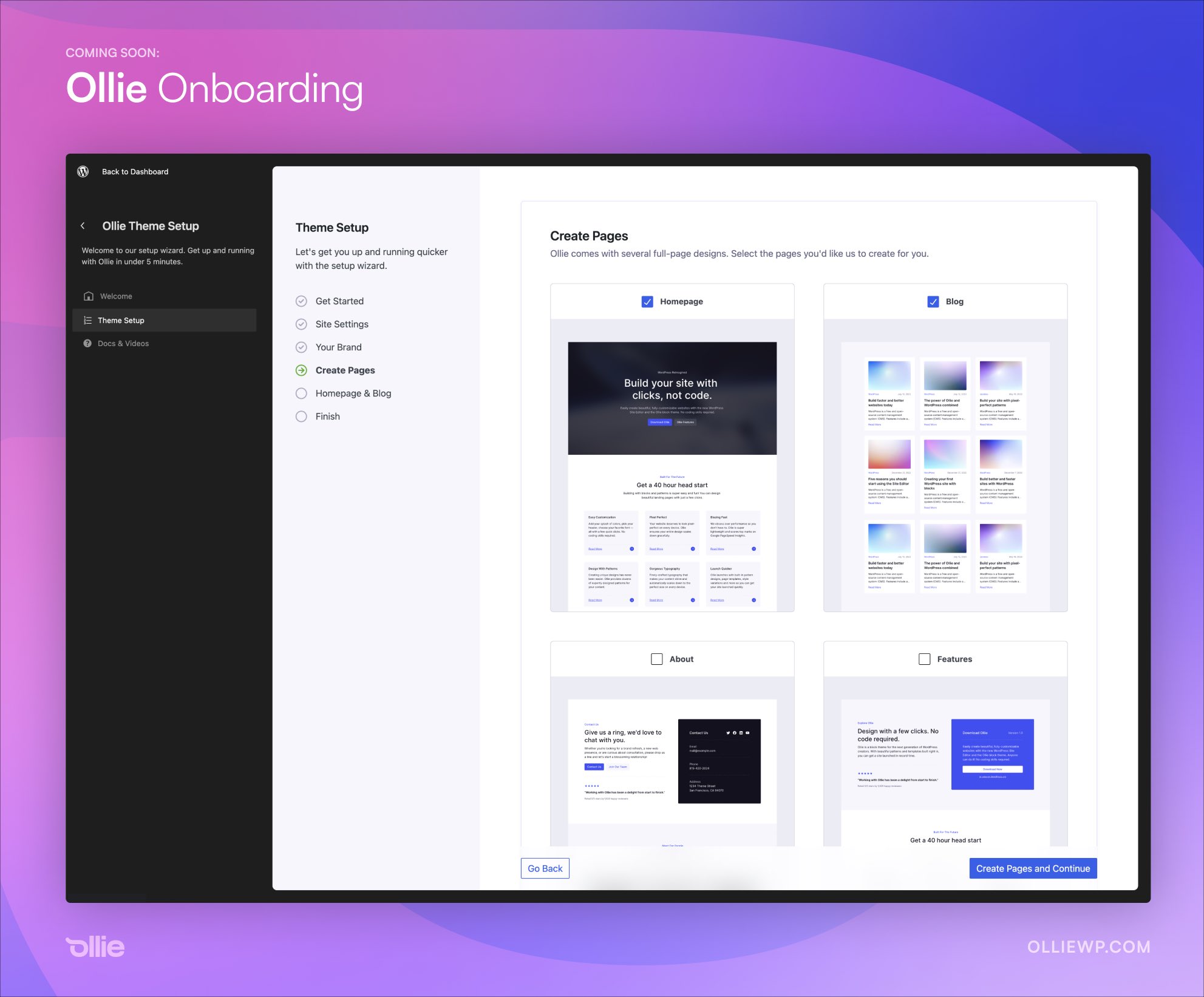


 Gutenberg 7.5 introduced a new block variations function in the editor. Photo credit:
  Gutenberg 7.4 introduced new color features and enhancements in the editor. Photo credit: