EDITS.WS

Tag: Product Guides

  • What is WordPress? Start Here (2023 Beginners Guide)

    Whether or not you’re in the website business, chances are high that you’ve heard of WordPress at some point. The reason is simple: it’s the most used platform to build websites. With 43% of the market share, it seems like every other website you come across is built with WordPress. In this post, we’ll explain what WordPress is, its features, the types of sites you can create with it, and its benefits. Let’s dive in.

    What is WordPress?

    what is WordPress

    WordPress is a content management system (CMS) that is built using PHP and MySQL. It is open-source, which means everyone can use it. It’s also constantly improving, which makes this a reliable option for building your website.

    How it Works

    WordPress mainly focuses on the backend of your website. It creates the foundation for you to build the front end of your website. These are the two important things needed to have a functional WordPress backend on your website:

    1. WordPress Core

    WordPress core consists of the files and code needed for the WordPress installation. Without WordPress core, your website won’t work. These need to be installed before anything else.

    2. Database

    There needs to be a database supporting your website as well. Luckily, most good hosting providers come with one-click WordPress installs. During this install, they automatically generate a database for your website. If you were to install WordPress on your website manually, you’d need to create the MySQL database as well.

    Who Created it

    WordPress is owned and operated by Automattic. It was created in 2003 by Matt Mullenweg and Mike Little. WordPress grew mainly because of its open-source nature. Because of the community of developers contributing to WordPress, it grew into the most-used platform for creating websites nowadays.

    Who Uses it

    As mentioned before, WordPress is open-source. This means anyone can use it and modify it to their convenience. This makes WordPress a go-to for building a wide variety of websites. Generally, WordPress is used mostly by:

    • Bloggers
    • Small business owners
    • Freelancers
    • Agencies

    Main Features

    We’ll get into the advantages of WordPress further down the post, but let’s highlight some key functionality of WordPress. Once WordPress is installed on your website, you’ll get access to the WordPress dashboard. This is what that looks like:

    WordPress dashboard

    You’ll navigate different parts of your website using the sidebar on the left.

    Built-in Page, Post, and Project Custom Post Types

    WordPress is very intuitive. It provides you with a streamlined structure you can use for your website. There are some recurring post types that you might need for your website. Pages is one of those. Think of it this way: whatever type of website you create, chances are high that you might need more than 1 page. Some websites have hundreds of pages on them.

    WP pages

    The need for multiple pages creates an organized way to create and organize them. That’s why there’s a custom post type assigned for pages. You can add a new page and manage the existing pages in this area. You can perform bulk actions, set parent pages, and more.

    The same counts for posts (particularly helpful if you run a blog or blog area on your website), and projects.

    WP posts

    Grouping these under a particular custom post type also helps you style them. You can create templates and assign them to a specific post type. Many premium themes, like Divi, provide you with a Theme Builder that allows you to do just that. You get to style every aspect of your website and basically create your own “theme,” in many cases, without needing a single line of code thanks to full site editing.

    Themes

    WordPress themes allow you to give your website a unique look. There are thousands of free themes that you can install directly through the WordPress dashboard, or you can install a premium theme, such as Divi. There are themes for nearly any type of website, including business, blogging, real estate, directories, and ecommerce websites.

    Plugins

    WordPress plugins allow you to add extra functionality to your website. Thousands of plugins are available in the WordPress repository or by third-party developers. Each one has a specific focus and depends on what type of site you need, but there are some essential plugins that any WordPress website owner can benefit from. These include plugins for SEO, backing up your website, caching, analytics, and adding social media.

    Dynamic Menus

    You can also create dynamic menus for your website, which is useful for learning management systems and membership sites where you want to restrict content at the user level. These can include menu items for logging in and out, ecommerce menu links, and more.

    Media Library

    WordPress comes with a media gallery where you can add images, audio and video files, pdfs, and more to use within your website. You can also edit media files and add metadata for titles, captions, alt tags, and more through the media gallery. If you want added functionality for your files, you can install one of these media gallery plugins.

    WordPress.org vs. WordPress.com

    When talking about WordPress, we usually refer to WordPress.org (unless specified otherwise). While these two come from the same source, they have some notable differences. We have a separate post that goes into detail on what the differences and similarities are.

    But in short, WordPress.com is entirely separate from WordPress.org. It is a hosting plan provided by the creators of WordPress.org, Automattic, and is a suitable solution for bloggers starting small. WordPress.com is much more limited than WordPress.org, with many more rules for ad placement, themes, plugins, and more.

    WP.com

    WordPress.org, however, refers to the WordPress open-source software you can install on any website you build, no matter what hosting provider you choose. You also own your website and its data, and you can easily transfer it to another host if you want to. It’s the most-used content management system (CMS) in the world and is highly customizable.

    What Kind of Websites Can You Build With WordPress?

    Whether you’re a beginner or not, you can build a wide range of websites using WordPress. Let’s go through some of the most popular options WordPress is used for.

    Business

    Divi Theme for Business

    Those embarking on a new business venture or needing a good platform to build on will love WordPress. As mentioned previously, it’s open source, so there are a ton of plugins and themes, like Divi, to help you stand out from the crowd. In addition to that, it’s SEO-friendly, has great support, and is mobile-friendly. Because of this, Google loves it. Using an SEO plugin like Rank Math, you can easily add keywords, metadata, and schema to help your business rank higher in the search engine ranking pages (SERPs).

    Ecommerce

    OceanWP theme

    WordPress is the way to go to sell products on your website. Thanks to plugins like WooCommerce, you can easily add physical or virtual products. Plugins, such as Dokan, will allow you to create a complete marketplace that enables users to create their own stores within your site. There are also ecommerce or WooCommerce-specific themes, like OceanWP that come with WooCommerce and a payment gateway pre-installed so you can get your site up in a few minutes.

    Blogs

    When WordPress was introduced in the early 2000s, it was primarily a blogging platform. Therefore, it’s an excellent platform for communicating your message. You can write and publish posts within minutes and easily share them on your social media platforms for greater exposure. Although there are other blogging platforms, such as Blogger and Medium, no other platform is as customizable.

    Portfolios

    portfolio theme

    Using WordPress to showcase your work is a great choice if you’re a photographer, graphic designer, or web developer. Out of the box, WP allows you to embed videos, image galleries, and other media, so creating a portfolio website is a breeze. You can use a generic WordPress theme to feature your work or a portfolio theme, such as Bridge, to give the world a glimpse into your creative body of work.

    Learning Management Systems (LMS)

    LearnDash

    In addition to more broad-spectrum websites, WordPress can create the most elaborate learning management systems. With LMS plugins such as LifterLMS or Learndash, you can create courses, quizzes, and lessons, add a paywall, and sell access to your content.

    LMS layout pack for Divi

    Alternatively, you can create an LMS using Divi, using one of our layout packs, and the Restrict Content Pro plugin.

    Membership Sites

    MemberPress plugin

    WordPress is a great choice if you’re looking to build a membership website. Through a membership plugin such as MemberPress, you can create membership levels, assign content to those levels, and make money.

    Forums

    CM Answer Q&A Plugin for WordPress

    Forums are excellent for building an online community of like-minded individuals. Using WordPress and a forum plugin like CM Answers, you can easily bring your forum to life in a few steps. CM Answer’s PayPal and Stripe integration allows you to monetize your forum, providing a good way to earn extra income.

    Why You Should Use WordPress

    There are many reasons why WordPress is the most popular tool to build a website. Let’s go through some of the most important ones.

    Free

    First of all, WordPress is free. It’s open-source, so you won’t have to pay a dime for it. To create a website that matches all your criteria, however, you’ll likely need to buy premium products that go with your WordPress website.

    So, yes, WordPress is free, but depending on your customization needs, there are hidden costs like themes and plugins. And let’s not forget hosting. Any website you want to share with the World Wide Web must be hosted somewhere. Some free hosting options exist, but you’ll most likely want something more fitting. If you’re looking for a suitable host, make sure to check out our top recommendations when it comes to WordPress hosting.

    Extensive Customization Options (themes, plugins, etc)

    As previously mentioned, WordPress comes with nearly unlimited customization options. WordPress is the most customizable CMS on the market, using themes, plugins, custom CSS, and HTML. Whether you’re a beginner or a seasoned web developer, you can use WP to build the website of your dreams.

    Easy to Use

    Another benefit of WP is its ease of use. For new users, there is a learning curve. That said, it doesn’t take long to learn WordPress. Once you get the hang of creating posts and pages, you’ll be amazed at how easy it is to build a website.

    Extensive documentation (WordPress Blogs, Tutorials, etc)

    While the platform does have a slight learning curve, there are countless tutorials and blogs out there (like ours) to help you along the way. This is especially true for our own theme, Divi, which has an extensive documentation library with more than 90 easy-to-follow tutorials that will help you become a WordPress guru in no time.

    SEO Friendly

    One of the reasons WP is so popular is because of its SEO-friendly nature. Out of the box, it comes with features that make Google happy. For example, WP alerts Google whenever you upload new content to your website. Because of this, WP websites are more likely to get a bump in the SERPs faster than a static HTML site would. Combining WP’s built-in features with a quality SEO plugin like AIOSEO allows you to add keywords, metadata, and rich snippets. You can also add a good SEO tool to track your keywords, analyze rankings, and look for opportunities to improve your search engine rankings.

    Speed

    WP is pretty speedy out of the box. That said, it will need some help if you use video, images, or other media content. Thankfully, there are excellent speed optimization plugins, such as WP Rocket, that will make your website a speed demon. Another way to ensure your site’s performance is by choosing a fast WordPress host.

    WordPress Hosting Options

    Choosing the right hosting is one of the most important decisions you’ll make for your website. With the right hosting, your website will be fast, secure, and stable. Without one, you risk losing visitors due to slow loading times. Not only that, you expose yourself to malware, bots, hackers, and downtime.

    What is WordPress Hosting?

    What is WordPress hosting

    WordPress hosting is a type of hosting that is optimized for WordPress. Generally, WP hosts use specific technology geared towards WP websites, which includes the necessary security, speed, and performance requirements. Most quality hosts include one-click WP installs, backups, free site migration, caching, and security features such as a web application firewall (WAF), DDoS protection, and malware detection.

    Types of WordPress Hosting

    Several types of hosting are available for WordPress, including shared, managed, cloud, and VPS. Small informational sites may be able to get away with shared hosting, but for those looking to build their business over time, it’s a good idea to choose a host that can grow with you, like SiteGround or Cloudways.

    Top 3 Hosts

    There are dozens of hosts available for WP, but we highly recommend a few.

    SiteGround

    SiteGround WordPress hosting

    SiteGround is our go-to for hosting. It’s optimized for WordPress, is based on Google Cloud, and has speed enhancements like caching, a free CDN, and custom PHP to improve page loading speed. You can’t go wrong with an affordable starting price of $14.99 monthly and features such as free migration, SSL, and business email. They also offer advanced security features, including daily backups, malware and DDoS protection, and a web application firewall.

    Pricing: Starting at $14.99 per month.

    Get SiteGround

    Pressable

    Pressable best WordPress hosting

    Founded by the same people who created WordPress, Pressable is the ultimate solution for managed hosting. They offer a 100% uptime guarantee, so you’ll never have to worry about your site going offline. Additional features include a proprietary CDN to enhance site speed and an automatic server failover that switches your site to a new server at the first sign of trouble. There’s also 24/7 support, daily performance monitoring, free backups, staging and SSL, and hack recovery assistance should you need it.

    Pricing: Starting at $25 per month.

    Get Pressable

    Cloudways

    Cloudways best WordPress hosting

    The last host on this list is well-suited for site owners who plan to grow their business over time. Based on a modular pricing structure, Cloudways allows you to choose your server’s location, the amount of ram and bandwidth you need, as well as storage. The interface does take some getting used to, but we have extensive tutorials to help you along the way. Even though it’s considered managed hosting, more advanced users will appreciate being able to configure their server settings themselves.

    Pricing: Starting at $12 per month.

    Get Cloudways

    Resources for Building a WordPress Website

    By now, it is probably clear that WordPress is a community effort. Many users use WordPress daily, and countless WordPress creators try to help those users build the website they need. Let’s look at some of the best WordPress themes and plugins you should check out if you’re new to WordPress.

    Best WordPress Themes

    Just like there are different types of websites, different themes fulfill the needs. Generally, you get the option between two types of themes:

    1. A theme specific to your niche
    2. A multi-purpose theme

    Especially the latter option is popular nowadays and usually goes hand in hand with a visual builder like Divi.

    Divi visual builder

    Depending on what type of theme you’re looking for, you can browse through our different posts with recommendations. Some of the most popular theme types are mentioned here:

    Best WordPress Plugins

    Every WordPress website has at least one plugin installed on it! But preferably, you’ll at least go for security and SEO plugins. There are other optional WordPress plugins, such as a YouTube plugin.

    You can view all the top recommended plugin posts here. Make sure you pick out the plugins you need. In this case, more isn’t better. You want to prioritize the speed of your website, so carefully curating the plugins you decide to use on your website is a must!

    Final Thoughts

    We hope this post has helped you understand what WordPress is. One thing is for sure: WordPress is here to stay, and with its easy learning curve, understanding at least the basics is a must. You can build any website you imagine with WordPress, and it’s open source! If you have any questions or suggestions, feel free to comment in the comment section below!

    Featured Image via Kris_Anfalova / Shutterstock.com

    The post What is WordPress? Start Here (2023 Beginners Guide) appeared first on Elegant Themes Blog.

  • How to Create a Landing Page in 2023 (Detailed Guide)

    Creating landing pages is a superpower. Master it, and your conversion rates will soar as visitors turn into customers right before your eyes. But like any leverageable skill, it requires practice and the right resources to harness its potential. This guide will provide a treasure trove of tools, tips, and strategies to create a landing page. We’ve got you covered, from design principles to copywriting tips and conversion optimization strategies. We’ll show you one of the quickest ways to build a landing page, using Divi, as well!

    What is a Landing Page?

    A landing page is a standalone web page that has everything on it that a visitor would need to take a specific action. It serves as the entry point for potential customers, guiding them towards taking a desired action, such as signing up for a newsletter, subscribing to a service, or purchasing a product.

    The magic of a landing page lies in its ability to focus on a single objective. Unlike regular website pages, which may have multiple links and distractions, a well-crafted landing page keeps the visitor’s attention fixed on the intended goal. Whether a product launch, a special offer, or an upcoming event, a carefully constructed landing page can significantly boost conversion rates.

    Do I Need a Landing Page?

    The answer is a resounding “Yes! You need to use landing pages if you have a clear offer.” Regardless of your business size or industry, a landing page can be a game-changer for your online success. Let’s explore why:

    1. Landing pages allow you to create highly targeted marketing campaigns tailored to specific audiences. By aligning your messaging with the needs and interests of your various target customers, you can increase the chances of converting them into valuable leads or loyal customers.
    2. Sending everyone to your homepage may not provide a clear path to action, leading to missed opportunities. A well-optimized landing page, on the other hand, provides a clear call-to-action (CTA), guiding users toward a specific next step you want them to take.
    3. Landing pages equipped with analytics tools like Google Analytics can provide invaluable data about visitor behavior. You can track conversion rates, understand what drives traffic to your page, and make data-driven decisions to optimize your campaigns further.

    Essential Elements of an Effective Landing Page

    To create a successful landing page that drives conversions, you must focus on specific elements that captivate your audience and guide them toward your desired action.

    Single Goal or Call to Action (CTA)

    The call to action (CTA) is the most essential element on a landing page. It drives all conversions and will be central to designing your whole page.

    When coming up with one, it should be prominent (color and weight) and action-oriented, guiding visitors toward your goal.

    Strong verbs and concise language, such as “Start Your Free Trial” or “Get Exclusive Access Now,” create urgency and encourage an immediate response. The same applies to all your copywriting, but you can go a long way with an undiluted CTA.

    Zapier One CTA Example Landing Page

    Zapier gives visitors multiple ways to do the same thing: create a free account.

    A well-crafted CTA eliminates confusion and makes it easy for visitors to understand what action they should take next, streamlining the conversion process. The above example from Zapier gives visitors who want to move forward one option—create an account and try it out.

    Attention Grabbing Headline and Hero Section

    The hero section and headline serve as your visitors’ first point of contact with your landing page. It will have a compelling yet concise headline that immediately grabs readers and tells them what they are in for. A well-crafted headline ignites curiosity and entices visitors to scroll through your landing page’s content. It should also pair well with your CTA.

    LearnDash Hero Section Landing Page

    Hero Section by LearnDash

    By conveying your unique value proposition clearly and succinctly, you communicate what sets your offering apart from the competition, encouraging visitors to stay and learn more about your product or service.

    You may also include a subheading with the headline, which can add more context and clarity to the headline. The headline and subheading should be paired with your most straightforward CTA.

    LearnDash’s CTA above is “Demo” and gives readers a chance to put the headline to the test. Is it the most powerful LMS? Let’s see the demo.

    Captivating Copywriting

    Copywriting is table stakes for a landing page because it aims to persuade readers.

    By crafting persuasive copy, you highlight your product or service’s key benefits, clarifying to potential customers why they should take action. Using language that instills confidence and urgency in your visitors creates a sense of excitement and motivation, driving them to explore further and ultimately convert.

    Copywriting Headline for Landing Page Example

    Copywriting Example by Brevo (SendinBlue)

    Copywriting Frameworks for Landing Pages

    Here are some copywriting frameworks that you can use on landing pages.

    1. Problem-Agitate-Solve (PAS): This classic copywriting formula identifies a problem, intensifies it, and finally presents a solution. It’s a powerful way to connect with your audience’s pain points and demonstrate how your product or service can help.
      Example: “Struggling to create eye-catching graphics? You’re not alone. Many businesses find it hard to stand out in a saturated marketplace. With our graphic design services, you can create stunning visuals that capture attention, and you don’t have to do anything.”
    2. Before-After-Bridge (BAB): This formula paints a picture of the reader’s world before and after using your product, then provides the ‘bridge’ or steps to get there.
      Example: “Before using our web design services, your website was just another drop in the digital ocean. But now, imagine a website that stands out, engages visitors and drives new revenue. We move you where you need to be with our expert web design services.”
    3. Features-Advantages-Benefits (FAB): This formula highlights your product’s features, advantages, and benefits to the customer.
      Example: “Our eCommerce store specializes in handmade leather boots (feature). Each pair is crafted with attention to detail, ensuring a unique, durable product that stands out (advantage). Step out in style and enjoy the comfort and longevity of our boots, making every purchase a worthwhile investment (benefit).”

    Copywriting goes beyond headlines and CTAs. It should be used with every word on a landing page. Your USPs, image captions, and bullet points also deserve the same level of detail.

    Engaging Visuals

    Visual content can convey mood, quality, experience, and value faster than the best headlines. By selecting visuals that resonate with your target audience and reinforce your brand message, you create an emotional connection and leave a lasting impression, increasing the likelihood of conversion.

    Ritz-Carlton Yacht Collection Engaging Visuals

    Example of Engaging Visuals from Ritz-Carlton Yacht Collection

    If possible, go beyond stock photographs to include people using your products or the general aesthetic of your brand and the benefits you hope to sell customers on. This is why so many commercials have storylines of happy, healthy people—they are trying to sell a brighter future through their offerings versus merely selling gadgets.

    If you are in dire need, try out an AI image generator to create images that will move the needle.

    Social Proof

    Building trust and credibility is crucial in converting potential customers. Showcase real customer testimonials, positive reviews, and success stories that demonstrate the value of your product or service. Include photos or names of satisfied customers to add authenticity and make the testimonials more relatable.

    Copy.ai Testimonials and Social Proof Example LP

    Copy.ai does an excellent job showing (1) social proof, (2)  reputation credentials, and (3) testimonials—all in one section.

    By any means necessary, ensure that what you are selling is up to snuff—and be sure to back up every claim.

    Minimal Lead Generation Form Fields

    Keep lead form fields minimal and easy to fill out. Long or complicated forms can deter potential leads, leading to lower conversion rates.

    CodeAcademy Landing Page Short Simple Lead Form

    Landing Page from CodeAcademy

    By requesting only essential information, you reduce friction and make it easier for visitors to provide the necessary details. Prioritizing simplicity in your form design enhances the user experience, making visitors more likely to complete the form and take the next step in the conversion process.

    This is often a hard choice in landing page design because we all think, “If I can just get a little more info, my future marketing efforts will be so much easier.” But it’s better not to sacrifice present conversion results for future email marketing and CRM ease. Build a strategy to collect new information throughout the funnel instead of all at once at the moment of truth for your visitors.

    We recommend using Divi Forms or one of WordPress’s best lead-generation plugins.

    5 Steps to Building a Landing Page

    Depending on what platforms you use, building a functioning landing page can happen in many different ways. No matter what, if you keep the LP elements mentioned above in mind, you can create a solid landing page.

    Here’s the high-level view of creating a landing page.

    1. Choose a Landing Page Builder

    Choosing the right landing page builder will save you a lot of headaches. Many think building a landing page from scratch requires technical expertise and significant time investment. All that is needed is a platform that can handle the unique needs of a landing page. Tools like the Divi theme for WordPress, WPFunnels, or ClickFunnels all bring to the table essential LP tools.

    The top features to look for in a landing page builder are a drag-and-drop visual builder, customizable templates, A/B testing, integration with email marketing tools, and advanced analytics. The best Landing Page plugins can help with this, though you don’t need to use WordPress to create a landing page.

    Here’s why many think Divi is perfect for any landing page build:

    2. Build a Landing Page Using a Template

    Most reputable landing page builders will offer templates to kickstart your design process. Divi provides a wide range of professionally designed landing page templates to kickstart your creative process. Within the Divi theme, you can access these templates at no additional cost. Templates span industries and page types to create a whole site with pre-made templates, not just one landing page.

    Here’s how to use a layout pack using Divi:

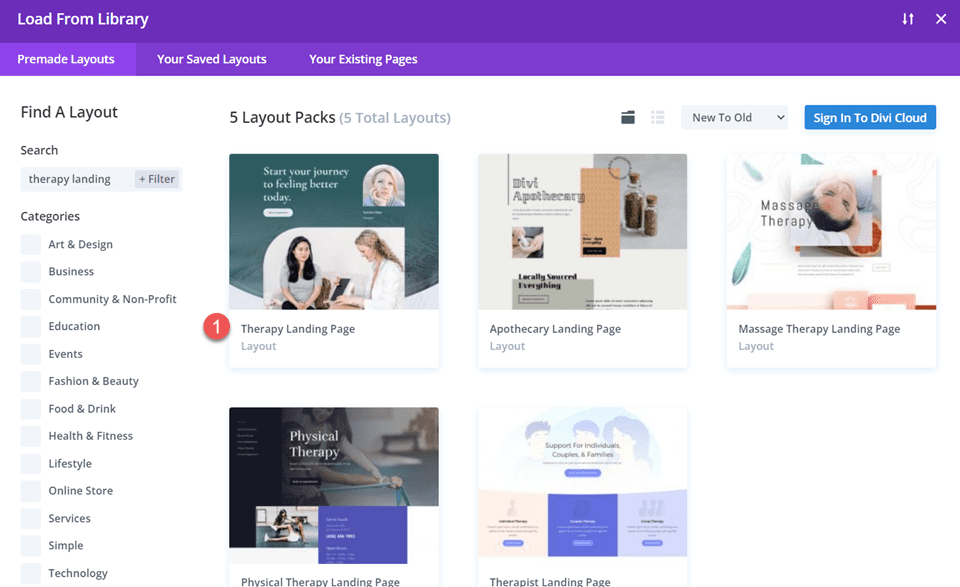
    Once in the Divi Builder, click the purple “+” button to add a new section. In the popup, choose “Choose a Premade Layout.” Here, you’ll find a collection of pre-designed templates available to you. Browse the thousands of pre-built pages to see what sparks something for you.

    Divi Include Multiple Email Addresses In Contact Form Module Find Layout

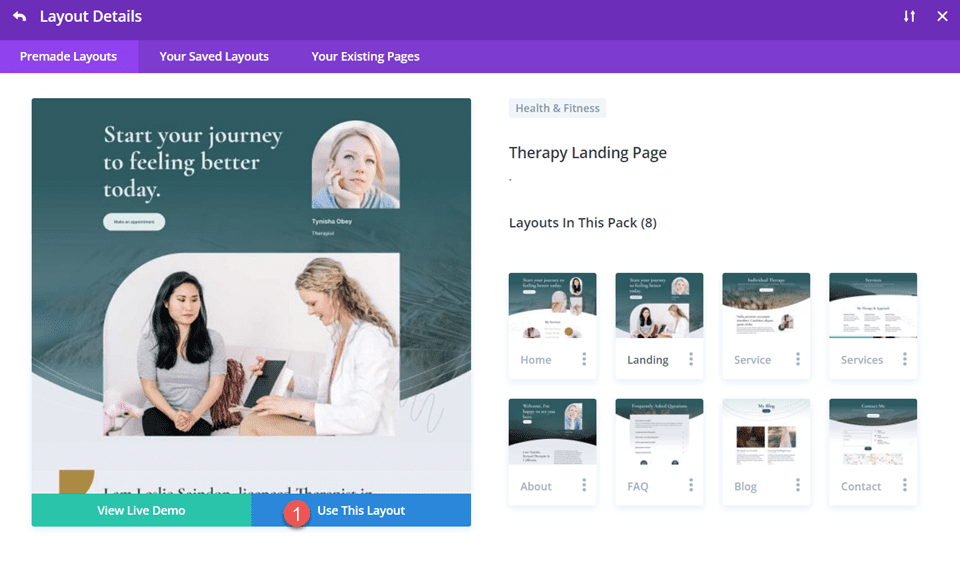
    You can preview the layout by clicking into the pack, selecting the page, and clicking “View Live Demo.” When you’ve found one you like, click “Use this Template” to load it to your page.

    Divi Include Multiple Email Addresses In Contact Form Module Use Layout

    Our Marketing layout pack is ideal for creative agencies. The landing page layout has everything you need to quickly set up a landing page with all the essential elements (plus, it already comes with superb illustrations for you to use).

    This layout and many others include an easy-to-read hero section with room for all the needed elements. It has CTA buttons throughout the page and placeholder text to make your case with solid copywriting. It has beautiful illustrations or places to place your images and videos. Lastly, the “How We Work” section can be easily adapted to fit case studies or testimonials.

    If you want more than the 2000+ free templates, you can explore the Landing Plus collection (and others) in the Divi marketplace.

    3. Set Up Lead Generation

    The lead generation form is one of the most crucial elements of a successful landing page. This form is the gateway to capturing valuable information from your visitors, turning them into potential leads or customers.

    Divi’s contact form offers a wide range of customization options, allowing you to create forms that match your brand and cater to your needs. It is included with the theme at no extra cost.

    You can also consider using WordPress lead-generation plugins if you want something else. These plugins offer powerful features to boost your lead-capturing efforts and seamlessly integrate with your email marketing and CRM services.

    For instance, you can explore options like OptinMonster or Thrive Leads, as mentioned in the best WordPress lead generation plugins article.

    Note that the goal of your landing pages may vary based on your specific business needs. While some businesses aim to gather contact information for potential follow-ups, others might focus on product sign-ups or demo requests. This is particularly true if they offer software-as-a-service (SaaS) products.

    4. Boost Landing Page SEO

    Landing pages are excellent when traffic is sent directly from email marketing or social/ad campaigns. However, there is a lot of opportunity to create landing pages that perform well in search results pages (SERPs) and potentially convert top-of-funnel traffic (TOFU).

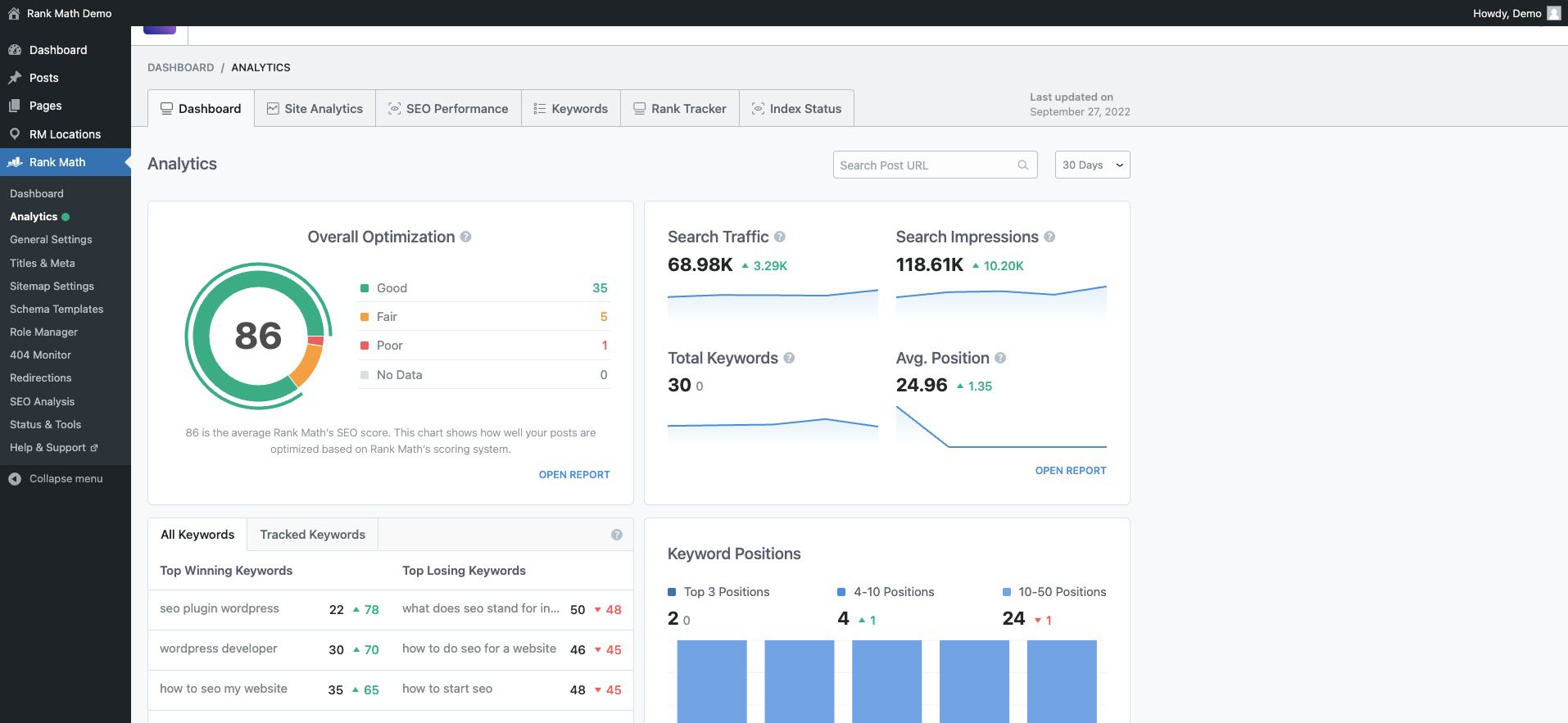
    With WordPress, SEO is easy. All it takes is one of the best SEO plugins (there are many). One of our favorites is Rank Math.

    It makes it easy to see your whole site’s SEO readiness with a great dashboard. Rank Math gives vital insights and allows effortless drill-down when you see something you want more detail on.

    Rank Math SEO Dashboard

    It also makes optimization of every page easy. It scores your page and its content and compares it against the competition. Rank Math then tells you what needs to be changed and tweaked to be in a good position to rank.

    Rank Math integration with Divi

    5. Improve Landing Page Performance

    There is no shortage of tools that can help you analyze the performance of your landing pages. Sometimes, it comes down to choosing a few tools to get a clear picture.

    You can consider some of these tools for analytics and analysis of your landing page performance:

    While you should use an analytics platform and could consider a heatmapping tool, having conversion-focused tools built into your landing page builder is an excellent addition. It means that you save some money and get the tools built in.

    Divi’s marketing tools offer valuable insights and features to enhance your landing page’s performance. You can conduct A/B tests to compare page variations against a set goal. This lets you identify which design elements or content variations you’ve created resonate better with your visitors.


    Additionally, it would be best to leverage conditional display logic to display personalized experiences based on user interactions. (See the explainer video for condition options).

    Divi Conditional Display Example

    These tools empower you to make data-based decisions and continuously improve your landing page’s effectiveness. Best of all, they are included with the Divi theme and are as intuitive to use as the rest of the visual builder.

    Additional Tips for Creating Good Landing Pages

    Optimize Your Page Load Speed

    A fast-loading landing page is crucial for enhancing user experience and improving conversion rates. To achieve this, analyze your page’s speed using tools like Google PageSpeed Insights or GTmetrix. Look for ways to optimize images, enable browser caching, and consider using a Content Delivery Network (CDN) to distribute content closer to your users for faster loading times. Take a look at all our recommended optimization plugins for WordPress. Additionally, ensure your hosting provider offers sufficient resources to handle traffic efficiently.

    Learn Copywriting or Employ AI Writers

    No one wants to be pitched or sold to. But copywriting disarms visitors’ and gets them to see what would be of interest to them. Beyond hooking visitors, copywriting also conveys your value proposition and sparks curiosity about how your product can help them with their problems.

    Copywriting is a deep well and might as well border on being an art. That makes it hard yet worthwhile to learn. Online learning platforms like Udemy have tons of courses on copywriting. If you write a lot, you should brush up on this and SEO copywriting.

    There is also a place for AI writers that specialize in marketing and sales copy. They certainly can create content faster and help you fill a knowledge gap if you have a long way to go in your copywriting.

    F-shaped Content/Page Structure:

    Organizing your content following the F-shaped reading pattern aligns with users’ natural reading behavior, ensuring that essential information, headlines, and critical points are noticed quickly. Placing important details along the top and left side of the page capitalizes on users’ tendency to skim through content, making it more likely they will absorb crucial information without feeling overwhelmed.


    F-Shaped Landing Page Design Structure Example

    Example Landing Page w/ F Pattern by SEOPress

    The F-Pattern for landing pages is backed up by a lot of heatmap data that shows our eyes start at the top left and work their way to the right and down, just like if you were reading a book. The only thing is that as we move down the page, we start to skim more, and thus, we go to the right less and less.

    Create a Sense of Urgency

    Incorporate time-sensitive elements on your landing page to create a sense of urgency and prompt immediate action. Limited-time offers, countdown timers, or flash sales can encourage visitors to act quickly and take advantage of your offer before it expires. This can be done with the conditional display referenced above. Watch how it transforms your conversion experience.

    Mobile-Optimize Your Landing Page

    Ensure your landing page is fully responsive and mobile-friendly to cater to users accessing your page from different devices. Test your page on various mobile devices and screen sizes to verify responsiveness and user-friendliness. Utilize responsive design principles to adapt the layout seamlessly for mobile users.

    Maintain Consistency with Ads and Email Marketing

    Consistency in messaging and design between your ads, email marketing, and landing pages reinforces your brand identity and builds recognition. Ensure the tone, color scheme, and key messages align seamlessly across all touchpoints. This cohesion enhances brand trust and fosters a sense of familiarity with your offerings.

    Conclusion

    Now is the time to unleash your creativity and bring your vision to life. So take the first step and start crafting your compelling landing page. Success is just a few minutes away, and the possibilities are endless with Divi as a trusted partner.

    Whether you opt for pre-made templates to get started quickly or embrace the creative freedom of the visual builder, Divi offers the tools you need to craft captivating and high-converting landing pages.

    Remember, a compelling headline, engaging visuals, a clear Call to Action (CTA), and captivating copywriting are the building blocks of an effective landing page. By incorporating these elements strategically, you’ll capture your audience’s attention and drive them toward your desired action.

    Looking for more resources? Checkout our top-notch guides for building powerful websites:

    1. How to Build an Online Store
    2. How to Build a Membership Site with Divi
    3. Creating a Learning Management (LMS) Website with Divi

    Let us know your progress while building out your landing pages.


    Feature Image by Overearth / shutterstock.com

    The post How to Create a Landing Page in 2023 (Detailed Guide) appeared first on Elegant Themes Blog.

  • How to Add Live Chat to Your WordPress Website in 2023

    Adding live chat functionality to your WordPress website is easy and quite beneficial. Live chat has evolved considerably in recent years by incorporating powerful communication and automation features similar to popular AI chatbots. Whether you’re looking to boost sales conversions or integrate AI into your customer service process, using a live chat plugin or software on your WordPress site can be crucial to success. In this guide, we’ll show you the benefits of live chat, walk through how to add live chat to your website and look at the options available with live chat and WordPress.

    Benefits of Using a WordPress Live Chat Feature on Your Website

    Many rewards come with using live chat functionality on your website. Here are a few examples of what they can allow you to do:

    Interact With Your Customers in Real-time – As the name implies, live chat takes place in real-time. Therefore, you can meet the needs of customers and visitors to your website as they come to your site. Your storefront may have set hours, and your phone line limited hours, but you can serve your customers at any time when they interact with your live chat.

    Provide High-Quality 24/7 Support to Visitors to Your Website – If someone lands on your website after hours, your live chat can still service them. You can give your customers the help they need without getting out of bed through AI and automated responses.

    Increase Conversions and Add Leads to Your Sales Funnel – Many live chat plugins allow you to add forms and collect information about customers who use the chat. To nurture later, you can retarget and add these customers’ information to your CRM, mailing list, or sales funnel.

    Powerful AI Features for Various Automated Solutions – With the advancement of AI, some live chat solutions provide much deeper functionality and can help you create automated human-like conversations for a better customer experience.

    I’m sure you get to experience other benefits of live chat first-hand once you add it to your site. On that note, let’s get to it!

    How to Add Live Chat to Your WordPress Website

    Now that we’ve seen some of the benefits of live chat let’s look at how we can bring this feature to your WordPress website.

    1. Choose a Live Chat Platform

    If you’re unsure which platform to use, check out our list of the best live chat plugins. There, you’ll find several plugins that could meet your specific needs. We’ll use the Tidio platform for this walkthrough, as it has a good mixture of features, support, and positive reviews.

    2. Create a Tidio account

    We must create an account before we add our Tidio live chat to our website. Visit Tidio and create your account by entering your email, website, and password.

    Once you have created and verified your account, you’ll see the Tidio dashboard.

    The Tidio dashboard

    Now, we’ll move to our WordPress site to install and connect our Tidio account to our website.

    3. Install Tidio Plugin

    To install the Tidio plugin, hover over the Plugins menu item. Then, click Add New. Search Tidio in the plugin search field. Click Install Now next to the Tidio card.

    Install the Tidio plugin

    Afterward, click Activate to complete the installation of the plugin.

    Activate the Tidio plugin

    Now that our plugin is installed, we can connect our website to our Tidio account.

    Tidio added to your WordPress website

    Notice we have a new menu item just for accessing our Tidio settings.

    4. Add API to WordPress website.

    From your WordPress menu, click Tidio. Then, click on the Login link under the signup form.

    Login to your Tidio account

    Enter your Tidio account credentials and click Login.

    Login to your Tidio account

    Once logged into your account, you can start your chat widget’s customization process.

    5. Create a New Chat Widget

    To begin, you’ll need to create a new project in Tidio. Click on the Create One text link and give your new project a name.

    Create new Tidio project

    After creating and naming your new project, you’ll have the opportunity to customize your chat widget.

    Customize your chat widget

    You can assign a name to your chat agent and choose a solid or gradient color scheme. Additionally, you can set your chat language and upload a custom avatar to your chat widget.

    My personalized chat widget

    6. Adjust Chat Settings

    Now, click on the blue Continue button. You’ll now be faced with a short questionnaire. This will help Tidio know how to personalize your experience as you maneuver through the platform.

    Personalize your Tidio experience

    Select the focus, add the number of agents, select your industry, and finally, the number of inquiries your site gets. Next, you’ll want to set up your welcome message. You can customize your message to say something that is on brand with your website by clicking the Customize this message text link.

    My customized welcome message with Tidio

    After setting your welcome message, click on the blue Install Widget button.

    Customize your initial message in Tidio

    You’ll be redirected to your WordPress website once you click the Install Widget button.

    Congrats on installing Tidio

    7. Test Live Chat Widget

    As with WordPress, testing the new feature you’ve added to your website is a good practice. To do this, navigate to your homepage and see if the Tidio chat widget appears on your homepage.

    Test your Tidio chat widget

    Try sending yourself a message to see what that process looks like for your guests.

    Testing your chat widget

    Now that we know our chat is installed and working on our WordPress website let’s look at some advanced settings and features we can implement with Tidio.

    Additional Settings and Personalizations

    With your new live chat installed, responding to visitors on your site is very simple. As you log in to your Tidio dashboard, you’ll see the mailbox icon in the top right. This is where you can see visitors on your site in real-time and respond to their messages. You can also see your chats on social networks should you connect them to your Tidio account.

    Accessing the Tidio mailbox

    Personalize Templates from the Tidio Chat Template Library

    Tidio comes packed with templates that you can use to increase sales, generate leads, and solve your customers’ problems via live chat. To access these templates, click on the robot icon from the left-hand menu. Here, you can customize your automated responses for a smoother WordPress live chat experience for your customers.

    Live chat flow templates

    Canned Responses and Notifications

    You can access more complex features and settings of Tidio by clicking the gear icon at the bottom of the left-hand menu. Your frequently asked questions can be answered with custom canned responses. Under the General heading, click on the Canned Responses menu link. This is where you can edit and add new preset answers to your customers frequently asked questions. Here, you can refine your live chat process by having a library of premade responses that can solve your users’ questions on the fly.

    Set custom responses for your agents in Tidio

    Notifications can also be customized when using Tidio. You can choose how you’d like to be notified when a visitor lands on your website (email or web notification), and you can also determine what actions trigger notifications and the web notification sound.

    Enable notifications for various settings across your chat widget

    Build an AI-Powered Chatbot

    AI chatbots can help make customer service a breeze, and Tidio is on the front lines of adding AI to the WordPress live chat sphere. With a Tidio+ plan, you can implement their AI chatbot Lyro, which can help you create innovative chat experiences for visitors to your website.

    Tidio's AI offering Lyro

    Establish Your Visual Branding

    Further customization options for your widget are also available within Tidio’s advanced settings. Change your widget’s screen position, appearance, and more. Additionally, you can add custom branding to your widget, like your brand’s colors and logo, to mesh your chat widget with your WordPress website’s theme.

    Advanced Tidio widget branding

    Set Your Live Chat’s Hours of Operation

    While your live chat allows for 24/7 contact with your customers, you may want to set hours of operation for your chat widget. Tidio enables you to customize your operating hours individually for each day of the week. Additionally, you can customize your away message or attach a lead form that appears when a visitor encounters your site after hours.

    Set operating hours for your live chat

    That’s it. Now, your site is equipped with live chat!

    Other Live Chat Options for Your WordPress Website

    Tidio is a solid WordPress live chat plugin. However, you may need a different set of features that it may not cover. Here are some other WordPress live chat plugins and solutions that may be a better fit for your needs:

    • HubSpot: The ultimate marketing platform, Hubspot has live chat functionality that is heavily integrated with other parts of its feature-rich CRM solution.
    • JivoChat: An all-in-one business messenger plugin that brings together live chat, phone, email, and social media chatting platforms. Additionally, you can make and receive phone calls through its live chat widget.
    • LiveChat: With integrations to eCommerce solutions like Shopify, WooCommerce, and BigCommerce, if you are running an eCommerce storefront, this is your live chat solution. 
    • Live Chat by Formilla: File sharing, real-time monitoring, and multilingual capabilities are just a few features that you can find with this live chat plugin.
    • tawk.to Live Chat: Managing multiple websites, agents, and chats is where this chat plugin shines. Use your computer or mobile devices to stay connected to your website visitors.
    • Chatra: Live chat, chatbots, email & social messaging can all be handled effectively with Chatra, a popular live chat solution that works with WordPress and as a standalone platform. 

    For more, check out the best live chat software options out there.

    Conclusion

    Live chat adds a powerful interactive feature to your WordPress website. Giving your customers a way to connect with you anytime is a great way to nurture client relationships and increase conversions. With the power of AI, the options are endless in the many ways you can customize your WordPress live chat process. Tidio is a great option to power live chat on your WordPress website. From AI to customizable automated messages, easy widget styling, and email marketing tools, Tidio is a solid choice to bring live chat to your WordPress website. Live chat functionality has come a long way. Now, you have a large selection of live chat tools that you can bring to your website. Have you added live chat to your website? What platform did you use? Let us know in the comments section below!

    The post How to Add Live Chat to Your WordPress Website in 2023 appeared first on Elegant Themes Blog.