EDITS.WS

Tag: sharing

  • Automatically share content to Instagram & Mastodon with Jetpack Social

    Dedicating time to publish content on all your social media platforms can be tedious and time-consuming. That’s why Jetpack has been working hard to create robust tools to help you automatically share more content across more platforms, with less effort. Now you can connect your Instagram Business & Mastodon accounts to Jetpack Social, and your content will be shared the moment you hit publish.

    Jetpack Social now allows you to auto-share your WordPress content to Instagram, Mastodon, Facebook,
    LinkedIn, and Tumblr!
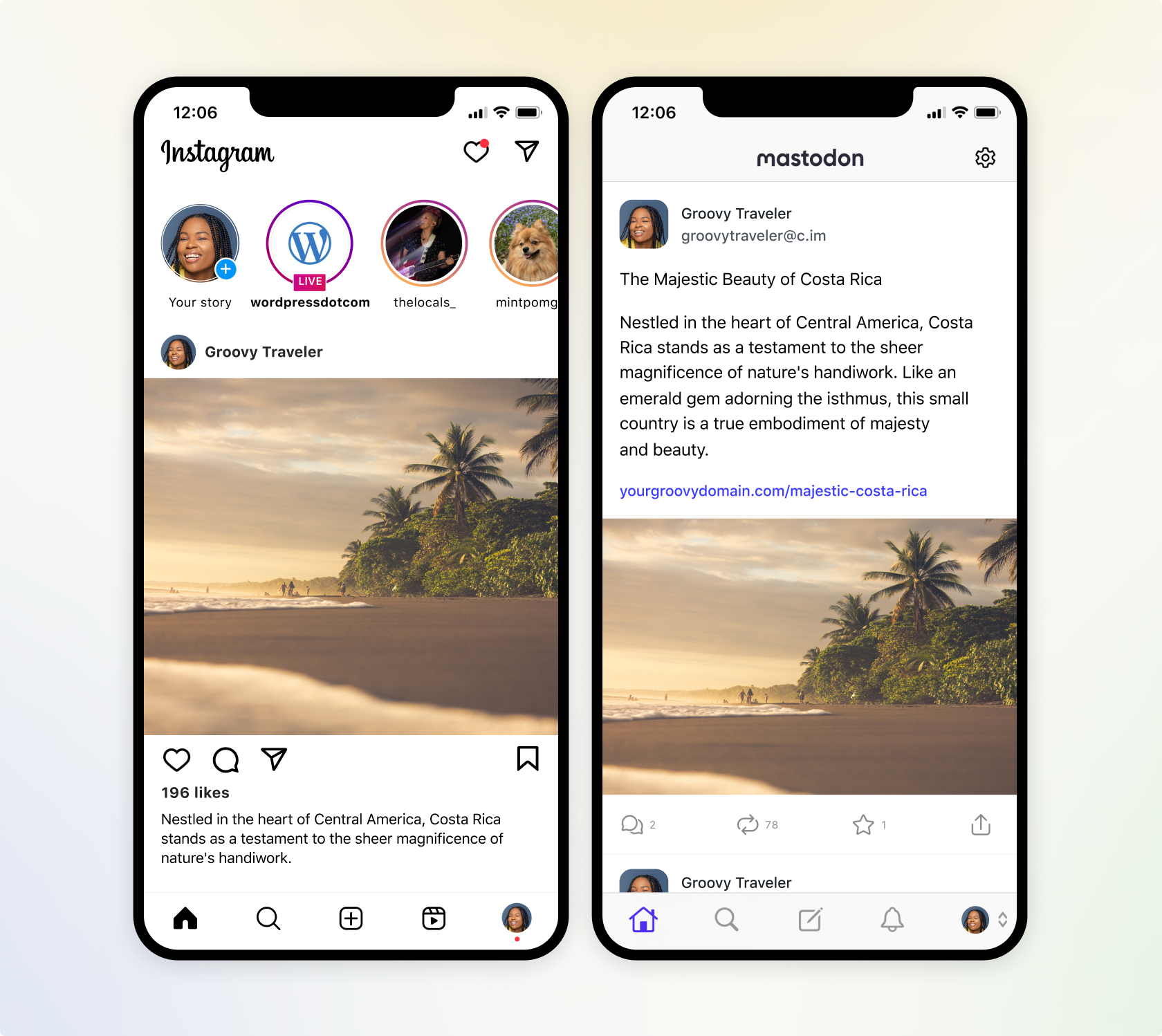
    A screenshot of how Jetpack Social will send content to Instagram and Mastodon.

    Instantly share to Instagram

    Instagram has a greater reach than any other social media platform and it is now available within Jetpack Social. Engage your target audience by sharing your post featured image to your Instagram Business account, directly from the WordPress editor. Learn how to connect Jetpack to Instagram.

    We’re also working on adding automatic video sharing capability, which will allow you to share the videos you’ve uploaded to your WordPress site, directly to Instagram Video Reels. That premium feature is coming soon to Jetpack Social Advanced.

    Multiply your reach with Mastodon

    Now you can also extend your influence to the newly popular social platform, Mastodon. Similar to Twitter, Mastodon allows you to share media and text content. Learn how to connect Jetpack to Mastodon.

    Mastodon is part of a larger ecosystem known as the “Fediverse.” This interconnected network allows users on Mastodon to interact with users on other compatible platforms, such as PixelFed (for image sharing). This allows you to connect with a broader audience.

    A screenshot of Jetpack Social displaying social previews on each social media network it supports

    Flexibility with every post

    • Select where you share with every post: Easily toggle which social media networks you want your content to automatically go to, with every WordPress post. Got some photos that you want to share on Instagram, but not LinkedIn? No problem.
    • Preview before you publish: We’ve improved the social preview tool, which allows you to see how your post will appear on all the social platforms you’re connected to, without ever leaving the WordPress editor.
    • Control your message: If you have long-form content, you can easily overwrite the default message and create your own custom messages to be shared amongst your social networks, alongside your media. This is also great for social media platforms that restrict character counts.

    Drive more engagement with Jetpack Social Advanced

    • Save time creating images with our social image generator: Social image generator automatically creates a composite image from your blog title and featured image, or create your own custom image in a few clicks. Learn more about our Social Image Generator.
    • Automate sharing with style: Ditch the default featured image, and make your auto-shared posts truly one-of-a-kind by selecting your own images or videos and crafting engaging custom messages.
    • Unlimited shares: With Jetpack Social Advanced, you can auto share unlimited content to your favorite social networks and engage your followers without limits.
  • Jetpack 12.3 – Introducing AI-Assisted Content Editing and More

    Since the launch of the Jetpack AI Assistant, we’ve been listening closely to your feedback, and we’re excited to announce that now, in addition to creating fresh content, you can use the AI Assistant to revise and enhance your existing blocks in the WordPress Editor. This release also introduces the new Tock Block for easy on-site bookings, alongside numerous enhancements and bug fixes.

    Enhance your editing experience with the Jetpack AI Assistant

    The AI Assistant is designed to make your content editing process more efficient and tailored to your needs. Let’s say you have a paragraph or a block of content that you think could be more engaging or could better represent your ideas. Now, with a simple click, Jetpack AI Assistant can step in and help you to enhance that content, all within the familiar environment of the WordPress Editor.

    The introduction of this new feature comes with several benefits:

    • Efficient Content Refinement: Instead of starting from scratch, let the AI Assistant help you improve your existing content, saving you both time and effort.
    • Quality Enhancement: AI-assisted editing can help fine-tune the language and tone of your content, making it more engaging for your readers.
    • Multiple Block Editing: The updated Jetpack AI is designed to work when you select more than one paragraph, making it much more convenient to edit larger sections of your content in one go.

    Are you ready to explore the AI-powered content editing feature? Here’s what you need to do:

    1. Update your Jetpack to the latest version.
    2. Head to the WordPress Editor within your wp-admin.
    3. Select the paragraph or block you want to edit and find the AI Assistant logo in the “tools” group.

    Seamless bookings now a click away: Introducing the new Tock Block

    Introducing the all-new Tock Block powered by Jetpack! Redefine the way your customers book reservations with your business. Utilizing the lightweight and efficient Tock, this block provides an intuitive, in-line booking experience directly from your website. With a simple click, your customers can access a neatly organized calendar and booking form.

    And More

    This release also includes several new features and improvements:

    A big thank you to everyone who contributed to this release:

    Adnan Haque, André Kallehauge, Andrei Demian, Andrés Blanco, Anna McPhee, Brad Jorsch, Brandon Kraft, Carlos Garcia, Caroline Moore, Clemen, Damián Suárez, Dognose, Donncha Ó Caoimh, Douglas Henri, Dylan Munson, Gergely Márk Juhász, Greg Fogelberg, Igor Zinovyev, Ivan Ottinger, Jason Moon, Jasper Kang, Jeremy Herve, John Caruso, Jonny Harris, Karen Attfield, Luiz Kowalski, MILLER/F, Manzoor Wani, Mark Biek, Miguel Lezama, Miguel Torres, Nate Weller, Osk, Panos Kountanis, Paul Bunkham, Paulo Marcos Trentin, Peter Petrov, Renato Augusto Gama dos Santos, Richard Ortiz, Romario Raffington, Samiff, Sean Fisher, Sergey Mitroshin, Sérgio Gomes, Tim Broddin, bindlegirl, gogdzl, nunyvega, ouikhuan, tbradsha, thingalon, valterlorran

  • Create custom visuals for your social media with the Jetpack Social Image Generator

    Traditionally, creating unique and engaging imagery for social media platforms often required a basic understanding of image editing tools. Adding text to images, changing photo orientation, and tinkering with different visual styles for each social network was tedious and frustrating. But not anymore.

    With Jetpack Social Advanced, you can overlay custom text onto your images and choose from a variety of styles to increase engagement on your social posts. Most importantly, you’ll save time by doing it all within the WordPress editor.

    Choose your image & add custom text

    Jetpack Social Advanced gives you the freedom to create social images with custom text applied to them. This is handy if you often have long blog post titles for SEO purposes, but prefer to use specific calls-to-action with your social media post images.

    A screenshot of the new Jetpack Social Image Generator working within the new WordPress Editor

    Sometimes the featured image of your blog post may not be the best fit to share on social platforms. With the Jetpack Social Image Generator, you can choose to share your featured image, select a different image from your media library, upload a new image, or select “no image” if you just want to create a text-based image for your socials.

    Pick a template to make it your own

    A screenshot of a user choosing a visual template to share on their social media accounts

    Tie everything together by exploring creative templates with various fonts and text placement around your image. Choose from full width images with text overlays or images with text aligned to either side.

    Preview before you share

    A screenshot of the social preview tool within Jetpack Social

    Finally, use the built-in Jetpack social preview tool to see exactly how your image will look on each of your connected social media platforms. Publish right away or schedule your posts to be shared when your audience is most active on social media.

    With Jetpack Social, it’s never been easier to share your WordPress content to social media.

  • An Update on Jetpack Social and Twitter

    On April 3rd, Twitter suspended our access to the Twitter API without warning. As a result of this, Jetpack Social connections to Twitter are currently not working, and it is not possible to share a post on Twitter. Other Jetpack functionalities that depend on Twitter are also affected.

    Any Jetpack Social connections to other platforms (Tumblr, Facebook, and LinkedIn) are unaffected and can be used as usual.

    We want you to know that we’re on top of this and working hard to find a solution. We’ll keep this post updated as we get more information.

    We’re sorry for any inconvenience this may have caused. Thanks for being patient with us as we work to get everything back up and running.

  • Jetpack Social, the newest and easiest way to share your WordPress content to Facebook, Twitter, LinkedIn, and Tumblr

    Social media has changed a lot in the last ten years since Jetpack launched its social sharing tools. Remember 2012? Pinterest exploded onto the scene, MySpace relaunched, Facebook went public, and also bought a little photo-sharing network called Instagram.

    Today, social networks have long been established as a pillar of any marketing or communication plan. In fact, Generation Z may be more likely to find answers through social media instead of Googling. You already know you need to get your message on social media to reach your audience where they hang out. But who has the time to manage that, along with everything else? That’s why we created Jetpack Social.

    Write once, post everywhere

    You’re already sharing posts, pages, and products on your website. Jetpack Social goes one step further and shares your content directly from the WordPress Editor to your social media channels. Whether your fans are on Facebook, Twitter, LinkedIn, or Tumblr, you can easily reach them with a few clicks.

    Manage your social connections and automatically share your posts to social networks

    You can set a featured image and update the message for your social channels through the simple interface. You’ll get a preview to see what it looks like, so you can be confident before you publish.

    Finish writing your posts on your time. Schedule them to go live when it’s convenient for you and we’ll take care of the rest. And coming in November, you can re-share your content, which is excellent for those evergreen posts you want to remind your readers about.

    Over 1 million posts are shared every day with Jetpack Social. If you haven’t tried it yet, find out what you’ve been missing.

    Free for casual users

    All of Jetpack Social’s features are free for up to 30 shares per month. If you share a post on Twitter, that’s one share. Share it on Twitter and Facebook, that’s two shares. That’s one post per day, for free!

    If you’re a power user, our basic plan is best for you. Get up to 1,000 shares and hit that re-share button until your heart’s content. To celebrate the launch of Jetpack Social, we have a $1 introductory offer for the first month, and after that, it’s $10 per month.

    If you’re already using Jetpack social media tools

    Thanks for using Jetpack! We’re happy that our sharing feature saved people so much time over the last ten years. And now we’re excited to give Jetpack Social the time it deserves. We have a new team focusing on how to make the product even better so we can help you get your message out and grow your business.

    All the features you’re used to are still free, and we moved social previews and re-sharing out from the paid plans to the free plan. Be sure to give those a try!

    If you want to share your content more than 30 times per month, you’ll need to upgrade to the Social Basic plan. The first month is just $1, and will be $10 monthly after that.

    Try Jetpack Social today.