Confused about which website platform to learn and use for your personal and business projects? Both WordPress and Showit offer competitive features, but they are quite different from each other.
WordPress is a popular CMS that holds up an impressive one-third of the internet. Showit, a drag-and-drop website builder, is a smaller player that has currently garnered over 40,000 customer websites in the last 13 years. Both are unique platforms that provide valuable solutions for website creators.
Let’s compare how these platforms get a website up and running so you can see which one is right for you.
WordPress vs. Showit Website Builder: Who are They For?
WordPress has been and will be a website platform for all types of website owners. Showit is built to be easy to use for those new to website building or who prefer a purely visual, drag-and-drop editing environment from the moment they open an account.
While the technology people prefer to use (think Mac vs. PC) is largely up to what works for each individual, it does seem like Showit is built for a particular type of customer. These customers tend to need less true customization built into their websites but want an unbridled page design process. And the fact that Showit has a large customer base that appreciates the product is proof enough that they deliver.
It is worth acknowledging that Showit utilizes WordPress as its blogging platform. So even with Showit websites, if they have a blog, it is built on WordPress.
With that said, Showit promotes itself to photographers and small businesses. WordPress users create sites ranging from personal blogs to e-commerce powerhouses.
WordPress vs. Showit: Ease of Use
Both website-building platforms try to make aspects of building a website dead simple. WordPress makes complex customization as simple as possible. Showit created a platform for users to build websites the way they would a scrapbook or collage. Both approaches solve interesting problems for website creators of all skill levels and experiences.
WordPress’ Ease of Use
WordPress requires a hosting environment of some kind to get started. This can be accomplished with a solution as easy as using WordPress.com or as custom and reliable as using WordPress’s first hosting companies. Once a host is picked, and WordPress installed, you may start creating your website.
WordPress comes with default themes pre-installed and all the basic functions of a true website baked in. You can use the default theme and start off running, or you can search for a theme that gets you closer to an idea you have for your website.
From there, you can easily change WordPress settings to make sure the website functions as you want it to. After going through basic settings like Permalink Structure, Static vs. Blog Homepage, and Blog Commenting, you can get started on creating your first pages.

WordPress Editing Tools
WordPress offers several options to users for creating amazing pages. Built-in is what is known as the Gutenberg Editor. This editor lets you build pages with WordPress Blocks. These work particularly well if you are using a block-based theme for your website.
There is also the Classic WordPress editing experience that uses the WYSIWYG editor or something like the Divi theme, which is a visual page-building theme built for designers.
Creating a blog on WordPress is easy since the tools to do so come standard. Simply add a new Post to create your first blog. Your settings will determine what page the blog feed shows up on. Taxonomy is easily customizable by creating categories and assigning posts to them (and tags).
Showit’s Ease of Use
Showit employs a visual builder that is about as simple as they come. The page builder reminds us of the Wix editor but is more simple and pared down. This is a welcome change, as even Wix sites are getting confusing to build for the “average website DIYer.”
Learning the platform is meant to be as easy as possible since it was built for creatives who don’t have coding skills. After creating a Showit account (they offer a 14-day trial), selecting a template, and inputting basic website information, you can start editing your site. On paid plans, they let you publish your website on a custom domain. The hosting, SSL, and site publishing are all done through Showit’s platform with minimal work from you. Showit employs a great onboarding flow for new customers. Prompts to how-to articles guide new users every step of the way.

Showit’s Built-In Tools
They offer this support over social channels and Live Chat in the editor itself. Their support team is on the smaller side, and sometimes that means that your chat question can go unanswered for up to one business day.
Showit has built-in tools for SEO, including:
- SEO Page Title
- SEO Meta Description
- Share Image
Showit does not have advanced tools for SEO like readability scores, keyword density, or native support for Schema markup. But, it does allow adding custom Javascript, CSS, and HTML to individual pages and site-wide. This lets you use tools like Google Analytics, Search Console, and Optimize if you wish.
One downside to Showit’s ease of use is that they recommend only using Google’s Chrome browser for full compatibility. While this is a popular browser, it is limiting for those using Firefox, Safari, and others. You will have to use Chrome to use Showit.

Assuming you are on Google Chrome, editing the entire website is simple. Pages are easy to jump-to to edit page-wide settings. Once on a particular page, you can edit section settings or click on individual elements to edit or move them on the page. Elements within a section present themselves like layers in photoshop for an easy view of the content within each section. Showit lets you see both desktop and mobile versions of your page at once. It also sports a dark mode that many people will appreciate.
 |
 |
|
|---|---|---|
| Ease of Use | Figuring out the interface can be a challenge and will definitely take some getting used to. | 🥇 Winner It’s incredibly simple, but requires you to use Google Chrome. |
| Choose WordPress | Choose Showit |
WordPress vs. Showit: Customization
Customization is an important aspect of any website platform. Usually, the deciding factor is going to be the extent of the web builder’s functionality. WordPress offers a wide variety of complex customization, while Showit offers less complexity to free up the design process.
WordPress Website Customization
Customization is a huge upside for WordPress. Many people think that WordPress is only customizable via custom code. While WordPress does offer a lot if you know CSS, PHP, or Javascript—you don’t need to plumb the depths of front-end web coding to get the benefits of WordPress’ customization.

With WordPress, the primary mode of customization is through finding the right combination of themes and plugins. This requires research and testing, but you usually come out with a unique and custom solution. WordPress has a repository of an unthinkable 59K+ free plugins. Even more premium themes/plugins offer advanced features and helpful customer support.
Popular WordPress Plugins and their Uses:
- Rank Math for advanced SEO
- Divi for Visual Site Building
- Exact Metrics for Website Metrics and Google Analytics integration
- MemberPress for creating membership websites
- WooCommerce for creating powerful eCommerce websites
The wonderful thing about WordPress is that every aspect is customizable. Your desire, skill, and imagination are the only limits.
Showit Website Customization
Showit is a website builder that offers an easy drag-and-drop interface. Its visual builder helps beginners create their own websites without any coding knowledge. In the eyes of many Showit users, this visual builder equals customization.
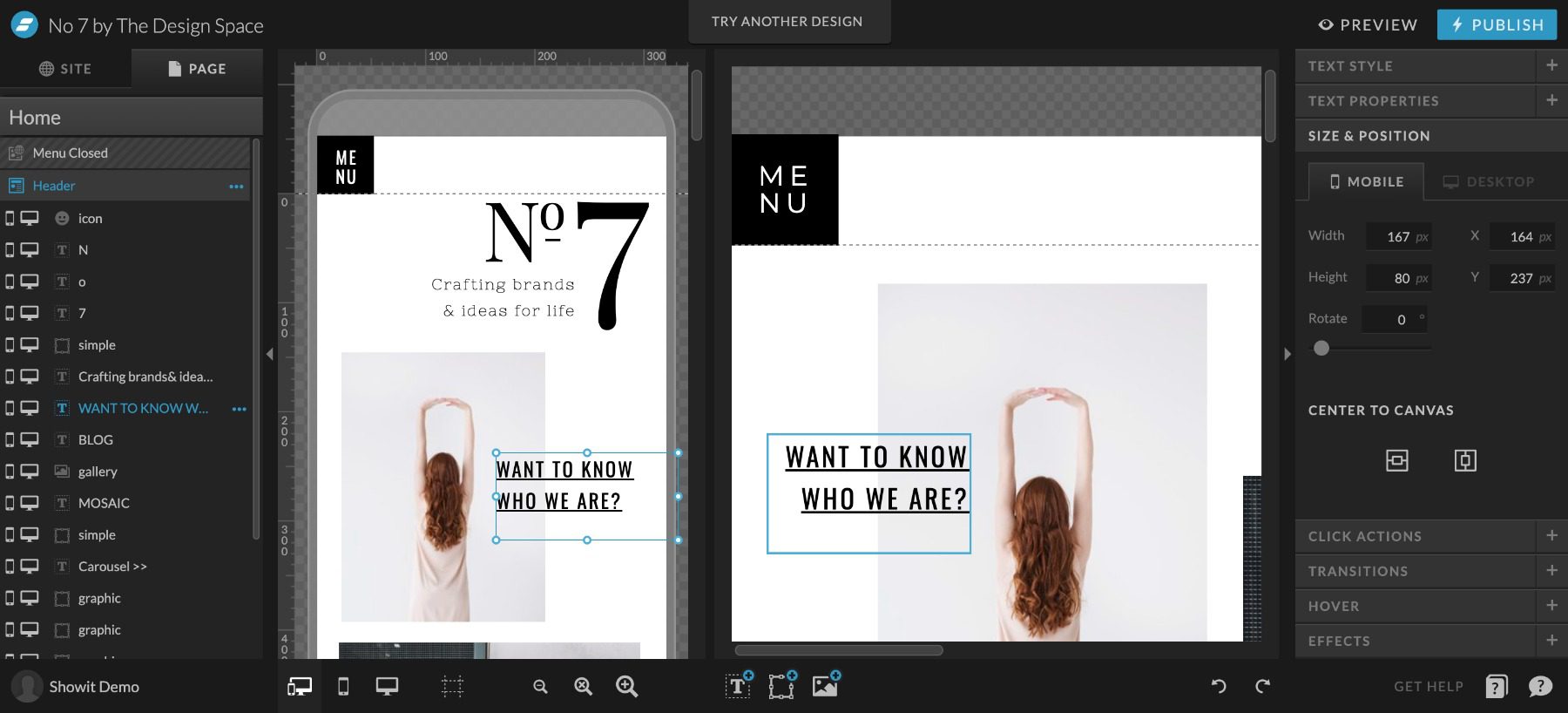
Customization with Showit is different than with WordPress. It is a closed system which means only official feature releases extend Showit’s website capabilities. The only caveat to that is with the highest-tiered pricing plan. This allows for an attached WordPress installation to the Showit website. On this pricing tier only, Showit will allow WordPress to extend the functionality of the WordPress side of the website. These plugins do not affect the main pages of the Showit website.
|
|
|
|---|---|---|
| Customization | 🥇 Winner Customization is where WordPress has no equals. It has tons of options regardless of technical experience. |
Showit seeks to be a simple solution—and because of that, they don’t offer a ton of customization |
| Choose WordPress | Choose Showit |
WordPress vs. Showit: Themes and Templates
WordPress and Showit both have a deep cache of theme and template options. How they handle those are different, but both platforms help website creators start strong.
WordPress Themes and Templates
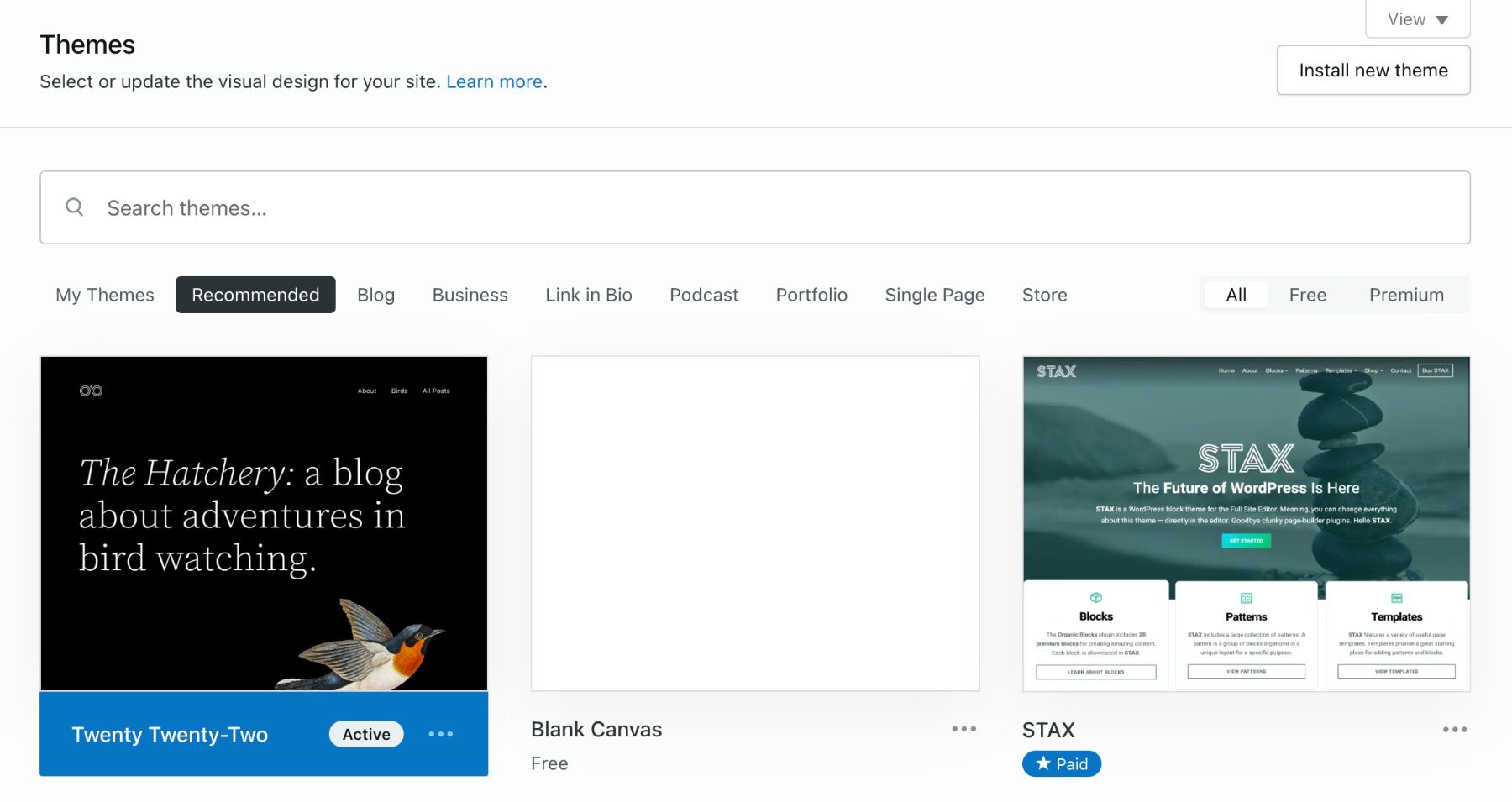
WordPress has traditionally relied on themes to mandate the look of a website but also the functionality. Currently, WordPress offers thousands of free themes that should get any WordPress user started on the right foot.
For those wanting a more custom approach and a visual building UI, Page Building themes/plugins like Divi bring hundreds of templates into an endlessly customizable drag-and-drop interface. This brings the customization of WordPress to any easy-to-use design workflow.
Showit Templates
Showit Templates are purely used for page design. They do not bring any other functionality to Showit’s feature set. Showit templates give website creators a head start in the design process.

This is helpful for people as they already know they don’t need a ton of features (Showit’s primary users are photographers). Since templates don’t add more features that require more training, they can simply pick a theme and start editing it to suit their needs.

There are several free templates to choose from. There is also a robust ecosystem of paid templates for sale. Something that would shock an average WordPress user is the price tag on many of these premium templates. The average template in their store is well over $500. WordPress commonly has themes from $49 to $200, with most on the lower end.
|
|
|
|---|---|---|
| Themes and Templates | 🥇 Winner WordPress has thousands of themes and a ton of great free options. |
Showit has themes that provide aesthetics but no new functionality, plus they don’t have nearly as many free themes. |
| Choose WordPress | Choose Showit |
WordPress vs. Showit: Publishing Tools
The publishing tools comparison gets murky here. Showit uses WordPress for the blogging infrastructure, which means that everything is the same when it comes to blogging features.
There are unique traits to each outside these couple of similarities.
WordPress Publishing Tools
WordPress allows you to build and publish web pages and blog posts and has the ability to create custom post types.

The default interface for creating content is the Block Editor. You build pages through intuitive blocks (think text block, image block, etc.) that stack to make your page’s content.

The Classic Editor is an option for those who prefer the tried and true content input interface. It features a strong WYSIWYG editor that used to be the staple of WordPress sites in the past.
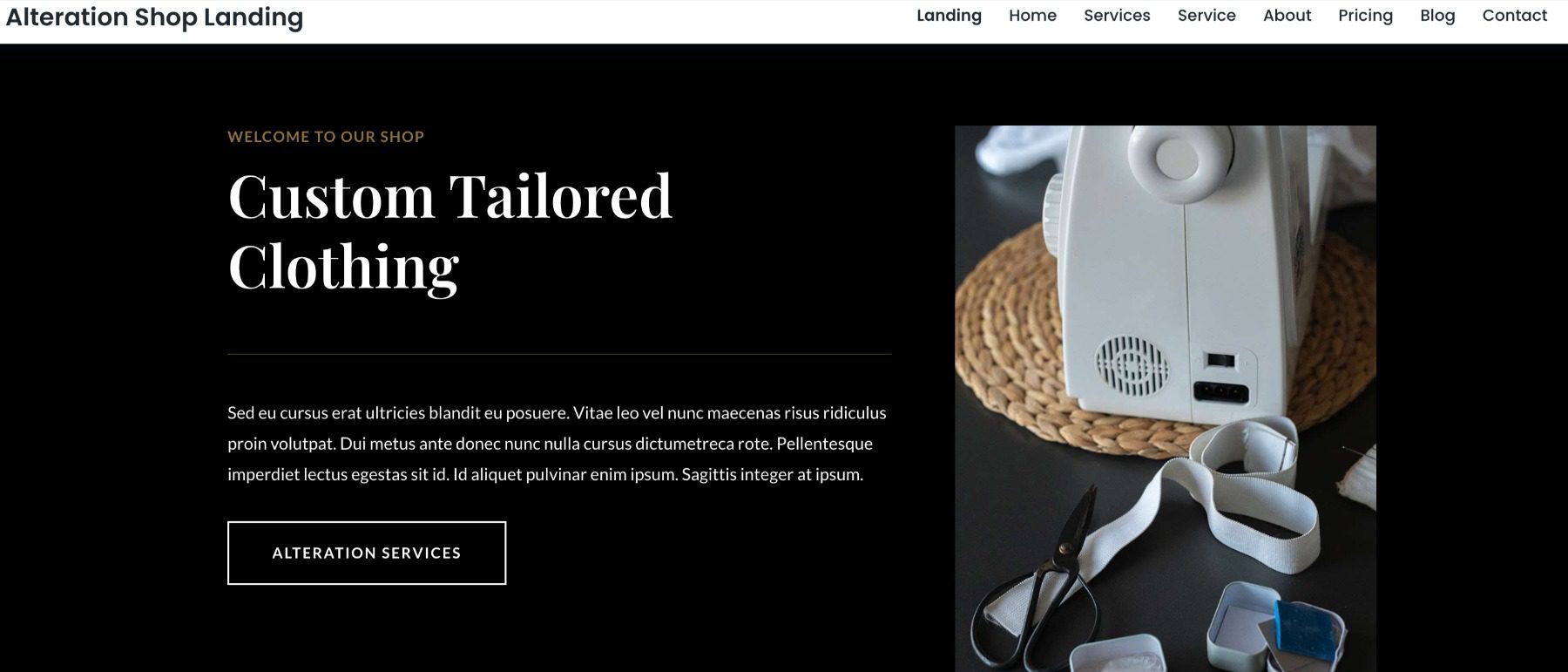
Page builders (like Divi) allow you to visually build your pages using a robust, design-first interface. Page Builders let you design with front-end visuals, so you know what you are designing as you go.
Publishing is simple with any of these options. Once your content is ready for the world, you can change the post status from Draft to Publish. This publishes the page to your site for your visitors to see. User rules can be created to restrict some users from publishing content without being reviewed first—giving powerful editing features to teams of writers and designers.
Showit Publishing Tools
Showit famously has its visual builder that lets you see what you are designing as you design. It still offers a preview button that removes all the editing options to give you a clear view of the page you’ve created thus far. Publishing all site changes is easy with the Publish button in the top right-hand corner. With any mistakes, there are undo/redo buttons on the bottom right to quickly revert changes.
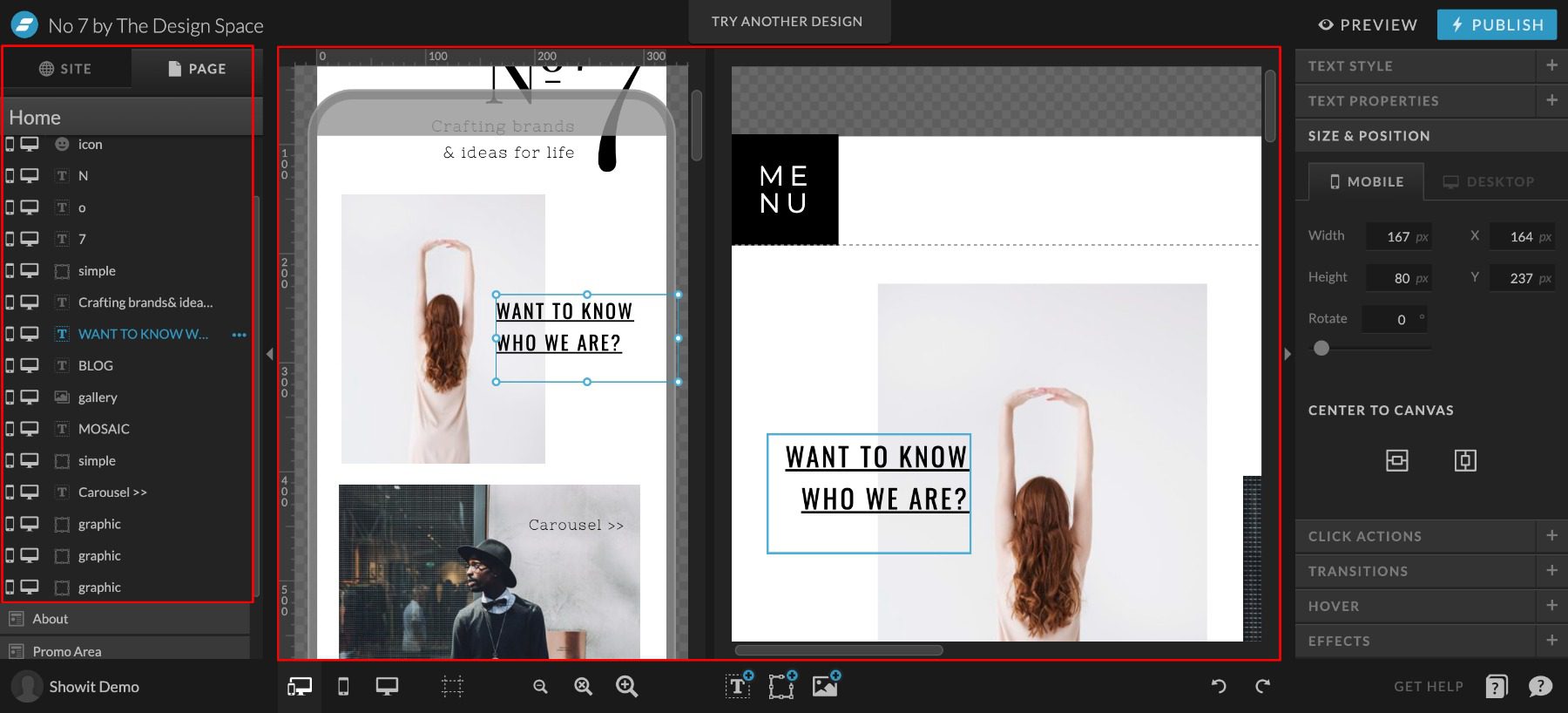
Showit has two separate editing interfaces. One for pages in the Showit editor and one for blog elements using WordPress.

All designing for either blogs or pages happens with the Showit visual editor. For designing blogs, Showit ties design elements (featured image, author, post content, categories, etc.) to dynamic content from the blog (for blog and single post pages). This lets you design the post template in Showit (using placeholder content) and pull in blog post content from WordPress. Creating individual posts on Showit + WordPress is exactly like creating them in WordPress proper. When the post is published on WordPress, Showit simply grabs the post content and publishes it according to the design template.
Including blogs, pages in Showit have to be designed twice. Once for desktop and once for mobile devices. This may add a little extra design time to your plate. But Showit has a side-by-side editing interface that allows you to see both designs at once, which does speed it up.
|
|
|
|---|---|---|
| Publishing Tools | 🥇 Winner WordPress was designed for blogging, and has all the tools needed for it. |
Showit has two separate editing interfaces. The side-by-side interface can be helpful, but overall leads to a slower design period. |
| Choose WordPress | Choose Showit |
WordPress vs. Showit: Security
Security is a very relevant topic when considering a website platform. Website security needs have increased dramatically every year, with no indication that it will slow down. Understanding your platform will help to cover the bases as far as security goes.
WordPress Security
Security with WordPress can be tricky. Many opportunities exist to create custom security solutions within WordPress. That is because multiple layers need protection.
For form and comment submissions, you can set up honey-pot and CAPTCHA plugins that limit the number of bot and spam submissions. This protects site viewers and administrators alike, who might have to wade through fake submissions to find the real ones. This is a problem no matter your website platform.

Image by eamesBot / shutterstock.com
On the more technical side, there are simple security solutions that cover most insecurities. These come in the form of WordPress security plugins. These free versions are usually good enough to cover most bases. These same plugins also come with Premium features that offer more hardened protection.
Hosting level security is also worth looking into—including free CDN to protect against DDoS attacks. Free CDN options are a must if your host offers one. CDNs also offer premium packages that protect more and increase the efficiency of your website.
As always, proper passwords and zero-trust solutions will help keep a website secure. There is no substitute for a strong password and two-factor confirmation.
Showit Security
Showit manages site security for hosted websites. This takes out the stress of finding and implementing custom solutions. This also means that you rely on Showit for complete protection.
Showit provides and automatically sets up an SSL certificate with your published website. Also, none of the source codes is editable. They also maintain backups of websites for easy retrieval if something does go wrong.
They offer additional managed security with Showit websites that have an attached WordPress blog.
Showit remains pretty secure because it is a simple website builder. Outside of web forms, there is not a whole lot of customization. The main appeal is the simple page builder interface which creates a fairly static website in terms of user interaction. This keeps risk factors down, which is a net positive for simple websites.
Password hygiene is very important with Showit as well. If you use leaked passwords, no matter the security level of Showit, bad actors can get in and do a world of damage in very little time.
|
|
|
|---|---|---|
| Security | WordPress has a ton of security plugins available, practicing proper security is a must. | 🥇 Winner Showit manages site security so you don’t have to find your own solutions. |
| Choose WordPress | Choose Showit |
WordPress vs. Showit: E-commerce
This section is a short comparison as Showit has no true, built-in eCommerce capabilities. Though, with their Showit + Advanced Blog package, they allow the use of WP plugins—including WooCommerce.
E-commerce on WordPress

WordPress’ eCommerce options are some of the most enticing features of the whole platform for many. WordPress boasts a diverse array of tools to enable creators, store owners, and service-based businesses to create ways to get paid online.
WooCommerce is the total and expandable package for WordPress store owners. It boasts powerful plugins for marketing, merchandising, shipping, dropshipping, and custom checkout experiences.
Other honorable mentions for WordPress e-commerce are Easy Digital Downloads, MemberPress, and LearnDash—depending on the business model at hand.
Showit E-commerce
E-commerce on Showit requires a third-party solution. This means that store functionality takes place on a different domain/website or through an embeddable code snippet that adds external functionality directly on the Showit website.
Showit allows for inline custom code. This means that you have the pick-of-the-crop for an external payment solution.

Potential embeddable third-party eCommerce solutions to explore:
With their highest paid tier, WordPress can be expanded to include WooCommerce. We’re going to still consider that 3rd party and not a native function of Showit, but the lines are admittingly blurred with their unique approach. We’d recommend that you go for a full WordPress website if you were wanting to use WooCommerce for your website, as Showit would complicate the proper setup and configuration of your store.
|
|
|
|---|---|---|
| E-Commerce | 🥇 Winner WooCommerce is a simple and cheap way to convert your WordPress site to an online store. |
Showit relies on expensive third-party solutions for e-commerce. |
| Choose WordPress | Choose Showit |
The Verdict
Showit and WordPress are both powerful platforms that give their users the tools that they want. The tool sets are different but effective at what they were built to do.
|
|
|
|---|---|---|
| Ease of Use | Figuring out the interface can be a challenge and will definitely take some getting used to. | 🥇 Winner It’s incredibly simple, but requires you to use Google Chrome. |
| Customization | 🥇 Winner Customization is where WordPress has no equals. It has tons of options regardless of technical experience. |
Showit seeks to be a simple solution—and because of that, they don’t offer a ton of customization |
| Themes and Templates | 🥇 Winner WordPress has thousands of themes and a ton of great free options. |
Showit has themes that provide aesthetics but no new functionality, plus they don’t have nearly as many free themes. |
| Publishing Tools | 🥇 Winner WordPress was designed for blogging, and has all the tools needed for it. |
Showit has two separate editing interfaces. The side-by-side interface can be helpful, but overall leads to a slower design period. |
| Security | WordPress has a ton of security plugins available, practicing proper security is a must. | 🥇 Winner Showit manages site security so you don’t have to find your own solutions. |
| E-Commerce | 🥇 Winner WooCommerce is a simple and cheap way to convert your WordPress site to an online store. |
Showit relies on expensive third-party solutions for e-commerce. |
| Choose WordPress | Choose Showit |
It is nice seeing a non-WordPress solution still using part of WordPress in their technology. That gives credence to the capabilities of the platform and how it empowers website owners to express themselves and do business online.
WordPress Deep Dive
Are you curious to see how WordPress stacks up against its other biggest competitors? We did the hard work and compared WordPress vs. everything else so that you don’t have to! We compared WordPress vs. Web.com, and I think you’ll be interested in the results.
If you’re looking for specific plugins to help WordPress become even more powerful, we recommend the following:
Have you discovered any benefits of using Showit vs. WordPress? Let us know in the comments!
The post WordPress vs Showit (2023) — Which One is Right For You? appeared first on Elegant Themes Blog.


