What are the best SEO tools to use with your WordPress website in 2023? Which utilities can help you achieve high rankings and attract quality search traffic? That’s exactly what we will try to answer in this post.
SEO has become a lot more complex over time. By now, it consists of many different aspects and it can be difficult to cover them all by manually doing the work yourself. Thankfully, there are also loads of software solutions that can assist you. They can help you optimize your site more quickly and automate parts of your SEO efforts.

To show you how, in the following, we have compiled a list of tools for all areas of search engine optimization. From the best general SEO tools over analytics, keyword research, content creation and on-page optimization, to link building, local SEO, and beyond.
It’s going to be a long one, so let’s dive right in.
1. Best All-in-One SEO Tools
We are starting off with all-round SEO solutions. These are instruments that offer a wide range of functionality covering different areas of search engine optimization.
SEMrush

SEMrush is one of the most popular SEO tools out there, even among professionals, and for good reason. It offers a lot of functionality to help your site rank better, such as:
- Keyword research
- Backlink analytics
- Rank tracking
- Competitor research
- Site audit and on-page SEO check
For WordPress users there is also the SEO Writing Assistant, which gives you input on the readability, tone, optimization, originality, and more of your online content.
SEMrush offers a free plan with limited functionality. After that, prices for their paid offers begin at $108.33/month for annual plans.
Ahrefs

Ahrefs is very similar to SEMrush and offers mostly the same functionality such as keyword suggestions and analysis, site audits, etc.
However, where it stands out is backlink analysis. Ahrefs allows you to see which sites are linking to your competitors and the content that they rank for and you don’t. That way, it makes the tool easier to emulate and beat your competitors’ linking strategy. The tool also warns you of duplicate content and keyword cannibalization.
You can get free access to a limited version of their webmaster tools. The cheapest paid plan is $99/month and you get two free months if you pay for a year ahead.
Ubersuggest

Ubersuggest allows you to analyze websites (both your own and your competitors’), track where you rank for keywords, do keyword research, and analyze backlinks. It also gives you keyword suggestions. In addition, Ubersuggest has an AI writing tool that can help you create content for the keywords you found.
There is a free limited version and a 7-day free trial for the paid plans, which start at $29/month. However, it also has a lifetime deal where you can buy the forever version starting at $290. In addition, there is a 30-day money-back guarantee. Overall much more affordable than the other big names.
2. Site Analysis and Analytics
An important part of SEO is to make sure your site’s technical optimization is on point and that you track what your visitors are doing on your site. Here are some of the best SEO tools to do that.
Google Search Console

This is a free webmaster suite that Google provides. It helps you monitor your website, check if the search engine is indexing your pages correctly, lets you spot issues, learn about Core Web Vitals, and make improvements if something is wrong.
In addition, it shows the keywords that others find you in Google for, where you rank, your click-through rate, and more. This is invaluable information to help your site rank and perform better. To get the most out of it, don’t miss our detailed Google Search Console tutorial.
Alternative: Bing Webmaster Tools
Google Analytics
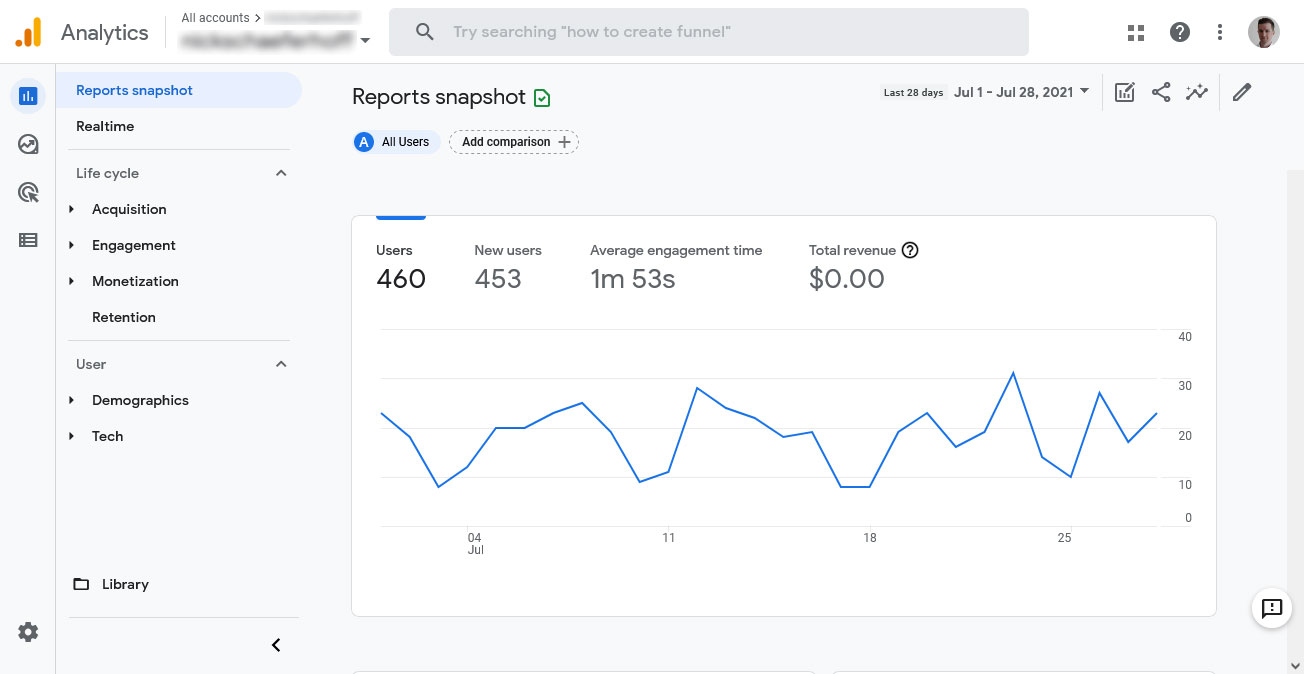
Google Analytics allows you to monitor what visitors are doing on your website. It shows you the pages they visit, how long they stay, how they found you, the countries they are from, and much more.
Basically, it allows you to understand which of your online content is doing it’s job well and which isn’t. You can use this information to make better decisions about your content strategy.
We have a Google Analytics 4 tutorial for you and also Google Analytics alternatives if you want to check some other SEO tools.
3. Best SEO Tools for Keyword Research
One of the most crucial parts of search engine optimization is keyword research. It helps you find topics that your audience is interested in and that you have a chance to rank for. There are also some excellent solutions to assist you in doing so.
Google Keyword Planner

Google has its own tool for this purpose. Though originally meant for picking keywords for paid ads, you can use the data it provides for organic keywords as well. This is especially good for local businesses because you can limit search to very specific localities.
While Google Keyword Planner provides relatively basic data, you can cross reference it with other tools to get a more comprehensive idea. It’s also free, you only need to create an account and a property but you don’t have to pay anything.
Google Trends

Another tool Google provides for keyword research is Google Trends. However, instead of focusing on a snapshot of how popular topics and keywords are at the moment, it shows you how they develop over time broken down by geography.
Simply enter a topic or keyword you are interested in and Google Trends will tell you how the rest of the world feels about it. It’s also possible to compare different topics and keywords to each other to see what trend to jump on and which to ignore. In addition, it gives you related keywords and phrases to your topic that are also en vogue.
Finally, it’s free as well and we have a detailed article how to use Google Trends for SEO.
KeywordTool.io

This is a great free keyword research tool. It mines the autosuggest function from sites like Google, Bing, YouTube, and Amazon to collect keywords related to your search. Simply enter a seed keyword, choose your language and search engine, then hit start.
You will receive a list of long-tail keywords, phrases, and questions that you can use to better plan your content, come up with additional article topics, or simply find keyword ideas. On paid plans you also get information about search volume, CPC, and other data. Highly recommended!
Alternative: Answer the Public, Mangools KWFinder
Keywords Everywhere

The last of our best SEO tools for keyword research is Keywords Everywhere. It is an add-on you can install in Chrome or Firefox. When you do, it provides you with keyword data on the fly.
For example, Keywords Everywhere shows key phrases related to what you type into Google, historical search data (from Google Trends), and keywords any website or web page ranks for as well as estimated traffic.
It’s also super affordable. The paid edition starts at just $1/month.
4. Solutions for Content Creation
Content is one of main signals that Google judges websites by. In order to use it to your advantage, you need to make sure that yours is of high quality and well-optimized. Here is some helpful software to assist you in that.
Surfer

AI is all the rage now (so much so that people are wondering if AI will replace us all) and it’s finding more and more application in all walks of life.
Surfer uses artificial intelligence for creating SEO-friendly content. It helps with keyword research, analyzes your existing content, and then helps you create relevant articles for your topics. The tool breaks down the content creation workflow into manageable pieces and helps you write articles quicker and easier.
It also has a WordPress integration and plans start at $69/month.
GrowthBar

This is a similar tool as the previous one. It, too, uses AI for scanning your existing content for keyword ideas and providing you with article outlines, including headings, internal links, and more. It can also optimize your articles already on your site and comes with other AI tools such as for writing product descriptions.
You can have all of the above starting at $29/month. There is a free trial.
Clearscope

While Clearscope is also AI-powered and helps you with content creation, it doesn’t do the writing for you. Instead, it creates reports for your target keyword by analyzing the existing SERPs. The tool then lists must-have and related keywords in its editor so that you know what topics and key phrases to include to beat the competition.
It also analyzes readability, can create content briefs, and do keyword research. Plus, Clearscope integrates into your workflow with a WordPress plugin.
However, it has its price. The lowest tier plan is $170/month.
Grammarly

If you are one of those people who doesn’t want to outsource all of content creation to AI, there is Grammarly. Yes, it too uses artificial intelligence. Yes, it also offers generative AI for writing texts. However, Grammarly’s main function is to help you polish your content and check it for errors.
The tool can check spelling and grammar, make suggestions for style, clarity, and tone, and even do complete sentence rewrites. It also integrates with a lot of common tools such as WordPress and Google Docs. Plus, there is a free version for basic error checking and premium plans can be as cheap as $12/month.
5. Best WordPress SEO Plugins for On-Page Optimization
Part of content creation is optimizing what you have written for search engine performance. That means, making sure you have the right keyword density, keywords are in the right places, and everything else that is part of on-page optimization. Luckily, the WordPress sphere offers a number of excellent tools for that purpose.
Yoast SEO

You say WordPress SEO, you think Yoast. It is the gold standard of WordPress SEO plugins.
If you just install and activate Yoast SEO, it already improves your website. In addition, it allows you to configure everything about how your site appears in search results. You can also use it to set SEO titles and descriptions for your content as well as metadata for social media.
The highlight is the on-page optimization guide. Just enter your main keyword and the plugin tells you how well optimized each piece of content is. It also comes with a readability analysis, XML sitemaps, and a lot more.
The free version is enough for most sites, however, there is also a paid version with additional features.
Rank Math

Rank Math is a plugin similar to Yoast SEO and has a lot of overlap in functionality. That includes the ability to set SEO titles and meta descriptions, create an XML sitemap, etc.
However, Rank Math also comes with an AI assistant for creating optimized content. Plus, you get full control over what user roles on your site can do what in terms of SEO and it integrates with Google Search Console so that you can see your keyword rankings in the WordPress back end. Finally you get a 404 monitor, redirection, and a lot more.
SEOPress

Another great WordPress SEO plugin. Of course, it does similar things as Yoast and Rank Math. Yet, its standout features is the clean and easy-to-use interface, which is completely free of ads. It also has heatmaps and session recordings and can automatically set image ALT tags and other data for image optimization.
The premium version is also cheaper than many of the other SEO plugins out there, so if you want to splurge for extra functionality, it’s the most affordable option.
6. Great Options for Image Optimization
Speaking of optimizing images for SEO, that’s also an important area where tools can help your site perform at its best. The most important consideration here is performance since images can slow down page loading time due to their size. It’s something that Google deeply cares about for user experience reasons and take into account when ranking websites.
Smush

This is probably the most popular WordPress image optimization plugin. Smush can do the following things:
- Compress images so they take up less space without altering their quality, both automatically during image upload and in bulk for existing visuals
- Set images to lazy load so only those visible in the browser window actually load
- Resize images and convert them to the WebP format.
All of this aims at making images, and your site, load as quickly as possible and keep users and search engines happy.
Alternative: EWWW Image Optimizer
ShortPixel Image Optimizer

Shortpixel is an an alternative to the above with similar functionality. However, it can also handle PDFs, convert images into WebP and AVIF format, has WP-CLI support, AI-powered smart cropping, and a whole lot of other features. Worth checking out.
TinyPNG

This is an external tool for optimizing images before uploading them to your site. Simply drag and drop files into the upload field and download your optimized images in bulk.
TinyPNG is free to use up to 20 images of 5MB or less (however, you can also use it several times in a row). If you end up taking advantage of it a lot, there is paid plan for $39/year. Plus, they even have a WordPress plugin if you want to integrate it directly on your website.
7. Schema Structured Data
Structured data allows you to add extra information to your web content such as images, price, rating. This can result in rich snippets being displayed in search results that include this information, which can lead to better click-through rates.

Many of the all-in-one WordPress SEO plugins above offer this functionality out of the box. However, you can also implement it manually using one of the plugins below. For more information, read our article on Schema.org structured data.
Schema & Structured Data for WP & AMP

This is one of the most popular WordPress plugins for implementing structured data. It supports more than 35 schema types from Blog Post over News Article to Recipe, Product, and more. The tool is also compatible with Google AMP plugins as well as easy to use.
Structured Content (JSON-LD)

This is an alternative for the above. While it doesn’t support as many schema types currently (FAQPage, JobPosting, LocalBusiness, Person, Event, and Course), Structured Content is Gutenberg optimized and allows you to configure Schema markup right in the block editor.
8. Link Building and Link Analysis Tools
If the Internet had an official currency, it would be links. They are a coveted resource since they represent a very strong ranking signal for search engines. Therefore, most successful SEO campaigns also involve a link building strategy. You can make this easier on yourself by using tools for this purpose.
Moz Link Explorer

First up is this semi-free tool to analyze any site’s link profile – yours or your competitors’. It allows you to see the number of links to a site, find broken links, check the link spam score, find new opportunities to earn links, see won and lost links, and a lot more. Plus, Moz can do keyword research.
There is a free plan with limited queries per month. Paid accounts with additional features start at $79/month for yearly and $99/month for monthly plans.
Majestic

Majestic is a link analysis tool. It shows you the number of inbound links and domains, gained and lost backlinks, and other data similar to Moz.
Unfortunately, the free plan is even more limited than its competitor. On the other hand, premium plans are more affordable, starting at $49.99 per month.
Internal Link Juicer

Links are not just important in terms of incoming links, also when it comes to links between pages on your website. Internal linking not only helps search engines and visitors navigate your site and find relevant content (notice all the internal links in this post), it also clarifies the relative importance of different pages on your site and their topics. For that reason, it should definitely be a habit of yours.
Internal Link Juicer helps you with that by automatically inserting internal links and using anchor text according to keywords. If you struggle with adding internal links to your content, give this plugin a try.
9. Solutions for Local SEO
Local search optimization is especially important for businesses with brick-and-mortar locations who want to show up for local searches in Google.
BrightLocal

BrightLocal is a complete SEO suite for local visibility. It reports search ranking in search results and Google Maps and helps you rank for the right local keywords.
In addition, it provides audits for your website and Google My Business listing and tools for taking care of your local business profiles. For example, it can help you generate reviews and answer them faster.
There is a 14-day free trial, after that you need to pay $35/month for the entire suite.
10. Best SEO Tools for Competitor Research
Ranking number one in search results could be so easy, if it weren’t for all the other websites trying to do the same. Sometimes SEO doesn’t just come down to doing your best but also to beating the competition. In those cases, it’s good to know what you are up against.
Besides the general SEO tools at the beginning of the page, here are some specialized solutions to spy on your contenders.
SpyFu

SpyFu offers a lot of the same functionality as your SEMrushs and Ahrefs. That includes things like rank tracking, keyword research, etc.
However, what it does best is help you with competitor analysis. Spyfu helps you figure out what your competition is doing better than you, understand, emulate, and beat their backlink strategies, learn their PPC keywords, do backlink outreach, see historical SEO data, and much more. This is invaluable knowledge to leave competitors in the dust.
SpyFu plans start at $16/month and there is a 7-day free trial and 30-day money-back guarantee.
SEOQuake

SEOQuake is a browser extension that provides an entire SEO toolbox. It’s free to use and available for Firefox and Chrome. Simply install and activate, then go to any web page that you are interested in, and it will provide your with SEO data about any website.
What kind of data? Anything from links and backlinks over estimated traffic and social shares to indexed pages and a lot more. The extension also displays this kind of information in Google search results. Great for quick overview of your own site or that of competitors.
Similarweb Browser Extension

Another browser extension that provides a lot of information about any website. Rank, visits, traffic sources, visitor locations – you name it. Another great option to spy on your competitors.
11. Performance Plugins and Tools
As mentioned, website speed is one of the factors that search engines like Google look at to determine website rank. For that reason, using tools that help you improve website performance is also best for SEO.
PageSpeed Insights

PageSpeed Insights is a free software made by Google to speed test your website. It shows different Core Web Vitals markers for the mobile and desktop version of your website. In addition, it gives detailed input on how to best fix any issues it finds and also checks for accessibility and SEO problems in the same way.
Alternatives: GTmetrix
WP Rocket

There are many free performance plugins for WordPress out there (see below), however, WP Rocket is often considered the best one, even though it is a paid extension. Simply install, activate, and you have a faster website right away. The plugin offers multiple caching layers, Gzip compression, deferring JavaScript, removing unused CSS, lazy loading and many more features.
A single-site license is $59/year. If that is too steep for you, can also achieve great results with the alternatives below.
Alternatives: W3 Total Cache, Autoptimize, LiteSpeed Cache, Jetpack Boost
12. SEO Utilities
Finally, here are some of the best random SEO tools that didn’t quite fit any of the categories above.
Redirection

Redirecting your pages is an important tool to help your website run properly. It allows you to eliminate 404 errors for pages that no longer exist by sending people trying to visit them to other relevant parts of your site.
This plugin not only monitors whenever someone tries to access a non-existent page on your site, it also provides you with a simple interface to create relevant redirect rules.
Broken Link Checker

In order to fix your broken links, you first need to find them. Doing so manually can be very tedious, especially if you have a very big website. That’s where this plugin comes in.
Broken Link Checker automatically scans your site for links that are going nowhere and reports them to you so you can solve the issues.
Alternatives: Screaming Frog SEO Spider (free up to 500 scanned URLs)
Really Simple SSL

Running your site on HTTPS is something that visitors increasingly expect for security reasons and it’s also something that search engines take into account when ranking your pages. If your hosting provider does not offer it out of the box or you are having trouble implementing it, this plugin can help you switch your WordPress site to SSL encryption.
XML Sitemap Generator for Google

If you don’t use any of the SEO plugins mentioned above, which automatically create XML sitemaps for your website, you can also use a dedicated solution just for that. Doing so allows you to submit your sitemap to Google Search Console and other webmaster tools in order to give search engines a better idea about what pages exist on your site so they can index them.
What Are Your Best SEO Tools?
With organic search continuing to be one of the main sources of website traffic, search engine optimization remains a central tool for any website that wants to be successful. Luckily, by now there are many tools to help you ace this part of running a website.
Above, we have discussed some of the best tools for different areas of SEO. As you could probably see, there are free tools, free limited plans, and free trials for most parts. Consequently, you don’t necessarily have to spend money to bring in traffic. We hope you find some good solutions for yourself!
What do you consider the best SEO tools for WordPress websites and beyond? Tell us about your favorites in the comments!
The post 40+ Best SEO Tools of 2023 (For WordPress and Beyond) appeared first on Torque.


