EDITS.WS

Tag: wordpress alternatives

  • WordPress vs Dreamweaver (2023) — Which is Better for Your Website?

    Choosing the right platform to build your website can be daunting, given the many options available. While WordPress and Dreamweaver are two of the most popular platforms due to their extensive customization capabilities, it’s important to note that there are some significant differences between them. Therefore, in this post, we’ll compare WordPress vs Dreamweaver to help you decide which suits your needs better. So, let’s dive in!

    WordPress vs Dreamweaver: Who Are They For?

    While WordPress and Dreamweaver allow you to build responsive and effective websites, they differ significantly in their approach. Therefore, before we can assess which platform would be the best fit for you, let’s delve into each.

    What is WordPress?

    WordPress vs Dreamweaver

    WordPress is an easy-to-use content management system (CMS) that empowers you to build and manage a website effortlessly. Over time, it has become one of the most widely used platforms for creating websites, accounting for more than 43% of the internet. Being an open-source and free platform, it provides an incredible amount of themes and plugins, both free and premium, that expand WordPress’ core capabilities.

    Whether you’re aiming to create a blog, a learning management system (LMS), a membership site, or an online store, WordPress makes it easy to learn and master. This makes it an excellent choice for both beginners and seasoned developers.

    What is Dreamweaver?

    WordPress vs Dreamweaver

    Dreamweaver, part of the Adobe Creative Suite, is used to design, develop, and deploy websites. Users have three interfaces to choose from, including code, split (code and visual), or a visual interface with a drag-and-drop editor. However, coding skills are essential if you want to build a fully responsive website. Like WordPress, Dreamweaver supports using HTML, CSS, javascript, and PHP. Still, it’s up to the user to put all the pieces together.

    Using Dreamweaver, developers can create web pages from scratch or choose from premade templates, previewing their designs on various browsers and screen sizes. Although not as popular as WordPress, Dreamweaver still holds about .3% of the market share of all websites on the internet.

    So, Who Are They For?

    Comparing WordPress vs Dreamweaver can be complex as they have different approaches to creating websites. WordPress is user-friendly and ideal for those without web design experience. Furthermore, it offers incredible versatility and can be modified by developers or extended with plugins and themes to create different kinds of websites.

    On the other hand, even though Dreamweaver provides a drag-and-drop interface, you still need to code draggable elements to ensure they work. Hiring a full-stack developer is also likely necessary if you’re looking to create more than an informational website. As a result, Dreamweaver is better suited for those with advanced coding knowledge.

    WordPress vs Dreamweaver: Pricing

    When it comes to pricing, WordPress and Dreamweaver are very different. That said, after add-ons, they are pretty even regarding price. Let’s explore what you’ll be getting yourself into should you choose one of these platforms.

    WordPress Pricing

    Calculating the overall cost of WordPress is tricky. While WordPress itself is free, there are other variables to consider. Before you ever start designing, you’ll need a choose a domain and obtain a hosting plan. While these aren’t huge costs – you can get a domain for less than $20 per year – when you factor in other things like plugins and themes, the cost can quickly add up.

    Cost of WooCommerce

    For instance, let’s say you are building an ecommerce website. Once you purchase a domain and settle on a hosting plan, you’ll need good ecommerce plugins, such as WooCommerce. WooCommerce is free, but when you factor in any extras you might need, like a theme, security, SEO, and add-ons for Woo, you’re getting raked over the coals.

    Dreamweaver Pricing

    WordPress vs Dreamweaver Pricing

    When choosing Dreamweaver as your website creation tool, the good news is that there aren’t many costs to worry about – at least if you plan to do the coding yourself. Of course, you’ll need to purchase a domain and web hosting, but you’ll also have to pay for the Dreamweaver software. The cost for Dreamweaver is roughly $22 per month before taxes.

    However, if you want to access Adobe’s full suite of creative products, including Dreamweaver, the cost increases to around $55 per month. It makes sense for most people using Dreamweaver to opt for the entire Creative Cloud. This is especially true if you plan to create a more advanced website that requires photo-editing tools and a way to make scalable vector graphics (SVG) or animations.

    WordPress Dreamweaver
    Pricing 🏳️ Draw

    WordPress is free, but you’ll need multiple add-ons, such as a domain, theme, plugins, and a theme.

    🏳️ Draw

    Dreamweaver isn’t cheap after you pay for a domain, hosting and the software, but is on par with WordPress after add-ons.

    Get started with WordPress Get started with Dreamweaver

    WordPress vs Dreamweaver: Ease of Use

    When building a website, selecting the right platform is critical, with ease of use being a key factor. While WordPress and Dreamweaver have a learning curve, WordPress distinguishes itself because of how easy it is to get up to speed.

    WordPress

    Before WordPress came along, creating a website required extensive coding. But thanks to the folks at Automattic, regular people can now easily create them. With that said, the first time you log in to WordPress, you may need help figuring out where to start. Although there is a learning curve, there are plenty of resources available (like our blog) to provide tips and tricks to help users overcome any obstacles. Once you’re over the initial shock of the number of settings available, it’s easy to figure out what things do and where they are located.

    WordPress vs Dreamweaver dashboard

    Another thing to consider is what type of site you intend to create. This will influence the types of plugins and themes you choose, which can add to the learning curve. Thankfully, some themes make WordPress easier to work with, regardless of the type of site you plan to build. For example, Divi is an excellent choice for beginners thanks to its no-code Visual Builder. You can design posts and pages on the front end to view design changes in real time. Having a visual representation of your site’s content as you add it makes life much easier.

    Gutenberg block editor

    That said, it’s best to familiarize yourself with the default block editor before learning to work with themes and plugins. Since most WordPress content creation centers around posts and pages, learning how and where to build your content will go a long way when learning WordPress.

    Dreamweaver
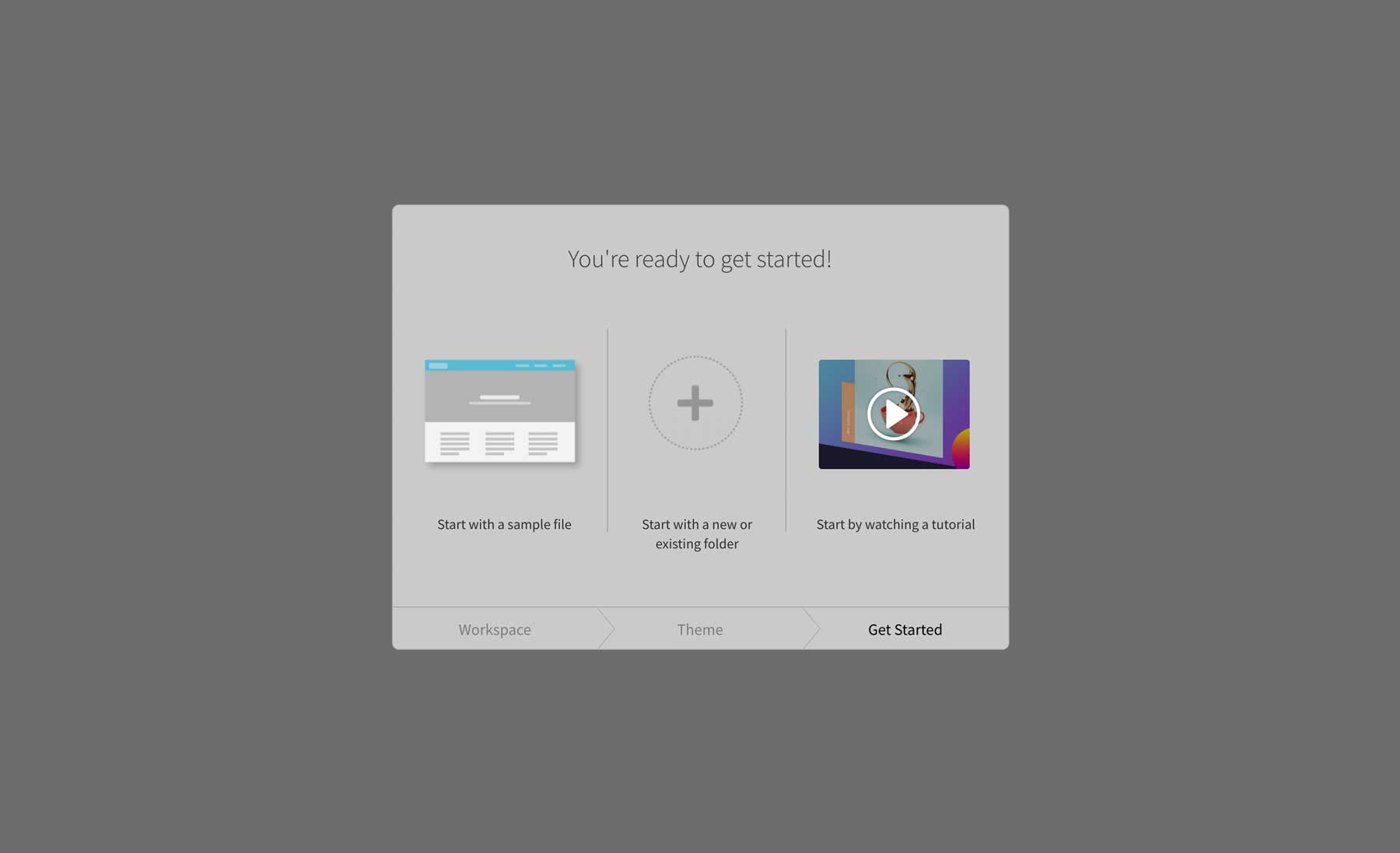
    Dreamweaver setup screen

    When you launch Dreamweaver for the first time, you’re met with an easy-to-follow setup screen. It walks you through display preferences and lets you choose to start with a sample file and watch a tutorial to help you get started. We highly recommend watching the tutorial video. It will help you set up the site manager – where you’ll configure your local hosting environment – and introduce you to the most commonly used tools. That said, that’s about all the help you’re going to get. After that, things are complicated if you are a stranger to coding.

    Dreamweaver templates

    To make things easier on yourself, you can start with one of the sixteen available templates. Keep in mind that these are starter pages, not full-blown websites. You can start with a basic multi-column or grid layout, a handful of responsive pages, build an email, or choose from a few Bootstrap pages. Once you load your chosen template, you must code in images, text, and other elements to complete your page.

    Overall, the learning curve for Dreamweaver is steep for beginners. If you have a basic knowledge of CSS, HTML, and Bootstrap, you can easily create a basic site, but it will take time. That said, if you are a coding guru who likes to get down deep into the coding weeds, Dreamweaver isn’t that difficult to master. It depends on your chosen coding language and level of comfort with learning a new platform.

    WordPress Dreamweaver
    Ease of Use 🥇 Winner

    After you get over the initial learning curve, WordPress is one of the easiest tools to create websites with.

    Dreamweaver requires extensive coding knowledge to build a website.
    Get started with WordPress Get started with Dreamweaver

    WordPress vs Dreamweaver: Customization

    One of the most important considerations when choosing a new web platform is having the ability to make it exactly what you want and need. Both WordPress and Dreamweaver offer unlimited customization options. That said, they provide completely different ways of allowing you to do it.

    WordPress

    WordPress themes

    Despite its origins as a blogging platform, WordPress has evolved into a dynamic content management system that can accommodate any website, thanks to its vast add-ons. Within the WordPress repository, you can find many themes, each offering a unique appearance for your website. These themes can be easily installed via the WordPress dashboard or the theme repository. Moreover, there are numerous premium themes available from third-party vendors, such as Elegant Themes, StudioPress, and ThemeIsle, that you can purchase to enhance the look and functionality of your website.

    best membership plugins

    Additionally, thousands of plugins allow you to customize your site. For example, let’s say you’re looking to build a membership website. Adding a good membership plugin will quickly enable you to gate content, create membership tiers, take payments, and even add a forum for community discussion. There are awesome plugins for literally anything, making customization options with WordPress endless.

    There are additional methods that allow you to add interesting bits to your website. For example, widgets can enhance your site’s appearance, as they can be placed in various locations, such as the sidebar, footer, or header. They can also display category archives, social media platforms, recent posts, and more. In addition, even though WordPress is designed to be user-friendly, you can take customization to the next level by adding custom CSS, HTML, and Javascript. Depending on the theme you select, you can create customized templates that will give your site a cohesive appearance throughout all your posts and pages, including those for displaying posts, search pages, archives, and more.

    Dreamweaver

    Like WordPress, Dreamweaver has tons of customization options. It starts with the ability to create the perfect workspace. You can choose between light and dark modes, assign custom colors for code previews, and more. As previously mentioned, Dreamweaver offers three different workspace views, including code, split, and live. You can drag and drop pre-coded elements into your pages with the live view. That said, you’ll still need to add CSS, images, and code snippets to make them function correctly.

    WordPress vs Dreamweaver Bootstrap components

    For example, when working with Bootstrap files, default components are available to bring your pages to life. You can choose from containers, carousels, card layouts, animated spinners, buttons, and more. Dreamweaver even includes the corresponding code snippets to give you a headstart on your CSS and Javascript. Additionally, there’s a front-end CSS designer that allows you to edit CSS for a particular property, which saves time.

    WordPress vs Dreamweaver customization

    When working in the split view, you can easily click on an element in the front end and edit the CSS property in the associated CSS file. You can also duplicate elements, add text decoration to headlines, link images, and make elements responsive with a click of a tick box. Additional customization options include the ability to install third-party extensions such as image galleries, contact forms with reCaptcha, Google Maps, and more.

    WordPress Dreamweaver
    Customization 🏳️ Draw

    WordPress is highly customizable with plugins, themes, and custom code.

    🏳️ Draw

    You can customize anything with Dreamweaver if you have excellent coding skills.

    Get started with WordPress Get started with Dreamweaver

    WordPress vs Dreamweaver: Hosting

    Hosting requirements for WordPress vs Dreamweaver are very different. Static websites (Dreamweaver) generally require less hosting than WordPress sites. With that in mind, here are a few options for each to give you an idea of what’s available.

    WordPress

    SiteGround WordPress hosting

    There are a lot of variables when it comes to WordPress hosting. First, what kind of hosting do you want? Secondly, what’s your budget? As a WordPress user, you’ll likely be overwhelmed by all the choices. With that in mind, there are a few that we can highly recommend – SiteGround and Pressable. Both providers offer managed WordPress hosting, several price tiers, excellent features, and are optimized for WordPress.

    Dreamweaver

    Dreamweaver hosting

    Hosting a site built with Dreamweaver is less complicated. Unless you build server-side applications such as CGI/Perl, ASP, or PHP, you’ll likely get away with low-end shared hosting. The reason for this is Dreamweaver’s basic functions use HTML, CSS, and Javascript, so they don’t require nearly as much power. With that in mind, there are a few that we can recommend that are geared towards client-side, static websites – A2 Hosting and Green Geeks. Both offer reasonable plans with ample NVMe SSD storage, automatic backups, FTP (a Dreamweaver requirement), free site migration, and a free SSL certificate.

    WordPress vs Dreamweaver: Is There a Clear Winner?

    When it’s time to choose between WordPress and Dreamweaver, both have their advantages. That said, the one you choose depends on your specific needs. WordPress is easy to use, has an extensive support system, and offers thousands of themes and plugins to customize your site. On the other hand, Dreamweaver is a powerful web development tool that allows you to create static websites, custom applications, and large complex sites.

    WordPress Dreamweaver
    Pricing 🏳️ Draw

    WordPress is free, but you’ll need multiple add-ons, such as a domain, theme, plugins, and a theme.

    🏳️ Draw

    Dreamweaver isn’t cheap after you pay for a domain, hosting and the software, but is on par with WordPress after add-ons.

    Ease of Use 🥇 Winner

    After you get over the initial learning curve, WordPress is one of the easiest tools to create websites with.

    Dreamweaver requires extensive coding knowledge to build a website.
    Customization 🏳️ Draw

    WordPress is highly customizable with plugins, themes, and custom code.

    🏳️ Draw

    You can customize anything with Dreamweaver if you have excellent coding skills.

    Get started with WordPress Get started with Dreamweaver

    At the end of the day, if you want to create a website quickly and don’t have much coding experience, WordPress is the way to go. However, if you want to develop apps or customized websites based on HTML, PHP, or Bootstrap, Dreamweaver could be a good fit.

    The post WordPress vs Dreamweaver (2023) — Which is Better for Your Website? appeared first on Elegant Themes Blog.

  • WordPress vs ClickFunnels: An In-Depth Analysis (2023)

    There have been platforms for building websites, landing pages, and sales funnels for quite some time now. For many, the choices come down to WordPress vs ClickFunnels, two powerful platforms that help people build websites that get more conversions on their digital properties.

    WordPress is the most flexible CMS on the market and can be adapted (with themes and plugins) to create sales funnels and landing pages optimized for lead generation. ClickFunnels (and its major update ClickFunnels 2.0) is a popular sales funnel builder that has grown to become an all-in-one platform for building a website. It has built-in tools for funnel marketing that include a funnel builder, LMS (for online courses), eCommerce, affiliate site builder, email marketing, and CRM. This makes it hard to compare with something so modular as WordPress.

    In this post, we’ll review how ClickFunnels and WordPress compare in price, usability, customization, eCommerce, and more, so you can find the right marketing funnel platform for your website.

    WordPress vs ClickFunnels: Pricing

    Pricing is a big deal for websites. WebFX has calculated the average cost for a professionally built small-business website at $2,000 to $9,000 with annual costs of between $400 and $1,200. And it’s easy to justify those figures when you recognize all the mission-critical features baked into a modern website. Ideally, you’d want to minimize the costs associated with a website or funnel builder while retaining the features and general capability. How do these two web platforms stack up on price?

    How Much Does WordPress Cost?

    WordPress is open-sourced software, meaning the core technology is free to use. However, there are costs associated with using it. At a minimum, you’ll spend around $20/yr on a domain (Namecheap) and from $5/mo to $75/mo on web hosting (you can get both of these with a trusted provider such as Siteground). Web hosting prices vary depending on the provider and the hosting you choose, such as shared hosting vs VPS hosting or dedicated hosting. These are the ante for working with WordPress (and any website platform, SaaS or self-hosted).

    Aside from the costs associated with hosting and domain registration, you can also purchase premium themes and plugins. This is where you can transform a powerful blogging CMS into a full-fledged funnel builder.

    With options like WooCommerce + WPFunnels, FunnelKit, or CartFlows, website owners can bring sales funnels, in all their glory, to WordPress. Some even have free options for those just starting in this world. CartFlows, at the time of this writing, cost only $79 per year for their starter plan. Compare that with ClickFunnel’s $147 per month price tag.

    Maybe add a premium WordPress theme (Divi has a one-time cost under $300), a contact form plugin like Gravity Forms (for $59 per year, a caching plugin like WPRocket (for $59 per year), and a mix of other free or low-cost plugins. With the domain, hosting, and these example plugins, powering a WordPress sales funnel would cost less than $250 per year with an additional one-time payment of less than $300. All that is the cost of only four months on ClickFunnels’ Basic plan.

    ClickFunnels also allows the creation of membership sites, courses, and CRM/Email marketing campaigns. WordPress, of course, can also do those things with the right free/premium tools. See our top recommendations for membership plugins, CRM plugins, and LMS plugins for WordPress sites.

    How Much Does ClickFunnels Cost?

    ClickFunnels is a platform that offers three plans for businesses to choose from based on scaling needs.

    ClickFunnels Pricing Page April 2023

    The Basic plan includes the foundational features of ClickFunnels at $147 per month. It provides one website, 20 funnels, one admin user, one domain, three courses, 1,000 students, and 10,000 contacts. Users get unlimited workflows, pages, products, email sequences, and basic analytics.

    The Pro plan includes everything in the Basic plan but with higher usage limits and additional features. For $197 per month, users get one website, 100 funnels, five admin users, and usage on three domains. The plan also includes 15 courses, 10,000 students, and 25,000 contacts. Additional features in the Pro plan are the ability to create an affiliate program, API access, ShareFunnels, Liquid Theme Editor, and CF1 Maintenance Mode Plan.

    Lastly, the Funnel Hacker plan includes everything in the Pro plan but with even higher limits and advanced features. For $297 per month, users get three websites, unlimited funnels, 15 admin users, usage across nine domains, and advanced analytics. The plan also includes 200 courses, 20,000 students, and 200,000 contacts.

    It’s important to note that while ClickFunnels does have a monthly cost, it is an all-in-one solution for creating sales funnels, which can save you money and time compared to creating funnels with multiple tools and platforms. It offers this simplicity and packaging for a higher cost. The Basic plan would cost about $1,524 per year with the annual payment option.

    Thankfully, ClickFunnels does offer a free 14-day trial, so you can try it out beforehand.

    WordPress vs ClickFunnels: Ease of Use

    Ease of use is where things can get interesting. It all depends on your experience with funnel building which is pretty different from creating a typical website. If you’re new to this concept, then it may be difficult either way you go. We’ll explore this in a little more detail below.

    WordPress Ease of Use

    WordPress offers excellent ease of use when creating a basic website or blog. The platform’s simple interface allows users to easily create and edit pages, posts, and media without much technical knowledge. However, setting up WordPress is more involved than many beginners expect. Finding the right hosting and domain registrar and installing WordPress, a theme, and plugins require some experience (at least good guidance). But it isn’t that hard.

    WordPress’ block editor and core settings are very easy to use, and there are plenty of resources online to get you up to speed. Although building marketing funnels in WordPress involves more integrated tools, you still have more flexibility to build funnels using your favorite drag-and-drop editor or visual page builder.  For instance, with Cartflows, you can select a page builder like Divi to use for your funnel-building process.

    CartFlows Installation and Setup

    Funnel Builders on WordPress do present more of a learning curve (especially for those that aren’t tech-savvy). This is the same as if you started with ClickFunnels. You’d have to learn how the program works—and for WordPress, we recommend trying either WPFunnels, FunnelKit, or CartFlows. Building eCommerce-powered sales funnels for products or courses is more challenging than creating a business website. You should expect that building a funnel will be a little more complicated (in WordPress or a dedicated sales funnel builder).

    ClickFunnels Ease of Use

    ClickFunnels has an intuitive drag-and-drop interface, making it easy to use for beginners. The platform offers a range of templates and prebuilt funnels, which can be customized to fit your specific needs. ClickFunnels also provides a visual editor that allows you to design and edit your funnels in real-time without any coding required.

    ClickFunnels Simultaneous Edits

    ClickFunnels also has all the tools you’ll likely need built-in. This includes eCommerce capability, funnel builders, and email marketing. This is nice compared to WordPress since you don’t have to figure out individual plugins that can do these tasks and then double-check that they all work seamlessly together. On the other hand, this also means that you are 100% bought into the ClickFunnel ecosystem—if they miss one or two features, you’re stuck with that.

    WordPress vs ClickFunnels: Customization

    Customization is a big part of many website-building platforms. It’s hard to know what your website will need in a couple of years, but you need to trust that your website technology will grow with you. Both WordPress and ClickFunnels offer a range of customization options, but as we’ll see, they look very different.

    Customization in WordPress

    WordPress is a highly customizable platform with endless possibilities for design and functionality. Unlike website builder platforms like ClickFunnels, WordPress offers a vast array of tools, resources, and people to help you create the website you want. With its theme repository containing thousands of free themes, as well as premium themes and page builders (including Divi), you have almost limitless options for design customization and extendibility.

    Divi, premium WordPress website builder plugin

    In addition to themes, WordPress has over 50,000 free plugins available for use. These plugins can add a wide range of functionality to your site, including forms, social media integration, eCommerce features, email marketing, and much more. You can also use free and premium plugins to create custom functionality unique to your site.

    WordPress 60000+ Plugins

    Moreover, those with coding skills can take customization to the next level by extending and modifying existing themes with simple CSS tweaks or more advanced PHP coding. With WordPress, you can make your website your own and stand out from the crowd.

    Customization in ClickFunnels

    ClickFunnels has limited customization options. It does come with prebuilt funnels and templates for creating things easily, but you are limited to what the Clickfunnels team has developed themselves. Impressively, the tools it has built span funnel building, CRM, and eCommerce. So, it isn’t like they don’t have any tools—you are just restricted to what they’ve built.

    ClickFunnel’s integrations allow for greater customization and flexibility with frequently used tools. For instance, it has integrations with popular SMS and email marketing services and a few payment processors. But since it is a closed ecosystem, integrations are sparse. When comparing the 3rd party integration potential of ClickFunnels vs WordPress, you quickly notice that there are far fewer options with ClickFunnels.

    WordPress vs ClickFunnels: Publishing Tools

    When it comes to publishing tools, WordPress is the de facto platform for publishing and blogging. It offers a wide range of features and customization options that cater to bloggers and content creators.

    WordPress CMS

    The WordPress CMS features an editor that you can use for creating and publishing content. The editor is intuitive and user-friendly, with various formatting options and the ability to add images, videos, and other media. Additionally, WordPress allows you to schedule posts in advance, which is helpful for bloggers and businesses that want to maintain a regular publishing schedule.

    WordPress also integrates with third-party tools, such as Google Analytics, SEO plugins, and social media sharing plugins. These tools allow you to analyze your website’s performance, improve your search engine optimization, and increase your social media presence.

    WordPress’s Block Editor is an advanced system for creating and displaying content. It goes well beyond a typical WYSIWYG editing environment. Blocks of all sorts can be used to create rich content that thrills visitors.

    The WordPress Block Editor

    ClickFunnels Publishing

    ClickFunnels primarily focuses on building sales funnels, offering limited publishing tools compared to WordPress. In ClickFunnels 2.0, a new Blog feature lets users create and publish blogs. It provides a simple editing interface that looks like a modern-looking 2015 WordPress editing interface with limited WYSIWYG editing.

    Blog Editor in ClickFunnels 2.0

    WordPress vs ClickFunnels: Security

    WordPress and ClickFunnels both provide features and tools for website security. However, they do differ in how they approach security and how much control you have over these features.

    WordPress Security

    WordPress is a self-hosted platform, meaning you are responsible for ensuring the security of your website. While WordPress is a secure platform, its customizable nature makes it vulnerable to attacks. If one plugin or theme is vulnerable, it can open up your whole site to nefarious actors.

    However, numerous security plugins available for WordPress can enhance its security. These plugins offer features such as malware scanning, firewalls, and login protection. WordPress regularly updates and patches to address known vulnerabilities and secure the platform. And the best plugins are routinely updated to ensure patches come out quickly before being exploited.

    However, it’s important to note that ensuring the security of a self-hosted WordPress website requires more work and attention compared to using a SaaS platform like ClickFunnels. You are responsible for setting up and maintaining security measures, such as SSL certificates and backup plugins.

    ClickFunnels Security

    ClickFunnels is a SaaS platform, which means that the platform’s team handles the security of your website. It offers a range of security features, including SSL encryption and two-factor authentication. These features help to ensure that your website and data are secure.

    A SaaS platform like ClickFunnels can offer peace of mind regarding website security, as you don’t have to worry about setting up and maintaining security measures. However, it’s important to note that SaaS platforms can still be vulnerable to attacks, and choosing a reputable and reliable platform that prioritizes security is essential.

    WordPress vs ClickFunnels: eCommerce

    Regarding eCommerce, both WordPress and ClickFunnels offer their features and considerations.

    WordPress eCommerce

    With its integration with various eCommerce plugins like WooCommerce and Easy Digital Downloads, WordPress has become a robust platform for creating online stores. Building an online store and adding products to it using WooCommerce is hassle-free. Once you install the plugin, new menu items are added to your WP admin dashboard. You can create and categorize products, just like you would create a new Post or Page. WooCommerce supports multiple payment gateways by default, including EFT, PayPal, and Stripe.

    WooCommerce features

    One of the benefits of using WordPress and WooCommerce is the flexibility it offers. You have full control over the design and functionality of pages used in the buying process (shopping cart, checkout, etc.).You can customize your online store with thousands of plugins and themes to meet your specific needs and preferences.  For example, Divi has powerful eCommerce Modules that make building a custom online store possible.

    ClickFunnels eCommerce

    ClickFunnels comes with eCommerce functionality, making it possible for you to set up and manage an online store without leaving the platform. However, customization options are limited compared to WordPress. While you can add products and collect orders, you can’t create a completely customized eCommerce experience.

    ClickFunnels Advanced Analytics for eCommerce

    One of the benefits of using ClickFunnels for eCommerce is the convenience it offers. The platform is designed to optimize your online store for conversions. ClickFunnels takes care of eCommerce setup and maintenance, allowing you to focus on managing your online store within the platform.

    FAQ

    Is WordPress better than Clickfunnels?

    Both WordPress and Clickfunnels have their strengths and weaknesses, and the choice between them depends on your needs and preferences. WordPress offers a high degree of customization and flexibility, while Clickfunnels is specifically designed for creating sales funnels and optimizing your website for conversions.

    Can you use Clickfunnels with WordPress?

    Yes, it is possible to use Clickfunnels with WordPress. You can use Clickfunnels to create and integrate sales funnels into your WordPress website. To do this, you can use Clickfunnels’ WordPress plugin or embed the Clickfunnels funnel directly into your WordPress website using an embed code. This integration allows you to take advantage of Clickfunnels’ powerful funnel-building capabilities while still using WordPress for your website’s design and functionality.

    Can Clickfunnels replace your website?

    While Clickfunnels is a powerful platform for building sales funnels, it is not designed to replace your entire website. Clickfunnels primarily focuses on creating sales pages and funnels optimized for converting leads into customers. While you can use Clickfunnels to create a website, it may not be as comprehensive as a website built with a content management system like WordPress. Therefore, if you need a website with a wide range of functionalities beyond just sales funnels, it’s better to use a content management system like WordPress, which offers more flexibility and control over your website’s design and functionality.

    Does WordPress have a funnel builder?

    WordPress does not have a built-in funnel builder, but there are various WordPress plugins that can be used to create sales funnels. Two popular options are WPFunnels and FunnelKit.

    These plugins provide users with comprehensive funnel-building capabilities that are specifically designed for WordPress websites. If you already use WordPress for your website and want to keep everything within the platform, WPFunnels and FunnelKit are good options for your funnel-building needs.

    Conclusion: Is ClickFunnels Better than WordPress?

    We recommend that you try WordPress if you need extreme customization or want better pricing than using ClickFunnels. Setting up WordPress for building sales funnels might be more work than with ClickFunnels, but that work can be considered true sweat equity that saves you from ClickFunnels’ high price tag. This is especially ideal for those starting who probably aren’t fully monetized. Why pay extra when you are still building your business? That said, it wouldn’t hurt to take advantage of ClickFunnel’s free trial to see if it is a better fit.

    WordPress vs ClickFunnels

    Let’s look at a quick comparison of the platforms and where each excels.

    Feature WordPress Clickfunnels
    Ease of Use Relatively easy to use, but has a steep learning curve, especially with all the customization options 🥇Winner
    Intuitive drag-and-drop interface, easy to use connect tools
    Customizability 🥇Winner
    Highly customizable, with thousands of plugins and themes for just about any need
    Less customizable, with limited design options
    eCommerce Support 🥇Winner
    Fully integrates with WooCommerce, and other eCommerce tools
    Built-in eCommerce functionality that’s limited to what ClickFunnels provides
    SEO Friendliness 🥇Winner
    Extremely SEO-friendly, with numerous plugins available for optimization (many are free)
    Offers basic SEO tools, but not as comprehensive as WordPress
    Pricing 🥇Winner
    Open-source and free to use, but requires hosting, domain, and sometimes premium solutions
    Subscription-based with various pricing tiers and features, but overall priced high since you are paying for multiple tools
    Integration 🥇Winner
    Most 3rd party tools that you’d want to use have a WP plugin or connect with hundreds of other plugins with integrations
    Offers integrations with some tools, but not as extensive as WordPress
    Get Started with WordPress Choose ClickFunnels

    The Best Way to Get Started with WordPress

    Are you thinking about using WordPress? If so, we know it can be challenging to know where to start. Here is a quick guide to help you create the ultimate WordPress toolkit:

    1. Hosting: You’ll want a great host. We recommend SiteGround and Pressable.
    2. Theme: We recommend our very own Divi Theme. It’s the most popular theme in the world for a reason!
    3. Funnel Builder: We recommend you try WPFunnels or FunnelKit for building WordPress funnels.
    4. SEO: Make sure your website is optimized for search engines using Rank Math (its free plan is better than ClickFunnels SEO tools).
    5. Performance: Get WP Rocket or another speed optimization plugin to ensure your site is blazing fast.

    What’s your experience with WordPress or ClickFunnels been like? Obviously, both are great platforms, but how have they worked for you?


    Featured image from WordPress.org and ClickFunnels

    The post WordPress vs ClickFunnels: An In-Depth Analysis (2023) appeared first on Elegant Themes Blog.

  • WordPress vs Bootstrap (2023) — What You Need To Know

    WordPress and Bootstrap are two popular methods of building websites. Although they share some similarities, such as responsive design and the ability to create visually stunning web pages, and are both free, they differ in approach. Bootstrap relies on only three programming languages: HTML, CSS, and javascript. In contrast, WordPress uses PHP, integrates CSS, HTML, and javascript, and requires a MySQL database. Deciding between the two for your web development needs depends on your goals and technical expertise. This post will compare WordPress vs Bootstrap to help you decide which platform suits your needs best.

    WordPress vs Bootstrap: Who Are They For?

    Although WordPress and Bootstrap are used to create responsive websites, each platform is tailored to a different audience.

    WordPress vs Boostrap

    WordPress and Bootstrap are meant for different types of users when building websites. If you know HTML, CSS, and Javascript well, Bootstrap lets you create a website from scratch by writing code for every part of it. However, since Bootstrap relies heavily on coding, it’s not the easiest choice for people who don’t have experience in this area. But Bootstrap can still be a good option if you’re willing to learn. That said, there are ways to use Bootstrap in WordPress, should you decide to go that route.

    WordPress vs Bootstrap

    On the other hand, WordPress is more user-friendly, which makes it an excellent choice for people who aren’t technically savvy. WordPress websites use themes that can be quickly installed, styled, and filled with content. Moreover, most themes either come with or allow page builder plugins to drag content blocks, images, and other design elements into a post or page. However, WordPress users will find that even though it’s not absolutely necessary, it’s good to know at least some basic CSS and some HTML codes in case they need to make changes that their chosen theme doesn’t support natively.

    Overall, WordPress is a more suitable platform for beginners. At the same time, Bootstrap is better suited for web developers with coding knowledge who prefer to build websites from the ground up.

    WordPress vs Bootstrap: Pricing

    Regarding pricing, it’s worth noting that both the core Bootstrap and WordPress platforms are free and open-source, making them accessible even for those with tight budgets. However, it’s important to remember that there are still associated costs if you want to expand the functionality of either platform.

    WordPress

    As a multi-purpose platform, WordPress is hard to beat. You can create any site with it, make it look any way you like, and even easily create an online store. That said, the costs associated with WordPress can quickly add up. You’ll need a domain, hosting, a theme, plugins, and other things like email accounts, should your hosting provider not offer them. The costs of using WordPress can vary depending on the hosting type, theme, and plugins you choose.

    Hosting options include shared, managed, dedicated, cloud, or VPS, with monthly prices ranging from a few to hundreds of dollars. For themes, you can choose from thousands of free options on the WordPress theme repository or invest in a premium one. Depending on your chosen theme, you can expect to pay anywhere from $40 to several hundred dollars annually for premium themes.

    Additionally, plugins are essential for expanding your website’s functionality, but they can also be costly depending on your needs. For example, suppose you’re building a membership website. In that case, you may need a membership plugin like MemberPress, which costs around $180 annually. If you’re creating an ecommerce site, you can use WooCommerce. Still, extensions can potentially cost thousands of dollars when it’s all said and done.

    Bootstrap

    One of the best features of Bootstrap is that it’s completely free, but as with anything free, there is a cost. In this case, the price is your time. As previously mentioned, Bootstrap uses HTML, CSS, and javascript. It utilizes a 12-column grid system designed to be responsive, making it an excellent platform for creating mobile-first websites. However, to build a beautiful, mobile-friendly website with Bootstrap, you must build it from scratch. No drag-and-drop builders, plugins, or themes will do the work for you. You will only spend a little as long as you’re okay with spending countless hours in the depths of inline CSS.

    The only costs you will incur with Bootstrap are hosting and a domain. Fortunately, Bootstrap doesn’t require much to host, so you can generally get away with cheaper shared options like Bluehost, HostGator, or Hostinger. For domains, you can expect to pay less than $20 a year through top domain registrars.

    WordPress Bootstrap
    Pricing While it is technically free, you’ll eventually need to pay for hosting, a theme, and plugins. Your costs depend on how much you’re willing to spend. 🥇 Winner

    Costs associated with Bootstrap are far less, with hosting and a domain being the only necessities.

    Get started with WordPress Get started with Bootstrap

    WordPress vs Bootstrap: Ease of Use

    Depending on your coding expertise and familiarity with a content management system (CMS) and its unique features, WordPress and Bootstrap can be challenging to learn. To help you choose the best platform for your needs, let’s explore which one is more user-friendly.

    WordPress

    WordPress Dashboard

    Anyone who knows WordPress is aware that getting used to things takes a little time. Initially, the dashboard can be overwhelming, mainly when using multiple plugins. That said, since it is so widely used, there are plenty of places to learn WordPress. One of the best features of WordPress is the fact that you don’t need to know how to code. WordPress uses the Gutenberg editor out of the box, which is based on blocks and functions similarly to old word processors, allowing users to start typing right away. However, the block editor expands on this by adding over 40 blocks to build pages and posts.

    Gutenberg editor

    You can also create templates with the editor, which allows you to build custom page designs for archives, 404, search results, and more.

    Bootstrap

    Bootstrap sample website

    While the learning curve for Bootstrap is steeper compared to WordPress, it’s manageable. As mentioned earlier, you need to develop a basic understanding of coding to add content like posts and pages. However, even without prior experience with Bootstrap, we grasped it quickly, thanks to our knowledge of CSS and HTML. After reviewing the documentation and coding examples on Bootstrap’s website, we built a functional one-page website in just an hour or so.

    WordPress Bootstrap
    Ease of Use 🥇 Winner

    Creating posts and pages with the Gutenberg editor is a breeze. However, deciphering the dashboard takes some getting used to.

    Working with Bootstrap requires coding knowledge, so it may take a while for beginners to get up to speed.
    Get started with WordPress Get started with Bootstrap

    WordPress vs Bootstrap: Customization

    Both platforms let users fully customize their websites, giving them complete control over design and functionality. This high level of customization is a significant reason for their popularity. However, there are notable differences between the two that may impact your choice.

    WordPress

    WordPress is one of the most highly customizable content management systems available. With unlimited themes and plugins, and the ability to add custom code, custom fields, additional post types, and any number of widgets, you can create the perfect website for your needs.

    Divi by Elegant Themes

    WordPress offers thousands of free themes in the theme repository, along with countless premium options from professional developers like Elegant Themes, aThemes, and StudioPress. Most themes offer customization using the live WordPress customizer or proprietary theme options pages, allowing users to adjust colors, fonts, site width, and more. Some themes, such as Divi, have a Theme Builder that enables users to create custom templates for a fully customized look.

    Best WordPress plugins

    WordPress plugins offer users a range of features to enhance their website’s functionality, such as SEO improvement, LMS integration, custom forms, security optimization, and more. Additionally, excellent plugins are available for almost anything you can imagine, making it one of WordPress’s best features.

    Custom post types, widgets, and custom code are other tools to make your website unique. Plugins such as Toolset allow you to create specialized websites like real estate, membership, business, or directory sites using custom post types. WordPress widgets let you add elements to your website, such as recent posts, search bars, categories, tags, and social media platforms, which you can place in the header, footer, or sidebar. You can add custom CSS or HTML to customize design elements further or insert snippets for third-party integrations, such as Google Analytics or Pinterest tags.

    Bootstrap

    Bootstrap is highly customizable, with every aspect being hand-coded, including reusable components, JavaScript code snippets, and CSS styles. This allows developers to modify Bootstrap’s framework and create a website that suits their needs without being limited by templates or themes. With a wide range of components to choose from, including headers, hero sections, modals, buttons, menus, and more, you can add elements to your site that can be easily adjusted with CSS to fit your website’s specific style.

    Bootstrap themes

    For those who require a more structured approach, Bootstrap offers more than 80 themes that can be used as a starting point. While they aren’t free, they are reasonably priced compared to some WordPress themes. They offer a solid foundation for developers to build on, with pre-designed styles and components that can be customized easily.

    WordPress Bootstrap
    Customization 🏳️ Draw

    WordPress offers tons of customization options by way of plugins, themes, custom post types, widgets, and custom CSS and HTML, giving you ample ways to make your website unique.

    🏳️ Draw

    Although Bootstrap doesn’t offer many themes, you can create your own with plenty of snippets and custom components at your disposal.

    Get started with WordPress Get started with Bootstrap

    WordPress vs Bootstrap: Hosting

    Both WordPress and Bootstrap require hosting to display a website. That said, each has a different set of requirements.

    WordPress

    WordPress runs on PHP, so it needs a stable version installed on the server. In addition, WordPress requires a MySQL or MariaDB database to store all of your site’s content, including posts, pages, comments, and images. It also helps to use a web host optimized for WordPress, where the server is set up with specific parameters to make it fast, stable, and secure.

    There are so many options for WordPress hosting that we’ve written plenty of posts about it. With several different types, including managed hosting, dedicated hosting, cloud hosting, and others, it’s essential to familiarize yourself with the different types before deciding.

    Bootstrap

    On the other hand, Bootstrap is a more straightforward option that utilizes Syntactically Awesome Style Sheets (Sass), a preprocessor scripting language that generates CSS stylesheets. This enables Bootstrap to provide a modular and customizable architecture. As a result, hosting requirements for Bootstrap are less stringent, and you can often use a budget-friendly hosting provider, depending on the size of your website. However, it’s worth noting that better options are available that optimize their web servers to run Bootstrap websites more efficiently.

    A2 Hosting for Bootstrap

    One of the better options is A2 Hosting, which offers several plans for Bootstrap ranging from $12-$25 per month. They offer turbo hosting, which is built using LiteSpeed servers. Additional features include a free SSL, one-click Bootstrap installs through Softaculous, and several server location options.

    WordPress vs Bootstrap: Which One is Better?

    Both WordPress and Bootstrap have a learning curve and offer plenty of customization options.

    WordPress Bootstrap
    Pricing While it is technically free, you’ll eventually need to pay for hosting, a theme, and plugins. Your costs depend on how much you’re willing to spend. 🥇Winner

    Costs associated with Bootstrap are far less, with hosting and a domain being the only necessities.

    Ease of Use 🥇 Winner

    Creating posts and pages with the Gutenberg editor is a breeze. However, deciphering the dashboard takes some getting used to.

    Working with Bootstrap requires coding knowledge, so it may take a while for beginners to get up to speed.
    Customization 🏳️ Draw

    WordPress offers tons of customization options by way of plugins, themes, custom post types, widgets, and custom CSS and HTML, giving you ample ways to make your website unique.

    🏳️ Draw

    Although Bootstrap doesn’t offer many themes, you can create your own with plenty of snippets and custom components at your disposal.

    Get started with WordPress Get started with Bootstrap

    However, the choice between the two ultimately comes down to what you want to achieve with your website. WordPress is the better option if you’re looking to create a blog or an e-commerce website. On the other hand, if you’re interested in building a custom website and enjoy coding, Bootstrap may be more appropriate. Regardless of your choice, WordPress and Bootstrap are excellent options for creating a unique website.

    The post WordPress vs Bootstrap (2023) — What You Need To Know appeared first on Elegant Themes Blog.

  • WordPress vs Django CMS (2023) — Which One’s The Best?

    There are many Content Management Systems (CMSs) that you can use to create your website. However, when it comes to choosing the right platform, it can be difficult to determine which one will work best for you. In this post, we’ll discuss the two popular options – WordPress vs Django CMS – and walk through who should consider using each option. Additionally, we’ll compare the two platforms in terms of their ease of use, security, publishing tools, and more. So, let’s get started!

    Who Are They For?

    When choosing a CMS, it’s important to think about the type of content you plan to create. WordPress and Django are two very different platforms, designed for specific types of users and purposes.

    WordPress

    As a free and open-source software, WordPress was originally developed as a blogging platform:

    Today, WordPress is the most popular CMS in the world, powering over 40 percent of websites due to its easy-to-use interface and a large number of themes and plugins. Additionally, you can use WordPress for any type of project, including portfolios, online shops, business sites, membership sites, and more.

    Furthermore, WordPress is built on PHP. However, you can build a fully-functional website without touching a line of code. This makes this CMS a more suitable choice for those without coding knowledge.

    Django CMS

    Django CMS is a free and open-source framework that gives users the flexibility to build professional and customized websites from the ground up:

    wordpress vs Django

    It’s important to note that Django CMS and Django are two different things. Specifically, Django is a Python web framework that helps developers create apps with minimal coding. In contrast, Django CMS is the content management system built on the Python framework. This makes it an ideal choice for users who are familiar with Python. Moreover, it allows you to make quick customizations to your content from the front end of your site.

    Which Platform Is Easier to Use?

    If you’re building your first site or project, you want a user-friendly and intuitive platform. Otherwise, you might find the process a little overwhelming. Let’s look at how WordPress vs Django CMS compare when it comes to ease of use.

    WordPress

    WordPress is a very beginner-friendly platform. Once you install the software, you can log into your admin dashboard and start building your website:

    WordPress vs Django

    The WordPress dashboard contains all of the platform’s built-in tools. With that being said, you can click on a tab to navigate to a particular area on your site, such as your posts and pages. For instance, if you go to Media, you can upload photos and videos:

    wordpress vs django

    Additionally, it might take a few hours to familiarize yourself with the dashboard and its tools. However, fortunately, you’ll find plenty of WordPress tutorials and how-to guides online.

    Django CMS

    In contrast to WordPress, Django CMS is powered by Django, the most popular Python framework. Although you don’t need to be an expert developer to get a demo Django CMS up and running, keep in mind that you’ll need to design your site from scratch.

    After being installed, Django CMS has a simple interface that enables you to edit your content on the front end. Consequently, you can see your changes in real time.

    wordpress vs django

    If you want to edit a particular page, such as your blog, all you have to do is select it from the menu.

    Django Blog

    In addition, you can configure its options by selecting Page from the top menu and navigating to Page settings or Advanced settings. This will launch a popup window, where you can edit the page’s title and URL, set up a redirect, and more.

    wordpress vs django page settings

    Furthermore, you can design and edit your content without navigating away from the page. This means you can access every area of your site, including pages, from the same interface. For instance, the media library appears as a sliding window over the page you’re working on.

    wordpress vs django media library

    As a result, Django CMS provides a very efficient way to build your site. Specifically, you don’t have to click through multiple tabs to access your settings or navigate away from the page to make customizations.

    WordPress Django
    Ease of Use By accessing tutorials and documentation, the WordPress learning curve can be surmounted. 🥇 Winner

    Right from the beginning, Django simplifies the process of adding and editing content in its CMS.

    Choose WordPress Choose Django CMS

    Customization Options

    When it comes to building a website, it’s important to consider the customization options available with each CMS. This is particularly important if you want to create a site that stands out from the crowd. Therefore, let’s compare WordPress vs Django CMS to see which has the best customization options.

    WordPress

    To begin with, WordPress is a highly flexible platform with various customization options. Firstly, it offers a vast library of customizable themes that can be used to design your site. In addition to that, it provides a plethora of options for customizing your site’s functionality. For instance, if you want to add a specific feature, such as a social media plugin, you can easily search for it in the WordPress Plugin Directory, or on sites like 10Web or Smash Balloon.

    Social media buttons plugins in WordPress

    Plus, there are thousands of free WordPress plugins you can use. You can access them right from your dashboard by navigating to Plugins > Add New:

    Adding new plugins in WordPress vs Django

    Additionally, WordPress provides a wide range of customization options for its themes and templates. This can help you achieve a unique design for your site that matches your brand. You can customize everything from the color scheme and fonts to the layout and design of your pages. With the help of a page builder plugin like Divi, you can create custom page layouts without needing to know how to code. These tools often come with a user-friendly drag-and-drop interface that allows you to easily rearrange and customize the elements on your pages.

    Django CMS

    In contrast to WordPress, Django CMS offers a different approach to customizing your site with plugins. Django CMS plugins can be added to your site to create various elements such as lines, buttons, text, headings, and more.

    wordpress vs django plugins

    To customize each plugin in Django CMS, you can make various changes based on the element added. For example, if you’re adding an image gallery, you can change the height and width of the thumbnail, enable fullscreen, zoom, and more.

    Customizing image gallery in Django

    Furthermore, Django CMS has some limitations when it comes to customization options unless you have experience with Python. Nonetheless, if you’re a web developer, you can effortlessly construct your applications in Django.

    WordPress Django
    Customization 🥇 Winner

    When it comes to customization, WP wins due to the number of design options, as well as plugins and themes available.

    Unless you have knowledge of Python, customization options in Django CMS can be somewhat restrictive.
    Choose WordPress Choose Django CMS

    Theme and Template Options

    Designing a website can be time-consuming. Fortunately, you can use themes and templates to simplify the process. This is where both WordPress and Django CMS shine.

    WordPress

    WordPress offers a user-friendly way to find and use templates to quickly get started with building your website. As we mentioned earlier, it offers a broad range of free themes for different types of websites. To search for specific designs, you can use the “Feature Filter” in the WordPress Themes Repository.

    wordpress vs django Themes

    In addition to the various free themes, each WordPress theme comes with its own set of templates and customization options. These options allow you to modify the color scheme, typography, and layout to match your preferences.

    As a result, you can now have greater flexibility and more options when using the new Full Site Editing feature. By utilizing blocks, you can fully customize your theme:

    Full Site Editing

    After creating or using a block-based theme, you can start editing your theme using the new Full Site Editing feature. To access this feature, navigate to the Editor section under Appearance. Here, you can edit your theme and its templates to customize your site.

    WordPress Full Site Editing Template

    Furthermore, if you don’t find a theme that meets your requirements, you can create your own. As mentioned previously, WordPress provides a user-friendly block editor that enables you to build your site with blocks. You can create custom templates by using different types of blocks, such as the row block, images, buttons, and more, and arranging them in the desired order. This way, you can have a unique design that stands out from the crowd.

    Django CMS

    While there is no themes library for Django CMS, you do have the option to select a template for your page. For instance, you might opt for a full-width layout.

    wordpress vs django templates

    Accordingly, if you want to have more design options and save time, WordPress would be a better choice than Django CMS. It provides a range of customizable themes and templates that can be easily applied to your site.

    WordPress Django
    Themes and Templates 🥇 Winner

    In addition to third-party themes and plugins, WordPress also features a user-friendly block editor that can be used to create templates.

    However, if you don’t intend to design your own, the options for themes and templates are limited.

    Choose WordPress Choose Django CMS

    WordPress vs Django for Publishing

    If you’re intending to create a website with frequent blog posts or a complex site structure, it’s crucial to have a wide range of publishing tools available in your content management system.

    WordPress

    Since it was originally developed as a blogging CMS, WordPress offers a lot of useful features for publishing posts. The main publishing tool is the Block Editor, which is a user-friendly builder that enables you to put together posts and pages with pre-built blocks. With a wide variety of elements, including headings, paragraphs, images, buttons, lists, block patterns, and more, this tool is ideal for building complex pages and posts quickly and easily.

    The WordPress Block Editor

    Plus, you can click on a block to customize it. For example, if you select an image, you can change its dimensions or add a border:

    Editing an image in WordPress

    WordPress lets you save your posts and pages as drafts so you can continue working on them later. In addition, you have the option to schedule your posts or publish them straight away. Furthermore, you can restrict a post’s visibility to site admins and editors, and protect it with passwords.

    All of these publishing tools make WordPress an ideal platform for blogs and news sites. They facilitate team collaboration on articles and help you manage your content schedule more effectively.

    Django CMS

    On the other hand, Django CMS has a basic blog feature. When you choose to create a new post, you get a window where you can write your content.

    Creating a new article in Django

    While Django CMS has a basic blog feature with fields for meta descriptions, keywords, and categories, it lacks functionality when it comes to publishing options such as scheduling a post or restricting its visibility. As a result, it may be limiting if you want to create a professional blog. In contrast, WordPress is a better option as it offers a wealth of blogging features and tools, such as saving drafts, scheduling posts, publishing options, and content collaboration.

    WordPress Django
    Publishing To enhance the ease of use, it’s worth noting that the WordPress interface is designed to make content publishing simple and efficient, thanks to the intuitive block editor.

    🥇 Winner

    Similarly, with the Django page editor, you can conveniently create and edit content.

    Choose WordPress Choose Django CMS

    Which Platform is More Secure?

    When it comes to content management systems, your site’s security is of the utmost importance. Both WordPress and Django CMS offer different security measures to help keep your content safe. However, let’s dive more into the differences between these platforms to see which one comes out on top in terms of security.

    WordPress

    WordPress is popular and has many plugins and themes, which makes it more vulnerable to attack. Hackers can exploit vulnerabilities in plugins, themes, and WordPress core. To keep your site safe, you should update all software on your site, including WordPress core and themes, as soon as new versions are released. Plus, you can enable auto-updates.

    wordpress vs django

    Furthermore, to enhance your site’s security, you can install one of the best WordPress security plugins such as Sucuri.

    Sucuri

    In addition, many web hosts such as SiteGround and Cloudways provide security tools and features such as SSL certificates, and you can use top WordPress backup plugins to back up your site files and databases.

    Django CMS

    Compared to WordPress, Django CMS provides more built-in protection due to its built-in authentication and security solutions for common threats like SQL injection and cross-site forgery. This means you won’t need to worry about carrying out updates or installing additional security tools. In contrast, with WordPress, you are responsible for ensuring that plugins and themes are secure and up to date.

    WordPress Django
    Security Although WP is not inherently the most secure platform, there are great options like Sucuri to get the job done.

    🥇 Winner

    Django is equipped with built-in authentication and security solutions, making it one of the most secure frameworks.

    Choose WordPress Choose Django CMS

    Who Has the Better E-Commerce Platform?

    To evaluate eCommerce functionality, let’s compare WordPress vs Django CMS.

    WordPress

    Though WordPress doesn’t provide built-in eCommerce features, it’s possible to set up an online shop using third-party tools. The most commonly used tool for eCommerce on WordPress is WooCommerce.

    wordpress vs django

    WooCommerce enables you to manage your online store right from your WordPress dashboard and provides various Yith extensions for additional functionality. Plus, these extensions can help you to filter products, add payment gateway support, and display customer reviews.

    Furthermore, if you’re looking to sell digital products, you can utilize a plugin such as Easy Digital Downloads. Moreover, you can customize your e-commerce website with a page builder like Divi.

    Django CMS

    Django CMS is versatile and suitable for eCommerce sites as well as for developing custom apps for businesses. You can utilize the Django-SHOP documentation to begin your development.

    wordpress vs django SHOP

    In conclusion, it’s worth noting that Django can offer more flexibility for e-commerce sites. With this platform, you have the freedom to extend your online store’s functionality and create custom features that are tailored to your specific business needs.

    WordPress Django
    E-Commerce 🥇 Winner

    To be e-commerce friendly, WP needs a solution such as WooCommerce.

    While there are good e-commerce choices, the learning curve is steeper.
    Choose WordPress Choose Django CMS

    WordPress And Django CMS Alternatives

    Before you make your final decision on your website platform, it may be helpful to compare WordPress against its other biggest competitors. We’ve done the hard work for you and compared WordPress vs everything else. Most recently, we reviewed WordPress vs Squarespace, and I think you’ll be interested to see the results.

    WordPress vs Django CMS: What’s the Final Verdict?

    As we have seen, there are some key differences between WordPress and Django CMS. Specifically, WordPress is generally considered more beginner-friendly, while Django CMS is more focused on the needs of developers.

    WordPress Django
    Ease of Use By accessing tutorials and documentation, the WordPress learning curve can be surmounted.

    🥇 Winner

    Right from the beginning, Django simplifies the process of adding and editing content in its CMS.

    Customization 🥇 Winner

    When it comes to customization, WP wins due to the number of design options, as well as plugins and themes available.

    Unless you have knowledge of Python, customization options in Django CMS can be somewhat restrictive.
    Themes and Templates 🥇 Winner

    In addition to third-party themes and plugins, WordPress also features a user-friendly block editor that can be used to create templates.

    However, if you don’t intend to design your own, the options for themes and templates are limited.

    Publishing To enhance the ease of use, it’s worth noting that the WordPress interface is designed to make content publishing simple and efficient, thanks to the intuitive block editor.

    🥇 Winner

    Similarly, with the Django page editor, you can conveniently create and edit content.

    Security Although WP is not inherently the most secure platform, there are great options like Sucuri to get the job done.

    🥇 Winner

    Django is equipped with built-in authentication and security solutions, making it one of the most secure frameworks.

    E-Commerce 🥇 Winner

    To be e-commerce friendly, WP needs a solution such as WooCommerce.

    While there are good e-commerce choices, the learning curve is steeper.

    Choose WordPress Choose Django CMS

    Final Comparison

    When it comes to WordPress, you get access to a vast array of tools, including plugins by 10Web and Smash Balloon and premium themes such as Divi, which allow you to create a complete website without any coding. This makes WordPress an ideal platform for showcasing content and building highly-customized sites.

    Django CMS, on the other hand, is more suitable for individuals who have experience with Python and prefer to develop custom apps for their websites. Additionally, Django CMS offers built-in security features, making it an excellent choice for those who value enhanced security measures.

    The post WordPress vs Django CMS (2023) — Which One’s The Best? appeared first on Elegant Themes Blog.

  • WordPress vs Laravel (2023) — What You Need To Know

    Comparing WordPress vs. Laravel is complicated because both “platforms” have little in common besides using PHP. However, understanding the differences between both options is essential to determine how to build your next project.

    In this post, we will talk about who should use WordPress and Laravel. We’ll discuss customization options, ease of use, security, and more. Let’s get to it!

    WordPress vs. Laravel PHP Framework: Who Are They For?

    It’s important to understand that WordPress and Laravel are two very different types of software. However, they’re both “solutions” that you can use to build websites and online applications.

    WordPress

    WordPress is a Content Management System (CMS) that enables you to build sites using visual tools. You get access to a Block Editor that works similarly to page builder software and a dashboard with options to create and manage content, user accounts, and more:

    WordPress homepage

    On paper, WordPress is a blogging platform. However, the CMS is incredibly versatile, so much so that 43% of all existing websites use it. Therefore, it’s suitable for everything from eCommerce stores to personal blogs.

    If you use the open-source version of WordPress, you’re not even limited to a specific web host. You can set up the CMS on any server that you want.

    Laravel

    Laravel is not a CMS but a “framework” for the PHP programming language. That’s the same language that’s at the core of WordPress. However, Laravel doesn’t provide visual tools or dashboards to help you create a website:

    Laravel homepage

    With Laravel, you get a library of pre-programmed features to “put together” a website. That process takes place from a Command Line Interface (CLI) called Artisan.

    To use Laravel, you’ll need to know your way around PHP even though you interact with the framework using a scripting language. Although that process may sound complicated, using Laravel can be remarkably straightforward if you have a development background.

    Laravel is not a “platform” that you can pick up without programming knowledge. If you have zero background in web development, WordPress is definitely preferable.

    However, that’s not to say WordPress is a platform for beginners only. The CMS is incredibly customizable, and you can use it to develop websites with highly complex functionality.

    WordPress vs. Laravel PHP Framework: Ease of Use

    Although WordPress and Laravel offer such different experiences, we can compare how easy they are to use. Let’s start with WordPress.

    WordPress

    WordPress is straightforward to learn, even if you have no web development experience. It might take a while to go from zero to having a ready-to-go website. However, you have an amazing wealth of resources and tutorials for the CMS. Combine those resources with an intuitive dashboard, and WordPress is a beginner-friendly option:

    WordPress dashboard

    Once you have some experience under your belt using WordPress, you should be able to create new pages and entire websites relatively quickly. You’ll practice using the Block Editor, know which plugins to use in particular situations, and get an idea of which themes to use for different sites.

    Laravel

    If you don’t have a background in web development or experience using the command line, Laravel might be overwhelming. However, you don’t need to be a master programmer to use Laravel.

    Basic knowledge of PHP and CLI functionality should be more than enough to unlock the potential of Laravel:

    Installing Laravel using the command line

    Laravel offers extensive documentation to help you get started. For the best possible experience, we recommend checking out the Laracasts library. The library contains in-depth video tutorials for getting started with Laravel. You’ll also learn how to use some of the many “packages” or pre-built features the framework offers.

    If you want an “easy” setup, Laravel offers some “starter kits” that package several features, including scaffolding (the basic structure for any Laravel app that you create). You can use starter kits such as Laravel Jetstream for faster application deployment:

    Laravel Jetstream

    Arguably, the learning curve for Laravel is bigger than with WordPress. However, once again, we’re talking about two options for web projects with entirely different approaches. If you’re comfortable with the command line, you can set up a Laravel project on your server and start publishing pages in minutes.

    WordPress
    Ease-of-Use 🥇 Winner
    While WordPress does take a second to learn, it is straightforward to get used to and most users will be acclimated within just a few minutes. However, the advanced features will take much longer to master.
    If you don’t have a background in web development, Laravel can be a lot to take in. However, they do offer video tutorials to help you get you started.
    Choose WordPress Choose Laravel

    WordPress vs. Laravel PHP Framework: Customization

    Both Laravel and WordPress offer a wealth of customization options for whatever project you’re working on. Here’s how both of them compare.

    WordPress

    Most people customize WordPress using plugins and themes. Plugins are add-ons that can add new functionality to the CMS. Fortunately, there are thousands of plugins available to use, and a lot of them are free:

    Installing plugins in WordPress

    Plugins not only add new features to WordPress but also enable you to change core aspects of how the CMS works. For instance, if you don’t like the default Block Editor, you can replace it with a page builders plugin, such as Divi or Beaver Builder.

    With WordPress, you can develop almost any kind of online project that you can imagine. If you have web development experience, you can also edit the WordPress code and create new plugins and themes. In short, every aspect of WordPress is up for customization.

    Laravel

    With Laravel, you start every project from scratch, choosing which dependencies and packages you want to use. That means any website built using Laravel only includes features that are manually added:

    Some of Laravel's packages

    The Laravel model means that every project has a unique set of features. With Laravel, you can add or remove any package since the framework uses a modular system.

    Although some packages can add a visual interface for your Laravel website, you should expect to make most edits via the command line. That means you’ll need to understand the Laravel syntax and be comfortable managing a web project via commands.

    WordPress
    Customization 🥇 Winner
    With all the thousands of plugins and opportunities for custom coding,
    WordPress is set up to be the master of customization.
    Laravel is designed to be a modular system, with frameworks being hand selected by the user. There is a lot of room for customization, it just takes a lot of know-how.
    Choose WordPress Choose Laravel

    WordPress vs. Laravel PHP Framework: Themes and Templates

    Many platforms provide themes and templates to customize your website’s style. Themes enable you to quickly try new designs and overhaul your website’s appearance without coding. Here are the differences in how WordPress and Laravel handle theming.

    WordPress

    As you may know, WordPress offers a massive collection of themes, both free and premium. You can look for and install themes without leaving the dashboard and change options almost instantly:

    The WordPress.org theme repository

    Plus, if you look beyond free options, many premium themes add new functionality to WordPress, such as page builder themes (like Divi). The biggest challenge with themes tends to be settling on an option because there are so many of them.

    You can fully customize any aspect of the themes that you use. Moreover, WordPress enables you to edit page templates using the Block Editor.

    Laravel

    Laravel uses the Blade templating engine by default. It enables you to produce layouts manually, which is more efficient than creating pages from scratch. However, you’ll still need to code every section and element of your Blade templates.

    Alternatively, you could use CCS pre-processors and frontend toolkits. One of the most popular options among Laravel users is Bootstrap:

    The Bootstrap homepage

    Toolkits such as Bootstrap do support and offer themes. However, these are not specific to Laravel itself but to the pre-processor you’re using.

    Although the lack of theming systems might be a con for some, the open-ended approach that Laravel offers is quite appealing. Since you’re working with a framework, you’re free to use any front-end toolkit. Therefore, you can choose from hundreds or thousands of templates if you take the time to set things up.

    If you look for Laravel templates, you will find some options for admin dashboards. Keep in mind that Laravel doesn’t come with an admin panel or dashboard. However, you can build one and use Laravel templates to customize its style:

    Examples of Laravel templates

    These templates will usually require dependencies and frontend toolkits to work. Additionally, you’ll still need to configure Laravel to work with the template and display data through it (some packages can do this).

    WordPress
    Themes and Templates 🥇 Winner

    WordPress offers a huge variety of premium and free themes.

    Laravel utilizes the Blade templating engine to produce manual layout, but you can also take advantage of Bootstrap to use hundreds of themes, as long as you take the time to set them up properly.
    Choose WordPress Choose Laravel

    WordPress vs. Laravel PHP Framework: Publishing Tools

    Although Laravel isn’t a “publishing” platform per se, it can fulfill that role with the right approach. Let’s talk about how WordPress and Laravel compare with publishing tools.

    WordPress

    Publishing posts and pages are at the core of the WordPress experience. The CMS focuses on providing tools to create pages and blog posts with ease. The Block Editor reflects that with its visual approach to page creation:

    The Block Editor

    WordPress also offers functionality for managing posts. You can edit, update, and delete posts at any time. Even if you have a massive library of content, WordPress makes it easy to manage it.

    Laravel

    Laravel doesn’t offer built-in publishing tools. However, you can easily change that using the right packages. Some Laravel packages focus on adding blogging and publishing functionality to the framework.

    One such example is Laravel Blog. This package adds a dashboard that looks like WordPress and a classic text editor to publish new posts and pages:

    The Laravel Blog dashboard

    The alternative is to code and publish pages manually. That’s a valid approach, but if you plan on running a blog that publishes content often, you’ll want to use packages to handle the workload more efficiently.

    WordPress
    Publishing Tools 🥇 Winner

    WordPress is a very user-friendly platform, making it easy for non-technical users to create and publish content without much technical expertise. It offers a built-in editor with a variety of formatting options and multimedia support.

    Laravel is more developer-oriented and requires technical expertise to use effectively. While it doesn’t offer a built-in content editor, it can be used to build custom publishing tools that are tailored to specific needs.
    Choose WordPress Choose Laravel

    WordPress vs. Laravel PHP Framework: Security

    Protecting your website from attacks and securing user data is key to any modern website. Here’s how Laravel and WordPress compare in terms of security.

    WordPress

    One of the main advantages of using WordPress is that the platform gets regular updates and security patches. If you keep WordPress itself, plus the themes and plugins you use, up to date, your website should be mostly secure. There are security plugins that can help you keep your website safe as well, We’ve listed the best ones here.

    Having said that, there are plenty of extra steps that you can take to protect your site even further. Some plugins can help you implement features such as Two Factor Authentication (2FA). Additionally, you can whitelist IP addresses, use web hosts that offer advanced security functionality, and more.

    Laravel

    Laravel offers many pre-programmed security features that you can implement for your projects. These features are not “enabled” by default, meaning you need to add them manually on a project-by-project basis. They include:

    • A user authentication system
    • Protection against XSS attacks and SQL injections
    • Email verification
    • Password hashing and reset functionality

    On top of its pre-programmed functionality, Laravel includes packages to enhance security. Arguably, Laravel is much more secure than most other PHP frameworks. However, there’s always more that you can do to protect your site, so it’s essential to be proactive about it.

    WordPress
    Security WordPress has several security plugins that can be installed to further enhance its security features. However, since it is a widely used platform, it is often targeted by hackers, making it more vulnerable to attacks. 🥇 Winner
    Laravel, on the other hand, is a PHP web application framework that is designed to be secure by default. It comes with built-in security features such as CSRF (Cross-Site Request Forgery) protection and secure session management.
    Choose WordPress Choose Laravel

    WordPress vs. Laravel PHP Framework: E-commerce

    Running an online store is one of the best ways to make money online. This section will help you decide which platform is more suitable.

    WordPress

    WordPress is a very user-friendly CMS for running an eCommerce store. Using the free WooCommerce plugin, you can create a storefront, upload products, process payments and shipping, and more:

    WooCommerce plugin

    Furthermore, you can use WooCommerce extensions to add extra functionality to your store, such as product filters and customer reviews. Since you control your shop visually, it’s very easy to organize and sell your products.

    Plus, you can choose from other free and paid eCommerce plugins, such as Easy Digital Downloads. Overall, WordPress eCommerce is very accessible.

    Laravel

    As we previously explained, Laravel works with packages. Some Laravel packages can add complex functionality to your projects, such as publishing tools and eCommerce systems.

    E-commerce packages like Aimeos and Lunar can help you set up complex online stores:

    Lunar

    These eCommerce packages give you arguably more freedom than WooCommerce since you can design more complex products, shopping carts, and customer parameters. You’ll also typically get access to an admin hub to manage all your sales. However, as with most Laravel features, you’ll need developer experience to get the most out of eCommerce packages.

    WordPress
    E-commerce The WooCommerce plugin let’s you create an online store with ease, plus it has extensions to add functionality and customize your store to your liking. 🥇 Winner
    Laravel provides a solid foundation for building e-commerce websites with a range of features such as authentication, routing, database management, and templating.
    Choose WordPress Choose Laravel

    WordPress vs Laravel: Picking The Best Option

    Laravel and WordPress offer very distinct approaches to creating a website. With WordPress, you get a CMS that packages visual tools to help you build and manage every aspect of your site. By contrast, Laravel is a PHP framework that requires you to put together projects from scratch using pre-built features and packages.

    WordPress
    Ease-of-Use 🥇 Winner
    While WordPress does take a second to learn, most users will be acclimated within just a few minutes.
    If you don’t have a background in web development, Laravel can be a lot to take in. However, they do offer video tutorials to help you get you started.
    Customization 🥇 Winner

    WordPress is set up to be the master of customization.

    There is a lot of room for customization, it just takes a lot of know-how.
    Themes and Templates 🥇 Winner

    WordPress offers a huge variety of premium and free themes.

    With Laravel you can use hundreds of themes, as long as you take the time to set them up properly.
    Publishing Tools 🥇 Winner

    WordPress is a designed for bloggers.

    Laravel is more developer-oriented.
    Security WordPress is a widely used platform, so it’s often targeted by hackers, making it more vulnerable to attacks. 🥇 Winner
    Laravel comes with built-in security features that are unmatched.
    E-commerce The WooCommerce plugin let’s you create an online store with ease. 🥇 Winner
    Laravel provides a solid foundation for building e-commerce websites with the right extension packages.
    Choose WordPress Choose Laravel

    There isn’t a definitively better option for building a website. If you’re an experienced programmer, you’ll probably appreciate Laravel for what it offers – an incredibly scalable and customizable framework that can adapt to your needs. On the other hand, WordPress simply works right out of the box, which can simplify and speed up some projects.

    WordPress vs Anything Else

    One more thing. Before you make your final decision on your website platform…are you curious to see how WordPress stacks up against its other biggest competitors? We did the hard work and compared WordPress vs. everything else so that you don’t have to! We also reviewed WordPress vs. GitHub Pages, and I think you will be interested to see the results.

    If you’re looking for specific plugins to help WordPress become even more powerful, we recommend the following:

    Do you have any questions about using WordPress vs. Laravel? Let’s talk about them in the comments section below!

    The post WordPress vs Laravel (2023) — What You Need To Know appeared first on Elegant Themes Blog.