EDITS.WS

Tag: wordpress

  • 7 Best WordPress Multisite Plugins in 2023

    Thanks to WordPress’ multisite option, you can create a network of sites using a single WordPress installation. It’s a fantastic feature that powers some of the biggest sites in the world, including WordPress.com, Reuters blogs, and BBC America.

    In this article, we’ll introduce you to some of the best WordPress multisite plugins that you can use to take your network to the next level. Let’s get to it!

    What are the Benefits of a WordPress Multisite Plugin?

    Multisite plugins offer numerous benefits, with centralized management being one of the most significant advantages. By installing plugins that simplify your workflow, you can manage all your sites effortlessly. For instance, using a cache plugin can be a game-changer since it enables you to flush the cache across all sites at once, eliminating the need to repeat the process per site.

    Another example is a Google Analytics plugin that works seamlessly with multisite environments, allowing you to monitor all your site’s pages in one place. Lastly, user role plugins make it possible to establish specific roles across the network, which saves you time and effort. Overall, multisite plugins can help you streamline your workflow and achieve better management of your WordPress sites.

    7 Best WordPress Multisite Plugins

    As we curated this list of top multisite plugins, we had a few key considerations in mind. Foremost, we prioritized compatibility, only featuring plugins that not only work with WordPress multisite but excel at it. Moreover, we weighed up reviews, number of installs, support, and ease of use, recognizing that you need plugins that simplify your workflow, not complicate it. So, without further ado, let’s dive into our top picks.

    1. Monster Insights

    Monster Insights is one of the best analytics plugins for WordPress. It’s especially effective in a multisite environment. You’ll have easy access to reporting for all subsites in one convenient location, allowing you to monitor each site’s performance collectively.

    Monster Insights dashboard

    Another key feature is the ease of use. With the easy setup wizard, you’ll have your Google Analytics properties set up within a matter of minutes. Once the setup is complete, you can create customized dashboards for each of your sites, so you can choose the most important metrics to track.

    Additionally, Monster Insights allows you to set up role-based access, so you can control who can access your analytics data on a site-by-site basis. Lastly, it offers the best tracking capabilities of any GA plugin including enhanced e-commerce tracking, form conversion tracking, landing page redirect tracking, and file download tracking. This allows you to gain deeper insights into user behavior on your sites, so you can optimize your content accordingly.

    Key Features for MonsterInsights:

    • Easy setup wizard
    • Centralized analytics
    • Customizable dashboards on a site-by-site basis
    • Role-based access
    • Advanced tracking metrics

    Monster Insights is for you if…

    …you want both simplicity and advanced features for tracking Google Analytics on your multisite environment. With Monster Insights’s ease of use and incredible tracking features, it’s a great addition to your WordPress multisite network.

    Price: Free, with premium licenses starting at $99.50 per year.

    Get Monster Insights

    2. WP Activity Log

    WP Activity Log, a WordPress multisite plugin

    This WordPress multisite plugin helps you keep track of everything that happens on your network. WP Activity Log sets up a log that keeps records of events such as new sites on your network when users register, when you change their user roles, when plugins are updated, and much more:

    WP Activity Log example

    It wouldn’t be an exaggeration to say that few things get past WP Activity Log. You can even use it to monitor attempts to log into your website, which can help you figure out if someone is trying to force their way through the WordPress login page.

    Key Features for WP Activity Log:

    • Monitor activity within your multisite network (as well as individual sites)
    • Track almost any event that happens on each website, from plugin activations to new user registrations and logins

    WP Activity Log is for you if…

    …you want to know everything that happens on your network and you don’t mind navigating logs. If you run a multisite network without user registrations or too many sites, you might not need an activity log, but it’s still not a bad idea to have one in place.

    Price: Free, with premium licenses starting at $99 per year.

    Get WP Activity Log

    3. LiteSpeed Cache

    LiteSpeed cache plugin

    Leveraging browser caching is a key step to optimizing WordPress sites. However, not all WordPress caching solutions offer multisite support. LiteSpeed Cache is one of the few plugins that do, and it provides you with a broad range of network-wide options for WordPress optimization.

    With this plugin, you can enable browser caching across your entire network with a click. LiteSpeed Cache also lets you configure the cache to purge when you update plugins, themes, or WordPress itself across the network.

    You’ll also get access to a variety of other useful features. That includes tools to “clean” each site’s database within your network:

    LiteSpeed database optimizer

    You can also use the plugin to automatically convert images to the .webp format as you upload them, which can help lower loading times even further. However, not all browsers are compatible with .webp, so we recommend using that setting on a site-by-site basis.

    Key Features for LiteSpeed Cache:

    • Enable caching for all the sites in your network
    • Configure cache purging options for your multisite network
    • Convert new images to the .webp format after uploading them
    • Clean the databases for each site in your network

    LiteSpeed Cache is for you if…

    …you want to enable browser caching across your multisite network using a plugin. You can also do so manually, but that means configuring settings for each site individually.

    Price: Free

    Get LiteSpeed Cache

    4. User Role Editor

    The User Role Editor plugin

    Custom user roles play a significant role in many WordPress websites. If you have one site on your network that serves as a store and another designed for blogging, you’re going to want different user roles for each project. Entering each site to manage individual roles can take up a lot of time, however, particularly as your user base grows.

    With User Role Editor, you can create custom roles and tweak permissions and capabilities for existing ones. This plugin also enables you to configure the default roles for new users across the entire network:

    Setting a default user role for a multisite network

    If you use the premium version of User Role Editor, you’ll be able to edit user roles for the network from your multisite admin dashboard. You can also export and import user roles from one website to another within the network.

    Key Features for User Role Editor:

    • Add custom user roles to your WordPress installations
    • Tweak the permissions and capabilities for existing user roles
    • Set a default user role for sites within the multisite network
    • Edit user roles across the entire network
    • Import and export user data across websites

    User Role Editor is for you if…

    …your multisite network includes a broad variety of website types, and you’re looking to use a wide range of user roles.

    Price: Free, with premium licenses starting at $29 per year.

    Get User Role Editor

    5. User Switching

    The User Switching plugin

    User Switching can be a lifesaver if you have a lot of registered users across multiple websites. With this plugin, you’ll be able to switch to other user accounts with a single click of a button from the Users tab in your dashboard. The plugin works with multisite, which means you can use it to switch to user accounts throughout your entire network from the admin area.

    This plugin can help immensely when it comes to troubleshooting errors for specific users. You can also switch to other accounts to test new features on your website, and make sure everything is working correctly.

    It’s worth noting that only administrators or super administrators have the option to switch to other user accounts. This plugin lets you change back to your original account at any time, and it doesn’t reveal passwords (so it doesn’t interfere with users’ privacy).

    Key Features for User Switching:

    • Switch to other user accounts within your multisite network
    • Only enable administrators or super administrators to access other user accounts

    User Switching is for you if…

    …you want to troubleshoot errors or bugs across your entire multisite network. In many cases, errors will only appear for specific user roles, which makes User Switching an invaluable tool. You can also use this WordPress multisite plugin to determine whether specific features are working correctly on one of your sites.

    Price: Free

    Get User Switching

    6. Multisite Language Switcher

    Multisite Language Switcher, a WordPress multisite plugin

    If you want to run a multisite network that includes multilingual websites, Multisite Language Switcher will come in handy. This WordPress multisite plugin enables you to set default front-end and admin languages for each site. You can also display a language switcher widget or block that visitors can use if the content they’re seeing is available in more than one language.

    Keep in mind that you’ll need to translate content on your own for the language switcher to work. Moreover, the plugin doesn’t offer configuration options within the multisite admin area. Instead, you can decide which languages to use and how to display the switcher on a site-by-site basis.

    Key Features for Multisite Language Switcher:

    • Enable multilingual support for all the sites within your network
    • Add a language switcher to each website using blocks or widgets
    • Set default font and admin languages for each website
    • Create different versions of each page or post in multiple languages

    Multisite Language Switcher is for you if…

    …you want to add multilingual support for all of the sites in your network. The plugin is also perfect if you want to use different languages for each site, as it gives you full control over each project’s settings.

    Price: Free

    Get Multisite Language Switcher

    7. All-in-One WP Migration

    All-in-One WP Migration, a WordPress multisite plugin

    Let’s start by saying that there are no free options when it comes to migrating multisite networks with plugins. You can always migrate a network or export individual sites manually. However, WordPress migration plugins such as All-in-One WP Migration only offer multisite support as a paid add-on.

    With All-in-One WP Migration’s multisite extension, you’ll be able to move your network from one web host to another. The plugin also lets you export individual or multiple sites in one go. The same system can be used to import sites from one network to another.

    All-in-One WP Migration also includes a cloning feature that lets you duplicate sites within a network, which can come in handy for staging purposes. If you use that extension as part of a network, it offers support for unlimited sites.

    Key Features for All-in-One WP Migration:

    • Migrate multisite networks from one web host to another
    • Import and export individual or multiple sites from a network
    • Clone websites within a network

    All-in-One WP Migration is for you if…

    …you don’t want to migrate your network manually, and your new web hosting provider doesn’t offer that service. If you need to use a migration plugin for multisite networks, this is the best option available.

    Price: Free, with premium licenses starting at $319 per year.

    Get All-in-One WP Migration

    Which WordPress Multisite Plugin is The Best?

    WordPress multisite already offers a powerful toolset on its own. Using it, you’ll be able to set up an entire network of websites with just a single WordPress installation. However, running a lot of sites at once brings its own set of challenges, which is where WordPress multisite plugins come in.

    Plugin Price Free Option
    🥇 Monster Insights Free, 99.50 per year ✔️ Visit
    🥈 WP Activity Log Free, $99 per year ✔️ Visit
    🥉 LiteSpeed Cache Free ✔️ Visit
    4 User Role Editor Free, $29 per year ✔️ Visit
    5 User Switching Free ✔️ Visit
    6 Multisite Language Switcher Free ✔️ Visit
    7 All-in-One WP Migration Free, $319 per year ✔️ Visit

    Monster Insights and WP Activity Log are two of the best WordPress multisite plugins due to their exceptional features and functionality. Monster Insights offers a robust analytics platform that delivers deep insights into your audience’s behavior, allowing you to optimize your sites accordingly. It’s easy to set up and use, making it an ideal solution for beginners and experts alike.

    On the other hand, WP Activity Log offers a comprehensive suite of site activity monitoring tools, including user role management, file changes, and site-wide activity tracking. This plugin provides an unparalleled level of control over your multisite network, ensuring that all changes are tracked and logged in real-time. Overall, both plugins are highly effective, and user-friendly, and offer a range of features that can help streamline your management process and improve your site’s performance.

    Do you have any questions about how to manage a WordPress multisite network? Let’s talk about them in the comments section below!

    Featured image illustration via filborg / shutterstock.com

    The post 7 Best WordPress Multisite Plugins in 2023 appeared first on Elegant Themes Blog.

  • 5 Best RSVP Plugins for WordPress Websites in 2023

    Event planning requires a massive amount of work, and managing the guest list is no small part of that. Fortunately, unlike dealing with catering or hiring a DJ, keeping track of RSVPs is a process you can automate with the right WordPress plugin.

    In this article, we’ll first discuss some use cases for WordPress RSVP plugins. Then we’ll introduce you to our top picks and help you choose the right one for your website.

    Let’s get to it!

    Subscribe To Our Youtube Channel

    Why You May Need a WordPress RSVP Plugin

    RSVPing for an event is easy. In most cases, it will only take you a few minutes to do so. However, if you’re the one managing responses and following up with guests who haven’t sent in their replies, that is a whole different issue.

    If you’re in charge of planning any kind of big event – such as a wedding, conference, business seminar, fundraiser, or even a concert – following up with RSVPs for hundreds of guests takes time. Fortunately, you can automate the process by using the right plugins.

    With the right RSVP plugin, you can create a system where people can confirm their plans to attend your event online at their leisure. Depending on which one you use, you may be able to send automatic email reminders, enable attendees to include notes, and even process payments for paid events. Booking plugins, which tend to work best for appointments and 1:1 meetings may be something you need for certain parts of your business, but if you are simply throwing a party, an RSVP plugin is what you’re after.

    5 of the Best RSVP Plugins for WordPress Websites

    Whether you’re creating a wedding RSVP website or organizing a conference, there’s a plugin that’s perfect for the job. Most of the ones we’ve highlighted below focus on event management. However, there are also some you can use to set up simple RSVP forms if you need something that’s a little more flexible.

    All of our top picks receive regular updates and have at least a four-and-a-half-star rating in the WordPress Plugin Directory. We’ve listed them in no particular order.

    1. WP Forms

    WPForms banner

    You’re probably familiar with WP Forms – it’s one of the most popular WordPress form plugins on the market. It’s also an excellent option to implement RSVP functionality.

    The free version of WP Forms doesn’t include RSVP templates. However, you can use its default fields to put together simple forms with checkboxes and ‘yes/no’ options for visitors to confirm their attendance to any type of event.

    If you upgrade to WP Forms Pro, you can also include event maps alongside your forms. Other fields available in the premium version include clickable phone fields, date and time information, and more. These aren’t necessary to set up basic RSVP forms, but they can come in handy if you want to use your website to manage multiple events.

    Compared to Ninja Forms, WP Forms loses a point or two since it doesn’t include RSVP form templates for its free version. However, if you use its premium version, then its extra fields make it a more comprehensive option.

    Key Features:

    • Set up simple forms using a drag-and-drop builder
    • Use ‘yes/no’ and checkbox fields to design a classic RSVP form
    • Configure notifications for new form submissions
    • Include a venue map with your form (premium version)

    Price: Free with a premium option available

    Get WP Forms

    2. Registrations for The Events Calendar

    The Registration for The Events Calendar add-on

    We’ve reviewed The Events Calendar in the past, which is one of many great WordPress events calendar plugins available today. It’s a plugin that enables you to display a calendar on your website to showcase any number of events you want. You can also share event information, times, venues, and much more.

    Registrations for The Events Calendar is a free add-on that incorporates RSVP functionality into the parent plugin. With this feature, visitors can see a quick glimpse of how many people are already planning to attend an event and sign up by leaving a few personal details.

    The plugin enables you to customize your RSVP forms and automatically sends a confirmation email to attendees, including all the event’s key details. You can use it to create forms for any type of event you want, and it enables you to browse your list of confirmed attendees from your dashboard.

    Key Features:

    • Add RSVP functionality to The Events Calendar
    • Customize your RSVP forms
    • Receive notifications for new signups
    • Browse your lists of attendees at any time

    Price: Free with a premium version available

    Get Registrations for The Events Calendar

    3. RSVP and Event Management Plugin

    The RSVP and Event Management Plugin

    The developer of the RSVP and Event Management Plugin built it with his own wedding in mind, and it shows when you take a look at its features. On top of basic RSVP functionality, it enables guests to add their plus ones as well. It also offers the option to associate with specific guests, so large groups or families can reply all at once.

    The RSVP and Event Management Plugin form is custom-built for weddings, too. It includes options for guests to select their meal choices, including vegetarian and kid’s meals. If you need a straightforward plugin for a wedding RSVP website, this is it.

    Key Features:

    • Set up an RSVP form for weddings (or other events)
    • Inquire about your guests’ dietary requirements
    • Enable attendees to add guests when they RSVP
    • Enable groups to RSVP together
    • Browse your list of attendees from your dashboard

    Price: Free with a premium version available

    Get RSVP and Event Management Plugin

    4. Ninja Forms

    The NInja Forms WordPress plugin.

    Ninja Forms is not precisely an RSVP plugin. It’s a form builder with drag-and-drop functionality. Using it, you can create forms for email signups, collecting feedback, user registration, event RSVPs, and more.

    There are a lot of great WordPress form plugins that offer similar functionality. However, Ninja Forms has an edge when it comes to RSVPs because it provides an events registration template out of the box. Most other form-builder plugins only offer this feature through paid add-ons.

    One downside to using Ninja Forms for collecting RSVPs is that it doesn’t include as many event information and description options as some of the plugins we listed above. If you want to add a calendar or display a venue map, you’ll need a separate tool for that.

    Key Features:

    • Provides an event registration form template
    • Enables you to build custom event registration forms using a broad range of pre-built fields
    • Processes payments for attendees using popular payment gateways

    Price: Free with a premium option available

    Get Ninja Forms

    5. RSVPMaker

    RSVP maker

    RSVPMaker is a lightweight WordPress plugin that specializes in RSVP management. It allows users to create an unlimited number of events, both virtual and in-person, and collect attendee information as desired. Additionally, for events that require payment, RSVPMaker offers the option to accept payments through PayPal or Stripe. Rather than attempting to include every possible feature, the plugin focuses on providing a solid base that can be adapted to meet specific requirements.

    Whether you’re planning a small meeting, a conference, or a fundraising event, RSVPMaker provides a range of customizable features and functionality to help you manage your event planning and registration process.

    Key Features for RSVPMaker:

    • Lightweight and extensible RSVP plugin for WordPress
    • Unlimited creation of virtual or in-person events
    • Attendee registration with customizable data collection
    • Acceptance of payments via PayPal or Stripe for paid events
    • A strong foundation for customization according to user needs
    • Easy-to-use event editor with a range of templates for different types of events.

    One of the key benefits of RSVPMaker is its flexibility and customization options. Users can tailor their event listings, registration forms, and email communications to fit the unique needs of their event and their audience. This can help improve engagement, increase attendance, and streamline the registration and communication process.

    Price: Free

    Get RSVPMaker

    Which One is The Best RSVP Plugin for WordPress?

    Whether you’re planning one big event or you make a living organizing them all year round, setting up a system to help you deal with RSVPs is a brilliant move. A WordPress RSVP plugin can save you significant time and money over contacting each guest or hiring someone to take care of it.

    Plugin Price Free Option
    🥇 WP Forms $49.50/yr ✔️ Visit
    🥈 Registrations for The Events Calendar $99.00/yr ✔️ Visit
    🥉 RSVO and Event Management Plugin $99.00/yr ✔️ Visit
    4 Ninja Forms $49.00/yr ✔️ Visit
    5 RSVPMaker Free ✔️ Visit

    If you want to set up an RSVP website using WordPress, these are our top two choices:

    1. WP Forms: An easy-to-use tool that enables you to quickly build RSVP forms.
    2. Registration for The Events Calendar: Adds RSVP functionality to The Events Calendar.

    Do you have any questions about WordPress RSVP plugins and how to use them? Let’s talk about them in the comments section below!

    Featured image illustration by garagestock / shutterstock.com

    The post 5 Best RSVP Plugins for WordPress Websites in 2023 appeared first on Elegant Themes Blog.

  • 9 Best Facebook Plugins for WordPress in 2023

    Facebook boasts over 2.8 billion monthly active users, which is to say that nearly everyone uses it. By integrating WordPress and Facebook, you can share audiences between your website and social media profiles. The best way to achieve that integration is by using Facebook plugins for WordPress.

    In this article, we’ll introduce you to the nine best Facebook plugins for WordPress, and discuss when to use each of them. Let’s get to it!

    Subscribe To Our Youtube Channel

    Why Do You Need a Facebook Plugin?

    A Facebook plugin can be beneficial for website owners in several ways. It can allow users to easily share content on their Facebook profiles, leave comments using their Facebook accounts, and like or recommend content. Additionally, Facebook plugins can integrate your website with your Facebook page, allowing you to promote your social media content and display your page’s feed on your site. Overall, a Facebook plugin can help increase engagement, visibility, and traffic to your WordPress website.

    9 Best Facebook Plugins for WordPress

    For this roundup, we’re focusing on Facebook plugins that add useful new functionality to your website. There is a mix of free and paid options here, and they’re all regularly updated and have strong reviews. With that in mind, let’s start by talking about feed integration.

    1. Social Post Feed

    The Social Post Feeds plugin

    First up, the Social Post Feed plugin provides you with a simple way to embed Facebook feeds anywhere on your site, as well as in individual posts. You can pull feeds from pages or groups, and the plugin doesn’t limit how many elements you can embed on your website:

    An example of an embedded Facebook feed

    Thanks to this plugin, visitors will be able to like posts within embedded feeds. However, if they want to leave comments, they’ll be redirected to Facebook.

    Social Post Feed also includes a feature that can make your embedded feeds compliant with the General Data Protection Regulation (GDPR). Moreover, since it doesn’t use IFrames for embedding content, search engines will be able to crawl those elements on your website, giving you a boost in SERPs.

    Key Features for Social Post Feed:

    • Displays unlimited posts and feeds
    • Lets you customize the look of embedded content so it matches your site
    • Supports Facebook pages and groups

    Social Post Feed is for you if…
    …You want to add a lot of Facebook content to your website, or you’re trying to ensure GDPR compliance.

    Price: Free, with a premium version starting at $49 per year.

    Get Social Post Feed

    2. Nextend Social Login and Register

    The Nextend Social Login and Register Facebook plugin for WordPress

    Creating a custom login screen is useful for your subscribers and can make your membership website easier to log in to. After all, if you want users to register for your website, you need to make that process as easy as possible. The default WordPress registration system works, but it also forces users to remember yet another set of credentials.

    A fantastic alternative is to enable users to register and log in using their social media accounts. The Nextend Social Login and Register plugin adds that functionality to your website.

    Adding social login functionality to WordPress

    Plus, it integrates with popular membership plugins such as MemberPress and Paid Memberships Pro.

    The free version of the plugin adds support for Facebook, Twitter, and Google registration and logins. Plus, users will be able to use their social media profile pictures on their WordPress accounts.

    Key Features for Nextend Social Login and Register:

    • Enables users to register for and log in to your site using Facebook and other social profiles
    • Connects users’ social accounts to their WordPress accounts
    • Displays users’ social profile pictures as their WordPress account avatars

    Nextend Social Login and Register is for you if…
    …You want to streamline the login process for your users or encourage them to connect their Facebook accounts to your site.

    Price: Free, with the premium version starting at $49 (one-time fee).

    Get Nextend Social Login and Register

    3. 10Web Social Post Feed

    The 10Web Social Post Feed plugin

    Next on our list is 10Web Social Post Feed. This plugin enables you to embed Facebook feeds on your WordPress website, as well as specific publications.

    Example Facebook feed

    One new feature this plugin brings to the table is the ability to add feeds to your website using widgets. With this approach, you can use your Facebook feed as a sidebar without it distracting from the rest of your page’s content.

    The plugin also includes lightbox functionality, multiple feed layout styles, and pre-made templates to choose from for each element. By using 10Web Social Post Feed, you can embed an unlimited number of Facebook feeds on your website.

    Key Features for 10Web Social Post Feed

    • Enables you to display unlimited feeds on your posts and pages
    • Lets you choose what types of content you want to display in your feeds
    • Provides an exceptional amount of customization options

    10Web Social Post Feed is for you if…
    …You want ultimate control over how your Facebook feeds appear.

    Price: Free, with a premium version (in a bundle) starting at $85 for six months.

    Get 10Web Social Post Feed

    4. Social Sharing Plugins – Social Warfare

    Social Warfare Facebook plugin

    Social Warfare is a lightweight, robust social sharing plugin that adds sharing buttons for Facebook, Twitter, Pinterest, LinkedIn, and others. With various placement options, you have the freedom to place social sharing buttons anywhere on your site.

    social warfare placement

    Additionally, users have the option to float the buttons on the page so that buttons follow readers as they advance throughout the page. This makes it easier to share your content with their followers, increasing the likelihood of readership. Additional features include the ability to style how your posts look on social media platforms, with options for thumbnail and text size, custom visual themes, and custom date ranges.

    Key Features for Social Sharing Plugins – Social Warfare:

    • Post display options
    • Multiple placement options
    • Various social media platforms included
    • Click to tweet quotes
    • Shortcode support
    • Content hijacking protection

    Social Sharing Plugins – Social Warfare is for you if…
    …You want to give your site’s visitors the ability to share your content with their followers and need custom post display capabilities.

    Price: Free, with a premium version starting at $29 per year.

    Get WP Social Sharing Plugins – Social Warfare

    5. WP Review Slider

    WP Review Slider plugin

    Social proof is one of the most powerful ways to encourage new visitors to trust your site’s content, service, and product recommendations. If you have a Facebook page for your website that includes ratings, The WP Review Slider plugin enables you to display them in WordPress.

    Serving as both a review plugin and Facebook plugin, this tool can retrieve review data from your Facebook page, import it into WordPress, and display it using a custom slider style. It can also import text-only tweets and display them as part of your carousel:

    WP Review Slider example

    In addition, WP Review Slider lets you customize your slider to show a specific number of reviews, show or hide ratings, display multiple rows, and more. You can even use custom CSS to tweak your review slider’s style.

    The free version of the plugin only works with Facebook page reviews. If you pay for the premium version, you’ll also be able to import reviews from Yelp, TripAdvisor, Google, and many more platforms.

    Key Features for WP Review Slider:

    • Helps you display Facebook reviews and positive tweets on your WordPress site
    • Provides you with a highly-customizable slider feature for showing off reviews and feedback
    • Lets you determine display placement using shortcodes, templates, or widgets

    WP Review Slider is for you if…
    …You want to show off Facebook reviews on your website and get a high level of control over their appearance and placement.

    Price: Free, with a premium version starting at $29 per year.

    GetWP Review Slider

    6. Easy Social Post Feed

    The Easy Social Post Feed plugin

    We already recommended a great Facebook feed plugin for WordPress. However, Easy Social Post Feed is worth looking at as well, since it brings several unique features to the table.

    For one, this plugin doesn’t work with just Facebook, as it also enables you to embed Instagram feeds, making it a good general social media plugin. Plus, it gives you full control over how you display feeds from either social media platform, and includes several built-in “skins” or templates that you can choose from.

    What’s more, Easy Social Post Feed lets you feature a Load More button, which enables visitors to keep scrolling through your feed without leaving your website. However, it’s worth noting that the free version of this tool only enables you to embed a single social media feed at a time.

    Key Features for Easy Social Post Feed:

    • Lets you embed a fully-customizable Facebook feed on your WordPress site
    • Includes a “PopUp” feature so users can view content more closely without leaving your site
    • Enables you to feature Instagram feeds on your website, as well as customize them extensively

    Easy Social Post Feed is for you if…
    …You want to feature both your Facebook and Instagram content on your site and like the idea of an all-in-one solution for the two platforms.

    Price: Free, with a premium version starting at $39 per year.

    Get Easy Social Post Feed

    7. Social Media Share Buttons

    The Social Media Share Buttons plugin

    Enabling users to share your WordPress blog posts via social media is a great way for your content to find new audiences. To implement that feature, you’ll need to use the right Facebook plugin for WordPress.

    With Social Media Share Buttons, you’ll be able to add sharing icons to your website for over 200 platforms, including Facebook, Pinterest, Instagram, Twitter, and more.

    This plugin also includes features that enable you to customize each social media icon’s actions. For example, you can configure your Facebook icons so that instead of sharing content, users will like your page or be redirected to it:

    Modifying your Facebook social media icon functionality

    In addition, you can decide precisely where social media icons will show up on your website, and choose from a broad range of button styles. Keep in mind that if you share blog content on Facebook, you may want to use the platform’s OpenGraph Debugger to ensure that it displays correctly.

    Key Features for Social Media Share Buttons:

    • Lets you add icons for Facebook and many other popular platforms to your site
    • Provides multiple design options for your social icons, and permits custom designs
    • Offers control over where your icons lead and what actions they prompt

    Social Media Share Buttons is for you if…
    …You want to encourage website visitors to share your Facebook content and check out your other social platforms as well.

    Price: Free, with a premium version starting at $29 per year.

    Get Social Media Share Buttons

    8. WP2Social Auto Publish

    The WP2Social Auto Publish Facebook plugin for WordPress

    If you want to run a popular Facebook page for your website, then it needs to be active. That means publishing new content often, and engaging with members so they’ll want to keep checking for new updates.

    The WP2Social Auto Publish plugin enables you to auto-publish the content that you upload to WordPress on Facebook. This means that if you publish a blog post, you can automatically share it on your Facebook page as well, saving you from having to do so manually. What’s more, you can decide what kind of content you want to auto-publish on Facebook and what elements will be ported over to the social media platform.

    Key Features for WP2Social Auto Publish

    • Enables you to automatically publish your blog posts on Facebook
    • Gives you multiple options for how your posts are displayed on the social platform
    • Lets you filter posts based on custom post types and categories

    WP2Social Auto Publish is for you if…
    …You want to grow your Facebook following and get twice the value for your blog content.

    Price: Free, with a premium version starting at $39 per year.

    Get WP2Social Auto Publish

    9. Fancy Facebook Comments

    The Fancy Facebook Comments plugin

    The default WordPress comments system works just fine for many users. However, there are a lot of alternative solutions that add more functionality to your comments section.

    One such tool is the Fancy Facebook Comments plugin. This solution enables you to add a Facebook-powered comments section to your posts and pages. If visitors are logged into Facebook, they’ll be able to leave comments on your website without needing to sign up for an account.

    You get some control over your Facebook comments section’s style as well, including which pages it appears on, what fonts it uses, and more:

    Configuring your Facebook comments section

    Fancy Facebook Comments also works with BuddyPress, BBPress, and WooCommerce, and it’s compatible with multisite setups.

    Key Features for Fancy Facebook Comments:

    • Lets visitors leave comments on your website using their Facebook accounts
    • Enables visitors to easily sort and search comments based on various factors
    • Helps you choose where Facebook comments will be displayed, and integrate them with third-party solutions

    Fancy Facebook Comments is for you if…
    …You’d like to drive engagement on your site without requiring users to sign up for new accounts.

    Price: Free, with a premium version starting at $11.99 per year.

    Get Fancy Facebook Comments

    Final Thoughts on Facebook Plugins

    It shouldn’t come as a surprise there are a lot of fantastic Facebook plugins for WordPress, considering this social media platform’s popularity. A lot of those tools implement similar features, but some solutions provide more unique and must-have functionality. For the top pick, we choose Social Post Feed, primarily due to having the ability to embed multiple Facebook feeds, as well as styling options to match branding.

    Plugin Price Free Option
    🥇 Social Post Feed Free, $49 per year ✔️ Visit
    🥈 Nextend Social Login and Register Free, $49 one-time fee ✔️ Visit
    🥉 10Web Social Post Feed Free, $85 for six months ✔️ Visit
    4 Social Sharing Plugins – Social Warfare Free, $29 per year ✔️ Visit
    5 WP Review Slider Free, $29 per year ✔️ Visit
    6 Easy Social Post Feed Free, $39 per year ✔️ Visit
    7 Social Media Share Buttons Free, $29 per year ✔️ Visit
    8 WP2Social Auto Publish Free, $39 per year ✔️ Visit
    9 Fancy Facebook Comments Free, $11.99 per year ✔️ Visit

    Whether it’s embedding feeds, social sharing, or even using Facebook’s commenting system, there’s a lot that the tools listed above can offer to your WordPress site. By integrating Facebook with WordPress using these solutions, you can offer a stronger user experience and leverage the platform to grow your website.

    Do you have any questions about Facebook plugins for WordPress? Let’s talk about them in the comments section below!

    Featured image illustration by V3rc4 / shutterstock.com

    The post 9 Best Facebook Plugins for WordPress in 2023 appeared first on Elegant Themes Blog.

  • WordPress 6.2 RC 1 Released and Ready for Testing

    WordPress 6.2 RC 1 was released today, marking the hard string freeze and readiness for translation ahead of the official release on March 28. There are three weeks remaining for testing.

    WordPress contributors published the 6.2 Field Guide, which includes the dev notes – technical updates for many of the new features and changes included in this release. These include editor component updates, notes on new and expanded APIs, accessibility updates, and more.

    Plugin and theme developers are advised to test their extensions for compatibility and update the “Tested up to”  version in their readme files to 6.2. (A separate testing guide is available for those who are testing the changes in this release.)

    A bug that was introduced in 6.2 Beta 1, which showed a white screen when using the browser’s back button inside the Site Editor, was fixed earlier this week in the 6.2 Beta 5 release. This is a major issue that would likely affect millions of users, and it underscores the fact that testing at this phase is still important. Bugs can be reported via the Alpha/Beta area in the support forums or by filing a bug report on WordPress Trac.

  • 11 Best WordPress Review Plugins in 2023

    Having customer reviews on your WordPress site is essential if you’re selling products or services. In fact, most customers look at multiple reviews before making a purchase. If you’re looking for the best WordPress review plugins, you’ll be pleased to learn that there are many options to choose from. In this article, we’ll take a closer look at the best WordPress review plugins and their main features. Let’s get started!

    What Are WordPress Review Plugins?

    Anyone with a WordPress website can collect user reviews using forms or email and publish them as they see fit. However, this can be time-consuming if you run an online business with a sizable customer base. Therefore, you might want to consider automating the process.

    WordPress review plugins enable you to set up that automation. Most of them include features such as:

    • Front-end submission forms for customer reviews
    • A rating system for product reviews
    • The ability to filter spam reviews
    • The option to aggregate reviews from third-party platforms, such as Yelp
    • Built-in Schema markup support to display your reviews on Google SERPs in Rich Snippets.
    • Custom post types for creating and managing reviews.
    • Potential to boost local SEO

    The more (positive) reviews you have on your website, the better. Users are more likely to trust online stores that showcase ratings for their products. Moreover, the feedback that you get from customers can be invaluable in helping you identify areas where you can improve.

    In a nutshell, the best review plugin for WordPress should make it easy for customers to submit reviews and ratings. It should also help you filter spam or fake entries. Anything on top of that is a bonus.

    11 Best WordPress Review Plugins

    In this section, we’ll help you choose the best review plugin for WordPress. We’ve included both free and premium options.

    1. Starfish Reviews

    Starfist Reviews best WordPress review plugin

    Starfish Reviews sits at the top of our list of the best WordPress review plugins because of its ability to create review prompts from your customers for multiple destinations including Facebook, Google, Twitter, and more. You can easily create a funnel page with custom text and links, then share it with your customers via several social media platforms and websites.

    When a customer completes the field, it will give them the option to share their review on the websites you specified. This is an enormously useful feature to leverage customer reviews across the web. Once reviews are submitted, you’ll have a handy review dashboard at your disposal to help you manage your online reputation.

    Key Features for Starfish Reviews:

    • Customized funnel pages to solicit feedback from customers
    • Multiple options to post user reviews
    • Comprehensive review dashboard to measure customer satisfaction

    Starfish Reviews is for you if…

    • You want customers to have multiple choices to leave a review.
    • Customized funnel pages are a must.

    Pricing: Free, with a premium license starting at $37 per month.

    Get Starfish Reviews

    2. Stars Testimonials

    Stars Testimonials

    Stars Testimonials is one of the few review plugins that work well with page builders such as Divi. The plugin enables you to create testimonials and reviews that include star ratings and user pictures (if they want to upload them).

    You can place individual reviews anywhere on your site using shortcodes or your favorite page builder. The plugin also enables you to create custom widgets to display multiple testimonials in slider or grid format. Moreover, you can customize every aspect of the style for those widgets.

    Key Features for Stars Testimonials:

    • Create reviews that include star ratings and user pictures.
    • Place testimonials using shortcodes or page builders.
    • Build custom widgets that include multiple testimonials and choose between slider or grid format.
    • Customize the style of your testimonial widgets.

    Stars Testimonials is for you if…

    • You want to use a review plugin that is compatible with page builders such as Divi

    Stars Testimonials Pricing: Free, with premium licenses starting at $25 per month.

    Get Stars Testimonials

    3. Strong Testimonials

    Strong Testimonials

    Strong Testimonials enables you to set up customizable review submission forms. You can add custom fields and re-arrange existing ones as you want. Additionally, the plugin comes with an editor that lets you configure precisely what testimonials you want to include and in which order.

    Strong Testimonials offers both shortcode and widget placements. You also get to choose between multiple pre-built designs for reviews.

    Key Features for Strong Testimonials:

    • Customize your review submission forms.
    • Select the testimonials you want to display on your site.
    • Choose between multiple styles for your customer reviews.
    • Use shortcodes or widgets to display reviews.

    Strong Testimonials is for you if…

    • You want to use a plugin that offers modern styles for displaying user reviews.

    Strong Testimonials Pricing: Free, with premium licenses starting at $69 per year.

    Get Strong Testimonials

    4. Real Testimonials

    Real Testimonials

    Real Testimonials enables you to collect reviews that include images, overall rating, names, and even the user’s job or position. The plugin uses a shortcode generator to give you control over which reviews to display and where to place them on your site.

    With this plugin, you get to choose from multiple pre-built layouts and styles, and you have the option to display testimonials as sliders. The slider functionality is fully customizable, with options to configure autoplay, infinite loops, and more.

    Key Features for Real Testimonials:

    • Process reviews that include images, ratings, and job titles.
    • Use a shortcode generator to create custom review sections.
    • Choose between multiple layout styles for reviews.
    • Enable slider functionality for reviews.

    Real Testimonials is for you if…

    • You want a review plugin that includes a customizable slider option.

    Real Testimonials Pricing: Free, with premium licenses starting at $49 per year.

    Get Real Testimonials

    5. Customer Reviews for WooCommerce

    Customer Reviews for WooCommerce

    Customer Reviews for WooCommerce is a WordPress customer review plugin that enables you to collect reviews for the products in your WooCommerce store. You can enable automatic approval for submissions or check them manually before they go up on your site.

    With this product review plugin, customers can upload images alongside reviews and include ratings. Meanwhile, potential buyers can filter comments to find the exact information they’re looking for. You can even offer discounts in exchange for reviews thanks to the WooCommerce coupon system.

    Additionally, the plugin lets you set up question-and-answer sections. Users can post specific questions on product pages and customers can reply to them.

    Key Features for Customer Reviews for WooCommerce:

    • Approve reviews manually or automatically.
    • Enable customers to filter and search reviews.
    • Offer discounts in exchange for reviews.
    • Set up question-and-answer sections for product pages.

    Customer Reviews for WooCommerce is for you if…

    • You want users to be able to upload images with their reviews and ask questions about your products.
    • You want to incentivize customers to leave reviews.

    Customer Reviews for WooCommerce Pricing: Free, with a premium license starting at $49.99 per year, plus a $4.17 per month VAT fee.

    Get Customer Reviews for WooCommerce

    6. Site Reviews

    Site Reviews plugin

    The Site Reviews WordPress plugin is a versatile plugin that works for products, services, and any other scenario where you want customers to submit reviews. The plugin enables users to submit a rating and write a review.

    You can request users to log in before they leave a review. You can also assign specific submissions to pages or posts. Likewise, you can prioritize reviews with high ratings to give a better first impression. The plugin enables you to use widgets, shortcodes, and blocks for adding reviews.

    Additionally, Site Reviews comes with a comprehensive “blacklisting” system that enables you to block specific words, IP addresses, names, and email addresses. Plus, you receive notifications when new reviews come up.

    Key Features for Site Reviews:

    • Request users to log in to leave reviews.
    • Prioritize displaying reviews with high ratings.
    • Use widgets, blocks, and shortcodes to place reviews.
    • Blacklist words, IP addresses, names, and email addresses from submitting reviews.

    Site Reviews is for you if…

    • You want to use a plugin that gives you several blacklisting settings for reviews.
    • You want flexibility in terms of where and when to display reviews.

    Site Reviews Pricing: Free with premium add-ons for €89 per year.

    Get Site Reviews

    7. Widgets for Google Reviews

    Widgets for Google Reviews

    The name of this plugin tells you pretty much everything you need to know about it. Widgets for Google Reviews lets you embed Google reviews in WordPress using widgets.

    You can use the plugin to display up to ten reviews and select which ones to show. WordPress imports the review data into your database for faster loading, and the plugin also offers shortcodes. Due to its versatility with shortcodes, it is one of the best google review plugins for WordPress.

    Key Features for Widgets for Google Reviews:

    • Display Google reviews in WordPress.
    • Use widgets or shortcodes to display reviews.
    • Show up to ten reviews and choose which ones to display.

    Widgets for Google Reviews is for you if…

    Widgets for Google Reviews Pricing: Free, with premium licenses starting at $65 per year.

    Get Widgets for Google Reviews

    8. WP Review Slider

    WP Review Slider WordPress review plugin

    If your website has a Facebook page and you use it to collect reviews, then WP Review Slider might be the best review plugin for you. This tool enables you to display Facebook reviews in slider format, using shortcodes.

    The plugin can also help you search Twitter for positive comments about your business and display them in review format on your site. You can also choose the number of reviews to display.

    Key Features for WP Review Slider:

    • Display Facebook reviews in WordPress in slider format.
    • Use shortcodes to display reviews.
    • Customize the style of your review sliders.

    WP Review Slider is for you if…

    • Your business has a Facebook page that you use to collect reviews.

    WP Review Slider Pricing: Free, with premium license starting at $29 per year.

    Get WP Review Slider

    9. WP TripAdvisor Review Slider

    WP TripAdvisor Review Slider plugin

    Unless you run a website for a restaurant or a travel destination, you can skip this plugin review. WP TripAdvisor Review Slider enables you to import reviews from your TripAdvisor account and display them in WordPress using sliders, grids, or simple rows.

    The plugin uses shortcodes and widgets to display reviews, and you can filter out negative submissions. Users can sort reviews by date. Additionally, the plugin will automatically check for new submissions every day.

    Key Features for WP TripAdvisor Review Slider:

    • Display TripAdvisor reviews in WordPress using sliders, grids, and rows.
    • Use shortcodes and widgets to display reviews.
    • Filter out negative reviews.

    WP TripAdvisor Review Slider is for you if…

    • You collect reviews using TripAdvisor.

    WP TripAdvisor Review Slider Pricing: Free, with a premium license starting at $29 per year.

    Get WP TripAdvisor Review Slider

    10. WP Customer Reviews

    WP Customer Reviews

    WP Customer Reviews is a highly-customizable and lightweight plugin that gives you control over what fields to include in your review forms. However, it’s worth noting that the plugin requires you to approve reviews manually.

    The plugin automatically sets up a page in which you can display customer reviews and enables you to embed specific submissions in pages. You can use shortcodes and widgets to display reviews and to post direct responses to any of the submissions that users make.

    Key Features for WP Customer Reviews:

    • Set up custom review forms anywhere on your website.
    • Place reviews using widgets and shortcodes.
    • Add public responses to reviews.
    • Approve reviews manually before publication.

    WP Customer Reviews is for you if…

    • You want to add custom fields to review forms.

    WP Customer Reviews Pricing: Free

    Get WP Customer Reviews

    11. Rating-Widget

    Rating Widget is one of the best review plugins for WordPress

    Rating-Widget enables users to rate basically anything on your website. You can configure the plugin so that visitors can leave ratings on posts, pages, individual comments, WooCommerce products, custom posts, and even authors. The plugin also works with BuddyPress and bbPress, so users can leave ratings for each other.

    The plugin supports both star and thumbs-up/down rating systems. You can choose between multiple styles for each option, and the free version supports up to one million page views per month. If you get more traffic than that, you’ll need to pay for a premium license.

    Key Features for Rating-Widget:

    • Use widgets to add review forms.
    • Enable users to submit reviews for posts, pages, individual comments, WooCommerce products, custom posts, and more.
    • Submit reviews for BuddyPress and bbPress users and posts.

    Rating-Widget is for you if…

    • You use either BuddyPress or bbPress and want to add a ratings/review system to your forum.

    Rating-Widget Pricing: Free, with a premium license starting at $3.99 per month (billed annually).

    Get Rating-Widget

    Final Thoughts on the Best Review Plugin for WordPress

    If you use WordPress to sell products or services, you need to collect reviews. Displaying customer testimonials on your site can help you drive more sales. Fortunately, you can use a WordPress review plugin to simplify the process.

    Plugin Price Free Option
    🥇 Starfish Reviews Free, $37 per month ✔️ Visit
    🥈 Stars Testimonials Free, $25 per month ✔️ Visit
    🥉 Strong Testimonials Free, $69 per year ✔️ Visit
    4 Real Testimonials Free, $49 per year ✔️ Visit
    5 Customer Reviews for WooCommerce Free, $49 per year ✔️ Visit
    6 Site Reviews Free, €89 per year ✔️ Visit
    7 Widgets for Google Reviews Free, $65 per year ✔️ Visit
    8 WP Review Slider Free, $29 per year ✔️ Visit
    9 WP TripAdvisor Review Slider Free, $29 per year ✔️ Visit
    10 WP Customer Reviews Free ✔️ Visit
    11 Rating-Widget Free, $3.99 per month (billed annually) ✔️ Visit

    Hands down, our top pick is Starfish Reviews. It’s a versatile plugin that will allow you to prompt your customers to leave reviews, with the ability to post them to multiple outlets such as Facebook, Twitter, Google, and more. Plus, you can embed top reviews anywhere on your website with a shortcode. Having reviews on your site helps build consumer confidence, as well as gives you an edge with SEO.

    Do you have any questions about the best review plugin for WordPress? Let us know in the comments section below!

    Featured image illustration via Azat Valeev / shutterstock.com

    The post 11 Best WordPress Review Plugins in 2023 appeared first on Elegant Themes Blog.

  • 8 Best Advertising Plugins for WordPress in 2023

    Ads are a great way to make money with your WordPress website. There are lots of ad platforms available, and ads can be placed just about anywhere on a website. The number of options can become overwhelming as there is a lot to manage when handling ads. In this article, we’ll look at the 8 best advertising plugins for WordPress to help you choose which is best for your needs.

    What is a WordPress Advertising Plugin?

    A WordPress advertising plugin is a tool that allows website owners to manage and display ads on their WordPress site. These plugins provide a range of features, including ad placement, ad tracking, ad targeting, and ad customization options, to help businesses effectively monetize their site through advertising. With the help of a WordPress advertising plugin, website owners can easily display and manage ads on their sites.

    In addition to providing features for managing and displaying ads, WordPress advertising plugins can also offer a range of customization options to help businesses optimize their ad strategy. By tailoring their ad strategy to the specific needs of their business and audience, website owners can maximize their ad revenue and ensure a positive user experience for their visitors.

    Top 8 WordPress Advertising Plugins

    If you’re looking to monetize your WordPress site or boost your revenue through advertising, you’re in luck. There are a plethora of advertising plugins available for WordPress that can help you effectively manage, track, and display ads on your site.

    So without further ado, let’s dive in and explore the top WordPress advertising plugins!

    1. Advanced Ads

    Advanced Ads

    Advanced Ads is a Google AdSense Partner that works will all ad types and networks, including Google AdSense, Google Ad Manager, media.net, Amazon ads, and more. It includes Gutenberg blocks and lets you create unlimited ads. It can automatically inject the ads into the most optimal locations on your website. This plugin checks for Google AdSense violations and integrates with Ad Health. You can schedule ads and display them based on conditions.

    Advnaced Ads integration

    The settings screen gives you lots of options to create and display your ads. Create the ad, see an overview of your ads, see groups and rotation, and see the placements.

    Advanced Ads settings

    The widget lets you choose the ad to display.

    Key Features for Advanced Ads:

    • Unlimited ads
    • Works with all ad platforms
    • Includes Gutenberg blocks
    • Checks for violations
    • Schedule ads
    • Inject ads automatically
    • Rotate ads
    • Inject HTML, CSS, and JS
    • Display based on visitor conditions
    • Display based on device or browser
    • Prevent ad blocking
    • Pro version adds new placements, conditions, lazy loading, fraud protection, grids, refresh without reloading, and more.

    Price: Free, pro version starts at €89.00 per year.

    Get Advanced Ads

    2. Ads by WPQUADS

    Ads by WPQUADS

    Ads by WPQUADS is one of the most feature-rich ad inserter and AdSense advertising plugins for WordPress. It supports 9 ad platforms and allows you to insert custom code. Insert ads into 12 positions across your website. It also has 10 conditional positions and 9 targeting positions to give you more control over how and where the ads appear. Adblocker detection provides 4 different types of notices.

    Ads by WPQUADS

    When creating ads, you’ll get to choose the type of ad integration you want to use.

    Ads by WPQUADS

    For custom code, add the code into the field, choose the alignment, add margin space, a label, etc.

    Key Features for Ads by WPQUADS:

    • Integrates with 9 platforms
    • Insert custom code
    • Full website background ad
    • Insert into 12 positions
    • 10 conditional positions
    • 9 targeting conditions
    • Lazy loading
    • Sidebar widgets
    • Adblocker detection
    • The pro version adds geolocation, group insertion, global excluder, auto ads, rotator, reports, AMP, Google Analytics, and more.

    Price: Free; the pro version starts at $89

    Get Ads by WPQUADS

    3. AdSanity

    AdSanity

    AdSanity is one of the most advanced premium advertising plugins for WordPress. It’s a lightweight ad rotator that makes it easy to create and manage your ads. Expand it with extensive add-ons. It also provides statistics on views and clicks. You can schedule the ads to display based on the date. Display ads within widgets and template tags, or place them anywhere on your website.

    Key Features for AdSanity:

    • Basic add-ons included
    • More expensive plans include advanced addons
    • Schedule ads
    • Widgets
    • Statistics

    Price: Starting at $59 per year.

    Get AdSanity

    4. Ad Inserter

    Ad Inserter

    Ad Inserter is one of the most popular advertising plugins for WordPress. This plugin makes it easy to place ad codes into the most optimal locations on your website. It supports lots of ad platforms, including Google AdSense, Google Ad Manager, Infolinks, Amazon native Shopping, and more. You can also display fixed or rotating ads. It also allows you to insert opt-in forms, scripts, CSS, JavaScript, PHP, and tracking code.

    Ad Inserter

    The settings screen lets you add the code into a field. You can choose the pages, post types, and taxonomies that can display the ad. The Insertion dropdown box includes all the locations where the ad can be placed. You can also select the alignment, which also includes floating options and custom CSS.

    Key Features for Ad Inserter:

    • Insert code into 17 locations
    • Integrates with multiple ad platforms
    • Disable on specific pages or posts
    • AdSense code generator
    • Timed ad rotation
    • Sticky widgets
    • Code generator for banners
    • Visual editor
    • Custom CSS
    • Pro version adds click detection, geolocation, reports, click fraud protection, and impression and click limits.

    Price: Free, pro version starts at €20.00

    Get Ad Inserter

    5. AdRotate

    Adroate banner manager logo

    AdRotate lets you insert ads from many ad servers and set up your own ads with HTML or JavaScript. You can place random ads or select them yourself. It provides lots of management options. Ads can be disguised so adblockers can’t see them. Schedule the ads with a date range. The dynamic mode rotates the ads every few seconds. Post them in an ad grid. Inject them into pages and posts.

    Create and manage the ads from the management screen. You can also manage groups, schedules, and media.

    adrotate manager page

    View statistics and your monthly overview of clicks and impressions.

    Adrotate stats page

    The widget lets you select the type. Choose between advertisement and group.

    Key Features for AdRotate:

    • Insert ads from multiple ad servers
    • Insert HTML or JavaScript
    • Disguises ads from blockers
    • Inject into pages and posts
    • Display in a grid
    • Rotate every few seconds
    • Manage ads, groups, schedules, and media
    • View statistics
    • The pro version adds banners, a live preview, mobile ads, a fallback group, post and page injection for widgets, and more options for scheduling, geo-targeting, statistics, advertisers, etc.

    Price: Free, pro version starts at €39.00

    Get AdRotate

    6. Wp-Insert

    Wp-Insert

    Wp-Insert is one of the most powerful free advertising plugins for WordPress. This plugin makes it easy to insert and manage ads for WordPress. Insert ads into multiple locations, including after a set number of paragraphs. Insert ads into sidebars with the included widgets. You can manually override the positioning on a per-post basis. Hide the ads for users that are logged in or using mobile devices. Perform a/b testing that complies with AdSense policies. The a/b testing can include ad rotation. Amp support is built in.

    Wp-Insert

    The settings screen provides tools for in-post ads, widgets, in-theme ads, shortcodes, AdSense auto ads, a/b testing, and more. It also includes templates for your legal pages, tracking codes, and a generator for your ads.txt.

    Key Features for Wp-Insert:

    • Insert into multiple locations
    • Optimized for AdSense
    • Supports Google Page-Level Ads
    • A/b testing
    • Supports AMP
    • Hide ads on specific pages
    • Hide ads for logged-in users
    • Style ads
    • Hide ads on mobile
    • Geo-targeting
    • Widgets

    Price: Free

    Get Wp-Insert

    7. Easy Google AdSense

    Easy Google AdSense

    Easy Google AdSense is the easiest to use of all the advertising plugins for WordPress. Just connect it to your AdSense account and then choose which auto ads you want to display. It automatically displays ads on your site without you having to paste the code. It’s designed with the user experience in mind. It uses machine learning to determine the best locations to place ads. Google will only show ads during optimal performance times. It doesn’t conflict with any ad code you already have on your website.

    Easy Google AdSense

    All you have to do is enter your Google AdSense Publisher ID and then go you’re your AdSense account to choose which types of auto ads you want to display. You don’t have to make any other choices, paste any code, etc. It’s all handled for you.

    Key Features for Easy Google AdSense:

    • Easiest to use
    • Displays ads automatically
    • Displays in the most optimal locations
    • Only displays ads at optimal times

    Price: Free

    Get Easy Google AdSense

    8. WP Simple Adsense Insertion

    WP Simple Adsense Insertion

    WP Simple Adsense Insertion is one of the easiest to use of all advertising plugins for WordPress. Easily insert your ad code anywhere within your website using shortcodes or your theme’s template files. It provides fields where you’ll enter the code. You can also have it automatically place the ads within your articles or above your articles. This is ideal for beginning WordPress users that want to have some control over where the ads will appear.

    WP Simple Adsense Insertion

    The ad code fields give you lots of options for where the ads will display. You just need to paste the code and then copy the shortcode for that field. This limits the number of ads you can use and their locations, but it is ideal for those that want to keep it simple and retain some control.

    Key Features for WP Simple Adsense Insertion:

    • Display ads anywhere using shortcodes
    • Add the shortcode to your PHP template files
    • Automatically place ads in articles or before articles
    • Works with other types of ad platforms

    Price: Free

    Get WP Simple Adsense Insertion

    Which One is The Best Advertising Plugin for WordPress?

    Plugin Price Free Option
    🥇 Advanced Ads €89.00 per year ✔️ Visit
    🥈 Ads by WPQUADS $89.00 per year ✔️ Visit
    🥉 AdSanity $59.00 per year ❌ Visit
    4 Ad Inserter €20.00 lifetime ✔️ Visit
    5 AdRotate €39.00 lifetime ✔️ Visit
    6 Wp-Insert Free ✔️ Visit
    7 Easy Google AdSense Free ✔️ Visit
    8 WP Simple Adsense Insertion Free ✔️ Visit

    That’s our look at the 8 best advertising plugins for WordPress. There are a lot of ad management plugins available with a range of prices and features to choose from. We recommend starting with Advanced Ads or Ads by WPQUADS; Advanced Ads is a powerful, user-friendly plugin that provides advanced features for managing ads, while Ads by WPQUADS is a lightweight, straightforward plugin that is perfect for beginners.

    By using these recommended advertising plugins, you can monetize your WordPress site effectively, improve your revenue, and provide a better user experience for your visitors. Just remember to test any plugin thoroughly before implementing it on your live site to ensure optimal performance.

    We want to hear from you. Have you tried any of these 8 best advertising plugins for WordPress? Let us know what you think about them in the comments.

    Featured image illustration via Nicescene / shutterstock.com

    The post 8 Best Advertising Plugins for WordPress in 2023 appeared first on Elegant Themes Blog.

  • 10 Best WordPress Recipe Plugins in 2023

    Food blogs and instructional cooking sites are some of the most popular websites on the net. Since there are so many websites dedicated to preparing food, it can be difficult for them to stand out from the crowd. Like the food itself, recipes need great presentation. This is where a WordPress recipe plugin is crucial.

    Fortunately, there are lots of recipe plugins available to help you present your recipes in the best way possible. They even provide special features and improve your SEO. In this article, we’ll look at the best WordPress recipe plugins and help you decide which is best for your needs.

    Subscribe To Our Youtube Channel

    What is a WordPress Recipe Plugin and Why do You Need One?

    WordPress recipe plugins add recipe cards to your posts and pages to display images, videos, ingredients, and instructions for making the food. They also include information about the food and recipe such as cooking time, number of servings, nutritional information, etc.

    Recipes can be created by hand, but a plugin provides lots of advantages. For example, they improve your SEO for Google and Pinterest searches and pins using JSON-LD and schema.org structured data. They also provide other features such as printing, scaling the serving size, social sharing, styling, and lots more. Many include templates designed for publishing recipes.

    There are many WordPress recipe plugins to choose from. Most have both a free and a premium version. We’ll look at both types.

    10 Best WordPress Recipe Plugins

    When considering which plugins to feature, we considered several factors. First, how popular are they? Secondly, we took ease of use, support, security, and reviews into consideration. After extensive research, we’ve settled on the following list. So without any further delay, let’s dive into our list.

    1. Delicious Recipes

    Delicious Recipes best WordPress recipe plugin

    Delicious Recipes uses the REST API to manage recipes. This WordPress recipe plugin includes image and video galleries, nutritional charts, rich text instructions, printable recipes, advanced search, star ratings, adjustable servings, author profiles, social sharing, and more. Social features include Pinterest Rich Pin support and Pinterest and Instagram sharing. Create recipes in a custom WordPress dashboard.

    Plus, you can display recipes with Gutenberg and sidebar widgets. It adds 9 Gutenberg blocks, 6 widgets, and color and layout settings. It’s SEO optimized with Google Structured Data and it supports schema.

    Key Features for Delicious Recipes:

    • 9 Gutenberg blocks
    • 6 widgets
    • Color and layout settings
    • Social sharing
    • Galleries
    • Star ratings
    • Nutritional facts
    • Print template
    • Advanced search
    • Adjustable servings

    Price: Free, with pro licenses starting at $49 per year.

    Get Delicious Recipes

    2. WP Tasty Recipes

    Tasty Recipes plugin

    WP Tasty Recipes is a premium WordPress recipe plugin that includes everything in one package. It was designed for food bloggers and includes nutritional information, embedded videos, and flexible formatting so you can create your recipes according to your writing style. Visitors can scale the recipes automatically to any size they want.

    It’s style-able and includes 5 premade themes to get you started quickly. Convert recipes from other plugins. It uses JSON-LD for the best Google and Pinterest SEO.

    Key Features for WP Tasty Recipes:

    • Flexible formatting
    • Import from other plugins
    • Convert in bulk
    • Recipe scaling
    • Videos
    • Nutritional information
    • Stylable
    • 5 premade styles

    Price: $49 per year.

    Get WP Tasty Recipes

    3. Recipe Card Blocks

    Recipe Card Blocks

    Recipe Card Blocks by WPZoom works with Gutenberg to create recipe cards. It adds several blocks including a recipe card with schema markup for SEO. Other blocks include details, ingredients, directions, and nutritional facts. Plus, you can integrate video into your recipes as well as add ingredients and instructions in bulk. It includes multiple designs, supports AMP, and it’s GDPR compliant.

    The pro version adds galleries, start ratings, adjustable servings, ingredients quantity, a gallery, custom Pinterest image, comments rating, social CTA, and more.

    Key Features for Recipe Card Blocks:

    • 5 Gutenberg blocks
    • Schema markup
    • Integrate video
    • Add ingredients in bulk
    • Add instructions in bulk
    • Supports AMP
    • GDRP compliant
    • Pro version available

    Price: Free, pro version starts at $59 per year.

    Get Recipe Card Blocks

    4. Zip Recipes

    Recipe Maker For Your Food Blog plugin

    Zip Recipes is a simple, yet powerful recipe plugin made by the folks who created Really Simple SSL. It includes a template editor so your recipes will have a professional design on any device. Plus, you can create your templates with a WYSIWYG editor, if you wish. Recipes can be inserted by copying and pasting from Microsoft Word or other sources. Plus, you can add recipes to posts, pages, and custom post types. It can use the featured image from the post or page. Recipes include nutritional information, cook and prep time, notes, etc. It’s SEO optimized with JSON-LD metadata.

    The pro version adds author settings, recipe card themes, visitor ratings, social media, recipe grid, automatic nutrition, serving adjustments, metric imperial converter, and search by ingredients.

    Key Features for Zip Recipes:

    • WYSIWYG editor
    • Display recipes in multiple post types
    • Cook and prep time
    • Nutritional information
    • Notes
    • JSON-LD for SEO
    • Pinterest Rich Recipe pins
    • AMP compatible
    • Pro version available

    Price: Free, pro version starts at $39 per year.

    Get Zip Recipes

    5. WP Recipe Maker

    WP Recipe Maker

    WP Recipe Maker makes it easy to add recipes to any post or page. It uses JSON-LD metadata, which will improve your SEO for Google’s recipe search. It works with Gutenberg and the classic editor. Add photos and videos to any step of the recipe. Structure the ingredients into groups. Shortcodes include printing the recipe and jumping to the recipe. The print page is interactive and includes space for ads. The template editor lets you customize the design.

    The pro version adds adjustable servings, ratings, ingredient links, nutritional labels, and more. To learn more about WP Recipe Maker, check out our extensive overview.

    Key Features for WP Recipe Maker:

    • Gutenberg or classic editor
    • JSON-LD metadata for improved SEO
    • Print recipe page
    • Group ingredients
    • Add photos and videos
    • Customize the template
    • Pro version and addons available

    Price: Free, the pro version starts at $49 per year.

    Get WP Recipe Maker

    6. Cooked

    Cooked recipe plugin

    Cooked comes with lots of premium features in the free version. Features include galleries, cooking timers, nutritional facts, printable recipes, a drag-and-drop recipe builder, SEO, etc. Recipes are displayed in an attractive grid, and the servings switcher adjusts the ingredient amounts. You can add prep and cooking times, difficulty levels, timers, and more. It also has powerful search and sorting features including the full-screen mode, which shows everything you need on the screen at once.

    The pro version adds ratings, favorites, recipe submissions, user profiles, social sharing, additional taxonomies, and more.

    Key Features for Cooked:

    • Prep and cooling times
    • Galleries
    • Nutritional facts
    • Difficulty level
    • Search and sorting options
    • Servings switcher
    • Author templates
    • Drag-and-drop builder
    • Printing
    • Full-screen mode
    • SEO features
    • Pro version available

    Price: Free, pro version starts at $39 per year.

    Get Cooked

    7. Create

    Create recipe plugin

    Create works for any type of instructions including recipes, lists and roundups, and how-to guides. It automatically calculates nutritional data and allows you to embed videos into your recipes. Multiple importers are included, so if you’re using one of 11 different recipe plugins, you can import your content. It has multiple themes to choose from so it will fit your site’s design. Plus, it’s ad-ready so you can monetize your content.

    Content is marked for mobile search carousels with Google Rich Snippet support with one-button schema validation. This plugin was designed to be fast and lightweight.

    Key Features for Create:

    • Calculates nutritional data automatically
    • Embed video
    • Multiple themes to choose from
    • Import from other recipe plugins
    • SEO optimized

    Price: Free

    Get Create

    8. Blossom Recipe Maker

    Blossom Recipe Maker plugin

    With Blossom Recipe Maker, you can effortlessly add recipes to your pages and posts using a shortcode. The plugin enables you to include photos for each step, group instructions with headings, and even add galleries, YouTube, or Vimeo videos. Additionally, you can conveniently sort and list the ingredients and instructions, making it easy for your visitors to follow along. The plugin also offers templates categorized by cuisine, cooking methods, and tags, with advanced searching capabilities. Furthermore, visitors can print recipes without images, and the plugin is translation-ready for a global audience.

    Visitors can interact with the recipes. For example, they can adjust the serving size and mark the ingredients and instructions as they prepare the food. This allows them to adjust it to their needs and keep track of their progress.

    Key Features for Blossom Recipe Maker:

    • Group with headings
    • Photos
    • Gallery
    • YouTube and Vimeo videos
    • Adjust servings size
    • Mark progress
    • Add to pages and posts with shortcodes
    • Category templates
    • Author templates
    • Advanced searching
    • Print without images
    • Translation ready

    Price: Free

    Get Blossom Recipe Maker

    9. Cookbook

    Cookbook recipe plugin

    Cookbook is a premium plugin that was designed with food bloggers in mind. Recipes include nutritional data and ratings. Visitors can jump to the recipe at the bottom of the page with an embedded shortcode. Recipes are printable. Style the recipe with rich formatting. It was designed for the classic editor and is the sister plugin to WP Recipe Maker, which was designed for Gutenberg.

    It includes JSON-LD recipe markup and schema to give you the best SEO for your recipes and makes them easy to share. You can override the schema output and create custom labels. It’s translation-ready and can import from other plugins.

    Key Features for Cookbook:

    • Nutritional data
    • Rating system
    • Jump to recipe feature
    • Printable
    • Rich formatting
    • Translation ready
    • SEO includes schema and JSON-LD
    • Imports from other plugins
    • Designed for the classic editor

    Price: $59.99 per year.

    Get Cookbook

    10. Food Recipes For Divi

    Food Recipes for Divi

    Food Recipes for Divi is a cool little plugin that adds a touch of elegance and functionality to your food blog. As a user of Divi, you can leverage over 20 modules to create stunning designs using the Visual Builder, the ultimate front-end WordPress page builder. With the plugin’s impressive features, you can embed videos and images into your recipes, making it easier for your audience to follow along as they prepare your delicious creations.

    Furthermore, the plugin’s LD+JSON schema allows for increased visibility in search engines, giving you a chance at higher SERPs. With Food Recipes for Divi, you can create a visually appealing, user-friendly blog that will keep your readers coming back for more.

    Key Features for Food Recipes For Divi:

    • 20+ Divi modules for flexible layouts
    • Include videos and images in your recipes
    • Pre-built Divi recipe layouts
    • LD+JSON schema support
    • Optimized for SEO

    Price: $69.99 per year.

    Get Food Recipes For Divi

    Choosing a WordPress Recipe Plugin

    When searching for a recipe card plugin, it’s important to look for specific features that will meet your needs. Take the time to consider what extras you require, such as the ability to add images, videos, or links. Additionally, consider whether you need to import content from another plugin or if you prefer to work with a specific editor, such as Gutenberg blocks or the classic editor with shortcodes.

    WordPress Recipe Plugin Ending Thoughts

    A food blog can be one of the most enjoyable and helpful blogs you can create. A WordPress recipe plugin such as Delicious Recipes or WP Tasty Recipes can improve the design of your food blog, provide extra tools to attract and help your audience, and even make it easy for them to find you and share your content.

    Plugin Price Free Option
    🥇 Delicious Recipes Free, $49 per year ✔️ Visit
    🥈 WP Tasty Recipes $49 per year ❌ Visit
    🥉 Recipe Card Blocks Free, $59 per year ✔️ Visit
    4 Zip Recipes Free, $39 per year ✔️ Visit
    5 WP Recipe Maker Free, $49 per year ✔️ Visit
    6 Cooked Free, $39 per year ✔️ Visit
    7 Create Free ✔️ Visit
    8 Blossom Recipe Maker Free ✔️ Visit
    9 Cookbook $59.99 per year ❌ Visit
    10 Food Recipes For Divi $69.99 per year ❌ Visit

    Whatever your needs are, you’re sure to find the right plugin on this list.

    We want to hear from you. Have you tried any of these 9 best WordPress recipe plugins? Let us know what you think about them.

    Featured image illustration via VectorMine / shutterstock.com

    The post 10 Best WordPress Recipe Plugins in 2023 appeared first on Elegant Themes Blog.

  • How to Customize WordPress Login Page: 4 Easy Methods + Best Custom Login Page Plugins

    When building a membership WordPress website, consider customizing the visitor login page. Even if the default page is sufficient, customizing it can benefit your site. Personalizing the default WordPress login page design improves the user experience and strengthens branding. Moreover, you can add extra security features to help prevent cyber criminals from attacking your site. […]

    Read More…

    The post How to Customize WordPress Login Page: 4 Easy Methods + Best Custom Login Page Plugins appeared first on Hostinger Tutorials.

  • 9 Best WordPress Table Plugins (2023)

    Data tables continue to be an effective way to visually represent information on a website like product features, pricing, and other comparisons. But it can be tedious to build a table from scratch. That’s why it’s important that you have the best WordPress table plugin for the job. Table plugins can be powerful tools for creating tables with advanced functionality and better user experience to accurately showcase your data.

    We’ve gone through the hard work of finding the absolute best free and paid solutions for you, comparing key features, pricing, and more. Hopefully, you’ll find the best plugin for adding tables to your websites.

    Why Use a Table WordPress Plugin?

    Tables are an essential tool for displaying information on websites, as they allow website owners to organize and present data in a clear, skimmable format. They are often used in combination with charts to help visualize data.

    Tables can be used to showcase:

    • Product Features and Specifications
    • Pricing Comparison table
    • Schedules
    • Raw Data from Research
    • and any sort of information that can be organized easily by a row and column format

    By using a table plugin (not to be confused with a table of contents plugin), website owners can ensure that their visitors can easily understand the information being presented in one simple place. This leads to increased engagement and a better user experience.

    WordPress has a table block as a core feature of the WordPress editor to build a table from scratch. But the block is limited and difficult to style without custom code. This is where a table plugin comes to the rescue.

    The 9 Best WordPress Table Plugins

    Some of the plugins on this list are incredibly packed with features while others focus on specific edge cases. Determine your needs and compare features as you look through these excellent options.

    1. wpDataTables Pro

    wpdatatables WordPress table and chart plugin

    wpDataTables is a unique table builder plugin that creates visually appealing tables without needing any custom code. It provides a quick and easy solution for users who need to add tables to their WordPress website. It is a freemium plugin with essential functions present in the free version, but it truly shines when upgrading to the pro version.

    Key Features for wpDataTables Pro:

    • Easy import of data from external sources
    • Interactive tables that can be sorted, filtered, and searched
    • Conditional formatting of cells based on cell value conditions
    • User role permission for table editing
    • Export tables and charts to PDF or Excel
    • Include formulas as cell values
    • Integrates with Divi page builder for more design options

    wpdatatables Conditional formatting rules

    A standout feature for wpDataTables is its conditional formatting feature which allows you to highlight specific data points in your tables based on certain conditions, such as values greater than or less than a certain number. This feature can help make your data easier to understand and make it simpler for them to find the information they need from your tables. It saves time by letting values be automatically formatted based on conditions rather than manually formatting each cell.

    wpDataTables is for you if you…

    • Need a premium table solution for WordPress that does not disappoint
    • Will be pulling in external data to your tables and want to apply automation
    • Want an attractive table creator to please your site visitors

    Pricing: From $94 a year

    Get wpDataTables

    2. Ninja Tables Pro

    Ninja Tables WordPress table plugin

    Ninja Tables is an admiringly customizable WordPress table plugin that includes an easy-to-use, drag-and-drop table builder. The free version of the plugin is impressive and offers basic functions such as uploading data into tables, sorting, pagination, and basic filtering. Ninja Tables is a widely-used plugin that provides a user-friendly interface, making it easy for beginners to create stunning tables. It is also built by the same folks behind Fluent Forms and FluentCRM.

    Key Features for Ninja Tables:

    • Integrates with popular third-party services (like Mailchimp, WooCommerce, and Google Analytics)
    • Pagination controls for best site performance and user experience
    • Multiple value content types including text, images, and buttons
    • Features for large datasets including lazy loading and server-side processing

    Drag and Drop Ninja Table Builder


    Ninja Forms is ideal for creating visual (as opposed to data-rich) tables. The drag-and-drop builder makes it easy to add text, buttons, ratings, and custom HTML to individual cells. For data automation, importing, and validation, we still recommend our first choice above, wpDataTables

    Ninja Tables is for you if you…

    • Need an easy-to-use visual table builder
    • Want to build easy WooCommerce-enabled product tables
    • Enjoy other WPManageNinja products

    Pricing: From $79 a year

    Get Ninja Tables

    3. TablePress

    Tablepress WordPress table plugin

    TablePress is arguably the most widely used table plugin for WordPress with over 800,000 active installs. It is easy to use and is packed with features. It will only take a few minutes to get a fully functional table on your site that is searchable, filterable, and has pagination. The free version allows you to create unlimited tables with basic formulas and table options. You’ll have to upgrade to the pro version if you want front-end styling. It even integrates with the Divi page builder using TablePress Styler which allows TablePress users even more control over visually stylizing their tables.

    TablePress Divi Styler UI

    Key Features for TablePress:

    • Conditional formatting to highlight certain cells or rows, based on specific criteria or rules
    • Includes a built-in JavaScript library that allows you to add custom JavaScript to your tables
    • Users can filter and sort tables
    • Uses pagination to split large tables into smaller pages
    • Manipulate data in the table with features like merge, split, and duplicate cells
    • Seamless integration with Divi

    TablePress Editing Table UI

    TablePress offers some features that allow you to use mathematical functions and formulas in cells within tables (much like Excel). This gives you even greater flexibility and precision when working with complex data tables on your WordPress site. You have complete power to display your data and information to your visitors.

    TablePress is for you if you…

    • Want a Free, powerful table plugin
    • Don’t mind paying for better front-end style options.
    • Use Divi and are interested in advanced table styling using TablePress Styler
    • Enjoy a slightly lower-priced solution than the most expensive ones on this list

    Pricing: Free, Pro from $79 a year

    Get TablePress

    4. Visualizer

    Visualizer Table and Charts plugin

    Visualizer is a heavy-lifting plugin that lets you build both tables and charts. Developed by Themeisle, the plugin makes possible fully interactive tables, animated charts, and colorful diagrams. This is a great choice for those who need a little more than just tables on their WordPress website. Check out our full review of the Visualizer plugin and how to use it.

    Key Features for Visualizer:

    • Customize the content of your cells by choosing from a variety of content types, including plain text, HTML, images, and links
    • Easily rearrange the order of columns in your table using a drag-and-drop interface
    • Display a total row at the bottom of your table, showing the sum or average of each column
    • Make your table headers sticky, meaning they stay visible as users scroll down the table
    • Display summary information for each column of your table, such as the total or average of the values in the column
    • Create multi-level headers for your table to organize and group related data
    • Perform calculations on your table data, such as adding or multiplying values, to create more complex data sets
    • Connect tables to external data sources, such as Google Analytics or Facebook Ads, to automatically display real-time data
    • Add interactive tooltips to your table cells

    Visualizer Charts and Table Templates

    The key differentiator of Visualizer compared to other plugins is the ability to display data more visually. There are several types of tables and charts that you can build, even in the free version, with even more in the premium version of the plugin. This doesn’t pigeonhole you into one way of visualizing data but allows you to choose the best representation that will be important for your visitors’ user experience.

    Visualizer is for you if you…

    • Have a lot of data that needs to be visualized for your site visitors
    • Need quality tables built but also something that goes beyond them

    Pricing: From $129 a year

    Get Visualizer

    5. Post Tables Pro

    Posts Table Pro WordPress table plugin

    Post Tables Pro is a freemium table builder that is uniquely built to display your posts, pages, taxonomies, and custom post types. What makes this plugin unique is that it can pull the data from your existing posts in WordPress to be displayed in tables. This is an excellent choice for website owners with lots of content that want to organize and display posts in clear ways. But the plugin isn’t limited to just blog post content. You can pull data from custom post types, custom fields, and more.

    Key Features for Post Tables Pro:

    • Dynamically adds post content to tables
    • Can attach a search bar to search and browse entries
    • Integrates seamlessly with WooCommerce allowing the use of pricing and product tables
    • Can create anchor links that jump to a specific cell
    • Lightbox integration that displays images or multimedia content in a lightbox directly from your table

    Post Tables Pro Example Table

    The only real feature you need to know about to determine if you need it is that it uses your posts as a data source. This can be helpful for course creators, large websites, and any application where creating paginated, and filterable tables is desirable. If you need other types of tables created, this isn’t for you. But…

    Post Tables Pro is for you if you…

    • Want to display your posts, products, and custom post types in a table format

    Pricing: From $79 a year

    Get Post Tables Pro

    6. WooCommerce Product Table

    WooCommerce Product Table

    WooCommerce Product Table is another table plugin by Barn2 that can build tables for your WooCommerce product data. And it does it well. This differs from Post Tables Pro in that it is 100% focused on WooCommerce products and provides only the essential features that pertain to eCommerce websites.

    Key Features for WooCommerce Product Table:

    • Display basic and variable products in tables
    • “Quick view” allows customers to view detailed product information in lightboxes
    • Add dynamic add-to-cart buttons that work with your store settings
    • Display custom product fields in the table, such as SKU or weight, etc.
    • Compatible with multi-vendor marketplaces like WooCommerce Product Vendors, YITH WooCommerce Multi Vendor, and WC Vendors

    WooCommerce Product Table Specific Product categories

    The WooCommerce Product Table provides a range of options that allow you to customize the products displayed in the table. You can choose to display products based on a specific category, tag, custom taxonomy term, custom field, date (year, month, or day), or status. Additionally, you can show or hide specific products in the table based on their ID and exclude specific categories. And, every column can be filterable to help your customers find exactly the products that they are after.

    WooCommerce Product Table is for you if you…

    • Have a WooCommerce store and want more ways to display your product information
    • Trust and use other Barn2 plugins
    • Want to dynamically create product and pricing tables based on specific products in your store

    Pricing: From $49 a year

    Get WooCommerce Product Table

    7. TableMaker

    TableMaker for Divi

    TableMaker is another Divi Marketplace item that excels at the table-making experience. Divi theme users will love the ability to create tables with the advanced styling that is expected of the Divi editing interface. This is made by the same folks who created the Divi TablePress styler—so they know a thing or two about making WordPress-powered tables.

    Key Features for TableMaker:

    • Creates beautiful responsive tables in the Divi Builder
    • Include in table cells text, buttons, images, and icons
    • Enable accordion view for mobile devices
    • Enable sticky headers for tables when scrolling
    • Style, hide, or show the corners of your table
    • Use alternate row or column backgrounds using: tints, blend modes, or pure color.
    • Apply a hover effect to rows and columns within the table

    TableMaker responsive layouts

    TableMaker is one of the most powerful table builders for Divi. An impressive feature of the builder is the responsive feature. TableMaker adds several options to customize the table’s display on different devices. You can choose to enable table responsiveness, set the table breakpoint at which the table will display as blocks or accordions, and specify whether to break the table by columns or rows. Additionally, you can set the spacing between each block or accordion section.

    TableMaker is for you if you…

    • Use and love the Divi visual builder
    • Like the idea of the TablePress Styler but only want to install one plugin

    Pricing: From $39 a year

    Get TableMaker

    8. WP Table Builder

    WP Table Builder

    WP Table Builder is a well-respected drag-and-drop table maker for WordPress websites. It does multiple things well and is ideal for those displaying mixed media type tables (text, images, buttons). It can be used to create pricing tables, schedules, and even restaurant menus (but there are better restaurant menu plugins for that).

    Key Features for WP Table Builder:

    • Visual table editing experience that lets you see what you are building in real-time
    • Use formulas to perform calculations on table data
    • Pagination and sorting features for your tables
    • Copy and paste data from other sources, such as Google Sheets or Excel spreadsheets, directly into your table
    • Inline editing allows you to edit table data directly from your website’s frontend
    • Merge or split cells in your table to create custom designs and layouts.
    • Set conditions for table elements to show or hide depending on user input or data
    • Enhance site performance by enabling lazy loading for your tables, so tables will only load data as the user scrolls down the page

    WP Table Builder drag and drop builder

    WP Table Builder’s intuitive drag-and-drop editor enables users to easily customize their tables by adding or removing rows and columns, rearranging the table structure, and adjusting the table styling, all without needing any coding skills or technical knowledge. Adjust the size of each cell and add custom content, such as text, images, and videos, directly within the builder. Additionally, the builder lets you change the font, color, and background of each cell.

    WP Table Builder is for you if you…

    • Want a well-rounded table builder
    • Prefer a visual editing experience
    • Want to create multiple types of tables with ease

    Pricing: From $49 a year

    Get WP Table Builder

    9. Data Tables Generator

    Supsystic Data Tables Generator

    Data Tables Generator is a table and chart plugin for WordPress. It is also a freemium solution (offering a free and premium plugin). Like many on the list, it majors on the majors for a table builder and lets you add all sorts of data types to your tables.

    Key Features for Data Tables Generator by Supsystic:

    • Drag-and-drop interfaces for creating and managing your tables and charts
    • Customize the design of your tables and charts by choosing from a variety of styles
    • Edit multiple cells in your tables and charts at once, making it easy to update large data sets
    • Real-time collaboration of your tables and charts
    • Conditional formatting with the use of icons to indicate the status of data
    • Comes with data analysis tools to perform statistical analysis on your data and create pivot tables
    • Compare two or more tables side by side, making it easy to identify differences and similarities in your data

    Sorting, searching and ordering with Supsystic

    The Data Tablet Generator offers filtering, search, and pagination features that enhance table navigation and overall user experience. The pagination feature easily limits the number of displayed rows (at a single time). The search option is useful for tables with numerous columns and rows, and the table sorting option enables data to be displayed in the desired order.

    Data Tables Generator by Supsystic is for you if you…

    • Want a low-cost yet reliable table plugin for your WordPress website
    • Like real-time collaboration and data analysis tools for your advanced tables

    Pricing: From $49 a year

    Get Data Tables Generator by Supsystic

    What is the Best WordPress Table Plugin?

    If you want to create tables on your website that are both visually appealing and well-organized, then using a WordPress table plugin is essential. The best WordPress table plugins offer a blend of performance and user engagement to ensure your data is presented accurately.

    Plugin Price Free Option
    🥇 wpDataTables Pro $94/yr ✔️ Visit
    🥈 Ninja Tables $79/yr ✔️ Visit
    🥉 TablePress $79/yr ✔️ Visit
    4 Visualizer $129/yr ✔️ Visit
    5 Post Tables Pro $79/yr ❌ Visit
    6 WooCommerce Product Table $49/yr ❌ Visit
    7 TableMaker $39/yr ❌ Visit
    8 WP Table Builder $49/yr ✔️ Visit
    9 Data Tables Generator $49/yr ✔️ Visit

    wpDataTables is the main contender for those looking for a truly impressive and good-looking table builder for WordPress. It is highly customizable and works well with different themes and plugins, making it easy to use on any of your websites. And if you are looking to create more stylish tables (especially product tables) using an impressive UI, we recommend Ninja Tables.

    For Divi users, the TableMaker plugin brings the power of TablePress (free) to Divi’s intuitive and user-friendly builder. TableMaker is also the cheapest premium solution on our list!

    Looking for more great plugins? Check out our entire collection of the best plugins for WordPress.

    Featured Image via SpicyTruffel / shutterstock.com

    The post 9 Best WordPress Table Plugins (2023) appeared first on Elegant Themes Blog.

  • 5 Best WordPress Podcast Plugins in 2023

    Podcasting is big business. Everyone and their uncle and their uncle’s uncle has a podcast. The best way to succeed is for the right person at the right time to notice you. For a lot of people, that can mean showcasing your podcast on your website in a simple, non-intrusive way that invites and entices your audience to press that Play button. With these WordPress podcast plugins, we think you will have the best chance of that happening while enhancing your users’ experience all around.

    Subscribe To Our Youtube Channel

    Why Would You Need a Podcast Plugin?

    A podcast plugin can be a valuable asset for anyone looking to create and promote a podcast on their WordPress website. By simplifying the process of publishing podcasts, a podcast plugin can save time and effort for podcasters while improving the listening experience for their audience.

    With a good podcast plugin, podcasters can easily create and schedule episodes, making it easier to keep their content organized and on schedule. In addition, many podcast plugins offer built-in social sharing tools, allowing podcasters to easily promote their content on popular social media platforms.

    Moreover, podcast plugins often come with email opt-in forms, which enable podcasters to collect email addresses from their listeners and grow their email list. This can be a powerful tool for building and nurturing relationships with listeners and promoting new episodes.

    Best Podcast Plugins for WordPress

    To be ranked among the best, a podcast plugin should provide podcasters with the ability to easily and effectively create, publish, and promote their podcasts. Our top five podcast plugins offer a range of features, including customizable options, integrations, and analytics, among others. In addition to these features, we also considered factors such as reviews, longevity, and the number of installs when ranking these plugins.

    So without delay, let’s dive in.

    1. Blubrry PowerPress

    blubrry powerpress podcast plugin

    Blubrry PowerPress is probably the number one podcasting plugin for WordPress based on name recognition alone. On top of that, it is also one of the best WordPress podcasting plugins in terms of reliability and feature sets, as well as how easy it is to set it up. So in every way possible, PowerPress earns the top spot in our list. Whether you’re a Blubrry paid member or just use their free membership, you can make use of this plugin, so don’t worry if your podcasting budget is either nonexistent or if you’re using a different host.

    podcast seo with powerpress

    A major benefit to using PowerPress is the built-in SEO settings, where it sets up your podcast posts in much the same way that plugins like RankMath and Yoast SEO do for your typical WordPress posts. Blubrry PowerPress will handle your schema and adjust your RSS feed prefixes and episode metadata, meaning that listeners will be able to come across your podcast episodes and posts more easily via a search engine.

    different podcast players

    One of the major draws to PowerPress these days is its inclusion of multiple podcast players. Whether you use audio or video to deliver your podcast, this WordPress plugin has you covered. With their audio options, you can choose between a plain, no-frills player or a robust, rich player that lets users see your show notes, download the episode, and even subscribe to various services right on your WordPress site. In terms of video, PowerPress offers much, too. Whether you host the video locally on your server, on your Blubrry account, or even on YouTube, you can use their dedicated player to get your content out.

    Key Features for Blubrry PowerPress:

    • Multiple player styles and options
    • Simple media import
    • Use with most podcast hosts, not just Blubrry
    • Great podcast SEO settings

    Price: FREE, with premium plans starting at $10 per month (billed annually).

    Get Blubrry PowerPress

    2. Fusebox Podcast Player

    wordpress podcast plugin player

    Formerly known as the Smart Podcast Player, Fusebox is the evolution of not only the player but also the business model. This is a premium plugin that you’ll need to pay for to get the most features. You can use it for free in a limited capacity which is pretty perfect for smaller shows. The free version of the plugin allows for up to 10k listens for up to 3 different shows. So if you’re not averaging more than that per month, you can get a lot of mileage out of the free version.

    podcast player by fusebox fm

    The best feature about using the Fusebox podcast plugin on your WordPress site is the enormous amount of customization that you get, even in the free version. You can choose brand colors, and the episode artwork, whether or not the listeners can download the episode, share it, or subscribe. You even get to choose if your listeners can speed up their listening (the answer is always yes).

    Key Features for Fusebox Podcast Player:

    • up to 10k listens per month for up to 3 shows for free
    • up to 100k listens per show with premium
    • fully customizable player
    • sticky, archive, or individual track players available
    • fast-loading and visually striking

    Price: FREE with premium upgrade starting at $7.50 per month (billed annually).

    Get Fusebox Podcast Player

    3. Seriously Simple Podcasting

    seriously simple podcasting plugin for wordpress

    Deserving of its name, Seriously Simple Podcasting by Castos provides users with a no-nonsense way to post their podcasts to the public. Castos offers its own podcast hosting service. But this plugin is designed to make any podcaster’s life easier, hosting platform agnostic.

    seriously simple podcasting extensions

    Part of this ease of use comes through its extensions and add-ons. Users can access transcripts and statistics for the service with just a few clicks. Plus you can set up different hosts for different posts (or guests), and while the podcast plugin works with any WordPress theme, Castos does have a Genesis extension to ease StudioPress users into usage.

    We also have a full rundown of the Seriously Simple Podcasting plugin if you’re interested in seeing a more in-depth look at how it works.

    Key Features for Seriously Simple Podcasting:

    • Complete control over podcast post categorization and descriptions
    • Can be used to podcast from your WordPress dashboard or simply let users listen there
    • Manage multiple podcast series and create multiple feeds using the plugin
    • Individual selection of where your podcast is distributed

    Price: FREE, with premium licenses starting at $19 per month.

    Get Seriously Simple Podcasting

    4. SimplePodcastPress

    SimplePodcastPress plugin

    SimplePodcastPress is a premium podcasting solution for WordPress. While there isn’t a free version of the plugin, you’ll find that the features included are worth the cost. It comes with a customizable audio player that can be embedded in your website or blog post, allowing your listeners to listen to your podcast directly from your site.

    SimplePodcastPress demo

    Plus, social sharing buttons make it easy for your listeners to share your podcast on social media platforms like Twitter and Facebook. Additionally, it provides a built-in email opt-in form that integrates with popular email providers and can be used to collect email addresses from your listeners. Another great feature is the ability to add timestamps to your podcast episodes, providing your listeners with a convenient way to jump to a desired point in your podcast.

    Moreover, it provides detailed analytics and statistics about your podcast, including the number of plays and downloads, as well as engagement metrics like social shares and email opt-ins. It integrates with popular podcast hosting platforms like Libsyn, Blubrry, and Podbean, making it easy to manage and publish your podcast episodes directly from your WordPress site.

    Key Features for SimplePodcastPress:

    • Display iTunes reviews on any page or sidebar
    • Clickable timestamps for easy audio navigation
    • Create playlists
    • Collapsible space-saving transcripts
    • Create Tweets from podcasts with one click
    • Email optin integration with MailChimp and other email providers
    • Custom styling to match your branding

    Price: Premium licenses start at $67 per year.

    Get SimplePodcastPress

    5. Podlove Podcast Publisher

    Podlove Podcast Publisher

    Podlove deserves all the pod love it can get. A delightfully simple plugin (or rather, plugins), Podlove can be used to publish your content or simply use their player to listen. The Podlove Publisher plugin is what you use to get your audio into your users’ feeds. You can also use it to get your video there, too. The Publisher plugin comes bundled with the Web Player plugin, which is a clean and lightweight HTML5 player that you can use to display any feed content you want, no matter where it’s hosted.

    wordpress podacst plugin web player

    Podlove offers plenty of customization options. In the backend, you can go with any default options or you can head into Expert Settings and configure items like combining your blog and podcast feeds (on your site, that is). You can set podcast landing pages and decide on a permalink structure for your episodes. (And it can be different from your blogs!)

    podlove options

    On top of that, the web player is compatible with the Gutenberg block editor, so no matter how you build your site, your podcast can be displayed anywhere.

    Key Features for Podlove Podcast Publisher:

    • Gutenberg block editor integration
    • Use the web player separately from the publishing plugin
    • Player supports WebM, MP3, MP4, AAC, H.264, and more file formats for audio and video
    • Publish in multiple formats so your listeners and viewers get the content delivered in the way that works best for them

    Price: FREE

    Get Podlove Podcast Publisher

    Final Thoughts on WordPress Podcasting Plugins

    The podcasting industry is only going to continue to grow. If you have your own show (or shows), these podcasting plugins are definitely the top ways to integrate that content with your WordPress website. Whether you host and publish externally or right within your WP dashboard, we have an option for you.

    Plugin Price Free Option
    🥇 Blubrry PowerPress Free, $10 per month (billed annually) ✔️ Visit
    🥈 Fusebox Podcast Player Free, $7.50 per mont (billed annually) ✔️ Visit
    🥉 Seriously Simple Podcasting Free, $19 per month ✔️ Visit
    4 SimplePodcastPress $67 per year ❌ Visit
    5 Podlove Podcast Publisher Free ✔️ Visit

    As for our top pick, you can’t get any better than Blubrry PowerPress. It’s easy to install, set up, and customize, making it an excellent choice for beginners or those who do not want to spend a lot of time on the technical aspects of podcasting. Plus, easy to share your episodes with easy social media sharing options.
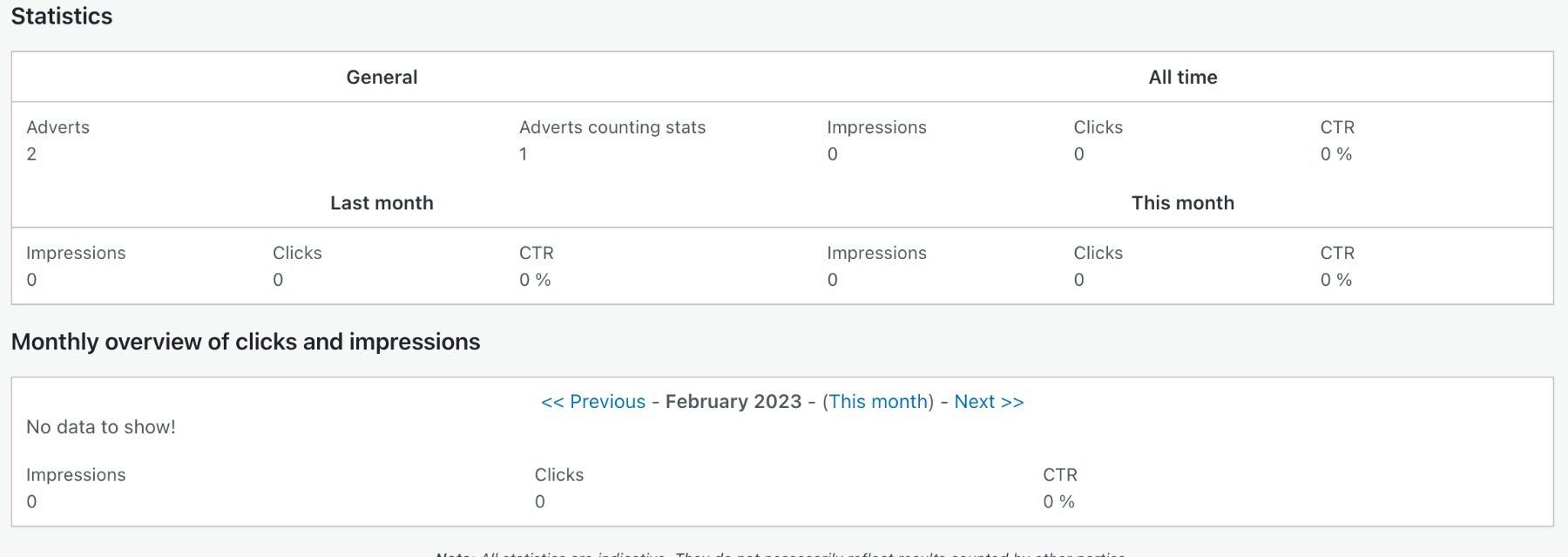
    What is your favorite WordPress podcasting plugin?

    Article featured image illustration by lenapolll / shutterstock.com

    The post 5 Best WordPress Podcast Plugins in 2023 appeared first on Elegant Themes Blog.